Skip to content
  • Home
  • Recent
  • Tags
  • 0 Unread 0
  • Categories
  • Unreplied
  • Popular
  • GitHub
  • Docu
  • Hilfe
Skins
  • Light
  • Brite
  • Cerulean
  • Cosmo
  • Flatly
  • Journal
  • Litera
  • Lumen
  • Lux
  • Materia
  • Minty
  • Morph
  • Pulse
  • Sandstone
  • Simplex
  • Sketchy
  • Spacelab
  • United
  • Yeti
  • Zephyr
  • Dark
  • Cyborg
  • Darkly
  • Quartz
  • Slate
  • Solar
  • Superhero
  • Vapor

  • Default (No Skin)
  • No Skin
Collapse
ioBroker Logo

Community Forum

donate donate
  1. ioBroker Community Home
  2. Deutsch
  3. Tester
  4. jarvis v3.1.x - just another remarkable vis

NEWS

  • Jahresrückblick 2025 – unser neuer Blogbeitrag ist online! ✨
    BluefoxB
    Bluefox
    17
    1
    2.9k

  • Neuer Blogbeitrag: Monatsrückblick - Dezember 2025 🎄
    BluefoxB
    Bluefox
    13
    1
    1.1k

  • Weihnachtsangebot 2025! 🎄
    BluefoxB
    Bluefox
    25
    1
    2.4k

jarvis v3.1.x - just another remarkable vis

Scheduled Pinned Locked Moved Tester
jarvismaterialmaterial uimaterialdesignvisvisualisierungvisualization
1.8k Posts 92 Posters 754.9k Views 77 Watching
  • Oldest to Newest
  • Newest to Oldest
  • Most Votes
Reply
  • Reply as topic
Log in to reply
This topic has been deleted. Only users with topic management privileges can see it.
  • sigi234S sigi234

    @mcu sagte in jarvis v3.1.x - just another remarkable vis:

    Jetzt kannst du es mal mit v3.1.3-beta.11 probieren.

    Bericht:

    Level Volume wird nicht angezeigt
    Oben die Tabs teilweise nicht mehr
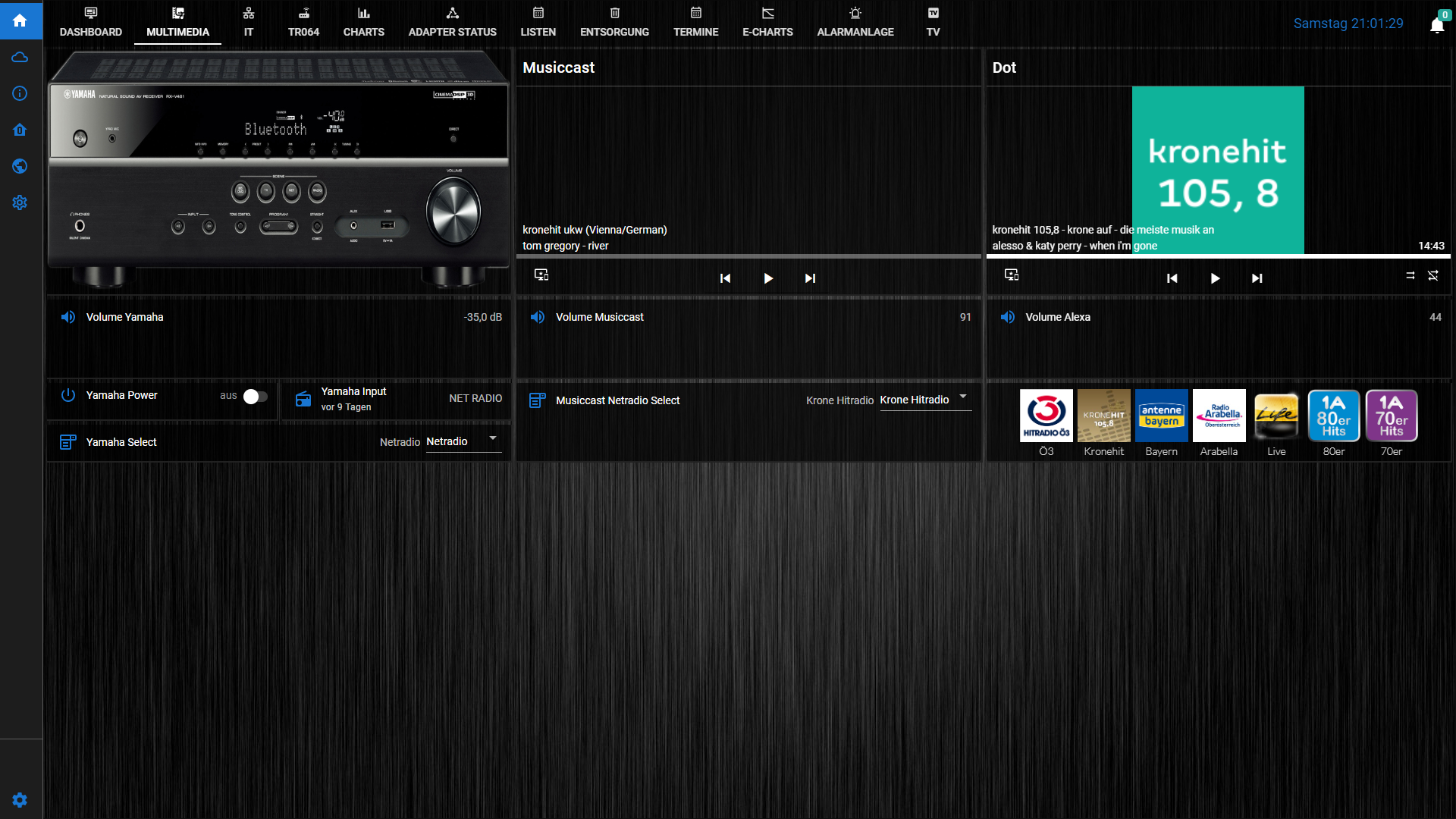
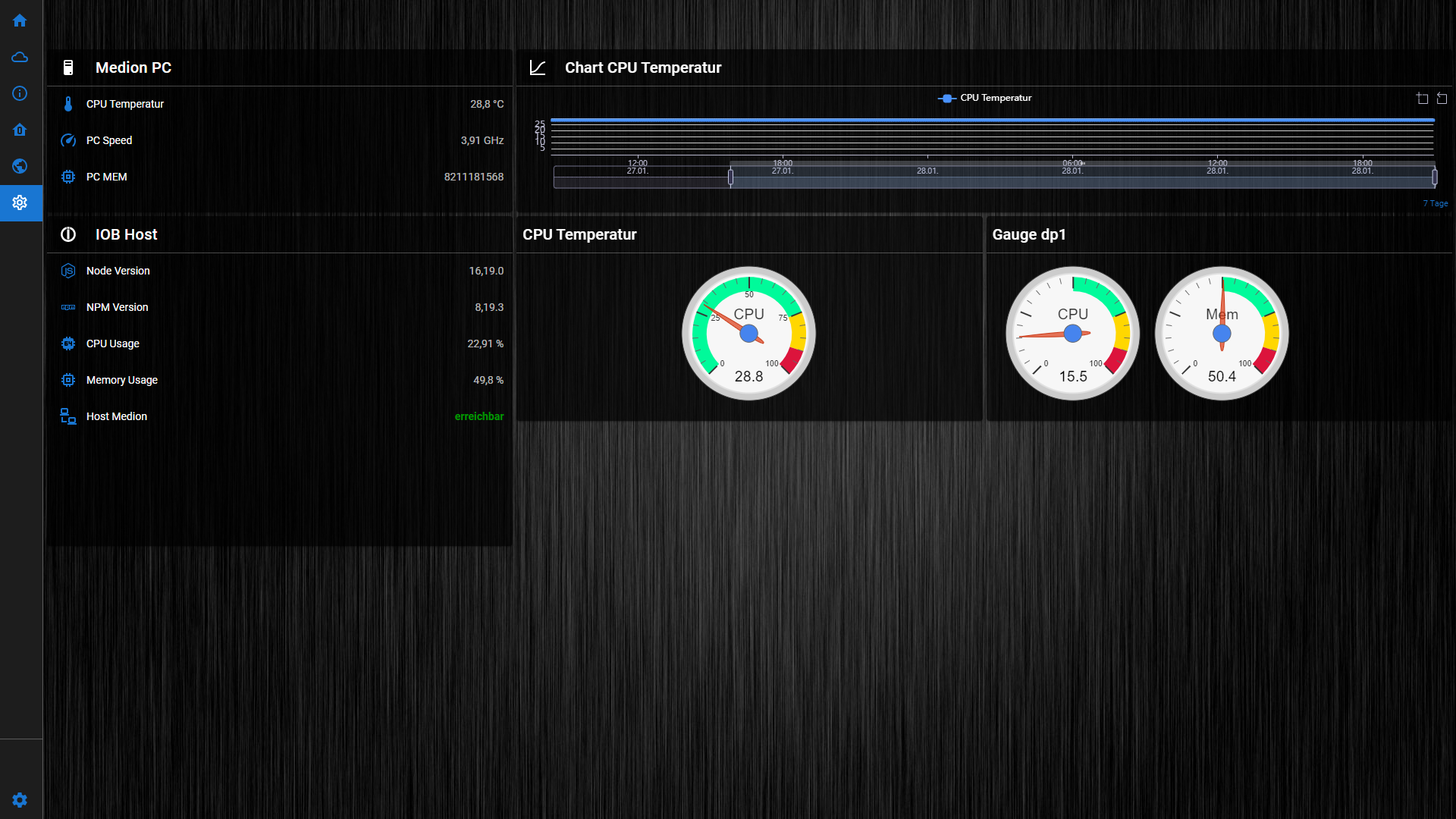
    Screenshot (5285).png Screenshot (5286).png

    sigi234S Online
    sigi234S Online
    sigi234
    Forum Testing Most Active
    wrote on last edited by sigi234
    #390

    @sigi234 sagte in jarvis v3.1.x - just another remarkable vis:

    Level Volume wird nicht angezeigt

    Anscheinend ist überall (auch Hue) beim BodyElement der LevelBody rausgefallen, nach setzen dieser geht es wieder

    Bitte benutzt das Voting rechts unten im Beitrag wenn er euch geholfen hat.
    Immer Daten sichern!

    M 1 Reply Last reply
    0
    • sigi234S sigi234

      @sigi234 sagte in jarvis v3.1.x - just another remarkable vis:

      Level Volume wird nicht angezeigt

      Anscheinend ist überall (auch Hue) beim BodyElement der LevelBody rausgefallen, nach setzen dieser geht es wieder

      M Offline
      M Offline
      MCU
      wrote on last edited by
      #391

      @sigi234 Bitte v3.1.3-beta.12 versuchen.

      NUC i7 64GB mit Proxmox ---- Jarvis Infos Aktualisierungen der Doku auf Instagram verfolgen -> mcuiobroker Instagram
      Wenn Euch mein Vorschlag geholfen hat, bitte rechts "^" klicken.

      sigi234S 1 Reply Last reply
      0
      • M MCU

        @sigi234 Bitte v3.1.3-beta.12 versuchen.

        sigi234S Online
        sigi234S Online
        sigi234
        Forum Testing Most Active
        wrote on last edited by
        #392

        @mcu sagte in jarvis v3.1.x - just another remarkable vis:

        @sigi234 Bitte v3.1.3-beta.12 versuchen.

        Jupp, läuft wieder Alles. Sidebar Minimode und Level

        Bitte benutzt das Voting rechts unten im Beitrag wenn er euch geholfen hat.
        Immer Daten sichern!

        1 Reply Last reply
        0
        • M MCU

          @sigi234 Jetzt kannst du es mal mit v3.1.3-beta.11 probieren.
          Aber vorab Sicherung machen. Die neuen Apps sind jetzt auch verfügbar.
          https://github.com/Zefau/ioBroker.jarvis/releases/tag/v3.1.3-beta.11

          sigi234S Online
          sigi234S Online
          sigi234
          Forum Testing Most Active
          wrote on last edited by
          #393

          @mcu sagte in jarvis v3.1.x - just another remarkable vis:

          Die neuen Apps sind jetzt auch verfügbar.

          Getestet:

          Windows funktioniert, Handy bekomme ich nur einen weißen Screen

          Bitte benutzt das Voting rechts unten im Beitrag wenn er euch geholfen hat.
          Immer Daten sichern!

          M 1 Reply Last reply
          0
          • sigi234S sigi234

            @mcu sagte in jarvis v3.1.x - just another remarkable vis:

            Die neuen Apps sind jetzt auch verfügbar.

            Getestet:

            Windows funktioniert, Handy bekomme ich nur einen weißen Screen

            M Offline
            M Offline
            MCU
            wrote on last edited by
            #394

            @sigi234 Bei mir auf dem Handy (Samsung) sieht es gut aus?

            NUC i7 64GB mit Proxmox ---- Jarvis Infos Aktualisierungen der Doku auf Instagram verfolgen -> mcuiobroker Instagram
            Wenn Euch mein Vorschlag geholfen hat, bitte rechts "^" klicken.

            sigi234S 1 Reply Last reply
            0
            • M MCU

              @sigi234 Bei mir auf dem Handy (Samsung) sieht es gut aus?

              sigi234S Online
              sigi234S Online
              sigi234
              Forum Testing Most Active
              wrote on last edited by sigi234
              #395

              @mcu sagte in jarvis v3.1.x - just another remarkable vis:

              @sigi234 Bei mir auf dem Handy (Samsung) sieht es gut aus?

              Ev. liegt es daran:

              VORRAUSSETZUNG: Android v10 vermutlich (Flutter)

              Habe ein Huawei mit Android Version 9

              Bitte benutzt das Voting rechts unten im Beitrag wenn er euch geholfen hat.
              Immer Daten sichern!

              1 Reply Last reply
              0
              • J Offline
                J Offline
                johannes1702
                wrote on last edited by
                #396

                Hallo zusammen,

                wollte mal in die Runde fragen, ob jemand erfolgreich JarVIS im Zusammenspiel mit einem Cloudflare Tunnel nutzt? Es gibt ein Issue in GitHub, aber das ist recht alt und verwaist. Wie genial wäre es, wenn man ohne VPN und Portfreigabe mit sehr hohem Sicherheitsstandard direkt von unterwegs auf JarVIS zugreifen könnte. :-)

                J 1 Reply Last reply
                0
                • FredFF Offline
                  FredFF Offline
                  FredF
                  Most Active Forum Testing
                  wrote on last edited by
                  #397

                  @johannes1702
                  Ich nutze zwar Cloudflare u.a. für meine Nextcloud, aber kein Jarvis mit meinem ioBroker, sondern VIS über die Pro Cloud.
                  Also genutzt nein... aber es gibt einen Cloudflare Adapter https://forum.iobroker.net/post/878184 den ich mangels Zeit noch nicht getestet habe

                  J 1 Reply Last reply
                  1
                  • FredFF FredF

                    @johannes1702
                    Ich nutze zwar Cloudflare u.a. für meine Nextcloud, aber kein Jarvis mit meinem ioBroker, sondern VIS über die Pro Cloud.
                    Also genutzt nein... aber es gibt einen Cloudflare Adapter https://forum.iobroker.net/post/878184 den ich mangels Zeit noch nicht getestet habe

                    J Offline
                    J Offline
                    johannes1702
                    wrote on last edited by
                    #398

                    @fredf Danke dir. Wenn ich das richtig verstanden habe, dann sorgt der Adapter "nur" dafür, dass Cloudflare die aktuelle IP mitgeteilt bekommt. Und das macht bei mir schon ein Cloudflare Client, der in einem Container auf dem Proxmox läuft. Wäre also vermutlich doppelt. ;-)

                    1 Reply Last reply
                    0
                    • R Offline
                      R Offline
                      ReinWei
                      wrote on last edited by
                      #399

                      Guten Morgen,

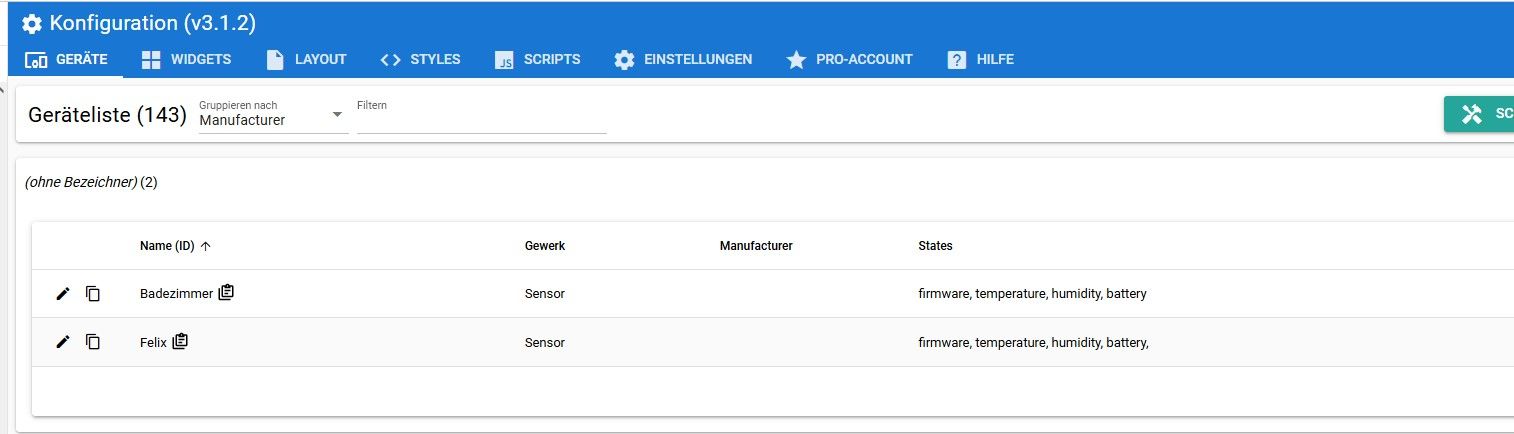
                      möchte geren wissen, wie und wo ich den Hersteller nachtragen kann

                      Screenshot 2023-01-31 084113.jpg

                      M 1 Reply Last reply
                      0
                      • R ReinWei

                        Guten Morgen,

                        möchte geren wissen, wie und wo ich den Hersteller nachtragen kann

                        Screenshot 2023-01-31 084113.jpg

                        M Offline
                        M Offline
                        MCU
                        wrote on last edited by MCU
                        #400

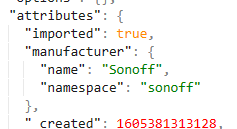
                        @reinwei Geräte -> ExpertenModus -> attributes manufacturer nachtragen
                        a3fd44e8-e611-4889-9aa7-941f0c5b4363-image.png
                        Wird normalerweise nur vom Importer gesetzt.
                        Wichtig!

                        "attributes":{
                          "imported":false,
                          "manufacturer":{
                            "name":"MYName", /* KEINE Importer Herstller verwenden! Deutlicher Unterschied zu den Importer-Herstllern */
                            "namespace":"MYHersteller" /* KEINE Importer Hersteller verwenden! Deutlicher Unterschied zu den Importer-Herstllern */
                          },
                        ... /* _created, usw. so drin lassen !! */
                        }
                        

                        Es gibt jetzt auch ein entsprechendes Programm dazu in der Doku.

                        NUC i7 64GB mit Proxmox ---- Jarvis Infos Aktualisierungen der Doku auf Instagram verfolgen -> mcuiobroker Instagram
                        Wenn Euch mein Vorschlag geholfen hat, bitte rechts "^" klicken.

                        1 Reply Last reply
                        0
                        • J johannes1702

                          Hallo zusammen,

                          wollte mal in die Runde fragen, ob jemand erfolgreich JarVIS im Zusammenspiel mit einem Cloudflare Tunnel nutzt? Es gibt ein Issue in GitHub, aber das ist recht alt und verwaist. Wie genial wäre es, wenn man ohne VPN und Portfreigabe mit sehr hohem Sicherheitsstandard direkt von unterwegs auf JarVIS zugreifen könnte. :-)

                          J Offline
                          J Offline
                          johannes1702
                          wrote on last edited by johannes1702
                          #401

                          Antworte mir mal selbst :-) Habe es geschafft. Trick ist, im Tunnel unter public Hostname sowohl auf den Web, als auch auf den Sicketport einen Host Name anzulegen. Die Adresse ist aber die gleiche. Dann lässt es sich problemlos aufrufen. :-)

                          M 1 Reply Last reply
                          0
                          • J johannes1702

                            Antworte mir mal selbst :-) Habe es geschafft. Trick ist, im Tunnel unter public Hostname sowohl auf den Web, als auch auf den Sicketport einen Host Name anzulegen. Die Adresse ist aber die gleiche. Dann lässt es sich problemlos aufrufen. :-)

                            M Offline
                            M Offline
                            MCU
                            wrote on last edited by
                            #402

                            @johannes1702 Kannst du ein paar Bilder dazu reinstecken, dann nehme ich das in die Doku. Danke.

                            NUC i7 64GB mit Proxmox ---- Jarvis Infos Aktualisierungen der Doku auf Instagram verfolgen -> mcuiobroker Instagram
                            Wenn Euch mein Vorschlag geholfen hat, bitte rechts "^" klicken.

                            J 2 Replies Last reply
                            0
                            • M MCU

                              @johannes1702 Kannst du ein paar Bilder dazu reinstecken, dann nehme ich das in die Doku. Danke.

                              J Offline
                              J Offline
                              johannes1702
                              wrote on last edited by
                              #403

                              @mcu Ja, mache ich nachher :-)

                              1 Reply Last reply
                              1
                              • M MCU

                                @johannes1702 Kannst du ein paar Bilder dazu reinstecken, dann nehme ich das in die Doku. Danke.

                                J Offline
                                J Offline
                                johannes1702
                                wrote on last edited by johannes1702
                                #404

                                @mcu Schau mal, passt das so?
                                Formatierung geht etwas flöten, da ich es in Word erstellt habe. Kann dir auch gerne das Word senden.

                                Prerequisite:
                                • Running instance of Cloudflare Tunnel
                                • Check this video tutorial for example: https://youtu.be/Q5dG8g4-Sx0
                                • Details on authentication with Cloudflare: https://youtu.be/wdmbAo02ktQ
                                • Cloudflare seems to be free, but sometimes they request to provide a payment method. I was not asked to do so, but I saw this in some tutorials.

                                Setting up the access to JarVIS in Cloudflare:

                                Short:
                                Create two subdomains with the same name, one pointing to the Web Port and one pointing to the Web Socket Port of JarVIS. Then create an application with the same subdomain.

                                Longer:
                                Login to Cloudflare, go to your Zero Trust Dashboard: https://one.dash.cloudflare.com/
                                Select Access – Tunnels – Configure (your Tunnel)
                                Click the Public Hostname tab, then Add a public hostname
                                Choose a subdomain select your domain, chose type HTTP and add the IP + Web Port (IP:PORT)
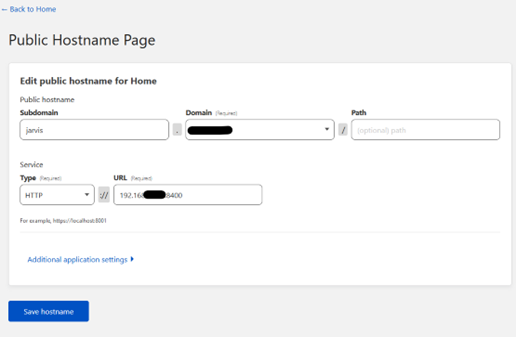
                                1f82e912-6157-4b5f-87c9-c0db43983057-grafik.png

                                Repeat it for the Socket Port, so make all entries exactly the same, except IP:8400
                                So in the end it will look like this:
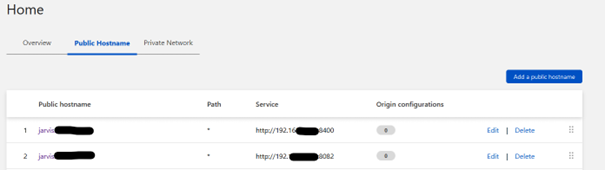
                                26eb26f3-7c88-4273-bdc6-afeded9f5386-grafik.png

                                Then click Applications in the menu, create a new Self Hosted Application, e.g. name it jarvis, Subdomain = Jarvis, select your domain. Keep path empty.
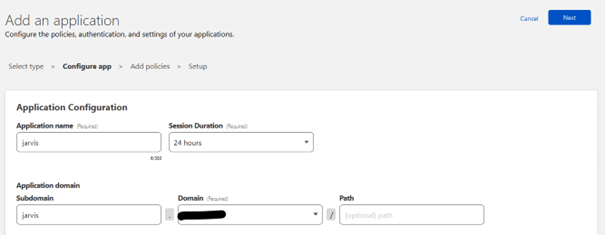
                                57792f8a-7bb2-4f2f-bc6c-878e95c210f9-grafik.png

                                Then add a policy (see second video for that too) and then save.

                                You should then be able to open your JarVIS dashboard with an external url such as https://jarvis.example-home-domain.com. Including automatic SSL encryption and authentication based on your selection. Make sure you set up authentication!

                                J 1 Reply Last reply
                                1
                                • M Offline
                                  M Offline
                                  MCU
                                  wrote on last edited by
                                  #405

                                  @johannes1702
                                  Danke. 1:1 übernommen.
                                  https://mcuiobroker.gitbook.io/jarvis-infos/jarvis-v3/besonderheiten-v3/allgemein/browser-connections/cloudflare-tunnel-johannes1702

                                  Version von jarvis ist doch egal?

                                  NUC i7 64GB mit Proxmox ---- Jarvis Infos Aktualisierungen der Doku auf Instagram verfolgen -> mcuiobroker Instagram
                                  Wenn Euch mein Vorschlag geholfen hat, bitte rechts "^" klicken.

                                  J 1 Reply Last reply
                                  1
                                  • M MCU

                                    @johannes1702
                                    Danke. 1:1 übernommen.
                                    https://mcuiobroker.gitbook.io/jarvis-infos/jarvis-v3/besonderheiten-v3/allgemein/browser-connections/cloudflare-tunnel-johannes1702

                                    Version von jarvis ist doch egal?

                                    J Offline
                                    J Offline
                                    johannes1702
                                    wrote on last edited by
                                    #406

                                    @mcu Bzgl. Version weiß ich nicht. Mit der aktuellen stable aber auf jeden Fall.

                                    M 1 Reply Last reply
                                    0
                                    • J johannes1702

                                      @mcu Bzgl. Version weiß ich nicht. Mit der aktuellen stable aber auf jeden Fall.

                                      M Offline
                                      M Offline
                                      MCU
                                      wrote on last edited by
                                      #407

                                      @johannes1702 v3.1.2?

                                      NUC i7 64GB mit Proxmox ---- Jarvis Infos Aktualisierungen der Doku auf Instagram verfolgen -> mcuiobroker Instagram
                                      Wenn Euch mein Vorschlag geholfen hat, bitte rechts "^" klicken.

                                      J 1 Reply Last reply
                                      0
                                      • M MCU

                                        @johannes1702 v3.1.2?

                                        J Offline
                                        J Offline
                                        johannes1702
                                        wrote on last edited by
                                        #408

                                        @mcu Ja, genau

                                        1 Reply Last reply
                                        0
                                        • J johannes1702

                                          @mcu Schau mal, passt das so?
                                          Formatierung geht etwas flöten, da ich es in Word erstellt habe. Kann dir auch gerne das Word senden.

                                          Prerequisite:
                                          • Running instance of Cloudflare Tunnel
                                          • Check this video tutorial for example: https://youtu.be/Q5dG8g4-Sx0
                                          • Details on authentication with Cloudflare: https://youtu.be/wdmbAo02ktQ
                                          • Cloudflare seems to be free, but sometimes they request to provide a payment method. I was not asked to do so, but I saw this in some tutorials.

                                          Setting up the access to JarVIS in Cloudflare:

                                          Short:
                                          Create two subdomains with the same name, one pointing to the Web Port and one pointing to the Web Socket Port of JarVIS. Then create an application with the same subdomain.

                                          Longer:
                                          Login to Cloudflare, go to your Zero Trust Dashboard: https://one.dash.cloudflare.com/
                                          Select Access – Tunnels – Configure (your Tunnel)
                                          Click the Public Hostname tab, then Add a public hostname
                                          Choose a subdomain select your domain, chose type HTTP and add the IP + Web Port (IP:PORT)

                                          1f82e912-6157-4b5f-87c9-c0db43983057-grafik.png

                                          Repeat it for the Socket Port, so make all entries exactly the same, except IP:8400
                                          So in the end it will look like this:

                                          26eb26f3-7c88-4273-bdc6-afeded9f5386-grafik.png

                                          Then click Applications in the menu, create a new Self Hosted Application, e.g. name it jarvis, Subdomain = Jarvis, select your domain. Keep path empty.

                                          57792f8a-7bb2-4f2f-bc6c-878e95c210f9-grafik.png

                                          Then add a policy (see second video for that too) and then save.

                                          You should then be able to open your JarVIS dashboard with an external url such as https://jarvis.example-home-domain.com. Including automatic SSL encryption and authentication based on your selection. Make sure you set up authentication!

                                          J Offline
                                          J Offline
                                          johannes1702
                                          wrote on last edited by
                                          #409

                                          @johannes1702 sagte in jarvis v3.1.x - just another remarkable vis

                                          Wenn es jemand nachgebaut hat, freue ich mich zu erfahren, ob es bei euch geklappt hat 😊

                                          1 Reply Last reply
                                          0
                                          Reply
                                          • Reply as topic
                                          Log in to reply
                                          • Oldest to Newest
                                          • Newest to Oldest
                                          • Most Votes


                                          Support us

                                          ioBroker
                                          Community Adapters
                                          Donate

                                          438

                                          Online

                                          32.6k

                                          Users

                                          82.3k

                                          Topics

                                          1.3m

                                          Posts
                                          Community
                                          Impressum | Datenschutz-Bestimmungen | Nutzungsbedingungen | Einwilligungseinstellungen
                                          ioBroker Community 2014-2025
                                          logo
                                          • Login

                                          • Don't have an account? Register

                                          • Login or register to search.
                                          • First post
                                            Last post
                                          0
                                          • Home
                                          • Recent
                                          • Tags
                                          • Unread 0
                                          • Categories
                                          • Unreplied
                                          • Popular
                                          • GitHub
                                          • Docu
                                          • Hilfe