




ioBroker + Homematic auf Promox VE
-
Hallo Zusammen.
Nachdem mein System kränkelt, habe ich mich entschlossen, es neu aufzuziehen.
Um für die Zukunft gewppnet zu sein, habe ich mich für eine Installation unter Promox entschieden.
Der erste Versuch war schon nicht so schlecht.
Ich habe es auf einem älteren Laptop installiert.
Lenovo 50-70, Intel Core i3-4030U DualCore Prozessor, (1,9 GHz), 4 GB RAM, 500GB HDDJetzt aber zu meinem Problem.
ioBroker läuft in einem lxc-Container. Habe zwar noch nicht den RF-Dongle am laufen, aber das System läuft mit einem
Backup meines alten Systems schon sehr gut.
Das Raspberrymatic habe ich nach Anleitung von Jens Maus
https://github.com/jens-maus/RaspberryMatic/wiki/Installation-Proxmox-VE
installiert.
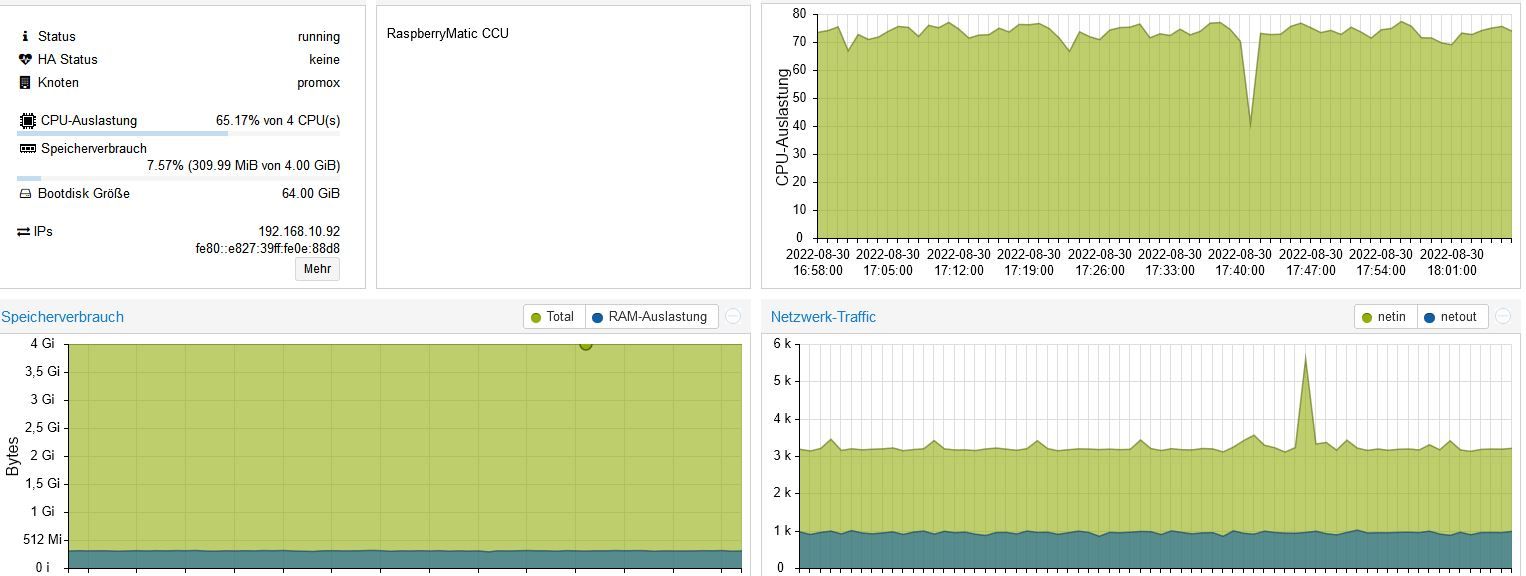
Hier habe ich das Problem, dass ich das HM Funkmodul mit der HB-RF-USB-2 nicht ans laufen bekomme.Raspberrymatic braucht fast 20 Minuten, bis die Seite erreichbar ist, und dann nochmal ca. 6 Minuten bis die WebUI erscheint.
Im Ruhezustand:

Beim Aufruf der WebUI von Raspberrymatic
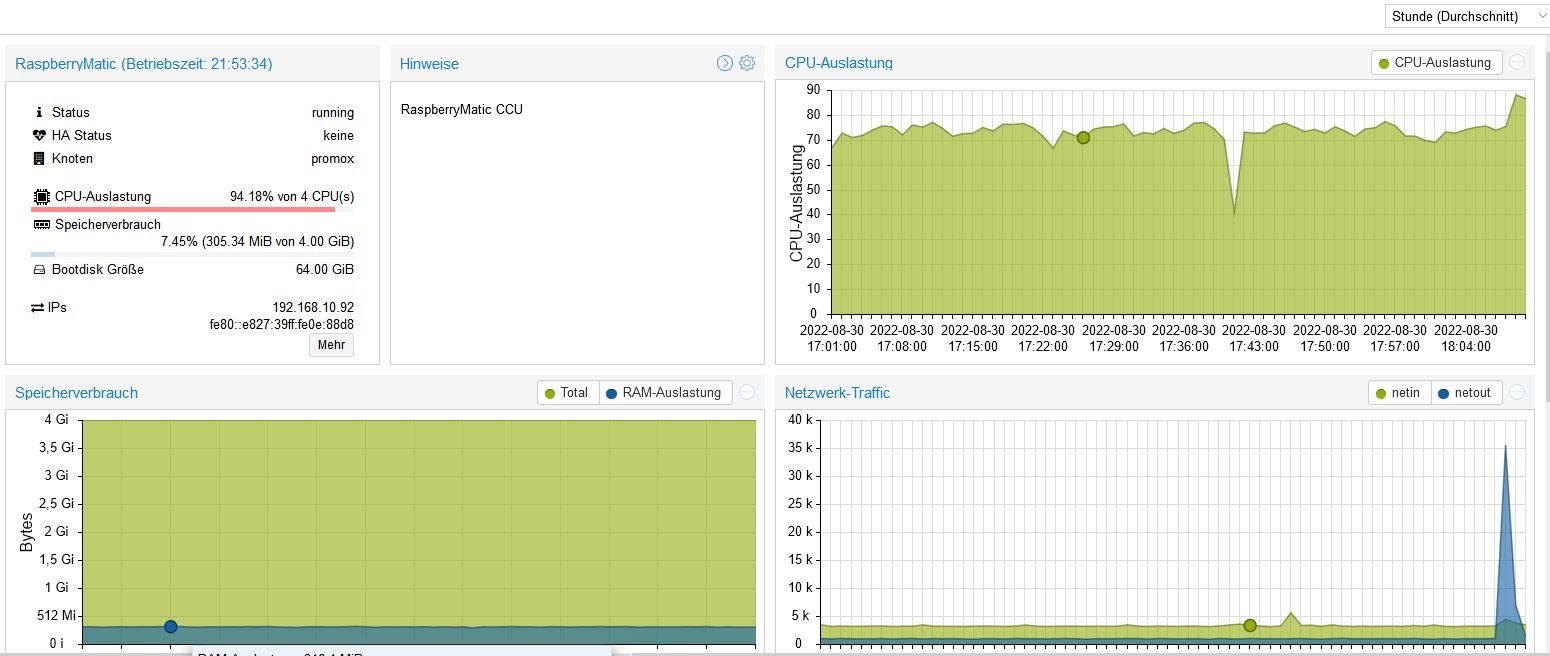
Teilweise geht die CPU-Auslastung sogar bis zu 98% hoch.Liegt das am Laptop - Prozessor zu schwach, oder am RAM, oder ist die Installation falsch gewesen?
Ich möchte mir jetzt nich noch 8GB RAM kaufen, um dann festzustellen, dass es trotzdem nicht funktioniert.
Dann würde ich mir lieber einen INTEL NUC mit i7 Prozessor und 16GB RAM gönnen.Bin ganz neu mit Promox unterwegs (3 Tage).
Hoffe auf gute Tipps.
INTEL NUC i7, Sonoff, hmIP, AVM, Jeelink, T-Link, Alexa, Saia-Burgess, uvm.
-
Hallo Zusammen.
Nachdem mein System kränkelt, habe ich mich entschlossen, es neu aufzuziehen.
Um für die Zukunft gewppnet zu sein, habe ich mich für eine Installation unter Promox entschieden.
Der erste Versuch war schon nicht so schlecht.
Ich habe es auf einem älteren Laptop installiert.
Lenovo 50-70, Intel Core i3-4030U DualCore Prozessor, (1,9 GHz), 4 GB RAM, 500GB HDDJetzt aber zu meinem Problem.
ioBroker läuft in einem lxc-Container. Habe zwar noch nicht den RF-Dongle am laufen, aber das System läuft mit einem
Backup meines alten Systems schon sehr gut.
Das Raspberrymatic habe ich nach Anleitung von Jens Maus
https://github.com/jens-maus/RaspberryMatic/wiki/Installation-Proxmox-VE
installiert.
Hier habe ich das Problem, dass ich das HM Funkmodul mit der HB-RF-USB-2 nicht ans laufen bekomme.Raspberrymatic braucht fast 20 Minuten, bis die Seite erreichbar ist, und dann nochmal ca. 6 Minuten bis die WebUI erscheint.
Im Ruhezustand:
Beim Aufruf der WebUI von Raspberrymatic
Teilweise geht die CPU-Auslastung sogar bis zu 98% hoch.Liegt das am Laptop - Prozessor zu schwach, oder am RAM, oder ist die Installation falsch gewesen?
Ich möchte mir jetzt nich noch 8GB RAM kaufen, um dann festzustellen, dass es trotzdem nicht funktioniert.
Dann würde ich mir lieber einen INTEL NUC mit i7 Prozessor und 16GB RAM gönnen.Bin ganz neu mit Promox unterwegs (3 Tage).
Hoffe auf gute Tipps.
@gregors sagte in ioBroker + Homematic auf Promox VE:
Liegt das am Laptop - Prozessor zu schwach
Möglich. Ich konnte jetzt auf die schnelle nicht herausfinden ob Raspberrymatic als x86 Kompatible Version installiert wird, weil das ja normal auf einem Pi läuft und der einen ARM CPU hat.
Die Virtualisierung eigentlich Emulation eines ARM CPUs Kostet viel mehr CPU Leistung. Aber es läuft als qemu was für eine Emulation spricht.Könnte aber auch einfach ein Bug in der Software Raspberryamtic sein.
In dem Fall würde auch eine i7 CPU das Problem nicht lösen.Ich würde dir Empfehlen debmatic zu verwenden, das ist die CCU Software auf x86 Hardware portiert und braucht dann auch nicht so viel Leistung.
@gregors sagte in ioBroker + Homematic auf Promox VE:
Teilweise geht die CPU-Auslastung sogar bis zu 98% hoch.
Das muss nicht zwingend ein Problem sein, wenn es nicht dauerhaft ist.
@gregors sagte in ioBroker + Homematic auf Promox VE:
ioBroker läuft in einem lxc-Container.
Wenn du USB Sticks verwenden willst solltest du auf jeden Fall eine VM verwenden, weil das mit einem Container (fast) nie Stabil funktioniert.
@gregors sagte in ioBroker + Homematic auf Promox VE:
Dann würde ich mir lieber einen INTEL NUC mit i7 Prozessor und 16GB RAM gönnen.
Ich Empfehle und verkaufe meinen Kunden Intel NUC mit i5, weil die Leistung ausreichend ist.
Persönlicher Support
Spenden -> paypal.me/J3YC33 -
@gregors sagte in ioBroker + Homematic auf Promox VE:
Liegt das am Laptop - Prozessor zu schwach
Möglich. Ich konnte jetzt auf die schnelle nicht herausfinden ob Raspberrymatic als x86 Kompatible Version installiert wird, weil das ja normal auf einem Pi läuft und der einen ARM CPU hat.
Die Virtualisierung eigentlich Emulation eines ARM CPUs Kostet viel mehr CPU Leistung. Aber es läuft als qemu was für eine Emulation spricht.Könnte aber auch einfach ein Bug in der Software Raspberryamtic sein.
In dem Fall würde auch eine i7 CPU das Problem nicht lösen.Ich würde dir Empfehlen debmatic zu verwenden, das ist die CCU Software auf x86 Hardware portiert und braucht dann auch nicht so viel Leistung.
@gregors sagte in ioBroker + Homematic auf Promox VE:
Teilweise geht die CPU-Auslastung sogar bis zu 98% hoch.
Das muss nicht zwingend ein Problem sein, wenn es nicht dauerhaft ist.
@gregors sagte in ioBroker + Homematic auf Promox VE:
ioBroker läuft in einem lxc-Container.
Wenn du USB Sticks verwenden willst solltest du auf jeden Fall eine VM verwenden, weil das mit einem Container (fast) nie Stabil funktioniert.
@gregors sagte in ioBroker + Homematic auf Promox VE:
Dann würde ich mir lieber einen INTEL NUC mit i7 Prozessor und 16GB RAM gönnen.
Ich Empfehle und verkaufe meinen Kunden Intel NUC mit i5, weil die Leistung ausreichend ist.
Danke für die Infos.
Mein ioBroker läuft ja in einem lxc-Container.
Ich nutze einen USB-Stack für meine Temperaturfühler (ähnlich CUL).
Sollte ich den ioBroker dann auch in einer VM installieren?Ich würde dir Empfehlen debmatic zu verwendenGibt es da eine gute Anleitung in Deutsch?
-
@gregors sagte in ioBroker + Homematic auf Promox VE:
Gibt es da eine gute Anleitung in Deutsch?
Am besten immer die Offiziellen Anleitungen benutzen und wenn sie in Englisch sind mit Deepl Übersetzen.
Hier findest du das debmatic Projekt, da ist alles auf Deutsch dokumentiert: https://github.com/alexreinert/debmatic@gregors sagte in ioBroker + Homematic auf Promox VE:
Sollte ich den ioBroker dann auch in einer VM installieren?
Ja.
-
@gregors sagte in ioBroker + Homematic auf Promox VE:
Liegt das am Laptop - Prozessor zu schwach
Möglich. Ich konnte jetzt auf die schnelle nicht herausfinden ob Raspberrymatic als x86 Kompatible Version installiert wird, weil das ja normal auf einem Pi läuft und der einen ARM CPU hat.
Die Virtualisierung eigentlich Emulation eines ARM CPUs Kostet viel mehr CPU Leistung. Aber es läuft als qemu was für eine Emulation spricht.Könnte aber auch einfach ein Bug in der Software Raspberryamtic sein.
In dem Fall würde auch eine i7 CPU das Problem nicht lösen.Ich würde dir Empfehlen debmatic zu verwenden, das ist die CCU Software auf x86 Hardware portiert und braucht dann auch nicht so viel Leistung.
@gregors sagte in ioBroker + Homematic auf Promox VE:
Teilweise geht die CPU-Auslastung sogar bis zu 98% hoch.
Das muss nicht zwingend ein Problem sein, wenn es nicht dauerhaft ist.
@gregors sagte in ioBroker + Homematic auf Promox VE:
ioBroker läuft in einem lxc-Container.
Wenn du USB Sticks verwenden willst solltest du auf jeden Fall eine VM verwenden, weil das mit einem Container (fast) nie Stabil funktioniert.
@gregors sagte in ioBroker + Homematic auf Promox VE:
Dann würde ich mir lieber einen INTEL NUC mit i7 Prozessor und 16GB RAM gönnen.
Ich Empfehle und verkaufe meinen Kunden Intel NUC mit i5, weil die Leistung ausreichend ist.
Habe heute meinen NUC bekommen, und eine VM für ioBroker erstellt.
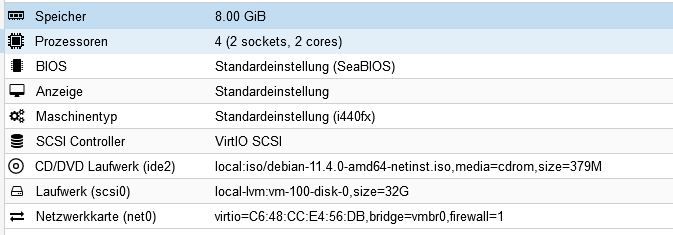
Als OS habe ich mir die debian-11.4.0-amd64-netinst.iso herunter geladen.
Nach dem 1. Aufruf der Konsole kam die Installation der Debian-Version.
Ich habe keine grafische Installation ausgewählt, sondern die einfache und habe alle
defaultmässig angehakten Paket abgewählt.
Die Installation ist soweit durchgelaufen.Aber wenn ich jetzt die Konsole aufrufe, she ich zwar
den Eingabeprompt, aber ich kann ihn nicht nutzen.
Übernahme von kopierten Zeichen (Mouse) ist nicht möglich.
Den Befehl zur Installation von ioBroker kann er nicht ausführen (curl)
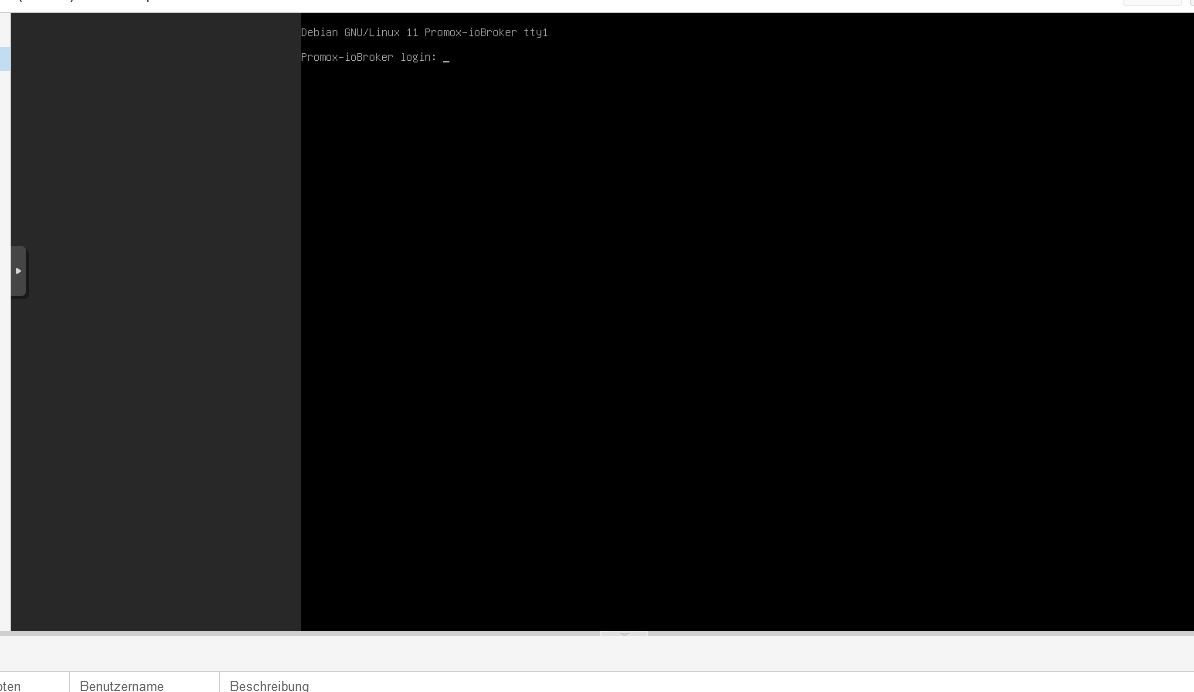
Hast du eine Idee, was ich falsch gemacht habe?INTEL NUC i7, Sonoff, hmIP, AVM, Jeelink, T-Link, Alexa, Saia-Burgess, uvm.
-
Habe heute meinen NUC bekommen, und eine VM für ioBroker erstellt.
Als OS habe ich mir die debian-11.4.0-amd64-netinst.iso herunter geladen.
Nach dem 1. Aufruf der Konsole kam die Installation der Debian-Version.
Ich habe keine grafische Installation ausgewählt, sondern die einfache und habe alle
defaultmässig angehakten Paket abgewählt.
Die Installation ist soweit durchgelaufen.Aber wenn ich jetzt die Konsole aufrufe, she ich zwar
den Eingabeprompt, aber ich kann ihn nicht nutzen.
Übernahme von kopierten Zeichen (Mouse) ist nicht möglich.
Den Befehl zur Installation von ioBroker kann er nicht ausführen (curl)
Hast du eine Idee, was ich falsch gemacht habe?@gregors sagte in ioBroker + Homematic auf Promox VE:
Übernahme von kopierten Zeichen (Mouse) ist nicht möglich.
Normal. Ich weis nicht ob man das irgendwie aktivieren, aber ich Arbeite Prinzipiell per SSH, deswegen stört mich das nicht.
@gregors sagte in ioBroker + Homematic auf Promox VE:
Den Befehl zur Installation von ioBroker kann er nicht ausführen (curl)
Es wäre Hilfreich die Ausgabe zu sehen damit man weis was das Problem ist, so ist das Raten.
Persönlicher Support
Spenden -> paypal.me/J3YC33 -
Habe heute meinen NUC bekommen, und eine VM für ioBroker erstellt.
Als OS habe ich mir die debian-11.4.0-amd64-netinst.iso herunter geladen.
Nach dem 1. Aufruf der Konsole kam die Installation der Debian-Version.
Ich habe keine grafische Installation ausgewählt, sondern die einfache und habe alle
defaultmässig angehakten Paket abgewählt.
Die Installation ist soweit durchgelaufen.Aber wenn ich jetzt die Konsole aufrufe, she ich zwar
den Eingabeprompt, aber ich kann ihn nicht nutzen.
Übernahme von kopierten Zeichen (Mouse) ist nicht möglich.
Den Befehl zur Installation von ioBroker kann er nicht ausführen (curl)
Hast du eine Idee, was ich falsch gemacht habe?@gregors said in ioBroker + Homematic auf Promox VE:
Den Befehl zur Installation von ioBroker kann er nicht ausführen (curl)
Versuch mal vorm installieren:
sudo apt install curlund habe alle
defaultmässig angehakten Paket abgewählt
SSH hoffentlich nicht (glaube die letzte Checkbox beim Setup)
-
@gregors said in ioBroker + Homematic auf Promox VE:
Den Befehl zur Installation von ioBroker kann er nicht ausführen (curl)
Versuch mal vorm installieren:
sudo apt install curlund habe alle
defaultmässig angehakten Paket abgewählt
SSH hoffentlich nicht (glaube die letzte Checkbox beim Setup)
@einstein67
Doch. Habe ich.
Habe den Container gerade gelöscht und versuche es nochmal.Habe jetzt die Anleitung auf iobroker.net gefunden.
-
@gregors sagte in ioBroker + Homematic auf Promox VE:
Übernahme von kopierten Zeichen (Mouse) ist nicht möglich.
Normal. Ich weis nicht ob man das irgendwie aktivieren, aber ich Arbeite Prinzipiell per SSH, deswegen stört mich das nicht.
@gregors sagte in ioBroker + Homematic auf Promox VE:
Den Befehl zur Installation von ioBroker kann er nicht ausführen (curl)
Es wäre Hilfreich die Ausgabe zu sehen damit man weis was das Problem ist, so ist das Raten.
@jey-cee
Nach Beendigung der Installation und Reboot hängt er jetzt.
Es wird nur " Booting from Hard Disk" angezeigt.
Den Container kann ich weder stoppen noch rebooten.
Fehlermeldung aus dem Log von Promox() trying to acquire lock... TASK ERROR: can't lock file '/var/lock/qemu-server/lock-100.conf' - got timeout
-
Hallo Zusammen.
Nachdem mein System kränkelt, habe ich mich entschlossen, es neu aufzuziehen.
Um für die Zukunft gewppnet zu sein, habe ich mich für eine Installation unter Promox entschieden.
Der erste Versuch war schon nicht so schlecht.
Ich habe es auf einem älteren Laptop installiert.
Lenovo 50-70, Intel Core i3-4030U DualCore Prozessor, (1,9 GHz), 4 GB RAM, 500GB HDDJetzt aber zu meinem Problem.
ioBroker läuft in einem lxc-Container. Habe zwar noch nicht den RF-Dongle am laufen, aber das System läuft mit einem
Backup meines alten Systems schon sehr gut.
Das Raspberrymatic habe ich nach Anleitung von Jens Maus
https://github.com/jens-maus/RaspberryMatic/wiki/Installation-Proxmox-VE
installiert.
Hier habe ich das Problem, dass ich das HM Funkmodul mit der HB-RF-USB-2 nicht ans laufen bekomme.Raspberrymatic braucht fast 20 Minuten, bis die Seite erreichbar ist, und dann nochmal ca. 6 Minuten bis die WebUI erscheint.
Im Ruhezustand:
Beim Aufruf der WebUI von Raspberrymatic
Teilweise geht die CPU-Auslastung sogar bis zu 98% hoch.Liegt das am Laptop - Prozessor zu schwach, oder am RAM, oder ist die Installation falsch gewesen?
Ich möchte mir jetzt nich noch 8GB RAM kaufen, um dann festzustellen, dass es trotzdem nicht funktioniert.
Dann würde ich mir lieber einen INTEL NUC mit i7 Prozessor und 16GB RAM gönnen.Bin ganz neu mit Promox unterwegs (3 Tage).
Hoffe auf gute Tipps.
@gregors sagte in ioBroker + Homematic auf Promox VE:
Raspberrymatic braucht fast 20 Minuten, bis die Seite erreichbar ist, und dann nochmal ca. 6 Minuten bis die WebUI erscheint.
Teilweise geht die CPU-Auslastung sogar bis zu 98% hoch.
Du hast dir zwar schon einen NUC zugelegt, doch bei meinem NUC mit einem J3455 (der etwa die gleiche Leistung wie dein i3-4030U hat) habe ich nur etwa 3,5% CPU-Auslastung und die Weboberfläche reagiert normal. Da hat also wohl irgendetwas mit der Installation nicht gepasst.
-
@gregors sagte in ioBroker + Homematic auf Promox VE:
Raspberrymatic braucht fast 20 Minuten, bis die Seite erreichbar ist, und dann nochmal ca. 6 Minuten bis die WebUI erscheint.
Teilweise geht die CPU-Auslastung sogar bis zu 98% hoch.
Du hast dir zwar schon einen NUC zugelegt, doch bei meinem NUC mit einem J3455 (der etwa die gleiche Leistung wie dein i3-4030U hat) habe ich nur etwa 3,5% CPU-Auslastung und die Weboberfläche reagiert normal. Da hat also wohl irgendetwas mit der Installation nicht gepasst.
-
@jey-cee
Nach Beendigung der Installation und Reboot hängt er jetzt.
Es wird nur " Booting from Hard Disk" angezeigt.
Den Container kann ich weder stoppen noch rebooten.
Fehlermeldung aus dem Log von Promox() trying to acquire lock... TASK ERROR: can't lock file '/var/lock/qemu-server/lock-100.conf' - got timeout@gregors sagte in ioBroker + Homematic auf Promox VE:
Fehlermeldung aus dem Log von Promox
() trying to acquire lock... TASK ERROR: can't lock file '/var/lock/qemu-server/lock-100.conf' - got timeoutSchau mal HIER da ist das Problem mit Lösung beschrieben.
Persönlicher Support
Spenden -> paypal.me/J3YC33 -
@gregors sagte in ioBroker + Homematic auf Promox VE:
Fehlermeldung aus dem Log von Promox
() trying to acquire lock... TASK ERROR: can't lock file '/var/lock/qemu-server/lock-100.conf' - got timeoutSchau mal HIER da ist das Problem mit Lösung beschrieben.
-
@jey-cee
Ok. Weiss ich nun für´s nächste mal.
Hab einfach neu installiert.
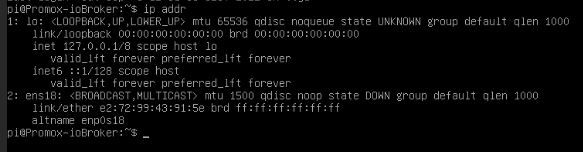
Jetzt läuft er wieder, aber er gibt mir keine IP-Adrese raus.
Hatte erst wie in der Anleitung beschrieben auf static umgestellt, dann wieder zurück auf dhcp.
Keine IP
Gehts hier jetzt um einen Container (CT) oder eine Virtuelle-Maschine (VM)??
Ich blicke nicht mehr durch ...
Einen Fix&Fertig IOBroker-Container könntest du dir mit folgenden Einzeiler installieren lassen.
bash -c "$(wget -qLO - https://github.com/tteck/Proxmox/raw/main/ct/iobroker-v4.sh)" -
Gehts hier jetzt um einen Container (CT) oder eine Virtuelle-Maschine (VM)??
Ich blicke nicht mehr durch ...
Einen Fix&Fertig IOBroker-Container könntest du dir mit folgenden Einzeiler installieren lassen.
bash -c "$(wget -qLO - https://github.com/tteck/Proxmox/raw/main/ct/iobroker-v4.sh)"Moin,
für iobroker habe ich eine eigene VM und für Debmatic auch. Für Debmatic kann auf jeden Fall 2 Kerne empfehlen. Mit nur einem Kern braucht das ewig, bis das System bereit ist. Bei zwei Kernen geht das flott.
Da es bei mir nach einem Proxmox Update Probleme mit den USB Treibern für das Funkmodul unter einem Container gab, bin ich auf VMs gewechselt. Seit dem keine Probleme mehr.
Zur Info: iobroker hat 4 Kerne und 8GB RAM, Debmatic 2 Kerne und 1GB RAM. Als CPU im NUC arbeitet eine Core i5 mit 8 Threads.
Gruß
Peterfido
Proxmox auf Intel NUC12WSHi5
ioBroker: Debian (VM)
CCU: Debmatic (VM)
Influx: Debian (VM)
Grafana: Debian (VM)
eBus: Debian (VM)
Zigbee: Debian (VM) mit zigbee2mqtt -
Moin,
für iobroker habe ich eine eigene VM und für Debmatic auch. Für Debmatic kann auf jeden Fall 2 Kerne empfehlen. Mit nur einem Kern braucht das ewig, bis das System bereit ist. Bei zwei Kernen geht das flott.
Da es bei mir nach einem Proxmox Update Probleme mit den USB Treibern für das Funkmodul unter einem Container gab, bin ich auf VMs gewechselt. Seit dem keine Probleme mehr.
Zur Info: iobroker hat 4 Kerne und 8GB RAM, Debmatic 2 Kerne und 1GB RAM. Als CPU im NUC arbeitet eine Core i5 mit 8 Threads.
@peterfido
So wollte ich es auch aufbauen.
Habe von jey-cee auch den Tipp mit der VM bekommen.
Erster Versuch war ebenfalls eine direkte Installation in einem lxc.Hoffe, dass ich eine Lösung für die nicht vorhanden IP-Adresse finde. Dann kann ich ioBroker schonmal installieren.
Danach kommt Debmatic -
@peterfido
So wollte ich es auch aufbauen.
Habe von jey-cee auch den Tipp mit der VM bekommen.
Erster Versuch war ebenfalls eine direkte Installation in einem lxc.Hoffe, dass ich eine Lösung für die nicht vorhanden IP-Adresse finde. Dann kann ich ioBroker schonmal installieren.
Danach kommt Debmatic@gregors In einem LXC kannst du die gewünschte IP im Proxmox GUI einstellen.
Bei einer VM musst du, falls DHCP nicht funktioniert in der Console eine Datei bearbeiten:
nano /etc/network/interfaces
---
#The primary network interface
iface enp6s18 inet static
        address 192.168.0.231
        netmask 255.255.255.0
        gateway 192.168.0.2
        dns-nameservers 192.168.0.2
wäre so ein Beispiel für IP x.x.x.231 und DNS x.x.x.2
-
Moin,
für iobroker habe ich eine eigene VM und für Debmatic auch. Für Debmatic kann auf jeden Fall 2 Kerne empfehlen. Mit nur einem Kern braucht das ewig, bis das System bereit ist. Bei zwei Kernen geht das flott.
Da es bei mir nach einem Proxmox Update Probleme mit den USB Treibern für das Funkmodul unter einem Container gab, bin ich auf VMs gewechselt. Seit dem keine Probleme mehr.
Zur Info: iobroker hat 4 Kerne und 8GB RAM, Debmatic 2 Kerne und 1GB RAM. Als CPU im NUC arbeitet eine Core i5 mit 8 Threads.
Bin gerade bei der Installation von Debmatic.
In der Anleitung von Alexreinert bin ich jetzt an Punkt 5 angelangt.
Habe ine VM erstellt und das Funkmodul (USB) durchgeleitet. Was ist ein previligierter Container?
Unter Pkt. 6Anpassen der Konfiguration des Containers, es müssen in der Datei /etc/pve/lxc/<Container-ID>.conf folgende beiden Zeilen eingefügt werden: lxc.apparmor.profile: unconfined lxc.hook.mount: /usr/share/debmatic/bin/lxc-start-hook.shIch habe doch keinen lxc-Container. Will eine VM.
INTEL NUC i7, Sonoff, hmIP, AVM, Jeelink, T-Link, Alexa, Saia-Burgess, uvm.
-
Hier die Anleitung von Jens Maus für Raspberrymatic.
Hat bei mir einwandfrei geklappt. -
ok, hab gerade gesehen, dass der TE diese ja schon verlinkt hatte.



Hello! It looks like you're interested in this conversation, but you don't have an account yet.
Getting fed up of having to scroll through the same posts each visit? When you register for an account, you'll always come back to exactly where you were before, and choose to be notified of new replies (either via email, or push notification). You'll also be able to save bookmarks and upvote posts to show your appreciation to other community members.
With your input, this post could be even better 💗
Register Login507
Online32.7k
Users82.6k
Topics1.3m
Posts