Skip to content
  • Home
  • Recent
  • Tags
  • 0 Unread 0
  • Categories
  • Unreplied
  • Popular
  • GitHub
  • Docu
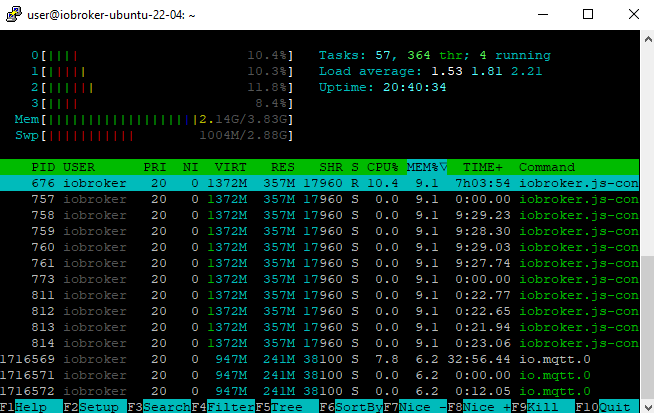
  • Hilfe
Skins
  • Light
  • Brite
  • Cerulean
  • Cosmo
  • Flatly
  • Journal
  • Litera
  • Lumen
  • Lux
  • Materia
  • Minty
  • Morph
  • Pulse
  • Sandstone
  • Simplex
  • Sketchy
  • Spacelab
  • United
  • Yeti
  • Zephyr
  • Dark
  • Cyborg
  • Darkly
  • Quartz
  • Slate
  • Solar
  • Superhero
  • Vapor

  • Default (No Skin)
  • No Skin
Collapse
ioBroker Logo

Community Forum

donate donate
  1. ioBroker Community Home
  2. Deutsch
  3. Error/Bug
  4. langsame Admin Weboberfläche/No connection to databases

NEWS

  • Jahresrückblick 2025 – unser neuer Blogbeitrag ist online! ✨
    BluefoxB
    Bluefox
    16
    1
    1.7k

  • Neuer Blogbeitrag: Monatsrückblick - Dezember 2025 🎄
    BluefoxB
    Bluefox
    13
    1
    876

  • Weihnachtsangebot 2025! 🎄
    BluefoxB
    Bluefox
    25
    1
    2.1k

langsame Admin Weboberfläche/No connection to databases

Scheduled Pinned Locked Moved Error/Bug
databaselangsam
14 Posts 4 Posters 1.2k Views 4 Watching
  • Oldest to Newest
  • Newest to Oldest
  • Most Votes
Reply
  • Reply as topic
Log in to reply
This topic has been deleted. Only users with topic management privileges can see it.
  • T Online
    T Online
    tilly
    wrote on last edited by
    #1

    Hallo,
    hatte ein langsames System neu aufgesetzt. Also Ubuntu 22.04.01 installiert, Iobroker und anschließend ein Backup eingespielt. War auch alles schnell und nun plötzlich wieder ein langsames System, Weboberfläche braucht ewig, teilweise Abbruch.

    user@iobroker-ubuntu-22-04:~$ cd /opt/iobroker
    user@iobroker-ubuntu-22-04:/opt/iobroker$ iobroker stop
    user@iobroker-ubuntu-22-04:/opt/iobroker$ iobroker update
    No connection to databases possible ...
     Unable to subscribe to meta namespace "meta." changes: Connection is closed.
     get state error: Connection is closed.
    Uncaught Rejection: Error: DB closed
        at Redis.sendCommand (/opt/iobroker/node_modules/ioredis/built/redis/index.js:636:24)
        at Redis.get (/opt/iobroker/node_modules/ioredis/built/commander.js:122:25)
        at ObjectsInMemoryServerClass._getObject (/opt/iobroker/node_modules/@iobroker/db-objects-redis/lib/objects/objectsInRedisClient.js:2663:37)
        at Immediate.<anonymous> (/opt/iobroker/node_modules/@iobroker/db-objects-redis/lib/objects/objectsInRedisClient.js:2709:33)
        at processImmediate (node:internal/timers:468:21)
    user@iobroker-ubuntu-22-04:/opt/iobroker$
    
    Systemdata
    Hardwaresystem: NUC
    Arbeitsspeicher: 8GB
    Festplattenart: SSD
    Betriebssystem: Ubuntu 22.04.01
    Node-Version: v16.17.0
    Nodejs-Version: v16.17.0
    NPM-Version: 8.15.0
    Installationsart: Skript
    Image genutzt: Nein
    GlasfaserG 1 Reply Last reply
    0
    • T tilly

      Hallo,
      hatte ein langsames System neu aufgesetzt. Also Ubuntu 22.04.01 installiert, Iobroker und anschließend ein Backup eingespielt. War auch alles schnell und nun plötzlich wieder ein langsames System, Weboberfläche braucht ewig, teilweise Abbruch.

      user@iobroker-ubuntu-22-04:~$ cd /opt/iobroker
      user@iobroker-ubuntu-22-04:/opt/iobroker$ iobroker stop
      user@iobroker-ubuntu-22-04:/opt/iobroker$ iobroker update
      No connection to databases possible ...
       Unable to subscribe to meta namespace "meta." changes: Connection is closed.
       get state error: Connection is closed.
      Uncaught Rejection: Error: DB closed
          at Redis.sendCommand (/opt/iobroker/node_modules/ioredis/built/redis/index.js:636:24)
          at Redis.get (/opt/iobroker/node_modules/ioredis/built/commander.js:122:25)
          at ObjectsInMemoryServerClass._getObject (/opt/iobroker/node_modules/@iobroker/db-objects-redis/lib/objects/objectsInRedisClient.js:2663:37)
          at Immediate.<anonymous> (/opt/iobroker/node_modules/@iobroker/db-objects-redis/lib/objects/objectsInRedisClient.js:2709:33)
          at processImmediate (node:internal/timers:468:21)
      user@iobroker-ubuntu-22-04:/opt/iobroker$
      
      Systemdata
      Hardwaresystem: NUC
      Arbeitsspeicher: 8GB
      Festplattenart: SSD
      Betriebssystem: Ubuntu 22.04.01
      Node-Version: v16.17.0
      Nodejs-Version: v16.17.0
      NPM-Version: 8.15.0
      Installationsart: Skript
      Image genutzt: Nein
      GlasfaserG Offline
      GlasfaserG Offline
      Glasfaser
      wrote on last edited by
      #2

      @tilly sagte in langsame Admin Weboberfläche/No connection to databases:

      neu aufgesetzt.

      Zeigen :

      cd /opt/iobroker
      npm ls | grep -E 'github.com|ERR' 
      
      iobroker update -i
       
      sudo ln -s /usr/bin/node /usr/bin/nodejs
      uname -m && type -P nodejs node npm && nodejs -v && node -v && npm -v && whoami && pwd && sudo apt update &> /dev/null && sudo apt update && apt policy nodejs
      

      .

      War auch alles schnell und nun plötzlich wieder ein langsames System,

      eventuell ein Script geschrieben was Amok läuft !?

      Synology 918+ 16GB - ioBroker in Docker v9 , VISO auf Trekstor Primebook C13 13,3" , Hikvision Domkameras mit Surveillance Station .. CCU RaspberryMatic in Synology VM .. Zigbee CC2538+CC2592 .. Sonoff .. KNX .. Modbus ..

      crunchipC T 2 Replies Last reply
      0
      • GlasfaserG Glasfaser

        @tilly sagte in langsame Admin Weboberfläche/No connection to databases:

        neu aufgesetzt.

        Zeigen :

        cd /opt/iobroker
        npm ls | grep -E 'github.com|ERR' 
        
        iobroker update -i
         
        sudo ln -s /usr/bin/node /usr/bin/nodejs
        uname -m && type -P nodejs node npm && nodejs -v && node -v && npm -v && whoami && pwd && sudo apt update &> /dev/null && sudo apt update && apt policy nodejs
        

        .

        War auch alles schnell und nun plötzlich wieder ein langsames System,

        eventuell ein Script geschrieben was Amok läuft !?

        crunchipC Away
        crunchipC Away
        crunchip
        Forum Testing Most Active
        wrote on last edited by
        #3

        @glasfaser oder liegt es an der Größe/Anzahl der Objekte

        umgestiegen von Proxmox auf Unraid

        GlasfaserG 1 Reply Last reply
        0
        • crunchipC crunchip

          @glasfaser oder liegt es an der Größe/Anzahl der Objekte

          GlasfaserG Offline
          GlasfaserG Offline
          Glasfaser
          wrote on last edited by
          #4

          @crunchip sagte in langsame Admin Weboberfläche/No connection to databases:
          Größe/Anzahl der Objekte

          Kann ich mir nicht vorstelle ,
          er schreibt

          und nun plötzlich wieder ein langsames System

          da sind schon ein paar Tage zwischen .....

          @tilly

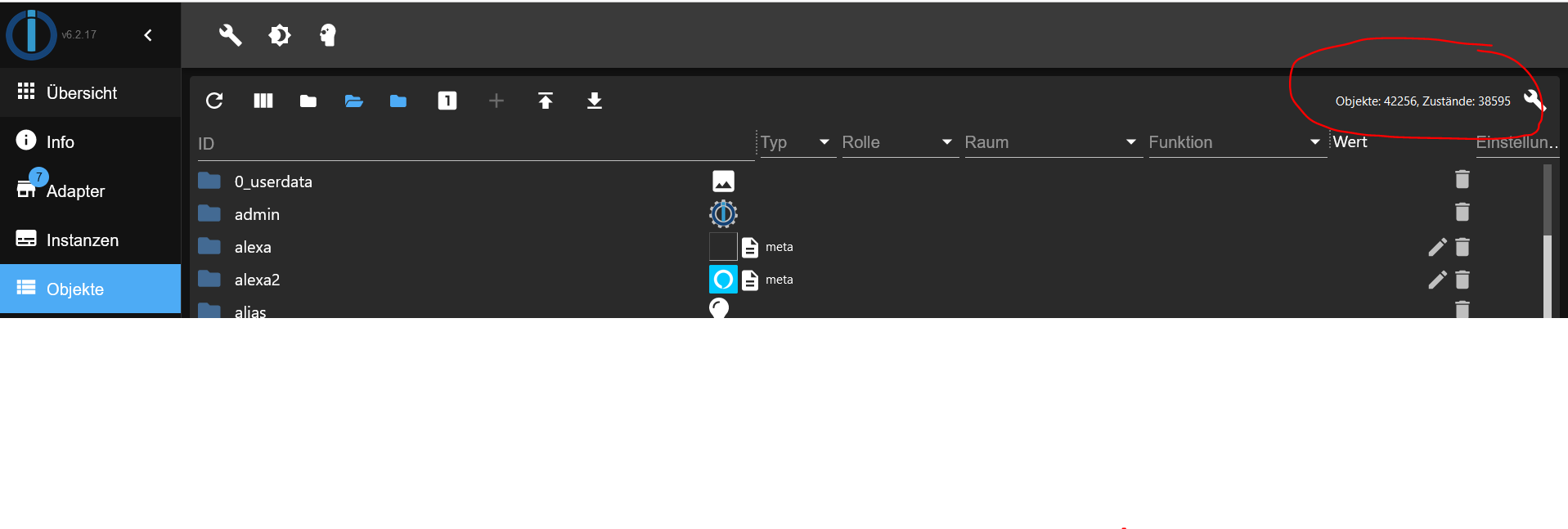
          zeige mal

          f5f60f6a-9238-41ce-8b38-17e4ee474216-grafik.png

          hast du dann wenn er langsam läuft einen Neustart gemacht und danach ist es X Zeit / X Tage wieder gut .

          Synology 918+ 16GB - ioBroker in Docker v9 , VISO auf Trekstor Primebook C13 13,3" , Hikvision Domkameras mit Surveillance Station .. CCU RaspberryMatic in Synology VM .. Zigbee CC2538+CC2592 .. Sonoff .. KNX .. Modbus ..

          T 1 Reply Last reply
          0
          • GlasfaserG Glasfaser

            @tilly sagte in langsame Admin Weboberfläche/No connection to databases:

            neu aufgesetzt.

            Zeigen :

            cd /opt/iobroker
            npm ls | grep -E 'github.com|ERR' 
            
            iobroker update -i
             
            sudo ln -s /usr/bin/node /usr/bin/nodejs
            uname -m && type -P nodejs node npm && nodejs -v && node -v && npm -v && whoami && pwd && sudo apt update &> /dev/null && sudo apt update && apt policy nodejs
            

            .

            War auch alles schnell und nun plötzlich wieder ein langsames System,

            eventuell ein Script geschrieben was Amok läuft !?

            T Online
            T Online
            tilly
            wrote on last edited by
            #5

            @glasfaser

            user@iobroker-ubuntu-22-04:~$ cd /opt/iobroker
            user@iobroker-ubuntu-22-04:/opt/iobroker$ npm ls | grep -E 'github.com|ERR'
            [sudo] password for user:
            
            user@iobroker-ubuntu-22-04:/opt/iobroker$ iobroker update -i
            Used repository: stable
            Adapter    "admin"        : 6.2.22   , installed 6.2.22
            Adapter    "alexa2"       : 3.19.9   , installed 3.19.9
            Adapter    "backitup"     : 2.4.10   , installed 2.4.12
            Adapter    "bring"        : 1.8.1    , installed 1.8.1
            Adapter    "cloud"        : 4.2.2    , installed 4.2.2
            Adapter    "discovery"    : 3.0.5    , installed 3.0.5
            Adapter    "dwd"          : 2.8.3    , installed 2.8.3
            Adapter    "echarts"      : 1.0.12   , installed 1.0.12
            Adapter    "ecovacs-deebot": 1.4.4   , installed 1.4.7
            Adapter    "firetv"       : 1.0.0    , installed 1.0.0
            Adapter    "flot"         : 1.11.0   , installed 1.11.0
            Adapter    "haassohn"     : 1.0.7    , installed 1.0.7
            Adapter    "ical"         : 1.13.1   , installed 1.13.1
            Adapter    "icons-mfd-png": 1.1.0    , installed 1.1.0
            Adapter    "info"         : 1.9.19   , installed 1.9.19
            Adapter    "iot"          : 1.11.9   , installed 1.11.9
            Adapter    "javascript"   : 6.0.3    , installed 6.0.3
            Controller "js-controller": 4.0.23   , installed 4.0.23
            Adapter    "mihome-lamp"  : 1.1.0    , installed 1.1.0
            Adapter    "modbus"       : 5.0.5    , installed 5.0.5
            Adapter    "mqtt"         : 4.0.7    , installed 4.0.7
            Adapter    "node-red"     : 4.0.0    , installed 4.0.0
            Adapter    "octoprint"    : 4.0.0    , installed 4.0.0
            Adapter    "openweathermap": 0.3.0   , installed 0.3.0
            Adapter    "parser"       : 1.1.8    , installed 1.1.8
            Adapter    "pvforecast"   : 2.3.0    , installed 2.3.0
            Adapter    "samsung"      : 0.5.8    , installed 0.5.11
            Adapter    "sayit"        : 1.12.3   , installed 1.12.6
            Adapter    "shelly"       : 6.0.0    , installed 6.0.0
            Adapter    "simple-api"   : 2.7.0    , installed 2.7.0
            Adapter    "socketio"     : 4.2.0    , installed 6.1.8
            Adapter    "sonoff"       : 2.5.1    , installed 2.5.1
            Adapter    "sonos"        : 2.2.3    , installed 2.2.3
            Adapter    "sprinklecontrol": 0.2.9  , installed 0.2.12
            Adapter    "sql"          : 2.1.8    , installed 2.1.8
            Adapter    "tankerkoenig" : 2.1.1    , installed 2.1.1
            Adapter    "telegram"     : 1.14.1   , installed 1.14.1
            Adapter    "tr-064"       : 4.2.16   , installed 4.2.16
            Adapter    "trashschedule": 2.0.3    , installed 2.0.3
            Adapter    "tuya"         : 3.6.15   , installed 3.6.15
            Adapter    "unifi"        : 0.5.10   , installed 0.6.1
            Adapter    "vis"          : 1.4.15   , installed 1.4.15
            Adapter    "vis-hqwidgets": 1.3.0    , installed 1.3.0
            Adapter    "vis-inventwo" : 3.3.1    , installed 3.3.3
            Adapter    "vis-jqui-mfd" : 1.0.12   , installed 1.0.12
            Adapter    "web"          : 4.3.0    , installed 5.2.4
            Adapter    "wled"         : 0.6.7    , installed 0.6.7
            Adapter    "ws"           : 1.3.0    , installed 2.1.3
            Adapter    "yahka"        : 0.13.1   , installed 0.13.1
            Adapter    "zigbee"       : 1.7.5    , installed 1.7.6
            Adapter    "zwave2"       : 2.6.0    , installed 2.6.0
            user@iobroker-ubuntu-22-04:/opt/iobroker$
            
            user@iobroker-ubuntu-22-04:/opt/iobroker$ sudo ln -s /usr/bin/node /usr/bin/nodejs
            uname -m && type -P nodejs node npm && nodejs -v && node -v && npm -v && whoami && pwd && sudo apt update &> /dev/null && sudo apt update && apt policy nodejs
            ln: failed to create symbolic link '/usr/bin/nodejs': File exists
            x86_64
            /usr/bin/nodejs
            /usr/bin/node
            /usr/bin/npm
            v16.17.0
            v16.17.0
            8.15.0
            user
            /opt/iobroker
            OK:1 http://de.archive.ubuntu.com/ubuntu jammy InRelease
            Holen:2 http://de.archive.ubuntu.com/ubuntu jammy-updates InRelease [114 kB]
            OK:3 https://deb.nodesource.com/node_16.x jammy InRelease
            OK:4 http://de.archive.ubuntu.com/ubuntu jammy-backports InRelease
            Holen:5 http://de.archive.ubuntu.com/ubuntu jammy-security InRelease [110 kB]
            Es wurden 224 kB in 2 s geholt (139 kB/s).
            Paketlisten werden gelesen… Fertig
            Abhängigkeitsbaum wird aufgebaut… Fertig
            Statusinformationen werden eingelesen… Fertig
            Alle Pakete sind aktuell.
            nodejs:
              Installiert:           16.17.0-deb-1nodesource1
              Installationskandidat: 16.17.0-deb-1nodesource1
              Versionstabelle:
             *** 16.17.0-deb-1nodesource1 500
                    500 https://deb.nodesource.com/node_16.x jammy/main amd64 Packages
                    100 /var/lib/dpkg/status
                 12.22.9~dfsg-1ubuntu3 500
                    500 http://de.archive.ubuntu.com/ubuntu jammy/universe amd64 Packages
            user@iobroker-ubuntu-22-04:/opt/iobroker$


            Ein Skript was ich neu gemacht hatte, habe ich erstmal wieder deaktiviert.

            1 Reply Last reply
            0
            • GlasfaserG Glasfaser

              @crunchip sagte in langsame Admin Weboberfläche/No connection to databases:
              Größe/Anzahl der Objekte

              Kann ich mir nicht vorstelle ,
              er schreibt

              und nun plötzlich wieder ein langsames System

              da sind schon ein paar Tage zwischen .....

              @tilly

              zeige mal

              f5f60f6a-9238-41ce-8b38-17e4ee474216-grafik.png

              hast du dann wenn er langsam läuft einen Neustart gemacht und danach ist es X Zeit / X Tage wieder gut .

              T Online
              T Online
              tilly
              wrote on last edited by
              #6

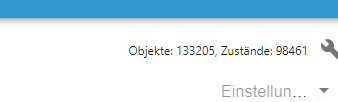
              @glasfaser

              1c39492c-aeda-40d5-9323-432bed672b54-image.png

              T 1 Reply Last reply
              0
              • T tilly

                @glasfaser

                1c39492c-aeda-40d5-9323-432bed672b54-image.png

                T Online
                T Online
                tilly
                wrote on last edited by
                #7

                Admin Weboberfläche jetzt auch nach Neustart sehr langsam.
                Info, Adapter und Instanzen wird noch geladen. Bei Objekten Timeout.

                Thomas BraunT 1 Reply Last reply
                0
                • T tilly

                  Admin Weboberfläche jetzt auch nach Neustart sehr langsam.
                  Info, Adapter und Instanzen wird noch geladen. Bei Objekten Timeout.

                  Thomas BraunT Online
                  Thomas BraunT Online
                  Thomas Braun
                  Most Active
                  wrote on last edited by Thomas Braun
                  #8

                  @tilly
                  133k Objekte könnte auch etwas heftig sein.

                  free -ht --mega
                  

                  sagt?

                  Linux-Werkzeugkasten:
                  https://forum.iobroker.net/topic/42952/der-kleine-iobroker-linux-werkzeugkasten
                  NodeJS Fixer Skript:
                  https://forum.iobroker.net/topic/68035/iob-node-fix-skript
                  iob_diag: curl -sLf -o diag.sh https://iobroker.net/diag.sh && bash diag.sh

                  T 1 Reply Last reply
                  0
                  • Thomas BraunT Thomas Braun

                    @tilly
                    133k Objekte könnte auch etwas heftig sein.

                    free -ht --mega
                    

                    sagt?

                    T Online
                    T Online
                    tilly
                    wrote on last edited by
                    #9

                    @thomas-braun said in langsame Admin Weboberfläche/No connection to databases:

                    free -ht --mega

                    user@iobroker-ubuntu-22-04:~$ free -ht --mega
                                   total        used        free      shared  buff/cache   available
                    Mem:            3,9G        3,2G        467M        1,0M        293M        529M
                    Swap:           3,0G        100M        2,9G
                    Total:          6,9G        3,3G        3,3G


                    Aber wieso sind es so viele? Da sind bestimmt welche doppelt.

                    Thomas BraunT 1 Reply Last reply
                    0
                    • T tilly

                      @thomas-braun said in langsame Admin Weboberfläche/No connection to databases:

                      free -ht --mega

                      user@iobroker-ubuntu-22-04:~$ free -ht --mega
                                     total        used        free      shared  buff/cache   available
                      Mem:            3,9G        3,2G        467M        1,0M        293M        529M
                      Swap:           3,0G        100M        2,9G
                      Total:          6,9G        3,3G        3,3G


                      Aber wieso sind es so viele? Da sind bestimmt welche doppelt.

                      Thomas BraunT Online
                      Thomas BraunT Online
                      Thomas Braun
                      Most Active
                      wrote on last edited by
                      #10

                      @tilly

                      Sooooo viel Luft ist da nicht mehr.
                      Schau mit

                      htop
                      

                      (sortiert nach MEM%) was da wieviel RAM knuspert.

                      Linux-Werkzeugkasten:
                      https://forum.iobroker.net/topic/42952/der-kleine-iobroker-linux-werkzeugkasten
                      NodeJS Fixer Skript:
                      https://forum.iobroker.net/topic/68035/iob-node-fix-skript
                      iob_diag: curl -sLf -o diag.sh https://iobroker.net/diag.sh && bash diag.sh

                      T 1 Reply Last reply
                      0
                      • Thomas BraunT Thomas Braun

                        @tilly

                        Sooooo viel Luft ist da nicht mehr.
                        Schau mit

                        htop
                        

                        (sortiert nach MEM%) was da wieviel RAM knuspert.

                        T Online
                        T Online
                        tilly
                        wrote on last edited by
                        #11

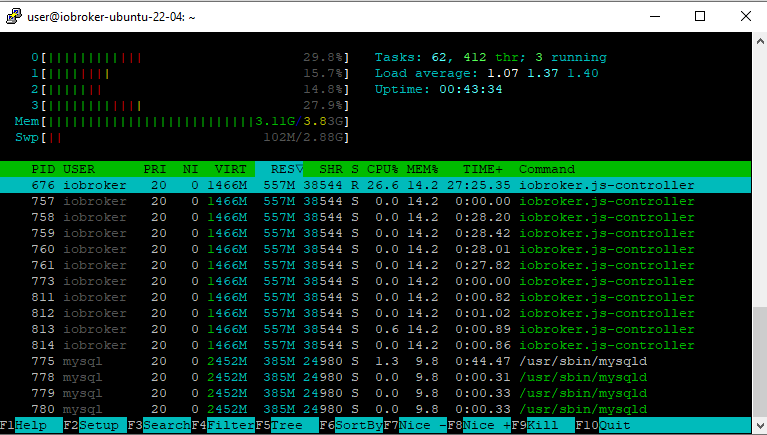
                        @thomas-braun said in langsame Admin Weboberfläche/No connection to databases:

                        htop

                        7c08865b-cd2e-4951-9439-bf907530b8c2-image.png

                        Thomas BraunT 1 Reply Last reply
                        0
                        • T tilly

                          @thomas-braun said in langsame Admin Weboberfläche/No connection to databases:

                          htop

                          7c08865b-cd2e-4951-9439-bf907530b8c2-image.png

                          Thomas BraunT Online
                          Thomas BraunT Online
                          Thomas Braun
                          Most Active
                          wrote on last edited by
                          #12

                          @tilly

                          (sortiert nach MEM%)

                          Linux-Werkzeugkasten:
                          https://forum.iobroker.net/topic/42952/der-kleine-iobroker-linux-werkzeugkasten
                          NodeJS Fixer Skript:
                          https://forum.iobroker.net/topic/68035/iob-node-fix-skript
                          iob_diag: curl -sLf -o diag.sh https://iobroker.net/diag.sh && bash diag.sh

                          T 1 Reply Last reply
                          0
                          • Thomas BraunT Thomas Braun

                            @tilly

                            (sortiert nach MEM%)

                            T Online
                            T Online
                            tilly
                            wrote on last edited by tilly
                            #13

                            @thomas-braun

                            c8161698-3de2-427a-8f77-451dc847f341-image.png

                            T 1 Reply Last reply
                            0
                            • T tilly

                              @thomas-braun

                              c8161698-3de2-427a-8f77-451dc847f341-image.png

                              T Online
                              T Online
                              tilly
                              wrote on last edited by tilly
                              #14

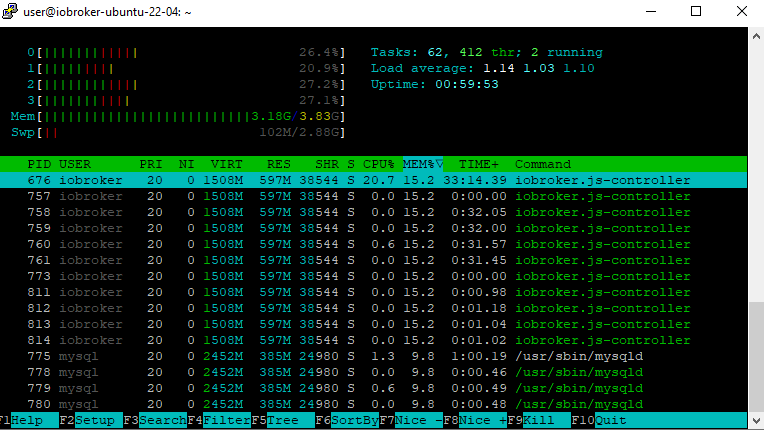
                              die Objekte kommen von Unifi Adapter. Den hab ich erst einmal gelöscht.

                              user@iobroker-ubuntu-22-04:~$ iobroker list objects unifi.0.* | wc -l
                              125649
                              

                              Jetzt ist die Auslastung wie folgt:

                              616ea558-b410-453c-b316-4dab76088e8c-image.png

                              1 Reply Last reply
                              0
                              Reply
                              • Reply as topic
                              Log in to reply
                              • Oldest to Newest
                              • Newest to Oldest
                              • Most Votes


                              Support us

                              ioBroker
                              Community Adapters
                              Donate

                              758

                              Online

                              32.6k

                              Users

                              82.1k

                              Topics

                              1.3m

                              Posts
                              Community
                              Impressum | Datenschutz-Bestimmungen | Nutzungsbedingungen | Einwilligungseinstellungen
                              ioBroker Community 2014-2025
                              logo
                              • Login

                              • Don't have an account? Register

                              • Login or register to search.
                              • First post
                                Last post
                              0
                              • Home
                              • Recent
                              • Tags
                              • Unread 0
                              • Categories
                              • Unreplied
                              • Popular
                              • GitHub
                              • Docu
                              • Hilfe