



Skip to content
  • Home
  • Aktuell
  • Tags
  • 0 Ungelesen 0
  • Kategorien
  • Unreplied
  • Beliebt
  • GitHub
  • Docu
  • Hilfe
Skins
  • Light
  • Brite
  • Cerulean
  • Cosmo
  • Flatly
  • Journal
  • Litera
  • Lumen
  • Lux
  • Materia
  • Minty
  • Morph
  • Pulse
  • Sandstone
  • Simplex
  • Sketchy
  • Spacelab
  • United
  • Yeti
  • Zephyr
  • Dark
  • Cyborg
  • Darkly
  • Quartz
  • Slate
  • Solar
  • Superhero
  • Vapor

  • Standard: (Kein Skin)
  • Kein Skin
Einklappen
ioBroker Logo

Community Forum

donate donate
  1. ioBroker Community Home
  2. Deutsch
  3. Visualisierung
  4. Solar Flow Visualisierung ähnlich Fronius SolarWeb

NEWS

  • UPDATE 31.10.: Amazon Alexa - ioBroker Skill läuft aus ?
    apollon77A
    apollon77
    48
    3
    8.9k

  • Monatsrückblick – September 2025
    BluefoxB
    Bluefox
    13
    1
    2.3k

  • Neues Video "KI im Smart Home" - ioBroker plus n8n
    BluefoxB
    Bluefox
    16
    1
    3.4k

Solar Flow Visualisierung ähnlich Fronius SolarWeb

Geplant Angeheftet Gesperrt Verschoben Visualisierung
17 Beiträge 9 Kommentatoren 3.1k Aufrufe 12 Watching
  • Älteste zuerst
  • Neuste zuerst
  • Meiste Stimmen
Antworten
  • In einem neuen Thema antworten
Anmelden zum Antworten
Dieses Thema wurde gelöscht. Nur Nutzer mit entsprechenden Rechten können es sehen.
  • P Offline
    P Offline
    PHaupt
    schrieb am zuletzt editiert von
    #1

    Hallo zusammen,

    Ich habe mal ein "Widget" gebastelt welches die Möglichkeit bietet, die Flows einer Solaranlage zu visualisieren. Das ganze ähnelt sehr stark der Visualisierung im SolarWeb von Fronius, einfach weil mir das prinzipiell sehr gut gefallen hat.
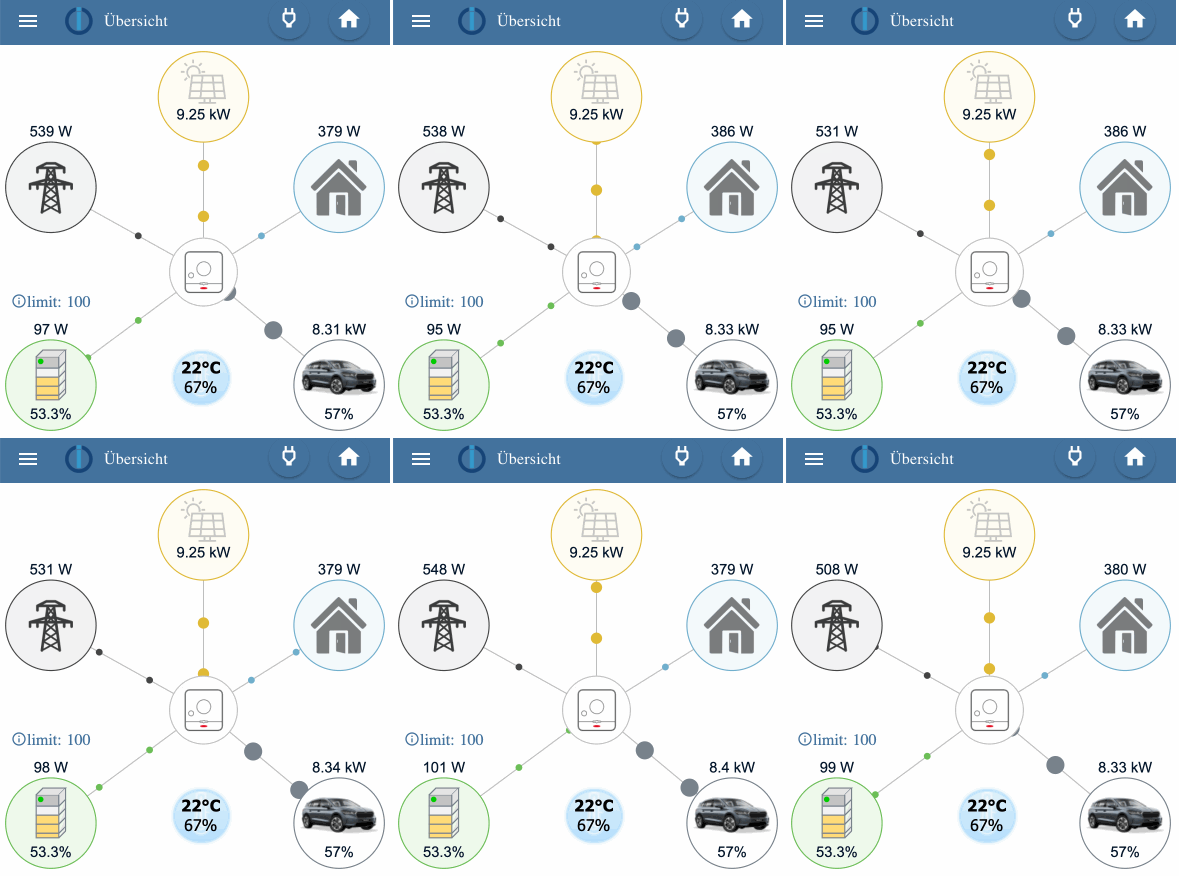
    solar_widget.gif

    Das ganze ist im Prinzip einfach Code in einem HTML-Widget und basiert auf SVG und JavaScript.
    Im Bild sieht man noch eine Temperaturanzeige und die Anzeige eines Limits für die Batterie. Diese sind nicht Bestandteil des Widgets, sonder einfach darüberliegende seperate Widgets.

    Ich habe das ganze mal im Git-Hub abgelegt und auch weitestgehend dokumentiert.

    GitHub - solarwidget

    Der nächste Schritt wäre hieraus einen Widget-Adapter zu erstellen, um sauber und einfach im VIS nutzen zu können.
    Wenn hierzu jemand Lust und Zeit hat, gerne bei mir melden. Bin für jede Unterstützung dankbar.

    Vielleicht kanns ja einer brauchen. Und sollte es sowas schon geben, ich bin für jeden Hinweis dankbar.

    Viele Grüße

    Haubi

    SKBS R jmeister79J 3 Antworten Letzte Antwort
    1
    • P PHaupt

      Hallo zusammen,

      Ich habe mal ein "Widget" gebastelt welches die Möglichkeit bietet, die Flows einer Solaranlage zu visualisieren. Das ganze ähnelt sehr stark der Visualisierung im SolarWeb von Fronius, einfach weil mir das prinzipiell sehr gut gefallen hat.

      solar_widget.gif

      Das ganze ist im Prinzip einfach Code in einem HTML-Widget und basiert auf SVG und JavaScript.
      Im Bild sieht man noch eine Temperaturanzeige und die Anzeige eines Limits für die Batterie. Diese sind nicht Bestandteil des Widgets, sonder einfach darüberliegende seperate Widgets.

      Ich habe das ganze mal im Git-Hub abgelegt und auch weitestgehend dokumentiert.

      GitHub - solarwidget

      Der nächste Schritt wäre hieraus einen Widget-Adapter zu erstellen, um sauber und einfach im VIS nutzen zu können.
      Wenn hierzu jemand Lust und Zeit hat, gerne bei mir melden. Bin für jede Unterstützung dankbar.

      Vielleicht kanns ja einer brauchen. Und sollte es sowas schon geben, ich bin für jeden Hinweis dankbar.

      Viele Grüße

      Haubi

      SKBS Offline
      SKBS Offline
      SKB
      Developer Most Active
      schrieb am zuletzt editiert von
      #2

      @phaupt Sowas ähnliches erstelle ich gerade als Adapter:

      https://forum.iobroker.net/topic/55627/test-adapter-energiefluss-v0-3-x-github-latest/

      ... wer nicht mit der Zeit geht, geht mit der Zeit ...

      Aktuelle Entwicklung: Energiefluss - erweitert (https://forum.iobroker.net/topic/64734)

      1 Antwort Letzte Antwort
      0
      • P PHaupt

        Hallo zusammen,

        Ich habe mal ein "Widget" gebastelt welches die Möglichkeit bietet, die Flows einer Solaranlage zu visualisieren. Das ganze ähnelt sehr stark der Visualisierung im SolarWeb von Fronius, einfach weil mir das prinzipiell sehr gut gefallen hat.

        solar_widget.gif

        Das ganze ist im Prinzip einfach Code in einem HTML-Widget und basiert auf SVG und JavaScript.
        Im Bild sieht man noch eine Temperaturanzeige und die Anzeige eines Limits für die Batterie. Diese sind nicht Bestandteil des Widgets, sonder einfach darüberliegende seperate Widgets.

        Ich habe das ganze mal im Git-Hub abgelegt und auch weitestgehend dokumentiert.

        GitHub - solarwidget

        Der nächste Schritt wäre hieraus einen Widget-Adapter zu erstellen, um sauber und einfach im VIS nutzen zu können.
        Wenn hierzu jemand Lust und Zeit hat, gerne bei mir melden. Bin für jede Unterstützung dankbar.

        Vielleicht kanns ja einer brauchen. Und sollte es sowas schon geben, ich bin für jeden Hinweis dankbar.

        Viele Grüße

        Haubi

        R Offline
        R Offline
        Rico76
        schrieb am zuletzt editiert von
        #3

        @phaupt Hallo würdest Du mir dein Widget für die Fronius Solaranlage ggf. zur Verfügung stellen?

        Liebe Grüße, Ricardo

        1 Antwort Letzte Antwort
        0
        • jmeister79J Offline
          jmeister79J Offline
          jmeister79
          schrieb am zuletzt editiert von
          #4

          Ich hab das Ding mal ordentlich aufgebohrt, hat da jemand Interesse dran?
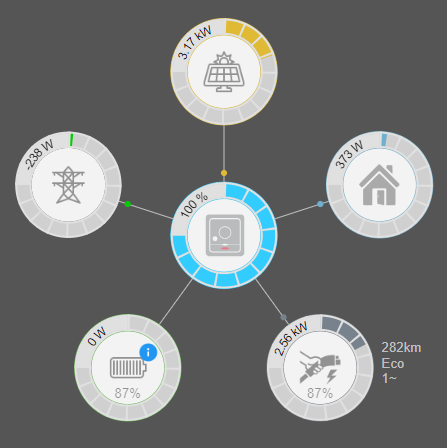
          1b4e6067-2ca9-4ff2-b035-db9aca213362-image.png

          2 T H 3 Antworten Letzte Antwort
          0
          • jmeister79J jmeister79

            Ich hab das Ding mal ordentlich aufgebohrt, hat da jemand Interesse dran?

            1b4e6067-2ca9-4ff2-b035-db9aca213362-image.png

            2 Offline
            2 Offline
            2hot4you
            schrieb am zuletzt editiert von
            #5

            @jmeister79

            Auf jeden Fall

            1 Antwort Letzte Antwort
            0
            • jmeister79J jmeister79

              Ich hab das Ding mal ordentlich aufgebohrt, hat da jemand Interesse dran?

              1b4e6067-2ca9-4ff2-b035-db9aca213362-image.png

              T Offline
              T Offline
              tritor
              schrieb am zuletzt editiert von
              #6

              @jmeister79

              Ja immer

              Gernot

              Host: i9 server Proxmox , Debian 12.0 for ioBroker
              ioBroker: 7.7.19, Node.js: 22.21.1, NPM: 10.9.3, JS-controller: 7.0.7
              Wetterstation: HP1000SEPro V1.9.0 Easeweather V1.7.0
              Grafana 12.0.2 / InfluxDB 2.7.11

              1 Antwort Letzte Antwort
              0
              • P PHaupt

                Hallo zusammen,

                Ich habe mal ein "Widget" gebastelt welches die Möglichkeit bietet, die Flows einer Solaranlage zu visualisieren. Das ganze ähnelt sehr stark der Visualisierung im SolarWeb von Fronius, einfach weil mir das prinzipiell sehr gut gefallen hat.

                solar_widget.gif

                Das ganze ist im Prinzip einfach Code in einem HTML-Widget und basiert auf SVG und JavaScript.
                Im Bild sieht man noch eine Temperaturanzeige und die Anzeige eines Limits für die Batterie. Diese sind nicht Bestandteil des Widgets, sonder einfach darüberliegende seperate Widgets.

                Ich habe das ganze mal im Git-Hub abgelegt und auch weitestgehend dokumentiert.

                GitHub - solarwidget

                Der nächste Schritt wäre hieraus einen Widget-Adapter zu erstellen, um sauber und einfach im VIS nutzen zu können.
                Wenn hierzu jemand Lust und Zeit hat, gerne bei mir melden. Bin für jede Unterstützung dankbar.

                Vielleicht kanns ja einer brauchen. Und sollte es sowas schon geben, ich bin für jeden Hinweis dankbar.

                Viele Grüße

                Haubi

                jmeister79J Offline
                jmeister79J Offline
                jmeister79
                schrieb am zuletzt editiert von
                #7

                @phaupt wäre das ok für dich, gerne kannst du es dir vorher mal ansehen

                @all wäre es möglich daraus ein richtiges widget zu machen? hab sowas noch nie gemacht.

                1 Antwort Letzte Antwort
                0
                • jmeister79J jmeister79

                  Ich hab das Ding mal ordentlich aufgebohrt, hat da jemand Interesse dran?

                  1b4e6067-2ca9-4ff2-b035-db9aca213362-image.png

                  H Offline
                  H Offline
                  hueppin
                  schrieb am zuletzt editiert von
                  #8

                  @jmeister79
                  Hat sich da noch etwas getan bezüglich "richtiges Widget"? Wenn nein, wäre ich sehr interessiert an den Dateien, es sieht wirklich professionell aus!
                  Gruss
                  Roger

                  jmeister79J 1 Antwort Letzte Antwort
                  0
                  • H hueppin

                    @jmeister79
                    Hat sich da noch etwas getan bezüglich "richtiges Widget"? Wenn nein, wäre ich sehr interessiert an den Dateien, es sieht wirklich professionell aus!
                    Gruss
                    Roger

                    jmeister79J Offline
                    jmeister79J Offline
                    jmeister79
                    schrieb am zuletzt editiert von
                    #9

                    @hueppin nein bisher musst du noch den js code editieren ist aber simpel. Ich nutze mittlerweile aber ein widget von Lovelace da ich vis nicht mehr nutze.

                    Kann den Code aber gerne per pn schixkenu

                    L 1 Antwort Letzte Antwort
                    0
                    • jmeister79J jmeister79

                      @hueppin nein bisher musst du noch den js code editieren ist aber simpel. Ich nutze mittlerweile aber ein widget von Lovelace da ich vis nicht mehr nutze.

                      Kann den Code aber gerne per pn schixkenu

                      L Offline
                      L Offline
                      lucajordi
                      schrieb am zuletzt editiert von
                      #10

                      @jmeister79
                      Dürfte ich den Code auch haben?
                      Sieht nämlich klasse aus!

                      jmeister79J 1 Antwort Letzte Antwort
                      0
                      • L lucajordi

                        @jmeister79
                        Dürfte ich den Code auch haben?
                        Sieht nämlich klasse aus!

                        jmeister79J Offline
                        jmeister79J Offline
                        jmeister79
                        schrieb am zuletzt editiert von
                        #11

                        @lucajordi

                        <!-- https://github.com/derHaubi/solarwidget -->
                        <style>
                        
                            :root {
                              --circleRadius: 44px;
                              --gaugeThickness: 16px;
                              --colorInv: #33CCFF;
                              --colorGridNeg: #FF0000;
                              --colorGridPos: #00CC00;
                              --colorProd: #E0BA34;
                              --colorCar: #78828C;
                              --colorBat: #6CBE58;
                              --colorHouse: #70AFCD; 
                            }
                        
                            .batElement {
                                stroke-width: 1;
                                stroke:#78828C;
                            }
                        
                            .lineElement {
                                fill: A#000;
                                stroke: #bfbfbf;
                                stroke-width: 1;
                            }
                            .wattText{
                                stroke: #000000; 
                                font-size:14px; 
                                fill:#000000; 
                                stroke-width:0;
                                text-anchor:middle;
                            }
                            .c_path{
                               transform:translate(0,0); 
                               fill:none; 
                               stroke:none; 
                                stroke-width:calc(var(--gaugeThickness) - 4px);
                            }
                            .c_Quarterpath{
                               transform:translate(0,0); 
                               fill:none; 
                               stroke:#e0e0e0;; 
                               stroke-width:calc(var(--gaugeThickness) - 4px);
                            }
                            .c_textPath{
                               transform:translate(0,0); 
                               fill:none; 
                               stroke:transparent; 
                               stroke-width:135px; 
                            }
                            .c_circleBar{
                                r: var(--circleRadius);
                                stroke-width:calc(var(--gaugeThickness) - 4px);
                                transform: rotate(-90deg); 
                                fill: transparent; 
                                stroke-dasharray:276.32px; 
                                stroke-dashoffset:42.9px;
                            }
                            .c_circleDashes{
                                r: var(--circleRadius);
                                stroke-width:var(--gaugeThickness);
                                transform: rotate(-90deg);
                                fill:transparent;
                                stroke:#e0e0e0 ;
                                stroke-dasharray:2px,21.02px;
                                /* 276,32 / 12) -2 */
                            } 
                            .c_circleInner{
                                r: calc(var(--circleRadius) - (var(--gaugeThickness) / 2));
                                fill:#f3f3f3;
                                stroke-width:1px;
                            } 
                            .c_circleOuter{
                                r: calc(var(--circleRadius) + (var(--gaugeThickness) / 2));
                                fill:transparent;
                                stroke-width:1px;
                            } 
                            .c_circleBackground{
                                r: var(--circleRadius);
                                stroke-width: var(--gaugeThickness);
                                fill:transparent;
                                stroke:#e0e0e0;
                            } 
                            .c_circleBackgroundInner{
                                r: var(--circleRadius);
                                stroke-width:calc(var(--gaugeThickness) - 4px);
                                fill:transparent;
                                stroke:#d0d0d0;
                            } 
                            .divmask{
                                height:16px;
                                width:16px;
                            }
                            
                        </style>
                        
                               <!-- r="50" cx="100" cy="100" fill="transparent" stroke-dasharray="314"-->
                               <!--r= 44 stroke dasharray = 2*pi*r = 276.32-->
                               
                        <svg viewBox="0 0 440 440" xmlns="http://www.w3.org/2000/svg" width="100%" height="100%">
                            <!-- die einzelnen elemente überschreiben hier die farben bei bedarf. das kommt noch in das js-->
                        
                            <defs>
                                <g id="bat_symbol">
                                    <rect id="batE4" class="batElement" x="0" y="0"  width="20" height="10" fill="#c3c3c3"/>
                                    <polyline class="batElement" points="0,0 6,-6 26,-6 20,0" fill="#e6e6e6"/>
                                    <polyline class="batElement" points="26,-6 26,4 20,10 20,0" fill="#e6e6e6"/>
                                    <polyline class="batElement" points="26,4 26,12 20,18" fill="#e6e6e6"/>
                                    <polyline class="batElement" points="26,12 26,20 20,26 " fill="#e6e6e6"/>
                                    <polyline class="batElement" points="26,20 26,28 20,34 " fill="#e6e6e6"/>
                                    <polyline class="batElement" points="26,28 26,32 20,38 " fill="#e6e6e6"/>
                        
                                    <rect id="batE3" class="batElement" x="0" y="10" width="20" height="8"  fill="#F3F3F3"/>
                                    <rect id="batE2" class="batElement" x="0" y="18" width="20" height="8" fill="#F3F3F3"/>
                                    <rect id="batE1" class="batElement" x="0" y="26" width="20" height="8" fill="#F3F3F3"/>
                                    <rect id="batE0" class="batElement" x="0" y="34" width="20" height="4" fill="#F3F3F3"/>
                                    <circle id="batOnOff" cx="4" cy="4" r="3" stroke="#c3c3c3" fill="#00cc00"/>
                                </g>
                                <g id="g_inverter">
                        	        <path id="myInvPath" class="c_path" d="M 45,0 A 45,45 0 0 1 -45,0 A 45,45 0 0 1 45,0"/>
                                    <circle id="cInverter" style="stroke:var(--colorInv)" class="c_circleInner"/>
                                    <circle id="cInverter" style="stroke:var(--colorInv)" class="c_circleOuter"/>
                                    <circle class="c_circleBackground"/>
                                    <circle class="c_circleBackgroundInner"/>
                                    <circle id="cInverterBar" style="stroke:var(--colorInv)" class="c_circleBar"/>
                                    <circle id="cInvDashes" class="c_circleDashes"/>
                        	        <path class="c_Quarterpath" d="M-44,0 a44,44 0 0,1 44,-44"/>
                                	<text class="wattText" >
                                        <textPath xlink:href="#myInvPath" startOffset="62.5%">
                                            <tspan id="inv_text" dy="6" ></tspan>
                                        </textPath>
                                    </text>
                                    
                                    <!--<circle id="cInv" r="40" stroke="#c3c3c3" stroke-width="3" fill="#FFFFFF"/>-->
                                    <image href="/vis.0/strom/img/inverter_gen24.svg" 
                                    x="-24" 
                                    y="-25" 
                                    height="50" 
                                    width="50"
                                    opacity="50%"
                                    preserveAspectRatio="xMinYMin meet"
                                    /> 
                                </g>
                        		
                                <g id="g_production">
                                    
                        	        <path id="myProdPath" class="c_path" d="M 45,0 A 45,45 0 0 1 -45,0 A 45,45 0 0 1 45,0"/>
                                    <circle id="cProduction" style="stroke:var(--colorProd)" class="c_circleInner"/>
                                    <circle id="cProduction" style="stroke:var(--colorProd)" class="c_circleOuter"/>
                                    <circle class="c_circleBackground"/>
                                    <circle class="c_circleBackgroundInner"/>
                                    <circle id="cProductionBar" style="stroke:var(--colorProd)" class="c_circleBar"/>
                                    <circle id="cProdDashes" class="c_circleDashes"/>
                        	        <path class="c_Quarterpath" d="M-44,0 a44,44 0 0,1 44,-44"/>
                                	<text class="wattText" >
                                        <textPath xlink:href="#myProdPath" startOffset="62.5%">
                                            <tspan id="prod_text_watt" dy="6" ></tspan>
                                        </textPath>
                                    </text>
                                    <image href="/vis-icontwo/Electricity/solar.png" 
                                    x="-20" 
                                    y="-20" 
                                    height="40" 
                                    width="40"
                                    opacity="40%"
                                    preserveAspectRatio="xMinYMin meet"
                                    />
                                </g>
                                
                                <g id="g_grid">
                        	        <path id="myGridPath" class="c_path" d="M 45,0 A 45,45 0 0 1 -45,0 A 45,45 0 0 1 45,0"/>
                                    <circle id="cGridInner" style="stroke:var(--colorGrid)" class=" c_circleInner"/>
                                    <circle id="cGridOuter" style="stroke:var(--colorGrid)" class=" c_circleOuter"/>
                                    <circle class="c_circleBackground"/>
                                    <circle class="c_circleBackgroundInner"/>
                                    <circle id="cGridBar" style="stroke:var(--colorGrid)" class=" c_circleBar"/>
                                    <circle id="cGridDashes" class="c_circleDashes"/>
                        	        <path class="c_Quarterpath" d="M-44,0 a44,44 0 0,1 44,-44"/>
                                    
                                	<text class="wattText">
                                        <textPath xlink:href="#myGridPath" startOffset="62.5%">
                                            <tspan id="grid_text_watt" dy="6"></tspan>
                                        </textPath>
                                    </text>
                        
                                   <image href="/vis-icontwo/Electricity/transmission_tower.png" 
                                    x="-20" 
                                    y="-20" 
                                    height="40" 
                                    width="40"
                                    opacity="40%"
                                    preserveAspectRatio="xMinYMin meet"
                                    />
                          
                                </g>
                                <g id="g_battery" visibility="visible">
                        	        <path id="myBatPath" class="c_path" d="M 45,0 A 45,45 0 0 1 -45,0 A 45,45 0 0 1 45,0"/>
                                    
                                    <circle id="cBattery" style="stroke:var(--colorBat)" class="c_circleInner"/>
                                    <circle id="cBattery" style="stroke:var(--colorBat)" class="c_circleOuter"/>
                                    <circle class="c_circleBackground"/>
                                    <circle class="c_circleBackgroundInner"/>
                                    <circle id="cBatteryBar" style="stroke:var(--colorBat)" class="c_circleBar"/>
                                    <circle id="cBatDashes" class="c_circleDashes"/>
                        	        <path class="c_Quarterpath" d="M-44,0 a44,44 0 0,1 44,-44"/>
                                    
                                	<text class="wattText">
                                        <textPath xlink:href="#myBatPath" startOffset="62.5%">
                                            <tspan id="bat_text_watt" dy="6" ></tspan>
                                        </textPath>
                                    </text>
                                   <!-- <use xlink:href="#bat_symbol" x="-13" y="-25"/>-->
                                   <image id="batteryIcon" href="/vis-icontwo/Electricity/transmission_tower.png" 
                                   
                                    x="-20" 
                                    y="-20" 
                                    height="40" 
                                    width="40"
                                    opacity="40%"
                                    preserveAspectRatio="xMinYMin meet"
                                    />
                                    <rect class="2divmask" id="batDivMask" width="28px" height ="16px" x="-15" y="-8" fill="#f3f3f3" />
                                    
                                    <image href="/vis.0/main/images/lvl_err.png" id="batStateIcon"
                                   
                                    x="10" 
                                    y="-25" 
                                    height="20" 
                                    width="20"
                                    preserveAspectRatio="xMinYMin meet"
                                    />
                                    <text id="percBat" x="0" y="30" text-anchor="middle" font-size="small" fill="#000000" opacity="40%">100%</text>
                                </g>        
                                <g id="g_house"> 
                        	        <path id="myHousePath" class="c_path" d="M 45,0 A 45,45 0 0 1 -45,0 A 45,45 0 0 1 45,0"/>
                        	        
                                    <circle id="cHouse" style="stroke:var(--colorHouse)" class=" c_circleInner"/>
                                    <circle id="cHouse" style="stroke:var(--colorHouse)" class=" c_circleOuter"/>
                                    <circle class="c_circleBackground"/>
                                    <circle class="c_circleBackgroundInner"/>
                                    <circle id="cHouseBar" style="stroke:var(--colorHouse)" class=" c_circleBar"/>
                                    <circle id="cHouseDashes" class="c_circleDashes"/>
                        	        <path class="c_Quarterpath" d="M-44,0 a44,44 0 0,1 44,-44"/>
                                    
                                	<text class="wattText">
                                        <textPath xlink:href="#myHousePath" startOffset="62.5%">
                                            <tspan id="house_text_watt" dy="6" ></tspan>
                                        </textPath>
                                    </text>
                                    
                                 <image href="/vis.0/strom/img/haus.png"
                                    x="-20" 
                                    y="-20" 
                                    height="40" 
                                    width="40"
                                    opacity="30%"
                                    preserveAspectRatio="xMinYMin meet"
                                    />
                                </g>          
                                
                                <g id="g_car">
                        	        <path id="myCarPath" class="c_path" d="M 45,0 A 45,45 0 0 1 -45,0 A 45,45 0 0 1 45,0"/>
                                    <circle id="cCar" style="stroke:var(--colorCar)" class=" c_circleInner"/>
                                    <circle id="cCar" style="stroke:var(--colorCar)" class=" c_circleOuter"/>
                                    <circle class="c_circleBackground"/>
                                    <circle class="c_circleBackgroundInner"/>
                                    <circle id="cCarBar" style="stroke:var(--colorCar)" class=" c_circleBar"/>
                                    <circle id="cCarDashes" class="c_circleDashes" style="stroke-dasharray:2px,23.12px;"/>
                        	        <path class="c_Quarterpath" d="M-44,0 a44,44 0 0,1 44,-44"/>
                                    
                                	<text class="wattText">
                                        <textPath xlink:href="#myCarPath" startOffset="62.5%">
                                            <tspan id="car_text_watt" dy="6" ></tspan>
                                        </textPath>
                                    </text>
                                        <!--<image href="/vis.0/strom/img/wallbox1.png" -->
                                        <!--<image href="/vis-icontwo/Electricity/e-car3.png"-->
                                        <image href="/vis.0/strom/img/plug.png"
                                        
                                    x="-20" 
                                    y="-20" 
                                    height="40" 
                                    width="40"
                                    opacity="40%"
                                    preserveAspectRatio="xMinYMin meet"
                                    />
                                </g>
                            </defs>
                            
                             <line id="prod_line" class="lineElement" x1="10" y1="10" x2="150" y2="150" visibility="hidden"></line>
                             <line id="grid_line" class="lineElement" x1="10" y1="10" x2="150" y2="150" visibility="hidden"></line> 
                             <line id="bat_line" class="lineElement" x1="10" y1="10" x2="150" y2="150" visibility="hidden"></line>
                             <line id="house_line" class="lineElement" x1="10" y1="10" x2="150" y2="150" visibility="hidden"></line>
                             <line id="car_line" class="lineElement" x1="10" y1="10" x2="150" y2="150" visibility="hidden"></line>
                             
                             <circle id="prod_circle1" r="7" cx="180" cy="45" fill="var(--colorProd)" visibility="hidden">
                                <animateMotion path="M0,0 0 135" dur="1.5s" repeatCount="indefinite" />
                            </circle>
                        
                            <circle id="grid_circle1" r="7" cx="45" cy="125" fill="var(--colorGrid)" visibility="hidden">
                                <animateMotion path="M0,0 135 75" dur="1.5s" repeatCount="indefinite" />
                            </circle>
                        
                            <circle id="bat_circle1" r="7" cx="45" cy="300" fill="var(--colorBat)" visibility="hidden">
                                <animateMotion path="M0,0 135 -100" dur="1.5s" repeatCount="indefinite" />
                            </circle>
                        
                            <circle id="house_circle1" r="7" cx="300" cy="125" fill="var(--colorHouse)" visibility="hidden">
                                <animateMotion path="M0,0 -120 75" dur="1.5s" repeatCount="indefinite" />
                            </circle>
                        
                            <circle id="car_circle1" r="7" cx="300" cy="300" fill="var(--colorCar)" visibility="hidden">
                                <animateMotion path="M0,0 -120 -100" dur="1.5s" repeatCount="indefinite" />
                            </circle>
                            
                        
                            <use xlink:href="#g_inverter" id="inv_group" x="180" y="200" visibility="hidden"/>
                            <use xlink:href="#g_production" id="prod_group" x="180" y="45" visibility="hidden"/>
                            <use xlink:href="#g_grid" id="grid_group" x="45" y="125" visibility="hidden"/>
                            <use xlink:href="#g_battery" id="bat_group" x="45" y="300" visibility="hidden"/>
                            <use xlink:href="#g_house" id="house_group" x="300" y="125" visibility="hidden"/>
                            <use xlink:href="#g_car" id="car_group" x="300" y="300" visibility="hidden"/>
                        
                            <text id="prod_text_watt" x="180" y="65" visibility="hidden" text-anchor="middle" font-size="small" fill="#c0c0c0">--</text>    
                            <text id="grid_text_watt" x="45" y="80" visibility="hidden" text-anchor="middle" font-size="small" fill="#c0c0c0" >--- W</text>
                            <text id="house_text_watt" x="300" y="80" visibility="hidden" text-anchor="middle" font-size="small" fill="#c0c0c0" >--- W</text>
                            <text id="bat_text_watt" x="45" y="255" visibility="hidden" text-anchor="middle" font-size="small" fill="#c0c0c0">-- W</text>
                            <text id="car_text_watt" x="300" y="255" visibility="hidden" text-anchor="middle" font-size="small" fill="#c0c0c0" >-- W</text>
                            <text id="car_text_perc" x="300" y="330" visibility="hidden" text-anchor="middle" font-size="small" fill="#000000" opacity="40%">-%</text>
                            <text id="car_text_autonomy" x="300" y="330" visibility="hidden" text-anchor="right" font-size="small" fill="#c0c0c0">-%</text>
                            <text id="car_text_phases" x="300" y="330" visibility="hidden" text-anchor="right" font-size="small" fill="#c0c0c0">-%</text>
                            <text id="car_text_mode" x="300" y="330" visibility="hidden" text-anchor="right" font-size="small" fill="#c0c0c0">-%</text>
                            <text id="inv_text" x="300" y="330" visibility="hidden" text-anchor="middle" font-size="small" fill="#c0c0c0">-%</text>
                        
                        </svg>
                        
                        <script type="text/javascript">
                            
                            (function(){
                                //define Array of Objects which values are gotten from server
                                let objIDs = [
                                'javascript.0.Zaehler.Momentanleistung_PV',
                                'javascript.0.Zaehler.Momentanleistung_Akkusystem',
                                'javascript.0.Zaehler.Momentanleistung_Netz',
                                'javascript.0.Zaehler.Momentanleistung_Verbraucher',
                                'javascript.0.Zaehler.Momentanleistung_Wallbox',
                                'javascript.0.PSA.energy.0.level',
                                'fronius.0.inverter.1.SOC',
                                'bydhvs.0.System.ErrorStr',
                                'javascript.0.PSA.energy.0.autonomy',
                                'javascript.0.Zaehler.Wallbox_Phasen',
                                'fronius-wattpilot.0.mode',
                                'fronius.0.site.rel_Autonomy',
                                'javascript.0.Alerts.psaError'
                                ];
                                
                                var allFlowObjects = ['inv', 'prod', 'house', 'car', 'bat', 'grid'];
                                
                                
                                var flowValues = { //initialize values used in the widget
                                    "prod": 0,
                                    "bat": 0,
                                    "grid": 0,
                                    "house": 0,
                                    "car": 0,
                                    "carChSt": 0,
                                    "batChSt": 0,
                                    "batStatus": 0,
                                    "carAutonomy": 0,
                                    "carPhases": 0,
                                    "carMode": 0,
                                    "inv":0,
                                    "psaError":false
                                }    
                        
                                //define Widget-Parameters - described in GitHub Wiki
                                
                                //größe Inverter r=40  -> r=52 : 12px nach außen alles  
                                
                                /*Berechnung Polar-->Kartesisch  cos @, sin@
                                
                                Inv = 185,200
                                mainradius
                                        @:      cosA    sinA*(-1) *da abstand vom Nullpunkt nach oben negativ ist
                                prod:   90°     0       -1
                                house:  18°     0.95    -0.31
                                car:    -54°    0.59    0.81
                                bat:    -126°   -0.59   0.81
                                grid    -189°   -0.95   -0.31
                                
                                Berechnung
                                wP.pos[type + 'X']).toString()
                                
                                */
                                var wP = {};
                                
                                var mainRadius = 160;
                                var startAngle = 90;
                                 
                                wP.nrAnimCircles = 5; //currently NOT changable
                                //Preassign the coordinates. will be overwritten
                                wP.pos = {
                                    "invX": 220,
                                    "invY": 235,
                                    "prodX": 185, 
                                    "prodY": 60,
                                    "houseX": 318,
                                    "houseY": 157,
                                    "carX": 267,
                                    "carY": 313,  
                                    "batX": 102,
                                    "batY": 313, 
                                    "gridX": 52,
                                    "gridY": 157, 
                                    
                                };
                                //calculationg the coordiantes of the elements for given radius and angles
                                function calculateSingleCoordinates(angle){
                                    var x = wP.pos.invX + mainRadius*Math.cos(Math.PI * angle/180);
                                    var y = wP.pos.invY - mainRadius*Math.sin(Math.PI * angle/180);
                                    return [x,y];
                                }
                                
                                
                                function calculateAllCoordinates(){
                                    for(var i=1;i<allFlowObjects.length;i++){
                                        var type = allFlowObjects[i];
                                        var angle = startAngle - (i-1)*(360/(allFlowObjects.length-1));//calculate angles by numebr of elements
                                        wP.pos[type+"X"]= calculateSingleCoordinates(angle)[0];
                                        wP.pos[type+"Y"]= calculateSingleCoordinates(angle)[1];
                                    }
                                }
                                calculateAllCoordinates();


                                wP.textPosDeltas = {
                                    /*
                                    "prod_text_watt": [-40, -50],
                                    "grid_text_watt": [90, -50],
                                    "bat_text_watt": [35, -50],
                                    "house_text_watt": [-180, -50],
                                    "car_text_watt": [-120, -50],
                                    */
                                    "prod_text_watt": [0, 0],
                                    "grid_text_watt": [0, 0],
                                    "bat_text_watt": [0, 0],
                                    "house_text_watt": [0, 0],
                                    "car_text_watt": [0, 0],
                                    "car_text_perc": [0, 30],
                                    "car_text_autonomy": [60, -15],
                                    "car_text_phases": [60, 15],
                                    "car_text_mode": [60, 0],
                                    "inv_text": [0, 0]
                                };        
                                //weil ich 1/4 des kreises verdecke muss ich alles mal 1,25 nehmen
                                wP.maxVals = {
                                    "inv": 100,
                                    "prod": 12000,
                                    "grid": 12000,
                                    "bat": 12000,
                                    "house": 12000,
                                    "car": 11000
                                };
                                var scaler = 1.3333333;//damit das obere viertel überdeckt werden kann
                                
                                
                                wP.pathes = {};
                                calculatePaths();
                        
                                /**
                                 * Calculates the Animation Pathes for the given Flow-relevant Objects
                                 * Makes use of the Positions ov the Main-SVG-Objects and assumes that each Path ends
                                 * within the Inverter.
                                 * Result is for each Object a current path (.cur), a path for positive values (.pos) and one for negative values (.neg) e.g. 'M0,0 45 180'
                                 */
                                function calculatePaths(){
                                    for(var i=1;i<allFlowObjects.length;i++){
                                        var type = allFlowObjects[i];
                                        wP.pathes[type] = {};
                                        wP.pathes[type].cur = "M0,0 " + (wP.pos.invX - wP.pos[type + 'X']).toString() + ' ' + (wP.pos.invY  - wP.pos[type + 'Y']).toString();
                                        wP.pathes[type].pos = "M0,0 " + (wP.pos.invX - wP.pos[type + 'X']).toString() + ' ' + (wP.pos.invY - wP.pos[type + 'Y']).toString();
                                        wP.pathes[type].neg = "M" + (wP.pos.invX - wP.pos[type + 'X']).toString() + ',' + (wP.pos.invY - wP.pos[type + 'Y']).toString() + ' 0 0';  
                                    }
                                }
                        
                                /**
                                 * Used to initialize the SVG-Objects withing the Widget. This is done by setting x/y Attributes in the Objects by DOM.
                                 */
                                function initSVG(){
                                    //Position and unhide SVG-Object-Groups
                                    for(var i=0; i < allFlowObjects.length; i++){ 
                                        var el = allFlowObjects[i];
                                        document.getElementById(el + '_group').setAttribute("x", wP.pos[el+"X"]);
                                        document.getElementById(el + '_group').setAttribute("y", wP.pos[el+"Y"]);
                                        document.getElementById(el + '_group').setAttribute("visibility", "visible");
                                    } 
                        
                                    //run through Loop without Inverter-Object
                                    for(var i=1; i < allFlowObjects.length; i++){ // i = 1 because no line for Inverter
                                        var el = allFlowObjects[i];
                                        var innercircle = true;
                                        //Position and unhide Animation Lines
                                        document.getElementById(el + '_line').setAttribute("x1", wP.pos[el+"X"]);
                                        document.getElementById(el + '_line').setAttribute("y1", wP.pos[el+"Y"]);
                                        document.getElementById(el + '_line').setAttribute("x2", wP.pos.invX);
                                        document.getElementById(el + '_line').setAttribute("y2", wP.pos.invY);
                                        document.getElementById(el + '_line').setAttribute("visibility", "visible");
                                    
                                        //Position and unhide given Set 1 of AnimationCircles - others will be autogenerated afterwards
                                        document.getElementById(el + '_circle1').setAttribute("cx", wP.pos[el+"X"]);
                                        document.getElementById(el + '_circle1').setAttribute("cy", wP.pos[el+"Y"]);
                                        document.getElementById(el + '_circle1').setAttribute("visibility", "visible");
                        
                                        //Position and unhide SVG-Text-Objects
                                        if (!innercircle){
                                            document.getElementById(el + '_text_watt').setAttribute("x", wP.pos[el+"X"] + wP.textPosDeltas[el + '_text_watt'][0]);
                                            document.getElementById(el + '_text_watt').setAttribute("y", wP.pos[el+"Y"] + wP.textPosDeltas[el + '_text_watt'][1]);
                                        }
                                        document.getElementById(el + '_text_watt').setAttribute("visibility", "visible");
                                        if(el == 'car'){
                                            document.getElementById(el + '_text_perc').setAttribute("x", wP.pos[el+"X"] + wP.textPosDeltas[el + '_text_perc'][0]);
                                            document.getElementById(el + '_text_perc').setAttribute("y", wP.pos[el+"Y"] + wP.textPosDeltas[el + '_text_perc'][1]);
                                            document.getElementById(el + '_text_perc').setAttribute("visibility", "visible");  
                                            
                                            
                                            document.getElementById(el + '_text_autonomy').setAttribute("x", wP.pos[el+"X"] + wP.textPosDeltas[el + '_text_autonomy'][0]);
                                            document.getElementById(el + '_text_autonomy').setAttribute("y", wP.pos[el+"Y"] + wP.textPosDeltas[el + '_text_autonomy'][1]);
                                            document.getElementById(el + '_text_autonomy').setAttribute("visibility", "visible");  
                                            
                                            document.getElementById(el + '_text_phases').setAttribute("x", wP.pos[el+"X"] + wP.textPosDeltas[el + '_text_phases'][0]);
                                            document.getElementById(el + '_text_phases').setAttribute("y", wP.pos[el+"Y"] + wP.textPosDeltas[el + '_text_phases'][1]);
                                            document.getElementById(el + '_text_phases').setAttribute("visibility", "visible");  
                                            
                                            document.getElementById(el + '_text_mode').setAttribute("x", wP.pos[el+"X"] + wP.textPosDeltas[el + '_text_mode'][0]);
                                            document.getElementById(el + '_text_mode').setAttribute("y", wP.pos[el+"Y"] + wP.textPosDeltas[el + '_text_mode'][1]);
                                            document.getElementById(el + '_text_mode').setAttribute("visibility", "visible");  
                                        }
                                        
                                            
                                    }
                                   
                                }
                                
                                /**
                                 * Function gets the Values for the Data-Points given in Array objIDs. This is a function which can only be used when the widget
                                 * is living in ioBroker VIS.
                                 * It is getting the Values and then recalculating Pathes, Circle Sizes and setting Text-SVGs
                                 */
                                
                                function getServerValues(){
                                    servConn.getStates(objIDs, (error, states) => {
                                        console.log(states);
                                        
                                        for(var i=0; i < objIDs.length; i++){
                                            //console.log(i + ' - ' + objIDs[i] + ' - ' + states[objIDs[i]].val);
                                            
                                            switch(i) {
                                                case 0:
                                                    flowValues.prod = +states[objIDs[i]].val;
                                                    break;
                                                case 1:
                                                    flowValues.bat = +Math.round(states[objIDs[i]].val);
                                                    break;
                                                case 2:
                                                    flowValues.grid = +Math.round(states[objIDs[i]].val)*-1;
                                                    break;
                                                case 3:
                                                    flowValues.house = +Math.round(states[objIDs[i]].val);
                                                    break;
                                                case 4:
                                                    flowValues.car = +Math.round(states[objIDs[i]].val);
                                                    break;
                                                case 5:
                                                    flowValues.carChSt = states[objIDs[i]].val;
                                                    break;
                                                case 6:
                                                    flowValues.batChSt = states[objIDs[i]].val;
                                                    break;
                                                case 7:
                                                    flowValues.batStatus = states[objIDs[i]].val;
                                                    break;
                                                case 8:
                                                    flowValues.carAutonomy = states[objIDs[i]].val;
                                                    break;
                                                case 9:
                                                    flowValues.carPhases = states[objIDs[i]].val;
                                                    break;
                                                case 10:
                                                    flowValues.carMode = states[objIDs[i]].val;
                                                    break;
                                                case 11:
                                                    flowValues.inv = states[objIDs[i]].val;
                                                    break;
                                                case 12:
                                                    flowValues.psaError = states[objIDs[i]].val;
                                                    break;
                                            }
                                         }
                                         
                                         if(flowValues.batStatus == 1) {flowValues.bat = 0}; //if Battery Off then force value for bat to be 0
                        
                                        setPathes();
                                        setCircleSizeAndSpeed('prod', flowValues.prod, wP.pathes.prod.cur);
                                        setCircleSizeAndSpeed('bat', flowValues.bat, wP.pathes.bat.cur);
                                        setCircleSizeAndSpeed('house', flowValues.house, wP.pathes.house.cur);
                                        setCircleSizeAndSpeed('car', flowValues.car, wP.pathes.car.cur);
                                        setCircleSizeAndSpeed('grid', flowValues.grid, wP.pathes.grid.cur);
                                        setTextValues();
                                        setBatterySVG(flowValues.batChSt);
                                    });
                                }
                                
                                /**
                                 * Function used to clone the Animation-Circle-SVGs directly into DOM. Needed because the SVG copying like <use> write the copies into the "Shadow-Dom".
                                 * The Problem then is, that we are not able to edit for example then AnimationPath via DOM anymore.
                                 * This Function is called only once, when the Widget is intilaized.
                                 * 
                                 *  @number integer number of circles which should be created per FlowLine (currently set to 3 and not changeable)
                                 */ 
                                function addAnimCircles(number){
                                    for(var i=1;i<allFlowObjects.length;i++){
                                        var type = allFlowObjects[i];
                                        var el = document.getElementById(type + '_circle1');
                                        
                                        for(z=2;z<=number;z++){
                                            var elCopy = el.cloneNode(true);
                                            el.id = type + '_circle' + z.toString();
                                            el.parentNode.insertBefore(elCopy, el.nextSibling); 
                                        }
                                    }
                                    
                                }       
                            
                                /**
                                 * Helper-Function used to calculate the Size, Speed (duartion) and begin-Time of the circles running on the FlowLine. Currently delivering three different sizes,
                                 * depending on Flows maximum Value and Flows current Value
                                 * 
                                 *  @type   string  Type of Flow (prod, bat, grid...)
                                 *  @value  number  current Value gotten from the server for the sepicific Flow
                                 * 
                                 *  @return Object  Object with circle size, duration for animation and begin-Threshold
                                 */ 
                                function calcCircleSize(type, value){
                                    value = Math.abs(value);
                                    var maxSize = 10;
                                    var maxVal = wP.maxVals[type];
                                    var z = 2;
                                    var res = {};
                                    
                                    //find thresholds for circle Sizes - currently 3 different sizes
                                    //also the duration is calculated assuming we have 3 circles running per line
                                    z = Math.round(value/maxVal*10); //
                            
                                    if(z<1){
                                        res.size = 2.5;
                                        res.duration = 3;
                                        res.begin = 3/wP.nrAnimCircles; //animation speed 2 Seconds with three Circles means every 0.66 seconds a circle can start
                                    } else if(z<3){
                                        res.size = 3;
                                        res.duration = 2.5;
                                        res.begin = 2.5/wP.nrAnimCircles; //animation speed 2 Seconds with three Circles means every 0.66 seconds a circle can start
                                    } else if(z<7){
                                        res.size = z;
                                        res.duration = 1.5;
                                        res.begin = 1.5/wP.nrAnimCircles;
                                    }  else if(z<=10){
                                        res.size = z;
                                        res.duration = 1;
                                        res.begin = 1/wP.nrAnimCircles;
                                    } else if(z>10){ //just save my ass :)
                                        res.size = 10;
                                        res.duration = 1;
                                        res.begin = 0.1;
                                    } 
                          
                            
                                    return res; 
                                }
                                
                                /**
                                 * Function Used to set new CircleSize, Animation-Path and Speed for the Flow-Animation
                                 * 
                                 *  @type   string  Type of Flow (prod, bat, grid...)
                                 *  @value  number  current Value gotten from the server for the sepicific Flow
                                 *  @path   string  recalculated Path (by Value) for the given Flow (Direction or OFF)
                                 * 
                                 */
                                function setCircleSizeAndSpeed(type, value, path){
                                    var opt = calcCircleSize(type, value);
                                    var animationElement = opt.aniElement;
                                    //var circleElement = opt.circleElement;
                                    var circleElement = type + '_circle';
                                    var beg = 0;
                                    for(var i=1;i<=wP.nrAnimCircles;i++){
                                        document.getElementById(circleElement + i.toString()).setAttribute("r", opt.size); 
                                        document.getElementById(circleElement + i.toString()).getElementsByTagName('animateMotion')[0].setAttribute("path", path);
                                        document.getElementById(circleElement + i.toString()).getElementsByTagName('animateMotion')[0].setAttribute("dur", opt.duration + 's');
                                        document.getElementById(circleElement + i.toString()).getElementsByTagName('animateMotion')[0].setAttribute("begin", beg + 's');
                                        
                                        beg = opt.begin * i;
                                    }
                                }
                                
                                /**
                                 * Function used to format the given Watt-Values. If more than 1000W then it is deliver kW
                                 * 
                                 * @val     number  Value in Watt
                                 * 
                                 * @return  string  Value as String in Watt or kW
                                 */
                                function formatWattNumber(val){
                                    
                                    function precisionRound(number, precision) {
                                        var factor = Math.pow(10, precision);
                                        return Math.round(number * factor) / factor;
                                    }
                                    
                                    var res = {};
                                    res.val = 0;
                                    res.unit = 'W';
                                    
                                    if (val > 1000 || val < -1000){
                                       res.val = precisionRound(val/1000, 2);
                                       res.unit = 'kW';
                                    }else {
                                        res.val = val;
                                        res.unit = 'W';
                                    }
                                    
                                    return res;
                                }
                                
                                /**
                                 * Function to set the Text-Values into the Text-SVG-Objects (Production Watt, Battery Watt, Grid Watt...)
                                 * New Values are set directly into the Text-SVG-Object via DOM
                                 */
                                function setTextValues(){
                                    var objWN = {};
                                    
                                    /*
                                    251.2px
                                    stroke-dasharray: 2 × 3.14 × 70 = 439.6
                                    stroke-dashoffset: 439.6 × ((100 - 75)/100) = 109.9
                                    
                                    2*3.14*40 = 251.2
                                    251.2 * ((10 - val)/10)
                                    */
                                    var dashoffset = 0;
                                    var maxOfBar = 12;  
                                    var stdUmfang = 251.2;
                                    var stdUmfang = 276.32;
                                    var dashes = 0;
                                    
                                    //---------Inv-------
                                    objWN.val = Math.round(flowValues.inv);
                                    objWN.unit = '%';
                                    maxOfBar = scaler * wP.maxVals["inv"]/10;
                                    dashes = (stdUmfang/maxOfBar)-2;
                                    document.getElementById('cInvDashes').style.strokeDasharray = "2px,"+dashes+"px";
                                    document.getElementById('inv_text').textContent = objWN.val + ' ' + objWN.unit;
                                    dashoffset = stdUmfang * ((maxOfBar - objWN.val/10)/maxOfBar)
                                    document.getElementById('cInverterBar').style.strokeDashoffset = dashoffset;
                                    
                                    
                                    //---------PV-------
                                    objWN = formatWattNumber(flowValues.prod);
                                    maxOfBar = scaler * wP.maxVals["prod"]/1000;
                                    dashes = (stdUmfang/maxOfBar)-2;
                                    document.getElementById('cProdDashes').style.strokeDasharray = "2px,"+dashes+"px";
                                    document.getElementById('prod_text_watt').textContent = objWN.val + ' ' + objWN.unit;
                                /* 267 / (maxval/1000) -2 */
                                    if(objWN.unit.includes("kW")){
                                        dashoffset = stdUmfang * ((maxOfBar - objWN.val)/maxOfBar)
                                    }else{
                                       dashoffset = stdUmfang * ((maxOfBar - objWN.val/1000)/maxOfBar) 
                                    }
                                    document.getElementById('cProductionBar').style.strokeDashoffset = dashoffset;
                                    
                                    //---------Grid-------
                                    objWN = formatWattNumber(flowValues.grid);
                                    maxOfBar = scaler * wP.maxVals["grid"]/1000;
                                    dashes = (stdUmfang/maxOfBar)-2;
                                    document.getElementById('cGridDashes').style.strokeDasharray = "2px,"+dashes+"px";
                                    document.getElementById('grid_text_watt').textContent = -objWN.val + ' ' + objWN.unit;
                                    
                                    if(objWN.unit.includes("kW")){
                                        dashoffset = stdUmfang * ((maxOfBar - objWN.val)/maxOfBar)
                                    }else{
                                       dashoffset = stdUmfang * ((maxOfBar - objWN.val/1000)/maxOfBar) 
                                    }
                                    document.getElementById('cGridBar').style.strokeDashoffset = dashoffset;
                                    if(objWN.val>0){
                                        document.getElementById('cGridBar').style.stroke = 'var(--colorGridPos)';
                                        document.getElementById('cGridInner').style.stroke = 'var(--colorGridPos)';
                                        document.getElementById('cGridOuter').style.stroke = 'var(--colorGridPos)';
                                        for (n=1; n<=wP.nrAnimCircles;n++){
                                            document.getElementById('grid_circle' + n).style.fill = 'var(--colorGridPos)';
                                            
                                        }
                                        
                                        
                                    //    document.getElementById('grid_circle1').style.fill = 'var(--colorGridPos)';
                                      //  document.getElementById('grid_circle2').style.fill = 'var(--colorGridPos)';
                                        //document.getElementById('grid_circle3').style.fill = 'var(--colorGridPos)';
                                        document.getElementById('cGridBar').style.transform="rotate(-90deg)"; 
                                    }else{
                                        document.getElementById('cGridBar').style.stroke = 'var(--colorGridNeg)';
                                        document.getElementById('cGridInner').style.stroke = 'var(--colorGridNeg)';
                                        document.getElementById('cGridOuter').style.stroke = 'var(--colorGridNeg)';
                                        //document.getElementById('grid_circle1').style.fill = 'var(--colorGridNeg)';
                                        //document.getElementById('grid_circle2').style.fill = 'var(--colorGridNeg)';
                                       // document.getElementById('grid_circle3').style.fill = 'var(--colorGridNeg)';
                                        for (n=1;n<=wP.nrAnimCircles;n++){
                                            document.getElementById('grid_circle'+n).style.fill = 'var(--colorGridNeg)';
                                            
                                        }
                                        document.getElementById('cGridBar').style.transform="rotate(-180deg)"; 
                                    }
                                    
                                    //---------Battery-------
                                    objWN = formatWattNumber(flowValues.bat);
                                    maxOfBar = scaler * wP.maxVals["bat"]/1000;
                                    dashes = (stdUmfang/maxOfBar)-2;
                                    document.getElementById('cBatDashes').style.strokeDasharray = "2px,"+dashes+"px";
                                    document.getElementById('bat_text_watt').textContent = objWN.val + ' ' + objWN.unit;
                                    if(objWN.unit.includes("kW")){
                                        dashoffset = stdUmfang * ((maxOfBar - objWN.val)/maxOfBar)
                                    }else{
                                       dashoffset = stdUmfang * ((maxOfBar - objWN.val/1000)/maxOfBar) 
                                    }
                                    document.getElementById('cBatteryBar').style.strokeDashoffset = dashoffset;
                                    
                                    if(objWN.val>0){
                                        document.getElementById('cBatteryBar').style.transform="rotate(-90deg)"; 
                                    }else{
                                        document.getElementById('cBatteryBar').style.transform="rotate(-180deg)"; 
                                    }
                                    document.getElementById('percBat').textContent = Math.round(flowValues.batChSt).toString() + "%";
                                    //---------House-------
                                    objWN = formatWattNumber(flowValues.house);
                                    maxOfBar = scaler * wP.maxVals["house"]/1000;
                                    dashes = (stdUmfang/maxOfBar)-2;
                                    document.getElementById('cHouseDashes').style.strokeDasharray = "2px,"+dashes+"px";
                                    document.getElementById('house_text_watt').textContent = objWN.val  + ' ' + objWN.unit;
                                    if(objWN.unit.includes("kW")){
                                        dashoffset = stdUmfang * ((maxOfBar - objWN.val)/maxOfBar)
                                    }else{
                                       dashoffset = stdUmfang * ((maxOfBar - objWN.val/1000)/maxOfBar) 
                                    }
                                    document.getElementById('cHouseBar').style.strokeDashoffset = dashoffset;
                                    
                                    //---------Car-------
                                    objWN = formatWattNumber(flowValues.car);
                                    maxOfBar = scaler * wP.maxVals["car"]/1000;
                                    dashes = (stdUmfang/maxOfBar)-2;
                                    document.getElementById('cCarDashes').style.strokeDasharray = "2px,"+dashes+"px";
                                    document.getElementById('car_text_watt').textContent = objWN.val + ' ' + objWN.unit;
                                    if(objWN.unit.includes("kW")){
                                        dashoffset = stdUmfang * ((maxOfBar - objWN.val)/maxOfBar)
                                    }else{
                                       dashoffset = stdUmfang * ((maxOfBar - objWN.val/1000)/maxOfBar) 
                                    }
                                    document.getElementById('cCarBar').style.strokeDashoffset = dashoffset;
                                    
                                    if (flowValues.psaError == true){
                                        flowValues.carChSt = '--';
                                        flowValues.carAutonomy = '--';
                                    }
                                    
                                    document.getElementById('car_text_perc').textContent = flowValues.carChSt.toString() + "%";
                                    document.getElementById('car_text_autonomy').textContent = flowValues.carAutonomy.toString() + "km";
                                    document.getElementById('car_text_phases').textContent = flowValues.carPhases.toString() + "~";
                                    document.getElementById('car_text_mode').textContent = flowValues.carMode.toString();
                                    
                                }
                                
                                /**
                                 * Function to calculate and repaint the Battery-Cells in different Colors depeind on Battery Charge-Stae Value
                                 */
                                function setBatterySVG(batVal){
                                    let colEmpty = '#F3F3F3';
                                    let colGreen = '#039442';
                                    let colOrange = '#ffdb78';
                                    let coldDarkOrange = '#ff5e08';
                                    let colRed = '#bd1b02';
                            
                                              var col = colEmpty;
                                    var nrSeg = 1;
                                    var imgSrc = "empty";
                                    var batColor = "black";
                                    
                                    if (flowValues.batStatus == "error"){
                                        document.getElementById('batStateIcon').setAttribute("href", "/vis.0/main/images/lvl_err.png");  
                                        var batColor = "red";
                                        }
                                    else if (flowValues.batStatus == "no Error"){
                                        document.getElementById('batStateIcon').setAttribute("href", "/vis.0/main/images/lvl_ok.png");  
                                        var batColor = "black";
                                    } else {
                                        document.getElementById('batStateIcon').setAttribute("href", "/vis.0/main/images/lvl_info.png");  
                                        document.getElementById('batOnOff').setAttribute("fill", '#00cc00');
                                        var batColor = "black";
                                    }
                                    //white block to paint out the battery bars
                                    var maskWidth = 28 - 28*batVal/100 ;
                                    var maskXShift = -15 + 28* batVal/100;
                                    document.getElementById('batDivMask').setAttribute("width", maskWidth+'px');
                                    document.getElementById('batDivMask').setAttribute("x", maskXShift+'px');
                                    imgSrc = "Full Battery.png"; 
                                    if(batVal < 5){
                                        col = colRed;
                                        nrSeg = 0;
                                        //imgSrc = "Empty Battery.png";
                                    }
                                    if(batVal < 10){
                                        col = colRed;
                                        nrSeg = 0;
                                        //imgSrc = "Empty Battery.png";
                                    } else if (batVal < 35) {
                                        col = coldDarkOrange;
                                        nrSeg = 1;
                                        //imgSrc = "Low Battery.png";
                                    } else if (batVal < 75) {
                                        col = colOrange;
                                        nrSeg = 2;
                                        //imgSrc = "Half-Charged Battery.png";
                                    } else if (batVal < 95) {
                                        col = colOrange;
                                        nrSeg = 2;
                                        //imgSrc = "Charged Battery.png";
                                    } else {
                                        col = colGreen;
                                        nrSeg = 3; 
                                        //imgSrc = "Full Battery.png";           
                                    }
                                    
                                    imgSrc = "/icons-icons8/battery/"+batColor+"/"+imgSrc;
                                    
                                    document.getElementById('batteryIcon').setAttribute("href", imgSrc);
                                    
                                    for(var i=0; i<=nrSeg; i++){
                                        if(i<=nrSeg){
                                            document.getElementById('batE' + i).setAttribute("fill", col);
                                        } else {
                                            document.getElementById('batE' + i).setAttribute("fill", colEmpty);
                                        }
                                    }
                                    
                                }
                                
                                /**
                                 * Function to set the recalculated Animation-Pathes. Basically it changes the Direction of how the Circles are running on the FlowLine
                                 * depending on the Flow-Value.
                                 * The result is written in the wP-Object and then used within Function/FunctionCall for setCircleSizeAndSpeed() 
                                 */
                                function setPathes(){
                                    for (var i=1;i<allFlowObjects.length;i++){
                                        var typ = allFlowObjects[i];
                                        var val = flowValues[typ];
                                        
                                        if(typ == 'prod'){ //if it's Value of Production then we need to negotiate to have correct direction
                                            val = val * -1;
                                        }
                                        
                                        if(val == 0) {
                                            wP.pathes[typ].cur = "M0,0";
                                        } else if (val < 0) {
                                            wP.pathes[typ].cur = wP.pathes[typ].pos;
                                        } else {
                                            wP.pathes[typ].cur = wP.pathes[typ].neg;
                                        }   
                        
                                        //console.log('Path of ' + typ + ': ' + wP.pathes[typ].pos);
                                    }
                            
                                }
                        
                                /**
                                 * 
                                 *  Start of Scritp Calls
                                 * 
                                 */
                                initSVG(); //unhide and plave SVG-Objects by given Values in Variable Definition wP
                                addAnimCircles(wP.nrAnimCircles); //create copies of circle-SVGs (needed because <use> creates copies in Shadow Dom which is not accessable)
                                getServerValues(); //"start widget" one time manually
                                setInterval(getServerValues, 2000); //update widget every 2 seconds
                            })();
                            
                        </script>
                        
                        1 Antwort Letzte Antwort
                        0
                        • G Offline
                          G Offline
                          guenter-
                          schrieb am zuletzt editiert von guenter-
                          #12

                          Interessent meldet sich.

                          Wahnsinns Arbeit!

                          Kannst du die Bilder und drei Worte auch noch beilegen.

                          Will mit VIS-2 das Ganze zum Laufen bringen.

                          MfG
                          Günter

                          jmeister79J 1 Antwort Letzte Antwort
                          0
                          • G guenter-

                            Interessent meldet sich.

                            Wahnsinns Arbeit!

                            Kannst du die Bilder und drei Worte auch noch beilegen.

                            Will mit VIS-2 das Ganze zum Laufen bringen.

                            MfG
                            Günter

                            jmeister79J Offline
                            jmeister79J Offline
                            jmeister79
                            schrieb am zuletzt editiert von
                            #13

                            @guenter mit vis2 funktioniert das ding nicht wirklich.

                            Ich habs irgendwann aufgegeben und war bei vis1 geblieben.
                            Weiterhin nutze ich jetzt lovelace.

                            Du kannst dir Bilder aus dem web laden, bin unsicher ob ich die hier teilen darf.

                            G 1 Antwort Letzte Antwort
                            0
                            • jmeister79J jmeister79

                              @guenter mit vis2 funktioniert das ding nicht wirklich.

                              Ich habs irgendwann aufgegeben und war bei vis1 geblieben.
                              Weiterhin nutze ich jetzt lovelace.

                              Du kannst dir Bilder aus dem web laden, bin unsicher ob ich die hier teilen darf.

                              G Offline
                              G Offline
                              guenter-
                              schrieb am zuletzt editiert von
                              #14

                              @jmeister79 Ok
                              kannst du etwas von lovelace empfehlen.

                              jmeister79J 1 Antwort Letzte Antwort
                              0
                              • G guenter-

                                @jmeister79 Ok
                                kannst du etwas von lovelace empfehlen.

                                jmeister79J Offline
                                jmeister79J Offline
                                jmeister79
                                schrieb am zuletzt editiert von
                                #15

                                @guenter Wenn Du lovelace isntalliert hast gibt es einige custom cards die ECHT cool sind.
                                Ich hab n bisschen loslassen lernen müssen vom klein klein des VIS. Aber am Ende des Tages lohnt es sich.

                                Es gibt mehrere davon ich habe einige ausprobiert und am Ende des Tages war es für mein Fronius System und die art wie es die Lesitungen darstellt diese hier

                                Flixlix power-flow-card plus

                                https://github.com/flixlix/power-flow-card-plus?tab=readme-ov-file

                                G 1 Antwort Letzte Antwort
                                0
                                • jmeister79J jmeister79

                                  @guenter Wenn Du lovelace isntalliert hast gibt es einige custom cards die ECHT cool sind.
                                  Ich hab n bisschen loslassen lernen müssen vom klein klein des VIS. Aber am Ende des Tages lohnt es sich.

                                  Es gibt mehrere davon ich habe einige ausprobiert und am Ende des Tages war es für mein Fronius System und die art wie es die Lesitungen darstellt diese hier

                                  Flixlix power-flow-card plus

                                  https://github.com/flixlix/power-flow-card-plus?tab=readme-ov-file

                                  G Offline
                                  G Offline
                                  guenter-
                                  schrieb am zuletzt editiert von
                                  #16

                                  @jmeister79
                                  Danke
                                  ja, mit der habe ich auch schon probiert, bin aber von Deiner nicht weggekommen.

                                  Werde mit der Flixlix power-flow-card plus auch weiter machen.

                                  Vielen Dank

                                  jmeister79J 1 Antwort Letzte Antwort
                                  1
                                  • G guenter-

                                    @jmeister79
                                    Danke
                                    ja, mit der habe ich auch schon probiert, bin aber von Deiner nicht weggekommen.

                                    Werde mit der Flixlix power-flow-card plus auch weiter machen.

                                    Vielen Dank

                                    jmeister79J Offline
                                    jmeister79J Offline
                                    jmeister79
                                    schrieb am zuletzt editiert von jmeister79
                                    #17

                                    @guenter danke für das Lob.
                                    Ich hab aber nur mehrere Anpassungen gemacht, der Autor ist jemand anders. :-)

                                    Am Ende des Tages ist die Flow Card etwas schciker weil sie sich in Lovelace schön einfügt. (Zwar nicht so vielseitig aber nice)

                                    1 Antwort Letzte Antwort
                                    0
                                    Antworten
                                    • In einem neuen Thema antworten
                                    Anmelden zum Antworten
                                    • Älteste zuerst
                                    • Neuste zuerst
                                    • Meiste Stimmen


                                    Support us

                                    ioBroker
                                    Community Adapters
                                    Donate

                                    580

                                    Online

                                    32.4k

                                    Benutzer

                                    81.6k

                                    Themen

                                    1.3m

                                    Beiträge
                                    Community
                                    Impressum | Datenschutz-Bestimmungen | Nutzungsbedingungen | Einwilligungseinstellungen
                                    ioBroker Community 2014-2025
                                    logo
                                    • Anmelden

                                    • Du hast noch kein Konto? Registrieren

                                    • Anmelden oder registrieren, um zu suchen
                                    • Erster Beitrag
                                      Letzter Beitrag
                                    0
                                    • Home
                                    • Aktuell
                                    • Tags
                                    • Ungelesen 0
                                    • Kategorien
                                    • Unreplied
                                    • Beliebt
                                    • GitHub
                                    • Docu
                                    • Hilfe