




Puppeteer: Screenshots PhantomJS Alternative
-
Edit:
hatte den Adapter nicht gestartet :(Adapter gestartet, kommt folgendes:
puppeteer.0 2022-08-11 23:53:10.863 warn Terminated (UNCAUGHT_EXCEPTION): Without reason puppeteer.0 2022-08-11 23:53:10.862 info terminating puppeteer.0 2022-08-11 23:53:10.858 error Failed to launch the browser process!/opt/iobroker/node_modules/puppeteer/.local-chromium/linux-982053/chrome-linux/chrome: error while loading shared libraries: libnss3.so: cannot open shared object file: No such file or directoryTROUBLESHOOTING: https://github.com/puppeteer/puppeteer/blob/main/docs/troubleshooting.md puppeteer.0 2022-08-11 23:53:10.857 error Error: Failed to launch the browser process!/opt/iobroker/node_modules/puppeteer/.local-chromium/linux-982053/chrome-linux/chrome: error while loading shared libraries: libnss3.so: cannot open shared object file: No such file or directoryTROUBLESHOOTING: https://github.com/puppeteer/puppeteer/blob/main/docs/troubleshooting.md at onClose (/opt/iobroker/node_modules/puppeteer/lib/cjs/puppeteer/node/BrowserRunner.js:241:20) at Interface.<anonymous> (/opt/iobroker/node_modules/puppeteer/lib/cjs/puppeteer/node/BrowserRunner.js:231:68) at Interface.emit (node:events:539:35) at Interface.close (node:readline:586:8) at Socket.onend (node:readline:277:10) at Socket.emit (node:events:539:35) at endReadableNT (node:internal/streams/readable:1345:12) at processTicksAndRejections (node:internal/process/task_queues:83:21) puppeteer.0 2022-08-11 23:53:10.856 error unhandled promise rejection: Failed to launch the browser process!/opt/iobroker/node_modules/puppeteer/.local-chromium/linux-982053/chrome-linux/chrome: error while loading shared libraries: libnss3.so: cannot open shared object file: No such file or directoryTROUBLESHOOTING: https://github.com/puppeteer/puppeteer/blob/main/docs/troubleshooting.md puppeteer.0 2022-08-11 23:53:10.856 error Unhandled promise rejection. This error originated either by throwing inside of an async function without a catch block, or by rejecting a promise which was not handled with .catch(). puppeteer.0 2022-08-11 23:53:10.787 info starting. Version 0.2.1 in /opt/iobroker/node_modules/iobroker.puppeteer, node: v16.15.1, js-controller: 4.0.23 -
@negalein lösche mal den Adapter und installiere ihn neu bitte. Am Anfang wurden die libraries nicht mit installiert und bei update passiert das leider nicht.
leider selbes Ergebnis
puppeteer.0 2022-08-12 00:26:10.626	warn	Terminated (UNCAUGHT_EXCEPTION): Without reason
puppeteer.0 2022-08-12 00:26:10.626	info	terminating
puppeteer.0 2022-08-12 00:26:10.618	error	Failed to launch the browser process! TROUBLESHOOTING: https://github.com/puppeteer/puppeteer/blob/main/docs/troubleshooting.md
puppeteer.0 2022-08-12 00:26:10.617	error	Error: Failed to launch the browser process! TROUBLESHOOTING: https://github.com/puppeteer/puppeteer/blob/main/docs/troubleshooting.md at onClose (/opt/iobroker/node_modules/puppeteer/lib/cjs/puppeteer/node/BrowserRunner.js:241:20) at ChildProcess.<anonymous> (/opt/iobroker/node_modules/puppeteer/lib/cjs/puppeteer/node/BrowserRunner.js:232:79) at ChildProcess.emit (node:events:539:35) at Process.ChildProcess._handle.onexit (node:internal/child_process:291:12)
puppeteer.0 2022-08-12 00:26:10.617	error	unhandled promise rejection: Failed to launch the browser process! TROUBLESHOOTING: https://github.com/puppeteer/puppeteer/blob/main/docs/troubleshooting.md
puppeteer.0 2022-08-12 00:26:10.616	error	Unhandled promise rejection. This error originated either by throwing inside of an async function without a catch block, or by rejecting a promise which was not handled with .catch().
puppeteer.0 2022-08-12 00:26:10.582	info	starting. Version 0.2.1 (non-npm: foxriver76/ioBroker.puppeteer) in /opt/iobroker/node_modules/iobroker.puppeteer, node: v16.15.1, js-controller: 4.0.23
° Node.js & System Update ---> sudo apt update, iob stop, sudo apt full-upgrade
° Node.js Fixer ---> iob nodejs-update
° Fixer ---> iob fix -
leider selbes Ergebnis
puppeteer.0 2022-08-12 00:26:10.626 warn Terminated (UNCAUGHT_EXCEPTION): Without reason puppeteer.0 2022-08-12 00:26:10.626 info terminating puppeteer.0 2022-08-12 00:26:10.618 error Failed to launch the browser process! TROUBLESHOOTING: https://github.com/puppeteer/puppeteer/blob/main/docs/troubleshooting.md puppeteer.0 2022-08-12 00:26:10.617 error Error: Failed to launch the browser process! TROUBLESHOOTING: https://github.com/puppeteer/puppeteer/blob/main/docs/troubleshooting.md at onClose (/opt/iobroker/node_modules/puppeteer/lib/cjs/puppeteer/node/BrowserRunner.js:241:20) at ChildProcess.<anonymous> (/opt/iobroker/node_modules/puppeteer/lib/cjs/puppeteer/node/BrowserRunner.js:232:79) at ChildProcess.emit (node:events:539:35) at Process.ChildProcess._handle.onexit (node:internal/child_process:291:12) puppeteer.0 2022-08-12 00:26:10.617 error unhandled promise rejection: Failed to launch the browser process! TROUBLESHOOTING: https://github.com/puppeteer/puppeteer/blob/main/docs/troubleshooting.md puppeteer.0 2022-08-12 00:26:10.616 error Unhandled promise rejection. This error originated either by throwing inside of an async function without a catch block, or by rejecting a promise which was not handled with .catch(). puppeteer.0 2022-08-12 00:26:10.582 info starting. Version 0.2.1 (non-npm: foxriver76/ioBroker.puppeteer) in /opt/iobroker/node_modules/iobroker.puppeteer, node: v16.15.1, js-controller: 4.0.23 -
@negalein zeig mal log von
iob del puppeteer && iob add puppeteer@foxriver76 sagte in Puppeteer: Screenshots PhantomJS Alternative:
zeig mal log von iob del puppeteer && iob add puppeteer
nega@ioBroker:/opt/iobroker$ iob del puppeteer && iob add puppeteer
Delete adapter "puppeteer"
host.ioBroker Counted 1 instances of puppeteer
host.ioBroker Counted 1 meta of puppeteer
host.ioBroker Counted 1 adapter for puppeteer
host.ioBroker Counted 9 states of puppeteer
host.ioBroker Counted 14 states of system.adapter.puppeteer
host.ioBroker Counted 3 states (io.puppeteer.*) from states
host.ioBroker Counted 14 states (system.adapter.puppeteer.*) from states
host.ioBroker file puppeteer.admin deleted
host.ioBroker object puppeteer deleted
host.ioBroker object puppeteer.admin deleted
host.ioBroker Deleting 26 object(s).
host.ioBroker Deleting 17 state(s).

removed 25 packages in 3s

193 packages are looking for funding
  run `npm fund` for details
NPM version: 8.11.0
Installing iobroker.puppeteer@0.2.1... (System call)

added 25 packages in 11s

193 packages are looking for funding
  run `npm fund` for details
host.ioBroker install adapter puppeteer
Cannot install "libnss3": E: Failed to fetch http://archive.ubuntu.com/ubuntu/pool/main/n/nss/libnss3_3.49.1-1ubuntu1.7_amd64.deb  404  Not Found [IP: 185.125.190.36 80]
E: Unable to fetch some archives, maybe run apt-get update or try with --fix-missing?

The following apt-get packages could not be installed: libnss3. Please install them manually.
upload [0] puppeteer.admin /opt/iobroker/node_modules/iobroker.puppeteer/admin/puppeteer.png puppeteer.png image/png
host.ioBroker object system.adapter.puppeteer created/updated
host.ioBroker create instance puppeteer
host.ioBroker object system.adapter.puppeteer.0.alive created
host.ioBroker object system.adapter.puppeteer.0.connected created
host.ioBroker object system.adapter.puppeteer.0.compactMode created
host.ioBroker object system.adapter.puppeteer.0.cpu created
host.ioBroker object system.adapter.puppeteer.0.cputime created
host.ioBroker object system.adapter.puppeteer.0.memHeapUsed created
host.ioBroker object system.adapter.puppeteer.0.memHeapTotal created
host.ioBroker object system.adapter.puppeteer.0.memRss created
host.ioBroker object system.adapter.puppeteer.0.uptime created
host.ioBroker object system.adapter.puppeteer.0.inputCount created
host.ioBroker object system.adapter.puppeteer.0.outputCount created
host.ioBroker object system.adapter.puppeteer.0.eventLoopLag created
host.ioBroker object system.adapter.puppeteer.0.sigKill created
host.ioBroker object system.adapter.puppeteer.0.logLevel created
host.ioBroker object puppeteer.0.url created
host.ioBroker object puppeteer.0.filename created
host.ioBroker object puppeteer.0.fullPage created
host.ioBroker object puppeteer.0.clipTop created
host.ioBroker object puppeteer.0.clipLeft created
host.ioBroker object puppeteer.0.clipWidth created
host.ioBroker object puppeteer.0.clipHeight created
host.ioBroker object puppeteer.0.renderTime created
host.ioBroker object puppeteer.0.waitForSelector created
host.ioBroker Set default value of puppeteer.0.fullPage: false
host.ioBroker Set default value of puppeteer.0.clipTop: 0
host.ioBroker Set default value of puppeteer.0.clipLeft: 0
host.ioBroker object system.adapter.puppeteer.0 created
nega@ioBroker:/opt/iobroker$
° Node.js & System Update ---> sudo apt update, iob stop, sudo apt full-upgrade
° Node.js Fixer ---> iob nodejs-update
° Fixer ---> iob fix -
@foxriver76 sagte in Puppeteer: Screenshots PhantomJS Alternative:
zeig mal log von iob del puppeteer && iob add puppeteer
nega@ioBroker:/opt/iobroker$ iob del puppeteer && iob add puppeteer Delete adapter "puppeteer" host.ioBroker Counted 1 instances of puppeteer host.ioBroker Counted 1 meta of puppeteer host.ioBroker Counted 1 adapter for puppeteer host.ioBroker Counted 9 states of puppeteer host.ioBroker Counted 14 states of system.adapter.puppeteer host.ioBroker Counted 3 states (io.puppeteer.*) from states host.ioBroker Counted 14 states (system.adapter.puppeteer.*) from states host.ioBroker file puppeteer.admin deleted host.ioBroker object puppeteer deleted host.ioBroker object puppeteer.admin deleted host.ioBroker Deleting 26 object(s). host.ioBroker Deleting 17 state(s). removed 25 packages in 3s 193 packages are looking for funding run `npm fund` for details NPM version: 8.11.0 Installing iobroker.puppeteer@0.2.1... (System call) added 25 packages in 11s 193 packages are looking for funding run `npm fund` for details host.ioBroker install adapter puppeteer Cannot install "libnss3": E: Failed to fetch http://archive.ubuntu.com/ubuntu/pool/main/n/nss/libnss3_3.49.1-1ubuntu1.7_amd64.deb 404 Not Found [IP: 185.125.190.36 80] E: Unable to fetch some archives, maybe run apt-get update or try with --fix-missing? The following apt-get packages could not be installed: libnss3. Please install them manually. upload [0] puppeteer.admin /opt/iobroker/node_modules/iobroker.puppeteer/admin/puppeteer.png puppeteer.png image/png host.ioBroker object system.adapter.puppeteer created/updated host.ioBroker create instance puppeteer host.ioBroker object system.adapter.puppeteer.0.alive created host.ioBroker object system.adapter.puppeteer.0.connected created host.ioBroker object system.adapter.puppeteer.0.compactMode created host.ioBroker object system.adapter.puppeteer.0.cpu created host.ioBroker object system.adapter.puppeteer.0.cputime created host.ioBroker object system.adapter.puppeteer.0.memHeapUsed created host.ioBroker object system.adapter.puppeteer.0.memHeapTotal created host.ioBroker object system.adapter.puppeteer.0.memRss created host.ioBroker object system.adapter.puppeteer.0.uptime created host.ioBroker object system.adapter.puppeteer.0.inputCount created host.ioBroker object system.adapter.puppeteer.0.outputCount created host.ioBroker object system.adapter.puppeteer.0.eventLoopLag created host.ioBroker object system.adapter.puppeteer.0.sigKill created host.ioBroker object system.adapter.puppeteer.0.logLevel created host.ioBroker object puppeteer.0.url created host.ioBroker object puppeteer.0.filename created host.ioBroker object puppeteer.0.fullPage created host.ioBroker object puppeteer.0.clipTop created host.ioBroker object puppeteer.0.clipLeft created host.ioBroker object puppeteer.0.clipWidth created host.ioBroker object puppeteer.0.clipHeight created host.ioBroker object puppeteer.0.renderTime created host.ioBroker object puppeteer.0.waitForSelector created host.ioBroker Set default value of puppeteer.0.fullPage: false host.ioBroker Set default value of puppeteer.0.clipTop: 0 host.ioBroker Set default value of puppeteer.0.clipLeft: 0 host.ioBroker object system.adapter.puppeteer.0 created nega@ioBroker:/opt/iobroker$ -
@negalein Und nach wie vor der Fehler beim Start?
@foxriver76 sagte in Puppeteer: Screenshots PhantomJS Alternative:
Und nach wie vor der Fehler beim Start?
Sorry, oben vergessen.
Ja, wieder die Fehler.puppeteer.0 2022-08-12 11:05:59.293 warn Terminated (UNCAUGHT_EXCEPTION): Without reason puppeteer.0 2022-08-12 11:05:59.292 info terminating puppeteer.0 2022-08-12 11:05:59.287 error Failed to launch the browser process!TROUBLESHOOTING: https://github.com/puppeteer/puppeteer/blob/main/docs/troubleshooting.md puppeteer.0 2022-08-12 11:05:59.286 error Error: Failed to launch the browser process!TROUBLESHOOTING: https://github.com/puppeteer/puppeteer/blob/main/docs/troubleshooting.md at onClose (/opt/iobroker/node_modules/puppeteer/lib/cjs/puppeteer/node/BrowserRunner.js:241:20) at ChildProcess.<anonymous> (/opt/iobroker/node_modules/puppeteer/lib/cjs/puppeteer/node/BrowserRunner.js:232:79) at ChildProcess.emit (node:events:539:35) at Process.ChildProcess._handle.onexit (node:internal/child_process:291:12) puppeteer.0 2022-08-12 11:05:59.284 error unhandled promise rejection: Failed to launch the browser process!TROUBLESHOOTING: https://github.com/puppeteer/puppeteer/blob/main/docs/troubleshooting.md puppeteer.0 2022-08-12 11:05:59.284 error Unhandled promise rejection. This error originated either by throwing inside of an async function without a catch block, or by rejecting a promise which was not handled with .catch(). puppeteer.0 2022-08-12 11:05:59.250 info starting. Version 0.2.1 in /opt/iobroker/node_modules/iobroker.puppeteer, node: v16.15.1, js-controller: 4.0.23° Node.js & System Update ---> sudo apt update, iob stop, sudo apt full-upgrade
° Node.js Fixer ---> iob nodejs-update
° Fixer ---> iob fix -
@foxriver76 sagte in Puppeteer: Screenshots PhantomJS Alternative:
Und nach wie vor der Fehler beim Start?
Sorry, oben vergessen.
Ja, wieder die Fehler.puppeteer.0 2022-08-12 11:05:59.293 warn Terminated (UNCAUGHT_EXCEPTION): Without reason puppeteer.0 2022-08-12 11:05:59.292 info terminating puppeteer.0 2022-08-12 11:05:59.287 error Failed to launch the browser process!TROUBLESHOOTING: https://github.com/puppeteer/puppeteer/blob/main/docs/troubleshooting.md puppeteer.0 2022-08-12 11:05:59.286 error Error: Failed to launch the browser process!TROUBLESHOOTING: https://github.com/puppeteer/puppeteer/blob/main/docs/troubleshooting.md at onClose (/opt/iobroker/node_modules/puppeteer/lib/cjs/puppeteer/node/BrowserRunner.js:241:20) at ChildProcess.<anonymous> (/opt/iobroker/node_modules/puppeteer/lib/cjs/puppeteer/node/BrowserRunner.js:232:79) at ChildProcess.emit (node:events:539:35) at Process.ChildProcess._handle.onexit (node:internal/child_process:291:12) puppeteer.0 2022-08-12 11:05:59.284 error unhandled promise rejection: Failed to launch the browser process!TROUBLESHOOTING: https://github.com/puppeteer/puppeteer/blob/main/docs/troubleshooting.md puppeteer.0 2022-08-12 11:05:59.284 error Unhandled promise rejection. This error originated either by throwing inside of an async function without a catch block, or by rejecting a promise which was not handled with .catch(). puppeteer.0 2022-08-12 11:05:59.250 info starting. Version 0.2.1 in /opt/iobroker/node_modules/iobroker.puppeteer, node: v16.15.1, js-controller: 4.0.23 -
@negalein Zeig mal bitte Output von
ldd /opt/iobroker/node_modules/puppeteer/.local-chromium/linux-982053/chrome-linux/chrome | grep not@foxriver76 sagte in Puppeteer: Screenshots PhantomJS Alternative:
Zeig mal bitte Output von
nega@ioBroker:~$ ldd /opt/iobroker/node_modules/puppeteer/.local-chromium/linux-982053/chrome-linux/chrome | grep not
        libnss3.so => not found
        libnssutil3.so => not found
        libsmime3.so => not found
nega@ioBroker:~$
° Node.js & System Update ---> sudo apt update, iob stop, sudo apt full-upgrade
° Node.js Fixer ---> iob nodejs-update
° Fixer ---> iob fix -
@foxriver76 sagte in Puppeteer: Screenshots PhantomJS Alternative:
Zeig mal bitte Output von
nega@ioBroker:~$ ldd /opt/iobroker/node_modules/puppeteer/.local-chromium/linux-982053/chrome-linux/chrome | grep not libnss3.so => not found libnssutil3.so => not found libsmime3.so => not found nega@ioBroker:~$ -
@negalein
sudo apt update && sudo apt install libnss3installiert er es da. Beim install Log hat er schon gesagt, dass er es nicht findet.. mal sehen woran das liegt@foxriver76 sagte in Puppeteer: Screenshots PhantomJS Alternative:
mal sehen woran das liegt
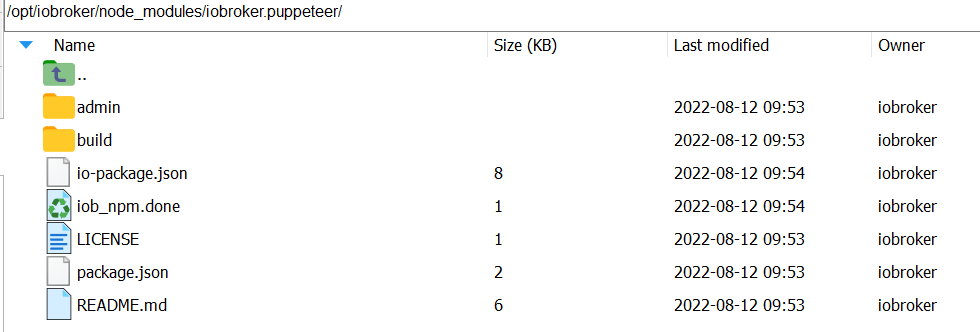
Danke, ist jetzt grün. :)
Screenshot wird nicht erstellt und DP sind leer.

° Node.js & System Update ---> sudo apt update, iob stop, sudo apt full-upgrade
° Node.js Fixer ---> iob nodejs-update
° Fixer ---> iob fix -
@foxriver76 sagte in Puppeteer: Screenshots PhantomJS Alternative:
mal sehen woran das liegt
Danke, ist jetzt grün. :)
Screenshot wird nicht erstellt und DP sind leer.
-
@negalein DPs sind nur zur Konfiguration. Schreibt er was im Log? Evtl. auf Debug wenn du sendTo ausführst?
@foxriver76 sagte in Puppeteer: Screenshots PhantomJS Alternative:
Schreibt er was im Log? Evtl. auf Debug wenn du sendTo ausführst?
puppeteer.0 2022-08-12 11:33:32.075	debug	Checking path "../wetterstation.png"
puppeteer.0 2022-08-12 11:33:32.075	debug	Message: {"command":"screenshot","message":{"url":"http://10.0.1.203:3000/d/14q2Khmnz/wetterstation-copy?orgId=1&refresh=1m&kiosk","clip":{"x":0,"y":0,"width":1920,"height":757},"path":"../wetterstation.png"},"from":"system.adapter.javascript.0","_id":48278577}
puppeteer.0 2022-08-12 11:33:19.946	debug	Checking path "../wetterstation.png"
puppeteer.0 2022-08-12 11:33:19.946	debug	Message: {"command":"screenshot","message":{"url":"http://10.0.1.203:3000/d/14q2Khmnz/wetterstation-copy?orgId=1&refresh=1m&kiosk","clip":{"x":0,"y":0,"width":1920,"height":757},"path":"../wetterstation.png"},"from":"system.adapter.javascript.0","_id":48278576}
puppeteer.0 2022-08-12 11:32:57.012	info	Ready to take screenshots
puppeteer.0 2022-08-12 11:32:56.815	info	starting. Version 0.2.1 in /opt/iobroker/node_modules/iobroker.puppeteer, node: v16.15.1, js-controller: 4.0.23
° Node.js & System Update ---> sudo apt update, iob stop, sudo apt full-upgrade
° Node.js Fixer ---> iob nodejs-update
° Fixer ---> iob fix -
@foxriver76 sagte in Puppeteer: Screenshots PhantomJS Alternative:
Schreibt er was im Log? Evtl. auf Debug wenn du sendTo ausführst?
puppeteer.0 2022-08-12 11:33:32.075 debug Checking path "../wetterstation.png" puppeteer.0 2022-08-12 11:33:32.075 debug Message: {"command":"screenshot","message":{"url":"http://10.0.1.203:3000/d/14q2Khmnz/wetterstation-copy?orgId=1&refresh=1m&kiosk","clip":{"x":0,"y":0,"width":1920,"height":757},"path":"../wetterstation.png"},"from":"system.adapter.javascript.0","_id":48278577} puppeteer.0 2022-08-12 11:33:19.946 debug Checking path "../wetterstation.png" puppeteer.0 2022-08-12 11:33:19.946 debug Message: {"command":"screenshot","message":{"url":"http://10.0.1.203:3000/d/14q2Khmnz/wetterstation-copy?orgId=1&refresh=1m&kiosk","clip":{"x":0,"y":0,"width":1920,"height":757},"path":"../wetterstation.png"},"from":"system.adapter.javascript.0","_id":48278576} puppeteer.0 2022-08-12 11:32:57.012 info Ready to take screenshots puppeteer.0 2022-08-12 11:32:56.815 info starting. Version 0.2.1 in /opt/iobroker/node_modules/iobroker.puppeteer, node: v16.15.1, js-controller: 4.0.23@negalein sagte in Puppeteer: Screenshots PhantomJS Alternative:
"../wetterstation.png"
hm gib mal als path im Skript
/opt/iobroker/node_modules/iobroker.puppeteer/wetterstation.pnganHier könnt ihr mich unterstützen.
-
@negalein sagte in Puppeteer: Screenshots PhantomJS Alternative:
"../wetterstation.png"
hm gib mal als path im Skript
/opt/iobroker/node_modules/iobroker.puppeteer/wetterstation.pngan@foxriver76 sagte in Puppeteer: Screenshots PhantomJS Alternative:
hm gib mal als path im Skript /opt/iobroker/node_modules/iobroker.puppeteer/wetterstation.png an
puppeteer.0 2022-08-12 11:38:01.009	error	Could not take screenshot of "http://10.0.1.203:3000/d/14q2Khmnz/wetterstation-copy?orgId=1&refresh=1m&kiosk": Screenshots cannot be stored inside a node_modules folder
puppeteer.0 2022-08-12 11:38:01.009	debug	Checking path "/opt/iobroker/node_modules/iobroker.puppeteer/wetterstation.png"
puppeteer.0 2022-08-12 11:38:01.008	debug	Message: {"command":"screenshot","message":{"url":"http://10.0.1.203:3000/d/14q2Khmnz/wetterstation-copy?orgId=1&refresh=1m&kiosk","clip":{"x":0,"y":0,"width":1920,"height":757},"path":"/opt/iobroker/node_modules/iobroker.puppeteer/wetterstation.png"},"from":"system.adapter.javascript.0","_id":48278587}
hmmm, muss es woanders speichern. Was würdest du empfehlen?
° Node.js & System Update ---> sudo apt update, iob stop, sudo apt full-upgrade
° Node.js Fixer ---> iob nodejs-update
° Fixer ---> iob fix -
@foxriver76 sagte in Puppeteer: Screenshots PhantomJS Alternative:
hm gib mal als path im Skript /opt/iobroker/node_modules/iobroker.puppeteer/wetterstation.png an
puppeteer.0 2022-08-12 11:38:01.009	error	Could not take screenshot of "http://10.0.1.203:3000/d/14q2Khmnz/wetterstation-copy?orgId=1&refresh=1m&kiosk": Screenshots cannot be stored inside a node_modules folder
puppeteer.0 2022-08-12 11:38:01.009	debug	Checking path "/opt/iobroker/node_modules/iobroker.puppeteer/wetterstation.png"
puppeteer.0 2022-08-12 11:38:01.008	debug	Message: {"command":"screenshot","message":{"url":"http://10.0.1.203:3000/d/14q2Khmnz/wetterstation-copy?orgId=1&refresh=1m&kiosk","clip":{"x":0,"y":0,"width":1920,"height":757},"path":"/opt/iobroker/node_modules/iobroker.puppeteer/wetterstation.png"},"from":"system.adapter.javascript.0","_id":48278587}
hmmm, muss es woanders speichern. Was würdest du empfehlen?
-
@negalein Stimmt ja, schlechter Stil wird ja vom Adapter verhindert :D
Sauber ist es im ioBroker storage, mach
pathweg und dafür das rein:ioBrokerOptions: { storagePath: 'wetterstation.png'; }@foxriver76 sagte in Puppeteer: Screenshots PhantomJS Alternative:
path weg und dafür das rein:
was brauch ich da wieder nach
}sendTo('puppeteer.0', 'screenshot', { url: 'http://10.0.1.203:3000/d/14q2Khmnz/wetterstation-copy?orgId=1&refresh=1m&kiosk', clip: { x: 0, y: 0, width: 1920, height: 757 }, ioBrokerOptions: { storagePath: 'wetterstation.png'; }, });Edit:
so gehts :)sendTo('puppeteer.0', 'screenshot', { url: 'http://10.0.1.203:3000/d/14q2Khmnz/wetterstation-copy?orgId=1&refresh=1m&kiosk', clip: { x: 0, y: 0, width: 1920, height: 757 }, ioBrokerOptions: { storagePath: 'wetterstation.png', }, });Edith 2:
hmmm, wo speichert er jetzt?° Node.js & System Update ---> sudo apt update, iob stop, sudo apt full-upgrade
° Node.js Fixer ---> iob nodejs-update
° Fixer ---> iob fix -
@foxriver76 sagte in Puppeteer: Screenshots PhantomJS Alternative:
path weg und dafür das rein:
was brauch ich da wieder nach
}sendTo('puppeteer.0', 'screenshot', { url: 'http://10.0.1.203:3000/d/14q2Khmnz/wetterstation-copy?orgId=1&refresh=1m&kiosk', clip: { x: 0, y: 0, width: 1920, height: 757 }, ioBrokerOptions: { storagePath: 'wetterstation.png'; }, });Edit:
so gehts :)sendTo('puppeteer.0', 'screenshot', { url: 'http://10.0.1.203:3000/d/14q2Khmnz/wetterstation-copy?orgId=1&refresh=1m&kiosk', clip: { x: 0, y: 0, width: 1920, height: 757 }, ioBrokerOptions: { storagePath: 'wetterstation.png', }, });Edith 2:
hmmm, wo speichert er jetzt? -
@negalein geh mal im admin auf Dateien und dann Benutzerdaten
Auf dem Filessystem ist das defaultmäßig
/opt/iobroker/iobroker-data/files/0_userdata.0/@foxriver76 sagte in Puppeteer: Screenshots PhantomJS Alternative:
geh mal im admin auf Dateien und dann Benutzerdaten
gefunden in
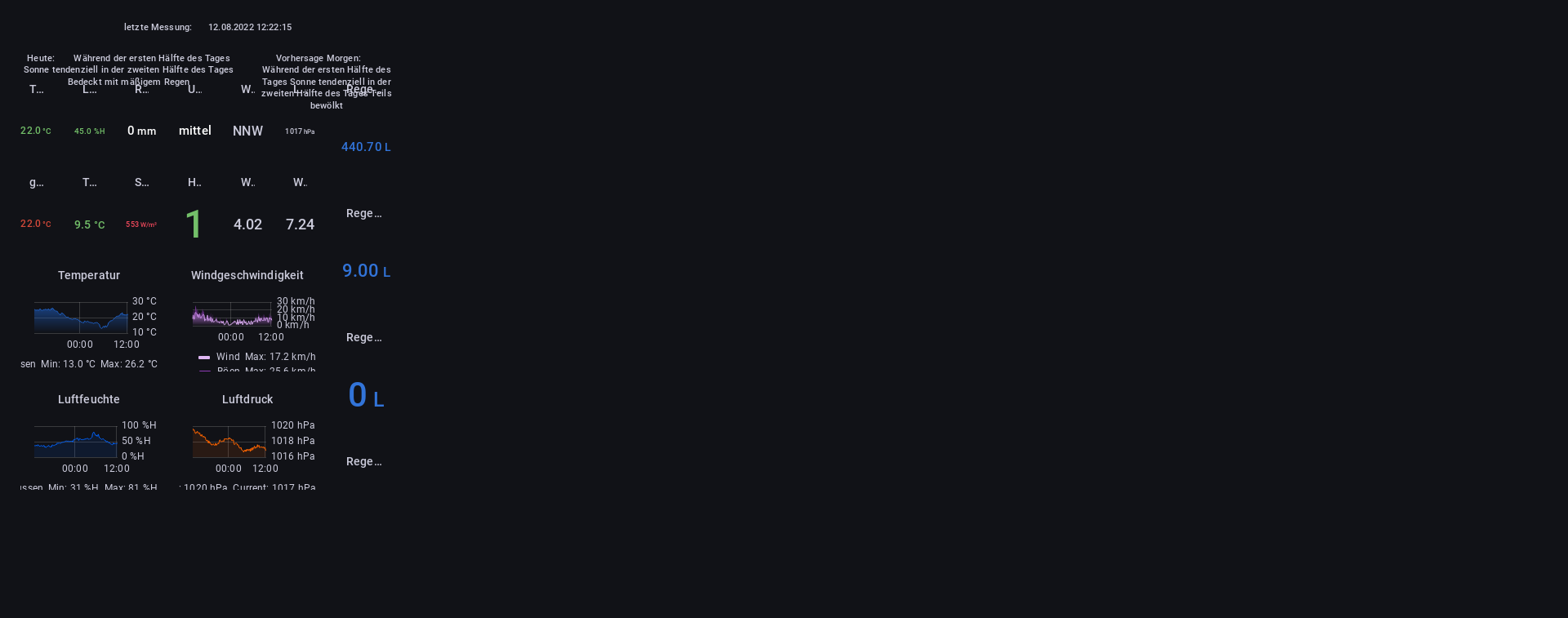
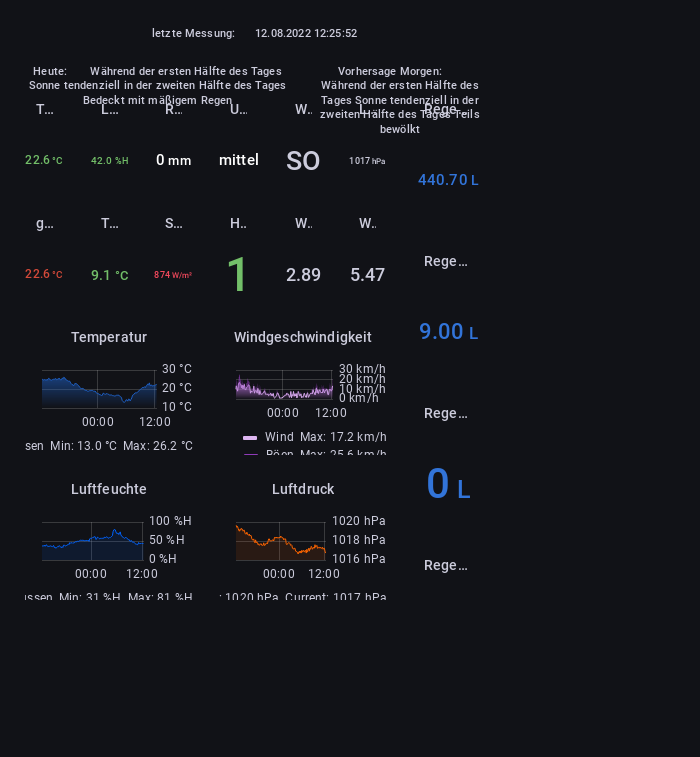
/opt/iobroker/iobroker-data/files/0_userdata.0/:)Jetzt muss ich noch an der Auflösung basteln
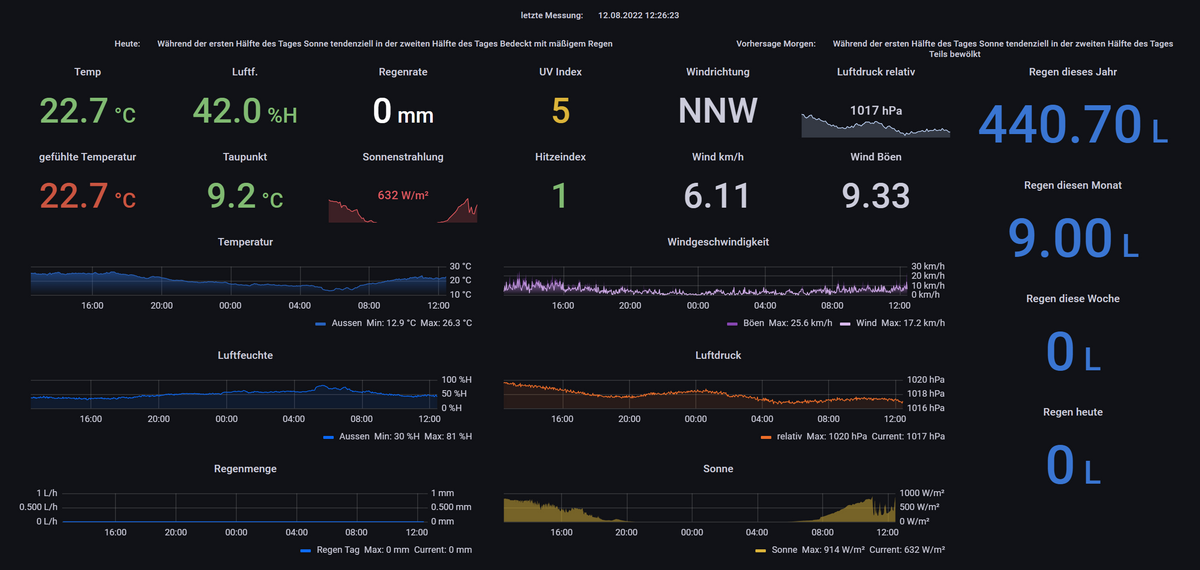
So ist es original.
Puppeteer quetscht es irgendwie.
° Node.js & System Update ---> sudo apt update, iob stop, sudo apt full-upgrade
° Node.js Fixer ---> iob nodejs-update
° Fixer ---> iob fix -
@foxriver76 sagte in Puppeteer: Screenshots PhantomJS Alternative:
geh mal im admin auf Dateien und dann Benutzerdaten
gefunden in
/opt/iobroker/iobroker-data/files/0_userdata.0/:)Jetzt muss ich noch an der Auflösung basteln
So ist es original.
Puppeteer quetscht es irgendwie.
-


Support us
520
Online32.7k
Users82.5k
Topics1.3m
Posts