



Skip to content
  • Home
  • Recent
  • Tags
  • 0 Unread 0
  • Categories
  • Unreplied
  • Popular
  • GitHub
  • Docu
  • Hilfe
Skins
  • Light
  • Brite
  • Cerulean
  • Cosmo
  • Flatly
  • Journal
  • Litera
  • Lumen
  • Lux
  • Materia
  • Minty
  • Morph
  • Pulse
  • Sandstone
  • Simplex
  • Sketchy
  • Spacelab
  • United
  • Yeti
  • Zephyr
  • Dark
  • Cyborg
  • Darkly
  • Quartz
  • Slate
  • Solar
  • Superhero
  • Vapor

  • Default (No Skin)
  • No Skin
Collapse
ioBroker Logo

Community Forum

donate donate
  1. ioBroker Community Home
  2. Deutsch
  3. Einsteigerfragen
  4. [erledigt] echarts geht nicht zu starten
NEWS

  • Jahresrückblick 2025 – unser neuer Blogbeitrag ist online! ✨
    BluefoxB
    Bluefox
    17
    1
    2.6k

  • Neuer Blogbeitrag: Monatsrückblick - Dezember 2025 🎄
    BluefoxB
    Bluefox
    13
    1
    996

  • Weihnachtsangebot 2025! 🎄
    BluefoxB
    Bluefox
    25
    1
    2.3k

[erledigt] echarts geht nicht zu starten

Scheduled Pinned Locked Moved Einsteigerfragen
27 Posts 3 Posters 2.0k Views 3 Watching
  • Oldest to Newest
  • Newest to Oldest
  • Most Votes
Reply
  • Reply as topic
Log in to reply
This topic has been deleted. Only users with topic management privileges can see it.
  • Thomas BraunT Thomas Braun

    @emi-0

    Was hast du gemacht?

    ls -la /opt/iobroker/iobroker-data/states.jsonl
    
    iobroker stop
    iobroker fix
    
    E Offline
    E Offline
    Emi 0
    wrote on last edited by
    #10

    @thomas-braun
    mache gerade ein update für web von 3.4.16 auf 4.2.0
    dann probiere noch einmal einen Neustart von iobroker

    Thomas BraunT 1 Reply Last reply
    0
    • E Emi 0

      @thomas-braun
      mache gerade ein update für web von 3.4.16 auf 4.2.0
      dann probiere noch einmal einen Neustart von iobroker

      Thomas BraunT Online
      Thomas BraunT Online
      Thomas Braun
      Most Active
      wrote on last edited by
      #11

      @emi-0 sagte in echarts geht nicht zu starten:

      mache gerade ein update für web von 3.4.16 auf 4.2.0

      Darauf hatte ich doch als erstes schon hingewiesen...

      Linux-Werkzeugkasten:
      https://forum.iobroker.net/topic/42952/der-kleine-iobroker-linux-werkzeugkasten
      NodeJS Fixer Skript:
      https://forum.iobroker.net/topic/68035/iob-node-fix-skript
      iob_diag: curl -sLf -o diag.sh https://iobroker.net/diag.sh && bash diag.sh

      E 1 Reply Last reply
      0
      • Thomas BraunT Thomas Braun

        @emi-0 sagte in echarts geht nicht zu starten:

        mache gerade ein update für web von 3.4.16 auf 4.2.0

        Darauf hatte ich doch als erstes schon hingewiesen...

        E Offline
        E Offline
        Emi 0
        wrote on last edited by
        #12

        @thomas-braun
        ja, hatte ich leider überlesen

        1 Reply Last reply
        0
        • Thomas BraunT Thomas Braun

          @emi-0

          Was hast du gemacht?

          ls -la /opt/iobroker/iobroker-data/states.jsonl
          
          iobroker stop
          iobroker fix
          
          E Offline
          E Offline
          Emi 0
          wrote on last edited by
          #13

          @thomas-braun
          iobroker läuft jetzt
          soll ich jetzt die 3 Befehle noch ausführen?

          Thomas BraunT 1 Reply Last reply
          0
          • E Emi 0

            @thomas-braun
            iobroker läuft jetzt
            soll ich jetzt die 3 Befehle noch ausführen?

            Thomas BraunT Online
            Thomas BraunT Online
            Thomas Braun
            Most Active
            wrote on last edited by
            #14

            @emi-0

            Wenn's läuft nicht unbedingt.
            Was sagt:

            iobroker status
            iobroker update -u
            sudo ln -s /usr/bin/node /usr/bin/nodejs
            which nodejs node npm && nodejs -v && node -v && npm -v && whoami && pwd && sudo apt update &> /dev/null && sudo apt update && apt policy nodejs
            

            Linux-Werkzeugkasten:
            https://forum.iobroker.net/topic/42952/der-kleine-iobroker-linux-werkzeugkasten
            NodeJS Fixer Skript:
            https://forum.iobroker.net/topic/68035/iob-node-fix-skript
            iob_diag: curl -sLf -o diag.sh https://iobroker.net/diag.sh && bash diag.sh

            E 1 Reply Last reply
            0
            • Thomas BraunT Thomas Braun

              @emi-0

              Wenn's läuft nicht unbedingt.
              Was sagt:

              iobroker status
              iobroker update -u
              sudo ln -s /usr/bin/node /usr/bin/nodejs
              which nodejs node npm && nodejs -v && node -v && npm -v && whoami && pwd && sudo apt update &> /dev/null && sudo apt update && apt policy nodejs
              
              E Offline
              E Offline
              Emi 0
              wrote on last edited by
              #15

              @thomas-braun

              micros02@smartmeter:~ $ iobroker status
               Unable to increase LUA script timeout: Connection is closed.
               Cannot determine Set feature status: Connection is closed.
              Server Cannot start inMem-objects on port 9001: Failed to lock DB file "/opt/iobroker/iobroker-data/objects.jsonl"!
              micros02@smartmeter:~ $
              
              
              Thomas BraunT 1 Reply Last reply
              0
              • E Emi 0

                @thomas-braun

                micros02@smartmeter:~ $ iobroker status
                 Unable to increase LUA script timeout: Connection is closed.
                 Cannot determine Set feature status: Connection is closed.
                Server Cannot start inMem-objects on port 9001: Failed to lock DB file "/opt/iobroker/iobroker-data/objects.jsonl"!
                micros02@smartmeter:~ $
                
                
                Thomas BraunT Online
                Thomas BraunT Online
                Thomas Braun
                Most Active
                wrote on last edited by
                #16

                @emi-0 sagte in echarts geht nicht zu starten:

                /opt/iobroker/iobroker-data/objects.jsonl

                sudo lsof /opt/iobroker/iobroker-data/objects.jsonl
                

                Linux-Werkzeugkasten:
                https://forum.iobroker.net/topic/42952/der-kleine-iobroker-linux-werkzeugkasten
                NodeJS Fixer Skript:
                https://forum.iobroker.net/topic/68035/iob-node-fix-skript
                iob_diag: curl -sLf -o diag.sh https://iobroker.net/diag.sh && bash diag.sh

                E 1 Reply Last reply
                0
                • Thomas BraunT Thomas Braun

                  @emi-0 sagte in echarts geht nicht zu starten:

                  /opt/iobroker/iobroker-data/objects.jsonl

                  sudo lsof /opt/iobroker/iobroker-data/objects.jsonl
                  
                  E Offline
                  E Offline
                  Emi 0
                  wrote on last edited by
                  #17

                  @thomas-braun

                  micros02@smartmeter:~ $ sudo lsof /opt/iobroker/iobroker-data/objects.jsonl
                  sudo: lsof: command not found
                  micros02@smartmeter:~ $
                  
                  
                  Thomas BraunT 1 Reply Last reply
                  0
                  • E Emi 0

                    @thomas-braun

                    micros02@smartmeter:~ $ sudo lsof /opt/iobroker/iobroker-data/objects.jsonl
                    sudo: lsof: command not found
                    micros02@smartmeter:~ $
                    
                    
                    Thomas BraunT Online
                    Thomas BraunT Online
                    Thomas Braun
                    Most Active
                    wrote on last edited by
                    #18

                    @emi-0

                    sudo apt update
                    sudo apt install lsof
                    

                    Linux-Werkzeugkasten:
                    https://forum.iobroker.net/topic/42952/der-kleine-iobroker-linux-werkzeugkasten
                    NodeJS Fixer Skript:
                    https://forum.iobroker.net/topic/68035/iob-node-fix-skript
                    iob_diag: curl -sLf -o diag.sh https://iobroker.net/diag.sh && bash diag.sh

                    E 1 Reply Last reply
                    0
                    • Thomas BraunT Thomas Braun

                      @emi-0

                      sudo apt update
                      sudo apt install lsof
                      
                      E Offline
                      E Offline
                      Emi 0
                      wrote on last edited by
                      #19

                      @thomas-braun
                      hat etwas länger gedauert, weil PUTTY abgeschmiert war

                      micros02@smartmeter:~ $ sudo apt update
                      Get:1 http://raspbian.raspberrypi.org/raspbian bullseye InRelease [15.0 kB]
                      Get:2 http://archive.raspberrypi.org/debian bullseye InRelease [23.6 kB]
                      Get:3 http://raspbian.raspberrypi.org/raspbian bullseye/main armhf Packages [13.2 MB]
                      Get:4 http://archive.raspberrypi.org/debian bullseye/main armhf Packages [264 kB]
                      Fetched 13.5 MB in 51s (266 kB/s)
                      Reading package lists... Done
                      Building dependency tree... Done
                      Reading state information... Done
                      4 packages can be upgraded. Run 'apt list --upgradable' to see them.
                      micros02@smartmeter:~ $ sudo apt install lsof
                      Reading package lists... Done
                      Building dependency tree... Done
                      Reading state information... Done
                      The following NEW packages will be installed:
                        lsof
                      0 upgraded, 1 newly installed, 0 to remove and 4 not upgraded.
                      Need to get 308 kB of archives.
                      After this operation, 449 kB of additional disk space will be used.
                      Get:1 http://raspbian.raspberrypi.org/raspbian bullseye/main armhf lsof armhf 4.93.2+dfsg-1.1 [308 kB]
                      Fetched 308 kB in 2s (183 kB/s)
                      Selecting previously unselected package lsof.
                      (Reading database ... 53331 files and directories currently installed.)
                      Preparing to unpack .../lsof_4.93.2+dfsg-1.1_armhf.deb ...
                      Unpacking lsof (4.93.2+dfsg-1.1) ...
                      Setting up lsof (4.93.2+dfsg-1.1) ...
                      Processing triggers for man-db (2.9.4-2) ...
                      micros02@smartmeter:~ $
                      
                      Was tue ich jetzt?
                      
                      Thomas BraunT 1 Reply Last reply
                      0
                      • E Emi 0

                        @thomas-braun
                        hat etwas länger gedauert, weil PUTTY abgeschmiert war

                        micros02@smartmeter:~ $ sudo apt update
                        Get:1 http://raspbian.raspberrypi.org/raspbian bullseye InRelease [15.0 kB]
                        Get:2 http://archive.raspberrypi.org/debian bullseye InRelease [23.6 kB]
                        Get:3 http://raspbian.raspberrypi.org/raspbian bullseye/main armhf Packages [13.2 MB]
                        Get:4 http://archive.raspberrypi.org/debian bullseye/main armhf Packages [264 kB]
                        Fetched 13.5 MB in 51s (266 kB/s)
                        Reading package lists... Done
                        Building dependency tree... Done
                        Reading state information... Done
                        4 packages can be upgraded. Run 'apt list --upgradable' to see them.
                        micros02@smartmeter:~ $ sudo apt install lsof
                        Reading package lists... Done
                        Building dependency tree... Done
                        Reading state information... Done
                        The following NEW packages will be installed:
                          lsof
                        0 upgraded, 1 newly installed, 0 to remove and 4 not upgraded.
                        Need to get 308 kB of archives.
                        After this operation, 449 kB of additional disk space will be used.
                        Get:1 http://raspbian.raspberrypi.org/raspbian bullseye/main armhf lsof armhf 4.93.2+dfsg-1.1 [308 kB]
                        Fetched 308 kB in 2s (183 kB/s)
                        Selecting previously unselected package lsof.
                        (Reading database ... 53331 files and directories currently installed.)
                        Preparing to unpack .../lsof_4.93.2+dfsg-1.1_armhf.deb ...
                        Unpacking lsof (4.93.2+dfsg-1.1) ...
                        Setting up lsof (4.93.2+dfsg-1.1) ...
                        Processing triggers for man-db (2.9.4-2) ...
                        micros02@smartmeter:~ $
                        
                        Was tue ich jetzt?
                        
                        Thomas BraunT Online
                        Thomas BraunT Online
                        Thomas Braun
                        Most Active
                        wrote on last edited by
                        #20

                        @emi-0

                        Jetzt nimmst du die 4 Updates auch noch mit:

                        sudo apt full-upgrade
                        sudo reboot
                        

                        Wenn es dann immer noch klemmt schauen wir je nach Meldung weiter.

                        Linux-Werkzeugkasten:
                        https://forum.iobroker.net/topic/42952/der-kleine-iobroker-linux-werkzeugkasten
                        NodeJS Fixer Skript:
                        https://forum.iobroker.net/topic/68035/iob-node-fix-skript
                        iob_diag: curl -sLf -o diag.sh https://iobroker.net/diag.sh && bash diag.sh

                        E 1 Reply Last reply
                        0
                        • Thomas BraunT Thomas Braun

                          @emi-0

                          Jetzt nimmst du die 4 Updates auch noch mit:

                          sudo apt full-upgrade
                          sudo reboot
                          

                          Wenn es dann immer noch klemmt schauen wir je nach Meldung weiter.

                          E Offline
                          E Offline
                          Emi 0
                          wrote on last edited by
                          #21

                          @thomas-braun

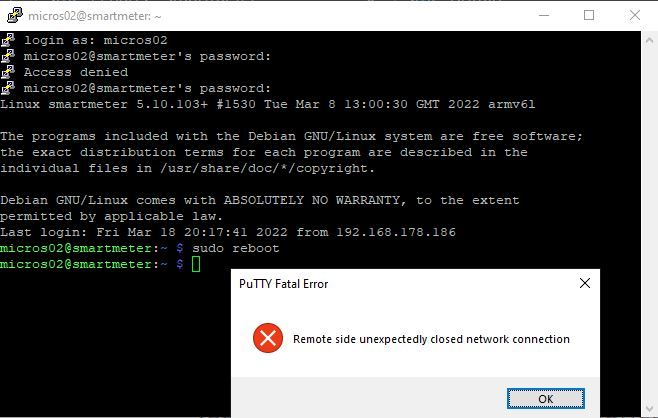
                          ich habe irgendein Problem mit PUTTY wenn ich sudo reboot eingebe:

                          echarts_03.JPG

                          Thomas BraunT da_WoodyD 2 Replies Last reply
                          0
                          • E Emi 0

                            @thomas-braun

                            ich habe irgendein Problem mit PUTTY wenn ich sudo reboot eingebe:

                            echarts_03.JPG

                            Thomas BraunT Online
                            Thomas BraunT Online
                            Thomas Braun
                            Most Active
                            wrote on last edited by
                            #22

                            @emi-0

                            Ich nutze kein Knetgummi (putty). Verbindung nochmal neuaufbauen? Bei den vier Updates dürfte auch openssl dabei gewesen sein.

                            Linux-Werkzeugkasten:
                            https://forum.iobroker.net/topic/42952/der-kleine-iobroker-linux-werkzeugkasten
                            NodeJS Fixer Skript:
                            https://forum.iobroker.net/topic/68035/iob-node-fix-skript
                            iob_diag: curl -sLf -o diag.sh https://iobroker.net/diag.sh && bash diag.sh

                            E 1 Reply Last reply
                            0
                            • Thomas BraunT Thomas Braun

                              @emi-0

                              Ich nutze kein Knetgummi (putty). Verbindung nochmal neuaufbauen? Bei den vier Updates dürfte auch openssl dabei gewesen sein.

                              E Offline
                              E Offline
                              Emi 0
                              wrote on last edited by
                              #23

                              @thomas-braun

                              habe ich jetzt schon 3x gemacht.
                              Gibt es etwas besseres als putty?

                              Thomas BraunT 1 Reply Last reply
                              0
                              • E Emi 0

                                @thomas-braun

                                habe ich jetzt schon 3x gemacht.
                                Gibt es etwas besseres als putty?

                                Thomas BraunT Online
                                Thomas BraunT Online
                                Thomas Braun
                                Most Active
                                wrote on last edited by
                                #24

                                @emi-0

                                Ich verwende die PowerShell 7.2.2.

                                Linux-Werkzeugkasten:
                                https://forum.iobroker.net/topic/42952/der-kleine-iobroker-linux-werkzeugkasten
                                NodeJS Fixer Skript:
                                https://forum.iobroker.net/topic/68035/iob-node-fix-skript
                                iob_diag: curl -sLf -o diag.sh https://iobroker.net/diag.sh && bash diag.sh

                                E 1 Reply Last reply
                                0
                                • Thomas BraunT Thomas Braun

                                  @emi-0

                                  Ich verwende die PowerShell 7.2.2.

                                  E Offline
                                  E Offline
                                  Emi 0
                                  wrote on last edited by
                                  #25

                                  @thomas-braun

                                  ok. Werde ich morgen ausprobieren.
                                  Melde mich dann wieder.
                                  Vielen Dank erstmal und schönen Abend

                                  1 Reply Last reply
                                  0
                                  • E Emi 0

                                    @thomas-braun

                                    ich habe irgendein Problem mit PUTTY wenn ich sudo reboot eingebe:

                                    echarts_03.JPG

                                    da_WoodyD Offline
                                    da_WoodyD Offline
                                    da_Woody
                                    wrote on last edited by
                                    #26

                                    @emi-0 nu, wenn du das teil rebootest, verliert putty logischerweise die verbindung. du kannst danach mit rechtsklick in der titelleiste restart session nehmen.

                                    Gibt es etwas besseres als putty?

                                    da gibts einiges... bin vor kurzem wieder auf MobaXterm gestossen. mächtig, kann viel. sicher teilweise überpowert, aber man kann damit halt auch viel mehr anstellen.

                                    gruß vom Woody
                                    HAPPINESS is not a DESTINATION, it's a WAY of LIFE!

                                    E 1 Reply Last reply
                                    0
                                    • da_WoodyD da_Woody

                                      @emi-0 nu, wenn du das teil rebootest, verliert putty logischerweise die verbindung. du kannst danach mit rechtsklick in der titelleiste restart session nehmen.

                                      Gibt es etwas besseres als putty?

                                      da gibts einiges... bin vor kurzem wieder auf MobaXterm gestossen. mächtig, kann viel. sicher teilweise überpowert, aber man kann damit halt auch viel mehr anstellen.

                                      E Offline
                                      E Offline
                                      Emi 0
                                      wrote on last edited by
                                      #27

                                      @da_woody
                                      Inzwischen scheint echarts zu funktionieren.
                                      Obwohl ich nichts mehr unternommen hatte.
                                      Also ist das Problem beseitigt.
                                      Danke an alle, die mit gewirkt haben.

                                      1 Reply Last reply
                                      1
                                      Reply
                                      • Reply as topic
                                      Log in to reply
                                      • Oldest to Newest
                                      • Newest to Oldest
                                      • Most Votes


                                      Support us

                                      ioBroker
                                      Community Adapters
                                      Donate

                                      682

                                      Online

                                      32.6k

                                      Users

                                      82.3k

                                      Topics

                                      1.3m

                                      Posts
                                      Community
                                      Impressum | Datenschutz-Bestimmungen | Nutzungsbedingungen | Einwilligungseinstellungen
                                      ioBroker Community 2014-2025
                                      logo
                                      • Login

                                      • Don't have an account? Register

                                      • Login or register to search.
                                      • First post
                                        Last post
                                      0
                                      • Home
                                      • Recent
                                      • Tags
                                      • Unread 0
                                      • Categories
                                      • Unreplied
                                      • Popular
                                      • GitHub
                                      • Docu
                                      • Hilfe