



Skip to content
  • Home
  • Recent
  • Tags
  • 0 Unread 0
  • Categories
  • Unreplied
  • Popular
  • GitHub
  • Docu
  • Hilfe
Skins
  • Light
  • Brite
  • Cerulean
  • Cosmo
  • Flatly
  • Journal
  • Litera
  • Lumen
  • Lux
  • Materia
  • Minty
  • Morph
  • Pulse
  • Sandstone
  • Simplex
  • Sketchy
  • Spacelab
  • United
  • Yeti
  • Zephyr
  • Dark
  • Cyborg
  • Darkly
  • Quartz
  • Slate
  • Solar
  • Superhero
  • Vapor

  • Default (No Skin)
  • No Skin
Collapse
ioBroker Logo

Community Forum

donate donate
  1. ioBroker Community Home
  2. Deutsch
  3. Einsteigerfragen
  4. Installation
  5. Vis Install

NEWS

  • Monatsrückblick Januar/Februar 2026 ist online!
    BluefoxB
    Bluefox
    18
    1
    719

  • Jahresrückblick 2025 – unser neuer Blogbeitrag ist online! ✨
    BluefoxB
    Bluefox
    18
    1
    5.9k

  • Neuer Blogbeitrag: Monatsrückblick - Dezember 2025 🎄
    BluefoxB
    Bluefox
    13
    1
    1.5k

Vis Install

Scheduled Pinned Locked Moved Installation
28 Posts 3 Posters 2.0k Views 2 Watching
  • Oldest to Newest
  • Newest to Oldest
  • Most Votes
Reply
  • Reply as topic
Log in to reply
This topic has been deleted. Only users with topic management privileges can see it.
  • T Thomas 7

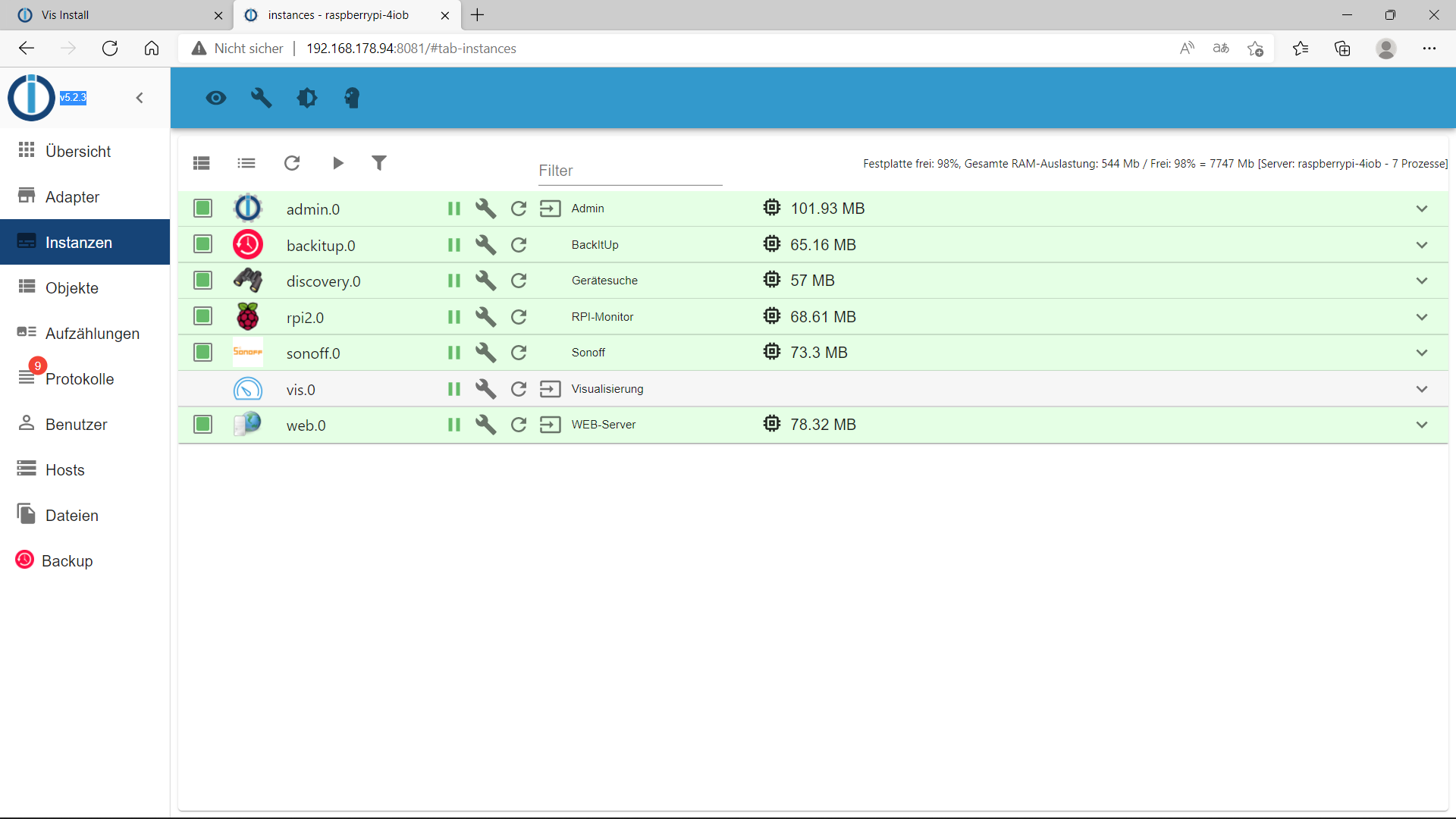
    @thomas-7 Hier ist die Aufstellung meiner Instanzen 20fbcb86-66ac-4672-a844-f58f7e7cd8b8-image.png

    T Offline
    T Offline
    Thomas 7
    wrote on last edited by Homoran
    #17

    @homoran Hier ist die gewünschte Datei aus Putty:

    pi@raspberrypi-4iob:~ $ iobroker list instances
    + system.adapter.admin.0                  : admin                 : raspberrypi-4iob                         -  enabled, port: 8081, bind: 0.0.0.0, run as: admin
    + system.adapter.backitup.0               : backitup              : raspberrypi-4iob                         -  enabled
    + system.adapter.discovery.0              : discovery             : raspberrypi-4iob                         -  enabled
    + system.adapter.rpi2.0                   : rpi2                  : raspberrypi-4iob                         -  enabled
    + system.adapter.sonoff.0                 : sonoff                : raspberrypi-4iob                         -  enabled, port: 1883, bind: 192.168.178.94
      system.adapter.vis.0                    : vis                   : raspberrypi-4iob                         -  enabled
    + system.adapter.web.0
    

    MOD EDIT: Log in Code Tags

    T 1 Reply Last reply
    0
    • T Thomas 7

      @thomas-7 Hier ist die Aufstellung meiner Instanzen 20fbcb86-66ac-4672-a844-f58f7e7cd8b8-image.png

      wendy2702W Offline
      wendy2702W Offline
      wendy2702
      wrote on last edited by
      #18

      @thomas-7 sagte in Vis Install:

      @thomas-7 Hier ist die Aufstellung meiner Instanzen 20fbcb86-66ac-4672-a844-f58f7e7cd8b8-image.png

      Da Steht VIS.0 doch drin.

      WO ist das Problem?

      Bitte keine Fragen per PN, die gehören ins Forum!

      Benutzt das Voting rechts unten im Beitrag wenn er euch geholfen hat.

      1 Reply Last reply
      0
      • T Thomas 7

        @thomas-7 Hier ist die Aufstellung meiner Instanzen 20fbcb86-66ac-4672-a844-f58f7e7cd8b8-image.png

        HomoranH Do not disturb
        HomoranH Do not disturb
        Homoran
        Global Moderator Administrators
        wrote on last edited by
        #19

        @thomas-7 sagte in Vis Install:

        Hier ist die Aufstellung meiner Instanzen

        da ist vis doch

        kein Support per PN! - Fragen im Forum stellen -
        Benutzt das Voting rechts unten im Beitrag wenn er euch geholfen hat.
        Das Forum freut sich über eine Spende. Benutzt dazu den Spendenbutton oben rechts. Danke!
        der Installationsfixer: curl -fsL https://iobroker.net/fix.sh | bash -

        T 1 Reply Last reply
        0
        • T Thomas 7

          @homoran Hier ist die gewünschte Datei aus Putty:

          pi@raspberrypi-4iob:~ $ iobroker list instances
          + system.adapter.admin.0                  : admin                 : raspberrypi-4iob                         -  enabled, port: 8081, bind: 0.0.0.0, run as: admin
          + system.adapter.backitup.0               : backitup              : raspberrypi-4iob                         -  enabled
          + system.adapter.discovery.0              : discovery             : raspberrypi-4iob                         -  enabled
          + system.adapter.rpi2.0                   : rpi2                  : raspberrypi-4iob                         -  enabled
          + system.adapter.sonoff.0                 : sonoff                : raspberrypi-4iob                         -  enabled, port: 1883, bind: 192.168.178.94
            system.adapter.vis.0                    : vis                   : raspberrypi-4iob                         -  enabled
          + system.adapter.web.0
          

          MOD EDIT: Log in Code Tags

          T Offline
          T Offline
          Thomas 7
          wrote on last edited by wendy2702
          #20

          @homoran Hier ist die andere Liste:

          pi@raspberrypi-4iob:~ $ iobroker update -i
          Used repository: default
          hash unchanged, use cached sources
          update done
          Adapter    "admin"         : 5.2.3    , installed 5.2.3
          Adapter    "backitup"      : 2.2.3    , installed 2.2.3
          Adapter    "discovery"     : 2.7.3    , installed 2.7.3
          Controller "js-controller" : 3.3.22   , installed 3.3.22
          Adapter    "rpi2"          : 1.3.1    , installed 1.3.1
          Adapter    "simple-api"    : 2.6.1    , installed 2.6.2
          Adapter    "socketio"      : 3.1.5    , installed 4.1.0
          Adapter    "sonoff"        : 2.4.5    , installed 2.4.5
          Adapter    "vis"           : 1.4.5    , installed 1.4.5
          Adapter    "web"           : 3.4.16   , installed 3.4.16
          pi@raspberrypi-4iob:~ $
          

          MOD EDIT: LOG IN CODE TAGS GESETZT

          @Thomas-7 : Benutze bitte beim Posten von Logs die </> Code Tags

          HomoranH 1 Reply Last reply
          0
          • T Thomas 7

            @homoran Hier ist die andere Liste:

            pi@raspberrypi-4iob:~ $ iobroker update -i
            Used repository: default
            hash unchanged, use cached sources
            update done
            Adapter    "admin"         : 5.2.3    , installed 5.2.3
            Adapter    "backitup"      : 2.2.3    , installed 2.2.3
            Adapter    "discovery"     : 2.7.3    , installed 2.7.3
            Controller "js-controller" : 3.3.22   , installed 3.3.22
            Adapter    "rpi2"          : 1.3.1    , installed 1.3.1
            Adapter    "simple-api"    : 2.6.1    , installed 2.6.2
            Adapter    "socketio"      : 3.1.5    , installed 4.1.0
            Adapter    "sonoff"        : 2.4.5    , installed 2.4.5
            Adapter    "vis"           : 1.4.5    , installed 1.4.5
            Adapter    "web"           : 3.4.16   , installed 3.4.16
            pi@raspberrypi-4iob:~ $
            

            MOD EDIT: LOG IN CODE TAGS GESETZT

            @Thomas-7 : Benutze bitte beim Posten von Logs die </> Code Tags

            HomoranH Do not disturb
            HomoranH Do not disturb
            Homoran
            Global Moderator Administrators
            wrote on last edited by
            #21

            @thomas-7 Bitte in code-tags posten.

            Die Listen haben sich ja längst erledigt. Vis.0 ist doch da

            kein Support per PN! - Fragen im Forum stellen -
            Benutzt das Voting rechts unten im Beitrag wenn er euch geholfen hat.
            Das Forum freut sich über eine Spende. Benutzt dazu den Spendenbutton oben rechts. Danke!
            der Installationsfixer: curl -fsL https://iobroker.net/fix.sh | bash -

            1 Reply Last reply
            0
            • HomoranH Homoran

              @thomas-7 sagte in Vis Install:

              Hier ist die Aufstellung meiner Instanzen

              da ist vis doch

              T Offline
              T Offline
              Thomas 7
              wrote on last edited by
              #22

              @homoran ja, das hat mich gerade auch gewundert. Aber es ist nicht grün markiert

              HomoranH 1 Reply Last reply
              0
              • T Thomas 7

                @homoran ja, das hat mich gerade auch gewundert. Aber es ist nicht grün markiert

                HomoranH Do not disturb
                HomoranH Do not disturb
                Homoran
                Global Moderator Administrators
                wrote on last edited by Homoran
                #23

                @thomas-7 sagte in Vis Install:

                Aber es ist nicht grün markiert

                Ist normal, da vis nur einmalig in den Hintergrund gestartet wird

                @thomas-7 sagte in Vis Install:

                hat mich gerade auch gewundert.

                wahrscheinlich durch den reload der Seite
                Immer mal STRG-F5 drücken wenn was seltsam ist

                kein Support per PN! - Fragen im Forum stellen -
                Benutzt das Voting rechts unten im Beitrag wenn er euch geholfen hat.
                Das Forum freut sich über eine Spende. Benutzt dazu den Spendenbutton oben rechts. Danke!
                der Installationsfixer: curl -fsL https://iobroker.net/fix.sh | bash -

                T 1 Reply Last reply
                0
                • HomoranH Homoran

                  @thomas-7 sagte in Vis Install:

                  Aber es ist nicht grün markiert

                  Ist normal, da vis nur einmalig in den Hintergrund gestartet wird

                  @thomas-7 sagte in Vis Install:

                  hat mich gerade auch gewundert.

                  wahrscheinlich durch den reload der Seite
                  Immer mal STRG-F5 drücken wenn was seltsam ist

                  T Offline
                  T Offline
                  Thomas 7
                  wrote on last edited by
                  #24

                  @homoran ach so, dann ist ja alles ok und ich kann damit arbeiten, oder ?

                  HomoranH 1 Reply Last reply
                  0
                  • T Thomas 7

                    @homoran ach so, dann ist ja alles ok und ich kann damit arbeiten, oder ?

                    HomoranH Do not disturb
                    HomoranH Do not disturb
                    Homoran
                    Global Moderator Administrators
                    wrote on last edited by
                    #25

                    @thomas-7 sagte in Vis Install:

                    @homoran ach so, dann ist ja alles ok und ich kann damit arbeiten, oder ?

                    natürlich - hast du doch schon

                    kein Support per PN! - Fragen im Forum stellen -
                    Benutzt das Voting rechts unten im Beitrag wenn er euch geholfen hat.
                    Das Forum freut sich über eine Spende. Benutzt dazu den Spendenbutton oben rechts. Danke!
                    der Installationsfixer: curl -fsL https://iobroker.net/fix.sh | bash -

                    T 1 Reply Last reply
                    0
                    • HomoranH Homoran

                      @thomas-7 sagte in Vis Install:

                      @homoran ach so, dann ist ja alles ok und ich kann damit arbeiten, oder ?

                      natürlich - hast du doch schon

                      T Offline
                      T Offline
                      Thomas 7
                      wrote on last edited by
                      #26

                      @homoran Dann bitte ich um endschuldigung und bedanke mich für die vielen Posts und Hilfestellungen. Dann werde ich mich einmal in Vis einarbeiten.

                      1 Reply Last reply
                      0
                      • wendy2702W Offline
                        wendy2702W Offline
                        wendy2702
                        wrote on last edited by
                        #27

                        Viel Spaß.

                        Ergänzt du bitte noch den Titel vom ersten Post um ein: „Gelöst:“

                        Bitte keine Fragen per PN, die gehören ins Forum!

                        Benutzt das Voting rechts unten im Beitrag wenn er euch geholfen hat.

                        1 Reply Last reply
                        0
                        • T Thomas 7

                          Ich habe IoBroker neu auf meinem pi4 8gb installiert und es läuft jetzt etwas besser. Allerdings kann ich Vis immer noch nicht vollständig installieren. Es gibt eine Fehlermeldung, daß Vis eine multiple Installation nicht unterstützt. Da muß wohl irgendein Eintrag vorheriger Installation noch vorhanden sein. Ich bin somit nur im Demo Modus und kann es leider nicht ändern, obwohl ich keine Private Lizenz bekommen habe. In den Instanzen wird Vis auch nicht dargestellt. Kann mir jemand helfen ?

                          T Offline
                          T Offline
                          Thomas 7
                          wrote on last edited by
                          #28

                          @thomas-7 said in Vis Install:

                          Ich habe IoBroker neu auf meinem pi4 8gb installiert und es läuft jetzt etwas besser. Allerdings kann ich Vis immer noch nicht vollständig installieren. Es gibt eine Fehlermeldung, daß Vis eine multiple Installation nicht unterstützt. Da muß wohl irgendein Eintrag vorheriger Installation noch vorhanden sein. Ich bin somit nur im Demo Modus und kann es leider nicht ändern, obwohl ich keine Private Lizenz bekommen habe. In den Instanzen wird Vis auch nicht dargestellt. Kann mir jemand helfen ?

                          „Gelöst“
                          1 Reply Last reply
                          0

                          Hello! It looks like you're interested in this conversation, but you don't have an account yet.

                          Getting fed up of having to scroll through the same posts each visit? When you register for an account, you'll always come back to exactly where you were before, and choose to be notified of new replies (either via email, or push notification). You'll also be able to save bookmarks and upvote posts to show your appreciation to other community members.

                          With your input, this post could be even better 💗

                          Register Login
                          Reply
                          • Reply as topic
                          Log in to reply
                          • Oldest to Newest
                          • Newest to Oldest
                          • Most Votes


                          Support us

                          ioBroker
                          Community Adapters
                          Donate

                          307

                          Online

                          32.7k

                          Users

                          82.6k

                          Topics

                          1.3m

                          Posts
                          Community
                          Impressum | Datenschutz-Bestimmungen | Nutzungsbedingungen | Einwilligungseinstellungen
                          ioBroker Community 2014-2025
                          logo
                          • Login

                          • Don't have an account? Register

                          • Login or register to search.
                          • First post
                            Last post
                          0
                          • Home
                          • Recent
                          • Tags
                          • Unread 0
                          • Categories
                          • Unreplied
                          • Popular
                          • GitHub
                          • Docu
                          • Hilfe

