



TESTER: Neuer Adapter Webuntis
-
Ich habe den Adapter gerade eingerichtet, aber nur inbox,info und newsfeed zu sehen. Weit und breit nichts vom Stundenplan
Ich habe eben mal den Adapter installiert und bekomme sehr wenig Infos:
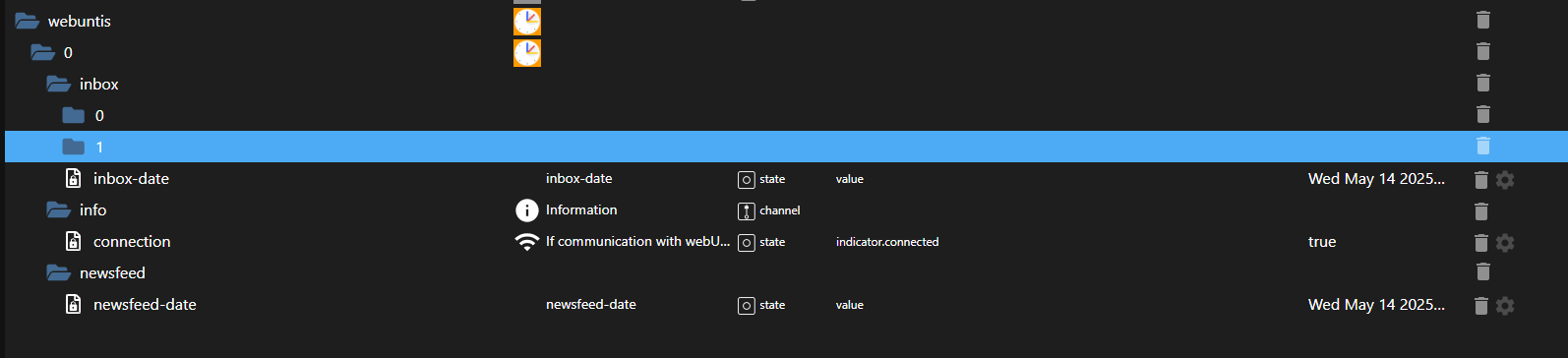
Im Log steht, dass er den Kalender nicht abrufen kann. In der Weboberfläche sehe ich den Kalender aber.
--- Edit ---
Ok, mit dem Account vom Schüler bekomme ich den Stundenplan (macht irgendwie auch Sinn).
Leider sind im Adapter die Klassenarbeiten nicht ersichtlich. Hat da schon jemand eine Lösung?
VG LarsKein support per PM. Bitte im Forum Fragen stellen!
-
Hallo zusammen,
ich bin auch Grade neu zum Adapter hinzugekommen.
Leider hat Untis die Serveradressen und vermutlich auch die API geändert.
Weiss da jemand mehr? -
Hallo zusammen,
ich bin auch Grade neu zum Adapter hinzugekommen.
Leider hat Untis die Serveradressen und vermutlich auch die API geändert.
Weiss da jemand mehr?@tobi_kieninger sagte in TESTER: Neuer Adapter Webuntis:
Hallo zusammen,
ich bin auch Grade neu zum Adapter hinzugekommen.
Leider hat Untis die Serveradressen und vermutlich auch die API geändert.
Weiss da jemand mehr?Bei mir hat sich seit Einrichtung letzten Sept die Base URL und das Secret geändert. Die Daten kommen aber an
-
@tobi_kieninger sagte in TESTER: Neuer Adapter Webuntis:
Hallo zusammen,
ich bin auch Grade neu zum Adapter hinzugekommen.
Leider hat Untis die Serveradressen und vermutlich auch die API geändert.
Weiss da jemand mehr?Bei mir hat sich seit Einrichtung letzten Sept die Base URL und das Secret geändert. Die Daten kommen aber an
@mading sagte in TESTER: Neuer Adapter Webuntis:
@tobi_kieninger sagte in TESTER: Neuer Adapter Webuntis:
Hallo zusammen,
ich bin auch Grade neu zum Adapter hinzugekommen.
Leider hat Untis die Serveradressen und vermutlich auch die API geändert.
Weiss da jemand mehr?Bei mir hat sich seit Einrichtung letzten Sept die Base URL und das Secret geändert. Die Daten kommen aber an
In wieweit hat sich das Secret geändert?
Ich. In seit 7.12. abgeschnitten..
Die neue BaseUrl enthält jetzt den Schulnamen, das hab ich geschafft, aber wie ändert sich das Secret?
-
Ich habe eben mal den Adapter installiert und bekomme sehr wenig Infos:
Im Log steht, dass er den Kalender nicht abrufen kann. In der Weboberfläche sehe ich den Kalender aber.
--- Edit ---
Ok, mit dem Account vom Schüler bekomme ich den Stundenplan (macht irgendwie auch Sinn).
Leider sind im Adapter die Klassenarbeiten nicht ersichtlich. Hat da schon jemand eine Lösung?
VG Lars@Eisbaeeer
Das mit dem Schüler Account hat geholfen - Danke - Hatte es erst mit dem Elternaccount probiert -
Bei uns benutzen alle Schüler und Eltern(!) den gleichen Login und man sucht sich unter "weitere Stundenpläne" die entsprechende Klasse(n) aus.
Lässt sich das auch abfragen?
Aktuell bekomm ich nur "Cannot read Timetable for today - possible block by scool" -
Hi alle zusammen,
nutze den Adapter nun auch, nachdem mit die Schule mitgeteilt hat, dass ical export ein kostenpflichtiger zusatz ist, und die Schule dass daher nicht anbieten kann.Adapter installiert und mit Schüler Account Verbunden.
Alles super.
Wünsche:
Wie wäre ein Datenpunkt mit komplett input als rohdaten?Hintergrund:
Ich möchte gerne den Stundenplan als export für JARVIS nutzen. Mache das aktuell schon mit Edupage meiner Grundschüler.
Weiter hätte ich gerne die gesammte aktuelle Woche inkl. Wichtiger news (wenn möglich als separaten datenpunkt)Gerne unterstütze ich auch dabei ;)
Grüße
-
Hi zusammen,
der Adapter war mir zu unzuverlässig bzw. hatte ich ein Javascript gefunden, dass mir alles für vis in einer Tabelle aufarbeitet. Das war aber nicht immer richtig. Ich habe mit Hilfe von copilot ein Skript gebaut, das mir Screenshots des Stundenplans macht.
# Create a new folder for the script
mkdir webuntis-shot && cd webuntis-shot

# Initialize and install dependencies
npm init -y
npm i playwright dotenv

# Install browsers for Playwright (first time only)
npx playwright install
dann .env Datei erstellen
# .env
WEBUNTIS_USERNAME="user"
WEBUNTIS_PASSWORD="xyz"
HEADLESS="1"
OUTPUT_DIR="/opt/iobroker"
dann die Datei z.B. webuntis.js anlegen
// webuntis-screenshot.js
// Usage: node webuntis-screenshot.js
// Optional env: WEBUNTIS_USERNAME, WEBUNTIS_PASSWORD, HEADLESS, OUTPUT_DIR, TARGET_HASH_FILE

import { chromium } from 'playwright';
import fs from 'fs';
import fsp from 'fs/promises';
import path from 'path';
import 'dotenv/config';

const USERNAME = process.env.WEBUNTIS_USERNAME || 'user';
const PASSWORD = process.env.WEBUNTIS_PASSWORD || 'pass';
const HEADLESS = (process.env.HEADLESS || '1') !== '0';
const OUTPUT_DIR = process.env.OUTPUT_DIR || '/opt/iobroker/iobroker-data/files/vis.0/main/img/';

const BASE_URL = 'https://gss-realschule.webuntis.com/timetable/my-student?date=';

// === NEW: read TARGET_HASH from external file ===
const TARGET_HASH_FILE = process.env.TARGET_HASH_FILE || path.resolve(process.cwd(), 'target-hash.txt');

async function loadTargetHash(filePath) {
  const exists = fs.existsSync(filePath);
  if (!exists) {
    throw new Error(`Target-hash file not found: ${filePath}`);
  }

  const ext = path.extname(filePath).toLowerCase();

  if (ext === '.json') {
    const raw = await fsp.readFile(filePath, 'utf-8');
    let data;
    try {
      data = JSON.parse(raw);
    } catch (e) {
      throw new Error(`Invalid JSON in ${filePath}: ${e.message}`);
    }
    const hash = (data.TARGET_HASH || '').trim();
    if (!hash) throw new Error(`Missing "TARGET_HASH" property in ${filePath}`);
    validateHash(hash);
    return hash;
  } else {
    // treat as plain text
    const hash = (await fsp.readFile(filePath, 'utf-8')).trim();
    validateHash(hash);
    return hash;
  }
}

function validateHash(hash) {
  if (!hash.startsWith('#/')) {
    throw new Error(`TARGET_HASH must start with "#/". Got: "${hash}"`);
  }
}

// Utility: ensure directory exists (try to create if not)
function ensureDir(dir) {
  try {
    if (!fs.existsSync(dir)) {
      fs.mkdirSync(dir, { recursive: true });
    }
    const testFile = path.join(dir, '.test_write.tmp');
    fs.writeFileSync(testFile, 'ok');
    fs.unlinkSync(testFile);
    return true;
  } catch (e) {
    console.error(`[WARN] Cannot write to ${dir}: ${e.message}`);
    return false;
  }
}

async function tryFill(page, selectors, value, opts = {}) {
  for (const sel of selectors) {
    try {
      const el = await page.$(sel);
      if (el) {
        await el.fill(value, { timeout: opts.timeout || 3000 });
        return true;
      }
    } catch { /* continue */ }
  }
  return false;
}

async function tryClick(page, candidates, opts = {}) {
  for (const c of candidates) {
    try {
      if (c.selector) {
        await page.click(c.selector, { timeout: opts.timeout || 3000 });
        return true;
      }
      if (c.text) {
        const el = page.getByText(c.text, { exact: false });
        await el.first().click({ timeout: opts.timeout || 3000 });
        return true;
      }
    } catch { /* continue */ }
  }
  return false;
}

async function acceptCookies(page) {
  const candidates = [
    { text: 'Accept all' }, { text: 'Accept All' }, { text: 'Accept' },
    { text: 'Alle akzeptieren' }, { text: 'Akzeptieren' }, { text: 'Einverstanden' },
    { selector: 'button#onetrust-accept-btn-handler' },
    { selector: 'button[aria-label*="accept"]' },
  ];
  await tryClick(page, candidates, { timeout: 2000 });
}

async function loginIfNeeded(page, username, password) {
  const usernameSelectors = [
    'input[name="username"]',
    'input#username',
    'input[name="user"]',
    'input[type="text"]',
    'input[autocomplete="username"]'
  ];
  const passwordSelectors = [
    'input[name="password"]',
    'input#password',
    'input[type="password"]',
    'input[autocomplete="current-password"]'
  ];
  const loginButtonCandidates = [
    { text: 'Log in' }, { text: 'Login' }, { text: 'Anmelden' }, { text: 'Sign in' },
    { selector: 'button[type="submit"]' }
  ];

  let needsLogin = false;
  for (const sel of passwordSelectors) {
    const el = await page.$(sel);
    if (el) { needsLogin = true; break; }
  }

  if (!needsLogin) {
    const clicked = await tryClick(page, [{ text: 'Login' }, { text: 'Anmelden' }, { text: 'Log in' }], { timeout: 2000 });
    if (clicked) {
      await page.waitForTimeout(1200);
    }
    for (const sel of passwordSelectors) {
      const el = await page.$(sel);
      if (el) { needsLogin = true; break; }
    }
  }

  if (!needsLogin) return false;

  const uFilled = await tryFill(page, usernameSelectors, username);
  const pFilled = await tryFill(page, passwordSelectors, password);
  if (!uFilled || !pFilled) {
    throw new Error('Could not locate username/password fields to perform login.');
  }

  const clickedSubmit = await tryClick(page, loginButtonCandidates, { timeout: 3000 });
  if (!clickedSubmit) {
    for (const sel of passwordSelectors) {
      const el = await page.$(sel);
      if (el) {
        await el.press('Enter');
        break;
      }
    }
  }

  await page.waitForLoadState('domcontentloaded');
  await page.waitForTimeout(2000);
  return true;
}

function timestamp() {
  const d = new Date();
  const pad = (n) => String(n).padStart(2, '0');
  return `${d.getFullYear()}-${pad(d.getMonth() + 1)}-${pad(d.getDate())}_${pad(d.getHours())}-${pad(d.getMinutes())}-${pad(d.getSeconds())}`;
}

(async () => {
  console.log('[INFO] Starting WebUntis screenshot task...');
  const canWrite = ensureDir(OUTPUT_DIR);
  const outDir = canWrite ? OUTPUT_DIR : process.cwd();
  if (!canWrite) {
    console.warn(`[WARN] Falling back to current directory: ${outDir}`);
  }

  // Load external hash
  let TARGET_HASH = '';
  try {
    TARGET_HASH = await loadTargetHash(TARGET_HASH_FILE);
    console.log(`[INFO] Loaded TARGET_HASH from ${TARGET_HASH_FILE}: ${TARGET_HASH}`);
  } catch (e) {
    console.error('[ERROR] Failed to load TARGET_HASH:', e.message);
    process.exit(1);
  }

  const TARGET_URL = `${BASE_URL}${TARGET_HASH}`;

  const browser = await chromium.launch({ headless: HEADLESS });
  const context = await browser.newContext({ viewport: { width: 1400, height: 900 } });
  const page = await context.newPage();

  try {
    console.log('[INFO] Navigating to base URL…');
    await page.goto(BASE_URL, { waitUntil: 'domcontentloaded', timeout: 60000 });
    await acceptCookies(page);

    await loginIfNeeded(page, USERNAME, PASSWORD);

    console.log('[INFO] Navigating to target timetable URL…');
    await page.goto(TARGET_URL, { waitUntil: 'domcontentloaded', timeout: 60000 });

    await page.waitForTimeout(4000);
    await acceptCookies(page);

    const filePath = path.join(outDir, `webuntis-screenshot.png`);
    await page.screenshot({ path: filePath, fullPage: true });
    console.log(`[SUCCESS] Screenshot saved to: ${filePath}`);
  } catch (err) {
    console.error('[ERROR]', err.message);
    process.exitCode = 1;
  } finally {
    await context.close();
    await browser.close();
  }
})();
eigentlich dachte ich, ich muss die URL noch wöchentlich auf die richtige Woche ändern, das macht aber ein redirect. die target-hash.txt Datei ist aber geblieben (gleicher Ordner) - steht "nichts" drin, könnte geändert werden
#/dann das Skript laufen lassen
node webuntis.jsBei mir kamen noch ein paar Fehler, ich musste ein paar libraries nachinstallieren.
Somit läuft es bei mir, ich muss jetzt nur noch schauen, ob ich es mit einem blockly und cron triggere oder von debian aus.
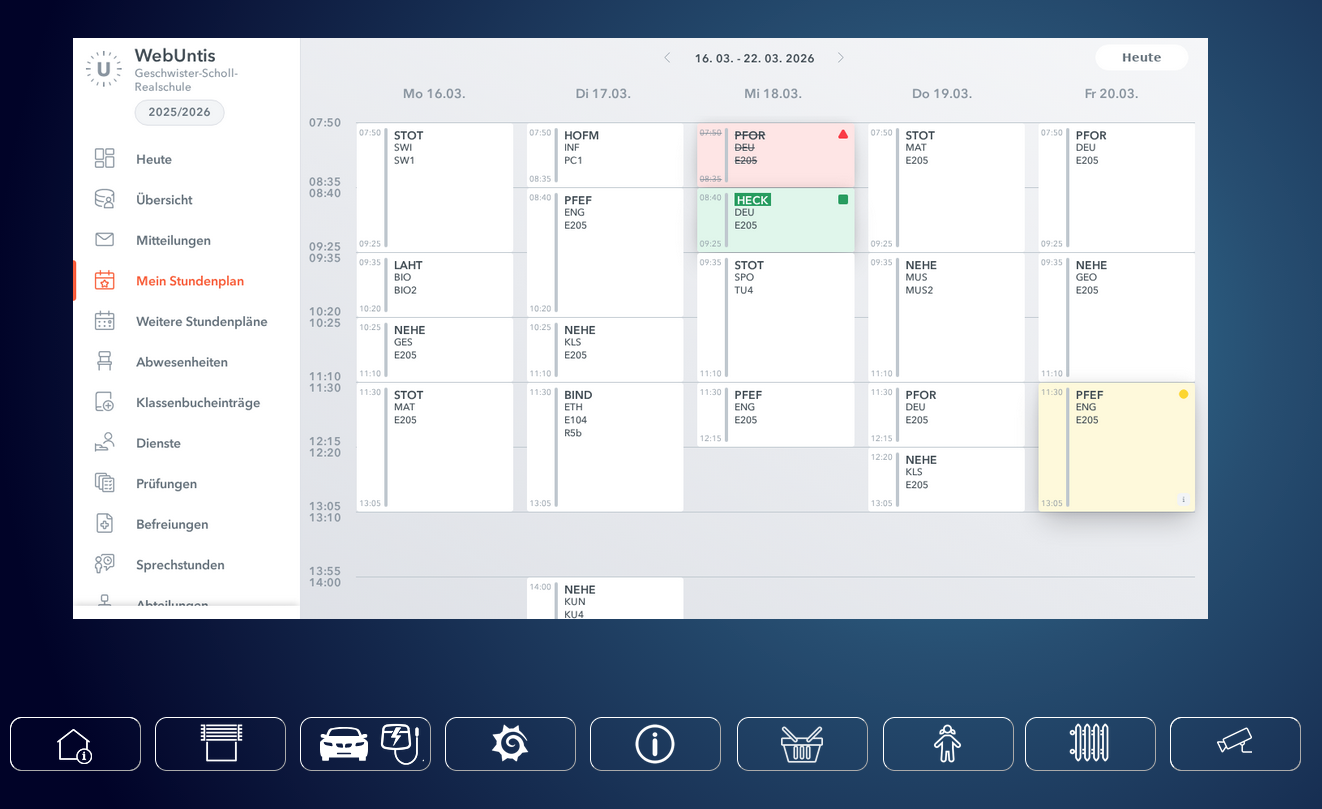
Damit läuft das Skript stündlich
0 * * * * /usr/bin/node /home/mading/webuntis-shot/webuntis.js >> /home/mading/webuntis-shot/cron.log 2>&1Damit vis das Bild kennt bzw. lesen kann, ist ein Javascript notwendig, dass die Datei in vis.0 schreibt:
var fs = require('fs');

 const picture= fs.readFileSync('/opt/iobroker/iobroker-data/files/vis.0/main/img/webuntis-screenshot.png'); //liest linux-datei-system
writeFile('vis.0','/main/img/webuntis-screenshot.png', picture, function (error) { });   //schreibt in iobroker system
Blockly:
<xml xmlns="https://developers.google.com/blockly/xml"> <block type="procedures_defcustomnoreturn" id="FuE%6{wZt7R{vL]0sp=:" x="-37" y="38"> <mutation statements="false"></mutation> <field name="NAME">etwas tun</field> <field name="SCRIPT">dmFyIGZzID0gcmVxdWlyZSgnZnMnKTsgDQogDQogY29uc3QgcGljdHVyZT0gZnMucmVhZEZpbGVTeW5jKCcvb3B0L2lvYnJva2VyL2lvYnJva2VyLWRhdGEvZmlsZXMvdmlzLjAvbWFpbi9pbWcvd2VidW50aXMtc2NyZWVuc2hvdC5wbmcnKTsgLy9saWVzdCBsaW51eC1kYXRlaS1zeXN0ZW0NCndyaXRlRmlsZSgndmlzLjAnLCcvbWFpbi9pbWcvd2VidW50aXMtc2NyZWVuc2hvdC5wbmcnLCBwaWN0dXJlLCBmdW5jdGlvbiAoZXJyb3IpIHsgfSk7ICAgLy9zY2hyZWlidCBpbiBpb2Jyb2tlciBzeXN0ZW0=</field> <comment pinned="false" h="80" w="160">Beschreibe diese Funktion …</comment> </block> <block type="schedule" id="9DD.a-@UNvoRp8i:Yode" x="63" y="113"> <field name="SCHEDULE">{"time":{"start":"06:00","end":"23:00","mode":"minutes","interval":61},"period":{"days":1}}</field> <statement name="STATEMENT"> <block type="procedures_callcustomnoreturn" id="esc^G_dpBegT:H7{mULt"> <mutation name="etwas tun"></mutation> </block> </statement> </block> </xml> -
 H Homoran verschob dieses Thema von Tester am
-
H Homoran verschob dieses Thema von ...nicht in offiziellem Repo am




Hey! Du scheinst an dieser Unterhaltung interessiert zu sein, hast aber noch kein Konto.
Hast du es satt, bei jedem Besuch durch die gleichen Beiträge zu scrollen? Wenn du dich für ein Konto anmeldest, kommst du immer genau dorthin zurück, wo du zuvor warst, und kannst dich über neue Antworten benachrichtigen lassen (entweder per E-Mail oder Push-Benachrichtigung). Du kannst auch Lesezeichen speichern und Beiträge positiv bewerten, um anderen Community-Mitgliedern deine Wertschätzung zu zeigen.
Mit deinem Input könnte dieser Beitrag noch besser werden 💗
Registrieren AnmeldenSupport us
407
Online33.0k
Benutzer83.6k
Themen1.3m
Beiträge