



Fritzdect neue Version 2.2.0
-
@michael-schmitt
in 2.2.3 habe ich auch die generischen Werte für die Zeit eingeführt, damit sie nicht uninitialisiert sind.
Ich kann es nachstellen, muß aber noch herausfinden, warum das System der Meinung ist, daß 5 ein string wäre.@foxthefox sagte in Fritzdect neue Version 2.2.0:
...muß aber noch herausfinden, warum das System der Meinung ist, daß 5 ein string wäre.
Bassgitarre?
-
@michael-schmitt
in 2.2.3 habe ich auch die generischen Werte für die Zeit eingeführt, damit sie nicht uninitialisiert sind.
Ich kann es nachstellen, muß aber noch herausfinden, warum das System der Meinung ist, daß 5 ein string wäre.@foxthefox
es war wohl die admin page die die Werte nicht als Zahl transportierte.
auf github liegt die Korrektur als 2.2.4Adapterüberblick: Profil Github;
Wenn der Adapter gefällt und nützlich ist, bitte ins Repo gehen und Star setzen. Danke
Ein Aufruf: video
-
@foxthefox
es war wohl die admin page die die Werte nicht als Zahl transportierte.
auf github liegt die Korrektur als 2.2.4-
Adapter deinstalliert
-
Objektbaum gelöscht
-
neu von Github installiert
der Adapter erscheint nicht in den Instanzen
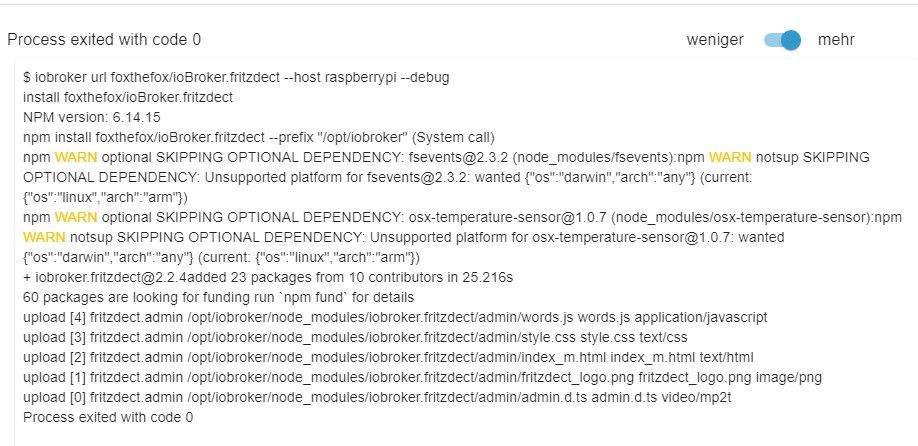
2022-01-19 13:14:09.898 - info: host.raspberrypi Updating repository "Stable (default)" under "http://download.iobroker.net/sources-dist.json" 2022-01-19 13:16:38.242 - info: javascript.0 (412) script.js.common.Bewegungsmelder.FLUR_BEWEGUNG: Bewegung im Flur erkannt und Licht ein 2022-01-19 13:16:40.284 - info: javascript.0 (412) script.js.common.Bewegungsmelder.FLUR_BEWEGUNG: Bewegung im Flur erkannt und Licht ein 2022-01-19 13:16:43.011 - info: javascript.0 (412) script.js.common.Bewegungsmelder.BAD_BEWEGUNG: Bewegung Bad erkannt und Licht ein 2022-01-19 13:17:08.064 - info: javascript.0 (412) script.js.common.Bewegungsmelder.FLUR_BEWEGUNG: Bewegung im Flur erkannt und Licht ein 2022-01-19 13:18:19.009 - info: javascript.0 (412) script.js.common.Bewegungsmelder.BAD_BEWEGUNG: Bewegung Bad erkannt und Licht ein 2022-01-19 13:19:11.016 - info: javascript.0 (412) script.js.common.Bewegungsmelder.FLUR_BEWEGUNG: Keine Bewegung im Flur erkannt und Licht aus 2022-01-19 13:19:29.144 - info: javascript.0 (412) script.js.common.Bewegungsmelder.BAD_BEWEGUNG: Bewegung Bad erkannt und Licht ein 2022-01-19 13:20:34.809 - info: javascript.0 (412) script.js.common.Bewegungsmelder.BAD_BEWEGUNG: Bewegung Bad erkannt und Licht ein 2022-01-19 13:21:42.738 - info: javascript.0 (412) script.js.common.Bewegungsmelder.BAD_BEWEGUNG: Bewegung Bad erkannt und Licht ein 2022-01-19 13:21:48.902 - info: javascript.0 (412) script.js.common.Bewegungsmelder.FLUR_BEWEGUNG: Bewegung im Flur erkannt und Licht ein 2022-01-19 13:21:50.919 - info: javascript.0 (412) script.js.common.Bewegungsmelder.FLUR_BEWEGUNG: Bewegung im Flur erkannt und Licht ein 2022-01-19 13:24:21.437 - info: javascript.0 (412) script.js.common.Bewegungsmelder.BAD_BEWEGUNG: Bewegung Bad erkannt und Licht ein 2022-01-19 13:24:22.847 - info: javascript.0 (412) script.js.common.Bewegungsmelder.BAD_BEWEGUNG: Bad Licht aus 2022-01-19 13:24:52.304 - info: host.raspberrypi "system.adapter.fritzdect.0" disabled 2022-01-19 13:24:52.317 - info: host.raspberrypi stopInstance system.adapter.fritzdect.0 (force=false, process=true) 2022-01-19 13:24:52.332 - info: fritzdect.0 (21389) Got terminate signal TERMINATE_YOURSELF 2022-01-19 13:24:52.336 - info: fritzdect.0 (21389) cleaned everything up... 2022-01-19 13:24:52.337 - info: fritzdect.0 (21389) terminating 2022-01-19 13:24:52.338 - info: fritzdect.0 (21389) Terminated (ADAPTER_REQUESTED_TERMINATION): Without reason 2022-01-19 13:24:52.353 - info: host.raspberrypi stopInstance system.adapter.fritzdect.0 send kill signal 2022-01-19 13:24:52.937 - info: host.raspberrypi instance system.adapter.fritzdect.0 terminated with code 11 (ADAPTER_REQUESTED_TERMINATION) 2022-01-19 13:24:58.439 - info: host.raspberrypi iobroker del fritzdect.0 2022-01-19 13:25:00.446 - info: host.raspberrypi iobroker Delete adapter "fritzdect.0" 2022-01-19 13:25:00.458 - info: host.raspberrypi iobroker host.raspberrypi Counted 1 instances of fritzdect.0 2022-01-19 13:25:00.478 - info: host.raspberrypi iobroker host.raspberrypi Counted 31 channels of fritzdect.0 2022-01-19 13:25:00.505 - info: host.raspberrypi iobroker host.raspberrypi Counted 297 states of fritzdect.0 2022-01-19 13:25:00.514 - info: host.raspberrypi iobroker host.raspberrypi Counted 14 states of system.adapter.fritzdect.0 2022-01-19 13:25:00.524 - info: host.raspberrypi iobroker host.raspberrypi Counted 273 states (io.fritzdect.0.*) from states 2022-01-19 13:25:00.544 - info: host.raspberrypi iobroker host.raspberrypi Counted 14 states (system.adapter.fritzdect.0.*) from states 2022-01-19 13:25:01.434 - info: host.raspberrypi iobroker host.raspberrypi Deleting 343 object(s). 2022-01-19 13:25:03.744 - info: host.raspberrypi iobroker host.raspberrypi: Only 200 objects left to be deleted. 2022-01-19 13:25:07.823 - info: host.raspberrypi object deleted system.adapter.fritzdect.0 2022-01-19 13:25:07.838 - info: host.raspberrypi iobroker host.raspberrypi Deleting 287 state(s). 2022-01-19 13:25:08.004 - info: host.raspberrypi iobroker host.raspberrypi: Only 200 states left to be deleted. 2022-01-19 13:25:09.486 - info: host.raspberrypi iobroker exit 0 2022-01-19 13:25:36.150 - info: host.raspberrypi iobroker del fritzdect 2022-01-19 13:25:38.108 - info: host.raspberrypi iobroker Delete adapter "fritzdect" 2022-01-19 13:25:38.124 - info: host.raspberrypi iobroker host.raspberrypi Counted 1 meta of fritzdect 2022-01-19 13:25:38.129 - info: host.raspberrypi iobroker host.raspberrypi Counted 1 adapter for fritzdect 2022-01-19 13:25:39.193 - info: host.raspberrypi iobroker host.raspberrypi file fritzdect.admin deleted 2022-01-19 13:25:39.202 - info: host.raspberrypi iobroker host.raspberrypi object fritzdect deleted 2022-01-19 13:25:39.214 - info: host.raspberrypi iobroker host.raspberrypi object fritzdect.admin deletedhost.raspberrypi Deleting 2 object(s). 2022-01-19 13:25:39.252 - info: host.raspberrypi iobroker npm uninstall iobroker.fritzdect --loglevel error --prefix "/opt/iobroker" (System call) 2022-01-19 13:25:56.701 - info: host.raspberrypi iobroker exit 0 2022-01-19 13:26:56.019 - info: javascript.0 (412) script.js.common.Bewegungsmelder.FLUR_BEWEGUNG: Keine Bewegung im Flur erkannt und Licht aus 2022-01-19 13:27:28.898 - info: host.raspberrypi Updating repository "Stable (default)" under "http://download.iobroker.net/sources-dist.json" 2022-01-19 13:27:44.959 - info: javascript.0 (412) script.js.common.Bewegungsmelder.KÜCHE_BEWEGUNG: Keine Bewegung in Küche erkannt und Licht aus 2022-01-19 13:28:03.037 - info: host.raspberrypi iobroker url foxthefox/ioBroker.fritzdect --host raspberrypi --debug 2022-01-19 13:28:05.040 - info: host.raspberrypi iobroker install foxthefox/ioBroker.fritzdect 2022-01-19 13:28:05.724 - info: host.raspberrypi iobroker NPM version: 6.14.15 2022-01-19 13:28:05.726 - info: host.raspberrypi iobroker npm install foxthefox/ioBroker.fritzdect --prefix "/opt/iobroker" (System call) 2022-01-19 13:28:32.291 - info: host.raspberrypi iobroker npm WARN optional SKIPPING OPTIONAL DEPENDENCY: fsevents@2.3.2 (node_modules/fsevents):npm WARN notsup SKIPPING OPTIONAL DEPENDENCY: Unsupported platform for fsevents@2.3.2: wanted {"os":"darwin","arch":"any"} (current: {"os":"linux","arch":"arm"}) 2022-01-19 13:28:32.340 - info: host.raspberrypi iobroker npm WARN optional SKIPPING OPTIONAL DEPENDENCY: osx-temperature-sensor@1.0.7 (node_modules/osx-temperature-sensor):npm WARN notsup SKIPPING OPTIONAL DEPENDENCY: Unsupported platform for osx-temperature-sensor@1.0.7: wanted {"os":"darwin","arch":"any"} (current: {"os":"linux","arch":"arm"}) 2022-01-19 13:28:32.342 - info: host.raspberrypi iobroker 2022-01-19 13:28:32.354 - info: host.raspberrypi iobroker + iobroker.fritzdect@2.2.4added 23 packages from 10 contributors in 25.216s 2022-01-19 13:28:33.664 - info: host.raspberrypi iobroker 2022-01-19 13:28:33.666 - info: host.raspberrypi iobroker 60 packages are looking for funding run `npm fund` for details 2022-01-19 13:28:33.741 - info: host.raspberrypi iobroker upload [4] fritzdect.admin /opt/iobroker/node_modules/iobroker.fritzdect/admin/words.js words.js application/javascript 2022-01-19 13:28:33.836 - info: host.raspberrypi iobroker upload [3] fritzdect.admin /opt/iobroker/node_modules/iobroker.fritzdect/admin/style.css style.css text/css 2022-01-19 13:28:33.895 - info: host.raspberrypi iobroker upload [2] fritzdect.admin /opt/iobroker/node_modules/iobroker.fritzdect/admin/index_m.html index_m.html text/html 2022-01-19 13:28:33.955 - info: host.raspberrypi iobroker upload [1] fritzdect.admin /opt/iobroker/node_modules/iobroker.fritzdect/admin/fritzdect_logo.png fritzdect_logo.png image/png 2022-01-19 13:28:34.014 - info: host.raspberrypi iobroker upload [0] fritzdect.admin /opt/iobroker/node_modules/iobroker.fritzdect/admin/admin.d.ts admin.d.ts video/mp2t 2022-01-19 13:28:35.163 - info: host.raspberrypi iobroker exit 0 2022-01-19 13:29:51.525 - info: javascript.0 (412) script.js.common.Bewegungsmelder.BAD_BEWEGUNG: Keine Bewegung Bad erkannt und Licht aus 2022-01-19 13:30:00.133 - info: host.raspberrypi instance system.adapter.ical.0 started with pid 1674 2022-01-19 13:30:02.547 - info: ical.0 (1674) starting. Version 1.11.4 in /opt/iobroker/node_modules/iobroker.ical, node: v14.18.3, js-controller: 3.3.22 2022-01-19 13:30:03.126 - info: ical.0 (1674) processing URL: Müllkalender https://calendar.google.com/calendar/ical/8n95sqg3r88betcpncgkhe3m8c%40group.calendar.google.com/private-32cc3a968fd521a665efcc600d6ce4d4/basic.ics 2022-01-19 13:30:08.463 - info: ical.0 (1674) Terminated (NO_ERROR): Without reason 2022-01-19 13:30:09.012 - info: host.raspberrypi instance system.adapter.ical.0 terminated with code 0 (NO_ERROR) 2022-01-19 13:31:09.627 - info: host.raspberrypi Updating repository "Stable (default)" under "http://download.iobroker.net/sources-dist.json" 2022-01-19 13:31:52.387 - info: host.raspberrypi Updating repository "Stable (default)" under "http://download.iobroker.net/sources-dist.json" -
-
-
Adapter deinstalliert
-
Objektbaum gelöscht
-
neu von Github installiert
der Adapter erscheint nicht in den Instanzen
2022-01-19 13:14:09.898 - info: host.raspberrypi Updating repository "Stable (default)" under "http://download.iobroker.net/sources-dist.json" 2022-01-19 13:16:38.242 - info: javascript.0 (412) script.js.common.Bewegungsmelder.FLUR_BEWEGUNG: Bewegung im Flur erkannt und Licht ein 2022-01-19 13:16:40.284 - info: javascript.0 (412) script.js.common.Bewegungsmelder.FLUR_BEWEGUNG: Bewegung im Flur erkannt und Licht ein 2022-01-19 13:16:43.011 - info: javascript.0 (412) script.js.common.Bewegungsmelder.BAD_BEWEGUNG: Bewegung Bad erkannt und Licht ein 2022-01-19 13:17:08.064 - info: javascript.0 (412) script.js.common.Bewegungsmelder.FLUR_BEWEGUNG: Bewegung im Flur erkannt und Licht ein 2022-01-19 13:18:19.009 - info: javascript.0 (412) script.js.common.Bewegungsmelder.BAD_BEWEGUNG: Bewegung Bad erkannt und Licht ein 2022-01-19 13:19:11.016 - info: javascript.0 (412) script.js.common.Bewegungsmelder.FLUR_BEWEGUNG: Keine Bewegung im Flur erkannt und Licht aus 2022-01-19 13:19:29.144 - info: javascript.0 (412) script.js.common.Bewegungsmelder.BAD_BEWEGUNG: Bewegung Bad erkannt und Licht ein 2022-01-19 13:20:34.809 - info: javascript.0 (412) script.js.common.Bewegungsmelder.BAD_BEWEGUNG: Bewegung Bad erkannt und Licht ein 2022-01-19 13:21:42.738 - info: javascript.0 (412) script.js.common.Bewegungsmelder.BAD_BEWEGUNG: Bewegung Bad erkannt und Licht ein 2022-01-19 13:21:48.902 - info: javascript.0 (412) script.js.common.Bewegungsmelder.FLUR_BEWEGUNG: Bewegung im Flur erkannt und Licht ein 2022-01-19 13:21:50.919 - info: javascript.0 (412) script.js.common.Bewegungsmelder.FLUR_BEWEGUNG: Bewegung im Flur erkannt und Licht ein 2022-01-19 13:24:21.437 - info: javascript.0 (412) script.js.common.Bewegungsmelder.BAD_BEWEGUNG: Bewegung Bad erkannt und Licht ein 2022-01-19 13:24:22.847 - info: javascript.0 (412) script.js.common.Bewegungsmelder.BAD_BEWEGUNG: Bad Licht aus 2022-01-19 13:24:52.304 - info: host.raspberrypi "system.adapter.fritzdect.0" disabled 2022-01-19 13:24:52.317 - info: host.raspberrypi stopInstance system.adapter.fritzdect.0 (force=false, process=true) 2022-01-19 13:24:52.332 - info: fritzdect.0 (21389) Got terminate signal TERMINATE_YOURSELF 2022-01-19 13:24:52.336 - info: fritzdect.0 (21389) cleaned everything up... 2022-01-19 13:24:52.337 - info: fritzdect.0 (21389) terminating 2022-01-19 13:24:52.338 - info: fritzdect.0 (21389) Terminated (ADAPTER_REQUESTED_TERMINATION): Without reason 2022-01-19 13:24:52.353 - info: host.raspberrypi stopInstance system.adapter.fritzdect.0 send kill signal 2022-01-19 13:24:52.937 - info: host.raspberrypi instance system.adapter.fritzdect.0 terminated with code 11 (ADAPTER_REQUESTED_TERMINATION) 2022-01-19 13:24:58.439 - info: host.raspberrypi iobroker del fritzdect.0 2022-01-19 13:25:00.446 - info: host.raspberrypi iobroker Delete adapter "fritzdect.0" 2022-01-19 13:25:00.458 - info: host.raspberrypi iobroker host.raspberrypi Counted 1 instances of fritzdect.0 2022-01-19 13:25:00.478 - info: host.raspberrypi iobroker host.raspberrypi Counted 31 channels of fritzdect.0 2022-01-19 13:25:00.505 - info: host.raspberrypi iobroker host.raspberrypi Counted 297 states of fritzdect.0 2022-01-19 13:25:00.514 - info: host.raspberrypi iobroker host.raspberrypi Counted 14 states of system.adapter.fritzdect.0 2022-01-19 13:25:00.524 - info: host.raspberrypi iobroker host.raspberrypi Counted 273 states (io.fritzdect.0.*) from states 2022-01-19 13:25:00.544 - info: host.raspberrypi iobroker host.raspberrypi Counted 14 states (system.adapter.fritzdect.0.*) from states 2022-01-19 13:25:01.434 - info: host.raspberrypi iobroker host.raspberrypi Deleting 343 object(s). 2022-01-19 13:25:03.744 - info: host.raspberrypi iobroker host.raspberrypi: Only 200 objects left to be deleted. 2022-01-19 13:25:07.823 - info: host.raspberrypi object deleted system.adapter.fritzdect.0 2022-01-19 13:25:07.838 - info: host.raspberrypi iobroker host.raspberrypi Deleting 287 state(s). 2022-01-19 13:25:08.004 - info: host.raspberrypi iobroker host.raspberrypi: Only 200 states left to be deleted. 2022-01-19 13:25:09.486 - info: host.raspberrypi iobroker exit 0 2022-01-19 13:25:36.150 - info: host.raspberrypi iobroker del fritzdect 2022-01-19 13:25:38.108 - info: host.raspberrypi iobroker Delete adapter "fritzdect" 2022-01-19 13:25:38.124 - info: host.raspberrypi iobroker host.raspberrypi Counted 1 meta of fritzdect 2022-01-19 13:25:38.129 - info: host.raspberrypi iobroker host.raspberrypi Counted 1 adapter for fritzdect 2022-01-19 13:25:39.193 - info: host.raspberrypi iobroker host.raspberrypi file fritzdect.admin deleted 2022-01-19 13:25:39.202 - info: host.raspberrypi iobroker host.raspberrypi object fritzdect deleted 2022-01-19 13:25:39.214 - info: host.raspberrypi iobroker host.raspberrypi object fritzdect.admin deletedhost.raspberrypi Deleting 2 object(s). 2022-01-19 13:25:39.252 - info: host.raspberrypi iobroker npm uninstall iobroker.fritzdect --loglevel error --prefix "/opt/iobroker" (System call) 2022-01-19 13:25:56.701 - info: host.raspberrypi iobroker exit 0 2022-01-19 13:26:56.019 - info: javascript.0 (412) script.js.common.Bewegungsmelder.FLUR_BEWEGUNG: Keine Bewegung im Flur erkannt und Licht aus 2022-01-19 13:27:28.898 - info: host.raspberrypi Updating repository "Stable (default)" under "http://download.iobroker.net/sources-dist.json" 2022-01-19 13:27:44.959 - info: javascript.0 (412) script.js.common.Bewegungsmelder.KÜCHE_BEWEGUNG: Keine Bewegung in Küche erkannt und Licht aus 2022-01-19 13:28:03.037 - info: host.raspberrypi iobroker url foxthefox/ioBroker.fritzdect --host raspberrypi --debug 2022-01-19 13:28:05.040 - info: host.raspberrypi iobroker install foxthefox/ioBroker.fritzdect 2022-01-19 13:28:05.724 - info: host.raspberrypi iobroker NPM version: 6.14.15 2022-01-19 13:28:05.726 - info: host.raspberrypi iobroker npm install foxthefox/ioBroker.fritzdect --prefix "/opt/iobroker" (System call) 2022-01-19 13:28:32.291 - info: host.raspberrypi iobroker npm WARN optional SKIPPING OPTIONAL DEPENDENCY: fsevents@2.3.2 (node_modules/fsevents):npm WARN notsup SKIPPING OPTIONAL DEPENDENCY: Unsupported platform for fsevents@2.3.2: wanted {"os":"darwin","arch":"any"} (current: {"os":"linux","arch":"arm"}) 2022-01-19 13:28:32.340 - info: host.raspberrypi iobroker npm WARN optional SKIPPING OPTIONAL DEPENDENCY: osx-temperature-sensor@1.0.7 (node_modules/osx-temperature-sensor):npm WARN notsup SKIPPING OPTIONAL DEPENDENCY: Unsupported platform for osx-temperature-sensor@1.0.7: wanted {"os":"darwin","arch":"any"} (current: {"os":"linux","arch":"arm"}) 2022-01-19 13:28:32.342 - info: host.raspberrypi iobroker 2022-01-19 13:28:32.354 - info: host.raspberrypi iobroker + iobroker.fritzdect@2.2.4added 23 packages from 10 contributors in 25.216s 2022-01-19 13:28:33.664 - info: host.raspberrypi iobroker 2022-01-19 13:28:33.666 - info: host.raspberrypi iobroker 60 packages are looking for funding run `npm fund` for details 2022-01-19 13:28:33.741 - info: host.raspberrypi iobroker upload [4] fritzdect.admin /opt/iobroker/node_modules/iobroker.fritzdect/admin/words.js words.js application/javascript 2022-01-19 13:28:33.836 - info: host.raspberrypi iobroker upload [3] fritzdect.admin /opt/iobroker/node_modules/iobroker.fritzdect/admin/style.css style.css text/css 2022-01-19 13:28:33.895 - info: host.raspberrypi iobroker upload [2] fritzdect.admin /opt/iobroker/node_modules/iobroker.fritzdect/admin/index_m.html index_m.html text/html 2022-01-19 13:28:33.955 - info: host.raspberrypi iobroker upload [1] fritzdect.admin /opt/iobroker/node_modules/iobroker.fritzdect/admin/fritzdect_logo.png fritzdect_logo.png image/png 2022-01-19 13:28:34.014 - info: host.raspberrypi iobroker upload [0] fritzdect.admin /opt/iobroker/node_modules/iobroker.fritzdect/admin/admin.d.ts admin.d.ts video/mp2t 2022-01-19 13:28:35.163 - info: host.raspberrypi iobroker exit 0 2022-01-19 13:29:51.525 - info: javascript.0 (412) script.js.common.Bewegungsmelder.BAD_BEWEGUNG: Keine Bewegung Bad erkannt und Licht aus 2022-01-19 13:30:00.133 - info: host.raspberrypi instance system.adapter.ical.0 started with pid 1674 2022-01-19 13:30:02.547 - info: ical.0 (1674) starting. Version 1.11.4 in /opt/iobroker/node_modules/iobroker.ical, node: v14.18.3, js-controller: 3.3.22 2022-01-19 13:30:03.126 - info: ical.0 (1674) processing URL: Müllkalender https://calendar.google.com/calendar/ical/8n95sqg3r88betcpncgkhe3m8c%40group.calendar.google.com/private-32cc3a968fd521a665efcc600d6ce4d4/basic.ics 2022-01-19 13:30:08.463 - info: ical.0 (1674) Terminated (NO_ERROR): Without reason 2022-01-19 13:30:09.012 - info: host.raspberrypi instance system.adapter.ical.0 terminated with code 0 (NO_ERROR) 2022-01-19 13:31:09.627 - info: host.raspberrypi Updating repository "Stable (default)" under "http://download.iobroker.net/sources-dist.json" 2022-01-19 13:31:52.387 - info: host.raspberrypi Updating repository "Stable (default)" under "http://download.iobroker.net/sources-dist.json" -
-
@michael-schmitt
von Git muss die Instanz immer manuell installiert werden ;)@jan1
muss ich dann bei "Benutzerdifiniert" einfach den link einfügen ? -
@jan1
muss ich dann bei "Benutzerdifiniert" einfach den link einfügen ?@michael-schmitt
nein, eine Instanz wird wie immer über das + am Adapter installiert -
@jan1
muss ich dann bei "Benutzerdifiniert" einfach den link einfügen ?@michael-schmitt Erst auf die 3 Punkte beim Adapter klicken, dann auf das + (Instanz hinzufügen)
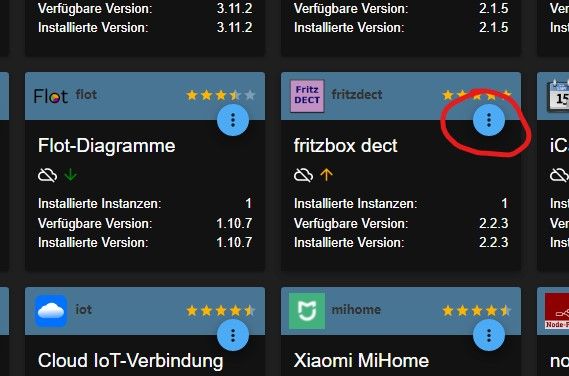
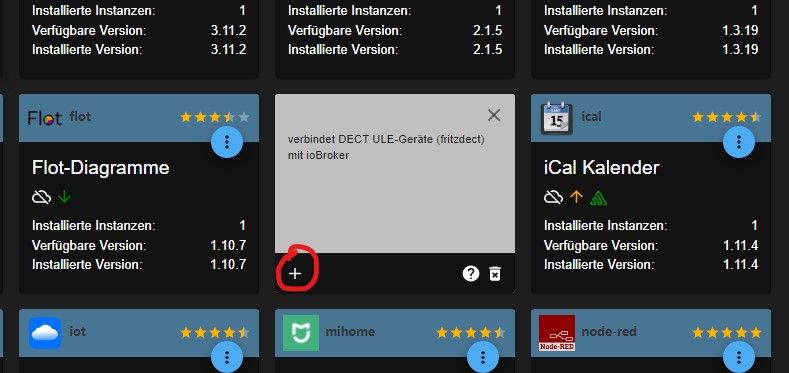
Schöne Grüße Frank
-
@michael-schmitt Erst auf die 3 Punkte beim Adapter klicken, dann auf das + (Instanz hinzufügen)
@frankyboy73 aber ich soll doch die Version von Github nehmen, wird so nicht einfach die 2.2.3 installiert und nicht die 2.2.4 die ich nehmen soll ???
-
@frankyboy73 aber ich soll doch die Version von Github nehmen, wird so nicht einfach die 2.2.3 installiert und nicht die 2.2.4 die ich nehmen soll ???
@michael-schmitt
Den Adapter von Git und die Instanz wie immer, recht einfach ;) -
@frankyboy73 aber ich soll doch die Version von Github nehmen, wird so nicht einfach die 2.2.3 installiert und nicht die 2.2.4 die ich nehmen soll ???
@michael-schmitt Hi, das war nur ein Beispiel, wenn du die 2.2.4 installiert hast dann da auf die 3 Punkte und dann aufs Plus. Bei mir läuft eben noch die 2.2.3.
Schöne Grüße Frank
-
@michael-schmitt Hi, das war nur ein Beispiel, wenn du die 2.2.4 installiert hast dann da auf die 3 Punkte und dann aufs Plus. Bei mir läuft eben noch die 2.2.3.
@frankyboy73 Jeeeeetzt hab ich's verstanden. Hat funktioniert ohne Fehler
-
 H Homoran verschob dieses Thema von Tester am
-
H Homoran verschob dieses Thema von ...nicht in offiziellem Repo am


Hey! Du scheinst an dieser Unterhaltung interessiert zu sein, hast aber noch kein Konto.
Hast du es satt, bei jedem Besuch durch die gleichen Beiträge zu scrollen? Wenn du dich für ein Konto anmeldest, kommst du immer genau dorthin zurück, wo du zuvor warst, und kannst dich über neue Antworten benachrichtigen lassen (entweder per E-Mail oder Push-Benachrichtigung). Du kannst auch Lesezeichen speichern und Beiträge positiv bewerten, um anderen Community-Mitgliedern deine Wertschätzung zu zeigen.
Mit deinem Input könnte dieser Beitrag noch besser werden 💗
Registrieren AnmeldenSupport us
465
Online33.0k
Benutzer83.7k
Themen1.3m
Beiträge