




Backup auf Synology Probleme
-
Hallo Zusammen,
versuche schon den ganzen Tag es hinzubekommen aber es klappt einfach nicht.
ich möchte die backups von iobroker auf meiner NAS speichern.
ich bekomme jedoch immer den Fehler wie im folgenden Code.
Hat jemand eine Idee?
Benutzer backitup hat lese und schreibe rechte im gemeinsamen Ordner backup io den ich auf der Synology erstellt habe.Ich weiss nicht was ich noch einstellen soll, damit der iobroker zugriff auf das NAS bekommt...
tarted iobroker ... [DEBUG] [mount] start with {"mountType":"CIFS","type":"storage","source":"local","mount":"//192.168.178.2","debugging":true,"fileDir":"/opt/iobroker/node_modules/iobroker.backitup","wakeOnLAN":false,"macAd":"20:DE:20:DE:20:DE","wolTime":"25","smb":"vers=1.0","sudo":false,"cifsDomain":"","clientInodes":false,"deleteOldBackup":true,"ownDir":true,"dir":"/Backup IO/komplett/","dirMinimal":"/Backup IO/komplett/","user":"backitup","pass":"****"} [DEBUG] [mount] - noserverino option: false [DEBUG] [mount] - cifs-mount command: "mount -t cifs -o username=backitup,password=****,rw,file_mode=0777,dir_mode=0777,vers=1.0 //192.168.178.2/Backup IO/komplett/ /opt/iobroker/backups" [DEBUG] [mount] - first mount attempt with smb option failed. try next mount attempt without smb option ... [DEBUG] [mount] - cifs-mount command: "mount -t cifs -o username=backitup,password=****,rw,file_mode=0777,dir_mode=0777 //192.168.178.2/Backup IO/komplett/ /opt/iobroker/backups" [ERROR] [mount] - [undefined Error: Command failed: mount -t cifs -o username=backitup,password=****,rw,file_mode=0777,dir_mode=0777 //192.168.178.2/Backup IO/komplett/ /opt/iobroker/backups mount: bad usage Try 'mount --help' for more information. [ERROR] [mount] - [IGNORED] Error: Command failed: mount -t cifs -o username=backitup,password=****,rw,file_mode=0777,dir_mode=0777 //192.168.178.2/Backup IO/komplett/ /opt/iobroker/backups mount: bad usage Try 'mount --help' for more information. [DEBUG] [iobroker] start with {"type":"creator","time":"02:40","debugging":true,"slaveBackup":"Single","everyXDays":"1","deleteBackupAfter":0,"cifs":{"enabled":true,"mountType":"CIFS","type":"storage","source":"local","mount":"//192.168.178.2","debugging":true,"fileDir":"/opt/iobroker/node_modules/iobroker.backitup","wakeOnLAN":false,"macAd":"20:DE:20:DE:20:DE","wolTime":"25","smb":"vers=1.0","sudo":false,"cifsDomain":"","clientInodes":false,"deleteOldBackup":true,"ownDir":true,"dir":"/Backup IO/komplett/","dirMinimal":"/Backup IO/komplett/","user":"backitup","pass":"****","context":{"fileNames":[],"errors":{"mount":"Error: Command failed: mount -t cifs -o username=backitup,password=****,rw,file_mode=0777,dir_mode=0777 //192.168.178.2/Backup IO/komplett/ /opt/iobroker/backups\nmount: bad usage\nTry 'mount --help' for more information.\n"},"done":[],"types":[]},"adapter":null,"influxDBEvents":[],"mySqlEvents":[],"pgSqlEvents":[]},"dir":"/opt/iobroker","historyHTML":{"enabled":true,"type":"message","entriesNumber":"25","systemLang":"de"},"historyJSON":{"enabled":true,"type":"message","entriesNumber":"25","systemLang":"de"},"telegram":{"enabled":true,"notificationsType":"Telegram","type":"message","instance":"","SilentNotice":false,"NoticeType":"longTelegramNotice","User":"none","onlyError":false,"telegramWaiting":0,"hostName":"","systemLang":"de"},"email":{"enabled":true,"notificationsType":"Telegram","type":"message","instance":"","NoticeType":"longEmailNotice","emailReceiver":"xxx@xxx.com","emailSender":"xxx@xxx.com","onlyError":false,"emailWaiting":0,"hostName":"","systemLang":"de"},"pushover":{"enabled":true,"notificationsType":"Telegram","type":"message","instance":"","SilentNotice":false,"NoticeType":"longPushoverNotice","deviceID":"","onlyError":false,"pushoverWaiting":0,"hostName":"","systemLang":"de"},"whatsapp":{"enabled":true,"notificationsType":"Telegram","type":"message","instance":"","NoticeType":"longWhatsappNotice","onlyError":false,"whatsappWaiting":0,"hostName":"","systemLang":"de"},"backupDir":"/opt/iobroker/backups"} [DEBUG] [iobroker] - host.raspberrypi 4309 states saved [DEBUG] [iobroker] - host.raspberrypi 4909 objects saved -
Hallo Zusammen,
versuche schon den ganzen Tag es hinzubekommen aber es klappt einfach nicht.
ich möchte die backups von iobroker auf meiner NAS speichern.
ich bekomme jedoch immer den Fehler wie im folgenden Code.
Hat jemand eine Idee?
Benutzer backitup hat lese und schreibe rechte im gemeinsamen Ordner backup io den ich auf der Synology erstellt habe.Ich weiss nicht was ich noch einstellen soll, damit der iobroker zugriff auf das NAS bekommt...
tarted iobroker ... [DEBUG] [mount] start with {"mountType":"CIFS","type":"storage","source":"local","mount":"//192.168.178.2","debugging":true,"fileDir":"/opt/iobroker/node_modules/iobroker.backitup","wakeOnLAN":false,"macAd":"20:DE:20:DE:20:DE","wolTime":"25","smb":"vers=1.0","sudo":false,"cifsDomain":"","clientInodes":false,"deleteOldBackup":true,"ownDir":true,"dir":"/Backup IO/komplett/","dirMinimal":"/Backup IO/komplett/","user":"backitup","pass":"****"} [DEBUG] [mount] - noserverino option: false [DEBUG] [mount] - cifs-mount command: "mount -t cifs -o username=backitup,password=****,rw,file_mode=0777,dir_mode=0777,vers=1.0 //192.168.178.2/Backup IO/komplett/ /opt/iobroker/backups" [DEBUG] [mount] - first mount attempt with smb option failed. try next mount attempt without smb option ... [DEBUG] [mount] - cifs-mount command: "mount -t cifs -o username=backitup,password=****,rw,file_mode=0777,dir_mode=0777 //192.168.178.2/Backup IO/komplett/ /opt/iobroker/backups" [ERROR] [mount] - [undefined Error: Command failed: mount -t cifs -o username=backitup,password=****,rw,file_mode=0777,dir_mode=0777 //192.168.178.2/Backup IO/komplett/ /opt/iobroker/backups mount: bad usage Try 'mount --help' for more information. [ERROR] [mount] - [IGNORED] Error: Command failed: mount -t cifs -o username=backitup,password=****,rw,file_mode=0777,dir_mode=0777 //192.168.178.2/Backup IO/komplett/ /opt/iobroker/backups mount: bad usage Try 'mount --help' for more information. [DEBUG] [iobroker] start with {"type":"creator","time":"02:40","debugging":true,"slaveBackup":"Single","everyXDays":"1","deleteBackupAfter":0,"cifs":{"enabled":true,"mountType":"CIFS","type":"storage","source":"local","mount":"//192.168.178.2","debugging":true,"fileDir":"/opt/iobroker/node_modules/iobroker.backitup","wakeOnLAN":false,"macAd":"20:DE:20:DE:20:DE","wolTime":"25","smb":"vers=1.0","sudo":false,"cifsDomain":"","clientInodes":false,"deleteOldBackup":true,"ownDir":true,"dir":"/Backup IO/komplett/","dirMinimal":"/Backup IO/komplett/","user":"backitup","pass":"****","context":{"fileNames":[],"errors":{"mount":"Error: Command failed: mount -t cifs -o username=backitup,password=****,rw,file_mode=0777,dir_mode=0777 //192.168.178.2/Backup IO/komplett/ /opt/iobroker/backups\nmount: bad usage\nTry 'mount --help' for more information.\n"},"done":[],"types":[]},"adapter":null,"influxDBEvents":[],"mySqlEvents":[],"pgSqlEvents":[]},"dir":"/opt/iobroker","historyHTML":{"enabled":true,"type":"message","entriesNumber":"25","systemLang":"de"},"historyJSON":{"enabled":true,"type":"message","entriesNumber":"25","systemLang":"de"},"telegram":{"enabled":true,"notificationsType":"Telegram","type":"message","instance":"","SilentNotice":false,"NoticeType":"longTelegramNotice","User":"none","onlyError":false,"telegramWaiting":0,"hostName":"","systemLang":"de"},"email":{"enabled":true,"notificationsType":"Telegram","type":"message","instance":"","NoticeType":"longEmailNotice","emailReceiver":"xxx@xxx.com","emailSender":"xxx@xxx.com","onlyError":false,"emailWaiting":0,"hostName":"","systemLang":"de"},"pushover":{"enabled":true,"notificationsType":"Telegram","type":"message","instance":"","SilentNotice":false,"NoticeType":"longPushoverNotice","deviceID":"","onlyError":false,"pushoverWaiting":0,"hostName":"","systemLang":"de"},"whatsapp":{"enabled":true,"notificationsType":"Telegram","type":"message","instance":"","NoticeType":"longWhatsappNotice","onlyError":false,"whatsappWaiting":0,"hostName":"","systemLang":"de"},"backupDir":"/opt/iobroker/backups"} [DEBUG] [iobroker] - host.raspberrypi 4309 states saved [DEBUG] [iobroker] - host.raspberrypi 4909 objects saved@jones88 sagte in Backup auf Synology Probleme:
Backup IO
Leerzeichen in Verzeichnispfaden sind eine doofe Idee.
Großbuchstaben ein Stück weit auch. -
Hallo Zusammen,
versuche schon den ganzen Tag es hinzubekommen aber es klappt einfach nicht.
ich möchte die backups von iobroker auf meiner NAS speichern.
ich bekomme jedoch immer den Fehler wie im folgenden Code.
Hat jemand eine Idee?
Benutzer backitup hat lese und schreibe rechte im gemeinsamen Ordner backup io den ich auf der Synology erstellt habe.Ich weiss nicht was ich noch einstellen soll, damit der iobroker zugriff auf das NAS bekommt...
tarted iobroker ... [DEBUG] [mount] start with {"mountType":"CIFS","type":"storage","source":"local","mount":"//192.168.178.2","debugging":true,"fileDir":"/opt/iobroker/node_modules/iobroker.backitup","wakeOnLAN":false,"macAd":"20:DE:20:DE:20:DE","wolTime":"25","smb":"vers=1.0","sudo":false,"cifsDomain":"","clientInodes":false,"deleteOldBackup":true,"ownDir":true,"dir":"/Backup IO/komplett/","dirMinimal":"/Backup IO/komplett/","user":"backitup","pass":"****"} [DEBUG] [mount] - noserverino option: false [DEBUG] [mount] - cifs-mount command: "mount -t cifs -o username=backitup,password=****,rw,file_mode=0777,dir_mode=0777,vers=1.0 //192.168.178.2/Backup IO/komplett/ /opt/iobroker/backups" [DEBUG] [mount] - first mount attempt with smb option failed. try next mount attempt without smb option ... [DEBUG] [mount] - cifs-mount command: "mount -t cifs -o username=backitup,password=****,rw,file_mode=0777,dir_mode=0777 //192.168.178.2/Backup IO/komplett/ /opt/iobroker/backups" [ERROR] [mount] - [undefined Error: Command failed: mount -t cifs -o username=backitup,password=****,rw,file_mode=0777,dir_mode=0777 //192.168.178.2/Backup IO/komplett/ /opt/iobroker/backups mount: bad usage Try 'mount --help' for more information. [ERROR] [mount] - [IGNORED] Error: Command failed: mount -t cifs -o username=backitup,password=****,rw,file_mode=0777,dir_mode=0777 //192.168.178.2/Backup IO/komplett/ /opt/iobroker/backups mount: bad usage Try 'mount --help' for more information. [DEBUG] [iobroker] start with {"type":"creator","time":"02:40","debugging":true,"slaveBackup":"Single","everyXDays":"1","deleteBackupAfter":0,"cifs":{"enabled":true,"mountType":"CIFS","type":"storage","source":"local","mount":"//192.168.178.2","debugging":true,"fileDir":"/opt/iobroker/node_modules/iobroker.backitup","wakeOnLAN":false,"macAd":"20:DE:20:DE:20:DE","wolTime":"25","smb":"vers=1.0","sudo":false,"cifsDomain":"","clientInodes":false,"deleteOldBackup":true,"ownDir":true,"dir":"/Backup IO/komplett/","dirMinimal":"/Backup IO/komplett/","user":"backitup","pass":"****","context":{"fileNames":[],"errors":{"mount":"Error: Command failed: mount -t cifs -o username=backitup,password=****,rw,file_mode=0777,dir_mode=0777 //192.168.178.2/Backup IO/komplett/ /opt/iobroker/backups\nmount: bad usage\nTry 'mount --help' for more information.\n"},"done":[],"types":[]},"adapter":null,"influxDBEvents":[],"mySqlEvents":[],"pgSqlEvents":[]},"dir":"/opt/iobroker","historyHTML":{"enabled":true,"type":"message","entriesNumber":"25","systemLang":"de"},"historyJSON":{"enabled":true,"type":"message","entriesNumber":"25","systemLang":"de"},"telegram":{"enabled":true,"notificationsType":"Telegram","type":"message","instance":"","SilentNotice":false,"NoticeType":"longTelegramNotice","User":"none","onlyError":false,"telegramWaiting":0,"hostName":"","systemLang":"de"},"email":{"enabled":true,"notificationsType":"Telegram","type":"message","instance":"","NoticeType":"longEmailNotice","emailReceiver":"xxx@xxx.com","emailSender":"xxx@xxx.com","onlyError":false,"emailWaiting":0,"hostName":"","systemLang":"de"},"pushover":{"enabled":true,"notificationsType":"Telegram","type":"message","instance":"","SilentNotice":false,"NoticeType":"longPushoverNotice","deviceID":"","onlyError":false,"pushoverWaiting":0,"hostName":"","systemLang":"de"},"whatsapp":{"enabled":true,"notificationsType":"Telegram","type":"message","instance":"","NoticeType":"longWhatsappNotice","onlyError":false,"whatsappWaiting":0,"hostName":"","systemLang":"de"},"backupDir":"/opt/iobroker/backups"} [DEBUG] [iobroker] - host.raspberrypi 4309 states saved [DEBUG] [iobroker] - host.raspberrypi 4909 objects saved -
@jones88 sagte in Backup auf Synology Probleme:
Backup IO
Leerzeichen in Verzeichnispfaden sind eine doofe Idee.
Großbuchstaben ein Stück weit auch.@thomas-braun
danke bad usage ist schon mal erledigt... funktionieren tut es trotzdem nicht :/Started iobroker ... [DEBUG] [mount] start with {"mountType":"CIFS","type":"storage","source":"local","mount":"//192.168.178.2","debugging":true,"fileDir":"/opt/iobroker/node_modules/iobroker.backitup","wakeOnLAN":false,"macAd":"20:DE:20:DE:20:DE","wolTime":"25","smb":"vers=1.0","sudo":false,"cifsDomain":"","clientInodes":false,"deleteOldBackup":true,"ownDir":true,"dir":"/Backupio/komplett/","dirMinimal":"/Backupio/komplett/","user":"backitup","pass":"****"} [DEBUG] [mount] - noserverino option: false [DEBUG] [mount] - cifs-mount command: "mount -t cifs -o username=backitup,password=****,rw,file_mode=0777,dir_mode=0777,vers=1.0 //192.168.178.2/Backupio/komplett/ /opt/iobroker/backups" [DEBUG] [mount] - first mount attempt with smb option failed. try next mount attempt without smb option ... [DEBUG] [mount] - cifs-mount command: "mount -t cifs -o username=backitup,password=****,rw,file_mode=0777,dir_mode=0777 //192.168.178.2/Backupio/komplett/ /opt/iobroker/backups" [ERROR] [mount] - [undefined Error: Command failed: mount -t cifs -o username=backitup,password=****,rw,file_mode=0777,dir_mode=0777 //192.168.178.2/Backupio/komplett/ /opt/iobroker/backups mount.cifs: permission denied: no match for /opt/iobroker/backups found in /etc/fstab [ERROR] [mount] - [IGNORED] Error: Command failed: mount -t cifs -o username=backitup,password=****,rw,file_mode=0777,dir_mode=0777 //192.168.178.2/Backupio/komplett/ /opt/iobroker/backups mount.cifs: permission denied: no match for /opt/iobroker/backups found in /etc/fstab [DEBUG] [iobroker] start with {"type":"creator","time":"02:40","debugging":true,"slaveBackup":"Single","everyXDays":"1","deleteBackupAfter":0,"cifs":{"enabled":true,"mountType":"CIFS","type":"storage","source":"local","mount":"//192.168.178.2","debugging":true,"fileDir":"/opt/iobroker/node_modules/iobroker.backitup","wakeOnLAN":false,"macAd":"20:DE:20:DE:20:DE","wolTime":"25","smb":"vers=1.0","sudo":false,"cifsDomain":"","clientInodes":false,"deleteOldBackup":true,"ownDir":true,"dir":"/Backupio/komplett/","dirMinimal":"/Backupio/komplett/","user":"backitup","pass":"****","context":{"fileNames":[],"errors":{"mount":"Error: Command failed: mount -t cifs -o username=backitup,password=****,rw,file_mode=0777,dir_mode=0777 //192.168.178.2/Backupio/komplett/ /opt/iobroker/backups\nmount.cifs: permission denied: no match for /opt/iobroker/backups found in /etc/fstab\n"},"done":[],"types":[]},"adapter":null,"influxDBEvents":[],"mySqlEvents":[],"pgSqlEvents":[]},"dir":"/opt/iobroker","historyHTML":{"enabled":true,"type":"message","entriesNumber":"25","systemLang":"de"},"historyJSON":{"enabled":true,"type":"message","entriesNumber":"25","systemLang":"de"},"telegram":{"enabled":true,"notificationsType":"Telegram","type":"message","instance":"","SilentNotice":false,"NoticeType":"longTelegramNotice","User":"none","onlyError":false,"telegramWaiting":0,"hostName":"","systemLang":"de"},"email":{"enabled":true,"notificationsType":"Telegram","type":"message","instance":"","NoticeType":"longEmailNotice","emailReceiver":"xxx@xxx.com","emailSender":"xxx@xxx.com","onlyError":false,"emailWaiting":0,"hostName":"","systemLang":"de"},"pushover":{"enabled":true,"notificationsType":"Telegram","type":"message","instance":"","SilentNotice":false,"NoticeType":"longPushoverNotice","deviceID":"","onlyError":false,"pushoverWaiting":0,"hostName":"","systemLang":"de"},"whatsapp":{"enabled":true,"notificationsType":"Telegram","type":"message","instance":"","NoticeType":"longWhatsappNotice","onlyError":false,"whatsappWaiting":0,"hostName":"","systemLang":"de"},"backupDir":"/opt/iobroker/backups"} [DEBUG] [iobroker] - host.raspberrypi 4309 states saved [DEBUG] [iobroker] - host.raspberrypi 4909 objects saved -
@thomas-braun
danke bad usage ist schon mal erledigt... funktionieren tut es trotzdem nicht :/Started iobroker ... [DEBUG] [mount] start with {"mountType":"CIFS","type":"storage","source":"local","mount":"//192.168.178.2","debugging":true,"fileDir":"/opt/iobroker/node_modules/iobroker.backitup","wakeOnLAN":false,"macAd":"20:DE:20:DE:20:DE","wolTime":"25","smb":"vers=1.0","sudo":false,"cifsDomain":"","clientInodes":false,"deleteOldBackup":true,"ownDir":true,"dir":"/Backupio/komplett/","dirMinimal":"/Backupio/komplett/","user":"backitup","pass":"****"} [DEBUG] [mount] - noserverino option: false [DEBUG] [mount] - cifs-mount command: "mount -t cifs -o username=backitup,password=****,rw,file_mode=0777,dir_mode=0777,vers=1.0 //192.168.178.2/Backupio/komplett/ /opt/iobroker/backups" [DEBUG] [mount] - first mount attempt with smb option failed. try next mount attempt without smb option ... [DEBUG] [mount] - cifs-mount command: "mount -t cifs -o username=backitup,password=****,rw,file_mode=0777,dir_mode=0777 //192.168.178.2/Backupio/komplett/ /opt/iobroker/backups" [ERROR] [mount] - [undefined Error: Command failed: mount -t cifs -o username=backitup,password=****,rw,file_mode=0777,dir_mode=0777 //192.168.178.2/Backupio/komplett/ /opt/iobroker/backups mount.cifs: permission denied: no match for /opt/iobroker/backups found in /etc/fstab [ERROR] [mount] - [IGNORED] Error: Command failed: mount -t cifs -o username=backitup,password=****,rw,file_mode=0777,dir_mode=0777 //192.168.178.2/Backupio/komplett/ /opt/iobroker/backups mount.cifs: permission denied: no match for /opt/iobroker/backups found in /etc/fstab [DEBUG] [iobroker] start with {"type":"creator","time":"02:40","debugging":true,"slaveBackup":"Single","everyXDays":"1","deleteBackupAfter":0,"cifs":{"enabled":true,"mountType":"CIFS","type":"storage","source":"local","mount":"//192.168.178.2","debugging":true,"fileDir":"/opt/iobroker/node_modules/iobroker.backitup","wakeOnLAN":false,"macAd":"20:DE:20:DE:20:DE","wolTime":"25","smb":"vers=1.0","sudo":false,"cifsDomain":"","clientInodes":false,"deleteOldBackup":true,"ownDir":true,"dir":"/Backupio/komplett/","dirMinimal":"/Backupio/komplett/","user":"backitup","pass":"****","context":{"fileNames":[],"errors":{"mount":"Error: Command failed: mount -t cifs -o username=backitup,password=****,rw,file_mode=0777,dir_mode=0777 //192.168.178.2/Backupio/komplett/ /opt/iobroker/backups\nmount.cifs: permission denied: no match for /opt/iobroker/backups found in /etc/fstab\n"},"done":[],"types":[]},"adapter":null,"influxDBEvents":[],"mySqlEvents":[],"pgSqlEvents":[]},"dir":"/opt/iobroker","historyHTML":{"enabled":true,"type":"message","entriesNumber":"25","systemLang":"de"},"historyJSON":{"enabled":true,"type":"message","entriesNumber":"25","systemLang":"de"},"telegram":{"enabled":true,"notificationsType":"Telegram","type":"message","instance":"","SilentNotice":false,"NoticeType":"longTelegramNotice","User":"none","onlyError":false,"telegramWaiting":0,"hostName":"","systemLang":"de"},"email":{"enabled":true,"notificationsType":"Telegram","type":"message","instance":"","NoticeType":"longEmailNotice","emailReceiver":"xxx@xxx.com","emailSender":"xxx@xxx.com","onlyError":false,"emailWaiting":0,"hostName":"","systemLang":"de"},"pushover":{"enabled":true,"notificationsType":"Telegram","type":"message","instance":"","SilentNotice":false,"NoticeType":"longPushoverNotice","deviceID":"","onlyError":false,"pushoverWaiting":0,"hostName":"","systemLang":"de"},"whatsapp":{"enabled":true,"notificationsType":"Telegram","type":"message","instance":"","NoticeType":"longWhatsappNotice","onlyError":false,"whatsappWaiting":0,"hostName":"","systemLang":"de"},"backupDir":"/opt/iobroker/backups"} [DEBUG] [iobroker] - host.raspberrypi 4309 states saved [DEBUG] [iobroker] - host.raspberrypi 4909 objects saved@jones88 sagte in Backup auf Synology Probleme:
vers=1.0
Vermutlich (und hoffentlich) zu niedrig. Versuch mal mit SMB3.
permission denied: no match for /opt/iobroker/backups found in /etc/fstabMountest du als user? Das geht so nicht. Entweder als root (per sudo) mounten ODER in der /etc/fstab ein Dateisystem einrichten. Das kann man dann auch so einrichten, dass ein user das dürfte.
-
@jones88 sagte in Backup auf Synology Probleme:
vers=1.0
Vermutlich (und hoffentlich) zu niedrig. Versuch mal mit SMB3.
permission denied: no match for /opt/iobroker/backups found in /etc/fstabMountest du als user? Das geht so nicht. Entweder als root (per sudo) mounten ODER in der /etc/fstab ein Dateisystem einrichten. Das kann man dann auch so einrichten, dass ein user das dürfte.
also: ich habe auf SMB3 geändert und das Feld als root user mounten aktiviert. Windows Freigabe habe ich ebenfalls in der Synology aktiviert.
nun habe ich folgenden code in backitup:
Started iobroker ...
[DEBUG] [mount] start with {"mountType":"CIFS","type":"storage","source":"local","mount":"//192.168.178.2","debugging":true,"fileDir":"/opt/iobroker/node_modules/iobroker.backitup","wakeOnLAN":false,"macAd":"20:DE:20:DE:20:DE","wolTime":"25","smb":"vers=3.0","sudo":true,"cifsDomain":"","clientInodes":false,"deleteOldBackup":true,"ownDir":true,"dir":"/Backupio/komplett/","dirMinimal":"/Backupio/komplett/","user":"backitup","pass":"****"}
[DEBUG] [mount] - noserverino option: false
[DEBUG] [mount] - cifs-mount command: "sudo mount -t cifs -o username=backitup,password=****,rw,file_mode=0777,dir_mode=0777,vers=3.0 //192.168.178.2/Backupio/komplett/ /opt/iobroker/backups"
[DEBUG] [mount] - mount successfully completed
[DEBUG] [mount] - done
[DEBUG] [iobroker] start with {"type":"creator","time":"02:40","debugging":true,"slaveBackup":"Single","everyXDays":"1","deleteBackupAfter":0,"cifs":{"enabled":true,"mountType":"CIFS","type":"storage","source":"local","mount":"//192.168.178.2","debugging":true,"fileDir":"/opt/iobroker/node_modules/iobroker.backitup","wakeOnLAN":false,"macAd":"20:DE:20:DE:20:DE","wolTime":"25","smb":"vers=3.0","sudo":true,"cifsDomain":"","clientInodes":false,"deleteOldBackup":true,"ownDir":true,"dir":"/Backupio/komplett/","dirMinimal":"/Backupio/komplett/","user":"backitup","pass":"****","context":{"fileNames":[],"errors":{},"done":["mount"],"types":[]},"adapter":null,"influxDBEvents":[],"mySqlEvents":[],"pgSqlEvents":[]},"dir":"/opt/iobroker","historyHTML":{"enabled":true,"type":"message","entriesNumber":"25","systemLang":"de"},"historyJSON":{"enabled":true,"type":"message","entriesNumber":"25","systemLang":"de"},"telegram":{"enabled":true,"notificationsType":"Telegram","type":"message","instance":"","SilentNotice":false,"NoticeType":"longTelegramNotice","User":"none","onlyError":false,"telegramWaiting":0,"hostName":"","systemLang":"de"},"email":{"enabled":true,"notificationsType":"Telegram","type":"message","instance":"","NoticeType":"longEmailNotice","emailReceiver":"xxx@xxx.com","emailSender":"xxx@xxx.com","onlyError":false,"emailWaiting":0,"hostName":"","systemLang":"de"},"pushover":{"enabled":true,"notificationsType":"Telegram","type":"message","instance":"","SilentNotice":false,"NoticeType":"longPushoverNotice","deviceID":"","onlyError":false,"pushoverWaiting":0,"hostName":"","systemLang":"de"},"whatsapp":{"enabled":true,"notificationsType":"Telegram","type":"message","instance":"","NoticeType":"longWhatsappNotice","onlyError":false,"whatsappWaiting":0,"hostName":"","systemLang":"de"},"backupDir":"/opt/iobroker/backups"}
[DEBUG] [iobroker] - host.raspberrypi 4309 states saved

[DEBUG] [iobroker] - host.raspberrypi 4909 objects saved
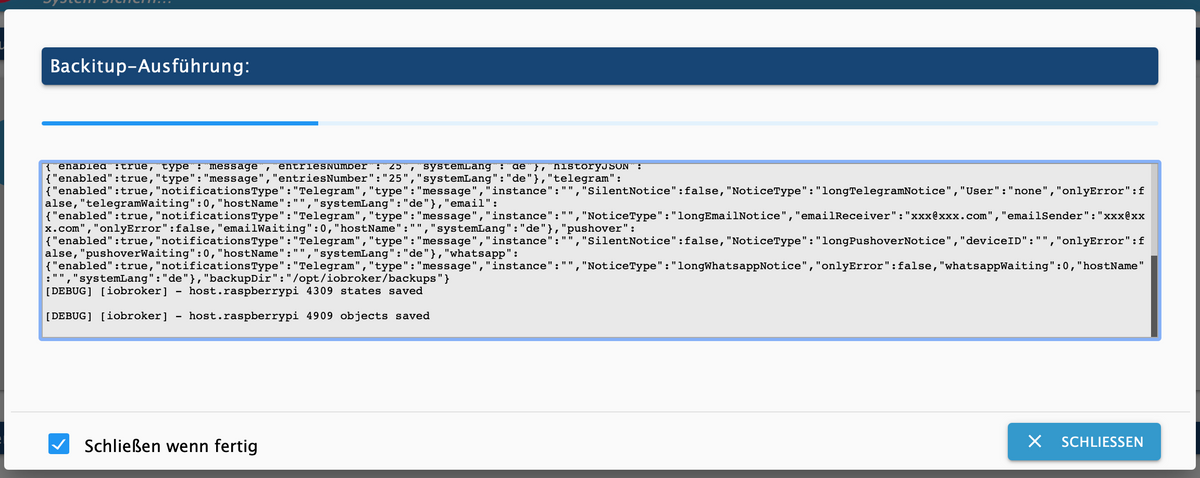
bedeutet das, dass das backup fertig gestellt wurde? Das Fenster bleibt nämlich geöffnet und der Ladebalken oben bewegt sich weiter... In der Synology sind auch noch keine Dateien erstellt worden.
Liegt immer noch ein Fehler vor oder muss ich dem iobroker länger zeit geben?
-
also: ich habe auf SMB3 geändert und das Feld als root user mounten aktiviert. Windows Freigabe habe ich ebenfalls in der Synology aktiviert.
nun habe ich folgenden code in backitup:
Started iobroker ...
[DEBUG] [mount] start with {"mountType":"CIFS","type":"storage","source":"local","mount":"//192.168.178.2","debugging":true,"fileDir":"/opt/iobroker/node_modules/iobroker.backitup","wakeOnLAN":false,"macAd":"20:DE:20:DE:20:DE","wolTime":"25","smb":"vers=3.0","sudo":true,"cifsDomain":"","clientInodes":false,"deleteOldBackup":true,"ownDir":true,"dir":"/Backupio/komplett/","dirMinimal":"/Backupio/komplett/","user":"backitup","pass":"****"}
[DEBUG] [mount] - noserverino option: false
[DEBUG] [mount] - cifs-mount command: "sudo mount -t cifs -o username=backitup,password=****,rw,file_mode=0777,dir_mode=0777,vers=3.0 //192.168.178.2/Backupio/komplett/ /opt/iobroker/backups"
[DEBUG] [mount] - mount successfully completed
[DEBUG] [mount] - done
[DEBUG] [iobroker] start with {"type":"creator","time":"02:40","debugging":true,"slaveBackup":"Single","everyXDays":"1","deleteBackupAfter":0,"cifs":{"enabled":true,"mountType":"CIFS","type":"storage","source":"local","mount":"//192.168.178.2","debugging":true,"fileDir":"/opt/iobroker/node_modules/iobroker.backitup","wakeOnLAN":false,"macAd":"20:DE:20:DE:20:DE","wolTime":"25","smb":"vers=3.0","sudo":true,"cifsDomain":"","clientInodes":false,"deleteOldBackup":true,"ownDir":true,"dir":"/Backupio/komplett/","dirMinimal":"/Backupio/komplett/","user":"backitup","pass":"****","context":{"fileNames":[],"errors":{},"done":["mount"],"types":[]},"adapter":null,"influxDBEvents":[],"mySqlEvents":[],"pgSqlEvents":[]},"dir":"/opt/iobroker","historyHTML":{"enabled":true,"type":"message","entriesNumber":"25","systemLang":"de"},"historyJSON":{"enabled":true,"type":"message","entriesNumber":"25","systemLang":"de"},"telegram":{"enabled":true,"notificationsType":"Telegram","type":"message","instance":"","SilentNotice":false,"NoticeType":"longTelegramNotice","User":"none","onlyError":false,"telegramWaiting":0,"hostName":"","systemLang":"de"},"email":{"enabled":true,"notificationsType":"Telegram","type":"message","instance":"","NoticeType":"longEmailNotice","emailReceiver":"xxx@xxx.com","emailSender":"xxx@xxx.com","onlyError":false,"emailWaiting":0,"hostName":"","systemLang":"de"},"pushover":{"enabled":true,"notificationsType":"Telegram","type":"message","instance":"","SilentNotice":false,"NoticeType":"longPushoverNotice","deviceID":"","onlyError":false,"pushoverWaiting":0,"hostName":"","systemLang":"de"},"whatsapp":{"enabled":true,"notificationsType":"Telegram","type":"message","instance":"","NoticeType":"longWhatsappNotice","onlyError":false,"whatsappWaiting":0,"hostName":"","systemLang":"de"},"backupDir":"/opt/iobroker/backups"}
[DEBUG] [iobroker] - host.raspberrypi 4309 states saved

[DEBUG] [iobroker] - host.raspberrypi 4909 objects saved
bedeutet das, dass das backup fertig gestellt wurde? Das Fenster bleibt nämlich geöffnet und der Ladebalken oben bewegt sich weiter... In der Synology sind auch noch keine Dateien erstellt worden.
Liegt immer noch ein Fehler vor oder muss ich dem iobroker länger zeit geben?
Schaut aus als sei das durch.
-
Schaut aus als sei das durch.
-
@thomas-braun
komisch auf der nas wurden keine Dateien angelegt...es sollte eigentlich so enden:
[DEBUG] [umount] - mount activ, umount is started ...
[DEBUG] [umount] - umount successfully completed
[DEBUG] [umount] - done
[EXIT] 0
Schau mal ob die dateien jetzt in /opt/iobroker/backups liegen ?
-
also: ich habe auf SMB3 geändert und das Feld als root user mounten aktiviert. Windows Freigabe habe ich ebenfalls in der Synology aktiviert.
nun habe ich folgenden code in backitup:
Started iobroker ...
[DEBUG] [mount] start with {"mountType":"CIFS","type":"storage","source":"local","mount":"//192.168.178.2","debugging":true,"fileDir":"/opt/iobroker/node_modules/iobroker.backitup","wakeOnLAN":false,"macAd":"20:DE:20:DE:20:DE","wolTime":"25","smb":"vers=3.0","sudo":true,"cifsDomain":"","clientInodes":false,"deleteOldBackup":true,"ownDir":true,"dir":"/Backupio/komplett/","dirMinimal":"/Backupio/komplett/","user":"backitup","pass":"****"}
[DEBUG] [mount] - noserverino option: false
[DEBUG] [mount] - cifs-mount command: "sudo mount -t cifs -o username=backitup,password=****,rw,file_mode=0777,dir_mode=0777,vers=3.0 //192.168.178.2/Backupio/komplett/ /opt/iobroker/backups"
[DEBUG] [mount] - mount successfully completed
[DEBUG] [mount] - done
[DEBUG] [iobroker] start with {"type":"creator","time":"02:40","debugging":true,"slaveBackup":"Single","everyXDays":"1","deleteBackupAfter":0,"cifs":{"enabled":true,"mountType":"CIFS","type":"storage","source":"local","mount":"//192.168.178.2","debugging":true,"fileDir":"/opt/iobroker/node_modules/iobroker.backitup","wakeOnLAN":false,"macAd":"20:DE:20:DE:20:DE","wolTime":"25","smb":"vers=3.0","sudo":true,"cifsDomain":"","clientInodes":false,"deleteOldBackup":true,"ownDir":true,"dir":"/Backupio/komplett/","dirMinimal":"/Backupio/komplett/","user":"backitup","pass":"****","context":{"fileNames":[],"errors":{},"done":["mount"],"types":[]},"adapter":null,"influxDBEvents":[],"mySqlEvents":[],"pgSqlEvents":[]},"dir":"/opt/iobroker","historyHTML":{"enabled":true,"type":"message","entriesNumber":"25","systemLang":"de"},"historyJSON":{"enabled":true,"type":"message","entriesNumber":"25","systemLang":"de"},"telegram":{"enabled":true,"notificationsType":"Telegram","type":"message","instance":"","SilentNotice":false,"NoticeType":"longTelegramNotice","User":"none","onlyError":false,"telegramWaiting":0,"hostName":"","systemLang":"de"},"email":{"enabled":true,"notificationsType":"Telegram","type":"message","instance":"","NoticeType":"longEmailNotice","emailReceiver":"xxx@xxx.com","emailSender":"xxx@xxx.com","onlyError":false,"emailWaiting":0,"hostName":"","systemLang":"de"},"pushover":{"enabled":true,"notificationsType":"Telegram","type":"message","instance":"","SilentNotice":false,"NoticeType":"longPushoverNotice","deviceID":"","onlyError":false,"pushoverWaiting":0,"hostName":"","systemLang":"de"},"whatsapp":{"enabled":true,"notificationsType":"Telegram","type":"message","instance":"","NoticeType":"longWhatsappNotice","onlyError":false,"whatsappWaiting":0,"hostName":"","systemLang":"de"},"backupDir":"/opt/iobroker/backups"}
[DEBUG] [iobroker] - host.raspberrypi 4309 states saved

[DEBUG] [iobroker] - host.raspberrypi 4909 objects saved
bedeutet das, dass das backup fertig gestellt wurde? Das Fenster bleibt nämlich geöffnet und der Ladebalken oben bewegt sich weiter... In der Synology sind auch noch keine Dateien erstellt worden.
Liegt immer noch ein Fehler vor oder muss ich dem iobroker länger zeit geben?
Hast du die Mitteilungen alle aktiv? Mach die mal aus.
-
es sollte eigentlich so enden:
[DEBUG] [umount] - mount activ, umount is started ...
[DEBUG] [umount] - umount successfully completed
[DEBUG] [umount] - done
[EXIT] 0
Schau mal ob die dateien jetzt in /opt/iobroker/backups liegen ?
-
Hast du die Mitteilungen alle aktiv? Mach die mal aus.
-
kannst du das konkretisieren? welche Mitteilungen meinst du und wo mache ich die aus?
@jones88
In den Einstellungen.Der mountpunkt sollte im übrigen leer sein, wenn dort das freigegebene Dateisystem eingehängt wird.
Und bitte keine Bilder von Text machen...
-
also: ich habe auf SMB3 geändert und das Feld als root user mounten aktiviert. Windows Freigabe habe ich ebenfalls in der Synology aktiviert.
nun habe ich folgenden code in backitup:
Started iobroker ...
[DEBUG] [mount] start with {"mountType":"CIFS","type":"storage","source":"local","mount":"//192.168.178.2","debugging":true,"fileDir":"/opt/iobroker/node_modules/iobroker.backitup","wakeOnLAN":false,"macAd":"20:DE:20:DE:20:DE","wolTime":"25","smb":"vers=3.0","sudo":true,"cifsDomain":"","clientInodes":false,"deleteOldBackup":true,"ownDir":true,"dir":"/Backupio/komplett/","dirMinimal":"/Backupio/komplett/","user":"backitup","pass":"****"}
[DEBUG] [mount] - noserverino option: false
[DEBUG] [mount] - cifs-mount command: "sudo mount -t cifs -o username=backitup,password=****,rw,file_mode=0777,dir_mode=0777,vers=3.0 //192.168.178.2/Backupio/komplett/ /opt/iobroker/backups"
[DEBUG] [mount] - mount successfully completed
[DEBUG] [mount] - done
[DEBUG] [iobroker] start with {"type":"creator","time":"02:40","debugging":true,"slaveBackup":"Single","everyXDays":"1","deleteBackupAfter":0,"cifs":{"enabled":true,"mountType":"CIFS","type":"storage","source":"local","mount":"//192.168.178.2","debugging":true,"fileDir":"/opt/iobroker/node_modules/iobroker.backitup","wakeOnLAN":false,"macAd":"20:DE:20:DE:20:DE","wolTime":"25","smb":"vers=3.0","sudo":true,"cifsDomain":"","clientInodes":false,"deleteOldBackup":true,"ownDir":true,"dir":"/Backupio/komplett/","dirMinimal":"/Backupio/komplett/","user":"backitup","pass":"****","context":{"fileNames":[],"errors":{},"done":["mount"],"types":[]},"adapter":null,"influxDBEvents":[],"mySqlEvents":[],"pgSqlEvents":[]},"dir":"/opt/iobroker","historyHTML":{"enabled":true,"type":"message","entriesNumber":"25","systemLang":"de"},"historyJSON":{"enabled":true,"type":"message","entriesNumber":"25","systemLang":"de"},"telegram":{"enabled":true,"notificationsType":"Telegram","type":"message","instance":"","SilentNotice":false,"NoticeType":"longTelegramNotice","User":"none","onlyError":false,"telegramWaiting":0,"hostName":"","systemLang":"de"},"email":{"enabled":true,"notificationsType":"Telegram","type":"message","instance":"","NoticeType":"longEmailNotice","emailReceiver":"xxx@xxx.com","emailSender":"xxx@xxx.com","onlyError":false,"emailWaiting":0,"hostName":"","systemLang":"de"},"pushover":{"enabled":true,"notificationsType":"Telegram","type":"message","instance":"","SilentNotice":false,"NoticeType":"longPushoverNotice","deviceID":"","onlyError":false,"pushoverWaiting":0,"hostName":"","systemLang":"de"},"whatsapp":{"enabled":true,"notificationsType":"Telegram","type":"message","instance":"","NoticeType":"longWhatsappNotice","onlyError":false,"whatsappWaiting":0,"hostName":"","systemLang":"de"},"backupDir":"/opt/iobroker/backups"}
[DEBUG] [iobroker] - host.raspberrypi 4309 states saved

[DEBUG] [iobroker] - host.raspberrypi 4909 objects saved
bedeutet das, dass das backup fertig gestellt wurde? Das Fenster bleibt nämlich geöffnet und der Ladebalken oben bewegt sich weiter... In der Synology sind auch noch keine Dateien erstellt worden.
Liegt immer noch ein Fehler vor oder muss ich dem iobroker länger zeit geben?
-
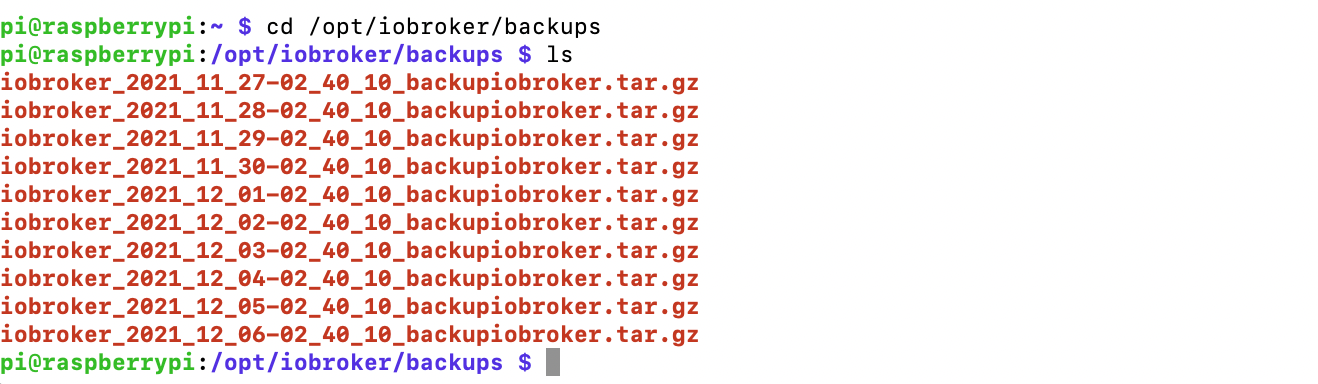
@jones88 Ich kann die Konfig von dir nicht mehr finden.
Kannst du sie nochmal posten?und wie heisst die Freigabe genau?



Hey! Du scheinst an dieser Unterhaltung interessiert zu sein, hast aber noch kein Konto.
Hast du es satt, bei jedem Besuch durch die gleichen Beiträge zu scrollen? Wenn du dich für ein Konto anmeldest, kommst du immer genau dorthin zurück, wo du zuvor warst, und kannst dich über neue Antworten benachrichtigen lassen (entweder per E-Mail oder Push-Benachrichtigung). Du kannst auch Lesezeichen speichern und Beiträge positiv bewerten, um anderen Community-Mitgliedern deine Wertschätzung zu zeigen.
Mit deinem Input könnte dieser Beitrag noch besser werden 💗
Registrieren Anmelden299
Online33.0k
Benutzer83.6k
Themen1.3m
Beiträge