
NEWS




[HowTo] InfluxDB 2.1 auf Debian 11 (proxmox CT) installieren
-
Hallo
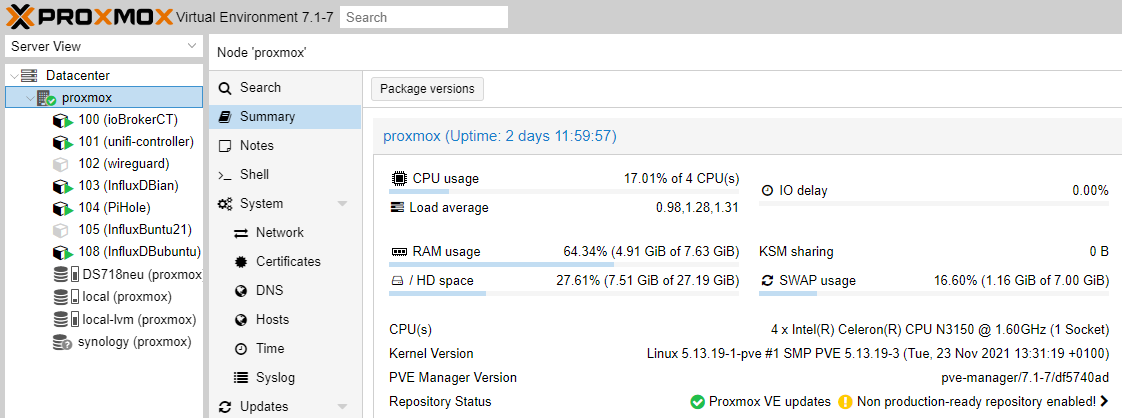
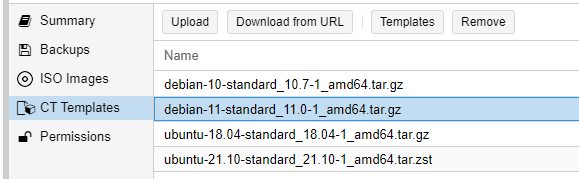
Habe auf Proxmox einen neuen Container mit Debian 11 erstellt und dann genau wie in der Anleitung angegeben die Befehle eingegeben.
Aber leider bekomme ich nach dem Punkt 6. "apt update" folgenden Fehler:root@Influx:~# apt update Hit:1 http://ftp.debian.org/debian bullseye InRelease Hit:2 http://security.debian.org bullseye-security InRelease Hit:3 http://ftp.debian.org/debian bullseye-updates InRelease Get:4 https://repos.influxdata.com/debian bullseye InRelease [12.9 kB] Err:4 https://repos.influxdata.com/debian bullseye InRelease The following signatures couldn't be verified because the public key is not available: NO_PUBKEY D8FF8E1F7DF8B07E Reading package lists... Done W: GPG error: https://repos.influxdata.com/debian bullseye InRelease: The following signatures couldn't be verified because the public key is not available: NO_PUBKEY D8FF8E1F7DF8B07E E: The repository 'https://repos.influxdata.com/debian bullseye InRelease' is not signed. N: Updating from such a repository can't be done securely, and is therefore disabled by default. N: See apt-secure(8) manpage for repository creation and user configuration details.Jemand einen Tipp?
Ist es nicht sinnvoller gleich auf Debian 12 zu gehen? -
Hallo
Habe auf Proxmox einen neuen Container mit Debian 11 erstellt und dann genau wie in der Anleitung angegeben die Befehle eingegeben.
Aber leider bekomme ich nach dem Punkt 6. "apt update" folgenden Fehler:root@Influx:~# apt update Hit:1 http://ftp.debian.org/debian bullseye InRelease Hit:2 http://security.debian.org bullseye-security InRelease Hit:3 http://ftp.debian.org/debian bullseye-updates InRelease Get:4 https://repos.influxdata.com/debian bullseye InRelease [12.9 kB] Err:4 https://repos.influxdata.com/debian bullseye InRelease The following signatures couldn't be verified because the public key is not available: NO_PUBKEY D8FF8E1F7DF8B07E Reading package lists... Done W: GPG error: https://repos.influxdata.com/debian bullseye InRelease: The following signatures couldn't be verified because the public key is not available: NO_PUBKEY D8FF8E1F7DF8B07E E: The repository 'https://repos.influxdata.com/debian bullseye InRelease' is not signed. N: Updating from such a repository can't be done securely, and is therefore disabled by default. N: See apt-secure(8) manpage for repository creation and user configuration details.Jemand einen Tipp?
Ist es nicht sinnvoller gleich auf Debian 12 zu gehen?@josbg sagte in [HowTo] InfluxDB 2.1 auf Debian 11 (proxmox CT) installieren:
Jemand einen Tipp?
Ja, nicht als root herumkaspern.
Ja, influx-Repository neu inkl. der Keys neuanlegen.Ist es nicht sinnvoller gleich auf Debian 12 zu gehen?
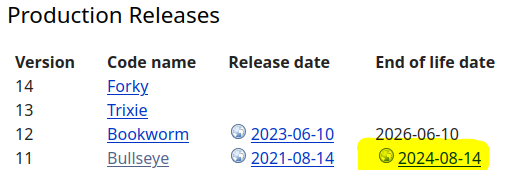
Das ohnehin, Bullseye ist abgekündigt.
-
@thomas-braun: Danke für die Info.
Hat jemand zufällig einen Link zu einer Anleitung?
Habe schon ein paar probiert, aber bisher leider ohne Erfolg.
Dank Proxmox-Snapshot ist zum Glück das "Neustarten" schnell und einfach :face_with_rolling_eyes: -
@thomas-braun: Danke für die Info.
Hat jemand zufällig einen Link zu einer Anleitung?
Habe schon ein paar probiert, aber bisher leider ohne Erfolg.
Dank Proxmox-Snapshot ist zum Glück das "Neustarten" schnell und einfach :face_with_rolling_eyes:@josbg sagte in [HowTo] InfluxDB 2.1 auf Debian 11 (proxmox CT) installieren:
Hat jemand zufällig einen Link zu einer Anleitung?
Anleitung wozu? Zur Installation von influxdb2?
Oder zur Einrichtung desselben? -
@josbg sagte in [HowTo] InfluxDB 2.1 auf Debian 11 (proxmox CT) installieren:
Hat jemand zufällig einen Link zu einer Anleitung?
Anleitung wozu? Zur Installation von influxdb2?
Oder zur Einrichtung desselben?@thomas-braun said in [HowTo] InfluxDB 2.1 auf Debian 11 (proxmox CT) installieren:
influxdb2?
Ich scheiter aktuell leider an der Installation.
Get:4 https://repos.influxdata.com/debian stable InRelease [6907 B]
Err:4 https://repos.influxdata.com/debian stable InRelease
  The following signatures couldn't be verified because the public key is not available: NO_PUBKEY D8FF8E1F7DF8B07E
Reading package lists... Done
W: GPG error: https://repos.influxdata.com/debian stable InRelease: The following signatures couldn't be verified because the public key is not available: NO_PUBKEY D8FF8E1F7DF8B07E
E: The repository 'https://repos.influxdata.com/debian stable InRelease' is not signed.
N: Updating from such a repository can't be done securely, and is therefore disabled by default.
N: See apt-secure(8) manpage for repository creation and user configuration details.
zuletzt habe ich die Informationen für Influx v2.7.10/Debian von der offiziellen Influx-Webseite probiert.
Mir fehlt da leider das Wissen um das Problem selber in den Griff zu bekommen.Für das Einrichten und Konfigurieren findet man genug Infos.
-
@thomas-braun said in [HowTo] InfluxDB 2.1 auf Debian 11 (proxmox CT) installieren:
influxdb2?
Ich scheiter aktuell leider an der Installation.
Get:4 https://repos.influxdata.com/debian stable InRelease [6907 B]
Err:4 https://repos.influxdata.com/debian stable InRelease
  The following signatures couldn't be verified because the public key is not available: NO_PUBKEY D8FF8E1F7DF8B07E
Reading package lists... Done
W: GPG error: https://repos.influxdata.com/debian stable InRelease: The following signatures couldn't be verified because the public key is not available: NO_PUBKEY D8FF8E1F7DF8B07E
E: The repository 'https://repos.influxdata.com/debian stable InRelease' is not signed.
N: Updating from such a repository can't be done securely, and is therefore disabled by default.
N: See apt-secure(8) manpage for repository creation and user configuration details.
zuletzt habe ich die Informationen für Influx v2.7.10/Debian von der offiziellen Influx-Webseite probiert.
Mir fehlt da leider das Wissen um das Problem selber in den Griff zu bekommen.Für das Einrichten und Konfigurieren findet man genug Infos.
Das Repo ist falsch/veraltet aufgesetzt. Mach es danach neu:
https://forum.iobroker.net/topic/59231/phantastische-repositories-und-wo-sie-zu-finden-sind
-
@thomas-braun: Danke für die Info.
Hat jemand zufällig einen Link zu einer Anleitung?
Habe schon ein paar probiert, aber bisher leider ohne Erfolg.
Dank Proxmox-Snapshot ist zum Glück das "Neustarten" schnell und einfach :face_with_rolling_eyes:@josbg sagte in [HowTo] InfluxDB 2.1 auf Debian 11 (proxmox CT) installieren:
Hat jemand zufällig einen Link zu einer Anleitung?
-
-
ich habe Lösung gefunden
@honnkoponko sagte in [HowTo] InfluxDB 2.1 auf Debian 11 (proxmox CT) installieren:
ich habe Lösung gefunden
Aha, und wofür?
-
@honnkoponko sagte in [HowTo] InfluxDB 2.1 auf Debian 11 (proxmox CT) installieren:
ich habe Lösung gefunden
Aha, und wofür?
@wendy2702
ich hatte Problem mit v1.x zu 2.x update.
Musste mehrmals neu installieren aber am Ende hat geklappt und funtkioniert jetzt :) -
hi,
ich kann auf proxmox auf meiner linux ct keine influxdb installieren.
The repository 'https://repos.influxdata.com/debian stable InRelease' is not signed.kommt, nachdem ich folgendes gemacht habe:
influxdb login: root
Password:
Linux influxdb 6.8.12-1-pve #1 SMP PREEMPT_DYNAMIC PMX 6.8.12-1 (2024-08-05T16:17Z) x86_64

The programs included with the Debian GNU/Linux system are free software;
the exact distribution terms for each program are described in the
individual files in /usr/share/doc/*/copyright.

Debian GNU/Linux comes with ABSOLUTELY NO WARRANTY, to the extent
permitted by applicable law.
Last login: Mon Jul  7 15:59:12 UTC 2025 on tty1
root@influxdb:~# sudo
-bash: sudo: command not found
root@influxdb:~# get update
-bash: get: command not found
root@influxdb:~# uname -m
x86_64
root@influxdb:~# cat /etc/debian_version
12.11
root@influxdb:~# getconf LONG_BIT
64
root@influxdb:~# cat /etc/*release
PRETTY_NAME="Debian GNU/Linux 12 (bookworm)"
NAME="Debian GNU/Linux"
VERSION_ID="12"
VERSION="12 (bookworm)"
VERSION_CODENAME=bookworm
ID=debian
HOME_URL="https://www.debian.org/"
SUPPORT_URL="https://www.debian.org/support"
BUG_REPORT_URL="https://bugs.debian.org/"
root@influxdb:~# wget -q https://repos.influxdata.com/influxdata-archive_compat.key
root@influxdb:~# echo 'deb [signed-by=/etc/apt/trusted.gpg.d/influxdata-archive_compat.gpg] https://repos.influxdata.com/debian stable main' | sudo tee /etc/apt/sources.list.d/influxdata.list
-bash: sudo: command not found
root@influxdb:~# echo 'deb [signed-by=/etc/apt/trusted.gpg.d/influxdata-archive_compat.gpg] https://repos.influxdata.com/debian stable main' | tee /etc/apt/so
urces.list.d/influxdata.list
deb [signed-by=/etc/apt/trusted.gpg.d/influxdata-archive_compat.gpg] https://repos.influxdata.com/debian stable main
root@influxdb:~# cat influxdata-archive_compat.key | gpg --dearmor | tee /etc/apt/trusted.gpg.d/influxdata-archive_compat.gpg > /dev/null
-bash: gpg: command not found
root@influxdb:~# install gpg
install: missing destination file operand after 'gpg'
Try 'install --help' for more information.
root@influxdb:~# apt install gnupg
Reading package lists... Done
Building dependency tree... Done
Reading state information... Done
The following additional packages will be installed:
  dirmngr gnupg-l10n gnupg-utils gpg gpg-agent gpg-wks-client gpg-wks-server gpgconf gpgsm libassuan0 libksba8 libnpth0 pinentry-curses
Suggested packages:
  dbus-user-session pinentry-gnome3 tor parcimonie xloadimage scdaemon pinentry-doc
The following NEW packages will be installed:
  dirmngr gnupg gnupg-l10n gnupg-utils gpg gpg-agent gpg-wks-client gpg-wks-server gpgconf gpgsm libassuan0 libksba8 libnpth0 pinentry-curses
0 upgraded, 14 newly installed, 0 to remove and 0 not upgraded.
Need to get 7881 kB of archives.
After this operation, 16.0 MB of additional disk space will be used.
Do you want to continue? [Y/n] Y
Get:1 http://deb.debian.org/debian bookworm/main amd64 libassuan0 amd64 2.5.5-5 [48.5 kB]
Get:2 http://deb.debian.org/debian bookworm/main amd64 gpgconf amd64 2.2.40-1.1 [564 kB]
Get:3 http://deb.debian.org/debian bookworm/main amd64 libksba8 amd64 1.6.3-2 [128 kB]
Get:4 http://deb.debian.org/debian bookworm/main amd64 libnpth0 amd64 1.6-3 [19.0 kB]
Get:5 http://deb.debian.org/debian bookworm/main amd64 dirmngr amd64 2.2.40-1.1 [792 kB]
Get:6 http://deb.debian.org/debian bookworm/main amd64 gnupg-l10n all 2.2.40-1.1 [1093 kB]
Get:7 http://deb.debian.org/debian bookworm/main amd64 gnupg-utils amd64 2.2.40-1.1 [927 kB]
Get:8 http://deb.debian.org/debian bookworm/main amd64 gpg amd64 2.2.40-1.1 [949 kB]
Get:9 http://deb.debian.org/debian bookworm/main amd64 pinentry-curses amd64 1.2.1-1 [77.4 kB]
Get:10 http://deb.debian.org/debian bookworm/main amd64 gpg-agent amd64 2.2.40-1.1 [695 kB]
Get:11 http://deb.debian.org/debian bookworm/main amd64 gpg-wks-client amd64 2.2.40-1.1 [541 kB]
Get:12 http://deb.debian.org/debian bookworm/main amd64 gpg-wks-server amd64 2.2.40-1.1 [531 kB]
Get:13 http://deb.debian.org/debian bookworm/main amd64 gpgsm amd64 2.2.40-1.1 [671 kB]
Get:14 http://deb.debian.org/debian bookworm/main amd64 gnupg all 2.2.40-1.1 [846 kB]
Fetched 7881 kB in 12s (641 kB/s)
Selecting previously unselected package libassuan0:amd64.
(Reading database ... 19137 files and directories currently installed.)
Preparing to unpack .../00-libassuan0_2.5.5-5_amd64.deb ...
Unpacking libassuan0:amd64 (2.5.5-5) ...
Selecting previously unselected package gpgconf.
Preparing to unpack .../01-gpgconf_2.2.40-1.1_amd64.deb ...
Unpacking gpgconf (2.2.40-1.1) ...
Selecting previously unselected package libksba8:amd64.
Preparing to unpack .../02-libksba8_1.6.3-2_amd64.deb ...
Unpacking libksba8:amd64 (1.6.3-2) ...
Selecting previously unselected package libnpth0:amd64.
Preparing to unpack .../03-libnpth0_1.6-3_amd64.deb ...
Unpacking libnpth0:amd64 (1.6-3) ...
Selecting previously unselected package dirmngr.
Preparing to unpack .../04-dirmngr_2.2.40-1.1_amd64.deb ...
Unpacking dirmngr (2.2.40-1.1) ...
Selecting previously unselected package gnupg-l10n.
Preparing to unpack .../05-gnupg-l10n_2.2.40-1.1_all.deb ...
Unpacking gnupg-l10n (2.2.40-1.1) ...
Selecting previously unselected package gnupg-utils.
Preparing to unpack .../06-gnupg-utils_2.2.40-1.1_amd64.deb ...
Unpacking gnupg-utils (2.2.40-1.1) ...
Selecting previously unselected package gpg.
Preparing to unpack .../07-gpg_2.2.40-1.1_amd64.deb ...
Unpacking gpg (2.2.40-1.1) ...
Selecting previously unselected package pinentry-curses.
Preparing to unpack .../08-pinentry-curses_1.2.1-1_amd64.deb ...
Unpacking pinentry-curses (1.2.1-1) ...
Selecting previously unselected package gpg-agent.
Preparing to unpack .../09-gpg-agent_2.2.40-1.1_amd64.deb ...
Unpacking gpg-agent (2.2.40-1.1) ...
Selecting previously unselected package gpg-wks-client.
Preparing to unpack .../10-gpg-wks-client_2.2.40-1.1_amd64.deb ...
Unpacking gpg-wks-client (2.2.40-1.1) ...
Selecting previously unselected package gpg-wks-server.
Preparing to unpack .../11-gpg-wks-server_2.2.40-1.1_amd64.deb ...
Unpacking gpg-wks-server (2.2.40-1.1) ...
Selecting previously unselected package gpgsm.
Preparing to unpack .../12-gpgsm_2.2.40-1.1_amd64.deb ...
Unpacking gpgsm (2.2.40-1.1) ...
Selecting previously unselected package gnupg.
Preparing to unpack .../13-gnupg_2.2.40-1.1_all.deb ...
Unpacking gnupg (2.2.40-1.1) ...
Setting up libksba8:amd64 (1.6.3-2) ...
Setting up libnpth0:amd64 (1.6-3) ...
Setting up libassuan0:amd64 (2.5.5-5) ...
Setting up gnupg-l10n (2.2.40-1.1) ...
Setting up gpgconf (2.2.40-1.1) ...
Setting up gpg (2.2.40-1.1) ...
Setting up gnupg-utils (2.2.40-1.1) ...
Setting up pinentry-curses (1.2.1-1) ...
Setting up gpg-agent (2.2.40-1.1) ...
Created symlink /etc/systemd/user/sockets.target.wants/gpg-agent-browser.socket -> /usr/lib/systemd/user/gpg-agent-browser.socket.
Created symlink /etc/systemd/user/sockets.target.wants/gpg-agent-extra.socket -> /usr/lib/systemd/user/gpg-agent-extra.socket.
Created symlink /etc/systemd/user/sockets.target.wants/gpg-agent-ssh.socket -> /usr/lib/systemd/user/gpg-agent-ssh.socket.
Created symlink /etc/systemd/user/sockets.target.wants/gpg-agent.socket -> /usr/lib/systemd/user/gpg-agent.socket.
Setting up gpgsm (2.2.40-1.1) ...
Setting up dirmngr (2.2.40-1.1) ...
Created symlink /etc/systemd/user/sockets.target.wants/dirmngr.socket -> /usr/lib/systemd/user/dirmngr.socket.
Setting up gpg-wks-server (2.2.40-1.1) ...
Setting up gpg-wks-client (2.2.40-1.1) ...
Setting up gnupg (2.2.40-1.1) ...
Processing triggers for man-db (2.11.2-2) ...
Processing triggers for libc-bin (2.36-9+deb12u10) ...
root@influxdb:~# apt install lsb-release
Reading package lists... Done
Building dependency tree... Done
Reading state information... Done
The following NEW packages will be installed:
  lsb-release
0 upgraded, 1 newly installed, 0 to remove and 0 not upgraded.
Need to get 6416 B of archives.
After this operation, 17.4 kB of additional disk space will be used.
Get:1 http://deb.debian.org/debian bookworm/main amd64 lsb-release all 12.0-1 [6416 B]
Fetched 6416 B in 10s (626 B/s)
Selecting previously unselected package lsb-release.
(Reading database ... 19392 files and directories currently installed.)
Preparing to unpack .../lsb-release_12.0-1_all.deb ...
Unpacking lsb-release (12.0-1) ...
Setting up lsb-release (12.0-1) ...
Processing triggers for man-db (2.11.2-2) ...
root@influxdb:~# apt update && apt install -y influxdb2
Hit:1 http://security.debian.org bookworm-security InRelease
Hit:2 http://deb.debian.org/debian bookworm InRelease
Hit:3 http://deb.debian.org/debian bookworm-updates InRelease
Get:4 https://repos.influxdata.com/debian stable InRelease [6907 B]
Err:4 https://repos.influxdata.com/debian stable InRelease
  The following signatures couldn't be verified because the public key is not available: NO_PUBKEY D8FF8E1F7DF8B07E
Reading package lists... Done
W: GPG error: https://repos.influxdata.com/debian stable InRelease: The following signatures couldn't be verified because the public key is not available: NO_PUBKEY D8FF8E1F7DF8B07E
E: The repository 'https://repos.influxdata.com/debian stable InRelease' is not signed.
N: Updating from such a repository can't be done securely, and is therefore disabled by default.
N: See apt-secure(8) manpage for repository creation and user configuration details.
**root@influxdb:~# apt update**
Hit:1 http://security.debian.org bookworm-security InRelease
Hit:2 http://deb.debian.org/debian bookworm InRelease
Hit:3 http://deb.debian.org/debian bookworm-updates InRelease
Get:4 https://repos.influxdata.com/debian stable InRelease [6907 B]
Err:4 https://repos.influxdata.com/debian stable InRelease
  The following signatures couldn't be verified because the public key is not available: NO_PUBKEY D8FF8E1F7DF8B07E
Reading package lists... Done
W: GPG error: https://repos.influxdata.com/debian stable InRelease: The following signatures couldn't be verified because the public key is not available: NO_PUBKEY D8FF8E1F7DF8B07E
E: The repository 'https://repos.influxdata.com/debian stable InRelease' is not signed.
N: Updating from such a repository can't be done securely, and is therefore disabled by default.
N: See apt-secure(8) manpage for repository creation and user configuration details.

**root@influxdb:~# apt install influxdb2**
Reading package lists... Done
Building dependency tree... Done
Reading state information... Done
E: Unable to locate package influxdb2
was kann ich machen?
-
hi,
ich kann auf proxmox auf meiner linux ct keine influxdb installieren.
The repository 'https://repos.influxdata.com/debian stable InRelease' is not signed.kommt, nachdem ich folgendes gemacht habe:
influxdb login: root
Password:
Linux influxdb 6.8.12-1-pve #1 SMP PREEMPT_DYNAMIC PMX 6.8.12-1 (2024-08-05T16:17Z) x86_64

The programs included with the Debian GNU/Linux system are free software;
the exact distribution terms for each program are described in the
individual files in /usr/share/doc/*/copyright.

Debian GNU/Linux comes with ABSOLUTELY NO WARRANTY, to the extent
permitted by applicable law.
Last login: Mon Jul  7 15:59:12 UTC 2025 on tty1
root@influxdb:~# sudo
-bash: sudo: command not found
root@influxdb:~# get update
-bash: get: command not found
root@influxdb:~# uname -m
x86_64
root@influxdb:~# cat /etc/debian_version
12.11
root@influxdb:~# getconf LONG_BIT
64
root@influxdb:~# cat /etc/*release
PRETTY_NAME="Debian GNU/Linux 12 (bookworm)"
NAME="Debian GNU/Linux"
VERSION_ID="12"
VERSION="12 (bookworm)"
VERSION_CODENAME=bookworm
ID=debian
HOME_URL="https://www.debian.org/"
SUPPORT_URL="https://www.debian.org/support"
BUG_REPORT_URL="https://bugs.debian.org/"
root@influxdb:~# wget -q https://repos.influxdata.com/influxdata-archive_compat.key
root@influxdb:~# echo 'deb [signed-by=/etc/apt/trusted.gpg.d/influxdata-archive_compat.gpg] https://repos.influxdata.com/debian stable main' | sudo tee /etc/apt/sources.list.d/influxdata.list
-bash: sudo: command not found
root@influxdb:~# echo 'deb [signed-by=/etc/apt/trusted.gpg.d/influxdata-archive_compat.gpg] https://repos.influxdata.com/debian stable main' | tee /etc/apt/so
urces.list.d/influxdata.list
deb [signed-by=/etc/apt/trusted.gpg.d/influxdata-archive_compat.gpg] https://repos.influxdata.com/debian stable main
root@influxdb:~# cat influxdata-archive_compat.key | gpg --dearmor | tee /etc/apt/trusted.gpg.d/influxdata-archive_compat.gpg > /dev/null
-bash: gpg: command not found
root@influxdb:~# install gpg
install: missing destination file operand after 'gpg'
Try 'install --help' for more information.
root@influxdb:~# apt install gnupg
Reading package lists... Done
Building dependency tree... Done
Reading state information... Done
The following additional packages will be installed:
  dirmngr gnupg-l10n gnupg-utils gpg gpg-agent gpg-wks-client gpg-wks-server gpgconf gpgsm libassuan0 libksba8 libnpth0 pinentry-curses
Suggested packages:
  dbus-user-session pinentry-gnome3 tor parcimonie xloadimage scdaemon pinentry-doc
The following NEW packages will be installed:
  dirmngr gnupg gnupg-l10n gnupg-utils gpg gpg-agent gpg-wks-client gpg-wks-server gpgconf gpgsm libassuan0 libksba8 libnpth0 pinentry-curses
0 upgraded, 14 newly installed, 0 to remove and 0 not upgraded.
Need to get 7881 kB of archives.
After this operation, 16.0 MB of additional disk space will be used.
Do you want to continue? [Y/n] Y
Get:1 http://deb.debian.org/debian bookworm/main amd64 libassuan0 amd64 2.5.5-5 [48.5 kB]
Get:2 http://deb.debian.org/debian bookworm/main amd64 gpgconf amd64 2.2.40-1.1 [564 kB]
Get:3 http://deb.debian.org/debian bookworm/main amd64 libksba8 amd64 1.6.3-2 [128 kB]
Get:4 http://deb.debian.org/debian bookworm/main amd64 libnpth0 amd64 1.6-3 [19.0 kB]
Get:5 http://deb.debian.org/debian bookworm/main amd64 dirmngr amd64 2.2.40-1.1 [792 kB]
Get:6 http://deb.debian.org/debian bookworm/main amd64 gnupg-l10n all 2.2.40-1.1 [1093 kB]
Get:7 http://deb.debian.org/debian bookworm/main amd64 gnupg-utils amd64 2.2.40-1.1 [927 kB]
Get:8 http://deb.debian.org/debian bookworm/main amd64 gpg amd64 2.2.40-1.1 [949 kB]
Get:9 http://deb.debian.org/debian bookworm/main amd64 pinentry-curses amd64 1.2.1-1 [77.4 kB]
Get:10 http://deb.debian.org/debian bookworm/main amd64 gpg-agent amd64 2.2.40-1.1 [695 kB]
Get:11 http://deb.debian.org/debian bookworm/main amd64 gpg-wks-client amd64 2.2.40-1.1 [541 kB]
Get:12 http://deb.debian.org/debian bookworm/main amd64 gpg-wks-server amd64 2.2.40-1.1 [531 kB]
Get:13 http://deb.debian.org/debian bookworm/main amd64 gpgsm amd64 2.2.40-1.1 [671 kB]
Get:14 http://deb.debian.org/debian bookworm/main amd64 gnupg all 2.2.40-1.1 [846 kB]
Fetched 7881 kB in 12s (641 kB/s)
Selecting previously unselected package libassuan0:amd64.
(Reading database ... 19137 files and directories currently installed.)
Preparing to unpack .../00-libassuan0_2.5.5-5_amd64.deb ...
Unpacking libassuan0:amd64 (2.5.5-5) ...
Selecting previously unselected package gpgconf.
Preparing to unpack .../01-gpgconf_2.2.40-1.1_amd64.deb ...
Unpacking gpgconf (2.2.40-1.1) ...
Selecting previously unselected package libksba8:amd64.
Preparing to unpack .../02-libksba8_1.6.3-2_amd64.deb ...
Unpacking libksba8:amd64 (1.6.3-2) ...
Selecting previously unselected package libnpth0:amd64.
Preparing to unpack .../03-libnpth0_1.6-3_amd64.deb ...
Unpacking libnpth0:amd64 (1.6-3) ...
Selecting previously unselected package dirmngr.
Preparing to unpack .../04-dirmngr_2.2.40-1.1_amd64.deb ...
Unpacking dirmngr (2.2.40-1.1) ...
Selecting previously unselected package gnupg-l10n.
Preparing to unpack .../05-gnupg-l10n_2.2.40-1.1_all.deb ...
Unpacking gnupg-l10n (2.2.40-1.1) ...
Selecting previously unselected package gnupg-utils.
Preparing to unpack .../06-gnupg-utils_2.2.40-1.1_amd64.deb ...
Unpacking gnupg-utils (2.2.40-1.1) ...
Selecting previously unselected package gpg.
Preparing to unpack .../07-gpg_2.2.40-1.1_amd64.deb ...
Unpacking gpg (2.2.40-1.1) ...
Selecting previously unselected package pinentry-curses.
Preparing to unpack .../08-pinentry-curses_1.2.1-1_amd64.deb ...
Unpacking pinentry-curses (1.2.1-1) ...
Selecting previously unselected package gpg-agent.
Preparing to unpack .../09-gpg-agent_2.2.40-1.1_amd64.deb ...
Unpacking gpg-agent (2.2.40-1.1) ...
Selecting previously unselected package gpg-wks-client.
Preparing to unpack .../10-gpg-wks-client_2.2.40-1.1_amd64.deb ...
Unpacking gpg-wks-client (2.2.40-1.1) ...
Selecting previously unselected package gpg-wks-server.
Preparing to unpack .../11-gpg-wks-server_2.2.40-1.1_amd64.deb ...
Unpacking gpg-wks-server (2.2.40-1.1) ...
Selecting previously unselected package gpgsm.
Preparing to unpack .../12-gpgsm_2.2.40-1.1_amd64.deb ...
Unpacking gpgsm (2.2.40-1.1) ...
Selecting previously unselected package gnupg.
Preparing to unpack .../13-gnupg_2.2.40-1.1_all.deb ...
Unpacking gnupg (2.2.40-1.1) ...
Setting up libksba8:amd64 (1.6.3-2) ...
Setting up libnpth0:amd64 (1.6-3) ...
Setting up libassuan0:amd64 (2.5.5-5) ...
Setting up gnupg-l10n (2.2.40-1.1) ...
Setting up gpgconf (2.2.40-1.1) ...
Setting up gpg (2.2.40-1.1) ...
Setting up gnupg-utils (2.2.40-1.1) ...
Setting up pinentry-curses (1.2.1-1) ...
Setting up gpg-agent (2.2.40-1.1) ...
Created symlink /etc/systemd/user/sockets.target.wants/gpg-agent-browser.socket -> /usr/lib/systemd/user/gpg-agent-browser.socket.
Created symlink /etc/systemd/user/sockets.target.wants/gpg-agent-extra.socket -> /usr/lib/systemd/user/gpg-agent-extra.socket.
Created symlink /etc/systemd/user/sockets.target.wants/gpg-agent-ssh.socket -> /usr/lib/systemd/user/gpg-agent-ssh.socket.
Created symlink /etc/systemd/user/sockets.target.wants/gpg-agent.socket -> /usr/lib/systemd/user/gpg-agent.socket.
Setting up gpgsm (2.2.40-1.1) ...
Setting up dirmngr (2.2.40-1.1) ...
Created symlink /etc/systemd/user/sockets.target.wants/dirmngr.socket -> /usr/lib/systemd/user/dirmngr.socket.
Setting up gpg-wks-server (2.2.40-1.1) ...
Setting up gpg-wks-client (2.2.40-1.1) ...
Setting up gnupg (2.2.40-1.1) ...
Processing triggers for man-db (2.11.2-2) ...
Processing triggers for libc-bin (2.36-9+deb12u10) ...
root@influxdb:~# apt install lsb-release
Reading package lists... Done
Building dependency tree... Done
Reading state information... Done
The following NEW packages will be installed:
  lsb-release
0 upgraded, 1 newly installed, 0 to remove and 0 not upgraded.
Need to get 6416 B of archives.
After this operation, 17.4 kB of additional disk space will be used.
Get:1 http://deb.debian.org/debian bookworm/main amd64 lsb-release all 12.0-1 [6416 B]
Fetched 6416 B in 10s (626 B/s)
Selecting previously unselected package lsb-release.
(Reading database ... 19392 files and directories currently installed.)
Preparing to unpack .../lsb-release_12.0-1_all.deb ...
Unpacking lsb-release (12.0-1) ...
Setting up lsb-release (12.0-1) ...
Processing triggers for man-db (2.11.2-2) ...
root@influxdb:~# apt update && apt install -y influxdb2
Hit:1 http://security.debian.org bookworm-security InRelease
Hit:2 http://deb.debian.org/debian bookworm InRelease
Hit:3 http://deb.debian.org/debian bookworm-updates InRelease
Get:4 https://repos.influxdata.com/debian stable InRelease [6907 B]
Err:4 https://repos.influxdata.com/debian stable InRelease
  The following signatures couldn't be verified because the public key is not available: NO_PUBKEY D8FF8E1F7DF8B07E
Reading package lists... Done
W: GPG error: https://repos.influxdata.com/debian stable InRelease: The following signatures couldn't be verified because the public key is not available: NO_PUBKEY D8FF8E1F7DF8B07E
E: The repository 'https://repos.influxdata.com/debian stable InRelease' is not signed.
N: Updating from such a repository can't be done securely, and is therefore disabled by default.
N: See apt-secure(8) manpage for repository creation and user configuration details.
**root@influxdb:~# apt update**
Hit:1 http://security.debian.org bookworm-security InRelease
Hit:2 http://deb.debian.org/debian bookworm InRelease
Hit:3 http://deb.debian.org/debian bookworm-updates InRelease
Get:4 https://repos.influxdata.com/debian stable InRelease [6907 B]
Err:4 https://repos.influxdata.com/debian stable InRelease
  The following signatures couldn't be verified because the public key is not available: NO_PUBKEY D8FF8E1F7DF8B07E
Reading package lists... Done
W: GPG error: https://repos.influxdata.com/debian stable InRelease: The following signatures couldn't be verified because the public key is not available: NO_PUBKEY D8FF8E1F7DF8B07E
E: The repository 'https://repos.influxdata.com/debian stable InRelease' is not signed.
N: Updating from such a repository can't be done securely, and is therefore disabled by default.
N: See apt-secure(8) manpage for repository creation and user configuration details.

**root@influxdb:~# apt install influxdb2**
Reading package lists... Done
Building dependency tree... Done
Reading state information... Done
E: Unable to locate package influxdb2
was kann ich machen?
Was veranstaltest du da? Und dann noch mit vollem root-Zugang.
-
Was veranstaltest du da? Und dann noch mit vollem root-Zugang.
@thomas-braun kann es halt (noch) nicht besser.
was/wie kann ich besser machen. hatte eine frische ct angelegt. dann wollte ich influxdb2 installieren, damit ich die daten aus meinem iobroker in die db schreiben kann.
viele videos/tut haben bei mir nicht geklappt. :-(
-
@thomas-braun kann es halt (noch) nicht besser.
was/wie kann ich besser machen. hatte eine frische ct angelegt. dann wollte ich influxdb2 installieren, damit ich die daten aus meinem iobroker in die db schreiben kann.
viele videos/tut haben bei mir nicht geklappt. :-(
@tklein sagte in [HowTo] InfluxDB 2.1 auf Debian 11 (proxmox CT) installieren:
was/wie kann ich besser machen.
Zunächst legt man sich einen User an, den man statt des root verwendet.
Wie das geht steht u.a. in der Anleitung, wie man man den ioBroker richtig auf einem lxc installiert.Und mit diesem user funktionieren dann auch die Befehle von hier:
https://forum.iobroker.net/topic/59231/phantastische-repositories-und-wo-sie-zu-finden-sind
Vorausgesetzt, dass gpg usw. bereits vorhanden ist. Ist bei richtigen Installationen der Fall, bei Containern halt nicht unbedingt. (Weswegen ich auch Container nicht für Linux-Anfänger empfehlen würde...)
-
@tklein sagte in [HowTo] InfluxDB 2.1 auf Debian 11 (proxmox CT) installieren:
was/wie kann ich besser machen.
Zunächst legt man sich einen User an, den man statt des root verwendet.
Wie das geht steht u.a. in der Anleitung, wie man man den ioBroker richtig auf einem lxc installiert.Und mit diesem user funktionieren dann auch die Befehle von hier:
https://forum.iobroker.net/topic/59231/phantastische-repositories-und-wo-sie-zu-finden-sind
Vorausgesetzt, dass gpg usw. bereits vorhanden ist. Ist bei richtigen Installationen der Fall, bei Containern halt nicht unbedingt. (Weswegen ich auch Container nicht für Linux-Anfänger empfehlen würde...)
@thomas-braun den iob hatte ich auch als ct angelegt. das hat soweit geklappt. für influxdb wollte ich eine separate installation.
dann werde ich mal schauen wie ich linux als lxc installiert bekomme.
danke dir für deine hilfe! -
@thomas-braun den iob hatte ich auch als ct angelegt. das hat soweit geklappt. für influxdb wollte ich eine separate installation.
dann werde ich mal schauen wie ich linux als lxc installiert bekomme.
danke dir für deine hilfe!@tklein sagte in [HowTo] InfluxDB 2.1 auf Debian 11 (proxmox CT) installieren:
für influxdb wollte ich eine separate installation.
Aber deine Turnübungen da oben waren doch im ioBroker-Container, oder nicht?
-
@tklein sagte in [HowTo] InfluxDB 2.1 auf Debian 11 (proxmox CT) installieren:
für influxdb wollte ich eine separate installation.
Aber deine Turnübungen da oben waren doch im ioBroker-Container, oder nicht?
@thomas-braun nee, die baucghlandung waren im influx ct
-
@thomas-braun den iob hatte ich auch als ct angelegt. das hat soweit geklappt. für influxdb wollte ich eine separate installation.
dann werde ich mal schauen wie ich linux als lxc installiert bekomme.
danke dir für deine hilfe!@tklein sagte in [HowTo] InfluxDB 2.1 auf Debian 11 (proxmox CT) installieren:
dann werde ich mal schauen wie ich linux als lxc installiert bekomme.
???
LXC IST ein LinuXContainer. Was willst du denn da 'Linux' installieren? -
@tklein sagte in [HowTo] InfluxDB 2.1 auf Debian 11 (proxmox CT) installieren:
dann werde ich mal schauen wie ich linux als lxc installiert bekomme.
???
LXC IST ein LinuXContainer. Was willst du denn da 'Linux' installieren?



Support us
359
Online32.7k
Users82.3k
Topics1.3m
Posts