




Nach Neuinstallation ERROR: Process exited with code 25
-
Systemdata Bitte Ausfüllen Hardwaresystem: PINE A64-LTS Arbeitsspeicher: 2GB Festplattenart: SD-Karte Betriebssystem: DietPi v7.7.3 (Ubuntu) Node-Version: V12.22.7 Nodejs-Version: V12.22.7 NPM-Version: 6.14.15 Installationsart: Manuell Image genutzt: Nein Hey Leute,
ich hatte vorher IoBroker Version 4 installiert, diesen aber irgendwann nicht mehr erreichen können.
Deshalb habe ich alles, was mit dem IoBroker zu tun hatte gelöscht und die neue Version 5 installiert.
Aber immer, wenn ich einen Adapter installieren möchte, kommt:
ERROR: Process exited with code 25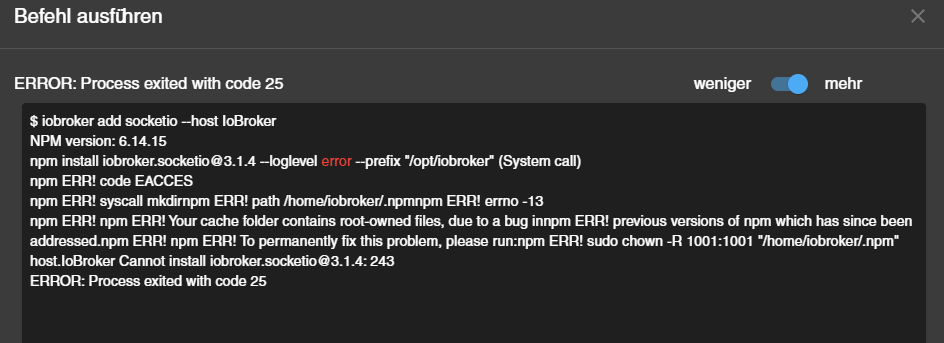
Könnt Ihr mir bitte helfen.
Vielen Dank im Voraus.@thomas-brodmann sagte in Nach Neuinstallation ERROR: Process exited with code 25:
DietPi v7.7.3 (Ubuntu)
da bin ich das erste mal raus!
und da das zweite mal:
@thomas-brodmann sagte in Nach Neuinstallation ERROR: Process exited with code 25:PINE A64-LTS
Ist dein OS ein 64bitter?
und welche node-Version/Architektur nutzst du?kein Support per PN! - Fragen im Forum stellen - Benutzt das Voting rechts unten im Beitrag wenn er euch geholfen hat.
Das Forum freut sich über eine Spende. Benutzt dazu den Spendenbutton oben rechts. Danke!
der Installationsfixer: curl -fsL https://iobroker.net/fix.sh | bash - -
@thomas-brodmann sagte in Nach Neuinstallation ERROR: Process exited with code 25:
DietPi v7.7.3 (Ubuntu)
da bin ich das erste mal raus!
und da das zweite mal:
@thomas-brodmann sagte in Nach Neuinstallation ERROR: Process exited with code 25:PINE A64-LTS
Ist dein OS ein 64bitter?
und welche node-Version/Architektur nutzst du? -
@homoran
Das System ist 64Bit und im Prinzip das gleiche wie ein raspberry pi.@thomas-brodmann sagte in Nach Neuinstallation ERROR: Process exited with code 25:
im Prinzip das gleiche wie ein raspberry pi.
ich weiß das habe schließlich 4 Stück davon.
Aber mit dem 64Bit OS hatte ich letztens Probleme beim Aufsetzen.
Deshalb bitte meine Frage beantworten:@homoran sagte in Nach Neuinstallation ERROR: Process exited with code 25:
st dein OS ein 64bitter?
und welche node-Version/Architektur nutzst du?kein Support per PN! - Fragen im Forum stellen - Benutzt das Voting rechts unten im Beitrag wenn er euch geholfen hat.
Das Forum freut sich über eine Spende. Benutzt dazu den Spendenbutton oben rechts. Danke!
der Installationsfixer: curl -fsL https://iobroker.net/fix.sh | bash - -
@thomas-brodmann sagte in Nach Neuinstallation ERROR: Process exited with code 25:
im Prinzip das gleiche wie ein raspberry pi.
ich weiß das habe schließlich 4 Stück davon.
Aber mit dem 64Bit OS hatte ich letztens Probleme beim Aufsetzen.
Deshalb bitte meine Frage beantworten:@homoran sagte in Nach Neuinstallation ERROR: Process exited with code 25:
st dein OS ein 64bitter?
und welche node-Version/Architektur nutzst du?@homoran sagte in Nach Neuinstallation ERROR: Process exited with code 25:
@thomas-brodmann sagte in Nach Neuinstallation ERROR: Process exited with code 25:
im Prinzip das gleiche wie ein raspberry pi.
ich weiß das habe schließlich 4 Stück davon.
Aber mit dem 64Bit OS hatte ich letztens Probleme beim Aufsetzen.
Deshalb bitte meine Frage beantworten:@homoran sagte in Nach Neuinstallation ERROR: Process exited with code 25:
st dein OS ein 64bitter?
und welche node-Version/Architektur nutzst du?Das Dietpi System ist 64Bit und Debian basierend.
Es ist Node.js v12.22.7 installiert. -
@homoran sagte in Nach Neuinstallation ERROR: Process exited with code 25:
@thomas-brodmann sagte in Nach Neuinstallation ERROR: Process exited with code 25:
im Prinzip das gleiche wie ein raspberry pi.
ich weiß das habe schließlich 4 Stück davon.
Aber mit dem 64Bit OS hatte ich letztens Probleme beim Aufsetzen.
Deshalb bitte meine Frage beantworten:@homoran sagte in Nach Neuinstallation ERROR: Process exited with code 25:
st dein OS ein 64bitter?
und welche node-Version/Architektur nutzst du?Das Dietpi System ist 64Bit und Debian basierend.
Es ist Node.js v12.22.7 installiert.@thomas-brodmann sagte in Nach Neuinstallation ERROR: Process exited with code 25:
@homoran sagte in Nach Neuinstallation ERROR: Process exited with code 25:
@thomas-brodmann sagte in Nach Neuinstallation ERROR: Process exited with code 25:
im Prinzip das gleiche wie ein raspberry pi.
ich weiß das habe schließlich 4 Stück davon.
Aber mit dem 64Bit OS hatte ich letztens Probleme beim Aufsetzen.
Deshalb bitte meine Frage beantworten:@homoran sagte in Nach Neuinstallation ERROR: Process exited with code 25:
st dein OS ein 64bitter?
und welche node-Version/Architektur nutzst du?Das Dietpi System ist 64Bit und Debian basierend.
Es ist Node.js v12.22.7 installiert.in der 64Bit Version für ARM64?
kein Support per PN! - Fragen im Forum stellen - Benutzt das Voting rechts unten im Beitrag wenn er euch geholfen hat.
Das Forum freut sich über eine Spende. Benutzt dazu den Spendenbutton oben rechts. Danke!
der Installationsfixer: curl -fsL https://iobroker.net/fix.sh | bash - -
@thomas-brodmann sagte in Nach Neuinstallation ERROR: Process exited with code 25:
@homoran sagte in Nach Neuinstallation ERROR: Process exited with code 25:
@thomas-brodmann sagte in Nach Neuinstallation ERROR: Process exited with code 25:
im Prinzip das gleiche wie ein raspberry pi.
ich weiß das habe schließlich 4 Stück davon.
Aber mit dem 64Bit OS hatte ich letztens Probleme beim Aufsetzen.
Deshalb bitte meine Frage beantworten:@homoran sagte in Nach Neuinstallation ERROR: Process exited with code 25:
st dein OS ein 64bitter?
und welche node-Version/Architektur nutzst du?Das Dietpi System ist 64Bit und Debian basierend.
Es ist Node.js v12.22.7 installiert.in der 64Bit Version für ARM64?
@homoran sagte in Nach Neuinstallation ERROR: Process exited with code 25:
@thomas-brodmann sagte in Nach Neuinstallation ERROR: Process exited with code 25:
@homoran sagte in Nach Neuinstallation ERROR: Process exited with code 25:
@thomas-brodmann sagte in Nach Neuinstallation ERROR: Process exited with code 25:
im Prinzip das gleiche wie ein raspberry pi.
ich weiß das habe schließlich 4 Stück davon.
Aber mit dem 64Bit OS hatte ich letztens Probleme beim Aufsetzen.
Deshalb bitte meine Frage beantworten:@homoran sagte in Nach Neuinstallation ERROR: Process exited with code 25:
st dein OS ein 64bitter?
und welche node-Version/Architektur nutzst du?Das Dietpi System ist 64Bit und Debian basierend.
Es ist Node.js v12.22.7 installiert.in der 64Bit Version für ARM64?
Ja
-
@homoran sagte in Nach Neuinstallation ERROR: Process exited with code 25:
@thomas-brodmann sagte in Nach Neuinstallation ERROR: Process exited with code 25:
@homoran sagte in Nach Neuinstallation ERROR: Process exited with code 25:
@thomas-brodmann sagte in Nach Neuinstallation ERROR: Process exited with code 25:
im Prinzip das gleiche wie ein raspberry pi.
ich weiß das habe schließlich 4 Stück davon.
Aber mit dem 64Bit OS hatte ich letztens Probleme beim Aufsetzen.
Deshalb bitte meine Frage beantworten:@homoran sagte in Nach Neuinstallation ERROR: Process exited with code 25:
st dein OS ein 64bitter?
und welche node-Version/Architektur nutzst du?Das Dietpi System ist 64Bit und Debian basierend.
Es ist Node.js v12.22.7 installiert.in der 64Bit Version für ARM64?
Ja
@thomas-brodmann OK! Dann hat das bei dir geklappt (hoffentlich)
iobroker scheint ja auch schon installiert zu sein, oder?dann würde ich es erst einmal mit
iobroker fixversuchen bevor ich das in der Meldung genannte schwere Geschütz auffahren würdekein Support per PN! - Fragen im Forum stellen - Benutzt das Voting rechts unten im Beitrag wenn er euch geholfen hat.
Das Forum freut sich über eine Spende. Benutzt dazu den Spendenbutton oben rechts. Danke!
der Installationsfixer: curl -fsL https://iobroker.net/fix.sh | bash - -
@thomas-brodmann OK! Dann hat das bei dir geklappt (hoffentlich)
iobroker scheint ja auch schon installiert zu sein, oder?dann würde ich es erst einmal mit
iobroker fixversuchen bevor ich das in der Meldung genannte schwere Geschütz auffahren würde@homoran sagte in Nach Neuinstallation ERROR: Process exited with code 25:
@thomas-brodmann OK! Dann hat das bei dir geklappt (hoffentlich)
iobroker scheint ja auch schon installiert zu sein, oder?Ja, ist bereits installiert.
dann würde ich es erst einmal mit
iobroker fixversuchen bevor ich das in der Meldung genannte schwere Geschütz auffahren würdeHabe IoBroker gestoppt, den fix durchlaufen lassen und den IoBrocker neu gestartet.
Leider keine Veränderung. -
@homoran sagte in Nach Neuinstallation ERROR: Process exited with code 25:
@thomas-brodmann OK! Dann hat das bei dir geklappt (hoffentlich)
iobroker scheint ja auch schon installiert zu sein, oder?Ja, ist bereits installiert.
dann würde ich es erst einmal mit
iobroker fixversuchen bevor ich das in der Meldung genannte schwere Geschütz auffahren würdeHabe IoBroker gestoppt, den fix durchlaufen lassen und den IoBrocker neu gestartet.
Leider keine Veränderung.@thomas-brodmann sagte in Nach Neuinstallation ERROR: Process exited with code 25:
Leider keine Veränderung.
In der Meldung steht ja was passiert ist.
(Leider kann ich aus einem Screenshot nichts zitieren - deswegen Code immer als Text in code-tags posten)da laut Meldung der Cache betroffen ist könnte ein
npm cache cleanim Installationsverzeichnis vielleicht schon helfen (Wenn du dazu berechtig bist)kein Support per PN! - Fragen im Forum stellen - Benutzt das Voting rechts unten im Beitrag wenn er euch geholfen hat.
Das Forum freut sich über eine Spende. Benutzt dazu den Spendenbutton oben rechts. Danke!
der Installationsfixer: curl -fsL https://iobroker.net/fix.sh | bash - -
@thomas-brodmann sagte in Nach Neuinstallation ERROR: Process exited with code 25:
Leider keine Veränderung.
In der Meldung steht ja was passiert ist.
(Leider kann ich aus einem Screenshot nichts zitieren - deswegen Code immer als Text in code-tags posten)da laut Meldung der Cache betroffen ist könnte ein
npm cache cleanim Installationsverzeichnis vielleicht schon helfen (Wenn du dazu berechtig bist)@homoran sagte in Nach Neuinstallation ERROR: Process exited with code 25:
@thomas-brodmann sagte in Nach Neuinstallation ERROR: Process exited with code 25:
Leider keine Veränderung.
In der Meldung steht ja was passiert ist.
(Leider kann ich aus einem Screenshot nichts zitieren - deswegen Code immer als Text in code-tags posten)da laut Meldung der Cache betroffen ist könnte ein
npm cache cleanim Installationsverzeichnis vielleicht schon helfen (Wenn du dazu berechtig bist)root@IoBroker:/# iobroker fix library: loaded Library version=2021-08-05 ========================================================================== Welcome to the ioBroker installation fixer! Script version: 2021-04-07 ========================================================================== ========================================================================== Installing prerequisites (1/3) ========================================================================== OK:1 https://dl.yarnpkg.com/debian stable InRelease OK:3 https://deb.nodesource.com/node_12.x buster InRelease OK:4 https://deb.debian.org/debian buster InRelease Holen:5 https://deb.debian.org/debian buster-updates InRelease [51,9 kB] OK:6 https://deb.debian.org/debian-security buster/updates InRelease Holen:7 https://deb.debian.org/debian buster-backports InRelease [46,7 kB] OK:2 http://mirrors.dotsrc.org/armbian-apt buster InRelease Es wurden 98,6 kB in 3 s geholt (31,9 kB/s). Paketlisten werden gelesen... Fertig Installed gcc-c++ ========================================================================== Checking ioBroker user and directory permissions (2/3) ========================================================================== Created /etc/sudoers.d/iobroker Fixing directory permissions... ========================================================================== Checking autostart (3/3) ========================================================================== Enabling autostart... Autostart enabled! ========================================================================== Your installation was fixed successfully Run iobroker start to start ioBroker again! ========================================================================== -
@thomas-brodmann sagte in Nach Neuinstallation ERROR: Process exited with code 25:
Leider keine Veränderung.
In der Meldung steht ja was passiert ist.
(Leider kann ich aus einem Screenshot nichts zitieren - deswegen Code immer als Text in code-tags posten)da laut Meldung der Cache betroffen ist könnte ein
npm cache cleanim Installationsverzeichnis vielleicht schon helfen (Wenn du dazu berechtig bist)@homoran sagte in Nach Neuinstallation ERROR: Process exited with code 25:
@thomas-brodmann sagte in Nach Neuinstallation ERROR: Process exited with code 25:
Leider keine Veränderung.
In der Meldung steht ja was passiert ist.
(Leider kann ich aus einem Screenshot nichts zitieren - deswegen Code immer als Text in code-tags posten)da laut Meldung der Cache betroffen ist könnte ein
npm cache cleanim Installationsverzeichnis vielleicht schon helfen (Wenn du dazu berechtig bist)Die Meldung kommt nach dem cache clean:
root@IoBroker:/# npm cache clean npm ERR! As of npm@5, the npm cache self-heals from corruption issues and data extracted from the cache is guaranteed to be valid. If you want to make sure everything is consistent, use 'npm cache verify' instead. On the other hand, if you're debugging an issue with the installer, you can use `npm install --cache /tmp/empty-cache` to use a temporary cache instead of nuking the actual one. npm ERR! npm ERR! If you're sure you want to delete the entire cache, rerun this command with --force. npm ERR! A complete log of this run can be found in: npm ERR! /root/.npm/_logs/2021-11-04T16_09_29_475Z-debug.log -
@homoran sagte in Nach Neuinstallation ERROR: Process exited with code 25:
@thomas-brodmann sagte in Nach Neuinstallation ERROR: Process exited with code 25:
Leider keine Veränderung.
In der Meldung steht ja was passiert ist.
(Leider kann ich aus einem Screenshot nichts zitieren - deswegen Code immer als Text in code-tags posten)da laut Meldung der Cache betroffen ist könnte ein
npm cache cleanim Installationsverzeichnis vielleicht schon helfen (Wenn du dazu berechtig bist)Die Meldung kommt nach dem cache clean:
root@IoBroker:/# npm cache clean npm ERR! As of npm@5, the npm cache self-heals from corruption issues and data extracted from the cache is guaranteed to be valid. If you want to make sure everything is consistent, use 'npm cache verify' instead. On the other hand, if you're debugging an issue with the installer, you can use `npm install --cache /tmp/empty-cache` to use a temporary cache instead of nuking the actual one. npm ERR! npm ERR! If you're sure you want to delete the entire cache, rerun this command with --force. npm ERR! A complete log of this run can be found in: npm ERR! /root/.npm/_logs/2021-11-04T16_09_29_475Z-debug.log@thomas-brodmann sagte in Nach Neuinstallation ERROR: Process exited with code 25:
root@IoBroker:/# npm cache clean
Nutzung vom root: Macht man nicht.
npm cache clean im ~ vom root: Macht man nicht, falsches Verzeichnis
npm cache clean: Funktioniert nicht ohne --force - Option -
@homoran sagte in Nach Neuinstallation ERROR: Process exited with code 25:
@thomas-brodmann sagte in Nach Neuinstallation ERROR: Process exited with code 25:
Leider keine Veränderung.
In der Meldung steht ja was passiert ist.
(Leider kann ich aus einem Screenshot nichts zitieren - deswegen Code immer als Text in code-tags posten)da laut Meldung der Cache betroffen ist könnte ein
npm cache cleanim Installationsverzeichnis vielleicht schon helfen (Wenn du dazu berechtig bist)Die Meldung kommt nach dem cache clean:
root@IoBroker:/# npm cache clean npm ERR! As of npm@5, the npm cache self-heals from corruption issues and data extracted from the cache is guaranteed to be valid. If you want to make sure everything is consistent, use 'npm cache verify' instead. On the other hand, if you're debugging an issue with the installer, you can use `npm install --cache /tmp/empty-cache` to use a temporary cache instead of nuking the actual one. npm ERR! npm ERR! If you're sure you want to delete the entire cache, rerun this command with --force. npm ERR! A complete log of this run can be found in: npm ERR! /root/.npm/_logs/2021-11-04T16_09_29_475Z-debug.log@Thomas-Brodmann
also erst einmal nie als root arbeiten.
Das hat dich in diesen Zustand gebracht!zweitens solltest du das im Installationsverzeichnis, also üblicherweise /opt/iobroker ausführen.
Dann versuche das bitte nochmal so:
@thomas-brodmann sagte in Nach Neuinstallation ERROR: Process exited with code 25:
If you're sure you want to delete the entire cache, rerun this command with --force.
kein Support per PN! - Fragen im Forum stellen - Benutzt das Voting rechts unten im Beitrag wenn er euch geholfen hat.
Das Forum freut sich über eine Spende. Benutzt dazu den Spendenbutton oben rechts. Danke!
der Installationsfixer: curl -fsL https://iobroker.net/fix.sh | bash - -
@Thomas-Brodmann
also erst einmal nie als root arbeiten.
Das hat dich in diesen Zustand gebracht!zweitens solltest du das im Installationsverzeichnis, also üblicherweise /opt/iobroker ausführen.
Dann versuche das bitte nochmal so:
@thomas-brodmann sagte in Nach Neuinstallation ERROR: Process exited with code 25:
If you're sure you want to delete the entire cache, rerun this command with --force.
@homoran sagte in Nach Neuinstallation ERROR: Process exited with code 25:
@Thomas-Brodmann
also erst einmal nie als root arbeiten.
Das hat dich in diesen Zustand gebracht!
Ich habe einen neuen User angelegt und arbeite jetzt mit diesem.zweitens solltest du das im Installationsverzeichnis, also üblicherweise /opt/iobroker ausführen.
Dann versuche das bitte nochmal so:
@thomas-brodmann sagte in Nach Neuinstallation ERROR: Process exited with code 25:
If you're sure you want to delete the entire cache, rerun this command with --force.
thommy@IoBroker:/opt/iobroker$ npm cache clean --force npm WARN using --force I sure hope you know what you are doing. -
@homoran sagte in Nach Neuinstallation ERROR: Process exited with code 25:
@Thomas-Brodmann
also erst einmal nie als root arbeiten.
Das hat dich in diesen Zustand gebracht!
Ich habe einen neuen User angelegt und arbeite jetzt mit diesem.zweitens solltest du das im Installationsverzeichnis, also üblicherweise /opt/iobroker ausführen.
Dann versuche das bitte nochmal so:
@thomas-brodmann sagte in Nach Neuinstallation ERROR: Process exited with code 25:
If you're sure you want to delete the entire cache, rerun this command with --force.
thommy@IoBroker:/opt/iobroker$ npm cache clean --force npm WARN using --force I sure hope you know what you are doing.@thomas-brodmann sagte in Nach Neuinstallation ERROR: Process exited with code 25:
@homoran sagte in Nach Neuinstallation ERROR: Process exited with code 25:
@Thomas-Brodmann
also erst einmal nie als root arbeiten.
Das hat dich in diesen Zustand gebracht!
Ich habe einen neuen User angelegt und arbeite jetzt mit diesem.zweitens solltest du das im Installationsverzeichnis, also üblicherweise /opt/iobroker ausführen.
Dann versuche das bitte nochmal so:
@thomas-brodmann sagte in Nach Neuinstallation ERROR: Process exited with code 25:
If you're sure you want to delete the entire cache, rerun this command with --force.
thommy@IoBroker:/opt/iobroker$ npm cache clean --force
npm WARN using --force I sure hope you know what you are doing.
Leider keine Veränderung.
-
@thomas-brodmann sagte in Nach Neuinstallation ERROR: Process exited with code 25:
@homoran sagte in Nach Neuinstallation ERROR: Process exited with code 25:
@Thomas-Brodmann
also erst einmal nie als root arbeiten.
Das hat dich in diesen Zustand gebracht!
Ich habe einen neuen User angelegt und arbeite jetzt mit diesem.zweitens solltest du das im Installationsverzeichnis, also üblicherweise /opt/iobroker ausführen.
Dann versuche das bitte nochmal so:
@thomas-brodmann sagte in Nach Neuinstallation ERROR: Process exited with code 25:
If you're sure you want to delete the entire cache, rerun this command with --force.
thommy@IoBroker:/opt/iobroker$ npm cache clean --force
npm WARN using --force I sure hope you know what you are doing.
Leider keine Veränderung.
@thomas-brodmann sagte in Nach Neuinstallation ERROR: Process exited with code 25:
Leider keine Veränderung.
hast du es denn überhaupt nach der Warnung gestartet?
kein Support per PN! - Fragen im Forum stellen - Benutzt das Voting rechts unten im Beitrag wenn er euch geholfen hat.
Das Forum freut sich über eine Spende. Benutzt dazu den Spendenbutton oben rechts. Danke!
der Installationsfixer: curl -fsL https://iobroker.net/fix.sh | bash - -
@thomas-brodmann sagte in Nach Neuinstallation ERROR: Process exited with code 25:
@homoran sagte in Nach Neuinstallation ERROR: Process exited with code 25:
@Thomas-Brodmann
also erst einmal nie als root arbeiten.
Das hat dich in diesen Zustand gebracht!
Ich habe einen neuen User angelegt und arbeite jetzt mit diesem.zweitens solltest du das im Installationsverzeichnis, also üblicherweise /opt/iobroker ausführen.
Dann versuche das bitte nochmal so:
@thomas-brodmann sagte in Nach Neuinstallation ERROR: Process exited with code 25:
If you're sure you want to delete the entire cache, rerun this command with --force.
thommy@IoBroker:/opt/iobroker$ npm cache clean --force
npm WARN using --force I sure hope you know what you are doing.
Leider keine Veränderung.
Wenn da root-owned Zeug dring liegt, dann kann der thommy die auch nicht löschen.
Deswegen halt auch die Maxime: NIE als root anmelden.Versuchs mal mit
sudo npm cache clean --forceim Verzeichnis /opt/iobroker.
-
@thomas-brodmann sagte in Nach Neuinstallation ERROR: Process exited with code 25:
Leider keine Veränderung.
hast du es denn überhaupt nach der Warnung gestartet?
@homoran sagte in Nach Neuinstallation ERROR: Process exited with code 25:
@thomas-brodmann sagte in Nach Neuinstallation ERROR: Process exited with code 25:
Leider keine Veränderung.
hast du es denn überhaupt nach der Warnung gestartet?
Wenn ich den Befehl mit Enter bestätige, kommt nur das:
thommy@IoBroker:/opt/iobroker$ npm cache clean --force npm WARN using --force I sure hope you know what you are doing. thommy@IoBroker:/opt/iobroker$ -
@homoran sagte in Nach Neuinstallation ERROR: Process exited with code 25:
@thomas-brodmann sagte in Nach Neuinstallation ERROR: Process exited with code 25:
Leider keine Veränderung.
hast du es denn überhaupt nach der Warnung gestartet?
Wenn ich den Befehl mit Enter bestätige, kommt nur das:
thommy@IoBroker:/opt/iobroker$ npm cache clean --force npm WARN using --force I sure hope you know what you are doing. thommy@IoBroker:/opt/iobroker$iobroker stop iobroker fix iobroker update iobroker upgrade iobroker start iobroker add socketio --host IoBroker -
Wenn da root-owned Zeug dring liegt, dann kann der thommy die auch nicht löschen.
Deswegen halt auch die Maxime: NIE als root anmelden.Versuchs mal mit
sudo npm cache clean --forceim Verzeichnis /opt/iobroker.
@thomas-braun sagte in Nach Neuinstallation ERROR: Process exited with code 25:
sudo npm cache clean --force
Der Benutzer hat nicht die Berechtigung für root.
thommy@IoBroker:/opt/iobroker$ sudo npm cache clean --force
[sudo] Passwort für thommy:
Leider darf der Benutzer thommy »/usr/bin/npm cache clean --force« als root auf IoBroker nicht ausführen.
thommy@IoBroker:/opt/iobroker$


Hey! Du scheinst an dieser Unterhaltung interessiert zu sein, hast aber noch kein Konto.
Hast du es satt, bei jedem Besuch durch die gleichen Beiträge zu scrollen? Wenn du dich für ein Konto anmeldest, kommst du immer genau dorthin zurück, wo du zuvor warst, und kannst dich über neue Antworten benachrichtigen lassen (entweder per E-Mail oder Push-Benachrichtigung). Du kannst auch Lesezeichen speichern und Beiträge positiv bewerten, um anderen Community-Mitgliedern deine Wertschätzung zu zeigen.
Mit deinem Input könnte dieser Beitrag noch besser werden 💗
Registrieren AnmeldenSupport us
474
Online33.0k
Benutzer83.6k
Themen1.3m
Beiträge