




Alpha Testing: OCPP Wallbox Adapter
-
@foxriver76 sagte in Alpha Testing: OCPP Wallbox Adapter:
@manubt Ne das ist alles zur Zeit.. ihr könnt euch gerne mal das Protokoll anschauen. Ich weiß aktuell nicht was ich da noch sinnvolles rausziehen soll/kann. Sehe gerade, dass er dir wegen der IP-Adresse ein Haufen "Ordner" anzeigt.
Edit: Habe eine 0.0.8 gemacht, da sollten solche Strukturen nun vermieden werden.
Hi,
hast du vielleicht eine URL zum protokol.... habe mal gesucht aber irgendwie finde ich nichts "übersichtliches"... Wahrscheinlich suche ich falsch
@schimi Ich habe mich an diesem Dokument orientiert: https://www.oasis-open.org/committees/download.php/58944/ocpp-1.6.pdf
-
@schimi Ich habe mich an diesem Dokument orientiert: https://www.oasis-open.org/committees/download.php/58944/ocpp-1.6.pdf
ich könnt mir vorstellen das sowas wie:
- Bei aktiver/letzter session geladene kWh
- insgesammt geladene kWh
- der soc (wobei ich nicht glaube das die Boxen den auslesen können.... ist bei Typ2 glaube ich gar nicht vorgesehen)
Interessant wären falls mal eine Vis damit erzeugen möchte...
Ich meine das müsste der Punkt "7.31. Measurand" in deinem PDF sein.....
Ich persönlich brauche OCPP nicht für meine Box.... aber bin da zum testen bereit.... was ich jetzt nicht brauche kann ja in zukunft noch kommen :-)
-
ich könnt mir vorstellen das sowas wie:
- Bei aktiver/letzter session geladene kWh
- insgesammt geladene kWh
- der soc (wobei ich nicht glaube das die Boxen den auslesen können.... ist bei Typ2 glaube ich gar nicht vorgesehen)
Interessant wären falls mal eine Vis damit erzeugen möchte...
Ich meine das müsste der Punkt "7.31. Measurand" in deinem PDF sein.....
Ich persönlich brauche OCPP nicht für meine Box.... aber bin da zum testen bereit.... was ich jetzt nicht brauche kann ja in zukunft noch kommen :-)
@schimi Das ist das was aktuell in
meterValuestehen sollte.Die insgesamt geladene Leistung müsste man wenn dann intern immer hochrechnen, da wäre dann aber sowas wie Sourceanalytix wieder eher geeignet der darauf spezialisiert ist. SoC weiß vermutlich nur das Auto - gibts im Protokoll nicht.
Objektiv betrachtet ist eine Anbindung über eine API des Entwicklers selbst, wenn vorhanden, für den Smart Home Bereich meist die bessere Lösung. OCPP ist wie es aktuell aussieht oft sehr halbherzig implementiert. Leider gibts bei der WB in unserem Haus lokal nur die Lösung mit OCPP.
-
Hallo zusammen,
heuet wurde unsere Wallbox in betrieb genommen. Es ist eine Pulsar Plus vom Hersteller Wallbox.
Die OCPP Konfiguration ging über die App recht schnell und einfach. Man musste lediglich die IP samt Port (<IP>:<Port>) sowie eine Ladestations Identität angeben.Danke für die Entwicklung bis hierhin. Ich werde mal schauen, was man alles so aus dieser Schnittstelle an Informationen ziehen kann.
LGe
-
Hallo zusammen,
heuet wurde unsere Wallbox in betrieb genommen. Es ist eine Pulsar Plus vom Hersteller Wallbox.
Die OCPP Konfiguration ging über die App recht schnell und einfach. Man musste lediglich die IP samt Port (<IP>:<Port>) sowie eine Ladestations Identität angeben.Danke für die Entwicklung bis hierhin. Ich werde mal schauen, was man alles so aus dieser Schnittstelle an Informationen ziehen kann.
LGe
Ich habe versucht die Pulsar Plus zu entsperren (status -> unlock). Leider hat das nicht geklappt. Ist die Kommunikation überhaupt bidirektional möglich bei ocpp?
Viele Grüße,
Maurice
-
Ich habe versucht die Pulsar Plus zu entsperren (status -> unlock). Leider hat das nicht geklappt. Ist die Kommunikation überhaupt bidirektional möglich bei ocpp?
Viele Grüße,
Maurice
@kleineismann Ja habe auch eine Plusar Plus, dort funktioniert das Entsperren. Letztendlich sind
availabilityundtransactionActivehierfür die entscheidenden Methoden/States. -
@kleineismann Ja habe auch eine Plusar Plus, dort funktioniert das Entsperren. Letztendlich sind
availabilityundtransactionActivehierfür die entscheidenden Methoden/States.@foxriver76 Das hilft mir, Danke! D.h. availability = entsperrt und transactionActive = gesperrt, richtig?
-
@foxriver76 Das hilft mir, Danke! D.h. availability = entsperrt und transactionActive = gesperrt, richtig?
Das sperren klappt, nur das entsperren nicht. Hast du eine Idee dazu?
-
Das sperren klappt, nur das entsperren nicht. Hast du eine Idee dazu?
@kleineismann
availabilityauftruesonst geht gar nichts und danntransactionActiveauftrue -
@kleineismann
availabilityauftruesonst geht gar nichts und danntransactionActiveauftrue@foxriver76 Hat geklappt, vielen Dank!! Werde mal testen die nächsten Tage.
-
@foxriver76 Hat geklappt, vielen Dank!! Werde mal testen die nächsten Tage.
@kleineismann Sehr geil , auf eine OCPP Implementierung habe ich schon lange gewartet, insbesondere da meine Wallbox keine anderen Schnittstellen bietet
ABB Terra AC
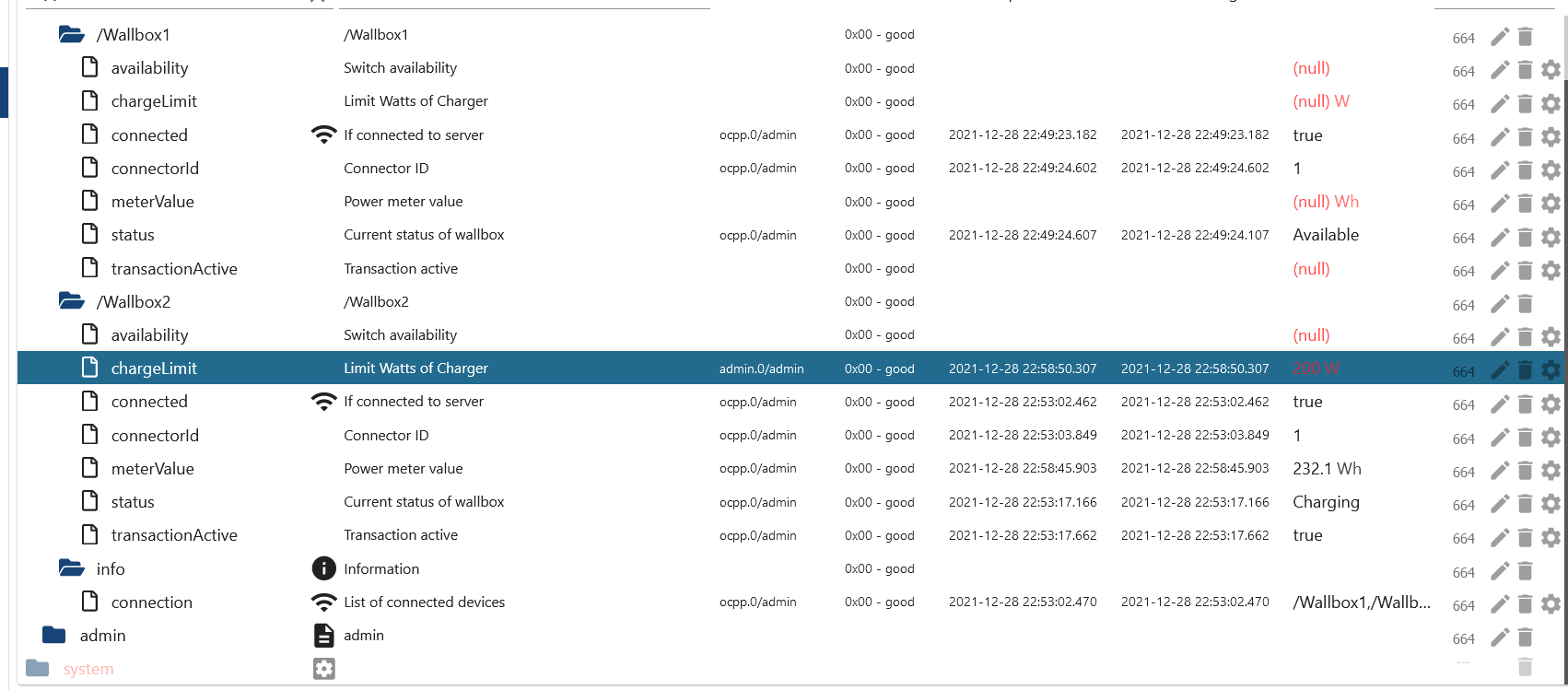
Beim setzen des Ladelimits (was ich gerne mit dem PV Überschuss koppeln möchte) kommt folgender Fehler
Cannot execute command "chargeLimit" for "/Wallbox2": Invalid value "[object Object]" for field csChargingProfiles -
@kleineismann Sehr geil , auf eine OCPP Implementierung habe ich schon lange gewartet, insbesondere da meine Wallbox keine anderen Schnittstellen bietet
ABB Terra AC
Beim setzen des Ladelimits (was ich gerne mit dem PV Überschuss koppeln möchte) kommt folgender Fehler
Cannot execute command "chargeLimit" for "/Wallbox2": Invalid value "[object Object]" for field csChargingProfiles@foxriver76 super cooler Adapter, schonmal vielen Dank hierfür. Denkst du die Ladestromanpassung wird auch noch eingebaut ? Das wäre echt ein USP für iobroker gegenüber anderen Plattformen
-
@foxriver76 super cooler Adapter, schonmal vielen Dank hierfür. Denkst du die Ladestromanpassung wird auch noch eingebaut ? Das wäre echt ein USP für iobroker gegenüber anderen Plattformen
@schwimbi Jop, das Ladelimit war mir auch sehr wichtig, leider scheint es bei meiner Wallbox so oder so (lt. Handbuch) nicht über OCPP zu funktionieren. Das eigentlich was mich ausbremst ist, dass die Implementierung auf Adapterseite da ist, jedoch die genutzte Library einen Bug hat. Ich hatte den Dev mal angeschrieben da er diese nicht mehr zu pflegen scheint, leider ohne Antwort.
Bleibt mir wohl nur ein Fork zu machen und selbst zu fixen. Ich kann nix versprechen aber ich habe vor mir das heute Abend mal anzuschauen.
-
@foxriver76 super cooler Adapter, schonmal vielen Dank hierfür. Denkst du die Ladestromanpassung wird auch noch eingebaut ? Das wäre echt ein USP für iobroker gegenüber anderen Plattformen
-
@schwimbi Probier mal bitte install von GitHub ob die Fehlermeldung noch kommt oder ob anderes nicht tut.
@foxriver76 Vielen Dank,
Derzeit mit der aktuellen GIT-Version bekomme ich keine Werte mehr.
Siehe Log :
ocpp.0
2022-01-08 14:19:09.466 info Requesting MeterValues from "/Wallbox1"
ocpp.0
2022-01-08 14:19:08.461 info Requesting StatusNotification from "/Wallbox1"
ocpp.0
2022-01-08 14:19:07.048 warn Command not implemented from "/Wallbox1": {"chargePointModel":"CDT_TACW22::NET_ETH","chargePointVendor":"Chargedot","chargeBoxSerialNumber":"Wallbox1","firmwareVersion":"TAC3Z9119006710273::V1.4.2","meterType":"V1","commandOcpp":"BootNotification"}
ocpp.0
2022-01-08 14:19:06.962 info Requesting BootNotification from "/Wallbox1"
ocpp.0
2022-01-08 14:19:06.961 info New device connected: "/Wallbox1"
ocpp.0
2022-01-08 14:19:02.473 info Requesting MeterValues from "/Wallbox2"
ocpp.0
2022-01-08 14:19:01.466 info Requesting StatusNotification from "/Wallbox2"
ocpp.0
2022-01-08 14:19:00.082 warn Command not implemented from "/Wallbox2": {"chargePointModel":"CDT_TACW22::NET_ETH","chargePointVendor":"Chargedot","chargeBoxSerialNumber":"Wallbox2","firmwareVersion":"TAC3Z9119006710273::V1.4.2","meterType":"V1","commandOcpp":"BootNotification"}
ocpp.0
2022-01-08 14:18:59.966 info Requesting BootNotification from "/Wallbox2"
ocpp.0
2022-01-08 14:18:59.965 info New device connected: "/Wallbox2"
ocpp.0
2022-01-08 14:16:21.685 warn Client "/Wallbox1" timed out
ocpp.0
2022-01-08 14:16:14.616 warn Client "/Wallbox2" timed out
ocpp.0
2022-01-08 14:14:54.047 info Requesting MeterValues from "/Wallbox1"
ocpp.0
2022-01-08 14:14:53.042 info Requesting StatusNotification from "/Wallbox1"
ocpp.0
2022-01-08 14:14:51.685 warn Command not implemented from "/Wallbox1": {"chargePointModel":"CDT_TACW22::NET_ETH","chargePointVendor":"Chargedot","chargeBoxSerialNumber":"Wallbox1","firmwareVersion":"TAC3Z9119006710273::V1.4.2","meterType":"V1","commandOcpp":"BootNotification"}
ocpp.0
2022-01-08 14:14:51.543 info Requesting BootNotification from "/Wallbox1" -
@foxriver76 Vielen Dank,
Derzeit mit der aktuellen GIT-Version bekomme ich keine Werte mehr.
Siehe Log :
ocpp.0
2022-01-08 14:19:09.466 info Requesting MeterValues from "/Wallbox1"
ocpp.0
2022-01-08 14:19:08.461 info Requesting StatusNotification from "/Wallbox1"
ocpp.0
2022-01-08 14:19:07.048 warn Command not implemented from "/Wallbox1": {"chargePointModel":"CDT_TACW22::NET_ETH","chargePointVendor":"Chargedot","chargeBoxSerialNumber":"Wallbox1","firmwareVersion":"TAC3Z9119006710273::V1.4.2","meterType":"V1","commandOcpp":"BootNotification"}
ocpp.0
2022-01-08 14:19:06.962 info Requesting BootNotification from "/Wallbox1"
ocpp.0
2022-01-08 14:19:06.961 info New device connected: "/Wallbox1"
ocpp.0
2022-01-08 14:19:02.473 info Requesting MeterValues from "/Wallbox2"
ocpp.0
2022-01-08 14:19:01.466 info Requesting StatusNotification from "/Wallbox2"
ocpp.0
2022-01-08 14:19:00.082 warn Command not implemented from "/Wallbox2": {"chargePointModel":"CDT_TACW22::NET_ETH","chargePointVendor":"Chargedot","chargeBoxSerialNumber":"Wallbox2","firmwareVersion":"TAC3Z9119006710273::V1.4.2","meterType":"V1","commandOcpp":"BootNotification"}
ocpp.0
2022-01-08 14:18:59.966 info Requesting BootNotification from "/Wallbox2"
ocpp.0
2022-01-08 14:18:59.965 info New device connected: "/Wallbox2"
ocpp.0
2022-01-08 14:16:21.685 warn Client "/Wallbox1" timed out
ocpp.0
2022-01-08 14:16:14.616 warn Client "/Wallbox2" timed out
ocpp.0
2022-01-08 14:14:54.047 info Requesting MeterValues from "/Wallbox1"
ocpp.0
2022-01-08 14:14:53.042 info Requesting StatusNotification from "/Wallbox1"
ocpp.0
2022-01-08 14:14:51.685 warn Command not implemented from "/Wallbox1": {"chargePointModel":"CDT_TACW22::NET_ETH","chargePointVendor":"Chargedot","chargeBoxSerialNumber":"Wallbox1","firmwareVersion":"TAC3Z9119006710273::V1.4.2","meterType":"V1","commandOcpp":"BootNotification"}
ocpp.0
2022-01-08 14:14:51.543 info Requesting BootNotification from "/Wallbox1" -
@schwimbi Jo, "sorry" hatte am GH Stand nochmal etwas geändert.
Jetzt gerne nochmal.
@foxriver76 Ok top,
Daten kommen wieder an.Ladestrom kann ich noch nicht setzen
root@r01iobroker:~# iobroker debug ocpp.0
Debugger listening on ws://127.0.0.1:9229/ec1a2682-69cb-448d-b680-65178abfee60
For help, see: https://nodejs.org/en/docs/inspector
2022-01-08 17:53:22.302 - debug: ocpp.0 (9688) Redis Objects: Use Redis connection: 127.0.0.1:9001
2022-01-08 17:53:22.361 - debug: ocpp.0 (9688) Objects client ready ... initialize now
2022-01-08 17:53:22.364 - debug: ocpp.0 (9688) Objects create System PubSub Client
2022-01-08 17:53:22.366 - debug: ocpp.0 (9688) Objects create User PubSub Client
2022-01-08 17:53:22.368 - debug: ocpp.0 (9688) Objects client initialize lua scripts
2022-01-08 17:53:22.382 - debug: ocpp.0 (9688) Objects connected to redis: 127.0.0.1:9001
2022-01-08 17:53:22.392 - debug: ocpp.0 (9688) objectDB connected
2022-01-08 17:53:22.394 - debug: ocpp.0 (9688) Redis States: Use Redis connection: 127.0.0.1:9000
2022-01-08 17:53:22.403 - debug: ocpp.0 (9688) States create System PubSub Client
2022-01-08 17:53:22.405 - debug: ocpp.0 (9688) States create User PubSub Client
2022-01-08 17:53:22.414 - debug: ocpp.0 (9688) States connected to redis: 127.0.0.1:9000
2022-01-08 17:53:22.415 - debug: ocpp.0 (9688) statesDB connected
2022-01-08 17:53:22.664 - info: ocpp.0 (9688) starting. Version 0.0.9 in /opt/iobroker/node_modules/iobroker.ocpp, node: v14.16.1, js-controller: 3.3.22
2022-01-08 17:53:22.737 - info: ocpp.0 (9688) Starting OCPP Server
2022-01-08 17:53:22.949 - info: ocpp.0 (9688) Server listening on port 9221
2022-01-08 17:53:32.373 - debug: ocpp.0 (9688) Sending SetChargingProfile for /Wallbox2
2022-01-08 17:53:32.376 - error: ocpp.0 (9688) Cannot execute command "chargeLimit" for "/Wallbox2": Cannot read property 'connection' of undefined
2022-01-08 17:54:17.337 - debug: ocpp.0 (9688) Sending SetChargingProfile for /Wallbox2
2022-01-08 17:54:17.338 - error: ocpp.0 (9688) Cannot execute command "chargeLimit" for "/Wallbox2": Cannot read property 'connection' of undefined
2022-01-08 17:54:20.876 - debug: ocpp.0 (9688) Sending SetChargingProfile for /Wallbox2
2022-01-08 17:54:20.880 - error: ocpp.0 (9688) Cannot execute command "chargeLimit" for "/Wallbox2": Cannot read property 'connection' of undefined
2022-01-08 17:54:23.402 - debug: ocpp.0 (9688) Sending SetChargingProfile for /Wallbox2
2022-01-08 17:54:23.405 - error: ocpp.0 (9688) Cannot execute command "chargeLimit" for "/Wallbox2": Cannot read property 'connection' of undefined -
@schwimbi sagte in Alpha Testing: OCPP Wallbox Adapter:
Starting OCPP Server
2022-01-08 17:53:22.949 - info: ocpp.0 (9688) Server listening on port 9221
2022-01-08 17:53:32.373 - debug: ocpp.0 (9688) Sending SetChargingProfile for /Wallbox2Der Client muss sich erst zum Server verbinden.
Aber eigentlich sollte dann auch
.connectedstate des jeweiligen Clients auf false sein und der wird geprüft und nur wenn true abgefragt, da hat der Adapter von der letzten Session iwie den State nicht korrekt resettet. -
@schwimbi sagte in Alpha Testing: OCPP Wallbox Adapter:
Starting OCPP Server
2022-01-08 17:53:22.949 - info: ocpp.0 (9688) Server listening on port 9221
2022-01-08 17:53:32.373 - debug: ocpp.0 (9688) Sending SetChargingProfile for /Wallbox2Der Client muss sich erst zum Server verbinden.
Aber eigentlich sollte dann auch
.connectedstate des jeweiligen Clients auf false sein und der wird geprüft und nur wenn true abgefragt, da hat der Adapter von der letzten Session iwie den State nicht korrekt resettet.@foxriver76
Eine Verbindung besteht.18:46:53.165892 IP 192.168.9.66.9220 > 192.168.9.32.49775: Flags [.], ack 5354, win 64000, length 0 18:46:53.181150 IP 192.168.9.66.9220 > 192.168.9.32.49775: Flags [P.], seq 1808:1826, ack 5354, win 64000, length 18 18:46:53.230021 IP 192.168.9.32.49775 > 192.168.9.66.9220: Flags [.], ack 1826, win 2499, length 0 18:47:15.510411 IP 192.168.9.66.9220 > 192.168.9.32.49775: Flags [P.], seq 1826:2228, ack 5354, win 64000, length 402 18:47:15.512241 IP 192.168.9.32.49775 > 192.168.9.66.9220: Flags [P.], seq 5354:5427, ack 2228, win 2097, length 73 18:47:15.560947 IP 192.168.9.66.9220 > 192.168.9.32.49775: Flags [.], ack 5427, win 64000, length 0 18:47:25.113990 IP 192.168.9.32.49775 > 192.168.9.66.9220: Flags [.], seq 5427:6887, ack 2228, win 2097, length 1460 18:47:25.114059 IP 192.168.9.66.9220 > 192.168.9.32.49775: Flags [.], ack 6887, win 64000, length 0 18:47:25.114170 IP 192.168.9.32.49775 > 192.168.9.66.9220: Flags [P.], seq 6887:6949, ack 2228, win 2097, length 62 18:47:25.114211 IP 192.168.9.66.9220 > 192.168.9.32.49775: Flags [.], ack 6949, win 64000, length 0 18:47:25.130660 IP 192.168.9.66.9220 > 192.168.9.32.49775: Flags [P.], seq 2228:2246, ack 6949, win 64000, length 18 18:47:25.230373 IP 192.168.9.32.49775 > 192.168.9.66.9220: Flags [.], ack 2246, win 2079, length 0 18:47:27.967879 IP 192.168.9.32.49775 > 192.168.9.66.9220: Flags [P.], seq 6949:7105, ack 2246, win 2079, length 156 18:47:27.967923 IP 192.168.9.66.9220 > 192.168.9.32.49775: Flags [.], ack 7105, win 64000, length 0 18:47:27.978135 IP 192.168.9.66.9220 > 192.168.9.32.49775: Flags [P.], seq 2246:2264, ack 7105, win 64000, length 18 18:47:27.980376 IP 192.168.9.32.49775 > 192.168.9.66.9220: Flags [.], ack 2264, win 2061, length 0 18:47:28.467411 IP 192.168.9.32.49775 > 192.168.9.66.9220: Flags [P.], seq 7105:7142, ack 2264, win 2061, length 37 18:47:28.467471 IP 192.168.9.66.9220 > 192.168.9.32.49775: Flags [.], ack 7142, win 64000, length 0 18:47:28.468637 IP 192.168.9.66.9220 > 192.168.9.32.49775: Flags [P.], seq 2264:2322, ack 7142, win 64000, length 58 18:47:28.480382 IP 192.168.9.32.49775 > 192.168.9.66.9220: Flags [.], ack 2322, win 2003, length 0 18:47:30.442655 IP 192.168.9.29.49296 > 192.168.9.66.9220: Flags [P.], seq 74:111, ack 117, win 2514, length 37 18:47:30.445440 IP 192.168.9.66.9220 > 192.168.9.29.49296: Flags [P.], seq 117:175, ack 111, win 64000, length 58 18:47:30.499432 IP 192.168.9.29.49296 > 192.168.9.66.9220: Flags [.], ack 175, win 2456, length 0Connected object steht auf true
root@r01iobroker:~# iobroker debug ocpp.0 Debugger listening on ws://127.0.0.1:9229/cd1df52b-643e-421f-b2fd-bd63df4b5b13 For help, see: https://nodejs.org/en/docs/inspector 2022-01-08 18:41:29.174 - debug: ocpp.0 (12422) Redis Objects: Use Redis connection: 127.0.0.1:9001 2022-01-08 18:41:29.240 - debug: ocpp.0 (12422) Objects client ready ... initialize now 2022-01-08 18:41:29.244 - debug: ocpp.0 (12422) Objects create System PubSub Client 2022-01-08 18:41:29.245 - debug: ocpp.0 (12422) Objects create User PubSub Client 2022-01-08 18:41:29.247 - debug: ocpp.0 (12422) Objects client initialize lua scripts 2022-01-08 18:41:29.263 - debug: ocpp.0 (12422) Objects connected to redis: 127.0.0.1:9001 2022-01-08 18:41:29.273 - debug: ocpp.0 (12422) objectDB connected 2022-01-08 18:41:29.276 - debug: ocpp.0 (12422) Redis States: Use Redis connection: 127.0.0.1:9000 2022-01-08 18:41:29.285 - debug: ocpp.0 (12422) States create System PubSub Client 2022-01-08 18:41:29.287 - debug: ocpp.0 (12422) States create User PubSub Client 2022-01-08 18:41:29.297 - debug: ocpp.0 (12422) States connected to redis: 127.0.0.1:9000 2022-01-08 18:41:29.298 - debug: ocpp.0 (12422) statesDB connected 2022-01-08 18:41:29.579 - info: ocpp.0 (12422) starting. Version 0.0.9 in /opt/iobroker/node_modules/iobroker.ocpp, node: v14.16.1, js-controller: 3.3.22 2022-01-08 18:41:29.648 - info: ocpp.0 (12422) Starting OCPP Server 2022-01-08 18:41:29.813 - info: ocpp.0 (12422) Server listening on port 9221 2022-01-08 18:46:03.443 - debug: ocpp.0 (12422) Sending SetChargingProfile for /Wallbox2 2022-01-08 18:46:03.445 - error: ocpp.0 (12422) Cannot execute command "chargeLimit" for "/Wallbox2": Cannot read property 'connection' of undefined 2022-01-08 18:46:23.272 - debug: ocpp.0 (12422) Sending SetChargingProfile for /Wallbox2 2022-01-08 18:46:23.274 - error: ocpp.0 (12422) Cannot execute command "chargeLimit" for "/Wallbox2": Cannot read property 'connection' of undefined 2022-01-08 18:46:31.563 - debug: ocpp.0 (12422) Sending SetChargingProfile for /Wallbox2 2022-01-08 18:46:31.566 - error: ocpp.0 (12422) Cannot execute command "chargeLimit" for "/Wallbox2": Cannot read property 'connection' of undefined 2022-01-08 18:46:48.246 - debug: ocpp.0 (12422) Sending SetChargingProfile for /Wallbox2 2022-01-08 18:46:48.248 - error: ocpp.0 (12422) Cannot execute command "chargeLimit" for "/Wallbox2": Cannot read property 'connection' of undefined 2022-01-08 18:47:15.504 - debug: ocpp.0 (12422) Sending SetChargingProfile for /Wallbox2 2022-01-08 18:47:15.507 - error: ocpp.0 (12422) Cannot execute command "chargeLimit" for "/Wallbox2": Cannot read property 'connection' of undefined -
@foxriver76
Eine Verbindung besteht.18:46:53.165892 IP 192.168.9.66.9220 > 192.168.9.32.49775: Flags [.], ack 5354, win 64000, length 0 18:46:53.181150 IP 192.168.9.66.9220 > 192.168.9.32.49775: Flags [P.], seq 1808:1826, ack 5354, win 64000, length 18 18:46:53.230021 IP 192.168.9.32.49775 > 192.168.9.66.9220: Flags [.], ack 1826, win 2499, length 0 18:47:15.510411 IP 192.168.9.66.9220 > 192.168.9.32.49775: Flags [P.], seq 1826:2228, ack 5354, win 64000, length 402 18:47:15.512241 IP 192.168.9.32.49775 > 192.168.9.66.9220: Flags [P.], seq 5354:5427, ack 2228, win 2097, length 73 18:47:15.560947 IP 192.168.9.66.9220 > 192.168.9.32.49775: Flags [.], ack 5427, win 64000, length 0 18:47:25.113990 IP 192.168.9.32.49775 > 192.168.9.66.9220: Flags [.], seq 5427:6887, ack 2228, win 2097, length 1460 18:47:25.114059 IP 192.168.9.66.9220 > 192.168.9.32.49775: Flags [.], ack 6887, win 64000, length 0 18:47:25.114170 IP 192.168.9.32.49775 > 192.168.9.66.9220: Flags [P.], seq 6887:6949, ack 2228, win 2097, length 62 18:47:25.114211 IP 192.168.9.66.9220 > 192.168.9.32.49775: Flags [.], ack 6949, win 64000, length 0 18:47:25.130660 IP 192.168.9.66.9220 > 192.168.9.32.49775: Flags [P.], seq 2228:2246, ack 6949, win 64000, length 18 18:47:25.230373 IP 192.168.9.32.49775 > 192.168.9.66.9220: Flags [.], ack 2246, win 2079, length 0 18:47:27.967879 IP 192.168.9.32.49775 > 192.168.9.66.9220: Flags [P.], seq 6949:7105, ack 2246, win 2079, length 156 18:47:27.967923 IP 192.168.9.66.9220 > 192.168.9.32.49775: Flags [.], ack 7105, win 64000, length 0 18:47:27.978135 IP 192.168.9.66.9220 > 192.168.9.32.49775: Flags [P.], seq 2246:2264, ack 7105, win 64000, length 18 18:47:27.980376 IP 192.168.9.32.49775 > 192.168.9.66.9220: Flags [.], ack 2264, win 2061, length 0 18:47:28.467411 IP 192.168.9.32.49775 > 192.168.9.66.9220: Flags [P.], seq 7105:7142, ack 2264, win 2061, length 37 18:47:28.467471 IP 192.168.9.66.9220 > 192.168.9.32.49775: Flags [.], ack 7142, win 64000, length 0 18:47:28.468637 IP 192.168.9.66.9220 > 192.168.9.32.49775: Flags [P.], seq 2264:2322, ack 7142, win 64000, length 58 18:47:28.480382 IP 192.168.9.32.49775 > 192.168.9.66.9220: Flags [.], ack 2322, win 2003, length 0 18:47:30.442655 IP 192.168.9.29.49296 > 192.168.9.66.9220: Flags [P.], seq 74:111, ack 117, win 2514, length 37 18:47:30.445440 IP 192.168.9.66.9220 > 192.168.9.29.49296: Flags [P.], seq 117:175, ack 111, win 64000, length 58 18:47:30.499432 IP 192.168.9.29.49296 > 192.168.9.66.9220: Flags [.], ack 175, win 2456, length 0Connected object steht auf true
root@r01iobroker:~# iobroker debug ocpp.0 Debugger listening on ws://127.0.0.1:9229/cd1df52b-643e-421f-b2fd-bd63df4b5b13 For help, see: https://nodejs.org/en/docs/inspector 2022-01-08 18:41:29.174 - debug: ocpp.0 (12422) Redis Objects: Use Redis connection: 127.0.0.1:9001 2022-01-08 18:41:29.240 - debug: ocpp.0 (12422) Objects client ready ... initialize now 2022-01-08 18:41:29.244 - debug: ocpp.0 (12422) Objects create System PubSub Client 2022-01-08 18:41:29.245 - debug: ocpp.0 (12422) Objects create User PubSub Client 2022-01-08 18:41:29.247 - debug: ocpp.0 (12422) Objects client initialize lua scripts 2022-01-08 18:41:29.263 - debug: ocpp.0 (12422) Objects connected to redis: 127.0.0.1:9001 2022-01-08 18:41:29.273 - debug: ocpp.0 (12422) objectDB connected 2022-01-08 18:41:29.276 - debug: ocpp.0 (12422) Redis States: Use Redis connection: 127.0.0.1:9000 2022-01-08 18:41:29.285 - debug: ocpp.0 (12422) States create System PubSub Client 2022-01-08 18:41:29.287 - debug: ocpp.0 (12422) States create User PubSub Client 2022-01-08 18:41:29.297 - debug: ocpp.0 (12422) States connected to redis: 127.0.0.1:9000 2022-01-08 18:41:29.298 - debug: ocpp.0 (12422) statesDB connected 2022-01-08 18:41:29.579 - info: ocpp.0 (12422) starting. Version 0.0.9 in /opt/iobroker/node_modules/iobroker.ocpp, node: v14.16.1, js-controller: 3.3.22 2022-01-08 18:41:29.648 - info: ocpp.0 (12422) Starting OCPP Server 2022-01-08 18:41:29.813 - info: ocpp.0 (12422) Server listening on port 9221 2022-01-08 18:46:03.443 - debug: ocpp.0 (12422) Sending SetChargingProfile for /Wallbox2 2022-01-08 18:46:03.445 - error: ocpp.0 (12422) Cannot execute command "chargeLimit" for "/Wallbox2": Cannot read property 'connection' of undefined 2022-01-08 18:46:23.272 - debug: ocpp.0 (12422) Sending SetChargingProfile for /Wallbox2 2022-01-08 18:46:23.274 - error: ocpp.0 (12422) Cannot execute command "chargeLimit" for "/Wallbox2": Cannot read property 'connection' of undefined 2022-01-08 18:46:31.563 - debug: ocpp.0 (12422) Sending SetChargingProfile for /Wallbox2 2022-01-08 18:46:31.566 - error: ocpp.0 (12422) Cannot execute command "chargeLimit" for "/Wallbox2": Cannot read property 'connection' of undefined 2022-01-08 18:46:48.246 - debug: ocpp.0 (12422) Sending SetChargingProfile for /Wallbox2 2022-01-08 18:46:48.248 - error: ocpp.0 (12422) Cannot execute command "chargeLimit" for "/Wallbox2": Cannot read property 'connection' of undefined 2022-01-08 18:47:15.504 - debug: ocpp.0 (12422) Sending SetChargingProfile for /Wallbox2 2022-01-08 18:47:15.507 - error: ocpp.0 (12422) Cannot execute command "chargeLimit" for "/Wallbox2": Cannot read property 'connection' of undefined@schwimbi sagte in Alpha Testing: OCPP Wallbox Adapter:
Starting OCPP Server 2022-01-08 18:41:29.813 - info: ocpp.0 (12422) Server listening on port 9221
Von Client Seite, aber wenn Server neustartet kennt dieser die Verbindungen nicht, bis wieder was vom Client kommt.
Erst wenn das passiert ist
ocpp.0 2022-01-08 18:32:01.480	info	Requesting StatusNotification from "/wallbox"
ocpp.0 2022-01-08 18:32:00.476	info	Requesting BootNotification from "/wallbox"
ocpp.0 2022-01-08 18:32:00.476	info	New device connected: "/wallbox"
ocpp.0 2022-01-08 18:32:00.464	info	Connection from /wallbox with credentials {"name":"wallbox","pass":"test"} and protocol: http
ocpp.0 2022-01-08 18:31:10.420	info	Server listening on port 9220
kennt der Server den Client und kann Anfragen zu ihm senden, aber mich wundert es nach wie vor, da unter Objekte wohl bei dir der
.connectedState von/Wallbox2auftrueist?

Hey! Du scheinst an dieser Unterhaltung interessiert zu sein, hast aber noch kein Konto.
Hast du es satt, bei jedem Besuch durch die gleichen Beiträge zu scrollen? Wenn du dich für ein Konto anmeldest, kommst du immer genau dorthin zurück, wo du zuvor warst, und kannst dich über neue Antworten benachrichtigen lassen (entweder per E-Mail oder Push-Benachrichtigung). Du kannst auch Lesezeichen speichern und Beiträge positiv bewerten, um anderen Community-Mitgliedern deine Wertschätzung zu zeigen.
Mit deinem Input könnte dieser Beitrag noch besser werden 💗
Registrieren AnmeldenSupport us
417
Online33.0k
Benutzer83.6k
Themen1.3m
Beiträge