
NEWS




Alpha Testing: OCPP Wallbox Adapter
-
@foxriver76 jetzt kommt nur noch eine Warnmeldung:

habe bereits auch die ABB Wallbox Firmware 1.5.2 installiert.
Wenn ich "transactionActive" von "true" auf "false" setze, dann verliert der Adapter die Verbindung und die Instanz LED geht auf rot.@hardwarefreak habe gerade mal frisch installiert, hast du lokal jetzt was modifiziert gehabt? ich bekomme diese meldung nicht und die validierung sollte nicht anders sein..
und wenn die led auf rot geht steht bestimmt auch was im log, damit könnte ich mehr anfangen.
-
@hardwarefreak habe gerade mal frisch installiert, hast du lokal jetzt was modifiziert gehabt? ich bekomme diese meldung nicht und die validierung sollte nicht anders sein..
und wenn die led auf rot geht steht bestimmt auch was im log, damit könnte ich mehr anfangen.
@foxriver76 eigentlich nicht. Bringt es etwas den Adapter noch einmal zu deinstallieren und neu zu installieren?
-
@hardwarefreak habe gerade mal frisch installiert, hast du lokal jetzt was modifiziert gehabt? ich bekomme diese meldung nicht und die validierung sollte nicht anders sein..
und wenn die led auf rot geht steht bestimmt auch was im log, damit könnte ich mehr anfangen.
wenn ich "transactionActive" von "true" auf "false" setze, dann kommt:
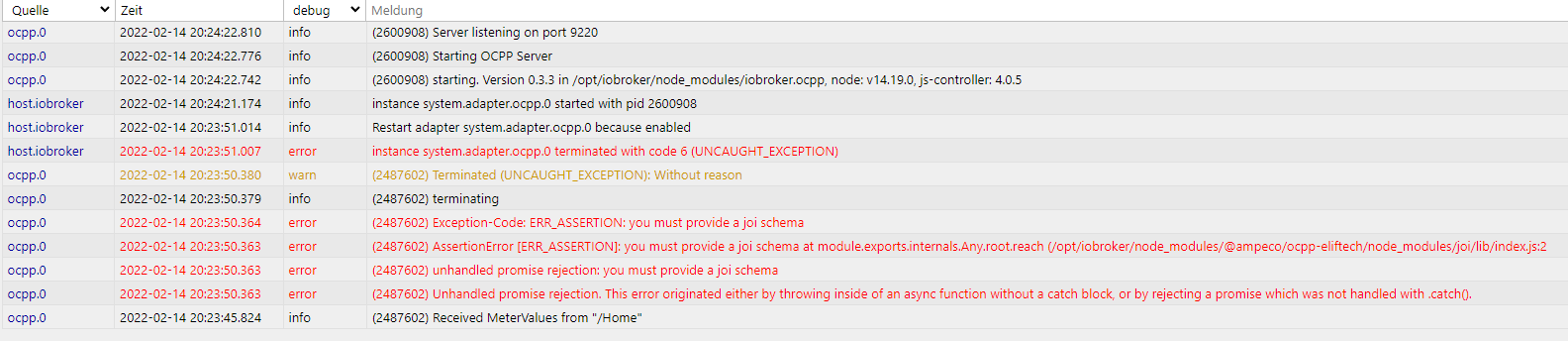
und anschließend ist die LED gelb:

und wenn ich dann wieder auf true setze kommt:
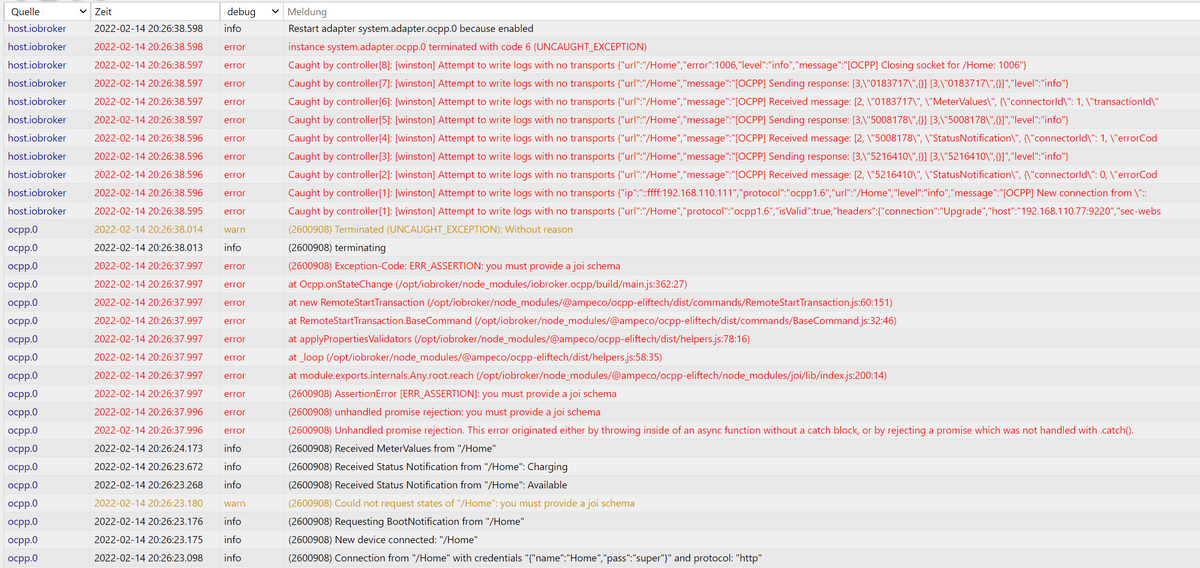
-
wenn ich "transactionActive" von "true" auf "false" setze, dann kommt:
und anschließend ist die LED gelb:
und wenn ich dann wieder auf true setze kommt:
@hardwarefreak Sehr komisch, dass da jegliche Validierungen fehlschlagen. Probier mal ne Neuinstallation des Adapters.
Ansonsten mal Ausgabe von
npm ls joiin/opt/iobroker -
@hardwarefreak Sehr komisch, dass da jegliche Validierungen fehlschlagen. Probier mal ne Neuinstallation des Adapters.
Ansonsten mal Ausgabe von
npm ls joiin/opt/iobrokerroot@iobroker:~# cd /opt/iobroker/
root@iobroker:/opt/iobroker# npm ls joi
iobroker.inst@2.0.3 /opt/iobroker
├─┬ iobroker.go-e@1.0.18
│ └── joi@17.6.0
└─┬ iobroker.ocpp@0.3.3
└─┬ @ampeco/ocpp-eliftech@1.0.6
├─┬ enjoi@3.2.5
│ └── joi@13.7.0
└── joi@13.7.0ok ich mache mal eine Neuinstallation.
-
@hardwarefreak Sehr komisch, dass da jegliche Validierungen fehlschlagen. Probier mal ne Neuinstallation des Adapters.
Ansonsten mal Ausgabe von
npm ls joiin/opt/iobroker@foxriver76 habe leider immer noch die gleichen Probleme auf meinem Gigabyte Brix unter Proxmox.
Jetzt habe ich das ganze mal auf meinem Tinkerboard installiert und nun bricht die Verbindung nicht mehr ab, wenn ich
"transactionActive" von "true" auf "false" setze und umgekehrt. Parallel läuft auch die piVCCU3 auf dem Tinkerboard.Die Warnungen bei der Installation sind auf beiden Plattformen identisch.
-
root@iobroker:~# cd /opt/iobroker/
root@iobroker:/opt/iobroker# npm ls joi
iobroker.inst@2.0.3 /opt/iobroker
├─┬ iobroker.go-e@1.0.18
│ └── joi@17.6.0
└─┬ iobroker.ocpp@0.3.3
└─┬ @ampeco/ocpp-eliftech@1.0.6
├─┬ enjoi@3.2.5
│ └── joi@13.7.0
└── joi@13.7.0ok ich mache mal eine Neuinstallation.
@foxriver76 am idTag lag es nicht! Anscheind liegt das Problem beim Chargelimit in der RemoteStartTransaction. Wenn das Limit auf 0 gesetzt wird, beginnt er die RemoteStartTransaction mit folgendem Befehl
Sending RemoteStartTransaction for /TACW1142021G1020: {"connectorId":1,"idTag":"1"}(ohne das ChargingProfil) und anschließend kann das Ladelimit wieder variabel eingestellt werden. Wird das LadeLimit vor dem Start gesetzt passiert nichts und dieser Befehl wird abgeschickt:
Sending RemoteStartTransaction for /TACW1142021G1020: {"connectorId":1,"idTag":"1","chargingProfile":{"chargingProfileId":1,"stackLevel":0,"chargingProfilePurpose":"TxDefaultProfile","chargingProfileKind":"Recurring","recurrencyKind":"Daily","chargingSchedule":{"duration":86400,"startSchedule":"2013-01-01T00:00Z","chargingRateUnit":"A","chargingSchedulePeriod":[{"startPeriod":0,"limit":6}]}}}@hardwarefreak
Ich habe auch Probleme mit der Firmware 1.5.2.
Versuch mal dein Chargelimit auf 0 zu setzen und anschließend mittransactionActive=true.
Bei mir sieht das dann so aus und der Ladevorgang kann über umwegen gestartet werden.ocpp.0 2022-02-14 21:37:41.814 debug Sending RemoteStopTransaction for /TACW1142021G1020 ocpp.0 2022-02-14 21:37:28.354 info Received Status Notification from "/TACW1142021G1020": Charging ocpp.0 2022-02-14 21:37:28.353 debug {"connectorId":1,"errorCode":"NoError","info":"null","status":"Charging","vendorErrorCode":"0x00","commandOcpp":"StatusNotification"} ocpp.0 2022-02-14 21:37:27.854 info Received Status Notification from "/TACW1142021G1020": SuspendedEV ocpp.0 2022-02-14 21:37:27.854 debug {"connectorId":1,"errorCode":"NoError","info":"null","status":"SuspendedEV","vendorErrorCode":"0x00","commandOcpp":"StatusNotification"} ocpp.0 2022-02-14 21:37:18.513 debug Sending SetChargingProfile for /TACW1142021G1020 ocpp.0 2022-02-14 21:37:17.917 info Received MeterValues from "/TACW1142021G1020" ocpp.0 2022-02-14 21:37:17.916 debug {"connectorId":1,"transactionId":1,"meterValue":[{"timestamp":"2022-02-14T20:37:17.000Z","sampledValue":[{"value":"233.90","context":"Transaction.Begin","format":"Raw","measurand":"Voltage","phase":"L1-N","unit":"V"},{"value":"0.0","context":"Transaction.Begin","format":"Raw","measurand":"Current.Import","phase":"L1","unit":"A"},{"value":"0","context":"Transaction.Begin","format":"Raw","measurand":"Power.Active.Import","phase":"L1","unit":"W"},{"value":"234.20","context":"Transaction.Begin","format":"Raw","measurand":"Voltage","phase":"L2-N","unit":"V"},{"value":"0.0","context":"Transaction.Begin","format":"Raw","measurand":"Current.Import","phase":"L2","unit":"A"},{"value":"0","context":"Transaction.Begin","format":"Raw","measurand":"Power.Active.Import","phase":"L2","unit":"W"},{"value":"234.00","context":"Transaction.Begin","format":"Raw","measurand":"Voltage","phase":"L3-N","unit":"V"},{"value":"0.0","context":"Transaction.Begin","format":"Raw","measurand":"Current.Import","phase":"L3","unit":"A"},{"value":"0","context":"Transaction.Begin","format":"Raw","measurand":"Power.Active.Import","phase":"L3","unit":"W"},{"value":"0","context":"Transaction.Begin","format":"Raw","measurand":"Energy.Active.Import.Register","unit":"Wh"},{"value":"10","context":"Transaction.Begin","format":"Raw","measurand":"Current.Offered","unit":"A"}]}],"commandOcpp":"MeterValues"} ocpp.0 2022-02-14 21:37:09.510 info Received Status Notification from "/TACW1142021G1020": SuspendedEVSE ocpp.0 2022-02-14 21:37:09.509 debug {"connectorId":1,"errorCode":"NoError","info":"null","status":"SuspendedEVSE","vendorErrorCode":"0x00","commandOcpp":"StatusNotification"} ocpp.0 2022-02-14 21:37:09.011 info Received Start transaction from "/TACW1142021G1020" ocpp.0 2022-02-14 21:37:09.010 debug {"connectorId":1,"idTag":"1","meterStart":0,"timestamp":"2022-02-14T20:37:07.000Z","commandOcpp":"StartTransaction"} ocpp.0 2022-02-14 21:37:08.510 info Received Status Notification from "/TACW1142021G1020": Charging ocpp.0 2022-02-14 21:37:08.510 debug {"connectorId":1,"errorCode":"NoError","info":"null","status":"Charging","vendorErrorCode":"0x00","commandOcpp":"StatusNotification"} ocpp.0 2022-02-14 21:37:08.010 info Received Status Notification from "/TACW1142021G1020": SuspendedEV ocpp.0 2022-02-14 21:37:08.010 debug {"connectorId":1,"errorCode":"NoError","info":"null","status":"SuspendedEV","vendorErrorCode":"0x00","commandOcpp":"StatusNotification"} ocpp.0 2022-02-14 21:37:07.500 debug Sending RemoteStartTransaction for /TACW1142021G1020: {"connectorId":1,"idTag":"1"} -
habe die Integration meiner Terra Box gerade selbst hinbekommen, hatte übersehen, das der Typ auf "wss://" statt auf "ws://" stand.
ich wundere mich noch über die Warnungen im LOG:

und

Habe ich etwas übersehen?
Worüber bringe ich dein Script für die PV-Überschussladung zur Ausführung im iobroker?
@hardwarefreak said in Alpha Testing: OCPP Wallbox Adapter:
@fl4sh-0
Worüber bringe ich dein Script für die PV-Überschussladung zur Ausführung im iobroker?Das kannst du über Javascript im iobroker ausführen. Du musst dann nur deine Variablen hinterlegen.
Ich kann dir das sonst auch als Blockly-Script zur Verfügung stellen. -
Hallo,
bin gerade auch am testen der OCPP Funktionen meiner Wallbox. Es handelt sich um eine M3W von Wallbox24.de welche OCPP 1.6 unterstützt.
Leider funktioniert das setzen des Ladestroms mittels chargeLimit bei mir nicht. Weder zu Begin der Transaktion noch während des Ladens.
Hab dazu mal ein Debug-Log angehängt, wäre echt prima wenn das funktionieren würde dann könnte ich nämlich das PV-Überschussladen angehen.
Das Log zeigt den Start des Ladevorgangs durch Setzen von transactionActive=true mit chargeLimit=6. Wie man in den folgenden Zeilen sieht steigt der Ladestrom dennoch auf über 16A an.
Wenn ich danach das chargeLimit ändere steht im Log nur 'Sending SetChargingProfile for /61689674063277'2022-03-21 16:42:57.217 - debug: ocpp.0 (12131) Sending RemoteStartTransaction for /61689674063277: {"connectorId":1,"idTag":"1","chargingProfile":{"chargingProfileId":1,"stackLevel":0,"chargingProfilePurpose":"TxDefaultProfile","chargingProfileKind":"Recurring","recurrencyKind":"Daily","chargingSchedule":{"duration":86400,"startSchedule":"2013-01-01T00:00Z","chargingRateUnit":"A","chargingSchedulePeriod":[{"startPeriod":0,"limit":7}]}}} 2022-03-21 16:42:57.945 - debug: ocpp.0 (12131) {"connectorId":1,"idTag":"1","meterStart":2103200,"timestamp":"2022-03-21T15:42:56.333Z","reservationId":0,"commandOcpp":"StartTransaction"} 2022-03-21 16:42:57.946 - info: ocpp.0 (12131) Received Start transaction from "/61689674063277" 2022-03-21 16:42:58.393 - debug: ocpp.0 (12131) {"connectorId":1,"errorCode":"NoError","status":"Preparing","commandOcpp":"StatusNotification"} 2022-03-21 16:42:58.394 - info: ocpp.0 (12131) Received Status Notification from "/61689674063277": Preparing 2022-03-21 16:42:59.088 - debug: ocpp.0 (12131) {"connectorId":1,"errorCode":"NoError","status":"Charging","commandOcpp":"StatusNotification"} 2022-03-21 16:42:59.089 - info: ocpp.0 (12131) Received Status Notification from "/61689674063277": Charging 2022-03-21 16:43:08.729 - debug: ocpp.0 (12131) {"connectorId":1,"transactionId":1,"meterValue":[{"timestamp":"2022-03-21T15:43:07.333Z","sampledValue":[{"measurand":"Energy.Active.Import.Register","unit":"Wh","value":"2103200"},{"measurand":"Power.Active.Import","unit":"kW","value":"0.1"},{"measurand":"Temperature","unit":"Celsius","value":"35"},{"measurand":"Voltage","phase":"L1-N","unit":"V","value":"238.2"},{"measurand":"Voltage","phase":"L2-N","unit":"V","value":"238.0"},{"measurand":"Voltage","phase":"L3-N","unit":"V","value":"238.4"},{"measurand":"Current.Import","phase":"L1","unit":"A","value":"0.8"},{"measurand":"Current.Import","phase":"L2","unit":"A","value":"0.2"},{"measurand":"Current.Import","phase":"L3","unit":"A","value":"0.2"}]}],"commandOcpp":"MeterValues"} 2022-03-21 16:43:08.730 - info: ocpp.0 (12131) Received MeterValues from "/61689674063277" 2022-03-21 16:43:18.513 - debug: ocpp.0 (12131) {"connectorId":1,"transactionId":1,"meterValue":[{"timestamp":"2022-03-21T15:43:18.333Z","sampledValue":[{"measurand":"Energy.Active.Import.Register","unit":"Wh","value":"2103200"},{"measurand":"Power.Active.Import","unit":"kW","value":"2.4"},{"measurand":"Temperature","unit":"Celsius","value":"35"},{"measurand":"Voltage","phase":"L1-N","unit":"V","value":"236.8"},{"measurand":"Voltage","phase":"L2-N","unit":"V","value":"236.6"},{"measurand":"Voltage","phase":"L3-N","unit":"V","value":"238.7"},{"measurand":"Current.Import","phase":"L1","unit":"A","value":"5.3"},{"measurand":"Current.Import","phase":"L2","unit":"A","value":"5.3"},{"measurand":"Current.Import","phase":"L3","unit":"A","value":"0.2"}]}],"commandOcpp":"MeterValues"} 2022-03-21 16:43:18.514 - info: ocpp.0 (12131) Received MeterValues from "/61689674063277" 2022-03-21 16:43:25.355 - debug: ocpp.0 (12131) {"commandOcpp":"Heartbeat"} 2022-03-21 16:43:25.356 - debug: ocpp.0 (12131) Received heartbeat from "/61689674063277" 2022-03-21 16:43:28.575 - debug: ocpp.0 (12131) {"connectorId":1,"transactionId":1,"meterValue":[{"timestamp":"2022-03-21T15:43:27.333Z","sampledValue":[{"measurand":"Energy.Active.Import.Register","unit":"Wh","value":"2103200"},{"measurand":"Power.Active.Import","unit":"kW","value":"9.1"},{"measurand":"Temperature","unit":"Celsius","value":"35"},{"measurand":"Voltage","phase":"L1-N","unit":"V","value":"236.2"},{"measurand":"Voltage","phase":"L2-N","unit":"V","value":"235.8"},{"measurand":"Voltage","phase":"L3-N","unit":"V","value":"236.0"},{"measurand":"Current.Import","phase":"L1","unit":"A","value":"12.8"},{"measurand":"Current.Import","phase":"L2","unit":"A","value":"12.9"},{"measurand":"Current.Import","phase":"L3","unit":"A","value":"12.9"}]}],"commandOcpp":"MeterValues"} 2022-03-21 16:43:28.577 - info: ocpp.0 (12131) Received MeterValues from "/61689674063277" 2022-03-21 16:43:38.564 - debug: ocpp.0 (12131) {"connectorId":1,"transactionId":1,"meterValue":[{"timestamp":"2022-03-21T15:43:38.333Z","sampledValue":[{"measurand":"Energy.Active.Import.Register","unit":"Wh","value":"2103300"},{"measurand":"Power.Active.Import","unit":"kW","value":"11.4"},{"measurand":"Temperature","unit":"Celsius","value":"35"},{"measurand":"Voltage","phase":"L1-N","unit":"V","value":"235.6"},{"measurand":"Voltage","phase":"L2-N","unit":"V","value":"235.1"},{"measurand":"Voltage","phase":"L3-N","unit":"V","value":"235.8"},{"measurand":"Current.Import","phase":"L1","unit":"A","value":"16.1"},{"measurand":"Current.Import","phase":"L2","unit":"A","value":"16.2"},{"measurand":"Current.Import","phase":"L3","unit":"A","value":"16.2"}]}],"commandOcpp":"MeterValues"} 2022-03-21 16:43:38.565 - info: ocpp.0 (12131) Received MeterValues from "/61689674063277" 2022-03-21 16:43:44.563 - debug: ocpp.0 (12131) Sending SetChargingProfile for /61689674063277 2022-03-21 16:43:48.532 - debug: ocpp.0 (12131) {"connectorId":1,"transactionId":1,"meterValue":[{"timestamp":"2022-03-21T15:43:48.333Z","sampledValue":[{"measurand":"Energy.Active.Import.Register","unit":"Wh","value":"2103300"},{"measurand":"Power.Active.Import","unit":"kW","value":"11.4"},{"measurand":"Temperature","unit":"Celsius","value":"35"},{"measurand":"Voltage","phase":"L1-N","unit":"V","value":"234.7"},{"measurand":"Voltage","phase":"L2-N","unit":"V","value":"235.4"},{"measurand":"Voltage","phase":"L3-N","unit":"V","value":"235.8"},{"measurand":"Current.Import","phase":"L1","unit":"A","value":"16.2"},{"measurand":"Current.Import","phase":"L2","unit":"A","value":"16.3"},{"measurand":"Current.Import","phase":"L3","unit":"A","value":"16.2"}]}],"commandOcpp":"MeterValues"} -
Hallo,
bin gerade auch am testen der OCPP Funktionen meiner Wallbox. Es handelt sich um eine M3W von Wallbox24.de welche OCPP 1.6 unterstützt.
Leider funktioniert das setzen des Ladestroms mittels chargeLimit bei mir nicht. Weder zu Begin der Transaktion noch während des Ladens.
Hab dazu mal ein Debug-Log angehängt, wäre echt prima wenn das funktionieren würde dann könnte ich nämlich das PV-Überschussladen angehen.
Das Log zeigt den Start des Ladevorgangs durch Setzen von transactionActive=true mit chargeLimit=6. Wie man in den folgenden Zeilen sieht steigt der Ladestrom dennoch auf über 16A an.
Wenn ich danach das chargeLimit ändere steht im Log nur 'Sending SetChargingProfile for /61689674063277'2022-03-21 16:42:57.217 - debug: ocpp.0 (12131) Sending RemoteStartTransaction for /61689674063277: {"connectorId":1,"idTag":"1","chargingProfile":{"chargingProfileId":1,"stackLevel":0,"chargingProfilePurpose":"TxDefaultProfile","chargingProfileKind":"Recurring","recurrencyKind":"Daily","chargingSchedule":{"duration":86400,"startSchedule":"2013-01-01T00:00Z","chargingRateUnit":"A","chargingSchedulePeriod":[{"startPeriod":0,"limit":7}]}}} 2022-03-21 16:42:57.945 - debug: ocpp.0 (12131) {"connectorId":1,"idTag":"1","meterStart":2103200,"timestamp":"2022-03-21T15:42:56.333Z","reservationId":0,"commandOcpp":"StartTransaction"} 2022-03-21 16:42:57.946 - info: ocpp.0 (12131) Received Start transaction from "/61689674063277" 2022-03-21 16:42:58.393 - debug: ocpp.0 (12131) {"connectorId":1,"errorCode":"NoError","status":"Preparing","commandOcpp":"StatusNotification"} 2022-03-21 16:42:58.394 - info: ocpp.0 (12131) Received Status Notification from "/61689674063277": Preparing 2022-03-21 16:42:59.088 - debug: ocpp.0 (12131) {"connectorId":1,"errorCode":"NoError","status":"Charging","commandOcpp":"StatusNotification"} 2022-03-21 16:42:59.089 - info: ocpp.0 (12131) Received Status Notification from "/61689674063277": Charging 2022-03-21 16:43:08.729 - debug: ocpp.0 (12131) {"connectorId":1,"transactionId":1,"meterValue":[{"timestamp":"2022-03-21T15:43:07.333Z","sampledValue":[{"measurand":"Energy.Active.Import.Register","unit":"Wh","value":"2103200"},{"measurand":"Power.Active.Import","unit":"kW","value":"0.1"},{"measurand":"Temperature","unit":"Celsius","value":"35"},{"measurand":"Voltage","phase":"L1-N","unit":"V","value":"238.2"},{"measurand":"Voltage","phase":"L2-N","unit":"V","value":"238.0"},{"measurand":"Voltage","phase":"L3-N","unit":"V","value":"238.4"},{"measurand":"Current.Import","phase":"L1","unit":"A","value":"0.8"},{"measurand":"Current.Import","phase":"L2","unit":"A","value":"0.2"},{"measurand":"Current.Import","phase":"L3","unit":"A","value":"0.2"}]}],"commandOcpp":"MeterValues"} 2022-03-21 16:43:08.730 - info: ocpp.0 (12131) Received MeterValues from "/61689674063277" 2022-03-21 16:43:18.513 - debug: ocpp.0 (12131) {"connectorId":1,"transactionId":1,"meterValue":[{"timestamp":"2022-03-21T15:43:18.333Z","sampledValue":[{"measurand":"Energy.Active.Import.Register","unit":"Wh","value":"2103200"},{"measurand":"Power.Active.Import","unit":"kW","value":"2.4"},{"measurand":"Temperature","unit":"Celsius","value":"35"},{"measurand":"Voltage","phase":"L1-N","unit":"V","value":"236.8"},{"measurand":"Voltage","phase":"L2-N","unit":"V","value":"236.6"},{"measurand":"Voltage","phase":"L3-N","unit":"V","value":"238.7"},{"measurand":"Current.Import","phase":"L1","unit":"A","value":"5.3"},{"measurand":"Current.Import","phase":"L2","unit":"A","value":"5.3"},{"measurand":"Current.Import","phase":"L3","unit":"A","value":"0.2"}]}],"commandOcpp":"MeterValues"} 2022-03-21 16:43:18.514 - info: ocpp.0 (12131) Received MeterValues from "/61689674063277" 2022-03-21 16:43:25.355 - debug: ocpp.0 (12131) {"commandOcpp":"Heartbeat"} 2022-03-21 16:43:25.356 - debug: ocpp.0 (12131) Received heartbeat from "/61689674063277" 2022-03-21 16:43:28.575 - debug: ocpp.0 (12131) {"connectorId":1,"transactionId":1,"meterValue":[{"timestamp":"2022-03-21T15:43:27.333Z","sampledValue":[{"measurand":"Energy.Active.Import.Register","unit":"Wh","value":"2103200"},{"measurand":"Power.Active.Import","unit":"kW","value":"9.1"},{"measurand":"Temperature","unit":"Celsius","value":"35"},{"measurand":"Voltage","phase":"L1-N","unit":"V","value":"236.2"},{"measurand":"Voltage","phase":"L2-N","unit":"V","value":"235.8"},{"measurand":"Voltage","phase":"L3-N","unit":"V","value":"236.0"},{"measurand":"Current.Import","phase":"L1","unit":"A","value":"12.8"},{"measurand":"Current.Import","phase":"L2","unit":"A","value":"12.9"},{"measurand":"Current.Import","phase":"L3","unit":"A","value":"12.9"}]}],"commandOcpp":"MeterValues"} 2022-03-21 16:43:28.577 - info: ocpp.0 (12131) Received MeterValues from "/61689674063277" 2022-03-21 16:43:38.564 - debug: ocpp.0 (12131) {"connectorId":1,"transactionId":1,"meterValue":[{"timestamp":"2022-03-21T15:43:38.333Z","sampledValue":[{"measurand":"Energy.Active.Import.Register","unit":"Wh","value":"2103300"},{"measurand":"Power.Active.Import","unit":"kW","value":"11.4"},{"measurand":"Temperature","unit":"Celsius","value":"35"},{"measurand":"Voltage","phase":"L1-N","unit":"V","value":"235.6"},{"measurand":"Voltage","phase":"L2-N","unit":"V","value":"235.1"},{"measurand":"Voltage","phase":"L3-N","unit":"V","value":"235.8"},{"measurand":"Current.Import","phase":"L1","unit":"A","value":"16.1"},{"measurand":"Current.Import","phase":"L2","unit":"A","value":"16.2"},{"measurand":"Current.Import","phase":"L3","unit":"A","value":"16.2"}]}],"commandOcpp":"MeterValues"} 2022-03-21 16:43:38.565 - info: ocpp.0 (12131) Received MeterValues from "/61689674063277" 2022-03-21 16:43:44.563 - debug: ocpp.0 (12131) Sending SetChargingProfile for /61689674063277 2022-03-21 16:43:48.532 - debug: ocpp.0 (12131) {"connectorId":1,"transactionId":1,"meterValue":[{"timestamp":"2022-03-21T15:43:48.333Z","sampledValue":[{"measurand":"Energy.Active.Import.Register","unit":"Wh","value":"2103300"},{"measurand":"Power.Active.Import","unit":"kW","value":"11.4"},{"measurand":"Temperature","unit":"Celsius","value":"35"},{"measurand":"Voltage","phase":"L1-N","unit":"V","value":"234.7"},{"measurand":"Voltage","phase":"L2-N","unit":"V","value":"235.4"},{"measurand":"Voltage","phase":"L3-N","unit":"V","value":"235.8"},{"measurand":"Current.Import","phase":"L1","unit":"A","value":"16.2"},{"measurand":"Current.Import","phase":"L2","unit":"A","value":"16.3"},{"measurand":"Current.Import","phase":"L3","unit":"A","value":"16.2"}]}],"commandOcpp":"MeterValues"} -
@yymsc finde für die leider kein Dokument welches den Umfang der ocpp Implementierung beschreibt.
@foxriver76 said in Alpha Testing: OCPP Wallbox Adapter:
@yymsc finde für die leider kein Dokument welches den Umfang der ocpp Implementierung beschreibt.
alles klar, sowas hatte ich fast befürchtet... Trotzdem vielen Dank für die schnelle Antwort !!!
-
Ich habe eben eine 0.4.0 veröffentlicht, diese unterstützt nun Authentifizierung. Sprich wenn in den Adapteroptionen Auth aktiviert wird und ein Passwort/Username vergeben wird und ein Client abweichende Credentials bereitstellt, wird die Verbindung abgelehnt.
-
@kleineismann Sehr geil , auf eine OCPP Implementierung habe ich schon lange gewartet, insbesondere da meine Wallbox keine anderen Schnittstellen bietet
ABB Terra AC
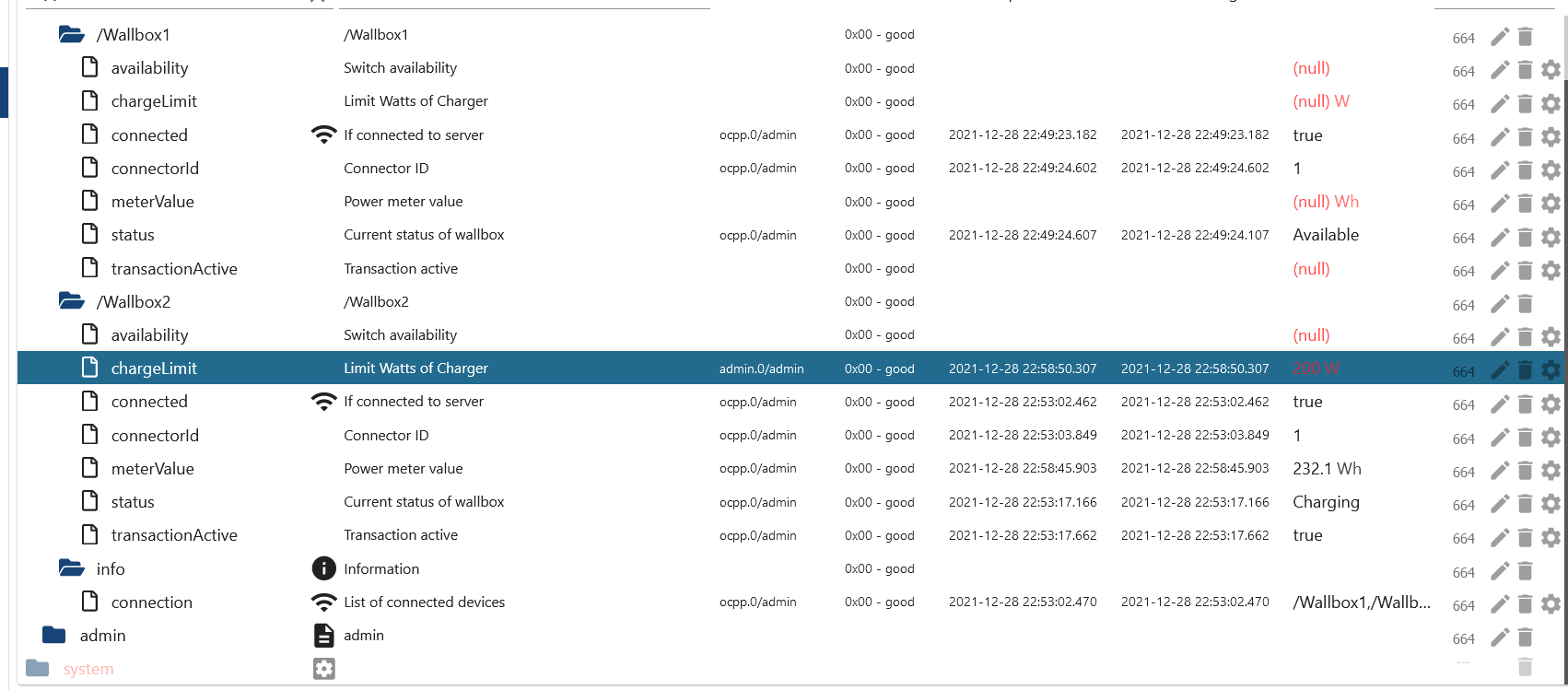
Beim setzen des Ladelimits (was ich gerne mit dem PV Überschuss koppeln möchte) kommt folgender Fehler
Cannot execute command "chargeLimit" for "/Wallbox2": Invalid value "[object Object]" for field csChargingProfiles -
@schwimbi Hey ich hab auch eine Terra AC, wie hast du alles genau gemacht ?
komme kein Schritt weiter.@foxriver76 Zunächst einmal Hochachtung für dein Engagement und diesen Adapter!
Ich verwende zwei Wallboxen Pulsar Plus mit konfiguriertem Power Sharing (Verbindung per CAN).
Testweise habe ich für eine Wallbox eine Instanz OCPP eingerichtet. Nun ist die Wallbox gesperrt (LEDs und auch in der App gelb -> gesperrt). Im Objektbaum wird availability=true, status=Available und transactionActive=true angezeigt.
Ändere ich im Objektbaum transactionActive zunächst auf false und dann wieder auf true, so ändert sich status auf Preparing und die Sperre ist aufgehoben (LEDs und auch in der App grün-> bereit).
Allerdings wird nach 2 Minuten status wieder auf Available gesetzt und die Station ist wieder gesperrt:
2022-05-11 09:32:05.215  - debug: ocpp.0 (23470) Sending RemoteStopTransaction for /Admin
2022-05-11 09:32:16.891  - debug: ocpp.0 (23470) Sending RemoteStartTransaction for /Admin: {"connectorId":1,"idTag":"1","chargingProfile":{"chargingProfileId":1,"stackLevel":0,"chargingProfilePurpose":"TxDefaultProfile","chargingProfileKind":"Recurring","recurrencyKind":"Daily","chargingSchedule":{"duration":86400,"startSchedule":"2013-01-01T00:00Z","chargingRateUnit":"A","chargingSchedulePeriod":[{"startPeriod":0,"limit":32}]}}}
2022-05-11 09:32:18.160  - debug: ocpp.0 (23470) {"info":"","vendorId":"com.wallbox","vendorErrorCode":"","connectorId":1,"errorCode":"NoError","status":"Preparing","timestamp":"2022-05-11T07:32:17Z","commandOcpp":"StatusNotification"}
2022-05-11 09:32:18.161  - info: ocpp.0 (23470) Received Status Notification from "/Admin": Preparing
2022-05-11 09:32:48.419  - debug: ocpp.0 (23470) {"commandOcpp":"Heartbeat"}
2022-05-11 09:32:48.421  - debug: ocpp.0 (23470) Received heartbeat from "/Admin"
2022-05-11 09:33:43.581  - debug: ocpp.0 (23470) {"commandOcpp":"Heartbeat"}
2022-05-11 09:33:43.584  - debug: ocpp.0 (23470) Received heartbeat from "/Admin"
2022-05-11 09:34:20.221  - debug: ocpp.0 (23470) {"info":"","vendorId":"com.wallbox","vendorErrorCode":"","connectorId":1,"errorCode":"NoError","status":"Available","timestamp":"2022-05-11T07:34:19Z","commandOcpp":"StatusNotification"}
2022-05-11 09:34:20.224  - info: ocpp.0 (23470) Received Status Notification from "/Admin": Available
Siehst du eine Möglichkeit, das zu verhindern?
-
@foxriver76 Zunächst einmal Hochachtung für dein Engagement und diesen Adapter!
Ich verwende zwei Wallboxen Pulsar Plus mit konfiguriertem Power Sharing (Verbindung per CAN).
Testweise habe ich für eine Wallbox eine Instanz OCPP eingerichtet. Nun ist die Wallbox gesperrt (LEDs und auch in der App gelb -> gesperrt). Im Objektbaum wird availability=true, status=Available und transactionActive=true angezeigt.
Ändere ich im Objektbaum transactionActive zunächst auf false und dann wieder auf true, so ändert sich status auf Preparing und die Sperre ist aufgehoben (LEDs und auch in der App grün-> bereit).
Allerdings wird nach 2 Minuten status wieder auf Available gesetzt und die Station ist wieder gesperrt:
2022-05-11 09:32:05.215  - debug: ocpp.0 (23470) Sending RemoteStopTransaction for /Admin
2022-05-11 09:32:16.891  - debug: ocpp.0 (23470) Sending RemoteStartTransaction for /Admin: {"connectorId":1,"idTag":"1","chargingProfile":{"chargingProfileId":1,"stackLevel":0,"chargingProfilePurpose":"TxDefaultProfile","chargingProfileKind":"Recurring","recurrencyKind":"Daily","chargingSchedule":{"duration":86400,"startSchedule":"2013-01-01T00:00Z","chargingRateUnit":"A","chargingSchedulePeriod":[{"startPeriod":0,"limit":32}]}}}
2022-05-11 09:32:18.160  - debug: ocpp.0 (23470) {"info":"","vendorId":"com.wallbox","vendorErrorCode":"","connectorId":1,"errorCode":"NoError","status":"Preparing","timestamp":"2022-05-11T07:32:17Z","commandOcpp":"StatusNotification"}
2022-05-11 09:32:18.161  - info: ocpp.0 (23470) Received Status Notification from "/Admin": Preparing
2022-05-11 09:32:48.419  - debug: ocpp.0 (23470) {"commandOcpp":"Heartbeat"}
2022-05-11 09:32:48.421  - debug: ocpp.0 (23470) Received heartbeat from "/Admin"
2022-05-11 09:33:43.581  - debug: ocpp.0 (23470) {"commandOcpp":"Heartbeat"}
2022-05-11 09:33:43.584  - debug: ocpp.0 (23470) Received heartbeat from "/Admin"
2022-05-11 09:34:20.221  - debug: ocpp.0 (23470) {"info":"","vendorId":"com.wallbox","vendorErrorCode":"","connectorId":1,"errorCode":"NoError","status":"Available","timestamp":"2022-05-11T07:34:19Z","commandOcpp":"StatusNotification"}
2022-05-11 09:34:20.224  - info: ocpp.0 (23470) Received Status Notification from "/Admin": Available
Siehst du eine Möglichkeit, das zu verhindern?
@thoko sagte in Alpha Testing: OCPP Wallbox Adapter:
Allerdings wird nach 2 Minuten status wieder auf Available gesetzt und die Station ist wieder gesperrt:
Bei mir ist dieses Verhalten nur wenn aktuell kein Auto angestöpselt ist, passiert das bei dir bei einem aktiven Ladevorgang?
-
@thoko sagte in Alpha Testing: OCPP Wallbox Adapter:
Allerdings wird nach 2 Minuten status wieder auf Available gesetzt und die Station ist wieder gesperrt:
Bei mir ist dieses Verhalten nur wenn aktuell kein Auto angestöpselt ist, passiert das bei dir bei einem aktiven Ladevorgang?
@foxriver76 Das werde ich gleich mal ausprobieren. Stay tuned :)
-
@foxriver76 Das werde ich gleich mal ausprobieren. Stay tuned :)
@foxriver76 Wenn ich den Ladestecker einstecke, ändert sich status auf Preparing, aber die Wallbox bleibt blockiert. Erst wenn ich transactionActive erst auf von true auf false und dann wieder auf true setze, ändert sich status über SuspendedEV auf Charging (LEDs und auch in der App grün-> laden).
Ohne OCPP musste ich eben nur den Ladestecker einstecken und konnte direkt laden.
Sehr cool ist aber, dass ich alle 5 Minuten die aktuell geladenen (oder bezogenen?) Wh geliefert bekomme. In der App wird mir das ja erst nach dem Tageswechsel dargestellt.
-
@thoko sagte in Alpha Testing: OCPP Wallbox Adapter:
Allerdings wird nach 2 Minuten status wieder auf Available gesetzt und die Station ist wieder gesperrt:
Bei mir ist dieses Verhalten nur wenn aktuell kein Auto angestöpselt ist, passiert das bei dir bei einem aktiven Ladevorgang?
@foxriver76 Hier noch der Log-Auszug:
2022-05-11 10:36:21.451 - debug: ocpp.0 (23470) {"info":"","vendorId":"com.wallbox","vendorErrorCode":"","connectorId":1,"errorCode":"NoError","status":"Preparing","timestamp":"2022-05-11T08:36:21Z","commandOcpp":"StatusNotification"} 2022-05-11 10:36:21.452 - info: ocpp.0 (23470) Received Status Notification from "/Admin": Preparing [heartbeat] 2022-05-11 10:38:37.317 - debug: ocpp.0 (23470) Sending RemoteStopTransaction for /Admin 2022-05-11 10:38:55.321 - debug: ocpp.0 (23470) Sending RemoteStartTransaction for /Admin: {"connectorId":1,"idTag":"1","chargingProfile":{"chargingProfileId":1,"stackLevel":0,"chargingProfilePurpose":"TxDefaultProfile","chargingProfileKind":"Recurring","recurrencyKind":"Daily","chargingSchedule":{"duration":86400,"startSchedule":"2013-01-01T00:00Z","chargingRateUnit":"A","chargingSchedulePeriod":[{"startPeriod":0,"limit":32}]}}} [heartbeat] 2022-05-11 10:38:56.680 - debug: ocpp.0 (23470) {"meterStop":0,"timestamp":"2022-05-11T08:38:56Z","idTag":"1","transactionData":[],"reason":"Other","transactionId":0,"commandOcpp":"StopTransaction"} 2022-05-11 10:38:56.684 - info: ocpp.0 (23470) Received stop transaction from "/Admin" 2022-05-11 10:38:56.837 - debug: ocpp.0 (23470) {"connectorId":1,"meterStart":0,"idTag":"1","timestamp":"2022-05-11T08:38:56Z","commandOcpp":"StartTransaction"} 2022-05-11 10:38:56.838 - info: ocpp.0 (23470) Received Start transaction from "/Admin" 2022-05-11 10:38:57.216 - debug: ocpp.0 (23470) {"info":"","vendorId":"com.wallbox","vendorErrorCode":"","connectorId":1,"errorCode":"NoError","status":"SuspendedEV","timestamp":"2022-05-11T08:38:56Z","commandOcpp":"StatusNotification"} 2022-05-11 10:38:57.217 - info: ocpp.0 (23470) Received Status Notification from "/Admin": SuspendedEV 2022-05-11 10:39:00.061 - debug: ocpp.0 (23470) {"info":"","vendorId":"com.wallbox","vendorErrorCode":"","connectorId":1,"errorCode":"NoError","status":"Charging","timestamp":"2022-05-11T08:38:59Z","commandOcpp":"StatusNotification"} 2022-05-11 10:39:00.064 - info: ocpp.0 (23470) Received Status Notification from "/Admin": Charging [heartbeat] 2022-05-11 10:42:14.940 - debug: ocpp.0 (23470) {"meterValue":[{"timestamp":"2022-05-11T08:42:13Z","sampledValue":[{"format":"Raw","location":"Outlet","context":"Sample.Periodic","measurand":"Energy.Active.Import.Register","unit":"Wh","value":"393"}]}],"connectorId":1,"transactionId":1,"commandOcpp":"MeterValues"} 2022-05-11 10:42:14.942 - info: ocpp.0 (23470) Received MeterValues from "/Admin" [heartbeat] 2022-05-11 10:47:14.693 - debug: ocpp.0 (23470) {"meterValue":[{"timestamp":"2022-05-11T08:47:13Z","sampledValue":[{"format":"Raw","location":"Outlet","context":"Sample.Periodic","measurand":"Energy.Active.Import.Register","unit":"Wh","value":"1020"}]}],"connectorId":1,"transactionId":1,"commandOcpp":"MeterValues"} 2022-05-11 10:47:14.695 - info: ocpp.0 (23470) Received MeterValues from "/Admin" -
@foxriver76 Wenn ich den Ladestecker einstecke, ändert sich status auf Preparing, aber die Wallbox bleibt blockiert. Erst wenn ich transactionActive erst auf von true auf false und dann wieder auf true setze, ändert sich status über SuspendedEV auf Charging (LEDs und auch in der App grün-> laden).
Ohne OCPP musste ich eben nur den Ladestecker einstecken und konnte direkt laden.
Sehr cool ist aber, dass ich alle 5 Minuten die aktuell geladenen (oder bezogenen?) Wh geliefert bekomme. In der App wird mir das ja erst nach dem Tageswechsel dargestellt.
-
Ja, mit
availabilitykannst du die Box quasi in den richtigen Lock Zustand setzen, das mache ich z. B. nicht. Wenn die grundsätzlichtrueist, kannst du alleine übertransactionActivesteuern.

Support us
858
Online32.5k
Users81.7k
Topics1.3m
Posts