Skip to content
  • Home
  • Recent
  • Tags
  • 0 Unread 0
  • Categories
  • Unreplied
  • Popular
  • GitHub
  • Docu
  • Hilfe
Skins
  • Light
  • Brite
  • Cerulean
  • Cosmo
  • Flatly
  • Journal
  • Litera
  • Lumen
  • Lux
  • Materia
  • Minty
  • Morph
  • Pulse
  • Sandstone
  • Simplex
  • Sketchy
  • Spacelab
  • United
  • Yeti
  • Zephyr
  • Dark
  • Cyborg
  • Darkly
  • Quartz
  • Slate
  • Solar
  • Superhero
  • Vapor

  • Default (No Skin)
  • No Skin
Collapse
ioBroker Logo

Community Forum

donate donate
  1. ioBroker Community Home
  2. Deutsch
  3. ioBroker Allgemein
  4. [HowTo] ioBroker unter Docker auf Synology DiskStation
NEWS

  • Jahresrückblick 2025 – unser neuer Blogbeitrag ist online! ✨
    BluefoxB
    Bluefox
    17
    1
    2.0k

  • Neuer Blogbeitrag: Monatsrückblick - Dezember 2025 🎄
    BluefoxB
    Bluefox
    13
    1
    927

  • Weihnachtsangebot 2025! 🎄
    BluefoxB
    Bluefox
    25
    1
    2.2k

[HowTo] ioBroker unter Docker auf Synology DiskStation
Scheduled Pinned Locked Moved ioBroker Allgemein
iobrokerdockerbuanetsynologydiskstation
2.9k Posts 248 Posters 1.6m Views 123 Watching
  • Oldest to Newest
  • Newest to Oldest
  • Most Votes
Reply
  • Reply as topic
Log in to reply
This topic has been deleted. Only users with topic management privileges can see it.
  • S Offline
    S Offline
    Shwowak
    wrote on last edited by
    #979

    Nein Zeitüberschreitung kommt.

    StuebiS 1 Reply Last reply
    0
    • S Shwowak

      Nein Zeitüberschreitung kommt.

      StuebiS Offline
      StuebiS Offline
      Stuebi
      wrote on last edited by Stuebi
      #980

      @Shwowak , ich hoffe Du hast mit 192.168.200.208 und nicht 192.168.20.208 getestet?
      Kannst Du denn wenn Du per ssh auf der NAS angemeldet bist die Adresse 192.168.200.208 anpingen?

      ioBroker auf Synology DS216+II im Docker Container

      S 1 Reply Last reply
      0
      • StuebiS Stuebi

        @Shwowak , ich hoffe Du hast mit 192.168.200.208 und nicht 192.168.20.208 getestet?
        Kannst Du denn wenn Du per ssh auf der NAS angemeldet bist die Adresse 192.168.200.208 anpingen?

        S Offline
        S Offline
        Shwowak
        wrote on last edited by Shwowak
        #981

        @Stuebi

        Ja klar mit 200. :D es ist ein virtual Maschine ohne Weboberfläche.

        Habe den Container per Hand gerade mal erstellt nach v3 Anleitung. Starte aber auch kein Zugriff auf Admin weboberfläsche.
        intelnuc@intelnuc:~$ ping 192.168.200.2 >>> IP CONTAINER
        PING 192.168.200.2 (192.168.200.2) 56(84) bytes of data.
        From 192.168.200.55 icmp_seq=1 Destination Host Unreachable IP Virtual Maschine:
        From 192.168.200.55 icmp_seq=2 Destination Host Unreachable
        From 192.168.200.55 icmp_seq=3 Destination Host Unreachable
        From 192.168.200.55 icmp_seq=4 Destination Host Unreachable

        StuebiS 1 Reply Last reply
        0
        • S Shwowak

          @Stuebi

          Ja klar mit 200. :D es ist ein virtual Maschine ohne Weboberfläche.

          Habe den Container per Hand gerade mal erstellt nach v3 Anleitung. Starte aber auch kein Zugriff auf Admin weboberfläsche.
          intelnuc@intelnuc:~$ ping 192.168.200.2 >>> IP CONTAINER
          PING 192.168.200.2 (192.168.200.2) 56(84) bytes of data.
          From 192.168.200.55 icmp_seq=1 Destination Host Unreachable IP Virtual Maschine:
          From 192.168.200.55 icmp_seq=2 Destination Host Unreachable
          From 192.168.200.55 icmp_seq=3 Destination Host Unreachable
          From 192.168.200.55 icmp_seq=4 Destination Host Unreachable

          StuebiS Offline
          StuebiS Offline
          Stuebi
          wrote on last edited by
          #982

          @Shwowak , dann hast du ein Problem mit dem Routing. Liegt nicht an iobroker

          ioBroker auf Synology DS216+II im Docker Container

          1 Reply Last reply
          0
          • S Offline
            S Offline
            Shwowak
            wrote on last edited by
            #983

            Also der Io broker läuft im hintergrund , nur kann per Ip nicht zugreifen und die Admin oberfläsche geht nicht auf.

            Kann mir jemanden sagen wie die Port richtig einstelle oder wie ich überhaupt vorgehen muss.

            StuebiS 1 Reply Last reply
            0
            • S Shwowak

              Also der Io broker läuft im hintergrund , nur kann per Ip nicht zugreifen und die Admin oberfläsche geht nicht auf.

              Kann mir jemanden sagen wie die Port richtig einstelle oder wie ich überhaupt vorgehen muss.

              StuebiS Offline
              StuebiS Offline
              Stuebi
              wrote on last edited by
              #984

              @Shwowak , wenn du den ioBroker Docker Container nicht einmal per Ping erreichen kannst, stimmt irgendetwas nicht an den Netzeinstellungen. Das kann z.B. am Routing, MACVLAN Einstellungen, ... liegen.
              Um das Problem einzugrenzen, kannst du denn den ioBroker Docker Containet einmal versuchen von der NAS aus anzupingen und vom PC. Funktioniert das?

              ioBroker auf Synology DS216+II im Docker Container

              S 1 Reply Last reply
              0
              • K Offline
                K Offline
                Knorki
                wrote on last edited by
                #985

                Hallo,

                beim ersten Lauf des Containers startet iobroker nicht. Im Log steht folgendes:


                ----- Image-Version: 3.0.0 -----
                ----- 2019-07-12 16:25:05 -----

                Startupscript running...

                Installing additional packages...
                The following packages will be installed: nano
                Installing additional packages done...

                Directory /opt/iobroker is empty!
                Restoring data from image...
                Restoring done...

                This is the first run of an new installation...
                Hostname given is OMV...
                Renaming ioBroker...
                module.js:550
                throw err;
                ^

                Error: Cannot find module '/opt/iobroker/node_modules/iobroker.js-controller/iobroker.js'
                at Function.Module._resolveFilename (module.js:548:15)
                at Function.Module._load (module.js:475:25)
                at Function.Module.runMain (module.js:694:10)
                at startup (bootstrap_node.js:204:16)
                at bootstrap_node.js:625:3
                Renaming ioBroker done...

                Changing permissions upon first run (This might take a while! Please be patient!)...
                Changing permissions done...

                Starting ioBroker...
                Starting ioBroker done...

                Kann jemand damit was anfangen?
                Gruß
                Stefan

                1 Reply Last reply
                0
                • StuebiS Stuebi

                  @Shwowak , wenn du den ioBroker Docker Container nicht einmal per Ping erreichen kannst, stimmt irgendetwas nicht an den Netzeinstellungen. Das kann z.B. am Routing, MACVLAN Einstellungen, ... liegen.
                  Um das Problem einzugrenzen, kannst du denn den ioBroker Docker Containet einmal versuchen von der NAS aus anzupingen und vom PC. Funktioniert das?

                  S Offline
                  S Offline
                  Shwowak
                  wrote on last edited by Shwowak
                  #986

                  @Stuebi

                  Habe es jetzt mit docker compose mal erstellen lassen.

                  
                  version: '2.4'
                  
                  services:


                    mqtt:
                     restart: always
                     ports:
                       - "1883:1883"
                       - "9001:9001"
                     image: toke/mosquitto
                     networks:
                        fhem-network: {}
                     volumes:
                       - ./mqtt/config/:/mqtt/config/
                       - ./mqtt/log/:/mqtt/log/
                       - ./mqtt/data/:/mqtt/data/
                  
                    nodered:
                      restart: always
                      ports:
                        - "1880:1880"
                      image: nodered/node-red-docker:0.18.4
                      volumes:
                        - ./nodered/data/:/root/data/
                      networks:
                        fhem-network: {}
                      depends_on:
                        - "mqtt"


                    portainer:
                      restart: always
                      image: portainer/portainer:1.21.0
                      volumes:
                        - ./portainer/:/data
                        - /var/run/docker.sock:/var/run/docker.sock
                      ports:
                        - "9000:9000"
                  
                    magic_mirror:
                      restart: always
                      image: bastilimbach/docker-magicmirror
                      ports:
                        - "8080:8080"
                      volumes:
                        - ./magic_mirror/config:/opt/magic_mirror/config \
                        - ./magic_mirror/modules:/opt/magic_mirror/modules \
                        - ./magic_mirror/css:/opt/magic_mirror/css/custom.css \
                      networks:
                        fhem-network: {}


                    iobroker:
                      restart: always      
                      image: buanet/iobroker:latest
                      volumes:
                        -  /etc/localtime:/etc/localtime:ro
                        - ./home/intelnuc/fhem-docker/iobroker:/opt/iobroker
                        - ./home/intelnuc/fhem-docker/iobroker/transfer:/tmp
                      
                      networks:
                        macvlan0:
                          ipv4_address: 192.168.200.17
                        fhem-network: {}
                  
                  networks:
                  
                    fhem-network:
                      driver: bridge
                  
                    macvlan0:
                      driver: macvlan
                      driver_opts:
                        parent: enp0s3
                      ipam:
                        config:
                        - subnet: 192.168.200.0/24
                          gateway: 192.168.200.1
                          ip_range: 192.168.200.17/32


                  Dann kommt das im Log:

                  ----------------------------------------
                  
                  
                  -----     Image-Version: 3.0.0     -----
                  
                  
                  -----      2019-07-16 09:04:15     -----
                  
                  
                  ----------------------------------------


                  Startupscript running...


                  Installing additional packages...
                  
                  
                  The following packages will be installed: nano
                  
                  
                  Installing additional packages done...


                  Changing permissions upon first run (This might take a while! Please be patient!)...
                  
                  
                  Changing permissions done...


                  Starting ioBroker...
                  
                  
                  Starting ioBroker done...


                  Aber im Ornder iobroker sind keine Dateien ... Ich kann auch in der Console von Iobroker keine befehle ausführen die mit iobroker .... beginnen.

                  H 1 Reply Last reply
                  0
                  • S Shwowak

                    @Stuebi

                    Habe es jetzt mit docker compose mal erstellen lassen.

                    
                    version: '2.4'
                    
                    services:


                      mqtt:
                       restart: always
                       ports:
                         - "1883:1883"
                         - "9001:9001"
                       image: toke/mosquitto
                       networks:
                          fhem-network: {}
                       volumes:
                         - ./mqtt/config/:/mqtt/config/
                         - ./mqtt/log/:/mqtt/log/
                         - ./mqtt/data/:/mqtt/data/
                    
                      nodered:
                        restart: always
                        ports:
                          - "1880:1880"
                        image: nodered/node-red-docker:0.18.4
                        volumes:
                          - ./nodered/data/:/root/data/
                        networks:
                          fhem-network: {}
                        depends_on:
                          - "mqtt"


                      portainer:
                        restart: always
                        image: portainer/portainer:1.21.0
                        volumes:
                          - ./portainer/:/data
                          - /var/run/docker.sock:/var/run/docker.sock
                        ports:
                          - "9000:9000"
                    
                      magic_mirror:
                        restart: always
                        image: bastilimbach/docker-magicmirror
                        ports:
                          - "8080:8080"
                        volumes:
                          - ./magic_mirror/config:/opt/magic_mirror/config \
                          - ./magic_mirror/modules:/opt/magic_mirror/modules \
                          - ./magic_mirror/css:/opt/magic_mirror/css/custom.css \
                        networks:
                          fhem-network: {}


                      iobroker:
                        restart: always      
                        image: buanet/iobroker:latest
                        volumes:
                          -  /etc/localtime:/etc/localtime:ro
                          - ./home/intelnuc/fhem-docker/iobroker:/opt/iobroker
                          - ./home/intelnuc/fhem-docker/iobroker/transfer:/tmp
                        
                        networks:
                          macvlan0:
                            ipv4_address: 192.168.200.17
                          fhem-network: {}
                    
                    networks:
                    
                      fhem-network:
                        driver: bridge
                    
                      macvlan0:
                        driver: macvlan
                        driver_opts:
                          parent: enp0s3
                        ipam:
                          config:
                          - subnet: 192.168.200.0/24
                            gateway: 192.168.200.1
                            ip_range: 192.168.200.17/32


                    Dann kommt das im Log:

                    ----------------------------------------
                    
                    
                    -----     Image-Version: 3.0.0     -----
                    
                    
                    -----      2019-07-16 09:04:15     -----
                    
                    
                    ----------------------------------------


                    Startupscript running...


                    Installing additional packages...
                    
                    
                    The following packages will be installed: nano
                    
                    
                    Installing additional packages done...


                    Changing permissions upon first run (This might take a while! Please be patient!)...
                    
                    
                    Changing permissions done...


                    Starting ioBroker...
                    
                    
                    Starting ioBroker done...


                    Aber im Ornder iobroker sind keine Dateien ... Ich kann auch in der Console von Iobroker keine befehle ausführen die mit iobroker .... beginnen.

                    H Offline
                    H Offline
                    Holzlenkrad
                    wrote on last edited by
                    #987

                    @Shwowak
                    Ist die Pfadangabe richtig? Die beginnt mit ./ Das braucht man doch nur bei relativen Pfaden, du nutzt aber ohnehin absolute?

                    1 Reply Last reply
                    0
                    • S Offline
                      S Offline
                      Shwowak
                      wrote on last edited by
                      #988

                      Ja läuft jetzt daran lag es und der Ordner muss leer sein.

                      Habe das problem nun das eine Macvlan eingerichtet habe auf Docker ... siehe oben ( Docker Compose.) Die ip Adresse 192.168.200.17 bekomme ich aufgerufen aber nur auf dem Host System also wo die Virtualmaschine lauft .
                      Zu dem bekomme überall von allen Adapter fehler .. siehe

                      telegram.0	2019-07-17 22:13:54.138	error	polling_error:EFATAL, EFATAL: Error: getaddrinfo EAI_AGAIN api.telegram.org:443
                      cloud.0	2019-07-17 22:13:53.148	error	Error while connecting to cloud: Error: websocket error
                      cloud.0	2019-07-17 22:13:43.139	info	Trying to connect as system.user.admin
                      telegram.0	2019-07-17 22:13:33.789	error	polling_error:EFATAL, EFATAL: Error: getaddrinfo EAI_AGAIN api.telegram.org:443
                      telegram.0	2019-07-17 22:12:21.747	error	polling_error:EFATAL, EFATAL: Error: getaddrinfo EAI_AGAIN api.telegram.org:443
                      cloud.0	2019-07-17 22:11:19.058	error	Error while connecting to cloud: Error: websocket error
                      telegram.0	2019-07-17 22:11:18.971	error	polling_error:EFATAL, EFATAL: Error: getaddrinfo EAI_AGAIN api.telegram.org:443
                      cloud.0	2019-07-17 22:11:09.017	info	Trying to connect as system.user.admin
                      telegram.0	2019-07-17 22:10:58.628	error	polling_error:EFATAL, EFATAL: Error: getaddrinfo EAI_AGAIN api.telegram.org:443
                      
                      1 Reply Last reply
                      0
                      • C Offline
                        C Offline
                        ChrisXY
                        wrote on last edited by
                        #989

                        wieso eigentlich kein Node10 ?

                        S 1 Reply Last reply
                        0
                        • D Offline
                          D Offline
                          dtp
                          wrote on last edited by
                          #990

                          Hi,

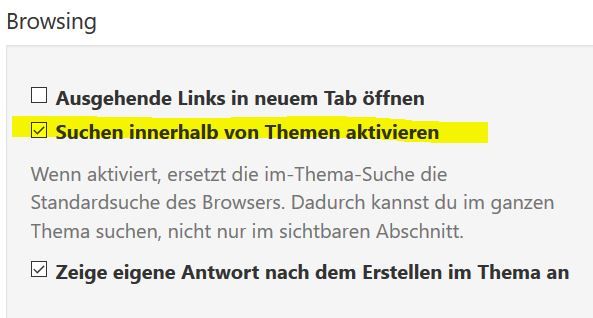
                          ich habe Probleme beim Update des js-controllers. In der ioBroker-Container-Konsole des Portainers erhalte ich immer folgende Meldungen:

                          2019-07-20_14h30_57.png

                          Jemand einen Tipp?

                          ioBroker im Docker-Container auf Synology DiskStation DS718+, HomeMatic IP über CCU3, IKEA Dirigera inkl. Matter, Apple Homekit, Amazon Alexa.
                          1 Reply Last reply
                          0
                          • D Offline
                            D Offline
                            dtp
                            wrote on last edited by
                            #991

                            Hat sich erledigt. Hab ein Update des Containers gemacht.

                            ioBroker im Docker-Container auf Synology DiskStation DS718+, HomeMatic IP über CCU3, IKEA Dirigera inkl. Matter, Apple Homekit, Amazon Alexa.

                            D 1 Reply Last reply
                            0
                            • cashC Offline
                              cashC Offline
                              cash
                              Most Active
                              wrote on last edited by
                              #992

                              Ich habe ein kleines Problem. Ich wollte einen Adapter löschen leider über die Admioberfläche. Leider funktioniert das nicht.

                              Im Log kommt folgender Fehler:

                              obroker	2019-07-21 07:53:28.766	info	exit 0
                              iobroker	2019-07-21 07:53:28.757	error	You might have to delete it yourself!
                              iobroker	2019-07-21 07:53:28.756	error	Error deleting adapter iqontrol from disk: Error: host.iobroker_v2_19-05-19: Cannot uninstall iobroker.iqontrol: 216
                              host.iobroker_v2_19-05-19	2019-07-21 07:53:09.736	error	Cannot write files: /opt/iobroker/iobroker-data/files/iqontrol.admin/_data.json: ENOENT: no such file or directory, open '/opt/iobroker/iobroker-data/files/iqontrol.admin/_data.json'
                              host.iobroker_v2_19-05-19	2019-07-21 07:53:09.735	error	Cannot write files: /opt/iobroker/iobroker-data/files/iqontrol/_data.json: ENOENT: no such file or directory, open '/opt/iobroker/iobroker-data/files/iqontrol/_data.json'
                              iobroker	2019-07-21 07:53:09.136	info	npm uninstall iobroker.iqontrol --silent --save --prefix "/opt/iobroker" (System call)


                              Wie kann ich den Adapter über die Konsole löschen oder wie bekomme ich den Fehler weg?
                              Ich bin noch bei V2

                              1 Reply Last reply
                              0
                              • C ChrisXY

                                wieso eigentlich kein Node10 ?

                                S Offline
                                S Offline
                                Shwowak
                                wrote on last edited by
                                #993

                                @ChrisXY

                                es muss ja erst mal so laufen :(

                                1 Reply Last reply
                                0
                                • S Offline
                                  S Offline
                                  Shwowak
                                  wrote on last edited by
                                  #994

                                  Host Maschine : # Dynamic resolv.conf(5) file for glibc resolver(3) generated by resolvconf(8)

                                  DO NOT EDIT THIS FILE BY HAND -- YOUR CHANGES WILL BE OVERWRITTEN

                                  nameserver 192.168.200.1
                                  search fritz.box

                                  Container:
                                  cat /etc/resolv.conf

                                  search fritz.box
                                  nameserver : <<<<<<<<<< Welche Ip muss hier stehen ?
                                  options ndots:0
                                  root@iobroker:/opt/iobroker#

                                  1 Reply Last reply
                                  0
                                  • D dtp

                                    Hat sich erledigt. Hab ein Update des Containers gemacht.

                                    D Offline
                                    D Offline
                                    dtp
                                    wrote on last edited by dtp
                                    #995

                                    @dtp sagte in [HowTo][Anleitung] Installation ioBroker in Docker auf Synology DiskStation:

                                    Hat sich erledigt.

                                    Nun stehe ich mit dem Update des js-controllers auf die Version 1.5.14 schon wieder vor demselben Problem, wie oben.

                                    Wie bekomme ich den Controller auf die aktuelle Version?

                                    Klappt das bei euch im ioBroker-Container mit

                                    pkill io
                                    iobroker update
                                    iobroker upgrade self
                                    node node_modules/iobroker.js-controller/controller.js >/opt/scripts/docker_iobroker_log.txt 2>&1 &
                                    

                                    oder

                                    pkill io
                                    npm install iobroker.js-controller –-production
                                    node node_modules/iobroker.js-controller/controller.js >/opt/scripts/docker_iobroker_log.txt 2>&1 &
                                    

                                    Ich erhalte da immer diese Fehlermeldungen.
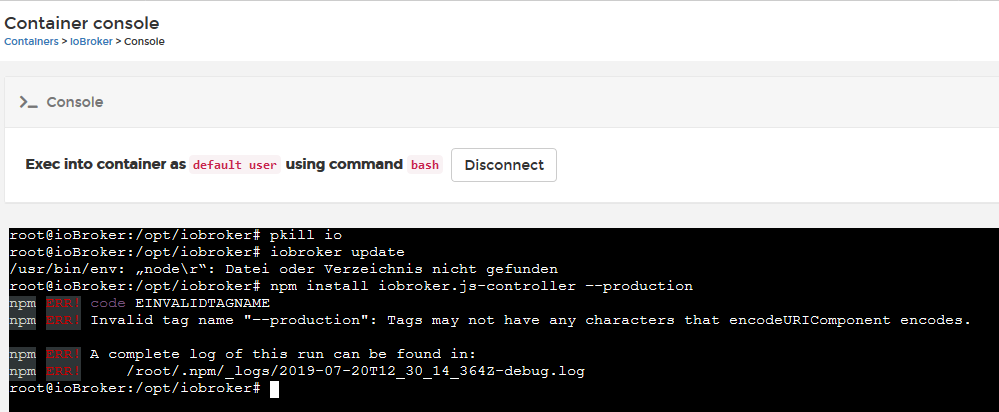
                                    Bild Text

                                    ioBroker im Docker-Container auf Synology DiskStation DS718+, HomeMatic IP über CCU3, IKEA Dirigera inkl. Matter, Apple Homekit, Amazon Alexa.

                                    dslraserD 1 Reply Last reply
                                    0
                                    • andreA andre

                                      @Homer-J
                                      Wie @Holzlenkrad schon sagt. Du musst schauen dass das Device in den Container durchgereicht wird. Ggf. musst du den Container mit erweiterten Rechten ausstatten. Ich selbst kann dazu wenig sagen, weil ich an meiner DS keine weitere Hardware für ioBroker nutze...

                                      MfG,
                                      André

                                      GlasfaserG Offline
                                      GlasfaserG Offline
                                      Glasfaser
                                      wrote on last edited by
                                      #996

                                      @andre / @all

                                      Welchen Einfluss hat das Ende der Synology DSM License :thinking_face: auf ioBrocker unter Docker :question:

                                      Docker DSM License activation ends on Aug. 12th, 2019

                                      Synology 918+ 16GB - ioBroker in Docker v9 , VISO auf Trekstor Primebook C13 13,3" , Hikvision Domkameras mit Surveillance Station .. CCU RaspberryMatic in Synology VM .. Zigbee CC2538+CC2592 .. Sonoff .. KNX .. Modbus ..

                                      1 Reply Last reply
                                      0
                                      • M Offline
                                        M Offline
                                        McD_HRTS
                                        wrote on last edited by
                                        #997

                                        @Glasfaser
                                        Hat keine Auswirkungen, geht ja nur um das DSM in Docker.
                                        Steht aber auch nochmal in den Fragen / Antworten:
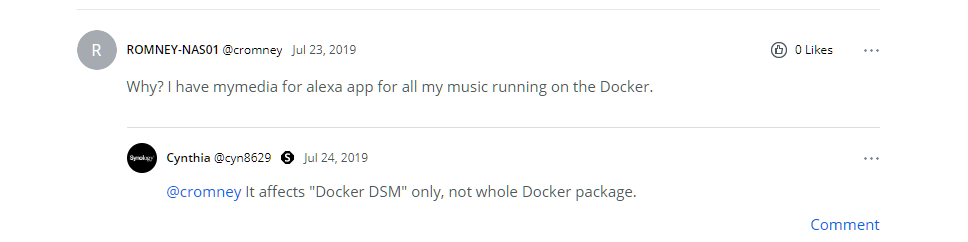
                                        720fa5af-de6b-4ff6-bd8c-92d59f2befcc-image.png

                                        1 Reply Last reply
                                        0
                                        • S Offline
                                          S Offline
                                          Shwowak
                                          wrote on last edited by
                                          #998

                                          Was kann man bei dem fehler machen ?

                                          root@5d84b836d60c:/opt/iobroker# node node_modules/iobroker.admin/admin.js --logs
                                          module.js:550
                                              throw err;
                                              ^
                                          
                                          Error: Cannot find module '/opt/iobroker/node_modules/iobroker.admin/admin.js'
                                              at Function.Module._resolveFilename (module.js:548:15)
                                              at Function.Module._load (module.js:475:25)
                                              at Function.Module.runMain (module.js:694:10)
                                              at startup (bootstrap_node.js:204:16)
                                              at bootstrap_node.js:625:3
                                          root@5d84b836d60c:/opt/iobroker# ^C
                                          root@5d84b836d60c:/opt/iobroker# node -v
                                          v8.16.0
                                          root@5d84b836d60c:/opt/iobroker# npm -v
                                          6.4.1

                                          
                                          J 1 Reply Last reply
                                          0
                                          Reply
                                          • Reply as topic
                                          Log in to reply
                                          • Oldest to Newest
                                          • Newest to Oldest
                                          • Most Votes


                                          Support us

                                          ioBroker
                                          Community Adapters
                                          Donate
                                          FAQ Cloud / IOT
                                          HowTo: Node.js-Update
                                          HowTo: Backup/Restore
                                          Downloads
                                          BLOG

                                          508

                                          Online

                                          32.6k

                                          Users

                                          82.2k

                                          Topics

                                          1.3m

                                          Posts
                                          Community
                                          Impressum | Datenschutz-Bestimmungen | Nutzungsbedingungen | Einwilligungseinstellungen
                                          ioBroker Community 2014-2025
                                          logo
                                          • Login

                                          • Don't have an account? Register

                                          • Login or register to search.
                                          • First post
                                            Last post
                                          0
                                          • Home
                                          • Recent
                                          • Tags
                                          • Unread 0
                                          • Categories
                                          • Unreplied
                                          • Popular
                                          • GitHub
                                          • Docu
                                          • Hilfe