Skip to content
  • Home
  • Recent
  • Tags
  • 0 Unread 0
  • Categories
  • Unreplied
  • Popular
  • GitHub
  • Docu
  • Hilfe
Skins
  • Light
  • Brite
  • Cerulean
  • Cosmo
  • Flatly
  • Journal
  • Litera
  • Lumen
  • Lux
  • Materia
  • Minty
  • Morph
  • Pulse
  • Sandstone
  • Simplex
  • Sketchy
  • Spacelab
  • United
  • Yeti
  • Zephyr
  • Dark
  • Cyborg
  • Darkly
  • Quartz
  • Slate
  • Solar
  • Superhero
  • Vapor

  • Default (No Skin)
  • No Skin
Collapse
ioBroker Logo

Community Forum

donate donate
  1. ioBroker Community Home
  2. Deutsch
  3. ioBroker Allgemein
  4. *gelöst* Vis-Oberfläche nach update nicht erreichbar

NEWS

  • Monatsrückblick Januar/Februar 2026 ist online!
    BluefoxB
    Bluefox
    18
    1
    823

  • Jahresrückblick 2025 – unser neuer Blogbeitrag ist online! ✨
    BluefoxB
    Bluefox
    18
    1
    6.3k

  • Neuer Blogbeitrag: Monatsrückblick - Dezember 2025 🎄
    BluefoxB
    Bluefox
    13
    1
    1.6k

*gelöst* Vis-Oberfläche nach update nicht erreichbar
Scheduled Pinned Locked Moved ioBroker Allgemein
vis lädt nicht
26 Posts 3 Posters 2.5k Views 3 Watching
  • Oldest to Newest
  • Newest to Oldest
  • Most Votes
Reply
  • Reply as topic
Log in to reply
This topic has been deleted. Only users with topic management privileges can see it.
  • A Aidan

    @glasfaser
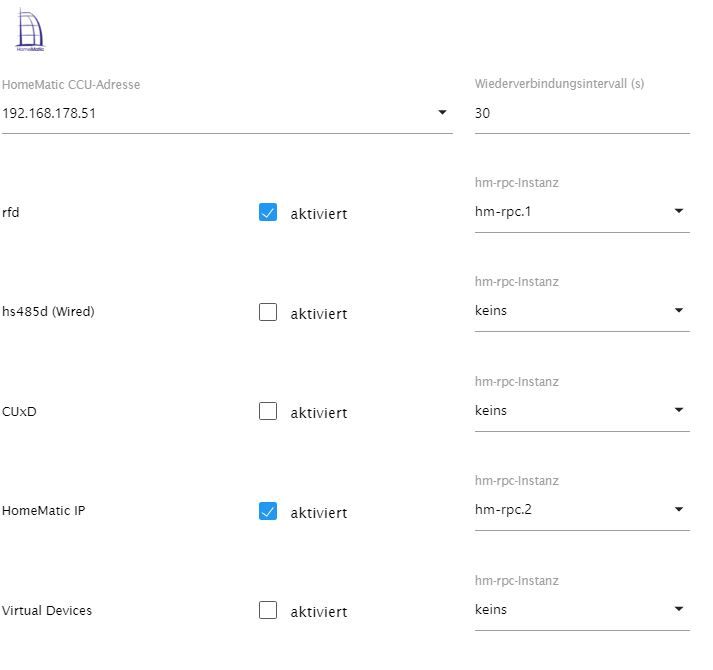
    keine Ahnung was falsch läuft. in der Rega Einstelllung ist kein Port hinterlegt oder ich finde ihn nicht.
    Unbenannt4.JPG
    die anderen Beiden Adapter habe ich ausgeschaltet und habe die gleichen Fehler in der LOG

    GlasfaserG Offline
    GlasfaserG Offline
    Glasfaser
    wrote on last edited by
    #17

    @aidan

    Sorry falsch ausgedrückt :

    in hm-rpc.1 / hm-rpc.2 hast du diese Einstellung

    Synology 918+ 16GB - ioBroker in Docker v9 , VISO auf Trekstor Primebook C13 13,3" , Hikvision Domkameras mit Surveillance Station .. CCU RaspberryMatic in Synology VM .. Zigbee CC2538+CC2592 .. Sonoff .. KNX .. Modbus ..

    1 Reply Last reply
    0
    • A Aidan

      @glasfaser
      keine Ahnung was falsch läuft. in der Rega Einstelllung ist kein Port hinterlegt oder ich finde ihn nicht.
      Unbenannt4.JPG
      die anderen Beiden Adapter habe ich ausgeschaltet und habe die gleichen Fehler in der LOG

      Thomas BraunT Online
      Thomas BraunT Online
      Thomas Braun
      Most Active
      wrote on last edited by
      #18

      @aidan

      iobroker list instances
      

      Linux-Werkzeugkasten:
      https://forum.iobroker.net/topic/42952/der-kleine-iobroker-linux-werkzeugkasten
      NodeJS Fixer Skript:
      https://forum.iobroker.net/topic/68035/iob-node-fix-skript
      iob_diag: curl -sLf -o diag.sh https://iobroker.net/diag.sh && bash diag.sh

      GlasfaserG A 2 Replies Last reply
      0
      • A Aidan

        @glasfaser
        keine Ahnung was falsch läuft. in der Rega Einstelllung ist kein Port hinterlegt oder ich finde ihn nicht.
        Unbenannt4.JPG
        die anderen Beiden Adapter habe ich ausgeschaltet und habe die gleichen Fehler in der LOG

        GlasfaserG Offline
        GlasfaserG Offline
        Glasfaser
        wrote on last edited by
        #19

        @aidan

        • system.adapter.hm-rpc.2 : hm-rpc : raspberrypi - enabled, port: 8081

        in hm-rpc.2 wie du oben gepostet hast !

        Synology 918+ 16GB - ioBroker in Docker v9 , VISO auf Trekstor Primebook C13 13,3" , Hikvision Domkameras mit Surveillance Station .. CCU RaspberryMatic in Synology VM .. Zigbee CC2538+CC2592 .. Sonoff .. KNX .. Modbus ..

        A 1 Reply Last reply
        0
        • Thomas BraunT Thomas Braun

          @aidan

          iobroker list instances
          
          GlasfaserG Offline
          GlasfaserG Offline
          Glasfaser
          wrote on last edited by Glasfaser
          #20

          @thomas-braun

          Die Meldung finde ich noch Witzig bei Ihm

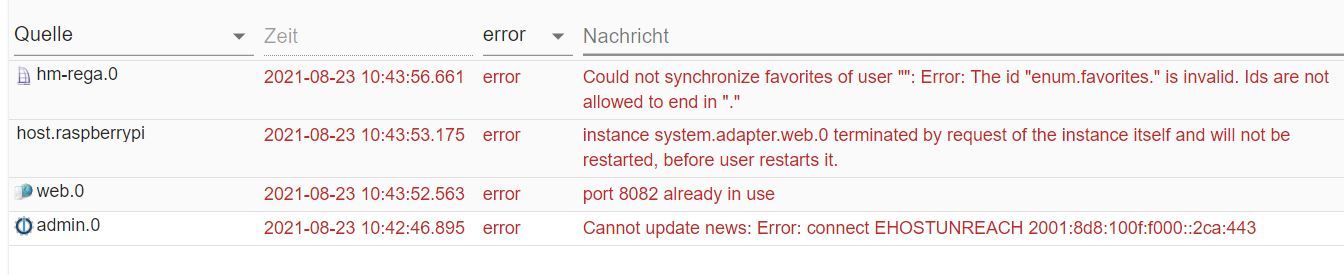
          web.0 2021-08-23 14:32:53.904 error port 8082 already in use

          er hat aber laut Ausgabe nichts doppelt.

          und nach Aussage schon rebootet

          Synology 918+ 16GB - ioBroker in Docker v9 , VISO auf Trekstor Primebook C13 13,3" , Hikvision Domkameras mit Surveillance Station .. CCU RaspberryMatic in Synology VM .. Zigbee CC2538+CC2592 .. Sonoff .. KNX .. Modbus ..

          Thomas BraunT 1 Reply Last reply
          0
          • GlasfaserG Glasfaser

            @thomas-braun

            Die Meldung finde ich noch Witzig bei Ihm

            web.0 2021-08-23 14:32:53.904 error port 8082 already in use

            er hat aber laut Ausgabe nichts doppelt.

            und nach Aussage schon rebootet

            Thomas BraunT Online
            Thomas BraunT Online
            Thomas Braun
            Most Active
            wrote on last edited by Thomas Braun
            #21

            @glasfaser

            Ich will mal sehen ob der Port von einem Adapter occupiert wird oder ob da irgendwas von außen drauf läuft.

            Linux-Werkzeugkasten:
            https://forum.iobroker.net/topic/42952/der-kleine-iobroker-linux-werkzeugkasten
            NodeJS Fixer Skript:
            https://forum.iobroker.net/topic/68035/iob-node-fix-skript
            iob_diag: curl -sLf -o diag.sh https://iobroker.net/diag.sh && bash diag.sh

            GlasfaserG 1 Reply Last reply
            0
            • Thomas BraunT Thomas Braun

              @glasfaser

              Ich will mal sehen ob der Port von einem Adapter occupiert wird oder ob da irgendwas von außen drauf läuft.

              GlasfaserG Offline
              GlasfaserG Offline
              Glasfaser
              wrote on last edited by
              #22

              @thomas-braun sagte in Vis-Oberfläche nach update nicht erreichbar:

              Port von einem Adapter occupiert wird

              Wird laut Log von Ihm , vom Adapter hm-rpc.2 genutzt .

              Mal sehen was aktuell mit seiner Ausgabe ist !

              Synology 918+ 16GB - ioBroker in Docker v9 , VISO auf Trekstor Primebook C13 13,3" , Hikvision Domkameras mit Surveillance Station .. CCU RaspberryMatic in Synology VM .. Zigbee CC2538+CC2592 .. Sonoff .. KNX .. Modbus ..

              1 Reply Last reply
              0
              • GlasfaserG Glasfaser

                @aidan

                • system.adapter.hm-rpc.2 : hm-rpc : raspberrypi - enabled, port: 8081

                in hm-rpc.2 wie du oben gepostet hast !

                A Offline
                A Offline
                Aidan
                wrote on last edited by
                #23

                @glasfaser
                hmm, Port auf 0 gesetzt und die Vis Oberfläche lädt wieder.
                Wieso auch immer da 8081 drin stand. Ich wars nicht^^😰
                Die Fehler in der Log sind auf 2 geschrumpft

                
                hm-rega.0
                2021-08-23 17:55:18.137	error	Could not synchronize favorites of user "": Error: The id "enum.favorites." is invalid. Ids are not allowed to end in "."
                
                admin.0
                2021-08-23 17:54:06.546	error	Cannot update news: Error: connect EHOSTUNREACH 2001:8d8:100f:f000::2ca:443
                
                GlasfaserG 1 Reply Last reply
                0
                • Thomas BraunT Thomas Braun

                  @aidan

                  iobroker list instances
                  
                  A Offline
                  A Offline
                  Aidan
                  wrote on last edited by
                  #24

                  @thomas-braun

                  pi@raspberrypi:~ $ iobroker list instances
                  + system.adapter.admin.0                  : admin                 : raspberrypi                              -  enabled, port: 8081, bind: 0.0.0.0, run as: admin
                    system.adapter.alarm.0                  : alarm                 : raspberrypi                              - disabled
                  + system.adapter.discovery.0              : discovery             : raspberrypi                              -  enabled
                  + system.adapter.email.0                  : email                 : raspberrypi                              -  enabled
                    system.adapter.gartenbewaesserung.0     : gartenbewaesserung    : raspberrypi                              - disabled
                    system.adapter.heos.0                   : heos                  : raspberrypi                              - disabled
                  + system.adapter.hm-rega.0                : hm-rega               : raspberrypi                              -  enabled
                  + system.adapter.hm-rpc.1                 : hm-rpc                : raspberrypi                              -  enabled, port: 0
                  + system.adapter.hm-rpc.2                 : hm-rpc                : raspberrypi                              -  enabled, port: 0
                    system.adapter.ical.0                   : ical                  : raspberrypi                              -  enabled
                    system.adapter.icons-material-png.0     : icons-material-png    : raspberrypi                              -  enabled
                    system.adapter.icons-mfd-png.0          : icons-mfd-png         : raspberrypi                              -  enabled
                    system.adapter.icons-open-icon-library-png.0: icons-open-icon-library-png: raspberrypi                              -  enabled
                    system.adapter.icons-ultimate-png.0     : icons-ultimate-png    : raspberrypi                              -  enabled
                  + system.adapter.info.0                   : info                  : raspberrypi                              -  enabled
                  + system.adapter.javascript.0             : javascript            : raspberrypi                              -  enabled
                  + system.adapter.tankerkoenig.0           : tankerkoenig          : raspberrypi                              -  enabled
                    system.adapter.telegram.0               : telegram              : raspberrypi                              - disabled, port: 8443, bind: 0.0.0.0
                    system.adapter.tvspielfilm.0            : tvspielfilm           : raspberrypi                              -  enabled
                    system.adapter.vis-google-fonts.0       : vis-google-fonts      : raspberrypi                              -  enabled
                    system.adapter.vis-hqwidgets.0          : vis-hqwidgets         : raspberrypi                              -  enabled
                    system.adapter.vis-jqui-mfd.0           : vis-jqui-mfd          : raspberrypi                              -  enabled
                    system.adapter.vis-justgage.0           : vis-justgage          : raspberrypi                              -  enabled
                    system.adapter.vis-map.0                : vis-map               : raspberrypi                              -  enabled
                    system.adapter.vis-metro.0              : vis-metro             : raspberrypi                              -  enabled
                    system.adapter.vis-plumb.0              : vis-plumb             : raspberrypi                              -  enabled
                    system.adapter.vis-timeandweather.0     : vis-timeandweather    : raspberrypi                              -  enabled
                    system.adapter.vis-weather.0            : vis-weather           : raspberrypi                              -  enabled
                    system.adapter.vis.0                    : vis                   : raspberrypi                              -  enabled
                  + system.adapter.web.0                    : web                   : raspberrypi                              -  enabled, port: 8082, bind: 0.0.0.0, run as: admin
                  
                  
                  1 Reply Last reply
                  0
                  • A Aidan

                    @glasfaser
                    hmm, Port auf 0 gesetzt und die Vis Oberfläche lädt wieder.
                    Wieso auch immer da 8081 drin stand. Ich wars nicht^^😰
                    Die Fehler in der Log sind auf 2 geschrumpft

                    
                    hm-rega.0
                    2021-08-23 17:55:18.137	error	Could not synchronize favorites of user "": Error: The id "enum.favorites." is invalid. Ids are not allowed to end in "."
                    
                    admin.0
                    2021-08-23 17:54:06.546	error	Cannot update news: Error: connect EHOSTUNREACH 2001:8d8:100f:f000::2ca:443
                    
                    GlasfaserG Offline
                    GlasfaserG Offline
                    Glasfaser
                    wrote on last edited by
                    #25

                    @aidan sagte in Vis-Oberfläche nach update nicht erreichbar:

                    Could not synchronize favorites of user "": Error: The id "enum.favorites." is invalid. Ids are not allowed to end in "."

                    Wäre dann das :

                    https://forum.iobroker.net/topic/34937/hm-rega-could-not-synchronize-favorites-of-user

                    Synology 918+ 16GB - ioBroker in Docker v9 , VISO auf Trekstor Primebook C13 13,3" , Hikvision Domkameras mit Surveillance Station .. CCU RaspberryMatic in Synology VM .. Zigbee CC2538+CC2592 .. Sonoff .. KNX .. Modbus ..

                    A 1 Reply Last reply
                    0
                    • GlasfaserG Glasfaser

                      @aidan sagte in Vis-Oberfläche nach update nicht erreichbar:

                      Could not synchronize favorites of user "": Error: The id "enum.favorites." is invalid. Ids are not allowed to end in "."

                      Wäre dann das :

                      https://forum.iobroker.net/topic/34937/hm-rega-could-not-synchronize-favorites-of-user

                      A Offline
                      A Offline
                      Aidan
                      wrote on last edited by
                      #26

                      Habe lediglich die E-Mail in der CCU3 hinterlegt, damit sind die anderen beiden Fehler auch verschwunden.

                      Vielen Dank für Eure Hilfe, 😳

                      1 Reply Last reply
                      0

                      Hello! It looks like you're interested in this conversation, but you don't have an account yet.

                      Getting fed up of having to scroll through the same posts each visit? When you register for an account, you'll always come back to exactly where you were before, and choose to be notified of new replies (either via email, or push notification). You'll also be able to save bookmarks and upvote posts to show your appreciation to other community members.

                      With your input, this post could be even better 💗

                      Register Login
                      Reply
                      • Reply as topic
                      Log in to reply
                      • Oldest to Newest
                      • Newest to Oldest
                      • Most Votes


                      Support us

                      ioBroker
                      Community Adapters
                      Donate
                      FAQ Cloud / IOT
                      HowTo: Node.js-Update
                      HowTo: Backup/Restore
                      Downloads
                      BLOG

                      350

                      Online

                      32.8k

                      Users

                      82.7k

                      Topics

                      1.3m

                      Posts
                      Community
                      Impressum | Datenschutz-Bestimmungen | Nutzungsbedingungen | Einwilligungseinstellungen
                      ioBroker Community 2014-2025
                      logo
                      • Login

                      • Don't have an account? Register

                      • Login or register to search.
                      • First post
                        Last post
                      0
                      • Home
                      • Recent
                      • Tags
                      • Unread 0
                      • Categories
                      • Unreplied
                      • Popular
                      • GitHub
                      • Docu
                      • Hilfe