
NEWS




Adapter "smartmeter"
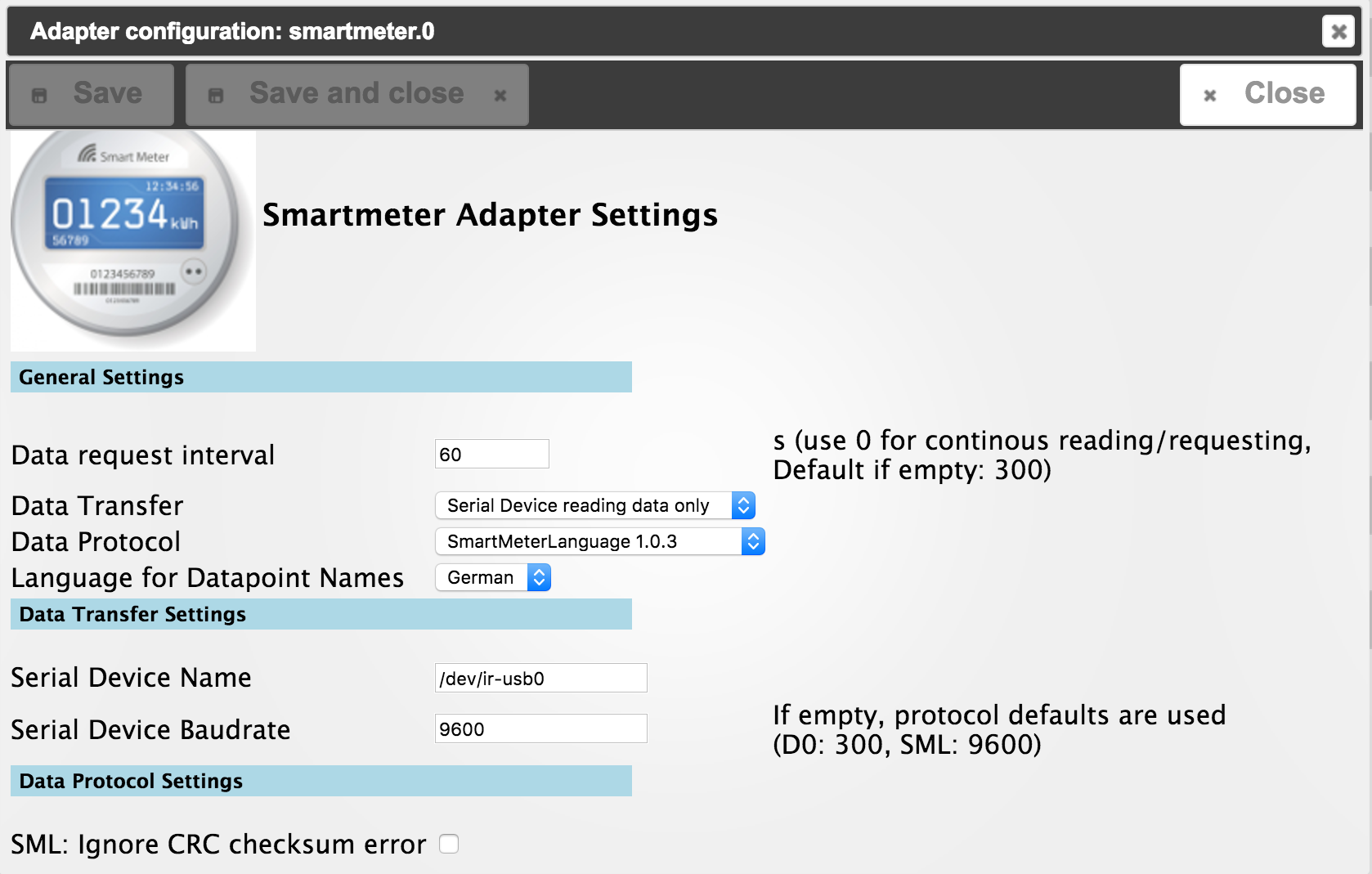
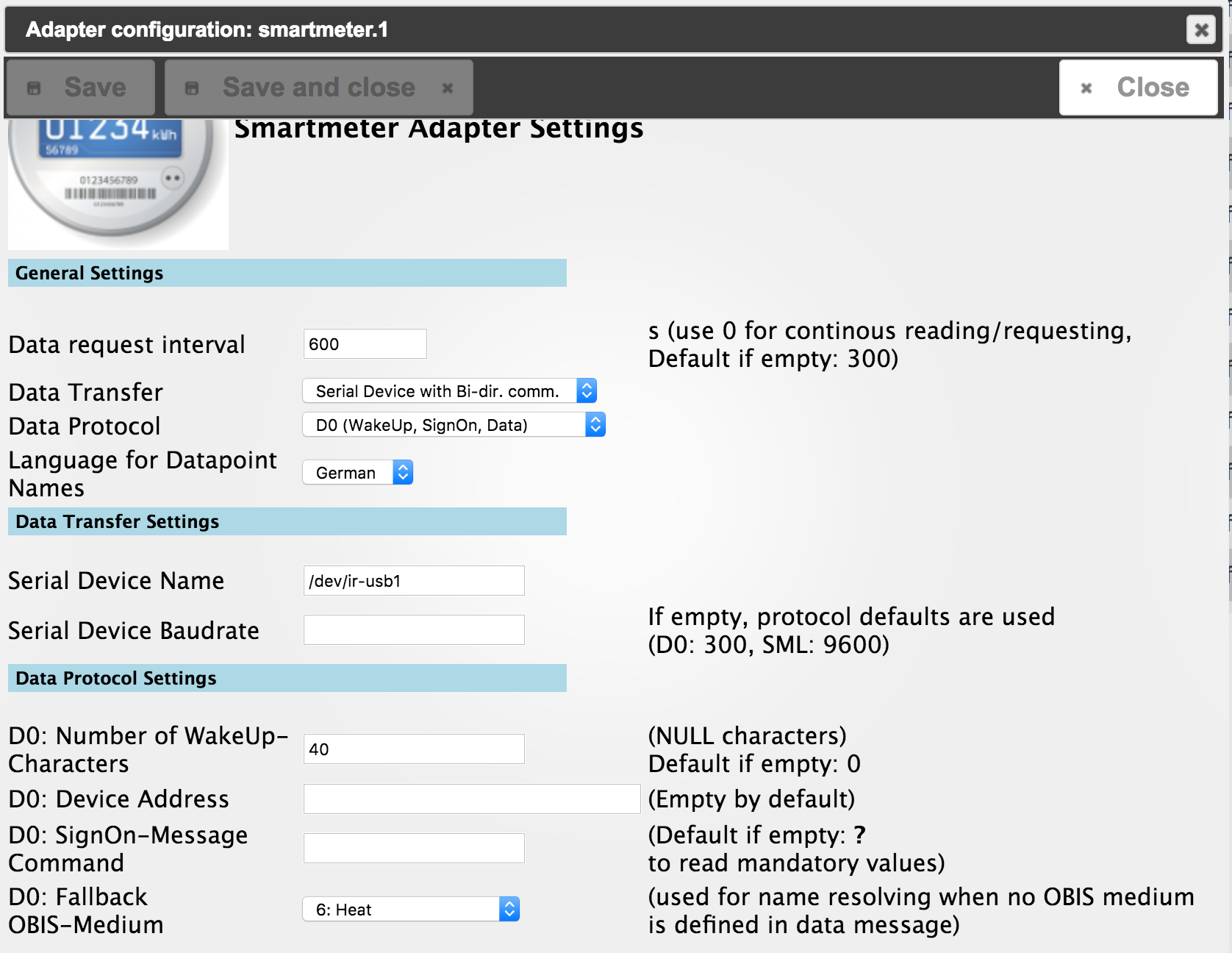
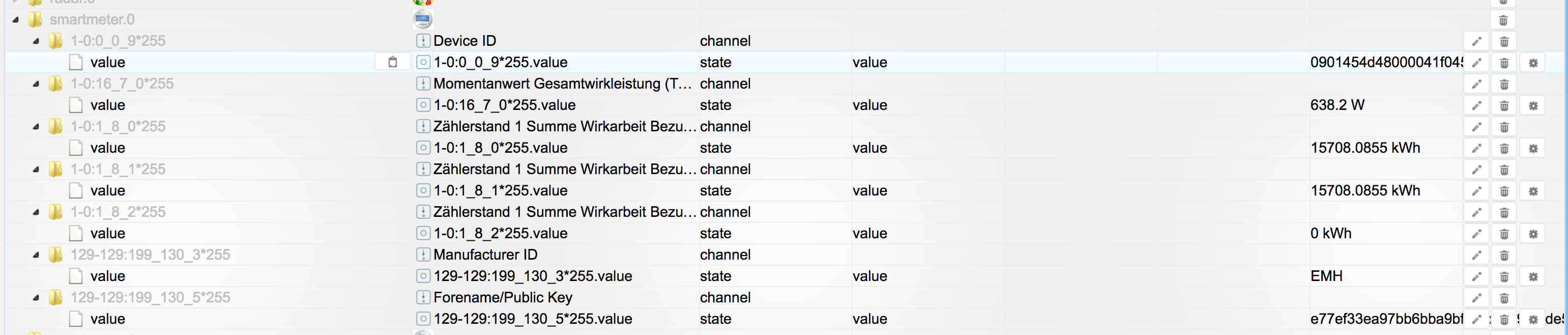
-
Hallo,
habe jetzt manuell drüber kopiert.
Jetzt bekomme ich nur noch:
host.rasp_pv1_goke 2017-07-24 21:35:41.501 error instance system.adapter.smartmeter.0 terminated with code 1 ()
host.rasp_pv1_goke 2017-07-24 21:35:40.719 info instance system.adapter.smartmeter.0 started with pid 11153
host.rasp_pv1_goke 2017-07-24 21:35:35.334 info Restart adapter system.adapter.smartmeter.0 because enabled
Auch wenn ich nochmal lösche und neu installiere das gleiche.
Nach der Installation erneuert sich auch nicht das Datum der SmlBuffer.js Datei.
Viele Grüße
Marcel Jaud
-
Bei mir läuft alles nach dem Update! :D
Enrico
-
Hy,
$ ./iobroker add smartmeter
npm install iobroker.smartmeter --production --prefix "/opt/iobroker" (System call)
npm

WARN

addRemoteGit Error: not found: gitnpm
WARN addRemoteGit     at getNotFoundError (/usr/lib/node_modules/npm/node_modules/which/which.js:14:12)
npm
WARN

addRemoteGit     at F (/usr/lib/node_modules/npm/node_modules/which/which.js:69:19)
npm
WARN
addRemoteGit     at E (/usr/lib/node_modules/npm/node_modules/which/which.js:81:29)npm WARN addRemoteGit     at /usr/lib/node_modules/npm/node_modules/which/which.js:90:16
npm WARN addRemoteGit     at /usr/lib/node_modules/npm/node_modules/which/node_modules/isexe/index.js:44:5
npm WARN addRemoteGit     at /usr/lib/node_modules/npm/node_modules/which/node_modules/isexe/access.js:8:5
npm WARN addRemoteGit     at FSReqWrap.oncomplete (fs.js:123:15)
npm WARN
 addRemoteGit  apollon77/OpenSML resetting remote /root/.npm/_git-remotes/git-github-com-apollon77-OpenSML-git-f43458a2 because of error: { Error: not found: gitnpm WARN addRemoteGit     at getNotFoundError (/usr/lib/node_modules/npm/node_modules/which/which.js:14:12)
npm WARN addRemoteGit     at F (/usr/lib/node_modules/npm/node_modules/which/which.js:69:19)
npm WARN addRemoteGit     at E (/usr/lib/node_modules/npm/node_modules/which/which.js:81:29)
npm WARN addRemoteGit     at /usr/lib/node_modules/npm/node_modules/which/which.js:90:16
npm WARN addRemoteGit     at /usr/lib/node_modules/npm/node_modules/which/node_modules/isexe/index.js:44:5
npm WARN addRemoteGit     at /usr/lib/node_modules/npm/node_modules/which/node_modules/isexe/access.js:8:5
npm WARN addRemoteGit     at FSReqWrap.oncomplete (fs.js:123:15) code: 'ENOGIT' }

npm
 ERR! git clone --template=/root/.npm/_git-remotes/_templates --mirror git://github.com/apollon77/OpenSML.git /root/.npm/_git-remotes/git-github-com-apollon77-OpenSML-git-f43458a2: undefinednpm ERR! git clone --template=/root/.npm/_git-remotes/_templates --mirror git://github.com/apollon77/OpenSML.git /root/.npm/_git-remotes/git-github-com-apollon77-OpenSML-git-f43458a2: undefined

npm
 WARN addRemoteGit Error: not found: gitnpm WARN addRemoteGit     at getNotFoundError (/usr/lib/node_modules/npm/node_modules/which/which.js:14:12)
npm
WARN addRemoteGit     at F (/usr/lib/node_modules/npm/node_modules/which/which.js:69:19)npm WARN

addRemoteGit
     at E (/usr/lib/node_modules/npm/node_modules/which/which.js:81:29)npm WARN addRemoteGit     at /usr/lib/node_modules/npm/node_modules/which/which.js:90:16
npm WARN addRemoteGit     at /usr/lib/node_modules/npm/node_modules/which/node_modules/isexe/index.js:44:5
npm WARN addRemoteGit     at /usr/lib/node_modules/npm/node_modules/which/node_modules/isexe/access.js:8:5
npm WARN addRemoteGit     at FSReqWrap.oncomplete (fs.js:123:15)
npm WARN addRemoteGit  apollon77/OpenSML resetting remote /root/.npm/_git-remotes/git-https-github-com-apollon77-OpenSML-git-28622d52 because of error: { Error: not found: git
npm WARN addRemoteGit     at getNotFoundError (/usr/lib/node_modules/npm/node_modules/which/which.js:14:12)
npm WARN addRemoteGit     at F (/usr/lib/node_modules/npm/node_modules/which/which.js:69:19)
npm WARN addRemoteGit     at E (/usr/lib/node_modules/npm/node_modules/which/which.js:81:29)
npm WARN addRemoteGit     at /usr/lib/node_modules/npm/node_modules/which/which.js:90:16
npm WARN addRemoteGit     at /usr/lib/node_modules/npm/node_modules/which/node_modules/isexe/index.js:44:5

npm WARN addRemoteGit
     at /usr/lib/node_modules/npm/node_modules/which/node_modules/isexe/access.js:8:5npm WARN addRemoteGit     at FSReqWrap.oncomplete (fs.js:123:15) code: 'ENOGIT' }

npm
 ERR! git clone --template=/root/.npm/_git-remotes/_templates --mirror https://github.com/apollon77/OpenSML.git /root/.npm/_git-remotes/git-https-github-com-apollon77-OpenSML-git-28622d52: undefinednpm ERR! git clone --template=/root/.npm/_git-remotes/_templates --mirror https://github.com/apollon77/OpenSML.git /root/.npm/_git-remotes/git-https-github-com-apollon77-OpenSML-git-28622d52: undefined

npm
 WARN addRemoteGit Error: not found: gitnpm WARN
 addRemoteGit     at getNotFoundError (/usr/lib/node_modules/npm/node_modules/which/which.js:14:12)npm WARN addRemoteGit     at F (/usr/lib/node_modules/npm/node_modules/which/which.js:69:19)
npm
 WARN addRemoteGit     at E (/usr/lib/node_modules/npm/node_modules/which/which.js:81:29)npm WARN addRemoteGit     at /usr/lib/node_modules/npm/node_modules/which/which.js:90:16
npm WARN addRemoteGit     at /usr/lib/node_modules/npm/node_modules/which/node_modules/isexe/index.js:44:5
npm WARN addRemoteGit
     at /usr/lib/node_modules/npm/node_modules/which/node_modules/isexe/access.js:8:5npm WARN addRemoteGit     at FSReqWrap.oncomplete (fs.js:123:15)
npm WARN addRemoteGit  apollon77/OpenSML resetting remote /root/.npm/_git-remotes/git-github-com-apollon77-OpenSML-git-6ff02cac because of error: { Error: not found: git
npm WARN addRemoteGit     at getNotFoundError (/usr/lib/node_modules/npm/node_modules/which/which.js:14:12)
npm WARN addRemoteGit     at F (/usr/lib/node_modules/npm/node_modules/which/which.js:69:19)
npm WARN addRemoteGit     at E (/usr/lib/node_modules/npm/node_modules/which/which.js:81:29)
npm WARN addRemoteGit
     at /usr/lib/node_modules/npm/node_modules/which/which.js:90:16npm WARN addRemoteGit     at /usr/lib/node_modules/npm/node_modules/which/node_modules/isexe/index.js:44:5
npm WARN addRemoteGit     at /usr/lib/node_modules/npm/node_modules/which/node_modules/isexe/access.js:8:5
npm WARN addRemoteGit     at FSReqWrap.oncomplete (fs.js:123:15) code: 'ENOGIT' }

npm
 ERR! git clone --template=/root/.npm/_git-remotes/_templates --mirror git@github.com:apollon77/OpenSML.git /root/.npm/_git-remotes/git-github-com-apollon77-OpenSML-git-6ff02cac: undefinednpm ERR! git clone --template=/root/.npm/_git-remotes/_templates --mirror git@github.com:apollon77/OpenSML.git /root/.npm/_git-remotes/git-github-com-apollon77-OpenSML-git-6ff02cac: undefined

npm
 ERR! Linux 4.9.24-v7+npm ERR! argv "/usr/bin/nodejs" "/usr/bin/npm" "install" "iobroker.smartmeter" "--production" "--prefix" "/opt/iobroker"
npm ERR! node v6.10.3
npm
 ERR! npm  v3.10.10npm
 ERR! code ENOGIT

npm
ERR! not found: gitnpm ERR!
npm ERR! Failed using git.
npm ERR! This is most likely not a problem with npm itself.
npm ERR! Please check if you have git installed and in your PATH.

npm ERR! Please include the following file with any support request:npm ERR!     /npm-debug.log

host.ioBroker-RasPi install adapter smartmeter
npm install iobroker.smartmeter --production --prefix "/opt/iobroker" (System call)
npm
 WARN addRemoteGit Error: not found: gitnpm WARN addRemoteGit     at getNotFoundError (/usr/lib/node_modules/npm/node_modules/which/which.js:14:12)
npm WARN addRemoteGit     at F (/usr/lib/node_modules/npm/node_modules/which/which.js:69:19)
npm WARN addRemoteGit     at E (/usr/lib/node_modules/npm/node_modules/which/which.js:81:29)
npm WARN addRemoteGit     at /usr/lib/node_modules/npm/node_modules/which/which.js:90:16

npm WARN addRemoteGit     at /usr/lib/node_modules/npm/node_modules/which/node_modules/isexe/index.js:44:5npm WARN addRemoteGit     at /usr/lib/node_modules/npm/node_modules/which/node_modules/isexe/access.js:8:5
npm WARN addRemoteGit     at FSReqWrap.oncomplete (fs.js:123:15)
npm WARN addRemoteGit  apollon77/OpenSML resetting remote /root/.npm/_git-remotes/git-github-com-apollon77-OpenSML-git-f43458a2 because of error: { Error: not found: git
npm WARN
addRemoteGit     at getNotFoundError (/usr/lib/node_modules/npm/node_modules/which/which.js:14:12)npm WARN addRemoteGit     at F (/usr/lib/node_modules/npm/node_modules/which/which.js:69:19)
npm WARN addRemoteGit     at E (/usr/lib/node_modules/npm/node_modules/which/which.js:81:29)
npm WARN addRemoteGit     at /usr/lib/node_modules/npm/node_modules/which/which.js:90:16
npm WARN addRemoteGit     at /usr/lib/node_modules/npm/node_modules/which/node_modules/isexe/index.js:44:5
npm WARN
 addRemoteGit     at /usr/lib/node_modules/npm/node_modules/which/node_modules/isexe/access.js:8:5npm WARN addRemoteGit     at FSReqWrap.oncomplete (fs.js:123:15) code: 'ENOGIT' }

npm
 ERR! git clone --template=/root/.npm/_git-remotes/_templates --mirror git://github.com/apollon77/OpenSML.git /root/.npm/_git-remotes/git-github-com-apollon77-OpenSML-git-f43458a2: undefinednpm ERR! git clone --template=/root/.npm/_git-remotes/_templates --mirror git://github.com/apollon77/OpenSML.git /root/.npm/_git-remotes/git-github-com-apollon77-OpenSML-git-f43458a2: undefined

npm
WARN addRemoteGit Error: not found: gitnpm WARN addRemoteGit     at getNotFoundError (/usr/lib/node_modules/npm/node_modules/which/which.js:14:12)
npm
 WARN addRemoteGit     at F (/usr/lib/node_modules/npm/node_modules/which/which.js:69:19)npm WARN
 addRemoteGit     at E (/usr/lib/node_modules/npm/node_modules/which/which.js:81:29)npm WARN addRemoteGit     at /usr/lib/node_modules/npm/node_modules/which/which.js:90:16
npm WARN addRemoteGit     at /usr/lib/node_modules/npm/node_modules/which/node_modules/isexe/index.js:44:5
npm WARN addRemoteGit     at /usr/lib/node_modules/npm/node_modules/which/node_modules/isexe/access.js:8:5
npm WARN addRemoteGit     at FSReqWrap.oncomplete (fs.js:123:15)
npm WARN addRemoteGit  apollon77/OpenSML resetting remote /root/.npm/_git-remotes/git-https-github-com-apollon77-OpenSML-git-28622d52 because of error: { Error: not found: git
npm WARN addRemoteGit     at getNotFoundError (/usr/lib/node_modules/npm/node_modules/which/which.js:14:12)
npm WARN addRemoteGit     at F (/usr/lib/node_modules/npm/node_modules/which/which.js:69:19)
npm WARN addRemoteGit     at E (/usr/lib/node_modules/npm/node_modules/which/which.js:81:29)
npm WARN addRemoteGit     at /usr/lib/node_modules/npm/node_modules/which/which.js:90:16
npm WARN addRemoteGit     at /usr/lib/node_modules/npm/node_modules/which/node_modules/isexe/index.js:44:5
npm WARN addRemoteGit     at /usr/lib/node_modules/npm/node_modules/which/node_modules/isexe/access.js:8:5
npm WARN addRemoteGit     at FSReqWrap.oncomplete (fs.js:123:15) code: 'ENOGIT' }

npm ERR! git clone --template=/root/.npm/_git-remotes/_templates --mirror https://github.com/apollon77/OpenSML.git /root/.npm/_git-remotes/git-https-github-com-apollon77-OpenSML-git-28622d52: undefinednpm ERR! git clone --template=/root/.npm/_git-remotes/_templates --mirror https://github.com/apollon77/OpenSML.git /root/.npm/_git-remotes/git-https-github-com-apollon77-OpenSML-git-28622d52: undefined

npm WARN addRemoteGit Error: not found: gitnpm WARN addRemoteGit     at getNotFoundError (/usr/lib/node_modules/npm/node_modules/which/which.js:14:12)
npm WARN addRemoteGit     at F (/usr/lib/node_modules/npm/node_modules/which/which.js:69:19)
npm WARN addRemoteGit     at E (/usr/lib/node_modules/npm/node_modules/which/which.js:81:29)
npm WARN addRemoteGit     at /usr/lib/node_modules/npm/node_modules/which/which.js:90:16
npm WARN addRemoteGit     at /usr/lib/node_modules/npm/node_modules/which/node_modules/isexe/index.js:44:5
npm WARN
addRemoteGit     at /usr/lib/node_modules/npm/node_modules/which/node_modules/isexe/access.js:8:5npm WARN addRemoteGit     at FSReqWrap.oncomplete (fs.js:123:15)
npm WARN addRemoteGit  apollon77/OpenSML resetting remote /root/.npm/_git-remotes/git-github-com-apollon77-OpenSML-git-6ff02cac because of error: { Error: not found: git
npm WARN addRemoteGit     at getNotFoundError (/usr/lib/node_modules/npm/node_modules/which/which.js:14:12)
npm WARN addRemoteGit     at F (/usr/lib/node_modules/npm/node_modules/which/which.js:69:19)
npm WARN addRemoteGit     at E (/usr/lib/node_modules/npm/node_modules/which/which.js:81:29)
npm WARN addRemoteGit     at /usr/lib/node_modules/npm/node_modules/which/which.js:90:16
npm WARN addRemoteGit     at /usr/lib/node_modules/npm/node_modules/which/node_modules/isexe/index.js:44:5
npm WARN addRemoteGit     at /usr/lib/node_modules/npm/node_modules/which/node_modules/isexe/access.js:8:5
npm WARN addRemoteGit     at FSReqWrap.oncomplete (fs.js:123:15) code: 'ENOGIT' }

npm ERR! git clone --template=/root/.npm/_git-remotes/_templates --mirror git@github.com:apollon77/OpenSML.git /root/.npm/_git-remotes/git-github-com-apollon77-OpenSML-git-6ff02cac: undefinednpm ERR! git clone --template=/root/.npm/_git-remotes/_templates --mirror git@github.com:apollon77/OpenSML.git /root/.npm/_git-remotes/git-github-com-apollon77-OpenSML-git-6ff02cac: undefined

npm
ERR! Linux 4.9.24-v7+npm ERR! argv "/usr/bin/nodejs" "/usr/bin/npm" "install" "iobroker.smartmeter" "--production" "--prefix" "/opt/iobroker"
npm ERR! node v6.10.3
npm ERR! npm  v3.10.10

npm ERR! code ENOGIT
npm ERR! not found: git
npm ERR!
npm ERR! Failed using git.
npm ERR! This is most likely not a problem with npm itself.
npm ERR! Please check if you have git installed and in your PATH.

npm ERR! Please include the following file with any support request:npm ERR!     /npm-debug.log

host.ioBroker-RasPi install adapter smartmeter
npm install iobroker.smartmeter --production --prefix "/opt/iobroker" (System call)
npm
 WARN
 addRemoteGit
 Error: not found: gitnpm
 WARN
addRemoteGit     at getNotFoundError (/usr/lib/node_modules/npm/node_modules/which/which.js:14:12)npm
 WARN
addRemoteGit     at F (/usr/lib/node_modules/npm/node_modules/which/which.js:69:19)npm
 WARN
addRemoteGit     at E (/usr/lib/node_modules/npm/node_modules/which/which.js:81:29)npm WARN addRemoteGit     at /usr/lib/node_modules/npm/node_modules/which/which.js:90:16
npm WARN addRemoteGit     at /usr/lib/node_modules/npm/node_modules/which/node_modules/isexe/index.js:44:5
npm WARN addRemoteGit     at /usr/lib/node_modules/npm/node_modules/which/node_modules/isexe/access.js:8:5
npm WARN addRemoteGit     at FSReqWrap.oncomplete (fs.js:123:15)
npm WARN addRemoteGit  apollon77/OpenSML resetting remote /root/.npm/_git-remotes/git-github-com-apollon77-OpenSML-git-f43458a2 because of error: { Error: not found: git
npm WARN addRemoteGit     at getNotFoundError (/usr/lib/node_modules/npm/node_modules/which/which.js:14:12)
npm WARN addRemoteGit     at F (/usr/lib/node_modules/npm/node_modules/which/which.js:69:19)
npm WARN addRemoteGit     at E (/usr/lib/node_modules/npm/node_modules/which/which.js:81:29)
npm WARN addRemoteGit     at /usr/lib/node_modules/npm/node_modules/which/which.js:90:16
npm WARN addRemoteGit     at /usr/lib/node_modules/npm/node_modules/which/node_modules/isexe/index.js:44:5
npm WARN addRemoteGit     at /usr/lib/node_modules/npm/node_modules/which/node_modules/isexe/access.js:8:5
npm WARN addRemoteGit     at FSReqWrap.oncomplete (fs.js:123:15) code: 'ENOGIT' }

npm
ERR! git clone --template=/root/.npm/_git-remotes/_templates --mirror git://github.com/apollon77/OpenSML.git /root/.npm/_git-remotes/git-github-com-apollon77-OpenSML-git-f43458a2: undefinednpm ERR! git clone --template=/root/.npm/_git-remotes/_templates --mirror git://github.com/apollon77/OpenSML.git /root/.npm/_git-remotes/git-github-com-apollon77-OpenSML-git-f43458a2: undefined

npm
 WARN addRemoteGit Error: not found: gitnpm WARN addRemoteGit     at getNotFoundError (/usr/lib/node_modules/npm/node_modules/which/which.js:14:12)
npm
WARN
 addRemoteGit
     at F (/usr/lib/node_modules/npm/node_modules/which/which.js:69:19)
npm WARN
 addRemoteGit
     at E (/usr/lib/node_modules/npm/node_modules/which/which.js:81:29)npm WARN addRemoteGit     at /usr/lib/node_modules/npm/node_modules/which/which.js:90:16
npm WARN addRemoteGit     at /usr/lib/node_modules/npm/node_modules/which/node_modules/isexe/index.js:44:5
npm WARN addRemoteGit     at /usr/lib/node_modules/npm/node_modules/which/node_modules/isexe/access.js:8:5
npm WARN addRemoteGit     at FSReqWrap.oncomplete (fs.js:123:15)
npm WARN addRemoteGit  apollon77/OpenSML resetting remote /root/.npm/_git-remotes/git-https-github-com-apollon77-OpenSML-git-28622d52 because of error: { Error: not found: git
npm WARN addRemoteGit     at getNotFoundError (/usr/lib/node_modules/npm/node_modules/which/which.js:14:12)
npm WARN addRemoteGit     at F (/usr/lib/node_modules/npm/node_modules/which/which.js:69:19)
npm WARN addRemoteGit     at E (/usr/lib/node_modules/npm/node_modules/which/which.js:81:29)
npm WARN addRemoteGit     at /usr/lib/node_modules/npm/node_modules/which/which.js:90:16
npm WARN addRemoteGit     at /usr/lib/node_modules/npm/node_modules/which/node_modules/isexe/index.js:44:5
npm WARN addRemoteGit     at /usr/lib/node_modules/npm/node_modules/which/node_modules/isexe/access.js:8:5
npm WARN addRemoteGit     at FSReqWrap.oncomplete (fs.js:123:15) code: 'ENOGIT' }

npm
 ERR! git clone --template=/root/.npm/_git-remotes/_templates --mirror https://github.com/apollon77/OpenSML.git /root/.npm/_git-remotes/git-https-github-com-apollon77-OpenSML-git-28622d52: undefinednpm ERR! git clone --template=/root/.npm/_git-remotes/_templates --mirror https://github.com/apollon77/OpenSML.git /root/.npm/_git-remotes/git-https-github-com-apollon77-OpenSML-git-28622d52: undefined

npm
 WARN addRemoteGit Error: not found: gitnpm WARN addRemoteGit     at getNotFoundError (/usr/lib/node_modules/npm/node_modules/which/which.js:14:12)
npm WARN addRemoteGit     at F (/usr/lib/node_modules/npm/node_modules/which/which.js:69:19)
npm WARN addRemoteGit     at E (/usr/lib/node_modules/npm/node_modules/which/which.js:81:29)
npm WARN addRemoteGit     at /usr/lib/node_modules/npm/node_modules/which/which.js:90:16
npm WARN addRemoteGit     at /usr/lib/node_modules/npm/node_modules/which/node_modules/isexe/index.js:44:5
npm WARN addRemoteGit     at /usr/lib/node_modules/npm/node_modules/which/node_modules/isexe/access.js:8:5
npm
 WARN addRemoteGit     at FSReqWrap.oncomplete (fs.js:123:15)npm WARN addRemoteGit  apollon77/OpenSML resetting remote /root/.npm/_git-remotes/git-github-com-apollon77-OpenSML-git-6ff02cac because of error: { Error: not found: git
npm WARN addRemoteGit     at getNotFoundError (/usr/lib/node_modules/npm/node_modules/which/which.js:14:12)
npm WARN addRemoteGit
     at F (/usr/lib/node_modules/npm/node_modules/which/which.js:69:19)npm WARN addRemoteGit     at E (/usr/lib/node_modules/npm/node_modules/which/which.js:81:29)
npm WARN addRemoteGit     at /usr/lib/node_modules/npm/node_modules/which/which.js:90:16
npm WARN addRemoteGit     at /usr/lib/node_modules/npm/node_modules/which/node_modules/isexe/index.js:44:5
npm WARN addRemoteGit     at /usr/lib/node_modules/npm/node_modules/which/node_modules/isexe/access.js:8:5
npm WARN addRemoteGit     at FSReqWrap.oncomplete (fs.js:123:15) code: 'ENOGIT' }

npm
 ERR! git clone --template=/root/.npm/_git-remotes/_templates --mirror git@github.com:apollon77/OpenSML.git /root/.npm/_git-remotes/git-github-com-apollon77-OpenSML-git-6ff02cac: undefinednpm ERR! git clone --template=/root/.npm/_git-remotes/_templates --mirror git@github.com:apollon77/OpenSML.git /root/.npm/_git-remotes/git-github-com-apollon77-OpenSML-git-6ff02cac: undefined

npm
 ERR! Linux 4.9.24-v7+
npm
 ERR!
argv "/usr/bin/nodejs" "/usr/bin/npm" "install" "iobroker.smartmeter" "--production" "--prefix" "/opt/iobroker"
npm ERR!
 node v6.10.3
npm
 ERR! npm  v3.10.10npm ERR! code ENOGIT

npm
ERR! not found: gitnpm ERR!
npm ERR! Failed using git.
npm ERR! This is most likely not a problem with npm itself.
npm ERR! Please check if you have git installed and in your PATH.

npm ERR! Please include the following file with any support request:npm ERR!     /npm-debug.log

host.ioBroker-RasPi install adapter smartmeter
ERROR: host.ioBroker-RasPi Cannot install smartmeter
ERROR: process exited with code 13
Ich bekomme den Adapter nicht installiert.
Woran kann das liegen?
-
Info: Udo verkauft keine Smartmeter Leseköpfe mehr.
Alle Infos hier: https://wiki.volkszaehler.org/hardware/ … sb-ausgang
-
:?:
@apollon77:… addRemoteGit Error: not found: git
apt-get install git `
Das heißt??? -
Dankeschön, werde ich heute direkt mal testen …
Off Topic: Ich kann mich nicht mehr per putty mit root einloggen. Bekomme" Access denied" zurück. Direkt am pi mit Tastatur geht es????
-
Dankeschön, werde ich heute direkt mal testen …
Off Topic: Ich kann mich nicht mehr per putty mit root einloggen. Bekomme" Access denied" zurück. Direkt am pi mit Tastatur geht es???? `
Und wenn du per Putty versuchst dich als User "Pi" einzuloggen ?
Gesendet von iPhone mit Tapatalk Pro
-
Das geht ohne Probleme. Das ist es ja…
-
Das geht ohne Probleme. Das ist es ja… `
Der root Zugang ist von Außen gesperrt. Du kannst entweder dich als pi einloggen und dann:
su -ausführen. Oder laut Installationsanleitung für ioBroker für Raspberry:
4. Über Putty am Raspberry anmelden. Login: pi, Kennwort: raspberry
5. mit sudo raspi-config die nötige Grundkonfiguration durchführen
6. Root Zugang freischalten
1. sudo nano /etc/ssh/sshd_config
2. Datei anpassen: PermitRootLogin without-password in PermitRootLogin yes ändern und speichern
3. SSH neu starten: sudo /etc/init.d/ssh restart
4. sudo su (jetzt ist der Root Modus gestartet)
5. mit passwd ein Passwort vergeben
6. Ausloggen und als Root über Putty anmelden
-
Du musst git installiert haben. Der Adapter installiert eine Library direkt aus git. Mit Linux geht das per " apt-get install git" `
perfekt, super DANKE funktioniert!
Welche Abfrageintervalle hältst du für sinnvoll? 60s?
VG Torsten
-
. Datei anpassen: PermitRootLogin without-password in PermitRootLogin yes ändern und speichern
An das kann ich mich irgendwie erinnern. Warum auch immer… Lol
-
Hallo zusammen,
ich würde mich hier auch gern einklinken, da ich nicht weiß was ich falsch mache.
Der Zähler den ich gern auswerten würde ich von der Deutschen Zählergesellschaft Oranienburg, Modell DWSE 20.244 (Hersteller: https://www.dzg.de/ , Anleitung hier: http://www.stadtwerke-kaltenkirchen.de/ … %20DSG.pdf ):
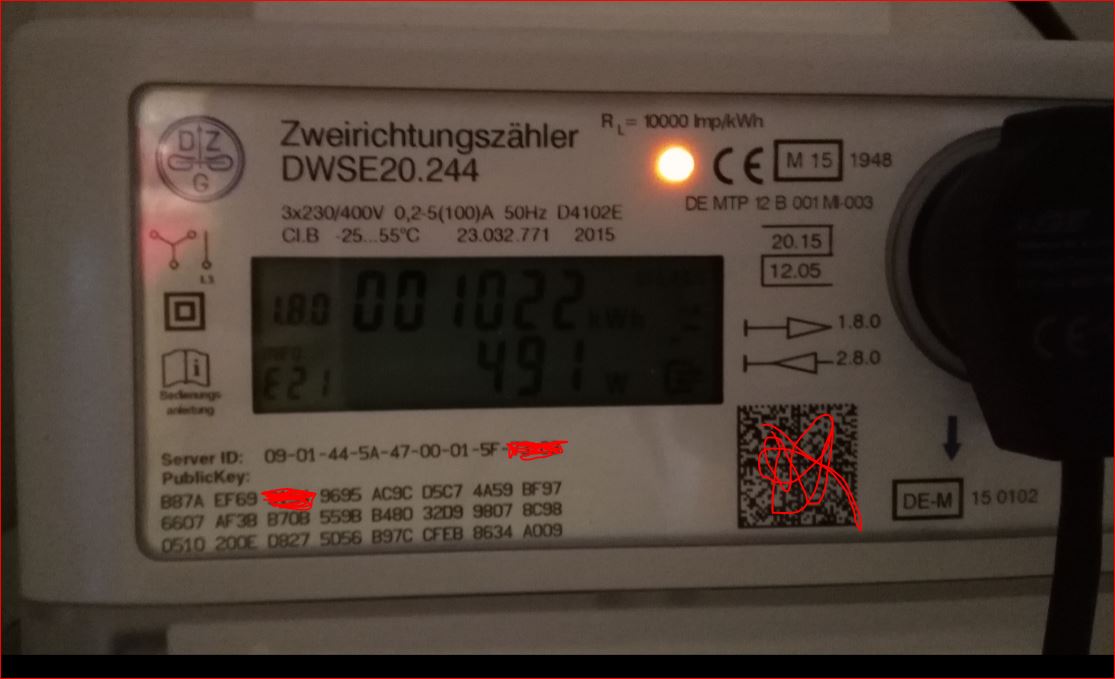
Als Equipment nutze ich den vielfach angesprochenen Auslesekopf von den Volkszähler-Kollegen (auf dem Bild ist noch der nicht funktionierende ELV Kopf zu sehen, da er das genutzte Protokoll leider nicht unterstützt).
Nach allem was ich herausgefunden habe, "spricht" mein Zähler SML. Soweit ich das beurteilen kann erhalte ich auch Daten, aber wohl keine mit denen man was anfangen könnte:
smartmeter.0	2017-07-31 02:29:11.433	debug	MATCH-RESULT MESSAGE: "08780a0d0a0c504c5b0e4c780c084f2128" -> null
smartmeter.0	2017-07-31 02:29:11.406	debug	MATCH-RESULT MESSAGE: "08780a0d0a0c504c5b0e4c780c084f21" -> null
smartmeter.0	2017-07-31 02:29:11.377	debug	MATCH-RESULT MESSAGE: "08780a0d0a0c504c5b0e4c780c084f" -> null
smartmeter.0	2017-07-31 02:29:11.347	debug	MATCH-RESULT MESSAGE: "08780a0d0a0c504c5b0e4c780c08" -> null
smartmeter.0	2017-07-31 02:29:11.318	debug	MATCH-RESULT MESSAGE: "08780a0d0a0c504c5b0e4c780c" -> null
smartmeter.0	2017-07-31 02:29:11.288	debug	MATCH-RESULT MESSAGE: "08780a0d0a0c504c5b0e4c78" -> null
smartmeter.0	2017-07-31 02:29:11.258	debug	MATCH-RESULT MESSAGE: "08780a0d0a0c504c5b0e4c" -> null
smartmeter.0	2017-07-31 02:29:11.229	debug	MATCH-RESULT MESSAGE: "08780a0d0a0c504c5b0e" -> null
smartmeter.0	2017-07-31 02:29:11.202	debug	MATCH-RESULT MESSAGE: "08780a0d0a0c504c5b" -> null
smartmeter.0	2017-07-31 02:29:11.170	debug	MATCH-RESULT MESSAGE: "08780a0d0a0c504c" -> null
smartmeter.0	2017-07-31 02:29:11.139	debug	MATCH-RESULT MESSAGE: "08780a0d0a0c50" -> null
smartmeter.0	2017-07-31 02:29:11.110	debug	MATCH-RESULT MESSAGE: "08780a0d0a0c" -> null
smartmeter.0	2017-07-31 02:29:11.081	debug	MATCH-RESULT MESSAGE: "08780a0d0a" -> null
smartmeter.0	2017-07-31 02:29:11.052	debug	MATCH-RESULT MESSAGE: "08780a0d" -> null
smartmeter.0	2017-07-31 02:29:11.022	debug	MATCH-RESULT MESSAGE: "08780a" -> null
smartmeter.0	2017-07-31 02:29:10.990	debug	MATCH-RESULT MESSAGE: "0878" -> null
smartmeter.0	2017-07-31 02:29:10.976	debug	MATCH-RESULT MESSAGE: "08" -> null
smartmeter.0	2017-07-31 02:29:10.643	debug	SET MESSAGE TIMEOUT TIMER: 120000
smartmeter.0	2017-07-31 02:29:10.642	debug	DONE SEND 0
smartmeter.0	2017-07-31 02:29:10.642	debug	INITIAL MESSAGES TO SEND: 0
smartmeter.0	2017-07-31 02:29:10.642	debug	SERIALPORT RESET BAUDRATE TO 300
smartmeter.0	2017-07-31 02:29:10.642	debug	SERIALPORT OPEN
smartmeter.0	2017-07-31 02:29:10.641	debug	CREATE SERIALPORT: 300 7 1 even
smartmeter.0	2017-07-31 02:29:10.640	debug	SmartmeterObis options: {"debug":2,"protocol":"SmlProtocol","transport":"SerialRequestResponseTransport","requestInterval":"60","transportSerialPort":"/dev/ttyUSB0","transportSerialBaudrate":null,"tra
smartmeter.0	2017-07-31 02:29:10.637	info	starting. Version 0.5.12 in /opt/iobroker/node_modules/iobroker.smartmeter, node: v4.8.4
Diese Daten schießen im Millisekundentakt nach oben. Innerhalb von einer Sekunde ist eine komplette Logseite voll, und die Zahl wird nach obigem Muster immer länger.
EDIT: den unter https://wiki.volkszaehler.org/hardware/ … sb-ausgang ganz unten beschriebenen Test habe ich ebenfalls durchgeführt, und auch die entsprechenden Daten bekommen
0000000 1b 1b 1b 1b 01 01 01 01 76 07 00 0a 00 6f 31 74
0000020 62 00 62 00 72 63 01 01 76 01 01 07 00 0a 00 20
0000040 10 7c 0b 06 45 4d 48 01 04 c5 6b 7d ce 01 01 63
0000060 86 9d 00 76 07 00 0a 00 6f 31 75 62 00 62 00 72
0000100 63 07 01 77 01 0b 06 45 4d 48 01 04 c5 6b 7d ce
0000120 07 01 00 62 0a ff ff 72 62 01 65 00 20 79 be 7a
Hat jemand einen Tipp für mich, was ich tun muss?
Vielen Dank!
-
Ich denke der Fehler liegt in der Einstellung.
Dein Zähler scheint die Daten direkt zu senden ohne das man Sie anfragen müsste. Oder wie war das bei deinem Test - kam das alles von sich aus?
Dann musst Du im Adapter "Seriell nur lesen" wählen. Dann sollte auch die Baudrate automatisch auf 9600 stehen und die EInstellungen wie beim test sein.
Wenns noch nicht tut nochmal log bitte
Ingo F
-
Hallo Ingo,
danke für Deine Hilfe. Habe Deinen Tipp probiert, leider ohne Erfolg:
smartmeter.0	2017-07-31 19:53:56.815	debug	MATCH-RESULT MESSAGE: "12121212000000006400000000000092826640004000604200006400022020202220222026262002fefe00fefefefefefefe02000000100600" -> null
smartmeter.0	2017-07-31 19:53:56.810	debug	MATCH-RESULT MESSAGE: "12121212000000006400000000000092826640004000604200006400022020202220222026262002fefe00fefefefefefefe" -> null
smartmeter.0	2017-07-31 19:53:56.801	debug	MATCH-RESULT MESSAGE: "12121212000000006400000000000092826640004000604200006400022020202220222026262002" -> null
smartmeter.0	2017-07-31 19:53:56.790	debug	MATCH-RESULT MESSAGE: "12121212000000006400000000000092826640004000604200006400022020202220222026" -> null
smartmeter.0	2017-07-31 19:53:56.786	debug	MATCH-RESULT MESSAGE: "12121212000000006400000000000092826640004000604200006400022020202220" -> null
smartmeter.0	2017-07-31 19:53:56.782	debug	MATCH-RESULT MESSAGE: "12121212000000006400000000000092826640004000604200006400022020" -> null
smartmeter.0	2017-07-31 19:53:56.778	debug	MATCH-RESULT MESSAGE: "121212120000000064000000000000928266400040006042000064" -> null
smartmeter.0	2017-07-31 19:53:56.774	debug	MATCH-RESULT MESSAGE: "121212120000000064000000000000928266400040006042" -> null
smartmeter.0	2017-07-31 19:53:56.770	debug	MATCH-RESULT MESSAGE: "1212121200000000640000000000009282664000" -> null
smartmeter.0	2017-07-31 19:53:56.765	debug	MATCH-RESULT MESSAGE: "121212120000000064000000000000" -> null
smartmeter.0	2017-07-31 19:53:56.760	debug	MATCH-RESULT MESSAGE: "121212120000" -> null
smartmeter.0	2017-07-31 19:53:56.144	debug	SET MESSAGE TIMEOUT TIMER: 120000
smartmeter.0	2017-07-31 19:53:56.144	debug	SERIALPORT OPEN
smartmeter.0	2017-07-31 19:53:56.144	debug	CREATE SERIALPORT: 9600 8 1 none
smartmeter.0	2017-07-31 19:53:56.143	debug	SmartmeterObis options: {"debug":2,"protocol":"SmlProtocol","transport":"SerialResponseTransport","requestInterval":"60","transportSerialPort":"/dev/ttyUSB0","transportSerialBaudrate":null,"transportS
smartmeter.0	2017-07-31 19:53:56.142	info	starting. Version 0.5.12 in /opt/iobroker/node_modules/iobroker.smartmeter, node: v4.8.4
Schade :(
-
Ich habe gerade nochmal gelesen was DU oben geschrieben hast: Du hast den Verbindungstest gemacht wie auf der Seite des Zählers beschrieben … und hast Dort Werte gepostet. Die entsprechen aber exakt denen von der volkszaehler-Seite. Also da passt was nicht.
Wenn Du den test machst:Was genau kommt den da an wenn Du es ohne dem Adapter machst.
Ansonsten ist das Log faktisch zu kurz.
Wenn er lauscht und der Zähler sendet gerade dann kann es sein das die ersten Daten von einem "angefangenen Telegram" kommen. Also mal etwas warten und bitte dann nochmal langes log schicken.


743
Online32.4k
Users81.5k
Topics1.3m
Posts