




ioBroker nicht erreichbar - Hilfe bei Fehlermeldung in Log
-
Also ich habe (hoffentlich) die benötigten Updates durchgeführt
pi@raspberrypi:~ $ npm -v
7.17.0
pi@raspberrypi:~ $ node -v
v14.17.0
pi@raspberrypi:~ $ nodejs -v
v12.22.1
korrekt?
Jetzt nochmal der verlinkten Anleitung folgen?
@n3ucr0n
Komplett falsch.Schau in meiner Signatur, da wird es erklärt.
-
@n3ucr0n
Komplett falsch.Schau in meiner Signatur, da wird es erklärt.
Alles klar, ich habe mir den Post in Deiner Signatur angeschaut und den Teil 2 beachtet.
Ich hatte zwei Verzeichnisse (node und npm), welche nicht gestimmt haben.
Diese habe ich gemäß Deiner Anleitung entfernt.Edit, falls jemand irgendwann das mal nachließt: die Pfade von node und npm waren
/usr/local/bin/node
/usr/local/bin/npmZu meiner Überraschung fehlte beim nächsten Check der Eintrag jedoch nicht, sondern er schien korrekt zu sein.
Kann es sein, dass ich mehrfache Installationen hatte!?Unmittelbar nach dem Entfernen der zwei falschen Pfade ergibt der Check dieses Muster:
pi@raspberrypi:~ $ which nodejs node npm && nodejs -v && node -v && npm -v && apt policy nodejs
/usr/bin/nodejs
/usr/bin/node
/usr/bin/npm
v12.22.1
v12.22.1
6.14.12
nodejs:
  Installed: 12.22.1-1nodesource1
  Candidate: 12.22.1-1nodesource1
  Version table:
 *** 12.22.1-1nodesource1 500
        500 https://deb.nodesource.com/node_12.x buster/main armhf Packages
        100 /var/lib/dpkg/status
     10.24.0~dfsg-1~deb10u1 500
        500 http://raspbian.raspberrypi.org/raspbian buster/main armhf Packages
Passt die Vorarbeit denn bis hier hin?
Was wären dann die nächsten Schritte? -
Alles klar, ich habe mir den Post in Deiner Signatur angeschaut und den Teil 2 beachtet.
Ich hatte zwei Verzeichnisse (node und npm), welche nicht gestimmt haben.
Diese habe ich gemäß Deiner Anleitung entfernt.Edit, falls jemand irgendwann das mal nachließt: die Pfade von node und npm waren
/usr/local/bin/node
/usr/local/bin/npmZu meiner Überraschung fehlte beim nächsten Check der Eintrag jedoch nicht, sondern er schien korrekt zu sein.
Kann es sein, dass ich mehrfache Installationen hatte!?Unmittelbar nach dem Entfernen der zwei falschen Pfade ergibt der Check dieses Muster:
pi@raspberrypi:~ $ which nodejs node npm && nodejs -v && node -v && npm -v && apt policy nodejs
/usr/bin/nodejs
/usr/bin/node
/usr/bin/npm
v12.22.1
v12.22.1
6.14.12
nodejs:
  Installed: 12.22.1-1nodesource1
  Candidate: 12.22.1-1nodesource1
  Version table:
 *** 12.22.1-1nodesource1 500
        500 https://deb.nodesource.com/node_12.x buster/main armhf Packages
        100 /var/lib/dpkg/status
     10.24.0~dfsg-1~deb10u1 500
        500 http://raspbian.raspberrypi.org/raspbian buster/main armhf Packages
Passt die Vorarbeit denn bis hier hin?
Was wären dann die nächsten Schritte?@n3ucr0n sagte in ioBroker nicht erreichbar - Hilfe bei Fehlermeldung in Log:
Kann es sein, dass ich mehrfache Installationen hatte!?
Ja, das ist (meist) der Fall, wenn die Installation in /usr/local/bin aufschlägt.
iobroker updateliefert nun?
-
@n3ucr0n sagte in ioBroker nicht erreichbar - Hilfe bei Fehlermeldung in Log:
Kann es sein, dass ich mehrfache Installationen hatte!?
Ja, das ist (meist) der Fall, wenn die Installation in /usr/local/bin aufschlägt.
iobroker updateliefert nun?
@thomas-braun
iobroker update liefert jetzt folgendes:pi@raspberrypi:~ $ iobroker update Used repository: stable hash changed or no sources cached => force download of new sources update done Adapter "admin" : 4.2.1 , installed 5.1.9 Adapter "alexa2" : 3.9.1 , installed 3.9.1 Adapter "alias-manager" : 1.2.1 , installed 1.2.3 Adapter "backitup" : 2.1.11 , installed 2.1.12 Adapter "bring" : 1.7.7 , installed 1.7.7 Adapter "broadlink2" : 2.0.3 , installed 2.1.5 Adapter "cloud" : 4.0.11 , installed 4.0.11 Adapter "daswetter" : 3.0.7 , installed 3.0.7 Adapter "devices" : 0.3.16 , installed 1.0.4 Adapter "discovery" : 2.6.1 , installed 2.6.3 Adapter "dwd" : 2.7.5 , installed 2.7.5 Adapter "flot" : 1.10.6 , installed 1.10.6 Adapter "fullybrowser" : 2.0.8 , installed 2.0.9 Adapter "history" : 1.9.13 , installed 1.9.13 Adapter "homeconnect" : 0.0.32 , installed 0.0.36 Adapter "ical" : 1.7.4 , installed 1.9.3 Adapter "icons-mfd-png" : 1.0.2 , installed 1.0.2 Adapter "info" : 1.7.14 , installed 1.7.15 Adapter "iot" : 1.8.22 , installed 1.8.22 Adapter "javascript" : 5.1.3 , installed 5.1.3 Controller "js-controller" : 3.2.16 , installed 3.3.11 Adapter "meross" : 1.6.2 , installed 1.6.3 Adapter "netatmo" : 1.3.3 , installed 1.3.3 Adapter "nuki-extended" : 2.3.0 , installed 2.3.0 Adapter "pi-hole" : 1.3.1 , installed 1.3.1 Adapter "ping" : 1.4.12 , installed 1.4.12 Adapter "shelly" : 4.0.7 , installed 4.0.8 Adapter "simple-api" : 2.6.1 , installed 2.6.1 Adapter "socketio" : 3.1.4 , installed 3.1.4 Adapter "telegram" : 1.8.1 , installed 1.8.1 Adapter "terminal" : 0.1.2 , installed 0.1.2 Adapter "unifi" : 0.5.8 , installed 0.5.10 Adapter "vis" : 1.3.9 , installed 1.3.10 Adapter "vis-google-fonts": 0.1.0 , installed 0.1.0 Adapter "vis-hqwidgets" : 1.1.7 , installed 1.1.7 Adapter "vis-icontwo" : 0.69.0 , installed 0.73.0 Adapter "vis-inventwo" : 2.8.3 , installed 2.9.7 Adapter "vis-timeandweather": 1.1.7 , installed 1.1.7 Adapter "web" : 3.4.1 , installed 3.4.1 Adapter "yahka" : 0.12.0 , installed 0.13.1 Adapter "zigbee" : 1.5.6 , installed 1.5.6 Adapter "zwave2" : 1.10.1 , installed 1.10.2Okai ich muss den js-controller noch downgraden.
Das mache ich über
cd /opt/iobroker
iobroker stop
npm i iobroker.js-controller@3.2.16 --production
iobroker start
oder?
-
@thomas-braun
iobroker update liefert jetzt folgendes:pi@raspberrypi:~ $ iobroker update Used repository: stable hash changed or no sources cached => force download of new sources update done Adapter "admin" : 4.2.1 , installed 5.1.9 Adapter "alexa2" : 3.9.1 , installed 3.9.1 Adapter "alias-manager" : 1.2.1 , installed 1.2.3 Adapter "backitup" : 2.1.11 , installed 2.1.12 Adapter "bring" : 1.7.7 , installed 1.7.7 Adapter "broadlink2" : 2.0.3 , installed 2.1.5 Adapter "cloud" : 4.0.11 , installed 4.0.11 Adapter "daswetter" : 3.0.7 , installed 3.0.7 Adapter "devices" : 0.3.16 , installed 1.0.4 Adapter "discovery" : 2.6.1 , installed 2.6.3 Adapter "dwd" : 2.7.5 , installed 2.7.5 Adapter "flot" : 1.10.6 , installed 1.10.6 Adapter "fullybrowser" : 2.0.8 , installed 2.0.9 Adapter "history" : 1.9.13 , installed 1.9.13 Adapter "homeconnect" : 0.0.32 , installed 0.0.36 Adapter "ical" : 1.7.4 , installed 1.9.3 Adapter "icons-mfd-png" : 1.0.2 , installed 1.0.2 Adapter "info" : 1.7.14 , installed 1.7.15 Adapter "iot" : 1.8.22 , installed 1.8.22 Adapter "javascript" : 5.1.3 , installed 5.1.3 Controller "js-controller" : 3.2.16 , installed 3.3.11 Adapter "meross" : 1.6.2 , installed 1.6.3 Adapter "netatmo" : 1.3.3 , installed 1.3.3 Adapter "nuki-extended" : 2.3.0 , installed 2.3.0 Adapter "pi-hole" : 1.3.1 , installed 1.3.1 Adapter "ping" : 1.4.12 , installed 1.4.12 Adapter "shelly" : 4.0.7 , installed 4.0.8 Adapter "simple-api" : 2.6.1 , installed 2.6.1 Adapter "socketio" : 3.1.4 , installed 3.1.4 Adapter "telegram" : 1.8.1 , installed 1.8.1 Adapter "terminal" : 0.1.2 , installed 0.1.2 Adapter "unifi" : 0.5.8 , installed 0.5.10 Adapter "vis" : 1.3.9 , installed 1.3.10 Adapter "vis-google-fonts": 0.1.0 , installed 0.1.0 Adapter "vis-hqwidgets" : 1.1.7 , installed 1.1.7 Adapter "vis-icontwo" : 0.69.0 , installed 0.73.0 Adapter "vis-inventwo" : 2.8.3 , installed 2.9.7 Adapter "vis-timeandweather": 1.1.7 , installed 1.1.7 Adapter "web" : 3.4.1 , installed 3.4.1 Adapter "yahka" : 0.12.0 , installed 0.13.1 Adapter "zigbee" : 1.5.6 , installed 1.5.6 Adapter "zwave2" : 1.10.1 , installed 1.10.2Okai ich muss den js-controller noch downgraden.
Das mache ich über
cd /opt/iobroker
iobroker stop
npm i iobroker.js-controller@3.2.16 --production
iobroker start
oder?
@n3ucr0n sagte in ioBroker nicht erreichbar - Hilfe bei Fehlermeldung in Log:
cd /opt/iobroker iobroker stop sudo -H -u iobroker npm install iobroker.js-controller@3.2.16 iobroker start -
@n3ucr0n sagte in ioBroker nicht erreichbar - Hilfe bei Fehlermeldung in Log:
cd /opt/iobroker iobroker stop sudo -H -u iobroker npm install iobroker.js-controller@3.2.16 iobroker start@thomas-braun
Danke für die Korrektur!
Ich poste den Ablauf mal hier rein, falls es von irgendwelchem Interesse ist:pi@raspberrypi:~ $ cd /opt/iobroker pi@raspberrypi:/opt/iobroker $ iobroker stop pi@raspberrypi:/opt/iobroker $ sudo -H -u iobroker npm install iobroker.js-controller@3.2.16 > iobroker.js-controller@3.2.16 preinstall /opt/iobroker/node_modules/iobroker.js-controller > node lib/preinstallCheck.js NPM version: 6.14.12 > iobroker.js-controller@3.2.16 install /opt/iobroker/node_modules/iobroker.js-controller > node iobroker.js setup first object _design/system updated The following notifications happened during sync: - Ignoring Directory "admin.admin" because officially not created as meta object. Please remove directory! - Ignoring Directory "alexa2.admin" because officially not created as meta object. Please remove directory! - Ignoring Directory "alias-manager.admin" because officially not created as meta object. Please remove directory! - Ignoring Directory "backitup.admin" because officially not created as meta object. Please remove directory! - Ignoring Directory "bring.admin" because officially not created as meta object. Please remove directory! - Ignoring Directory "broadlink2.admin" because officially not created as meta object. Please remove directory! - Ignoring Directory "cloud.admin" because officially not created as meta object. Please remove directory! - Ignoring Directory "daswetter.admin" because officially not created as meta object. Please remove directory! - Ignoring Directory "devices.admin" because officially not created as meta object. Please remove directory! - Ignoring Directory "discovery.admin" because officially not created as meta object. Please remove directory! - Ignoring Directory "dwd.admin" because officially not created as meta object. Please remove directory! - Ignoring Directory "flot" because officially not created as meta object. Please remove directory! - Ignoring Directory "flot.admin" because officially not created as meta object. Please remove directory! - Ignoring Directory "fullybrowser.admin" because officially not created as meta object. Please remove directory! - Ignoring Directory "history.admin" because officially not created as meta object. Please remove directory! - Ignoring Directory "homeconnect.admin" because officially not created as meta object. Please remove directory! - Ignoring Directory "ical.admin" because officially not created as meta object. Please remove directory! - Ignoring Directory "icons-mfd-png" because officially not created as meta object. Please remove directory! - Ignoring Directory "icons-mfd-png.admin" because officially not created as meta object. Please remove directory! - Ignoring Directory "info.admin" because officially not created as meta object. Please remove directory! - Ignoring Directory "iot.admin" because officially not created as meta object. Please remove directory! - Ignoring Directory "javascript.admin" because officially not created as meta object. Please remove directory! - Ignoring Directory "meross.admin" because officially not created as meta object. Please remove directory! - Ignoring Directory "netatmo.admin" because officially not created as meta object. Please remove directory! - Ignoring Directory "nuki-extended" because officially not created as meta object. Please remove directory! - Ignoring Directory "nuki-extended.admin" because officially not created as meta object. Please remove directory! - Ignoring Directory "pi-hole.admin" because officially not created as meta object. Please remove directory! - Ignoring Directory "ping.admin" because officially not created as meta object. Please remove directory! - Ignoring Directory "ring.0" because officially not created as meta object. Please remove directory! - Ignoring Directory "shelly.admin" because officially not created as meta object. Please remove directory! - Ignoring Directory "simple-api.admin" because officially not created as meta object. Please remove directory! - Ignoring Directory "socketio.admin" because officially not created as meta object. Please remove directory! - Ignoring Directory "telegram.admin" because officially not created as meta object. Please remove directory! - Ignoring Directory "terminal" because officially not created as meta object. Please remove directory! - Ignoring Directory "terminal.admin" because officially not created as meta object. Please remove directory! - Ignoring Directory "unifi.admin" because officially not created as meta object. Please remove directory! - Ignoring Directory "vis" because officially not created as meta object. Please remove directory! - Ignoring Directory "vis-google-fonts.admin" because officially not created as meta object. Please remove directory! - Ignoring Directory "vis-hqwidgets.admin" because officially not created as meta object. Please remove directory! - Ignoring Directory "vis-icontwo" because officially not created as meta object. Please remove directory! - Ignoring Directory "vis-icontwo.admin" because officially not created as meta object. Please remove directory! - Ignoring Directory "vis-inventwo.admin" because officially not created as meta object. Please remove directory! - Ignoring Directory "vis-materialdesign.admin" because officially not created as meta object. Please remove directory! - Ignoring Directory "vis-timeandweather.admin" because officially not created as meta object. Please remove directory! - Ignoring Directory "vis.0" because officially not created as meta object. Please remove directory! - Ignoring Directory "vis.admin" because officially not created as meta object. Please remove directory! - Ignoring Directory "web" because officially not created as meta object. Please remove directory! - Ignoring Directory "web.admin" because officially not created as meta object. Please remove directory! - Ignoring Directory "yahka.admin" because officially not created as meta object. Please remove directory! - Ignoring Directory "zigbee.admin" because officially not created as meta object. Please remove directory! - Ignoring Directory "zwave2.admin" because officially not created as meta object. Please remove directory! npm WARN optional SKIPPING OPTIONAL DEPENDENCY: fsevents@~2.3.2 (node_modules/chokidar/node_modules/fsevents): npm WARN notsup SKIPPING OPTIONAL DEPENDENCY: Unsupported platform for fsevents@2.3.2: wanted {"os":"darwin","arch":"any"} (current: {"os":"linux","arch":"arm"}) npm WARN typedoc@0.20.28 requires a peer of typescript@3.9.x || 4.0.x || 4.1.x but none is installed. You must install peer dependencies yourself. npm WARN typedoc@0.20.28 requires a peer of typescript@3.9.x || 4.0.x || 4.1.x but none is installed. You must install peer dependencies yourself. npm WARN optional SKIPPING OPTIONAL DEPENDENCY: osx-temperature-sensor@1.0.7 (node_modules/osx-temperature-sensor): npm WARN notsup SKIPPING OPTIONAL DEPENDENCY: Unsupported platform for osx-temperature-sensor@1.0.7: wanted {"os":"darwin","arch":"any"} (current: {"os":"linux","arch":"arm"}) npm WARN optional SKIPPING OPTIONAL DEPENDENCY: fsevents@2.3.2 (node_modules/zigbee-herdsman-converters/node_modules/fsevents): npm WARN notsup SKIPPING OPTIONAL DEPENDENCY: Unsupported platform for fsevents@2.3.2: wanted {"os":"darwin","arch":"any"} (current: {"os":"linux","arch":"arm"}) npm WARN optional SKIPPING OPTIONAL DEPENDENCY: fsevents@2.3.2 (node_modules/zigbee-herdsman-converters/node_modules/zigbee-herdsman/node_modules/fsevents): npm WARN notsup SKIPPING OPTIONAL DEPENDENCY: Unsupported platform for fsevents@2.3.2: wanted {"os":"darwin","arch":"any"} (current: {"os":"linux","arch":"arm"}) npm WARN optional SKIPPING OPTIONAL DEPENDENCY: fsevents@2.3.2 (node_modules/zigbee-herdsman/node_modules/fsevents): npm WARN notsup SKIPPING OPTIONAL DEPENDENCY: Unsupported platform for fsevents@2.3.2: wanted {"os":"darwin","arch":"any"} (current: {"os":"linux","arch":"arm"}) + iobroker.js-controller@3.2.16 added 1 package from 3 contributors, removed 645 packages and updated 18 packages in 74.184s 170 packages are looking for funding run `npm fund` for detailsiobroker update liefert jetzt folgendes:
pi@raspberrypi:~ $ iobroker update
Used repository: stable
hash unchanged, use cached sources
update done
Adapter    "admin"         : 4.2.1    , installed 5.1.9
Adapter    "alarm"         : 2.0.1
Adapter    "alexa2"        : 3.9.1    , installed 3.9.1
Adapter    "alias-manager" : 1.2.1    , installed 1.2.3
Adapter    "alpha2"        : 1.0.0
Adapter    "amazon-dash"   : 1.1.0
Adapter    "artnet"        : 1.2.2
Adapter    "asterisk"      : 1.0.6
Adapter    "asuswrt"       : 1.0.1
Adapter    "b-control-em"  : 0.2.1
Adapter    "backitup"      : 2.1.11   , installed 2.1.12
Adapter    "beckhoff"      : 1.4.0
Adapter    "benq"          : 0.2.4
Adapter    "binance"       : 1.1.3
Adapter    "ble"           : 0.12.0
Adapter    "bluelink"      : 1.0.4
Adapter    "bmw"           : 1.3.3
Adapter    "bosesoundtouch": 0.9.3
Adapter    "botvac"        : 1.0.0
Adapter    "bring"         : 1.7.7    , installed 1.7.7
Adapter    "broadlink2"    : 2.0.3    , installed 2.1.5
Adapter    "bsblan"        : 0.2.2
Adapter    "bshb"          : 0.1.13
Adapter    "bydbatt"       : 1.0.5
Adapter    "chromecast"    : 2.3.1
Adapter    "cloud"         : 4.0.11   , installed 4.0.11
Adapter    "comfoair"      : 1.1.3
Adapter    "contactid"     : 1.0.2
Adapter    "coronavirus-statistics": 0.6.3
Adapter    "countdown"     : 1.2.3
Adapter    "cul"           : 1.3.5
Adapter    "daikin"        : 1.3.1
Adapter    "daswetter"     : 3.0.7    , installed 3.0.7
Adapter    "deconz"        : 1.3.16
Adapter    "denon"         : 1.10.7
Adapter    "device-reminder": 1.2.1
Adapter    "devices"       : 0.3.16   , installed 1.0.4
Adapter    "digitalstrom"  : 2.2.0
Adapter    "discovergy"    : 0.5.4
Adapter    "discovery"     : 2.6.1    , installed 2.6.3
Adapter    "divera247"     : 0.1.2
Adapter    "doorio"        : 2.0.1
Adapter    "ds18b20"       : 1.4.1
Adapter    "dwd"           : 2.7.5    , installed 2.7.5
Adapter    "dysonairpurifier": 0.9.1
Adapter    "easee"         : 1.0.2
Adapter    "ebus"          : 2.2.5
Adapter    "echarts"       : 0.4.11
Adapter    "ecovacs-deebot": 1.1.1
Adapter    "egigeozone"    : 0.1.2
Adapter    "ekey"          : 1.1.0
Adapter    "email"         : 1.0.9
Adapter    "emby"          : 1.0.2
Adapter    "energymanager" : 1.2.3
Adapter    "enet"          : 1.0.1
Adapter    "epson_ecotank_et_2750": 0.0.5
Adapter    "epson_stylus_px830": 0.2.1
Adapter    "epson_xp540"   : 1.0.6
Adapter    "exchangerates" : 0.0.14
Adapter    "fahrplan"      : 1.0.7
Adapter    "fakeroku"      : 0.2.1
Adapter    "fb-checkpresence": 1.1.5
Adapter    "feiertage"     : 1.0.17
Adapter    "fhem"          : 1.6.0
Adapter    "find-my-iphone": 0.2.15
Adapter    "firetv"        : 1.0.0
Adapter    "flot"          : 1.10.6   , installed 1.10.6
Adapter    "followthesun"  : 0.3.4
Adapter    "foobar2000"    : 2.0.4
Adapter    "fritzbox"      : 0.2.1
Adapter    "fritzdect"     : 2.1.11
Adapter    "fronius"       : 1.0.5
Adapter    "frontier_silicon": 0.0.10
Adapter    "fuelpricemonitor": 0.2.5
Adapter    "fullcalendar"  : 1.1.0
Adapter    "fullybrowser"  : 2.0.8    , installed 2.0.9
Adapter    "g-homa"        : 0.5.3
Adapter    "geofency"      : 1.0.3
Adapter    "go-e"          : 1.0.13
Adapter    "growatt"       : 1.0.1
Adapter    "gruenbeck"     : 0.0.29
Adapter    "haassohn"      : 1.0.3
Adapter    "habpanel"      : 0.4.3
Adapter    "haier"         : 1.0.4
Adapter    "ham"           : 4.0.2
Adapter    "ham-wemo"      : 2.0.0
Adapter    "harmony"       : 1.2.2
Adapter    "heatingcontrol": 2.3.2
Adapter    "heos"          : 1.8.6
Adapter    "heytech"       : 1.0.0
Adapter    "hid"           : 0.1.17
Adapter    "history"       : 1.9.13   , installed 1.9.13
Adapter    "hm-rega"       : 3.0.16
Adapter    "hm-rpc"        : 1.14.37
Adapter    "hmip"          : 1.12.1
Adapter    "homeconnect"   : 0.0.32   , installed 0.0.36
Adapter    "homee"         : 1.1.1
Adapter    "homepilot"     : 1.0.3
Adapter    "hp-ilo"        : 1.0.6
Adapter    "hs100"         : 2.0.3
Adapter    "hue"           : 3.5.15
Adapter    "hue-extended"  : 2.0.0
Adapter    "i2c"           : 1.2.0
Adapter    "ical"          : 1.7.4    , installed 1.9.3
Adapter    "icons-addictive-flavour-png": 0.1.0
Adapter    "icons-fatcow-hosting": 0.1.0
Adapter    "icons-icons8"  : 0.0.1
Adapter    "icons-material-png": 0.1.0
Adapter    "icons-material-svg": 0.1.0
Adapter    "icons-mfd-png" : 1.0.2    , installed 1.0.2
Adapter    "icons-mfd-svg" : 1.0.2
Adapter    "icons-open-icon-library-png": 0.1.2
Adapter    "icons-ultimate-png": 1.0.1
Adapter    "influxdb"      : 1.9.5
Adapter    "info"          : 1.7.14   , installed 1.7.15
Adapter    "innogy-smarthome": 0.3.6
Adapter    "iogo"          : 0.6.5
Adapter    "iot"           : 1.8.22   , installed 1.8.22
Adapter    "iqontrol"      : 1.6.4
Adapter    "jarvis"        : 2.1.0
Adapter    "javascript"    : 5.1.3    , installed 5.1.3
Adapter    "jeelink"       : 0.1.0
Controller "js-controller" : 3.2.16   , installed 3.2.16
Adapter    "kecontact"     : 1.1.3
Adapter    "klf200"        : 1.0.1
Adapter    "km200"         : 1.1.6
Adapter    "knmi-weather"  : 1.0.0
Adapter    "knx"           : 1.0.45
Adapter    "kodi"          : 2.0.5
Adapter    "kostal-piko-ba": 1.1.8
Adapter    "kress"         : 2.5.5
Adapter    "lametric"      : 1.2.0
Adapter    "landroid"      : 1.0.3
Adapter    "lcn"           : 1.0.2
Adapter    "legrand-ecocompteur": 1.0.0
Adapter    "letrika_comgw" : 0.0.5
Adapter    "lg-ess-home"   : 0.0.10
Adapter    "lgtv"          : 1.1.10
Adapter    "lgtv-rs"       : 0.1.1
Adapter    "lgtv11"        : 1.0.5
Adapter    "lifx"          : 0.1.0
Adapter    "lightify"      : 0.2.16
Adapter    "link"          : 0.5.10
Adapter    "linkeddevices" : 1.4.3
Adapter    "linktap"       : 0.1.8
Adapter    "linux-control" : 1.1.2
Adapter    "logparser"     : 1.1.0
Adapter    "lovelace"      : 1.0.16
Adapter    "loxone"        : 2.1.0
Adapter    "luftdaten"     : 1.0.2
Adapter    "lupusec"       : 1.3.4
Adapter    "luxtronik1"    : 0.3.1
Adapter    "material"      : 0.13.9
Adapter    "maxcube"       : 1.0.3
Adapter    "maxcul"        : 1.3.1
Adapter    "mbus"          : 2.3.4
Adapter    "mclighting"    : 0.1.2
Adapter    "megad"         : 1.2.1
Adapter    "megadd"        : 0.2.0
Adapter    "megaesp"       : 0.1.0
Adapter    "melcloud"      : 1.1.4
Adapter    "mercedesme"    : 0.0.50
Adapter    "mercury"       : 0.1.4
Adapter    "meross"        : 1.6.2    , installed 1.6.3
Adapter    "meteoalarm"    : 1.2.0
Adapter    "midea"         : 0.0.6
Adapter    "miele"         : 0.1.5
Adapter    "mielecloudservice": 4.2.0
Adapter    "mihome"        : 1.3.7
Adapter    "mihome-lamp"   : 1.1.0
Adapter    "mihome-plug"   : 0.2.1
Adapter    "mihome-vacuum" : 2.1.1
Adapter    "mikrotik"      : 1.0.16
Adapter    "milight"       : 0.3.6
Adapter    "milight-smart-light": 1.2.0
Adapter    "minuvis"       : 1.4.0
Adapter    "mobile"        : 1.0.1
Adapter    "modbus"        : 3.2.6
Adapter    "moma"          : 1.2.8
Adapter    "mpd"           : 1.0.6
Adapter    "mqtt"          : 2.4.0
Adapter    "mqtt-client"   : 1.3.1
Adapter    "musiccast"     : 0.1.5
Adapter    "mydlink"       : 1.1.7
Adapter    "mysensors"     : 2.0.1
Adapter    "nanoleaf-lightpanels": 1.2.0
Adapter    "net-tools"     : 0.1.5
Adapter    "netatmo"       : 1.3.3    , installed 1.3.3
Adapter    "netatmo-crawler": 0.4.1
Adapter    "nibeuplink"    : 0.4.0
Adapter    "nina"          : 0.0.24
Adapter    "node-red"      : 2.3.0
Adapter    "nuki"          : 1.4.3
Adapter    "nuki-extended" : 2.3.0    , installed 2.3.0
Adapter    "nut"           : 1.5.0
Adapter    "octoprint"     : 1.0.8
Adapter    "odl"           : 1.1.4
Adapter    "oilfox"        : 0.0.5
Adapter    "omnicomm-lls"  : 0.0.7
Adapter    "onkyo"         : 2.0.5
Adapter    "onvif"         : 0.4.4
Adapter    "openhab"       : 1.1.0
Adapter    "openligadb"    : 1.1.0
Adapter    "openweathermap": 0.1.0
Adapter    "opi"           : 0.1.1
Adapter    "oppoplayer"    : 0.2.4
Adapter    "owfs"          : 0.6.4
Adapter    "owntracks"     : 1.0.0
Adapter    "panasonic-viera": 1.0.2
Adapter    "parser"        : 1.0.7
Adapter    "paw"           : 0.0.7
Adapter    "pegelalarm"    : 1.2.0
Adapter    "ph803w"        : 0.1.5
Adapter    "phantomjs"     : 1.1.2
Adapter    "pi-hole"       : 1.3.1    , installed 1.3.1
Adapter    "piface"        : 1.0.0
Adapter    "pimatic"       : 0.3.0
Adapter    "ping"          : 1.4.12   , installed 1.4.12
Adapter    "places"        : 1.0.0
Adapter    "plenticore"    : 2.1.6
Adapter    "plex"          : 0.8.11
Adapter    "plexconnect"   : 0.0.7
Adapter    "pollenflug"    : 1.0.6
Adapter    "proxmox"       : 1.3.3
Adapter    "proxy"         : 1.2.2
Adapter    "pushbullet"    : 0.0.11
Adapter    "pushover"      : 2.0.3
Adapter    "pushsafer"     : 1.0.3
Adapter    "radar2"        : 1.0.9
Adapter    "radiohead"     : 1.1.1
Adapter    "rflink"        : 2.1.6
Adapter    "rickshaw"      : 1.0.0
Adapter    "ring"          : 1.1.3
Adapter    "robonect"      : 0.1.3
Adapter    "roomba"        : 1.1.1
Adapter    "rpi2"          : 1.2.0
Adapter    "s7"            : 1.2.5
Adapter    "sainlogic"     : 0.6.6
Adapter    "samsung"       : 0.2.9
Adapter    "sanext"        : 0.0.5
Adapter    "sayit"         : 1.12.2
Adapter    "sbfspot"       : 4.0.5
Adapter    "scenes"        : 2.3.6
Adapter    "schoolfree"    : 1.0.0
Adapter    "schwoerer-ventcube": 1.4.1
Adapter    "seq"           : 0.2.10
Adapter    "shelly"        : 4.0.7    , installed 4.0.8
Adapter    "shuttercontrol": 1.2.0
Adapter    "sia"           : 1.0.4
Adapter    "siegenia"      : 1.1.0
Adapter    "simple-api"    : 2.6.1    , installed 2.6.1
Adapter    "smappee"       : 0.2.4
Adapter    "smartcontrol"  : 1.2.1
Adapter    "smartgarden"   : 1.0.5
Adapter    "smartmeter"    : 3.2.1
Adapter    "snips"         : 1.5.1
Adapter    "snmp"          : 0.5.0
Adapter    "socketio"      : 3.1.4    , installed 3.1.4
Adapter    "solarlog"      : 2.1.2
Adapter    "solarviewdatareader": 1.0.2
Adapter    "solarwetter"   : 1.0.0
Adapter    "sonnen"        : 1.7.3
Adapter    "sonoff"        : 2.4.0
Adapter    "sonos"         : 2.1.1
Adapter    "sony-bravia"   : 1.0.1
Adapter    "spotify-premium": 1.0.0
Adapter    "sprinklecontrol": 0.1.7
Adapter    "sql"           : 1.15.7
Adapter    "squeezebox"    : 1.0.0
Adapter    "squeezeboxrpc" : 1.3.4
Adapter    "starline"      : 1.1.3
Adapter    "statistics"    : 1.0.4
Adapter    "stiebel-isg"   : 1.6.0
Adapter    "sunnyportal"   : 0.1.5
Adapter    "swiss-weather-api": 0.3.2
Adapter    "synology"      : 1.0.0
Adapter    "systeminfo"    : 0.3.1
Adapter    "tahoma"        : 0.3.2
Adapter    "tankerkoenig"  : 2.0.5
Adapter    "telegram"      : 1.8.1    , installed 1.8.1
Adapter    "terminal"      : 0.1.2    , installed 0.1.2
Adapter    "tesla-motors"  : 0.4.2
Adapter    "text2command"  : 2.1.0
Adapter    "tinker"        : 1.1.0
Adapter    "tr-064"        : 4.2.12
Adapter    "traccar"       : 0.0.9
Adapter    "tradfri"       : 2.7.3
Adapter    "trashschedule" : 1.1.1
Adapter    "tunnelbroker-endpoint-updater": 0.0.1
Adapter    "tuya"          : 3.6.2
Adapter    "tvprogram"     : 1.1.0
Adapter    "tvspielfilm"   : 1.0.4
Adapter    "unifi"         : 0.5.8    , installed 0.5.10
Adapter    "upnp"          : 1.0.17
Adapter    "vaillant"      : 0.0.11
Adapter    "valloxmv"      : 1.1.2
Adapter    "vcard"         : 0.0.9
Adapter    "velux"         : 0.0.7
Adapter    "viessmann"     : 1.3.4
Adapter    "virtualpowermeter": 1.4.2
Adapter    "vis"           : 1.3.9    , installed 1.3.10
Adapter    "vis-bars"      : 0.1.4
Adapter    "vis-canvas-gauges": 0.1.5
Adapter    "vis-colorpicker": 1.2.0
Adapter    "vis-fancyswitch": 1.1.0
Adapter    "vis-google-fonts": 0.1.0   , installed 0.1.0
Adapter    "vis-history"   : 1.0.0
Adapter    "vis-hqwidgets" : 1.1.7    , installed 1.1.7
Adapter    "vis-icontwo"   : 0.69.0   , installed 0.73.0
Adapter    "vis-inventwo"  : 2.8.3    , installed 2.9.7
Adapter    "vis-jqui-mfd"  : 1.0.12
Adapter    "vis-justgage"  : 1.0.2
Adapter    "vis-keyboard"  : 0.0.2
Adapter    "vis-lcars"     : 1.0.4
Adapter    "vis-map"       : 1.0.4
Adapter    "vis-material-advanced": 1.7.0
Adapter    "vis-metro"     : 1.1.2
Adapter    "vis-players"   : 0.1.6
Adapter    "vis-plumb"     : 1.0.2
Adapter    "vis-rgraph"    : 0.0.2
Adapter    "vis-timeandweather": 1.1.7   , installed 1.1.7
Adapter    "vis-weather"   : 2.5.3
Adapter    "volumio"       : 0.1.2
Adapter    "volvo"         : 0.0.3
Adapter    "vr200"         : 1.0.0
Adapter    "vw-connect"    : 0.0.30
Adapter    "weatherunderground": 3.3.0
Adapter    "web"           : 3.4.1    , installed 3.4.1
Adapter    "weishaupt-wem" : 0.0.9
Adapter    "whatsapp-cmb"  : 0.1.6
Adapter    "wiffi-wz"      : 2.2.0
Adapter    "wifilight"     : 1.1.0
Adapter    "windows-control": 0.1.5
Adapter    "wled"          : 0.5.6
Adapter    "wm-bus"        : 0.1.12
Adapter    "wolf"          : 1.2.1
Adapter    "worx"          : 1.3.6
Adapter    "xbox"          : 0.7.7
Adapter    "xs1"           : 1.0.2
Adapter    "yahka"         : 0.12.0   , installed 0.13.1
Adapter    "yamaha"        : 0.4.0
Adapter    "yeelight-2"    : 1.0.3
Adapter    "youtube"       : 1.0.3
Adapter    "yr"            : 2.0.3
Adapter    "zigbee"        : 1.5.6    , installed 1.5.6
Adapter    "zont"          : 0.5.3
Adapter    "zwave2"        : 1.10.1   , installed 1.10.2
Das Downgrade des JS-Controllers scheint erfolgreich gewesen zu sein.
Da der ioBroker noch immer nicht erreichbar ist, denke ich es folgen noch weitere Schritte!?Danke für Deine anhaltende Unterstützung!
-
@thomas-braun
Danke für die Korrektur!
Ich poste den Ablauf mal hier rein, falls es von irgendwelchem Interesse ist:pi@raspberrypi:~ $ cd /opt/iobroker pi@raspberrypi:/opt/iobroker $ iobroker stop pi@raspberrypi:/opt/iobroker $ sudo -H -u iobroker npm install iobroker.js-controller@3.2.16 > iobroker.js-controller@3.2.16 preinstall /opt/iobroker/node_modules/iobroker.js-controller > node lib/preinstallCheck.js NPM version: 6.14.12 > iobroker.js-controller@3.2.16 install /opt/iobroker/node_modules/iobroker.js-controller > node iobroker.js setup first object _design/system updated The following notifications happened during sync: - Ignoring Directory "admin.admin" because officially not created as meta object. Please remove directory! - Ignoring Directory "alexa2.admin" because officially not created as meta object. Please remove directory! - Ignoring Directory "alias-manager.admin" because officially not created as meta object. Please remove directory! - Ignoring Directory "backitup.admin" because officially not created as meta object. Please remove directory! - Ignoring Directory "bring.admin" because officially not created as meta object. Please remove directory! - Ignoring Directory "broadlink2.admin" because officially not created as meta object. Please remove directory! - Ignoring Directory "cloud.admin" because officially not created as meta object. Please remove directory! - Ignoring Directory "daswetter.admin" because officially not created as meta object. Please remove directory! - Ignoring Directory "devices.admin" because officially not created as meta object. Please remove directory! - Ignoring Directory "discovery.admin" because officially not created as meta object. Please remove directory! - Ignoring Directory "dwd.admin" because officially not created as meta object. Please remove directory! - Ignoring Directory "flot" because officially not created as meta object. Please remove directory! - Ignoring Directory "flot.admin" because officially not created as meta object. Please remove directory! - Ignoring Directory "fullybrowser.admin" because officially not created as meta object. Please remove directory! - Ignoring Directory "history.admin" because officially not created as meta object. Please remove directory! - Ignoring Directory "homeconnect.admin" because officially not created as meta object. Please remove directory! - Ignoring Directory "ical.admin" because officially not created as meta object. Please remove directory! - Ignoring Directory "icons-mfd-png" because officially not created as meta object. Please remove directory! - Ignoring Directory "icons-mfd-png.admin" because officially not created as meta object. Please remove directory! - Ignoring Directory "info.admin" because officially not created as meta object. Please remove directory! - Ignoring Directory "iot.admin" because officially not created as meta object. Please remove directory! - Ignoring Directory "javascript.admin" because officially not created as meta object. Please remove directory! - Ignoring Directory "meross.admin" because officially not created as meta object. Please remove directory! - Ignoring Directory "netatmo.admin" because officially not created as meta object. Please remove directory! - Ignoring Directory "nuki-extended" because officially not created as meta object. Please remove directory! - Ignoring Directory "nuki-extended.admin" because officially not created as meta object. Please remove directory! - Ignoring Directory "pi-hole.admin" because officially not created as meta object. Please remove directory! - Ignoring Directory "ping.admin" because officially not created as meta object. Please remove directory! - Ignoring Directory "ring.0" because officially not created as meta object. Please remove directory! - Ignoring Directory "shelly.admin" because officially not created as meta object. Please remove directory! - Ignoring Directory "simple-api.admin" because officially not created as meta object. Please remove directory! - Ignoring Directory "socketio.admin" because officially not created as meta object. Please remove directory! - Ignoring Directory "telegram.admin" because officially not created as meta object. Please remove directory! - Ignoring Directory "terminal" because officially not created as meta object. Please remove directory! - Ignoring Directory "terminal.admin" because officially not created as meta object. Please remove directory! - Ignoring Directory "unifi.admin" because officially not created as meta object. Please remove directory! - Ignoring Directory "vis" because officially not created as meta object. Please remove directory! - Ignoring Directory "vis-google-fonts.admin" because officially not created as meta object. Please remove directory! - Ignoring Directory "vis-hqwidgets.admin" because officially not created as meta object. Please remove directory! - Ignoring Directory "vis-icontwo" because officially not created as meta object. Please remove directory! - Ignoring Directory "vis-icontwo.admin" because officially not created as meta object. Please remove directory! - Ignoring Directory "vis-inventwo.admin" because officially not created as meta object. Please remove directory! - Ignoring Directory "vis-materialdesign.admin" because officially not created as meta object. Please remove directory! - Ignoring Directory "vis-timeandweather.admin" because officially not created as meta object. Please remove directory! - Ignoring Directory "vis.0" because officially not created as meta object. Please remove directory! - Ignoring Directory "vis.admin" because officially not created as meta object. Please remove directory! - Ignoring Directory "web" because officially not created as meta object. Please remove directory! - Ignoring Directory "web.admin" because officially not created as meta object. Please remove directory! - Ignoring Directory "yahka.admin" because officially not created as meta object. Please remove directory! - Ignoring Directory "zigbee.admin" because officially not created as meta object. Please remove directory! - Ignoring Directory "zwave2.admin" because officially not created as meta object. Please remove directory! npm WARN optional SKIPPING OPTIONAL DEPENDENCY: fsevents@~2.3.2 (node_modules/chokidar/node_modules/fsevents): npm WARN notsup SKIPPING OPTIONAL DEPENDENCY: Unsupported platform for fsevents@2.3.2: wanted {"os":"darwin","arch":"any"} (current: {"os":"linux","arch":"arm"}) npm WARN typedoc@0.20.28 requires a peer of typescript@3.9.x || 4.0.x || 4.1.x but none is installed. You must install peer dependencies yourself. npm WARN typedoc@0.20.28 requires a peer of typescript@3.9.x || 4.0.x || 4.1.x but none is installed. You must install peer dependencies yourself. npm WARN optional SKIPPING OPTIONAL DEPENDENCY: osx-temperature-sensor@1.0.7 (node_modules/osx-temperature-sensor): npm WARN notsup SKIPPING OPTIONAL DEPENDENCY: Unsupported platform for osx-temperature-sensor@1.0.7: wanted {"os":"darwin","arch":"any"} (current: {"os":"linux","arch":"arm"}) npm WARN optional SKIPPING OPTIONAL DEPENDENCY: fsevents@2.3.2 (node_modules/zigbee-herdsman-converters/node_modules/fsevents): npm WARN notsup SKIPPING OPTIONAL DEPENDENCY: Unsupported platform for fsevents@2.3.2: wanted {"os":"darwin","arch":"any"} (current: {"os":"linux","arch":"arm"}) npm WARN optional SKIPPING OPTIONAL DEPENDENCY: fsevents@2.3.2 (node_modules/zigbee-herdsman-converters/node_modules/zigbee-herdsman/node_modules/fsevents): npm WARN notsup SKIPPING OPTIONAL DEPENDENCY: Unsupported platform for fsevents@2.3.2: wanted {"os":"darwin","arch":"any"} (current: {"os":"linux","arch":"arm"}) npm WARN optional SKIPPING OPTIONAL DEPENDENCY: fsevents@2.3.2 (node_modules/zigbee-herdsman/node_modules/fsevents): npm WARN notsup SKIPPING OPTIONAL DEPENDENCY: Unsupported platform for fsevents@2.3.2: wanted {"os":"darwin","arch":"any"} (current: {"os":"linux","arch":"arm"}) + iobroker.js-controller@3.2.16 added 1 package from 3 contributors, removed 645 packages and updated 18 packages in 74.184s 170 packages are looking for funding run `npm fund` for detailsiobroker update liefert jetzt folgendes:
pi@raspberrypi:~ $ iobroker update
Used repository: stable
hash unchanged, use cached sources
update done
Adapter    "admin"         : 4.2.1    , installed 5.1.9
Adapter    "alarm"         : 2.0.1
Adapter    "alexa2"        : 3.9.1    , installed 3.9.1
Adapter    "alias-manager" : 1.2.1    , installed 1.2.3
Adapter    "alpha2"        : 1.0.0
Adapter    "amazon-dash"   : 1.1.0
Adapter    "artnet"        : 1.2.2
Adapter    "asterisk"      : 1.0.6
Adapter    "asuswrt"       : 1.0.1
Adapter    "b-control-em"  : 0.2.1
Adapter    "backitup"      : 2.1.11   , installed 2.1.12
Adapter    "beckhoff"      : 1.4.0
Adapter    "benq"          : 0.2.4
Adapter    "binance"       : 1.1.3
Adapter    "ble"           : 0.12.0
Adapter    "bluelink"      : 1.0.4
Adapter    "bmw"           : 1.3.3
Adapter    "bosesoundtouch": 0.9.3
Adapter    "botvac"        : 1.0.0
Adapter    "bring"         : 1.7.7    , installed 1.7.7
Adapter    "broadlink2"    : 2.0.3    , installed 2.1.5
Adapter    "bsblan"        : 0.2.2
Adapter    "bshb"          : 0.1.13
Adapter    "bydbatt"       : 1.0.5
Adapter    "chromecast"    : 2.3.1
Adapter    "cloud"         : 4.0.11   , installed 4.0.11
Adapter    "comfoair"      : 1.1.3
Adapter    "contactid"     : 1.0.2
Adapter    "coronavirus-statistics": 0.6.3
Adapter    "countdown"     : 1.2.3
Adapter    "cul"           : 1.3.5
Adapter    "daikin"        : 1.3.1
Adapter    "daswetter"     : 3.0.7    , installed 3.0.7
Adapter    "deconz"        : 1.3.16
Adapter    "denon"         : 1.10.7
Adapter    "device-reminder": 1.2.1
Adapter    "devices"       : 0.3.16   , installed 1.0.4
Adapter    "digitalstrom"  : 2.2.0
Adapter    "discovergy"    : 0.5.4
Adapter    "discovery"     : 2.6.1    , installed 2.6.3
Adapter    "divera247"     : 0.1.2
Adapter    "doorio"        : 2.0.1
Adapter    "ds18b20"       : 1.4.1
Adapter    "dwd"           : 2.7.5    , installed 2.7.5
Adapter    "dysonairpurifier": 0.9.1
Adapter    "easee"         : 1.0.2
Adapter    "ebus"          : 2.2.5
Adapter    "echarts"       : 0.4.11
Adapter    "ecovacs-deebot": 1.1.1
Adapter    "egigeozone"    : 0.1.2
Adapter    "ekey"          : 1.1.0
Adapter    "email"         : 1.0.9
Adapter    "emby"          : 1.0.2
Adapter    "energymanager" : 1.2.3
Adapter    "enet"          : 1.0.1
Adapter    "epson_ecotank_et_2750": 0.0.5
Adapter    "epson_stylus_px830": 0.2.1
Adapter    "epson_xp540"   : 1.0.6
Adapter    "exchangerates" : 0.0.14
Adapter    "fahrplan"      : 1.0.7
Adapter    "fakeroku"      : 0.2.1
Adapter    "fb-checkpresence": 1.1.5
Adapter    "feiertage"     : 1.0.17
Adapter    "fhem"          : 1.6.0
Adapter    "find-my-iphone": 0.2.15
Adapter    "firetv"        : 1.0.0
Adapter    "flot"          : 1.10.6   , installed 1.10.6
Adapter    "followthesun"  : 0.3.4
Adapter    "foobar2000"    : 2.0.4
Adapter    "fritzbox"      : 0.2.1
Adapter    "fritzdect"     : 2.1.11
Adapter    "fronius"       : 1.0.5
Adapter    "frontier_silicon": 0.0.10
Adapter    "fuelpricemonitor": 0.2.5
Adapter    "fullcalendar"  : 1.1.0
Adapter    "fullybrowser"  : 2.0.8    , installed 2.0.9
Adapter    "g-homa"        : 0.5.3
Adapter    "geofency"      : 1.0.3
Adapter    "go-e"          : 1.0.13
Adapter    "growatt"       : 1.0.1
Adapter    "gruenbeck"     : 0.0.29
Adapter    "haassohn"      : 1.0.3
Adapter    "habpanel"      : 0.4.3
Adapter    "haier"         : 1.0.4
Adapter    "ham"           : 4.0.2
Adapter    "ham-wemo"      : 2.0.0
Adapter    "harmony"       : 1.2.2
Adapter    "heatingcontrol": 2.3.2
Adapter    "heos"          : 1.8.6
Adapter    "heytech"       : 1.0.0
Adapter    "hid"           : 0.1.17
Adapter    "history"       : 1.9.13   , installed 1.9.13
Adapter    "hm-rega"       : 3.0.16
Adapter    "hm-rpc"        : 1.14.37
Adapter    "hmip"          : 1.12.1
Adapter    "homeconnect"   : 0.0.32   , installed 0.0.36
Adapter    "homee"         : 1.1.1
Adapter    "homepilot"     : 1.0.3
Adapter    "hp-ilo"        : 1.0.6
Adapter    "hs100"         : 2.0.3
Adapter    "hue"           : 3.5.15
Adapter    "hue-extended"  : 2.0.0
Adapter    "i2c"           : 1.2.0
Adapter    "ical"          : 1.7.4    , installed 1.9.3
Adapter    "icons-addictive-flavour-png": 0.1.0
Adapter    "icons-fatcow-hosting": 0.1.0
Adapter    "icons-icons8"  : 0.0.1
Adapter    "icons-material-png": 0.1.0
Adapter    "icons-material-svg": 0.1.0
Adapter    "icons-mfd-png" : 1.0.2    , installed 1.0.2
Adapter    "icons-mfd-svg" : 1.0.2
Adapter    "icons-open-icon-library-png": 0.1.2
Adapter    "icons-ultimate-png": 1.0.1
Adapter    "influxdb"      : 1.9.5
Adapter    "info"          : 1.7.14   , installed 1.7.15
Adapter    "innogy-smarthome": 0.3.6
Adapter    "iogo"          : 0.6.5
Adapter    "iot"           : 1.8.22   , installed 1.8.22
Adapter    "iqontrol"      : 1.6.4
Adapter    "jarvis"        : 2.1.0
Adapter    "javascript"    : 5.1.3    , installed 5.1.3
Adapter    "jeelink"       : 0.1.0
Controller "js-controller" : 3.2.16   , installed 3.2.16
Adapter    "kecontact"     : 1.1.3
Adapter    "klf200"        : 1.0.1
Adapter    "km200"         : 1.1.6
Adapter    "knmi-weather"  : 1.0.0
Adapter    "knx"           : 1.0.45
Adapter    "kodi"          : 2.0.5
Adapter    "kostal-piko-ba": 1.1.8
Adapter    "kress"         : 2.5.5
Adapter    "lametric"      : 1.2.0
Adapter    "landroid"      : 1.0.3
Adapter    "lcn"           : 1.0.2
Adapter    "legrand-ecocompteur": 1.0.0
Adapter    "letrika_comgw" : 0.0.5
Adapter    "lg-ess-home"   : 0.0.10
Adapter    "lgtv"          : 1.1.10
Adapter    "lgtv-rs"       : 0.1.1
Adapter    "lgtv11"        : 1.0.5
Adapter    "lifx"          : 0.1.0
Adapter    "lightify"      : 0.2.16
Adapter    "link"          : 0.5.10
Adapter    "linkeddevices" : 1.4.3
Adapter    "linktap"       : 0.1.8
Adapter    "linux-control" : 1.1.2
Adapter    "logparser"     : 1.1.0
Adapter    "lovelace"      : 1.0.16
Adapter    "loxone"        : 2.1.0
Adapter    "luftdaten"     : 1.0.2
Adapter    "lupusec"       : 1.3.4
Adapter    "luxtronik1"    : 0.3.1
Adapter    "material"      : 0.13.9
Adapter    "maxcube"       : 1.0.3
Adapter    "maxcul"        : 1.3.1
Adapter    "mbus"          : 2.3.4
Adapter    "mclighting"    : 0.1.2
Adapter    "megad"         : 1.2.1
Adapter    "megadd"        : 0.2.0
Adapter    "megaesp"       : 0.1.0
Adapter    "melcloud"      : 1.1.4
Adapter    "mercedesme"    : 0.0.50
Adapter    "mercury"       : 0.1.4
Adapter    "meross"        : 1.6.2    , installed 1.6.3
Adapter    "meteoalarm"    : 1.2.0
Adapter    "midea"         : 0.0.6
Adapter    "miele"         : 0.1.5
Adapter    "mielecloudservice": 4.2.0
Adapter    "mihome"        : 1.3.7
Adapter    "mihome-lamp"   : 1.1.0
Adapter    "mihome-plug"   : 0.2.1
Adapter    "mihome-vacuum" : 2.1.1
Adapter    "mikrotik"      : 1.0.16
Adapter    "milight"       : 0.3.6
Adapter    "milight-smart-light": 1.2.0
Adapter    "minuvis"       : 1.4.0
Adapter    "mobile"        : 1.0.1
Adapter    "modbus"        : 3.2.6
Adapter    "moma"          : 1.2.8
Adapter    "mpd"           : 1.0.6
Adapter    "mqtt"          : 2.4.0
Adapter    "mqtt-client"   : 1.3.1
Adapter    "musiccast"     : 0.1.5
Adapter    "mydlink"       : 1.1.7
Adapter    "mysensors"     : 2.0.1
Adapter    "nanoleaf-lightpanels": 1.2.0
Adapter    "net-tools"     : 0.1.5
Adapter    "netatmo"       : 1.3.3    , installed 1.3.3
Adapter    "netatmo-crawler": 0.4.1
Adapter    "nibeuplink"    : 0.4.0
Adapter    "nina"          : 0.0.24
Adapter    "node-red"      : 2.3.0
Adapter    "nuki"          : 1.4.3
Adapter    "nuki-extended" : 2.3.0    , installed 2.3.0
Adapter    "nut"           : 1.5.0
Adapter    "octoprint"     : 1.0.8
Adapter    "odl"           : 1.1.4
Adapter    "oilfox"        : 0.0.5
Adapter    "omnicomm-lls"  : 0.0.7
Adapter    "onkyo"         : 2.0.5
Adapter    "onvif"         : 0.4.4
Adapter    "openhab"       : 1.1.0
Adapter    "openligadb"    : 1.1.0
Adapter    "openweathermap": 0.1.0
Adapter    "opi"           : 0.1.1
Adapter    "oppoplayer"    : 0.2.4
Adapter    "owfs"          : 0.6.4
Adapter    "owntracks"     : 1.0.0
Adapter    "panasonic-viera": 1.0.2
Adapter    "parser"        : 1.0.7
Adapter    "paw"           : 0.0.7
Adapter    "pegelalarm"    : 1.2.0
Adapter    "ph803w"        : 0.1.5
Adapter    "phantomjs"     : 1.1.2
Adapter    "pi-hole"       : 1.3.1    , installed 1.3.1
Adapter    "piface"        : 1.0.0
Adapter    "pimatic"       : 0.3.0
Adapter    "ping"          : 1.4.12   , installed 1.4.12
Adapter    "places"        : 1.0.0
Adapter    "plenticore"    : 2.1.6
Adapter    "plex"          : 0.8.11
Adapter    "plexconnect"   : 0.0.7
Adapter    "pollenflug"    : 1.0.6
Adapter    "proxmox"       : 1.3.3
Adapter    "proxy"         : 1.2.2
Adapter    "pushbullet"    : 0.0.11
Adapter    "pushover"      : 2.0.3
Adapter    "pushsafer"     : 1.0.3
Adapter    "radar2"        : 1.0.9
Adapter    "radiohead"     : 1.1.1
Adapter    "rflink"        : 2.1.6
Adapter    "rickshaw"      : 1.0.0
Adapter    "ring"          : 1.1.3
Adapter    "robonect"      : 0.1.3
Adapter    "roomba"        : 1.1.1
Adapter    "rpi2"          : 1.2.0
Adapter    "s7"            : 1.2.5
Adapter    "sainlogic"     : 0.6.6
Adapter    "samsung"       : 0.2.9
Adapter    "sanext"        : 0.0.5
Adapter    "sayit"         : 1.12.2
Adapter    "sbfspot"       : 4.0.5
Adapter    "scenes"        : 2.3.6
Adapter    "schoolfree"    : 1.0.0
Adapter    "schwoerer-ventcube": 1.4.1
Adapter    "seq"           : 0.2.10
Adapter    "shelly"        : 4.0.7    , installed 4.0.8
Adapter    "shuttercontrol": 1.2.0
Adapter    "sia"           : 1.0.4
Adapter    "siegenia"      : 1.1.0
Adapter    "simple-api"    : 2.6.1    , installed 2.6.1
Adapter    "smappee"       : 0.2.4
Adapter    "smartcontrol"  : 1.2.1
Adapter    "smartgarden"   : 1.0.5
Adapter    "smartmeter"    : 3.2.1
Adapter    "snips"         : 1.5.1
Adapter    "snmp"          : 0.5.0
Adapter    "socketio"      : 3.1.4    , installed 3.1.4
Adapter    "solarlog"      : 2.1.2
Adapter    "solarviewdatareader": 1.0.2
Adapter    "solarwetter"   : 1.0.0
Adapter    "sonnen"        : 1.7.3
Adapter    "sonoff"        : 2.4.0
Adapter    "sonos"         : 2.1.1
Adapter    "sony-bravia"   : 1.0.1
Adapter    "spotify-premium": 1.0.0
Adapter    "sprinklecontrol": 0.1.7
Adapter    "sql"           : 1.15.7
Adapter    "squeezebox"    : 1.0.0
Adapter    "squeezeboxrpc" : 1.3.4
Adapter    "starline"      : 1.1.3
Adapter    "statistics"    : 1.0.4
Adapter    "stiebel-isg"   : 1.6.0
Adapter    "sunnyportal"   : 0.1.5
Adapter    "swiss-weather-api": 0.3.2
Adapter    "synology"      : 1.0.0
Adapter    "systeminfo"    : 0.3.1
Adapter    "tahoma"        : 0.3.2
Adapter    "tankerkoenig"  : 2.0.5
Adapter    "telegram"      : 1.8.1    , installed 1.8.1
Adapter    "terminal"      : 0.1.2    , installed 0.1.2
Adapter    "tesla-motors"  : 0.4.2
Adapter    "text2command"  : 2.1.0
Adapter    "tinker"        : 1.1.0
Adapter    "tr-064"        : 4.2.12
Adapter    "traccar"       : 0.0.9
Adapter    "tradfri"       : 2.7.3
Adapter    "trashschedule" : 1.1.1
Adapter    "tunnelbroker-endpoint-updater": 0.0.1
Adapter    "tuya"          : 3.6.2
Adapter    "tvprogram"     : 1.1.0
Adapter    "tvspielfilm"   : 1.0.4
Adapter    "unifi"         : 0.5.8    , installed 0.5.10
Adapter    "upnp"          : 1.0.17
Adapter    "vaillant"      : 0.0.11
Adapter    "valloxmv"      : 1.1.2
Adapter    "vcard"         : 0.0.9
Adapter    "velux"         : 0.0.7
Adapter    "viessmann"     : 1.3.4
Adapter    "virtualpowermeter": 1.4.2
Adapter    "vis"           : 1.3.9    , installed 1.3.10
Adapter    "vis-bars"      : 0.1.4
Adapter    "vis-canvas-gauges": 0.1.5
Adapter    "vis-colorpicker": 1.2.0
Adapter    "vis-fancyswitch": 1.1.0
Adapter    "vis-google-fonts": 0.1.0   , installed 0.1.0
Adapter    "vis-history"   : 1.0.0
Adapter    "vis-hqwidgets" : 1.1.7    , installed 1.1.7
Adapter    "vis-icontwo"   : 0.69.0   , installed 0.73.0
Adapter    "vis-inventwo"  : 2.8.3    , installed 2.9.7
Adapter    "vis-jqui-mfd"  : 1.0.12
Adapter    "vis-justgage"  : 1.0.2
Adapter    "vis-keyboard"  : 0.0.2
Adapter    "vis-lcars"     : 1.0.4
Adapter    "vis-map"       : 1.0.4
Adapter    "vis-material-advanced": 1.7.0
Adapter    "vis-metro"     : 1.1.2
Adapter    "vis-players"   : 0.1.6
Adapter    "vis-plumb"     : 1.0.2
Adapter    "vis-rgraph"    : 0.0.2
Adapter    "vis-timeandweather": 1.1.7   , installed 1.1.7
Adapter    "vis-weather"   : 2.5.3
Adapter    "volumio"       : 0.1.2
Adapter    "volvo"         : 0.0.3
Adapter    "vr200"         : 1.0.0
Adapter    "vw-connect"    : 0.0.30
Adapter    "weatherunderground": 3.3.0
Adapter    "web"           : 3.4.1    , installed 3.4.1
Adapter    "weishaupt-wem" : 0.0.9
Adapter    "whatsapp-cmb"  : 0.1.6
Adapter    "wiffi-wz"      : 2.2.0
Adapter    "wifilight"     : 1.1.0
Adapter    "windows-control": 0.1.5
Adapter    "wled"          : 0.5.6
Adapter    "wm-bus"        : 0.1.12
Adapter    "wolf"          : 1.2.1
Adapter    "worx"          : 1.3.6
Adapter    "xbox"          : 0.7.7
Adapter    "xs1"           : 1.0.2
Adapter    "yahka"         : 0.12.0   , installed 0.13.1
Adapter    "yamaha"        : 0.4.0
Adapter    "yeelight-2"    : 1.0.3
Adapter    "youtube"       : 1.0.3
Adapter    "yr"            : 2.0.3
Adapter    "zigbee"        : 1.5.6    , installed 1.5.6
Adapter    "zont"          : 0.5.3
Adapter    "zwave2"        : 1.10.1   , installed 1.10.2
Das Downgrade des JS-Controllers scheint erfolgreich gewesen zu sein.
Da der ioBroker noch immer nicht erreichbar ist, denke ich es folgen noch weitere Schritte!?Danke für Deine anhaltende Unterstützung!
iobroker status iobroker list adapters iobroker list instances -
iobroker status iobroker list adapters iobroker list instancesErledigt :
pi@raspberrypi:~ $ iobroker status iobroker is running on this host. Objects type: file States type: file pi@raspberrypi:~ $ iobroker list adapters pi@raspberrypi:~ $ iobroker list instances + instance is alive pi@raspberrypi:~ $ -
Erledigt :
pi@raspberrypi:~ $ iobroker status iobroker is running on this host. Objects type: file States type: file pi@raspberrypi:~ $ iobroker list adapters pi@raspberrypi:~ $ iobroker list instances + instance is alive pi@raspberrypi:~ $iobroker add adminVermutlich ist es allerdings flotter dein Backup zu zücken und das einzuspielen.
-
iobroker add adminVermutlich ist es allerdings flotter dein Backup zu zücken und das einzuspielen.
ebenfalls erledigt:
pi@raspberrypi:~ $ iobroker add admin
host.raspberrypi install adapter admin
upload [4] admin.admin /opt/iobroker/node_modules/iobroker.admin/admin/words.js words.js application/javascript
upload [3] admin.admin /opt/iobroker/node_modules/iobroker.admin/admin/jsonConfig.json jsonConfig.json application/json
upload [2] admin.admin /opt/iobroker/node_modules/iobroker.admin/admin/index_m.html index_m.html text/html
upload [1] admin.admin /opt/iobroker/node_modules/iobroker.admin/admin/index.html index.html text/html
upload [0] admin.admin /opt/iobroker/node_modules/iobroker.admin/admin/admin.png admin.png image/png
host.raspberrypi object system.adapter.admin created/updated
host.raspberrypi create instance admin
host.raspberrypi object admin.0.info.updatesList created
host.raspberrypi object admin.0.info.newsLastId created
host.raspberrypi object admin.0.info.newsETag created
host.raspberrypi object admin.0.info.newsFeed created
host.raspberrypi object admin.0.connected created
host.raspberrypi object admin.0 created
host.raspberrypi object admin.0.info created
host.raspberrypi object system.adapter.admin.upload created
host.raspberrypi object system.adapter.admin.0.logLevel created
host.raspberrypi object system.adapter.admin.0.sigKill created
host.raspberrypi object system.adapter.admin.0.eventLoopLag created
host.raspberrypi object system.adapter.admin.0.outputCount created
host.raspberrypi object system.adapter.admin.0.inputCount created
host.raspberrypi object system.adapter.admin.0.uptime created
host.raspberrypi object system.adapter.admin.0.memRss created
host.raspberrypi object system.adapter.admin.0.memHeapTotal created
host.raspberrypi object system.adapter.admin.0.memHeapUsed created
host.raspberrypi object system.adapter.admin.0.cputime created
host.raspberrypi object system.adapter.admin.0.cpu created
host.raspberrypi object system.adapter.admin.0.compactMode created
host.raspberrypi object system.adapter.admin.0.connected created
host.raspberrypi object system.adapter.admin.0.alive created
host.raspberrypi Set default value of admin.0.info.updatesList:
host.raspberrypi object system.adapter.admin.0 created
Und es scheint sich etwas getan zu haben! :-)

Muss ich das "erste Setup" durchlaufen?
Danke!!
Edit:
@thomas-braun said in ioBroker nicht erreichbar - Hilfe bei Fehlermeldung in Log:
Vermutlich ist es allerdings flotter dein Backup zu zücken und das einzuspielen.
Ach jetzt ist mir grade erst der Unterkommentar aufgefallen.
Ja so wie es scheint ist das so. Ich hatte gehofft, die alte Installation noch retten zu können.
Habe vor dem Crash den ganzen Tag an einer neuen Vis gearbeitet, das ist in dem Backup leider nicht mit drin... naja, pech gehabt :-)Dann hätte ich direkt die ganze SD Karte neu aufgesetzt bzw. vielleicht steige ich direkt auf ne SSD um.
Sofern Du keine Chance siehst die alte Datenlage zu retten, setz ich alles neu auf glaube ich.
Danke für Deine ganze Hilfe!
Liebe Grüße -
ebenfalls erledigt:
pi@raspberrypi:~ $ iobroker add admin
host.raspberrypi install adapter admin
upload [4] admin.admin /opt/iobroker/node_modules/iobroker.admin/admin/words.js words.js application/javascript
upload [3] admin.admin /opt/iobroker/node_modules/iobroker.admin/admin/jsonConfig.json jsonConfig.json application/json
upload [2] admin.admin /opt/iobroker/node_modules/iobroker.admin/admin/index_m.html index_m.html text/html
upload [1] admin.admin /opt/iobroker/node_modules/iobroker.admin/admin/index.html index.html text/html
upload [0] admin.admin /opt/iobroker/node_modules/iobroker.admin/admin/admin.png admin.png image/png
host.raspberrypi object system.adapter.admin created/updated
host.raspberrypi create instance admin
host.raspberrypi object admin.0.info.updatesList created
host.raspberrypi object admin.0.info.newsLastId created
host.raspberrypi object admin.0.info.newsETag created
host.raspberrypi object admin.0.info.newsFeed created
host.raspberrypi object admin.0.connected created
host.raspberrypi object admin.0 created
host.raspberrypi object admin.0.info created
host.raspberrypi object system.adapter.admin.upload created
host.raspberrypi object system.adapter.admin.0.logLevel created
host.raspberrypi object system.adapter.admin.0.sigKill created
host.raspberrypi object system.adapter.admin.0.eventLoopLag created
host.raspberrypi object system.adapter.admin.0.outputCount created
host.raspberrypi object system.adapter.admin.0.inputCount created
host.raspberrypi object system.adapter.admin.0.uptime created
host.raspberrypi object system.adapter.admin.0.memRss created
host.raspberrypi object system.adapter.admin.0.memHeapTotal created
host.raspberrypi object system.adapter.admin.0.memHeapUsed created
host.raspberrypi object system.adapter.admin.0.cputime created
host.raspberrypi object system.adapter.admin.0.cpu created
host.raspberrypi object system.adapter.admin.0.compactMode created
host.raspberrypi object system.adapter.admin.0.connected created
host.raspberrypi object system.adapter.admin.0.alive created
host.raspberrypi Set default value of admin.0.info.updatesList:
host.raspberrypi object system.adapter.admin.0 created
Und es scheint sich etwas getan zu haben! :-)
Muss ich das "erste Setup" durchlaufen?
Danke!!
Edit:
@thomas-braun said in ioBroker nicht erreichbar - Hilfe bei Fehlermeldung in Log:
Vermutlich ist es allerdings flotter dein Backup zu zücken und das einzuspielen.
Ach jetzt ist mir grade erst der Unterkommentar aufgefallen.
Ja so wie es scheint ist das so. Ich hatte gehofft, die alte Installation noch retten zu können.
Habe vor dem Crash den ganzen Tag an einer neuen Vis gearbeitet, das ist in dem Backup leider nicht mit drin... naja, pech gehabt :-)Dann hätte ich direkt die ganze SD Karte neu aufgesetzt bzw. vielleicht steige ich direkt auf ne SSD um.
Sofern Du keine Chance siehst die alte Datenlage zu retten, setz ich alles neu auf glaube ich.
Danke für Deine ganze Hilfe!
Liebe Grüße@n3ucr0n
Da bin ich dann raus. Was du an Backups da in der Hinterhand hast (und nach welchem Verfahren du die angelegt hast) weiß ich natürlich nicht. -
@n3ucr0n
Da bin ich dann raus. Was du an Backups da in der Hinterhand hast (und nach welchem Verfahren du die angelegt hast) weiß ich natürlich nicht.Zum Glück jede Nacht ein BackItUp auf meine NAS :-)
Danke aber für Deine aktuelle Begleitung bei meinem Problem!Wenn ich Doch noch etwas von Deiner Zeit @thomas-braun klauen dürfte!
Ich habe mein Backup in den Backupordner auf dem Raspberry gespielt.
Über BackItUp wollte ich es nun wiederherstellen, leider scheint auch das nicht zu klappen.Der Adapter findet das Backup, startet es, und bricht dann unverrichteter Dinge ab.
Hier das Log:
backitup.0
2021-06-15 18:09:27.858	info	[iobroker] backup was activated at 02:40 every 1 day(s)
backitup.0
2021-06-15 18:09:27.831	warn	Cannot read log file: ReferenceError: config is not defined
backitup.0
2021-06-15 18:09:27.829	error	[ERROR] [iobroker] host.raspberrypi Cannot extract from file "/opt/iobroker/backups/iobroker_2021_06_14-02_00_20_backupiobroker.tar.gz"
backitup.0
2021-06-15 18:09:27.753	info	starting. Version 2.1.12 in /opt/iobroker/node_modules/iobroker.backitup, node: v12.22.1, js-controller: 3.2.16
host.raspberrypi
2021-06-15 18:09:24.131	info	instance system.adapter.backitup.0 started with pid 1020

admin.0
2021-06-15 18:09:22.641	info	Use link "http://localhost:8081" to configure.

admin.0
2021-06-15 18:09:22.640	info	http server listening on port 8081

admin.0
2021-06-15 18:09:22.414	info	received all objects

admin.0
2021-06-15 18:09:22.135	info	requesting all objects

admin.0
2021-06-15 18:09:22.134	info	requesting all states

admin.0
2021-06-15 18:09:22.083	info	starting. Version 5.1.9 in /opt/iobroker/node_modules/iobroker.admin, node: v12.22.1, js-controller: 3.2.16
host.raspberrypi
2021-06-15 18:09:20.171	info	instance system.adapter.admin.0 started with pid 948
host.raspberrypi
2021-06-15 18:09:20.111	info	starting 2 instances
host.raspberrypi
2021-06-15 18:09:20.099	info	2 instances found
host.raspberrypi
2021-06-15 18:09:19.733	info	added notifications configuration of host
host.raspberrypi
2021-06-15 18:09:19.709	info	connected to Objects and States
host.raspberrypi
2021-06-15 18:09:19.402	info	ip addresses: 192.168.178.47 2003:eb:870b:cf00:c59c:2fec:51c0:413b fe80::b498:545d:ccd7:ffe2
host.raspberrypi
2021-06-15 18:09:19.401	info	hostname: raspberrypi, node: v12.22.1
host.raspberrypi
2021-06-15 18:09:19.400	info	Copyright (c) 2014-2021 bluefox, 2014 hobbyquaker
host.raspberrypi
2021-06-15 18:09:19.395	info	iobroker.js-controller version 3.2.16 js-controller starting
host.raspberrypi
2021-06-15 18:09:08.067	info	terminated
host.raspberrypi
2021-06-15 18:09:08.035	info	All instances are stopped.
host.raspberrypi
2021-06-15 18:09:08.035	info	instance system.adapter.backitup.0 terminated with code 156 (START_IMMEDIATELY_AFTER_STOP)
host.raspberrypi
2021-06-15 18:09:08.020	info	instance system.adapter.admin.0 terminated with code 156 (START_IMMEDIATELY_AFTER_STOP)
backitup.0
2021-06-15 18:09:07.470	info	Terminated (START_IMMEDIATELY_AFTER_STOP): Without reason
host.raspberrypi
2021-06-15 18:09:07.468	info	stopInstance system.adapter.backitup.0 send kill signal

admin.0
2021-06-15 18:09:07.468	info	Terminated (START_IMMEDIATELY_AFTER_STOP): Without reason
host.raspberrypi
2021-06-15 18:09:07.468	info	stopInstance system.adapter.admin.0 send kill signal
backitup.0
2021-06-15 18:09:07.464	info	Got terminate signal TERMINATE_YOURSELF

admin.0
2021-06-15 18:09:07.463	info	Got terminate signal TERMINATE_YOURSELF
host.raspberrypi
2021-06-15 18:09:07.449	info	stopInstance system.adapter.backitup.0 (force=false, process=true)
host.raspberrypi
2021-06-15 18:09:07.448	info	stopInstance system.adapter.admin.0 (force=false, process=true)
backitup.0
2021-06-15 18:09:07.452	info	cleaned everything up...
host.raspberrypi
2021-06-15 18:09:07.446	info	received SIGTERM

admin.0
2021-06-15 18:09:07.448	info	terminating http server on port 8081
backitup.0
2021-06-15 18:08:47.696	info	[iobroker] backup was activated at 02:40 every 1 day(s)
backitup.0
2021-06-15 18:08:47.613	info	starting. Version 2.1.12 in /opt/iobroker/node_modules/iobroker.backitup, node: v12.22.1, js-controller: 3.2.16
host.raspberrypi
2021-06-15 18:08:44.022	info	instance system.adapter.backitup.0 started with pid 416
host.raspberrypi
2021-06-15 18:08:41.551	info	instance system.adapter.backitup.0 terminated with code 11 (ADAPTER_REQUESTED_TERMINATION)
backitup.0
2021-06-15 18:08:41.007	info	Terminated (ADAPTER_REQUESTED_TERMINATION): Without reason
backitup.0
2021-06-15 18:08:41.005	info	terminating
backitup.0
2021-06-15 18:08:41.004	info	cleaned everything up...
backitup.0
2021-06-15 18:08:41.002	info	Got terminate signal TERMINATE_YOURSELF
host.raspberrypi
2021-06-15 18:08:41.002	info	stopInstance system.adapter.backitup.0 send kill signal
host.raspberrypi
2021-06-15 18:08:40.995	info	stopInstance system.adapter.backitup.0 (force=false, process=true)
backitup.0
2021-06-15 18:08:26.298	info	[iobroker] backup was activated at 02:40 every 1 day(s)
backitup.0
2021-06-15 18:08:26.214	info	starting. Version 2.1.12 in /opt/iobroker/node_modules/iobroker.backitup, node: v12.22.1, js-controller: 3.2.16
host.raspberrypi
2021-06-15 18:08:22.560	info	instance system.adapter.backitup.0 started with pid 32651
host.raspberrypi
2021-06-15 18:08:20.099	info	instance system.adapter.backitup.0 terminated with code 11 (ADAPTER_REQUESTED_TERMINATION)
backitup.0
2021-06-15 18:08:19.546	info	Terminated (ADAPTER_REQUESTED_TERMINATION): Without reason
backitup.0
2021-06-15 18:08:19.545	info	terminating
backitup.0
2021-06-15 18:08:19.543	info	cleaned everything up...
host.raspberrypi
2021-06-15 18:08:19.542	info	stopInstance system.adapter.backitup.0 send kill signal
backitup.0
2021-06-15 18:08:19.542	info	Got terminate signal TERMINATE_YOURSELF
Kannst Du mir dabei auch einen Tipp geben?
-
Zum Glück jede Nacht ein BackItUp auf meine NAS :-)
Danke aber für Deine aktuelle Begleitung bei meinem Problem!Wenn ich Doch noch etwas von Deiner Zeit @thomas-braun klauen dürfte!
Ich habe mein Backup in den Backupordner auf dem Raspberry gespielt.
Über BackItUp wollte ich es nun wiederherstellen, leider scheint auch das nicht zu klappen.Der Adapter findet das Backup, startet es, und bricht dann unverrichteter Dinge ab.
Hier das Log:
backitup.0
2021-06-15 18:09:27.858	info	[iobroker] backup was activated at 02:40 every 1 day(s)
backitup.0
2021-06-15 18:09:27.831	warn	Cannot read log file: ReferenceError: config is not defined
backitup.0
2021-06-15 18:09:27.829	error	[ERROR] [iobroker] host.raspberrypi Cannot extract from file "/opt/iobroker/backups/iobroker_2021_06_14-02_00_20_backupiobroker.tar.gz"
backitup.0
2021-06-15 18:09:27.753	info	starting. Version 2.1.12 in /opt/iobroker/node_modules/iobroker.backitup, node: v12.22.1, js-controller: 3.2.16
host.raspberrypi
2021-06-15 18:09:24.131	info	instance system.adapter.backitup.0 started with pid 1020

admin.0
2021-06-15 18:09:22.641	info	Use link "http://localhost:8081" to configure.

admin.0
2021-06-15 18:09:22.640	info	http server listening on port 8081

admin.0
2021-06-15 18:09:22.414	info	received all objects

admin.0
2021-06-15 18:09:22.135	info	requesting all objects

admin.0
2021-06-15 18:09:22.134	info	requesting all states

admin.0
2021-06-15 18:09:22.083	info	starting. Version 5.1.9 in /opt/iobroker/node_modules/iobroker.admin, node: v12.22.1, js-controller: 3.2.16
host.raspberrypi
2021-06-15 18:09:20.171	info	instance system.adapter.admin.0 started with pid 948
host.raspberrypi
2021-06-15 18:09:20.111	info	starting 2 instances
host.raspberrypi
2021-06-15 18:09:20.099	info	2 instances found
host.raspberrypi
2021-06-15 18:09:19.733	info	added notifications configuration of host
host.raspberrypi
2021-06-15 18:09:19.709	info	connected to Objects and States
host.raspberrypi
2021-06-15 18:09:19.402	info	ip addresses: 192.168.178.47 2003:eb:870b:cf00:c59c:2fec:51c0:413b fe80::b498:545d:ccd7:ffe2
host.raspberrypi
2021-06-15 18:09:19.401	info	hostname: raspberrypi, node: v12.22.1
host.raspberrypi
2021-06-15 18:09:19.400	info	Copyright (c) 2014-2021 bluefox, 2014 hobbyquaker
host.raspberrypi
2021-06-15 18:09:19.395	info	iobroker.js-controller version 3.2.16 js-controller starting
host.raspberrypi
2021-06-15 18:09:08.067	info	terminated
host.raspberrypi
2021-06-15 18:09:08.035	info	All instances are stopped.
host.raspberrypi
2021-06-15 18:09:08.035	info	instance system.adapter.backitup.0 terminated with code 156 (START_IMMEDIATELY_AFTER_STOP)
host.raspberrypi
2021-06-15 18:09:08.020	info	instance system.adapter.admin.0 terminated with code 156 (START_IMMEDIATELY_AFTER_STOP)
backitup.0
2021-06-15 18:09:07.470	info	Terminated (START_IMMEDIATELY_AFTER_STOP): Without reason
host.raspberrypi
2021-06-15 18:09:07.468	info	stopInstance system.adapter.backitup.0 send kill signal

admin.0
2021-06-15 18:09:07.468	info	Terminated (START_IMMEDIATELY_AFTER_STOP): Without reason
host.raspberrypi
2021-06-15 18:09:07.468	info	stopInstance system.adapter.admin.0 send kill signal
backitup.0
2021-06-15 18:09:07.464	info	Got terminate signal TERMINATE_YOURSELF

admin.0
2021-06-15 18:09:07.463	info	Got terminate signal TERMINATE_YOURSELF
host.raspberrypi
2021-06-15 18:09:07.449	info	stopInstance system.adapter.backitup.0 (force=false, process=true)
host.raspberrypi
2021-06-15 18:09:07.448	info	stopInstance system.adapter.admin.0 (force=false, process=true)
backitup.0
2021-06-15 18:09:07.452	info	cleaned everything up...
host.raspberrypi
2021-06-15 18:09:07.446	info	received SIGTERM

admin.0
2021-06-15 18:09:07.448	info	terminating http server on port 8081
backitup.0
2021-06-15 18:08:47.696	info	[iobroker] backup was activated at 02:40 every 1 day(s)
backitup.0
2021-06-15 18:08:47.613	info	starting. Version 2.1.12 in /opt/iobroker/node_modules/iobroker.backitup, node: v12.22.1, js-controller: 3.2.16
host.raspberrypi
2021-06-15 18:08:44.022	info	instance system.adapter.backitup.0 started with pid 416
host.raspberrypi
2021-06-15 18:08:41.551	info	instance system.adapter.backitup.0 terminated with code 11 (ADAPTER_REQUESTED_TERMINATION)
backitup.0
2021-06-15 18:08:41.007	info	Terminated (ADAPTER_REQUESTED_TERMINATION): Without reason
backitup.0
2021-06-15 18:08:41.005	info	terminating
backitup.0
2021-06-15 18:08:41.004	info	cleaned everything up...
backitup.0
2021-06-15 18:08:41.002	info	Got terminate signal TERMINATE_YOURSELF
host.raspberrypi
2021-06-15 18:08:41.002	info	stopInstance system.adapter.backitup.0 send kill signal
host.raspberrypi
2021-06-15 18:08:40.995	info	stopInstance system.adapter.backitup.0 (force=false, process=true)
backitup.0
2021-06-15 18:08:26.298	info	[iobroker] backup was activated at 02:40 every 1 day(s)
backitup.0
2021-06-15 18:08:26.214	info	starting. Version 2.1.12 in /opt/iobroker/node_modules/iobroker.backitup, node: v12.22.1, js-controller: 3.2.16
host.raspberrypi
2021-06-15 18:08:22.560	info	instance system.adapter.backitup.0 started with pid 32651
host.raspberrypi
2021-06-15 18:08:20.099	info	instance system.adapter.backitup.0 terminated with code 11 (ADAPTER_REQUESTED_TERMINATION)
backitup.0
2021-06-15 18:08:19.546	info	Terminated (ADAPTER_REQUESTED_TERMINATION): Without reason
backitup.0
2021-06-15 18:08:19.545	info	terminating
backitup.0
2021-06-15 18:08:19.543	info	cleaned everything up...
host.raspberrypi
2021-06-15 18:08:19.542	info	stopInstance system.adapter.backitup.0 send kill signal
backitup.0
2021-06-15 18:08:19.542	info	Got terminate signal TERMINATE_YOURSELF
Kannst Du mir dabei auch einen Tipp geben?
@n3ucr0n Das Backup wurde nicht vom Adapter angelegt?
-
@n3ucr0n Das Backup wurde nicht vom Adapter angelegt?
-
@thomas-braun
Ja, auf meinem alten System hat der Adapter die Backups angelegt und auf mein nas gespeichert.Von da habe ich es in den Backup Ordner des ioBroker kopiert und versucht wiederherzustellen
@n3ucr0n Dann zieh das doch auch aus dem NAS wieder auf das System drauf.
-
@thomas-braun
Der Hinweis war Zielführend.Es gab zwischendurch das Problem, dass der Adapter ein Backup aus dem lokalen Ordner ziehen wollte, obwohl ich eigentlich das NAS-Backup gewählt hatte.
Ich habe alle Backups aus dem lokalen Ordner entfernt, dann hat es geklappt.Leider habe ich das selbe Problem nun mit dem Zigbee-Backup (ebenfalls über Backitup erstellt).
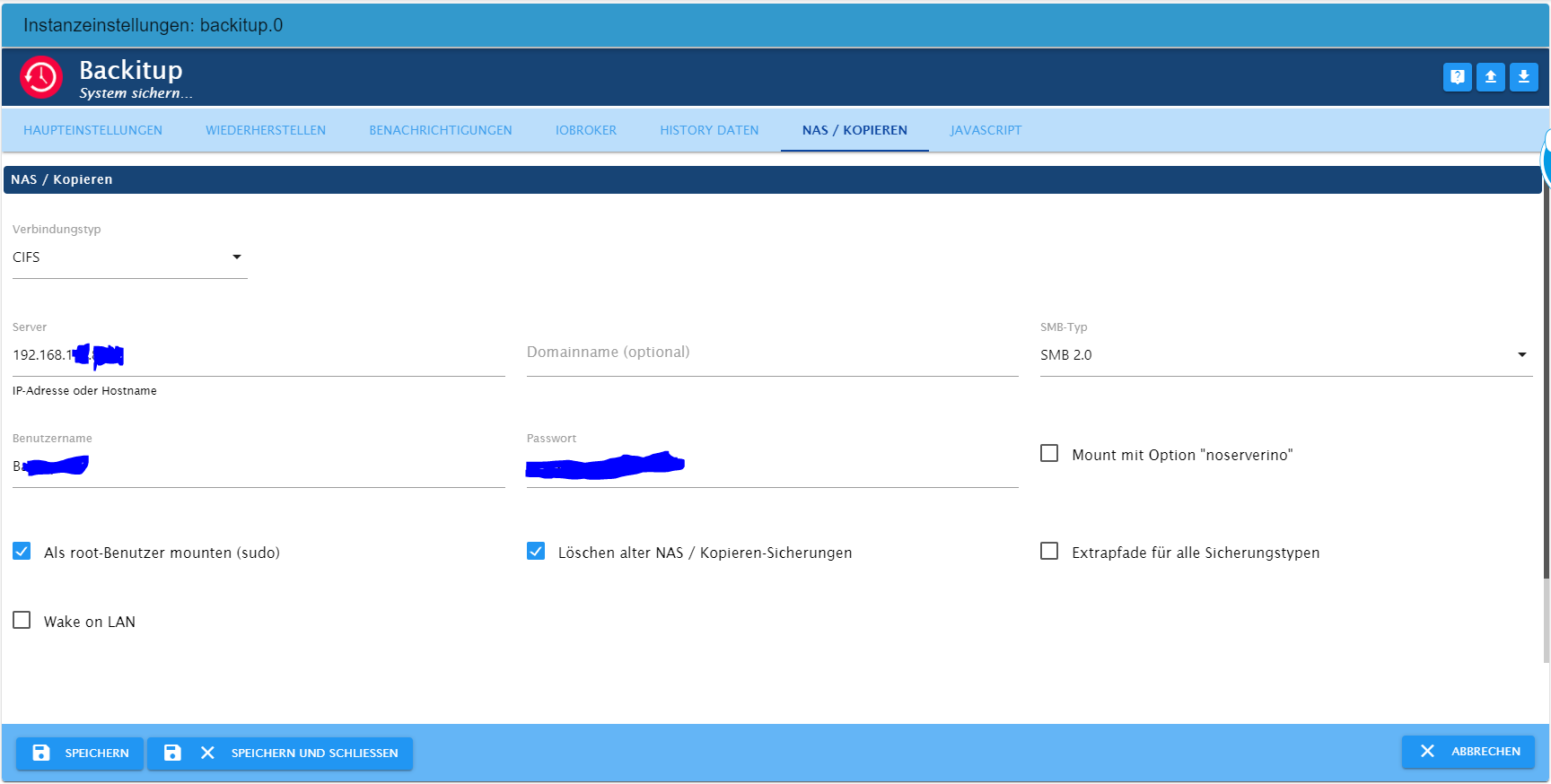
Leider habe ich bisher kein Workaround gefunden.Hier die Konfiguration, welche für das ioBroker Backup funktioniert hat:
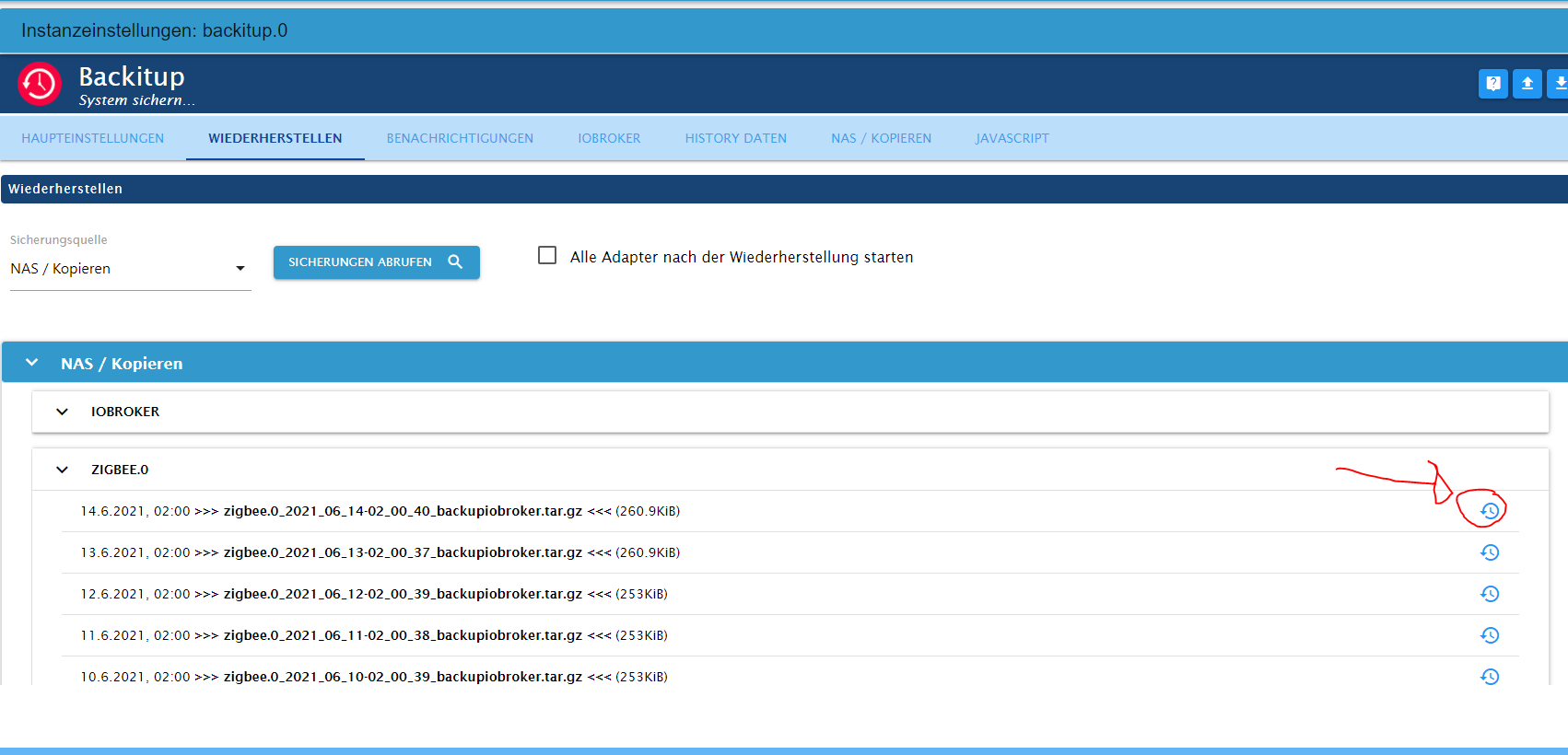
Dann das Auswählen des zigbee-Backups:
Dann kommt die erste Fehlermeldung:
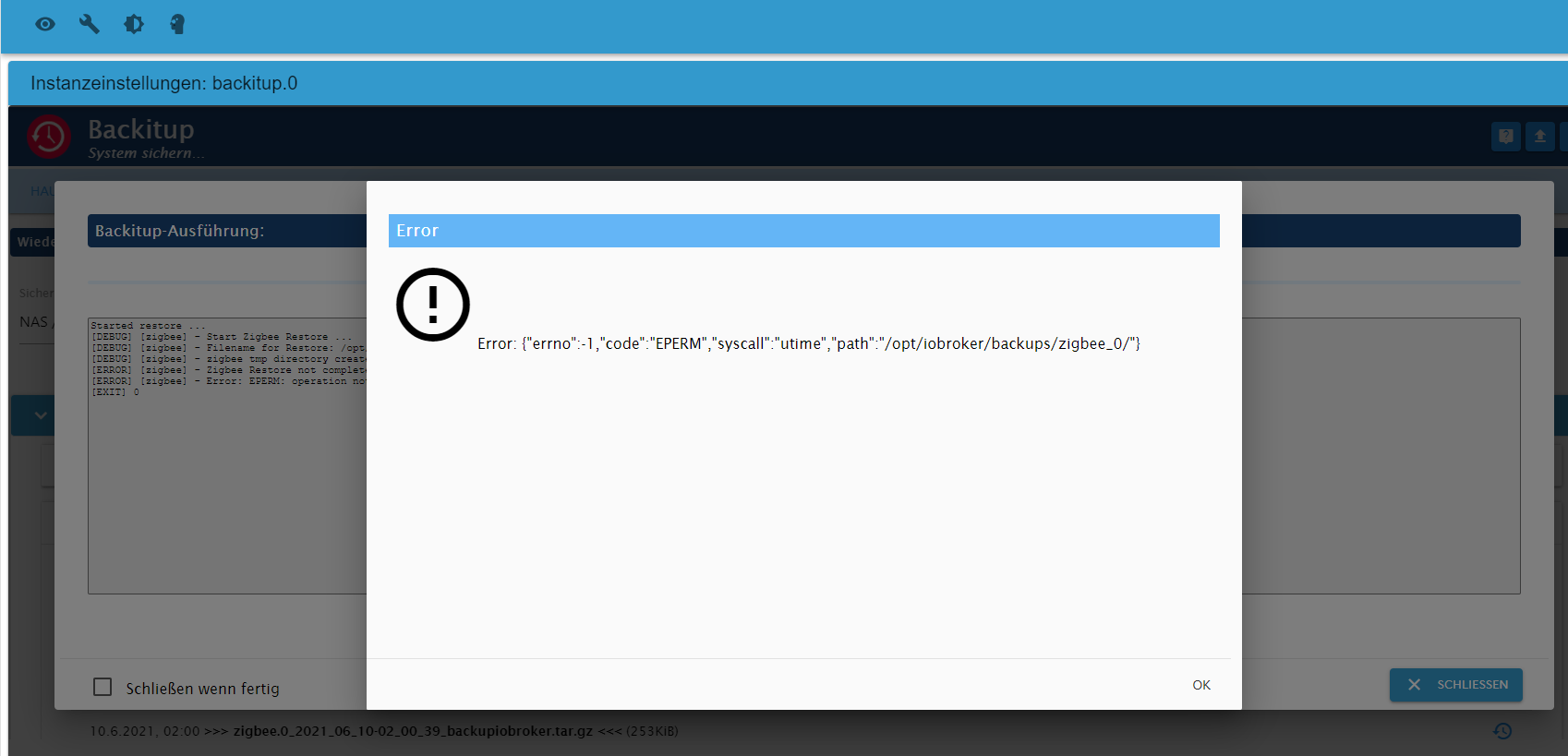
Error: {"errno":-l,"code":"EPERM","syscall":"utime","path":"/opt/iobroker/backups/zigbee_0/"}und der Eintrag im offenen Logfenster:
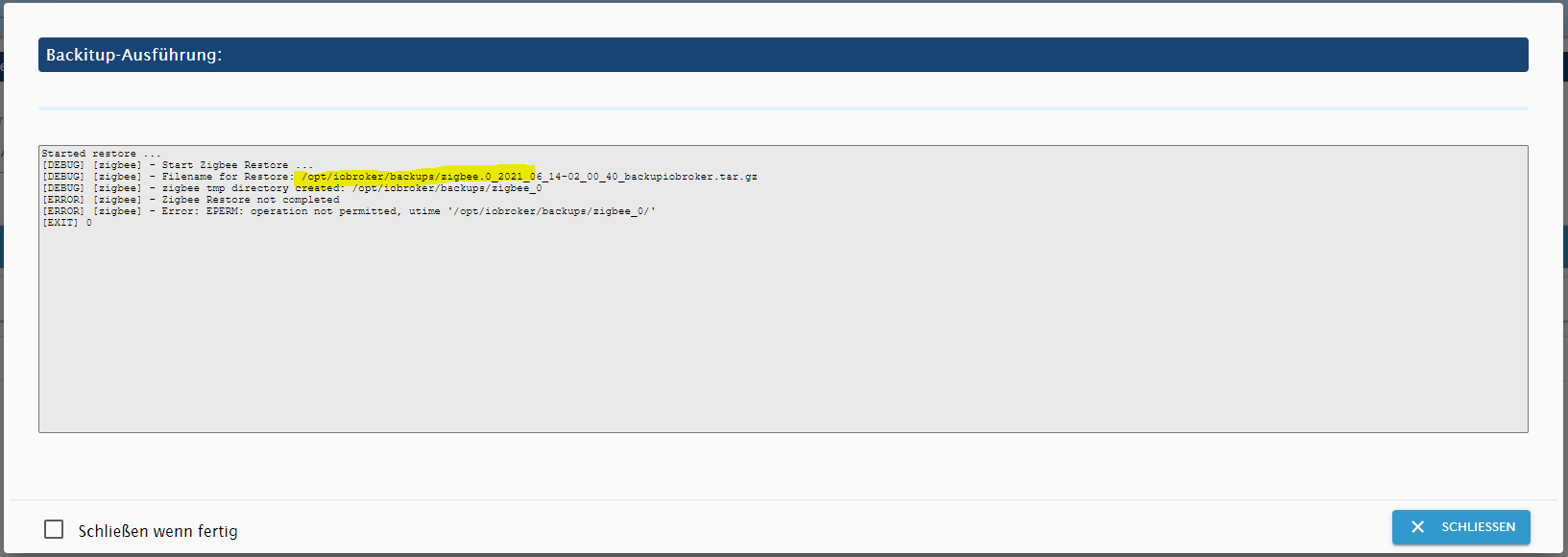
Started restore ...
[DEBUG] [zigbee] - Start Zigbee Restore ...
[DEBUG] [zigbee] - Filename for Restore: /opt/iobroker/backups/zigbee.0_2021_06_14-02_00_40_backupiobroker.tar.gz
[DEBUG] [zigbee] - zigbee tmp directory created: /opt/iobroker/backups/zigbee_0
[ERROR] [zigbee] - Zigbee Restore not completed
[ERROR] [zigbee] - Error: EPERM: operation not permitted, utime '/opt/iobroker/backups/zigbee_0/'
[EXIT] 0
Sowohl die Fehlermeldung als auch der Logeintrag von dem Restore scheinen auf
/opt/iobroker/backupszu verweisen. Interpretiere ich das richtig?
Was muss ich verändern, dass nicht lokal, sondern wie bei dem ioBroker Backup auch, das Backup von der NAS genommen wird?Danke und liebe Grüße
-
@thomas-braun
Der Hinweis war Zielführend.Es gab zwischendurch das Problem, dass der Adapter ein Backup aus dem lokalen Ordner ziehen wollte, obwohl ich eigentlich das NAS-Backup gewählt hatte.
Ich habe alle Backups aus dem lokalen Ordner entfernt, dann hat es geklappt.Leider habe ich das selbe Problem nun mit dem Zigbee-Backup (ebenfalls über Backitup erstellt).
Leider habe ich bisher kein Workaround gefunden.Hier die Konfiguration, welche für das ioBroker Backup funktioniert hat:
Dann das Auswählen des zigbee-Backups:
Dann kommt die erste Fehlermeldung:
Error: {"errno":-l,"code":"EPERM","syscall":"utime","path":"/opt/iobroker/backups/zigbee_0/"}und der Eintrag im offenen Logfenster:
Started restore ...
[DEBUG] [zigbee] - Start Zigbee Restore ...
[DEBUG] [zigbee] - Filename for Restore: /opt/iobroker/backups/zigbee.0_2021_06_14-02_00_40_backupiobroker.tar.gz
[DEBUG] [zigbee] - zigbee tmp directory created: /opt/iobroker/backups/zigbee_0
[ERROR] [zigbee] - Zigbee Restore not completed
[ERROR] [zigbee] - Error: EPERM: operation not permitted, utime '/opt/iobroker/backups/zigbee_0/'
[EXIT] 0
Sowohl die Fehlermeldung als auch der Logeintrag von dem Restore scheinen auf
/opt/iobroker/backupszu verweisen. Interpretiere ich das richtig?
Was muss ich verändern, dass nicht lokal, sondern wie bei dem ioBroker Backup auch, das Backup von der NAS genommen wird?Danke und liebe Grüße
Dir ist schon bewusst, das das Dateisystem des NAS bei SMB/CIFS auf dem Mountpunkt /opt/iobroker/backups eingehängt wird? Deswegen sollte das Verzeichnis auch leer sein, wenn der Backitup-Adapter gerade nicht läuft.
SMB-Typ so hoch wie möglich einstellen. Bei mir läuft ein FritzNAS FW 7.26 mit SMB-Typ 3.1.1
Mount-Option 'noserverino' sollte auch mal gesetzt werden. Muss ich bei meinem FritzDings auch einstellen.
-
Dir ist schon bewusst, das das Dateisystem des NAS bei SMB/CIFS auf dem Mountpunkt /opt/iobroker/backups eingehängt wird? Deswegen sollte das Verzeichnis auch leer sein, wenn der Backitup-Adapter gerade nicht läuft.
SMB-Typ so hoch wie möglich einstellen. Bei mir läuft ein FritzNAS FW 7.26 mit SMB-Typ 3.1.1
Mount-Option 'noserverino' sollte auch mal gesetzt werden. Muss ich bei meinem FritzDings auch einstellen.
@thomas-braun said in ioBroker nicht erreichbar - Hilfe bei Fehlermeldung in Log:
Dir ist schon bewusst, das das Dateisystem des NAS bei SMB/CIFS auf dem Mountpunkt /opt/iobroker/backups eingehängt wird? Deswegen sollte das Verzeichnis auch leer sein, wenn der Backitup-Adapter gerade nicht läuft.
ne, das war mir nicht bewusst aber ich lerne stetig dazu =)
SMB-Typ so hoch wie möglich einstellen. Bei mir läuft ein FritzNAS FW 7.26 mit SMB-Typ 3.1.1
Okai habe ich im Adapter umgestellt - auf der Synology ist es bereits auf minimal Version 2, maximal Version 3 eingestellt. Das sind die maximalen Möglichkeiten.
Leider bekomme ich noch immer den selben Fehler.Mount-Option 'noserverino' sollte auch mal gesetzt werden. Muss ich bei meinem FritzDings auch einstellen.
Im Zigbee.0 Adapter habe ich die Mountoption "noserverino" aktiviert. Leider ebenfalls kein Erfolg uns unveränderte Fehlermeldung...
Edit:
Bitte entschuldige, dass ich mich offenbar etwas schwerfällig anstelle... Ist es ein Berechtigungsproblem auf der NAS?Und hier noch der Auszug aus dem LOG
backitup.0 2021-06-16 23:49:32.057 error [zigbee] Error: EPERM: operation not permitted, utime '/opt/iobroker/backups/zigbee_0/' backitup.0 2021-06-16 23:49:32.056 error [zigbee] Zigbee Restore not completed backitup.0 2021-06-16 23:49:23.167 error Error: Command failed: sudo mount -t cifs -o username=B******,password=****,noserverino,rw,file_mode=0777,dir_mode=0777 //192.168.1**.**/Backup/ioBroker /opt/iobroker/backupsmount error(16): Device or resource busyRefer to the mount.cifs(8) manual page (e.g. man mount.cifs) -
@thomas-braun said in ioBroker nicht erreichbar - Hilfe bei Fehlermeldung in Log:
Dir ist schon bewusst, das das Dateisystem des NAS bei SMB/CIFS auf dem Mountpunkt /opt/iobroker/backups eingehängt wird? Deswegen sollte das Verzeichnis auch leer sein, wenn der Backitup-Adapter gerade nicht läuft.
ne, das war mir nicht bewusst aber ich lerne stetig dazu =)
SMB-Typ so hoch wie möglich einstellen. Bei mir läuft ein FritzNAS FW 7.26 mit SMB-Typ 3.1.1
Okai habe ich im Adapter umgestellt - auf der Synology ist es bereits auf minimal Version 2, maximal Version 3 eingestellt. Das sind die maximalen Möglichkeiten.
Leider bekomme ich noch immer den selben Fehler.Mount-Option 'noserverino' sollte auch mal gesetzt werden. Muss ich bei meinem FritzDings auch einstellen.
Im Zigbee.0 Adapter habe ich die Mountoption "noserverino" aktiviert. Leider ebenfalls kein Erfolg uns unveränderte Fehlermeldung...
Edit:
Bitte entschuldige, dass ich mich offenbar etwas schwerfällig anstelle... Ist es ein Berechtigungsproblem auf der NAS?Und hier noch der Auszug aus dem LOG
backitup.0 2021-06-16 23:49:32.057 error [zigbee] Error: EPERM: operation not permitted, utime '/opt/iobroker/backups/zigbee_0/' backitup.0 2021-06-16 23:49:32.056 error [zigbee] Zigbee Restore not completed backitup.0 2021-06-16 23:49:23.167 error Error: Command failed: sudo mount -t cifs -o username=B******,password=****,noserverino,rw,file_mode=0777,dir_mode=0777 //192.168.1**.**/Backup/ioBroker /opt/iobroker/backupsmount error(16): Device or resource busyRefer to the mount.cifs(8) manual page (e.g. man mount.cifs)@n3ucr0n
Ja, hat mit den Rechten zu tun. -
@n3ucr0n
Ja, hat mit den Rechten zu tun.Okai, ich werde mich mal um das Thema kümmern.
Ich habe gefühlt soweit alle Einstellungen für den benutzten User geprüft und alles sollte stimmen.Zur Kontrolle habe ich dann als Zugang meinen Adminzugang eingetragen, dieser hat alle Rechte, leider trotzdem der oben beschriebene Fehler.
Ich nutze eine Synology unter DMS6
Hast Du Tipps, was ich dort noch kontrollieren kann? Natürlich bemühe ich parallel auch schon Google und Co :-)Danke!

Hey! Du scheinst an dieser Unterhaltung interessiert zu sein, hast aber noch kein Konto.
Hast du es satt, bei jedem Besuch durch die gleichen Beiträge zu scrollen? Wenn du dich für ein Konto anmeldest, kommst du immer genau dorthin zurück, wo du zuvor warst, und kannst dich über neue Antworten benachrichtigen lassen (entweder per E-Mail oder Push-Benachrichtigung). Du kannst auch Lesezeichen speichern und Beiträge positiv bewerten, um anderen Community-Mitgliedern deine Wertschätzung zu zeigen.
Mit deinem Input könnte dieser Beitrag noch besser werden 💗
Registrieren Anmelden394
Online33.0k
Benutzer83.6k
Themen1.3m
Beiträge