




Aufnahmeaktivierung von MotionEye mit Bewegungsmeldern?
-
Hallo :-)
Erst einmal mein Aufbau:
Rasp4 1: Iobroker
Rasp4 2: MotionEye
Bewegungsmelder: über ioBroker mit Deconz
MotionEye wandelt einen RTSP-Stream um, welches ioBroker dann abgreift und via "View in Widget" anzeigt, wenn der Bewegungsmelder Bewegung registriert.Soweit läuft alles, aber:
MotionEye hat ein internes Motion-Detection-System eingebaut, ich weiß.
Ich suche aber eine mehr ressourcenschonende Möglichkeit.Wie kann ich MotionEye dazu bringen, eine 60sekündige Aufnahme zu starten (intern auf der MotionEye-SD oder noch besser auf meine NAS) wenn der Bewegungsmelder Bewegungen wahrnimmt?
Kann man die MotionEye dazu vielleicht mit einem Befehl von ioBroker anstossen?
Am Liebsten wäre mir eine Blockly-Lösung, zum Scripten bin ich zu doof ;-)
Liebe Grüße
Michael–--------------------------------------------------------------------------------------
- Smart mit: Rasp 4B / ioBroker / Conbee2 / Trådfri / Xiaomi / HUE / Logitech Harmony / Aqara / Easee Wallbox / Hyundai Ioniq / Alexa / Google Home / Fully Kiosk / VIS
-
Hallo :-)
Erst einmal mein Aufbau:
Rasp4 1: Iobroker
Rasp4 2: MotionEye
Bewegungsmelder: über ioBroker mit Deconz
MotionEye wandelt einen RTSP-Stream um, welches ioBroker dann abgreift und via "View in Widget" anzeigt, wenn der Bewegungsmelder Bewegung registriert.Soweit läuft alles, aber:
MotionEye hat ein internes Motion-Detection-System eingebaut, ich weiß.
Ich suche aber eine mehr ressourcenschonende Möglichkeit.Wie kann ich MotionEye dazu bringen, eine 60sekündige Aufnahme zu starten (intern auf der MotionEye-SD oder noch besser auf meine NAS) wenn der Bewegungsmelder Bewegungen wahrnimmt?
Kann man die MotionEye dazu vielleicht mit einem Befehl von ioBroker anstossen?
Am Liebsten wäre mir eine Blockly-Lösung, zum Scripten bin ich zu doof ;-)
Liebe Grüße
MichaelKeine fertige Lösung..dazu müsste ich mich nochmal mehr einlesen.
Ich hatte MotionEye aber auch mal im Einsatz und weiß das man per HTTP command (curl ode ähnliches)
verschiedene Dinge antriggern kann.so kann man wohl bspw. auch MotionEye "vorgaukeln" das eine Bewegung statt gefunden hat und dadurch eine Aufnahme anstoßen.
If you enable webcontrol in motion.conf, you can make HTTP requests to set emulate_motion=on to make motion behave as if it detected motion, and then set emulate_motion=off when your PIR sensor reports no movement. https://htmlpreview.github.io/?https://github.com/Motion-Project/motion/blob/master/motion_guide.html#emulate_motion
https://github.com/ccrisan/motioneye/issues/563
Wie gesagt nur ein Denkansatz...
Grüße John.
-
Hallo :-)
Erst einmal mein Aufbau:
Rasp4 1: Iobroker
Rasp4 2: MotionEye
Bewegungsmelder: über ioBroker mit Deconz
MotionEye wandelt einen RTSP-Stream um, welches ioBroker dann abgreift und via "View in Widget" anzeigt, wenn der Bewegungsmelder Bewegung registriert.Soweit läuft alles, aber:
MotionEye hat ein internes Motion-Detection-System eingebaut, ich weiß.
Ich suche aber eine mehr ressourcenschonende Möglichkeit.Wie kann ich MotionEye dazu bringen, eine 60sekündige Aufnahme zu starten (intern auf der MotionEye-SD oder noch besser auf meine NAS) wenn der Bewegungsmelder Bewegungen wahrnimmt?
Kann man die MotionEye dazu vielleicht mit einem Befehl von ioBroker anstossen?
Am Liebsten wäre mir eine Blockly-Lösung, zum Scripten bin ich zu doof ;-)
Liebe Grüße
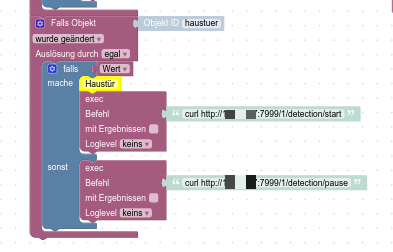
Michael@michaelnorge schau mal HIER
mit nem curl Befehl kannst du die camera aktivieren/pausieren
-
@michaelnorge schau mal HIER
mit nem curl Befehl kannst du die camera aktivieren/pausieren
@crunchip @Leone-Mortuo Vielen Dank Euch! Ich werde das mal testen...


Hello! It looks like you're interested in this conversation, but you don't have an account yet.
Getting fed up of having to scroll through the same posts each visit? When you register for an account, you'll always come back to exactly where you were before, and choose to be notified of new replies (either via email, or push notification). You'll also be able to save bookmarks and upvote posts to show your appreciation to other community members.
With your input, this post could be even better 💗
Register LoginSupport us
356
Online32.8k
Users82.7k
Topics1.3m
Posts