



Skip to content
  • Home
  • Recent
  • Tags
  • 0 Unread 0
  • Categories
  • Unreplied
  • Popular
  • GitHub
  • Docu
  • Hilfe
Skins
  • Light
  • Brite
  • Cerulean
  • Cosmo
  • Flatly
  • Journal
  • Litera
  • Lumen
  • Lux
  • Materia
  • Minty
  • Morph
  • Pulse
  • Sandstone
  • Simplex
  • Sketchy
  • Spacelab
  • United
  • Yeti
  • Zephyr
  • Dark
  • Cyborg
  • Darkly
  • Quartz
  • Slate
  • Solar
  • Superhero
  • Vapor

  • Default (No Skin)
  • No Skin
Collapse
ioBroker Logo

Community Forum

donate donate
  1. ioBroker Community Home
  2. Deutsch
  3. Hardware
  4. ZigBee Probleme mit dem CC2531 - irgendwie behebbar??
NEWS

  • Jahresrückblick 2025 – unser neuer Blogbeitrag ist online! ✨
    BluefoxB
    Bluefox
    17
    1
    2.7k

  • Neuer Blogbeitrag: Monatsrückblick - Dezember 2025 🎄
    BluefoxB
    Bluefox
    13
    1
    1.1k

  • Weihnachtsangebot 2025! 🎄
    BluefoxB
    Bluefox
    25
    1
    2.4k

ZigBee Probleme mit dem CC2531 - irgendwie behebbar??

Scheduled Pinned Locked Moved Hardware
75 Posts 10 Posters 9.3k Views 7 Watching
  • Oldest to Newest
  • Newest to Oldest
  • Most Votes
Reply
  • Reply as topic
Log in to reply
This topic has been deleted. Only users with topic management privileges can see it.
  • I ioThomas
      GNU nano 5.4                                         120.conf                                                   
    arch: amd64
    cores: 1
    features: nesting=1
    hostname: ioBroker
    memory: 4096
    net0: name=eth0,bridge=vmbr0,firewall=1,gw=192.168.178.1,hwaddr=0E:45:A6:8B:EE:EB,ip=192.168.178.36/24,ip6=dhcp,t>
    onboot: 1
    ostype: debian
    rootfs: DiskStation:120/vm-120-disk-1.raw,size=8G
    swap: 512
    unprivileged: 1
    
    TeNNo2k5T Offline
    TeNNo2k5T Offline
    TeNNo2k5
    wrote on last edited by
    #26

    @iothomas

    Ok ja das ist der Inhalt deiner Conig Datei :)

    Um deinen Stick einzubinden, befolge Punkt 3&4 von der Anleitung die Fredf vorhin verlinkt hat.

    Proxmox VE 7.4 [Shuttle DH310V2] = LXC [Ubuntu 22.04]
    ioBroker – Pi-hole – InfluxDB – Grafana – WireGuard – Ansible - Mosquitto - Zigbee2MQTT

    I 1 Reply Last reply
    -1
    • TeNNo2k5T TeNNo2k5

      @iothomas

      Ok ja das ist der Inhalt deiner Conig Datei :)

      Um deinen Stick einzubinden, befolge Punkt 3&4 von der Anleitung die Fredf vorhin verlinkt hat.

      I Offline
      I Offline
      ioThomas
      wrote on last edited by
      #27

      @tenno2k5 ich gebe mein Bestes. Allerdings noch nicht von Erfolg gekrönt :confused:

      LG
      Thomas

      1 Reply Last reply
      0
      • FredFF FredF

        @iothomas Ich sagte doch schon du musst dich in der pve einloggen

        I Offline
        I Offline
        ioThomas
        wrote on last edited by
        #28

        @fredf

        Naabend, ich habe mal alles nach der Anleitung eingespielt, und vermutlich einen Fehler gemacht. Im ioBroker Container kann ich den ttyZigbee sehen, sind die Rechte so ok?

        root@ioBroker:/dev# ls -l
        total 0
        crw--w---- 1 root   tty     136, 0 Jan  7 16:23 console
        lrwxrwxrwx 1 root   root        11 Jan  7 16:18 core -> /proc/kcore
        lrwxrwxrwx 1 root   root        13 Jan  7 16:18 fd -> /proc/self/fd
        crw-rw-rw- 1 nobody nogroup   1, 7 Jan  7 16:18 full
        lrwxrwxrwx 1 root   root        12 Jan  7 16:18 initctl -> /run/initctl
        lrwxrwxrwx 1 root   root        28 Jan  7 16:18 log -> /run/systemd/journal/dev-log
        drwxrwxrwt 2 nobody nogroup     40 Jan  7 16:18 mqueue
        crw-rw-rw- 1 nobody nogroup   1, 3 Jan  7 16:18 null
        crw-rw-rw- 1 root   root      5, 2 Jan  7 16:33 ptmx
        drwxr-xr-x 2 root   root         0 Jan  7 16:18 pts
        crw-rw-rw- 1 nobody nogroup   1, 8 Jan  7 16:18 random
        drwxrwxrwt 2 root   root        40 Jan  7 16:18 shm
        lrwxrwxrwx 1 root   root        15 Jan  7 16:18 stderr -> /proc/self/fd/2
        lrwxrwxrwx 1 root   root        15 Jan  7 16:18 stdin -> /proc/self/fd/0
        lrwxrwxrwx 1 root   root        15 Jan  7 16:18 stdout -> /proc/self/fd/1
        crw-rw-rw- 1 nobody nogroup   5, 0 Jan  7 16:18 tty
        crw------- 1 root   tty     136, 1 Jan  7 16:33 tty1
        crw--w---- 1 root   tty     136, 2 Jan  7 16:23 tty2
        crw-rw-rw- 1 nobody nogroup 166, 0 Jan  7 16:18 ttyZigbee
        crw-rw-rw- 1 nobody nogroup   1, 9 Jan  7 16:18 urandom
        crw-rw-rw- 1 nobody nogroup   1, 5 Jan  7 16:18 zero
        root@ioBroker:/dev# ^C
        root@ioBroker:/dev#
        

        LG
        Thomas

        TeNNo2k5T 1 Reply Last reply
        0
        • I ioThomas

          @fredf

          Naabend, ich habe mal alles nach der Anleitung eingespielt, und vermutlich einen Fehler gemacht. Im ioBroker Container kann ich den ttyZigbee sehen, sind die Rechte so ok?

          root@ioBroker:/dev# ls -l
          total 0
          crw--w---- 1 root   tty     136, 0 Jan  7 16:23 console
          lrwxrwxrwx 1 root   root        11 Jan  7 16:18 core -> /proc/kcore
          lrwxrwxrwx 1 root   root        13 Jan  7 16:18 fd -> /proc/self/fd
          crw-rw-rw- 1 nobody nogroup   1, 7 Jan  7 16:18 full
          lrwxrwxrwx 1 root   root        12 Jan  7 16:18 initctl -> /run/initctl
          lrwxrwxrwx 1 root   root        28 Jan  7 16:18 log -> /run/systemd/journal/dev-log
          drwxrwxrwt 2 nobody nogroup     40 Jan  7 16:18 mqueue
          crw-rw-rw- 1 nobody nogroup   1, 3 Jan  7 16:18 null
          crw-rw-rw- 1 root   root      5, 2 Jan  7 16:33 ptmx
          drwxr-xr-x 2 root   root         0 Jan  7 16:18 pts
          crw-rw-rw- 1 nobody nogroup   1, 8 Jan  7 16:18 random
          drwxrwxrwt 2 root   root        40 Jan  7 16:18 shm
          lrwxrwxrwx 1 root   root        15 Jan  7 16:18 stderr -> /proc/self/fd/2
          lrwxrwxrwx 1 root   root        15 Jan  7 16:18 stdin -> /proc/self/fd/0
          lrwxrwxrwx 1 root   root        15 Jan  7 16:18 stdout -> /proc/self/fd/1
          crw-rw-rw- 1 nobody nogroup   5, 0 Jan  7 16:18 tty
          crw------- 1 root   tty     136, 1 Jan  7 16:33 tty1
          crw--w---- 1 root   tty     136, 2 Jan  7 16:23 tty2
          crw-rw-rw- 1 nobody nogroup 166, 0 Jan  7 16:18 ttyZigbee
          crw-rw-rw- 1 nobody nogroup   1, 9 Jan  7 16:18 urandom
          crw-rw-rw- 1 nobody nogroup   1, 5 Jan  7 16:18 zero
          root@ioBroker:/dev# ^C
          root@ioBroker:/dev#
          
          TeNNo2k5T Offline
          TeNNo2k5T Offline
          TeNNo2k5
          wrote on last edited by TeNNo2k5
          #29

          @iothomas

          Sieht soweit gut aus, vorrausgesetzt du hast die Anleitung genau befolgt musst du noch den Zigbee Adapter im iobroker konfigurieren.

          Einstellungen -> COM-Anschlussname -> /dev/ttyZigbee

          Proxmox VE 7.4 [Shuttle DH310V2] = LXC [Ubuntu 22.04]
          ioBroker – Pi-hole – InfluxDB – Grafana – WireGuard – Ansible - Mosquitto - Zigbee2MQTT

          I 1 Reply Last reply
          0
          • TeNNo2k5T TeNNo2k5

            @iothomas

            Sieht soweit gut aus, vorrausgesetzt du hast die Anleitung genau befolgt musst du noch den Zigbee Adapter im iobroker konfigurieren.

            Einstellungen -> COM-Anschlussname -> /dev/ttyZigbee

            I Offline
            I Offline
            ioThomas
            wrote on last edited by
            #30

            @tenno2k5
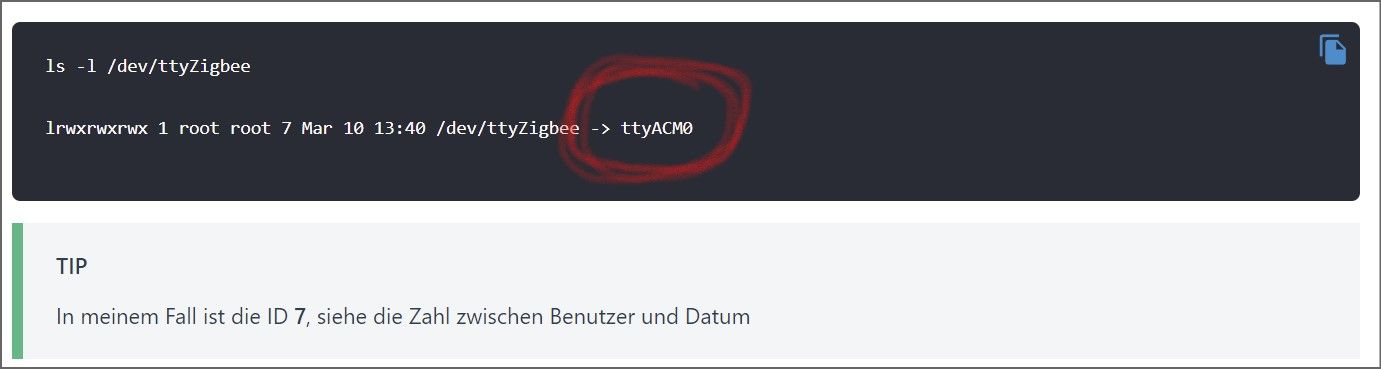
            habe ich so eingestellt und den Link geprüft. Er will noch nicht. Die ACL ID (Beispiel und bei mir auch 7) kommt von Proxmox oder aus dem LXC (166)? Beide funktionieren nicht, aber mir ist das aus der Anleitung nicht 100% klar geworden.

            Last login: Sat Jan  8 08:48:32 UTC 2022 on tty1
            root@ioBroker:~# ls -l /dev/ttyZigbee
            crw-rw-rw- 1 nobody nogroup 166, 0 Jan  8 08:54 /dev/ttyZigbee
            root@ioBroker:~#
            

            Dann fehlt mir auch der eingekringelte Bereich. Oder ist das nur ein Hinweis?
            Screenshot 2022-01-08 101145.jpg

            LG
            Thomas

            TeNNo2k5T 1 Reply Last reply
            0
            • I ioThomas

              @tenno2k5
              habe ich so eingestellt und den Link geprüft. Er will noch nicht. Die ACL ID (Beispiel und bei mir auch 7) kommt von Proxmox oder aus dem LXC (166)? Beide funktionieren nicht, aber mir ist das aus der Anleitung nicht 100% klar geworden.

              Last login: Sat Jan  8 08:48:32 UTC 2022 on tty1
              root@ioBroker:~# ls -l /dev/ttyZigbee
              crw-rw-rw- 1 nobody nogroup 166, 0 Jan  8 08:54 /dev/ttyZigbee
              root@ioBroker:~#
              

              Dann fehlt mir auch der eingekringelte Bereich. Oder ist das nur ein Hinweis?
              Screenshot 2022-01-08 101145.jpg

              TeNNo2k5T Offline
              TeNNo2k5T Offline
              TeNNo2k5
              wrote on last edited by
              #31

              @iothomas

              Mach mal bitte erstmal einen sauberen cold reboot auf deinem Lxc Container, also über die Proxmox Weboberfläche: deine iobroker lxc auswählen -> shutdown -> warten bis lxc ausgeschalten ist -> start

              Sollte das nicht helfen setze bitte folgende Befehle einzeln auf deinem Proxmox Host ab, und poste die Ausgabe:

              udevadm info -a -p $(udevadm info -q path -n /dev/ttyACM0) | grep "ATTRS{idVendor}" && udevadm info -a -p $(udevadm info -q path -n /dev/ttyACM0) | grep "ATTRS{idProduct}"
              
              cat /etc/udev/rules.d/49-custom.rules
              
              cat /etc/pve/lxc/120.conf
              

              Proxmox VE 7.4 [Shuttle DH310V2] = LXC [Ubuntu 22.04]
              ioBroker – Pi-hole – InfluxDB – Grafana – WireGuard – Ansible - Mosquitto - Zigbee2MQTT

              I 1 Reply Last reply
              0
              • TeNNo2k5T TeNNo2k5

                @iothomas

                Mach mal bitte erstmal einen sauberen cold reboot auf deinem Lxc Container, also über die Proxmox Weboberfläche: deine iobroker lxc auswählen -> shutdown -> warten bis lxc ausgeschalten ist -> start

                Sollte das nicht helfen setze bitte folgende Befehle einzeln auf deinem Proxmox Host ab, und poste die Ausgabe:

                udevadm info -a -p $(udevadm info -q path -n /dev/ttyACM0) | grep "ATTRS{idVendor}" && udevadm info -a -p $(udevadm info -q path -n /dev/ttyACM0) | grep "ATTRS{idProduct}"
                
                cat /etc/udev/rules.d/49-custom.rules
                
                cat /etc/pve/lxc/120.conf
                
                I Offline
                I Offline
                ioThomas
                wrote on last edited by
                #32
                root@ProxMox:~# udevadm info -a -p $(udevadm info -q path -n /dev/ttyACM0) | grep "ATTRS{idVendor}" && udevadm info -a -p $(udevadm info -q path -n /dev/ttyACM0) | grep "ATTRS{idProduct}"
                    ATTRS{idVendor}=="0451"
                    ATTRS{idVendor}=="1d6b"
                    ATTRS{idProduct}=="16a8"
                    ATTRS{idProduct}=="0002"
                root@ProxMox:~# 
                
                root@ProxMox:~# cat /etc/udev/rules.d/49-custom.rules
                KERNEL=="ttyACM0*", SUBSYSTEM=="tty", ATTRS{idVendor}=="0451", ATTRS{idProduct}=="16a8", SYMLINK="ttyZigbee"
                SUBSYSTEMS=="usb", ATTRS{idVendor}=="0451", ATTRS{idProduct}=="16a8", GROUP="users", MODE="0666"
                root@ProxMox:~#
                
                root@ProxMox:~# cat /etc/pve/lxc/120.conf
                arch: amd64
                cores: 1
                features: nesting=1
                hostname: ioBroker
                memory: 4096
                net0: name=eth0,bridge=vmbr0,firewall=1,gw=192.168.178.1,hwaddr=0E:45:A6:8B:EE:EB,ip=192.168.178.36/24,ip6=dhcp,type=veth
                onboot: 1
                ostype: debian
                rootfs: DiskStation:120/vm-120-disk-1.raw,size=8G
                swap: 512
                unprivileged: 1
                lxc.cgroup.devices.allow: c 166:* rwm
                lxc.mount.entry: /dev/ttyZigbee dev/ttyZigbee none bind,optional,create=file
                root@ProxMox:~#
                

                ich hatte auch die 7 schon unter "lxc.cgroup.devices.allow:"

                /dev/ttyzigbee/usb-Texas_Instruments_TI_CC2531_USB_CDC___0X00124B00014EF171-if00
                

                der Pfad im ioBroker zum Stick

                LG
                Thomas

                1 Reply Last reply
                0
                • TeNNo2k5T Offline
                  TeNNo2k5T Offline
                  TeNNo2k5
                  wrote on last edited by TeNNo2k5
                  #33

                  @iothomas

                  hmm sieht alles soweit ok aus, nur bei der udev rule ist beim Kernel Parameter die Wildcard anders gesetzt als in der Anleitung aber ich glaube nicht das der Fehler daran liegt.

                  Bei meinem System habe ich die Anleitung von Coldcorner befolgt, probiere es doch bitte mal so vielleicht passt die vorgensweise von drozmotix nicht zum cc2531.

                  Edit: Sollte es mit der Anleitung von Coldcorner funktionieren musst du noch eine udev rule auf dem proxmox Host anlegen damit der USB-Passthrough auch nach einem Neustart vom Proxmox Host funktioniert:

                  nano /etc/udev/rules.d/50-myusb.rules
                  

                  Inhalt:

                  SUBSYSTEMS=="usb", ATTRS{idVendor}=="0451", ATTRS{idProduct}=="16a8", GROUP="users", MODE="0666"
                  

                  Proxmox VE 7.4 [Shuttle DH310V2] = LXC [Ubuntu 22.04]
                  ioBroker – Pi-hole – InfluxDB – Grafana – WireGuard – Ansible - Mosquitto - Zigbee2MQTT

                  I 1 Reply Last reply
                  0
                  • TeNNo2k5T TeNNo2k5

                    @iothomas

                    hmm sieht alles soweit ok aus, nur bei der udev rule ist beim Kernel Parameter die Wildcard anders gesetzt als in der Anleitung aber ich glaube nicht das der Fehler daran liegt.

                    Bei meinem System habe ich die Anleitung von Coldcorner befolgt, probiere es doch bitte mal so vielleicht passt die vorgensweise von drozmotix nicht zum cc2531.

                    Edit: Sollte es mit der Anleitung von Coldcorner funktionieren musst du noch eine udev rule auf dem proxmox Host anlegen damit der USB-Passthrough auch nach einem Neustart vom Proxmox Host funktioniert:

                    nano /etc/udev/rules.d/50-myusb.rules
                    

                    Inhalt:

                    SUBSYSTEMS=="usb", ATTRS{idVendor}=="0451", ATTRS{idProduct}=="16a8", GROUP="users", MODE="0666"
                    
                    I Offline
                    I Offline
                    ioThomas
                    wrote on last edited by
                    #34

                    @tenno2k5
                    was ein Käse. Kann ich im Container prüfen, was sich hinter dem ttyACM0 verbirgt? Folgende Fehlermeldung kommt im ioBroker:

                    Starting zigbee-herdsman problem : "Error while opening serialport 'Error: Error: Not a directory, cannot open /dev/ttyACM0/usb-Texas_Instruments_TI_CC2531_USB_CDC___0X00124B00014EF171-if00'"
                    

                    Ich werde noch einmal alles in Ruhe durchgehen.

                    LG
                    Thomas

                    1 Reply Last reply
                    0
                    • Thomas BraunT Online
                      Thomas BraunT Online
                      Thomas Braun
                      Most Active
                      wrote on last edited by Thomas Braun
                      #35

                      @iothomas sagte in ZigBee Probleme mit dem CC2531 - irgendwie behebbar??:

                      ls -la /dev/ttyACM0/usb-Texas_Instruments_TI_CC2531_USB_CDC___0X00124B00014EF171-if00
                      

                      Das ist ja auch Käse...

                      Der Geräte-Link ist bestimmt hier zu finden:

                      ls -l /dev/serial/by-id/Texas_Instruments_TI_CC2531_USB_CDC___0X00124B00014EF171-if00
                      

                      [Edit:] Ach, ich vergaß... Container-Gedöns...

                      Linux-Werkzeugkasten:
                      https://forum.iobroker.net/topic/42952/der-kleine-iobroker-linux-werkzeugkasten
                      NodeJS Fixer Skript:
                      https://forum.iobroker.net/topic/68035/iob-node-fix-skript
                      iob_diag: curl -sLf -o diag.sh https://iobroker.net/diag.sh && bash diag.sh

                      I 1 Reply Last reply
                      0
                      • Thomas BraunT Thomas Braun

                        @iothomas sagte in ZigBee Probleme mit dem CC2531 - irgendwie behebbar??:

                        ls -la /dev/ttyACM0/usb-Texas_Instruments_TI_CC2531_USB_CDC___0X00124B00014EF171-if00
                        

                        Das ist ja auch Käse...

                        Der Geräte-Link ist bestimmt hier zu finden:

                        ls -l /dev/serial/by-id/Texas_Instruments_TI_CC2531_USB_CDC___0X00124B00014EF171-if00
                        

                        [Edit:] Ach, ich vergaß... Container-Gedöns...

                        I Offline
                        I Offline
                        ioThomas
                        wrote on last edited by ioThomas
                        #36

                        @thomas-braun
                        ok, danke. Hat jetzt leider auch nicht geholfen. Ich habe die Anleitung von Coldcorner auch noch mal geprüft. Es scheint alles richtig zu sein

                        EDIT:

                        Starting zigbee-herdsman problem : "Error while opening serialport 'Error: Error: No such file or directory, cannot open /dev/serial/by-id/usb-Texas_Instruments_TI_CC2531_USB_CDC___0X00124B00014EF171-if00'"
                        

                        LG
                        Thomas

                        I 1 Reply Last reply
                        0
                        • I ioThomas

                          @thomas-braun
                          ok, danke. Hat jetzt leider auch nicht geholfen. Ich habe die Anleitung von Coldcorner auch noch mal geprüft. Es scheint alles richtig zu sein

                          EDIT:

                          Starting zigbee-herdsman problem : "Error while opening serialport 'Error: Error: No such file or directory, cannot open /dev/serial/by-id/usb-Texas_Instruments_TI_CC2531_USB_CDC___0X00124B00014EF171-if00'"
                          
                          I Offline
                          I Offline
                          ioThomas
                          wrote on last edited by
                          #37

                          @iothomas

                          dann habe ich im ioBroker mal den Pfad zum Stick geändert (vor Verzweiflung) auf:

                          /dev/ttyACM0
                          

                          und plötzlich schaltete die Instanz auf grün. Die Geräte wurden angezeigt, doch nicht gepairt. Nun ist der der Spuk wieder vorbei, die Instanz will nicht mehr. Hat noch jemand eine Idee bevor ich den Zigbee Stick für die Tomatenzucht verwende?

                          LG
                          Thomas

                          Thomas BraunT 1 Reply Last reply
                          0
                          • I ioThomas

                            @iothomas

                            dann habe ich im ioBroker mal den Pfad zum Stick geändert (vor Verzweiflung) auf:

                            /dev/ttyACM0
                            

                            und plötzlich schaltete die Instanz auf grün. Die Geräte wurden angezeigt, doch nicht gepairt. Nun ist der der Spuk wieder vorbei, die Instanz will nicht mehr. Hat noch jemand eine Idee bevor ich den Zigbee Stick für die Tomatenzucht verwende?

                            Thomas BraunT Online
                            Thomas BraunT Online
                            Thomas Braun
                            Most Active
                            wrote on last edited by
                            #38

                            @iothomas sagte in ZigBee Probleme mit dem CC2531 - irgendwie behebbar??:

                            die Instanz will nicht mehr.

                            Auch keine Meldungen ins LogFile schreiben?

                            Linux-Werkzeugkasten:
                            https://forum.iobroker.net/topic/42952/der-kleine-iobroker-linux-werkzeugkasten
                            NodeJS Fixer Skript:
                            https://forum.iobroker.net/topic/68035/iob-node-fix-skript
                            iob_diag: curl -sLf -o diag.sh https://iobroker.net/diag.sh && bash diag.sh

                            I 1 Reply Last reply
                            0
                            • Thomas BraunT Thomas Braun

                              @iothomas sagte in ZigBee Probleme mit dem CC2531 - irgendwie behebbar??:

                              die Instanz will nicht mehr.

                              Auch keine Meldungen ins LogFile schreiben?

                              I Offline
                              I Offline
                              ioThomas
                              wrote on last edited by
                              #39

                              @thomas-braun

                              Starting zigbee-herdsman problem : "Error while opening serialport 'Error: Error: Permission denied, cannot open /dev/ttyACM0'"
                              

                              LG
                              Thomas

                              Thomas BraunT 1 Reply Last reply
                              0
                              • I ioThomas

                                @thomas-braun

                                Starting zigbee-herdsman problem : "Error while opening serialport 'Error: Error: Permission denied, cannot open /dev/ttyACM0'"
                                
                                Thomas BraunT Online
                                Thomas BraunT Online
                                Thomas Braun
                                Most Active
                                wrote on last edited by
                                #40

                                @iothomas
                                Und wie sehen die Rechte an der Datei aus?

                                Linux-Werkzeugkasten:
                                https://forum.iobroker.net/topic/42952/der-kleine-iobroker-linux-werkzeugkasten
                                NodeJS Fixer Skript:
                                https://forum.iobroker.net/topic/68035/iob-node-fix-skript
                                iob_diag: curl -sLf -o diag.sh https://iobroker.net/diag.sh && bash diag.sh

                                I 1 Reply Last reply
                                0
                                • Thomas BraunT Thomas Braun

                                  @iothomas
                                  Und wie sehen die Rechte an der Datei aus?

                                  I Offline
                                  I Offline
                                  ioThomas
                                  wrote on last edited by
                                  #41
                                  drwxr-xr-x 3 root   root        60 Jan  9 13:11 bus
                                  crw--w---- 1 root   tty     136, 0 Jan  9 13:16 console
                                  lrwxrwxrwx 1 root   root        11 Jan  9 13:11 core -> /proc/kcore
                                  lrwxrwxrwx 1 root   root        13 Jan  9 13:11 fd -> /proc/self/fd
                                  crw-rw-rw- 1 nobody nogroup   1, 7 Jan  9 13:10 full
                                  lrwxrwxrwx 1 root   root        12 Jan  9 13:11 initctl -> /run/initctl
                                  lrwxrwxrwx 1 root   root        28 Jan  9 13:11 log -> /run/systemd/journal/dev-log
                                  drwxrwxrwt 2 nobody nogroup     40 Jan  9 13:11 mqueue
                                  crw-rw-rw- 1 nobody nogroup   1, 3 Jan  9 13:10 null
                                  crw-rw-rw- 1 root   root      5, 2 Jan  9 15:08 ptmx
                                  drwxr-xr-x 2 root   root         0 Jan  9 13:11 pts
                                  crw-rw-rw- 1 nobody nogroup   1, 8 Jan  9 13:10 random
                                  drwxrwxrwt 2 root   root        40 Jan  9 13:11 shm
                                  lrwxrwxrwx 1 root   root        15 Jan  9 13:11 stderr -> /proc/self/fd/2
                                  lrwxrwxrwx 1 root   root        15 Jan  9 13:11 stdin -> /proc/self/fd/0
                                  lrwxrwxrwx 1 root   root        15 Jan  9 13:11 stdout -> /proc/self/fd/1
                                  crw-rw-rw- 1 nobody nogroup   5, 0 Jan  9 13:10 tty
                                  crw------- 1 root   tty     136, 1 Jan  9 15:08 tty1
                                  crw--w---- 1 root   tty     136, 2 Jan  9 13:16 tty2
                                  c--------- 0 nobody nogroup 166, 0 Jan  9 14:29 ttyACM0
                                  crw-rw-rw- 1 nobody nogroup   1, 9 Jan  9 13:10 urandom
                                  crw-rw-rw- 1 nobody nogroup   1, 5 Jan  9 13:10 zero
                                  root@ioBroker:/dev# 
                                  

                                  ich vergebe sie gerade mal neu

                                  LG
                                  Thomas

                                  Thomas BraunT 1 Reply Last reply
                                  0
                                  • I ioThomas
                                    drwxr-xr-x 3 root   root        60 Jan  9 13:11 bus
                                    crw--w---- 1 root   tty     136, 0 Jan  9 13:16 console
                                    lrwxrwxrwx 1 root   root        11 Jan  9 13:11 core -> /proc/kcore
                                    lrwxrwxrwx 1 root   root        13 Jan  9 13:11 fd -> /proc/self/fd
                                    crw-rw-rw- 1 nobody nogroup   1, 7 Jan  9 13:10 full
                                    lrwxrwxrwx 1 root   root        12 Jan  9 13:11 initctl -> /run/initctl
                                    lrwxrwxrwx 1 root   root        28 Jan  9 13:11 log -> /run/systemd/journal/dev-log
                                    drwxrwxrwt 2 nobody nogroup     40 Jan  9 13:11 mqueue
                                    crw-rw-rw- 1 nobody nogroup   1, 3 Jan  9 13:10 null
                                    crw-rw-rw- 1 root   root      5, 2 Jan  9 15:08 ptmx
                                    drwxr-xr-x 2 root   root         0 Jan  9 13:11 pts
                                    crw-rw-rw- 1 nobody nogroup   1, 8 Jan  9 13:10 random
                                    drwxrwxrwt 2 root   root        40 Jan  9 13:11 shm
                                    lrwxrwxrwx 1 root   root        15 Jan  9 13:11 stderr -> /proc/self/fd/2
                                    lrwxrwxrwx 1 root   root        15 Jan  9 13:11 stdin -> /proc/self/fd/0
                                    lrwxrwxrwx 1 root   root        15 Jan  9 13:11 stdout -> /proc/self/fd/1
                                    crw-rw-rw- 1 nobody nogroup   5, 0 Jan  9 13:10 tty
                                    crw------- 1 root   tty     136, 1 Jan  9 15:08 tty1
                                    crw--w---- 1 root   tty     136, 2 Jan  9 13:16 tty2
                                    c--------- 0 nobody nogroup 166, 0 Jan  9 14:29 ttyACM0
                                    crw-rw-rw- 1 nobody nogroup   1, 9 Jan  9 13:10 urandom
                                    crw-rw-rw- 1 nobody nogroup   1, 5 Jan  9 13:10 zero
                                    root@ioBroker:/dev# 
                                    

                                    ich vergebe sie gerade mal neu

                                    Thomas BraunT Online
                                    Thomas BraunT Online
                                    Thomas Braun
                                    Most Active
                                    wrote on last edited by Thomas Braun
                                    #42

                                    @iothomas

                                    c--------- 0 nobody nogroup 166, 0 Jan  9 14:29 ttyACM0
                                    

                                    Keine Ahnung was dein udev (oder was auch immer da im Container dafür benutzt wird) da treibt, aber die Rechte sind hinten und vorne und oben und unten falsch.

                                    Entweder beim durchreichen geht da was kaputt oder der Stick selber hat nen Schuß. Spannungsversorgung?

                                    Linux-Werkzeugkasten:
                                    https://forum.iobroker.net/topic/42952/der-kleine-iobroker-linux-werkzeugkasten
                                    NodeJS Fixer Skript:
                                    https://forum.iobroker.net/topic/68035/iob-node-fix-skript
                                    iob_diag: curl -sLf -o diag.sh https://iobroker.net/diag.sh && bash diag.sh

                                    I 1 Reply Last reply
                                    0
                                    • Thomas BraunT Thomas Braun

                                      @iothomas

                                      c--------- 0 nobody nogroup 166, 0 Jan  9 14:29 ttyACM0
                                      

                                      Keine Ahnung was dein udev (oder was auch immer da im Container dafür benutzt wird) da treibt, aber die Rechte sind hinten und vorne und oben und unten falsch.

                                      Entweder beim durchreichen geht da was kaputt oder der Stick selber hat nen Schuß. Spannungsversorgung?

                                      I Offline
                                      I Offline
                                      ioThomas
                                      wrote on last edited by
                                      #43

                                      @thomas-braun
                                      ich hatte den kurz aus dem USB Port abgezogen und neu gestartet. Damit hatte er die Rechte verloren. Das Problem hatten laut der Coldcorner Anleitung schon mehrere Leute. Der Stick hatte bisher immer sehr gut funktioniert.

                                      -rw-r--r-- 1 root root 0 Jan  7 13:07 ttyACM0
                                      

                                      So sieht es jetzt wieder nach der Anleitung aus. Die Geräte nimmt er trotzdem nicht. Aber die Instanz ist wieder auf grün.

                                      LG
                                      Thomas

                                      Thomas BraunT 1 Reply Last reply
                                      0
                                      • I ioThomas

                                        @thomas-braun
                                        ich hatte den kurz aus dem USB Port abgezogen und neu gestartet. Damit hatte er die Rechte verloren. Das Problem hatten laut der Coldcorner Anleitung schon mehrere Leute. Der Stick hatte bisher immer sehr gut funktioniert.

                                        -rw-r--r-- 1 root root 0 Jan  7 13:07 ttyACM0
                                        

                                        So sieht es jetzt wieder nach der Anleitung aus. Die Geräte nimmt er trotzdem nicht. Aber die Instanz ist wieder auf grün.

                                        Thomas BraunT Online
                                        Thomas BraunT Online
                                        Thomas Braun
                                        Most Active
                                        wrote on last edited by
                                        #44

                                        @iothomas

                                        Die Rechte sollten 'ordentlich' so aussehen:

                                        pi@chet:~ $ ls -la /dev/ttyUSB0
                                        crw-rw---- 1 root dialout 188, 0 Jan  9 00:03 /dev/ttyUSB0
                                        pi@chet:~ $
                                        

                                        Mein USB-Stick wird so automatisch angelegt. Den User in der Gruppe 'dialout' zu haben hilft auch.

                                        Linux-Werkzeugkasten:
                                        https://forum.iobroker.net/topic/42952/der-kleine-iobroker-linux-werkzeugkasten
                                        NodeJS Fixer Skript:
                                        https://forum.iobroker.net/topic/68035/iob-node-fix-skript
                                        iob_diag: curl -sLf -o diag.sh https://iobroker.net/diag.sh && bash diag.sh

                                        I 1 Reply Last reply
                                        0
                                        • Thomas BraunT Thomas Braun

                                          @iothomas

                                          Die Rechte sollten 'ordentlich' so aussehen:

                                          pi@chet:~ $ ls -la /dev/ttyUSB0
                                          crw-rw---- 1 root dialout 188, 0 Jan  9 00:03 /dev/ttyUSB0
                                          pi@chet:~ $
                                          

                                          Mein USB-Stick wird so automatisch angelegt. Den User in der Gruppe 'dialout' zu haben hilft auch.

                                          I Offline
                                          I Offline
                                          ioThomas
                                          wrote on last edited by
                                          #45

                                          @thomas-braun
                                          ich nehme an, eine Anleitung finde ich dafür nirgends? Ich bin nicht wirklich fit diesen Themen. Wobei ich lernen möchte...

                                          LG
                                          Thomas

                                          Thomas BraunT 1 Reply Last reply
                                          0
                                          Reply
                                          • Reply as topic
                                          Log in to reply
                                          • Oldest to Newest
                                          • Newest to Oldest
                                          • Most Votes


                                          Support us

                                          ioBroker
                                          Community Adapters
                                          Donate

                                          675

                                          Online

                                          32.6k

                                          Users

                                          82.3k

                                          Topics

                                          1.3m

                                          Posts
                                          Community
                                          Impressum | Datenschutz-Bestimmungen | Nutzungsbedingungen | Einwilligungseinstellungen
                                          ioBroker Community 2014-2025
                                          logo
                                          • Login

                                          • Don't have an account? Register

                                          • Login or register to search.
                                          • First post
                                            Last post
                                          0
                                          • Home
                                          • Recent
                                          • Tags
                                          • Unread 0
                                          • Categories
                                          • Unreplied
                                          • Popular
                                          • GitHub
                                          • Docu
                                          • Hilfe