




Test Adapter Mihome-vacuum v3.1.6 Next Generarition
-
@d3ltoroxp Hier hatte ich meine Lösung erklärt:
https://github.com/iobroker-community-adapters/ioBroker.mihome-vacuum/issues/449#issuecomment-984390288Entscheidend bei mir war:
-
canvas unter /opt/iobroker/node_modules/ manuell löschen
-
npm i in /opt/iobroker/node_modules/ ausführen, um canvas mit der neuen node Version zu bauen
btw. "-rebuild" ist kein korrekter Parameter.
-
-
@diginix said in Test Adapter Mihome-vacuum v3.1.6 Next Generarition:
canvas unter /opt/iobroker/node_modules/ manuell löschen
Das löschen einfach mit rm -r canvas ?
@d3ltoroxp Ja oder mit absolutem Pfad
rm -rf /opt/iobroker/node_modules/canvasum 100% den richtigen Ordner zu löschen.
Danachcd /opt/iobroker/node_modules && npm i..:: So long! Tom ::..
NUC7i3 (Ubuntu Proxmox VM) | Echo Dots 2+3. Gen | Xiaomi Sensoren | Mi Robot 1S | Yeelight | Sonoff | Shelly | H801 RGB | Gosund SP1 | NodeMCU+ESP32 | Kostal Plenticore PV+BYD | openWB
-
@d3ltoroxp Ja oder mit absolutem Pfad
rm -rf /opt/iobroker/node_modules/canvasum 100% den richtigen Ordner zu löschen.
Danachcd /opt/iobroker/node_modules && npm i -
@da_woody Vllt das gleiche Problem wie bei mir und den anderen, hast du vor kurzem nodejs auf 14 geupdated ?
Dann musst du
@strobelix said in Test Adapter Mihome-vacuum v3.1.6 Next Generarition:
einfach nur npm -rebuild
im passenden Pfad ausführen und davor Canvas löschen.
@d3ltoroxp sagte in Test Adapter Mihome-vacuum v3.1.6 Next Generarition:
Vllt das gleiche Problem wie bei mir und den anderen, hast du vor kurzem nodejs auf 14 geupdated ?
jetzt wo dus sagst... :D
les grad fleissig mit mit dem canvas zeuch. backup von der ioB VM läuft gerade. sicherheitshalber... :face_with_rolling_eyes: -
@diginix Hm ich weiß nicht, irgendwas stimmt doch da bei mir nicht. Sauber sieht das nicht aus.
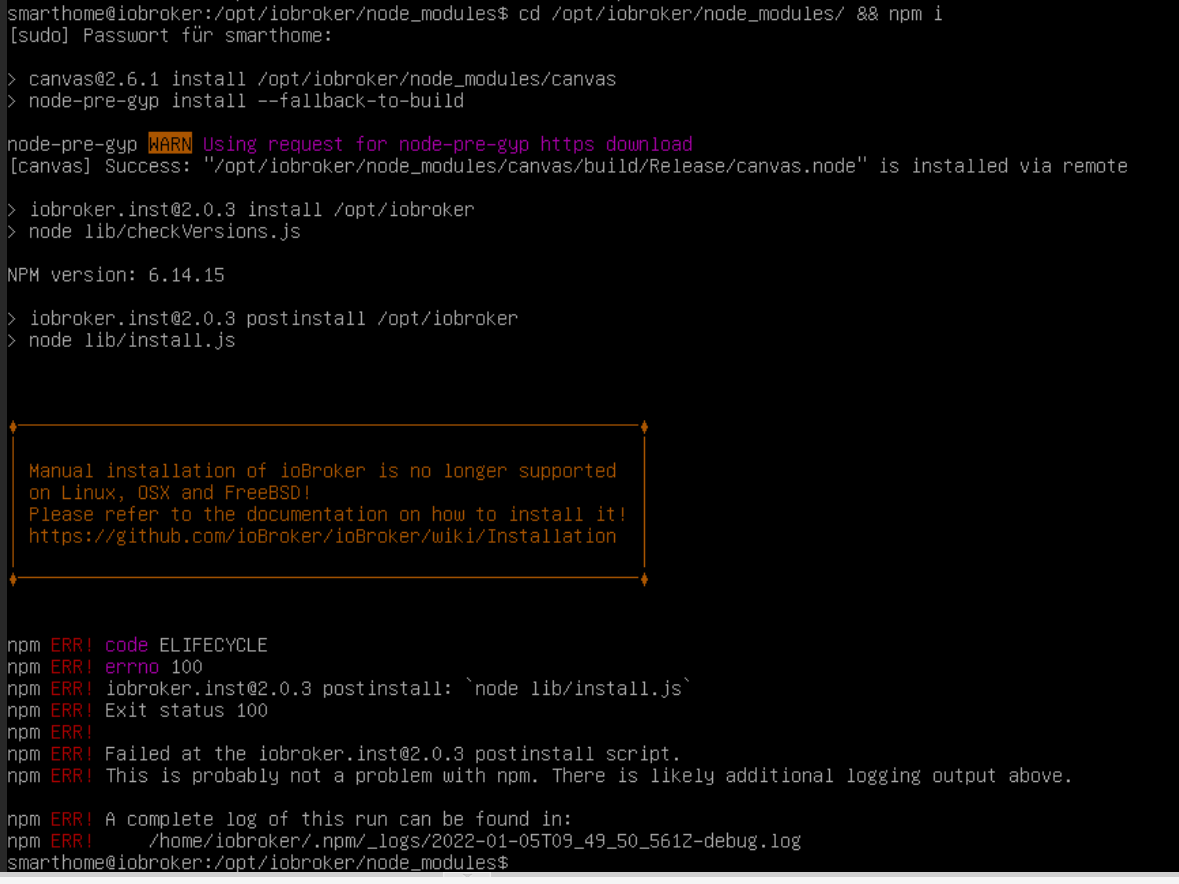
Nachdem Befehl, rannte in einer Zeile alles mögliche durch, da stand ganz oft remove und dann was mit Zigbee Herdsmen, bestimmt auch nicht io.
@d3ltoroxp Div. Meldungen kommen bei npm immer. Solange aber alles funktioniert, muss man nicht jeder hinterher rennen. Hast du bei dir node letzten aktualisiert? Nur dann wäre das es überhaupt der im GIT Issue beschriebene Fall, dass cancas noch von der alten node Version stammt.
Wenn ich es richtig interpretiere wurde canvas bei dir nun wieder sauber mit der aktuellen node Version erstellt. Nach einem mihome-vacuum Restart sollte nun auch die Karte wieder funktionieren. Solange alles andere auch passt. Gab ja zuletzt auch Token Probleme mit Xiaomi Servern usw.
..:: So long! Tom ::..
NUC7i3 (Ubuntu Proxmox VM) | Echo Dots 2+3. Gen | Xiaomi Sensoren | Mi Robot 1S | Yeelight | Sonoff | Shelly | H801 RGB | Gosund SP1 | NodeMCU+ESP32 | Kostal Plenticore PV+BYD | openWB
-
@d3ltoroxp Div. Meldungen kommen bei npm immer. Solange aber alles funktioniert, muss man nicht jeder hinterher rennen. Hast du bei dir node letzten aktualisiert? Nur dann wäre das es überhaupt der im GIT Issue beschriebene Fall, dass cancas noch von der alten node Version stammt.
Wenn ich es richtig interpretiere wurde canvas bei dir nun wieder sauber mit der aktuellen node Version erstellt. Nach einem mihome-vacuum Restart sollte nun auch die Karte wieder funktionieren. Solange alles andere auch passt. Gab ja zuletzt auch Token Probleme mit Xiaomi Servern usw.
@diginix Genau hatte auch vor paar Tagen auf noddjs 14 geupadet. Mir aber jetzt erst aufgefallen das keine Map vorhanden ist. War allgemein auf ein neues System umgezogen.
Hm also wenn das nichts zu sagen hat und man das System beruhigt weiter laufen lassen kann, dann werd ich das so noch mal machen. Hatte erst wieder den Snapshot eingespielt, weil das nicht gut aus sah.
Dieses npm -i installiert nur canvas nach, oder fummelt das noch anderweitig rum ? -
@diginix Genau hatte auch vor paar Tagen auf noddjs 14 geupadet. Mir aber jetzt erst aufgefallen das keine Map vorhanden ist. War allgemein auf ein neues System umgezogen.
Hm also wenn das nichts zu sagen hat und man das System beruhigt weiter laufen lassen kann, dann werd ich das so noch mal machen. Hatte erst wieder den Snapshot eingespielt, weil das nicht gut aus sah.
Dieses npm -i installiert nur canvas nach, oder fummelt das noch anderweitig rum ?@d3ltoroxp Das installiert alle node_module die im System gelistet sind und als Abhängigkeiten bekannt sind. Man kann auch nur canvas mit "npm i canvas" installieren. Aber wenn das node Update nach Anleitung inkl aller Schritte gemacht wurde, verschlimmbessert ein npm i nichts.
rebuild gehört ja eh zum Update dazu. Nur dass das eben manche Zusatzmodule wie canvas anscheinend nicht neu baut. Deswegen muss man es löschen und from scratch mit der neuen node Version installieren...:: So long! Tom ::..
NUC7i3 (Ubuntu Proxmox VM) | Echo Dots 2+3. Gen | Xiaomi Sensoren | Mi Robot 1S | Yeelight | Sonoff | Shelly | H801 RGB | Gosund SP1 | NodeMCU+ESP32 | Kostal Plenticore PV+BYD | openWB
-
@d3ltoroxp Das installiert alle node_module die im System gelistet sind und als Abhängigkeiten bekannt sind. Man kann auch nur canvas mit "npm i canvas" installieren. Aber wenn das node Update nach Anleitung inkl aller Schritte gemacht wurde, verschlimmbessert ein npm i nichts.
rebuild gehört ja eh zum Update dazu. Nur dass das eben manche Zusatzmodule wie canvas anscheinend nicht neu baut. Deswegen muss man es löschen und from scratch mit der neuen node Version installieren.@diginix so, hab da auch mal mitgemacht...
mit winscp den canvas ordner gelöscht, dann mit putty drauf,cd /opt/iobroker/node_modules && npm iwoody@ioBroker:~$ cd /opt/iobroker/node_modules && npm i [sudo] Passwort für woody: > canvas@2.8.0 install /opt/iobroker/node_modules/canvas > node-pre-gyp install --fallback-to-build [canvas] Success: "/opt/iobroker/node_modules/canvas/build/Release/canvas.node" is installed via remote > cpu-features@0.0.2 install /opt/iobroker/node_modules/cpu-features > node-gyp rebuild make: Verzeichnis „/opt/iobroker/node_modules/cpu-features/build“ wird betreten ACTION Configuring dependencies /opt/iobroker/node_modules/cpu-features/deps/cpu_features/build/Makefile /bin/sh: 1: cmake: not found make: *** [config_deps.target.mk:13: /opt/iobroker/node_modules/cpu-features/deps/cpu_features/build/Makefile] Fehler 127 make: Verzeichnis „/opt/iobroker/node_modules/cpu-features/build“ wird verlassen gyp ERR! build error gyp ERR! stack Error: `make` failed with exit code: 2 gyp ERR! stack at ChildProcess.onExit (/usr/lib/node_modules/npm/node_modules/node-gyp/lib/build.js:194:23) gyp ERR! stack at ChildProcess.emit (events.js:400:28) gyp ERR! stack at Process.ChildProcess._handle.onexit (internal/child_process.js:282:12) gyp ERR! System Linux 4.19.0-18-amd64 gyp ERR! command "/usr/bin/node" "/usr/lib/node_modules/npm/node_modules/node-gyp/bin/node-gyp.js" "rebuild" gyp ERR! cwd /opt/iobroker/node_modules/cpu-features gyp ERR! node -v v14.18.2 gyp ERR! node-gyp -v v5.1.0 gyp ERR! not ok npm WARN xmlhttprequest-ts@1.0.1 requires a peer of @angular/common@>= 5.0.0 but none is installed. You must install peer dependencies yourself. npm WARN xmlhttprequest-ts@1.0.1 requires a peer of @angular/core@>= 5.0.0 but none is installed. You must install peer dependencies yourself. npm WARN optional SKIPPING OPTIONAL DEPENDENCY: fsevents@2.3.2 (node_modules/fsevents): npm WARN notsup SKIPPING OPTIONAL DEPENDENCY: Unsupported platform for fsevents@2.3.2: wanted {"os":"darwin","arch":"any"} (current: {"os":"linux","arch":"x64"}) npm WARN optional SKIPPING OPTIONAL DEPENDENCY: osx-temperature-sensor@1.0.7 (node_modules/osx-temperature-sensor): npm WARN notsup SKIPPING OPTIONAL DEPENDENCY: Unsupported platform for osx-temperature-sensor@1.0.7: wanted {"os":"darwin","arch":"any"} (current: {"os":"linux","arch":"x64"}) npm WARN optional SKIPPING OPTIONAL DEPENDENCY: cpu-features@0.0.2 (node_modules/cpu-features): npm WARN optional SKIPPING OPTIONAL DEPENDENCY: cpu-features@0.0.2 install: `node-gyp rebuild` npm WARN optional SKIPPING OPTIONAL DEPENDENCY: Exit status 1 added 1 package from 4 contributors and removed 31 packages in 12.548s 77 packages are looking for funding run `npm fund` for details woody@ioBroker:/opt/iobroker/node_modules$strange, aber ok. hatte dann zumindest mal in map64 was stehn. hab dann mal auf loadMap geklickt und dann auch wieder /mihome-vacuum.admin/actualMap_0.png unter mapURL drinnen.
in iQontrol seh ich allerdings die karte nicht... aber, immerhin.gruß vom Woody
HAPPINESS is not a DESTINATION, it's a WAY of LIFE! -
@diginix so, hab da auch mal mitgemacht...
mit winscp den canvas ordner gelöscht, dann mit putty drauf,cd /opt/iobroker/node_modules && npm iwoody@ioBroker:~$ cd /opt/iobroker/node_modules && npm i [sudo] Passwort für woody: > canvas@2.8.0 install /opt/iobroker/node_modules/canvas > node-pre-gyp install --fallback-to-build [canvas] Success: "/opt/iobroker/node_modules/canvas/build/Release/canvas.node" is installed via remote > cpu-features@0.0.2 install /opt/iobroker/node_modules/cpu-features > node-gyp rebuild make: Verzeichnis „/opt/iobroker/node_modules/cpu-features/build“ wird betreten ACTION Configuring dependencies /opt/iobroker/node_modules/cpu-features/deps/cpu_features/build/Makefile /bin/sh: 1: cmake: not found make: *** [config_deps.target.mk:13: /opt/iobroker/node_modules/cpu-features/deps/cpu_features/build/Makefile] Fehler 127 make: Verzeichnis „/opt/iobroker/node_modules/cpu-features/build“ wird verlassen gyp ERR! build error gyp ERR! stack Error: `make` failed with exit code: 2 gyp ERR! stack at ChildProcess.onExit (/usr/lib/node_modules/npm/node_modules/node-gyp/lib/build.js:194:23) gyp ERR! stack at ChildProcess.emit (events.js:400:28) gyp ERR! stack at Process.ChildProcess._handle.onexit (internal/child_process.js:282:12) gyp ERR! System Linux 4.19.0-18-amd64 gyp ERR! command "/usr/bin/node" "/usr/lib/node_modules/npm/node_modules/node-gyp/bin/node-gyp.js" "rebuild" gyp ERR! cwd /opt/iobroker/node_modules/cpu-features gyp ERR! node -v v14.18.2 gyp ERR! node-gyp -v v5.1.0 gyp ERR! not ok npm WARN xmlhttprequest-ts@1.0.1 requires a peer of @angular/common@>= 5.0.0 but none is installed. You must install peer dependencies yourself. npm WARN xmlhttprequest-ts@1.0.1 requires a peer of @angular/core@>= 5.0.0 but none is installed. You must install peer dependencies yourself. npm WARN optional SKIPPING OPTIONAL DEPENDENCY: fsevents@2.3.2 (node_modules/fsevents): npm WARN notsup SKIPPING OPTIONAL DEPENDENCY: Unsupported platform for fsevents@2.3.2: wanted {"os":"darwin","arch":"any"} (current: {"os":"linux","arch":"x64"}) npm WARN optional SKIPPING OPTIONAL DEPENDENCY: osx-temperature-sensor@1.0.7 (node_modules/osx-temperature-sensor): npm WARN notsup SKIPPING OPTIONAL DEPENDENCY: Unsupported platform for osx-temperature-sensor@1.0.7: wanted {"os":"darwin","arch":"any"} (current: {"os":"linux","arch":"x64"}) npm WARN optional SKIPPING OPTIONAL DEPENDENCY: cpu-features@0.0.2 (node_modules/cpu-features): npm WARN optional SKIPPING OPTIONAL DEPENDENCY: cpu-features@0.0.2 install: `node-gyp rebuild` npm WARN optional SKIPPING OPTIONAL DEPENDENCY: Exit status 1 added 1 package from 4 contributors and removed 31 packages in 12.548s 77 packages are looking for funding run `npm fund` for details woody@ioBroker:/opt/iobroker/node_modules$strange, aber ok. hatte dann zumindest mal in map64 was stehn. hab dann mal auf loadMap geklickt und dann auch wieder /mihome-vacuum.admin/actualMap_0.png unter mapURL drinnen.
in iQontrol seh ich allerdings die karte nicht... aber, immerhin.@da_woody sagte in Test Adapter Mihome-vacuum v3.1.6 Next Generarition:
added 1 package from 4 contributors and removed 31 packagesZeigt aber auch dass da noch mehr nicht passte. Bin da auch kein Profi, aber wenn er Dinge removed dann waren die nicht korrekt angemeldet und da stellt sich die Frage woher kamen diese Pakete.
"cpu-features" ist bei dir ja auch als zusätzliches Paket installiert und wurde durch npm i angefasst. Zu welchem iobroker Adapter das aber gehört, k.a...:: So long! Tom ::..
NUC7i3 (Ubuntu Proxmox VM) | Echo Dots 2+3. Gen | Xiaomi Sensoren | Mi Robot 1S | Yeelight | Sonoff | Shelly | H801 RGB | Gosund SP1 | NodeMCU+ESP32 | Kostal Plenticore PV+BYD | openWB
-
@da_woody sagte in Test Adapter Mihome-vacuum v3.1.6 Next Generarition:
added 1 package from 4 contributors and removed 31 packagesZeigt aber auch dass da noch mehr nicht passte. Bin da auch kein Profi, aber wenn er Dinge removed dann waren die nicht korrekt angemeldet und da stellt sich die Frage woher kamen diese Pakete.
"cpu-features" ist bei dir ja auch als zusätzliches Paket installiert und wurde durch npm i angefasst. Zu welchem iobroker Adapter das aber gehört, k.a.@diginix sagte in Test Adapter Mihome-vacuum v3.1.6 Next Generarition:
"cpu-features" ist bei dir ja auch als zusätzliches Paket installiert
hmm, cpu wird ja von einigen adaptern abgefragt...
was mich in letzter zeit allerdings mehr stört, ist der gyp ERR!. der taucht da auf und auch bei diversen updates lese ich den öfter...gruß vom Woody
HAPPINESS is not a DESTINATION, it's a WAY of LIFE! -
@diginix sagte in Test Adapter Mihome-vacuum v3.1.6 Next Generarition:
"cpu-features" ist bei dir ja auch als zusätzliches Paket installiert
hmm, cpu wird ja von einigen adaptern abgefragt...
was mich in letzter zeit allerdings mehr stört, ist der gyp ERR!. der taucht da auf und auch bei diversen updates lese ich den öfter...cmake: not found
Wenn da was nicht gefunden wird muss man es halt nachinstallieren:
sudo apt update sudo apt install cmake -
cmake: not found
Wenn da was nicht gefunden wird muss man es halt nachinstallieren:
sudo apt update sudo apt install cmake -
@thomas-braun ok, thnx. erledigt.
soll ichcd /opt/iobroker/node_modules && npm ijetzt nochmal laufen lassen?
Kannst du machen, kannst aber auch einfach abwarten bis npm bei irgendeiner künftigen Aktion wieder von alleine aktiv wird.
-
@diginix so, hab da auch mal mitgemacht...
mit winscp den canvas ordner gelöscht, dann mit putty drauf,cd /opt/iobroker/node_modules && npm iwoody@ioBroker:~$ cd /opt/iobroker/node_modules && npm i [sudo] Passwort für woody: > canvas@2.8.0 install /opt/iobroker/node_modules/canvas > node-pre-gyp install --fallback-to-build [canvas] Success: "/opt/iobroker/node_modules/canvas/build/Release/canvas.node" is installed via remote > cpu-features@0.0.2 install /opt/iobroker/node_modules/cpu-features > node-gyp rebuild make: Verzeichnis „/opt/iobroker/node_modules/cpu-features/build“ wird betreten ACTION Configuring dependencies /opt/iobroker/node_modules/cpu-features/deps/cpu_features/build/Makefile /bin/sh: 1: cmake: not found make: *** [config_deps.target.mk:13: /opt/iobroker/node_modules/cpu-features/deps/cpu_features/build/Makefile] Fehler 127 make: Verzeichnis „/opt/iobroker/node_modules/cpu-features/build“ wird verlassen gyp ERR! build error gyp ERR! stack Error: `make` failed with exit code: 2 gyp ERR! stack at ChildProcess.onExit (/usr/lib/node_modules/npm/node_modules/node-gyp/lib/build.js:194:23) gyp ERR! stack at ChildProcess.emit (events.js:400:28) gyp ERR! stack at Process.ChildProcess._handle.onexit (internal/child_process.js:282:12) gyp ERR! System Linux 4.19.0-18-amd64 gyp ERR! command "/usr/bin/node" "/usr/lib/node_modules/npm/node_modules/node-gyp/bin/node-gyp.js" "rebuild" gyp ERR! cwd /opt/iobroker/node_modules/cpu-features gyp ERR! node -v v14.18.2 gyp ERR! node-gyp -v v5.1.0 gyp ERR! not ok npm WARN xmlhttprequest-ts@1.0.1 requires a peer of @angular/common@>= 5.0.0 but none is installed. You must install peer dependencies yourself. npm WARN xmlhttprequest-ts@1.0.1 requires a peer of @angular/core@>= 5.0.0 but none is installed. You must install peer dependencies yourself. npm WARN optional SKIPPING OPTIONAL DEPENDENCY: fsevents@2.3.2 (node_modules/fsevents): npm WARN notsup SKIPPING OPTIONAL DEPENDENCY: Unsupported platform for fsevents@2.3.2: wanted {"os":"darwin","arch":"any"} (current: {"os":"linux","arch":"x64"}) npm WARN optional SKIPPING OPTIONAL DEPENDENCY: osx-temperature-sensor@1.0.7 (node_modules/osx-temperature-sensor): npm WARN notsup SKIPPING OPTIONAL DEPENDENCY: Unsupported platform for osx-temperature-sensor@1.0.7: wanted {"os":"darwin","arch":"any"} (current: {"os":"linux","arch":"x64"}) npm WARN optional SKIPPING OPTIONAL DEPENDENCY: cpu-features@0.0.2 (node_modules/cpu-features): npm WARN optional SKIPPING OPTIONAL DEPENDENCY: cpu-features@0.0.2 install: `node-gyp rebuild` npm WARN optional SKIPPING OPTIONAL DEPENDENCY: Exit status 1 added 1 package from 4 contributors and removed 31 packages in 12.548s 77 packages are looking for funding run `npm fund` for details woody@ioBroker:/opt/iobroker/node_modules$strange, aber ok. hatte dann zumindest mal in map64 was stehn. hab dann mal auf loadMap geklickt und dann auch wieder /mihome-vacuum.admin/actualMap_0.png unter mapURL drinnen.
in iQontrol seh ich allerdings die karte nicht... aber, immerhin.@da_woody sagte in Test Adapter Mihome-vacuum v3.1.6 Next Generarition:
in iQontrol seh ich allerdings die karte nicht...
klassischer selbstleger. wenn man datenpunkt statt konstante als background_URL nimmt...
ist wohl beim rumprobieren passiert. :face_with_head_bandage: -
Bin mal gespannt ob nun alles noch läuft.

Davon hat er ganz viel removed. @Diginix aber du sagtest ja, wenn der andere Sachen removed, dann hat da auch was nicht gestimmt.
@d3ltoroxp sagte in Test Adapter Mihome-vacuum v3.1.6 Next Generarition:
wenn der andere Sachen removed, dann hat da auch was nicht gestimmt.
Das sind nicht unbedingt Fehler, da hat sich nur in den Dependencies was getan.
-
So mal noch was anderes. Ich habe mir mal Valetudo drauf geflashed. Was muss ich am Adapter ändern, das er sich verbindet. Ich habe unter Map Valetudo aktiviert, aber auf der Hauptseite, will er doch was mit der Cloud, immer noch. Kann man das umstellen ? Der Adapter wird nicht mehr grün...
mihome-vacuum.0 2022-01-05 13:04:05.368 info settest next timer: not available mihome-vacuum.0 2022-01-05 13:04:05.057 info Map selected create states... mihome-vacuum.0 2022-01-05 13:04:04.647 info select standard vacuum protocol.... mihome-vacuum.0 2022-01-05 13:04:04.316 warn No Answer for DeviceModel use model from Config mihome-vacuum.0 2022-01-05 13:04:04.315 warn No Answer for DeviceModel use old one mihome-vacuum.0 2022-01-05 13:04:04.315 warn YOUR DEVICE IS CONNECTED BUT DID NOT ANSWER YET - CONNECTION CAN TAKE UP TO 10 MINUTES - PLEASE BE PATIENT AND DO NOT TURN THE ADAPTER OFF mihome-vacuum.0 2022-01-05 13:03:54.281 info IOT enabled, create state mihome-vacuum.0 2022-01-05 13:03:54.146 info starting. Version 3.3.1 in /opt/iobroker/node_modules/iobroker.mihome-vacuum, node: v14.18.2, js-controller: 3.3.22 mihome-vacuum.0 2022-01-05 13:03:41.539 info Terminated (ADAPTER_REQUESTED_TERMINATION): Without reason mihome-vacuum.0 2022-01-05 13:03:41.538 info terminating mihome-vacuum.0 2022-01-05 13:03:41.537 error Socket Close -
So mal noch was anderes. Ich habe mir mal Valetudo drauf geflashed. Was muss ich am Adapter ändern, das er sich verbindet. Ich habe unter Map Valetudo aktiviert, aber auf der Hauptseite, will er doch was mit der Cloud, immer noch. Kann man das umstellen ? Der Adapter wird nicht mehr grün...
mihome-vacuum.0 2022-01-05 13:04:05.368 info settest next timer: not available mihome-vacuum.0 2022-01-05 13:04:05.057 info Map selected create states... mihome-vacuum.0 2022-01-05 13:04:04.647 info select standard vacuum protocol.... mihome-vacuum.0 2022-01-05 13:04:04.316 warn No Answer for DeviceModel use model from Config mihome-vacuum.0 2022-01-05 13:04:04.315 warn No Answer for DeviceModel use old one mihome-vacuum.0 2022-01-05 13:04:04.315 warn YOUR DEVICE IS CONNECTED BUT DID NOT ANSWER YET - CONNECTION CAN TAKE UP TO 10 MINUTES - PLEASE BE PATIENT AND DO NOT TURN THE ADAPTER OFF mihome-vacuum.0 2022-01-05 13:03:54.281 info IOT enabled, create state mihome-vacuum.0 2022-01-05 13:03:54.146 info starting. Version 3.3.1 in /opt/iobroker/node_modules/iobroker.mihome-vacuum, node: v14.18.2, js-controller: 3.3.22 mihome-vacuum.0 2022-01-05 13:03:41.539 info Terminated (ADAPTER_REQUESTED_TERMINATION): Without reason mihome-vacuum.0 2022-01-05 13:03:41.538 info terminating mihome-vacuum.0 2022-01-05 13:03:41.537 error Socket Close@d3ltoroxp sagte in Test Adapter Mihome-vacuum v3.1.6 Next Generarition:
CONNECTION CAN TAKE UP TO 10 MINUTES - PLEASE BE PATIENT AND DO NOT TURN THE ADAPTER OFF
-
@d3ltoroxp sagte in Test Adapter Mihome-vacuum v3.1.6 Next Generarition:
CONNECTION CAN TAKE UP TO 10 MINUTES - PLEASE BE PATIENT AND DO NOT TURN THE ADAPTER OFF
@thomas-braun Die 10min habe ich schon lange überschritten... Muss man auf der Hauptseite des Adapters etwas ändern ?
-
@thomas-braun Die 10min habe ich schon lange überschritten... Muss man auf der Hauptseite des Adapters etwas ändern ?
Bei mir läuft die originale FW. Bei Valetudo kann ich nicht weiterhelfen.




Support us
348
Online32.7k
Users82.5k
Topics1.3m
Posts