
NEWS




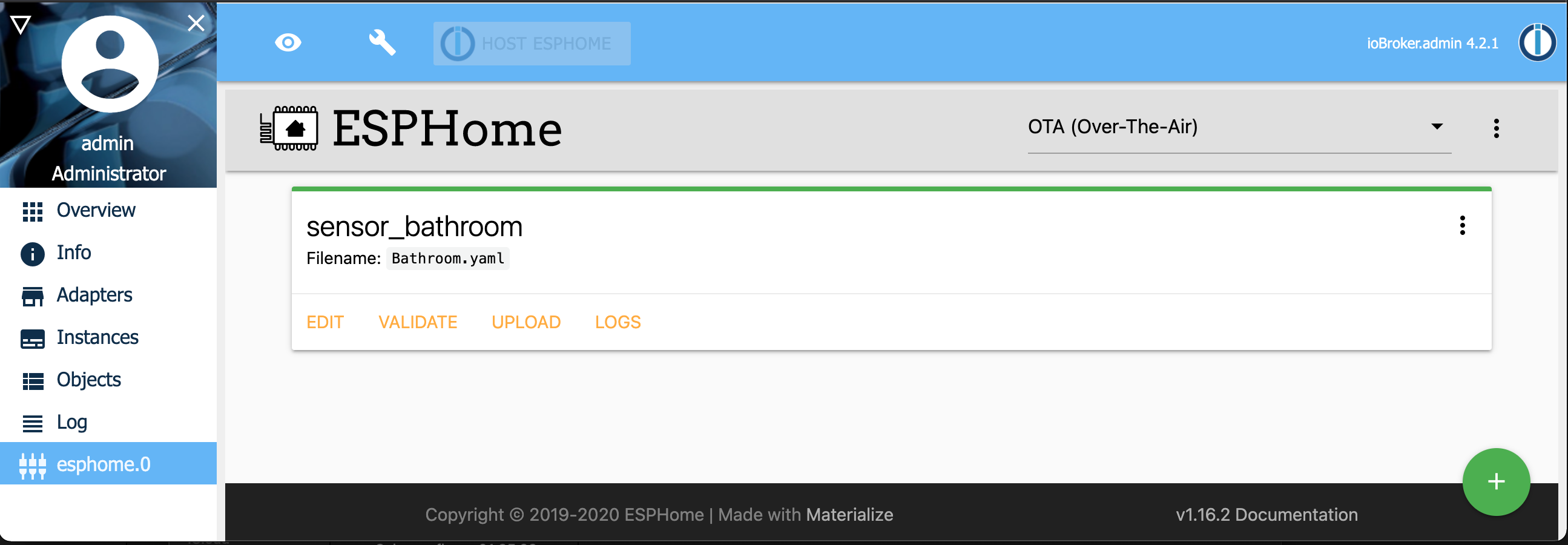
[ESPHome] Beta release
-
Hi,
ich hab an einem ESP8266 ein EPaper angeschlossen und mit der YAML unten kann ich auch Text auf dem EPaper Display anzeigen.
Weis jemand wie man Werte vom IOBroker (z.B. vom Homematic Adapter) auf dem Display anzeigen kann?
Grüße, Bernd
esphome: name: test12345 platform: ESP8266 board: d1_mini wifi: ssid: "WLANNAME" password: "WLANPASSWORT" # Enable fallback hotspot (captive portal) in case wifi connection fails ap: ssid: "Fallback Hotspot" password: "istgeheim" captive_portal: # Enable logging logger: # Enable Home Assistant API api: ota: http_request: useragent: esphome timeout: 10s interval: - interval: 1min then: - http_request.get: http://e4310:8087/getPlainValue/javascript.0.SolarTestLV time: - platform: sntp id: meine_time spi: clk_pin: D5 mosi_pin: D7 font: - file: 'arial.ttf' #'slkscr.ttf' id: font1 size: 12 glyphs: '!\"%()+,-_.:°0123456789ABCDEFGHIJKLMNOPQRSTUVWXYZ abcdefghijklmnopqrstuvwxyzßäöü' display: - platform: waveshare_epaper cs_pin: D8 dc_pin: D4 reset_pin: D1 busy_pin: D2 model: 4.20in #model: 2.90in update_interval: 60s lambda: |- it.print(2, 2, id(font1), "Test 1 2 3 4 5 6 7 ° ä ö ü"); it.print(2, 14, id(font1), "Test 1 2 3 4 5 6 7"); it.print(2, 26, id(font1), "Test 1 2 3 4 5 6 7"); it.strftime(2, 38, id(font1), "%d.%m.%Y %H:%M Uhr", id(meine_time).now()); -
Hi,
ich hab an einem ESP8266 ein EPaper angeschlossen und mit der YAML unten kann ich auch Text auf dem EPaper Display anzeigen.
Weis jemand wie man Werte vom IOBroker (z.B. vom Homematic Adapter) auf dem Display anzeigen kann?
Grüße, Bernd
esphome: name: test12345 platform: ESP8266 board: d1_mini wifi: ssid: "WLANNAME" password: "WLANPASSWORT" # Enable fallback hotspot (captive portal) in case wifi connection fails ap: ssid: "Fallback Hotspot" password: "istgeheim" captive_portal: # Enable logging logger: # Enable Home Assistant API api: ota: http_request: useragent: esphome timeout: 10s interval: - interval: 1min then: - http_request.get: http://e4310:8087/getPlainValue/javascript.0.SolarTestLV time: - platform: sntp id: meine_time spi: clk_pin: D5 mosi_pin: D7 font: - file: 'arial.ttf' #'slkscr.ttf' id: font1 size: 12 glyphs: '!\"%()+,-_.:°0123456789ABCDEFGHIJKLMNOPQRSTUVWXYZ abcdefghijklmnopqrstuvwxyzßäöü' display: - platform: waveshare_epaper cs_pin: D8 dc_pin: D4 reset_pin: D1 busy_pin: D2 model: 4.20in #model: 2.90in update_interval: 60s lambda: |- it.print(2, 2, id(font1), "Test 1 2 3 4 5 6 7 ° ä ö ü"); it.print(2, 14, id(font1), "Test 1 2 3 4 5 6 7"); it.print(2, 26, id(font1), "Test 1 2 3 4 5 6 7"); it.strftime(2, 38, id(font1), "%d.%m.%Y %H:%M Uhr", id(meine_time).now());@bernd33-1 sagte in [ESPHome] Beta release:
Weis jemand wie man Werte vom IOBroker (z.B. vom Homematic Adapter) auf dem Display anzeigen kann?
leider noch nicht, du kannst. werten von Sensoren etc weiterreichen aber texte selber kan ich leider noch nicht schicken: https://github.com/DrozmotiX/ioBroker.esphome/issues/103
-
Hi,
ich hab an einem ESP8266 ein EPaper angeschlossen und mit der YAML unten kann ich auch Text auf dem EPaper Display anzeigen.
Weis jemand wie man Werte vom IOBroker (z.B. vom Homematic Adapter) auf dem Display anzeigen kann?
Grüße, Bernd
esphome: name: test12345 platform: ESP8266 board: d1_mini wifi: ssid: "WLANNAME" password: "WLANPASSWORT" # Enable fallback hotspot (captive portal) in case wifi connection fails ap: ssid: "Fallback Hotspot" password: "istgeheim" captive_portal: # Enable logging logger: # Enable Home Assistant API api: ota: http_request: useragent: esphome timeout: 10s interval: - interval: 1min then: - http_request.get: http://e4310:8087/getPlainValue/javascript.0.SolarTestLV time: - platform: sntp id: meine_time spi: clk_pin: D5 mosi_pin: D7 font: - file: 'arial.ttf' #'slkscr.ttf' id: font1 size: 12 glyphs: '!\"%()+,-_.:°0123456789ABCDEFGHIJKLMNOPQRSTUVWXYZ abcdefghijklmnopqrstuvwxyzßäöü' display: - platform: waveshare_epaper cs_pin: D8 dc_pin: D4 reset_pin: D1 busy_pin: D2 model: 4.20in #model: 2.90in update_interval: 60s lambda: |- it.print(2, 2, id(font1), "Test 1 2 3 4 5 6 7 ° ä ö ü"); it.print(2, 14, id(font1), "Test 1 2 3 4 5 6 7"); it.print(2, 26, id(font1), "Test 1 2 3 4 5 6 7"); it.strftime(2, 38, id(font1), "%d.%m.%Y %H:%M Uhr", id(meine_time).now());@bernd33-1 Über MQTT funktioniert. es.
Ein Ausschnitt aus der YAML:display: - platform: ili9341 model: TFT 2.4 id: Display1 cs_pin: GPIO5 dc_pin: GPIO4 led_pin: GPIO15 reset_pin: GPIO22 rotation: 90° pages: - id: page1 lambda: |- it.strftime(160, 0, id(RB1), TextAlign::TOP_CENTER, "%X %d.%m.%y", id(timeact).now()); it.printf(5, 25, id(RB3), id(green_01), "%s", id(Zeile11).state.c_str()); it.printf(5, 60, id(RB3), id(green_01), "%s", id(Zeile12).state.c_str()); it.printf(5, 90, id(RB3), id(green_01), "%s", id(Zeile13).state.c_str()); it.printf(5, 120, id(RB3), id(green_01), "%s", id(Zeile14).state.c_str()); it.printf(5, 150, id(RB3), id(green_01), "%s", id(Zeile15).state.c_str()); it.printf(5, 180, id(RB3), id(blue_01), "%s", id(Zeile16).state.c_str()); it.printf(5, 210, id(RB3), id(blue_01), "%s", id(Zeile17).state.c_str()); - id: page2 lambda: |- it.strftime(160, 0, id(RB1), TextAlign::TOP_CENTER, "%X %d.%m.%y", id(timeact).now()); it.printf(5, 25, id(RB3), id(green_01), "%s", id(Zeile21).state.c_str()); it.printf(5, 60, id(RB3), id(green_01), "%s", id(Zeile22).state.c_str()); it.printf(5, 90, id(RB3), id(green_01), "%s", id(Zeile23).state.c_str()); it.printf(5, 120, id(RB3), id(green_01), "%s", id(Zeile24).state.c_str()); it.printf(5, 150, id(RB3), id(green_01), "%s", id(Zeile25).state.c_str()); it.printf(5, 180, id(RB3), id(blue_01), "%s", id(Zeile26).state.c_str()); it.printf(5, 210, id(RB3), id(blue_01), "%s", id(Zeile27).state.c_str()); text_sensor: - platform: mqtt_subscribe name: "Zeile 1.1" id: Zeile11 topic: Seite1/Zeile1 - platform: mqtt_subscribe name: "Zeile 1.2" id: Zeile12 topic: Seite1/Zeile2 - platform: mqtt_subscribe name: "Zeile 1.3" id: Zeile13 topic: Seite1/Zeile3 - platform: mqtt_subscribe name: "Zeile 1.4" id: Zeile14 topic: Seite1/Zeile4 - platform: mqtt_subscribe name: "Zeile 1.5" id: Zeile15 topic: Seite1/Zeile5 - platform: mqtt_subscribe name: "Zeile 1.6" id: Zeile16 topic: Seite1/Zeile6 - platform: mqtt_subscribe name: "Zeile 1.7" id: Zeile17 topic: Seite1/Zeile7 - platform: mqtt_subscribe name: "Zeile 2.1" id: Zeile21 topic: Seite2/Zeile1 - platform: mqtt_subscribe name: "Zeile 2.2" id: Zeile22 topic: Seite2/Zeile2 - platform: mqtt_subscribe name: "Zeile 2.3" id: Zeile23 topic: Seite2/Zeile3 - platform: mqtt_subscribe name: "Zeile 2.4" id: Zeile24 topic: Seite2/Zeile4 - platform: mqtt_subscribe name: "Zeile 2.5" id: Zeile25 topic: Seite2/Zeile5 - platform: mqtt_subscribe name: "Zeile 2.6" id: Zeile26 topic: Seite2/Zeile6 - platform: mqtt_subscribe name: "Zeile 2.7" id: Zeile27 topic: Seite2/Zeile7 -
@bernd33-1 Über MQTT funktioniert. es.
Ein Ausschnitt aus der YAML:display: - platform: ili9341 model: TFT 2.4 id: Display1 cs_pin: GPIO5 dc_pin: GPIO4 led_pin: GPIO15 reset_pin: GPIO22 rotation: 90° pages: - id: page1 lambda: |- it.strftime(160, 0, id(RB1), TextAlign::TOP_CENTER, "%X %d.%m.%y", id(timeact).now()); it.printf(5, 25, id(RB3), id(green_01), "%s", id(Zeile11).state.c_str()); it.printf(5, 60, id(RB3), id(green_01), "%s", id(Zeile12).state.c_str()); it.printf(5, 90, id(RB3), id(green_01), "%s", id(Zeile13).state.c_str()); it.printf(5, 120, id(RB3), id(green_01), "%s", id(Zeile14).state.c_str()); it.printf(5, 150, id(RB3), id(green_01), "%s", id(Zeile15).state.c_str()); it.printf(5, 180, id(RB3), id(blue_01), "%s", id(Zeile16).state.c_str()); it.printf(5, 210, id(RB3), id(blue_01), "%s", id(Zeile17).state.c_str()); - id: page2 lambda: |- it.strftime(160, 0, id(RB1), TextAlign::TOP_CENTER, "%X %d.%m.%y", id(timeact).now()); it.printf(5, 25, id(RB3), id(green_01), "%s", id(Zeile21).state.c_str()); it.printf(5, 60, id(RB3), id(green_01), "%s", id(Zeile22).state.c_str()); it.printf(5, 90, id(RB3), id(green_01), "%s", id(Zeile23).state.c_str()); it.printf(5, 120, id(RB3), id(green_01), "%s", id(Zeile24).state.c_str()); it.printf(5, 150, id(RB3), id(green_01), "%s", id(Zeile25).state.c_str()); it.printf(5, 180, id(RB3), id(blue_01), "%s", id(Zeile26).state.c_str()); it.printf(5, 210, id(RB3), id(blue_01), "%s", id(Zeile27).state.c_str()); text_sensor: - platform: mqtt_subscribe name: "Zeile 1.1" id: Zeile11 topic: Seite1/Zeile1 - platform: mqtt_subscribe name: "Zeile 1.2" id: Zeile12 topic: Seite1/Zeile2 - platform: mqtt_subscribe name: "Zeile 1.3" id: Zeile13 topic: Seite1/Zeile3 - platform: mqtt_subscribe name: "Zeile 1.4" id: Zeile14 topic: Seite1/Zeile4 - platform: mqtt_subscribe name: "Zeile 1.5" id: Zeile15 topic: Seite1/Zeile5 - platform: mqtt_subscribe name: "Zeile 1.6" id: Zeile16 topic: Seite1/Zeile6 - platform: mqtt_subscribe name: "Zeile 1.7" id: Zeile17 topic: Seite1/Zeile7 - platform: mqtt_subscribe name: "Zeile 2.1" id: Zeile21 topic: Seite2/Zeile1 - platform: mqtt_subscribe name: "Zeile 2.2" id: Zeile22 topic: Seite2/Zeile2 - platform: mqtt_subscribe name: "Zeile 2.3" id: Zeile23 topic: Seite2/Zeile3 - platform: mqtt_subscribe name: "Zeile 2.4" id: Zeile24 topic: Seite2/Zeile4 - platform: mqtt_subscribe name: "Zeile 2.5" id: Zeile25 topic: Seite2/Zeile5 - platform: mqtt_subscribe name: "Zeile 2.6" id: Zeile26 topic: Seite2/Zeile6 - platform: mqtt_subscribe name: "Zeile 2.7" id: Zeile27 topic: Seite2/Zeile7 -
@pboeck Könntest du ein vollständiges Beispiel zur Verfügung stellen? Versuche mich gerade mit Nextion Displays. Allerdings habe ich auch das von dir verwendete Display hier um es mal zu testen.
@noah3112 sagte in [ESPHome] Beta release:
@pboeck Könntest du ein vollständiges Beispiel zur Verfügung stellen? Versuche mich gerade mit Nextion Displays. Allerdings habe ich auch das von dir verwendete Display hier um es mal zu testen.
Die yaml steht in seinem Beitrag, ich bin auf 50% es im Adapter ohne mqtt zu lösen muss nur noch den Proto Bluff begreifen
-
@noah3112 sagte in [ESPHome] Beta release:
@pboeck Könntest du ein vollständiges Beispiel zur Verfügung stellen? Versuche mich gerade mit Nextion Displays. Allerdings habe ich auch das von dir verwendete Display hier um es mal zu testen.
Die yaml steht in seinem Beitrag, ich bin auf 50% es im Adapter ohne mqtt zu lösen muss nur noch den Proto Bluff begreifen
@dutchman Ich wollte gern ein komplettes Beispiel nicht nur ein Ausschnitt. Vielleicht bekomme ich ja noch eine Antwort vom Autor ;-)
Wenn es bald ohne den Umweg über MQTT funktioniert wäre das der Knaller. Danke für deine Arbeit 👍 -
@dutchman Ich wollte gern ein komplettes Beispiel nicht nur ein Ausschnitt. Vielleicht bekomme ich ja noch eine Antwort vom Autor ;-)
Wenn es bald ohne den Umweg über MQTT funktioniert wäre das der Knaller. Danke für deine Arbeit 👍@noah3112
Hier ist die komplette .yaml und das Blockly:esphome: name: testdisplay platform: ESP32 board: nodemcu-32s wifi: ssid: "XX" password: "XX" manual_ip: static_ip: X gateway: X subnet: X # Enable fallback hotspot (captive portal) in case wifi connection fails ap: ssid: "Test Display Fallback Hotspot" password: "X" captive_portal: # Enable logging logger: baud_rate: 0 # level: ERROR # Enable Home Assistant API # api: # password: "XX" mqtt: broker: XX username: XX password: XX ota: password: "X" web_server: port: 80 auth: username: XX password: XX time: - platform: sntp servers: XX id: timeact spi: clk_pin: GPIO18 mosi_pin: GPIO23 miso_pin: GPIO19 sensor: - platform: wifi_signal id: WLAN name: "WiFi Signal" update_interval: 60s font: - file: "Roboto-Regular.ttf" id: RB3 size: 24 - file: "Roboto-Regular.ttf" id: size: 20 - file: "Roboto-Regular.ttf" id: RB1 size: 16 color: - id: red_01 red: 100% green: 0% blue: 0% - id: blue_01 red: 0% green: 0% blue: 100% - id: green_01 red: 0% green: 100% blue: 0% display: - platform: ili9341 model: TFT 2.4 id: Display1 cs_pin: GPIO5 dc_pin: GPIO4 led_pin: GPIO15 reset_pin: GPIO22 rotation: 90° pages: - id: page1 lambda: |- it.strftime(160, 0, id(RB1), TextAlign::TOP_CENTER, "%X %d.%m.%y", id(timeact).now()); it.printf(5, 25, id(RB3), id(green_01), "%s", id(Zeile11).state.c_str()); it.printf(5, 60, id(RB3), id(green_01), "%s", id(Zeile12).state.c_str()); it.printf(5, 90, id(RB3), id(green_01), "%s", id(Zeile13).state.c_str()); it.printf(5, 120, id(RB3), id(green_01), "%s", id(Zeile14).state.c_str()); it.printf(5, 150, id(RB3), id(green_01), "%s", id(Zeile15).state.c_str()); it.printf(5, 180, id(RB3), id(blue_01), "%s", id(Zeile16).state.c_str()); it.printf(5, 210, id(RB3), id(blue_01), "%s", id(Zeile17).state.c_str()); - id: page2 lambda: |- it.strftime(160, 0, id(RB1), TextAlign::TOP_CENTER, "%X %d.%m.%y", id(timeact).now()); it.printf(5, 25, id(RB3), id(green_01), "%s", id(Zeile21).state.c_str()); it.printf(5, 60, id(RB3), id(green_01), "%s", id(Zeile22).state.c_str()); it.printf(5, 90, id(RB3), id(green_01), "%s", id(Zeile23).state.c_str()); it.printf(5, 120, id(RB3), id(green_01), "%s", id(Zeile24).state.c_str()); it.printf(5, 150, id(RB3), id(green_01), "%s", id(Zeile25).state.c_str()); it.printf(5, 180, id(RB3), id(blue_01), "%s", id(Zeile26).state.c_str()); it.printf(5, 210, id(RB3), id(blue_01), "%s", id(Zeile27).state.c_str()); text_sensor: - platform: mqtt_subscribe name: "Zeile 1.1" id: Zeile11 topic: Seite1/Zeile1 - platform: mqtt_subscribe name: "Zeile 1.2" id: Zeile12 topic: Seite1/Zeile2 - platform: mqtt_subscribe name: "Zeile 1.3" id: Zeile13 topic: Seite1/Zeile3 - platform: mqtt_subscribe name: "Zeile 1.4" id: Zeile14 topic: Seite1/Zeile4 - platform: mqtt_subscribe name: "Zeile 1.5" id: Zeile15 topic: Seite1/Zeile5 - platform: mqtt_subscribe name: "Zeile 1.6" id: Zeile16 topic: Seite1/Zeile6 - platform: mqtt_subscribe name: "Zeile 1.7" id: Zeile17 topic: Seite1/Zeile7 - platform: mqtt_subscribe name: "Zeile 2.1" id: Zeile21 topic: Seite2/Zeile1 - platform: mqtt_subscribe name: "Zeile 2.2" id: Zeile22 topic: Seite2/Zeile2 - platform: mqtt_subscribe name: "Zeile 2.3" id: Zeile23 topic: Seite2/Zeile3 - platform: mqtt_subscribe name: "Zeile 2.4" id: Zeile24 topic: Seite2/Zeile4 - platform: mqtt_subscribe name: "Zeile 2.5" id: Zeile25 topic: Seite2/Zeile5 - platform: mqtt_subscribe name: "Zeile 2.6" id: Zeile26 topic: Seite2/Zeile6 - platform: mqtt_subscribe name: "Zeile 2.7" id: Zeile27 topic: Seite2/Zeile7 output: - platform: ledc pin: GPIO15 id: gpio_32_backlight_pwm inverted: yes light: - platform: monochromatic output: gpio_32_backlight_pwm name: "ILI9341 Display Backlight" id: back_light restore_mode: ALWAYS_OFF on_turn_on: - delay: 10s - light.turn_off: back_light xpt2046: id: touchscreen cs_pin: GPIO14 irq_pin: GPIO27 update_interval: 50ms report_interval: 1s threshold: 400 dimension_x: 240 dimension_y: 320 calibration_x_min: 3860 calibration_x_max: 280 calibration_y_min: 340 calibration_y_max: 3860 swap_x_y: false on_state: - lambda: |- ESP_LOGI("main", "args x=%d, y=%d, touched=%s", x, y, (touched ? "touch" : "release")); ESP_LOGI("main", "member x=%d, y=%d, touched=%d, x_raw=%d, y_raw=%d, z_raw=%d", id(touchscreen).x, id(touchscreen).y, (int) id(touchscreen).touched, id(touchscreen).x_raw, id(touchscreen).y_raw, id(touchscreen).z_raw ); binary_sensor: - platform: xpt2046 xpt2046_id: touchscreen name: Touch1 id: touch_key0 x_min: 20 x_max: 80 y_min: 200 y_max: 280 on_press: - display.page.show_next: Display1 - component.update: Display1 - platform: xpt2046 xpt2046_id: touchscreen name: Touch2 id: touch_key2 x_min: 90 x_max: 140 y_min: 100 y_max: 160 on_press: - light.turn_on: back_light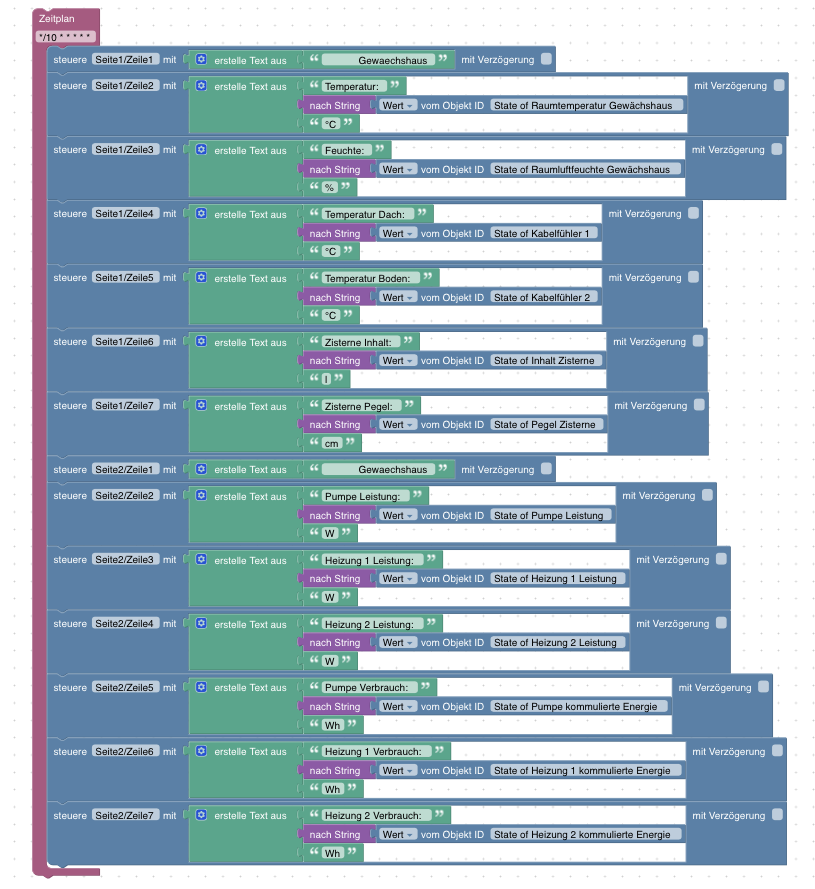
-
@noah3112
Hier ist die komplette .yaml und das Blockly:esphome: name: testdisplay platform: ESP32 board: nodemcu-32s wifi: ssid: "XX" password: "XX" manual_ip: static_ip: X gateway: X subnet: X # Enable fallback hotspot (captive portal) in case wifi connection fails ap: ssid: "Test Display Fallback Hotspot" password: "X" captive_portal: # Enable logging logger: baud_rate: 0 # level: ERROR # Enable Home Assistant API # api: # password: "XX" mqtt: broker: XX username: XX password: XX ota: password: "X" web_server: port: 80 auth: username: XX password: XX time: - platform: sntp servers: XX id: timeact spi: clk_pin: GPIO18 mosi_pin: GPIO23 miso_pin: GPIO19 sensor: - platform: wifi_signal id: WLAN name: "WiFi Signal" update_interval: 60s font: - file: "Roboto-Regular.ttf" id: RB3 size: 24 - file: "Roboto-Regular.ttf" id: size: 20 - file: "Roboto-Regular.ttf" id: RB1 size: 16 color: - id: red_01 red: 100% green: 0% blue: 0% - id: blue_01 red: 0% green: 0% blue: 100% - id: green_01 red: 0% green: 100% blue: 0% display: - platform: ili9341 model: TFT 2.4 id: Display1 cs_pin: GPIO5 dc_pin: GPIO4 led_pin: GPIO15 reset_pin: GPIO22 rotation: 90° pages: - id: page1 lambda: |- it.strftime(160, 0, id(RB1), TextAlign::TOP_CENTER, "%X %d.%m.%y", id(timeact).now()); it.printf(5, 25, id(RB3), id(green_01), "%s", id(Zeile11).state.c_str()); it.printf(5, 60, id(RB3), id(green_01), "%s", id(Zeile12).state.c_str()); it.printf(5, 90, id(RB3), id(green_01), "%s", id(Zeile13).state.c_str()); it.printf(5, 120, id(RB3), id(green_01), "%s", id(Zeile14).state.c_str()); it.printf(5, 150, id(RB3), id(green_01), "%s", id(Zeile15).state.c_str()); it.printf(5, 180, id(RB3), id(blue_01), "%s", id(Zeile16).state.c_str()); it.printf(5, 210, id(RB3), id(blue_01), "%s", id(Zeile17).state.c_str()); - id: page2 lambda: |- it.strftime(160, 0, id(RB1), TextAlign::TOP_CENTER, "%X %d.%m.%y", id(timeact).now()); it.printf(5, 25, id(RB3), id(green_01), "%s", id(Zeile21).state.c_str()); it.printf(5, 60, id(RB3), id(green_01), "%s", id(Zeile22).state.c_str()); it.printf(5, 90, id(RB3), id(green_01), "%s", id(Zeile23).state.c_str()); it.printf(5, 120, id(RB3), id(green_01), "%s", id(Zeile24).state.c_str()); it.printf(5, 150, id(RB3), id(green_01), "%s", id(Zeile25).state.c_str()); it.printf(5, 180, id(RB3), id(blue_01), "%s", id(Zeile26).state.c_str()); it.printf(5, 210, id(RB3), id(blue_01), "%s", id(Zeile27).state.c_str()); text_sensor: - platform: mqtt_subscribe name: "Zeile 1.1" id: Zeile11 topic: Seite1/Zeile1 - platform: mqtt_subscribe name: "Zeile 1.2" id: Zeile12 topic: Seite1/Zeile2 - platform: mqtt_subscribe name: "Zeile 1.3" id: Zeile13 topic: Seite1/Zeile3 - platform: mqtt_subscribe name: "Zeile 1.4" id: Zeile14 topic: Seite1/Zeile4 - platform: mqtt_subscribe name: "Zeile 1.5" id: Zeile15 topic: Seite1/Zeile5 - platform: mqtt_subscribe name: "Zeile 1.6" id: Zeile16 topic: Seite1/Zeile6 - platform: mqtt_subscribe name: "Zeile 1.7" id: Zeile17 topic: Seite1/Zeile7 - platform: mqtt_subscribe name: "Zeile 2.1" id: Zeile21 topic: Seite2/Zeile1 - platform: mqtt_subscribe name: "Zeile 2.2" id: Zeile22 topic: Seite2/Zeile2 - platform: mqtt_subscribe name: "Zeile 2.3" id: Zeile23 topic: Seite2/Zeile3 - platform: mqtt_subscribe name: "Zeile 2.4" id: Zeile24 topic: Seite2/Zeile4 - platform: mqtt_subscribe name: "Zeile 2.5" id: Zeile25 topic: Seite2/Zeile5 - platform: mqtt_subscribe name: "Zeile 2.6" id: Zeile26 topic: Seite2/Zeile6 - platform: mqtt_subscribe name: "Zeile 2.7" id: Zeile27 topic: Seite2/Zeile7 output: - platform: ledc pin: GPIO15 id: gpio_32_backlight_pwm inverted: yes light: - platform: monochromatic output: gpio_32_backlight_pwm name: "ILI9341 Display Backlight" id: back_light restore_mode: ALWAYS_OFF on_turn_on: - delay: 10s - light.turn_off: back_light xpt2046: id: touchscreen cs_pin: GPIO14 irq_pin: GPIO27 update_interval: 50ms report_interval: 1s threshold: 400 dimension_x: 240 dimension_y: 320 calibration_x_min: 3860 calibration_x_max: 280 calibration_y_min: 340 calibration_y_max: 3860 swap_x_y: false on_state: - lambda: |- ESP_LOGI("main", "args x=%d, y=%d, touched=%s", x, y, (touched ? "touch" : "release")); ESP_LOGI("main", "member x=%d, y=%d, touched=%d, x_raw=%d, y_raw=%d, z_raw=%d", id(touchscreen).x, id(touchscreen).y, (int) id(touchscreen).touched, id(touchscreen).x_raw, id(touchscreen).y_raw, id(touchscreen).z_raw ); binary_sensor: - platform: xpt2046 xpt2046_id: touchscreen name: Touch1 id: touch_key0 x_min: 20 x_max: 80 y_min: 200 y_max: 280 on_press: - display.page.show_next: Display1 - component.update: Display1 - platform: xpt2046 xpt2046_id: touchscreen name: Touch2 id: touch_key2 x_min: 90 x_max: 140 y_min: 100 y_max: 160 on_press: - light.turn_on: back_light@pboeck Supi 😊 Danke 👍
-
@Dutchman,
ich dachte vorhin das der Adapter installiert wurde, da ich das Laptop geschlossen habe wärend der Installation....nein er brach bei der Installation mit code 25 ab.
Den installations Fixer habe ich schon durchlaufen lassen, brachte aber nichts.
Anbei das installations Log.2021-09-29T21_49_57_821Z-debug.log
RPI 4 Debian Buster
Python 3.7.3 -
@Dutchman,
ich dachte vorhin das der Adapter installiert wurde, da ich das Laptop geschlossen habe wärend der Installation....nein er brach bei der Installation mit code 25 ab.
Den installations Fixer habe ich schon durchlaufen lassen, brachte aber nichts.
Anbei das installations Log.2021-09-29T21_49_57_821Z-debug.log
RPI 4 Debian Buster
Python 3.7.3@menne installiere mal pip und probiere erneut
-
@dutchman ,
ein Hallo an dich.
Pip3 war schon installiert, musste aber ein reinstall machen. Jetzt wird auch die Version angezeigt.pip 21.2.4 from /usr/local/lib/python3.7/dist-packages/pip (python 3.7)
Immer noch code 25 (
npip install) -
@dutchman ,
ein Hallo an dich.
Pip3 war schon installiert, musste aber ein reinstall machen. Jetzt wird auch die Version angezeigt.pip 21.2.4 from /usr/local/lib/python3.7/dist-packages/pip (python 3.7)
Immer noch code 25 (
npip install)...ein vollständiger Rebooot brachte keine Besserung.
Hier nochmal das Installfenster.
$ iobroker add esphome 0 --host iobroker

NPM version: 6.14.15

npm install iobroker.esphome@0.2.4 --loglevel error --prefix "/opt/iobroker" (System call)

Traceback (most recent call last):

File "/opt/iobroker/node_modules/nopy/src/get-pip.py", line 20061, in <module> main() File "/opt/iobroker/node_modules/nopy/src/get-pip.py", line 194, in main bootstrap(tmpdir=tmpdir) File "/opt/iobroker/node_modules/nopy/src/get-pip.py", line 82, in bootstrap import pip File "<frozen importlib._bootstrap>", line 983, in _find_and_load File "<frozen importlib._bootstrap>", line 967, in _find_and_load_unlocked File "<frozen importlib._bootstrap>", line 668, in _load_unlocked File "<frozen importlib._bootstrap>", line 638, in _load_backward_compatible File "/tmp/tmpt93vp9xz/pip.zip/pip/__init__.py", line 26, in <module> File "<frozen importlib._bootstrap>", line 983, in _find_and_load File "<frozen importlib._bootstrap>", line 967, in _find_and_load_unlocked File "<frozen importlib._bootstrap>", line 668, in _load_unlocked File "<frozen importlib._bootstrap>", line 638, in _load_backward_compatible File "/tmp/tmpt93vp9xz/pip.zip/pip/utils/__init__.py", line 27, in <module> File "<frozen importlib._bootstrap>", line 983, in _find_and_load File "<frozen importlib._bootstrap>", line 967, in _find_and_load_unlocked File "<frozen importlib._bootstrap>", line 668, in _load_unlocked File "<frozen importlib._bootstrap>", line 638, in _load_backward_compatible File "/tmp/tmpt93vp9xz/pip.zip/pip/_vendor/pkg_resources/__init__.py", line 3018, in <module> File "/tmp/tmpt93vp9xz/pip.zip/pip/_vendor/pkg_resources/__init__.py", line 3004, in _call_aside File "/tmp/tmpt93vp9xz/pip.zip/pip/_vendor/pkg_resources/__init__.py", line 3046, in _initialize_master_working_set File "/tmp/tmpt93vp9xz/pip.zip/pip/_vendor/pkg_resources/__init__.py", line 2578, in activate File "/tmp/tmpt93vp9xz/pip.zip/pip/_vendor/pkg_resources/__init__.py", line 2152, in declare_namespace File "/tmp/tmpt93vp9xz/pip.zip/pip/_vendor/pkg_resources/__init__.py", line 2092, in _handle_ns File "/tmp/tmpt93vp9xz/pip.zip/pip/_vendor/pkg_resources/__init__.py", line 2121, in _rebuild_mod_pathAttributeError: '_NamespacePath' object has no attribute 'sort'

Error: Exited with code 1.

at ChildProcess.<anonymous> (/opt/iobroker/node_modules/nopy/src/api.js:277:20) at ChildProcess.emit (events.js:314:20) at maybeClose (internal/child_process.js:1022:16) at Process.ChildProcess._handle.onexit (internal/child_process.js:287:5)

npm ERR! code ELIFECYCLEnpm ERR! errno 1

npm ERR! iobroker.esphome@0.2.4 install: `npip install`npm ERR! Exit status 1npm ERR! npm ERR! Failed at the iobroker.esphome@0.2.4 install script.npm ERR! This is probably not a problem with npm. There is likely additional logging output above.

npm ERR! A complete log of this run can be found in:npm ERR! /home/iobroker/.npm/_logs/2021-09-30T11_14_01_544Z-debug.log

host.iobroker Cannot install iobroker.esphome@0.2.4: 1

ERROR: Process exited with code 25
Scheinbar meckert er jetzt wegen eines Attributes...
-
...ein vollständiger Rebooot brachte keine Besserung.
Hier nochmal das Installfenster.
$ iobroker add esphome 0 --host iobroker

NPM version: 6.14.15

npm install iobroker.esphome@0.2.4 --loglevel error --prefix "/opt/iobroker" (System call)

Traceback (most recent call last):

File "/opt/iobroker/node_modules/nopy/src/get-pip.py", line 20061, in <module> main() File "/opt/iobroker/node_modules/nopy/src/get-pip.py", line 194, in main bootstrap(tmpdir=tmpdir) File "/opt/iobroker/node_modules/nopy/src/get-pip.py", line 82, in bootstrap import pip File "<frozen importlib._bootstrap>", line 983, in _find_and_load File "<frozen importlib._bootstrap>", line 967, in _find_and_load_unlocked File "<frozen importlib._bootstrap>", line 668, in _load_unlocked File "<frozen importlib._bootstrap>", line 638, in _load_backward_compatible File "/tmp/tmpt93vp9xz/pip.zip/pip/__init__.py", line 26, in <module> File "<frozen importlib._bootstrap>", line 983, in _find_and_load File "<frozen importlib._bootstrap>", line 967, in _find_and_load_unlocked File "<frozen importlib._bootstrap>", line 668, in _load_unlocked File "<frozen importlib._bootstrap>", line 638, in _load_backward_compatible File "/tmp/tmpt93vp9xz/pip.zip/pip/utils/__init__.py", line 27, in <module> File "<frozen importlib._bootstrap>", line 983, in _find_and_load File "<frozen importlib._bootstrap>", line 967, in _find_and_load_unlocked File "<frozen importlib._bootstrap>", line 668, in _load_unlocked File "<frozen importlib._bootstrap>", line 638, in _load_backward_compatible File "/tmp/tmpt93vp9xz/pip.zip/pip/_vendor/pkg_resources/__init__.py", line 3018, in <module> File "/tmp/tmpt93vp9xz/pip.zip/pip/_vendor/pkg_resources/__init__.py", line 3004, in _call_aside File "/tmp/tmpt93vp9xz/pip.zip/pip/_vendor/pkg_resources/__init__.py", line 3046, in _initialize_master_working_set File "/tmp/tmpt93vp9xz/pip.zip/pip/_vendor/pkg_resources/__init__.py", line 2578, in activate File "/tmp/tmpt93vp9xz/pip.zip/pip/_vendor/pkg_resources/__init__.py", line 2152, in declare_namespace File "/tmp/tmpt93vp9xz/pip.zip/pip/_vendor/pkg_resources/__init__.py", line 2092, in _handle_ns File "/tmp/tmpt93vp9xz/pip.zip/pip/_vendor/pkg_resources/__init__.py", line 2121, in _rebuild_mod_pathAttributeError: '_NamespacePath' object has no attribute 'sort'

Error: Exited with code 1.

at ChildProcess.<anonymous> (/opt/iobroker/node_modules/nopy/src/api.js:277:20) at ChildProcess.emit (events.js:314:20) at maybeClose (internal/child_process.js:1022:16) at Process.ChildProcess._handle.onexit (internal/child_process.js:287:5)

npm ERR! code ELIFECYCLEnpm ERR! errno 1

npm ERR! iobroker.esphome@0.2.4 install: `npip install`npm ERR! Exit status 1npm ERR! npm ERR! Failed at the iobroker.esphome@0.2.4 install script.npm ERR! This is probably not a problem with npm. There is likely additional logging output above.

npm ERR! A complete log of this run can be found in:npm ERR! /home/iobroker/.npm/_logs/2021-09-30T11_14_01_544Z-debug.log

host.iobroker Cannot install iobroker.esphome@0.2.4: 1

ERROR: Process exited with code 25
Scheinbar meckert er jetzt wegen eines Attributes...
@menne sagte in [ESPHome] Beta release:
Scheinbare meckert er jetzt wegen eines Attributes...
Da scheint was mit Python nicht in Ordnung zu sein was genau kan ich dir aber nicht sagen
-
@dutchman , komisch....mein Display und Lüfter laufen über python3 deshalb war auch pip installiert. Tja...k.A.
-
@dutchman , komisch....mein Display und Lüfter laufen über python3 deshalb war auch pip installiert. Tja...k.A.
-
@klassisch , ich mache gerade ein Full-Backup meines Systems. Morgen fliegt der ganze python3 Plunder runter. Danach installiere ich gleich auf eine höhere Version.
Wenn Kodi nicht auf Bullseye so beschixxxx laufen würde, wäre ich schon dort.
Dann liefe schon python 3.9.2
Deshalb werde ich python3 komplett reanimieren....Was anderes , wie der RPI 4 kommt bei mir nicht in Frage!
-
@menne sagte in [ESPHome] Beta release:
Scheinbare meckert er jetzt wegen eines Attributes...
Da scheint was mit Python nicht in Ordnung zu sein was genau kan ich dir aber nicht sagen
-
@menne sagte in [ESPHome] Beta release:
Python 3.9.1
:+1:
Danke für die Rückmeldung! Also war wohl was mit der Python Installation verbugt 😅 na dan viel Spaß damit 😁
-
-
@menne Ja. was dem ioBroker sein nodejs ist dem ESPHome sein python. Segen und Fluch.
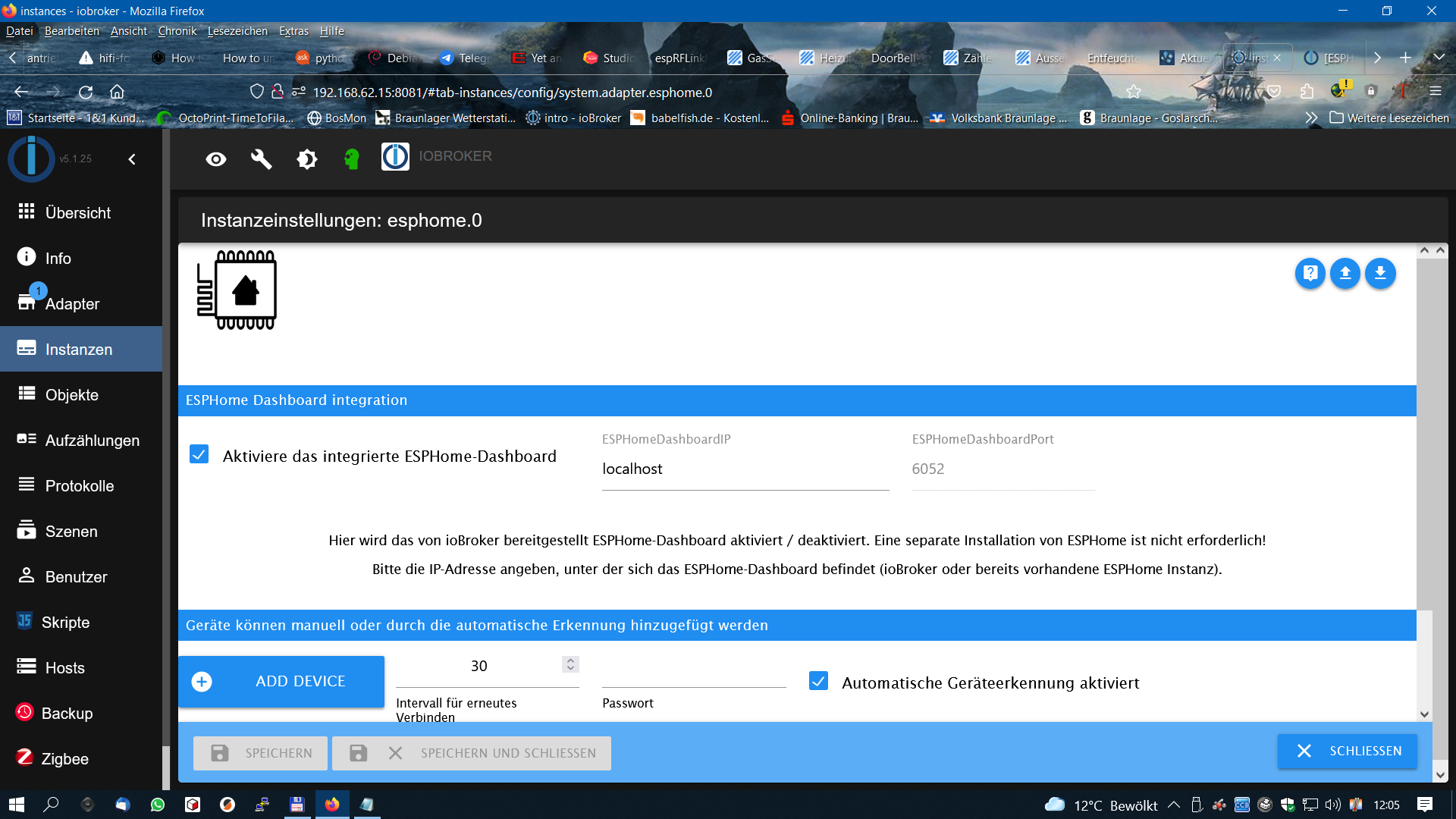
Sieht jetzt aber nach einem Erfolg aus. Dann kann es ja losgehen!Danke Euch beiden.....Mein Besuch ist gerade weg.
Was ich leider feststellen musste, dass das Display mit dem Controller Chip sh1106 nicht unterstützt wird.
Das ist derzeit in meinem PulseCounter verbaut und über den I²C Bus angeschlosseen.
Nun komme ich nicht mehr weiter...so wie es aussieht muss ich beim alten System bleiben.Vielleicht kann sich @Dutchman darüber äußern.
Anbei eine pdf von dem Display....


Support us
296
Online32.7k
Users82.4k
Topics1.3m
Posts