




PH-Messung
-
Log wenn Gerät eingeschaltet, dann ausgeschaltet. Nach ca. 30s bricht er dann komplett ab.
root@debian:/home/coyote/ph803w/node_modules/node-ph803w/example# DEBUG=ph803w*                                                                                                                      node data.js 192.168.66.56
  ph803w:device Connected to TCP 192.168.66.56:12416 +0ms
  ph803w:device Write and register for response type 7: 0000000303000006 +2ms
  ph803w:device Passcode received: IIXODDIHLL +7ms
  ph803w:device Resolve for message type 7: IIXODDIHLL +1ms
  ph803w:device Write and register for response type 9: 000000030f000008000a4949                                                                                                                     584f444449484c4c +0ms
  ph803w:device login success +16ms
  ph803w:device Resolve for message type 9: true +0ms
  ph803w:device Write and register for response type 145: 000000030400009002 +1m                                                                                                                     s
  ph803w:device Retrieved data: {"binFlags1":"11","binFlags2":"10","ph":7.35,"re                                                                                                                     dox":96,"phSwitch":false,"redoxSwitch":true} +48ms
Data: {"binFlags1":"11","binFlags2":"10","ph":7.35,"redox":96,"phSwitch":false,"                                                                                                                     redoxSwitch":true}
  ph803w:device Resolve for message type 145: [object Object] +2ms
  ph803w:device Retrieved data: {"binFlags1":"100","binFlags2":"10","ph":7.35,"r                                                                                                                     edox":94,"phSwitch":false,"redoxSwitch":true} +3s
Data: {"binFlags1":"100","binFlags2":"10","ph":7.35,"redox":94,"phSwitch":false,                                                                                                                     "redoxSwitch":true}
  ph803w:device Ignore resolve for message type 145 because no promise stored: {                                                                                                                     "binFlags1":"100","binFlags2":"10","ph":7.35,"redox":94,"phSwitch":false,"redoxS                                                                                                                     witch":true} +0ms
  ph803w:device Send ping +1s
  ph803w:device received pong +3ms
  ph803w:device Send ping +4s
  ph803w:device received pong +16ms
  ph803w:device Retrieved data: {"binFlags1":"100","binFlags2":"10","ph":7.36,"redox":93,"phSwitch":false,"redoxSwitch":true} +707ms
Data: {"binFlags1":"100","binFlags2":"10","ph":7.36,"redox":93,"phSwitch":false,"redoxSwitch":true}
  ph803w:device Ignore resolve for message type 145 because no promise stored: {"binFlags1":"100","binFlags2":"10","ph":7.36,"redox":93,"phSwitch":false,"redoxSwitch":true} +0ms
  ph803w:device Send ping +3s
  ph803w:device received pong +3ms
  ph803w:device Retrieved data: {"binFlags1":"100","binFlags2":"10","ph":7.36,"redox":92,"phSwitch":false,"redoxSwitch":true} +3s
Data: {"binFlags1":"100","binFlags2":"10","ph":7.36,"redox":92,"phSwitch":false,"redoxSwitch":true}
  ph803w:device Ignore resolve for message type 145 because no promise stored: {"binFlags1":"100","binFlags2":"10","ph":7.36,"redox":92,"phSwitch":false,"redoxSwitch":true} +0ms
  ph803w:device Send ping +1s
  ph803w:device received pong +2ms
  ph803w:device Send ping +4s
  ph803w:device received pong +43ms
  ph803w:device Send ping +4s
  ph803w:device Ping response overdue, reconnect +8s
  ph803w:device Destroy socket +0ms
  ph803w:device Socket error: Error: connect EHOSTUNREACH 192.168.66.56:12416 +28s
Error: Error: connect EHOSTUNREACH 192.168.66.56:12416
(node:13947) UnhandledPromiseRejectionWarning: Error
    at Socket.<anonymous> (/home/coyote/ph803w/node_modules/node-ph803w/lib/device.js:78:28)
    at Socket.emit (events.js:314:20)
    at emitErrorNT (internal/streams/destroy.js:92:8)
    at emitErrorAndCloseNT (internal/streams/destroy.js:60:3)
    at processTicksAndRejections (internal/process/task_queues.js:84:21)
(node:13947) UnhandledPromiseRejectionWarning: Unhandled promise rejection. This error originated either by throwing inside of an async function without a catch block, or by rejecting a promise which was not handled with .catch(). To terminate the node process on unhandled promise rejection, use the CLI flag `--unhandled-rejections=strict` (see https://nodejs.org/api/cli.html#cli_unhandled_rejections_mode). (rejection id: 1)
(node:13947) [DEP0018] DeprecationWarning: Unhandled promise rejections are deprecated. In the future, promise rejections that are not handled will terminate the Node.js process with a non-zero exit code.
Zweites Log, Gerät nach ca. 10-15s wieder eingesteckt.
root@debian:/home/coyote/ph803w/node_modules/node-ph803w/example# DEBUG=ph803w* node data.js 192.168.66.56 ph803w:device Connected to TCP 192.168.66.56:12416 +0ms ph803w:device Write and register for response type 7: 0000000303000006 +12ms ph803w:device Passcode received: IIXODDIHLL +7ms ph803w:device Resolve for message type 7: IIXODDIHLL +1ms ph803w:device Write and register for response type 9: 000000030f000008000a4949584f444449484c4c +1ms ph803w:device login success +7ms ph803w:device Resolve for message type 9: true +1ms ph803w:device Write and register for response type 145: 000000030400009002 +1ms ph803w:device Retrieved data: {"binFlags1":"11","binFlags2":"10","ph":7.42,"redox":-59,"phSwitch":false,"redoxSwitch":true} +47ms Data: {"binFlags1":"11","binFlags2":"10","ph":7.42,"redox":-59,"phSwitch":false,"redoxSwitch":true} ph803w:device Resolve for message type 145: [object Object] +2ms ph803w:device Retrieved data: {"binFlags1":"100","binFlags2":"10","ph":7.38,"redox":-56,"phSwitch":false,"redoxSwitch":true} +3s Data: {"binFlags1":"100","binFlags2":"10","ph":7.38,"redox":-56,"phSwitch":false,"redoxSwitch":true} ph803w:device Ignore resolve for message type 145 because no promise stored: {"binFlags1":"100","binFlags2":"10","ph":7.38,"redox":-56,"phSwitch":false,"redoxSwitch":true} +0ms ph803w:device Send ping +1s ph803w:device received pong +5ms ph803w:device Send ping +4s ph803w:device received pong +2ms ph803w:device Retrieved data: {"binFlags1":"100","binFlags2":"10","ph":7.38,"redox":-57,"phSwitch":false,"redoxSwitch":true} +3s Data: {"binFlags1":"100","binFlags2":"10","ph":7.38,"redox":-57,"phSwitch":false,"redoxSwitch":true} ph803w:device Ignore resolve for message type 145 because no promise stored: {"binFlags1":"100","binFlags2":"10","ph":7.38,"redox":-57,"phSwitch":false,"redoxSwitch":true} +0ms ph803w:device Send ping +764ms ph803w:device received pong +2ms ph803w:device Send ping +4s ph803w:device received pong +2ms ph803w:device Retrieved data: {"binFlags1":"100","binFlags2":"10","ph":7.39,"redox":-56,"phSwitch":false,"redoxSwitch":true} +1s Data: {"binFlags1":"100","binFlags2":"10","ph":7.39,"redox":-56,"phSwitch":false,"redoxSwitch":true} ph803w:device Ignore resolve for message type 145 because no promise stored: {"binFlags1":"100","binFlags2":"10","ph":7.39,"redox":-56,"phSwitch":false,"redoxSwitch":true} +0ms ph803w:device Send ping +3s ph803w:device Ping response overdue, reconnect +8s ph803w:device Destroy socket +0ms ph803w:device Connected to TCP 192.168.66.56:12416 +10s ph803w:device Socket end, Reconnect: true +10s ph803w:device Connected to TCP 192.168.66.56:12416 +10s ph803w:device Socket end, Reconnect: true +10s ph803w:device Connected to TCP 192.168.66.56:12416 +10s ph803w:device Socket end, Reconnect: true +10sReconnect geht bei mir jetzt gar nicht mehr. Zumindest kommen keine Werte mehr. Er bricht aber auch nicht ab
ph803w:device Retrieved data: {"binFlags1":"100","binFlags2":"10","ph":6.95,"redox":690,"phSwitch":false,"redoxSwitch":true} +1s Data: {"binFlags1":"100","binFlags2":"10","ph":6.95,"redox":690,"phSwitch":false,"redoxSwitch":true} ph803w:device Ignore resolve for message type 145 because no promise stored: {"binFlags1":"100","binFlags2":"10","ph":6.95,"redox":690,"phSwitch":false,"redoxSwitch":true} +0ms ph803w:device Send ping +3s ph803w:device received pong +5ms ph803w:device Send ping +4s ph803w:device Ping response overdue, reconnect +8s ph803w:device Destroy socket +1ms ph803w:device Connected to TCP 192.168.88.128:12416 +10s ph803w:device Socket end, Reconnect: true +10s ph803w:device Connected to TCP 192.168.88.128:12416 +10s ph803w:device Socket end, Reconnect: true +10s ph803w:device Connected to TCP 192.168.88.128:12416 +10s ph803w:device Socket end, Reconnect: true +10s ph803w:device Connected to TCP 192.168.88.128:12416 +10s ph803w:device Socket end, Reconnect: true +10s ph803w:device Connected to TCP 192.168.88.128:12416 +10s ph803w:device Socket end, Reconnect: true +10s -
Alles unter Vorbehalt, weil es gestern bei mir auch schon nicht lief und bei Coyote gings. Kanns an diesen Meldungen liegen, das es nicht funktioniert? Mal sehn was die anderen sagen.
pi@iobroker:~ $ npm install Apollon77/node-ph803w
npm WARN saveError ENOENT: no such file or directory, open '/home/pi/package.json'
npm WARN enoent ENOENT: no such file or directory, open '/home/pi/package.json'
npm WARN pi No description
npm WARN pi No repository field.
npm WARN pi No README data
npm WARN pi No license field.
npm WARN optional SKIPPING OPTIONAL DEPENDENCY: fsevents@2.3.2 (node_modules/fsevents):
npm WARN notsup SKIPPING OPTIONAL DEPENDENCY: Unsupported platform for fsevents@2.3.2: wanted {"os":"darwin","arch":"any"} (current: {"os":"linux","arch":"arm"})
Hier hab ich das Gerät angemacht, script laufen lassen, Gerät aus, gewartet und wieder an.
pi@iobroker:~/node_modules/node-ph803w/example $ DEBUG=ph803w* node data.js 192.168.88.128
  ph803w:device Connected to TCP 192.168.88.128:12416 +0ms
  ph803w:device Write and register for response type 7: 0000000303000006 +4ms
  ph803w:device Passcode received: IVEXBRFPMQ +8ms
  ph803w:device Resolve for message type 7: IVEXBRFPMQ +0ms
  ph803w:device Write and register for response type 9: 000000030f000008000a49564558425246504d51 +1ms
  ph803w:device login success +7ms
  ph803w:device Resolve for message type 9: true +0ms
  ph803w:device Write and register for response type 145: 000000030400009002 +1ms
  ph803w:device Retrieved data: {"binFlags1":"11","binFlags2":"10","ph":7.09,"redox":729,"phSwitch":false,"redoxSwitch":true} +56ms
Data: {"binFlags1":"11","binFlags2":"10","ph":7.09,"redox":729,"phSwitch":false,"redoxSwitch":true}
  ph803w:device Resolve for message type 145: [object Object] +2ms
  ph803w:device Send ping +4s
  ph803w:device received pong +6ms
  ph803w:device Send ping +4s
  ph803w:device received pong +73ms
  ph803w:device Send ping +4s
  ph803w:device received pong +6ms
  ph803w:device Send ping +4s
  ph803w:device received pong +4ms
  ph803w:device Send ping +4s
  ph803w:device received pong +9ms
  ph803w:device Send ping +4s
  ph803w:device received pong +4ms
  ph803w:device Send ping +4s
  ph803w:device received pong +10ms
  ph803w:device Send ping +4s
  ph803w:device received pong +8ms
  ph803w:device Send ping +4s
  ph803w:device received pong +8ms
  ph803w:device Send ping +4s
  ph803w:device received pong +4ms
  ph803w:device Send ping +4s
  ph803w:device received pong +4ms
  ph803w:device Send ping +4s
  ph803w:device received pong +7ms
  ph803w:device Send ping +4s
  ph803w:device Ping response overdue, reconnect +8s
  ph803w:device Destroy socket +1ms
  ph803w:device Connected to TCP 192.168.88.128:12416 +13s
  ph803w:device Socket end, Reconnect: true +10s
  ph803w:device Connected to TCP 192.168.88.128:12416 +10s
  ph803w:device Socket end, Reconnect: true +10s
Dann aus, script anund Gerät an:
pi@iobroker:~/node_modules/node-ph803w/example $ DEBUG=ph803w* node data.js 192.168.88.128
  ph803w:device Socket error: Error: connect EHOSTUNREACH 192.168.88.128:12416 +0ms
Error: Error: connect EHOSTUNREACH 192.168.88.128:12416
Hab dann vermutlich erst heute Mittag wieder Zeit zu testen.
-
Alles unter Vorbehalt, weil es gestern bei mir auch schon nicht lief und bei Coyote gings. Kanns an diesen Meldungen liegen, das es nicht funktioniert? Mal sehn was die anderen sagen.
pi@iobroker:~ $ npm install Apollon77/node-ph803w
npm WARN saveError ENOENT: no such file or directory, open '/home/pi/package.json'
npm WARN enoent ENOENT: no such file or directory, open '/home/pi/package.json'
npm WARN pi No description
npm WARN pi No repository field.
npm WARN pi No README data
npm WARN pi No license field.
npm WARN optional SKIPPING OPTIONAL DEPENDENCY: fsevents@2.3.2 (node_modules/fsevents):
npm WARN notsup SKIPPING OPTIONAL DEPENDENCY: Unsupported platform for fsevents@2.3.2: wanted {"os":"darwin","arch":"any"} (current: {"os":"linux","arch":"arm"})
Hier hab ich das Gerät angemacht, script laufen lassen, Gerät aus, gewartet und wieder an.
pi@iobroker:~/node_modules/node-ph803w/example $ DEBUG=ph803w* node data.js 192.168.88.128
  ph803w:device Connected to TCP 192.168.88.128:12416 +0ms
  ph803w:device Write and register for response type 7: 0000000303000006 +4ms
  ph803w:device Passcode received: IVEXBRFPMQ +8ms
  ph803w:device Resolve for message type 7: IVEXBRFPMQ +0ms
  ph803w:device Write and register for response type 9: 000000030f000008000a49564558425246504d51 +1ms
  ph803w:device login success +7ms
  ph803w:device Resolve for message type 9: true +0ms
  ph803w:device Write and register for response type 145: 000000030400009002 +1ms
  ph803w:device Retrieved data: {"binFlags1":"11","binFlags2":"10","ph":7.09,"redox":729,"phSwitch":false,"redoxSwitch":true} +56ms
Data: {"binFlags1":"11","binFlags2":"10","ph":7.09,"redox":729,"phSwitch":false,"redoxSwitch":true}
  ph803w:device Resolve for message type 145: [object Object] +2ms
  ph803w:device Send ping +4s
  ph803w:device received pong +6ms
  ph803w:device Send ping +4s
  ph803w:device received pong +73ms
  ph803w:device Send ping +4s
  ph803w:device received pong +6ms
  ph803w:device Send ping +4s
  ph803w:device received pong +4ms
  ph803w:device Send ping +4s
  ph803w:device received pong +9ms
  ph803w:device Send ping +4s
  ph803w:device received pong +4ms
  ph803w:device Send ping +4s
  ph803w:device received pong +10ms
  ph803w:device Send ping +4s
  ph803w:device received pong +8ms
  ph803w:device Send ping +4s
  ph803w:device received pong +8ms
  ph803w:device Send ping +4s
  ph803w:device received pong +4ms
  ph803w:device Send ping +4s
  ph803w:device received pong +4ms
  ph803w:device Send ping +4s
  ph803w:device received pong +7ms
  ph803w:device Send ping +4s
  ph803w:device Ping response overdue, reconnect +8s
  ph803w:device Destroy socket +1ms
  ph803w:device Connected to TCP 192.168.88.128:12416 +13s
  ph803w:device Socket end, Reconnect: true +10s
  ph803w:device Connected to TCP 192.168.88.128:12416 +10s
  ph803w:device Socket end, Reconnect: true +10s
Dann aus, script anund Gerät an:
pi@iobroker:~/node_modules/node-ph803w/example $ DEBUG=ph803w* node data.js 192.168.88.128
  ph803w:device Socket error: Error: connect EHOSTUNREACH 192.168.88.128:12416 +0ms
Error: Error: connect EHOSTUNREACH 192.168.88.128:12416
Hab dann vermutlich erst heute Mittag wieder Zeit zu testen.
@skinni nein, das passt schon. Die Fehlermeldungen kommen bei mir auch beim Installieren.
Eigentlich sieht es ja so aus wie bei mir, nur das beim zweiten mal das Script das Gerät nicht findet.
Ich habe zwar jetzt die neue Version installiert, kann aber erst heute Mittag/Abend testen mit Gerät aus/ein schalten -
@skinni nein, das passt schon. Die Fehlermeldungen kommen bei mir auch beim Installieren.
Eigentlich sieht es ja so aus wie bei mir, nur das beim zweiten mal das Script das Gerät nicht findet.
Ich habe zwar jetzt die neue Version installiert, kann aber erst heute Mittag/Abend testen mit Gerät aus/ein schaltenAlso jetzt gerade nochmal getestet.
Wenn ich das Script starte und dann das Gerät einstecke, verbindet er sich. Man darf aber auch da nicht so lange warten.
Ansonsten gleiches wie gestern, stecke ich das Teil aus und warte über 30s bricht er ab, warte ich etwas kürzer kommt wieder:ph803w:device Connected to TCP 192.168.88.128:12416 +10s ph803w:device Socket end, Reconnect: true +10s ph803w:device Connected to TCP 192.168.88.128:12416 +10s ph803w:device Socket end, Reconnect: true +10s ph803w:device Connected to TCP 192.168.88.128:12416 +10s ph803w:device Socket end, Reconnect: true +10s ph803w:device Connected to TCP 192.168.88.128:12416 +10s ph803w:device Socket end, Reconnect: true +10s ph803w:device Connected to TCP 192.168.88.128:12416 +10s ph803w:device Socket end, Reconnect: true +10s -
@skinni sagte in PH-Messung:
ooooookkkk ... ich glaube ich hab jetzt meinen Denkfehler gefunden. Bitte nochmal Reconnect versuchen
Beitrag hat geholfen? Votet rechts unten im Beitrag :-) https://paypal.me/Apollon77 / https://github.com/sponsors/Apollon77
- Debug-Log für Instanz einschalten? Admin -> Instanzen -> Expertenmodus -> Instanz aufklappen - Loglevel ändern
- Logfiles auf Platte /opt/iobroker/log/… nutzen, Admin schneidet Zeilen ab
-
@skinni sagte in PH-Messung:
ooooookkkk ... ich glaube ich hab jetzt meinen Denkfehler gefunden. Bitte nochmal Reconnect versuchen
Funktioniert, gute Arbeit so ohne eigenes Gerät

Gerät eingesteckt, Script start -> läuft
Gerät ausgesteckt, 15s später eingesteckt ->läuft
Gerät ausgesteckt, 1min später eingesteckt -> läuftProbiere jetzt noch Script start und Gerät ausgesteckt, denke das geht aber auch.
Noch was testen?
Ansonsten kannst nen Adapter draus machen

-
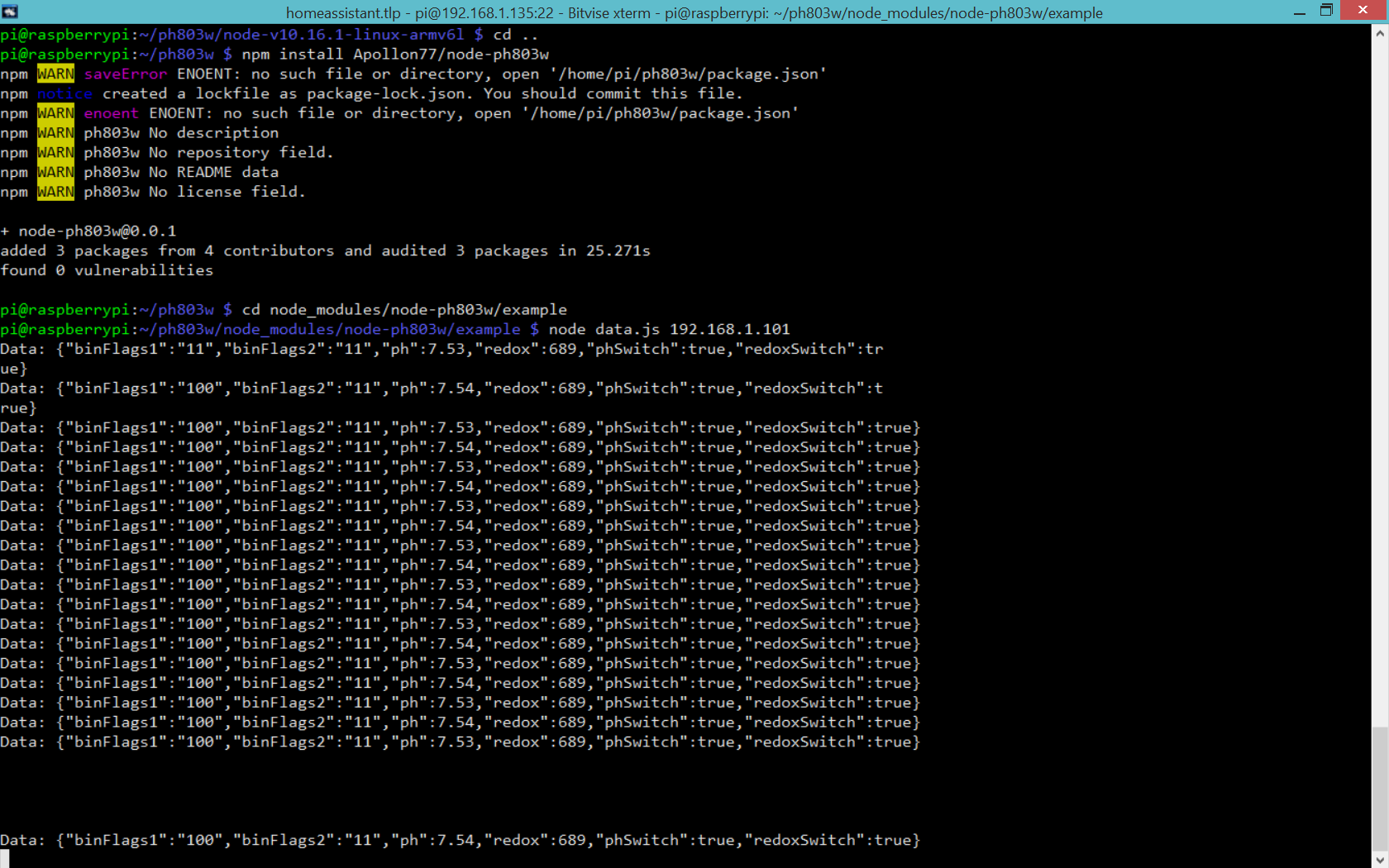
nee sorry, ich weiß du hättest da gerne was :) Ist bei mir immer 100 bis auf das erste Paket mit 11.
Mir ist gerade aufgefallen, dass es manchmal selten Daten gibt. Gefühlt ist es so, wenn sich die Werte stabilisiert haben, aber das ist nur eine Vermutung. Evtl. wenn keine Änderung war, gibts kein Update.
Wenn ich das script neu starte verbindet es sich, aber bekommt weiterhin nichts. Scheint also am Gerät selbst zu liegen. Die Abstände bis Daten kommen können also variieren.ph803w:device Resolve for message type 7: {"type":"Buffer","data":[73,86,69,88,66,82,70,80,77,81]} +1ms ph803w:device Write and register for response type 9: 000000030f000008000a49564558425246504d51 +1ms ph803w:device login success +9ms ph803w:device Resolve for message type 9: true +1ms ph803w:device Write and register for response type 145: 000000030400009002 +2ms ph803w:device Retrieved data: {"binFlags1":"11","binFlags2":"10","ph":7.14,"redox":690,"phSwitch":false,"redoxSwitch":true} +48ms Data: {"binFlags1":"11","binFlags2":"10","ph":7.14,"redox":690,"phSwitch":false,"redoxSwitch":true} ph803w:device Resolve for message type 145: {"binFlags1":"11","binFlags2":"10","ph":7.14,"redox":690,"phSwitch":false,"redoxSwitch":true} +3ms ph803w:device Send ping +4s ph803w:device received pong +6ms ph803w:device Send ping +4s ph803w:device received pong +8ms ph803w:device Send ping +4s ph803w:device received pong +5ms ph803w:device Send ping +4s ph803w:device received pong +5ms ph803w:device Send ping +4s ph803w:device received pong +7ms ph803w:device Send ping +4s ph803w:device received pong +9ms ph803w:device Send ping +4s ph803w:device received pong +6ms ph803w:device Send ping +4s ph803w:device received pong +5ms ph803w:device Send ping +4s ph803w:device received pong +7ms ph803w:device Send ping +4s ph803w:device received pong +7ms ph803w:device Send ping +4s ph803w:device received pong +5ms ph803w:device Send ping +4s ph803w:device received pong +6ms ph803w:device Send ping +4s ph803w:device received pong +5ms ph803w:device Send ping +4s ph803w:device received pong +5ms ph803w:device Send ping +4s ph803w:device received pong +6ms ph803w:device Send ping +4s ph803w:device received pong +5ms ph803w:device Send ping +4s ph803w:device received pong +6ms ph803w:device Send ping +4s ph803w:device received pong +5ms ph803w:device Send ping +4s ph803w:device received pong +5ms ph803w:device Send ping +4s ph803w:device received pong +5ms ph803w:device Send ping +4s ph803w:device received pong +5ms ph803w:device Send ping +4s ph803w:device received pong +5ms ph803w:device Send ping +4s ph803w:device received pong +6ms ph803w:device Send ping +4s ph803w:device received pong +5ms ph803w:device Send ping +4s ph803w:device received pong +5ms ph803w:device Send ping +4s ph803w:device received pong +6ms ph803w:device Send ping +4s ph803w:device received pong +5ms ph803w:device Send ping +4s ph803w:device received pong +6ms ph803w:device Send ping +4s ph803w:device received pong +6ms ph803w:device Send ping +4s ph803w:device received pong +7ms ph803w:device Send ping +4s ph803w:device received pong +4ms ph803w:device Send ping +4s ph803w:device received pong +9ms ph803w:device Send ping +4s ph803w:device received pong +4ms ph803w:device Retrieved data: {"binFlags1":"100","binFlags2":"10","ph":7.14,"redox":689,"phSwitch":false,"redoxSwitch":true} +1s Data: {"binFlags1":"100","binFlags2":"10","ph":7.14,"redox":689,"phSwitch":false,"redoxSwitch":true} ph803w:device Ignore resolve for message type 145 because no promise stored: {"binFlags1":"100","binFlags2":"10","ph":7.14,"redox":689,"phSwitch":false,"redoxSwitch":true} +1ms ph803w:device Send ping +3s ph803w:device received pong +5ms ph803w:device Send ping +4s ph803w:device received pong +6ms ph803w:device Send ping +4s ph803w:device received pong +5ms ph803w:device Retrieved data: {"binFlags1":"100","binFlags2":"10","ph":7.14,"redox":690,"phSwitch":false,"redoxSwitch":true} +1s Data: {"binFlags1":"100","binFlags2":"10","ph":7.14,"redox":690,"phSwitch":false,"redoxSwitch":true} ph803w:device Ignore resolve for message type 145 because no promise stored: {"binFlags1":"100","binFlags2":"10","ph":7.14,"redox":690,"phSwitch":false,"redoxSwitch":true} +0ms -
nee sorry, ich weiß du hättest da gerne was :) Ist bei mir immer 100 bis auf das erste Paket mit 11.
Mir ist gerade aufgefallen, dass es manchmal selten Daten gibt. Gefühlt ist es so, wenn sich die Werte stabilisiert haben, aber das ist nur eine Vermutung. Evtl. wenn keine Änderung war, gibts kein Update.
Wenn ich das script neu starte verbindet es sich, aber bekommt weiterhin nichts. Scheint also am Gerät selbst zu liegen. Die Abstände bis Daten kommen können also variieren.ph803w:device Resolve for message type 7: {"type":"Buffer","data":[73,86,69,88,66,82,70,80,77,81]} +1ms ph803w:device Write and register for response type 9: 000000030f000008000a49564558425246504d51 +1ms ph803w:device login success +9ms ph803w:device Resolve for message type 9: true +1ms ph803w:device Write and register for response type 145: 000000030400009002 +2ms ph803w:device Retrieved data: {"binFlags1":"11","binFlags2":"10","ph":7.14,"redox":690,"phSwitch":false,"redoxSwitch":true} +48ms Data: {"binFlags1":"11","binFlags2":"10","ph":7.14,"redox":690,"phSwitch":false,"redoxSwitch":true} ph803w:device Resolve for message type 145: {"binFlags1":"11","binFlags2":"10","ph":7.14,"redox":690,"phSwitch":false,"redoxSwitch":true} +3ms ph803w:device Send ping +4s ph803w:device received pong +6ms ph803w:device Send ping +4s ph803w:device received pong +8ms ph803w:device Send ping +4s ph803w:device received pong +5ms ph803w:device Send ping +4s ph803w:device received pong +5ms ph803w:device Send ping +4s ph803w:device received pong +7ms ph803w:device Send ping +4s ph803w:device received pong +9ms ph803w:device Send ping +4s ph803w:device received pong +6ms ph803w:device Send ping +4s ph803w:device received pong +5ms ph803w:device Send ping +4s ph803w:device received pong +7ms ph803w:device Send ping +4s ph803w:device received pong +7ms ph803w:device Send ping +4s ph803w:device received pong +5ms ph803w:device Send ping +4s ph803w:device received pong +6ms ph803w:device Send ping +4s ph803w:device received pong +5ms ph803w:device Send ping +4s ph803w:device received pong +5ms ph803w:device Send ping +4s ph803w:device received pong +6ms ph803w:device Send ping +4s ph803w:device received pong +5ms ph803w:device Send ping +4s ph803w:device received pong +6ms ph803w:device Send ping +4s ph803w:device received pong +5ms ph803w:device Send ping +4s ph803w:device received pong +5ms ph803w:device Send ping +4s ph803w:device received pong +5ms ph803w:device Send ping +4s ph803w:device received pong +5ms ph803w:device Send ping +4s ph803w:device received pong +5ms ph803w:device Send ping +4s ph803w:device received pong +6ms ph803w:device Send ping +4s ph803w:device received pong +5ms ph803w:device Send ping +4s ph803w:device received pong +5ms ph803w:device Send ping +4s ph803w:device received pong +6ms ph803w:device Send ping +4s ph803w:device received pong +5ms ph803w:device Send ping +4s ph803w:device received pong +6ms ph803w:device Send ping +4s ph803w:device received pong +6ms ph803w:device Send ping +4s ph803w:device received pong +7ms ph803w:device Send ping +4s ph803w:device received pong +4ms ph803w:device Send ping +4s ph803w:device received pong +9ms ph803w:device Send ping +4s ph803w:device received pong +4ms ph803w:device Retrieved data: {"binFlags1":"100","binFlags2":"10","ph":7.14,"redox":689,"phSwitch":false,"redoxSwitch":true} +1s Data: {"binFlags1":"100","binFlags2":"10","ph":7.14,"redox":689,"phSwitch":false,"redoxSwitch":true} ph803w:device Ignore resolve for message type 145 because no promise stored: {"binFlags1":"100","binFlags2":"10","ph":7.14,"redox":689,"phSwitch":false,"redoxSwitch":true} +1ms ph803w:device Send ping +3s ph803w:device received pong +5ms ph803w:device Send ping +4s ph803w:device received pong +6ms ph803w:device Send ping +4s ph803w:device received pong +5ms ph803w:device Retrieved data: {"binFlags1":"100","binFlags2":"10","ph":7.14,"redox":690,"phSwitch":false,"redoxSwitch":true} +1s Data: {"binFlags1":"100","binFlags2":"10","ph":7.14,"redox":690,"phSwitch":false,"redoxSwitch":true} ph803w:device Ignore resolve for message type 145 because no promise stored: {"binFlags1":"100","binFlags2":"10","ph":7.14,"redox":690,"phSwitch":false,"redoxSwitch":true} +0ms -
nee sorry, ich weiß du hättest da gerne was :) Ist bei mir immer 100 bis auf das erste Paket mit 11.
Mir ist gerade aufgefallen, dass es manchmal selten Daten gibt. Gefühlt ist es so, wenn sich die Werte stabilisiert haben, aber das ist nur eine Vermutung. Evtl. wenn keine Änderung war, gibts kein Update.
Wenn ich das script neu starte verbindet es sich, aber bekommt weiterhin nichts. Scheint also am Gerät selbst zu liegen. Die Abstände bis Daten kommen können also variieren.ph803w:device Resolve for message type 7: {"type":"Buffer","data":[73,86,69,88,66,82,70,80,77,81]} +1ms ph803w:device Write and register for response type 9: 000000030f000008000a49564558425246504d51 +1ms ph803w:device login success +9ms ph803w:device Resolve for message type 9: true +1ms ph803w:device Write and register for response type 145: 000000030400009002 +2ms ph803w:device Retrieved data: {"binFlags1":"11","binFlags2":"10","ph":7.14,"redox":690,"phSwitch":false,"redoxSwitch":true} +48ms Data: {"binFlags1":"11","binFlags2":"10","ph":7.14,"redox":690,"phSwitch":false,"redoxSwitch":true} ph803w:device Resolve for message type 145: {"binFlags1":"11","binFlags2":"10","ph":7.14,"redox":690,"phSwitch":false,"redoxSwitch":true} +3ms ph803w:device Send ping +4s ph803w:device received pong +6ms ph803w:device Send ping +4s ph803w:device received pong +8ms ph803w:device Send ping +4s ph803w:device received pong +5ms ph803w:device Send ping +4s ph803w:device received pong +5ms ph803w:device Send ping +4s ph803w:device received pong +7ms ph803w:device Send ping +4s ph803w:device received pong +9ms ph803w:device Send ping +4s ph803w:device received pong +6ms ph803w:device Send ping +4s ph803w:device received pong +5ms ph803w:device Send ping +4s ph803w:device received pong +7ms ph803w:device Send ping +4s ph803w:device received pong +7ms ph803w:device Send ping +4s ph803w:device received pong +5ms ph803w:device Send ping +4s ph803w:device received pong +6ms ph803w:device Send ping +4s ph803w:device received pong +5ms ph803w:device Send ping +4s ph803w:device received pong +5ms ph803w:device Send ping +4s ph803w:device received pong +6ms ph803w:device Send ping +4s ph803w:device received pong +5ms ph803w:device Send ping +4s ph803w:device received pong +6ms ph803w:device Send ping +4s ph803w:device received pong +5ms ph803w:device Send ping +4s ph803w:device received pong +5ms ph803w:device Send ping +4s ph803w:device received pong +5ms ph803w:device Send ping +4s ph803w:device received pong +5ms ph803w:device Send ping +4s ph803w:device received pong +5ms ph803w:device Send ping +4s ph803w:device received pong +6ms ph803w:device Send ping +4s ph803w:device received pong +5ms ph803w:device Send ping +4s ph803w:device received pong +5ms ph803w:device Send ping +4s ph803w:device received pong +6ms ph803w:device Send ping +4s ph803w:device received pong +5ms ph803w:device Send ping +4s ph803w:device received pong +6ms ph803w:device Send ping +4s ph803w:device received pong +6ms ph803w:device Send ping +4s ph803w:device received pong +7ms ph803w:device Send ping +4s ph803w:device received pong +4ms ph803w:device Send ping +4s ph803w:device received pong +9ms ph803w:device Send ping +4s ph803w:device received pong +4ms ph803w:device Retrieved data: {"binFlags1":"100","binFlags2":"10","ph":7.14,"redox":689,"phSwitch":false,"redoxSwitch":true} +1s Data: {"binFlags1":"100","binFlags2":"10","ph":7.14,"redox":689,"phSwitch":false,"redoxSwitch":true} ph803w:device Ignore resolve for message type 145 because no promise stored: {"binFlags1":"100","binFlags2":"10","ph":7.14,"redox":689,"phSwitch":false,"redoxSwitch":true} +1ms ph803w:device Send ping +3s ph803w:device received pong +5ms ph803w:device Send ping +4s ph803w:device received pong +6ms ph803w:device Send ping +4s ph803w:device received pong +5ms ph803w:device Retrieved data: {"binFlags1":"100","binFlags2":"10","ph":7.14,"redox":690,"phSwitch":false,"redoxSwitch":true} +1s Data: {"binFlags1":"100","binFlags2":"10","ph":7.14,"redox":690,"phSwitch":false,"redoxSwitch":true} ph803w:device Ignore resolve for message type 145 because no promise stored: {"binFlags1":"100","binFlags2":"10","ph":7.14,"redox":690,"phSwitch":false,"redoxSwitch":true} +0ms -
ist es schon möglich den Adapter zu testen?
Muss man für die Installation anders vorgehen als mit normalen Adapter, die man von github installiert? -
ist es schon möglich den Adapter zu testen?
Muss man für die Installation anders vorgehen als mit normalen Adapter, die man von github installiert?@sven-n gibt noch kein Adapter, Apollon hat ein node Script gebastelt. Weiter oben im Thread hat er geschrieben, wie man es installiert
-
@sven-n gibt noch kein Adapter, Apollon hat ein node Script gebastelt. Weiter oben im Thread hat er geschrieben, wie man es installiert
-
@coyote auf seinem github gibt es doch schon was oder sehe ich das falsch?
@sven-n ja da ist ein leeres repository. Finger weg ;-)
Beitrag hat geholfen? Votet rechts unten im Beitrag :-) https://paypal.me/Apollon77 / https://github.com/sponsors/Apollon77
- Debug-Log für Instanz einschalten? Admin -> Instanzen -> Expertenmodus -> Instanz aufklappen - Loglevel ändern
- Logfiles auf Platte /opt/iobroker/log/… nutzen, Admin schneidet Zeilen ab
-
@apollon77 ok danke dir



Hello! It looks like you're interested in this conversation, but you don't have an account yet.
Getting fed up of having to scroll through the same posts each visit? When you register for an account, you'll always come back to exactly where you were before, and choose to be notified of new replies (either via email, or push notification). You'll also be able to save bookmarks and upvote posts to show your appreciation to other community members.
With your input, this post could be even better 💗
Register Login411
Online32.7k
Users82.6k
Topics1.3m
Posts