




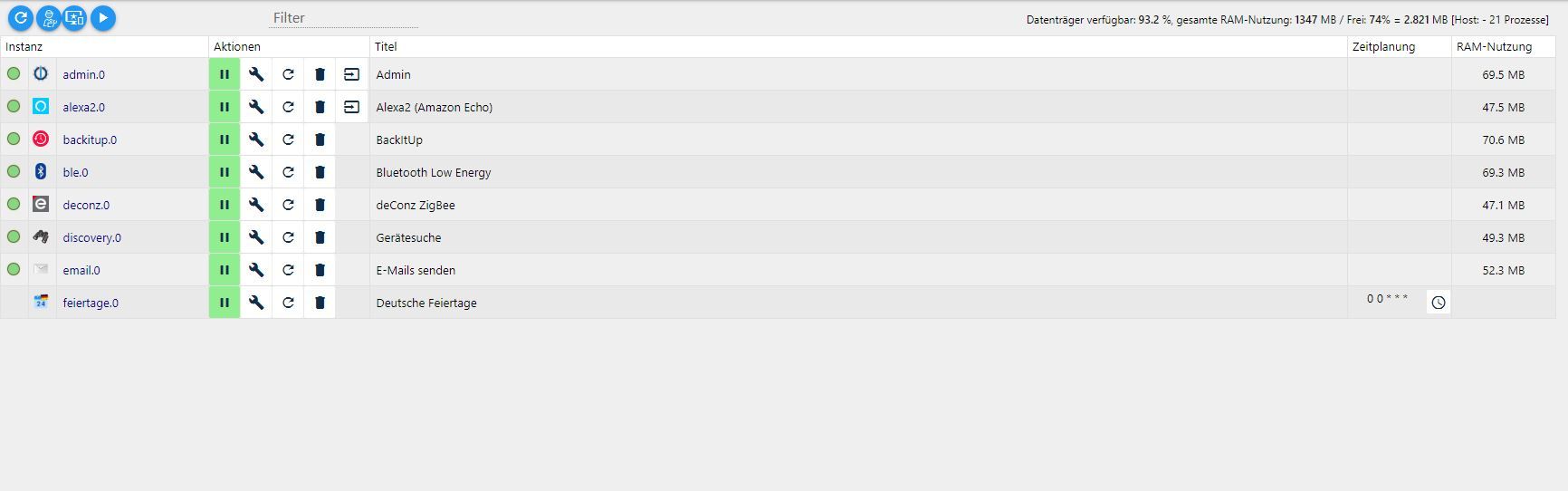
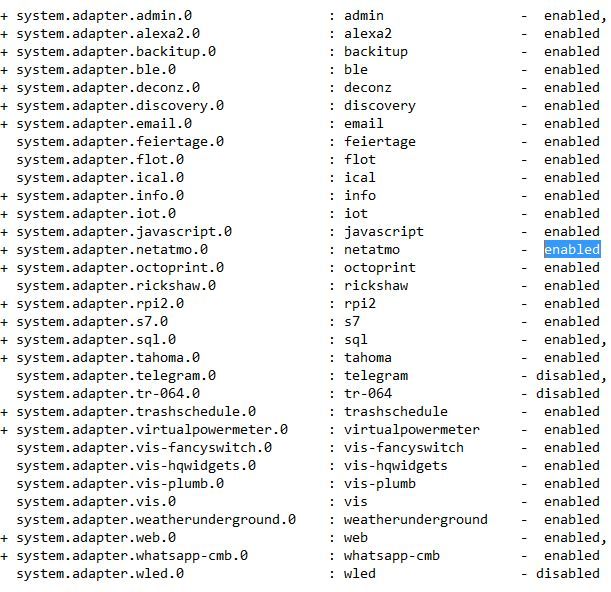
Nicht alle Instanzen werden angezeigt
-
@homoran sagte in Nicht alle Instanzen werden angezeigt:
@thwe12 Danke!
Die Versionen passen, du verwendest default; was mich allerdings etwas stutzig macht, weil es bei mir mit gleicher Konstellation so aussieht:
pi@raspberrypi:~ $ iobroker update
Used repository: Stable (default)
hash changed or no sources cached => force download of new sources
Ok und was sagt mir das??
@thwe12 sagte in Nicht alle Instanzen werden angezeigt:
Ok und was sagt mir das??
Das ist die Frage!
Installiere noch einmal den admin drüber
ich denke
iobroker i adminwird nicht klappen -
@thwe12 sagte in Nicht alle Instanzen werden angezeigt:
Ok und was sagt mir das??
Das ist die Frage!
Installiere noch einmal den admin drüber
ich denke
iobroker i adminwird nicht klappen -
@homoran sagte in Nicht alle Instanzen werden angezeigt:
iobroker i admin
pi@raspberrypi:~ $ iobroker i admin adapter "admin" already installed. Use "upgrade" to upgrade to a newer version.@thwe12 Das hatte ich befürchtet
cd /opt/iobroker sudo -H npm install iobroker.admin iobroker u admin -
@thwe12 Das hatte ich befürchtet
cd /opt/iobroker sudo -H npm install iobroker.admin iobroker u admin@homoran sagte in Nicht alle Instanzen werden angezeigt:
@thwe12 Das hatte ich befürchtet
cd /opt/iobroker
sudo -H npm install iobroker.admin
iobroker u admin
pi@raspberrypi:~ $ cd /opt/iobroker pi@raspberrypi:/opt/iobroker $ sudo -H npm install iobroker.admin > canvas@2.6.1 install /opt/iobroker/node_modules/canvas > node-pre-gyp install --fallback-to-build node-pre-gyp WARN Using request for node-pre-gyp https download node-pre-gyp WARN Pre-built binaries not installable for canvas@2.6.1 and node@10.23.0 (node-v64 ABI, glibc) (falling back to source compile with node-gyp) node-pre-gyp WARN Hit error EACCES: permission denied, mkdir '/opt/iobroker/node_modules/canvas/build' gyp WARN EACCES current user ("pi") does not have permission to access the dev dir "/root/.cache/node-gyp/10.23.0" gyp WARN EACCES attempting to reinstall using temporary dev dir "/tmp/.node-gyp" gyp ERR! configure error gyp ERR! stack Error: EACCES: permission denied, mkdir '/opt/iobroker/node_modules/canvas/build' gyp ERR! System Linux 5.4.79-v7l+ gyp ERR! command "/usr/bin/node" "/usr/lib/node_modules/npm/node_modules/node-gyp/bin/node-gyp.js" "configure" "--fallback-to-build" "--module=/opt/iobroker/node_modules/canvas/build/Release/canvas.node" "--module_name=canvas" "--module_path=/opt/iobroker/node_modules/canvas/build/Release" "--napi_version=7" "--node_abi_napi=napi" "--napi_build_version=0" "--node_napi_label=node-v64" gyp ERR! cwd /opt/iobroker/node_modules/canvas gyp ERR! node -v v10.23.0 gyp ERR! node-gyp -v v5.1.0 gyp ERR! not ok node-pre-gyp ERR! build error node-pre-gyp ERR! stack Error: Failed to execute '/usr/bin/node /usr/lib/node_modules/npm/node_modules/node-gyp/bin/node-gyp.js configure --fallback-to-build --module=/opt/iobroker/node_modules/canvas/build/Release/canvas.node --module_name=canvas --module_path=/opt/iobroker/node_modules/canvas/build/Release --napi_version=7 --node_abi_napi=napi --napi_build_version=0 --node_napi_label=node-v64' (1) node-pre-gyp ERR! stack at ChildProcess.<anonymous> (/opt/iobroker/node_modules/canvas/node_modules/node-pre-gyp/lib/util/compile.js:83:29) node-pre-gyp ERR! stack at ChildProcess.emit (events.js:198:13) node-pre-gyp ERR! stack at maybeClose (internal/child_process.js:982:16) node-pre-gyp ERR! stack at Process.ChildProcess._handle.onexit (internal/child_process.js:259:5) node-pre-gyp ERR! System Linux 5.4.79-v7l+ node-pre-gyp ERR! command "/usr/bin/node" "/opt/iobroker/node_modules/canvas/node_modules/.bin/node-pre-gyp" "install" "--fallback-to-build" node-pre-gyp ERR! cwd /opt/iobroker/node_modules/canvas node-pre-gyp ERR! node -v v10.23.0 node-pre-gyp ERR! node-pre-gyp -v v0.11.0 node-pre-gyp ERR! not ok Failed to execute '/usr/bin/node /usr/lib/node_modules/npm/node_modules/node-gyp/bin/node-gyp.js configure --fallback-to-build --module=/opt/iobroker/node_modules/canvas/build/Release/canvas.node --module_name=canvas --module_path=/opt/iobroker/node_modules/canvas/build/Release --napi_version=7 --node_abi_napi=napi --napi_build_version=0 --node_napi_label=node-v64' (1) npm WARN optional SKIPPING OPTIONAL DEPENDENCY: fsevents@2.3.1 (node_modules/fsevents): npm WARN notsup SKIPPING OPTIONAL DEPENDENCY: Unsupported platform for fsevents@2.3.1: wanted {"os":"darwin","arch":"any"} (current: {"os":"linux","arch":"arm"}) npm WARN optional SKIPPING OPTIONAL DEPENDENCY: osx-temperature-sensor@1.0.7 (node_modules/osx-temperature-sensor): npm WARN notsup SKIPPING OPTIONAL DEPENDENCY: Unsupported platform for osx-temperature-sensor@1.0.7: wanted {"os":"darwin","arch":"any"} (current: {"os":"linux","arch":"arm"}) npm WARN optional SKIPPING OPTIONAL DEPENDENCY: canvas@2.6.1 (node_modules/canvas): npm WARN optional SKIPPING OPTIONAL DEPENDENCY: canvas@2.6.1 install: `node-pre-gyp install --fallback-to-build` npm WARN optional SKIPPING OPTIONAL DEPENDENCY: Exit status 1 + iobroker.admin@4.2.1 removed 2 packages and updated 1 package in 29.361s 17 packages are looking for funding run `npm fund` for details -
@homoran sagte in Nicht alle Instanzen werden angezeigt:
@thwe12 Das hatte ich befürchtet
cd /opt/iobroker
sudo -H npm install iobroker.admin
iobroker u admin
pi@raspberrypi:~ $ cd /opt/iobroker pi@raspberrypi:/opt/iobroker $ sudo -H npm install iobroker.admin > canvas@2.6.1 install /opt/iobroker/node_modules/canvas > node-pre-gyp install --fallback-to-build node-pre-gyp WARN Using request for node-pre-gyp https download node-pre-gyp WARN Pre-built binaries not installable for canvas@2.6.1 and node@10.23.0 (node-v64 ABI, glibc) (falling back to source compile with node-gyp) node-pre-gyp WARN Hit error EACCES: permission denied, mkdir '/opt/iobroker/node_modules/canvas/build' gyp WARN EACCES current user ("pi") does not have permission to access the dev dir "/root/.cache/node-gyp/10.23.0" gyp WARN EACCES attempting to reinstall using temporary dev dir "/tmp/.node-gyp" gyp ERR! configure error gyp ERR! stack Error: EACCES: permission denied, mkdir '/opt/iobroker/node_modules/canvas/build' gyp ERR! System Linux 5.4.79-v7l+ gyp ERR! command "/usr/bin/node" "/usr/lib/node_modules/npm/node_modules/node-gyp/bin/node-gyp.js" "configure" "--fallback-to-build" "--module=/opt/iobroker/node_modules/canvas/build/Release/canvas.node" "--module_name=canvas" "--module_path=/opt/iobroker/node_modules/canvas/build/Release" "--napi_version=7" "--node_abi_napi=napi" "--napi_build_version=0" "--node_napi_label=node-v64" gyp ERR! cwd /opt/iobroker/node_modules/canvas gyp ERR! node -v v10.23.0 gyp ERR! node-gyp -v v5.1.0 gyp ERR! not ok node-pre-gyp ERR! build error node-pre-gyp ERR! stack Error: Failed to execute '/usr/bin/node /usr/lib/node_modules/npm/node_modules/node-gyp/bin/node-gyp.js configure --fallback-to-build --module=/opt/iobroker/node_modules/canvas/build/Release/canvas.node --module_name=canvas --module_path=/opt/iobroker/node_modules/canvas/build/Release --napi_version=7 --node_abi_napi=napi --napi_build_version=0 --node_napi_label=node-v64' (1) node-pre-gyp ERR! stack at ChildProcess.<anonymous> (/opt/iobroker/node_modules/canvas/node_modules/node-pre-gyp/lib/util/compile.js:83:29) node-pre-gyp ERR! stack at ChildProcess.emit (events.js:198:13) node-pre-gyp ERR! stack at maybeClose (internal/child_process.js:982:16) node-pre-gyp ERR! stack at Process.ChildProcess._handle.onexit (internal/child_process.js:259:5) node-pre-gyp ERR! System Linux 5.4.79-v7l+ node-pre-gyp ERR! command "/usr/bin/node" "/opt/iobroker/node_modules/canvas/node_modules/.bin/node-pre-gyp" "install" "--fallback-to-build" node-pre-gyp ERR! cwd /opt/iobroker/node_modules/canvas node-pre-gyp ERR! node -v v10.23.0 node-pre-gyp ERR! node-pre-gyp -v v0.11.0 node-pre-gyp ERR! not ok Failed to execute '/usr/bin/node /usr/lib/node_modules/npm/node_modules/node-gyp/bin/node-gyp.js configure --fallback-to-build --module=/opt/iobroker/node_modules/canvas/build/Release/canvas.node --module_name=canvas --module_path=/opt/iobroker/node_modules/canvas/build/Release --napi_version=7 --node_abi_napi=napi --napi_build_version=0 --node_napi_label=node-v64' (1) npm WARN optional SKIPPING OPTIONAL DEPENDENCY: fsevents@2.3.1 (node_modules/fsevents): npm WARN notsup SKIPPING OPTIONAL DEPENDENCY: Unsupported platform for fsevents@2.3.1: wanted {"os":"darwin","arch":"any"} (current: {"os":"linux","arch":"arm"}) npm WARN optional SKIPPING OPTIONAL DEPENDENCY: osx-temperature-sensor@1.0.7 (node_modules/osx-temperature-sensor): npm WARN notsup SKIPPING OPTIONAL DEPENDENCY: Unsupported platform for osx-temperature-sensor@1.0.7: wanted {"os":"darwin","arch":"any"} (current: {"os":"linux","arch":"arm"}) npm WARN optional SKIPPING OPTIONAL DEPENDENCY: canvas@2.6.1 (node_modules/canvas): npm WARN optional SKIPPING OPTIONAL DEPENDENCY: canvas@2.6.1 install: `node-pre-gyp install --fallback-to-build` npm WARN optional SKIPPING OPTIONAL DEPENDENCY: Exit status 1 + iobroker.admin@4.2.1 removed 2 packages and updated 1 package in 29.361s 17 packages are looking for funding run `npm fund` for details@thwe12 sagte in Nicht alle Instanzen werden angezeigt:
@homoran sagte in Nicht alle Instanzen werden angezeigt:
@thwe12 Das hatte ich befürchtet
cd /opt/iobroker
sudo -H npm install iobroker.admin
iobroker u admin
pi@raspberrypi:~ $ cd /opt/iobroker pi@raspberrypi:/opt/iobroker $ sudo -H npm install iobroker.admin > canvas@2.6.1 install /opt/iobroker/node_modules/canvas > node-pre-gyp install --fallback-to-build node-pre-gyp WARN Using request for node-pre-gyp https download node-pre-gyp WARN Pre-built binaries not installable for canvas@2.6.1 and node@10.23.0 (node-v64 ABI, glibc) (falling back to source compile with node-gyp) node-pre-gyp WARN Hit error EACCES: permission denied, mkdir '/opt/iobroker/node_modules/canvas/build' gyp WARN EACCES current user ("pi") does not have permission to access the dev dir "/root/.cache/node-gyp/10.23.0" gyp WARN EACCES attempting to reinstall using temporary dev dir "/tmp/.node-gyp" gyp ERR! configure error gyp ERR! stack Error: EACCES: permission denied, mkdir '/opt/iobroker/node_modules/canvas/build' gyp ERR! System Linux 5.4.79-v7l+ gyp ERR! command "/usr/bin/node" "/usr/lib/node_modules/npm/node_modules/node-gyp/bin/node-gyp.js" "configure" "--fallback-to-build" "--module=/opt/iobroker/node_modules/canvas/build/Release/canvas.node" "--module_name=canvas" "--module_path=/opt/iobroker/node_modules/canvas/build/Release" "--napi_version=7" "--node_abi_napi=napi" "--napi_build_version=0" "--node_napi_label=node-v64" gyp ERR! cwd /opt/iobroker/node_modules/canvas gyp ERR! node -v v10.23.0 gyp ERR! node-gyp -v v5.1.0 gyp ERR! not ok node-pre-gyp ERR! build error node-pre-gyp ERR! stack Error: Failed to execute '/usr/bin/node /usr/lib/node_modules/npm/node_modules/node-gyp/bin/node-gyp.js configure --fallback-to-build --module=/opt/iobroker/node_modules/canvas/build/Release/canvas.node --module_name=canvas --module_path=/opt/iobroker/node_modules/canvas/build/Release --napi_version=7 --node_abi_napi=napi --napi_build_version=0 --node_napi_label=node-v64' (1) node-pre-gyp ERR! stack at ChildProcess.<anonymous> (/opt/iobroker/node_modules/canvas/node_modules/node-pre-gyp/lib/util/compile.js:83:29) node-pre-gyp ERR! stack at ChildProcess.emit (events.js:198:13) node-pre-gyp ERR! stack at maybeClose (internal/child_process.js:982:16) node-pre-gyp ERR! stack at Process.ChildProcess._handle.onexit (internal/child_process.js:259:5) node-pre-gyp ERR! System Linux 5.4.79-v7l+ node-pre-gyp ERR! command "/usr/bin/node" "/opt/iobroker/node_modules/canvas/node_modules/.bin/node-pre-gyp" "install" "--fallback-to-build" node-pre-gyp ERR! cwd /opt/iobroker/node_modules/canvas node-pre-gyp ERR! node -v v10.23.0 node-pre-gyp ERR! node-pre-gyp -v v0.11.0 node-pre-gyp ERR! not ok Failed to execute '/usr/bin/node /usr/lib/node_modules/npm/node_modules/node-gyp/bin/node-gyp.js configure --fallback-to-build --module=/opt/iobroker/node_modules/canvas/build/Release/canvas.node --module_name=canvas --module_path=/opt/iobroker/node_modules/canvas/build/Release --napi_version=7 --node_abi_napi=napi --napi_build_version=0 --node_napi_label=node-v64' (1) npm WARN optional SKIPPING OPTIONAL DEPENDENCY: fsevents@2.3.1 (node_modules/fsevents): npm WARN notsup SKIPPING OPTIONAL DEPENDENCY: Unsupported platform for fsevents@2.3.1: wanted {"os":"darwin","arch":"any"} (current: {"os":"linux","arch":"arm"}) npm WARN optional SKIPPING OPTIONAL DEPENDENCY: osx-temperature-sensor@1.0.7 (node_modules/osx-temperature-sensor): npm WARN notsup SKIPPING OPTIONAL DEPENDENCY: Unsupported platform for osx-temperature-sensor@1.0.7: wanted {"os":"darwin","arch":"any"} (current: {"os":"linux","arch":"arm"}) npm WARN optional SKIPPING OPTIONAL DEPENDENCY: canvas@2.6.1 (node_modules/canvas): npm WARN optional SKIPPING OPTIONAL DEPENDENCY: canvas@2.6.1 install: `node-pre-gyp install --fallback-to-build` npm WARN optional SKIPPING OPTIONAL DEPENDENCY: Exit status 1 + iobroker.admin@4.2.1 removed 2 packages and updated 1 package in 29.361s 17 packages are looking for funding run `npm fund` for detailspi@raspberrypi:/opt/iobroker $ iobroker u admin upload [3] admin.admin /opt/iobroker/node_modules/iobroker.admin/admin/words.js words.js application/javascript upload [2] admin.admin /opt/iobroker/node_modules/iobroker.admin/admin/index_m.html index_m.html text/html upload [1] admin.admin /opt/iobroker/node_modules/iobroker.admin/admin/index.html index.html text/html upload [0] admin.admin /opt/iobroker/node_modules/iobroker.admin/admin/admin.png admin.png image/png Update "system.adapter.admin.0" -
@homoran sagte in Nicht alle Instanzen werden angezeigt:
@thwe12 Das hatte ich befürchtet
cd /opt/iobroker
sudo -H npm install iobroker.admin
iobroker u admin
pi@raspberrypi:~ $ cd /opt/iobroker pi@raspberrypi:/opt/iobroker $ sudo -H npm install iobroker.admin > canvas@2.6.1 install /opt/iobroker/node_modules/canvas > node-pre-gyp install --fallback-to-build node-pre-gyp WARN Using request for node-pre-gyp https download node-pre-gyp WARN Pre-built binaries not installable for canvas@2.6.1 and node@10.23.0 (node-v64 ABI, glibc) (falling back to source compile with node-gyp) node-pre-gyp WARN Hit error EACCES: permission denied, mkdir '/opt/iobroker/node_modules/canvas/build' gyp WARN EACCES current user ("pi") does not have permission to access the dev dir "/root/.cache/node-gyp/10.23.0" gyp WARN EACCES attempting to reinstall using temporary dev dir "/tmp/.node-gyp" gyp ERR! configure error gyp ERR! stack Error: EACCES: permission denied, mkdir '/opt/iobroker/node_modules/canvas/build' gyp ERR! System Linux 5.4.79-v7l+ gyp ERR! command "/usr/bin/node" "/usr/lib/node_modules/npm/node_modules/node-gyp/bin/node-gyp.js" "configure" "--fallback-to-build" "--module=/opt/iobroker/node_modules/canvas/build/Release/canvas.node" "--module_name=canvas" "--module_path=/opt/iobroker/node_modules/canvas/build/Release" "--napi_version=7" "--node_abi_napi=napi" "--napi_build_version=0" "--node_napi_label=node-v64" gyp ERR! cwd /opt/iobroker/node_modules/canvas gyp ERR! node -v v10.23.0 gyp ERR! node-gyp -v v5.1.0 gyp ERR! not ok node-pre-gyp ERR! build error node-pre-gyp ERR! stack Error: Failed to execute '/usr/bin/node /usr/lib/node_modules/npm/node_modules/node-gyp/bin/node-gyp.js configure --fallback-to-build --module=/opt/iobroker/node_modules/canvas/build/Release/canvas.node --module_name=canvas --module_path=/opt/iobroker/node_modules/canvas/build/Release --napi_version=7 --node_abi_napi=napi --napi_build_version=0 --node_napi_label=node-v64' (1) node-pre-gyp ERR! stack at ChildProcess.<anonymous> (/opt/iobroker/node_modules/canvas/node_modules/node-pre-gyp/lib/util/compile.js:83:29) node-pre-gyp ERR! stack at ChildProcess.emit (events.js:198:13) node-pre-gyp ERR! stack at maybeClose (internal/child_process.js:982:16) node-pre-gyp ERR! stack at Process.ChildProcess._handle.onexit (internal/child_process.js:259:5) node-pre-gyp ERR! System Linux 5.4.79-v7l+ node-pre-gyp ERR! command "/usr/bin/node" "/opt/iobroker/node_modules/canvas/node_modules/.bin/node-pre-gyp" "install" "--fallback-to-build" node-pre-gyp ERR! cwd /opt/iobroker/node_modules/canvas node-pre-gyp ERR! node -v v10.23.0 node-pre-gyp ERR! node-pre-gyp -v v0.11.0 node-pre-gyp ERR! not ok Failed to execute '/usr/bin/node /usr/lib/node_modules/npm/node_modules/node-gyp/bin/node-gyp.js configure --fallback-to-build --module=/opt/iobroker/node_modules/canvas/build/Release/canvas.node --module_name=canvas --module_path=/opt/iobroker/node_modules/canvas/build/Release --napi_version=7 --node_abi_napi=napi --napi_build_version=0 --node_napi_label=node-v64' (1) npm WARN optional SKIPPING OPTIONAL DEPENDENCY: fsevents@2.3.1 (node_modules/fsevents): npm WARN notsup SKIPPING OPTIONAL DEPENDENCY: Unsupported platform for fsevents@2.3.1: wanted {"os":"darwin","arch":"any"} (current: {"os":"linux","arch":"arm"}) npm WARN optional SKIPPING OPTIONAL DEPENDENCY: osx-temperature-sensor@1.0.7 (node_modules/osx-temperature-sensor): npm WARN notsup SKIPPING OPTIONAL DEPENDENCY: Unsupported platform for osx-temperature-sensor@1.0.7: wanted {"os":"darwin","arch":"any"} (current: {"os":"linux","arch":"arm"}) npm WARN optional SKIPPING OPTIONAL DEPENDENCY: canvas@2.6.1 (node_modules/canvas): npm WARN optional SKIPPING OPTIONAL DEPENDENCY: canvas@2.6.1 install: `node-pre-gyp install --fallback-to-build` npm WARN optional SKIPPING OPTIONAL DEPENDENCY: Exit status 1 + iobroker.admin@4.2.1 removed 2 packages and updated 1 package in 29.361s 17 packages are looking for funding run `npm fund` for details@thwe12 sagte in Nicht alle Instanzen werden angezeigt:
gyp WARN EACCES current user ("pi") does not have permission to access the dev dir "/root/.cache/node-gyp/10.23.0" gyp WARN EACCES attempting to reinstall using temporary dev dir "/tmp/.node-gyp"
ohhh
was ist denn da schief gelaufen?
als root installiert?Das wäre was für @Thomas-Braun
-
@thwe12 sagte in Nicht alle Instanzen werden angezeigt:
@homoran sagte in Nicht alle Instanzen werden angezeigt:
@thwe12 Das hatte ich befürchtet
cd /opt/iobroker
sudo -H npm install iobroker.admin
iobroker u admin
pi@raspberrypi:~ $ cd /opt/iobroker pi@raspberrypi:/opt/iobroker $ sudo -H npm install iobroker.admin > canvas@2.6.1 install /opt/iobroker/node_modules/canvas > node-pre-gyp install --fallback-to-build node-pre-gyp WARN Using request for node-pre-gyp https download node-pre-gyp WARN Pre-built binaries not installable for canvas@2.6.1 and node@10.23.0 (node-v64 ABI, glibc) (falling back to source compile with node-gyp) node-pre-gyp WARN Hit error EACCES: permission denied, mkdir '/opt/iobroker/node_modules/canvas/build' gyp WARN EACCES current user ("pi") does not have permission to access the dev dir "/root/.cache/node-gyp/10.23.0" gyp WARN EACCES attempting to reinstall using temporary dev dir "/tmp/.node-gyp" gyp ERR! configure error gyp ERR! stack Error: EACCES: permission denied, mkdir '/opt/iobroker/node_modules/canvas/build' gyp ERR! System Linux 5.4.79-v7l+ gyp ERR! command "/usr/bin/node" "/usr/lib/node_modules/npm/node_modules/node-gyp/bin/node-gyp.js" "configure" "--fallback-to-build" "--module=/opt/iobroker/node_modules/canvas/build/Release/canvas.node" "--module_name=canvas" "--module_path=/opt/iobroker/node_modules/canvas/build/Release" "--napi_version=7" "--node_abi_napi=napi" "--napi_build_version=0" "--node_napi_label=node-v64" gyp ERR! cwd /opt/iobroker/node_modules/canvas gyp ERR! node -v v10.23.0 gyp ERR! node-gyp -v v5.1.0 gyp ERR! not ok node-pre-gyp ERR! build error node-pre-gyp ERR! stack Error: Failed to execute '/usr/bin/node /usr/lib/node_modules/npm/node_modules/node-gyp/bin/node-gyp.js configure --fallback-to-build --module=/opt/iobroker/node_modules/canvas/build/Release/canvas.node --module_name=canvas --module_path=/opt/iobroker/node_modules/canvas/build/Release --napi_version=7 --node_abi_napi=napi --napi_build_version=0 --node_napi_label=node-v64' (1) node-pre-gyp ERR! stack at ChildProcess.<anonymous> (/opt/iobroker/node_modules/canvas/node_modules/node-pre-gyp/lib/util/compile.js:83:29) node-pre-gyp ERR! stack at ChildProcess.emit (events.js:198:13) node-pre-gyp ERR! stack at maybeClose (internal/child_process.js:982:16) node-pre-gyp ERR! stack at Process.ChildProcess._handle.onexit (internal/child_process.js:259:5) node-pre-gyp ERR! System Linux 5.4.79-v7l+ node-pre-gyp ERR! command "/usr/bin/node" "/opt/iobroker/node_modules/canvas/node_modules/.bin/node-pre-gyp" "install" "--fallback-to-build" node-pre-gyp ERR! cwd /opt/iobroker/node_modules/canvas node-pre-gyp ERR! node -v v10.23.0 node-pre-gyp ERR! node-pre-gyp -v v0.11.0 node-pre-gyp ERR! not ok Failed to execute '/usr/bin/node /usr/lib/node_modules/npm/node_modules/node-gyp/bin/node-gyp.js configure --fallback-to-build --module=/opt/iobroker/node_modules/canvas/build/Release/canvas.node --module_name=canvas --module_path=/opt/iobroker/node_modules/canvas/build/Release --napi_version=7 --node_abi_napi=napi --napi_build_version=0 --node_napi_label=node-v64' (1) npm WARN optional SKIPPING OPTIONAL DEPENDENCY: fsevents@2.3.1 (node_modules/fsevents): npm WARN notsup SKIPPING OPTIONAL DEPENDENCY: Unsupported platform for fsevents@2.3.1: wanted {"os":"darwin","arch":"any"} (current: {"os":"linux","arch":"arm"}) npm WARN optional SKIPPING OPTIONAL DEPENDENCY: osx-temperature-sensor@1.0.7 (node_modules/osx-temperature-sensor): npm WARN notsup SKIPPING OPTIONAL DEPENDENCY: Unsupported platform for osx-temperature-sensor@1.0.7: wanted {"os":"darwin","arch":"any"} (current: {"os":"linux","arch":"arm"}) npm WARN optional SKIPPING OPTIONAL DEPENDENCY: canvas@2.6.1 (node_modules/canvas): npm WARN optional SKIPPING OPTIONAL DEPENDENCY: canvas@2.6.1 install: `node-pre-gyp install --fallback-to-build` npm WARN optional SKIPPING OPTIONAL DEPENDENCY: Exit status 1 + iobroker.admin@4.2.1 removed 2 packages and updated 1 package in 29.361s 17 packages are looking for funding run `npm fund` for detailspi@raspberrypi:/opt/iobroker $ iobroker u admin upload [3] admin.admin /opt/iobroker/node_modules/iobroker.admin/admin/words.js words.js application/javascript upload [2] admin.admin /opt/iobroker/node_modules/iobroker.admin/admin/index_m.html index_m.html text/html upload [1] admin.admin /opt/iobroker/node_modules/iobroker.admin/admin/index.html index.html text/html upload [0] admin.admin /opt/iobroker/node_modules/iobroker.admin/admin/admin.png admin.png image/png Update "system.adapter.admin.0"@thwe12 Nach deinem Edit:
jetzt mal im Browser STRG-F5 und sehen ob es vielleicht doch passt -
@thwe12 sagte in Nicht alle Instanzen werden angezeigt:
gyp WARN EACCES current user ("pi") does not have permission to access the dev dir "/root/.cache/node-gyp/10.23.0" gyp WARN EACCES attempting to reinstall using temporary dev dir "/tmp/.node-gyp"
ohhh
was ist denn da schief gelaufen?
als root installiert?Das wäre was für @Thomas-Braun
@homoran sagte in Nicht alle Instanzen werden angezeigt:
@thwe12 sagte in Nicht alle Instanzen werden angezeigt:
gyp WARN EACCES current user ("pi") does not have permission to access the dev dir "/root/.cache/node-gyp/10.23.0" gyp WARN EACCES attempting to reinstall using temporary dev dir "/tmp/.node-gyp"
ohhh
was ist denn da schief gelaufen?
als root installiert?Das wäre was für @Thomas-Braun
Das kann ich dir nicht sagen den habe ich vor 1,5 Jahren aufgesetzt ob das als root war kann ich nicht sagen
-
Synology 918+ 16GB - ioBroker in Docker v9 , VISO auf Trekstor Primebook C13 13,3" , Hikvision Domkameras mit Surveillance Station .. CCU RaspberryMatic in Synology VM .. Zigbee CC2538+CC2592 .. Sonoff .. KNX .. Modbus ..
-
@thwe12 Nach deinem Edit:
jetzt mal im Browser STRG-F5 und sehen ob es vielleicht doch passt@homoran sagte in Nicht alle Instanzen werden angezeigt:
@thwe12 Nach deinem Edit:
jetzt mal im Browser STRG-F5 und sehen ob es vielleicht doch passtNö leider micht :-(
-
@THWE12
@glasfaser auch nicht mit iobroker -v?ggf. ist die gesamte Installation krumm
-
@homoran sagte in Nicht alle Instanzen werden angezeigt:
@thwe12 Nach deinem Edit:
jetzt mal im Browser STRG-F5 und sehen ob es vielleicht doch passtNö leider micht :-(
-
@THWE12
@glasfaser auch nicht mit iobroker -v?ggf. ist die gesamte Installation krumm
@homoran sagte in Nicht alle Instanzen werden angezeigt:
@THWE12
@glasfaser auch nicht mit iobroker -v?ggf. ist die gesamte Installation krumm
Na dann werde ich wohl nicht herum kommen und das System neu aufzusetzen.
Hatte gehopft dieser Kelch geht an mir vorüber -
@glasfaser sagte in Nicht alle Instanzen werden angezeigt:
@homoran
die Frage ist , warum bekommt er nichts mitiobroker versionangezeigt ...
pi@raspberrypi:~ $ iobroker version 3.1.6 -
@glasfaser sagte in Nicht alle Instanzen werden angezeigt:
@homoran
die Frage ist , warum bekommt er nichts mitiobroker versionangezeigt ...
pi@raspberrypi:~ $ iobroker version 3.1.6@thwe12 und das hatte vor deinen Upgrades nicht geklappt?
-
@glasfaser sagte in Nicht alle Instanzen werden angezeigt:
@homoran
die Frage ist , warum bekommt er nichts mitiobroker versionangezeigt ...
pi@raspberrypi:~ $ iobroker version 3.1.6@thwe12
Und wenn du mal von 'unten anfängst' das System zu updaten?
Manchmal zieht sich die Installation dann wieder gerade.sudo apt update sudo apt dist-upgrade sudo reboot iobroker stop iobroker fix iobroker update iobroker upgradeDas wäre so meine Vorgehensweise.
-
@thwe12
Und wenn du mal von 'unten anfängst' das System zu updaten?
Manchmal zieht sich die Installation dann wieder gerade.sudo apt update sudo apt dist-upgrade sudo reboot iobroker stop iobroker fix iobroker update iobroker upgradeDas wäre so meine Vorgehensweise.
@thomas-braun sagte in Nicht alle Instanzen werden angezeigt:
sudo apt update sudo apt dist-upgrade sudo rebootsudo apt update sudo apt dist-upgrade sudo rebootbis dahin hab ich jetzt es gemacht aber jetzt kann ich mich nicht mehr einloggen
-
@thomas-braun sagte in Nicht alle Instanzen werden angezeigt:
sudo apt update sudo apt dist-upgrade sudo rebootsudo apt update sudo apt dist-upgrade sudo rebootbis dahin hab ich jetzt es gemacht aber jetzt kann ich mich nicht mehr einloggen
-
@glasfaser sagte in Nicht alle Instanzen werden angezeigt:
iobroker startnach dem reboot bin ich rausgeflogen
jetzt geht es aber weiter :-)
iobroker stop
iobroker fix
iobroker update
iobroker upgrade


Hey! Du scheinst an dieser Unterhaltung interessiert zu sein, hast aber noch kein Konto.
Hast du es satt, bei jedem Besuch durch die gleichen Beiträge zu scrollen? Wenn du dich für ein Konto anmeldest, kommst du immer genau dorthin zurück, wo du zuvor warst, und kannst dich über neue Antworten benachrichtigen lassen (entweder per E-Mail oder Push-Benachrichtigung). Du kannst auch Lesezeichen speichern und Beiträge positiv bewerten, um anderen Community-Mitgliedern deine Wertschätzung zu zeigen.
Mit deinem Input könnte dieser Beitrag noch besser werden 💗
Registrieren Anmelden485
Online33.0k
Benutzer83.7k
Themen1.3m
Beiträge