




Admin 1.6.8 und js-controller 0.14.0 Test
-
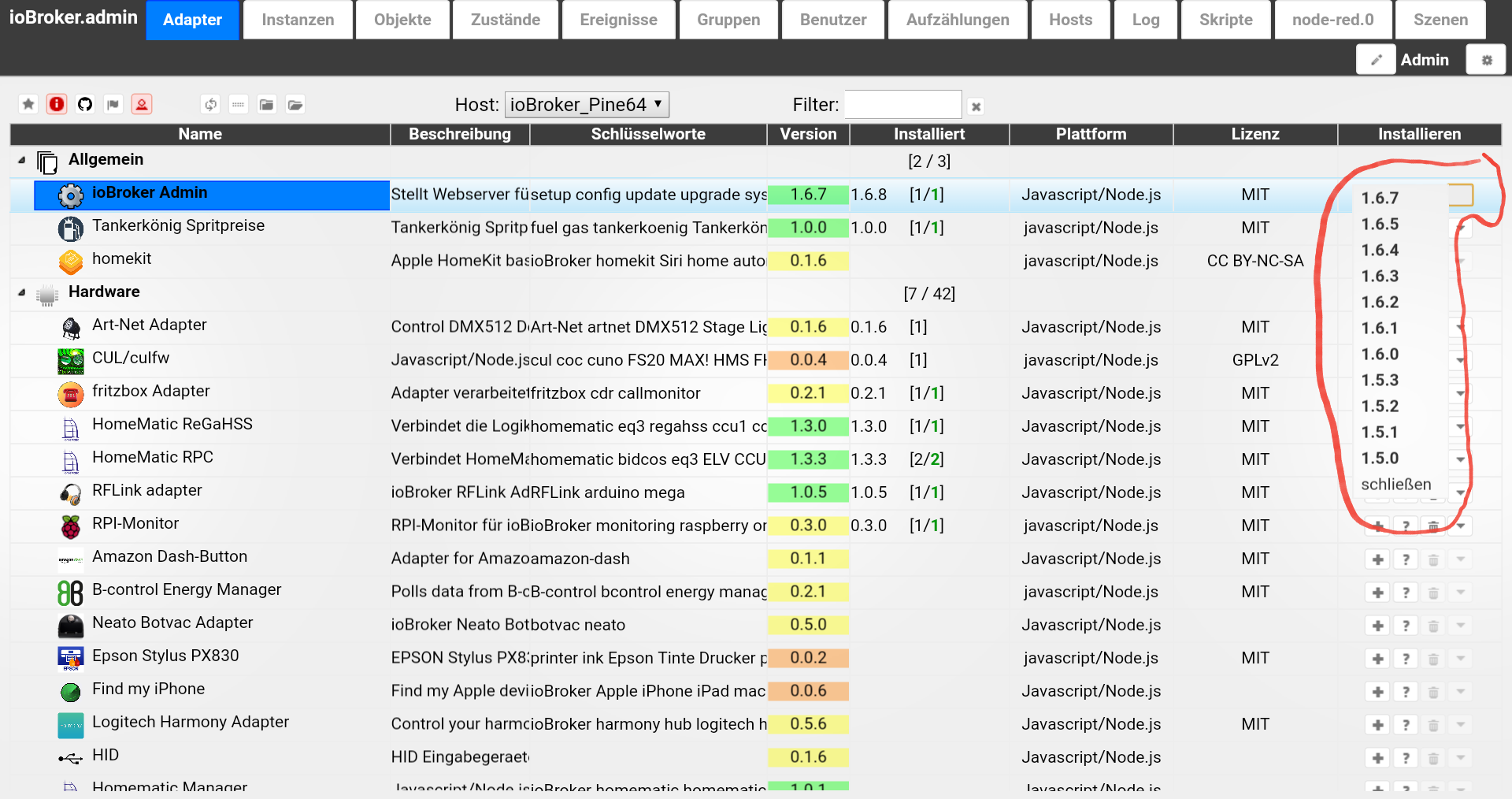
Da gibt es eine interessante Feature: Installation von einer beliebigen Version von adapter. `
Cool!
Gruß
Rainer, der die Doku schon wieder anpassen muss :lol:
-
Da gibt es eine interessante Feature: Installation von einer beliebigen Version von adapter.
ja das ist mal nen cooles Feature, aber das ist doch min. schon seit Version 1.6.7 drin…admin.jpg `
Die hat nicht funktioniert. Admin konnte die Versionen schon anzeigen, aber es war keine Auswirkung. Erst mit js-controller 0.13.4 -
-
Hallo zusammen,
bekomme es grad nicht hin:
oot@Raspi31:/opt/iobroker# npm -v
2.15.11
root@Raspi31:/opt/iobroker# node -v
v4.6.2
root@Raspi31:/opt/iobroker# npm install https://github.com/ioBroker/ioBroker.js-controller --production
npm ERR! git clone --template=/root/.npm/_git-remotes/_templates --mirror https://github.com/ioBroker/ioBroker.js-controller.git /root/.npm/_git-remotes/https-github-com-ioBroker-ioBroker-js-controller-git-bafee4ac: undefined
npm ERR! git clone --template=/root/.npm/_git-remotes/_templates --mirror https://github.com/ioBroker/ioBroker.js-controller.git /root/.npm/_git-remotes/https-github-com-ioBroker-ioBroker-js-controller-git-bafee4ac: undefined
npm ERR! Linux 4.4.34-v7+
npm ERR! argv "/usr/bin/nodejs" "/usr/bin/npm" "install" "https://github.com/ioBroker/ioBroker.js-controller" "--production"
npm ERR! node v4.6.2
npm ERR! npm  v2.15.11
npm ERR! code ENOGIT

npm ERR! not found: git
npm ERR!
npm ERR! Failed using git.
npm ERR! This is most likely not a problem with npm itself.
npm ERR! Please check if you have git installed and in your PATH.

npm ERR! Please include the following file with any support request:
npm ERR!     /opt/iobroker/npm-debug.log
iobroker habe ich natürlich vorher gestoppt, cache ist leer.
Hat bisher funktioniert, muss ich noch was beachten?
Danke und Gruß
-
Hallo zusammen,
bekomme es grad nicht hin:
oot@Raspi31:/opt/iobroker# npm -v
2.15.11
root@Raspi31:/opt/iobroker# node -v
v4.6.2
root@Raspi31:/opt/iobroker# npm install https://github.com/ioBroker/ioBroker.js-controller --production
npm ERR! git clone --template=/root/.npm/_git-remotes/_templates --mirror https://github.com/ioBroker/ioBroker.js-controller.git /root/.npm/_git-remotes/https-github-com-ioBroker-ioBroker-js-controller-git-bafee4ac: undefined
npm ERR! git clone --template=/root/.npm/_git-remotes/_templates --mirror https://github.com/ioBroker/ioBroker.js-controller.git /root/.npm/_git-remotes/https-github-com-ioBroker-ioBroker-js-controller-git-bafee4ac: undefined
npm ERR! Linux 4.4.34-v7+
npm ERR! argv "/usr/bin/nodejs" "/usr/bin/npm" "install" "https://github.com/ioBroker/ioBroker.js-controller" "--production"
npm ERR! node v4.6.2
npm ERR! npm  v2.15.11
npm ERR! code ENOGIT

npm ERR! not found: git
npm ERR!
npm ERR! Failed using git.
npm ERR! This is most likely not a problem with npm itself.
npm ERR! Please check if you have git installed and in your PATH.

npm ERR! Please include the following file with any support request:
npm ERR!     /opt/iobroker/npm-debug.log
iobroker habe ich natürlich vorher gestoppt, cache ist leer.
Hat bisher funktioniert, muss ich noch was beachten?
Danke und Gruß `
Du hast vergessen /tarball/mastercd /opt/iobroker npm i https://github.com/ioBroker/ioBroker.js-controller/tarball/master --production -
-
Hallo
Habe jetzt soweit alles aktualisiert.
Aber eine Versionsauswahl habe ich nicht.
Mit Firefox, Chrome und Edge probiert.

Muss man noch irgendetwas einstellen?
Grüße
-
Hallo
Habe jetzt soweit alles aktualisiert.
Aber eine Versionsauswahl habe ich nicht.
Mit Firefox, Chrome und Edge probiert.
admin.PNG
Muss man noch irgendetwas einstellen?
Grüße `
Einfach die Seite updaten? Oder Cache löschen? -
Muss man noch irgendetwas einstellen? `
ich musste den Experten Modus einschaltenGruß
Rainer
-
Hallo Zusammen
habe ich alles ausprobiert.
Admin 1.6.8
Javascript 3.2.2
JS-Controler 0.14.0
Ich kann auch im VIS-Edit keine Gruppen bilden.
VIS 0.10.15
Grüße
-
Hallo Zusammen
habe ich alles ausprobiert.
Admin 1.6.8
Javascript 3.2.2
JS-Controler 0.14.0
Ich kann auch im VIS-Edit keine Gruppen bilden.
VIS 0.10.15
Grüße `
Gruppen erst ab vis 0.12.x -
Bei mir haut das Installieren vom js-controller vom Git überhaupt nicht hin!
Siehe Fehler, einmal mit sudo und einmal ohne, leider läuft dann iobroker nicht mehr und ich muss in /opt/iobroker das iobroker script löschen und dann iobroker mit –unsave-perm neu installieren damit er wirder läuft (aber natürlich dann mit js-controller von npm und nicht git) :
! ````
pi@jessi3:/opt/iobroker $ sudo npm install https://github.com/ioBroker/ioBroker.js-controller/tarball/master --production |
unix-dgram@0.2.3 install /opt/iobroker/node_modules/iobroker.js-controller/node_modules/winston-syslog/node_modules/unix-dgram
node-gyp rebuild
! gyp WARN EACCES user "root" does not have permission to access the dev dir "/root/.node-gyp/4.7.0"
gyp WARN EACCES attempting to reinstall using temporary dev dir "/opt/iobroker/node_modules/iobroker.js-controller/node_modules/winston-syslog/node_modules/unix-dgram/.node-gyp"
make: Entering directory '/opt/iobroker/node_modules/iobroker.js-controller/node_modules/winston-syslog/node_modules/unix-dgram/build'
CXX(target) Release/obj.target/unix_dgram/src/unix_dgram.o
SOLINK_MODULE(target) Release/obj.target/unix_dgram.node
COPY Release/unix_dgram.node
make: Leaving directory '/opt/iobroker/node_modules/iobroker.js-controller/node_modules/winston-syslog/node_modules/unix-dgram/build'
! > iobroker.js-controller@0.14.0 install /opt/iobroker/node_modules/iobroker.js-controller
node lib/setup.js setup first
! fs.js:549
return binding.open(pathModule._makeLong(path), stringToFlags(flags), mode);
^
! Error: EACCES: permission denied, open '/opt/iobroker/node_modules/iobroker.js-controller/lib/setup/../../../../killall.sh'
at Error (native)
at Object.fs.openSync (fs.js:549:18)
at Object.fs.writeFileSync (fs.js:1156:15)
at Setup.setup (/opt/iobroker/node_modules/iobroker.js-controller/lib/setup/setupSetup.js:88:24)
at /opt/iobroker/node_modules/iobroker.js-controller/lib/setup.js:554:23
at Object. <anonymous>(/opt/iobroker/node_modules/iobroker.js-controller/lib/setup.js:575:11)
at Module._compile (module.js:409:26)
at Object.Module._extensions..js (module.js:416:10)
at Module.load (module.js:343:32)
at Function.Module._load (module.js:300:12)
npm ERR! Linux 4.4.38-v7+
npm ERR! argv "/usr/bin/nodejs" "/usr/bin/npm" "install" "https://github.com/ioBroker/ioBroker.js-controller/tarball/master" "--production"
npm ERR! node v4.7.0
npm ERR! npm v2.15.11
npm ERR! code ELIFECYCLE
! npm ERR! iobroker.js-controller@0.14.0 install:node lib/setup.js setup first
npm ERR! Exit status 1
npm ERR!
npm ERR! Failed at the iobroker.js-controller@0.14.0 install script 'node lib/setup.js setup first'.
npm ERR! This is most likely a problem with the iobroker.js-controller package,
npm ERR! not with npm itself.
npm ERR! Tell the author that this fails on your system:
npm ERR! node lib/setup.js setup first
npm ERR! You can get information on how to open an issue for this project with:
npm ERR! npm bugs iobroker.js-controller
npm ERR! Or if that isn't available, you can get their info via:
npm ERR!
npm ERR! npm owner ls iobroker.js-controller
npm ERR! There is likely additional logging output above.
! npm ERR! Please include the following file with any support request:
npm ERR! /opt/iobroker/npm-debug.log
pi@jessi3:/opt/iobroker $ npm install https://github.com/ioBroker/ioBroker.js-controller/tarball/master --production
unix-dgram@0.2.3 install /opt/iobroker/node_modules/iobroker.js-controller/node_modules/winston-syslog/node_modules/unix-dgram
node-gyp rebuild
! make: Entering directory '/opt/iobroker/node_modules/iobroker.js-controller/node_modules/winston-syslog/node_modules/unix-dgram/build'
CXX(target) Release/obj.target/unix_dgram/src/unix_dgram.o
SOLINK_MODULE(target) Release/obj.target/unix_dgram.node
COPY Release/unix_dgram.node
make: Leaving directory '/opt/iobroker/node_modules/iobroker.js-controller/node_modules/winston-syslog/node_modules/unix-dgram/build'
npm ERR! Linux 4.4.38-v7+
npm ERR! argv "/usr/bin/nodejs" "/usr/bin/npm" "install" "https://github.com/ioBroker/ioBroker.js-controller/tarball/master" "--production"
npm ERR! node v4.7.0
npm ERR! npm v2.15.11
npm ERR! path ../iobroker.js-controller/iobroker.js
npm ERR! code EACCES
npm ERR! errno -13
npm ERR! syscall symlink
! npm ERR! Error: EACCES: permission denied, symlink '../iobroker.js-controller/iobroker.js' -> '/opt/iobroker/node_modules/.bin/iobroker'
npm ERR! at Error (native)
npm ERR! { [Error: EACCES: permission denied, symlink '../iobroker.js-controller/iobroker.js' -> '/opt/iobroker/node_modules/.bin/iobroker']
npm ERR! errno: -13,
npm ERR! code: 'EACCES',
npm ERR! syscall: 'symlink',
npm ERR! path: '../iobroker.js-controller/iobroker.js',
npm ERR! dest: '/opt/iobroker/node_modules/.bin/iobroker' }
npm ERR!
npm ERR! Please try running this command again as root/Administrator.
! npm ERR! Please include the following file with any support request:
npm ERR! /opt/iobroker/npm-debug.log
pi@jessi3:/opt/iobroker $ ls
backups etc iobroker iobroker_x killall.sh node_modules package.json
cache install.sh iobroker-data iobroker_y log npm-debug.log reinstall.sh
pi@jessi3:/opt/iobroker $ sudo iobroker start
module.js:327
throw err;
^
! Error: Cannot find module '/opt/iobroker/node_modules/iobroker.js-controller/iobroker.js'
at Function.Module._resolveFilename (module.js:325:15)
at Function.Module._load (module.js:276:25)
at Function.Module.runMain (module.js:441:10)
at startup (node.js:139:18)
at node.js:990:3</anonymous>







Hey! Du scheinst an dieser Unterhaltung interessiert zu sein, hast aber noch kein Konto.
Hast du es satt, bei jedem Besuch durch die gleichen Beiträge zu scrollen? Wenn du dich für ein Konto anmeldest, kommst du immer genau dorthin zurück, wo du zuvor warst, und kannst dich über neue Antworten benachrichtigen lassen (entweder per E-Mail oder Push-Benachrichtigung). Du kannst auch Lesezeichen speichern und Beiträge positiv bewerten, um anderen Community-Mitgliedern deine Wertschätzung zu zeigen.
Mit deinem Input könnte dieser Beitrag noch besser werden 💗
Registrieren AnmeldenSupport us
249
Online33.0k
Benutzer83.7k
Themen1.3m
Beiträge