Weiter zum Inhalt
  • Home
  • Aktuell
  • Tags
  • 0 Ungelesen 0
  • Kategorien
  • Unreplied
  • Beliebt
  • GitHub
  • Docu
  • Hilfe
Skins
  • Hell
  • Brite
  • Cerulean
  • Cosmo
  • Flatly
  • Journal
  • Litera
  • Lumen
  • Lux
  • Materia
  • Minty
  • Morph
  • Pulse
  • Sandstone
  • Simplex
  • Sketchy
  • Spacelab
  • United
  • Yeti
  • Zephyr
  • Dunkel
  • Cyborg
  • Darkly
  • Quartz
  • Slate
  • Solar
  • Superhero
  • Vapor

  • Standard: (Kein Skin)
  • Kein Skin
Einklappen
ioBroker Logo

Community Forum

donate donate
  1. ioBroker Community Home
  2. Deutsch
  3. Visualisierung
  4. HABPanel Installation klappt nicht

NEWS

  • Neuer ioBroker-Blog online: Monatsrückblick März/April 2026
    BluefoxB
    Bluefox
    8
    1
    459

  • Verwendung von KI bitte immer deutlich kennzeichnen
    HomoranH
    Homoran
    10
    1
    380

  • Monatsrückblick Januar/Februar 2026 ist online!
    BluefoxB
    Bluefox
    18
    1
    972

HABPanel Installation klappt nicht

Geplant Angeheftet Gesperrt Verschoben Ungelöst Visualisierung
14 Beiträge 3 Kommentatoren 669 Aufrufe 3 Beobachtet
  • Älteste zuerst
  • Neuste zuerst
  • Meiste Stimmen
Antworten
  • In einem neuen Thema antworten
Anmelden zum Antworten
Dieses Thema wurde gelöscht. Nur Nutzer mit entsprechenden Rechten können es sehen.
  • T Offline
    T Offline
    Thomas75 0
    schrieb am zuletzt editiert von
    #1

    Hallo,
    mein erster Post, ich hoffe ich beschreibe es richtig... Die Installation des HABPanels auf dem Raspberry PI3 mit Betriebssystem RaspIOS lite klappt einfach nicht. Die Fehlermeldung wird angezeigt:

    $ ./iobroker add habpanel  --host raspberrypi
    NPM version: 6.14.10
    npm install iobroker.habpanel@0.4.3 --loglevel error --prefix "/opt/iobroker" (System call)
    npm ERR! code ENOTSUP
    npm ERR! notsup Unsupported engine for got@5.7.1: wanted: {"node":">=0.10.0 <7"} (current: {"node":"10.23.1","npm":"6.14.10"})
    npm ERR! notsup Not compatible with your version of node/npm: got@5.7.1
    npm ERR! notsup Not compatible with your version of node/npm: got@5.7.1
    npm ERR! notsup Required: {"node":">=0.10.0 <7"}
    npm ERR! notsup Actual:   {"npm":"6.14.10","node":"10.23.1"}
    
    npm ERR! A complete log of this run can be found in:npm ERR!     /home/iobroker/.npm/_logs/2021-01-17T14_10_44_513Z-debug.log
    ERROR: host.raspberrypi Cannot install iobroker.habpanel@0.4.3: 1
    ERROR: process exited with code 25
    

    Danke für eure Hilfe.
    Gruß
    Thomas

    Thomas BraunT 1 Antwort Letzte Antwort
    0
    • T Thomas75 0

      Hallo,
      mein erster Post, ich hoffe ich beschreibe es richtig... Die Installation des HABPanels auf dem Raspberry PI3 mit Betriebssystem RaspIOS lite klappt einfach nicht. Die Fehlermeldung wird angezeigt:

      $ ./iobroker add habpanel  --host raspberrypi
      NPM version: 6.14.10
      npm install iobroker.habpanel@0.4.3 --loglevel error --prefix "/opt/iobroker" (System call)
      npm ERR! code ENOTSUP
      npm ERR! notsup Unsupported engine for got@5.7.1: wanted: {"node":">=0.10.0 <7"} (current: {"node":"10.23.1","npm":"6.14.10"})
      npm ERR! notsup Not compatible with your version of node/npm: got@5.7.1
      npm ERR! notsup Not compatible with your version of node/npm: got@5.7.1
      npm ERR! notsup Required: {"node":">=0.10.0 <7"}
      npm ERR! notsup Actual:   {"npm":"6.14.10","node":"10.23.1"}
      
      npm ERR! A complete log of this run can be found in:npm ERR!     /home/iobroker/.npm/_logs/2021-01-17T14_10_44_513Z-debug.log
      ERROR: host.raspberrypi Cannot install iobroker.habpanel@0.4.3: 1
      ERROR: process exited with code 25
      

      Danke für eure Hilfe.
      Gruß
      Thomas

      Thomas BraunT Online
      Thomas BraunT Online
      Thomas Braun
      Most Active
      schrieb am zuletzt editiert von Thomas Braun
      #2

      @thomas75-0

      cd /opt/iobroker
      npm cache  clear --force
      

      Und mal schauen was die node-Installation so sagt:

      which nodejs && nodejs -v && which node && node -v && which npm && npm -v && apt policy nodejs
      

      Linux-Werkzeugkasten:
      https://forum.iobroker.net/topic/42952/der-kleine-iobroker-linux-werkzeugkasten
      NodeJS Fixer Skript:
      https://forum.iobroker.net/topic/68035/iob-node-fix-skript
      iob_diag: curl -sLf -o diag.sh https://iobroker.net/diag.sh && bash diag.sh

      T 1 Antwort Letzte Antwort
      0
      • Thomas BraunT Thomas Braun

        @thomas75-0

        cd /opt/iobroker
        npm cache  clear --force
        

        Und mal schauen was die node-Installation so sagt:

        which nodejs && nodejs -v && which node && node -v && which npm && npm -v && apt policy nodejs
        
        T Offline
        T Offline
        Thomas75 0
        schrieb am zuletzt editiert von
        #3

        @thomas-braun said in HABPanel Installation klappt nicht:

        which nodejs && nodejs -v && which node && node -v && which npm && npm -v && apt policy nodejs

        Das hat leider nicht geklappt. Ist immer noch der gleiche Fehler.

        Die node-Installation sagt:

        /usr/bin/nodejs
        v10.23.1
        /usr/bin/node
        v10.23.1
        /usr/bin/npm
        6.14.10
        nodejs:
          Installed: 10.23.1-1nodesource1
          Candidate: 10.23.1-1nodesource1
          Version table:
         *** 10.23.1-1nodesource1 500
                500 https://deb.nodesource.com/node_10.x buster/main armhf Packages
                100 /var/lib/dpkg/status
             10.23.1~dfsg-1~deb10u1 500
                500 http://raspbian.raspberrypi.org/raspbian buster/main armhf Packages
        
        
        Thomas BraunT 1 Antwort Letzte Antwort
        0
        • T Thomas75 0

          @thomas-braun said in HABPanel Installation klappt nicht:

          which nodejs && nodejs -v && which node && node -v && which npm && npm -v && apt policy nodejs

          Das hat leider nicht geklappt. Ist immer noch der gleiche Fehler.

          Die node-Installation sagt:

          /usr/bin/nodejs
          v10.23.1
          /usr/bin/node
          v10.23.1
          /usr/bin/npm
          6.14.10
          nodejs:
            Installed: 10.23.1-1nodesource1
            Candidate: 10.23.1-1nodesource1
            Version table:
           *** 10.23.1-1nodesource1 500
                  500 https://deb.nodesource.com/node_10.x buster/main armhf Packages
                  100 /var/lib/dpkg/status
               10.23.1~dfsg-1~deb10u1 500
                  500 http://raspbian.raspberrypi.org/raspbian buster/main armhf Packages
          
          
          Thomas BraunT Online
          Thomas BraunT Online
          Thomas Braun
          Most Active
          schrieb am zuletzt editiert von
          #4

          @thomas75-0

          Node könntest du nebenher auf node12 aktualisieren.
          Zum Fehler:
          https://github.com/iobroker-community-adapters/ioBroker.habpanel/issues/81

          Linux-Werkzeugkasten:
          https://forum.iobroker.net/topic/42952/der-kleine-iobroker-linux-werkzeugkasten
          NodeJS Fixer Skript:
          https://forum.iobroker.net/topic/68035/iob-node-fix-skript
          iob_diag: curl -sLf -o diag.sh https://iobroker.net/diag.sh && bash diag.sh

          T 1 Antwort Letzte Antwort
          0
          • Thomas BraunT Thomas Braun

            @thomas75-0

            Node könntest du nebenher auf node12 aktualisieren.
            Zum Fehler:
            https://github.com/iobroker-community-adapters/ioBroker.habpanel/issues/81

            T Offline
            T Offline
            Thomas75 0
            schrieb am zuletzt editiert von Thomas75 0
            #5

            @thomas-braun

            Okay, Habe auf node12 umgestellt:

            /usr/bin/nodejs
            v12.20.1
            /usr/bin/node
            v12.20.1
            /usr/bin/npm
            6.14.10
            nodejs:
              Installed: 12.20.1-1nodesource1
              Candidate: 12.20.1-1nodesource1
              Version table:
             *** 12.20.1-1nodesource1 500
                    500 https://deb.nodesource.com/node_12.x buster/main armhf Packages
                    100 /var/lib/dpkg/status
                 10.23.1~dfsg-1~deb10u1 500
                    500 http://raspbian.raspberrypi.org/raspbian buster/main armhf Packages
            

            Danach

            cd /opt/iobroker
            npm cache  clear --force
            

            und

            which nodejs && nodejs -v && which node && node -v && which npm && npm -v && apt policy nodejs 
            

            Aber leider klappt es immer noch nicht. Gleicher Fehler bei der Installation.

            $ ./iobroker add habpanel  --host raspberrypi
            NPM version: 6.14.10
            npm install iobroker.habpanel@0.4.3 --loglevel error --prefix "/opt/iobroker" (System call)
            npm ERR! code ENOTSUP
            npm ERR! notsup Unsupported engine for got@5.7.1: wanted: {"node":">=0.10.0 <7"} (current: {"node":"12.20.1","npm":"6.14.10"})
            npm ERR! notsup Not compatible with your version of node/npm: got@5.7.1
            npm ERR! notsup Not compatible with your version of node/npm: got@5.7.1npm ERR! notsup Required: {"node":">=0.10.0 <7"}npm ERR! notsup Actual:   {"npm":"6.14.10","node":"12.20.1"}
            
            npm ERR! A complete log of this run can be found in:npm ERR!     /home/iobroker/.npm/_logs/2021-01-17T19_16_10_445Z-debug.log
            ERROR: host.raspberrypi Cannot install iobroker.habpanel@0.4.3: 1
            ERROR: process exited with code 25
            
            Thomas BraunT 1 Antwort Letzte Antwort
            0
            • T Thomas75 0

              @thomas-braun

              Okay, Habe auf node12 umgestellt:

              /usr/bin/nodejs
              v12.20.1
              /usr/bin/node
              v12.20.1
              /usr/bin/npm
              6.14.10
              nodejs:
                Installed: 12.20.1-1nodesource1
                Candidate: 12.20.1-1nodesource1
                Version table:
               *** 12.20.1-1nodesource1 500
                      500 https://deb.nodesource.com/node_12.x buster/main armhf Packages
                      100 /var/lib/dpkg/status
                   10.23.1~dfsg-1~deb10u1 500
                      500 http://raspbian.raspberrypi.org/raspbian buster/main armhf Packages
              

              Danach

              cd /opt/iobroker
              npm cache  clear --force
              

              und

              which nodejs && nodejs -v && which node && node -v && which npm && npm -v && apt policy nodejs 
              

              Aber leider klappt es immer noch nicht. Gleicher Fehler bei der Installation.

              $ ./iobroker add habpanel  --host raspberrypi
              NPM version: 6.14.10
              npm install iobroker.habpanel@0.4.3 --loglevel error --prefix "/opt/iobroker" (System call)
              npm ERR! code ENOTSUP
              npm ERR! notsup Unsupported engine for got@5.7.1: wanted: {"node":">=0.10.0 <7"} (current: {"node":"12.20.1","npm":"6.14.10"})
              npm ERR! notsup Not compatible with your version of node/npm: got@5.7.1
              npm ERR! notsup Not compatible with your version of node/npm: got@5.7.1npm ERR! notsup Required: {"node":">=0.10.0 <7"}npm ERR! notsup Actual:   {"npm":"6.14.10","node":"12.20.1"}
              
              npm ERR! A complete log of this run can be found in:npm ERR!     /home/iobroker/.npm/_logs/2021-01-17T19_16_10_445Z-debug.log
              ERROR: host.raspberrypi Cannot install iobroker.habpanel@0.4.3: 1
              ERROR: process exited with code 25
              
              Thomas BraunT Online
              Thomas BraunT Online
              Thomas Braun
              Most Active
              schrieb am zuletzt editiert von
              #6

              @thomas75-0 Ja, hast du den Issue auf GitHub gesehen? Da muss der Maintainer wohl ran.

              Linux-Werkzeugkasten:
              https://forum.iobroker.net/topic/42952/der-kleine-iobroker-linux-werkzeugkasten
              NodeJS Fixer Skript:
              https://forum.iobroker.net/topic/68035/iob-node-fix-skript
              iob_diag: curl -sLf -o diag.sh https://iobroker.net/diag.sh && bash diag.sh

              T 1 Antwort Letzte Antwort
              0
              • Thomas BraunT Thomas Braun

                @thomas75-0 Ja, hast du den Issue auf GitHub gesehen? Da muss der Maintainer wohl ran.

                T Offline
                T Offline
                Thomas75 0
                schrieb am zuletzt editiert von
                #7

                @thomas-braun
                Okay, hab ich gesehen. Scheint das gleiche zu sein. Dann abwarten?

                Thomas BraunT 1 Antwort Letzte Antwort
                0
                • T Thomas75 0

                  @thomas-braun
                  Okay, hab ich gesehen. Scheint das gleiche zu sein. Dann abwarten?

                  Thomas BraunT Online
                  Thomas BraunT Online
                  Thomas Braun
                  Most Active
                  schrieb am zuletzt editiert von
                  #8

                  @thomas75-0 Ja, da sind vermutlich die dependencies falsch.

                  Linux-Werkzeugkasten:
                  https://forum.iobroker.net/topic/42952/der-kleine-iobroker-linux-werkzeugkasten
                  NodeJS Fixer Skript:
                  https://forum.iobroker.net/topic/68035/iob-node-fix-skript
                  iob_diag: curl -sLf -o diag.sh https://iobroker.net/diag.sh && bash diag.sh

                  T 1 Antwort Letzte Antwort
                  0
                  • Thomas BraunT Thomas Braun

                    @thomas75-0 Ja, da sind vermutlich die dependencies falsch.

                    T Offline
                    T Offline
                    Thomas75 0
                    schrieb am zuletzt editiert von
                    #9

                    @thomas-braun
                    Danke!

                    1 Antwort Letzte Antwort
                    0
                    • FriedhofsblondF Offline
                      FriedhofsblondF Offline
                      Friedhofsblond
                      schrieb am zuletzt editiert von Friedhofsblond
                      #10

                      @thomas75-0
                      Moin,
                      wollte eben auch mal HabPanel ausprobieren - Installation funktioniert nicht. :(

                      Gibts einen Trick ??

                      IOB: v5.1.28
                      PLATTFORM: LINUX
                      RAM: 7.3 GB
                      NODE.JS: V12.22.7
                      NPM: 6.14.15

                      Thomas BraunT 1 Antwort Letzte Antwort
                      0
                      • FriedhofsblondF Friedhofsblond

                        @thomas75-0
                        Moin,
                        wollte eben auch mal HabPanel ausprobieren - Installation funktioniert nicht. :(

                        Gibts einen Trick ??

                        IOB: v5.1.28
                        PLATTFORM: LINUX
                        RAM: 7.3 GB
                        NODE.JS: V12.22.7
                        NPM: 6.14.15

                        Thomas BraunT Online
                        Thomas BraunT Online
                        Thomas Braun
                        Most Active
                        schrieb am zuletzt editiert von Thomas Braun
                        #11

                        @friedhofsblond sagte in HABPanel Installation klappt nicht:

                        Installation funktioniert nicht.

                        Konkret? Meldungen im LogFile?
                        Grundsätzlich geht es nämlich:

                        echad@chet:~ $ iobroker add habpanel
                        NPM version: 6.14.15
                        npm install iobroker.habpanel@0.4.3 --loglevel error --prefix "/opt/iobroker" (System call)
                        host.chet install adapter habpanel
                        upload [0] habpanel.admin /opt/iobroker/node_modules/iobroker.habpanel/admin/habpanel.png habpanel.png image/png
                        (...upload gekürzt...)
                        upload [0] habpanel /opt/iobroker/node_modules/iobroker.habpanel/www/app/app.js app/app.js application/javascript
                        host.chet object system.adapter.habpanel created/updated
                        host.chet create instance habpanel
                        host.chet object system.adapter.habpanel.upload created
                        host.chet object system.adapter.habpanel.0 created
                        

                        Linux-Werkzeugkasten:
                        https://forum.iobroker.net/topic/42952/der-kleine-iobroker-linux-werkzeugkasten
                        NodeJS Fixer Skript:
                        https://forum.iobroker.net/topic/68035/iob-node-fix-skript
                        iob_diag: curl -sLf -o diag.sh https://iobroker.net/diag.sh && bash diag.sh

                        FriedhofsblondF 1 Antwort Letzte Antwort
                        0
                        • Thomas BraunT Thomas Braun

                          @friedhofsblond sagte in HABPanel Installation klappt nicht:

                          Installation funktioniert nicht.

                          Konkret? Meldungen im LogFile?
                          Grundsätzlich geht es nämlich:

                          echad@chet:~ $ iobroker add habpanel
                          NPM version: 6.14.15
                          npm install iobroker.habpanel@0.4.3 --loglevel error --prefix "/opt/iobroker" (System call)
                          host.chet install adapter habpanel
                          upload [0] habpanel.admin /opt/iobroker/node_modules/iobroker.habpanel/admin/habpanel.png habpanel.png image/png
                          (...upload gekürzt...)
                          upload [0] habpanel /opt/iobroker/node_modules/iobroker.habpanel/www/app/app.js app/app.js application/javascript
                          host.chet object system.adapter.habpanel created/updated
                          host.chet create instance habpanel
                          host.chet object system.adapter.habpanel.upload created
                          host.chet object system.adapter.habpanel.0 created
                          
                          FriedhofsblondF Offline
                          FriedhofsblondF Offline
                          Friedhofsblond
                          schrieb am zuletzt editiert von
                          #12

                          @thomas-braun
                          hm, sorry bin erst ein paar Tage bei ioBroker.
                          Muß ich den Adapter irgendwie anders installieren?
                          Protokoll steht auf debug - zeigt überhaupt nix an beim Installversuch
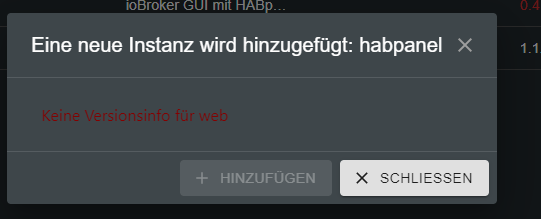
                          iobw.PNG

                          Thomas BraunT 1 Antwort Letzte Antwort
                          0
                          • FriedhofsblondF Friedhofsblond

                            @thomas-braun
                            hm, sorry bin erst ein paar Tage bei ioBroker.
                            Muß ich den Adapter irgendwie anders installieren?
                            Protokoll steht auf debug - zeigt überhaupt nix an beim Installversuch

                            iobw.PNG

                            Thomas BraunT Online
                            Thomas BraunT Online
                            Thomas Braun
                            Most Active
                            schrieb am zuletzt editiert von
                            #13

                            @friedhofsblond

                            iobroker.web nicht installiert?

                            iobroker list instances | grep web
                            

                            Am besten nimmst du die Konsole für die Administrierung des iobrokers her. Geht am einfachsten.

                            Linux-Werkzeugkasten:
                            https://forum.iobroker.net/topic/42952/der-kleine-iobroker-linux-werkzeugkasten
                            NodeJS Fixer Skript:
                            https://forum.iobroker.net/topic/68035/iob-node-fix-skript
                            iob_diag: curl -sLf -o diag.sh https://iobroker.net/diag.sh && bash diag.sh

                            FriedhofsblondF 1 Antwort Letzte Antwort
                            0
                            • Thomas BraunT Thomas Braun

                              @friedhofsblond

                              iobroker.web nicht installiert?

                              iobroker list instances | grep web
                              

                              Am besten nimmst du die Konsole für die Administrierung des iobrokers her. Geht am einfachsten.

                              FriedhofsblondF Offline
                              FriedhofsblondF Offline
                              Friedhofsblond
                              schrieb am zuletzt editiert von Friedhofsblond
                              #14

                              @thomas-braun
                              Ja sorry Anfängerfehler - aus dem Web funktionierte es jetzt - Danke ;)

                              Welche Icons sollte man hier verwenden SVG oder PNG ?

                              1 Antwort Letzte Antwort
                              0

                              Hey! Du scheinst an dieser Unterhaltung interessiert zu sein, hast aber noch kein Konto.

                              Hast du es satt, bei jedem Besuch durch die gleichen Beiträge zu scrollen? Wenn du dich für ein Konto anmeldest, kommst du immer genau dorthin zurück, wo du zuvor warst, und kannst dich über neue Antworten benachrichtigen lassen (entweder per E-Mail oder Push-Benachrichtigung). Du kannst auch Lesezeichen speichern und Beiträge positiv bewerten, um anderen Community-Mitgliedern deine Wertschätzung zu zeigen.

                              Mit deinem Input könnte dieser Beitrag noch besser werden 💗

                              Registrieren Anmelden
                              Antworten
                              • In einem neuen Thema antworten
                              Anmelden zum Antworten
                              • Älteste zuerst
                              • Neuste zuerst
                              • Meiste Stimmen


                              Support us

                              ioBroker
                              Community Adapters
                              Donate

                              480

                              Online

                              32.8k

                              Benutzer

                              82.8k

                              Themen

                              1.3m

                              Beiträge
                              Community
                              Impressum | Datenschutz-Bestimmungen | Nutzungsbedingungen | Einwilligungseinstellungen
                              ioBroker Community 2014-2025
                              logo
                              • Anmelden

                              • Du hast noch kein Konto? Registrieren

                              • Anmelden oder registrieren, um zu suchen
                              • Erster Beitrag
                                Letzter Beitrag
                              0
                              • Home
                              • Aktuell
                              • Tags
                              • Ungelesen 0
                              • Kategorien
                              • Unreplied
                              • Beliebt
                              • GitHub
                              • Docu
                              • Hilfe