
NEWS




VIS App -> kein resync mehr (Android 4.4)
-
Hi zusammen!
Ich hab n riesen Problem.
Mit der Version 0.8.1 von ioBroker VIS App kann ich nicht mehr resync durchführen.
Ich bekomme zwar den Ladebalken aber am Ende erscheint dann das keine Views in main vorhanden sind bzw keine views gefunden wurden.
Hab auch schon neu installiert aber hilft nichts.
Ich kann über das Tab das VIS-App nicht mehr nutzen.
Auf m Handy bzw auf m Tab von meiner Frau (Android 5) da gehts noch!
Hier mal meine Liste der installierten Adapter
Adapter    "yr"            : 1.0.5    , installed 1.0.5
Adapter    "web"           : 1.7.5    , installed 1.7.5
Adapter    "weatherunderground": 1.0.2    , installed 1.0.2
Adapter    "vis-timeandweather": 1.1.6    , installed 1.1.6
Adapter    "vis-rgraph"    : 0.0.2    , installed 0.0.2
Adapter    "vis-plumb"     : 0.1.6    , installed 0.1.6
Adapter    "vis-metro"     : 1.0.4    , installed 1.0.4
Adapter    "vis-lcars"     : 1.0.1    , installed 1.0.1
Adapter    "vis-keyboard"  : 0.0.2    , installed 0.0.2
Adapter    "vis-justgage"  : 0.6.1    , installed 0.6.1
Adapter    "vis-jqui-mfd"  : 1.0.5    , installed 1.0.5
Adapter    "vis-hqwidgets" : 1.0.6    , installed 1.0.6
Adapter    "vis-google-fonts": 0.1.0    , installed 0.1.0
Adapter    "vis-fancyswitch": 1.0.0    , installed 1.0.0
Adapter    "vis-colorpicker": 1.1.1    , installed 1.1.1
Adapter    "vis-bars"      : 0.1.2    , installed 0.1.2
Adapter    "vis"           : 0.10.15  , installed 0.10.15
Adapter    "vcard"         : 0.0.8    , installed 0.0.8
Adapter    "tr-064"        : 0.1.10   , installed 0.1.10
Adapter    "text2command"  : 1.1.3    , installed 1.1.3
Adapter    "telegram"      : 1.0.1    , installed 1.0.1
Adapter    "socketio"      : 1.7.3    , installed 1.7.3
Adapter    "sql"           : 1.3.2    , installed 1.3.2
Adapter    "sayit"         : 1.2.1    , installed 1.2.1
Adapter    "rickshaw"      : 0.4.4    , installed 0.4.4
Adapter    "pushover"      : 1.0.2    , installed 1.0.2
Adapter    "nut"           : 1.0.0    , installed 1.0.0
Controller "js-controller" : 0.13.2   , installed 0.13.2
Adapter    "javascript"    : 3.2.0    , installed 3.2.0
Adapter    "icons-ultimate-png": 0.1.0    , installed 0.1.0
Adapter    "icons-open-icon-library-png": 0.1.3    , installed 0.1.3
Adapter    "icons-mfd-svg" : 1.0.0    , installed 1.0.0
Adapter    "icons-mfd-png" : 1.0.0    , installed 1.0.0
Adapter    "icons-material-svg": 0.1.0    , installed 0.1.0
Adapter    "icons-material-png": 0.1.0    , installed 0.1.0
Adapter    "icons-icons8"  : 0.0.1    , installed 0.0.1
Adapter    "icons-addictive-flavour-png": 0.1.0    , installed 0.1.0
Adapter    "ical"          : 1.2.0    , installed 1.2.0
Adapter    "hm-rpc"        : 1.3.3    , installed 1.3.3
Adapter    "hm-rega"       : 1.3.0    , installed 1.3.0
Adapter    "fritzbox"      : 0.2.1    , installed 0.2.1
Adapter    "flot"          : 1.5.6    , installed 1.5.6
Adapter    "email"         : 1.0.0    , installed 0.2.0 [Updateable]
Adapter    "dwd"           : 2.1.1    , installed 2.1.1
Adapter    "admin"         : 1.6.7    , installed 1.6.7
Vorher ging alles bestens. Hab auch n älteres Update von meiner ioBroker installation ausprobiert. Selbes Problem.
Kann mir da vielleicht jemand mal ne ältere App-Version zur Verfügung stellen?
Vielleicht liegt es an dem?
Gruß
Johnny
-
Hi zusammen!
Ich hab n riesen Problem.
Mit der Version 0.8.1 von ioBroker VIS App kann ich nicht mehr resync durchführen.
Ich bekomme zwar den Ladebalken aber am Ende erscheint dann das keine Views in main vorhanden sind bzw keine views gefunden wurden.
Hab auch schon neu installiert aber hilft nichts.
Ich kann über das Tab das VIS-App nicht mehr nutzen.
Auf m Handy bzw auf m Tab von meiner Frau (Android 5) da gehts noch!
Hier mal meine Liste der installierten Adapter
Adapter    "yr"            : 1.0.5    , installed 1.0.5
Adapter    "web"           : 1.7.5    , installed 1.7.5
Adapter    "weatherunderground": 1.0.2    , installed 1.0.2
Adapter    "vis-timeandweather": 1.1.6    , installed 1.1.6
Adapter    "vis-rgraph"    : 0.0.2    , installed 0.0.2
Adapter    "vis-plumb"     : 0.1.6    , installed 0.1.6
Adapter    "vis-metro"     : 1.0.4    , installed 1.0.4
Adapter    "vis-lcars"     : 1.0.1    , installed 1.0.1
Adapter    "vis-keyboard"  : 0.0.2    , installed 0.0.2
Adapter    "vis-justgage"  : 0.6.1    , installed 0.6.1
Adapter    "vis-jqui-mfd"  : 1.0.5    , installed 1.0.5
Adapter    "vis-hqwidgets" : 1.0.6    , installed 1.0.6
Adapter    "vis-google-fonts": 0.1.0    , installed 0.1.0
Adapter    "vis-fancyswitch": 1.0.0    , installed 1.0.0
Adapter    "vis-colorpicker": 1.1.1    , installed 1.1.1
Adapter    "vis-bars"      : 0.1.2    , installed 0.1.2
Adapter    "vis"           : 0.10.15  , installed 0.10.15
Adapter    "vcard"         : 0.0.8    , installed 0.0.8
Adapter    "tr-064"        : 0.1.10   , installed 0.1.10
Adapter    "text2command"  : 1.1.3    , installed 1.1.3
Adapter    "telegram"      : 1.0.1    , installed 1.0.1
Adapter    "socketio"      : 1.7.3    , installed 1.7.3
Adapter    "sql"           : 1.3.2    , installed 1.3.2
Adapter    "sayit"         : 1.2.1    , installed 1.2.1
Adapter    "rickshaw"      : 0.4.4    , installed 0.4.4
Adapter    "pushover"      : 1.0.2    , installed 1.0.2
Adapter    "nut"           : 1.0.0    , installed 1.0.0
Controller "js-controller" : 0.13.2   , installed 0.13.2
Adapter    "javascript"    : 3.2.0    , installed 3.2.0
Adapter    "icons-ultimate-png": 0.1.0    , installed 0.1.0
Adapter    "icons-open-icon-library-png": 0.1.3    , installed 0.1.3
Adapter    "icons-mfd-svg" : 1.0.0    , installed 1.0.0
Adapter    "icons-mfd-png" : 1.0.0    , installed 1.0.0
Adapter    "icons-material-svg": 0.1.0    , installed 0.1.0
Adapter    "icons-material-png": 0.1.0    , installed 0.1.0
Adapter    "icons-icons8"  : 0.0.1    , installed 0.0.1
Adapter    "icons-addictive-flavour-png": 0.1.0    , installed 0.1.0
Adapter    "ical"          : 1.2.0    , installed 1.2.0
Adapter    "hm-rpc"        : 1.3.3    , installed 1.3.3
Adapter    "hm-rega"       : 1.3.0    , installed 1.3.0
Adapter    "fritzbox"      : 0.2.1    , installed 0.2.1
Adapter    "flot"          : 1.5.6    , installed 1.5.6
Adapter    "email"         : 1.0.0    , installed 0.2.0 [Updateable]
Adapter    "dwd"           : 2.1.1    , installed 2.1.1
Adapter    "admin"         : 1.6.7    , installed 1.6.7
Vorher ging alles bestens. Hab auch n älteres Update von meiner ioBroker installation ausprobiert. Selbes Problem.
Kann mir da vielleicht jemand mal ne ältere App-Version zur Verfügung stellen?
Vielleicht liegt es an dem?
Gruß
Johnny `
Probier mal WEB vom git zu installieren. -
` > Probier mal WEB vom git zu installieren.
Hallo Bluefox, bekomme mit npm install iobroker.web nur die Version 1.7.5, wahrscheinlich schnalle ich einfach nicht den Kommandoaufruf für 1.7.6, kannst Du hier kurz helfen…. sorry und danke
-
bekomme mit npm install iobroker.web nur die Version 1.7.5 `
klar, du sollst ja auch nicht über npm sondern aus github installieren. ;-)Dazu gehst du in den Admin auf den Reiter Adapter.
Dort klickst du oben links auf das dritte Icon von links (Octocat) und gibst in dem Reiter "aus eigener Datei" (o.ä.) den Link von Bluefox ein.
Es kann sein, dass du anschließend über die Konsole noch ein
iobroker upload webmachen musst, wenn immer noch nicht die neue Version angezeigt wird.
Gruß
Rainer
-
Hallo Rainer,
Danke Dir!!! Jetzt bekomme ich folgende Meldung im LOG beim installieren:
(Nachtrag: habe jetzt über ioBrokerAdmin/Install from URL/von Github/ dann "Web" ausgewählt und jetzt die Version 1.7.6. installiert bekommen….) Grüße!)
$ ./iobroker url "https://github.com/ioBroker/ioBroker.web#176-2016-12-07"
install https://github.com/ioBroker/ioBroker.web#176-2016-12-07/tarball/master
npm install https://github.com/ioBroker/ioBroker.web#176-2016-12-07/tarball/master --production --prefix "/opt/iobroker" (System call)
npm
WARN
addRemoteGit
 Error: not found: git
npm
 WARN addRemoteGit     at getNotFoundError (/usr/lib/node_modules/npm/node_modules/which/which.js:14:12)npm WARN addRemoteGit     at F (/usr/lib/node_modules/npm/node_modules/which/which.js:69:19)
npm WARN addRemoteGit     at E (/usr/lib/node_modules/npm/node_modules/which/which.js:81:29)
npm WARN addRemoteGit     at /usr/lib/node_modules/npm/node_modules/which/which.js:90:16
npm
WARN addRemoteGit     at /usr/lib/node_modules/npm/node_modules/which/node_modules/isexe/index.js:44:5npm WARN addRemoteGit     at /usr/lib/node_modules/npm/node_modules/which/node_modules/isexe/access.js:8:5
npm WARN addRemoteGit     at FSReqWrap.oncomplete (fs.js:82:15)
npm WARN addRemoteGit  git+https://github.com/ioBroker/ioBroker.web.git#176-2016-12-07/tarball/master resetting remote /root/.npm/_git-remotes/https-github-com-ioBroker-ioBroker-web-git-01d420cd because of error: { [Error: not found: git] code: 'ENOGIT' }
npm ERR! git clone --template=/root/.npm/_git-remotes/_templates --mirror https://github.com/ioBroker/ioBroker.web.git /root/.npm/_git-remotes/https-github-com-ioBroker-ioBroker-web-git-01d420cd: undefinednpm ERR! git clone --template=/root/.npm/_git-remotes/_templates --mirror https://github.com/ioBroker/ioBroker.web.git /root/.npm/_git-remotes/https-github-com-ioBroker-ioBroker-web-git-01d420cd: undefined
npm
 ERR! Linux 4.4.13-v7+
npm
 ERR! argv "/usr/bin/nodejs" "/usr/bin/npm" "install" "https://github.com/ioBroker/ioBroker.web#176-2016-12-07/tarball/master" "--production" "--prefix" "/opt/iobroker"npm ERR! node v4.5.0
npm ERR! npm  v2.15.9npm ERR! code ENOGIT
npm ERR! not found: gitnpm ERR!
npm ERR!
 Failed using git.npm ERR! This is most likely not a problem with npm itself.
npm ERR! Please check if you have git installed and in your PATH.
npm ERR! Please include the following file with any support request:npm
ERR!
     /npm-debug.log
ERROR: host.ioBroker-Pi Cannot install https://github.com/ioBroker/ioBroker.web#176-2016-12-07/tarball/master: 1
ERROR: process exited with code 25
EDIT: code in codetags gesetzt; Homoran (Admin)
-
Dir fehlt anscheinend das Paket git.
Als root bitte ausführen:
apt-get install gitDann nochmal versuchen.
Gruß
Rainer
-
Hi Bluefox
Also wenn ich über Admin versuche den web-Adapter zu aktualisieren
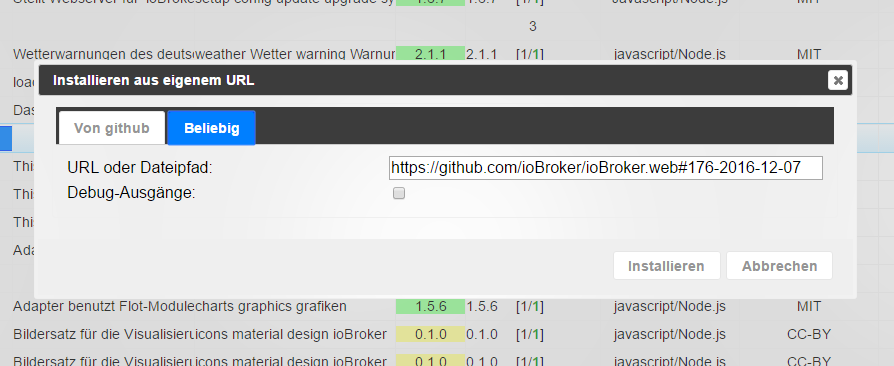
Dann bekomme ich folgende Fehlermeldung
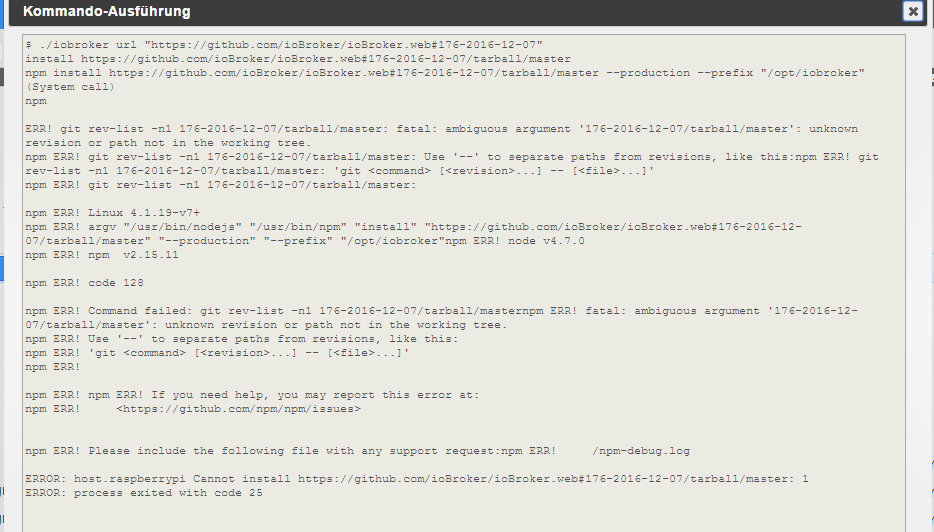
Wenn ich auf der Konsole den Adapter wie folgt aktualisiere
iobroker stop
npm install https://github.com/ioBroker/ioBroker.web/tarball/master --production
iobroker upload web
iobroker restart
dann erhalte ich unter anderem das
root@raspberrypi:/opt/iobroker# npm install https://github.com/ioBroker/ioBroker                                                                       .web/tarball/master --production
/
> ursa@0.9.4 install /opt/iobroker/node_modules/iobroker.web/node_modules/iobroker.simple-api/node_modules/letsencrypt/node_modules/rsa-compat/node_modules/ursa
> node-gyp rebuild

make: Entering directory '/opt/iobroker/node_modules/iobroker.web/node_modules/iobroker.simple-api/node_modules/letsencrypt/node_modules/rsa-compat/node_modules/ursa/build'
  CXX(target) Release/obj.target/ursaNative/src/ursaNative.o
make: g++: Kommando nicht gefunden
ursaNative.target.mk:96: recipe for target 'Release/obj.target/ursaNative/src/ursaNative.o' failed
make: *** [Release/obj.target/ursaNative/src/ursaNative.o] Error 127
make: Leaving directory '/opt/iobroker/node_modules/iobroker.web/node_modules/iobroker.simple-api/node_modules/letsencrypt/node_modules/rsa-compat/node_modules/ursa/build'
gyp ERR! build error
gyp ERR! stack Error: `make` failed with exit code: 2
gyp ERR! stack     at ChildProcess.onExit (/usr/lib/node_modules/npm/node_modules/node-gyp/lib/build.js:276:23)
gyp ERR! stack     at emitTwo (events.js:87:13)
gyp ERR! stack     at ChildProcess.emit (events.js:172:7)
gyp ERR! stack     at Process.ChildProcess._handle.onexit (internal/child_process.js:211:12)
gyp ERR! System Linux 4.1.19-v7+
gyp ERR! command "/usr/bin/nodejs" "/usr/lib/node_modules/npm/node_modules/node-gyp/bin/node-gyp.js" "rebuild"
gyp ERR! cwd /opt/iobroker/node_modules/iobroker.web/node_modules/iobroker.simple-api/node_modules/letsencrypt/node_modules/rsa-compat/node_modules/ursa
gyp ERR! node -v v4.7.0
gyp ERR! node-gyp -v v3.4.0
gyp ERR! not ok
npm WARN optional dep failed, continuing ursa@0.9.4

iobroker.web@1.7.6 node_modules/iobroker.web
├── connect-flash@0.1.1
├── xtend@4.0.1
├── passport.socketio@3.7.0
├── cookie-parser@1.4.3 (cookie-signature@1.0.6, cookie@0.3.1)
├── passport-local@1.0.0 (passport-strategy@1.0.0)
├── passport@0.3.2 (pause@0.0.1, passport-strategy@1.0.0)
├── express-session@1.14.2 (cookie-signature@1.0.6, utils-merge@1.0.0, on-headers@1.0.1, cookie@0.3.1, parseurl@1.3.1, depd@1.1.0, crc@3.4.1, uid-safe@2.1.3, debug@2.2.0)
├── body-parser@1.15.2 (bytes@2.4.0, content-type@1.0.2, depd@1.1.0, qs@6.2.0, on-finished@2.3.0, raw-body@2.1.7, http-errors@1.5.1, debug@2.2.0, iconv-lite@0.4.13, type-is@1.6.14)
├── express@4.14.0 (escape-html@1.0.3, array-flatten@1.1.1, cookie-signature@1.0.6, utils-merge@1.0.0, content-type@1.0.2, merge-descriptors@1.0.1, encodeurl@1.0.1, methods@1.1.2, cookie@0.3.1, parseurl@1.3.1, content-disposition@0.5.1, etag@1.7.0, fresh@0.3.0, path-to-regexp@0.1.7, range-parser@1.2.0, vary@1.1.0, serve-static@1.11.1, depd@1.1.0, qs@6.2.0, on-finished@2.3.0, finalhandler@0.5.0, debug@2.2.0, proxy-addr@1.1.2, send@0.14.1, type-is@1.6.14, accepts@1.3.3)
└── iobroker.simple-api@1.3.0 (le-challenge-fs@2.0.8, le-sni-auto@2.1.0, le-store-certbot@2.0.3, letsencrypt@2.1.8)
Mir wird dann zwar auf der Admin Seite die Version 1.7.6 angezeigt aber ein Resync mit dem ioBroker-App geht immer noch nicht.
Gruß
Johnny
-
Die URL hast de ja oben angegeben.
Also wenn ich das über den ersten Reiter mache, also web ddann auswähle dann kommt am Anfang auch die Fehlermeldung
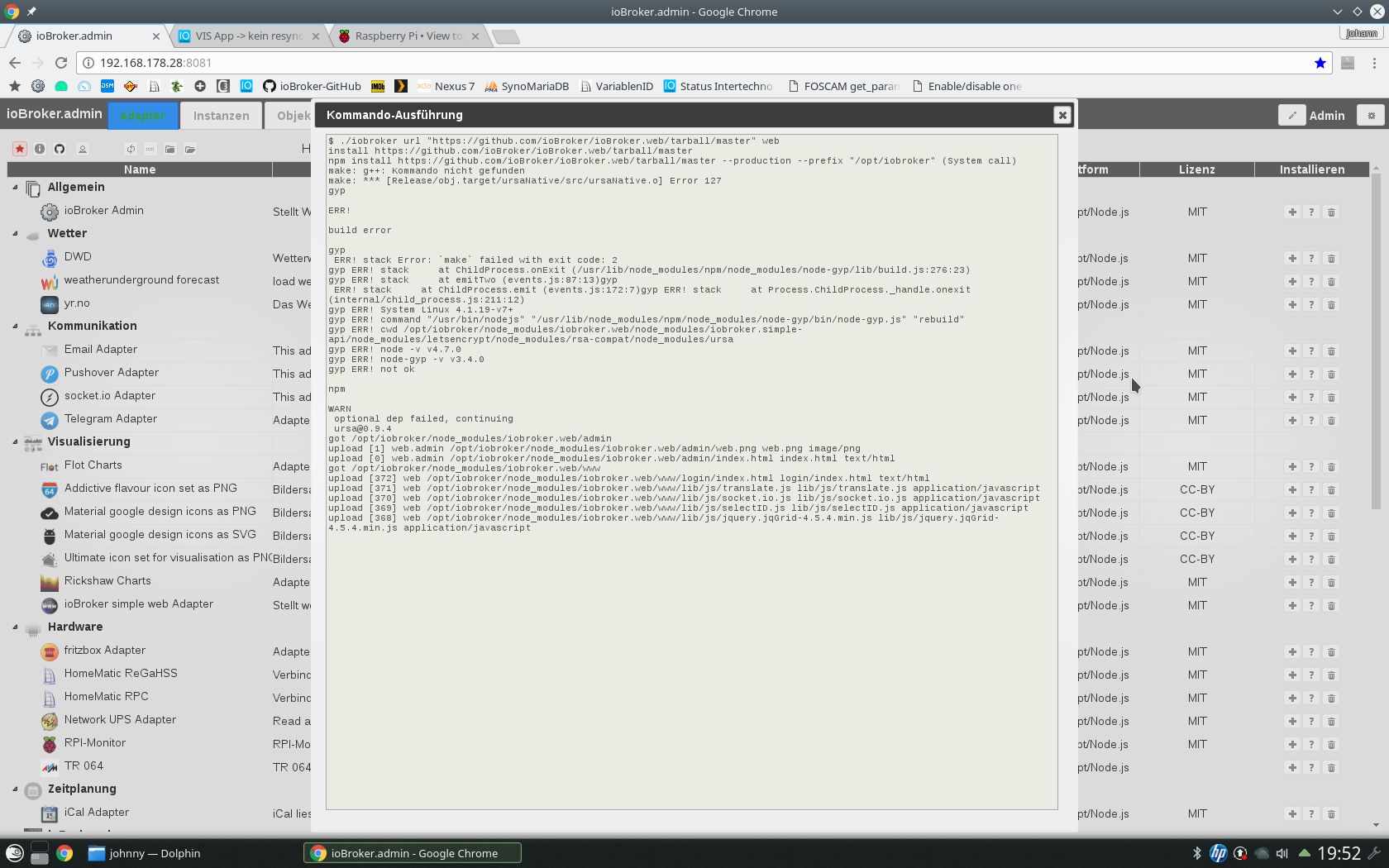
Gruß
Johnny
-
Was hat es eigentlich mit der Fehlermeldung auf sich?
In iobroker wird mir zwar die Version 1.7.6 beim Web Adapter angezeigt aber der resync geht trotzdem nicht!
Gruß Johnny
-
Die URL hast de ja oben angegeben.
Also wenn ich das über den ersten Reiter mache, also web ddann auswähle dann kommt am Anfang auch die Fehlermeldung
Screenshot_20161211_195238.png
Gruß
Johnny `
Der Fehler kommt beim optionalem Modul.probier mal:
iobroker upload web
iobroker restart web


Support us
732
Online32.7k
Users82.4k
Topics1.3m
Posts