
NEWS




[ Geklärt ] Problem bei Influx Installation
-
Guten Morgen,
Ich möchte meine Graphen zukünftig mittels Grafana darstellen.
Dafür benötige ich die InfluxDB.
Dazu habe ich mir sehr viele Videos angesehen und es sollte von der
Sache her kein Problem sein, Aber der teufel steckt im DetailProcessing triggers for man-db (2.8.5-2) ... pi@raspberrypi:~ $ sudo service influxdb start pi@raspberrypi:~ $ sudo influx Failed to connect to http://localhost:8086: Get http://localhost:8086/ping: dial tcp [::1]:8086: connect: connection refused Please check your connection settings and ensure 'influxd' is running. pi@raspberrypi:~ $Heist:
sudo influx Fehler beim Herstellen einer Verbindung zu http: // localhost: 8086: Abrufen von http: // localhost: 8086 / ping: Wählen von TCP [:: 1]: 8086: Verbinden: Verbindung abgelehnt
Bitte überprüfen Sie Ihre Verbindungseinstellungen und stellen Sie sicher, dass 'influxd' ausgeführt wird.Wer kann mir bitte helfen das Problem zu lösen.
Freundliche Grüße
Michael@Altersrentner
gib mal folgendes einsystemctl daemon-reload systemctl enable influxdb systemctl start influxdb -
@Altersrentner
gib mal folgendes einsystemctl daemon-reload systemctl enable influxdb systemctl start influxdb@crunchip
Danke für Deine schnelle Unterstützung!:+1:pi@raspberrypi:~ $ sudo service influxdb start pi@raspberrypi:~ $ sudo influx Failed to connect to http://localhost:8086: Get http://localhost:8086/ping: dial tcp [::1]:8086: connect: connection refused Please check your connection settings and ensure 'influxd' is running. pi@raspberrypi:~ $ systemctl daemon-reload ==== AUTHENTICATING FOR org.freedesktop.systemd1.reload-daemon === Authentication is required to reload the systemd state. Authenticating as: root Password: polkit-agent-helper-1: pam_authenticate failed: Authentication failure ==== AUTHENTICATION FAILED === Failed to reload daemon: Access denied pi@raspberrypi:~ $ systemctl enable influxdb ==== AUTHENTICATING FOR org.freedesktop.systemd1.manage-unit-files === Authentication is required to manage system service or unit files. Authenticating as: root Password: polkit-agent-helper-1: pam_authenticate failed: Authentication failure ==== AUTHENTICATION FAILED === Failed to enable unit: Access denied pi@raspberrypi:~ $ systemctl start influxdb ==== AUTHENTICATING FOR org.freedesktop.systemd1.manage-units === Authentication is required to start 'influxdb.service'. Authenticating as: root Password: -
@crunchip
Danke für Deine schnelle Unterstützung!:+1:pi@raspberrypi:~ $ sudo service influxdb start pi@raspberrypi:~ $ sudo influx Failed to connect to http://localhost:8086: Get http://localhost:8086/ping: dial tcp [::1]:8086: connect: connection refused Please check your connection settings and ensure 'influxd' is running. pi@raspberrypi:~ $ systemctl daemon-reload ==== AUTHENTICATING FOR org.freedesktop.systemd1.reload-daemon === Authentication is required to reload the systemd state. Authenticating as: root Password: polkit-agent-helper-1: pam_authenticate failed: Authentication failure ==== AUTHENTICATION FAILED === Failed to reload daemon: Access denied pi@raspberrypi:~ $ systemctl enable influxdb ==== AUTHENTICATING FOR org.freedesktop.systemd1.manage-unit-files === Authentication is required to manage system service or unit files. Authenticating as: root Password: polkit-agent-helper-1: pam_authenticate failed: Authentication failure ==== AUTHENTICATION FAILED === Failed to enable unit: Access denied pi@raspberrypi:~ $ systemctl start influxdb ==== AUTHENTICATING FOR org.freedesktop.systemd1.manage-units === Authentication is required to start 'influxdb.service'. Authenticating as: root Password:@Altersrentner wenn du als pi angemeldet bist, setze bei den drei Befehlen ein sudo davor
-
@Altersrentner wenn du als pi angemeldet bist, setze bei den drei Befehlen ein sudo davor
@crunchip
Alles klar:anguished:SSH is enabled and the default password for the 'pi' user has not been changed. This is a security risk - please login as the 'pi' user and type 'passwd' to set a new password. pi@raspberrypi:~ $ sudo service influxdb start pi@raspberrypi:~ $ sudo influx Failed to connect to http://localhost:8086: Get http://localhost:8086/ping: dial tcp [::1]:8086: connect: connection refused Please check your connection settings and ensure 'influxd' is running. pi@raspberrypi:~ $ sudo systemctl daemon-reload pi@raspberrypi:~ $ sudo systemctl enable influxdb pi@raspberrypi:~ $ sudo systemctl start influxdb pi@raspberrypi:~ $ -
@crunchip
Alles klar:anguished:SSH is enabled and the default password for the 'pi' user has not been changed. This is a security risk - please login as the 'pi' user and type 'passwd' to set a new password. pi@raspberrypi:~ $ sudo service influxdb start pi@raspberrypi:~ $ sudo influx Failed to connect to http://localhost:8086: Get http://localhost:8086/ping: dial tcp [::1]:8086: connect: connection refused Please check your connection settings and ensure 'influxd' is running. pi@raspberrypi:~ $ sudo systemctl daemon-reload pi@raspberrypi:~ $ sudo systemctl enable influxdb pi@raspberrypi:~ $ sudo systemctl start influxdb pi@raspberrypi:~ $@Altersrentner und klappt?:+1:
-
@Altersrentner und klappt?:+1:
@crunchip Da bin ich echt überftragt.
Auf alle Fälle werden keine Fehler angezeigt.
Nur der influxdb.0 Adapter stellt keine Verbindung her.
Host: localhost
Protokoll: http
Port: 8086influxdb.0 2020-12-20 11:24:45.446 error (13161) Error: connect ECONNREFUSED 127.0.0.1:8086 influxdb.0 2020-12-20 11:24:45.442 info (13161) Connecting http://localhost:8086 ...Edit:
Weiterhin keine Verbindungpi@raspberrypi:~ $ influx Failed to connect to http://localhost:8086: Get http://localhost:8086/ping: dial tcp [::1]:8086: connect: connection refused Please check your connection settings and ensure 'influxd' is running. pi@raspberrypi:~ $ sudo influx Failed to connect to http://localhost:8086: Get http://localhost:8086/ping: dial tcp [::1]:8086: connect: connection refused Please check your connection settings and ensure 'influxd' is running. pi@raspberrypi:~ $ -
@crunchip Da bin ich echt überftragt.
Auf alle Fälle werden keine Fehler angezeigt.
Nur der influxdb.0 Adapter stellt keine Verbindung her.
Host: localhost
Protokoll: http
Port: 8086influxdb.0 2020-12-20 11:24:45.446 error (13161) Error: connect ECONNREFUSED 127.0.0.1:8086 influxdb.0 2020-12-20 11:24:45.442 info (13161) Connecting http://localhost:8086 ...Edit:
Weiterhin keine Verbindungpi@raspberrypi:~ $ influx Failed to connect to http://localhost:8086: Get http://localhost:8086/ping: dial tcp [::1]:8086: connect: connection refused Please check your connection settings and ensure 'influxd' is running. pi@raspberrypi:~ $ sudo influx Failed to connect to http://localhost:8086: Get http://localhost:8086/ping: dial tcp [::1]:8086: connect: connection refused Please check your connection settings and ensure 'influxd' is running. pi@raspberrypi:~ $@Altersrentner probier mal bei Host, anstatt "localhost" die Ip deines Rechners bei den Settings einzutragen.
Edit:
was gibt folgendes aus?systemctl status influxdb -
@Altersrentner probier mal bei Host, anstatt "localhost" die Ip deines Rechners bei den Settings einzutragen.
Edit:
was gibt folgendes aus?systemctl status influxdb@crunchip
Brachte keine Änderunginfluxdb.0 2020-12-20 11:36:27.294 error (14640) Error: connect ECONNREFUSED 192.168.178.41:8086 influxdb.0 2020-12-20 11:36:27.290 info (14640) Connecting http://192.168.178.41:8086 ... fhem.0 2020-12-20 11:36:25.223 info (835) Update channel: WattUsageAnDummy | fhem.0.WattUsageAnDummy - native fhem.0 2020-12-20 11:36:25.218 info (835) check channel fhem.0.WattUsageAnDummy | name: WattUsa -
@Altersrentner probier mal bei Host, anstatt "localhost" die Ip deines Rechners bei den Settings einzutragen.
Edit:
was gibt folgendes aus?systemctl status influxdbpi@raspberrypi:~ $ sudo systemctl status influxdb ● influxdb.service - InfluxDB is an open-source, distributed, time series database Loaded: loaded (/lib/systemd/system/influxdb.service; enabled; vendor preset: enabl Active: failed (Result: exit-code) since Sun 2020-12-20 11:12:30 CET; 27min ago Docs: https://docs.influxdata.com/influxdb/ Process: 12273 ExecStart=/usr/bin/influxd -config /etc/influxdb/influxdb.conf $INFLU Main PID: 12273 (code=exited, status=1/FAILURE) Dec 20 11:12:30 raspberrypi systemd[1]: influxdb.service: Service RestartSec=100ms exp Dec 20 11:12:30 raspberrypi systemd[1]: influxdb.service: Scheduled restart job, resta Dec 20 11:12:30 raspberrypi systemd[1]: Stopped InfluxDB is an open-source, distribute Dec 20 11:12:30 raspberrypi systemd[1]: influxdb.service: Start request repeated too q Dec 20 11:12:30 raspberrypi systemd[1]: influxdb.service: Failed with result 'exit-cod Dec 20 11:12:30 raspberrypi systemd[1]: Failed to start InfluxDB is an open-source, di lines 1-13/13 (END)...skipping... ● influxdb.service - InfluxDB is an open-source, distributed, time series database Loaded: loaded (/lib/systemd/system/influxdb.service; enabled; vendor preset: enabl Active: failed (Result: exit-code) since Sun 2020-12-20 11:12:30 CET; 27min ago Docs: https://docs.influxdata.com/influxdb/ Process: 12273 ExecStart=/usr/bin/influxd -config /etc/influxdb/influxdb.conf $INFLU Main PID: 12273 (code=exited, status=1/FAILURE) Dec 20 11:12:30 raspberrypi systemd[1]: influxdb.service: Service RestartSec=100ms exp Dec 20 11:12:30 raspberrypi systemd[1]: influxdb.service: Scheduled restart job, resta Dec 20 11:12:30 raspberrypi systemd[1]: Stopped InfluxDB is an open-source, distribute Dec 20 11:12:30 raspberrypi systemd[1]: influxdb.service: Start request repeated too q Dec 20 11:12:30 raspberrypi systemd[1]: influxdb.service: Failed with result 'exit-cod Dec 20 11:12:30 raspberrypi systemd[1]: Failed to start InfluxDB is an open-source, di ~ ~ ~ ~ ~ ~ ~ ~ ~ ~ ~ ~ lines 1-13/13 (END) ● influxdb.service - InfluxDB is an open-source, distributed, time series database Loaded: loaded (/lib/systemd/system/influxdb.service; enabled; vendor preset: enabled) Active: failed (Result: exit-code) since Sun 2020-12-20 11:12:30 CET; 27min ago Docs: https://docs.influxdata.com/influxdb/ Process: 12273 ExecStart=/usr/bin/influxd -config /etc/influxdb/influxdb.conf $INFLUXD_OPTS (code=exited, s Main PID: 12273 (code=exited, status=1/FAILURE) Dec 20 11:12:30 raspberrypi systemd[1]: influxdb.service: Service RestartSec=100ms expired, scheduling restar Dec 20 11:12:30 raspberrypi systemd[1]: influxdb.service: Scheduled restart job, restart counter is at 5. Dec 20 11:12:30 raspberrypi systemd[1]: Stopped InfluxDB is an open-source, distributed, time series database Dec 20 11:12:30 raspberrypi systemd[1]: influxdb.service: Start request repeated too quickly. Dec 20 11:12:30 raspberrypi systemd[1]: influxdb.service: Failed with result 'exit-code'. Dec 20 11:12:30 raspberrypi systemd[1]: Failed to start InfluxDB is an open-source, distributed, time series ~ ~ ~ ~ ~ ~ ~ ~ ~ ~ ~ ~ lines 1-13/13 (END) ● influxdb.service - InfluxDB is an open-source, distributed, time series database Loaded: loaded (/lib/systemd/system/influxdb.service; enabled; vendor preset: enabled) Active: failed (Result: exit-code) since Sun 2020-12-20 11:12:30 CET; 27min ago Docs: https://docs.influxdata.com/influxdb/ Process: 12273 ExecStart=/usr/bin/influxd -config /etc/influxdb/influxdb.conf $INFLUXD_OPTS (code=exited, status=1/FAILURE) Main PID: 12273 (code=exited, status=1/FAILURE) Dec 20 11:12:30 raspberrypi systemd[1]: influxdb.service: Service RestartSec=100ms expired, scheduling restart. Dec 20 11:12:30 raspberrypi systemd[1]: influxdb.service: Scheduled restart job, restart counter is at 5. Dec 20 11:12:30 raspberrypi systemd[1]: Stopped InfluxDB is an open-source, distributed, time series database. Dec 20 11:12:30 raspberrypi systemd[1]: influxdb.service: Start request repeated too quickly. Dec 20 11:12:30 raspberrypi systemd[1]: influxdb.service: Failed with result 'exit-code'. Dec 20 11:12:30 raspberrypi systemd[1]: Failed to start InfluxDB is an open-source, distributed, time series database. ~ ~ ~ ~ ~ ~ ~ ~ ~ ~ ~ ~ lines 1-13/13 (END) ● influxdb.service - InfluxDB is an open-source, distributed, time series database Loaded: loaded (/lib/systemd/system/influxdb.service; enabled; vendor preset: enabled) Active: failed (Result: exit-code) since Sun 2020-12-20 11:12:30 CET; 27min ago Docs: https://docs.influxdata.com/influxdb/ Process: 12273 ExecStart=/usr/bin/influxd -config /etc/influxdb/influxdb.conf $INFLUXD_OPTS (code=exited, status=1/FAILURE) Main PID: 12273 (code=exited, status=1/FAILURE) Dec 20 11:12:30 raspberrypi systemd[1]: influxdb.service: Service RestartSec=100ms expired, scheduling restart. Dec 20 11:12:30 raspberrypi systemd[1]: influxdb.service: Scheduled restart job, restart counter is at 5. Dec 20 11:12:30 raspberrypi systemd[1]: Stopped InfluxDB is an open-source, distributed, time series database. Dec 20 11:12:30 raspberrypi systemd[1]: influxdb.service: Start request repeated too quickly. Dec 20 11:12:30 raspberrypi systemd[1]: influxdb.service: Failed with result 'exit-code'. Dec 20 11:12:30 raspberrypi systemd[1]: Failed to start InfluxDB is an open-source, distributed, time series database. ~ ~ ~ ~ ~ ~ ~ ~ ~ ~ ~ ~ lines 1-13/13 (END) -
pi@raspberrypi:~ $ sudo systemctl status influxdb ● influxdb.service - InfluxDB is an open-source, distributed, time series database Loaded: loaded (/lib/systemd/system/influxdb.service; enabled; vendor preset: enabl Active: failed (Result: exit-code) since Sun 2020-12-20 11:12:30 CET; 27min ago Docs: https://docs.influxdata.com/influxdb/ Process: 12273 ExecStart=/usr/bin/influxd -config /etc/influxdb/influxdb.conf $INFLU Main PID: 12273 (code=exited, status=1/FAILURE) Dec 20 11:12:30 raspberrypi systemd[1]: influxdb.service: Service RestartSec=100ms exp Dec 20 11:12:30 raspberrypi systemd[1]: influxdb.service: Scheduled restart job, resta Dec 20 11:12:30 raspberrypi systemd[1]: Stopped InfluxDB is an open-source, distribute Dec 20 11:12:30 raspberrypi systemd[1]: influxdb.service: Start request repeated too q Dec 20 11:12:30 raspberrypi systemd[1]: influxdb.service: Failed with result 'exit-cod Dec 20 11:12:30 raspberrypi systemd[1]: Failed to start InfluxDB is an open-source, di lines 1-13/13 (END)...skipping... ● influxdb.service - InfluxDB is an open-source, distributed, time series database Loaded: loaded (/lib/systemd/system/influxdb.service; enabled; vendor preset: enabl Active: failed (Result: exit-code) since Sun 2020-12-20 11:12:30 CET; 27min ago Docs: https://docs.influxdata.com/influxdb/ Process: 12273 ExecStart=/usr/bin/influxd -config /etc/influxdb/influxdb.conf $INFLU Main PID: 12273 (code=exited, status=1/FAILURE) Dec 20 11:12:30 raspberrypi systemd[1]: influxdb.service: Service RestartSec=100ms exp Dec 20 11:12:30 raspberrypi systemd[1]: influxdb.service: Scheduled restart job, resta Dec 20 11:12:30 raspberrypi systemd[1]: Stopped InfluxDB is an open-source, distribute Dec 20 11:12:30 raspberrypi systemd[1]: influxdb.service: Start request repeated too q Dec 20 11:12:30 raspberrypi systemd[1]: influxdb.service: Failed with result 'exit-cod Dec 20 11:12:30 raspberrypi systemd[1]: Failed to start InfluxDB is an open-source, di ~ ~ ~ ~ ~ ~ ~ ~ ~ ~ ~ ~ lines 1-13/13 (END) ● influxdb.service - InfluxDB is an open-source, distributed, time series database Loaded: loaded (/lib/systemd/system/influxdb.service; enabled; vendor preset: enabled) Active: failed (Result: exit-code) since Sun 2020-12-20 11:12:30 CET; 27min ago Docs: https://docs.influxdata.com/influxdb/ Process: 12273 ExecStart=/usr/bin/influxd -config /etc/influxdb/influxdb.conf $INFLUXD_OPTS (code=exited, s Main PID: 12273 (code=exited, status=1/FAILURE) Dec 20 11:12:30 raspberrypi systemd[1]: influxdb.service: Service RestartSec=100ms expired, scheduling restar Dec 20 11:12:30 raspberrypi systemd[1]: influxdb.service: Scheduled restart job, restart counter is at 5. Dec 20 11:12:30 raspberrypi systemd[1]: Stopped InfluxDB is an open-source, distributed, time series database Dec 20 11:12:30 raspberrypi systemd[1]: influxdb.service: Start request repeated too quickly. Dec 20 11:12:30 raspberrypi systemd[1]: influxdb.service: Failed with result 'exit-code'. Dec 20 11:12:30 raspberrypi systemd[1]: Failed to start InfluxDB is an open-source, distributed, time series ~ ~ ~ ~ ~ ~ ~ ~ ~ ~ ~ ~ lines 1-13/13 (END) ● influxdb.service - InfluxDB is an open-source, distributed, time series database Loaded: loaded (/lib/systemd/system/influxdb.service; enabled; vendor preset: enabled) Active: failed (Result: exit-code) since Sun 2020-12-20 11:12:30 CET; 27min ago Docs: https://docs.influxdata.com/influxdb/ Process: 12273 ExecStart=/usr/bin/influxd -config /etc/influxdb/influxdb.conf $INFLUXD_OPTS (code=exited, status=1/FAILURE) Main PID: 12273 (code=exited, status=1/FAILURE) Dec 20 11:12:30 raspberrypi systemd[1]: influxdb.service: Service RestartSec=100ms expired, scheduling restart. Dec 20 11:12:30 raspberrypi systemd[1]: influxdb.service: Scheduled restart job, restart counter is at 5. Dec 20 11:12:30 raspberrypi systemd[1]: Stopped InfluxDB is an open-source, distributed, time series database. Dec 20 11:12:30 raspberrypi systemd[1]: influxdb.service: Start request repeated too quickly. Dec 20 11:12:30 raspberrypi systemd[1]: influxdb.service: Failed with result 'exit-code'. Dec 20 11:12:30 raspberrypi systemd[1]: Failed to start InfluxDB is an open-source, distributed, time series database. ~ ~ ~ ~ ~ ~ ~ ~ ~ ~ ~ ~ lines 1-13/13 (END) ● influxdb.service - InfluxDB is an open-source, distributed, time series database Loaded: loaded (/lib/systemd/system/influxdb.service; enabled; vendor preset: enabled) Active: failed (Result: exit-code) since Sun 2020-12-20 11:12:30 CET; 27min ago Docs: https://docs.influxdata.com/influxdb/ Process: 12273 ExecStart=/usr/bin/influxd -config /etc/influxdb/influxdb.conf $INFLUXD_OPTS (code=exited, status=1/FAILURE) Main PID: 12273 (code=exited, status=1/FAILURE) Dec 20 11:12:30 raspberrypi systemd[1]: influxdb.service: Service RestartSec=100ms expired, scheduling restart. Dec 20 11:12:30 raspberrypi systemd[1]: influxdb.service: Scheduled restart job, restart counter is at 5. Dec 20 11:12:30 raspberrypi systemd[1]: Stopped InfluxDB is an open-source, distributed, time series database. Dec 20 11:12:30 raspberrypi systemd[1]: influxdb.service: Start request repeated too quickly. Dec 20 11:12:30 raspberrypi systemd[1]: influxdb.service: Failed with result 'exit-code'. Dec 20 11:12:30 raspberrypi systemd[1]: Failed to start InfluxDB is an open-source, distributed, time series database. ~ ~ ~ ~ ~ ~ ~ ~ ~ ~ ~ ~ lines 1-13/13 (END)@Altersrentner ok, also da kann auch keine Verbindung zustande kommen, da dein Influx gar nicht läuft.
wie oder nach welcher Anleitung hast du denn installiert? -
pi@raspberrypi:~ $ sudo systemctl status influxdb ● influxdb.service - InfluxDB is an open-source, distributed, time series database Loaded: loaded (/lib/systemd/system/influxdb.service; enabled; vendor preset: enabl Active: failed (Result: exit-code) since Sun 2020-12-20 11:12:30 CET; 27min ago Docs: https://docs.influxdata.com/influxdb/ Process: 12273 ExecStart=/usr/bin/influxd -config /etc/influxdb/influxdb.conf $INFLU Main PID: 12273 (code=exited, status=1/FAILURE) Dec 20 11:12:30 raspberrypi systemd[1]: influxdb.service: Service RestartSec=100ms exp Dec 20 11:12:30 raspberrypi systemd[1]: influxdb.service: Scheduled restart job, resta Dec 20 11:12:30 raspberrypi systemd[1]: Stopped InfluxDB is an open-source, distribute Dec 20 11:12:30 raspberrypi systemd[1]: influxdb.service: Start request repeated too q Dec 20 11:12:30 raspberrypi systemd[1]: influxdb.service: Failed with result 'exit-cod Dec 20 11:12:30 raspberrypi systemd[1]: Failed to start InfluxDB is an open-source, di lines 1-13/13 (END)...skipping... ● influxdb.service - InfluxDB is an open-source, distributed, time series database Loaded: loaded (/lib/systemd/system/influxdb.service; enabled; vendor preset: enabl Active: failed (Result: exit-code) since Sun 2020-12-20 11:12:30 CET; 27min ago Docs: https://docs.influxdata.com/influxdb/ Process: 12273 ExecStart=/usr/bin/influxd -config /etc/influxdb/influxdb.conf $INFLU Main PID: 12273 (code=exited, status=1/FAILURE) Dec 20 11:12:30 raspberrypi systemd[1]: influxdb.service: Service RestartSec=100ms exp Dec 20 11:12:30 raspberrypi systemd[1]: influxdb.service: Scheduled restart job, resta Dec 20 11:12:30 raspberrypi systemd[1]: Stopped InfluxDB is an open-source, distribute Dec 20 11:12:30 raspberrypi systemd[1]: influxdb.service: Start request repeated too q Dec 20 11:12:30 raspberrypi systemd[1]: influxdb.service: Failed with result 'exit-cod Dec 20 11:12:30 raspberrypi systemd[1]: Failed to start InfluxDB is an open-source, di ~ ~ ~ ~ ~ ~ ~ ~ ~ ~ ~ ~ lines 1-13/13 (END) ● influxdb.service - InfluxDB is an open-source, distributed, time series database Loaded: loaded (/lib/systemd/system/influxdb.service; enabled; vendor preset: enabled) Active: failed (Result: exit-code) since Sun 2020-12-20 11:12:30 CET; 27min ago Docs: https://docs.influxdata.com/influxdb/ Process: 12273 ExecStart=/usr/bin/influxd -config /etc/influxdb/influxdb.conf $INFLUXD_OPTS (code=exited, s Main PID: 12273 (code=exited, status=1/FAILURE) Dec 20 11:12:30 raspberrypi systemd[1]: influxdb.service: Service RestartSec=100ms expired, scheduling restar Dec 20 11:12:30 raspberrypi systemd[1]: influxdb.service: Scheduled restart job, restart counter is at 5. Dec 20 11:12:30 raspberrypi systemd[1]: Stopped InfluxDB is an open-source, distributed, time series database Dec 20 11:12:30 raspberrypi systemd[1]: influxdb.service: Start request repeated too quickly. Dec 20 11:12:30 raspberrypi systemd[1]: influxdb.service: Failed with result 'exit-code'. Dec 20 11:12:30 raspberrypi systemd[1]: Failed to start InfluxDB is an open-source, distributed, time series ~ ~ ~ ~ ~ ~ ~ ~ ~ ~ ~ ~ lines 1-13/13 (END) ● influxdb.service - InfluxDB is an open-source, distributed, time series database Loaded: loaded (/lib/systemd/system/influxdb.service; enabled; vendor preset: enabled) Active: failed (Result: exit-code) since Sun 2020-12-20 11:12:30 CET; 27min ago Docs: https://docs.influxdata.com/influxdb/ Process: 12273 ExecStart=/usr/bin/influxd -config /etc/influxdb/influxdb.conf $INFLUXD_OPTS (code=exited, status=1/FAILURE) Main PID: 12273 (code=exited, status=1/FAILURE) Dec 20 11:12:30 raspberrypi systemd[1]: influxdb.service: Service RestartSec=100ms expired, scheduling restart. Dec 20 11:12:30 raspberrypi systemd[1]: influxdb.service: Scheduled restart job, restart counter is at 5. Dec 20 11:12:30 raspberrypi systemd[1]: Stopped InfluxDB is an open-source, distributed, time series database. Dec 20 11:12:30 raspberrypi systemd[1]: influxdb.service: Start request repeated too quickly. Dec 20 11:12:30 raspberrypi systemd[1]: influxdb.service: Failed with result 'exit-code'. Dec 20 11:12:30 raspberrypi systemd[1]: Failed to start InfluxDB is an open-source, distributed, time series database. ~ ~ ~ ~ ~ ~ ~ ~ ~ ~ ~ ~ lines 1-13/13 (END) ● influxdb.service - InfluxDB is an open-source, distributed, time series database Loaded: loaded (/lib/systemd/system/influxdb.service; enabled; vendor preset: enabled) Active: failed (Result: exit-code) since Sun 2020-12-20 11:12:30 CET; 27min ago Docs: https://docs.influxdata.com/influxdb/ Process: 12273 ExecStart=/usr/bin/influxd -config /etc/influxdb/influxdb.conf $INFLUXD_OPTS (code=exited, status=1/FAILURE) Main PID: 12273 (code=exited, status=1/FAILURE) Dec 20 11:12:30 raspberrypi systemd[1]: influxdb.service: Service RestartSec=100ms expired, scheduling restart. Dec 20 11:12:30 raspberrypi systemd[1]: influxdb.service: Scheduled restart job, restart counter is at 5. Dec 20 11:12:30 raspberrypi systemd[1]: Stopped InfluxDB is an open-source, distributed, time series database. Dec 20 11:12:30 raspberrypi systemd[1]: influxdb.service: Start request repeated too quickly. Dec 20 11:12:30 raspberrypi systemd[1]: influxdb.service: Failed with result 'exit-code'. Dec 20 11:12:30 raspberrypi systemd[1]: Failed to start InfluxDB is an open-source, distributed, time series database. ~ ~ ~ ~ ~ ~ ~ ~ ~ ~ ~ ~ lines 1-13/13 (END)@Altersrentner
Ganz doofe Frage:apt policy influxdb -
@Altersrentner ok, also da kann auch keine Verbindung zustande kommen, da dein Influx gar nicht läuft.
wie oder nach welcher Anleitung hast du denn installiert?wget -qO- https://repos.influxdata.com/influxdb.key | sudo apt-key add - source /etc/os-release echo "deb https://repos.influxdata.com/debian $(lsb_release -cs) stable" | sudo tee /etc/apt/sources.list.d/influxdb.list sudo apt-get update sudo apt-get install influxdb sudo service influxdb start sudo influxJetzt sollte es eigentlich laufen
-
@Altersrentner
Ganz doofe Frage:apt policy influxdb@Thomas-Braun said in Problem bei Influx Installation:
pi@raspberrypi:~ $ sudo service influxdb start pi@raspberrypi:~ $ sudo influx Failed to connect to http://localhost:8086: Get http://localhost:8086/ping: dial tcp [::1]:8086: connect: connection refused Please check your connection settings and ensure 'influxd' is running. pi@raspberrypi:~ $ sudo apt policy influxdb influxdb: Installed: 1.8.3-1 Candidate: 1.8.3-1 Version table: *** 1.8.3-1 500 500 https://repos.influxdata.com/debian buster/stable armhf Packages 100 /var/lib/dpkg/status 1.6.4-1 500 500 http://raspbian.raspberrypi.org/raspbian buster/main armhf Packages pi@raspberrypi:~ $ -
ok, hast zwar noch die "alte" Version aber sollte passen.
ist dein Port vllt belegt?netstat -tulpen -
ok, hast zwar noch die "alte" Version aber sollte passen.
ist dein Port vllt belegt?netstat -tulpen@crunchip said in Problem bei Influx Installation:
netstat -tulpen
Leider das selbe Ergebnis:anguished:
pi@raspberrypi:~ $ sudo netstat -tulpen Active Internet connections (only servers) Proto Recv-Q Send-Q Local Address Foreign Address State User Inode PID/Program name tcp 0 0 127.0.0.1:9000 0.0.0.0:* LISTEN 1001 17609 637/iobroker.js-con tcp 0 0 127.0.0.1:9001 0.0.0.0:* LISTEN 1001 17608 637/iobroker.js-con tcp 0 0 192.168.178.41:2000 0.0.0.0:* LISTEN 1001 20269 1195/io.hm-rpc.2 tcp 0 0 192.168.178.41:2001 0.0.0.0:* LISTEN 1001 20769 1156/io.hm-rpc.0 tcp 0 0 0.0.0.0:22 0.0.0.0:* LISTEN 0 15904 644/sshd tcp 0 0 127.0.0.1:6010 0.0.0.0:* LISTEN 1000 285748 16680/sshd: pi@pts/ tcp 0 0 192.168.178.41:8701 0.0.0.0:* LISTEN 1001 20759 1175/io.hm-rpc.1 tcp6 0 0 :::61991 :::* LISTEN 1001 19711 903/io.harmony.0 tcp6 0 0 :::8081 :::* LISTEN 1001 17670 662/io.admin.0 tcp6 0 0 :::8083 :::* LISTEN 1001 17292 1127/io.web.0 tcp6 0 0 :::8084 :::* LISTEN 1001 16792 731/io.socketio.0 tcp6 0 0 :::22 :::* LISTEN 0 15906 644/sshd tcp6 0 0 :::8088 :::* LISTEN 1001 20792 1237/io.terminal.0 tcp6 0 0 ::1:6010 :::* LISTEN 1000 285747 16680/sshd: pi@pts/ udp 0 0 0.0.0.0:5353 0.0.0.0:* 108 14271 402/avahi-daemon: r udp 0 0 0.0.0.0:61991 0.0.0.0:* 1001 19712 903/io.harmony.0 udp 0 0 0.0.0.0:5683 0.0.0.0:* 1001 17212 1093/io.shelly.0 udp 0 0 0.0.0.0:68 0.0.0.0:* 0 15151 636/dhcpcd udp 0 0 0.0.0.0:43619 0.0.0.0:* 108 14273 402/avahi-daemon: r udp 0 0 0.0.0.0:9898 0.0.0.0:* 1001 18957 869/io.mihome.0 udp 0 0 0.0.0.0:53421 0.0.0.0:* 1001 18929 858/io.mihome-vacuu udp6 0 0 :::5353 :::* 108 14272 402/avahi-daemon: r udp6 0 0 :::546 :::* 0 18566 636/dhcpcd udp6 0 0 :::51291 :::* 108 14274 402/avahi-daemon: r pi@raspberrypi:~ $ sudo influx Failed to connect to http://localhost:8086: Get http://localhost:8086/ping: dial tcp [::1]:8086: connect: connection refused Please check your connection settings and ensure 'influxd' is running. pi@raspberrypi:~ $ -
@crunchip said in Problem bei Influx Installation:
netstat -tulpen
Leider das selbe Ergebnis:anguished:
pi@raspberrypi:~ $ sudo netstat -tulpen Active Internet connections (only servers) Proto Recv-Q Send-Q Local Address Foreign Address State User Inode PID/Program name tcp 0 0 127.0.0.1:9000 0.0.0.0:* LISTEN 1001 17609 637/iobroker.js-con tcp 0 0 127.0.0.1:9001 0.0.0.0:* LISTEN 1001 17608 637/iobroker.js-con tcp 0 0 192.168.178.41:2000 0.0.0.0:* LISTEN 1001 20269 1195/io.hm-rpc.2 tcp 0 0 192.168.178.41:2001 0.0.0.0:* LISTEN 1001 20769 1156/io.hm-rpc.0 tcp 0 0 0.0.0.0:22 0.0.0.0:* LISTEN 0 15904 644/sshd tcp 0 0 127.0.0.1:6010 0.0.0.0:* LISTEN 1000 285748 16680/sshd: pi@pts/ tcp 0 0 192.168.178.41:8701 0.0.0.0:* LISTEN 1001 20759 1175/io.hm-rpc.1 tcp6 0 0 :::61991 :::* LISTEN 1001 19711 903/io.harmony.0 tcp6 0 0 :::8081 :::* LISTEN 1001 17670 662/io.admin.0 tcp6 0 0 :::8083 :::* LISTEN 1001 17292 1127/io.web.0 tcp6 0 0 :::8084 :::* LISTEN 1001 16792 731/io.socketio.0 tcp6 0 0 :::22 :::* LISTEN 0 15906 644/sshd tcp6 0 0 :::8088 :::* LISTEN 1001 20792 1237/io.terminal.0 tcp6 0 0 ::1:6010 :::* LISTEN 1000 285747 16680/sshd: pi@pts/ udp 0 0 0.0.0.0:5353 0.0.0.0:* 108 14271 402/avahi-daemon: r udp 0 0 0.0.0.0:61991 0.0.0.0:* 1001 19712 903/io.harmony.0 udp 0 0 0.0.0.0:5683 0.0.0.0:* 1001 17212 1093/io.shelly.0 udp 0 0 0.0.0.0:68 0.0.0.0:* 0 15151 636/dhcpcd udp 0 0 0.0.0.0:43619 0.0.0.0:* 108 14273 402/avahi-daemon: r udp 0 0 0.0.0.0:9898 0.0.0.0:* 1001 18957 869/io.mihome.0 udp 0 0 0.0.0.0:53421 0.0.0.0:* 1001 18929 858/io.mihome-vacuu udp6 0 0 :::5353 :::* 108 14272 402/avahi-daemon: r udp6 0 0 :::546 :::* 0 18566 636/dhcpcd udp6 0 0 :::51291 :::* 108 14274 402/avahi-daemon: r pi@raspberrypi:~ $ sudo influx Failed to connect to http://localhost:8086: Get http://localhost:8086/ping: dial tcp [::1]:8086: connect: connection refused Please check your connection settings and ensure 'influxd' is running. pi@raspberrypi:~ $@Altersrentner
Standardmäßig verwendet InfluxDB die folgenden Netzwerkports:Der TCP-Port 8086 ist für die Client-Server-Kommunikation über die InfluxDB-API verfügbar.
Der TCP-Port 8088 steht dem RPC-Dienst zur Verfügung, um Sicherungs- und Wiederherstellungsvorgänge durchzuführen.bei dir ist, siehe Zeile 16 dein iobroker terminal auf port 8088, bin mir da nicht sicher ob das Probleme bereitet
@Altersrentner änder mal deinen terminal port in iobroker und probier es dann nochmal den Service enable, start....
siehe auch hier
https://forum.iobroker.net/post/378412 -
@Altersrentner
Standardmäßig verwendet InfluxDB die folgenden Netzwerkports:Der TCP-Port 8086 ist für die Client-Server-Kommunikation über die InfluxDB-API verfügbar.
Der TCP-Port 8088 steht dem RPC-Dienst zur Verfügung, um Sicherungs- und Wiederherstellungsvorgänge durchzuführen.bei dir ist, siehe Zeile 16 dein iobroker terminal auf port 8088, bin mir da nicht sicher ob das Probleme bereitet
@Altersrentner änder mal deinen terminal port in iobroker und probier es dann nochmal den Service enable, start....
siehe auch hier
https://forum.iobroker.net/post/378412@crunchip
ich verzweifle bald
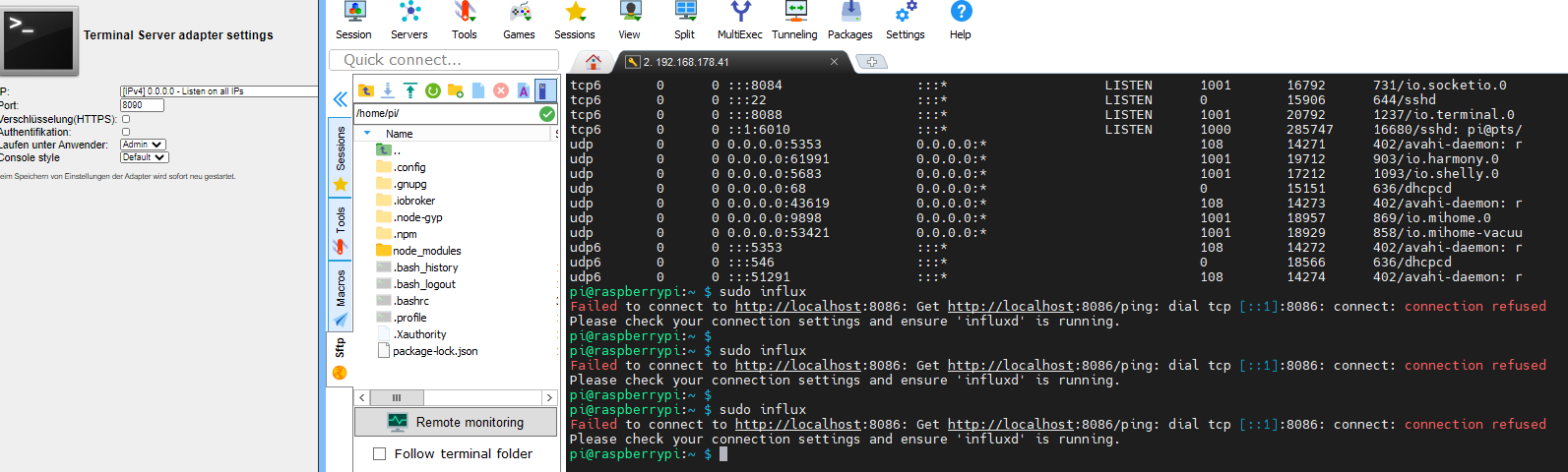
Zustand wie gehabtHabe jetzt mal
influxd eingegebenpi@raspberrypi:~ $ sudo influxd 8888888 .d888 888 8888888b. 888888b. 888 d88P" 888 888 "Y88b 888 "88b 888 888 888 888 888 888 .88P 888 88888b. 888888 888 888 888 888 888 888 888 8888888K. 888 888 "88b 888 888 888 888 Y8bd8P' 888 888 888 "Y88b 888 888 888 888 888 888 888 X88K 888 888 888 888 888 888 888 888 888 Y88b 888 .d8""8b. 888 .d88P 888 d88P 8888888 888 888 888 888 "Y88888 888 888 8888888P" 8888888P" 2020-12-20T13:31:40.279443Z info InfluxDB starting {"log_id": "0RC5QVTG000", "version": "1.8.3", "branch": "1.8", "commit": "563e6 c3d1a7a2790763c6289501095dbec19244e"} 2020-12-20T13:31:40.280532Z info Go runtime {"log_id": "0RC5QVTG000", "version": "go1.13.8", "maxprocs": 4} 2020-12-20T13:31:41.290904Z info Using data dir {"log_id": "0RC5QVTG000", "service": "store", "path": "/var/lib/influxdb/data"} 2020-12-20T13:31:41.293624Z info Compaction settings {"log_id": "0RC5QVTG000", "service": "store", "max_concurrent_compactions": 2, "throughput_bytes_per_second": 50331648, "throughput_bytes_per_second_burst": 50331648} 2020-12-20T13:31:41.296007Z info Open store (start) {"log_id": "0RC5QVTG000", "service": "store", "trace_id": "0RC5QZRl000", "op_na me": "tsdb_open", "op_event": "start"} 2020-12-20T13:31:41.298469Z info Open store (end) {"log_id": "0RC5QVTG000", "service": "store", "trace_id": "0RC5QZRl000", "op_na me": "tsdb_open", "op_event": "end", "op_elapsed": "2.477ms"} 2020-12-20T13:31:41.300868Z info Opened service {"log_id": "0RC5QVTG000", "service": "subscriber"} 2020-12-20T13:31:41.310202Z info Starting monitor service {"log_id": "0RC5QVTG000", "service": "monitor"} 2020-12-20T13:31:41.312167Z info Registered diagnostics client {"log_id": "0RC5QVTG000", "service": "monitor", "name": "build"} 2020-12-20T13:31:41.312781Z info Registered diagnostics client {"log_id": "0RC5QVTG000", "service": "monitor", "name": "runtime"} 2020-12-20T13:31:41.313403Z info Registered diagnostics client {"log_id": "0RC5QVTG000", "service": "monitor", "name": "network"} 2020-12-20T13:31:41.313732Z info Registered diagnostics client {"log_id": "0RC5QVTG000", "service": "monitor", "name": "system"} 2020-12-20T13:31:41.314463Z info Starting precreation service {"log_id": "0RC5QVTG000", "service": "shard-precreation", "check_interv al": "10m", "advance_period": "30m"} 2020-12-20T13:31:41.315897Z info Starting snapshot service {"log_id": "0RC5QVTG000", "service": "snapshot"} 2020-12-20T13:31:41.316280Z info Storing statistics {"log_id": "0RC5QVTG000", "service": "monitor", "db_instance": "_internal", "db _rp": "monitor", "interval": "10s"} 2020-12-20T13:31:41.317118Z info Starting continuous query service {"log_id": "0RC5QVTG000", "service": "continuous_querier"} 2020-12-20T13:31:41.319668Z info Starting HTTP service {"log_id": "0RC5QVTG000", "service": "httpd", "authentication": false} 2020-12-20T13:31:41.321326Z info opened HTTP access log {"log_id": "0RC5QVTG000", "service": "httpd", "path": "stderr"} 2020-12-20T13:31:41.322670Z info Listening on HTTP {"log_id": "0RC5QVTG000", "service": "httpd", "addr": "[::]:8086", "https": fal se} 2020-12-20T13:31:41.326261Z info Starting retention policy enforcement service {"log_id": "0RC5QVTG000", "service": "retention", "chec k_interval": "30m"} 2020-12-20T13:31:41.327863Z info Sending usage statistics to usage.influxdata.com {"log_id": "0RC5QVTG000"} 2020-12-20T13:31:41.331840Z info Listening for signals {"log_id": "0RC5QVTG000"} 2020-12-20T13:31:44.084613Z info Executing query {"log_id": "0RC5QVTG000", "service": "query", "query": "SHOW DATABASES"} [httpd] 192.168.178.41 - admin [20/Dec/2020:14:31:44 +0100] "GET /query?db=iobroker&p=%5BREDACTED%5D&precision=ms&q=show+databases&u=admin HTTP /1.1" 200 84 "-" "-" b3681eb6-42c7-11eb-8001-dca6321bbd83 9249 2020-12-20T13:31:54.107193Z info Executing query {"log_id": "0RC5QVTG000", "service": "query", "query": "SHOW DATABASES"} [httpd] 192.168.178.41 - admin [20/Dec/2020:14:31:54 +0100] "GET /query?db=iobroker&p=%5BREDACTED%5D&precision=ms&q=show+databases&u=admin HTTP /1.1" 200 84 "-" "-" b9620632-42c7-11eb-8002-dca6321bbd83 1031 2020-12-20T13:32:04.115541Z info Executing query {"log_id": "0RC5QVTG000", "service": "query", "query": "SHOW DATABASES"} [httpd] 192.168.178.41 - admin [20/Dec/2020:14:32:04 +0100] "GET /query?db=iobroker&p=%5BREDACTED%5D&precision=ms&q=show+databases&u=admin HTTP /1.1" 200 109 "-" "-" bf592910-42c7-11eb-8003-dca6321bbd83 2055833 2020-12-20T13:32:06.177505Z info Executing query {"log_id": "0RC5QVTG000", "service": "query", "query": "CREATE DATABASE iobroker"} [httpd] 192.168.178.41 - admin [20/Dec/2020:14:32:06 +0100] "POST /query?db=iobroker&p=%5BREDACTED%5D&precision=ms&q=create+database+%22iobroke r%22&u=admin HTTP/1.1" 200 33 "-" "-" c093ce61-42c7-11eb-8004-dca6321bbd83 468972 2020-12-20T13:32:06.651822Z info Executing query {"log_id": "0RC5QVTG000", "service": "query", "query": "CREATE RETENTION POLICY global ON iobroker DURATION 365d REPLICATION 1 DEFAULT"} [httpd] 192.168.178.41 - admin [20/Dec/2020:14:32:06 +0100] "GET /query?db=iobroker&p=%5BREDACTED%5D&precision=ms&q=CREATE+RETENTION+POLICY+%22 global%22+ON+iobroker+DURATION+31536000s+REPLICATION+1+DEFAULT&u=admin HTTP/1.1" 200 232 "-" "-" c0dc2b88-42c7-11eb-8005-dca6321bbd83 2247119 2020-12-20T13:32:08.905601Z info Executing query {"log_id": "0RC5QVTG000", "service": "query", "query": "SHOW DATABASES"} [httpd] 192.168.178.41 - admin [20/Dec/2020:14:32:08 +0100] "GET /query?db=iobroker&p=%5BREDACTED%5D&precision=ms&q=show+databases&u=admin HTTP /1.1" 200 122 "-" "-" c234151c-42c7-11eb-8006-dca6321bbd83 2841Kannst Du hier etwas lokalisierne?
-
@crunchip
ich verzweifle bald
Zustand wie gehabtHabe jetzt mal
influxd eingegebenpi@raspberrypi:~ $ sudo influxd 8888888 .d888 888 8888888b. 888888b. 888 d88P" 888 888 "Y88b 888 "88b 888 888 888 888 888 888 .88P 888 88888b. 888888 888 888 888 888 888 888 888 8888888K. 888 888 "88b 888 888 888 888 Y8bd8P' 888 888 888 "Y88b 888 888 888 888 888 888 888 X88K 888 888 888 888 888 888 888 888 888 Y88b 888 .d8""8b. 888 .d88P 888 d88P 8888888 888 888 888 888 "Y88888 888 888 8888888P" 8888888P" 2020-12-20T13:31:40.279443Z info InfluxDB starting {"log_id": "0RC5QVTG000", "version": "1.8.3", "branch": "1.8", "commit": "563e6 c3d1a7a2790763c6289501095dbec19244e"} 2020-12-20T13:31:40.280532Z info Go runtime {"log_id": "0RC5QVTG000", "version": "go1.13.8", "maxprocs": 4} 2020-12-20T13:31:41.290904Z info Using data dir {"log_id": "0RC5QVTG000", "service": "store", "path": "/var/lib/influxdb/data"} 2020-12-20T13:31:41.293624Z info Compaction settings {"log_id": "0RC5QVTG000", "service": "store", "max_concurrent_compactions": 2, "throughput_bytes_per_second": 50331648, "throughput_bytes_per_second_burst": 50331648} 2020-12-20T13:31:41.296007Z info Open store (start) {"log_id": "0RC5QVTG000", "service": "store", "trace_id": "0RC5QZRl000", "op_na me": "tsdb_open", "op_event": "start"} 2020-12-20T13:31:41.298469Z info Open store (end) {"log_id": "0RC5QVTG000", "service": "store", "trace_id": "0RC5QZRl000", "op_na me": "tsdb_open", "op_event": "end", "op_elapsed": "2.477ms"} 2020-12-20T13:31:41.300868Z info Opened service {"log_id": "0RC5QVTG000", "service": "subscriber"} 2020-12-20T13:31:41.310202Z info Starting monitor service {"log_id": "0RC5QVTG000", "service": "monitor"} 2020-12-20T13:31:41.312167Z info Registered diagnostics client {"log_id": "0RC5QVTG000", "service": "monitor", "name": "build"} 2020-12-20T13:31:41.312781Z info Registered diagnostics client {"log_id": "0RC5QVTG000", "service": "monitor", "name": "runtime"} 2020-12-20T13:31:41.313403Z info Registered diagnostics client {"log_id": "0RC5QVTG000", "service": "monitor", "name": "network"} 2020-12-20T13:31:41.313732Z info Registered diagnostics client {"log_id": "0RC5QVTG000", "service": "monitor", "name": "system"} 2020-12-20T13:31:41.314463Z info Starting precreation service {"log_id": "0RC5QVTG000", "service": "shard-precreation", "check_interv al": "10m", "advance_period": "30m"} 2020-12-20T13:31:41.315897Z info Starting snapshot service {"log_id": "0RC5QVTG000", "service": "snapshot"} 2020-12-20T13:31:41.316280Z info Storing statistics {"log_id": "0RC5QVTG000", "service": "monitor", "db_instance": "_internal", "db _rp": "monitor", "interval": "10s"} 2020-12-20T13:31:41.317118Z info Starting continuous query service {"log_id": "0RC5QVTG000", "service": "continuous_querier"} 2020-12-20T13:31:41.319668Z info Starting HTTP service {"log_id": "0RC5QVTG000", "service": "httpd", "authentication": false} 2020-12-20T13:31:41.321326Z info opened HTTP access log {"log_id": "0RC5QVTG000", "service": "httpd", "path": "stderr"} 2020-12-20T13:31:41.322670Z info Listening on HTTP {"log_id": "0RC5QVTG000", "service": "httpd", "addr": "[::]:8086", "https": fal se} 2020-12-20T13:31:41.326261Z info Starting retention policy enforcement service {"log_id": "0RC5QVTG000", "service": "retention", "chec k_interval": "30m"} 2020-12-20T13:31:41.327863Z info Sending usage statistics to usage.influxdata.com {"log_id": "0RC5QVTG000"} 2020-12-20T13:31:41.331840Z info Listening for signals {"log_id": "0RC5QVTG000"} 2020-12-20T13:31:44.084613Z info Executing query {"log_id": "0RC5QVTG000", "service": "query", "query": "SHOW DATABASES"} [httpd] 192.168.178.41 - admin [20/Dec/2020:14:31:44 +0100] "GET /query?db=iobroker&p=%5BREDACTED%5D&precision=ms&q=show+databases&u=admin HTTP /1.1" 200 84 "-" "-" b3681eb6-42c7-11eb-8001-dca6321bbd83 9249 2020-12-20T13:31:54.107193Z info Executing query {"log_id": "0RC5QVTG000", "service": "query", "query": "SHOW DATABASES"} [httpd] 192.168.178.41 - admin [20/Dec/2020:14:31:54 +0100] "GET /query?db=iobroker&p=%5BREDACTED%5D&precision=ms&q=show+databases&u=admin HTTP /1.1" 200 84 "-" "-" b9620632-42c7-11eb-8002-dca6321bbd83 1031 2020-12-20T13:32:04.115541Z info Executing query {"log_id": "0RC5QVTG000", "service": "query", "query": "SHOW DATABASES"} [httpd] 192.168.178.41 - admin [20/Dec/2020:14:32:04 +0100] "GET /query?db=iobroker&p=%5BREDACTED%5D&precision=ms&q=show+databases&u=admin HTTP /1.1" 200 109 "-" "-" bf592910-42c7-11eb-8003-dca6321bbd83 2055833 2020-12-20T13:32:06.177505Z info Executing query {"log_id": "0RC5QVTG000", "service": "query", "query": "CREATE DATABASE iobroker"} [httpd] 192.168.178.41 - admin [20/Dec/2020:14:32:06 +0100] "POST /query?db=iobroker&p=%5BREDACTED%5D&precision=ms&q=create+database+%22iobroke r%22&u=admin HTTP/1.1" 200 33 "-" "-" c093ce61-42c7-11eb-8004-dca6321bbd83 468972 2020-12-20T13:32:06.651822Z info Executing query {"log_id": "0RC5QVTG000", "service": "query", "query": "CREATE RETENTION POLICY global ON iobroker DURATION 365d REPLICATION 1 DEFAULT"} [httpd] 192.168.178.41 - admin [20/Dec/2020:14:32:06 +0100] "GET /query?db=iobroker&p=%5BREDACTED%5D&precision=ms&q=CREATE+RETENTION+POLICY+%22 global%22+ON+iobroker+DURATION+31536000s+REPLICATION+1+DEFAULT&u=admin HTTP/1.1" 200 232 "-" "-" c0dc2b88-42c7-11eb-8005-dca6321bbd83 2247119 2020-12-20T13:32:08.905601Z info Executing query {"log_id": "0RC5QVTG000", "service": "query", "query": "SHOW DATABASES"} [httpd] 192.168.178.41 - admin [20/Dec/2020:14:32:08 +0100] "GET /query?db=iobroker&p=%5BREDACTED%5D&precision=ms&q=show+databases&u=admin HTTP /1.1" 200 122 "-" "-" c234151c-42c7-11eb-8006-dca6321bbd83 2841Kannst Du hier etwas lokalisierne?
@Altersrentner es läuft immer noch auf port 8088, gegebenenfalls system neustarten.
danach nochmal prüfen, wenn dieser port dann auf 8090 läuft
nochmalsudo systemctl daemon-reload sudo systemctl enable influxdb sudo systemctl start influxdbanschliessend prüfen, ob influx läuft mit
sudo systemctl status influx@Altersrentner sagte in Problem bei Influx Installation:
Kannst Du hier etwas lokalisierne?
dein influx läuft noch nicht
-
@Altersrentner es läuft immer noch auf port 8088, gegebenenfalls system neustarten.
danach nochmal prüfen, wenn dieser port dann auf 8090 läuft
nochmalsudo systemctl daemon-reload sudo systemctl enable influxdb sudo systemctl start influxdbanschliessend prüfen, ob influx läuft mit
sudo systemctl status influx@Altersrentner sagte in Problem bei Influx Installation:
Kannst Du hier etwas lokalisierne?
dein influx läuft noch nicht
@crunchip
jetzt wird influx nicht mehr gefundenpi@raspberrypi:~ $ sudo iobroker stop pi@raspberrypi:~ $ sudo iobroker restart pi@raspberrypi:~ $ sudo systemctl daemon-reload pi@raspberrypi:~ $ sudo systemctl enable influxdb pi@raspberrypi:~ $ sudo systemctl start influxdb pi@raspberrypi:~ $ sudo systemctl status influx Unit influx.service could not be found. pi@raspberrypi:~ $ -
@crunchip
jetzt wird influx nicht mehr gefundenpi@raspberrypi:~ $ sudo iobroker stop pi@raspberrypi:~ $ sudo iobroker restart pi@raspberrypi:~ $ sudo systemctl daemon-reload pi@raspberrypi:~ $ sudo systemctl enable influxdb pi@raspberrypi:~ $ sudo systemctl start influxdb pi@raspberrypi:~ $ sudo systemctl status influx Unit influx.service could not be found. pi@raspberrypi:~ $@Altersrentner mein Fehler
sudo systemctl status influxdb


378
Online32.6k
Users82.3k
Topics1.3m
Posts