



Skip to content
  • Home
  • Recent
  • Tags
  • 0 Unread 0
  • Categories
  • Unreplied
  • Popular
  • GitHub
  • Docu
  • Hilfe
Skins
  • Light
  • Brite
  • Cerulean
  • Cosmo
  • Flatly
  • Journal
  • Litera
  • Lumen
  • Lux
  • Materia
  • Minty
  • Morph
  • Pulse
  • Sandstone
  • Simplex
  • Sketchy
  • Spacelab
  • United
  • Yeti
  • Zephyr
  • Dark
  • Cyborg
  • Darkly
  • Quartz
  • Slate
  • Solar
  • Superhero
  • Vapor

  • Default (No Skin)
  • No Skin
Collapse
ioBroker Logo

Community Forum

donate donate
  1. ioBroker Community Home
  2. Deutsch
  3. ioBroker Allgemein
  4. Diskussion zum HowTo nodejs-Installation und upgrade

NEWS

  • Jahresrückblick 2025 – unser neuer Blogbeitrag ist online! ✨
    BluefoxB
    Bluefox
    16
    1
    1.9k

  • Neuer Blogbeitrag: Monatsrückblick - Dezember 2025 🎄
    BluefoxB
    Bluefox
    13
    1
    916

  • Weihnachtsangebot 2025! 🎄
    BluefoxB
    Bluefox
    25
    1
    2.2k

Diskussion zum HowTo nodejs-Installation und upgrade

Scheduled Pinned Locked Moved ioBroker Allgemein
nodejs
844 Posts 91 Posters 247.0k Views 63 Watching
  • Oldest to Newest
  • Newest to Oldest
  • Most Votes
Reply
  • Reply as topic
Log in to reply
This topic has been deleted. Only users with topic management privileges can see it.
  • Thomas BraunT Thomas Braun

    @bostil

    iobroker update -i
    
    BostilB Offline
    BostilB Offline
    Bostil
    wrote on last edited by
    #292

    @thomas-braun Danke dir.

    Bin mittlerweile auch wieder zurück im Stable. Anders als im Beta-Status habe ich hier keine Updates vorliegen, versuche aber Adapter "Energiefluss" über Katze (ja .. ich weiß...) zu installieren und erhalte weiterhin den Fehler:

    $ iobroker url https://github.com/SKB-CGN/ioBroker.energiefluss --host raspberrypi --debug
    
    install SKB-CGN/ioBroker.energiefluss#c84758fb62c8f27236aba7ecd79d24622de1166a
    
    NPM version: 8.11.0
    
    Installing SKB-CGN/ioBroker.energiefluss#c84758fb62c8f27236aba7ecd79d24622de1166a... (System call)
    
    npm ERR! code ENOTEMPTYnpm ERR! syscall renamenpm ERR! path /opt/iobroker/node_modules/iobroker.javascript
    
    host.raspberrypi Cannot install SKB-CGN/ioBroker.energiefluss#c84758fb62c8f27236aba7ecd79d24622de1166a: 217
    
    ERROR: Process exited with code 25
    

    iobroker update -i bringt dies:

    bostil@raspberrypi:~ $ iobroker update -i
    Used repository: Stable (default)
    Adapter    "admin"        : 5.3.8    , installed 6.2.3
    Adapter    "backitup"     : 2.4.9    , installed 2.4.10
    Adapter    "daswetter"    : 3.1.2    , installed 3.1.3
    Adapter    "denon"        : 1.13.4   , installed 1.13.4
    Adapter    "device-reminder": 1.2.9  , installed 1.2.9
    Adapter    "discovery"    : 3.0.5    , installed 3.0.5
    Adapter    "fb-checkpresence": 1.1.19, installed 1.1.19
    Adapter    "feiertage"    : 1.1.0    , installed 1.1.0
    Adapter    "history"      : 2.1.7    , installed 2.1.7
    Adapter    "homeconnect"  : 1.0.1    , installed 1.0.1
    Adapter    "ical"         : 1.13.1   , installed 1.13.1
    Adapter    "icons-mfd-svg": 1.1.0    , installed 1.1.0
    Adapter    "info"         : 1.9.19   , installed 1.9.19
    Adapter    "javascript"   : 5.7.0    , installed 5.8.5
    Controller "js-controller": 4.0.23   , installed 4.0.23
    Adapter    "km200"        : 2.0.3    , installed 2.0.3
    Adapter    "openligadb"   : 1.2.4    , installed 1.2.4
    Adapter    "pegelalarm"   : 1.2.5    , installed 1.2.8
    Adapter    "plenticore"   : 2.2.0    , installed 2.2.2
    Adapter    "rssfeed"      : 1.0.0    , installed 1.0.0
    Adapter    "scenes"       : 2.3.9    , installed 2.3.9
    Adapter    "shelly"       : 5.3.2    , installed 6.0.0
    Adapter    "shuttercontrol": 1.4.12  , installed 1.4.14
    Adapter    "simple-api"   : 2.7.0    , installed 2.7.0
    Adapter    "smartcontrol" : 1.2.1    , installed 1.2.1
    Adapter    "socketio"     : 4.2.0    , installed 6.1.8
    Adapter    "sony-bravia"  : 1.0.3    , installed 1.0.9
    Adapter    "trashschedule": 2.0.2    , installed 2.0.3
    Adapter    "tvprogram"    : 1.1.2    , installed 1.1.2
    Adapter    "vis"          : 1.4.15   , installed 1.4.15
    Adapter    "vis-colorpicker": 1.2.0  , installed 1.2.0
    Adapter    "vis-material-advanced": 1.7.2, installed 1.7.2
    Adapter    "vis-plumb"    : 1.0.2    , installed 1.0.2
    Adapter    "vis-timeandweather": 1.1.7, installed 1.2.2
    Adapter    "weatherunderground": 3.4.2, installed 3.4.2
    Adapter    "web"          : 4.3.0    , installed 5.2.4
    Adapter    "windows-control": 0.1.5  , installed 0.1.5
    Adapter    "worx"         : 1.6.6    , installed 1.6.6
    Adapter    "ws"           : 1.3.0    , installed 2.1.3
    
    
    Thomas BraunT GlasfaserG 2 Replies Last reply
    0
    • BostilB Bostil

      @thomas-braun Danke dir.

      Bin mittlerweile auch wieder zurück im Stable. Anders als im Beta-Status habe ich hier keine Updates vorliegen, versuche aber Adapter "Energiefluss" über Katze (ja .. ich weiß...) zu installieren und erhalte weiterhin den Fehler:

      $ iobroker url https://github.com/SKB-CGN/ioBroker.energiefluss --host raspberrypi --debug
      
      install SKB-CGN/ioBroker.energiefluss#c84758fb62c8f27236aba7ecd79d24622de1166a
      
      NPM version: 8.11.0
      
      Installing SKB-CGN/ioBroker.energiefluss#c84758fb62c8f27236aba7ecd79d24622de1166a... (System call)
      
      npm ERR! code ENOTEMPTYnpm ERR! syscall renamenpm ERR! path /opt/iobroker/node_modules/iobroker.javascript
      
      host.raspberrypi Cannot install SKB-CGN/ioBroker.energiefluss#c84758fb62c8f27236aba7ecd79d24622de1166a: 217
      
      ERROR: Process exited with code 25
      

      iobroker update -i bringt dies:

      bostil@raspberrypi:~ $ iobroker update -i
      Used repository: Stable (default)
      Adapter    "admin"        : 5.3.8    , installed 6.2.3
      Adapter    "backitup"     : 2.4.9    , installed 2.4.10
      Adapter    "daswetter"    : 3.1.2    , installed 3.1.3
      Adapter    "denon"        : 1.13.4   , installed 1.13.4
      Adapter    "device-reminder": 1.2.9  , installed 1.2.9
      Adapter    "discovery"    : 3.0.5    , installed 3.0.5
      Adapter    "fb-checkpresence": 1.1.19, installed 1.1.19
      Adapter    "feiertage"    : 1.1.0    , installed 1.1.0
      Adapter    "history"      : 2.1.7    , installed 2.1.7
      Adapter    "homeconnect"  : 1.0.1    , installed 1.0.1
      Adapter    "ical"         : 1.13.1   , installed 1.13.1
      Adapter    "icons-mfd-svg": 1.1.0    , installed 1.1.0
      Adapter    "info"         : 1.9.19   , installed 1.9.19
      Adapter    "javascript"   : 5.7.0    , installed 5.8.5
      Controller "js-controller": 4.0.23   , installed 4.0.23
      Adapter    "km200"        : 2.0.3    , installed 2.0.3
      Adapter    "openligadb"   : 1.2.4    , installed 1.2.4
      Adapter    "pegelalarm"   : 1.2.5    , installed 1.2.8
      Adapter    "plenticore"   : 2.2.0    , installed 2.2.2
      Adapter    "rssfeed"      : 1.0.0    , installed 1.0.0
      Adapter    "scenes"       : 2.3.9    , installed 2.3.9
      Adapter    "shelly"       : 5.3.2    , installed 6.0.0
      Adapter    "shuttercontrol": 1.4.12  , installed 1.4.14
      Adapter    "simple-api"   : 2.7.0    , installed 2.7.0
      Adapter    "smartcontrol" : 1.2.1    , installed 1.2.1
      Adapter    "socketio"     : 4.2.0    , installed 6.1.8
      Adapter    "sony-bravia"  : 1.0.3    , installed 1.0.9
      Adapter    "trashschedule": 2.0.2    , installed 2.0.3
      Adapter    "tvprogram"    : 1.1.2    , installed 1.1.2
      Adapter    "vis"          : 1.4.15   , installed 1.4.15
      Adapter    "vis-colorpicker": 1.2.0  , installed 1.2.0
      Adapter    "vis-material-advanced": 1.7.2, installed 1.7.2
      Adapter    "vis-plumb"    : 1.0.2    , installed 1.0.2
      Adapter    "vis-timeandweather": 1.1.7, installed 1.2.2
      Adapter    "weatherunderground": 3.4.2, installed 3.4.2
      Adapter    "web"          : 4.3.0    , installed 5.2.4
      Adapter    "windows-control": 0.1.5  , installed 0.1.5
      Adapter    "worx"         : 1.6.6    , installed 1.6.6
      Adapter    "ws"           : 1.3.0    , installed 2.1.3
      
      
      Thomas BraunT Online
      Thomas BraunT Online
      Thomas Braun
      Most Active
      wrote on last edited by
      #293

      @bostil sagte in Diskussion zum HowTo nodejs-Installation und upgrade:

      über Katze (ja .. ich weiß...)

      Lass die Katze in Ruhe!

      Installier mal einen 'ordentlichen Adapter' aus dem Stable-Zweig, aber halt mit --debug Option.

      Linux-Werkzeugkasten:
      https://forum.iobroker.net/topic/42952/der-kleine-iobroker-linux-werkzeugkasten
      NodeJS Fixer Skript:
      https://forum.iobroker.net/topic/68035/iob-node-fix-skript
      iob_diag: curl -sLf -o diag.sh https://iobroker.net/diag.sh && bash diag.sh

      1 Reply Last reply
      0
      • BostilB Offline
        BostilB Offline
        Bostil
        wrote on last edited by Bostil
        #294

        Ok, dann jetzt mal probehalber "CoronaVirus-Statistics" ... man, was habe ich das Thema schon vermisst ;-) Aber leider noch selbiger Fehler:

        $ iobroker add coronavirus-statistics auto --host raspberrypi --debug
        
        NPM version: 8.11.0
        
        Installing iobroker.coronavirus-statistics@0.8.7... (System call)
        
        npm ERR! code ENOTEMPTY
        
        host.raspberrypi Cannot install iobroker.coronavirus-statistics@0.8.7: 217
        
        ERROR: Process exited with code 25
        
        Thomas BraunT GlasfaserG 3 Replies Last reply
        0
        • BostilB Bostil

          Ok, dann jetzt mal probehalber "CoronaVirus-Statistics" ... man, was habe ich das Thema schon vermisst ;-) Aber leider noch selbiger Fehler:

          $ iobroker add coronavirus-statistics auto --host raspberrypi --debug
          
          NPM version: 8.11.0
          
          Installing iobroker.coronavirus-statistics@0.8.7... (System call)
          
          npm ERR! code ENOTEMPTY
          
          host.raspberrypi Cannot install iobroker.coronavirus-statistics@0.8.7: 217
          
          ERROR: Process exited with code 25
          
          Thomas BraunT Online
          Thomas BraunT Online
          Thomas Braun
          Most Active
          wrote on last edited by
          #295

          @bostil sagte in Diskussion zum HowTo nodejs-Installation und upgrade:

          npm ERR! code ENOTEMPTY

          Für gewöhnlich kommt da auch ein Hinweis, welches Verzeichnis da NOTEMPTY ist.

          Linux-Werkzeugkasten:
          https://forum.iobroker.net/topic/42952/der-kleine-iobroker-linux-werkzeugkasten
          NodeJS Fixer Skript:
          https://forum.iobroker.net/topic/68035/iob-node-fix-skript
          iob_diag: curl -sLf -o diag.sh https://iobroker.net/diag.sh && bash diag.sh

          1 Reply Last reply
          0
          • BostilB Bostil

            Ok, dann jetzt mal probehalber "CoronaVirus-Statistics" ... man, was habe ich das Thema schon vermisst ;-) Aber leider noch selbiger Fehler:

            $ iobroker add coronavirus-statistics auto --host raspberrypi --debug
            
            NPM version: 8.11.0
            
            Installing iobroker.coronavirus-statistics@0.8.7... (System call)
            
            npm ERR! code ENOTEMPTY
            
            host.raspberrypi Cannot install iobroker.coronavirus-statistics@0.8.7: 217
            
            ERROR: Process exited with code 25
            
            GlasfaserG Offline
            GlasfaserG Offline
            Glasfaser
            wrote on last edited by
            #296

            @bostil sagte in Diskussion zum HowTo nodejs-Installation und upgrade:

            npm ERR! code ENOTEMPTY

            Eigentlich so :

            npm ERR! ENOTEMPTY: directory not empty, rename
            

            sieht komisch aus !?

            Synology 918+ 16GB - ioBroker in Docker v9 , VISO auf Trekstor Primebook C13 13,3" , Hikvision Domkameras mit Surveillance Station .. CCU RaspberryMatic in Synology VM .. Zigbee CC2538+CC2592 .. Sonoff .. KNX .. Modbus ..

            1 Reply Last reply
            0
            • BostilB Bostil

              Ok, dann jetzt mal probehalber "CoronaVirus-Statistics" ... man, was habe ich das Thema schon vermisst ;-) Aber leider noch selbiger Fehler:

              $ iobroker add coronavirus-statistics auto --host raspberrypi --debug
              
              NPM version: 8.11.0
              
              Installing iobroker.coronavirus-statistics@0.8.7... (System call)
              
              npm ERR! code ENOTEMPTY
              
              host.raspberrypi Cannot install iobroker.coronavirus-statistics@0.8.7: 217
              
              ERROR: Process exited with code 25
              
              GlasfaserG Offline
              GlasfaserG Offline
              Glasfaser
              wrote on last edited by
              #297

              @bostil

              cd /opt/iobroker
              npm ls | grep -E 'github.com|ERR'
              

              Synology 918+ 16GB - ioBroker in Docker v9 , VISO auf Trekstor Primebook C13 13,3" , Hikvision Domkameras mit Surveillance Station .. CCU RaspberryMatic in Synology VM .. Zigbee CC2538+CC2592 .. Sonoff .. KNX .. Modbus ..

              BostilB 1 Reply Last reply
              0
              • BostilB Offline
                BostilB Offline
                Bostil
                wrote on last edited by
                #298

                Wenn ihr Spezies schon rumrätselt ...

                Könnte eine Iobroker-Neuinstallation eine Lösung darstellen? Für gewöhnlich werden ja Nutzerdaten, Einstellungen beibehalten, deswegen würde ich dem entspannt gegenüber stehen.

                GlasfaserG 1 Reply Last reply
                0
                • GlasfaserG Glasfaser

                  @bostil

                  cd /opt/iobroker
                  npm ls | grep -E 'github.com|ERR'
                  
                  BostilB Offline
                  BostilB Offline
                  Bostil
                  wrote on last edited by
                  #299

                  @glasfaser Viel passiert da leider nicht:

                  bostil@raspberrypi:~ $ cd /opt/iobroker
                  bostil@raspberrypi:/opt/iobroker $ npm ls | grep -E 'github.com|ERR'
                  [sudo] Passwort für bostil:
                  bostil@raspberrypi:/opt/iobroker $
                  
                  Thomas BraunT 1 Reply Last reply
                  0
                  • BostilB Bostil

                    Wenn ihr Spezies schon rumrätselt ...

                    Könnte eine Iobroker-Neuinstallation eine Lösung darstellen? Für gewöhnlich werden ja Nutzerdaten, Einstellungen beibehalten, deswegen würde ich dem entspannt gegenüber stehen.

                    GlasfaserG Offline
                    GlasfaserG Offline
                    Glasfaser
                    wrote on last edited by
                    #300

                    @bostil sagte in Diskussion zum HowTo nodejs-Installation und upgrade:

                    Könnte eine Iobroker-Neuinstallation eine Lösung darstellen?

                    Das ( Problem ) kam mit Nodejs 16

                    teste mal .. gehe auf 14 zurück

                    Synology 918+ 16GB - ioBroker in Docker v9 , VISO auf Trekstor Primebook C13 13,3" , Hikvision Domkameras mit Surveillance Station .. CCU RaspberryMatic in Synology VM .. Zigbee CC2538+CC2592 .. Sonoff .. KNX .. Modbus ..

                    1 Reply Last reply
                    1
                    • BostilB Bostil

                      @glasfaser Viel passiert da leider nicht:

                      bostil@raspberrypi:~ $ cd /opt/iobroker
                      bostil@raspberrypi:/opt/iobroker $ npm ls | grep -E 'github.com|ERR'
                      [sudo] Passwort für bostil:
                      bostil@raspberrypi:/opt/iobroker $
                      
                      Thomas BraunT Online
                      Thomas BraunT Online
                      Thomas Braun
                      Most Active
                      wrote on last edited by
                      #301

                      @bostil

                      cd /opt/iobroker/node_modules
                      ls -a | grep '^\.'
                      

                      Linux-Werkzeugkasten:
                      https://forum.iobroker.net/topic/42952/der-kleine-iobroker-linux-werkzeugkasten
                      NodeJS Fixer Skript:
                      https://forum.iobroker.net/topic/68035/iob-node-fix-skript
                      iob_diag: curl -sLf -o diag.sh https://iobroker.net/diag.sh && bash diag.sh

                      1 Reply Last reply
                      0
                      • BostilB Bostil

                        @thomas-braun Danke dir.

                        Bin mittlerweile auch wieder zurück im Stable. Anders als im Beta-Status habe ich hier keine Updates vorliegen, versuche aber Adapter "Energiefluss" über Katze (ja .. ich weiß...) zu installieren und erhalte weiterhin den Fehler:

                        $ iobroker url https://github.com/SKB-CGN/ioBroker.energiefluss --host raspberrypi --debug
                        
                        install SKB-CGN/ioBroker.energiefluss#c84758fb62c8f27236aba7ecd79d24622de1166a
                        
                        NPM version: 8.11.0
                        
                        Installing SKB-CGN/ioBroker.energiefluss#c84758fb62c8f27236aba7ecd79d24622de1166a... (System call)
                        
                        npm ERR! code ENOTEMPTYnpm ERR! syscall renamenpm ERR! path /opt/iobroker/node_modules/iobroker.javascript
                        
                        host.raspberrypi Cannot install SKB-CGN/ioBroker.energiefluss#c84758fb62c8f27236aba7ecd79d24622de1166a: 217
                        
                        ERROR: Process exited with code 25
                        

                        iobroker update -i bringt dies:

                        bostil@raspberrypi:~ $ iobroker update -i
                        Used repository: Stable (default)
                        Adapter    "admin"        : 5.3.8    , installed 6.2.3
                        Adapter    "backitup"     : 2.4.9    , installed 2.4.10
                        Adapter    "daswetter"    : 3.1.2    , installed 3.1.3
                        Adapter    "denon"        : 1.13.4   , installed 1.13.4
                        Adapter    "device-reminder": 1.2.9  , installed 1.2.9
                        Adapter    "discovery"    : 3.0.5    , installed 3.0.5
                        Adapter    "fb-checkpresence": 1.1.19, installed 1.1.19
                        Adapter    "feiertage"    : 1.1.0    , installed 1.1.0
                        Adapter    "history"      : 2.1.7    , installed 2.1.7
                        Adapter    "homeconnect"  : 1.0.1    , installed 1.0.1
                        Adapter    "ical"         : 1.13.1   , installed 1.13.1
                        Adapter    "icons-mfd-svg": 1.1.0    , installed 1.1.0
                        Adapter    "info"         : 1.9.19   , installed 1.9.19
                        Adapter    "javascript"   : 5.7.0    , installed 5.8.5
                        Controller "js-controller": 4.0.23   , installed 4.0.23
                        Adapter    "km200"        : 2.0.3    , installed 2.0.3
                        Adapter    "openligadb"   : 1.2.4    , installed 1.2.4
                        Adapter    "pegelalarm"   : 1.2.5    , installed 1.2.8
                        Adapter    "plenticore"   : 2.2.0    , installed 2.2.2
                        Adapter    "rssfeed"      : 1.0.0    , installed 1.0.0
                        Adapter    "scenes"       : 2.3.9    , installed 2.3.9
                        Adapter    "shelly"       : 5.3.2    , installed 6.0.0
                        Adapter    "shuttercontrol": 1.4.12  , installed 1.4.14
                        Adapter    "simple-api"   : 2.7.0    , installed 2.7.0
                        Adapter    "smartcontrol" : 1.2.1    , installed 1.2.1
                        Adapter    "socketio"     : 4.2.0    , installed 6.1.8
                        Adapter    "sony-bravia"  : 1.0.3    , installed 1.0.9
                        Adapter    "trashschedule": 2.0.2    , installed 2.0.3
                        Adapter    "tvprogram"    : 1.1.2    , installed 1.1.2
                        Adapter    "vis"          : 1.4.15   , installed 1.4.15
                        Adapter    "vis-colorpicker": 1.2.0  , installed 1.2.0
                        Adapter    "vis-material-advanced": 1.7.2, installed 1.7.2
                        Adapter    "vis-plumb"    : 1.0.2    , installed 1.0.2
                        Adapter    "vis-timeandweather": 1.1.7, installed 1.2.2
                        Adapter    "weatherunderground": 3.4.2, installed 3.4.2
                        Adapter    "web"          : 4.3.0    , installed 5.2.4
                        Adapter    "windows-control": 0.1.5  , installed 0.1.5
                        Adapter    "worx"         : 1.6.6    , installed 1.6.6
                        Adapter    "ws"           : 1.3.0    , installed 2.1.3
                        
                        
                        GlasfaserG Offline
                        GlasfaserG Offline
                        Glasfaser
                        wrote on last edited by Glasfaser
                        #302

                        @bostil sagte in Diskussion zum HowTo nodejs-Installation und upgrade:

                        iobroker update -i bringt dies:

                        Du spielst auch mit der Repro ... du hast teilweise Beta Adapter

                        Alter Betastand !!

                        Used repository: Stable (default)
                        Adapter "admin" : 5.3.8 , installed 6.2.3

                        Synology 918+ 16GB - ioBroker in Docker v9 , VISO auf Trekstor Primebook C13 13,3" , Hikvision Domkameras mit Surveillance Station .. CCU RaspberryMatic in Synology VM .. Zigbee CC2538+CC2592 .. Sonoff .. KNX .. Modbus ..

                        1 Reply Last reply
                        0
                        • BostilB Offline
                          BostilB Offline
                          Bostil
                          wrote on last edited by Bostil
                          #303

                          Eigentlich wurde erfolgreich auf NodeJS 14 aktualisiert, war sogar auch im Admin. Nach einer Pause und Zurückgelanden an den Rechner, stelle ich fest, dass Iobroker abgeschmiert ist. Wenn ich "iob start admin" anwähle, dann erreicht mich nur folgende Meldung:

                          bostil@raspberrypi:~ $ iob start admin
                          internal/modules/cjs/loader.js:905
                            throw err;
                            ^
                          
                          Error: Cannot find module '/opt/iobroker/node_modules/iobroker.js-controller/iobroker.js'
                              at Function.Module._resolveFilename (internal/modules/cjs/loader.js:902:15)
                              at Function.Module._load (internal/modules/cjs/loader.js:746:27)
                              at Function.executeUserEntryPoint [as runMain] (internal/modules/run_main.js:75:12)
                              at internal/main/run_main_module.js:17:47 {
                            code: 'MODULE_NOT_FOUND',
                            requireStack: []
                          }


                          Ach was solls ... werde Iobroker nochmal neu draufbügeln. Wünsche euch einen schönen Abend und Danke für eure Hilfe!! :-)

                          1 Reply Last reply
                          0
                          • J Offline
                            J Offline
                            JavaMafia
                            wrote on last edited by
                            #304

                            Guten Abend,

                            bin seid gestern Abend dran ein Update, von 12 auf 16 oder höher, für denn NodeJS Adapter zu machen. Leider ohne Erfolg.
                            Habe erst die Meldung bekommen (NO-PUBKEY),die ich immer noch bekomme. Mehrere Möglichkeiten aus dem Netz und hier versucht kein Erfolg.

                            Jetzt bekomme ich noch weitere Meldungen

                            • Sperrdatei ...... konnte nicht geöffnet werden
                            • Das Verzeichnis ...... kann nicht gesperrt werden
                            • Problem beim Entfernen (unlink) der Datei ...... - RemoverCaches (13: keine Berechtigung)

                            kann mir dazu jemand weiter helfen.

                            Thomas BraunT 1 Reply Last reply
                            0
                            • HomoranH Offline
                              HomoranH Offline
                              Homoran
                              Global Moderator Administrators
                              wrote on last edited by
                              #305

                              hier ist der aktuelle thread

                              https://forum.iobroker.net/post/621254

                              kein Support per PN! - Fragen im Forum stellen - es gibt fast nichts, was nicht auch für andere interessant ist.

                              Benutzt das Voting rechts unten im Beitrag wenn er euch geholfen hat.

                              der Installationsfixer: curl -fsL https://iobroker.net/fix.sh | bash -

                              GlasfaserG 1 Reply Last reply
                              0
                              • HomoranH Homoran

                                hier ist der aktuelle thread

                                https://forum.iobroker.net/post/621254

                                GlasfaserG Offline
                                GlasfaserG Offline
                                Glasfaser
                                wrote on last edited by Glasfaser
                                #306

                                @homoran sagte in Diskussion zum HowTo nodejs-Installation und upgrade:

                                hier ist der aktuelle thread

                                https://forum.iobroker.net/**post/621254**

                                Hast du etwas bei dir umgestellt , bei dir kommt /post/...

                                Wäre sonst so der Link !?

                                https://forum.iobroker.net/topic/44566/how-to-node-js-iobroker-richtig-updaten-2021-22-edition

                                Synology 918+ 16GB - ioBroker in Docker v9 , VISO auf Trekstor Primebook C13 13,3" , Hikvision Domkameras mit Surveillance Station .. CCU RaspberryMatic in Synology VM .. Zigbee CC2538+CC2592 .. Sonoff .. KNX .. Modbus ..

                                HomoranH 1 Reply Last reply
                                0
                                • GlasfaserG Glasfaser

                                  @homoran sagte in Diskussion zum HowTo nodejs-Installation und upgrade:

                                  hier ist der aktuelle thread

                                  https://forum.iobroker.net/**post/621254**

                                  Hast du etwas bei dir umgestellt , bei dir kommt /post/...

                                  Wäre sonst so der Link !?

                                  https://forum.iobroker.net/topic/44566/how-to-node-js-iobroker-richtig-updaten-2021-22-edition

                                  HomoranH Offline
                                  HomoranH Offline
                                  Homoran
                                  Global Moderator Administrators
                                  wrote on last edited by Homoran
                                  #307

                                  @glasfaser hab den Link aus dem Timestamp des ersten Posts, so wie jetzt hier
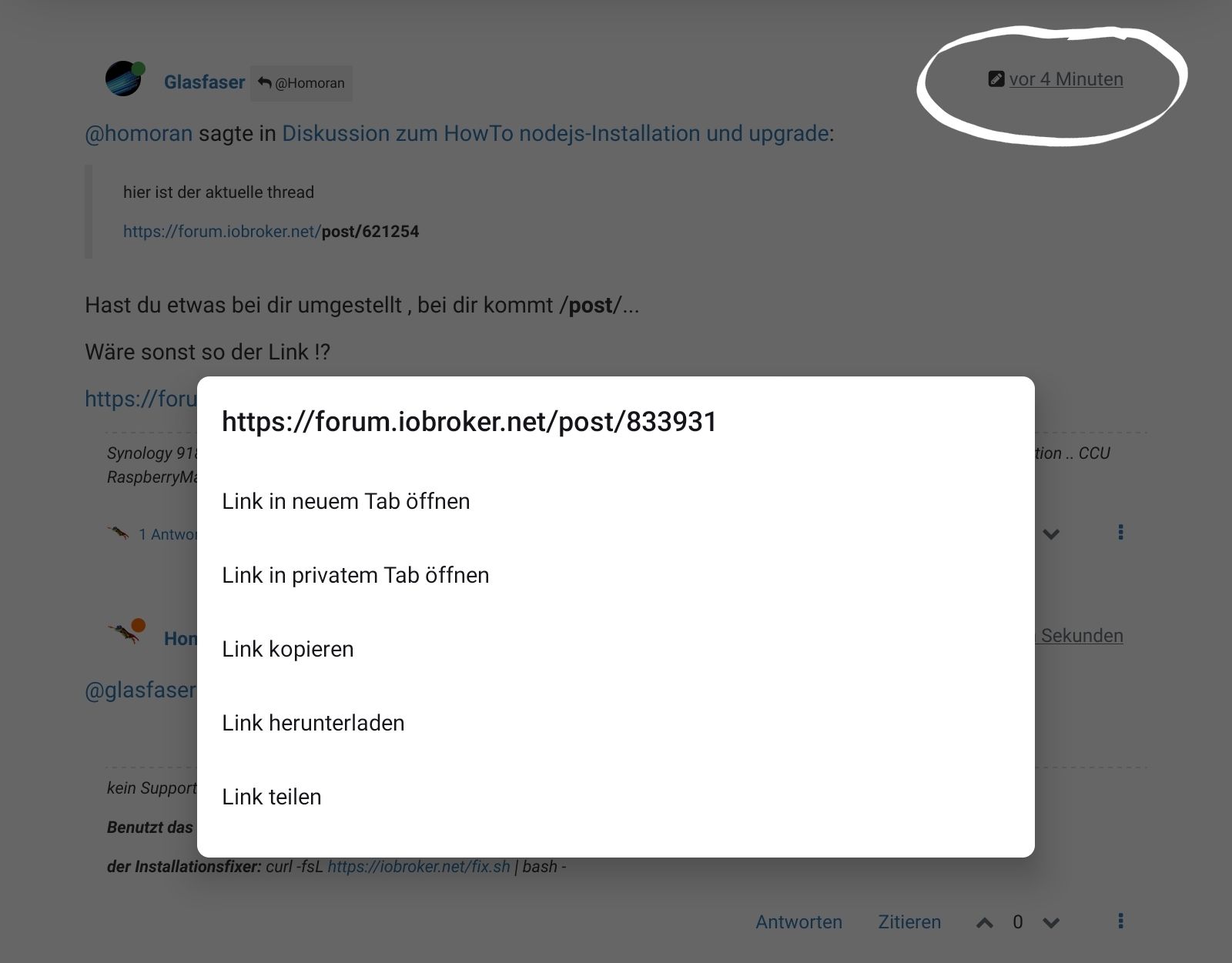
                                  Screenshot_20220725-204502_Firefox.jpg

                                  kein Support per PN! - Fragen im Forum stellen - es gibt fast nichts, was nicht auch für andere interessant ist.

                                  Benutzt das Voting rechts unten im Beitrag wenn er euch geholfen hat.

                                  der Installationsfixer: curl -fsL https://iobroker.net/fix.sh | bash -

                                  GlasfaserG 1 Reply Last reply
                                  1
                                  • HomoranH Homoran

                                    @glasfaser hab den Link aus dem Timestamp des ersten Posts, so wie jetzt hier

                                    Screenshot_20220725-204502_Firefox.jpg

                                    GlasfaserG Offline
                                    GlasfaserG Offline
                                    Glasfaser
                                    wrote on last edited by
                                    #308

                                    @homoran

                                    Danke für den EDIT ... habe es dann verstanden ... mit dem Screenshot ;)

                                    Synology 918+ 16GB - ioBroker in Docker v9 , VISO auf Trekstor Primebook C13 13,3" , Hikvision Domkameras mit Surveillance Station .. CCU RaspberryMatic in Synology VM .. Zigbee CC2538+CC2592 .. Sonoff .. KNX .. Modbus ..

                                    1 Reply Last reply
                                    0
                                    • wendy2702W Offline
                                      wendy2702W Offline
                                      wendy2702
                                      wrote on last edited by
                                      #309

                                      Hi,

                                      konnte keine wirkliche Lösung zu den "peer dep missing" Meldungen finden, deshalb mal die Frage wie ich die bei mir wegbekomme.

                                      Start sah so aus:

                                      mirko@iobroker:/opt/iobroker$ npm ls | grep -E 'github|ERR'
                                      +-- iobroker.bidirectional-counter@1.5.5 (github:BenAhrdt/ioBroker.bidirectional-counter#844c4d2bb6a9704728fe5e0aaa30be6c4af46a50)
                                      |   +-- github-url-from-git@1.5.0
                                      |   +-- new-github-release-url@1.0.0
                                      npm ERR! peer dep missing: buffer@>=6.0.3, required by crc@4.1.0


                                      Dann den bidirectional deinstalliert:

                                      mirko@iobroker:/opt/iobroker$ npm ls | grep -E 'github|ERR'
                                      npm ERR! peer dep missing: buffer@>=6.0.3, required by crc@4.1.0
                                      |   +-- github-url-from-git@1.5.0
                                      |   +-- new-github-release-url@1.0.0


                                      Dann zum testen die aktuelle Version von bidirectional counter erneut installiert:

                                      mirko@iobroker:/opt/iobroker$ npm ls | grep -E 'github|ERR'
                                      |   +-- github-url-from-git@1.5.0
                                      |   +-- new-github-release-url@1.0.0
                                      npm ERR! peer dep missing: buffer@>=6.0.3, required by crc@4.1.0


                                      Wie bekommen ich die Einträge denn jetzt weg?

                                      Bitte keine Fragen per PN, die gehören ins Forum!

                                      Benutzt das Voting rechts unten im Beitrag wenn er euch geholfen hat.

                                      Thomas BraunT 1 Reply Last reply
                                      0
                                      • wendy2702W wendy2702

                                        Hi,

                                        konnte keine wirkliche Lösung zu den "peer dep missing" Meldungen finden, deshalb mal die Frage wie ich die bei mir wegbekomme.

                                        Start sah so aus:

                                        mirko@iobroker:/opt/iobroker$ npm ls | grep -E 'github|ERR'
                                        +-- iobroker.bidirectional-counter@1.5.5 (github:BenAhrdt/ioBroker.bidirectional-counter#844c4d2bb6a9704728fe5e0aaa30be6c4af46a50)
                                        |   +-- github-url-from-git@1.5.0
                                        |   +-- new-github-release-url@1.0.0
                                        npm ERR! peer dep missing: buffer@>=6.0.3, required by crc@4.1.0


                                        Dann den bidirectional deinstalliert:

                                        mirko@iobroker:/opt/iobroker$ npm ls | grep -E 'github|ERR'
                                        npm ERR! peer dep missing: buffer@>=6.0.3, required by crc@4.1.0
                                        |   +-- github-url-from-git@1.5.0
                                        |   +-- new-github-release-url@1.0.0


                                        Dann zum testen die aktuelle Version von bidirectional counter erneut installiert:

                                        mirko@iobroker:/opt/iobroker$ npm ls | grep -E 'github|ERR'
                                        |   +-- github-url-from-git@1.5.0
                                        |   +-- new-github-release-url@1.0.0
                                        npm ERR! peer dep missing: buffer@>=6.0.3, required by crc@4.1.0


                                        Wie bekommen ich die Einträge denn jetzt weg?

                                        Thomas BraunT Online
                                        Thomas BraunT Online
                                        Thomas Braun
                                        Most Active
                                        wrote on last edited by
                                        #310

                                        @wendy2702

                                        Die werden von npm8 erledigt, soweit ich das weiß.

                                        Linux-Werkzeugkasten:
                                        https://forum.iobroker.net/topic/42952/der-kleine-iobroker-linux-werkzeugkasten
                                        NodeJS Fixer Skript:
                                        https://forum.iobroker.net/topic/68035/iob-node-fix-skript
                                        iob_diag: curl -sLf -o diag.sh https://iobroker.net/diag.sh && bash diag.sh

                                        wendy2702W 1 Reply Last reply
                                        0
                                        • Thomas BraunT Thomas Braun

                                          @wendy2702

                                          Die werden von npm8 erledigt, soweit ich das weiß.

                                          wendy2702W Offline
                                          wendy2702W Offline
                                          wendy2702
                                          wrote on last edited by
                                          #311

                                          @thomas-braun Also in dem Fall jetzt für das Upgrade von 6 --> 8 ignorieren ?

                                          Bitte keine Fragen per PN, die gehören ins Forum!

                                          Benutzt das Voting rechts unten im Beitrag wenn er euch geholfen hat.

                                          Thomas BraunT 1 Reply Last reply
                                          0
                                          Reply
                                          • Reply as topic
                                          Log in to reply
                                          • Oldest to Newest
                                          • Newest to Oldest
                                          • Most Votes


                                          Support us

                                          ioBroker
                                          Community Adapters
                                          Donate
                                          FAQ Cloud / IOT
                                          HowTo: Node.js-Update
                                          HowTo: Backup/Restore
                                          Downloads
                                          BLOG

                                          371

                                          Online

                                          32.6k

                                          Users

                                          82.2k

                                          Topics

                                          1.3m

                                          Posts
                                          Community
                                          Impressum | Datenschutz-Bestimmungen | Nutzungsbedingungen | Einwilligungseinstellungen
                                          ioBroker Community 2014-2025
                                          logo
                                          • Login

                                          • Don't have an account? Register

                                          • Login or register to search.
                                          • First post
                                            Last post
                                          0
                                          • Home
                                          • Recent
                                          • Tags
                                          • Unread 0
                                          • Categories
                                          • Unreplied
                                          • Popular
                                          • GitHub
                                          • Docu
                                          • Hilfe


