Skip to content
  • Home
  • Recent
  • Tags
  • 0 Unread 0
  • Categories
  • Unreplied
  • Popular
  • GitHub
  • Docu
  • Hilfe
Skins
  • Light
  • Brite
  • Cerulean
  • Cosmo
  • Flatly
  • Journal
  • Litera
  • Lumen
  • Lux
  • Materia
  • Minty
  • Morph
  • Pulse
  • Sandstone
  • Simplex
  • Sketchy
  • Spacelab
  • United
  • Yeti
  • Zephyr
  • Dark
  • Cyborg
  • Darkly
  • Quartz
  • Slate
  • Solar
  • Superhero
  • Vapor

  • Default (No Skin)
  • No Skin
Collapse
ioBroker Logo

Community Forum

donate donate
  1. ioBroker Community Home
  2. Deutsch
  3. ioBroker Allgemein
  4. Iobroker Logging zu syslog

NEWS

  • Jahresrückblick 2025 – unser neuer Blogbeitrag ist online! ✨
    BluefoxB
    Bluefox
    16
    1
    1.9k

  • Neuer Blogbeitrag: Monatsrückblick - Dezember 2025 🎄
    BluefoxB
    Bluefox
    13
    1
    918

  • Weihnachtsangebot 2025! 🎄
    BluefoxB
    Bluefox
    25
    1
    2.2k

Iobroker Logging zu syslog

Scheduled Pinned Locked Moved ioBroker Allgemein
26 Posts 11 Posters 6.8k Views 4 Watching
  • Oldest to Newest
  • Newest to Oldest
  • Most Votes
Reply
  • Reply as topic
Log in to reply
This topic has been deleted. Only users with topic management privileges can see it.
  • C Offline
    C Offline
    cybertron
    wrote on last edited by
    #6

    Koennte mal jemand den Bereich aus der iobroker.json als ausgefülltes Beispiel posten?

    Ich wuerde das Ganze gern auf einen im Netz ohnehin vorhanden syslog-Server schicken.

    Danke & Gruss

    Silvio

    1 Reply Last reply
    0
    • apollon77A Offline
      apollon77A Offline
      apollon77
      wrote on last edited by
      #7

      Siehe https://github.com/ioBroker/ioBroker.js … -dist.json

      Ist an sich alles drin.

      Musst nur log -> transport -> syslog1 das "enabled": true machen und unter "Host" den Server eintragen wenn nicht localhost

      Beitrag hat geholfen? Votet rechts unten im Beitrag :-) https://paypal.me/Apollon77 / https://github.com/sponsors/Apollon77

      • Debug-Log für Instanz einschalten? Admin -> Instanzen -> Expertenmodus -> Instanz aufklappen - Loglevel ändern
      • Logfiles auf Platte /opt/iobroker/log/… nutzen, Admin schneidet Zeilen ab
      1 Reply Last reply
      0
      • sissiwupS Offline
        sissiwupS Offline
        sissiwup
        wrote on last edited by
        #8

        Hallo,

        bei mir passiert da nix. Hat das schon wer zum laufen bekommen?

        Habe die CCU2 und div. andere Logs auf meinen Log-Server liegen,

        ioBroker will aber nicht.

         "log": {
            "level": "info",
            "maxDays": 30,
            "transport": {
              "file1": {
                "type": "file",
                "enabled": true,
                "filename": "log/iobroker",
                "fileext": ".log",
                "maxsize": null,
                "maxFiles": null
              },
              "syslog1": {
                        "type":                 "syslog",
                        "enabled":              true,
        
                        "host":                 "192.168.1.13",
                        "host_comment":         "The host running syslogd, defaults to localhost.",
        
                        "port_comment":         "The port on the host that syslog is running on, defaults to syslogd's default port(514/UD
        P).",
        
                        "protocol":             "udp4",
                        "protocol_comment":     "The network protocol to log over (e.g. tcp4, udp4, unix, unix-connect, etc).",
        
                        "path_comment":         "The path to the syslog dgram socket (i.e. /dev/log or /var/run/syslog for OS X).",
                        "facility_comment":     "Syslog facility to use (Default: local0).",
                        "localhost":            "iobroker",
                        "localhost_comment":    "Host to indicate that log messages are coming from (Default: localhost).",
                        "sysLogType_comment":   "The type of the syslog protocol to use (Default: BSD).",
                        "app_name_comment":     "The name of the application (Default: process.title).",
                        "eol_comment":          "The end of line character to be added to the end of the message (Default: Message without
         modifications)."
                    }
            }


        MfG

        Sissi

        –-----------------------------------------

        1 CCU3 1 CCU2-Gateway 1 LanGateway 1 Pi-Gateway 1 I7 für ioBroker/MySQL


        1 Reply Last reply
        0
        • sissiwupS Offline
          sissiwupS Offline
          sissiwup
          wrote on last edited by
          #9

          da fehlte noch was, jetzt gehts bei mir:

                "syslog1": {
                          "type":                 "syslog",
                          "enabled":              true,
          
                          "host":                 "192.168.1.13",
                          "host_comment":         "The host running syslogd, defaults to localhost.",
                          "port":                 "514",
                          "port_comment":         "The port on the host that syslog is running on, defaults to syslogd's default port(514/UDP).",
          
                          "protocol":             "udp4",
                          "protocol_comment":     "The network protocol to log over (e.g. tcp4, udp4, unix, unix-connect, etc).",
                          "path":                 "",
                          "path_comment":         "The path to the syslog dgram socket (i.e. /dev/log or /var/run/syslog for OS X).",
                          "facility_comment":     "Syslog facility to use (Default: local0).",
                          "localhost":            "iobroker",
                          "localhost_comment":    "Host to indicate that log messages are coming from (Default: localhost).",
                          "sysLogType_comment":   "The type of the syslog protocol to use (Default: BSD).",
                          "app_name_comment":     "The name of the application (Default: process.title).",
                          "eol_comment":          "The end of line character to be added to the end of the message (Default: Message without modifications)."
                      }


          MfG

          Sissi

          –-----------------------------------------

          1 CCU3 1 CCU2-Gateway 1 LanGateway 1 Pi-Gateway 1 I7 für ioBroker/MySQL


          1 Reply Last reply
          0
          • sissiwupS Offline
            sissiwupS Offline
            sissiwup
            wrote on last edited by
            #10
              "syslog1": {
                            "type":                 "syslog",
                            "enabled":              true,
            
                            "host":                 "192.168.1.13",
                            "host_comment":         "The host running syslogd, defaults to localhost.",
                            "port":                 "514",
                            "port_comment":         "The port on the host that syslog is running on, defaults to syslogd's default port(514/UDP).",
                            "pid":                  "0",
                            "protocol":             "udp4",
                            "protocol_comment":     "The network protocol to log over (e.g. tcp4, udp4, unix, unix-connect, etc).",
                            "path":                 "",
                            "path_comment":         "The path to the syslog dgram socket (i.e. /dev/log or /var/run/syslog for OS X).",
                            "facility_comment":     "Syslog facility to use (Default: local0).",
                            "localhost":            "iobroker",
                            "localhost_comment":    "Host to indicate that log messages are coming from (Default: localhost).",
                            "sysLogType_comment":   "The type of the syslog protocol to use (Default: BSD).",
                            "app_name_comment":     "The name of the application (Default: process.title).",
                            "eol_comment":          "The end of line character to be added to the end of the message (Default: Message without modifications)."
                        }


            Mit "pid" = 0 erreicht man, das die Prozess-ID nicht mit im Namen geloggt wird, das stört oft beim Filtern.

            MfG

            Sissi

            –-----------------------------------------

            1 CCU3 1 CCU2-Gateway 1 LanGateway 1 Pi-Gateway 1 I7 für ioBroker/MySQL


            1 Reply Last reply
            0
            • sissiwupS Offline
              sissiwupS Offline
              sissiwup
              wrote on last edited by
              #11

              Kann es sein dass

              process.title nur vom js-controller verwendet wird und nicht von den Adaptern?

              Wie kann ich adapter.appName oder ähnliches übergeben?

              MfG

              Sissi

              –-----------------------------------------

              1 CCU3 1 CCU2-Gateway 1 LanGateway 1 Pi-Gateway 1 I7 für ioBroker/MySQL


              1 Reply Last reply
              0
              • sissiwupS Offline
                sissiwupS Offline
                sissiwup
                wrote on last edited by
                #12

                Hallo,

                das "pid = 0" kann man entfernen wenn man seinen Logging Server beibringt pid und syslogtag zu trennen:

                /etc/rsyslog.d/mysql.conf

                ### Configuration file for rsyslog-mysql
                ### Changes are preserved
                $template dbFormat,"insert into SystemEvents (Message, Facility, FromHost, Priority, DeviceReportedTime, ReceivedAt, InfoUnitID, SysLogTag, processid) values ('%msg%', %syslogfacility%, '%HOSTNAME%
                ', %syslogpriority%, '%timereported:::date-mysql%', '%timegenerated:::date-mysql%', %iut%, '%syslogtag:R,ERE,1,FIELD:([a-zA-Z\/]+)(\[[0-9]{1,5}\])*:--end%', '%syslogtag:R,ERE,1,BLANK:\[([0-9]{1,5})
                \]--end%')",sql
                
                $ModLoad ommysql
                *.* :ommysql:localhost,Syslog,rsyslog-mysql,PASSWORT;dbFormat


                Mysql-User:

                User: rsyslog-mysql

                Passwort: PASSWORT

                MfG

                Sissi

                –-----------------------------------------

                1 CCU3 1 CCU2-Gateway 1 LanGateway 1 Pi-Gateway 1 I7 für ioBroker/MySQL


                1 Reply Last reply
                0
                • wendy2702W Offline
                  wendy2702W Offline
                  wendy2702
                  wrote on last edited by
                  #13

                  Damit ich das richtig verstehe:

                  Bedeutet das iobroker.log wird zusätzlich in Linux SYSLOG geschrieben?

                  Bitte keine Fragen per PN, die gehören ins Forum!

                  Benutzt das Voting rechts unten im Beitrag wenn er euch geholfen hat.

                  1 Reply Last reply
                  0
                  • nieIPN Offline
                    nieIPN Offline
                    nieIP
                    wrote on last edited by
                    #14

                    Hallo

                    ich würde das gern morgen mal testen. Wie ist der aktuelle Stand …

                    Muss ich

                     npm install winston-syslog
                    

                    noch ausführen, oder ist das default schon mit installiert?

                    Der Beitrag ist ja schon 2 Jahre alt, daher die Nachfrage.

                    1 Reply Last reply
                    0
                    • apollon77A Offline
                      apollon77A Offline
                      apollon77
                      wrote on last edited by
                      #15

                      winston-syslog ist ein optionale dep … musst mal schauen ob es installiert ist oder du es manuell machen musst

                      Beitrag hat geholfen? Votet rechts unten im Beitrag :-) https://paypal.me/Apollon77 / https://github.com/sponsors/Apollon77

                      • Debug-Log für Instanz einschalten? Admin -> Instanzen -> Expertenmodus -> Instanz aufklappen - Loglevel ändern
                      • Logfiles auf Platte /opt/iobroker/log/… nutzen, Admin schneidet Zeilen ab
                      1 Reply Last reply
                      0
                      • P Offline
                        P Offline
                        pid5be0
                        wrote on last edited by
                        #16

                        Moin moin…

                        Da mich das Thema ebenfalls interessiert, wollte ich den Winston-Syslog-Service ebenfalls installieren.

                        Dabei erhielt ich diese Ausgabe. Kann es sein, das ich die Installation nicht von der ROOT des Hosts machen kann?

                        root@debian-iobroker:~# npm install winston-syslog
                        
                        > unix-dgram@0.2.3 install /root/node_modules/unix-dgram
                        > node-gyp rebuild
                        
                        make: Entering directory '/root/node_modules/unix-dgram/build'
                          CXX(target) Release/obj.target/unix_dgram/src/unix_dgram.o
                          SOLINK_MODULE(target) Release/obj.target/unix_dgram.node
                          COPY Release/unix_dgram.node
                        make: Leaving directory '/root/node_modules/unix-dgram/build'
                        npm WARN saveError ENOENT: no such file or directory, open '/root/package.json'
                        npm notice created a lockfile as package-lock.json. You should commit this file.
                        npm WARN enoent ENOENT: no such file or directory, open '/root/package.json'
                        npm WARN root No description
                        npm WARN root No repository field.
                        npm WARN root No README data
                        npm WARN root No license field.
                        
                        + winston-syslog@2.0.0
                        added 6 packages from 18 contributors and audited 6 packages in 11.999s
                        found 0 vulnerabilities
                        
                        root@debian-iobroker:~#
                        

                        Grüße,

                        Daniel

                        IOBROKER via VM auf QNAP TS453, Unify Network (Switch/WLAN), Hardware Firewall - SIF, Raspberry für Homematic

                        1 Reply Last reply
                        0
                        • P Offline
                          P Offline
                          pid5be0
                          wrote on last edited by
                          #17

                          Habe mal die Installation vom iobroker Verzeichnis gemacht.

                          ` > root@debian-iobroker:/opt/iobroker# npm install winston-syslog

                          • winston-syslog@2.0.0

                          added 1 package from 2 contributors, updated 1 package and audited 4794 packages in 39.864s

                          found 52 vulnerabilities (38 low, 14 high)

                          run npm audit fix to fix them, or npm audit for details

                          root@debian-iobroker:/opt/iobroker# npm audit

                          npm ERR! code ELOCKVERIFY

                          npm ERR! Errors were found in your package-lock.json, run npm install to fix them.

                          npm ERR! Missing: iobroker.flot@^1.9.2

                          npm ERR! Missing: iobroker.fritzbox@^0.2.1

                          npm ERR! Missing: iobroker.geofency@^0.3.2

                          npm ERR! Invalid: lock file's iobroker.hm-rega@2.0.1 does not satisfy iobroker.hm-rega@^2.1.2

                          npm ERR! Invalid: lock file's iobroker.hm-rpc@1.8.3 does not satisfy iobroker.hm-rpc@^1.9.1

                          npm ERR! Invalid: lock file's iobroker.iot@0.2.2 does not satisfy iobroker.iot@^0.3.1

                          npm ERR! Invalid: lock file's iobroker.shelly@2.0.2 does not satisfy iobroker.shelly@^2.0.5

                          npm ERR! Missing: iobroker.simple-api@^2.0.0

                          npm ERR! Missing: iobroker.sql@^1.9.2

                          npm ERR! Invalid: lock file's iobroker.type-detector@0.1.0 does not satisfy iobroker.type-detector@file:node_modules/iobroker.type-detector

                          npm ERR! Missing: iobroker.unifi@^0.3.1

                          npm ERR! Missing: iobroker.web@^2.4.1

                          npm ERR! Invalid: lock file's winston-syslog@1.2.6 does not satisfy winston-syslog@^2.0.0

                          npm ERR! A complete log of this run can be found in:

                          npm ERR! /root/.npm/_logs/2019-01-14T05_26_12_350Z-debug.log `

                          @pid5be0:

                          Moin moin…

                          Da mich das Thema ebenfalls interessiert, wollte ich den Winston-Syslog-Service ebenfalls installieren.

                          Dabei erhielt ich diese Ausgabe. Kann es sein, das ich die Installation nicht von der ROOT des Hosts machen kann?

                          root@debian-iobroker:~# npm install winston-syslog
                          
                          > unix-dgram@0.2.3 install /root/node_modules/unix-dgram
                          > node-gyp rebuild
                          
                          make: Entering directory '/root/node_modules/unix-dgram/build'
                            CXX(target) Release/obj.target/unix_dgram/src/unix_dgram.o
                            SOLINK_MODULE(target) Release/obj.target/unix_dgram.node
                            COPY Release/unix_dgram.node
                          make: Leaving directory '/root/node_modules/unix-dgram/build'
                          npm WARN saveError ENOENT: no such file or directory, open '/root/package.json'
                          npm notice created a lockfile as package-lock.json. You should commit this file.
                          npm WARN enoent ENOENT: no such file or directory, open '/root/package.json'
                          npm WARN root No description
                          npm WARN root No repository field.
                          npm WARN root No README data
                          npm WARN root No license field.
                          
                          + winston-syslog@2.0.0
                          added 6 packages from 18 contributors and audited 6 packages in 11.999s
                          found 0 vulnerabilities
                          
                          root@debian-iobroker:~#
                          

                          Grüße,

                          Daniel `

                          IOBROKER via VM auf QNAP TS453, Unify Network (Switch/WLAN), Hardware Firewall - SIF, Raspberry für Homematic

                          1 Reply Last reply
                          0
                          • apollon77A Offline
                            apollon77A Offline
                            apollon77
                            wrote on last edited by
                            #18

                            Das sieht erstmal ok aus. Ich weiß nur nicht mehr aus dem Kopf ob die 2.0.0 geht oder ob man aktuell die letzte 1.x von der Winston-syslog nehmen muss.

                            Starte iobroker mal neu und konfiguriere es. Dann siehst du es ja

                            Gesendet vom Handy …

                            Beitrag hat geholfen? Votet rechts unten im Beitrag :-) https://paypal.me/Apollon77 / https://github.com/sponsors/Apollon77

                            • Debug-Log für Instanz einschalten? Admin -> Instanzen -> Expertenmodus -> Instanz aufklappen - Loglevel ändern
                            • Logfiles auf Platte /opt/iobroker/log/… nutzen, Admin schneidet Zeilen ab
                            1 Reply Last reply
                            0
                            • nieIPN Offline
                              nieIPN Offline
                              nieIP
                              wrote on last edited by
                              #19

                              Hallo

                              ich habe winston-syslog in /opt/iobroker nach installiert und mich bei der Konfig nach dem obrigen Beispiel gerichtet.

                              Hat sofort funktioniert.

                              Danke

                              1 Reply Last reply
                              0
                              • M Offline
                                M Offline
                                MrLee
                                wrote on last edited by
                                #20

                                Moin!

                                Genial!!!! Vielen Dank für den Tipp!
                                Kann ich nur jedem empfehlen der eh eine Syno mit ProtokollCenter laufen hat.

                                Installation auf beiden Systemen völlig stressfrei.

                                bis denne
                                Mr.Lee

                                1 Reply Last reply
                                0
                                • ScroungerS Offline
                                  ScroungerS Offline
                                  Scrounger
                                  Developer
                                  wrote on last edited by
                                  #21

                                  Mir ist gerade aufgefallen das mein syslog server die 'warn' Meldungen von ioBroker nicht mitbekommt.
                                  Alle anderen severity levels gehen.

                                  Kann das daran liegen weil der server das level 'Warning' erwartet?
                                  Gibt es eine config Möglichkeit das iobrker aus 'warn' level 'warning' macht?

                                  K 1 Reply Last reply
                                  0
                                  • ScroungerS Scrounger

                                    Mir ist gerade aufgefallen das mein syslog server die 'warn' Meldungen von ioBroker nicht mitbekommt.
                                    Alle anderen severity levels gehen.

                                    Kann das daran liegen weil der server das level 'Warning' erwartet?
                                    Gibt es eine config Möglichkeit das iobrker aus 'warn' level 'warning' macht?

                                    K Offline
                                    K Offline
                                    Kueppert
                                    wrote on last edited by
                                    #22

                                    @scrounger hast du hierzu eine Lösung gefunden? Ich hab auch ne SYNO und würde gern starten, das LOG entsprechend bei mir im Protokoll-Server mit aufzuzeichnen.
                                    Danke dir und vG, Thorsten

                                    UDM Pro, Intel NUC - ioBroker in Proxmox-VM, PiHole+Grafana&Influx+TasmoAdmin in LXCs, Raspberry Pi3 (als CCU), Zigbee-Stick Sonoff, Synology DS918+

                                    ScroungerS 1 Reply Last reply
                                    0
                                    • K Kueppert

                                      @scrounger hast du hierzu eine Lösung gefunden? Ich hab auch ne SYNO und würde gern starten, das LOG entsprechend bei mir im Protokoll-Server mit aufzuzeichnen.
                                      Danke dir und vG, Thorsten

                                      ScroungerS Offline
                                      ScroungerS Offline
                                      Scrounger
                                      Developer
                                      wrote on last edited by
                                      #23

                                      @kueppert
                                      Ne hab leider keine Lösung dafür gefunden.

                                      A 1 Reply Last reply
                                      1
                                      • ScroungerS Scrounger

                                        @kueppert
                                        Ne hab leider keine Lösung dafür gefunden.

                                        A Offline
                                        A Offline
                                        Aiouh
                                        wrote on last edited by Aiouh
                                        #24

                                        Ist zwar schon alt der Fred, aber ich denke SysLog ist nach wie vor für den ein oder Anderen von Interesse, also fasse ich das mal zusammen.
                                        Ich logge alle Syslogs meiner Systeme auf einem Synology NAS mit LogCenter, daher wollte ich den ioBroker auch dort mit drin sehen.
                                        Das waren bei mir die dazu erforderlichen Schritte:

                                        sudo npm install winston-syslog
                                        

                                        dann

                                        sudo nano /opt/iobroker/iobroker-data/iobroker.json
                                        

                                        In der Datei die Zeilen 4 und 5 entsprechend mit "true" und der IP eures Syslog Servers anpassen und die Zeilen 7 und 9 einfügen

                                         },
                                              "syslog1": {
                                                "type": "syslog",
                                                "enabled": true,
                                                "host": "192.168.178.85",
                                                "hostComment": "The host running syslogd, defaults to localhost.",
                                                "port":        "514",
                                                "portComment": "The port on the host that syslog is running on, default$
                                                "pid":         "0",
                                                "protocol":    "udp4",
                                                "protocolComment": "The network protocol to log over (e.g. tcp4, udp4, $
                                                "pathComment": "The path to the syslog dgram socket (i.e. /dev/log or /$
                                                "facilityComment": "Syslog facility to use (Default: local0).",
                                                "localhost": "iobroker",
                                                "localhostComment": "Host to indicate that log messages are coming from$
                                                "sysLogTypeComment": "The type of the syslog protocol to use (Default: $
                                                "app_nameComment": "The name of the application (Default: process.title$
                                                "eolComment": "The end of line character to be added to the end of the $
                                              }


                                        Im Synololgy NAS LogCenter, "Achive Settings" setzen
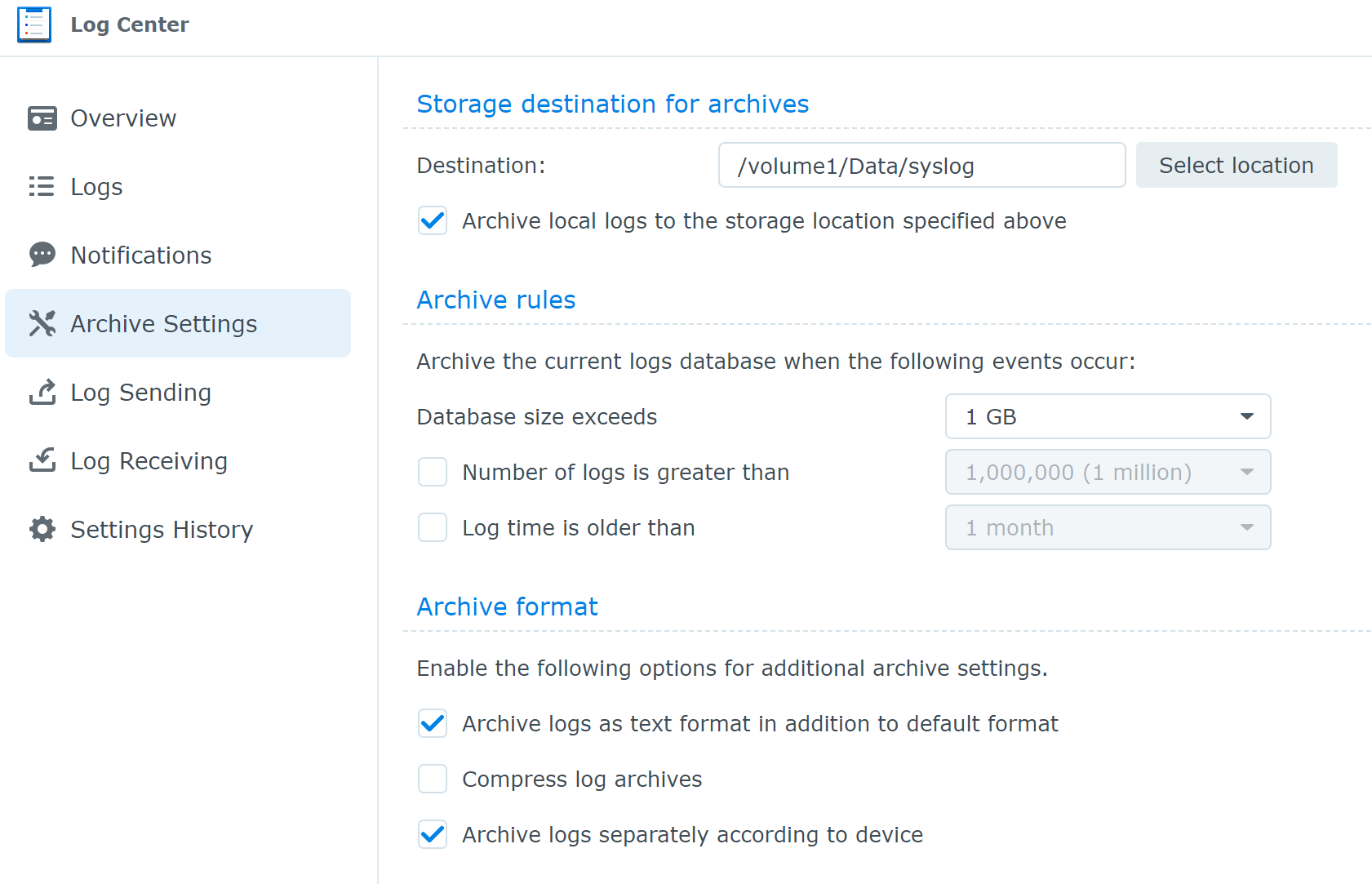
                                        109cd916-2da0-4bac-9743-5f62df216570-image.png

                                        und unter "Log Receiving" eine Regel anlegen,
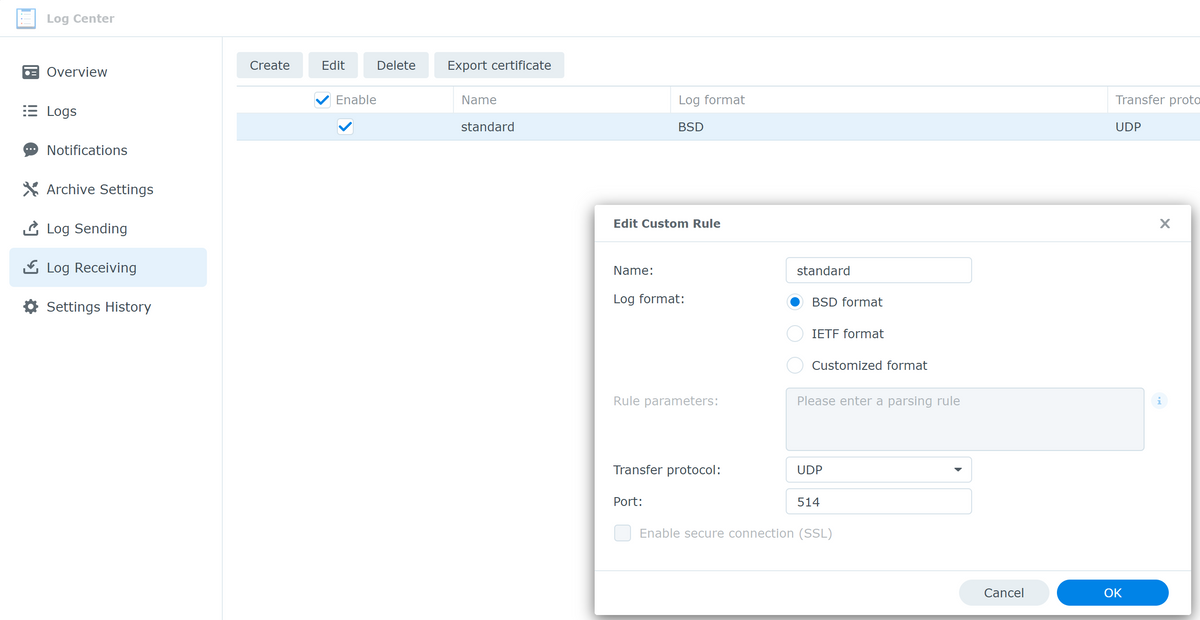
                                        d380e26d-c609-4fbd-a319-5df1c43fc4bb-image.png

                                        Den ioBroker neu starten

                                        iobroker restart


                                        Das war es schon, das LogCenter in der Syno bekommt jetzt die Meldungen vom iobroker, auch die Warnungen

                                        1e6c60e5-001f-4aa8-948c-48c0dba797dd-image.png

                                        @apollon77 weisst Du ob damit das gesamte logging vom ioBroker auf den syslog server verschoben wird, oder ist das syslog quasi doppelt, d.h. der ioBroker logged selbst immern noch auch lokal?

                                        apollon77A 1 Reply Last reply
                                        1
                                        • A Aiouh

                                          Ist zwar schon alt der Fred, aber ich denke SysLog ist nach wie vor für den ein oder Anderen von Interesse, also fasse ich das mal zusammen.
                                          Ich logge alle Syslogs meiner Systeme auf einem Synology NAS mit LogCenter, daher wollte ich den ioBroker auch dort mit drin sehen.
                                          Das waren bei mir die dazu erforderlichen Schritte:

                                          sudo npm install winston-syslog
                                          

                                          dann

                                          sudo nano /opt/iobroker/iobroker-data/iobroker.json
                                          

                                          In der Datei die Zeilen 4 und 5 entsprechend mit "true" und der IP eures Syslog Servers anpassen und die Zeilen 7 und 9 einfügen

                                           },
                                                "syslog1": {
                                                  "type": "syslog",
                                                  "enabled": true,
                                                  "host": "192.168.178.85",
                                                  "hostComment": "The host running syslogd, defaults to localhost.",
                                                  "port":        "514",
                                                  "portComment": "The port on the host that syslog is running on, default$
                                                  "pid":         "0",
                                                  "protocol":    "udp4",
                                                  "protocolComment": "The network protocol to log over (e.g. tcp4, udp4, $
                                                  "pathComment": "The path to the syslog dgram socket (i.e. /dev/log or /$
                                                  "facilityComment": "Syslog facility to use (Default: local0).",
                                                  "localhost": "iobroker",
                                                  "localhostComment": "Host to indicate that log messages are coming from$
                                                  "sysLogTypeComment": "The type of the syslog protocol to use (Default: $
                                                  "app_nameComment": "The name of the application (Default: process.title$
                                                  "eolComment": "The end of line character to be added to the end of the $
                                                }


                                          Im Synololgy NAS LogCenter, "Achive Settings" setzen

                                          109cd916-2da0-4bac-9743-5f62df216570-image.png

                                          und unter "Log Receiving" eine Regel anlegen,
                                          d380e26d-c609-4fbd-a319-5df1c43fc4bb-image.png

                                          Den ioBroker neu starten

                                          iobroker restart


                                          Das war es schon, das LogCenter in der Syno bekommt jetzt die Meldungen vom iobroker, auch die Warnungen

                                          1e6c60e5-001f-4aa8-948c-48c0dba797dd-image.png

                                          @apollon77 weisst Du ob damit das gesamte logging vom ioBroker auf den syslog server verschoben wird, oder ist das syslog quasi doppelt, d.h. der ioBroker logged selbst immern noch auch lokal?

                                          apollon77A Offline
                                          apollon77A Offline
                                          apollon77
                                          wrote on last edited by
                                          #25

                                          @aiouh also das npm install von Winston-syslog hätte an sich nicht nötig sein sollen und du hast jetzt ein extraneous Paket. Sollte jetzt aber kein Beinbruch sein.

                                          Sonst schau ins iobroker.json. Da ist definiert welches logging aktiv ist. Wenn du unter log bei „file“ nichts geändert hast loggt er jetzt beides. Im zweifel kannst du file noch ausschalten.

                                          Ansonsten geht die konfig inzwischen auch per Admin unter „hosts“. Da muss keiner mehr ans json file. Aber es geht beides.


                                          Beitrag hat geholfen? Votet rechts unten im Beitrag :-) https://paypal.me/Apollon77 / https://github.com/sponsors/Apollon77

                                          • Debug-Log für Instanz einschalten? Admin -> Instanzen -> Expertenmodus -> Instanz aufklappen - Loglevel ändern
                                          • Logfiles auf Platte /opt/iobroker/log/… nutzen, Admin schneidet Zeilen ab
                                          A 1 Reply Last reply
                                          1
                                          Reply
                                          • Reply as topic
                                          Log in to reply
                                          • Oldest to Newest
                                          • Newest to Oldest
                                          • Most Votes


                                          Support us

                                          ioBroker
                                          Community Adapters
                                          Donate
                                          FAQ Cloud / IOT
                                          HowTo: Node.js-Update
                                          HowTo: Backup/Restore
                                          Downloads
                                          BLOG

                                          632

                                          Online

                                          32.6k

                                          Users

                                          82.2k

                                          Topics

                                          1.3m

                                          Posts
                                          Community
                                          Impressum | Datenschutz-Bestimmungen | Nutzungsbedingungen | Einwilligungseinstellungen
                                          ioBroker Community 2014-2025
                                          logo
                                          • Login

                                          • Don't have an account? Register

                                          • Login or register to search.
                                          • First post
                                            Last post
                                          0
                                          • Home
                                          • Recent
                                          • Tags
                                          • Unread 0
                                          • Categories
                                          • Unreplied
                                          • Popular
                                          • GitHub
                                          • Docu
                                          • Hilfe