Skip to content
  • Home
  • Recent
  • Tags
  • 0 Unread 0
  • Categories
  • Unreplied
  • Popular
  • GitHub
  • Docu
  • Hilfe
Skins
  • Light
  • Brite
  • Cerulean
  • Cosmo
  • Flatly
  • Journal
  • Litera
  • Lumen
  • Lux
  • Materia
  • Minty
  • Morph
  • Pulse
  • Sandstone
  • Simplex
  • Sketchy
  • Spacelab
  • United
  • Yeti
  • Zephyr
  • Dark
  • Cyborg
  • Darkly
  • Quartz
  • Slate
  • Solar
  • Superhero
  • Vapor

  • Default (No Skin)
  • No Skin
Collapse
ioBroker Logo

Community Forum

donate donate
  1. ioBroker Community Home
  2. Deutsch
  3. Tester
  4. Test Adapter luxtronik2 v0.4.x

NEWS

  • Jahresrückblick 2025 – unser neuer Blogbeitrag ist online! ✨
    BluefoxB
    Bluefox
    17
    1
    3.6k

  • Neuer Blogbeitrag: Monatsrückblick - Dezember 2025 🎄
    BluefoxB
    Bluefox
    13
    1
    1.1k

  • Weihnachtsangebot 2025! 🎄
    BluefoxB
    Bluefox
    25
    1
    2.5k

Test Adapter luxtronik2 v0.4.x

Scheduled Pinned Locked Moved Tester
adapterluxtronik wpwebsocket
289 Posts 52 Posters 75.9k Views 49 Watching
  • Oldest to Newest
  • Newest to Oldest
  • Most Votes
Reply
  • Reply as topic
Log in to reply
This topic has been deleted. Only users with topic management privileges can see it.
  • Bernd 0B Offline
    Bernd 0B Offline
    Bernd 0
    wrote on last edited by
    #150

    Könntet ihr mir sagen, welchen Luxtronik Port und welches Passwort ihr verwendet?

    1 Reply Last reply
    0
    • H Offline
      H Offline
      Henning 1
      wrote on last edited by
      #151

      Hi,

      ich bin neu bei ioBroker und möchte den luxtronik2 Adapter nutzen. Ich betreibe den Broker auf einem Pi3. In der Adapterauswahl sehe ich nur den luxtronik1 Adapter, so dass ich mit dem Kommando "npm i iobroker.luxtronik2" versucht habe, den Adapter zu installieren. Bis auf 2 Warnings schien das auch geklappt zu haben.

      npm WARN luxtronik2@1.0.0 No description
      npm WARN luxtronik2@1.0.0 No repository field.
      

      Installiert habe ich den Adapter unter home/pi/luxtronik2. Allerdings sehe ich den Adapter nach wie vor nicht in meiner Adapterliste :-( Kann da wer helfen? Wenn Zusatzinfos benötigt werden, bitte einfordern. Von Linux habe ich leider keine Ahnung, daher bitte auf Niveau eines 8-jährigen antworten :grinning:

      LG Henning

      1 Reply Last reply
      0
      • H Offline
        H Offline
        Henning 1
        wrote on last edited by
        #152

        Ist der Thread hier tot oder ist meine Frage zu komisch?

        TbsJahT 1 Reply Last reply
        0
        • H Henning 1

          Ist der Thread hier tot oder ist meine Frage zu komisch?

          TbsJahT Offline
          TbsJahT Offline
          TbsJah
          wrote on last edited by
          #153

          @henning-1
          wenn du über die shell installierst dann solltest du

          npm i iobroker.luxtronik2
          

          verwenden .
          Alternativ direkt über iobroker installieren (Adapter)

          1 Reply Last reply
          0
          • H Offline
            H Offline
            Henning 1
            wrote on last edited by
            #154

            Hi,
            den Adapter sehe ich leider nicht in der Adapterliste. Daher habe ich über Shell mit genau dem Kommando installiert. Den installierten Adapter sehe ich aber auch nicht... Mehr Ideen? Muß ich den Adapter von einem bestimmten Ordner aus installieren?
            LG

            Thomas BraunT 1 Reply Last reply
            0
            • H Henning 1

              Hi,
              den Adapter sehe ich leider nicht in der Adapterliste. Daher habe ich über Shell mit genau dem Kommando installiert. Den installierten Adapter sehe ich aber auch nicht... Mehr Ideen? Muß ich den Adapter von einem bestimmten Ordner aus installieren?
              LG

              Thomas BraunT Online
              Thomas BraunT Online
              Thomas Braun
              Most Active
              wrote on last edited by Thomas Braun
              #155

              @henning-1

              Besser nicht per npm direkt.

              iobroker add ADAPTERNAME
              

              ist besser, weil u.a. egal ist in welchem Verzeichnis das gemacht wird. Und die Rechte sind auch richtig dann.

              luxtronik2 ist derzeitig aber nur über die Beta-Schiene erhältlich.

              Linux-Werkzeugkasten:
              https://forum.iobroker.net/topic/42952/der-kleine-iobroker-linux-werkzeugkasten
              NodeJS Fixer Skript:
              https://forum.iobroker.net/topic/68035/iob-node-fix-skript
              iob_diag: curl -sLf -o diag.sh https://iobroker.net/diag.sh && bash diag.sh

              1 Reply Last reply
              0
              • H Offline
                H Offline
                Henning 1
                wrote on last edited by
                #156

                Hi,
                danke. Hab ich probiert. Dazu hab ich unter home/pi/luxtronik2 den adapter mit npb uninstall deinstalliert und dann unter home/pi das npm add Kommando eingegeben. Fehlermeldungen sind wie folgt

                pi@iobroker-pi:~ $ npm add iobroker.luxtronik2
                npm WARN saveError ENOENT: no such file or directory, open '/home/pi/package.json'
                npm WARN enoent ENOENT: no such file or directory, open '/home/pi/package.json'
                npm WARN pi No description
                npm WARN pi No repository field.
                npm WARN pi No README data
                npm WARN pi No license field.


                Ich hatte vorab in dem luxtronik2 Ordner noch ein npm init ausgeführt. Um ehrlich zu sein weiß ich da aber nicht wirklich, was ich tue...

                Der Adpater ist nach wie vor nicht sichtbar unter ioBroker.

                LG

                Thomas BraunT 1 Reply Last reply
                0
                • H Henning 1

                  Hi,
                  danke. Hab ich probiert. Dazu hab ich unter home/pi/luxtronik2 den adapter mit npb uninstall deinstalliert und dann unter home/pi das npm add Kommando eingegeben. Fehlermeldungen sind wie folgt

                  pi@iobroker-pi:~ $ npm add iobroker.luxtronik2
                  npm WARN saveError ENOENT: no such file or directory, open '/home/pi/package.json'
                  npm WARN enoent ENOENT: no such file or directory, open '/home/pi/package.json'
                  npm WARN pi No description
                  npm WARN pi No repository field.
                  npm WARN pi No README data
                  npm WARN pi No license field.


                  Ich hatte vorab in dem luxtronik2 Ordner noch ein npm init ausgeführt. Um ehrlich zu sein weiß ich da aber nicht wirklich, was ich tue...

                  Der Adpater ist nach wie vor nicht sichtbar unter ioBroker.

                  LG

                  Thomas BraunT Online
                  Thomas BraunT Online
                  Thomas Braun
                  Most Active
                  wrote on last edited by Thomas Braun
                  #157

                  @henning-1

                  Warum machst du es jetzt anders als von mir vorgeschlagen?
                  Für Aktionen mittels npm stehst du immer noch im falschen Verzeichnis. Du musst in /opt/iobroker stehen. ODER halt (besser)

                  iobroker add ADAPTERNAME
                  

                  luxtronik2 ist allerdings nur als Beta verfügbar.

                  Linux-Werkzeugkasten:
                  https://forum.iobroker.net/topic/42952/der-kleine-iobroker-linux-werkzeugkasten
                  NodeJS Fixer Skript:
                  https://forum.iobroker.net/topic/68035/iob-node-fix-skript
                  iob_diag: curl -sLf -o diag.sh https://iobroker.net/diag.sh && bash diag.sh

                  1 Reply Last reply
                  0
                  • H Offline
                    H Offline
                    Henning 1
                    wrote on last edited by
                    #158

                    Hi,
                    sorry, meine geistige Umnachtung :-) Ist irgendwie zu warm draußen... Ich machs gleich nochmal anders.

                    1 Reply Last reply
                    0
                    • H Offline
                      H Offline
                      Henning 1
                      wrote on last edited by
                      #159

                      Hmm, ging auch nicht:

                      pi@iobroker-pi:~ $ iobroker add luxtronik2
                      host.iobroker-pi Unknown packetName luxtronik2. Please install packages from outside the repository using npm!
                      pi@iobroker-pi:~ $ iobroker add iobroker.luxtronik2
                      host.iobroker-pi Unknown packetName luxtronik2. Please install packages from outside the repository using npm!


                      Ich versuchs jetzt nochmal im opt/iobroker mittels npm. Geht auch nicht :-(

                      npm WARN xmlhttprequest-ts@1.0.1 requires a peer of @angular/common@>= 5.0.0 but none is installed. You must install peer dependencies yourself.
                      npm WARN xmlhttprequest-ts@1.0.1 requires a peer of @angular/core@>= 5.0.0 but none is installed. You must install peer dependencies yourself.
                      
                      npm ERR! code EACCES
                      npm ERR! syscall access
                      npm ERR! path /opt/iobroker/node_modules
                      npm ERR! errno -13
                      npm ERR! Error: EACCES: permission denied, access '/opt/iobroker/node_modules'
                      npm ERR!  [Error: EACCES: permission denied, access '/opt/iobroker/node_modules'] {
                      npm ERR!   errno: -13,
                      npm ERR!   code: 'EACCES',
                      npm ERR!   syscall: 'access',
                      npm ERR!   path: '/opt/iobroker/node_modules'
                      npm ERR! }
                      npm ERR!
                      npm ERR! The operation was rejected by your operating system.
                      npm ERR! It is likely you do not have the permissions to access this file as the current user
                      npm ERR!
                      npm ERR! If you believe this might be a permissions issue, please double-check the
                      npm ERR! permissions of the file and its containing directories, or try running
                      npm ERR! the command again as root/Administrator.
                      
                      npm ERR! A complete log of this run can be found in:
                      npm ERR!     /home/pi/.npm/_logs/2022-07-03T11_29_51_613Z-debug.log
                      
                      
                      Thomas BraunT 2 Replies Last reply
                      0
                      • H Henning 1

                        Hmm, ging auch nicht:

                        pi@iobroker-pi:~ $ iobroker add luxtronik2
                        host.iobroker-pi Unknown packetName luxtronik2. Please install packages from outside the repository using npm!
                        pi@iobroker-pi:~ $ iobroker add iobroker.luxtronik2
                        host.iobroker-pi Unknown packetName luxtronik2. Please install packages from outside the repository using npm!


                        Ich versuchs jetzt nochmal im opt/iobroker mittels npm. Geht auch nicht :-(

                        npm WARN xmlhttprequest-ts@1.0.1 requires a peer of @angular/common@>= 5.0.0 but none is installed. You must install peer dependencies yourself.
                        npm WARN xmlhttprequest-ts@1.0.1 requires a peer of @angular/core@>= 5.0.0 but none is installed. You must install peer dependencies yourself.
                        
                        npm ERR! code EACCES
                        npm ERR! syscall access
                        npm ERR! path /opt/iobroker/node_modules
                        npm ERR! errno -13
                        npm ERR! Error: EACCES: permission denied, access '/opt/iobroker/node_modules'
                        npm ERR!  [Error: EACCES: permission denied, access '/opt/iobroker/node_modules'] {
                        npm ERR!   errno: -13,
                        npm ERR!   code: 'EACCES',
                        npm ERR!   syscall: 'access',
                        npm ERR!   path: '/opt/iobroker/node_modules'
                        npm ERR! }
                        npm ERR!
                        npm ERR! The operation was rejected by your operating system.
                        npm ERR! It is likely you do not have the permissions to access this file as the current user
                        npm ERR!
                        npm ERR! If you believe this might be a permissions issue, please double-check the
                        npm ERR! permissions of the file and its containing directories, or try running
                        npm ERR! the command again as root/Administrator.
                        
                        npm ERR! A complete log of this run can be found in:
                        npm ERR!     /home/pi/.npm/_logs/2022-07-03T11_29_51_613Z-debug.log
                        
                        
                        Thomas BraunT Online
                        Thomas BraunT Online
                        Thomas Braun
                        Most Active
                        wrote on last edited by
                        #160

                        @henning-1

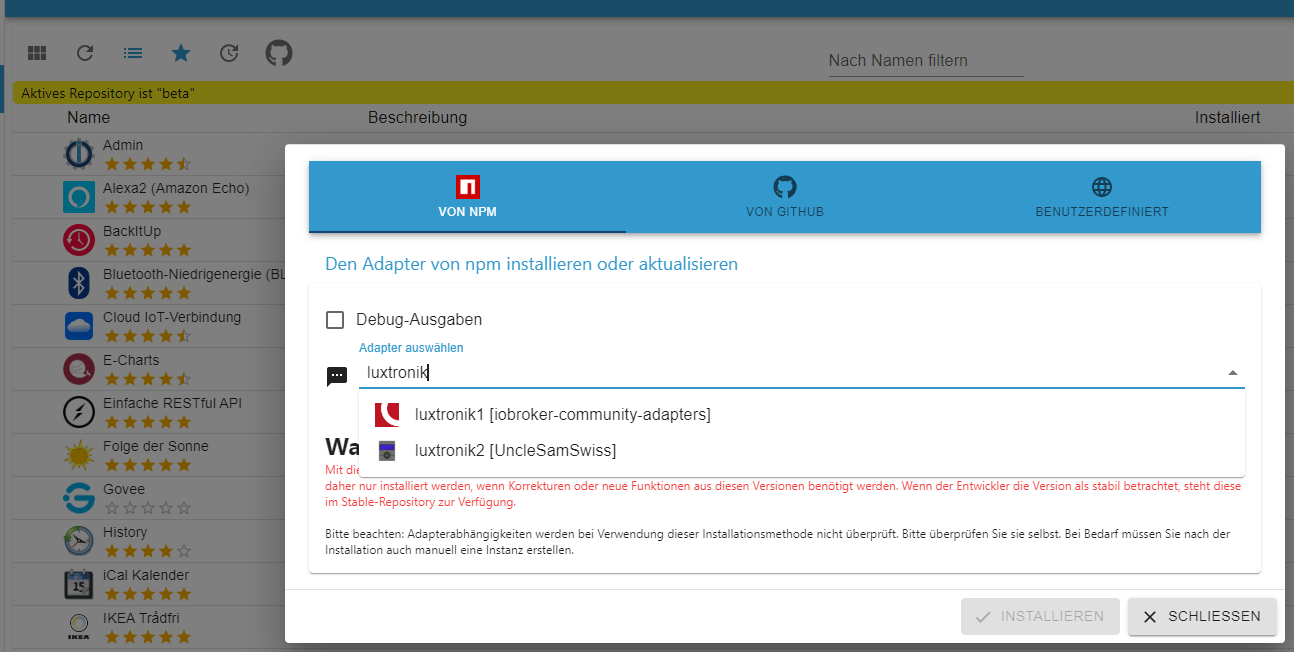
                        Mach es so...

                        1f568cc8-205f-4894-9159-fa16ae7e93c3-image.png

                        Linux-Werkzeugkasten:
                        https://forum.iobroker.net/topic/42952/der-kleine-iobroker-linux-werkzeugkasten
                        NodeJS Fixer Skript:
                        https://forum.iobroker.net/topic/68035/iob-node-fix-skript
                        iob_diag: curl -sLf -o diag.sh https://iobroker.net/diag.sh && bash diag.sh

                        1 Reply Last reply
                        0
                        • H Offline
                          H Offline
                          Henning 1
                          wrote on last edited by
                          #161

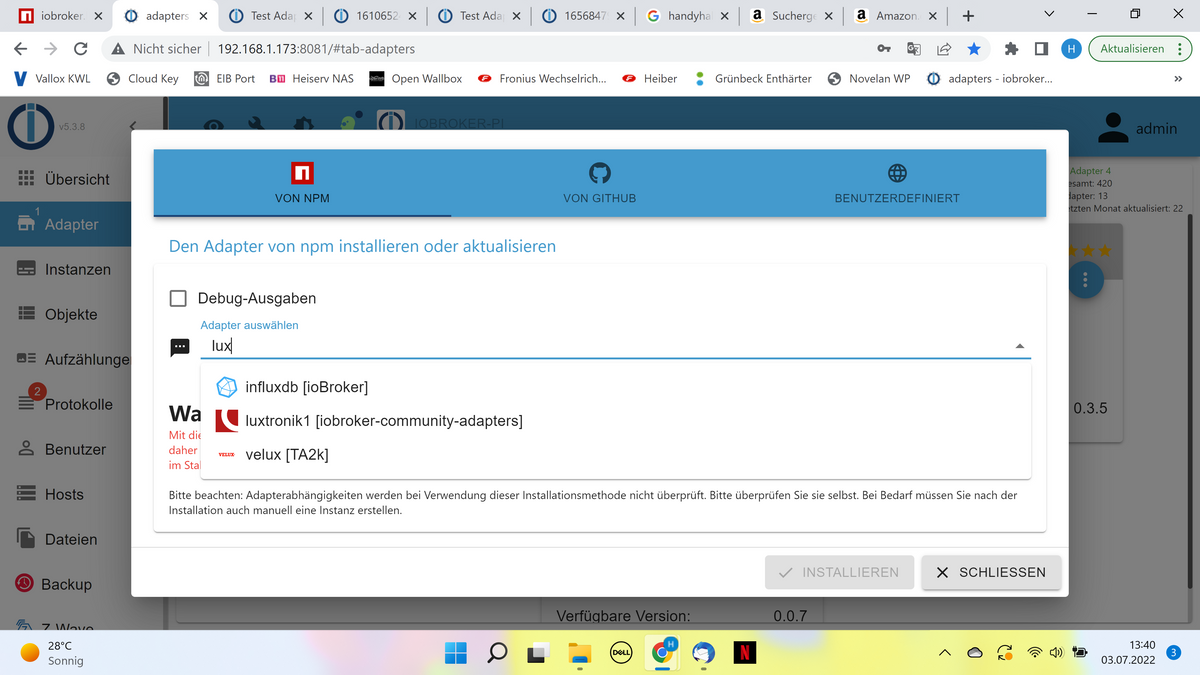
                          Das hatte ich schon probiert. Der Adapter ist nicht sichtbar.
                          1dd3428e-267a-46ab-85d0-7343ec7b3fc8-image.png

                          Thomas BraunT 1 Reply Last reply
                          0
                          • H Henning 1

                            Das hatte ich schon probiert. Der Adapter ist nicht sichtbar.
                            1dd3428e-267a-46ab-85d0-7343ec7b3fc8-image.png

                            Thomas BraunT Online
                            Thomas BraunT Online
                            Thomas Braun
                            Most Active
                            wrote on last edited by
                            #162

                            @henning-1

                            iobroker update -i
                            

                            Linux-Werkzeugkasten:
                            https://forum.iobroker.net/topic/42952/der-kleine-iobroker-linux-werkzeugkasten
                            NodeJS Fixer Skript:
                            https://forum.iobroker.net/topic/68035/iob-node-fix-skript
                            iob_diag: curl -sLf -o diag.sh https://iobroker.net/diag.sh && bash diag.sh

                            1 Reply Last reply
                            0
                            • H Offline
                              H Offline
                              Henning 1
                              wrote on last edited by
                              #163
                              Used repository: stable
                              Adapter    "admin"        : 5.3.8    , installed 5.3.8
                              Adapter    "backitup"     : 2.4.9    , installed 2.4.9
                              Adapter    "discovery"    : 3.0.3    , installed 3.0.3
                              Adapter    "fronius"      : 1.1.3    , installed 1.1.3
                              Adapter    "gruenbeck"    : 0.0.34   , installed 0.0.34
                              Adapter    "javascript"   : 5.7.0    , installed 5.7.0
                              Controller "js-controller": 4.0.23   , installed 4.0.23
                              Adapter    "net-tools"    : 0.2.0    , installed 0.2.0
                              Adapter    "openknx"      : 0.2.5    , installed 0.1.22 [Updatable]
                              Adapter    "ping"         : 1.5.3    , installed 1.5.3
                              Adapter    "pvforecast"   : 2.1.4    , installed 2.1.4
                              Adapter    "unifi"        : 0.5.10   , installed 0.5.10
                              Adapter    "valloxmv"     : 1.1.3    , installed 1.1.3
                              Adapter    "zwave2"       : 2.5.0    , installed 2.5.0
                              
                              
                              1 Reply Last reply
                              0
                              • H Henning 1

                                Hmm, ging auch nicht:

                                pi@iobroker-pi:~ $ iobroker add luxtronik2
                                host.iobroker-pi Unknown packetName luxtronik2. Please install packages from outside the repository using npm!
                                pi@iobroker-pi:~ $ iobroker add iobroker.luxtronik2
                                host.iobroker-pi Unknown packetName luxtronik2. Please install packages from outside the repository using npm!


                                Ich versuchs jetzt nochmal im opt/iobroker mittels npm. Geht auch nicht :-(

                                npm WARN xmlhttprequest-ts@1.0.1 requires a peer of @angular/common@>= 5.0.0 but none is installed. You must install peer dependencies yourself.
                                npm WARN xmlhttprequest-ts@1.0.1 requires a peer of @angular/core@>= 5.0.0 but none is installed. You must install peer dependencies yourself.
                                
                                npm ERR! code EACCES
                                npm ERR! syscall access
                                npm ERR! path /opt/iobroker/node_modules
                                npm ERR! errno -13
                                npm ERR! Error: EACCES: permission denied, access '/opt/iobroker/node_modules'
                                npm ERR!  [Error: EACCES: permission denied, access '/opt/iobroker/node_modules'] {
                                npm ERR!   errno: -13,
                                npm ERR!   code: 'EACCES',
                                npm ERR!   syscall: 'access',
                                npm ERR!   path: '/opt/iobroker/node_modules'
                                npm ERR! }
                                npm ERR!
                                npm ERR! The operation was rejected by your operating system.
                                npm ERR! It is likely you do not have the permissions to access this file as the current user
                                npm ERR!
                                npm ERR! If you believe this might be a permissions issue, please double-check the
                                npm ERR! permissions of the file and its containing directories, or try running
                                npm ERR! the command again as root/Administrator.
                                
                                npm ERR! A complete log of this run can be found in:
                                npm ERR!     /home/pi/.npm/_logs/2022-07-03T11_29_51_613Z-debug.log
                                
                                
                                Thomas BraunT Online
                                Thomas BraunT Online
                                Thomas Braun
                                Most Active
                                wrote on last edited by
                                #164

                                @henning-1 sagte in Test Adapter luxtronik2 v0.4.x:

                                Ich versuchs jetzt nochmal im opt/iobroker mittels npm. Geht auch nicht

                                Was genau hast du da eingegeben?
                                Bitte IMMER vollständige Ein- wie Ausgaben zeigen.

                                Linux-Werkzeugkasten:
                                https://forum.iobroker.net/topic/42952/der-kleine-iobroker-linux-werkzeugkasten
                                NodeJS Fixer Skript:
                                https://forum.iobroker.net/topic/68035/iob-node-fix-skript
                                iob_diag: curl -sLf -o diag.sh https://iobroker.net/diag.sh && bash diag.sh

                                1 Reply Last reply
                                0
                                • H Offline
                                  H Offline
                                  Henning 1
                                  wrote on last edited by
                                  #165

                                  Hier inkl. eingegebenes Kommando:

                                  
                                  pi@iobroker-pi:/opt/iobroker $ npm i iobroker.luxtronik2                        npm WARN checkPermissions Missing write access to /opt/iobroker/node_modules
                                  npm WARN xmlhttprequest-ts@1.0.1 requires a peer of @angular/common@>= 5.0.0 but none is installed. You must install peer dependencies yourself.
                                  npm WARN xmlhttprequest-ts@1.0.1 requires a peer of @angular/core@>= 5.0.0 but none is installed. You must install peer dependencies yourself.
                                  
                                  npm ERR! code EACCES
                                  npm ERR! syscall access
                                  npm ERR! path /opt/iobroker/node_modules
                                  npm ERR! errno -13
                                  npm ERR! Error: EACCES: permission denied, access '/opt/iobroker/node_modules'
                                  npm ERR!  [Error: EACCES: permission denied, access '/opt/iobroker/node_modules'] {
                                  npm ERR!   errno: -13,
                                  npm ERR!   code: 'EACCES',
                                  npm ERR!   syscall: 'access',
                                  npm ERR!   path: '/opt/iobroker/node_modules'
                                  npm ERR! }
                                  npm ERR!
                                  npm ERR! The operation was rejected by your operating system.
                                  npm ERR! It is likely you do not have the permissions to access this file as the current user
                                  npm ERR!
                                  npm ERR! If you believe this might be a permissions issue, please double-check the
                                  npm ERR! permissions of the file and its containing directories, or try running
                                  npm ERR! the command again as root/Administrator.
                                  
                                  npm ERR! A complete log of this run can be found in:
                                  npm ERR!     /home/pi/.npm/_logs/2022-07-03T12_13_16_514Z-debug.log
                                  pi@iobroker-pi:/opt/iobroker $
                                  
                                  
                                  Thomas BraunT 2 Replies Last reply
                                  0
                                  • H Henning 1

                                    Hier inkl. eingegebenes Kommando:

                                    
                                    pi@iobroker-pi:/opt/iobroker $ npm i iobroker.luxtronik2                        npm WARN checkPermissions Missing write access to /opt/iobroker/node_modules
                                    npm WARN xmlhttprequest-ts@1.0.1 requires a peer of @angular/common@>= 5.0.0 but none is installed. You must install peer dependencies yourself.
                                    npm WARN xmlhttprequest-ts@1.0.1 requires a peer of @angular/core@>= 5.0.0 but none is installed. You must install peer dependencies yourself.
                                    
                                    npm ERR! code EACCES
                                    npm ERR! syscall access
                                    npm ERR! path /opt/iobroker/node_modules
                                    npm ERR! errno -13
                                    npm ERR! Error: EACCES: permission denied, access '/opt/iobroker/node_modules'
                                    npm ERR!  [Error: EACCES: permission denied, access '/opt/iobroker/node_modules'] {
                                    npm ERR!   errno: -13,
                                    npm ERR!   code: 'EACCES',
                                    npm ERR!   syscall: 'access',
                                    npm ERR!   path: '/opt/iobroker/node_modules'
                                    npm ERR! }
                                    npm ERR!
                                    npm ERR! The operation was rejected by your operating system.
                                    npm ERR! It is likely you do not have the permissions to access this file as the current user
                                    npm ERR!
                                    npm ERR! If you believe this might be a permissions issue, please double-check the
                                    npm ERR! permissions of the file and its containing directories, or try running
                                    npm ERR! the command again as root/Administrator.
                                    
                                    npm ERR! A complete log of this run can be found in:
                                    npm ERR!     /home/pi/.npm/_logs/2022-07-03T12_13_16_514Z-debug.log
                                    pi@iobroker-pi:/opt/iobroker $
                                    
                                    
                                    Thomas BraunT Online
                                    Thomas BraunT Online
                                    Thomas Braun
                                    Most Active
                                    wrote on last edited by
                                    #166

                                    @henning-1

                                    groups
                                    

                                    als pi ausgeführt liefert?

                                    Linux-Werkzeugkasten:
                                    https://forum.iobroker.net/topic/42952/der-kleine-iobroker-linux-werkzeugkasten
                                    NodeJS Fixer Skript:
                                    https://forum.iobroker.net/topic/68035/iob-node-fix-skript
                                    iob_diag: curl -sLf -o diag.sh https://iobroker.net/diag.sh && bash diag.sh

                                    1 Reply Last reply
                                    0
                                    • H Offline
                                      H Offline
                                      Henning 1
                                      wrote on last edited by
                                      #167
                                      pi@iobroker-pi:/opt/iobroker $ groups
                                      pi adm dialout cdrom sudo audio video plugdev games users input netdev gpio i2c spi

                                      
                                      Thomas BraunT 1 Reply Last reply
                                      0
                                      • H Henning 1

                                        Hier inkl. eingegebenes Kommando:

                                        
                                        pi@iobroker-pi:/opt/iobroker $ npm i iobroker.luxtronik2                        npm WARN checkPermissions Missing write access to /opt/iobroker/node_modules
                                        npm WARN xmlhttprequest-ts@1.0.1 requires a peer of @angular/common@>= 5.0.0 but none is installed. You must install peer dependencies yourself.
                                        npm WARN xmlhttprequest-ts@1.0.1 requires a peer of @angular/core@>= 5.0.0 but none is installed. You must install peer dependencies yourself.
                                        
                                        npm ERR! code EACCES
                                        npm ERR! syscall access
                                        npm ERR! path /opt/iobroker/node_modules
                                        npm ERR! errno -13
                                        npm ERR! Error: EACCES: permission denied, access '/opt/iobroker/node_modules'
                                        npm ERR!  [Error: EACCES: permission denied, access '/opt/iobroker/node_modules'] {
                                        npm ERR!   errno: -13,
                                        npm ERR!   code: 'EACCES',
                                        npm ERR!   syscall: 'access',
                                        npm ERR!   path: '/opt/iobroker/node_modules'
                                        npm ERR! }
                                        npm ERR!
                                        npm ERR! The operation was rejected by your operating system.
                                        npm ERR! It is likely you do not have the permissions to access this file as the current user
                                        npm ERR!
                                        npm ERR! If you believe this might be a permissions issue, please double-check the
                                        npm ERR! permissions of the file and its containing directories, or try running
                                        npm ERR! the command again as root/Administrator.
                                        
                                        npm ERR! A complete log of this run can be found in:
                                        npm ERR!     /home/pi/.npm/_logs/2022-07-03T12_13_16_514Z-debug.log
                                        pi@iobroker-pi:/opt/iobroker $
                                        
                                        
                                        Thomas BraunT Online
                                        Thomas BraunT Online
                                        Thomas Braun
                                        Most Active
                                        wrote on last edited by
                                        #168

                                        @henning-1 sagte in Test Adapter luxtronik2 v0.4.x:

                                        npm i iobroker.luxtronik2

                                        Alternativ:

                                        cd /opt/iobroker
                                        sudo -H -u iobroker npm i iobroker.luxtronik2
                                        

                                        Linux-Werkzeugkasten:
                                        https://forum.iobroker.net/topic/42952/der-kleine-iobroker-linux-werkzeugkasten
                                        NodeJS Fixer Skript:
                                        https://forum.iobroker.net/topic/68035/iob-node-fix-skript
                                        iob_diag: curl -sLf -o diag.sh https://iobroker.net/diag.sh && bash diag.sh

                                        1 Reply Last reply
                                        0
                                        • H Henning 1
                                          pi@iobroker-pi:/opt/iobroker $ groups
                                          pi adm dialout cdrom sudo audio video plugdev games users input netdev gpio i2c spi
                                          
                                          Thomas BraunT Online
                                          Thomas BraunT Online
                                          Thomas Braun
                                          Most Active
                                          wrote on last edited by
                                          #169

                                          @henning-1

                                          Der pi fehlt in der Gruppe 'iobroker'

                                          sudo usermod -aG iobroker pi
                                          

                                          Linux-Werkzeugkasten:
                                          https://forum.iobroker.net/topic/42952/der-kleine-iobroker-linux-werkzeugkasten
                                          NodeJS Fixer Skript:
                                          https://forum.iobroker.net/topic/68035/iob-node-fix-skript
                                          iob_diag: curl -sLf -o diag.sh https://iobroker.net/diag.sh && bash diag.sh

                                          H 1 Reply Last reply
                                          0
                                          Reply
                                          • Reply as topic
                                          Log in to reply
                                          • Oldest to Newest
                                          • Newest to Oldest
                                          • Most Votes


                                          Support us

                                          ioBroker
                                          Community Adapters
                                          Donate

                                          757

                                          Online

                                          32.7k

                                          Users

                                          82.4k

                                          Topics

                                          1.3m

                                          Posts
                                          Community
                                          Impressum | Datenschutz-Bestimmungen | Nutzungsbedingungen | Einwilligungseinstellungen
                                          ioBroker Community 2014-2025
                                          logo
                                          • Login

                                          • Don't have an account? Register

                                          • Login or register to search.
                                          • First post
                                            Last post
                                          0
                                          • Home
                                          • Recent
                                          • Tags
                                          • Unread 0
                                          • Categories
                                          • Unreplied
                                          • Popular
                                          • GitHub
                                          • Docu
                                          • Hilfe