



Weiter zum Inhalt
  • Home
  • Aktuell
  • Tags
  • 0 Ungelesen 0
  • Kategorien
  • Unreplied
  • Beliebt
  • GitHub
  • Docu
  • Hilfe
Skins
  • Hell
  • Brite
  • Cerulean
  • Cosmo
  • Flatly
  • Journal
  • Litera
  • Lumen
  • Lux
  • Materia
  • Minty
  • Morph
  • Pulse
  • Sandstone
  • Simplex
  • Sketchy
  • Spacelab
  • United
  • Yeti
  • Zephyr
  • Dunkel
  • Cyborg
  • Darkly
  • Quartz
  • Slate
  • Solar
  • Superhero
  • Vapor

  • Standard: (Kein Skin)
  • Kein Skin
Einklappen
ioBroker Logo

Community Forum

donate donate
  1. ioBroker Community Home
  2. Deutsch
  3. ioBroker Allgemein
  4. Backup per Console ausführen

NEWS

  • Neuer ioBroker-Blog online: Monatsrückblick März/April 2026
    BluefoxB
    Bluefox
    8
    1
    1.7k

  • Verwendung von KI bitte immer deutlich kennzeichnen
    HomoranH
    Homoran
    10
    1
    685

  • Monatsrückblick Januar/Februar 2026 ist online!
    BluefoxB
    Bluefox
    18
    1
    1.2k

Backup per Console ausführen

Geplant Angeheftet Gesperrt Verschoben ioBroker Allgemein
backup wiederherstellenbackup zurückspielen
38 Beiträge 6 Kommentatoren 3.1k Aufrufe 3 Beobachtet
  • Älteste zuerst
  • Neuste zuerst
  • Meiste Stimmen
Antworten
  • In einem neuen Thema antworten
Anmelden zum Antworten
Dieses Thema wurde gelöscht. Nur Nutzer mit entsprechenden Rechten können es sehen.
  • PeoplesP Peoples

    @Ralla66
    Hier findest du was du suchst:
    Iobroker Doku

    Ralla66R Offline
    Ralla66R Offline
    Ralla66
    Most Active
    schrieb am zuletzt editiert von
    #3

    @Peoples

    Danke bekomme ich hin :-)

    Ralla66R 1 Antwort Letzte Antwort
    0
    • Ralla66R Ralla66

      @Peoples

      Danke bekomme ich hin :-)

      Ralla66R Offline
      Ralla66R Offline
      Ralla66
      Most Active
      schrieb am zuletzt editiert von
      #4

      @Ralla66

      geht leider noch nicht.
      Ordner opt/iobroker/backups ist da.
      Per Filezilla nachgeschaut, Backupdateien liegen dort.

      pi@raspberrypi:~ $ iobroker stop
      pi@raspberrypi:~ $ iobroker status
      iobroker is not running on this host.
      
      No iobroker host is running.
      
      Objects type: file
      States  type: file
      pi@raspberrypi:~ $ cd /opt/iobroker
      pi@raspberrypi:/opt/iobroker $ iobroker restore 09-10-2020-04-00-00.tar.gz
      host.raspberrypi Cannot find /opt/iobroker/node_modules/iobroker.js-controller/lib/setup/../../../../backups/09-10-2020-04-00-00.tar.gz_backupiobroker.tar.gz
      pi@raspberrypi:/opt/iobroker $ iobroker restore backup-09-10-2020-04-00-00.tar.gz
      host.raspberrypi Cannot find /opt/iobroker/node_modules/iobroker.js-controller/lib/setup/../../../../backups/backup-09-10-2020-04-00-00.tar.gz_backupiobroker.tar.gz
      pi@raspberrypi:/opt/iobroker $ 


      verstehe gerade nicht warum das Backup nicht gefunden wird.
      Was übersehe ich hier.

      GlasfaserG 2 Antworten Letzte Antwort
      0
      • Ralla66R Ralla66

        @Ralla66

        geht leider noch nicht.
        Ordner opt/iobroker/backups ist da.
        Per Filezilla nachgeschaut, Backupdateien liegen dort.

        pi@raspberrypi:~ $ iobroker stop
        pi@raspberrypi:~ $ iobroker status
        iobroker is not running on this host.
        
        No iobroker host is running.
        
        Objects type: file
        States  type: file
        pi@raspberrypi:~ $ cd /opt/iobroker
        pi@raspberrypi:/opt/iobroker $ iobroker restore 09-10-2020-04-00-00.tar.gz
        host.raspberrypi Cannot find /opt/iobroker/node_modules/iobroker.js-controller/lib/setup/../../../../backups/09-10-2020-04-00-00.tar.gz_backupiobroker.tar.gz
        pi@raspberrypi:/opt/iobroker $ iobroker restore backup-09-10-2020-04-00-00.tar.gz
        host.raspberrypi Cannot find /opt/iobroker/node_modules/iobroker.js-controller/lib/setup/../../../../backups/backup-09-10-2020-04-00-00.tar.gz_backupiobroker.tar.gz
        pi@raspberrypi:/opt/iobroker $ 


        verstehe gerade nicht warum das Backup nicht gefunden wird.
        Was übersehe ich hier.

        GlasfaserG Offline
        GlasfaserG Offline
        Glasfaser
        schrieb am zuletzt editiert von
        #5

        @Ralla66 sagte in Backup per Console ausführen:

        opt/iobroker/backups

        zeige mal

        cd opt/iobroker/backups
        
        ls -la
        

        Synology 918+ 16GB - ioBroker in Docker v9 , VISO auf Trekstor Primebook C13 13,3" , Hikvision Domkameras mit Surveillance Station .. CCU RaspberryMatic in Synology VM .. Zigbee CC2538+CC2592 .. Sonoff .. KNX .. Modbus ..

        Ralla66R 1 Antwort Letzte Antwort
        0
        • GlasfaserG Glasfaser

          @Ralla66 sagte in Backup per Console ausführen:

          opt/iobroker/backups

          zeige mal

          cd opt/iobroker/backups
          
          ls -la
          
          Ralla66R Offline
          Ralla66R Offline
          Ralla66
          Most Active
          schrieb am zuletzt editiert von
          #6

          @Glasfaser

          bitte

          pi@raspberrypi:~ $ cd opt/iobroker/backups
          bash: cd: opt/iobroker/backups: Datei oder Verzeichnis nicht gefunden
          pi@raspberrypi:~ $ ls -la
          insgesamt 5628
          drwxr-xr-x 20 pi   pi      4096 Okt  9 14:45 .
          drwxr-xr-x  4 root root    4096 Okt  9 13:27 ..
          -rw-r--r--  1 pi   pi   1398343 Okt  9 14:26 2020-10-09-142627_1920x1080_scrot.png
          -rw-r--r--  1 pi   pi   1398218 Okt  9 14:27 2020-10-09-142757_1920x1080_scrot.png
          -rw-r--r--  1 pi   pi   1398366 Okt  9 14:28 2020-10-09-142810_1920x1080_scrot.png
          -rw-r--r--  1 pi   pi   1398362 Okt  9 14:28 2020-10-09-142811_1920x1080_scrot.png
          -rw-------  1 pi   pi      1503 Okt  9 15:04 .bash_history
          -rw-r--r--  1 pi   pi       220 Aug 20 12:31 .bash_logout
          -rw-r--r--  1 pi   pi      3633 Okt  9 13:32 .bashrc
          drwxr-xr-x  2 pi   pi      4096 Aug 20 12:40 Bookshelf
          drwxr-xr-x  6 pi   pi      4096 Okt  9 13:29 .cache
          drwx------  5 pi   pi      4096 Okt  9 13:26 .config
          drwxr-xr-x  2 pi   pi      4096 Aug 20 12:54 Desktop
          drwxr-xr-x  2 pi   pi      4096 Aug 20 12:54 Documents
          drwxr-xr-x  2 pi   pi      4096 Aug 20 12:54 Downloads
          drwx------  3 pi   pi      4096 Aug 20 12:54 .gnupg
          drwxr-xr-x  2 pi   pi      4096 Okt  9 13:32 .iobroker
          drwxr-xr-x  3 pi   pi      4096 Aug 20 12:40 .local
          drwxr-xr-x  2 pi   pi      4096 Aug 20 12:54 Music
          drwxr-xr-x 19 pi   pi      4096 Okt  9 13:17 node_modules
          drwxr-xr-x  5 pi   pi      4096 Okt  9 13:32 .npm
          -rw-------  1 pi   pi        36 Okt  9 13:26 .npmrc
          drwxrwxrwt  2 pi   pi      4096 Okt  9 14:45 .pcsc10
          drwxr-xr-x  2 pi   pi      4096 Aug 20 12:54 Pictures
          -rw-r--r--  1 pi   pi       807 Aug 20 12:31 .profile
          drwxr-xr-x  2 pi   pi      4096 Aug 20 12:54 Public
          drwxr-xr-x  2 pi   pi      4096 Aug 20 12:54 Templates
          drwxr-xr-x  0 root root       0 Jan  1  1970 thinclient_drives
          drwxr-xr-x  2 pi   pi      4096 Aug 20 12:54 Videos
          -rw-------  1 pi   pi       113 Okt  9 14:06 .Xauthority
          -rw-r--r--  1 pi   pi     20583 Okt  9 15:05 .xorgxrdp.10.log
          -rw-r--r--  1 pi   pi     14987 Okt  9 13:57 .xorgxrdp.10.log.old
          -rw-------  1 pi   pi      4744 Okt  9 14:06 .xsession-errors
          -rw-------  1 pi   pi      4744 Okt  9 13:57 .xsession-errors.old
          pi@raspberrypi:~ $ 
          
          
          Thomas BraunT 1 Antwort Letzte Antwort
          0
          • Ralla66R Ralla66

            @Ralla66

            geht leider noch nicht.
            Ordner opt/iobroker/backups ist da.
            Per Filezilla nachgeschaut, Backupdateien liegen dort.

            pi@raspberrypi:~ $ iobroker stop
            pi@raspberrypi:~ $ iobroker status
            iobroker is not running on this host.
            
            No iobroker host is running.
            
            Objects type: file
            States  type: file
            pi@raspberrypi:~ $ cd /opt/iobroker
            pi@raspberrypi:/opt/iobroker $ iobroker restore 09-10-2020-04-00-00.tar.gz
            host.raspberrypi Cannot find /opt/iobroker/node_modules/iobroker.js-controller/lib/setup/../../../../backups/09-10-2020-04-00-00.tar.gz_backupiobroker.tar.gz
            pi@raspberrypi:/opt/iobroker $ iobroker restore backup-09-10-2020-04-00-00.tar.gz
            host.raspberrypi Cannot find /opt/iobroker/node_modules/iobroker.js-controller/lib/setup/../../../../backups/backup-09-10-2020-04-00-00.tar.gz_backupiobroker.tar.gz
            pi@raspberrypi:/opt/iobroker $ 


            verstehe gerade nicht warum das Backup nicht gefunden wird.
            Was übersehe ich hier.

            GlasfaserG Offline
            GlasfaserG Offline
            Glasfaser
            schrieb am zuletzt editiert von
            #7

            @Ralla66

            @Ralla66 sagte in Backup per Console ausführen:
            Ordner opt/iobroker/backups ist da.

            und wo ist der Ordner !?

            weil bei

            cd opt/iobroker/backups
            

            sollte er angezeigt werden

            zeige mal

            cd opt/iobroker
            ls- la
            

            Synology 918+ 16GB - ioBroker in Docker v9 , VISO auf Trekstor Primebook C13 13,3" , Hikvision Domkameras mit Surveillance Station .. CCU RaspberryMatic in Synology VM .. Zigbee CC2538+CC2592 .. Sonoff .. KNX .. Modbus ..

            Thomas BraunT 1 Antwort Letzte Antwort
            0
            • GlasfaserG Glasfaser

              @Ralla66

              @Ralla66 sagte in Backup per Console ausführen:
              Ordner opt/iobroker/backups ist da.

              und wo ist der Ordner !?

              weil bei

              cd opt/iobroker/backups
              

              sollte er angezeigt werden

              zeige mal

              cd opt/iobroker
              ls- la
              
              Thomas BraunT Online
              Thomas BraunT Online
              Thomas Braun
              Most Active
              schrieb am zuletzt editiert von
              #8

              @Glasfaser Da fehlt ein / vor dem opt
              Also /opt/iobroker/backup

              Linux-Werkzeugkasten:
              https://forum.iobroker.net/topic/42952/der-kleine-iobroker-linux-werkzeugkasten
              NodeJS Fixer Skript:
              https://forum.iobroker.net/topic/68035/iob-node-fix-skript
              iob_diag: curl -sLf -o diag.sh https://iobroker.net/diag.sh && bash diag.sh

              GlasfaserG 1 Antwort Letzte Antwort
              0
              • Thomas BraunT Thomas Braun

                @Glasfaser Da fehlt ein / vor dem opt
                Also /opt/iobroker/backup

                GlasfaserG Offline
                GlasfaserG Offline
                Glasfaser
                schrieb am zuletzt editiert von
                #9

                @Thomas-Braun

                witzig bei mir funktioniert es .....

                Synology 918+ 16GB - ioBroker in Docker v9 , VISO auf Trekstor Primebook C13 13,3" , Hikvision Domkameras mit Surveillance Station .. CCU RaspberryMatic in Synology VM .. Zigbee CC2538+CC2592 .. Sonoff .. KNX .. Modbus ..

                HomoranH 1 Antwort Letzte Antwort
                0
                • GlasfaserG Glasfaser

                  @Thomas-Braun

                  witzig bei mir funktioniert es .....

                  HomoranH Nicht stören
                  HomoranH Nicht stören
                  Homoran
                  Global Moderator Administrators
                  schrieb am zuletzt editiert von
                  #10

                  @Glasfaser sagte in Backup per Console ausführen:

                  witzig bei mir funktioniert es ..

                  dann bist du schon in /

                  kein Support per PN! - Fragen im Forum stellen -
                  Benutzt das Voting rechts unten im Beitrag wenn er euch geholfen hat.
                  Das Forum freut sich über eine Spende. Benutzt dazu den Spendenbutton oben rechts. Danke!
                  der Installationsfixer: curl -fsL https://iobroker.net/fix.sh | bash -

                  GlasfaserG 1 Antwort Letzte Antwort
                  1
                  • HomoranH Homoran

                    @Glasfaser sagte in Backup per Console ausführen:

                    witzig bei mir funktioniert es ..

                    dann bist du schon in /

                    GlasfaserG Offline
                    GlasfaserG Offline
                    Glasfaser
                    schrieb am zuletzt editiert von
                    #11

                    @Homoran

                    Jooh .. stimmt bin auch root auf der Synology

                    root@iobroker:/# cd opt/iobroker                                                                        
                    root@iobroker:/opt/iobroker#
                    

                    Synology 918+ 16GB - ioBroker in Docker v9 , VISO auf Trekstor Primebook C13 13,3" , Hikvision Domkameras mit Surveillance Station .. CCU RaspberryMatic in Synology VM .. Zigbee CC2538+CC2592 .. Sonoff .. KNX .. Modbus ..

                    1 Antwort Letzte Antwort
                    0
                    • Ralla66R Ralla66

                      @Glasfaser

                      bitte

                      pi@raspberrypi:~ $ cd opt/iobroker/backups
                      bash: cd: opt/iobroker/backups: Datei oder Verzeichnis nicht gefunden
                      pi@raspberrypi:~ $ ls -la
                      insgesamt 5628
                      drwxr-xr-x 20 pi   pi      4096 Okt  9 14:45 .
                      drwxr-xr-x  4 root root    4096 Okt  9 13:27 ..
                      -rw-r--r--  1 pi   pi   1398343 Okt  9 14:26 2020-10-09-142627_1920x1080_scrot.png
                      -rw-r--r--  1 pi   pi   1398218 Okt  9 14:27 2020-10-09-142757_1920x1080_scrot.png
                      -rw-r--r--  1 pi   pi   1398366 Okt  9 14:28 2020-10-09-142810_1920x1080_scrot.png
                      -rw-r--r--  1 pi   pi   1398362 Okt  9 14:28 2020-10-09-142811_1920x1080_scrot.png
                      -rw-------  1 pi   pi      1503 Okt  9 15:04 .bash_history
                      -rw-r--r--  1 pi   pi       220 Aug 20 12:31 .bash_logout
                      -rw-r--r--  1 pi   pi      3633 Okt  9 13:32 .bashrc
                      drwxr-xr-x  2 pi   pi      4096 Aug 20 12:40 Bookshelf
                      drwxr-xr-x  6 pi   pi      4096 Okt  9 13:29 .cache
                      drwx------  5 pi   pi      4096 Okt  9 13:26 .config
                      drwxr-xr-x  2 pi   pi      4096 Aug 20 12:54 Desktop
                      drwxr-xr-x  2 pi   pi      4096 Aug 20 12:54 Documents
                      drwxr-xr-x  2 pi   pi      4096 Aug 20 12:54 Downloads
                      drwx------  3 pi   pi      4096 Aug 20 12:54 .gnupg
                      drwxr-xr-x  2 pi   pi      4096 Okt  9 13:32 .iobroker
                      drwxr-xr-x  3 pi   pi      4096 Aug 20 12:40 .local
                      drwxr-xr-x  2 pi   pi      4096 Aug 20 12:54 Music
                      drwxr-xr-x 19 pi   pi      4096 Okt  9 13:17 node_modules
                      drwxr-xr-x  5 pi   pi      4096 Okt  9 13:32 .npm
                      -rw-------  1 pi   pi        36 Okt  9 13:26 .npmrc
                      drwxrwxrwt  2 pi   pi      4096 Okt  9 14:45 .pcsc10
                      drwxr-xr-x  2 pi   pi      4096 Aug 20 12:54 Pictures
                      -rw-r--r--  1 pi   pi       807 Aug 20 12:31 .profile
                      drwxr-xr-x  2 pi   pi      4096 Aug 20 12:54 Public
                      drwxr-xr-x  2 pi   pi      4096 Aug 20 12:54 Templates
                      drwxr-xr-x  0 root root       0 Jan  1  1970 thinclient_drives
                      drwxr-xr-x  2 pi   pi      4096 Aug 20 12:54 Videos
                      -rw-------  1 pi   pi       113 Okt  9 14:06 .Xauthority
                      -rw-r--r--  1 pi   pi     20583 Okt  9 15:05 .xorgxrdp.10.log
                      -rw-r--r--  1 pi   pi     14987 Okt  9 13:57 .xorgxrdp.10.log.old
                      -rw-------  1 pi   pi      4744 Okt  9 14:06 .xsession-errors
                      -rw-------  1 pi   pi      4744 Okt  9 13:57 .xsession-errors.old
                      pi@raspberrypi:~ $ 
                      
                      
                      Thomas BraunT Online
                      Thomas BraunT Online
                      Thomas Braun
                      Most Active
                      schrieb am zuletzt editiert von Thomas Braun
                      #12

                      @Ralla66
                      Die Kiste läuft auch unter Garantie im runlevel 5.

                      Und ein paar Node-Module sind auch daneben geworfen worden, scheint mir.

                      Linux-Werkzeugkasten:
                      https://forum.iobroker.net/topic/42952/der-kleine-iobroker-linux-werkzeugkasten
                      NodeJS Fixer Skript:
                      https://forum.iobroker.net/topic/68035/iob-node-fix-skript
                      iob_diag: curl -sLf -o diag.sh https://iobroker.net/diag.sh && bash diag.sh

                      Ralla66R 1 Antwort Letzte Antwort
                      0
                      • Thomas BraunT Thomas Braun

                        @Ralla66
                        Die Kiste läuft auch unter Garantie im runlevel 5.

                        Und ein paar Node-Module sind auch daneben geworfen worden, scheint mir.

                        Ralla66R Offline
                        Ralla66R Offline
                        Ralla66
                        Most Active
                        schrieb am zuletzt editiert von Ralla66
                        #13

                        @Thomas-Braun
                        da war die Tage was mit Runlevel auf 3 gehen.
                        Wie mache ich das ?

                        Wie in der Anleitung oben mit sudo mkdir /opt/iobroker/backups ausgeführt.
                        Das Backup habe ich auf dem alten Pi gemacht.
                        Mit Filezilla nach Windows PC von da nach neuen PI nach backups kopiert.
                        Per Remote oder Filezilla sind ja die Ordner da.
                        Ist ja alles neu, Buster,Node ist 12.19.0, npm 6.14.8, Controller was mit 3.

                        Thomas BraunT 1 Antwort Letzte Antwort
                        0
                        • Ralla66R Ralla66

                          @Thomas-Braun
                          da war die Tage was mit Runlevel auf 3 gehen.
                          Wie mache ich das ?

                          Wie in der Anleitung oben mit sudo mkdir /opt/iobroker/backups ausgeführt.
                          Das Backup habe ich auf dem alten Pi gemacht.
                          Mit Filezilla nach Windows PC von da nach neuen PI nach backups kopiert.
                          Per Remote oder Filezilla sind ja die Ordner da.
                          Ist ja alles neu, Buster,Node ist 12.19.0, npm 6.14.8, Controller was mit 3.

                          Thomas BraunT Online
                          Thomas BraunT Online
                          Thomas Braun
                          Most Active
                          schrieb am zuletzt editiert von
                          #14

                          @Ralla66 sagte in Backup per Console ausführen:

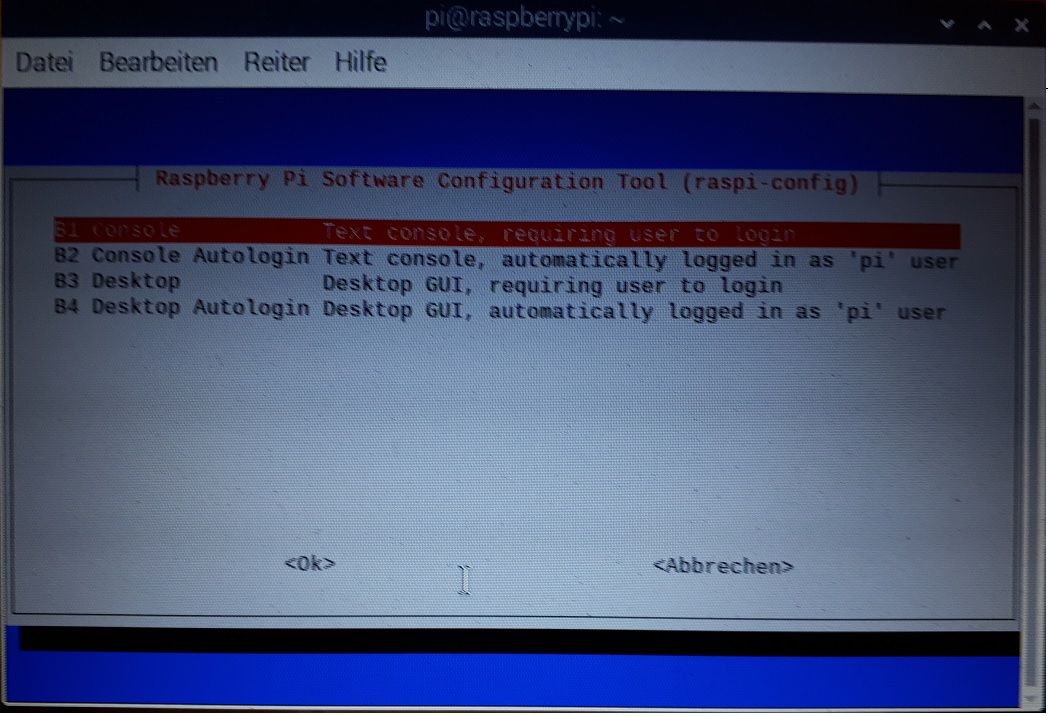
                          RunLevel3:

                          sudo raspi-config
                          

                          Menüpunkt 3 - B1 - B1

                          sudo mkdir /opt/iobroker/backups

                          Da dürften die Rechte nicht stimmen.
                          Jag mal den

                          iobroker fix
                          

                          über das System.

                          Linux-Werkzeugkasten:
                          https://forum.iobroker.net/topic/42952/der-kleine-iobroker-linux-werkzeugkasten
                          NodeJS Fixer Skript:
                          https://forum.iobroker.net/topic/68035/iob-node-fix-skript
                          iob_diag: curl -sLf -o diag.sh https://iobroker.net/diag.sh && bash diag.sh

                          Ralla66R 1 Antwort Letzte Antwort
                          0
                          • Thomas BraunT Thomas Braun

                            @Ralla66 sagte in Backup per Console ausführen:

                            RunLevel3:

                            sudo raspi-config
                            

                            Menüpunkt 3 - B1 - B1

                            sudo mkdir /opt/iobroker/backups

                            Da dürften die Rechte nicht stimmen.
                            Jag mal den

                            iobroker fix
                            

                            über das System.

                            Ralla66R Offline
                            Ralla66R Offline
                            Ralla66
                            Most Active
                            schrieb am zuletzt editiert von
                            #15

                            @Thomas-Braun

                            Fixer ist durch, wie schalte ich den Admin wieder ein damit ich auf 8081 komme ?

                                Your installation was fixed successfully
                                Run iobroker start to start ioBroker again!
                            
                            ==========================================================================
                            
                            pi@raspberrypi:~ $ iobroker start
                            
                            
                            Thomas BraunT 1 Antwort Letzte Antwort
                            0
                            • Ralla66R Ralla66

                              @Thomas-Braun

                              Fixer ist durch, wie schalte ich den Admin wieder ein damit ich auf 8081 komme ?

                                  Your installation was fixed successfully
                                  Run iobroker start to start ioBroker again!
                              
                              ==========================================================================
                              
                              pi@raspberrypi:~ $ iobroker start
                              
                              
                              Thomas BraunT Online
                              Thomas BraunT Online
                              Thomas Braun
                              Most Active
                              schrieb am zuletzt editiert von
                              #16

                              @Ralla66

                              iobroker status
                              iobroker list instances
                              

                              Linux-Werkzeugkasten:
                              https://forum.iobroker.net/topic/42952/der-kleine-iobroker-linux-werkzeugkasten
                              NodeJS Fixer Skript:
                              https://forum.iobroker.net/topic/68035/iob-node-fix-skript
                              iob_diag: curl -sLf -o diag.sh https://iobroker.net/diag.sh && bash diag.sh

                              Ralla66R 1 Antwort Letzte Antwort
                              0
                              • Thomas BraunT Thomas Braun

                                @Ralla66

                                iobroker status
                                iobroker list instances
                                
                                Ralla66R Offline
                                Ralla66R Offline
                                Ralla66
                                Most Active
                                schrieb am zuletzt editiert von
                                #17

                                @Thomas-Braun

                                wie bekomme ich admin enable.

                                pi@raspberrypi:~ $ iobroker status
                                iobroker is running on this host.
                                
                                At least one iobroker host is running.
                                
                                Objects type: file
                                States  type: file
                                pi@raspberrypi:~ $ iobroker list instances
                                  system.adapter.admin.0                 : admin                 - disabled, port: 8081, bind: 0.0.0.0, run as: admin
                                  system.adapter.discovery.0             : discovery             - disabled
                                  system.adapter.info.0                  : info                  - disabled
                                
                                + instance is alive
                                pi@raspberrypi:~ $ 
                                
                                
                                Thomas BraunT 1 Antwort Letzte Antwort
                                0
                                • Ralla66R Ralla66

                                  @Thomas-Braun

                                  wie bekomme ich admin enable.

                                  pi@raspberrypi:~ $ iobroker status
                                  iobroker is running on this host.
                                  
                                  At least one iobroker host is running.
                                  
                                  Objects type: file
                                  States  type: file
                                  pi@raspberrypi:~ $ iobroker list instances
                                    system.adapter.admin.0                 : admin                 - disabled, port: 8081, bind: 0.0.0.0, run as: admin
                                    system.adapter.discovery.0             : discovery             - disabled
                                    system.adapter.info.0                  : info                  - disabled
                                  
                                  + instance is alive
                                  pi@raspberrypi:~ $ 
                                  
                                  
                                  Thomas BraunT Online
                                  Thomas BraunT Online
                                  Thomas Braun
                                  Most Active
                                  schrieb am zuletzt editiert von
                                  #18

                                  @Ralla66

                                  iobroker start admin
                                  

                                  Linux-Werkzeugkasten:
                                  https://forum.iobroker.net/topic/42952/der-kleine-iobroker-linux-werkzeugkasten
                                  NodeJS Fixer Skript:
                                  https://forum.iobroker.net/topic/68035/iob-node-fix-skript
                                  iob_diag: curl -sLf -o diag.sh https://iobroker.net/diag.sh && bash diag.sh
                                  Ralla66R 1 Antwort Letzte Antwort
                                  0
                                  • Thomas BraunT Thomas Braun

                                    @Ralla66

                                    iobroker start admin
                                    
                                    Ralla66R Offline
                                    Ralla66R Offline
                                    Ralla66
                                    Most Active
                                    schrieb am zuletzt editiert von
                                    #19

                                    @Thomas-Braun
                                    Menüpunkt 3 - B1 - B1
                                    3 boot
                                    B1 Desktop
                                    B1 Console user to login

                                    und wie weiter bitte ?

                                    Thomas BraunT 1 Antwort Letzte Antwort
                                    0
                                    • Ralla66R Ralla66

                                      @Thomas-Braun
                                      Menüpunkt 3 - B1 - B1
                                      3 boot
                                      B1 Desktop
                                      B1 Console user to login

                                      und wie weiter bitte ?

                                      Thomas BraunT Online
                                      Thomas BraunT Online
                                      Thomas Braun
                                      Most Active
                                      schrieb am zuletzt editiert von
                                      #20

                                      @Ralla66
                                      ?
                                      Aus raspi-config raus und rebooten, wenn die Kiste das nicht ohnehin von alleine macht.

                                      Linux-Werkzeugkasten:
                                      https://forum.iobroker.net/topic/42952/der-kleine-iobroker-linux-werkzeugkasten
                                      NodeJS Fixer Skript:
                                      https://forum.iobroker.net/topic/68035/iob-node-fix-skript
                                      iob_diag: curl -sLf -o diag.sh https://iobroker.net/diag.sh && bash diag.sh

                                      Ralla66R 1 Antwort Letzte Antwort
                                      0
                                      • Thomas BraunT Thomas Braun

                                        @Ralla66
                                        ?
                                        Aus raspi-config raus und rebooten, wenn die Kiste das nicht ohnehin von alleine macht.

                                        Ralla66R Offline
                                        Ralla66R Offline
                                        Ralla66
                                        Most Active
                                        schrieb am zuletzt editiert von
                                        #21

                                        @Thomas-Braun

                                        komm da nicht rein, spingt dann wieder zurück 1 bis xx.

                                        pi config 2.jpg

                                        Thomas BraunT GlasfaserG HomoranH 3 Antworten Letzte Antwort
                                        0
                                        • Ralla66R Ralla66

                                          @Thomas-Braun

                                          komm da nicht rein, spingt dann wieder zurück 1 bis xx.

                                          pi config 2.jpg

                                          Thomas BraunT Online
                                          Thomas BraunT Online
                                          Thomas Braun
                                          Most Active
                                          schrieb am zuletzt editiert von
                                          #22

                                          @Ralla66 Ich verstehe dein Problem nicht

                                          Linux-Werkzeugkasten:
                                          https://forum.iobroker.net/topic/42952/der-kleine-iobroker-linux-werkzeugkasten
                                          NodeJS Fixer Skript:
                                          https://forum.iobroker.net/topic/68035/iob-node-fix-skript
                                          iob_diag: curl -sLf -o diag.sh https://iobroker.net/diag.sh && bash diag.sh

                                          Ralla66R 1 Antwort Letzte Antwort
                                          0

                                          Hey! Du scheinst an dieser Unterhaltung interessiert zu sein, hast aber noch kein Konto.

                                          Hast du es satt, bei jedem Besuch durch die gleichen Beiträge zu scrollen? Wenn du dich für ein Konto anmeldest, kommst du immer genau dorthin zurück, wo du zuvor warst, und kannst dich über neue Antworten benachrichtigen lassen (entweder per E-Mail oder Push-Benachrichtigung). Du kannst auch Lesezeichen speichern und Beiträge positiv bewerten, um anderen Community-Mitgliedern deine Wertschätzung zu zeigen.

                                          Mit deinem Input könnte dieser Beitrag noch besser werden 💗

                                          Registrieren Anmelden
                                          Antworten
                                          • In einem neuen Thema antworten
                                          Anmelden zum Antworten
                                          • Älteste zuerst
                                          • Neuste zuerst
                                          • Meiste Stimmen


                                          Support us

                                          ioBroker
                                          Community Adapters
                                          Donate
                                          FAQ Cloud / IOT
                                          HowTo: Node.js-Update
                                          HowTo: Backup/Restore
                                          Downloads
                                          BLOG

                                          236

                                          Online

                                          32.9k

                                          Benutzer

                                          83.0k

                                          Themen

                                          1.3m

                                          Beiträge
                                          Community
                                          Impressum | Datenschutz-Bestimmungen | Nutzungsbedingungen | Einwilligungseinstellungen
                                          ioBroker Community 2014-2025
                                          logo
                                          • Anmelden

                                          • Du hast noch kein Konto? Registrieren

                                          • Anmelden oder registrieren, um zu suchen
                                          • Erster Beitrag
                                            Letzter Beitrag
                                          0
                                          • Home
                                          • Aktuell
                                          • Tags
                                          • Ungelesen 0
                                          • Kategorien
                                          • Unreplied
                                          • Beliebt
                                          • GitHub
                                          • Docu
                                          • Hilfe