



Skip to content
  • Home
  • Recent
  • Tags
  • 0 Unread 0
  • Categories
  • Unreplied
  • Popular
  • GitHub
  • Docu
  • Hilfe
Skins
  • Light
  • Brite
  • Cerulean
  • Cosmo
  • Flatly
  • Journal
  • Litera
  • Lumen
  • Lux
  • Materia
  • Minty
  • Morph
  • Pulse
  • Sandstone
  • Simplex
  • Sketchy
  • Spacelab
  • United
  • Yeti
  • Zephyr
  • Dark
  • Cyborg
  • Darkly
  • Quartz
  • Slate
  • Solar
  • Superhero
  • Vapor

  • Default (No Skin)
  • No Skin
Collapse
ioBroker Logo

Community Forum

donate donate
  1. ioBroker Community Home
  2. Deutsch
  3. ioBroker Allgemein
  4. Solarprognose

NEWS

  • Jahresrückblick 2025 – unser neuer Blogbeitrag ist online! ✨
    BluefoxB
    Bluefox
    17
    1
    2.9k

  • Neuer Blogbeitrag: Monatsrückblick - Dezember 2025 🎄
    BluefoxB
    Bluefox
    13
    1
    1.1k

  • Weihnachtsangebot 2025! 🎄
    BluefoxB
    Bluefox
    25
    1
    2.4k

Solarprognose

Scheduled Pinned Locked Moved ioBroker Allgemein
solarprognoseadapterjavascript
157 Posts 27 Posters 29.7k Views 30 Watching
  • Oldest to Newest
  • Newest to Oldest
  • Most Votes
Reply
  • Reply as topic
Log in to reply
This topic has been deleted. Only users with topic management privileges can see it.
  • paul53P paul53

    @streit187 sagte: Skript ein bisschen anpassen?

    Dazu müsste ich erst verstehen, was das Ergebnis sein soll. Es gibt einen Widerspruch zwischen
    @streit187 sagte: Art: Objekt
    und dem Aussehen als JSON und "JSON Graph Widget (Material Design)". Ein JSON ist kein Objekt, sondern ein String.

    Soll das alles in den Wert (als JSON)?

    {   "axisLabels": ["8", "9", "10", "11", "12", "13", "14", "15", "16", "17", "18", "8", "9", "10", "11", "12", "13", "14", "15", "16", "17", "18"],
        "graphs": {
            "data": [0, 0.01, 0.588, 1.392, 1.484, 1.1, 1.05, 0.95, 0.7, 0.22, 0, 0, 0.02, 0.45, 0.82, 0.98, 1.1, 1.05, 0.95, 0.7, 0.22, 0],
            "type": "line",
            "yAxis_min": 0,
            "yAxis_max": 10,
            "yAxis_step": 1,
            "yAxis_position": "left",
            "yAxis_appendix": " kW",
            "datalabel_show": false
        }
    }
    

    und ist das so korrekt?

    S Offline
    S Offline
    Streit187
    wrote on last edited by
    #55

    Entschuldige bitte wenn ich hier die Begrifflichkeiten nicht korrekt verwende.
    Ja, absolut korrekt. Zum Testen habe ich manuell einen Datenpunkt angelegt:

       "name": "Solar Prognose",
        "role": "table",
        "type": "object",
        "read": true,
        "write": true
    
      "_id": "0_userdata.0.Solar.objekt",
      "type": "state"
    

    und als Wert den von dir genannten Strin (?) hinterlegt. Diesen neuen Datensatz dann im "JSON Graph Widget" hinterlegt.
    Heraus kam genau der gewünschte Prognose Graph.

    paul53P 1 Reply Last reply
    0
    • S Streit187

      Entschuldige bitte wenn ich hier die Begrifflichkeiten nicht korrekt verwende.
      Ja, absolut korrekt. Zum Testen habe ich manuell einen Datenpunkt angelegt:

         "name": "Solar Prognose",
          "role": "table",
          "type": "object",
          "read": true,
          "write": true
      
        "_id": "0_userdata.0.Solar.objekt",
        "type": "state"
      

      und als Wert den von dir genannten Strin (?) hinterlegt. Diesen neuen Datensatz dann im "JSON Graph Widget" hinterlegt.
      Heraus kam genau der gewünschte Prognose Graph.

      paul53P Offline
      paul53P Offline
      paul53
      wrote on last edited by
      #56

      @streit187 sagte: Ja, absolut korrekt.

      Dann versuche es mal so:

      const url = 'hier die komplette URL eintragen';
      const path = '0_userdata.0.Solar.';
      const idLeistung = path + 'Leistung';
      const idEnergie  = path + 'Energie';
      
      var Leistung = {
          "axisLabels": ["8", "9", "10", "11", "12", "13", "14", "15", "16", "17", "18", "8", "9", "10", "11", "12", "13", "14", "15", "16", "17", "18"],
          "graphs": {
              "data": [0, 0, 0, 0, 0, 0, 0, 0, 0, 0, 0, 0, 0, 0, 0, 0, 0, 0, 0, 0, 0, 0],
              "type": "line",
              "yAxis_min": 0,
              "yAxis_max": 10,
              "yAxis_step": 1,
              "yAxis_position": "left",
              "yAxis_appendix": " kW",
              "datalabel_show": false
          }
      };
      var Energie = {
          "axisLabels": ["8", "9", "10", "11", "12", "13", "14", "15", "16", "17", "18", "8", "9", "10", "11", "12", "13", "14", "15", "16", "17", "18"],
          "graphs": {
              "data": [0, 0, 0, 0, 0, 0, 0, 0, 0, 0, 0, 0, 0, 0, 0, 0, 0, 0, 0, 0, 0, 0],
              "type": "line",
              "yAxis_min": 0,
              "yAxis_max": 10,
              "yAxis_step": 1,
              "yAxis_position": "left",
              "yAxis_appendix": " kWh",
              "datalabel_show": false
          }
      };
      
      if(!existsState(idLeistung)) createState(idLeistung, JSON.stringify(Leistung), {type: 'string', name: 'Leistung', role: 'table'}); 
      if(!existsState(idEnergie)) createState(idEnergie, JSON.stringify(Energie), {type: 'string', name: 'Energie', role: 'table'}); 
       
      schedule('16 4-22 * * *', function() { 
          request(url, function (error, response, result) {
              if(error) log(error, 'error');
              else {
                  let obj = JSON.parse(result);
                  if(obj.status) log('Fehler: ' + obj.status, 'warn');
                  else {
                      let data = obj.data;
                      Leistung.axisLabels = [];
                      Leistung.graphs.data = [];
                      Energie.axisLabels = [];
                      Energie.graphs.data = [];
                      for(let entry in data) {
                          let time = formatDate(parseInt(entry), 'hh');
                          Leistung.axisLabels.push(time);
                          Energie.axisLabels.push(time);
                          Leistung.graphs.data.push(data[entry][0]);
                          Energie.graphs.data.push(data[entry][1]);
                      }
                      setState(idLeistung, JSON.stringify(Leistung), true);
                      setState(idEnergie, JSON.stringify(Energie), true);
                  }
              }
          });
      });
      

      Bitte verzichtet auf Chat-Nachrichten, denn die Handhabung ist grauenhaft !
      Produktiv: RPi 2 mit S.USV, HM-MOD-RPI und SLC-USB-Stick mit root fs

      S 1 Reply Last reply
      0
      • paul53P paul53

        @streit187 sagte: Ja, absolut korrekt.

        Dann versuche es mal so:

        const url = 'hier die komplette URL eintragen';
        const path = '0_userdata.0.Solar.';
        const idLeistung = path + 'Leistung';
        const idEnergie  = path + 'Energie';
        
        var Leistung = {
            "axisLabels": ["8", "9", "10", "11", "12", "13", "14", "15", "16", "17", "18", "8", "9", "10", "11", "12", "13", "14", "15", "16", "17", "18"],
            "graphs": {
                "data": [0, 0, 0, 0, 0, 0, 0, 0, 0, 0, 0, 0, 0, 0, 0, 0, 0, 0, 0, 0, 0, 0],
                "type": "line",
                "yAxis_min": 0,
                "yAxis_max": 10,
                "yAxis_step": 1,
                "yAxis_position": "left",
                "yAxis_appendix": " kW",
                "datalabel_show": false
            }
        };
        var Energie = {
            "axisLabels": ["8", "9", "10", "11", "12", "13", "14", "15", "16", "17", "18", "8", "9", "10", "11", "12", "13", "14", "15", "16", "17", "18"],
            "graphs": {
                "data": [0, 0, 0, 0, 0, 0, 0, 0, 0, 0, 0, 0, 0, 0, 0, 0, 0, 0, 0, 0, 0, 0],
                "type": "line",
                "yAxis_min": 0,
                "yAxis_max": 10,
                "yAxis_step": 1,
                "yAxis_position": "left",
                "yAxis_appendix": " kWh",
                "datalabel_show": false
            }
        };
        
        if(!existsState(idLeistung)) createState(idLeistung, JSON.stringify(Leistung), {type: 'string', name: 'Leistung', role: 'table'}); 
        if(!existsState(idEnergie)) createState(idEnergie, JSON.stringify(Energie), {type: 'string', name: 'Energie', role: 'table'}); 
         
        schedule('16 4-22 * * *', function() { 
            request(url, function (error, response, result) {
                if(error) log(error, 'error');
                else {
                    let obj = JSON.parse(result);
                    if(obj.status) log('Fehler: ' + obj.status, 'warn');
                    else {
                        let data = obj.data;
                        Leistung.axisLabels = [];
                        Leistung.graphs.data = [];
                        Energie.axisLabels = [];
                        Energie.graphs.data = [];
                        for(let entry in data) {
                            let time = formatDate(parseInt(entry), 'hh');
                            Leistung.axisLabels.push(time);
                            Energie.axisLabels.push(time);
                            Leistung.graphs.data.push(data[entry][0]);
                            Energie.graphs.data.push(data[entry][1]);
                        }
                        setState(idLeistung, JSON.stringify(Leistung), true);
                        setState(idEnergie, JSON.stringify(Energie), true);
                    }
                }
            });
        });
        
        S Offline
        S Offline
        Streit187
        wrote on last edited by
        #57

        @paul53
        Ein Traum! Du bist der Beste. Ich habe noch den Schedule angepasst und eine [] eingefügt beim Graphen. Läuft super.

        const url = 'hier die komplette URL eintragen';
        const path = '0_userdata.0.Solar.';
        const idLeistung = path + 'Leistung';
        const idEnergie  = path + 'Energie';
         
        var Leistung = {
            "axisLabels": ["8", "9", "10", "11", "12", "13", "14", "15", "16", "17", "18", "8", "9", "10", "11", "12", "13", "14", "15", "16", "17", "18"],
            "graphs": [{
                "data": [0, 0, 0, 0, 0, 0, 0, 0, 0, 0, 0, 0, 0, 0, 0, 0, 0, 0, 0, 0, 0, 0],
                "type": "line",
                "yAxis_min": 0,
                "yAxis_max": 10,
                "yAxis_step": 1,
                "yAxis_position": "left",
                "yAxis_appendix": " kW",
                "datalabel_show": false
            }
            ]
        };
        var Energie = {
            "axisLabels": ["8", "9", "10", "11", "12", "13", "14", "15", "16", "17", "18", "8", "9", "10", "11", "12", "13", "14", "15", "16", "17", "18"],
            "graphs": [{
                "data": [0, 0, 0, 0, 0, 0, 0, 0, 0, 0, 0, 0, 0, 0, 0, 0, 0, 0, 0, 0, 0, 0],
                "type": "line",
                "yAxis_min": 0,
                "yAxis_max": 10,
                "yAxis_step": 1,
                "yAxis_position": "left",
                "yAxis_appendix": " kWh",
                "datalabel_show": false
            }
            ]
        };
         
        if(!existsState(idLeistung)) createState(idLeistung, JSON.stringify(Leistung), {type: 'string', name: 'Leistung', role: 'table'}); 
        if(!existsState(idEnergie)) createState(idEnergie, JSON.stringify(Energie), {type: 'string', name: 'Energie', role: 'table'}); 
         
        schedule('5 7-19 * * *', function() { 
            request(url, function (error, response, result) {
                if(error) log(error, 'error');
                else {
                    let obj = JSON.parse(result);
                    if(obj.status) log('Fehler: ' + obj.status, 'warn');
                    else {
                        let data = obj.data;
                        Leistung.axisLabels = [];
                        Leistung.graphs.data = [];
                        Energie.axisLabels = [];
                        Energie.graphs.data = [];
                        for(let entry in data) {
                            let time = formatDate(parseInt(entry), 'hh');
                            Leistung.axisLabels.push(time);
                            Energie.axisLabels.push(time);
                            Leistung.graphs.data.push(data[entry][0]);
                            Energie.graphs.data.push(data[entry][1]);
                        }
                        setState(idLeistung, JSON.stringify(Leistung), true);
                        setState(idEnergie, JSON.stringify(Energie), true);
                    }
                }
            });
        });


        Unbenannt.JPG

        Vielen Dank

        paul53P 1 Reply Last reply
        -1
        • S Streit187

          @paul53
          Ein Traum! Du bist der Beste. Ich habe noch den Schedule angepasst und eine [] eingefügt beim Graphen. Läuft super.

          const url = 'hier die komplette URL eintragen';
          const path = '0_userdata.0.Solar.';
          const idLeistung = path + 'Leistung';
          const idEnergie  = path + 'Energie';
           
          var Leistung = {
              "axisLabels": ["8", "9", "10", "11", "12", "13", "14", "15", "16", "17", "18", "8", "9", "10", "11", "12", "13", "14", "15", "16", "17", "18"],
              "graphs": [{
                  "data": [0, 0, 0, 0, 0, 0, 0, 0, 0, 0, 0, 0, 0, 0, 0, 0, 0, 0, 0, 0, 0, 0],
                  "type": "line",
                  "yAxis_min": 0,
                  "yAxis_max": 10,
                  "yAxis_step": 1,
                  "yAxis_position": "left",
                  "yAxis_appendix": " kW",
                  "datalabel_show": false
              }
              ]
          };
          var Energie = {
              "axisLabels": ["8", "9", "10", "11", "12", "13", "14", "15", "16", "17", "18", "8", "9", "10", "11", "12", "13", "14", "15", "16", "17", "18"],
              "graphs": [{
                  "data": [0, 0, 0, 0, 0, 0, 0, 0, 0, 0, 0, 0, 0, 0, 0, 0, 0, 0, 0, 0, 0, 0],
                  "type": "line",
                  "yAxis_min": 0,
                  "yAxis_max": 10,
                  "yAxis_step": 1,
                  "yAxis_position": "left",
                  "yAxis_appendix": " kWh",
                  "datalabel_show": false
              }
              ]
          };
           
          if(!existsState(idLeistung)) createState(idLeistung, JSON.stringify(Leistung), {type: 'string', name: 'Leistung', role: 'table'}); 
          if(!existsState(idEnergie)) createState(idEnergie, JSON.stringify(Energie), {type: 'string', name: 'Energie', role: 'table'}); 
           
          schedule('5 7-19 * * *', function() { 
              request(url, function (error, response, result) {
                  if(error) log(error, 'error');
                  else {
                      let obj = JSON.parse(result);
                      if(obj.status) log('Fehler: ' + obj.status, 'warn');
                      else {
                          let data = obj.data;
                          Leistung.axisLabels = [];
                          Leistung.graphs.data = [];
                          Energie.axisLabels = [];
                          Energie.graphs.data = [];
                          for(let entry in data) {
                              let time = formatDate(parseInt(entry), 'hh');
                              Leistung.axisLabels.push(time);
                              Energie.axisLabels.push(time);
                              Leistung.graphs.data.push(data[entry][0]);
                              Energie.graphs.data.push(data[entry][1]);
                          }
                          setState(idLeistung, JSON.stringify(Leistung), true);
                          setState(idEnergie, JSON.stringify(Energie), true);
                      }
                  }
              });
          });


          Unbenannt.JPG

          Vielen Dank

          paul53P Offline
          paul53P Offline
          paul53
          wrote on last edited by
          #58

          @streit187 sagte: eine [] eingefügt beim Graphen.

          Wenn graphs ein Array mit einem Element ist, müssten Zeilen 47, 49, 54 und 55 angepasst werden.

                              Leistung.graphs[0].data.push(data[entry][0]);
                              Energie.graphs[0].data.push(data[entry][1]);
          

          Bitte verzichtet auf Chat-Nachrichten, denn die Handhabung ist grauenhaft !
          Produktiv: RPi 2 mit S.USV, HM-MOD-RPI und SLC-USB-Stick mit root fs

          S 1 Reply Last reply
          0
          • paul53P paul53

            @streit187 sagte: eine [] eingefügt beim Graphen.

            Wenn graphs ein Array mit einem Element ist, müssten Zeilen 47, 49, 54 und 55 angepasst werden.

                                Leistung.graphs[0].data.push(data[entry][0]);
                                Energie.graphs[0].data.push(data[entry][1]);
            
            S Offline
            S Offline
            Streit187
            wrote on last edited by
            #59

            @paul53
            Sehr gut. Erfolgreich getestet. Dann nur der Vollständigkeit halber nochmal das ganz Skript

            const url = 'hier die komplette URL eintragen';
            const path = '0_userdata.0.Solar.';
            const idLeistung = path + 'Leistung';
            const idEnergie  = path + 'Energie';
             
            var Leistung = {
                "axisLabels": ["8", "9", "10", "11", "12", "13", "14", "15", "16", "17", "18", "8", "9", "10", "11", "12", "13", "14", "15", "16", "17", "18"],
                "graphs": [{
                    "data": [0, 0, 0, 0, 0, 0, 0, 0, 0, 0, 0, 0, 0, 0, 0, 0, 0, 0, 0, 0, 0, 0],
                    "type": "line",
                    "yAxis_min": 0,
                    "yAxis_max": 10,
                    "yAxis_step": 1,
                    "yAxis_position": "left",
                    "yAxis_appendix": " kW",
                    "datalabel_show": false
                }
                ]
            };
            var Energie = {
                "axisLabels": ["8", "9", "10", "11", "12", "13", "14", "15", "16", "17", "18", "8", "9", "10", "11", "12", "13", "14", "15", "16", "17", "18"],
                "graphs": [{
                    "data": [0, 0, 0, 0, 0, 0, 0, 0, 0, 0, 0, 0, 0, 0, 0, 0, 0, 0, 0, 0, 0, 0],
                    "type": "line",
                    "yAxis_min": 0,
                    "yAxis_max": 10,
                    "yAxis_step": 1,
                    "yAxis_position": "left",
                    "yAxis_appendix": " kWh",
                    "datalabel_show": false
                }
                ]
            };
             
            if(!existsState(idLeistung)) createState(idLeistung, JSON.stringify(Leistung), {type: 'string', name: 'Leistung', role: 'table'}); 
            if(!existsState(idEnergie)) createState(idEnergie, JSON.stringify(Energie), {type: 'string', name: 'Energie', role: 'table'}); 
             
            schedule('5 7-19 * * *', function() { 
                request(url, function (error, response, result) {
                    if(error) log(error, 'error');
                    else {
                        let obj = JSON.parse(result);
                        if(obj.status) log('Fehler: ' + obj.status, 'warn');
                        else {
                            let data = obj.data;
                            Leistung.axisLabels = [];
                            Leistung.graphs[0].data = [];
                            Energie.axisLabels = [];
                            Energie.graphs[0].data = [];
                            for(let entry in data) {
                                let time = formatDate(parseInt(entry), 'hh');
                                Leistung.axisLabels.push(time);
                                Energie.axisLabels.push(time);
                                Leistung.graphs[0].data.push(data[entry][0]);
                                Energie.graphs[0].data.push(data[entry][1]);
                            }
                            setState(idEnergie, JSON.stringify(Energie), true);
                            setState(idLeistung, JSON.stringify(Leistung), true);
                        }
                    }
                });
            });
            
            wendy2702W 1 Reply Last reply
            1
            • S Streit187

              @paul53
              Sehr gut. Erfolgreich getestet. Dann nur der Vollständigkeit halber nochmal das ganz Skript

              const url = 'hier die komplette URL eintragen';
              const path = '0_userdata.0.Solar.';
              const idLeistung = path + 'Leistung';
              const idEnergie  = path + 'Energie';
               
              var Leistung = {
                  "axisLabels": ["8", "9", "10", "11", "12", "13", "14", "15", "16", "17", "18", "8", "9", "10", "11", "12", "13", "14", "15", "16", "17", "18"],
                  "graphs": [{
                      "data": [0, 0, 0, 0, 0, 0, 0, 0, 0, 0, 0, 0, 0, 0, 0, 0, 0, 0, 0, 0, 0, 0],
                      "type": "line",
                      "yAxis_min": 0,
                      "yAxis_max": 10,
                      "yAxis_step": 1,
                      "yAxis_position": "left",
                      "yAxis_appendix": " kW",
                      "datalabel_show": false
                  }
                  ]
              };
              var Energie = {
                  "axisLabels": ["8", "9", "10", "11", "12", "13", "14", "15", "16", "17", "18", "8", "9", "10", "11", "12", "13", "14", "15", "16", "17", "18"],
                  "graphs": [{
                      "data": [0, 0, 0, 0, 0, 0, 0, 0, 0, 0, 0, 0, 0, 0, 0, 0, 0, 0, 0, 0, 0, 0],
                      "type": "line",
                      "yAxis_min": 0,
                      "yAxis_max": 10,
                      "yAxis_step": 1,
                      "yAxis_position": "left",
                      "yAxis_appendix": " kWh",
                      "datalabel_show": false
                  }
                  ]
              };
               
              if(!existsState(idLeistung)) createState(idLeistung, JSON.stringify(Leistung), {type: 'string', name: 'Leistung', role: 'table'}); 
              if(!existsState(idEnergie)) createState(idEnergie, JSON.stringify(Energie), {type: 'string', name: 'Energie', role: 'table'}); 
               
              schedule('5 7-19 * * *', function() { 
                  request(url, function (error, response, result) {
                      if(error) log(error, 'error');
                      else {
                          let obj = JSON.parse(result);
                          if(obj.status) log('Fehler: ' + obj.status, 'warn');
                          else {
                              let data = obj.data;
                              Leistung.axisLabels = [];
                              Leistung.graphs[0].data = [];
                              Energie.axisLabels = [];
                              Energie.graphs[0].data = [];
                              for(let entry in data) {
                                  let time = formatDate(parseInt(entry), 'hh');
                                  Leistung.axisLabels.push(time);
                                  Energie.axisLabels.push(time);
                                  Leistung.graphs[0].data.push(data[entry][0]);
                                  Energie.graphs[0].data.push(data[entry][1]);
                              }
                              setState(idEnergie, JSON.stringify(Energie), true);
                              setState(idLeistung, JSON.stringify(Leistung), true);
                          }
                      }
                  });
              });
              
              wendy2702W Offline
              wendy2702W Offline
              wendy2702
              wrote on last edited by
              #60

              @streit187 sagte in Solarprognose:

              const url = 'hier die komplette URL eintragen';

              Welche URL kommt denn in das aktuelle Script?

              Bitte keine Fragen per PN, die gehören ins Forum!

              Benutzt das Voting rechts unten im Beitrag wenn er euch geholfen hat.

              S 1 Reply Last reply
              0
              • wendy2702W wendy2702

                @streit187 sagte in Solarprognose:

                const url = 'hier die komplette URL eintragen';

                Welche URL kommt denn in das aktuelle Script?

                S Offline
                S Offline
                Streit187
                wrote on last edited by
                #61

                @wendy2702
                Nach einer kostenlosen Registrierung und Eingabe der Daten deiner PV Anlage (Ort, Neigung, Ausrichtung) auf www.solarprognose.de bekommst du eine URL die so aussieht mit deinem eigenen Token:
                http://www.solarprognose.de/web/solarprediction/api/v1?_format=json&access-token=CZCCYr2Iucnx5Exxxxxxxxx&item=location&id=160&type=hourly

                wendy2702W 1 Reply Last reply
                0
                • S Streit187

                  @wendy2702
                  Nach einer kostenlosen Registrierung und Eingabe der Daten deiner PV Anlage (Ort, Neigung, Ausrichtung) auf www.solarprognose.de bekommst du eine URL die so aussieht mit deinem eigenen Token:
                  http://www.solarprognose.de/web/solarprediction/api/v1?_format=json&access-token=CZCCYr2Iucnx5Exxxxxxxxx&item=location&id=160&type=hourly

                  wendy2702W Offline
                  wendy2702W Offline
                  wendy2702
                  wrote on last edited by
                  #62

                  @streit187 Danke!

                  Bitte keine Fragen per PN, die gehören ins Forum!

                  Benutzt das Voting rechts unten im Beitrag wenn er euch geholfen hat.

                  S 1 Reply Last reply
                  0
                  • wendy2702W wendy2702

                    @streit187 Danke!

                    S Offline
                    S Offline
                    Streit187
                    wrote on last edited by Streit187
                    #63

                    @wendy2702
                    Falls deine Prognosedaten viel zu gering sind füge deiner URL noch "&algorithm=mosmix" hinzu. Das hat wenigstens bei mir zu wesentlich realistischeren Werten geführt.

                    @apollon77
                    Darf ich dich hier nochmal um deiner Unterstützung bitten. Ich steige beim auswerten der JSON Daten einfach nicht durch.
                    Ich hätte gerne zwei weitere Datenpunkte welche als Wert den jeweils letzten und damit höchsten Wert aus dem zweiten Array(?) enthält. Ich glaube im Skript werden die beiden Array mit 0 und 1 unterschieden. Dann wäre es von 1.
                    Einmal von heute 18 Uhr (13er Wert) und einen von morgen 18 Uhr (26er Wert).
                    path=0_userdata.0.Solar
                    name=Gesamt kWh heute / Gesamt kWh morgen
                    Das darf gerne im gleichen Skript passieren damit die Daten nicht noch Einmal abgerufen werden und den gleichen schedule nutzen.

                    wendy2702W S 2 Replies Last reply
                    0
                    • S Streit187

                      @wendy2702
                      Falls deine Prognosedaten viel zu gering sind füge deiner URL noch "&algorithm=mosmix" hinzu. Das hat wenigstens bei mir zu wesentlich realistischeren Werten geführt.

                      @apollon77
                      Darf ich dich hier nochmal um deiner Unterstützung bitten. Ich steige beim auswerten der JSON Daten einfach nicht durch.
                      Ich hätte gerne zwei weitere Datenpunkte welche als Wert den jeweils letzten und damit höchsten Wert aus dem zweiten Array(?) enthält. Ich glaube im Skript werden die beiden Array mit 0 und 1 unterschieden. Dann wäre es von 1.
                      Einmal von heute 18 Uhr (13er Wert) und einen von morgen 18 Uhr (26er Wert).
                      path=0_userdata.0.Solar
                      name=Gesamt kWh heute / Gesamt kWh morgen
                      Das darf gerne im gleichen Skript passieren damit die Daten nicht noch Einmal abgerufen werden und den gleichen schedule nutzen.

                      wendy2702W Offline
                      wendy2702W Offline
                      wendy2702
                      wrote on last edited by
                      #64

                      @streit187 Danke!

                      Bitte keine Fragen per PN, die gehören ins Forum!

                      Benutzt das Voting rechts unten im Beitrag wenn er euch geholfen hat.

                      1 Reply Last reply
                      0
                      • S Streit187

                        @wendy2702
                        Falls deine Prognosedaten viel zu gering sind füge deiner URL noch "&algorithm=mosmix" hinzu. Das hat wenigstens bei mir zu wesentlich realistischeren Werten geführt.

                        @apollon77
                        Darf ich dich hier nochmal um deiner Unterstützung bitten. Ich steige beim auswerten der JSON Daten einfach nicht durch.
                        Ich hätte gerne zwei weitere Datenpunkte welche als Wert den jeweils letzten und damit höchsten Wert aus dem zweiten Array(?) enthält. Ich glaube im Skript werden die beiden Array mit 0 und 1 unterschieden. Dann wäre es von 1.
                        Einmal von heute 18 Uhr (13er Wert) und einen von morgen 18 Uhr (26er Wert).
                        path=0_userdata.0.Solar
                        name=Gesamt kWh heute / Gesamt kWh morgen
                        Das darf gerne im gleichen Skript passieren damit die Daten nicht noch Einmal abgerufen werden und den gleichen schedule nutzen.

                        S Offline
                        S Offline
                        Streit187
                        wrote on last edited by Streit187
                        #65

                        Das ist vermutlich nicht schön aber es tut was es soll. Leider nur an einem Tag weil das Objekt direkt aufgerufen wird.
                        Wie kann ich denn hier die Objekt Nummer aufrufen ähnlich der Eigenschaft mit [0[ bzw. [1]?

                        const url = 'http://www.solarprognose.de/web/solarprediction/api/v1?_format=json&......';
                        const path = '0_userdata.0.Solar.';
                        const idLeistung = path + 'Leistung';
                        const idEnergie  = path + 'Energie';
                        const idEnergieMaxHeute = path + 'EnergieMaxHeute';
                        const idEnergieMaxMorgen = path + 'EnergieMaxMorgen';
                         
                        var Leistung = {
                            "axisLabels": ["8", "9", "10", "11", "12", "13", "14", "15", "16", "17", "18", "8", "9", "10", "11", "12", "13", "14", "15", "16", "17", "18"],
                            "graphs": [{
                                "data": [0, 0, 0, 0, 0, 0, 0, 0, 0, 0, 0, 0, 0, 0, 0, 0, 0, 0, 0, 0, 0, 0],
                                "type": "line",
                                "yAxis_min": 0,
                                "yAxis_max": 10,
                                "yAxis_step": 1,
                                "yAxis_position": "left",
                                "yAxis_appendix": " kW",
                                "datalabel_show": false
                            }
                            ]
                        };
                        var Energie = {
                            "axisLabels": ["8", "9", "10", "11", "12", "13", "14", "15", "16", "17", "18", "8", "9", "10", "11", "12", "13", "14", "15", "16", "17", "18"],
                            "graphs": [{
                                "data": [0, 0, 0, 0, 0, 0, 0, 0, 0, 0, 0, 0, 0, 0, 0, 0, 0, 0, 0, 0, 0, 0],
                                "type": "line",
                                "yAxis_min": 0,
                                "yAxis_max": 10,
                                "yAxis_step": 1,
                                "yAxis_position": "left",
                                "yAxis_appendix": " kWh",
                                "datalabel_show": false
                            }
                            ]
                        };
                         
                        if(!existsState(idLeistung)) createState(idLeistung, JSON.stringify(Leistung), {type: 'string', name: 'Leistung', role: 'table'}); 
                        if(!existsState(idEnergie)) createState(idEnergie, JSON.stringify(Energie), {type: 'string', name: 'Energie', role: 'table'}); 
                         
                        schedule('5 7-19 * * *', function() { 
                            request(url, function (error, response, result) {
                                if(error) log(error, 'error');
                                else {
                                    let obj = JSON.parse(result);
                                    if(obj.status) log('Fehler: ' + obj.status, 'warn');
                                    else {
                                        let data = obj.data;
                                        Leistung.axisLabels = [];
                                        Leistung.graphs[0].data = [];
                                        Energie.axisLabels = [];
                                        Energie.graphs[0].data = [];
                                        for(let entry in data) {
                                            let time = formatDate(parseInt(entry), 'hh');
                                            Leistung.axisLabels.push(time);
                                            Energie.axisLabels.push(time);
                                            Leistung.graphs[0].data.push(data[entry][0]);
                                            Energie.graphs[0].data.push(data[entry][1]);
                        
                                            if(existsState(idEnergieMaxHeute)) setState(idEnergieMaxHeute, data[1614621600][1], true);
                                            else createState(idEnergieMaxHeute, data[1614621600][1], {
                                                type: 'number', 
                                                role: 'value', 
                                                name: 'EnergieMaxHeute',
                                                read: true,
                                                write: false,
                                                unit: 'kWh'
                                                });
                        
                                            if(existsState(idEnergieMaxMorgen)) setState(idEnergieMaxMorgen, data[1614708000][1], true);
                                            else createState(idEnergieMaxMorgen, data[1614708000][1], {
                                                type: 'number', 
                                                role: 'value', 
                                                name: 'EnergieMaxMorgen',
                                                read: true,
                                                write: false,
                                                unit: 'kWh'
                                                });
                        
                                        }
                                        setState(idEnergie, JSON.stringify(Energie), true);
                                        setState(idLeistung, JSON.stringify(Leistung), true);
                                    }
                                }
                            });
                        });
                        
                        
                        B T 2 Replies Last reply
                        0
                        • S Streit187

                          Das ist vermutlich nicht schön aber es tut was es soll. Leider nur an einem Tag weil das Objekt direkt aufgerufen wird.
                          Wie kann ich denn hier die Objekt Nummer aufrufen ähnlich der Eigenschaft mit [0[ bzw. [1]?

                          const url = 'http://www.solarprognose.de/web/solarprediction/api/v1?_format=json&......';
                          const path = '0_userdata.0.Solar.';
                          const idLeistung = path + 'Leistung';
                          const idEnergie  = path + 'Energie';
                          const idEnergieMaxHeute = path + 'EnergieMaxHeute';
                          const idEnergieMaxMorgen = path + 'EnergieMaxMorgen';
                           
                          var Leistung = {
                              "axisLabels": ["8", "9", "10", "11", "12", "13", "14", "15", "16", "17", "18", "8", "9", "10", "11", "12", "13", "14", "15", "16", "17", "18"],
                              "graphs": [{
                                  "data": [0, 0, 0, 0, 0, 0, 0, 0, 0, 0, 0, 0, 0, 0, 0, 0, 0, 0, 0, 0, 0, 0],
                                  "type": "line",
                                  "yAxis_min": 0,
                                  "yAxis_max": 10,
                                  "yAxis_step": 1,
                                  "yAxis_position": "left",
                                  "yAxis_appendix": " kW",
                                  "datalabel_show": false
                              }
                              ]
                          };
                          var Energie = {
                              "axisLabels": ["8", "9", "10", "11", "12", "13", "14", "15", "16", "17", "18", "8", "9", "10", "11", "12", "13", "14", "15", "16", "17", "18"],
                              "graphs": [{
                                  "data": [0, 0, 0, 0, 0, 0, 0, 0, 0, 0, 0, 0, 0, 0, 0, 0, 0, 0, 0, 0, 0, 0],
                                  "type": "line",
                                  "yAxis_min": 0,
                                  "yAxis_max": 10,
                                  "yAxis_step": 1,
                                  "yAxis_position": "left",
                                  "yAxis_appendix": " kWh",
                                  "datalabel_show": false
                              }
                              ]
                          };
                           
                          if(!existsState(idLeistung)) createState(idLeistung, JSON.stringify(Leistung), {type: 'string', name: 'Leistung', role: 'table'}); 
                          if(!existsState(idEnergie)) createState(idEnergie, JSON.stringify(Energie), {type: 'string', name: 'Energie', role: 'table'}); 
                           
                          schedule('5 7-19 * * *', function() { 
                              request(url, function (error, response, result) {
                                  if(error) log(error, 'error');
                                  else {
                                      let obj = JSON.parse(result);
                                      if(obj.status) log('Fehler: ' + obj.status, 'warn');
                                      else {
                                          let data = obj.data;
                                          Leistung.axisLabels = [];
                                          Leistung.graphs[0].data = [];
                                          Energie.axisLabels = [];
                                          Energie.graphs[0].data = [];
                                          for(let entry in data) {
                                              let time = formatDate(parseInt(entry), 'hh');
                                              Leistung.axisLabels.push(time);
                                              Energie.axisLabels.push(time);
                                              Leistung.graphs[0].data.push(data[entry][0]);
                                              Energie.graphs[0].data.push(data[entry][1]);
                          
                                              if(existsState(idEnergieMaxHeute)) setState(idEnergieMaxHeute, data[1614621600][1], true);
                                              else createState(idEnergieMaxHeute, data[1614621600][1], {
                                                  type: 'number', 
                                                  role: 'value', 
                                                  name: 'EnergieMaxHeute',
                                                  read: true,
                                                  write: false,
                                                  unit: 'kWh'
                                                  });
                          
                                              if(existsState(idEnergieMaxMorgen)) setState(idEnergieMaxMorgen, data[1614708000][1], true);
                                              else createState(idEnergieMaxMorgen, data[1614708000][1], {
                                                  type: 'number', 
                                                  role: 'value', 
                                                  name: 'EnergieMaxMorgen',
                                                  read: true,
                                                  write: false,
                                                  unit: 'kWh'
                                                  });
                          
                                          }
                                          setState(idEnergie, JSON.stringify(Energie), true);
                                          setState(idLeistung, JSON.stringify(Leistung), true);
                                      }
                                  }
                              });
                          });
                          
                          
                          B Offline
                          B Offline
                          bjoernson
                          wrote on last edited by
                          #66

                          Hallo zusammen,

                          und schon vielen Dank für das Script :)

                          Hat es schon jemand geschafft diese Daten vom iobroker für Grafana in die influxDB zu übertragen?

                          Viele Grüße

                          1 Reply Last reply
                          0
                          • S Streit187

                            Das ist vermutlich nicht schön aber es tut was es soll. Leider nur an einem Tag weil das Objekt direkt aufgerufen wird.
                            Wie kann ich denn hier die Objekt Nummer aufrufen ähnlich der Eigenschaft mit [0[ bzw. [1]?

                            const url = 'http://www.solarprognose.de/web/solarprediction/api/v1?_format=json&......';
                            const path = '0_userdata.0.Solar.';
                            const idLeistung = path + 'Leistung';
                            const idEnergie  = path + 'Energie';
                            const idEnergieMaxHeute = path + 'EnergieMaxHeute';
                            const idEnergieMaxMorgen = path + 'EnergieMaxMorgen';
                             
                            var Leistung = {
                                "axisLabels": ["8", "9", "10", "11", "12", "13", "14", "15", "16", "17", "18", "8", "9", "10", "11", "12", "13", "14", "15", "16", "17", "18"],
                                "graphs": [{
                                    "data": [0, 0, 0, 0, 0, 0, 0, 0, 0, 0, 0, 0, 0, 0, 0, 0, 0, 0, 0, 0, 0, 0],
                                    "type": "line",
                                    "yAxis_min": 0,
                                    "yAxis_max": 10,
                                    "yAxis_step": 1,
                                    "yAxis_position": "left",
                                    "yAxis_appendix": " kW",
                                    "datalabel_show": false
                                }
                                ]
                            };
                            var Energie = {
                                "axisLabels": ["8", "9", "10", "11", "12", "13", "14", "15", "16", "17", "18", "8", "9", "10", "11", "12", "13", "14", "15", "16", "17", "18"],
                                "graphs": [{
                                    "data": [0, 0, 0, 0, 0, 0, 0, 0, 0, 0, 0, 0, 0, 0, 0, 0, 0, 0, 0, 0, 0, 0],
                                    "type": "line",
                                    "yAxis_min": 0,
                                    "yAxis_max": 10,
                                    "yAxis_step": 1,
                                    "yAxis_position": "left",
                                    "yAxis_appendix": " kWh",
                                    "datalabel_show": false
                                }
                                ]
                            };
                             
                            if(!existsState(idLeistung)) createState(idLeistung, JSON.stringify(Leistung), {type: 'string', name: 'Leistung', role: 'table'}); 
                            if(!existsState(idEnergie)) createState(idEnergie, JSON.stringify(Energie), {type: 'string', name: 'Energie', role: 'table'}); 
                             
                            schedule('5 7-19 * * *', function() { 
                                request(url, function (error, response, result) {
                                    if(error) log(error, 'error');
                                    else {
                                        let obj = JSON.parse(result);
                                        if(obj.status) log('Fehler: ' + obj.status, 'warn');
                                        else {
                                            let data = obj.data;
                                            Leistung.axisLabels = [];
                                            Leistung.graphs[0].data = [];
                                            Energie.axisLabels = [];
                                            Energie.graphs[0].data = [];
                                            for(let entry in data) {
                                                let time = formatDate(parseInt(entry), 'hh');
                                                Leistung.axisLabels.push(time);
                                                Energie.axisLabels.push(time);
                                                Leistung.graphs[0].data.push(data[entry][0]);
                                                Energie.graphs[0].data.push(data[entry][1]);
                            
                                                if(existsState(idEnergieMaxHeute)) setState(idEnergieMaxHeute, data[1614621600][1], true);
                                                else createState(idEnergieMaxHeute, data[1614621600][1], {
                                                    type: 'number', 
                                                    role: 'value', 
                                                    name: 'EnergieMaxHeute',
                                                    read: true,
                                                    write: false,
                                                    unit: 'kWh'
                                                    });
                            
                                                if(existsState(idEnergieMaxMorgen)) setState(idEnergieMaxMorgen, data[1614708000][1], true);
                                                else createState(idEnergieMaxMorgen, data[1614708000][1], {
                                                    type: 'number', 
                                                    role: 'value', 
                                                    name: 'EnergieMaxMorgen',
                                                    read: true,
                                                    write: false,
                                                    unit: 'kWh'
                                                    });
                            
                                            }
                                            setState(idEnergie, JSON.stringify(Energie), true);
                                            setState(idLeistung, JSON.stringify(Leistung), true);
                                        }
                                    }
                                });
                            });
                            
                            
                            T Offline
                            T Offline
                            tobi19
                            wrote on last edited by
                            #67

                            @streit187 sagte in Solarprognose:

                            Das ist vermutlich nicht schön aber es tut was es soll. Leider nur an einem Tag weil das Objekt direkt aufgerufen wird.
                            Wie kann ich denn hier die Objekt Nummer aufrufen ähnlich der Eigenschaft mit [0[ bzw. [1]?

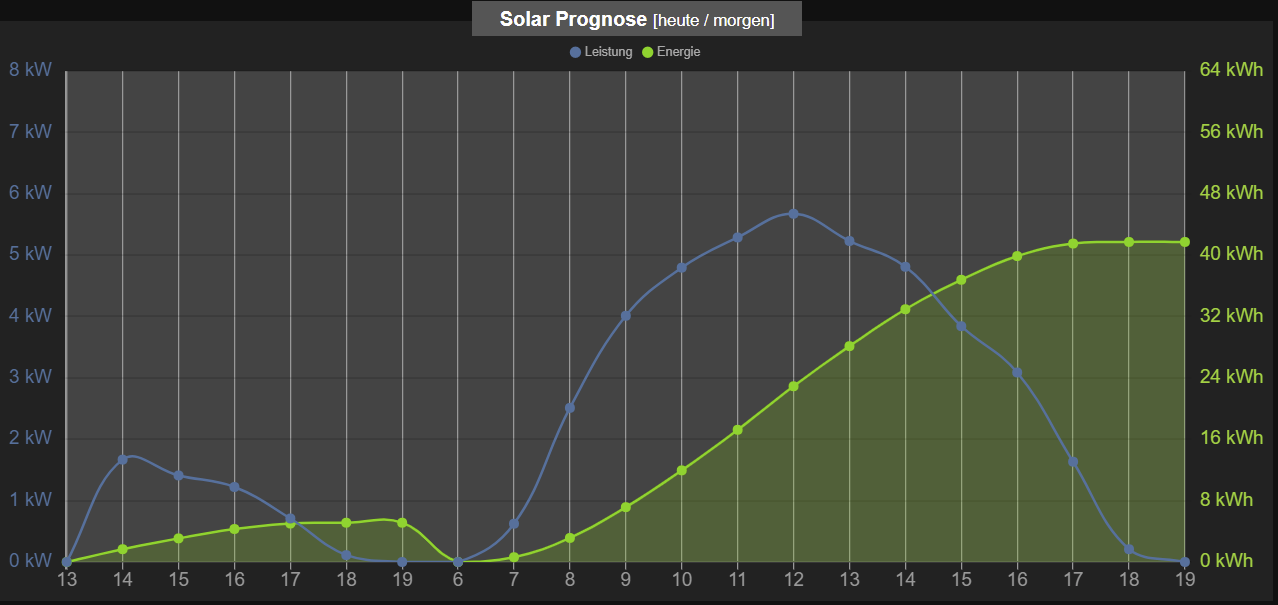
                            Dank an alle - ich habe mir hier für ein interessantes Thema viel abgeschaut und beide Grafen in ein Diagramm zusammengefasst:
                            2021-03-05 22_35_39.png

                            Hier eine Lösung für die zwei weiteren DP; ob sie auf Dauer funktioniert, sehe ich dann morgen mit neuen Daten.

                            const url = 'http://www.solarprognose.de/web/solarprediction/api/v1?_format=json&access-token=....&item=inverter&id=412&type=hourly';
                            const path = '0_userdata.0.SolarGraph.';
                            const idLeistung_Energie = path + 'Leistung_Energie';
                            const idEnergieMaxHeute = path + 'EnergieMaxHeute';
                            const idEnergieMaxMorgen = path + 'EnergieMaxMorgen';
                             
                            var Leistung_Energie = {
                                "axisLabels": ["8", "9", "10", "11", "12", "13", "14", "15", "16", "17", "18", "8", "9", "10", "11", "12", "13", "14", "15", "16", "17", "18"],
                                "graphs": [{
                                    "data": [0, 0, 0, 0, 0, 0, 0, 0, 0, 0, 0, 0, 0, 0, 0, 0, 0, 0, 0, 0, 0, 0],
                                    "type": "line",
                                    "legendText":"Leistung",
                                    "yAxis_min": 0,
                                    "yAxis_max": 8,
                                    "yAxis_step": 1,
                                    "yAxis_position": "left",
                                    "yAxis_appendix": " kW",
                                    "datalabel_show": false
                                },
                                {
                                    "data": [0, 0, 0, 0, 0, 0, 0, 0, 0, 0, 0, 0, 0, 0, 0, 0, 0, 0, 0, 0, 0, 0],
                                    "type": "line",
                                    "line_UseFillColor": true,
                                    "legendText":"Energie",
                                    "yAxis_min": 0,
                                    "yAxis_max": 64,
                                    "yAxis_step": 8,
                                    "yAxis_position": "right",
                                    "yAxis_appendix": " kWh",
                                    "yAxis_color": "#91d430",
                                    "datalabel_show": false
                                }
                                ]
                            };
                             
                            createState(idLeistung_Energie, JSON.stringify(Leistung_Energie), {type: 'string', name: 'Leistung_Energie', role: 'table'}); 
                            createState(idEnergieMaxHeute, 0, {type: 'number', role: 'value', name: 'EnergieMaxHeute', read: true, write: false, unit: 'kWh'});
                            createState(idEnergieMaxMorgen, 0, {type: 'number', role: 'value', name: 'EnergieMaxMorgen', read: true, write: false, unit: 'kWh'});
                            
                            schedule('5 7,9,12,14,16,18 * * *', function() { 
                                request(url, function (error, response, result) {
                                    if(error) log(error, 'error');
                                    else {
                                        let obj = JSON.parse(result);
                                        if(obj.status) log('Fehler: ' + obj.status, 'warn');
                                        else {
                                            let data = obj.data;
                                            Leistung_Energie.axisLabels = [];
                                            Leistung_Energie.graphs[0].data = [];
                                            Leistung_Energie.graphs[1].data = [];
                                            let i = 0;
                                            for(let entry in data) {
                                                let time = formatDate(parseInt(entry), 'hh');
                                                Leistung_Energie.axisLabels.push(time);
                                                Leistung_Energie.graphs[0].data.push(data[entry][0]);
                                                Leistung_Energie.graphs[1].data.push(data[entry][1]);
                                                if (time == '19')
                                                   if (i == 0) { setState(idEnergieMaxHeute, data[entry][1], true);  i = i+1 }
                                                   else         setState(idEnergieMaxMorgen, data[entry][1], true);
                                            }
                                            setState(idLeistung_Energie, JSON.stringify(Leistung_Energie), true);               
                                        }
                                    }
                                });
                            });
                            
                            
                            M S 2 Replies Last reply
                            1
                            • T tobi19

                              @streit187 sagte in Solarprognose:

                              Das ist vermutlich nicht schön aber es tut was es soll. Leider nur an einem Tag weil das Objekt direkt aufgerufen wird.
                              Wie kann ich denn hier die Objekt Nummer aufrufen ähnlich der Eigenschaft mit [0[ bzw. [1]?

                              Dank an alle - ich habe mir hier für ein interessantes Thema viel abgeschaut und beide Grafen in ein Diagramm zusammengefasst:
                              2021-03-05 22_35_39.png

                              Hier eine Lösung für die zwei weiteren DP; ob sie auf Dauer funktioniert, sehe ich dann morgen mit neuen Daten.

                              const url = 'http://www.solarprognose.de/web/solarprediction/api/v1?_format=json&access-token=....&item=inverter&id=412&type=hourly';
                              const path = '0_userdata.0.SolarGraph.';
                              const idLeistung_Energie = path + 'Leistung_Energie';
                              const idEnergieMaxHeute = path + 'EnergieMaxHeute';
                              const idEnergieMaxMorgen = path + 'EnergieMaxMorgen';
                               
                              var Leistung_Energie = {
                                  "axisLabels": ["8", "9", "10", "11", "12", "13", "14", "15", "16", "17", "18", "8", "9", "10", "11", "12", "13", "14", "15", "16", "17", "18"],
                                  "graphs": [{
                                      "data": [0, 0, 0, 0, 0, 0, 0, 0, 0, 0, 0, 0, 0, 0, 0, 0, 0, 0, 0, 0, 0, 0],
                                      "type": "line",
                                      "legendText":"Leistung",
                                      "yAxis_min": 0,
                                      "yAxis_max": 8,
                                      "yAxis_step": 1,
                                      "yAxis_position": "left",
                                      "yAxis_appendix": " kW",
                                      "datalabel_show": false
                                  },
                                  {
                                      "data": [0, 0, 0, 0, 0, 0, 0, 0, 0, 0, 0, 0, 0, 0, 0, 0, 0, 0, 0, 0, 0, 0],
                                      "type": "line",
                                      "line_UseFillColor": true,
                                      "legendText":"Energie",
                                      "yAxis_min": 0,
                                      "yAxis_max": 64,
                                      "yAxis_step": 8,
                                      "yAxis_position": "right",
                                      "yAxis_appendix": " kWh",
                                      "yAxis_color": "#91d430",
                                      "datalabel_show": false
                                  }
                                  ]
                              };
                               
                              createState(idLeistung_Energie, JSON.stringify(Leistung_Energie), {type: 'string', name: 'Leistung_Energie', role: 'table'}); 
                              createState(idEnergieMaxHeute, 0, {type: 'number', role: 'value', name: 'EnergieMaxHeute', read: true, write: false, unit: 'kWh'});
                              createState(idEnergieMaxMorgen, 0, {type: 'number', role: 'value', name: 'EnergieMaxMorgen', read: true, write: false, unit: 'kWh'});
                              
                              schedule('5 7,9,12,14,16,18 * * *', function() { 
                                  request(url, function (error, response, result) {
                                      if(error) log(error, 'error');
                                      else {
                                          let obj = JSON.parse(result);
                                          if(obj.status) log('Fehler: ' + obj.status, 'warn');
                                          else {
                                              let data = obj.data;
                                              Leistung_Energie.axisLabels = [];
                                              Leistung_Energie.graphs[0].data = [];
                                              Leistung_Energie.graphs[1].data = [];
                                              let i = 0;
                                              for(let entry in data) {
                                                  let time = formatDate(parseInt(entry), 'hh');
                                                  Leistung_Energie.axisLabels.push(time);
                                                  Leistung_Energie.graphs[0].data.push(data[entry][0]);
                                                  Leistung_Energie.graphs[1].data.push(data[entry][1]);
                                                  if (time == '19')
                                                     if (i == 0) { setState(idEnergieMaxHeute, data[entry][1], true);  i = i+1 }
                                                     else         setState(idEnergieMaxMorgen, data[entry][1], true);
                                              }
                                              setState(idLeistung_Energie, JSON.stringify(Leistung_Energie), true);               
                                          }
                                      }
                                  });
                              });
                              
                              
                              M Offline
                              M Offline
                              MartyBr
                              wrote on last edited by MartyBr
                              #68

                              @tobi19 Kannst du bitte beschreiben, wie du den Graph erstellt hast? Mit Flot oder Grafana?

                              Gruß
                              Martin


                              Intel NUCs mit Proxmox / Iobroker als VM unter Debian
                              Raspeberry mit USB Leseköpfen für Smartmeter
                              Homematic und Homematic IP

                              T 1 Reply Last reply
                              0
                              • M MartyBr

                                @tobi19 Kannst du bitte beschreiben, wie du den Graph erstellt hast? Mit Flot oder Grafana?

                                T Offline
                                T Offline
                                tobi19
                                wrote on last edited by
                                #69

                                @martybr sagte in Solarprognose:

                                @tobi19 Kannst du bitte beschreiben, wie du den Graph erstellt hast? Mit Flot oder Grafana?

                                Der Graf ist wie oben erwähnt mit dem JSON Chart Widget aus dem Material-Design Adapter erstellt. Widget Export anbei.


                                [{"tpl":"tplVis-materialdesign-Chart-JSON","data":{"oid":"0_userdata.0.SolarGraph.Leistung_Energie","g_fixed":false,"g_visibility":false,"g_css_font_text":false,"g_css_background":false,"g_css_shadow_padding":false,"g_css_border":false,"g_gestures":false,"g_signals":false,"g_last_change":false,"visibility-cond":"==","visibility-val":1,"visibility-groups-action":"hide","chartType":"line","showTooltip":"true","tooltipMode":"nearest","tooltipShowColorBox":"true","xAxisPosition":"bottom","xAxisValueDistanceToAxis":"0","xAxisShowAxis":true,"xAxisShowAxisLabels":true,"xAxisShowGridLines":true,"xAxisShowTicks":true,"xAxisMinRotation":"0","xAxisMaxRotation":"0","yAxisValueDistanceToAxis":"7","signals-cond-0":"==","signals-val-0":true,"signals-icon-0":"/vis/signals/lowbattery.png","signals-icon-size-0":0,"signals-blink-0":false,"signals-horz-0":0,"signals-vert-0":0,"signals-hide-edit-0":false,"signals-cond-1":"==","signals-val-1":true,"signals-icon-1":"/vis/signals/lowbattery.png","signals-icon-size-1":0,"signals-blink-1":false,"signals-horz-1":0,"signals-vert-1":0,"signals-hide-edit-1":false,"signals-cond-2":"==","signals-val-2":true,"signals-icon-2":"/vis/signals/lowbattery.png","signals-icon-size-2":0,"signals-blink-2":false,"signals-horz-2":0,"signals-vert-2":0,"signals-hide-edit-2":false,"lc-type":"last-change","lc-is-interval":true,"lc-is-moment":false,"lc-format":"","lc-position-vert":"top","lc-position-horz":"right","lc-offset-vert":0,"lc-offset-horz":0,"lc-font-size":"12px","lc-font-family":"","lc-font-style":"","lc-bkg-color":"","lc-color":"","lc-border-width":"0","lc-border-style":"","lc-border-color":"","lc-border-radius":10,"lc-zindex":0,"mdwDebug":false,"backgroundColor":"#222222","chartAreaBackgroundColor":"#444444","colorScheme":"scrounger.pie","chartPaddingTop":"10","xAxisTitleColor":"#880000","axisLabelAutoSkip":false,"xAxisTickLength":"6","xAxisGridLinesColor":"#999999","xAxisGridLinesWitdh":"1","xAxisZeroLineWidth":"2","xAxisZeroLineColor":"#999999","xAxisTitle":"","xAxisTitleFontSize":"14","xAxisValueLabelColor":"#999999","xAxisOffsetGridLines":false,"g_legendLayout":true,"showLegend":true,"legendPosition":"top","legendPointStyle":true,"legendFontColor":"#aaaaaa","legendFontSize":"10","legendBoxWidth":"5","legendPadding":"","disableHoverEffects":false},"style":{"left":"2px","top":"81px","width":"1019px","height":"464px"},"widgetSet":"materialdesign"}]

                                M 1 Reply Last reply
                                0
                                • T tobi19

                                  @streit187 sagte in Solarprognose:

                                  Das ist vermutlich nicht schön aber es tut was es soll. Leider nur an einem Tag weil das Objekt direkt aufgerufen wird.
                                  Wie kann ich denn hier die Objekt Nummer aufrufen ähnlich der Eigenschaft mit [0[ bzw. [1]?

                                  Dank an alle - ich habe mir hier für ein interessantes Thema viel abgeschaut und beide Grafen in ein Diagramm zusammengefasst:
                                  2021-03-05 22_35_39.png

                                  Hier eine Lösung für die zwei weiteren DP; ob sie auf Dauer funktioniert, sehe ich dann morgen mit neuen Daten.

                                  const url = 'http://www.solarprognose.de/web/solarprediction/api/v1?_format=json&access-token=....&item=inverter&id=412&type=hourly';
                                  const path = '0_userdata.0.SolarGraph.';
                                  const idLeistung_Energie = path + 'Leistung_Energie';
                                  const idEnergieMaxHeute = path + 'EnergieMaxHeute';
                                  const idEnergieMaxMorgen = path + 'EnergieMaxMorgen';
                                   
                                  var Leistung_Energie = {
                                      "axisLabels": ["8", "9", "10", "11", "12", "13", "14", "15", "16", "17", "18", "8", "9", "10", "11", "12", "13", "14", "15", "16", "17", "18"],
                                      "graphs": [{
                                          "data": [0, 0, 0, 0, 0, 0, 0, 0, 0, 0, 0, 0, 0, 0, 0, 0, 0, 0, 0, 0, 0, 0],
                                          "type": "line",
                                          "legendText":"Leistung",
                                          "yAxis_min": 0,
                                          "yAxis_max": 8,
                                          "yAxis_step": 1,
                                          "yAxis_position": "left",
                                          "yAxis_appendix": " kW",
                                          "datalabel_show": false
                                      },
                                      {
                                          "data": [0, 0, 0, 0, 0, 0, 0, 0, 0, 0, 0, 0, 0, 0, 0, 0, 0, 0, 0, 0, 0, 0],
                                          "type": "line",
                                          "line_UseFillColor": true,
                                          "legendText":"Energie",
                                          "yAxis_min": 0,
                                          "yAxis_max": 64,
                                          "yAxis_step": 8,
                                          "yAxis_position": "right",
                                          "yAxis_appendix": " kWh",
                                          "yAxis_color": "#91d430",
                                          "datalabel_show": false
                                      }
                                      ]
                                  };
                                   
                                  createState(idLeistung_Energie, JSON.stringify(Leistung_Energie), {type: 'string', name: 'Leistung_Energie', role: 'table'}); 
                                  createState(idEnergieMaxHeute, 0, {type: 'number', role: 'value', name: 'EnergieMaxHeute', read: true, write: false, unit: 'kWh'});
                                  createState(idEnergieMaxMorgen, 0, {type: 'number', role: 'value', name: 'EnergieMaxMorgen', read: true, write: false, unit: 'kWh'});
                                  
                                  schedule('5 7,9,12,14,16,18 * * *', function() { 
                                      request(url, function (error, response, result) {
                                          if(error) log(error, 'error');
                                          else {
                                              let obj = JSON.parse(result);
                                              if(obj.status) log('Fehler: ' + obj.status, 'warn');
                                              else {
                                                  let data = obj.data;
                                                  Leistung_Energie.axisLabels = [];
                                                  Leistung_Energie.graphs[0].data = [];
                                                  Leistung_Energie.graphs[1].data = [];
                                                  let i = 0;
                                                  for(let entry in data) {
                                                      let time = formatDate(parseInt(entry), 'hh');
                                                      Leistung_Energie.axisLabels.push(time);
                                                      Leistung_Energie.graphs[0].data.push(data[entry][0]);
                                                      Leistung_Energie.graphs[1].data.push(data[entry][1]);
                                                      if (time == '19')
                                                         if (i == 0) { setState(idEnergieMaxHeute, data[entry][1], true);  i = i+1 }
                                                         else         setState(idEnergieMaxMorgen, data[entry][1], true);
                                                  }
                                                  setState(idLeistung_Energie, JSON.stringify(Leistung_Energie), true);               
                                              }
                                          }
                                      });
                                  });
                                  
                                  
                                  S Offline
                                  S Offline
                                  Streit187
                                  wrote on last edited by
                                  #70

                                  @tobi19 Und? Was sagen die Zahlen heute? Hat es geklappt?
                                  Ihr könnt übrigens noch die Daten für 7 und 19 sowohl für heute als auch für morgen hinzufügen die Bestandteil der Daten von Solarprognose sind.
                                  Dazu einfach bei axisLabels zwei Mal "7" und "19" einfügen und bei Data noch 4x 0, einfügen.

                                  T 1 Reply Last reply
                                  0
                                  • S Streit187

                                    @tobi19 Und? Was sagen die Zahlen heute? Hat es geklappt?
                                    Ihr könnt übrigens noch die Daten für 7 und 19 sowohl für heute als auch für morgen hinzufügen die Bestandteil der Daten von Solarprognose sind.
                                    Dazu einfach bei axisLabels zwei Mal "7" und "19" einfügen und bei Data noch 4x 0, einfügen.

                                    T Offline
                                    T Offline
                                    tobi19
                                    wrote on last edited by
                                    #71

                                    @streit187 sagte in Solarprognose:

                                    @tobi19 Und? Was sagen die Zahlen heute? Hat es geklappt?

                                    JA, ich habe heute Daten von 6 Uhr bis 19 Uhr für 2 Tage bekommen.
                                    Das Javascript scheint dies zu verarbeiten. Bin aber kein Kenner der Sprache und weiß daher nicht wieso diese Erweiterung der Datenraums funktioniert.
                                    Da ich den Datenpunkt Time == 19 filtere, klappt es, wenn der Datenpunkt 19Uhr dabei ist.

                                    1 Reply Last reply
                                    0
                                    • T tobi19

                                      @martybr sagte in Solarprognose:

                                      @tobi19 Kannst du bitte beschreiben, wie du den Graph erstellt hast? Mit Flot oder Grafana?

                                      Der Graf ist wie oben erwähnt mit dem JSON Chart Widget aus dem Material-Design Adapter erstellt. Widget Export anbei.


                                      [{"tpl":"tplVis-materialdesign-Chart-JSON","data":{"oid":"0_userdata.0.SolarGraph.Leistung_Energie","g_fixed":false,"g_visibility":false,"g_css_font_text":false,"g_css_background":false,"g_css_shadow_padding":false,"g_css_border":false,"g_gestures":false,"g_signals":false,"g_last_change":false,"visibility-cond":"==","visibility-val":1,"visibility-groups-action":"hide","chartType":"line","showTooltip":"true","tooltipMode":"nearest","tooltipShowColorBox":"true","xAxisPosition":"bottom","xAxisValueDistanceToAxis":"0","xAxisShowAxis":true,"xAxisShowAxisLabels":true,"xAxisShowGridLines":true,"xAxisShowTicks":true,"xAxisMinRotation":"0","xAxisMaxRotation":"0","yAxisValueDistanceToAxis":"7","signals-cond-0":"==","signals-val-0":true,"signals-icon-0":"/vis/signals/lowbattery.png","signals-icon-size-0":0,"signals-blink-0":false,"signals-horz-0":0,"signals-vert-0":0,"signals-hide-edit-0":false,"signals-cond-1":"==","signals-val-1":true,"signals-icon-1":"/vis/signals/lowbattery.png","signals-icon-size-1":0,"signals-blink-1":false,"signals-horz-1":0,"signals-vert-1":0,"signals-hide-edit-1":false,"signals-cond-2":"==","signals-val-2":true,"signals-icon-2":"/vis/signals/lowbattery.png","signals-icon-size-2":0,"signals-blink-2":false,"signals-horz-2":0,"signals-vert-2":0,"signals-hide-edit-2":false,"lc-type":"last-change","lc-is-interval":true,"lc-is-moment":false,"lc-format":"","lc-position-vert":"top","lc-position-horz":"right","lc-offset-vert":0,"lc-offset-horz":0,"lc-font-size":"12px","lc-font-family":"","lc-font-style":"","lc-bkg-color":"","lc-color":"","lc-border-width":"0","lc-border-style":"","lc-border-color":"","lc-border-radius":10,"lc-zindex":0,"mdwDebug":false,"backgroundColor":"#222222","chartAreaBackgroundColor":"#444444","colorScheme":"scrounger.pie","chartPaddingTop":"10","xAxisTitleColor":"#880000","axisLabelAutoSkip":false,"xAxisTickLength":"6","xAxisGridLinesColor":"#999999","xAxisGridLinesWitdh":"1","xAxisZeroLineWidth":"2","xAxisZeroLineColor":"#999999","xAxisTitle":"","xAxisTitleFontSize":"14","xAxisValueLabelColor":"#999999","xAxisOffsetGridLines":false,"g_legendLayout":true,"showLegend":true,"legendPosition":"top","legendPointStyle":true,"legendFontColor":"#aaaaaa","legendFontSize":"10","legendBoxWidth":"5","legendPadding":"","disableHoverEffects":false},"style":{"left":"2px","top":"81px","width":"1019px","height":"464px"},"widgetSet":"materialdesign"}]

                                      M Offline
                                      M Offline
                                      MartyBr
                                      wrote on last edited by
                                      #72

                                      @tobi19 Vielen Dank, perfekt. Daten sind da

                                      Gruß
                                      Martin


                                      Intel NUCs mit Proxmox / Iobroker als VM unter Debian
                                      Raspeberry mit USB Leseköpfen für Smartmeter
                                      Homematic und Homematic IP

                                      1 Reply Last reply
                                      0
                                      • Palm_ManiacP Offline
                                        Palm_ManiacP Offline
                                        Palm_Maniac
                                        wrote on last edited by
                                        #73

                                        Hallo,

                                        ich muß jetzt auch mal etwas fragen.

                                        Ich versuche mich an diesem Skript:

                                        const url = 'hier die komplette URL eintragen';
                                        const path = '0_userdata.0.Solar.';
                                        const idLeistung = path + 'Leistung.';
                                        const idEnergie  = path + 'Energie.';
                                         
                                        schedule('16 4-22 * * *', function() { 
                                            request(url, function (error, response, result) {
                                                if(error) log(error, 'error');
                                                else {
                                                    let obj = JSON.parse(result);
                                                    if(obj.status) log('Fehler: ' + obj.status, 'warn');
                                                    else {
                                                        let data = obj.data;
                                                        let wdHeute = new Date().getDay();
                                                        for(let entry in data) {
                                                            let wd = new Date(1000 * parseInt(entry)).getDay();
                                                            let time = formatDate(parseInt(entry), 'hh:mm');
                                                            if(wd == wdHeute) time = 'heute_' + time;
                                                            else time = 'morgen_' + time;
                                                            if(existsState(idLeistung + time)) setState(idLeistung + time, data[entry][0]);
                                                            else createState(idLeistung + time, data[entry][0], {
                                                                type: 'number', 
                                                                role: 'value', 
                                                                name: 'Solarleistung ' + time,
                                                                read: true,
                                                                write: false,
                                                                unit: 'kW'
                                                            });
                                                            if(existsState(idEnergie + time)) setState(idEnergie + time, data[entry][1]);
                                                            else createState(idEnergie + time, data[entry][1], {
                                                                type: 'number', 
                                                                role: 'value', 
                                                                name: 'Solarenergie ' + time,
                                                                read: true,
                                                                write: false,
                                                                unit: 'kWh'
                                                            });
                                                        }
                                                    }
                                                }
                                            });
                                        });


                                        Über den Link von Solarprognose bekomme ich folgenden Output am Browser:

                                        {"status":0,"iLastPredictionGenerationEpochTime":1615222151,"weather_source_text":"<a target=\"_blank\" href=\"https://darksky.net/poweredby/\"><img src=\"{assetWeather}/images/darksky.png\" alt=\"Powered by Darksky\" style=\"width: 500px\"></a>","datalinename":"Germany > Gieben","data":{"1615215600":[0,0],"1615219200":[0.221,0.221],"1615222800":[0.029,0.25],"1615226400":[0,0.25],"1615266000":[0,0],"1615269600":[0.056,0.056],"1615273200":[0.23,0.286],"1615276800":[0.4,0.686],"1615280400":[0.512,1.198],"1615284000":[0.581,1.779],"1615287600":[0.641,2.42],"1615291200":[0.597,3.017],"1615294800":[0.525,3.542],"1615298400":[0.435,3.977],"1615302000":[0.326,4.303],"1615305600":[0.19,4.493],"1615309200":[0.026,4.519],"1615312800":[0,4.519]}}
                                        

                                        Wenn ich nun meinen Link in das Skript einfüge und es starte, dann sehe ich zwar, dass der Cronjob eingerichtet wird, es werden aber die Datenpunkte nicht erzeugt, Fehlermeldungen gibt es auch keine. Was läuft denn da falsch?

                                        wendy2702W 2 Replies Last reply
                                        0
                                        • Palm_ManiacP Palm_Maniac

                                          Hallo,

                                          ich muß jetzt auch mal etwas fragen.

                                          Ich versuche mich an diesem Skript:

                                          const url = 'hier die komplette URL eintragen';
                                          const path = '0_userdata.0.Solar.';
                                          const idLeistung = path + 'Leistung.';
                                          const idEnergie  = path + 'Energie.';
                                           
                                          schedule('16 4-22 * * *', function() { 
                                              request(url, function (error, response, result) {
                                                  if(error) log(error, 'error');
                                                  else {
                                                      let obj = JSON.parse(result);
                                                      if(obj.status) log('Fehler: ' + obj.status, 'warn');
                                                      else {
                                                          let data = obj.data;
                                                          let wdHeute = new Date().getDay();
                                                          for(let entry in data) {
                                                              let wd = new Date(1000 * parseInt(entry)).getDay();
                                                              let time = formatDate(parseInt(entry), 'hh:mm');
                                                              if(wd == wdHeute) time = 'heute_' + time;
                                                              else time = 'morgen_' + time;
                                                              if(existsState(idLeistung + time)) setState(idLeistung + time, data[entry][0]);
                                                              else createState(idLeistung + time, data[entry][0], {
                                                                  type: 'number', 
                                                                  role: 'value', 
                                                                  name: 'Solarleistung ' + time,
                                                                  read: true,
                                                                  write: false,
                                                                  unit: 'kW'
                                                              });
                                                              if(existsState(idEnergie + time)) setState(idEnergie + time, data[entry][1]);
                                                              else createState(idEnergie + time, data[entry][1], {
                                                                  type: 'number', 
                                                                  role: 'value', 
                                                                  name: 'Solarenergie ' + time,
                                                                  read: true,
                                                                  write: false,
                                                                  unit: 'kWh'
                                                              });
                                                          }
                                                      }
                                                  }
                                              });
                                          });


                                          Über den Link von Solarprognose bekomme ich folgenden Output am Browser:

                                          {"status":0,"iLastPredictionGenerationEpochTime":1615222151,"weather_source_text":"<a target=\"_blank\" href=\"https://darksky.net/poweredby/\"><img src=\"{assetWeather}/images/darksky.png\" alt=\"Powered by Darksky\" style=\"width: 500px\"></a>","datalinename":"Germany > Gieben","data":{"1615215600":[0,0],"1615219200":[0.221,0.221],"1615222800":[0.029,0.25],"1615226400":[0,0.25],"1615266000":[0,0],"1615269600":[0.056,0.056],"1615273200":[0.23,0.286],"1615276800":[0.4,0.686],"1615280400":[0.512,1.198],"1615284000":[0.581,1.779],"1615287600":[0.641,2.42],"1615291200":[0.597,3.017],"1615294800":[0.525,3.542],"1615298400":[0.435,3.977],"1615302000":[0.326,4.303],"1615305600":[0.19,4.493],"1615309200":[0.026,4.519],"1615312800":[0,4.519]}}
                                          

                                          Wenn ich nun meinen Link in das Skript einfüge und es starte, dann sehe ich zwar, dass der Cronjob eingerichtet wird, es werden aber die Datenpunkte nicht erzeugt, Fehlermeldungen gibt es auch keine. Was läuft denn da falsch?

                                          wendy2702W Offline
                                          wendy2702W Offline
                                          wendy2702
                                          wrote on last edited by
                                          #74

                                          @palm_maniac sagte in Solarprognose:

                                          0_userdata.0.Solar.

                                          Und du bist sicher das es in diesem Ordner auch nach neu laden der Object Seite keine Objecte gibt?

                                          Stell doch mal das loggen fuer die Javascript Instanz auf Debug und starte das Script neu.

                                          Bitte keine Fragen per PN, die gehören ins Forum!

                                          Benutzt das Voting rechts unten im Beitrag wenn er euch geholfen hat.

                                          1 Reply Last reply
                                          0
                                          Reply
                                          • Reply as topic
                                          Log in to reply
                                          • Oldest to Newest
                                          • Newest to Oldest
                                          • Most Votes


                                          Support us

                                          ioBroker
                                          Community Adapters
                                          Donate
                                          FAQ Cloud / IOT
                                          HowTo: Node.js-Update
                                          HowTo: Backup/Restore
                                          Downloads
                                          BLOG

                                          298

                                          Online

                                          32.6k

                                          Users

                                          82.3k

                                          Topics

                                          1.3m

                                          Posts
                                          Community
                                          Impressum | Datenschutz-Bestimmungen | Nutzungsbedingungen | Einwilligungseinstellungen
                                          ioBroker Community 2014-2025
                                          logo
                                          • Login

                                          • Don't have an account? Register

                                          • Login or register to search.
                                          • First post
                                            Last post
                                          0
                                          • Home
                                          • Recent
                                          • Tags
                                          • Unread 0
                                          • Categories
                                          • Unreplied
                                          • Popular
                                          • GitHub
                                          • Docu
                                          • Hilfe
