Skip to content
  • Home
  • Recent
  • Tags
  • 0 Unread 0
  • Categories
  • Unreplied
  • Popular
  • GitHub
  • Docu
  • Hilfe
Skins
  • Light
  • Brite
  • Cerulean
  • Cosmo
  • Flatly
  • Journal
  • Litera
  • Lumen
  • Lux
  • Materia
  • Minty
  • Morph
  • Pulse
  • Sandstone
  • Simplex
  • Sketchy
  • Spacelab
  • United
  • Yeti
  • Zephyr
  • Dark
  • Cyborg
  • Darkly
  • Quartz
  • Slate
  • Solar
  • Superhero
  • Vapor

  • Default (No Skin)
  • No Skin
Collapse
ioBroker Logo

Community Forum

donate donate
  1. ioBroker Community Home
  2. Deutsch
  3. Praktische Anwendungen (Showcase)
  4. Material Design Widgets: Proxmox

NEWS

  • Weihnachtsangebot 2025! 🎄
    BluefoxB
    Bluefox
    22
    1
    1.2k

  • UPDATE 31.10.: Amazon Alexa - ioBroker Skill läuft aus ?
    apollon77A
    apollon77
    48
    3
    9.2k

  • Monatsrückblick – September 2025
    BluefoxB
    Bluefox
    14
    1
    2.5k

Material Design Widgets: Proxmox

Scheduled Pinned Locked Moved Praktische Anwendungen (Showcase)
35 Posts 12 Posters 7.6k Views 22 Watching
  • Oldest to Newest
  • Newest to Oldest
  • Most Votes
Reply
  • Reply as topic
Log in to reply
This topic has been deleted. Only users with topic management privileges can see it.
  • ScroungerS Offline
    ScroungerS Offline
    Scrounger
    Developer
    wrote on last edited by
    #1

    Ein weiters Beispiel Projekt für eine responsiv VIS View mit Proxmox Adapter Daten und wenn benötigt weitere individuell konfigurierbaren Daten.
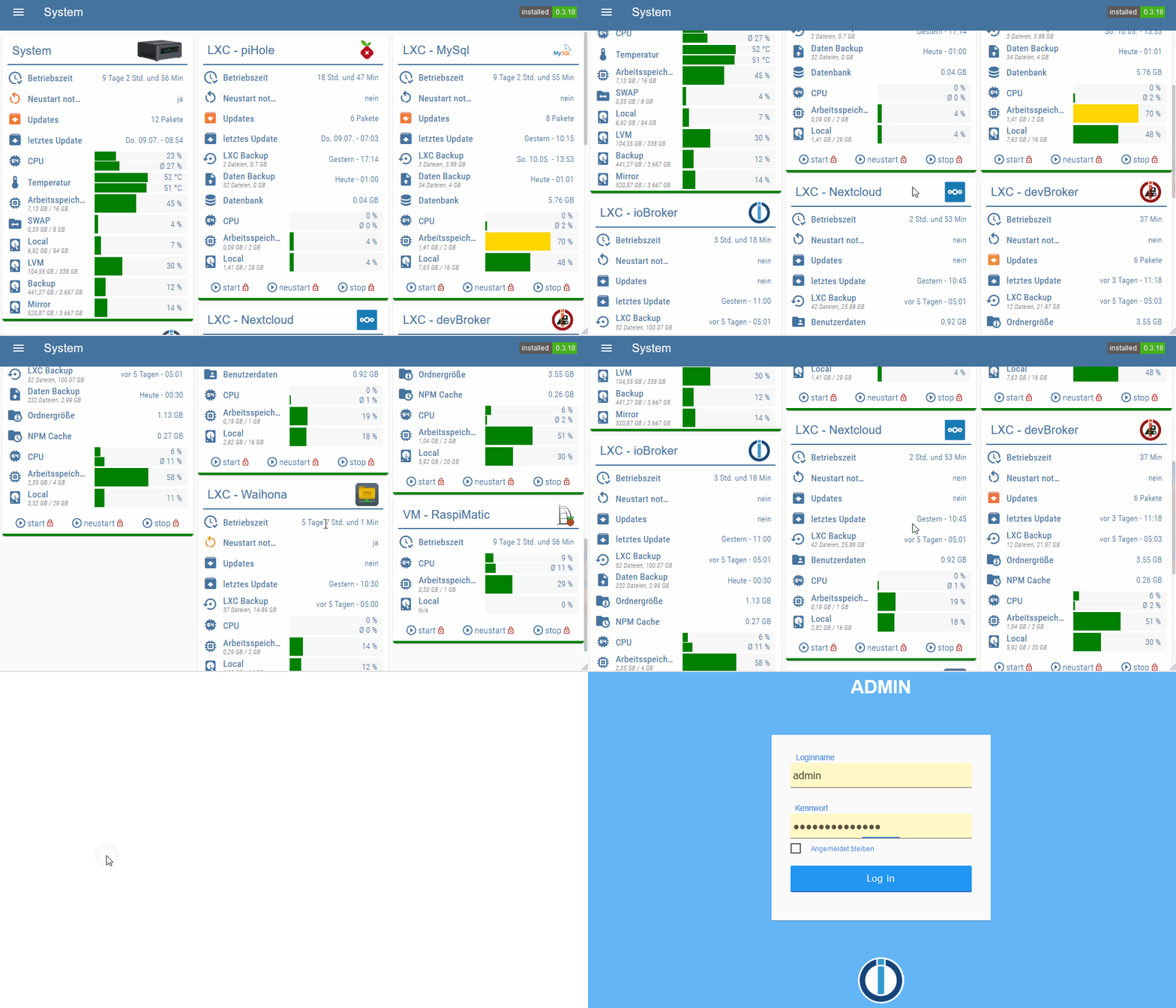
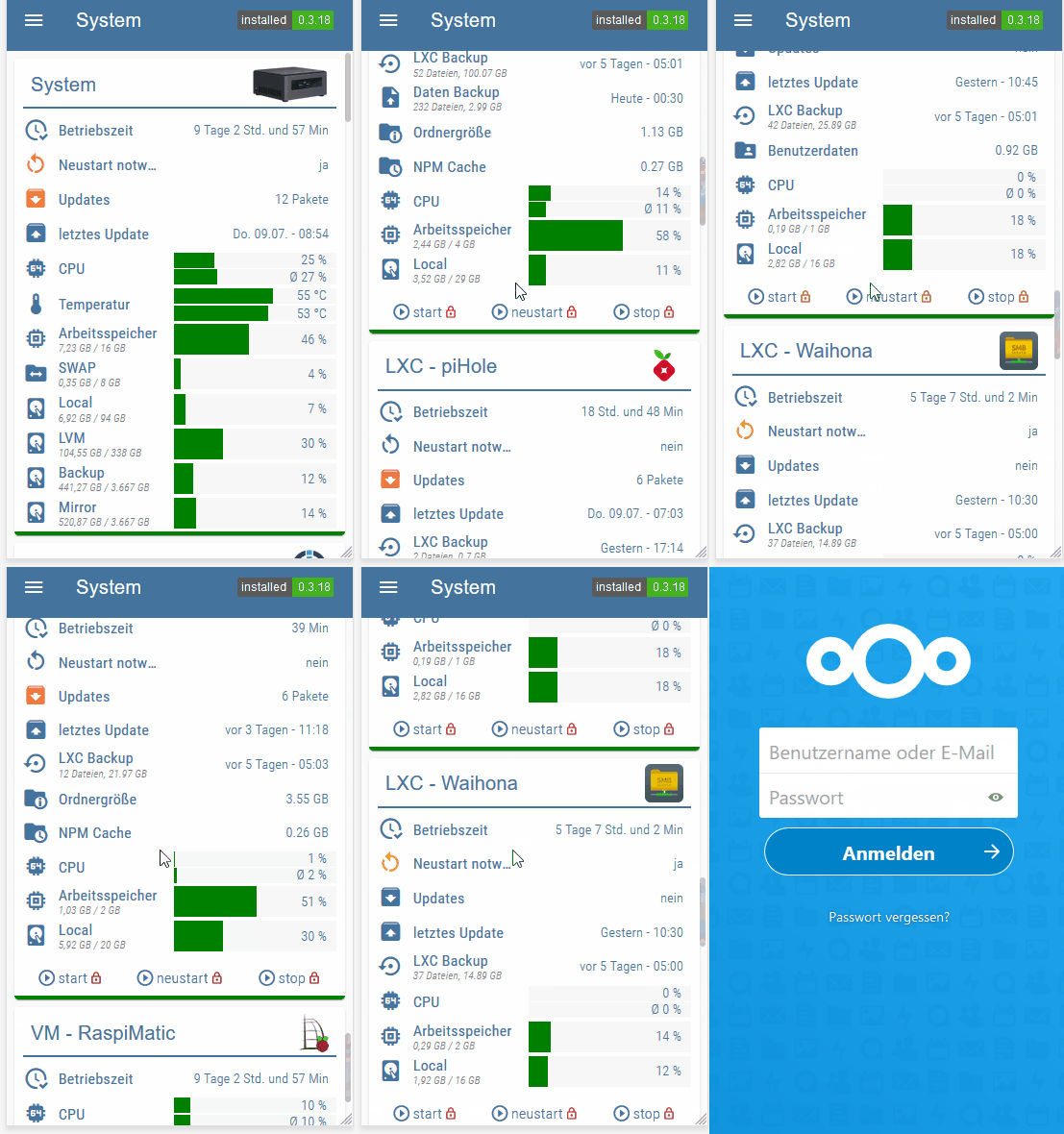
    Tablet Phone

    Alle Informationen und Anleitung findet ihr im Material Design Widgets repo auf github

    L CKMartensC 2 Replies Last reply
    9
    • ScroungerS Scrounger

      Ein weiters Beispiel Projekt für eine responsiv VIS View mit Proxmox Adapter Daten und wenn benötigt weitere individuell konfigurierbaren Daten.

      Tablet Phone

      Alle Informationen und Anleitung findet ihr im Material Design Widgets repo auf github

      L Offline
      L Offline
      Leviathan09
      wrote on last edited by Leviathan09
      #2

      @Scrounger Bekomme den Error

      26.8.2020, 10:24:04.408	[warn ]: javascript.0 (9290) script.js.common.VIS_Skripte.Proxmox_MaterialDesign: [updateVm - promox] datapoint 'undefined' not exist!
      26.8.2020, 10:26:04.410	[warn ]: javascript.0 (9290) script.js.common.VIS_Skripte.Proxmox_MaterialDesign: [updateVm - promox] datapoint 'undefined' not exist!
      

      Außerdem bekomme ich die Icons nicht angezeigt obwohl ich unter vis.0 einen Ordner myImages habe mit den passenden Dateien wie ich sie im Skript stehen habe.

      Ebenso zeigt er mir nicht alle meine Widgets an die ich in ein GridView gepackt habe.
      Die ersten 4 werden angezeigt aber ich kann nicht weiter nach unten scrollen.
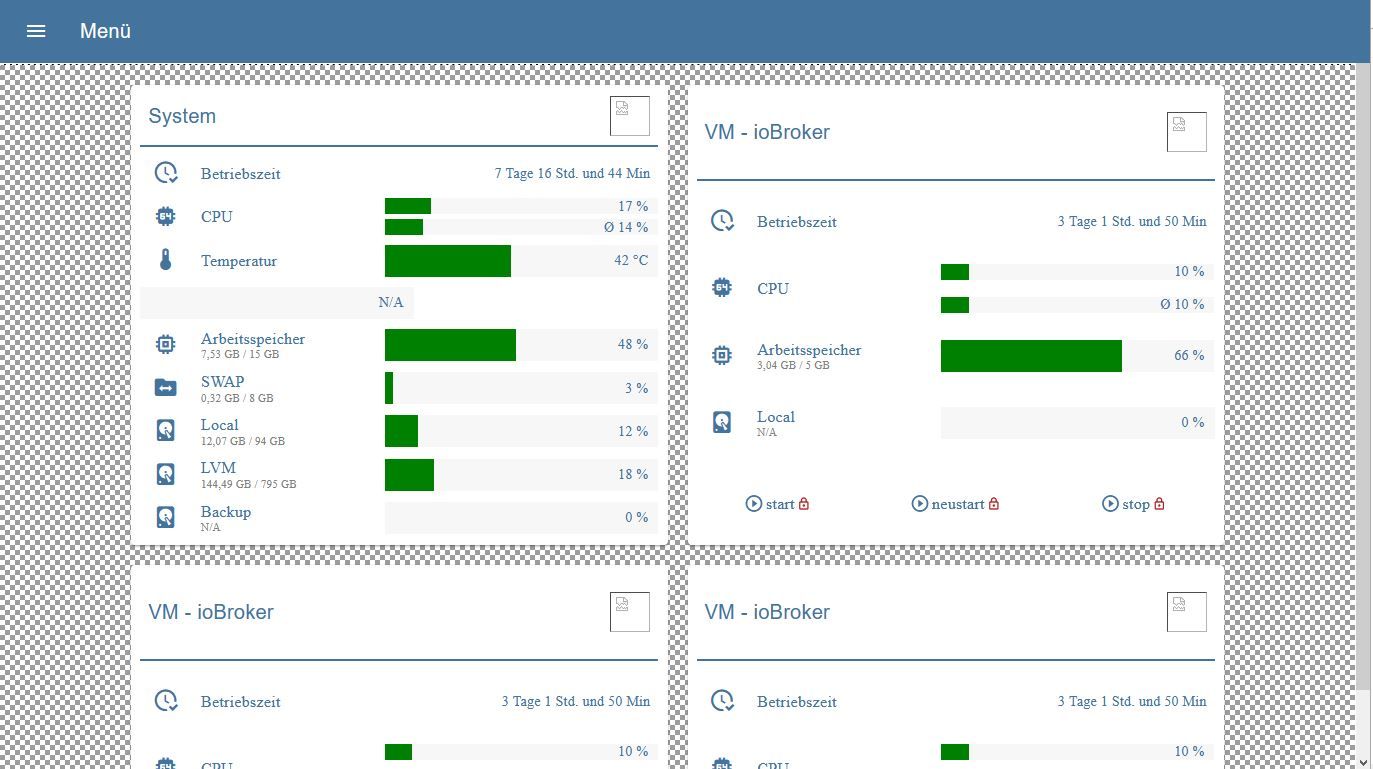
      landing_page.JPG
      Bei der View mit dem Grid selbst sieht man das die Scroll Leiste rechts viel länger ist, aber auf meiner Landing Page wo ich diese View über "View in Widget" aufrufe wird das nicht übernommen.
      Die Höhe ist auf 100% gesetzt.
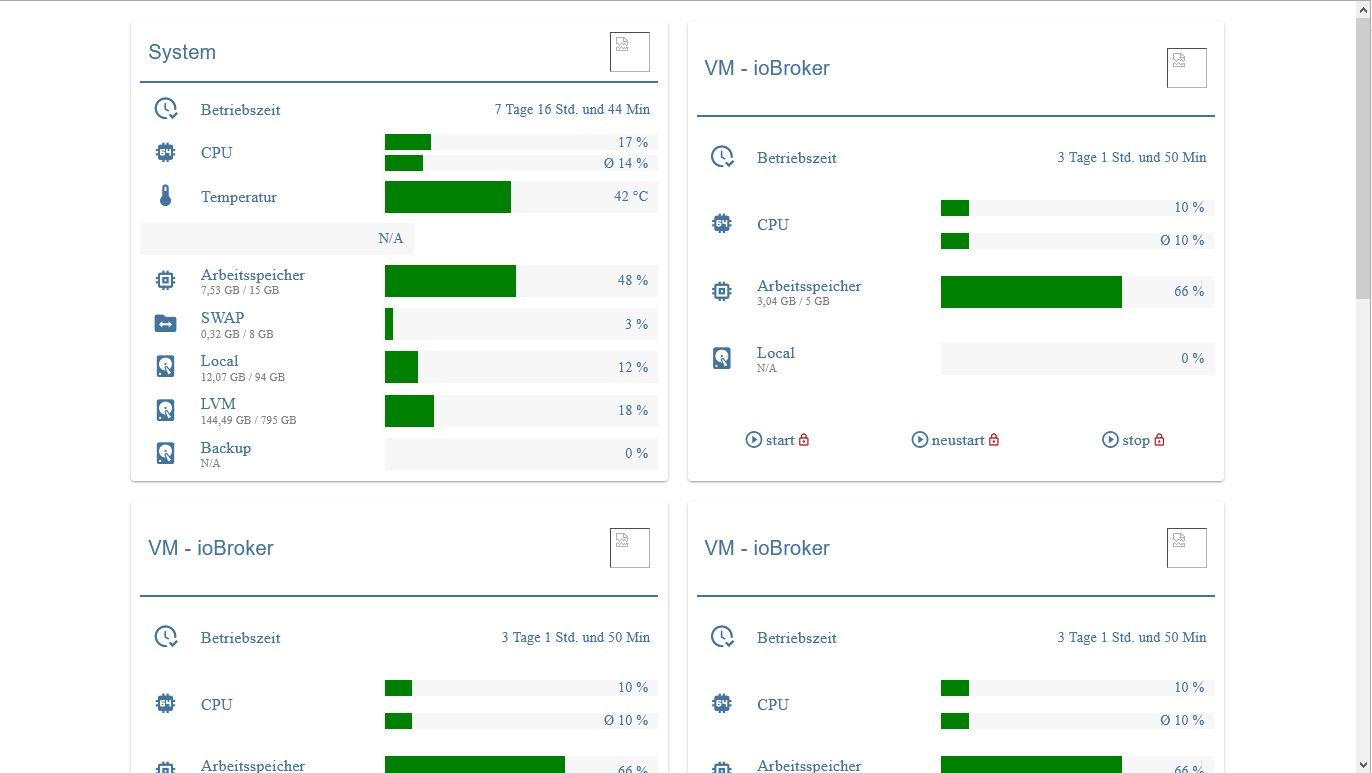
      proxmox_status_grid.JPG

      FredFF ScroungerS 3 Replies Last reply
      0
      • L Leviathan09

        @Scrounger Bekomme den Error

        26.8.2020, 10:24:04.408	[warn ]: javascript.0 (9290) script.js.common.VIS_Skripte.Proxmox_MaterialDesign: [updateVm - promox] datapoint 'undefined' not exist!
        26.8.2020, 10:26:04.410	[warn ]: javascript.0 (9290) script.js.common.VIS_Skripte.Proxmox_MaterialDesign: [updateVm - promox] datapoint 'undefined' not exist!
        

        Außerdem bekomme ich die Icons nicht angezeigt obwohl ich unter vis.0 einen Ordner myImages habe mit den passenden Dateien wie ich sie im Skript stehen habe.

        Ebenso zeigt er mir nicht alle meine Widgets an die ich in ein GridView gepackt habe.
        Die ersten 4 werden angezeigt aber ich kann nicht weiter nach unten scrollen.
        landing_page.JPG
        Bei der View mit dem Grid selbst sieht man das die Scroll Leiste rechts viel länger ist, aber auf meiner Landing Page wo ich diese View über "View in Widget" aufrufe wird das nicht übernommen.
        Die Höhe ist auf 100% gesetzt.
        proxmox_status_grid.JPG

        FredFF Online
        FredFF Online
        FredF
        Most Active Forum Testing
        wrote on last edited by
        #3

        @Leviathan09 sagte in Material Design Widgets: Proxmox:

        vis.0 einen Ordner myImages habe mit den passenden Dateien

        Icons müssen über den Vis Dateimanager hochgeladen geladen werden, damit sie in Vis sichtbar sind

        L 1 Reply Last reply
        1
        • FredFF FredF

          @Leviathan09 sagte in Material Design Widgets: Proxmox:

          vis.0 einen Ordner myImages habe mit den passenden Dateien

          Icons müssen über den Vis Dateimanager hochgeladen geladen werden, damit sie in Vis sichtbar sind

          L Offline
          L Offline
          Leviathan09
          wrote on last edited by
          #4

          @FredF Das hat dann schon mal funktioniert, danke
          Wusste garnicht das man die extra über Vis hochladen muss.
          Dachte wenn der Ordner und die Dateien vorhanden sind passt das.

          Wieder was gelernt

          1 Reply Last reply
          0
          • L Leviathan09

            @Scrounger Bekomme den Error

            26.8.2020, 10:24:04.408	[warn ]: javascript.0 (9290) script.js.common.VIS_Skripte.Proxmox_MaterialDesign: [updateVm - promox] datapoint 'undefined' not exist!
            26.8.2020, 10:26:04.410	[warn ]: javascript.0 (9290) script.js.common.VIS_Skripte.Proxmox_MaterialDesign: [updateVm - promox] datapoint 'undefined' not exist!
            

            Außerdem bekomme ich die Icons nicht angezeigt obwohl ich unter vis.0 einen Ordner myImages habe mit den passenden Dateien wie ich sie im Skript stehen habe.

            Ebenso zeigt er mir nicht alle meine Widgets an die ich in ein GridView gepackt habe.
            Die ersten 4 werden angezeigt aber ich kann nicht weiter nach unten scrollen.
            landing_page.JPG
            Bei der View mit dem Grid selbst sieht man das die Scroll Leiste rechts viel länger ist, aber auf meiner Landing Page wo ich diese View über "View in Widget" aufrufe wird das nicht übernommen.
            Die Höhe ist auf 100% gesetzt.
            proxmox_status_grid.JPG

            ScroungerS Offline
            ScroungerS Offline
            Scrounger
            Developer
            wrote on last edited by
            #5

            @Leviathan09
            Zeig mal bitte die Einstellungen deines skriptes

            L 1 Reply Last reply
            0
            • ScroungerS Scrounger

              @Leviathan09
              Zeig mal bitte die Einstellungen deines skriptes

              L Offline
              L Offline
              Leviathan09
              wrote on last edited by
              #6

              @Scrounger -> https://0bin.net/paste/zx9aLTtt#fgLOXmuOLz2tsbE8Z7lmIJHqhzD5JNFQmaMNEZrEV69

              ScroungerS 1 Reply Last reply
              0
              • L Leviathan09

                @Scrounger -> https://0bin.net/paste/zx9aLTtt#fgLOXmuOLz2tsbE8Z7lmIJHqhzD5JNFQmaMNEZrEV69

                ScroungerS Offline
                ScroungerS Offline
                Scrounger
                Developer
                wrote on last edited by
                #7

                @Leviathan09 sagte in Material Design Widgets: Proxmox:

                @Scrounger -> https://0bin.net/paste/zx9aLTtt#fgLOXmuOLz2tsbE8Z7lmIJHqhzD5JNFQmaMNEZrEV69

                Der Link geht nicht. Poste es doch hier im code tag.

                L 1 Reply Last reply
                0
                • ScroungerS Scrounger

                  @Leviathan09 sagte in Material Design Widgets: Proxmox:

                  @Scrounger -> https://0bin.net/paste/zx9aLTtt#fgLOXmuOLz2tsbE8Z7lmIJHqhzD5JNFQmaMNEZrEV69

                  Der Link geht nicht. Poste es doch hier im code tag.

                  L Offline
                  L Offline
                  Leviathan09
                  wrote on last edited by
                  #8

                  @Scrounger Hm bei mir geht der Link ohne Probleme.
                  Hier im tag:

                  /************************************************************************************************************************************************************************
                  Version: 1.0.0
                  created by Scrounger
                   
                  Dieses Skript erzeugt json strings um Proxmox Informationen im VIS mit den Material Design Widgets darzustellen
                  =========================================================================================================================================================================
                   
                  !!! Voraussetzungen !!!
                  * Material Design Widgets               >= 0.3.19
                  * Proxmox                               >= 1.0.2
                  * Javascript Adapter                    >= 4.6.1
                  * Javascript Adapter NPM Module:        moment, moment-timezone, moment-duration-format, mathjs
                  =========================================================================================================================================================================
                   
                  --- Links ---
                  * Support:          https://forum.iobroker.net/topic/35296/material-design-widgets-proxmox
                  * Github:           https://github.com/Scrounger/ioBroker.vis-materialdesign/tree/master/examples/Proxmox
                   
                  =========================================================================================================================================================================
                   
                  --- Changelog ---
                  * 1.0.0:            Initial release
                   
                  ************************************************************************************************************************************************************************/
                   
                  // Skript Einstellungen *************************************************************************************************************************************************
                  let idDatenpunktPrefix = 'javascript.0'                                                                         // '0_userdata.0' or 'javascript.x'
                  let idDatenPunktStrukturPrefix = '02_VIS.Proxmox.MaterialDesignWidgets'                                            // Struktur unter Prefix
                   
                  let triggerDatenpunkt = "proxmox.0.node_pve.uptime";                                                        // Datenpunkt um Skript Ausführung zu triggern (z.B. uptime einer Node)
                   
                  let cpuAverageLastValues = 60;                                                                                  // Wieviele Werte zur Berechnung der durchschnittlichen CPU Last verwendet werden sollen
                   
                  let nodesList = [                                                                                               // Node Liste
                      {
                          idChannel: 'proxmox.0.node_pve',                                                                    // id des Channels der Node
                          targetChannel: 'promox',                                                                                // id unter der der json string für das Table Widget gespeichert werden soll
                          name: 'System',                                                                                         // name der als Titel angezeigt werden soll
                          image: '/vis.0/myImages/proxmox_logo2.png',                                                                       // Bild das im Titel angezeigt werden soll
                          url: 'https://192.168.112.99:8006/',                                                                        // Url die aufgerufen wird beim Klick auf den Titel
                          showControlButtons: false,                                                                              // Buttons für start, restart, stop anzeigen
                           temperatures: ['0_userdata.0.CPU_Temp_Proxmox'], // Datenpunkte für Temperatur (1 oder 2 Datenpunkte, entfernen wenn nicht benötigt)
                           storages: [                                                                                             // Storage Datenpunkt des Proxmox Adapter anzeigen
                               {
                                   idChannel: 'proxmox.0.storage_local',                                                           // id des Storage Datenpunkts
                                   text: 'Local',                                                                                  // Text der für den Storage angezeigt werden soll
                                   icon: 'harddisk'                                                                                // Icon das für den Storage angezeigt werden soll
                               },
                               {
                                   idChannel: 'proxmox.0.storage_local-lvm',
                                   text: 'LVM',
                                   icon: 'harddisk'
                               },
                               {
                                   idChannel: 'proxmox.0.storage_Backup',
                                   text: 'Backup',
                                   icon: 'harddisk'
                          //     },
                          //     {
                          //         idChannel: 'proxmox.0.storage_Mirror',
                          //         text: 'Mirror',
                          //         icon: 'harddisk'
                               }
                           ],
                          // custom: [                                                                                               // andere Datenpunkte (nicht vom Proxmox Adapter) die mit aufgelistet werden sollen. Falls nicht benötigt, Array löschen
                          //     {
                          //         id: 'linux-control.0.proxmox.needrestart.needrestart',                                          // id des Datenpunktes
                          //         text: 'Neustart notwendig',                                                                     // text der angezeigt werden soll
                          //         icon: 'restart',                                                                                // icon das angezeigt werden soll
                          //         type: 'boolean',                                                                                // welche Funktion verwendet werden soll
                          //         attention: true                                                                                 // ob Attention Farbe angezeigt werden soll
                          //     },
                          //     {
                          //         id: 'linux-control.0.proxmox.updates.newPackages',                                              // id des Datenpunktes
                          //         text: 'Updates',                                                                                // text der angezeigt werden soll
                          //         icon: 'package-down',                                                                           // icon das angezeigt werden soll
                          //         type: 'number',                                                                                 // welche Funktion verwendet werden soll
                          //         attention: true                                                                                 // ob Attention Farbe angezeigt werden soll
                          //     },
                          //     {
                          //         id: 'linux-control.0.proxmox.updates.lastUpdate',                                               // id des Datenpunktes
                          //         text: 'letztes Update',                                                                         // text der angezeigt werden soll
                          //         icon: 'package-up',                                                                             // icon das angezeigt werden soll
                          //         type: 'timestamp',                                                                              // welche Funktion verwendet werden soll
                          //     }
                          // ]
                      }
                  ]
                   
                  let vmList = [                                                                                                  // LXC / VM Liste
                      {
                          idChannel: 'proxmox.0.qemu_ioBroker',                                                                    // id des Channels der Node
                          targetChannel: 'qemu_ioBroker',                                                                          // id unter der der json string für das Table Widget gespeichert werden soll
                          name: 'VM - ioBroker',                                                                                 // name der als Titel angezeigt werden soll
                          image: '/vis.0/myImages/iobroker_logo.png',                                                                  // Bild das im Titel angezeigt werden soll
                          url: 'https://192.168.112.100:8081/',                                               // Url die aufgerufen wird beim Klick auf den Titel
                          showControlButtons: false,                                                                              // Buttons für start, restart, stop anzeigen
                          // custom: [                                                                                               // andere Datenpunkte (nicht vom Proxmox Adapter) die mit aufgelistet werden sollen. Falls nicht benötigt, Array löschen
                          //     {
                          //         id: 'linux-control.0.lxc_ioBroker.needrestart.needrestart',                                     // id des Datenpunktes
                          //         text: 'Neustart notwendig',                                                                     // text der angezeigt werden soll
                          //         icon: 'restart',                                                                                // icon das angezeigt werden soll
                          //         type: 'boolean',                                                                                // welche Funktion verwendet werden soll
                          //         attention: true                                                                                 // ob Attention Farbe angezeigt werden soll
                          //     },
                          //     {
                          //         id: 'linux-control.0.lxc_ioBroker.updates.newPackages',                                         // id des Datenpunktes
                          //         text: 'Updates',                                                                                // text der angezeigt werden soll
                          //         icon: 'package-down',                                                                           // icon das angezeigt werden soll
                          //         type: 'number',                                                                                 // welche Funktion verwendet werden soll
                          //         attention: true                                                                                 // ob Attention Farbe angezeigt werden soll
                          //     },
                          //     {
                          //         id: 'linux-control.0.lxc_ioBroker.updates.lastUpdate',                                          // id des Datenpunktes
                          //         text: 'letztes Update',                                                                         // text der angezeigt werden soll
                          //         icon: 'package-up',                                                                             // icon das angezeigt werden soll
                          //         type: 'timestamp',                                                                              // welche Funktion verwendet werden soll
                          //     },
                          //     {
                          //         id: 'linux-control.0.lxc_ioBroker.backup.container.timestamp',                                  // id des Datenpunktes
                          //         secondIds: [                                                                                    // ids für subtext
                          //             'linux-control.0.lxc_ioBroker.backup.container.files',
                          //             'linux-control.0.lxc_ioBroker.backup.container.size'
                          //         ],
                          //         text: 'LXC Backup',                                                                             // text der angezeigt werden soll
                          //         icon: 'backup-restore',                                                                         // icon das angezeigt werden soll
                          //         type: 'timestampInSeconds'
                          //     },
                          //     {
                          //         id: 'linux-control.0.lxc_ioBroker.backup.data.timestamp',                                       // id des Datenpunktes
                          //         secondIds: [                                                                                    // ids für subtext
                          //             'linux-control.0.lxc_ioBroker.backup.data.files',
                          //             'linux-control.0.lxc_ioBroker.backup.data.size'
                          //         ],
                          //         text: 'Daten Backup',                                                                           // text der angezeigt werden soll
                          //         icon: 'file-upload',                                                                            // icon das angezeigt werden soll
                          //         type: 'timestampInSeconds'
                          //     },
                          //     {
                          //         id: 'linux-control.0.lxc_ioBroker.folders.ioBroker',                                            // id des Datenpunktes
                          //         text: 'Ordnergröße',                                                                            // text der angezeigt werden soll
                          //         icon: 'folder-information',                                                                     // icon das angezeigt werden soll
                          //     },
                          //     {
                          //         id: 'linux-control.0.lxc_ioBroker.folders.npm_cache',                                           // id des Datenpunktes
                          //         text: 'NPM Cache',                                                                              // text der angezeigt werden soll
                          //         icon: 'folder-clock',                                                                           // icon das angezeigt werden soll
                          //     }
                          // ]
                      },
                      {
                          idChannel: 'proxmox.0.qemu_Nextcloud',                                                                    // id des Channels der Node
                          targetChannel: 'qemu_NextCloud',                                                                          // id unter der der json string für das Table Widget gespeichert werden soll
                          name: 'VM - Nextcloud',                                                                                 // name der als Titel angezeigt werden soll
                          image: '/vis.0/myImages/nextcloud_logo.png',                                                             // Bild das im Titel angezeigt werden soll
                          url: 'https://cloud.gertznet.de',                                                               // Url die aufgerufen wird beim Klick auf den Titel
                          showControlButtons: false,                                                                              // Buttons für start, restart, stop anzeigen
                          // custom: [                                                                                                // andere Datenpunkte (nicht vom Proxmox Adapter) die mit aufgelistet werden sollen. Falls nicht benötigt, Array löschen
                          //     {
                          //         id: 'linux-control.0.lxc_NextCloud.needrestart.needrestart',                                    // id des Datenpunktes
                          //         text: 'Neustart notwendig',                                                                     // text der angezeigt werden soll
                          //         icon: 'restart',                                                                                // icon das angezeigt werden soll
                          //         type: 'boolean',                                                                                // welche Funktion verwendet werden soll
                          //         attention: true                                                                                 // ob Attention Farbe angezeigt werden soll
                          //     },
                          //     {
                          //         id: 'linux-control.0.lxc_NextCloud.updates.newPackages',                                         // id des Datenpunktes
                          //         text: 'Updates',                                                                                // text der angezeigt werden soll
                          //         icon: 'package-down',                                                                           // icon das angezeigt werden soll
                          //         type: 'number',                                                                                 // welche Funktion verwendet werden soll
                          //         attention: true                                                                                 // ob Attention Farbe angezeigt werden soll
                          //     },
                          //     {
                          //         id: 'linux-control.0.lxc_NextCloud.updates.lastUpdate',                                          // id des Datenpunktes
                          //         text: 'letztes Update',                                                                         // text der angezeigt werden soll
                          //         icon: 'package-up',                                                                             // icon das angezeigt werden soll
                          //         type: 'timestamp',                                                                              // welche Funktion verwendet werden soll
                          //     },
                          //     {
                          //         id: 'linux-control.0.lxc_NextCloud.backup.container.timestamp',                                  // id des Datenpunktes
                          //         secondIds: [                                                                                     // ids für subtext
                          //             'linux-control.0.lxc_NextCloud.backup.container.files',
                          //             'linux-control.0.lxc_NextCloud.backup.container.size'
                          //         ],
                          //         text: 'LXC Backup',                                                                              // text der angezeigt werden soll
                          //         icon: 'backup-restore',                                                                          // icon das angezeigt werden soll
                          //         type: 'timestampInSeconds'
                          //     },
                          //     {
                          //         id: 'linux-control.0.lxc_NextCloud.folders.userData',                                            // id des Datenpunktes
                          //         text: 'Benutzerdaten',                                                                           // text der angezeigt werden soll
                          //         icon: 'folder-account',                                                                          // icon das angezeigt werden soll
                          //     }
                          // ]
                      },
                      {
                          idChannel: 'proxmox.0.qemu_OpenVPN',                                                                      // id des Channels der Node
                          targetChannel: 'qemu_OpenVPN',                                                                            // id unter der der json string für das Table Widget gespeichert werden soll
                          name: 'VM - OpenVPN',                                                                                   // name der als Titel angezeigt werden soll
                          image: '/vis.0/myImages/openvpn_logo.png',                                                                      // Bild das im Titel angezeigt werden soll
                          //url: 'https://10.25.1.12:8000/',                                                                         // Url die aufgerufen wird beim Klick auf den Titel
                          showControlButtons: false,                                                                              // Buttons für start, restart, stop anzeigen
                          // custom: [                                                                                                // andere Datenpunkte (nicht vom Proxmox Adapter) die mit aufgelistet werden sollen. Falls nicht benötigt, Array löschen
                          //     {
                          //         id: 'linux-control.0.lxc_Waihona.needrestart.needrestart',                                    // id des Datenpunktes
                          //         text: 'Neustart notwendig',                                                                     // text der angezeigt werden soll
                          //         icon: 'restart',                                                                                // icon das angezeigt werden soll
                          //         type: 'boolean',                                                                                // welche Funktion verwendet werden soll
                          //         attention: true                                                                                 // ob Attention Farbe angezeigt werden soll
                          //     },
                          //     {
                          //         id: 'linux-control.0.lxc_Waihona.updates.newPackages',                                         // id des Datenpunktes
                          //         text: 'Updates',                                                                                // text der angezeigt werden soll
                          //         icon: 'package-down',                                                                           // icon das angezeigt werden soll
                          //         type: 'number',                                                                                 // welche Funktion verwendet werden soll
                          //         attention: true                                                                                 // ob Attention Farbe angezeigt werden soll
                          //     },
                          //     {
                          //         id: 'linux-control.0.lxc_Waihona.updates.lastUpdate',                                          // id des Datenpunktes
                          //         text: 'letztes Update',                                                                         // text der angezeigt werden soll
                          //         icon: 'package-up',                                                                             // icon das angezeigt werden soll
                          //         type: 'timestamp',                                                                              // welche Funktion verwendet werden soll
                          //     },
                          //     {
                          //         id: 'linux-control.0.lxc_Waihona.backup.container.timestamp',                                    // id des Datenpunktes
                          //         secondIds: [                                                                                     // ids für subtext
                          //             'linux-control.0.lxc_Waihona.backup.container.files',
                          //             'linux-control.0.lxc_Waihona.backup.container.size'
                          //         ],
                          //         text: 'LXC Backup',                                                                              // text der angezeigt werden soll
                          //         icon: 'backup-restore',                                                                          // icon das angezeigt werden soll
                          //         type: 'timestampInSeconds'
                          //     }
                          // ]
                      },
                      {
                          idChannel: 'proxmox.0.lxc_Grafana',                                                                        // id des Channels der Node
                          targetChannel: 'lxc_Grafana',                                                                              // id unter der der json string für das Table Widget gespeichert werden soll
                          name: 'LXC - Grafana',                                                                                     // name der als Titel angezeigt werden soll
                          image: '/vis.0/myImages/grafana_logo.png',                                                                      // Bild das im Titel angezeigt werden soll
                          showControlButtons: false,                                                                              // Buttons für start, restart, stop anzeigen
                          // custom: [                                                                                                // andere Datenpunkte (nicht vom Proxmox Adapter) die mit aufgelistet werden sollen. Falls nicht benötigt, Array löschen
                          //     {
                          //         id: 'linux-control.0.lxc_MySql.needrestart.needrestart',                                    // id des Datenpunktes
                          //         text: 'Neustart notwendig',                                                                     // text der angezeigt werden soll
                          //         icon: 'restart',                                                                                // icon das angezeigt werden soll
                          //         type: 'boolean',                                                                                // welche Funktion verwendet werden soll
                          //         attention: true                                                                                 // ob Attention Farbe angezeigt werden soll
                          //     },
                          //     {
                          //         id: 'linux-control.0.lxc_MySql.updates.newPackages',                                         // id des Datenpunktes
                          //         text: 'Updates',                                                                                // text der angezeigt werden soll
                          //         icon: 'package-down',                                                                           // icon das angezeigt werden soll
                          //         type: 'number',                                                                                 // welche Funktion verwendet werden soll
                          //         attention: true                                                                                 // ob Attention Farbe angezeigt werden soll
                          //     },
                          //     {
                          //         id: 'linux-control.0.lxc_MySql.updates.lastUpdate',                                          // id des Datenpunktes
                          //         text: 'letztes Update',                                                                         // text der angezeigt werden soll
                          //         icon: 'package-up',                                                                             // icon das angezeigt werden soll
                          //         type: 'timestamp',                                                                              // welche Funktion verwendet werden soll
                          //     },
                          //     {
                          //         id: 'linux-control.0.lxc_MySql.backup.container.timestamp',                                      // id des Datenpunktes
                          //         secondIds: [                                                                                     // ids für subtext
                          //             'linux-control.0.lxc_MySql.backup.container.files',
                          //             'linux-control.0.lxc_MySql.backup.container.size'
                          //         ],
                          //         text: 'LXC Backup',                                                                              // text der angezeigt werden soll
                          //         icon: 'backup-restore',                                                                          // icon das angezeigt werden soll
                          //         type: 'timestampInSeconds'
                          //     },
                          //     {
                          //         id: 'linux-control.0.lxc_MySql.backup.data.timestamp',                                          // id des Datenpunktes
                          //         secondIds: [                                                                                    // ids für subtext
                          //             'linux-control.0.lxc_MySql.backup.data.files',
                          //             'linux-control.0.lxc_MySql.backup.data.size'
                          //         ],
                          //         text: 'Daten Backup',                                                                           // text der angezeigt werden soll
                          //         icon: 'file-upload',                                                                            // icon das angezeigt werden soll
                          //         type: 'timestampInSeconds'
                          //     },
                          //     {
                          //         id: 'linux-control.0.lxc_MySql.folders.databaseSize',                                            // id des Datenpunktes
                          //         text: 'Datenbank',                                                                               // text der angezeigt werden soll
                          //         icon: 'database',                                                                                // icon das angezeigt werden soll
                          //     }
                          // ]
                      },
                      {
                          idChannel: 'proxmox.0.lxc_piHole',                                                                       // id des Channels der Node
                          targetChannel: 'lxc_piHole',                                                                             // id unter der der json string für das Table Widget gespeichert werden soll
                          name: 'LXC - piHole',                                                                                    // name der als Titel angezeigt werden soll
                          image: '/vis.0/myImages/pihole_logo.png',                                                                     // Bild das im Titel angezeigt werden soll
                          //url: 'https://10.25.1.11/admin/',                                                                        // Url die aufgerufen wird beim Klick auf den Titel
                          showControlButtons: false,                                                                              // Buttons für start, restart, stop anzeigen
                          // custom: [                                                                                                // andere Datenpunkte (nicht vom Proxmox Adapter) die mit aufgelistet werden sollen. Falls nicht benötigt, Array löschen
                          //     {
                          //         id: 'linux-control.0.lxc_piHole.needrestart.needrestart',                                    // id des Datenpunktes
                          //         text: 'Neustart notwendig',                                                                     // text der angezeigt werden soll
                          //         icon: 'restart',                                                                                // icon das angezeigt werden soll
                          //         type: 'boolean',                                                                                // welche Funktion verwendet werden soll
                          //         attention: true                                                                                 // ob Attention Farbe angezeigt werden soll
                          //     },
                          //     {
                          //         id: 'linux-control.0.lxc_piHole.updates.newPackages',                                         // id des Datenpunktes
                          //         text: 'Updates',                                                                                // text der angezeigt werden soll
                          //         icon: 'package-down',                                                                           // icon das angezeigt werden soll
                          //         type: 'number',                                                                                 // welche Funktion verwendet werden soll
                          //         attention: true                                                                                 // ob Attention Farbe angezeigt werden soll
                          //     },
                          //     {
                          //         id: 'linux-control.0.lxc_piHole.updates.lastUpdate',                                          // id des Datenpunktes
                          //         text: 'letztes Update',                                                                         // text der angezeigt werden soll
                          //         icon: 'package-up',                                                                             // icon das angezeigt werden soll
                          //         type: 'timestamp',                                                                              // welche Funktion verwendet werden soll
                          //     },
                          //     {
                          //         id: 'linux-control.0.lxc_piHole.backup.container.timestamp',                                     // id des Datenpunktes
                          //         secondIds: [                                                                                     // ids für subtext
                          //             'linux-control.0.lxc_piHole.backup.container.files',
                          //             'linux-control.0.lxc_piHole.backup.container.size'
                          //         ],
                          //         text: 'LXC Backup',                                                                              // text der angezeigt werden soll
                          //         icon: 'backup-restore',                                                                          // icon das angezeigt werden soll
                          //         type: 'timestampInSeconds'
                          //     },
                          //     {
                          //         id: 'linux-control.0.lxc_piHole.backup.data.timestamp',                                         // id des Datenpunktes
                          //         secondIds: [                                                                                    // ids für subtext
                          //             'linux-control.0.lxc_piHole.backup.data.files',
                          //             'linux-control.0.lxc_piHole.backup.data.size'
                          //         ],
                          //         text: 'Daten Backup',                                                                           // text der angezeigt werden soll
                          //         icon: 'file-upload',                                                                            // icon das angezeigt werden soll
                          //         type: 'timestampInSeconds'
                          //     },
                          //     {
                          //         id: 'linux-control.0.lxc_piHole.folders.databaseSize',                                           // id des Datenpunktes
                          //         text: 'Datenbank',                                                                               // text der angezeigt werden soll
                          //         icon: 'database',                                                                                // icon das angezeigt werden soll
                          //     }
                          // ]
                      },
                      {
                          idChannel: 'proxmox.0.lxc_fritz-collector',                                                                    // id des Channels der Node
                          targetChannel: 'lxc_fritz-collector',                                                                          // id unter der der json string für das Table Widget gespeichert werden soll
                          name: 'LXC - fritz-collector',                                                                                 // name der als Titel angezeigt werden soll
                          image: '/vis.0/myImages/fritz_logo.png',                                                                  // Bild das im Titel angezeigt werden soll
                          //url: 'https://10.25.1.17:8081/login/index.html?href=%2F',                                                // Url die aufgerufen wird beim Klick auf den Titel
                          showControlButtons: false,                                                                              // Buttons für start, restart, stop anzeigen
                          // custom: [                                                                                                // andere Datenpunkte (nicht vom Proxmox Adapter) die mit aufgelistet werden sollen. Falls nicht benötigt, Array löschen
                          //     {
                          //         id: 'linux-control.0.lxc_devBroker.needrestart.needrestart',                                    // id des Datenpunktes
                          //         text: 'Neustart notwendig',                                                                     // text der angezeigt werden soll
                          //         icon: 'restart',                                                                                // icon das angezeigt werden soll
                          //         type: 'boolean',                                                                                // welche Funktion verwendet werden soll
                          //         attention: true                                                                                 // ob Attention Farbe angezeigt werden soll
                          //     },
                          //     {
                          //         id: 'linux-control.0.lxc_devBroker.updates.newPackages',                                         // id des Datenpunktes
                          //         text: 'Updates',                                                                                // text der angezeigt werden soll
                          //         icon: 'package-down',                                                                           // icon das angezeigt werden soll
                          //         type: 'number',                                                                                 // welche Funktion verwendet werden soll
                          //         attention: true                                                                                 // ob Attention Farbe angezeigt werden soll
                          //     },
                          //     {
                          //         id: 'linux-control.0.lxc_devBroker.updates.lastUpdate',                                          // id des Datenpunktes
                          //         text: 'letztes Update',                                                                         // text der angezeigt werden soll
                          //         icon: 'package-up',                                                                             // icon das angezeigt werden soll
                          //         type: 'timestamp',                                                                              // welche Funktion verwendet werden soll
                          //     },
                          //     {
                          //         id: 'linux-control.0.lxc_devBroker.backup.container.timestamp',                                  // id des Datenpunktes
                          //         secondIds: [                                                                                     // ids für subtext
                          //             'linux-control.0.lxc_devBroker.backup.container.files',
                          //             'linux-control.0.lxc_devBroker.backup.container.size'
                          //         ],
                          //         text: 'LXC Backup',                                                                              // text der angezeigt werden soll
                          //         icon: 'backup-restore',                                                                          // icon das angezeigt werden soll
                          //         type: 'timestampInSeconds'
                          //     },
                          //     {
                          //         id: 'linux-control.0.lxc_devBroker.folders.ioBroker',                                            // id des Datenpunktes
                          //         text: 'Ordnergröße',                                                                             // text der angezeigt werden soll
                          //         icon: 'folder-information',                                                                      // icon das angezeigt werden soll
                          //     },
                          //     {
                          //         id: 'linux-control.0.lxc_devBroker.folders.npm_cache',                                           // id des Datenpunktes
                          //         text: 'NPM Cache',                                                                               // text der angezeigt werden soll
                          //         icon: 'folder-clock',                                                                            // icon das angezeigt werden soll
                          //     }
                          // ]
                      },
                      {
                          idChannel: 'proxmox.0.lxc_debian-test',                                                              // id des Channels der Node
                          targetChannel: 'lxc_debian-test',                                                                        // id unter der der json string für das Table Widget gespeichert werden soll
                          name: 'LXC - Debian-Test',                                                                                 // name der als Titel angezeigt werden soll
                          image: '/vis.0/myImages/debian_logo.png',                                                             // Bild das im Titel angezeigt werden soll
                          //url: 'http://10.25.1.16/login.htm',                                                                      // Url die aufgerufen wird beim Klick auf den Titel
                          showControlButtons: false,                                                                              // Buttons für start, restart, stop anzeigen
                      },
                  ]
                   
                  let fontSizePrimary = 20;
                  let fontSizeSecondary = 16;
                  let fontSizeTertiary = 14;
                  let fontSizeQuinary = 11;
                   
                  let fontFamilyPrimary = 'Roboto,sans-serif';
                  let fontFamilySecondary = 'RobotoCondensed-Regular';
                  let fontFamilyTertiary = 'RobotoCondensed-Light';
                  let fontFamilyQuaternary = 'RobotoCondensed-LightItalic';
                   
                  let colorPrimary = '#44739e';
                  let colorSecondary = 'gray';
                  let colorTertiary = '#44739e';
                   
                  let colorOnline = 'green';
                  let colorOffline = 'FireBrick';
                   
                   
                  let colorGood = 'green';
                  let colorMedium = 'gold';
                  let colorBad = 'FireBrick';
                   
                  let iconAttentionColor = '#f27935';
                   
                  let colCount = 24;                                                                                              // Anzahl der Spalten die im Widget eingestellt sind (+1 weil 0 im VIS Editor mitzählt)
                  let colSpanIcon = 3;                                                                                            // Anzahl der Spalten die für das icon verwendet werden soll
                  let colSpanText = 8;                                                                                            // Anzahl der Spalten die für den Text verwendet werden soll
                  let colSpanValueText = colCount - colSpanIcon - colSpanText;
                   
                  let rowHeight = 32;
                   
                  let styleValue = `font-size: ${fontSizeTertiary}px; text-align: right; margin-right: 8px; font-family: ${fontFamilyTertiary}; color: ${colorTertiary};`
                  let styleText = `font-size: ${fontSizeSecondary}px; text-align: left; font-family: ${fontFamilySecondary}; color: ${colorPrimary}; height: ${rowHeight}px; line-height: ${rowHeight}px; white-space: nowrap; text-overflow: ellipsis; overflow: hidden;`
                  let styleButtonText = `font-size: ${fontSizeSecondary}px; text-align: left; font-family: ${fontFamilyTertiary}; color: ${colorPrimary}; margin-left: 2px; margin-right: 2px;`
                   
                  let iconLayout = {
                      type: "materialdesignicon",
                      mdwIconSize: 26,
                      colspan: colSpanIcon,
                      cellStyleAttrs: 'text-overflow: unset'
                  }
                   
                  let textLayout = {
                      type: "html",
                      width: "100%",
                      cellStyleAttrs: 'padding-left: 2px;',
                      colspan: colSpanText
                  }
                   
                  let valueTextLayout = {
                      type: "html",
                      width: "100%",
                      colspan: colSpanValueText,
                  }
                   
                  let progressBarLayout = {
                      type: "progress",
                      width: "100%",
                      height: `${rowHeight}px`,
                      showValueLabel: true,
                      textAlign: "end",
                      colorProgress: colorGood,
                      colorOneCondition: 69,
                      colorOne: colorMedium,
                      colorTwoCondition: 89,
                      colorTwo: colorBad,
                      progressRounded: false,
                      verticalAlign: 'top',
                      textFontSize: fontSizeTertiary,
                      textFontFamily: fontFamilyTertiary,
                      colspan: colSpanValueText
                  }
                   
                  let progressBarCpuLayout = {
                      type: "progress",
                      width: "100%",
                      height: `${rowHeight / 2}px`,
                      showValueLabel: true,
                      textAlign: "end",
                      colorProgress: colorGood,
                      colorOneCondition: 69,
                      colorOne: colorMedium,
                      colorTwoCondition: 89,
                      colorTwo: colorBad,
                      progressRounded: false,
                      textFontSize: fontSizeTertiary,
                      textFontFamily: fontFamilyTertiary,
                      colspan: colSpanValueText
                  }
                   
                  let temperatureMaxValue = 90;
                  let progressBarTemperaturLayout = {
                      type: "progress",
                      width: "100%",
                      min: 0,
                      max: temperatureMaxValue,
                      showValueLabel: true,
                      textAlign: "end",
                      colorProgress: colorGood,
                      colorOneCondition: 59 / temperatureMaxValue * 100,
                      colorOne: colorMedium,
                      colorTwoCondition: 69 / temperatureMaxValue * 100,
                      colorTwo: colorBad,
                      progressRounded: false,
                      textFontSize: fontSizeTertiary,
                      textFontFamily: fontFamilyTertiary,
                      colspan: colSpanValueText,
                      valueLabelStyle: 'progressCustom'
                  }
                   
                  let buttonControlLayout = {
                      type: "buttonState",
                      width: "100%",
                      height: "40px",
                      buttonStyle: "text",
                      vibrateOnMobilDevices: 50,
                      iconPosition: "left",
                      iconHeight: "20",
                      labelWidth: "",
                      autoLockAfter: 5,
                      lockEnabled: true,
                      lockIconColor: "FireBrick",
                  }
                   
                  let statusSeperator = {
                      type: "html",
                      width: "100%",
                      colspan: colCount
                  }
                   
                  let iconButtonControlLayout = {
                      type: "buttonState_icon",
                      width: `${rowHeight}px`,
                      height: `${rowHeight}px`,
                      imageColor: colorPrimary,
                      vibrateOnMobilDevices: "50",
                      autoLockAfter: "5",
                      lockIconTop: "32",
                      lockIconLeft: "30",
                      lockIconSize: "12",
                      lockIconColor: "red",
                      lockFilterGrayscale: "30",
                      image: "update",
                      iconHeight: "26",
                      lockEnabled: true,
                      lockIconBackground: "white",
                      lockBackgroundSizeFactor: "1.1"
                  }
                  // **********************************************************************************************************************************************************************
                   
                  //import
                  const mathjs = require("mathjs");
                  const moment = require("moment");
                  const momentDurationFormatSetup = require("moment-duration-format");
                  moment.locale("de");
                   
                  // Trigger
                  on({ id: triggerDatenpunkt, change: 'any' }, updateData);
                   
                  function updateData() {
                   
                      for (const node of nodesList) {
                          updateVm(node, true);
                      }
                   
                      for (const vm of vmList) {
                          updateVm(vm);
                      }
                  }
                   
                  function updateVm(vm, isNode = false) {
                      try {
                          let table = [];
                   
                          if (existsObject(`${vm.idChannel}`)) {
                              let channel = getObject(`${vm.idChannel}`)
                   
                              if (channel && channel.common && channel.common.name) {
                                  let row = {};
                   
                                  if (vm.url) {
                                      row.button = {
                                          type: "buttonLink",
                                          href: vm.url,
                                          openNewWindow: true,
                                          width: "100%",
                                          height: "46px",
                                          buttonStyle: "text",
                                          vibrateOnMobilDevices: "50",
                                          iconPosition: "right",
                                          image: vm.image,
                                          iconHeight: "40",
                                          labelWidth: "100",
                                          buttontext: `<div style="font-family: ${fontFamilyPrimary}; font-size: ${fontSizePrimary}px; font-weight: 500; letter-spacing: .0125em; text-decoration: inherit; text-align: left;">${vm.name}</div>`,
                                          colspan: colCount,
                                      }
                                  } else {
                                      row.title = {
                                          type: "html",
                                          width: "100%",
                                          height: "46px",
                                          html: `<div style="display: flex; padding: 0 8px 0 8px; align-items: center;">
                                                      <div style="flex: 1; font-family: ${fontFamilyPrimary}; font-size: ${fontSizePrimary}px; color: ${colorPrimary}; font-weight: 500; letter-spacing: .0125em; text-decoration: inherit; text-align: left;">${vm.name}</div>
                                                      <img class="materialdesign-icon-image" src="${vm.image}" style="width: auto; height: 40px; ;">
                                                  </div>`,
                                          colspan: colCount,
                                          cellStyleAttrs: 'height: 49px;'
                                      }
                                  }
                   
                                  table.push(row)
                              }
                   
                              table.push({
                                  seperator: {
                                      type: "html",
                                      width: "100%",
                                      cellStyleAttrs: 'top: -3px; position: relative;',
                                      html: `<hr style="color: ${colorPrimary}; background-color: ${colorPrimary}; border-width: 0; height: 2px; margin-top: 0; margin-bottom: 0;">`,
                                      colspan: colCount
                                  }
                              })
                          } else {
                              logDpNotExist(vm.targetChannel, `${vm.idChannel}`);
                          }
                   
                          generateUptimeRow(`${vm.idChannel}.uptime`, table, vm)
                   
                          if (vm.custom && vm.custom.length > 0) {
                              for (const dp of vm.custom) {
                                  generateCustomRow(dp, table, vm);
                              }
                          }
                   
                          generateProgressBarCpuRow(`${vm.idChannel}.cpu`, table, vm, isNode);
                   
                          generateProgressBarTemperatures(vm.temperatures, table, vm);
                   
                          if (!isNode) {
                              generateProgressBarRow(`${vm.idChannel}.mem_lev`, table, vm, "memory", 'Arbeitsspeicher', getUsedOfText(`${vm.idChannel}.mem`, `${vm.idChannel}.maxmem`, vm.targetChannel));
                              generateProgressBarRow(`${vm.idChannel}.disk_lev`, table, vm, "harddisk", 'Local', getUsedOfText(`${vm.idChannel}.disk`, `${vm.idChannel}.maxdisk`, vm.targetChannel));
                          } else {
                              generateProgressBarRow(`${vm.idChannel}.memory.used_lev`, table, vm, "memory", 'Arbeitsspeicher', getUsedOfText(`${vm.idChannel}.memory.used`, `${vm.idChannel}.memory.total`, vm.targetChannel));
                              generateProgressBarRow(`${vm.idChannel}.swap.used_lev`, table, vm, "folder-swap", 'SWAP', getUsedOfText(`${vm.idChannel}.swap.used`, `${vm.idChannel}.swap.total`, vm.targetChannel));
                   
                              if (vm.storages) {
                                  for (const storage of vm.storages) {
                                      generateProgressBarRow(`${storage.idChannel}.used_lev`, table, vm, storage.icon, storage.text, getUsedOfText(`${storage.idChannel}.used`, `${storage.idChannel}.total`, vm.targetChannel));
                                  }
                              }
                          }
                   
                          // generateStatusBar(`${vm.idChannel}.status`, table, vm, 'top: 3px; position: relative;');
                   
                          table.push({
                              seperator: Object.assign({
                                  html: `<hr style="background: transparent; border-width: 0; height: 1px;margin-top: 0; margin-bottom: 0;">`,
                              }, statusSeperator)
                          })


                          if (vm.showControlButtons || vm.showControlButtons === undefined) {
                              let btnIds = [];
                              let btnRow = {};
                   
                              if (existsObject(`${vm.idChannel}.start`)) {
                                  btnIds.push({ id: `${vm.idChannel}.start`, text: 'start' });
                              }
                   
                              if (existsObject(`${vm.idChannel}.reboot`)) {
                                  btnIds.push({ id: `${vm.idChannel}.reboot`, text: 'neustart' });
                              }
                   
                              if (existsObject(`${vm.idChannel}.shutdown`)) {
                                  btnIds.push({ id: `${vm.idChannel}.shutdown`, text: 'stop' });
                              }
                   
                              for (var i = 0; i <= btnIds.length - 1; i++) {
                                  let id = btnIds[i].id;
                   
                                  btnRow[`btn${i}`] = Object.assign(
                                      {
                                          oid: id,
                                          value: true,
                                          buttontext: `<div style="${styleButtonText}">${btnIds[i].text}</div>`,
                                          image: "play-circle-outline",
                                          colspan: colCount / btnIds.length
                                      }, buttonControlLayout);
                              }
                              table.push(btnRow);
                          }
                   
                          // generateStatusBar(`${vm.idChannel}.status`, table, vm, 'top: -3px; position: relative;');
                   
                          mySetState(`${idDatenpunktPrefix}.${idDatenPunktStrukturPrefix}.${isNode ? 'node' : 'vm'}.${vm.targetChannel}.jsonTable`, JSON.stringify(table), 'string', 'JSON string für Tabellen Widget');
                   
                      } catch (ex) {
                          console.error(`[updateVm - ${vm.targetChannel}] error: ${ex.message}, stack: ${ex.stack}`);
                      }
                  }


                  function generateUptimeRow(id, table, vm) {
                      let row = {};
                   
                      row.icon = Object.assign({ mdwIcon: "clock-check-outline" }, iconLayout)
                      row.text = Object.assign({ html: `<div style="${styleText}">Betriebszeit</div>` }, textLayout);
                   
                      if (existsState(id)) {
                          let duration = moment.duration(getState(id).val * 1000);
                          let durationText = duration.format('D [Tage] h [Std. und] m [Min.]');
                          if (duration.asDays() <= 2) {
                              durationText = duration.format('D [Tag] h [Std. und] m [Min.]');
                          }
                   
                          row.value = Object.assign({ html: `<div style="${styleValue}">${durationText}</div>` }, valueTextLayout);
                      } else {
                          logDpNotExist(vm.targetChannel, id);
                          row.value = Object.assign({ html: `<div style="${styleValue}; color: red;">N/A</div>` }, valueTextLayout);
                      }
                   
                      table.push(row);
                  }
                   
                  function generateCustomRow(dp, table, vm) {
                      let row = {};
                      row.icon = Object.assign({ mdwIcon: dp.icon }, iconLayout);
                   
                      if (!dp.secondIds) {
                          row.text = Object.assign({ html: `<div style="${styleText}">${dp.text}</div>` }, textLayout);
                      } else {
                          let secondText = [];
                          for (const id of dp.secondIds) {
                              if (existsState(id)) {
                                  let obj = getObject(id);
                   
                                  let unit = '';
                                  if (obj && obj.common && obj.common.unit) {
                                      unit = ' ' + obj.common.unit;
                                  }
                   
                                  secondText.push(getState(id).val + unit);
                              } else {
                                  logDpNotExist(vm.targetChannel, id);
                                  secondText.push('N/A');
                              }
                          }
                   
                          row.text = Object.assign({ html: getHtmlTwoLines(dp.text, secondText.join(', ')) }, textLayout);
                      }
                   
                      if (existsState(dp.id)) {
                          let val = getState(dp.id).val;
                          let obj = getObject(dp.id);
                   
                          let unit = '';
                          if (obj && obj.common && obj.common.unit) {
                              unit = obj.common.unit
                          }
                   
                          if (!dp.type) {
                              row.value = Object.assign({ html: `<div style="${styleValue}">${val} ${unit}</div>` }, valueTextLayout);
                          } else if (dp.type === 'timestamp') {
                              row.value = Object.assign({ html: `<div style="${styleValue}">${getFormattedTimeStamp(val)}</div>` }, valueTextLayout);
                          } else if (dp.type === 'timestampInSeconds') {
                              row.value = Object.assign({ html: `<div style="${styleValue}">${getFormattedTimeStamp(val * 1000)}</div>` }, valueTextLayout);
                          } else if (dp.type === 'boolean') {
                              row.value = Object.assign({ html: `<div style="${styleValue}">${val ? 'ja' : 'nein'}</div>` }, valueTextLayout);
                   
                              if (dp.attention && val) {
                                  row.icon = Object.assign({ mdwIcon: dp.icon, mdwIconColor: iconAttentionColor }, iconLayout);
                              }
                          } else if (dp.type === 'number') {
                              row.value = Object.assign({ html: `<div style="${styleValue}">${val > 0 ? `${val} ${unit}` : 'nein'}</div>` }, valueTextLayout);
                   
                              if (dp.attention && val > 0) {
                                  row.icon = Object.assign({ mdwIcon: dp.icon, mdwIconColor: iconAttentionColor }, iconLayout);
                              }
                          }
                   
                      } else {
                          logDpNotExist(vm.targetChannel, dp.id);
                          row.value = Object.assign({ html: `<div style="${styleValue}; color: red;">N/A</div>` }, valueTextLayout);
                      }
                   
                      table.push(row);
                  }
                   
                  function generateProgressBarTemperatures(idList, table, vm) {
                      if (idList && idList.length > 0) {
                          let row = {};
                   
                          row.icon = Object.assign({ mdwIcon: "thermometer", rowspan: idList.length }, iconLayout);
                          row.text = Object.assign({ html: `<div style="${styleText}">Temperatur</div>`, rowspan: idList.length }, textLayout);
                   
                          if (idList[0] && existsState(idList[0])) {
                              row.progressBar = Object.assign({ oid: idList[0], valueLabelCustom: '[#value] °C', textColor: colorTertiary, verticalAlign: 'bottom', height: `${rowHeight / idList.length}px`, cellStyleAttrs: `line-height: ${rowHeight / idList.length}px; padding-bottom: 0;` }, progressBarTemperaturLayout);
                          } else {
                              logDpNotExist(vm.targetChannel, idList[0]);
                              row.progressBar = Object.assign({ valueLabelCustom: 'N/A', textColor: colorTertiary, verticalAlign: 'bottom', height: `${rowHeight / idList.length}px`, cellStyleAttrs: `line-height: ${rowHeight / idList.length}px; padding-bottom: 0;` }, progressBarTemperaturLayout);
                          }
                   
                          table.push(row);
                   
                          if (idList[1] && existsState(idList[1])) {
                              table.push({ temp: Object.assign({ oid: idList[1], valueLabelCustom: '[#value] °C', textColor: colorTertiary, verticalAlign: 'bottom', height: `${rowHeight / idList.length}px`, cellStyleAttrs: `line-height: ${rowHeight / idList.length}px; padding-bottom: 0;` }, progressBarTemperaturLayout) });
                          } else {
                              logDpNotExist(vm.targetChannel, idList[1]);
                              table.push({ temp: Object.assign({ valueLabelCustom: 'N/A', textColor: colorTertiary, verticalAlign: 'bottom', height: `${rowHeight / idList.length}px`, cellStyleAttrs: `line-height: ${rowHeight / idList.length}px; padding-bottom: 0;` }, progressBarTemperaturLayout) });
                          }
                      }
                  }
                   
                  function generateProgressBarCpuRow(id, table, vm, isNode = false) {
                      let row = {};
                      row.icon = Object.assign({ mdwIcon: "cpu-64-bit", rowspan: 2 }, iconLayout);
                      row.text = Object.assign({ html: `<div style="${styleText}">CPU</div>`, rowspan: 2 }, textLayout);
                   
                      if (existsState(id)) {
                          calculateCpuAverage(vm.targetChannel, getState(id).val, isNode);
                          let cpuAverageId = `${idDatenpunktPrefix}.${idDatenPunktStrukturPrefix}.${isNode ? 'node' : 'vm'}.${vm.targetChannel}.cpuAverage`
                   
                          row.progressBar = Object.assign({ oid: id, textColor: colorTertiary, verticalAlign: 'bottom', cellStyleAttrs: `line-height: ${rowHeight / 2}px; padding-bottom: 0;` }, progressBarCpuLayout);
                   
                          table.push(row);
                   
                          if (existsState(cpuAverageId)) {
                              table.push({ cpu: Object.assign({ oid: cpuAverageId, valueLabelStyle: 'progressCustom', valueLabelCustom: 'Ø [#value] %', textColor: colorTertiary, verticalAlign: 'top', cellStyleAttrs: `line-height: ${rowHeight / 2}px; padding-top: 0;` }, progressBarCpuLayout) });
                          } else {
                              logDpNotExist(vm.targetChannel, cpuAverageId);
                              table.push({ cpu: Object.assign({ valueLabelStyle: 'progressCustom', valueLabelCustom: 'N/A', textColor: 'red', verticalAlign: 'top', cellStyleAttrs: `line-height: ${rowHeight / 2}px; padding-top: 0;` }, progressBarCpuLayout) });
                          }
                   
                      } else {
                          logDpNotExist(vm.targetChannel, id);
                   
                          row.progressBar = Object.assign({ valueLabelStyle: 'progressCustom', valueLabelCustom: 'N/A', textColor: 'red', verticalAlign: 'bottom', cellStyleAttrs: `line-height: ${rowHeight / 2}px; padding-bottom: 0;` }, progressBarCpuLayout);
                          table.push(row);
                   
                          table.push({ cpu: Object.assign({ valueLabelStyle: 'progressCustom', valueLabelCustom: 'N/A', textColor: 'red', verticalAlign: 'top', cellStyleAttrs: `line-height: ${rowHeight / 2}px; padding-top: 0;` }, progressBarCpuLayout) });
                      }
                  }
                   
                  function generateProgressBarRow(id, table, vm, icon, textOne, textTwo) {
                      let row = {};
                      row.icon = Object.assign({ mdwIcon: icon }, iconLayout);
                   
                      if (existsState(id)) {
                          row.text = Object.assign({ html: getHtmlTwoLines(textOne, textTwo) }, textLayout);
                   
                          row.progressBar = Object.assign({ oid: id, textColor: colorTertiary }, progressBarLayout);
                      } else {
                          logDpNotExist(vm.targetChannel, id);
                          row.text = Object.assign({ html: `<div style="${styleText}">${textOne}</div>` }, textLayout);
                          row.progressBar = Object.assign({ valueLabelStyle: 'progressCustom', valueLabelCustom: 'N/A', textColor: 'red', }, progressBarLayout);
                      }
                   
                      table.push(row);
                  }
                   
                  function generateStatusBar(id, table, vm, cellStyleAttrs) {
                      if (getObject(id)) {
                          let statusColor = getState(id).val === 'running' ? colorOnline : colorOffline;
                          table.push({
                              seperator: Object.assign({
                                  cellStyleAttrs: cellStyleAttrs,
                                  html: `<hr style="background: linear-gradient(90deg, transparent 0%, ${statusColor} 30%, ${statusColor} 50%, ${statusColor} 70%, transparent 100%); border-width: 0; height: 1px;margin-top: 0; margin-bottom: 0;">`,
                              }, statusSeperator)
                          })
                      } else {
                          logDpNotExist(vm.targetChannel, id);
                      }
                   
                  }
                   
                  function getFormattedTimeStamp(val) {
                      let now = moment();
                      let daysDiff = now.startOf('day').diff(moment(val).startOf('day'), 'days');
                   
                      let timeFormated = moment(val).format('ddd DD.MM. - HH:mm');
                      if (daysDiff === 0) {
                          timeFormated = `Heute - ${moment(val).format('HH:mm')}`;
                      } else if (daysDiff === 1) {
                          timeFormated = `Gestern - ${moment(val).format('HH:mm')}`;
                      } else if (daysDiff > 1 && daysDiff <= 6) {
                          timeFormated = `vor ${daysDiff} Tagen - ${moment(val).format('HH:mm')}`;
                      } else if (daysDiff === 7) {
                          timeFormated = `vor einer Woche - ${moment(val).format('HH:mm')}`;
                      }
                   
                      return timeFormated;
                  }
                   
                  function calculateCpuAverage(targetChannel, val, isNode = false) {
                      let id = `${idDatenpunktPrefix}.${idDatenPunktStrukturPrefix}.${isNode ? 'node' : 'vm'}.${targetChannel}.cpuLastValues`;
                   
                      try {
                          if (existsState(id)) {
                              let letzteWerte = getState(id).val;
                   
                              letzteWerte = letzteWerte.toString().split(',');
                   
                              if (val > 0) {
                                  letzteWerte.unshift(val);
                              } else {
                                  letzteWerte.unshift(0);
                              }
                   
                              if (letzteWerte.length > cpuAverageLastValues) {
                                  letzteWerte.splice(cpuAverageLastValues);
                              }
                   
                              setState(id, letzteWerte.join(','), true);
                   
                              let sum = 0;
                              for (const value of letzteWerte) {
                                  sum = sum + parseFloat(value);
                              }
                   
                              mySetState(`${idDatenpunktPrefix}.${idDatenPunktStrukturPrefix}.${isNode ? 'node' : 'vm'}.${targetChannel}.cpuAverage`, mathjs.round(sum / letzteWerte.length, 0), 'number', 'Durchschnittle CPU Last');
                          } else {
                              mySetState(id, val.toString(), 'string', 'Durchschnittle CPU Last letzte 60 Werte');
                          }
                   
                      } catch (err) {
                          console.error(`[calculateCpuAverage] '${id}' - error: ${err.message}, stack: ${err.stack}`);
                      }
                  }
                   
                  function mySetState(id, val, type, name, write = false) {
                      if (existsState(id)) {
                          setState(id, val, true);
                      } else {
                          createState(id, {
                              'name': name,
                              'type': type,
                              'read': true,
                              'write': write
                          }, function () {
                              setState(id, val, true);
                          });
                      }
                  }
                   
                  function getUsedOfText(usedId, totalId, targetChannel) {
                      let text = 'N/A'
                   
                      let used = existsState(usedId) ? getState(usedId).val : logDpNotExist(targetChannel, usedId);
                      let total = existsState(totalId) ? getState(totalId).val : logDpNotExist(targetChannel, totalId);
                   
                      if (used && total) {
                          text = `${formatValue(used / 1024, 2, '.,')} GB / ${formatValue(total / 1024, 0, '.,')} GB`
                      }
                   
                      return text;
                  }
                   
                  function getHtmlTwoLines(text1, text2) {
                      return `<div style="font-size: ${fontSizeSecondary}px; text-align: left; font-family: ${fontFamilySecondary}; color: ${colorPrimary}; line-height: 1.2; white-space: nowrap; text-overflow: ellipsis; overflow: hidden;">${text1}</div>
                              <div style="font-size: ${fontSizeQuinary}px; text-align: left; font-family: ${fontFamilyQuaternary}; color: ${colorSecondary}; line-height: 1.2">${text2}</div>`
                  }
                   
                  function logDpNotExist(target, id) {
                      console.warn(`[updateVm - ${target}] datapoint '${id}' not exist!`);
                  }
                   
                  // Bei JS Start ausführen
                  updateData();
                  
                  
                  1 Reply Last reply
                  0
                  • L Leviathan09

                    @Scrounger Bekomme den Error

                    26.8.2020, 10:24:04.408	[warn ]: javascript.0 (9290) script.js.common.VIS_Skripte.Proxmox_MaterialDesign: [updateVm - promox] datapoint 'undefined' not exist!
                    26.8.2020, 10:26:04.410	[warn ]: javascript.0 (9290) script.js.common.VIS_Skripte.Proxmox_MaterialDesign: [updateVm - promox] datapoint 'undefined' not exist!
                    

                    Außerdem bekomme ich die Icons nicht angezeigt obwohl ich unter vis.0 einen Ordner myImages habe mit den passenden Dateien wie ich sie im Skript stehen habe.

                    Ebenso zeigt er mir nicht alle meine Widgets an die ich in ein GridView gepackt habe.
                    Die ersten 4 werden angezeigt aber ich kann nicht weiter nach unten scrollen.
                    landing_page.JPG
                    Bei der View mit dem Grid selbst sieht man das die Scroll Leiste rechts viel länger ist, aber auf meiner Landing Page wo ich diese View über "View in Widget" aufrufe wird das nicht übernommen.
                    Die Höhe ist auf 100% gesetzt.
                    proxmox_status_grid.JPG

                    ScroungerS Offline
                    ScroungerS Offline
                    Scrounger
                    Developer
                    wrote on last edited by
                    #9

                    Version 1.0.2 bei github hochgeladen

                    @Leviathan09 sagte in Material Design Widgets: Proxmox:

                    @Scrounger Bekomme den Error

                    26.8.2020, 10:24:04.408	[warn ]: javascript.0 (9290) script.js.common.VIS_Skripte.Proxmox_MaterialDesign: [updateVm - promox] datapoint 'undefined' not exist!
                    26.8.2020, 10:26:04.410	[warn ]: javascript.0 (9290) script.js.common.VIS_Skripte.Proxmox_MaterialDesign: [updateVm - promox] datapoint 'undefined' not exist!
                    

                    Die Meldung sollte jetzt nicht mehr kommen.

                    Ebenso zeigt er mir nicht alle meine Widgets an die ich in ein GridView gepackt habe.
                    Die ersten 4 werden angezeigt aber ich kann nicht weiter nach unten scrollen.
                    landing_page.JPG
                    Bei der View mit dem Grid selbst sieht man das die Scroll Leiste rechts viel länger ist, aber auf meiner Landing Page wo ich diese View über "View in Widget" aufrufe wird das nicht übernommen.
                    Die Höhe ist auf 100% gesetzt.
                    proxmox_status_grid.JPG

                    Das hat aber nicht mit dem Skript zu tun, sondern ist ein Einstellungsache bei den Widgets.
                    Am besten das Projekt hochladen und die JSON Daten der ganzen verwendeten Datenpunkte. Dann kann ich es mir mal anschauen.

                    L 1 Reply Last reply
                    0
                    • ScroungerS Scrounger

                      Version 1.0.2 bei github hochgeladen

                      @Leviathan09 sagte in Material Design Widgets: Proxmox:

                      @Scrounger Bekomme den Error

                      26.8.2020, 10:24:04.408	[warn ]: javascript.0 (9290) script.js.common.VIS_Skripte.Proxmox_MaterialDesign: [updateVm - promox] datapoint 'undefined' not exist!
                      26.8.2020, 10:26:04.410	[warn ]: javascript.0 (9290) script.js.common.VIS_Skripte.Proxmox_MaterialDesign: [updateVm - promox] datapoint 'undefined' not exist!
                      

                      Die Meldung sollte jetzt nicht mehr kommen.

                      Ebenso zeigt er mir nicht alle meine Widgets an die ich in ein GridView gepackt habe.
                      Die ersten 4 werden angezeigt aber ich kann nicht weiter nach unten scrollen.
                      landing_page.JPG
                      Bei der View mit dem Grid selbst sieht man das die Scroll Leiste rechts viel länger ist, aber auf meiner Landing Page wo ich diese View über "View in Widget" aufrufe wird das nicht übernommen.
                      Die Höhe ist auf 100% gesetzt.
                      proxmox_status_grid.JPG

                      Das hat aber nicht mit dem Skript zu tun, sondern ist ein Einstellungsache bei den Widgets.
                      Am besten das Projekt hochladen und die JSON Daten der ganzen verwendeten Datenpunkte. Dann kann ich es mir mal anschauen.

                      L Offline
                      L Offline
                      Leviathan09
                      wrote on last edited by
                      #10

                      @Scrounger Der erste Fehler ist schon mal weg, vielen Dank.

                      Hier hast du mal meine aktuelle Vis mit der Proxmox View
                      2020-09-04-main.zip

                      Die JSON Daten kann ich dir noch nachliefern, die sind aber unverändert so wie dein Script mir die erstellt.
                      Ich vermute also es liegt an irgendeiner VIS Einstellung.

                      ScroungerS 1 Reply Last reply
                      0
                      • D Offline
                        D Offline
                        darkiop
                        Most Active
                        wrote on last edited by
                        #11

                        @Scrounger Besteht die Möglichkeit die Farbe des Icons einer Zeile anzupassen? Im Skript sehe ich nur die iconAttentionColor.

                        Proxmox-ioBroker-Redis-HA Doku: https://forum.iobroker.net/topic/47478/dokumentation-einer-proxmox-iobroker-redis-ha-umgebung

                        ScroungerS 1 Reply Last reply
                        0
                        • D darkiop

                          @Scrounger Besteht die Möglichkeit die Farbe des Icons einer Zeile anzupassen? Im Skript sehe ich nur die iconAttentionColor.

                          ScroungerS Offline
                          ScroungerS Offline
                          Scrounger
                          Developer
                          wrote on last edited by
                          #12

                          @darkiop

                          Ja musst ab Zeile 435 mdwIconColor einfügen:

                          let iconLayout = {
                              type: "materialdesignicon",
                              mdwIconSize: 26,
                              mdwIconColor: 'red',
                              colspan: colSpanIcon,
                              cellStyleAttrs: 'text-overflow: unset'
                          }
                          
                          D 2 Replies Last reply
                          0
                          • ScroungerS Scrounger

                            @darkiop

                            Ja musst ab Zeile 435 mdwIconColor einfügen:

                            let iconLayout = {
                                type: "materialdesignicon",
                                mdwIconSize: 26,
                                mdwIconColor: 'red',
                                colspan: colSpanIcon,
                                cellStyleAttrs: 'text-overflow: unset'
                            }
                            
                            D Offline
                            D Offline
                            darkiop
                            Most Active
                            wrote on last edited by
                            #13

                            @Scrounger Danke dir!

                            Proxmox-ioBroker-Redis-HA Doku: https://forum.iobroker.net/topic/47478/dokumentation-einer-proxmox-iobroker-redis-ha-umgebung

                            1 Reply Last reply
                            0
                            • L Leviathan09

                              @Scrounger Der erste Fehler ist schon mal weg, vielen Dank.

                              Hier hast du mal meine aktuelle Vis mit der Proxmox View
                              2020-09-04-main.zip

                              Die JSON Daten kann ich dir noch nachliefern, die sind aber unverändert so wie dein Script mir die erstellt.
                              Ich vermute also es liegt an irgendeiner VIS Einstellung.

                              ScroungerS Offline
                              ScroungerS Offline
                              Scrounger
                              Developer
                              wrote on last edited by
                              #14

                              @Leviathan09
                              Deine Landing page -> Widget View in 8 muss die Höhe abzgl der topappbar haben calc(100% - 66px)
                              Proxmox_Status_Page muss die Grid View Widget overflow-y auf auto stehen und bei width und height 100% eintragen.

                              Dann gehts.

                              L 1 Reply Last reply
                              1
                              • ScroungerS Scrounger

                                @darkiop

                                Ja musst ab Zeile 435 mdwIconColor einfügen:

                                let iconLayout = {
                                    type: "materialdesignicon",
                                    mdwIconSize: 26,
                                    mdwIconColor: 'red',
                                    colspan: colSpanIcon,
                                    cellStyleAttrs: 'text-overflow: unset'
                                }
                                
                                D Offline
                                D Offline
                                darkiop
                                Most Active
                                wrote on last edited by
                                #15

                                @Scrounger sagte in Material Design Widgets: Proxmox:

                                Ja musst ab Zeile 435 mdwIconColor einfügen:

                                Ergänzend: Das Überschreibt dann auch die iconAttentionColor

                                Proxmox-ioBroker-Redis-HA Doku: https://forum.iobroker.net/topic/47478/dokumentation-einer-proxmox-iobroker-redis-ha-umgebung

                                ScroungerS 1 Reply Last reply
                                0
                                • ScroungerS Scrounger

                                  @Leviathan09
                                  Deine Landing page -> Widget View in 8 muss die Höhe abzgl der topappbar haben calc(100% - 66px)
                                  Proxmox_Status_Page muss die Grid View Widget overflow-y auf auto stehen und bei width und height 100% eintragen.

                                  Dann gehts.

                                  L Offline
                                  L Offline
                                  Leviathan09
                                  wrote on last edited by
                                  #16

                                  @Scrounger Perfekt, vielen dank es funktioniert.

                                  Das ist aber auch echt kompliziert mit diesem VIS :dizzy_face:
                                  Muss da noch viel lernen

                                  1 Reply Last reply
                                  0
                                  • D darkiop

                                    @Scrounger sagte in Material Design Widgets: Proxmox:

                                    Ja musst ab Zeile 435 mdwIconColor einfügen:

                                    Ergänzend: Das Überschreibt dann auch die iconAttentionColor

                                    ScroungerS Offline
                                    ScroungerS Offline
                                    Scrounger
                                    Developer
                                    wrote on last edited by
                                    #17

                                    Version 1.0.3 verügbar

                                    • Einstellung 'iconColor' für icon Farbe hinzugefügt

                                    @darkiop sagte in Material Design Widgets: Proxmox:

                                    Ergänzend: Das Überschreibt dann auch die iconAttentionColor

                                    Wird jetzt nicht mehr übershrieben

                                    1 Reply Last reply
                                    0
                                    • C Offline
                                      C Offline
                                      Ceel
                                      wrote on last edited by
                                      #18

                                      Moin und danke für die coole Idee.

                                      Kannst du beschreiben wie du die folder Informationen über Linux controll bekommst und das needrestart eingebaut hast? Habe sonst alles hinbekommen.

                                      ScroungerS 1 Reply Last reply
                                      0
                                      • C Ceel

                                        Moin und danke für die coole Idee.

                                        Kannst du beschreiben wie du die folder Informationen über Linux controll bekommst und das needrestart eingebaut hast? Habe sonst alles hinbekommen.

                                        ScroungerS Offline
                                        ScroungerS Offline
                                        Scrounger
                                        Developer
                                        wrote on last edited by
                                        #19

                                        @Ceel sagte in Material Design Widgets: Proxmox:

                                        Moin und danke für die coole Idee.

                                        Kannst du beschreiben wie du die folder Informationen über Linux controll bekommst und das needrestart eingebaut hast? Habe sonst alles hinbekommen.

                                        Mittels Linux Control Adapter:
                                        https://github.com/Scrounger/ioBroker.linux-control

                                        Thread zum Adapter:
                                        https://forum.iobroker.net/topic/35870/test-adapter-linux-control-v0-x-x

                                        C 1 Reply Last reply
                                        0
                                        • ScroungerS Scrounger

                                          @Ceel sagte in Material Design Widgets: Proxmox:

                                          Moin und danke für die coole Idee.

                                          Kannst du beschreiben wie du die folder Informationen über Linux controll bekommst und das needrestart eingebaut hast? Habe sonst alles hinbekommen.

                                          Mittels Linux Control Adapter:
                                          https://github.com/Scrounger/ioBroker.linux-control

                                          Thread zum Adapter:
                                          https://forum.iobroker.net/topic/35870/test-adapter-linux-control-v0-x-x

                                          C Offline
                                          C Offline
                                          Ceel
                                          wrote on last edited by
                                          #20

                                          @Scrounger
                                          Ja das habe ich auch alles eingerichtet.
                                          Ich bekomme einige Anfragen nur nicht hin.
                                          Die Standart Sachen funktionieren.
                                          Nur nicht diese folder und needrestart

                                          Könntest du da deine Einstellungen Posten?

                                          1 Reply Last reply
                                          0
                                          Reply
                                          • Reply as topic
                                          Log in to reply
                                          • Oldest to Newest
                                          • Newest to Oldest
                                          • Most Votes


                                          Support us

                                          ioBroker
                                          Community Adapters
                                          Donate

                                          741

                                          Online

                                          32.5k

                                          Users

                                          81.7k

                                          Topics

                                          1.3m

                                          Posts
                                          Community
                                          Impressum | Datenschutz-Bestimmungen | Nutzungsbedingungen | Einwilligungseinstellungen
                                          ioBroker Community 2014-2025
                                          logo
                                          • Login

                                          • Don't have an account? Register

                                          • Login or register to search.
                                          • First post
                                            Last post
                                          0
                                          • Home
                                          • Recent
                                          • Tags
                                          • Unread 0
                                          • Categories
                                          • Unreplied
                                          • Popular
                                          • GitHub
                                          • Docu
                                          • Hilfe