




Pool Thermometer und Chlormesser
-
Ich stand letztes Jahr vor dem selben Problem - Wie bekomme ich meine Wasserwerte in meine Smarthome Umgebung?
Den BlueConnect habe ich nach zwei Wochen direkt verworfen - der "Cloud-Zwang" gefällt mir nicht und die damit verbundenen Restriktionen auch nicht. Auf der Suche nach Alternativen bin ich erfolglos geblieben. Hab mich dann für den Selbstbau entschieden.
Basis bildet ein RaspberryPi, welches mit EZO Messumformern bestückt ist. Die Software lässt sich komplett per REST API "fernsteuern", was eine Einbindung in ioBroker oder andere Systeme sehr einfach macht.
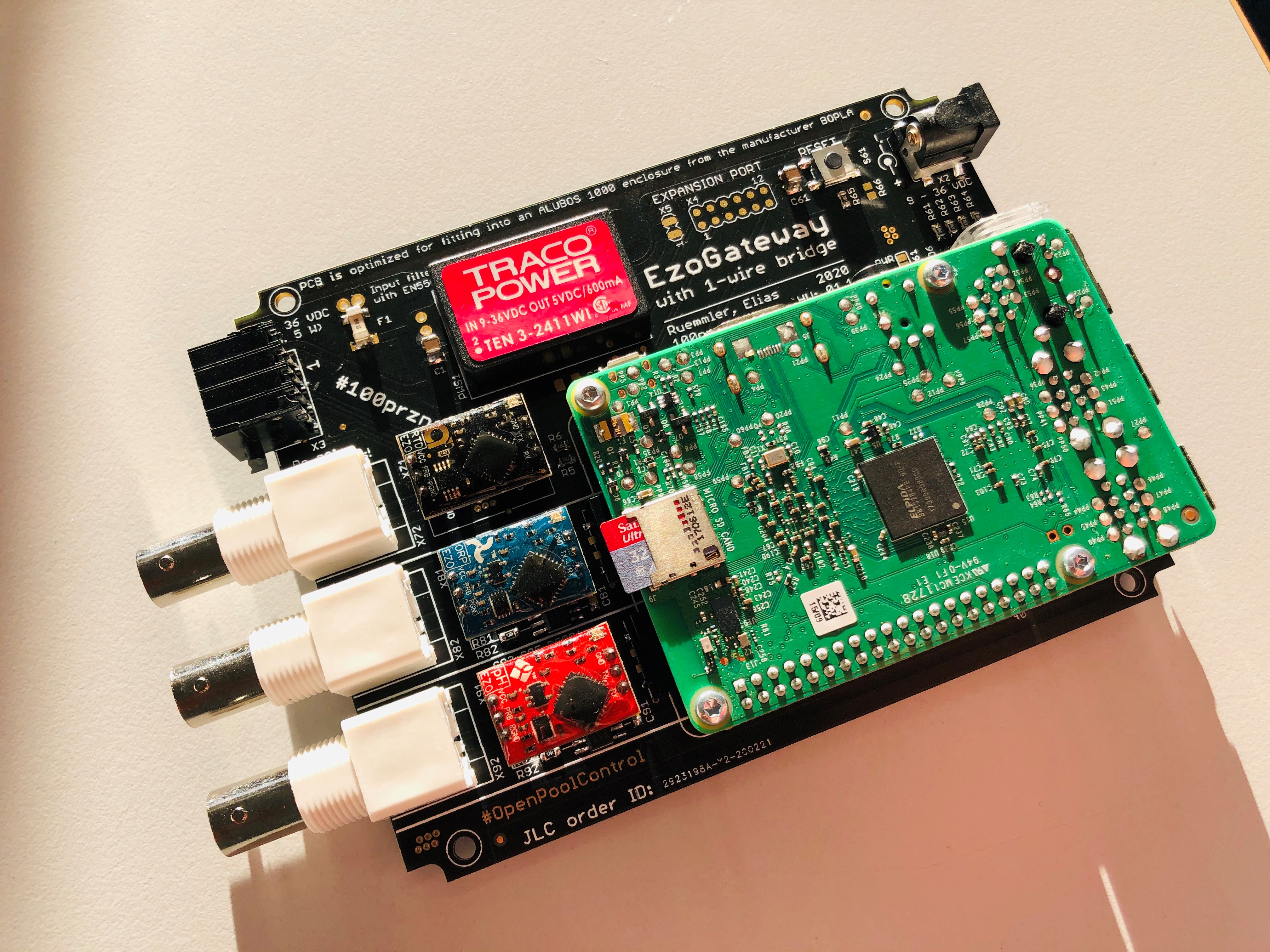
Das ganze lässt sich auch ohne spezielle Platine mit einer fertigen EZO HAT von Whitboxes aufbauen, näheres dazu steht im Projekt-Wiki.
Grüße Elias
-
@martinp Also bei mir letztens nach ca. 3 Jagren die Sonde eines meiner Blueconnects ausgefallen. Die hat von jetzt auf gleich nur noch Müll gemessen (pH <1).
Habe dann den Fühler getauscht (ca. 100 EUR) und seitdem ist alles wieder gut. Die Werte sind identisch mit den alten. Demnach denke ich, die Dinger scheinen recht stabil zu sein.
Sonst messe ich nix. Habe aber auch einen altmodischen Chlorpool.
@oxident es gibt ja durchaus noch weitere Sachen am Pool, die sich für Automatisierung anbieten.
Pumpen Zeitschaltung. Erfassung Stromaufnahme (Trockenlauferkennung, wie dicht ist der Sandfilter?) Druck im Filter, Wasserstand...
Solarheizung des Pools, Wassertemperatur.... -
@oxident es gibt ja durchaus noch weitere Sachen am Pool, die sich für Automatisierung anbieten.
Pumpen Zeitschaltung. Erfassung Stromaufnahme (Trockenlauferkennung, wie dicht ist der Sandfilter?) Druck im Filter, Wasserstand...
Solarheizung des Pools, Wassertemperatur....@martinp said in Pool Thermometer und Chlormesser:
@oxident es gibt ja durchaus noch weitere Sachen am Pool, die sich für Automatisierung anbieten.
Pumpen Zeitschaltung. Erfassung Stromaufnahme (Trockenlauferkennung, wie dicht ist der Sandfilter?) Druck im Filter, Wasserstand...
Solarheizung des Pools, Wassertemperatur....Ja, stimmt natürlich.
Ich nutze für die Pumpe einen Homematic FSM16 und errechne mir damit die prozentuale Leistung der Pumpe. Bei mir wären 800W = 100%. Wenn es >120% ist, dann sitzt die Pumpe fest und ich schalte nach 10sec ab. Wenn es <60% sind, dann saugt die Pumpe kein Wasser. Hier lasse ich länger laufen (bis zu 60sec) und schalte dann erst ab. Hat sich gut gewährt.
Beim Sandfilter habe ich mir so einen China-Drucksensor geholt und werte ihn mit einem ESP32 aus. Ist jedoch ein wenig blöd, da der Sensor für 5V ausgelegt ist. Da tüftel ich noch ein wenig rum ;-)
Chlorpumpe steuere ich ebenfalls mit einem Homematic-Aktor an, auf Basis der Messwerte vom Blueconnect und Status der Pumpe. pH ist bei mir relativ stabil ... da füll ich selber nach.
Poolabdeckung (Rollo) ist bei mir blöderweise Bluetooth (versuche ich noch zu sniffen) und bei der Heizung habe ich schon ein Skript zu geschrieben.
Wasserstand klingt interessant ;-)
-
Okay, hier mal das YAML für ESPHome um die Blueconnects ohne Cloud auszulesen:
substitutions:
  # erster Blueconnect
  blueriiot1_mac: '00:A0:50:ZZ:XX:YY'
  blueriiot1_name_prefix: 'pool'
  blueriiot1_id_prefix: 'pl'

  # zweiter Blueconnect
  # ggf. auskommentieren
  blueriiot2_mac: '00:A0:50:ZZ:XX:YY'
  blueriiot2_name_prefix: 'spa'
  blueriiot2_id_prefix: 'sp'

  # send true 0x01 to this service ID
  blueriiot_send_service_uuid: 'F3300001-F0A2-9B06-0C59-1BC4763B5C00'
  blueriiot_send_characteristic_uuid: 'F3300002-F0A2-9B06-0C59-1BC4763B5C00'

  # notification is recieved on this Service ID
  blueriiot_recieve_service_uuid: 'F3300001-F0A2-9B06-0C59-1BC4763B5C00'
  blueriiot_recieve_characteristic_uuid: 'F3300003-F0A2-9B06-0C59-1BC4763B5C00'

esphome:
  name: "poolsensors"
  friendly_name: Poolsensoren

esp32:
  board: m5stack-atom # ANPASSEN
  framework:
    type: arduino

# Enable logging
logger:
  #level: VERY_VERBOSE
  level: INFO

# Enable Home Assistant API
api:
  password: "1234"

ota:
  password: "1234"

wifi:
  ssid: !secret wifi_ssid
  password: !secret wifi_password


esp32_ble_tracker:

ble_client:
  # erster Sensor
  - mac_address: ${blueriiot1_mac}
    id: ble_client_${blueriiot1_id_prefix}
    on_connect:
      then:
        - lambda: "id(binary_sensor_${blueriiot1_id_prefix}_connected).publish_state(true);"
        - delay: 2s
        - button.press: button_${blueriiot1_id_prefix}_doreading
    on_disconnect: [lambda: "id(binary_sensor_${blueriiot1_id_prefix}_connected).publish_state(false);"]

  # zweiter Sensor (optional)
  - mac_address: ${blueriiot2_mac}
    id: ble_client_${blueriiot2_id_prefix}
    on_connect:
      then:
        - lambda: "id(binary_sensor_${blueriiot2_id_prefix}_connected).publish_state(true);"
        - delay: 2s
        - button.press: button_${blueriiot2_id_prefix}_doreading
    on_disconnect: [lambda: "id(binary_sensor_${blueriiot2_id_prefix}_connected).publish_state(false);"]


binary_sensor:
# erster Sensor
  - platform: template
    id: binary_sensor_${blueriiot1_id_prefix}_connected
    name: ${blueriiot1_name_prefix} Status
    device_class: connectivity
    entity_category: diagnostic

# zweiter Sensor (optional)
  - platform: template
    id: binary_sensor_${blueriiot2_id_prefix}_connected
    name: ${blueriiot2_name_prefix} Status
    device_class: connectivity
    entity_category: diagnostic


switch:
  # erster Sensor
  - platform: ble_client
    ble_client_id: ble_client_${blueriiot1_id_prefix}
    name: "${blueriiot1_name_prefix} Enable"
    id: switch_${blueriiot1_id_prefix}_enable
    restore_mode: ALWAYS_OFF

  # zweiter Sensor (optional)
  - platform: ble_client
    ble_client_id: ble_client_${blueriiot2_id_prefix}
    name: "${blueriiot2_name_prefix} Enable"
    id: switch_${blueriiot2_id_prefix}_enable
    restore_mode: ALWAYS_OFF

sensor:
  # erster Sensor
  - platform: template
    id: sensor_${blueriiot1_id_prefix}_temperature
    name: ${blueriiot1_name_prefix} Temperature
    # Optional variables:
    unit_of_measurement: "°C"
    icon: "mdi:water-percent"
    device_class: "temperature"
    state_class: "measurement"
    accuracy_decimals: 1

  - platform: template
    id: sensor_${blueriiot1_id_prefix}_ph
    name: ${blueriiot1_name_prefix} PH
    # Optional variables:
    #unit_of_measurement: "°C"
    #icon: "mdi:water-percent"
    #device_class: "temperature"
    state_class: "measurement"
    accuracy_decimals: 1

  - platform: template
    id: sensor_${blueriiot1_id_prefix}_orp
    name: ${blueriiot1_name_prefix} Chlor
    # Optional variables:
    #unit_of_measurement: "°C"
    #icon: "mdi:water-percent"
    device_class: "voltage"
    state_class: "measurement"
    accuracy_decimals: 1

  - platform: template
    id: sensor_${blueriiot1_id_prefix}_bat
    name: ${blueriiot1_name_prefix} Battery
    # Optional variables:
    #unit_of_measurement: "°C"
    #icon: "mdi:water-percent"
    device_class: "battery"
    state_class: "measurement"
    accuracy_decimals: 1
  # ENDE erster Sensor

  # zweiter Sensor (optional)
  - platform: template
    id: sensor_${blueriiot2_id_prefix}_temperature
    name: ${blueriiot2_name_prefix} Temperature
    # Optional variables:
    unit_of_measurement: "°C"
    icon: "mdi:water-percent"
    device_class: "temperature"
    state_class: "measurement"
    accuracy_decimals: 1

  - platform: template
    id: sensor_${blueriiot2_id_prefix}_ph
    name: ${blueriiot2_name_prefix} PH
    # Optional variables:
    #unit_of_measurement: "°C"
    #icon: "mdi:water-percent"
    #device_class: "temperature"
    state_class: "measurement"
    accuracy_decimals: 1

  - platform: template
    id: sensor_${blueriiot2_id_prefix}_orp
    name: ${blueriiot2_name_prefix} Chlor
    # Optional variables:
    #unit_of_measurement: "°C"
    #icon: "mdi:water-percent"
    device_class: "voltage"
    state_class: "measurement"
    accuracy_decimals: 1

  - platform: template
    id: sensor_${blueriiot2_id_prefix}_bat
    name: ${blueriiot2_name_prefix} Battery
    # Optional variables:
    #unit_of_measurement: "°C"
    #icon: "mdi:water-percent"
    device_class: "battery"
    state_class: "measurement"
    accuracy_decimals: 1
  # ENDE zweiter Sensor (optional)

##
## Blue Connect
# erster Sensor
button:
  - platform: template
    id: button_${blueriiot1_id_prefix}_doreading
    name: ${blueriiot1_name_prefix} do reading
    internal: true
    on_press:
      then:
        - ble_client.ble_write:
            id: ble_client_${blueriiot1_id_prefix}
            service_uuid: ${blueriiot_send_service_uuid}
            characteristic_uuid: ${blueriiot_send_characteristic_uuid}
            # A lambda returning an std::vector<uint8_t>.
            value: !lambda |-
              return {0x01};

  # zweiter Sensor (optional)
  - platform: template
    id: button_${blueriiot2_id_prefix}_doreading
    name: ${blueriiot2_name_prefix} do reading
    internal: true
    on_press:
      then:
        - ble_client.ble_write:
            id: ble_client_${blueriiot2_id_prefix}
            service_uuid: ${blueriiot_send_service_uuid}
            characteristic_uuid: ${blueriiot_send_characteristic_uuid}
            # A lambda returning an std::vector<uint8_t>.
            value: !lambda |-
              return {0x01};

text_sensor:
  # erster Sensor
  - platform: ble_client
    id: ${blueriiot1_id_prefix}_reading_data
    name: ${blueriiot1_name_prefix} reading data
    internal: true
    ble_client_id: ble_client_${blueriiot1_id_prefix}
    service_uuid: ${blueriiot_recieve_service_uuid}
    characteristic_uuid: ${blueriiot_recieve_characteristic_uuid}
    notify: true
    update_interval: never
    on_notify:
      then:
       lambda: |-
          std::string rawhex = format_hex_pretty((uint8_t *) x.c_str(), x.size()).c_str();
          ESP_LOGD("raw_hex", "%s", rawhex.c_str());

          float temperature = (float)((int16_t)(x[2]<< 8) + x[1])/100;
          ESP_LOGD("temp", "%f", temperature);
          id(sensor_${blueriiot1_id_prefix}_temperature).publish_state(temperature);

          float raw_ph = (float)( (int16_t) (x[4]<< 8) + x[3]) ;
          float ph = (float)( (int16_t) (2048 - raw_ph)) / 232  + 7 ;
          ESP_LOGD("ph", "%f", ph);
          id(sensor_${blueriiot1_id_prefix}_ph).publish_state(ph);

          float orp = (float)( (int16_t) (x[6]<< 8) + x[5]) / 3.86 ;
          ESP_LOGD("orp", "%f", orp);
          id(sensor_${blueriiot1_id_prefix}_orp).publish_state(orp);

          float bat = (float)( (int16_t) x[11]) ;
          ESP_LOGD("bat", "%f", bat);
          id(sensor_${blueriiot1_id_prefix}_bat).publish_state(bat);


          id(switch_${blueriiot1_id_prefix}_enable).turn_off();
    # ENDE erster Sensor

    # zweiter Sensor (optional)
  - platform: ble_client
    id: ${blueriiot2_id_prefix}_reading_data
    name: ${blueriiot2_name_prefix} reading data
    internal: true
    ble_client_id: ble_client_${blueriiot2_id_prefix}
    service_uuid: ${blueriiot_recieve_service_uuid}
    characteristic_uuid: ${blueriiot_recieve_characteristic_uuid}
    notify: true
    update_interval: never
    on_notify:
      then:
       lambda: |-
          std::string rawhex = format_hex_pretty((uint8_t *) x.c_str(), x.size()).c_str();
          ESP_LOGD("raw_hex", "%s", rawhex.c_str());

          float temperature = (float)((int16_t)(x[2]<< 8) + x[1])/100;
          ESP_LOGD("temp", "%f", temperature);
          id(sensor_${blueriiot2_id_prefix}_temperature).publish_state(temperature);

          float raw_ph = (float)( (int16_t) (x[4]<< 8) + x[3]) ;
          float ph = (float)( (int16_t) (2048 - raw_ph)) / 232  + 7 ;
          ESP_LOGD("ph", "%f", ph);
          id(sensor_${blueriiot2_id_prefix}_ph).publish_state(ph);

          float orp = (float)( (int16_t) (x[6]<< 8) + x[5]) / 3.86 ;
          ESP_LOGD("orp", "%f", orp);
          id(sensor_${blueriiot2_id_prefix}_orp).publish_state(orp);

          float bat = (float)( (int16_t) x[11]) ;
          ESP_LOGD("bat", "%f", bat);
          id(sensor_${blueriiot2_id_prefix}_bat).publish_state(bat);


          id(switch_${blueriiot2_id_prefix}_enable).turn_off();
    # ENDE zweiter Sensor
Bitte beachtet, dass Ihr ggf. die ganzen Teil zum zweiten Sensor auskommentieren müsst und natürlich auch das verwendete Board und die MAC-Adresse(n) anpassen müsst.
Ich stelle das hier erstmal "zur Diskussion" rein. Vielleicht erspart es ja jemandem Arbeit ;-)
-
Okay, hier mal das YAML für ESPHome um die Blueconnects ohne Cloud auszulesen:
substitutions:
  # erster Blueconnect
  blueriiot1_mac: '00:A0:50:ZZ:XX:YY'
  blueriiot1_name_prefix: 'pool'
  blueriiot1_id_prefix: 'pl'

  # zweiter Blueconnect
  # ggf. auskommentieren
  blueriiot2_mac: '00:A0:50:ZZ:XX:YY'
  blueriiot2_name_prefix: 'spa'
  blueriiot2_id_prefix: 'sp'

  # send true 0x01 to this service ID
  blueriiot_send_service_uuid: 'F3300001-F0A2-9B06-0C59-1BC4763B5C00'
  blueriiot_send_characteristic_uuid: 'F3300002-F0A2-9B06-0C59-1BC4763B5C00'

  # notification is recieved on this Service ID
  blueriiot_recieve_service_uuid: 'F3300001-F0A2-9B06-0C59-1BC4763B5C00'
  blueriiot_recieve_characteristic_uuid: 'F3300003-F0A2-9B06-0C59-1BC4763B5C00'

esphome:
  name: "poolsensors"
  friendly_name: Poolsensoren

esp32:
  board: m5stack-atom # ANPASSEN
  framework:
    type: arduino

# Enable logging
logger:
  #level: VERY_VERBOSE
  level: INFO

# Enable Home Assistant API
api:
  password: "1234"

ota:
  password: "1234"

wifi:
  ssid: !secret wifi_ssid
  password: !secret wifi_password


esp32_ble_tracker:

ble_client:
  # erster Sensor
  - mac_address: ${blueriiot1_mac}
    id: ble_client_${blueriiot1_id_prefix}
    on_connect:
      then:
        - lambda: "id(binary_sensor_${blueriiot1_id_prefix}_connected).publish_state(true);"
        - delay: 2s
        - button.press: button_${blueriiot1_id_prefix}_doreading
    on_disconnect: [lambda: "id(binary_sensor_${blueriiot1_id_prefix}_connected).publish_state(false);"]

  # zweiter Sensor (optional)
  - mac_address: ${blueriiot2_mac}
    id: ble_client_${blueriiot2_id_prefix}
    on_connect:
      then:
        - lambda: "id(binary_sensor_${blueriiot2_id_prefix}_connected).publish_state(true);"
        - delay: 2s
        - button.press: button_${blueriiot2_id_prefix}_doreading
    on_disconnect: [lambda: "id(binary_sensor_${blueriiot2_id_prefix}_connected).publish_state(false);"]


binary_sensor:
# erster Sensor
  - platform: template
    id: binary_sensor_${blueriiot1_id_prefix}_connected
    name: ${blueriiot1_name_prefix} Status
    device_class: connectivity
    entity_category: diagnostic

# zweiter Sensor (optional)
  - platform: template
    id: binary_sensor_${blueriiot2_id_prefix}_connected
    name: ${blueriiot2_name_prefix} Status
    device_class: connectivity
    entity_category: diagnostic


switch:
  # erster Sensor
  - platform: ble_client
    ble_client_id: ble_client_${blueriiot1_id_prefix}
    name: "${blueriiot1_name_prefix} Enable"
    id: switch_${blueriiot1_id_prefix}_enable
    restore_mode: ALWAYS_OFF

  # zweiter Sensor (optional)
  - platform: ble_client
    ble_client_id: ble_client_${blueriiot2_id_prefix}
    name: "${blueriiot2_name_prefix} Enable"
    id: switch_${blueriiot2_id_prefix}_enable
    restore_mode: ALWAYS_OFF

sensor:
  # erster Sensor
  - platform: template
    id: sensor_${blueriiot1_id_prefix}_temperature
    name: ${blueriiot1_name_prefix} Temperature
    # Optional variables:
    unit_of_measurement: "°C"
    icon: "mdi:water-percent"
    device_class: "temperature"
    state_class: "measurement"
    accuracy_decimals: 1

  - platform: template
    id: sensor_${blueriiot1_id_prefix}_ph
    name: ${blueriiot1_name_prefix} PH
    # Optional variables:
    #unit_of_measurement: "°C"
    #icon: "mdi:water-percent"
    #device_class: "temperature"
    state_class: "measurement"
    accuracy_decimals: 1

  - platform: template
    id: sensor_${blueriiot1_id_prefix}_orp
    name: ${blueriiot1_name_prefix} Chlor
    # Optional variables:
    #unit_of_measurement: "°C"
    #icon: "mdi:water-percent"
    device_class: "voltage"
    state_class: "measurement"
    accuracy_decimals: 1

  - platform: template
    id: sensor_${blueriiot1_id_prefix}_bat
    name: ${blueriiot1_name_prefix} Battery
    # Optional variables:
    #unit_of_measurement: "°C"
    #icon: "mdi:water-percent"
    device_class: "battery"
    state_class: "measurement"
    accuracy_decimals: 1
  # ENDE erster Sensor

  # zweiter Sensor (optional)
  - platform: template
    id: sensor_${blueriiot2_id_prefix}_temperature
    name: ${blueriiot2_name_prefix} Temperature
    # Optional variables:
    unit_of_measurement: "°C"
    icon: "mdi:water-percent"
    device_class: "temperature"
    state_class: "measurement"
    accuracy_decimals: 1

  - platform: template
    id: sensor_${blueriiot2_id_prefix}_ph
    name: ${blueriiot2_name_prefix} PH
    # Optional variables:
    #unit_of_measurement: "°C"
    #icon: "mdi:water-percent"
    #device_class: "temperature"
    state_class: "measurement"
    accuracy_decimals: 1

  - platform: template
    id: sensor_${blueriiot2_id_prefix}_orp
    name: ${blueriiot2_name_prefix} Chlor
    # Optional variables:
    #unit_of_measurement: "°C"
    #icon: "mdi:water-percent"
    device_class: "voltage"
    state_class: "measurement"
    accuracy_decimals: 1

  - platform: template
    id: sensor_${blueriiot2_id_prefix}_bat
    name: ${blueriiot2_name_prefix} Battery
    # Optional variables:
    #unit_of_measurement: "°C"
    #icon: "mdi:water-percent"
    device_class: "battery"
    state_class: "measurement"
    accuracy_decimals: 1
  # ENDE zweiter Sensor (optional)

##
## Blue Connect
# erster Sensor
button:
  - platform: template
    id: button_${blueriiot1_id_prefix}_doreading
    name: ${blueriiot1_name_prefix} do reading
    internal: true
    on_press:
      then:
        - ble_client.ble_write:
            id: ble_client_${blueriiot1_id_prefix}
            service_uuid: ${blueriiot_send_service_uuid}
            characteristic_uuid: ${blueriiot_send_characteristic_uuid}
            # A lambda returning an std::vector<uint8_t>.
            value: !lambda |-
              return {0x01};

  # zweiter Sensor (optional)
  - platform: template
    id: button_${blueriiot2_id_prefix}_doreading
    name: ${blueriiot2_name_prefix} do reading
    internal: true
    on_press:
      then:
        - ble_client.ble_write:
            id: ble_client_${blueriiot2_id_prefix}
            service_uuid: ${blueriiot_send_service_uuid}
            characteristic_uuid: ${blueriiot_send_characteristic_uuid}
            # A lambda returning an std::vector<uint8_t>.
            value: !lambda |-
              return {0x01};

text_sensor:
  # erster Sensor
  - platform: ble_client
    id: ${blueriiot1_id_prefix}_reading_data
    name: ${blueriiot1_name_prefix} reading data
    internal: true
    ble_client_id: ble_client_${blueriiot1_id_prefix}
    service_uuid: ${blueriiot_recieve_service_uuid}
    characteristic_uuid: ${blueriiot_recieve_characteristic_uuid}
    notify: true
    update_interval: never
    on_notify:
      then:
       lambda: |-
          std::string rawhex = format_hex_pretty((uint8_t *) x.c_str(), x.size()).c_str();
          ESP_LOGD("raw_hex", "%s", rawhex.c_str());

          float temperature = (float)((int16_t)(x[2]<< 8) + x[1])/100;
          ESP_LOGD("temp", "%f", temperature);
          id(sensor_${blueriiot1_id_prefix}_temperature).publish_state(temperature);

          float raw_ph = (float)( (int16_t) (x[4]<< 8) + x[3]) ;
          float ph = (float)( (int16_t) (2048 - raw_ph)) / 232  + 7 ;
          ESP_LOGD("ph", "%f", ph);
          id(sensor_${blueriiot1_id_prefix}_ph).publish_state(ph);

          float orp = (float)( (int16_t) (x[6]<< 8) + x[5]) / 3.86 ;
          ESP_LOGD("orp", "%f", orp);
          id(sensor_${blueriiot1_id_prefix}_orp).publish_state(orp);

          float bat = (float)( (int16_t) x[11]) ;
          ESP_LOGD("bat", "%f", bat);
          id(sensor_${blueriiot1_id_prefix}_bat).publish_state(bat);


          id(switch_${blueriiot1_id_prefix}_enable).turn_off();
    # ENDE erster Sensor

    # zweiter Sensor (optional)
  - platform: ble_client
    id: ${blueriiot2_id_prefix}_reading_data
    name: ${blueriiot2_name_prefix} reading data
    internal: true
    ble_client_id: ble_client_${blueriiot2_id_prefix}
    service_uuid: ${blueriiot_recieve_service_uuid}
    characteristic_uuid: ${blueriiot_recieve_characteristic_uuid}
    notify: true
    update_interval: never
    on_notify:
      then:
       lambda: |-
          std::string rawhex = format_hex_pretty((uint8_t *) x.c_str(), x.size()).c_str();
          ESP_LOGD("raw_hex", "%s", rawhex.c_str());

          float temperature = (float)((int16_t)(x[2]<< 8) + x[1])/100;
          ESP_LOGD("temp", "%f", temperature);
          id(sensor_${blueriiot2_id_prefix}_temperature).publish_state(temperature);

          float raw_ph = (float)( (int16_t) (x[4]<< 8) + x[3]) ;
          float ph = (float)( (int16_t) (2048 - raw_ph)) / 232  + 7 ;
          ESP_LOGD("ph", "%f", ph);
          id(sensor_${blueriiot2_id_prefix}_ph).publish_state(ph);

          float orp = (float)( (int16_t) (x[6]<< 8) + x[5]) / 3.86 ;
          ESP_LOGD("orp", "%f", orp);
          id(sensor_${blueriiot2_id_prefix}_orp).publish_state(orp);

          float bat = (float)( (int16_t) x[11]) ;
          ESP_LOGD("bat", "%f", bat);
          id(sensor_${blueriiot2_id_prefix}_bat).publish_state(bat);


          id(switch_${blueriiot2_id_prefix}_enable).turn_off();
    # ENDE zweiter Sensor
Bitte beachtet, dass Ihr ggf. die ganzen Teil zum zweiten Sensor auskommentieren müsst und natürlich auch das verwendete Board und die MAC-Adresse(n) anpassen müsst.
Ich stelle das hier erstmal "zur Diskussion" rein. Vielleicht erspart es ja jemandem Arbeit ;-)
-
@oxident dank dir schon mal, bin echt am überlegen, ob ich mir do ein teil zulege... habe vor kurzen erst wieder tabletten gekauft, aber nicht mehr zum pool rennen, lockt mich ja auch.
-
@dirkhe naja, zwischendurch mal einen Blick werfen ist ja durchaus ratsam. Ist ja blöd, wenn ein Tier im Wasser ertrinkt, und man merkt es erst nach Wochen....
@martinp said in Pool Thermometer und Chlormesser:
@dirkhe naja, zwischendurch mal einen Blick werfen ist ja durchaus ratsam. Ist ja blöd, wenn ein Tier im Wasser ertrinkt, und man merkt es erst nach Wochen....
Da geht dann der ORP krass runter. Kann man durchaus erkennen :blush:
-
@oxident dank dir schon mal, bin echt am überlegen, ob ich mir do ein teil zulege... habe vor kurzen erst wieder tabletten gekauft, aber nicht mehr zum pool rennen, lockt mich ja auch.
-
@100prznt Auf welche kosten bist du da gekommen, hast du vielleicht auch mal paar mehr Infos der Umsetzung am Pool usw..
@deta Was meinst du genau für Kosten?
- Für das Temp2Iot gibt es im Repo ja eine Kostenübersicht.
- Beim EzoGateway habe ich hier eine Stückliste (https://github.com/100prznt/EzoGateway/wiki/Stückliste) der benötigten Komponenten zusammen gestellt. Die Preis sind je nach Bezugsquelle und Konditionen sehr verschieden.
-
@dirkhe Also ganz "flutscht" es noch nicht mit ESPHome. Aber das bügel ich auch noch irgendwie zurecht.
-
@oxident Pull ist commited...
@mameier1234 Hallo zusammen, funktioniert dieser Adapter noch und welches ist die aktuellste Version? Ich brauche nur den Blue Connect Plus oder auch den WIfi Extender? Die Dosierempfehlungen werden in dem Adapter auch vorgegeben?
Welche Anmeldedaten werden benötigt? Danke -
@mameier1234 Hallo zusammen, funktioniert dieser Adapter noch und welches ist die aktuellste Version? Ich brauche nur den Blue Connect Plus oder auch den WIfi Extender? Die Dosierempfehlungen werden in dem Adapter auch vorgegeben?
Welche Anmeldedaten werden benötigt? Danke@iphone333 said in Pool Thermometer und Chlormesser:
@mameier1234 Hallo zusammen, funktioniert dieser Adapter noch und welches ist die aktuellste Version? Ich brauche nur den Blue Connect Plus oder auch den WIfi Extender? Die Dosierempfehlungen werden in dem Adapter auch vorgegeben?
Welche Anmeldedaten werden benötigt? DankeDas wäre super, wenn sich hier noch eine Integration in IOBroker entwickeln ließe!
-
@iphone333 said in Pool Thermometer und Chlormesser:
@mameier1234 Hallo zusammen, funktioniert dieser Adapter noch und welches ist die aktuellste Version? Ich brauche nur den Blue Connect Plus oder auch den WIfi Extender? Die Dosierempfehlungen werden in dem Adapter auch vorgegeben?
Welche Anmeldedaten werden benötigt? DankeDas wäre super, wenn sich hier noch eine Integration in IOBroker entwickeln ließe!
-
@scubydoo Öhmm, für die Cloud-Variante gibt es doch meinen Adapter: https://github.com/kopierschnitte/ioBroker.blueconnect
-
@oxident Ach stimmt. Das hatte ich dann auch gesehen. Kannst du mir helfen wie ich den installieren kann
-
@scubydoo Eigentlich müsste alles selbsternannten sein. Hast Du schonmal Test-Adapter installiert?
-
Okay, hier mal das YAML für ESPHome um die Blueconnects ohne Cloud auszulesen:
substitutions:
  # erster Blueconnect
  blueriiot1_mac: '00:A0:50:ZZ:XX:YY'
  blueriiot1_name_prefix: 'pool'
  blueriiot1_id_prefix: 'pl'

  # zweiter Blueconnect
  # ggf. auskommentieren
  blueriiot2_mac: '00:A0:50:ZZ:XX:YY'
  blueriiot2_name_prefix: 'spa'
  blueriiot2_id_prefix: 'sp'

  # send true 0x01 to this service ID
  blueriiot_send_service_uuid: 'F3300001-F0A2-9B06-0C59-1BC4763B5C00'
  blueriiot_send_characteristic_uuid: 'F3300002-F0A2-9B06-0C59-1BC4763B5C00'

  # notification is recieved on this Service ID
  blueriiot_recieve_service_uuid: 'F3300001-F0A2-9B06-0C59-1BC4763B5C00'
  blueriiot_recieve_characteristic_uuid: 'F3300003-F0A2-9B06-0C59-1BC4763B5C00'

esphome:
  name: "poolsensors"
  friendly_name: Poolsensoren

esp32:
  board: m5stack-atom # ANPASSEN
  framework:
    type: arduino

# Enable logging
logger:
  #level: VERY_VERBOSE
  level: INFO

# Enable Home Assistant API
api:
  password: "1234"

ota:
  password: "1234"

wifi:
  ssid: !secret wifi_ssid
  password: !secret wifi_password


esp32_ble_tracker:

ble_client:
  # erster Sensor
  - mac_address: ${blueriiot1_mac}
    id: ble_client_${blueriiot1_id_prefix}
    on_connect:
      then:
        - lambda: "id(binary_sensor_${blueriiot1_id_prefix}_connected).publish_state(true);"
        - delay: 2s
        - button.press: button_${blueriiot1_id_prefix}_doreading
    on_disconnect: [lambda: "id(binary_sensor_${blueriiot1_id_prefix}_connected).publish_state(false);"]

  # zweiter Sensor (optional)
  - mac_address: ${blueriiot2_mac}
    id: ble_client_${blueriiot2_id_prefix}
    on_connect:
      then:
        - lambda: "id(binary_sensor_${blueriiot2_id_prefix}_connected).publish_state(true);"
        - delay: 2s
        - button.press: button_${blueriiot2_id_prefix}_doreading
    on_disconnect: [lambda: "id(binary_sensor_${blueriiot2_id_prefix}_connected).publish_state(false);"]


binary_sensor:
# erster Sensor
  - platform: template
    id: binary_sensor_${blueriiot1_id_prefix}_connected
    name: ${blueriiot1_name_prefix} Status
    device_class: connectivity
    entity_category: diagnostic

# zweiter Sensor (optional)
  - platform: template
    id: binary_sensor_${blueriiot2_id_prefix}_connected
    name: ${blueriiot2_name_prefix} Status
    device_class: connectivity
    entity_category: diagnostic


switch:
  # erster Sensor
  - platform: ble_client
    ble_client_id: ble_client_${blueriiot1_id_prefix}
    name: "${blueriiot1_name_prefix} Enable"
    id: switch_${blueriiot1_id_prefix}_enable
    restore_mode: ALWAYS_OFF

  # zweiter Sensor (optional)
  - platform: ble_client
    ble_client_id: ble_client_${blueriiot2_id_prefix}
    name: "${blueriiot2_name_prefix} Enable"
    id: switch_${blueriiot2_id_prefix}_enable
    restore_mode: ALWAYS_OFF

sensor:
  # erster Sensor
  - platform: template
    id: sensor_${blueriiot1_id_prefix}_temperature
    name: ${blueriiot1_name_prefix} Temperature
    # Optional variables:
    unit_of_measurement: "°C"
    icon: "mdi:water-percent"
    device_class: "temperature"
    state_class: "measurement"
    accuracy_decimals: 1

  - platform: template
    id: sensor_${blueriiot1_id_prefix}_ph
    name: ${blueriiot1_name_prefix} PH
    # Optional variables:
    #unit_of_measurement: "°C"
    #icon: "mdi:water-percent"
    #device_class: "temperature"
    state_class: "measurement"
    accuracy_decimals: 1

  - platform: template
    id: sensor_${blueriiot1_id_prefix}_orp
    name: ${blueriiot1_name_prefix} Chlor
    # Optional variables:
    #unit_of_measurement: "°C"
    #icon: "mdi:water-percent"
    device_class: "voltage"
    state_class: "measurement"
    accuracy_decimals: 1

  - platform: template
    id: sensor_${blueriiot1_id_prefix}_bat
    name: ${blueriiot1_name_prefix} Battery
    # Optional variables:
    #unit_of_measurement: "°C"
    #icon: "mdi:water-percent"
    device_class: "battery"
    state_class: "measurement"
    accuracy_decimals: 1
  # ENDE erster Sensor

  # zweiter Sensor (optional)
  - platform: template
    id: sensor_${blueriiot2_id_prefix}_temperature
    name: ${blueriiot2_name_prefix} Temperature
    # Optional variables:
    unit_of_measurement: "°C"
    icon: "mdi:water-percent"
    device_class: "temperature"
    state_class: "measurement"
    accuracy_decimals: 1

  - platform: template
    id: sensor_${blueriiot2_id_prefix}_ph
    name: ${blueriiot2_name_prefix} PH
    # Optional variables:
    #unit_of_measurement: "°C"
    #icon: "mdi:water-percent"
    #device_class: "temperature"
    state_class: "measurement"
    accuracy_decimals: 1

  - platform: template
    id: sensor_${blueriiot2_id_prefix}_orp
    name: ${blueriiot2_name_prefix} Chlor
    # Optional variables:
    #unit_of_measurement: "°C"
    #icon: "mdi:water-percent"
    device_class: "voltage"
    state_class: "measurement"
    accuracy_decimals: 1

  - platform: template
    id: sensor_${blueriiot2_id_prefix}_bat
    name: ${blueriiot2_name_prefix} Battery
    # Optional variables:
    #unit_of_measurement: "°C"
    #icon: "mdi:water-percent"
    device_class: "battery"
    state_class: "measurement"
    accuracy_decimals: 1
  # ENDE zweiter Sensor (optional)

##
## Blue Connect
# erster Sensor
button:
  - platform: template
    id: button_${blueriiot1_id_prefix}_doreading
    name: ${blueriiot1_name_prefix} do reading
    internal: true
    on_press:
      then:
        - ble_client.ble_write:
            id: ble_client_${blueriiot1_id_prefix}
            service_uuid: ${blueriiot_send_service_uuid}
            characteristic_uuid: ${blueriiot_send_characteristic_uuid}
            # A lambda returning an std::vector<uint8_t>.
            value: !lambda |-
              return {0x01};

  # zweiter Sensor (optional)
  - platform: template
    id: button_${blueriiot2_id_prefix}_doreading
    name: ${blueriiot2_name_prefix} do reading
    internal: true
    on_press:
      then:
        - ble_client.ble_write:
            id: ble_client_${blueriiot2_id_prefix}
            service_uuid: ${blueriiot_send_service_uuid}
            characteristic_uuid: ${blueriiot_send_characteristic_uuid}
            # A lambda returning an std::vector<uint8_t>.
            value: !lambda |-
              return {0x01};

text_sensor:
  # erster Sensor
  - platform: ble_client
    id: ${blueriiot1_id_prefix}_reading_data
    name: ${blueriiot1_name_prefix} reading data
    internal: true
    ble_client_id: ble_client_${blueriiot1_id_prefix}
    service_uuid: ${blueriiot_recieve_service_uuid}
    characteristic_uuid: ${blueriiot_recieve_characteristic_uuid}
    notify: true
    update_interval: never
    on_notify:
      then:
       lambda: |-
          std::string rawhex = format_hex_pretty((uint8_t *) x.c_str(), x.size()).c_str();
          ESP_LOGD("raw_hex", "%s", rawhex.c_str());

          float temperature = (float)((int16_t)(x[2]<< 8) + x[1])/100;
          ESP_LOGD("temp", "%f", temperature);
          id(sensor_${blueriiot1_id_prefix}_temperature).publish_state(temperature);

          float raw_ph = (float)( (int16_t) (x[4]<< 8) + x[3]) ;
          float ph = (float)( (int16_t) (2048 - raw_ph)) / 232  + 7 ;
          ESP_LOGD("ph", "%f", ph);
          id(sensor_${blueriiot1_id_prefix}_ph).publish_state(ph);

          float orp = (float)( (int16_t) (x[6]<< 8) + x[5]) / 3.86 ;
          ESP_LOGD("orp", "%f", orp);
          id(sensor_${blueriiot1_id_prefix}_orp).publish_state(orp);

          float bat = (float)( (int16_t) x[11]) ;
          ESP_LOGD("bat", "%f", bat);
          id(sensor_${blueriiot1_id_prefix}_bat).publish_state(bat);


          id(switch_${blueriiot1_id_prefix}_enable).turn_off();
    # ENDE erster Sensor

    # zweiter Sensor (optional)
  - platform: ble_client
    id: ${blueriiot2_id_prefix}_reading_data
    name: ${blueriiot2_name_prefix} reading data
    internal: true
    ble_client_id: ble_client_${blueriiot2_id_prefix}
    service_uuid: ${blueriiot_recieve_service_uuid}
    characteristic_uuid: ${blueriiot_recieve_characteristic_uuid}
    notify: true
    update_interval: never
    on_notify:
      then:
       lambda: |-
          std::string rawhex = format_hex_pretty((uint8_t *) x.c_str(), x.size()).c_str();
          ESP_LOGD("raw_hex", "%s", rawhex.c_str());

          float temperature = (float)((int16_t)(x[2]<< 8) + x[1])/100;
          ESP_LOGD("temp", "%f", temperature);
          id(sensor_${blueriiot2_id_prefix}_temperature).publish_state(temperature);

          float raw_ph = (float)( (int16_t) (x[4]<< 8) + x[3]) ;
          float ph = (float)( (int16_t) (2048 - raw_ph)) / 232  + 7 ;
          ESP_LOGD("ph", "%f", ph);
          id(sensor_${blueriiot2_id_prefix}_ph).publish_state(ph);

          float orp = (float)( (int16_t) (x[6]<< 8) + x[5]) / 3.86 ;
          ESP_LOGD("orp", "%f", orp);
          id(sensor_${blueriiot2_id_prefix}_orp).publish_state(orp);

          float bat = (float)( (int16_t) x[11]) ;
          ESP_LOGD("bat", "%f", bat);
          id(sensor_${blueriiot2_id_prefix}_bat).publish_state(bat);


          id(switch_${blueriiot2_id_prefix}_enable).turn_off();
    # ENDE zweiter Sensor
Bitte beachtet, dass Ihr ggf. die ganzen Teil zum zweiten Sensor auskommentieren müsst und natürlich auch das verwendete Board und die MAC-Adresse(n) anpassen müsst.
Ich stelle das hier erstmal "zur Diskussion" rein. Vielleicht erspart es ja jemandem Arbeit ;-)
Hi, funktioniert das ESP32 Skript bei dir einwandfrei? Dann brauch ich kein Abo oder?
-
Hi, funktioniert das ESP32 Skript bei dir einwandfrei? Dann brauch ich kein Abo oder?
@diamand2k22 Leider nein ... bin da bisher noch nicht weitergekommen. Theoretisch klappt es, praktisch ist es aber noch extrem unzuverlässig.
Aber ja, wenn es klappt, dann braucht man weder Abo noch App.
-
@diamand2k22 Leider nein ... bin da bisher noch nicht weitergekommen. Theoretisch klappt es, praktisch ist es aber noch extrem unzuverlässig.
Aber ja, wenn es klappt, dann braucht man weder Abo noch App.
@oxident said in Pool Thermometer und Chlormesser:
@diamand2k22 Leider nein ... bin da bisher noch nicht weitergekommen. Theoretisch klappt es, praktisch ist es aber noch extrem unzuverlässig.
Aber ja, wenn es klappt, dann braucht man weder Abo noch App.
Generell bin ich kein Freund von diesem Cloud Mist, bin da eher der Verfechter von lokaler Anbindung. Was klappt denn noch nicht so richtig im Detail mit dem Skript?

279
Online32.7k
Users82.5k
Topics1.3m
Posts