




Gelöst: Adapter Updates können nicht installiert werden
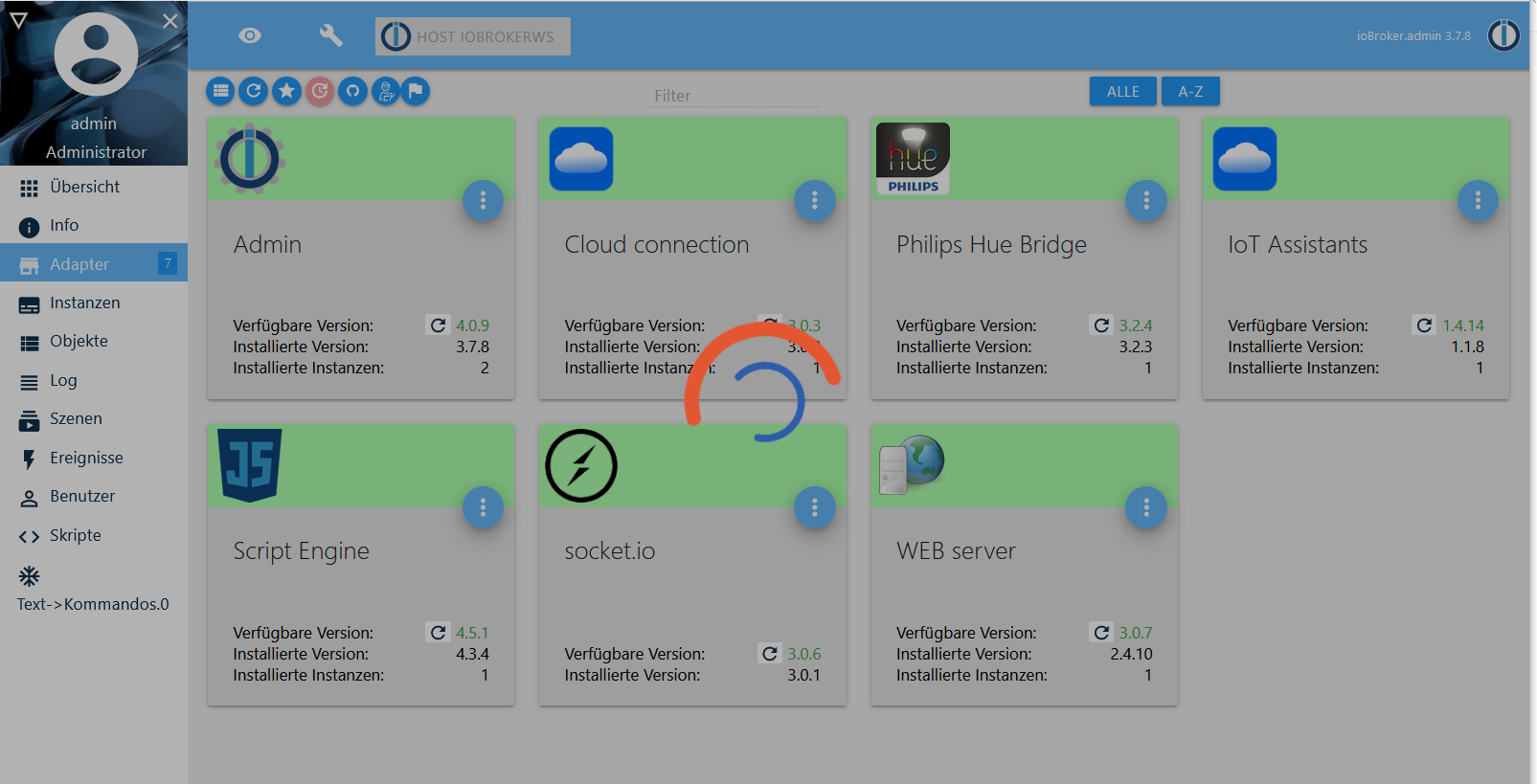
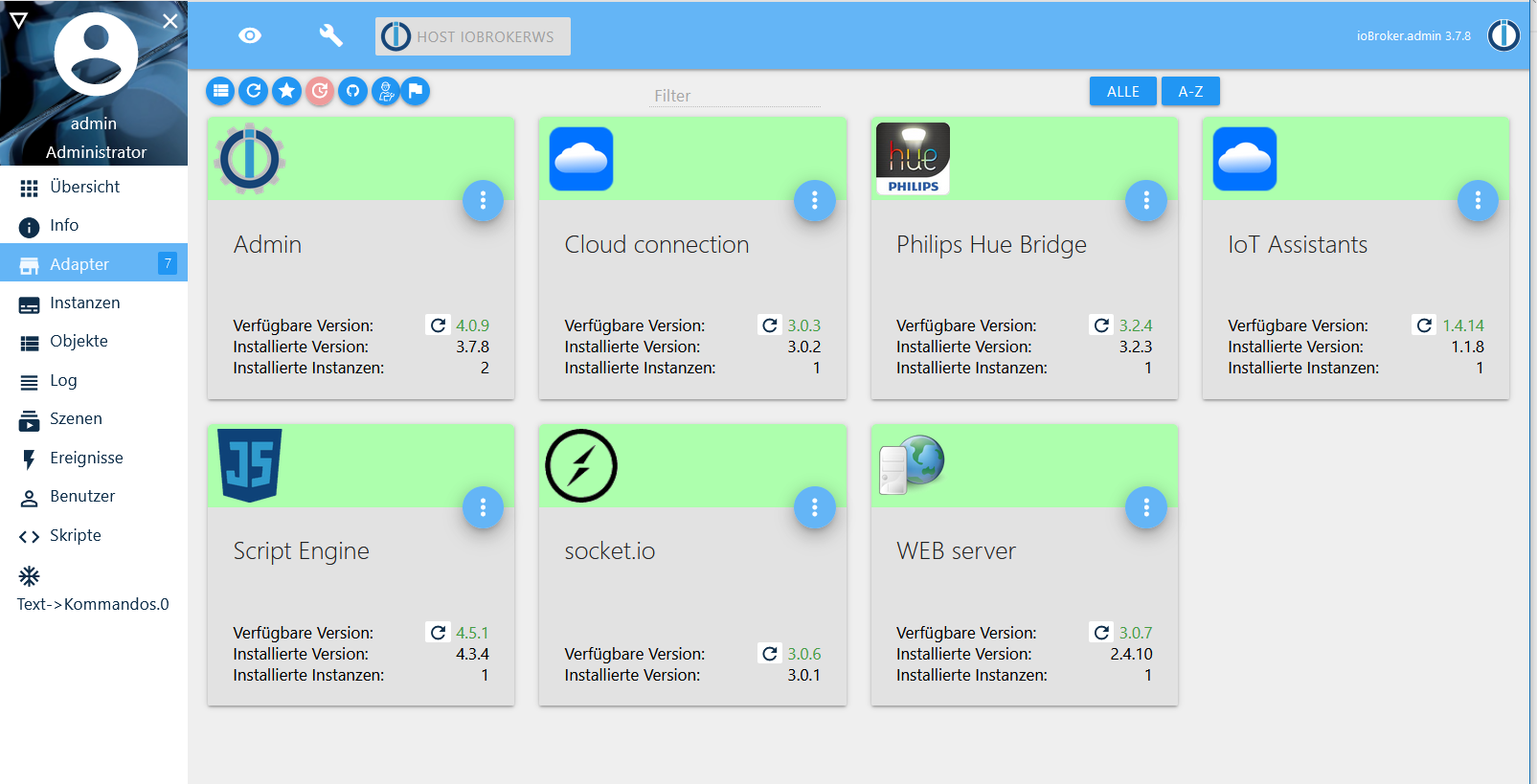
-
@Thomas-Braun sagte in Adapter Updates können nicht installiert werden:
wendy2702 legt ja auch los. Dann kann ich mich ja zurücklehnen..
Ne, lass mal...
Nur noch 18% Akku dann ist Schicht.
Außerdem verderben schließlich viele Köche den Brei :-)
@wendy2702 said in Adapter Updates können nicht installiert werden:
Außerdem verderben schließlich viele Köche den Brei
Bislang kochen wir den gleichen Brei.
-
Ergebnis:
i@ioBrokerWS:~ $ pi@ioBrokerWS:~ $ cd /opt/iobroker pi@ioBrokerWS:/opt/iobroker $ npm install iobroker.js-controller > iobroker.js-controller@2.2.9 preinstall /opt/iobroker/node_modules/iobroker.js-controller > node lib/preinstallCheck.js NPM version: 6.14.4 > node-bluetooth@1.2.6 install /opt/iobroker/node_modules/node-bluetooth > node-gyp configure build make: Verzeichnis „/opt/iobroker/node_modules/node-bluetooth/build“ wird betreten CXX(target) Release/obj.target/BluetoothSerialPort/src/linux/BluetoothSerialPort.o In file included from ../src/DeviceINQ.h:17, from ../src/linux/BluetoothSerialPort.cc:13: ../node_modules/nan/nan.h: In function ‘void Nan::AsyncQueueWorker(Nan::AsyncWorker*)’: ../node_modules/nan/nan.h:2298:62: warning: cast between incompatible function types from ‘void (*)(uv_work_t*)’ {aka ‘void (*)(uv_work_s*)’} to ‘uv_after_work_cb’ {aka ‘void (*)(uv_work_s*, int)’} [-Wcast-function-type] , reinterpret_cast<uv_after_work_cb>(AsyncExecuteComplete) ^ ../src/linux/BluetoothSerialPort.cc: At global scope: ../src/linux/BluetoothSerialPort.cc:18:14: error: variable or field ‘InitAll’ declared void void InitAll(Handle<Object> exports) { ^~~~~~ ../src/linux/BluetoothSerialPort.cc:18:14: error: ‘Handle’ was not declared in this scope ../src/linux/BluetoothSerialPort.cc:18:14: note: suggested alternative: ‘rand_r’ void InitAll(Handle<Object> exports) { ^~~~~~ rand_r ../src/linux/BluetoothSerialPort.cc:18:27: error: expected primary-expression before ‘>’ token void InitAll(Handle<Object> exports) { ^ ../src/linux/BluetoothSerialPort.cc:18:29: error: ‘exports’ was not declared in this scope void InitAll(Handle<Object> exports) { ^~~~~~~ In file included from ../src/linux/BluetoothSerialPort.cc:12: ../src/linux/BluetoothSerialPort.cc:23:34: error: ‘InitAll’ was not declared in this scope NODE_MODULE(BluetoothSerialPort, InitAll) ^~~~~~~ /home/iobroker/.cache/node-gyp/12.16.3/include/node/node.h:608:36: note: in definition of macro ‘NODE_MODULE_X’ (node::addon_register_func) (regfunc), \ ^~~~~~~ ../src/linux/BluetoothSerialPort.cc:23:1: note: in expansion of macro ‘NODE_MODULE’ NODE_MODULE(BluetoothSerialPort, InitAll) ^~~~~~~~~~~ make: *** [BluetoothSerialPort.target.mk:115: Release/obj.target/BluetoothSerialPort/src/linux/BluetoothSerialPort.o] Fehler 1 make: Verzeichnis „/opt/iobroker/node_modules/node-bluetooth/build“ wird verlassen gyp ERR! build error gyp ERR! stack Error: `make` failed with exit code: 2 gyp ERR! stack at ChildProcess.onExit (/usr/lib/node_modules/npm/node_modules/node-gyp/lib/build.js:194:23) gyp ERR! stack at ChildProcess.emit (events.js:310:20) gyp ERR! stack at Process.ChildProcess._handle.onexit (internal/child_process.js:275:12) gyp ERR! System Linux 4.19.97-v7+ gyp ERR! command "/usr/bin/node" "/usr/lib/node_modules/npm/node_modules/node-gyp/bin/node-gyp.js" "configure" "build" gyp ERR! cwd /opt/iobroker/node_modules/node-bluetooth gyp ERR! node -v v12.16.3 gyp ERR! node-gyp -v v5.1.0 gyp ERR! not ok > unix-dgram@2.0.3 install /opt/iobroker/node_modules/unix-dgram > node-gyp rebuild make: Verzeichnis „/opt/iobroker/node_modules/unix-dgram/build“ wird betreten CXX(target) Release/obj.target/unix_dgram/src/unix_dgram.o In file included from ../src/unix_dgram.cc:5: ../../nan/nan.h: In function ‘void Nan::AsyncQueueWorker(Nan::AsyncWorker*)’: ../../nan/nan.h:2298:62: warning: cast between incompatible function types from ‘void (*)(uv_work_t*)’ {aka ‘void (*)(uv_work_s*)’} to ‘uv_after_work_cb’ {aka ‘void (*)(uv_work_s*, int)’} [-Wcast-function-type] , reinterpret_cast<uv_after_work_cb>(AsyncExecuteComplete) ^ In file included from ../../nan/nan.h:54, from ../src/unix_dgram.cc:5: ../src/unix_dgram.cc: At global scope: /home/iobroker/.cache/node-gyp/12.16.3/include/node/node.h:608:43: warning: cast between incompatible function types from ‘void (*)(v8::Local<v8::Object>)’ to ‘node::addon_register_func’ {aka ‘void (*)(v8::Local<v8::Object>, v8::Local<v8::Value>, void*)’} [-Wcast-function-type] (node::addon_register_func) (regfunc), \ ^ /home/iobroker/.cache/node-gyp/12.16.3/include/node/node.h:642:3: note: in expansion of macro ‘NODE_MODULE_X’ NODE_MODULE_X(modname, regfunc, NULL, 0) // NOLINT (readability/null_usage) ^~~~~~~~~~~~~ ../src/unix_dgram.cc:404:1: note: in expansion of macro ‘NODE_MODULE’ NODE_MODULE(unix_dgram, Initialize) ^~~~~~~~~~~ SOLINK_MODULE(target) Release/obj.target/unix_dgram.node COPY Release/unix_dgram.node make: Verzeichnis „/opt/iobroker/node_modules/unix-dgram/build“ wird verlassen > ursa-optional@0.9.10 install /opt/iobroker/node_modules/ursa-optional > node rebuild.js ursaNative bindings compilation fail. This is not an issue. Modules that depend on it will use fallbacks. > diskusage@1.1.3 install /opt/iobroker/node_modules/diskusage > node-gyp rebuild make: Verzeichnis „/opt/iobroker/node_modules/diskusage/build“ wird betreten CXX(target) Release/obj.target/diskusage/src/main.o In file included from ../src/main.cpp:3: ../../nan/nan.h: In function ‘void Nan::AsyncQueueWorker(Nan::AsyncWorker*)’: ../../nan/nan.h:2298:62: warning: cast between incompatible function types from ‘void (*)(uv_work_t*)’ {aka ‘void (*)(uv_work_s*)’} to ‘uv_after_work_cb’ {aka ‘void (*)(uv_work_s*, int)’} [-Wcast-function-type] , reinterpret_cast<uv_after_work_cb>(AsyncExecuteComplete) ^ In file included from ../../nan/nan.h:54, from ../src/main.cpp:3: ../src/main.cpp: At global scope: /home/iobroker/.cache/node-gyp/12.16.3/include/node/node.h:608:43: warning: cast between incompatible function types from ‘void (*)(v8::Local<v8::Object>)’ to ‘node::addon_register_func’ {aka ‘void (*)(v8::Local<v8::Object>, v8::Local<v8::Value>, void*)’} [-Wcast-function-type] (node::addon_register_func) (regfunc), \ ^ /home/iobroker/.cache/node-gyp/12.16.3/include/node/node.h:642:3: note: in expansion of macro ‘NODE_MODULE_X’ NODE_MODULE_X(modname, regfunc, NULL, 0) // NOLINT (readability/null_usage) ^~~~~~~~~~~~~ ../src/main.cpp:42:1: note: in expansion of macro ‘NODE_MODULE’ NODE_MODULE(diskusage, Init) ^~~~~~~~~~~ CXX(target) Release/obj.target/diskusage/src/diskusage_posix.o SOLINK_MODULE(target) Release/obj.target/diskusage.node COPY Release/diskusage.node make: Verzeichnis „/opt/iobroker/node_modules/diskusage/build“ wird verlassen > iobroker.js-controller@2.2.9 install /opt/iobroker/node_modules/iobroker.js-controller > node iobroker.js setup first The following notifications happened during sync: - Ignoring Directory "ical.admin" because officially not created as meta object. Please remove directory! > acme-v2@1.8.6 postinstall /opt/iobroker/node_modules/acme-v2 > node scripts/postinstall Greenlock and ACME.js v3 are on the way! Watch for updates at https://indiegogo.com/at/greenlock npm WARN optional SKIPPING OPTIONAL DEPENDENCY: fsevents@~2.1.2 (node_modules/chokidar/node_modules/fsevents): npm WARN notsup SKIPPING OPTIONAL DEPENDENCY: Unsupported platform for fsevents@2.1.3: wanted {"os":"darwin","arch":"any"} (current: {"os":"linux","arch":"arm"}) npm WARN optional SKIPPING OPTIONAL DEPENDENCY: osx-temperature-sensor@1.0.5 (node_modules/osx-temperature-sensor): npm WARN notsup SKIPPING OPTIONAL DEPENDENCY: Unsupported platform for osx-temperature-sensor@1.0.5: wanted {"os":"darwin","arch":"any"} (current: {"os":"linux","arch":"arm"}) npm WARN optional SKIPPING OPTIONAL DEPENDENCY: node-bluetooth@1.2.6 (node_modules/node-bluetooth): npm WARN optional SKIPPING OPTIONAL DEPENDENCY: node-bluetooth@1.2.6 install: `node-gyp configure build` npm WARN optional SKIPPING OPTIONAL DEPENDENCY: Exit status 1 + iobroker.js-controller@2.2.9 added 178 packages from 199 contributors in 95.143s 9 packages are looking for funding run `npm fund` for details pi@ioBrokerWS:/opt/iobroker $ -
hatte ich auch gerade gemerkt dass das noch fehlte, hatte es gleich nachgeholt und Hurra! Webseite wieder da.
Ubuntu auf Intel NUC PC
Node.js v14.18.1
NPM 6.14.15 -
hatte ich auch gerade gemerkt dass das noch fehlte, hatte es gleich nachgeholt und Hurra! Webseite wieder da.
@WalterKA Dann kannst du ja jetzt in der Konsole weitermachen:
iobroker list adapters -
dauert das jetzt noch länger oder ist die Installation hinüber? Jetzt sind unter Adapter keinerlei Einträge mehr zu sehen.
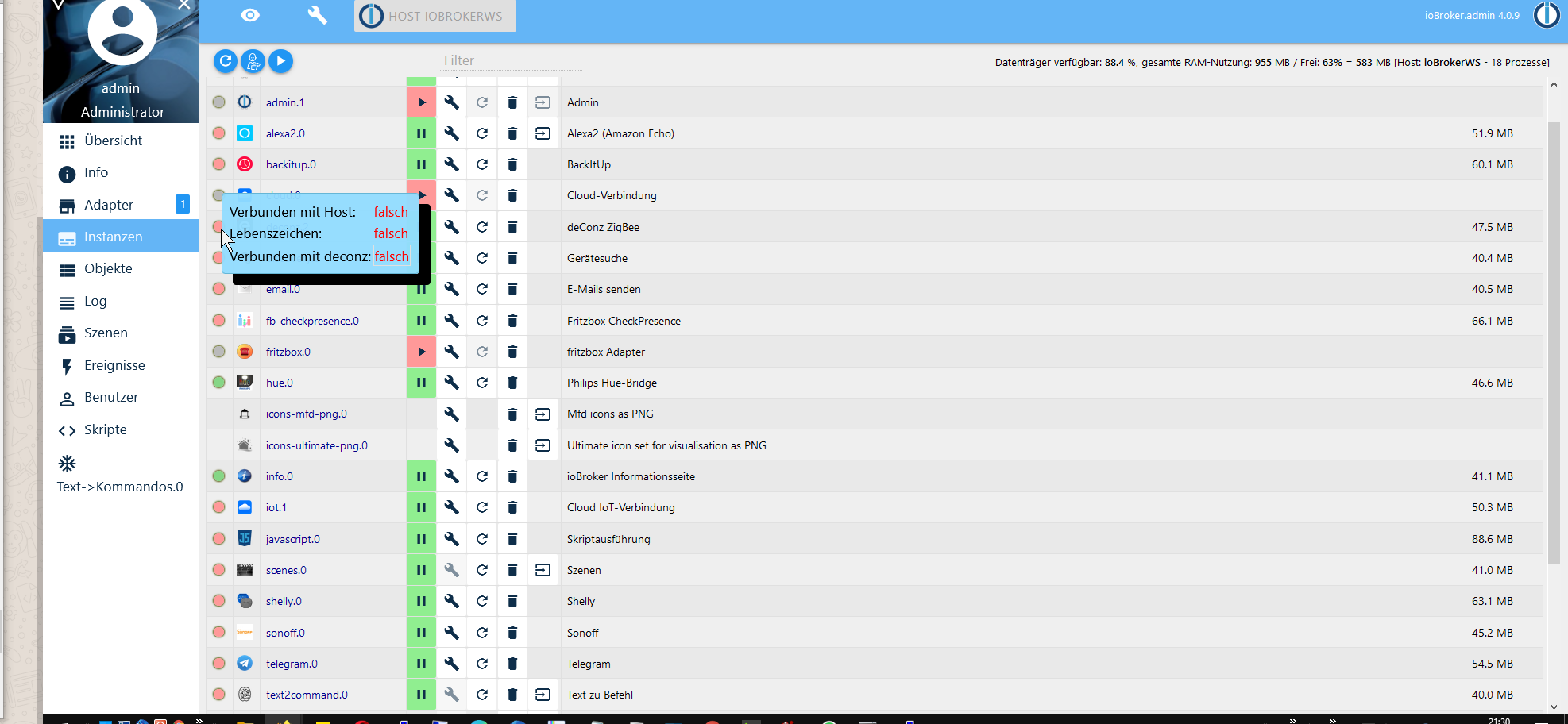
Ich hatte vorhin auf Anraten alle Instanzen bis auf admin deaktiviert vor dem Updateversuch. Die habe ich nun gestartet. Es geht nur noch hue.0 und info.0
Alle anderen Instanzen starten scheinbar nicht -
@WalterKA Dann kannst du ja jetzt in der Konsole weitermachen:
iobroker list adapters@Thomas-Braun sagte in Adapter Updates können nicht installiert werden:
iobroker list adapters
pi@ioBrokerWS:/opt/iobroker $ iobroker start
pi@ioBrokerWS:/opt/iobroker $ iobroker list adapters
system.adapter.admin                   : admin          - v4.0.9
system.adapter.alexa2                  : alexa2         - v3.0.5
system.adapter.backitup                : backitup       - v1.4.5
system.adapter.cloud                   : cloud          - v3.0.2
system.adapter.deconz                  : deconz         - v1.2.6
system.adapter.discovery               : discovery      - v2.2.2
system.adapter.email                   : email          - v1.0.6
system.adapter.fb-checkpresence        : fb-checkpresence - v0.3.0
system.adapter.fritzbox                : fritzbox       - v0.2.1
system.adapter.hue                     : hue            - v3.2.3
system.adapter.icons-mfd-png           : icons-mfd-png  - v1.0.2
system.adapter.icons-ultimate-png      : icons-ultimate-png - v1.0.1
system.adapter.info                    : info           - v1.5.6
system.adapter.iot                     : iot            - v1.1.8
system.adapter.javascript              : javascript     - v4.3.4
system.adapter.scenes                  : scenes         - v1.1.0
system.adapter.shelly                  : shelly         - v3.1.6
system.adapter.sonoff                  : sonoff         - v2.3.3
system.adapter.tahoma                  : tahoma         - v0.3.2
system.adapter.telegram                : telegram       - v1.4.3
system.adapter.text2command            : text2command   - v1.3.0
system.adapter.tr-064                  : tr-064         - v3.2.0
system.adapter.vis                     : vis            - v1.2.4
system.adapter.vis-hqwidgets           : vis-hqwidgets  - v1.1.3
system.adapter.vis-jqui-mfd            : vis-jqui-mfd   - v1.0.12
system.adapter.vis-metro               : vis-metro      - v1.1.2
system.adapter.vis-timeandweather      : vis-timeandweather - v1.1.7
system.adapter.web                     : web            - v2.4.1
Ubuntu auf Intel NUC PC
Node.js v14.18.1
NPM 6.14.15 -
@Thomas-Braun sagte in Adapter Updates können nicht installiert werden:
iobroker list adapters
pi@ioBrokerWS:/opt/iobroker $ iobroker start pi@ioBrokerWS:/opt/iobroker $ iobroker list adapters system.adapter.admin : admin - v4.0.9 system.adapter.alexa2 : alexa2 - v3.0.5 system.adapter.backitup : backitup - v1.4.5 system.adapter.cloud : cloud - v3.0.2 system.adapter.deconz : deconz - v1.2.6 system.adapter.discovery : discovery - v2.2.2 system.adapter.email : email - v1.0.6 system.adapter.fb-checkpresence : fb-checkpresence - v0.3.0 system.adapter.fritzbox : fritzbox - v0.2.1 system.adapter.hue : hue - v3.2.3 system.adapter.icons-mfd-png : icons-mfd-png - v1.0.2 system.adapter.icons-ultimate-png : icons-ultimate-png - v1.0.1 system.adapter.info : info - v1.5.6 system.adapter.iot : iot - v1.1.8 system.adapter.javascript : javascript - v4.3.4 system.adapter.scenes : scenes - v1.1.0 system.adapter.shelly : shelly - v3.1.6 system.adapter.sonoff : sonoff - v2.3.3 system.adapter.tahoma : tahoma - v0.3.2 system.adapter.telegram : telegram - v1.4.3 system.adapter.text2command : text2command - v1.3.0 system.adapter.tr-064 : tr-064 - v3.2.0 system.adapter.vis : vis - v1.2.4 system.adapter.vis-hqwidgets : vis-hqwidgets - v1.1.3 system.adapter.vis-jqui-mfd : vis-jqui-mfd - v1.0.12 system.adapter.vis-metro : vis-metro - v1.1.2 system.adapter.vis-timeandweather : vis-timeandweather - v1.1.7 system.adapter.web : web - v2.4.1CloudConnection wird meist nicht mehr benötigt. Läuft über iot jetzt.
Oder hast du da wissentlich was drin? -
CloudConnection wird meist nicht mehr benötigt. Läuft über iot jetzt.
Oder hast du da wissentlich was drin?das war von Anfang an drin, aber deaktiviert weil iot gekauft habe
Ubuntu auf Intel NUC PC
Node.js v14.18.1
NPM 6.14.15 -
host.ioBrokerWS	2020-05-04 21:36:01.714	info	iobroker npm-install: npm install iobroker.sonoff@2.3.3 --loglevel error --prefix "/opt/iobroker" (System call)
host.ioBrokerWS	2020-05-04 21:36:01.711	info	iobroker npm-install: NPM version: 6.14.4
host.ioBrokerWS	2020-05-04 21:35:57.820	info	iobroker install sonoff@2.3.3 using installedFrom
host.ioBrokerWS	2020-05-04 21:35:57.819	warn	startInstance cannot find adapter "sonoff@2.3.3". Try to install it... 1 attempt
host.ioBrokerWS	2020-05-04 21:35:56.817	info	iobroker npm-install: exit 0
host.ioBrokerWS	2020-05-04 21:35:55.749	info	iobroker npm-install: host.ioBrokerWS object system.adapter.scenes created/updated
host.ioBrokerWS	2020-05-04 21:35:55.662	info	iobroker npm-install: upload [0] scenes.admin /opt/iobroker/node_modules/iobroker.scenes/admin/scenes.png scenes.png image/png
host.ioBrokerWS	2020-05-04 21:35:55.597	info	iobroker npm-install: upload [1] scenes.admin /opt/iobroker/node_modules/iobroker.scenes/admin/tab.html tab.html text/html
host.ioBrokerWS	2020-05-04 21:35:55.530	info	iobroker npm-install: upload [2] scenes.admin /opt/iobroker/node_modules/iobroker.scenes/admin/tab.js tab.js application/javascript
host.ioBrokerWS	2020-05-04 21:35:55.352	info	iobroker npm-install: upload [3] scenes.admin /opt/iobroker/node_modules/iobroker.scenes/admin/words.js words.js application/javascript
host.ioBrokerWS	2020-05-04 21:35:54.887	info	iobroker npm-install: host.ioBrokerWS install adapter scenes@1.1.0
host.ioBrokerWS	2020-05-04 21:35:48.389	info	iobroker npm-install: node -v v12.16.3gyp ERR! node-gyp -v v5.1.0gyp ERR! not ok
host.ioBrokerWS	2020-05-04 21:35:48.388	info	iobroker npm-install: gyp ERR! command "/usr/bin/node" "/usr/lib/node_modules/npm/node_modules/node-gyp/bin/node-gyp.js" "configure" "build"gyp ERR! cwd /opt/iobroker/node_modules/node-bluetoothgyp E
host.ioBrokerWS	2020-05-04 21:35:48.381	info	iobroker npm-install: ERR! stack at ChildProcess.onExit (/usr/lib/node_modules/npm/node_modules/node-gyp/lib/build.js:194:23)gyp ERR! stack at ChildProcess.emit (events.js:310:20)gyp ERR! sta
host.ioBrokerWS	2020-05-04 21:35:48.378	info	iobroker npm-install: ERR! build error gyp ERR! stack Error: `make` failed with exit code: 2gyp
host.ioBrokerWS	2020-05-04 21:35:48.375	info	iobroker npm-install:
host.ioBrokerWS	2020-05-04 21:35:48.373	info	iobroker npm-install: gyp
host.ioBrokerWS	2020-05-04 21:35:48.368	info	iobroker npm-install: make: *** [BluetoothSerialPort.target.mk:115: Release/obj.target/BluetoothSerialPort/src/linux/BluetoothSerialPort.o] Fehler 1
host.ioBrokerWS	2020-05-04 21:35:47.906	info	iobroker npm-install: In file included from ../src/linux/BluetoothSerialPort.cc:12:../src/linux/BluetoothSerialPort.cc:23:34: error: ‘InitAll’ was not declared in this scope NODE_MODULE(BluetoothSeri
host.ioBrokerWS	2020-05-04 21:35:47.893	info	iobroker npm-install: ../src/linux/BluetoothSerialPort.cc:18:14: note: suggested alternative: ‘rand_r’ void InitAll(Handle<Object> exports) { ^~~~~~ rand_r../src/linux/Bluet
host.ioBrokerWS	2020-05-04 21:35:47.880	info	iobroker npm-install: ../src/linux/BluetoothSerialPort.cc: At global scope:../src/linux/BluetoothSerialPort.cc:18:14: error: variable or field ‘InitAll’ declared void void InitAll(Handle<Object> expo
host.ioBrokerWS	2020-05-04 21:35:47.780	info	iobroker npm-install: In file included from ../src/DeviceINQ.h:17, from ../src/linux/BluetoothSerialPort.cc:13:../node_modules/nan/nan.h: In function ‘void Nan::AsyncQueueWorker(Nan::
host.ioBrokerWS	2020-05-04 21:35:12.943	info	iobroker npm-install: npm install iobroker.scenes@1.1.0 --loglevel error --prefix "/opt/iobroker" (System call)
host.ioBrokerWS	2020-05-04 21:35:12.939	info	iobroker npm-install: NPM version: 6.14.4
host.ioBrokerWS	2020-05-04 21:35:08.754	info	iobroker install scenes@1.1.0 using installedFrom
host.ioBrokerWS	2020-05-04 21:35:08.752	warn	startInstance cannot find adapter "scenes@1.1.0". Try to install it... 1 attempt
host.ioBrokerWS	2020-05-04 21:35:07.745	info	iobroker npm-install: exit 0
host.ioBrokerWS	2020-05-04 21:35:06.513	info	iobroker npm-install: host.ioBrokerWS object _design/script created/updated
host.ioBrokerWS	2020-05-04 21:35:06.501	info	iobroker npm-install: host.ioBrokerWS object script.js created/updated
host.ioBrokerWS	2020-05-04 21:35:06.453	info	iobroker npm-install: host.ioBrokerWS object script.js.common created/updated
host.ioBrokerWS	2020-05-04 21:35:06.442	info	iobroker npm-install: host.ioBrokerWS object script.js.global created/updated
host.ioBrokerWS	2020-05-04 21:35:06.389	info	iobroker npm-install: host.ioBrokerWS object system.adapter.javascript created/updated
host.ioBrokerWS	2020-05-04 21:35:06.269	info	iobroker npm-install: upload [0] javascript.admin /opt/iobroker/node_modules/iobroker.javascript/admin/adminWords.js adminWords.js application/javascript
host.ioBrokerWS	2020-05-04 21:35:06.206	info	iobroker npm-install: upload [1] javascript.admin /opt/iobroker/node_modules/iobroker.javascript/admin/asset-manifest.json asset-manifest.json application/json
host.ioBrokerWS	2020-05-04 21:35:06.140	info	iobroker npm-install: upload [2] javascript.admin /opt/iobroker/node_modules/iobroker.javascript/admin/favicon.ico favicon.ico image/vnd.microsoft.icon
host.ioBrokerWS	2020-05-04 21:35:06.072	info	iobroker npm-install: upload [3] javascript.admin /opt/iobroker/node_modules/iobroker.javascript/admin/google-blockly/LICENSE google-blockly/LICENSE null
host.ioBrokerWS	2020-05-04 21:35:05.960	info	iobroker npm-install: upload [4] javascript.admin /opt/iobroker/node_modules/iobroker.javascript/admin/google-blockly/blockly_compressed.js google-blockly/blockly_compressed.js application/javascript
host.ioBrokerWS	2020-05-04 21:35:05.897	info	iobroker npm-install: upload [5] javascript.admin /opt/iobroker/node_modules/iobroker.javascript/admin/google-blockly/blocks_compressed.js google-blockly/blocks_compressed.js application/javascript
host.ioBrokerWS	2020-05-04 21:35:05.833	info	iobroker npm-install: upload [6] javascript.admin /opt/iobroker/node_modules/iobroker.javascript/admin/google-blockly/javascript_compressed.js google-blockly/javascript_compressed.js application/java
host.ioBrokerWS	2020-05-04 21:35:05.771	info	iobroker npm-install: upload [7] javascript.admin /opt/iobroker/node_modules/iobroker.javascript/admin/google-blockly/media/1x1.gif google-blockly/media/1x1.gif image/gif
host.ioBrokerWS	2020-05-04 21:35:05.709	info	iobroker npm-install: upload [8] javascript.admin /opt/iobroker/node_modules/iobroker.javascript/admin/google-blockly/media/click.mp3 google-blockly/media/click.mp3 audio/mpeg
host.ioBrokerWS	2020-05-04 21:35:05.639	info	iobroker npm-install: upload [9] javascript.admin /opt/iobroker/node_modules/iobroker.javascript/admin/google-blockly/media/click.ogg google-blockly/media/click.ogg audio/ogg
host.ioBrokerWS	2020-05-04 21:35:05.564	info	iobroker npm-install: upload [10] javascript.admin /opt/iobroker/node_modules/iobroker.javascript/admin/google-blockly/media/click.wav google-blockly/media/click.wav audio/wav
host.ioBrokerWS	2020-05-04 21:35:05.495	info	iobroker npm-install: upload [11] javascript.admin /opt/iobroker/node_modules/iobroker.javascript/admin/google-blockly/media/delete.mp3 google-blockly/media/delete.mp3 audio/mpeg
host.ioBrokerWS	2020-05-04 21:35:05.425	info	iobroker npm-install: upload [12] javascript.admin /opt/iobroker/node_modules/iobroker.javascript/admin/google-blockly/media/delete.ogg google-blockly/media/delete.ogg audio/ogg
host.ioBrokerWS	2020-05-04 21:35:05.353	info	iobroker npm-install: upload [13] javascript.admin /opt/iobroker/node_modules/iobroker.javascript/admin/google-blockly/media/delete.wav google-blockly/media/delete.wav audio/wav
host.ioBrokerWS	2020-05-04 21:35:05.283	info	iobroker npm-install: upload [14] javascript.admin /opt/iobroker/node_modules/iobroker.javascript/admin/google-blockly/media/disconnect.mp3 google-blockly/media/disconnect.mp3 audio/mpeg
host.ioBrokerWS	2020-05-04 21:35:05.220	info	iobroker npm-install: upload [15] javascript.admin /opt/iobroker/node_modules/iobroker.javascript/admin/google-blockly/media/disconnect.ogg google-blockly/media/disconnect.ogg audio/ogg
host.ioBrokerWS	2020-05-04 21:35:05.158	info	iobroker npm-install: upload [16] javascript.admin /opt/iobroker/node_modules/iobroker.javascript/admin/google-blockly/media/disconnect.wav google-blockly/media/disconnect.wav audio/wav
host.ioBrokerWS	2020-05-04 21:35:05.095	info	iobroker npm-install: upload [17] javascript.admin /opt/iobroker/node_modules/iobroker.javascript/admin/google-blockly/media/handclosed.cur google-blockly/media/handclosed.cur null
host.ioBrokerWS	2020-05-04 21:35:05.032	info	iobroker npm-install: upload [18] javascript.admin /opt/iobroker/node_modules/iobroker.javascript/admin/google-blockly/media/handdelete.cur google-blockly/media/handdelete.cur null
host.ioBrokerWS	2020-05-04 21:35:04.969	info	iobroker npm-install: upload [19] javascript.admin /opt/iobroker/node_modules/iobroker.javascript/admin/google-blockly/media/handopen.cur google-blockly/media/handopen.cur null
host.ioBrokerWS	2020-05-04 21:35:04.896	info	iobroker npm-install: upload [20] javascript.admin /opt/iobroker/node_modules/iobroker.javascript/admin/google-blockly/media/quote0.png google-blockly/media/quote0.png image/png
host.ioBrokerWS	2020-05-04 21:35:04.214	info	iobroker npm-install: upload [30] javascript.admin /opt/iobroker/node_modules/iobroker.javascript/admin/google-blockly/msg/js/pl.js google-blockly/msg/js/pl.js application/javascript
host.ioBrokerWS	2020-05-04 21:35:03.420	info	iobroker npm-install: upload [40] javascript.admin /opt/iobroker/node_modules/iobroker.javascript/admin/google-blockly/own/blocks_time.js google-blockly/own/blocks_time.js application/javascript
host.ioBrokerWS	2020-05-04 21:35:02.721	info	iobroker npm-install: upload [50] javascript.admin /opt/iobroker/node_modules/iobroker.javascript/admin/google-blockly/own/msg/fr.js google-blockly/own/msg/fr.js application/javascript
host.ioBrokerWS	2020-05-04 21:35:02.022	info	iobroker npm-install: upload [60] javascript.admin /opt/iobroker/node_modules/iobroker.javascript/admin/precache-manifest.746ac9eff22296784d9a7ef35a405493.js precache-manifest.746ac9eff22296784d9a7ef
host.ioBrokerWS	2020-05-04 21:34:59.422	info	iobroker npm-install: upload [70] javascript.admin /opt/iobroker/node_modules/iobroker.javascript/admin/static/js/runtime-main.b8ed958b.js static/js/runtime-main.b8ed958b.js application/javascript
host.ioBrokerWS	2020-05-04 21:34:58.746	info	iobroker npm-install: upload [80] javascript.admin /opt/iobroker/node_modules/iobroker.javascript/admin/vs/basic-languages/csp/csp.js vs/basic-languages/csp/csp.js application/javascript
host.ioBrokerWS	2020-05-04 21:34:58.117	info	iobroker npm-install: upload [90] javascript.admin /opt/iobroker/node_modules/iobroker.javascript/admin/vs/basic-languages/lua/lua.js vs/basic-languages/lua/lua.js application/javascript
host.ioBrokerWS	2020-05-04 21:34:57.416	info	iobroker npm-install: upload [100] javascript.admin /opt/iobroker/node_modules/iobroker.javascript/admin/vs/basic-languages/python/python.js vs/basic-languages/python/python.js application/javascript
host.ioBrokerWS	2020-05-04 21:34:53.054	info	iobroker npm-install: host.ioBrokerWS install adapter javascript@4.3.4
host.ioBrokerWS	2020-05-04 21:34:34.473	info	iobroker npm-install: ERR! node -v v12.16.3gyp ERR! node-gyp -v v5.1.0gyp ERR! not ok
host.ioBrokerWS	2020-05-04 21:34:34.469	info	iobroker npm-install: ERR! stack at ChildProcess.emit (events.js:310:20)gyp ERR! stack at Process.ChildProcess._handle.onexit (internal/child_process.js:275:12)gyp ERR! System Linux 4.19.97-v
host.ioBrokerWS	2020-05-04 21:34:34.465	info	iobroker npm-install: ERR! build error gyp ERR! stack Error: `make` failed with exit code: 2gyp ERR! stack at ChildProcess.onExit (/usr/lib/node_modules/npm/node_modules/node-gyp/lib/build.js:194
host.ioBrokerWS	2020-05-04 21:34:34.461	info	iobroker npm-install:
host.ioBrokerWS	2020-05-04 21:34:34.460	info	iobroker npm-install: gyp
host.ioBrokerWS	2020-05-04 21:34:34.454	info	iobroker npm-install: make: *** [BluetoothSerialPort.target.mk:115: Release/obj.target/BluetoothSerialPort/src/linux/BluetoothSerialPort.o] Fehler 1
host.ioBrokerWS	2020-05-04 21:34:34.062	info	iobroker npm-install: In file included from ../src/linux/BluetoothSerialPort.cc:12:../src/linux/BluetoothSerialPort.cc:23:34: error: ‘InitAll’ was not declared in this scope NODE_MODULE(BluetoothSeri
host.ioBrokerWS	2020-05-04 21:34:34.051	info	iobroker npm-install: ../src/linux/BluetoothSerialPort.cc:18:27: error: expected primary-expression before ‘>’ token void InitAll(Handle<Object> exports) { ^../src/linux/Blu
host.ioBrokerWS	2020-05-04 21:34:34.049	info	iobroker npm-install: ../src/linux/BluetoothSerialPort.cc:18:14: note: suggested alternative: ‘rand_r’ void InitAll(Handle<Object> exports) { ^~~~~~ rand_r
host.ioBrokerWS	2020-05-04 21:34:34.039	info	iobroker npm-install: ../src/linux/BluetoothSerialPort.cc: At global scope:../src/linux/BluetoothSerialPort.cc:18:14: error: variable or field ‘InitAll’ declared void void InitAll(Handle<Object> expo
host.ioBrokerWS	2020-05-04 21:34:33.946	info	iobroker npm-install: In file included from ../src/DeviceINQ.h:17, from ../src/linux/BluetoothSerialPort.cc:13:../node_modules/nan/nan.h: In function ‘void Nan::AsyncQueueWorker(Nan::
host.ioBrokerWS	2020-05-04 21:33:40.595	info	iobroker npm-install: npm install iobroker.javascript@4.3.4 --loglevel error --prefix "/opt/iobroker" (System call)
host.ioBrokerWS	2020-05-04 21:33:40.592	info	iobroker npm-install: NPM version: 6.14.4
host.ioBrokerWS	2020-05-04 21:33:36.656	info	iobroker install javascript@4.3.4 using installedFrom
host.ioBrokerWS	2020-05-04 21:33:36.655	warn	startInstance cannot find adapter "javascript@4.3.4". Try to install it... 1 attempt
host.ioBrokerWS	2020-05-04 21:33:35.652	info	iobroker npm-install: exit 0
host.ioBrokerWS	2020-05-04 21:33:34.617	info	"system.adapter.iot.1" enabled
host.ioBrokerWS	2020-05-04 21:33:34.605	info	iobroker npm-install: host.ioBrokerWS Adapter "system.adapter.iot.1" is started
host.ioBrokerWS	2020-05-04 21:33:34.541	info	iobroker npm-install: host.ioBrokerWS object system.adapter.iot created/updated
host.ioBrokerWS	2020-05-04 21:33:34.263	info	iobroker npm-install: upload [0] iot.admin /opt/iobroker/node_modules/iobroker.iot/admin/actions.js actions.js application/javascript
host.ioBrokerWS	2020-05-04 21:33:34.195	info	iobroker npm-install: upload [1] iot.admin /opt/iobroker/node_modules/iobroker.iot/admin/alexalogo.png alexalogo.png image/png
host.ioBrokerWS	2020-05-04 21:33:34.128	info	iobroker npm-install: upload [2] iot.admin /opt/iobroker/node_modules/iobroker.iot/admin/asset-manifest.json asset-manifest.json application/json
host.ioBrokerWS	2020-05-04 21:33:34.062	info	iobroker npm-install: upload [3] iot.admin /opt/iobroker/node_modules/iobroker.iot/admin/blockly.js blockly.js application/javascript
host.ioBrokerWS	2020-05-04 21:33:33.994	info	iobroker npm-install: upload [4] iot.admin /opt/iobroker/node_modules/iobroker.iot/admin/favicon.ico favicon.ico image/vnd.microsoft.icon
host.ioBrokerWS	2020-05-04 21:33:33.930	info	iobroker npm-install: upload [5] iot.admin /opt/iobroker/node_modules/iobroker.iot/admin/index_m.html index_m.html text/html
host.ioBrokerWS	2020-05-04 21:33:33.866	info	iobroker npm-install: upload [6] iot.admin /opt/iobroker/node_modules/iobroker.iot/admin/iot.png iot.png image/png
host.ioBrokerWS	2020-05-04 21:33:33.792	info	iobroker npm-install: upload [7] iot.admin /opt/iobroker/node_modules/iobroker.iot/admin/manifest.json manifest.json application/json
host.ioBrokerWS	2020-05-04 21:33:33.730	info	iobroker npm-install: upload [8] iot.admin /opt/iobroker/node_modules/iobroker.iot/admin/precache-manifest.1bdb4d94c9bb79beb117b2e1a0a9136e.js precache-manifest.1bdb4d94c9bb79beb117b2e1a0a9136e.js ap
host.ioBrokerWS	2020-05-04 21:33:33.669	info	iobroker npm-install: upload [9] iot.admin /opt/iobroker/node_modules/iobroker.iot/admin/service-worker.js service-worker.js application/javascript
host.ioBrokerWS	2020-05-04 21:33:33.607	info	iobroker npm-install: upload [10] iot.admin /opt/iobroker/node_modules/iobroker.iot/admin/static/css/2.0302007b.chunk.css static/css/2.0302007b.chunk.css text/css
host.ioBrokerWS	2020-05-04 21:33:33.546	info	iobroker npm-install: upload [11] iot.admin /opt/iobroker/node_modules/iobroker.iot/admin/static/css/2.0302007b.chunk.css.map static/css/2.0302007b.chunk.css.map application/json
host.ioBrokerWS	2020-05-04 21:33:33.482	info	iobroker npm-install: upload [12] iot.admin /opt/iobroker/node_modules/iobroker.iot/admin/static/css/main.d4bed9c6.chunk.css static/css/main.d4bed9c6.chunk.css text/css
host.ioBrokerWS	2020-05-04 21:33:33.370	info	iobroker npm-install: upload [13] iot.admin /opt/iobroker/node_modules/iobroker.iot/admin/static/css/main.d4bed9c6.chunk.css.map static/css/main.d4bed9c6.chunk.css.map application/json
host.ioBrokerWS	2020-05-04 21:33:32.935	info	iobroker npm-install: upload [14] iot.admin /opt/iobroker/node_modules/iobroker.iot/admin/static/js/2.125d4b51.chunk.js static/js/2.125d4b51.chunk.js application/javascript
host.ioBrokerWS	2020-05-04 21:33:31.018	info	iobroker npm-install: upload [15] iot.admin /opt/iobroker/node_modules/iobroker.iot/admin/static/js/2.125d4b51.chunk.js.map static/js/2.125d4b51.chunk.js.map application/json
host.ioBrokerWS	2020-05-04 21:33:30.946	info	iobroker npm-install: upload [16] iot.admin /opt/iobroker/node_modules/iobroker.iot/admin/static/js/main.52677f0c.chunk.js static/js/main.52677f0c.chunk.js application/javascript
host.ioBrokerWS	2020-05-04 21:33:30.873	info	iobroker npm-install: upload [17] iot.admin /opt/iobroker/node_modules/iobroker.iot/admin/static/js/main.52677f0c.chunk.js.map static/js/main.52677f0c.chunk.js.map application/json
host.ioBrokerWS	2020-05-04 21:33:30.810	info	iobroker npm-install: upload [18] iot.admin /opt/iobroker/node_modules/iobroker.iot/admin/static/js/runtime~main.d653cc00.js static/js/runtime~main.d653cc00.js application/javascript
host.ioBrokerWS	2020-05-04 21:33:30.744	info	iobroker npm-install: upload [19] iot.admin /opt/iobroker/node_modules/iobroker.iot/admin/static/js/runtime~main.d653cc00.js.map static/js/runtime~main.d653cc00.js.map application/json
host.ioBrokerWS	2020-05-04 21:33:30.672	info	iobroker npm-install: upload [20] iot.admin /opt/iobroker/node_modules/iobroker.iot/admin/static/media/copy-content.6fe0b363.svg static/media/copy-content.6fe0b363.svg image/svg+xml
host.ioBrokerWS	2020-05-04 21:33:30.038	info	iobroker npm-install: host.ioBrokerWS install adapter iot@1.1.8
host.ioBrokerWS	2020-05-04 21:33:24.623	info	iobroker npm-install: gyp ERR! node-gyp -v v5.1.0gyp ERR! not ok
host.ioBrokerWS	2020-05-04 21:33:24.621	info	iobroker npm-install: gyp ERR! stack Error: `make` failed with exit code: 2gyp ERR! stack at ChildProcess.onExit (/usr/lib/node_modules/npm/node_modules/node-gyp/lib/build.js:194:23)gyp ERR! stac
host.ioBrokerWS	2020-05-04 21:33:24.617	info	iobroker npm-install: ERR! build error
host.ioBrokerWS	2020-05-04 21:33:24.614	info	iobroker npm-install:
host.ioBrokerWS	2020-05-04 21:33:24.613	info	iobroker npm-install: gyp
host.ioBrokerWS	2020-05-04 21:33:24.607	info	iobroker npm-install: make: *** [BluetoothSerialPort.target.mk:115: Release/obj.target/BluetoothSerialPort/src/linux/BluetoothSerialPort.o] Fehler 1
host.ioBrokerWS	2020-05-04 21:33:24.203	info	iobroker npm-install: In file included from ../src/linux/BluetoothSerialPort.cc:12:../src/linux/BluetoothSerialPort.cc:23:34: error: ‘InitAll’ was not declared in this scope NODE_MODULE(BluetoothSeri
host.ioBrokerWS	2020-05-04 21:33:24.190	info	iobroker npm-install: ../src/linux/BluetoothSerialPort.cc:18:14: note: suggested alternative: ‘rand_r’ void InitAll(Handle<Object> exports) { ^~~~~~ rand_r../src/linux/Bluet
host.ioBrokerWS	2020-05-04 21:33:24.180	info	iobroker npm-install: ../src/linux/BluetoothSerialPort.cc: At global scope:../src/linux/BluetoothSerialPort.cc:18:14: error: variable or field ‘InitAll’ declared void void InitAll(Handle<Object> expo
host.ioBrokerWS	2020-05-04 21:33:24.085	info	iobroker npm-install: In file included from ../src/DeviceINQ.h:17, from ../src/linux/BluetoothSerialPort.cc:13:../node_modules/nan/nan.h: In function ‘void Nan::AsyncQueueWorker(Nan::
host.ioBrokerWS	2020-05-04 21:32:35.878	info	iobroker npm-install: npm install iobroker.iot@1.1.8 --loglevel error --prefix "/opt/iobroker" (System call)
host.ioBrokerWS	2020-05-04 21:32:35.873	info	iobroker npm-install: NPM version: 6.14.4
host.ioBrokerWS	2020-05-04 21:32:34.794	info	"system.adapter.iot.1" disabled
host.ioBrokerWS	2020-05-04 21:32:34.779	info	iobroker npm-install: host.ioBrokerWS Adapter "system.adapter.iot.1" is stopped.
host.ioBrokerWS	2020-05-04 21:32:31.939	info	iobroker install iot@1.1.8 using installedFrom
host.ioBrokerWS	2020-05-04 21:32:31.938	warn	startInstance cannot find adapter "iot@1.1.8". Try to install it... 1 attempt
host.ioBrokerWS	2020-05-04 21:32:30.936	info	iobroker npm-install: exit 51
host.ioBrokerWS	2020-05-04 21:32:29.909	info	iobroker npm-install: adapter "icons-ultimate-png" already installed. Use "upgrade" to upgrade to a newer version.
host.ioBrokerWS	2020-05-04 21:32:27.519	info	iobroker install icons-ultimate-png using installedVersion
host.ioBrokerWS	2020-05-04 21:32:27.518	warn	startInstance cannot find adapter "icons-ultimate-png". Try to install it... 2 attempt
host.ioBrokerWS	2020-05-04 21:32:26.514	info	iobroker npm-install: exit 51
host.ioBrokerWS	2020-05-04 21:32:25.486	info	iobroker npm-install: adapter "icons-mfd-png" already installed. Use "upgrade" to upgrade to a newer version.
host.ioBrokerWS	2020-05-04 21:32:23.051	info	iobroker install icons-mfd-png using installedVersion
host.ioBrokerWS	2020-05-04 21:32:23.050	warn	startInstance cannot find adapter "icons-mfd-png". Try to install it... 2 attempt
host.ioBrokerWS	2020-05-04 21:32:22.048	info	iobroker npm-install: exit 0
host.ioBrokerWS	2020-05-04 21:32:20.972	info	iobroker npm-install: host.ioBrokerWS object system.adapter.fritzbox created/updated
host.ioBrokerWS	2020-05-04 21:32:20.886	info	iobroker npm-install: upload [0] fritzbox.admin /opt/iobroker/node_modules/iobroker.fritzbox/admin/fritzbox.png fritzbox.png image/png
host.ioBrokerWS	2020-05-04 21:32:20.701	info	iobroker npm-install: upload [1] fritzbox.admin /opt/iobroker/node_modules/iobroker.fritzbox/admin/index.html index.html text/html
host.ioBrokerWS	2020-05-04 21:32:20.255	info	iobroker npm-install: host.ioBrokerWS install adapter fritzbox@0.2.1
host.ioBrokerWS	2020-05-04 21:32:15.539	info	iobroker npm-install: gyp ERR! command "/usr/bin/node" "/usr/lib/node_modules/npm/node_modules/node-gyp/bin/node-gyp.js" "configure" "build"gyp ERR! cwd /opt/iobroker/node_modules/node-bluetoothgyp E
host.ioBrokerWS	2020-05-04 21:32:15.535	info	iobroker npm-install: ERR! stack Error: `make` failed with exit code: 2gyp ERR! stack at ChildProcess.onExit (/usr/lib/node_modules/npm/node_modules/node-gyp/lib/build.js:194:23)gyp ERR! stack
host.ioBrokerWS	2020-05-04 21:32:15.532	info	iobroker npm-install: ERR! build error gyp
host.ioBrokerWS	2020-05-04 21:32:15.530	info	iobroker npm-install:
host.ioBrokerWS	2020-05-04 21:32:15.528	info	iobroker npm-install: gyp
host.ioBrokerWS	2020-05-04 21:32:15.523	info	iobroker npm-install: make: *** [BluetoothSerialPort.target.mk:115: Release/obj.target/BluetoothSerialPort/src/linux/BluetoothSerialPort.o] Fehler 1
host.ioBrokerWS	2020-05-04 21:32:15.133	info	iobroker npm-install: In file included from ../src/linux/BluetoothSerialPort.cc:12:../src/linux/BluetoothSerialPort.cc:23:34: error: ‘InitAll’ was not declared in this scope NODE_MODULE(BluetoothSeri
host.ioBrokerWS	2020-05-04 21:32:15.120	info	iobroker npm-install: ../src/linux/BluetoothSerialPort.cc:18:27: error: expected primary-expression before ‘>’ token void InitAll(Handle<Object> exports) { ^../src/linux/Blu
host.ioBrokerWS	2020-05-04 21:32:15.119	info	iobroker npm-install: ../src/linux/BluetoothSerialPort.cc:18:14: note: suggested alternative: ‘rand_r’ void InitAll(Handle<Object> exports) { ^~~~~~ rand_r
EDIT: Bitte beim nächsten mal Code Tags verwenden!
-
das war von Anfang an drin, aber deaktiviert weil iot gekauft habe
@WalterKA Dann kannst du den rauswerfen. Spart Ressourcnen, sowohl bei dir wie auch beim ioBroker-Projekt.
-
@WalterKA Dann kannst du den rauswerfen. Spart Ressourcnen, sowohl bei dir wie auch beim ioBroker-Projekt.
-
Mach ich das dann nachher wenn wir durch sind und alles läuft, oder soll ich das gleich machen?
@WalterKA Kannst du machen, wenn da ansonsten Ruhe ist.
Im Moment wird da wohl das komplette System neugebaut. Abwarten... -
@WalterKA Kannst du machen, wenn da ansonsten Ruhe ist.
Im Moment wird da wohl das komplette System neugebaut. Abwarten...@Thomas-Braun sagte in Adapter Updates können nicht installiert werden:
Im Moment wird da wohl das komplette System neugebaut. Abwarten...
Das verstehe ich nicht so ganz.
Macht der ioBroker jetzt eine Reparatur im Hintergrund und das dauert seine Zeit oder ist etwas anderes gemeint?
Wenn das wirklich so ist, dass man eine Weile warten muss, dann würde ich die Zeit nutzen um schnell etwas zu essen. Wenn es anders ist, dann bleibe ich hier sitzen und mache das was ich tun soll wenn ihr es schreibt. Bin heilfroh das ihr helft!Ubuntu auf Intel NUC PC
Node.js v14.18.1
NPM 6.14.15 -
@Thomas-Braun sagte in Adapter Updates können nicht installiert werden:
Im Moment wird da wohl das komplette System neugebaut. Abwarten...
Das verstehe ich nicht so ganz.
Macht der ioBroker jetzt eine Reparatur im Hintergrund und das dauert seine Zeit oder ist etwas anderes gemeint?
Wenn das wirklich so ist, dass man eine Weile warten muss, dann würde ich die Zeit nutzen um schnell etwas zu essen. Wenn es anders ist, dann bleibe ich hier sitzen und mache das was ich tun soll wenn ihr es schreibt. Bin heilfroh das ihr helft!@WalterKA Geh mal was Essen. Nicht dass du uns hier noch vor der Tastatur verhungerst. Nach deinem Acht-Gänge-Menü dürfte dann auch der iobroker fertig sein.
-
@WalterKA Geh mal was Essen. Nicht dass du uns hier noch vor der Tastatur verhungerst. Nach deinem Acht-Gänge-Menü dürfte dann auch der iobroker fertig sein.


Jetzt habe ich voll gegrinst! Aber es wird nur ne Scheibe Brot um die Uhrzeit und kein 8 Gänge Menü.Hört sich ja toll an. Dann kann ioBroker sich quasi selber heilen, wenn davor die richtigen Heilerinnen/ Heiler dran waren um den Vorgang anzustossen.
Falls das sehr lange geht werde ich morgen posten wie es ausging.Ich bedanke mich bei euch ganz herzlich für die Hilfe! Ihr seid tolle Leut!!
Ubuntu auf Intel NUC PC
Node.js v14.18.1
NPM 6.14.15 -
Jetzt habe ich voll gegrinst! Aber es wird nur ne Scheibe Brot um die Uhrzeit und kein 8 Gänge Menü.Hört sich ja toll an. Dann kann ioBroker sich quasi selber heilen, wenn davor die richtigen Heilerinnen/ Heiler dran waren um den Vorgang anzustossen.
Falls das sehr lange geht werde ich morgen posten wie es ausging.Ich bedanke mich bei euch ganz herzlich für die Hilfe! Ihr seid tolle Leut!!
@WalterKA said in Adapter Updates können nicht installiert werden:
Dann kann ioBroker sich quasi selber heilen
Ja, in gewissem Maße schon. Übertreiben sollte man es mit dem 'kaputtmachen' aber auch nicht.


Hey! Du scheinst an dieser Unterhaltung interessiert zu sein, hast aber noch kein Konto.
Hast du es satt, bei jedem Besuch durch die gleichen Beiträge zu scrollen? Wenn du dich für ein Konto anmeldest, kommst du immer genau dorthin zurück, wo du zuvor warst, und kannst dich über neue Antworten benachrichtigen lassen (entweder per E-Mail oder Push-Benachrichtigung). Du kannst auch Lesezeichen speichern und Beiträge positiv bewerten, um anderen Community-Mitgliedern deine Wertschätzung zu zeigen.
Mit deinem Input könnte dieser Beitrag noch besser werden 💗
Registrieren Anmelden283
Online33.1k
Benutzende83.7k
Themen1.3m
Beiträge