Skip to content
  • Home
  • Recent
  • Tags
  • 0 Unread 0
  • Categories
  • Unreplied
  • Popular
  • GitHub
  • Docu
  • Hilfe
Skins
  • Light
  • Brite
  • Cerulean
  • Cosmo
  • Flatly
  • Journal
  • Litera
  • Lumen
  • Lux
  • Materia
  • Minty
  • Morph
  • Pulse
  • Sandstone
  • Simplex
  • Sketchy
  • Spacelab
  • United
  • Yeti
  • Zephyr
  • Dark
  • Cyborg
  • Darkly
  • Quartz
  • Slate
  • Solar
  • Superhero
  • Vapor

  • Default (No Skin)
  • No Skin
Collapse
ioBroker Logo

Community Forum

donate donate
  1. ioBroker Community Home
  2. Deutsch
  3. ioBroker Allgemein
  4. Ble.0 Adapter bremst ganzen IObroker in 2 Min.
NEWS

  • Monatsrückblick Januar/Februar 2026 ist online!
    BluefoxB
    Bluefox
    18
    1
    680

  • Jahresrückblick 2025 – unser neuer Blogbeitrag ist online! ✨
    BluefoxB
    Bluefox
    18
    1
    5.7k

  • Neuer Blogbeitrag: Monatsrückblick - Dezember 2025 🎄
    BluefoxB
    Bluefox
    13
    1
    1.5k

Ble.0 Adapter bremst ganzen IObroker in 2 Min.

Scheduled Pinned Locked Moved ioBroker Allgemein
ble adapter
124 Posts 12 Posters 12.9k Views 11 Watching
  • Oldest to Newest
  • Newest to Oldest
  • Most Votes
Reply
  • Reply as topic
Log in to reply
This topic has been deleted. Only users with topic management privileges can see it.
  • A arnold

    meine /var/log/syslog (über winscp )

    Jul 25 16:58:19 raspberrypi4-iob bash[25674]: cat: /sys/devices/system/cpu/cpu0/cpufreq/cpuinfo_cur_freq: Keine Berechtigung
    Jul 25 16:59:19 raspberrypi4-iob bash[25674]: cat: /sys/devices/system/cpu/cpu0/cpufreq/cpuinfo_cur_freq: Keine Berechtigung
    Jul 25 16:59:28 raspberrypi4-iob rngd[348]: stats: bits received from HRNG source: 80064
    Jul 25 16:59:28 raspberrypi4-iob rngd[348]: stats: bits sent to kernel pool: 34336
    Jul 25 16:59:28 raspberrypi4-iob rngd[348]: stats: entropy added to kernel pool: 34336
    Jul 25 16:59:28 raspberrypi4-iob rngd[348]: stats: FIPS 140-2 successes: 4
    Jul 25 16:59:28 raspberrypi4-iob rngd[348]: stats: FIPS 140-2 failures: 0
    Jul 25 16:59:28 raspberrypi4-iob rngd[348]: stats: FIPS 140-2(2001-10-10) Monobit: 0
    Jul 25 16:59:28 raspberrypi4-iob rngd[348]: stats: FIPS 140-2(2001-10-10) Poker: 0
    Jul 25 16:59:28 raspberrypi4-iob rngd[348]: stats: FIPS 140-2(2001-10-10) Runs: 0
    Jul 25 16:59:28 raspberrypi4-iob rngd[348]: stats: FIPS 140-2(2001-10-10) Long run: 0
    Jul 25 16:59:28 raspberrypi4-iob rngd[348]: stats: FIPS 140-2(2001-10-10) Continuous run: 0
    Jul 25 16:59:28 raspberrypi4-iob rngd[348]: stats: HRNG source speed: (min=190.938; avg=337.874; max=504.319)Kibits/s
    Jul 25 16:59:28 raspberrypi4-iob rngd[348]: stats: FIPS tests speed: (min=11.109; avg=11.998; max=12.345)Mibits/s
    Jul 25 16:59:28 raspberrypi4-iob rngd[348]: stats: Lowest ready-buffers level: 2
    Jul 25 16:59:28 raspberrypi4-iob rngd[348]: stats: Entropy starvations: 0
    Jul 25 16:59:28 raspberrypi4-iob rngd[348]: stats: Time spent starving for entropy: (min=0; avg=0.000; max=0)us
    Jul 25 17:00:19 raspberrypi4-iob bash[25674]: cat: /sys/devices/system/cpu/cpu0/cpufreq/cpuinfo_cur_freq: Keine Berechtigung
    Jul 25 17:01:19 raspberrypi4-iob bash[25674]: cat: /sys/devices/system/cpu/cpu0/cpufreq/cpuinfo_cur_freq: Keine Berechtigung
    Jul 25 17:02:19 raspberrypi4-iob bash[25674]: cat: /sys/devices/system/cpu/cpu0/cpufreq/cpuinfo_cur_freq: Keine Berechtigung
    Jul 25 17:03:19 raspberrypi4-iob bash[25674]: cat: /sys/devices/system/cpu/cpu0/cpufreq/cpuinfo_cur_freq: Keine Berechtigung
    Jul 25 17:04:19 raspberrypi4-iob bash[25674]: cat: /sys/devices/system/cpu/cpu0/cpufreq/cpuinfo_cur_freq: Keine Berechtigung
    Jul 25 17:04:30 raspberrypi4-iob systemd[1]: Started Session c3 of user pi.
    Jul 25 17:05:04 raspberrypi4-iob dhcpcd[403]: wlan0: Router Advertisement from fe80::f2b0:14ff:fe18:2216
    Jul 25 17:05:19 raspberrypi4-iob bash[25674]: cat: /sys/devices/system/cpu/cpu0/cpufreq/cpuinfo_cur_freq: Keine Berechtigung
    Jul 25 17:06:19 raspberrypi4-iob bash[25674]: cat: /sys/devices/system/cpu/cpu0/cpufreq/cpuinfo_cur_freq: Keine Berechtigung
    Jul 25 17:07:19 raspberrypi4-iob bash[25674]: cat: /sys/devices/system/cpu/cpu0/cpufreq/cpuinfo_cur_freq: Keine Berechtigung
    Jul 25 17:08:19 raspberrypi4-iob bash[25674]: cat: /sys/devices/system/cpu/cpu0/cpufreq/cpuinfo_cur_freq: Keine Berechtigung
    Jul 25 17:08:34 raspberrypi4-iob bash[25674]: ================================== > LOG REDIRECT system.adapter.admin.0 => false [system.adapter.admin.0.logging]
    Jul 25 17:09:19 raspberrypi4-iob bash[25674]: cat: /sys/devices/system/cpu/cpu0/cpufreq/cpuinfo_cur_freq: Keine Berechtigung
    Jul 25 17:10:19 raspberrypi4-iob bash[25674]: cat: /sys/devices/system/cpu/cpu0/cpufreq/cpuinfo_cur_freq: Keine Berechtigung
    Jul 25 17:11:19 raspberrypi4-iob bash[25674]: cat: /sys/devices/system/cpu/cpu0/cpufreq/cpuinfo_cur_freq: Keine Berechtigung
    Jul 25 17:12:19 raspberrypi4-iob bash[25674]: cat: /sys/devices/system/cpu/cpu0/cpufreq/cpuinfo_cur_freq: Keine Berechtigung
    

    MOD-Edit: Code in code-tags gesetzt!

    Thomas BraunT Online
    Thomas BraunT Online
    Thomas Braun
    Most Active
    wrote on last edited by
    #31

    @arnold
    Bitte in CodeTags setzen </>

    Linux-Werkzeugkasten:
    https://forum.iobroker.net/topic/42952/der-kleine-iobroker-linux-werkzeugkasten
    NodeJS Fixer Skript:
    https://forum.iobroker.net/topic/68035/iob-node-fix-skript
    iob_diag: curl -sLf -o diag.sh https://iobroker.net/diag.sh && bash diag.sh

    1 Reply Last reply
    0
    • A Offline
      A Offline
      arnold
      wrote on last edited by Homoran
      #32

      @Thomas-Braun said in Ble.0 Adapter bremst ganzen IObroker in 2 Min.:

      CodeTags setzen </>
      <

      Jul 25 16:58:19 raspberrypi4-iob bash[25674]: cat: /sys/devices/system/cpu/cpu0/cpufreq/cpuinfo_cur_freq: Keine Berechtigung
      Jul 25 16:59:19 raspberrypi4-iob bash[25674]: cat: /sys/devices/system/cpu/cpu0/cpufreq/cpuinfo_cur_freq: Keine Berechtigung
      Jul 25 16:59:28 raspberrypi4-iob rngd[348]: stats: bits received from HRNG source: 80064
      Jul 25 16:59:28 raspberrypi4-iob rngd[348]: stats: bits sent to kernel pool: 34336
      Jul 25 16:59:28 raspberrypi4-iob rngd[348]: stats: entropy added to kernel pool: 34336
      Jul 25 16:59:28 raspberrypi4-iob rngd[348]: stats: FIPS 140-2 successes: 4
      Jul 25 16:59:28 raspberrypi4-iob rngd[348]: stats: FIPS 140-2 failures: 0
      Jul 25 16:59:28 raspberrypi4-iob rngd[348]: stats: FIPS 140-2(2001-10-10) Monobit: 0
      Jul 25 16:59:28 raspberrypi4-iob rngd[348]: stats: FIPS 140-2(2001-10-10) Poker: 0
      Jul 25 16:59:28 raspberrypi4-iob rngd[348]: stats: FIPS 140-2(2001-10-10) Runs: 0
      Jul 25 16:59:28 raspberrypi4-iob rngd[348]: stats: FIPS 140-2(2001-10-10) Long run: 0
      Jul 25 16:59:28 raspberrypi4-iob rngd[348]: stats: FIPS 140-2(2001-10-10) Continuous run: 0
      Jul 25 16:59:28 raspberrypi4-iob rngd[348]: stats: HRNG source speed: (min=190.938; avg=337.874; max=504.319)Kibits/s
      Jul 25 16:59:28 raspberrypi4-iob rngd[348]: stats: FIPS tests speed: (min=11.109; avg=11.998; max=12.345)Mibits/s
      Jul 25 16:59:28 raspberrypi4-iob rngd[348]: stats: Lowest ready-buffers level: 2
      Jul 25 16:59:28 raspberrypi4-iob rngd[348]: stats: Entropy starvations: 0
      Jul 25 16:59:28 raspberrypi4-iob rngd[348]: stats: Time spent starving for entropy: (min=0; avg=0.000; max=0)us
      Jul 25 17:00:19 raspberrypi4-iob bash[25674]: cat: /sys/devices/system/cpu/cpu0/cpufreq/cpuinfo_cur_freq: Keine Berechtigung
      Jul 25 17:01:19 raspberrypi4-iob bash[25674]: cat: /sys/devices/system/cpu/cpu0/cpufreq/cpuinfo_cur_freq: Keine Berechtigung
      Jul 25 17:02:19 raspberrypi4-iob bash[25674]: cat: /sys/devices/system/cpu/cpu0/cpufreq/cpuinfo_cur_freq: Keine Berechtigung
      Jul 25 17:03:19 raspberrypi4-iob bash[25674]: cat: /sys/devices/system/cpu/cpu0/cpufreq/cpuinfo_cur_freq: Keine Berechtigung
      Jul 25 17:04:19 raspberrypi4-iob bash[25674]: cat: /sys/devices/system/cpu/cpu0/cpufreq/cpuinfo_cur_freq: Keine Berechtigung
      Jul 25 17:04:30 raspberrypi4-iob systemd[1]: Started Session c3 of user pi.
      Jul 25 17:05:04 raspberrypi4-iob dhcpcd[403]: wlan0: Router Advertisement from fe80::f2b0:14ff:fe18:2216
      Jul 25 17:05:19 raspberrypi4-iob bash[25674]: cat: /sys/devices/system/cpu/cpu0/cpufreq/cpuinfo_cur_freq: Keine Berechtigung
      Jul 25 17:06:19 raspberrypi4-iob bash[25674]: cat: /sys/devices/system/cpu/cpu0/cpufreq/cpuinfo_cur_freq: Keine Berechtigung
      Jul 25 17:07:19 raspberrypi4-iob bash[25674]: cat: /sys/devices/system/cpu/cpu0/cpufreq/cpuinfo_cur_freq: Keine Berechtigung
      Jul 25 17:08:19 raspberrypi4-iob bash[25674]: cat: /sys/devices/system/cpu/cpu0/cpufreq/cpuinfo_cur_freq: Keine Berechtigung
      Jul 25 17:08:34 raspberrypi4-iob bash[25674]: ================================== > LOG REDIRECT system.adapter.admin.0 => false [system.adapter.admin.0.logging]
      Jul 25 17:09:19 raspberrypi4-iob bash[25674]: cat: /sys/devices/system/cpu/cpu0/cpufreq/cpuinfo_cur_freq: Keine Berechtigung
      Jul 25 17:10:19 raspberrypi4-iob bash[25674]: cat: /sys/devices/system/cpu/cpu0/cpufreq/cpuinfo_cur_freq: Keine Berechtigung
      Jul 25 17:11:19 raspberrypi4-iob bash[25674]: cat: /sys/devices/system/cpu/cpu0/cpufreq/cpuinfo_cur_freq: Keine Berechtigung
      Jul 25 17:12:19 raspberrypi4-iob bash[25674]: cat: /sys/devices/system/cpu/cpu0/cpufreq/cpuinfo_cur_freq: Keine Berechtigung
      

      MOD-Edit: Code in code-tags gesetzt!

      Thomas BraunT 1 Reply Last reply
      0
      • A arnold

        @Thomas-Braun said in Ble.0 Adapter bremst ganzen IObroker in 2 Min.:

        CodeTags setzen </>
        <

        Jul 25 16:58:19 raspberrypi4-iob bash[25674]: cat: /sys/devices/system/cpu/cpu0/cpufreq/cpuinfo_cur_freq: Keine Berechtigung
        Jul 25 16:59:19 raspberrypi4-iob bash[25674]: cat: /sys/devices/system/cpu/cpu0/cpufreq/cpuinfo_cur_freq: Keine Berechtigung
        Jul 25 16:59:28 raspberrypi4-iob rngd[348]: stats: bits received from HRNG source: 80064
        Jul 25 16:59:28 raspberrypi4-iob rngd[348]: stats: bits sent to kernel pool: 34336
        Jul 25 16:59:28 raspberrypi4-iob rngd[348]: stats: entropy added to kernel pool: 34336
        Jul 25 16:59:28 raspberrypi4-iob rngd[348]: stats: FIPS 140-2 successes: 4
        Jul 25 16:59:28 raspberrypi4-iob rngd[348]: stats: FIPS 140-2 failures: 0
        Jul 25 16:59:28 raspberrypi4-iob rngd[348]: stats: FIPS 140-2(2001-10-10) Monobit: 0
        Jul 25 16:59:28 raspberrypi4-iob rngd[348]: stats: FIPS 140-2(2001-10-10) Poker: 0
        Jul 25 16:59:28 raspberrypi4-iob rngd[348]: stats: FIPS 140-2(2001-10-10) Runs: 0
        Jul 25 16:59:28 raspberrypi4-iob rngd[348]: stats: FIPS 140-2(2001-10-10) Long run: 0
        Jul 25 16:59:28 raspberrypi4-iob rngd[348]: stats: FIPS 140-2(2001-10-10) Continuous run: 0
        Jul 25 16:59:28 raspberrypi4-iob rngd[348]: stats: HRNG source speed: (min=190.938; avg=337.874; max=504.319)Kibits/s
        Jul 25 16:59:28 raspberrypi4-iob rngd[348]: stats: FIPS tests speed: (min=11.109; avg=11.998; max=12.345)Mibits/s
        Jul 25 16:59:28 raspberrypi4-iob rngd[348]: stats: Lowest ready-buffers level: 2
        Jul 25 16:59:28 raspberrypi4-iob rngd[348]: stats: Entropy starvations: 0
        Jul 25 16:59:28 raspberrypi4-iob rngd[348]: stats: Time spent starving for entropy: (min=0; avg=0.000; max=0)us
        Jul 25 17:00:19 raspberrypi4-iob bash[25674]: cat: /sys/devices/system/cpu/cpu0/cpufreq/cpuinfo_cur_freq: Keine Berechtigung
        Jul 25 17:01:19 raspberrypi4-iob bash[25674]: cat: /sys/devices/system/cpu/cpu0/cpufreq/cpuinfo_cur_freq: Keine Berechtigung
        Jul 25 17:02:19 raspberrypi4-iob bash[25674]: cat: /sys/devices/system/cpu/cpu0/cpufreq/cpuinfo_cur_freq: Keine Berechtigung
        Jul 25 17:03:19 raspberrypi4-iob bash[25674]: cat: /sys/devices/system/cpu/cpu0/cpufreq/cpuinfo_cur_freq: Keine Berechtigung
        Jul 25 17:04:19 raspberrypi4-iob bash[25674]: cat: /sys/devices/system/cpu/cpu0/cpufreq/cpuinfo_cur_freq: Keine Berechtigung
        Jul 25 17:04:30 raspberrypi4-iob systemd[1]: Started Session c3 of user pi.
        Jul 25 17:05:04 raspberrypi4-iob dhcpcd[403]: wlan0: Router Advertisement from fe80::f2b0:14ff:fe18:2216
        Jul 25 17:05:19 raspberrypi4-iob bash[25674]: cat: /sys/devices/system/cpu/cpu0/cpufreq/cpuinfo_cur_freq: Keine Berechtigung
        Jul 25 17:06:19 raspberrypi4-iob bash[25674]: cat: /sys/devices/system/cpu/cpu0/cpufreq/cpuinfo_cur_freq: Keine Berechtigung
        Jul 25 17:07:19 raspberrypi4-iob bash[25674]: cat: /sys/devices/system/cpu/cpu0/cpufreq/cpuinfo_cur_freq: Keine Berechtigung
        Jul 25 17:08:19 raspberrypi4-iob bash[25674]: cat: /sys/devices/system/cpu/cpu0/cpufreq/cpuinfo_cur_freq: Keine Berechtigung
        Jul 25 17:08:34 raspberrypi4-iob bash[25674]: ================================== > LOG REDIRECT system.adapter.admin.0 => false [system.adapter.admin.0.logging]
        Jul 25 17:09:19 raspberrypi4-iob bash[25674]: cat: /sys/devices/system/cpu/cpu0/cpufreq/cpuinfo_cur_freq: Keine Berechtigung
        Jul 25 17:10:19 raspberrypi4-iob bash[25674]: cat: /sys/devices/system/cpu/cpu0/cpufreq/cpuinfo_cur_freq: Keine Berechtigung
        Jul 25 17:11:19 raspberrypi4-iob bash[25674]: cat: /sys/devices/system/cpu/cpu0/cpufreq/cpuinfo_cur_freq: Keine Berechtigung
        Jul 25 17:12:19 raspberrypi4-iob bash[25674]: cat: /sys/devices/system/cpu/cpu0/cpufreq/cpuinfo_cur_freq: Keine Berechtigung
        

        MOD-Edit: Code in code-tags gesetzt!

        Thomas BraunT Online
        Thomas BraunT Online
        Thomas Braun
        Most Active
        wrote on last edited by
        #33

        @arnold
        Fast...

        Text markieren und dann das fünfte Icon in der Icon-Leiste anklicken. Sieht so aus: </>

        Linux-Werkzeugkasten:
        https://forum.iobroker.net/topic/42952/der-kleine-iobroker-linux-werkzeugkasten
        NodeJS Fixer Skript:
        https://forum.iobroker.net/topic/68035/iob-node-fix-skript
        iob_diag: curl -sLf -o diag.sh https://iobroker.net/diag.sh && bash diag.sh

        1 Reply Last reply
        0
        • A Offline
          A Offline
          arnold
          wrote on last edited by
          #34
          Jul 25 16:58:19 raspberrypi4-iob bash[25674]: cat: /sys/devices/system/cpu/cpu0/cpufreq/cpuinfo_cur_freq: Keine Berechtigung
          Jul 25 16:59:19 raspberrypi4-iob bash[25674]: cat: /sys/devices/system/cpu/cpu0/cpufreq/cpuinfo_cur_freq: Keine Berechtigung
          Jul 25 16:59:28 raspberrypi4-iob rngd[348]: stats: bits received from HRNG source: 80064
          Jul 25 16:59:28 raspberrypi4-iob rngd[348]: stats: bits sent to kernel pool: 34336
          Jul 25 16:59:28 raspberrypi4-iob rngd[348]: stats: entropy added to kernel pool: 34336
          Jul 25 16:59:28 raspberrypi4-iob rngd[348]: stats: FIPS 140-2 successes: 4
          Jul 25 16:59:28 raspberrypi4-iob rngd[348]: stats: FIPS 140-2 failures: 0
          Jul 25 16:59:28 raspberrypi4-iob rngd[348]: stats: FIPS 140-2(2001-10-10) Monobit: 0
          Jul 25 16:59:28 raspberrypi4-iob rngd[348]: stats: FIPS 140-2(2001-10-10) Poker: 0
          Jul 25 16:59:28 raspberrypi4-iob rngd[348]: stats: FIPS 140-2(2001-10-10) Runs: 0
          Jul 25 16:59:28 raspberrypi4-iob rngd[348]: stats: FIPS 140-2(2001-10-10) Long run: 0
          Jul 25 16:59:28 raspberrypi4-iob rngd[348]: stats: FIPS 140-2(2001-10-10) Continuous run: 0
          Jul 25 16:59:28 raspberrypi4-iob rngd[348]: stats: HRNG source speed: (min=190.938; avg=337.874; max=504.319)Kibits/s
          Jul 25 16:59:28 raspberrypi4-iob rngd[348]: stats: FIPS tests speed: (min=11.109; avg=11.998; max=12.345)Mibits/s
          Jul 25 16:59:28 raspberrypi4-iob rngd[348]: stats: Lowest ready-buffers level: 2
          Jul 25 16:59:28 raspberrypi4-iob rngd[348]: stats: Entropy starvations: 0
          Jul 25 16:59:28 raspberrypi4-iob rngd[348]: stats: Time spent starving for entropy: (min=0; avg=0.000; max=0)us
          Jul 25 17:00:19 raspberrypi4-iob bash[25674]: cat: /sys/devices/system/cpu/cpu0/cpufreq/cpuinfo_cur_freq: Keine Berechtigung
          Jul 25 17:01:19 raspberrypi4-iob bash[25674]: cat: /sys/devices/system/cpu/cpu0/cpufreq/cpuinfo_cur_freq: Keine Berechtigung
          Jul 25 17:02:19 raspberrypi4-iob bash[25674]: cat: /sys/devices/system/cpu/cpu0/cpufreq/cpuinfo_cur_freq: Keine Berechtigung
          Jul 25 17:03:19 raspberrypi4-iob bash[25674]: cat: /sys/devices/system/cpu/cpu0/cpufreq/cpuinfo_cur_freq: Keine Berechtigung
          Jul 25 17:04:19 raspberrypi4-iob bash[25674]: cat: /sys/devices/system/cpu/cpu0/cpufreq/cpuinfo_cur_freq: Keine Berechtigung
          Jul 25 17:04:30 raspberrypi4-iob systemd[1]: Started Session c3 of user pi.
          Jul 25 17:05:04 raspberrypi4-iob dhcpcd[403]: wlan0: Router Advertisement from fe80::f2b0:14ff:fe18:2216
          Jul 25 17:05:19 raspberrypi4-iob bash[25674]: cat: /sys/devices/system/cpu/cpu0/cpufreq/cpuinfo_cur_freq: Keine Berechtigung
          Jul 25 17:06:19 raspberrypi4-iob bash[25674]: cat: /sys/devices/system/cpu/cpu0/cpufreq/cpuinfo_cur_freq: Keine Berechtigung
          Jul 25 17:07:19 raspberrypi4-iob bash[25674]: cat: /sys/devices/system/cpu/cpu0/cpufreq/cpuinfo_cur_freq: Keine Berechtigung
          Jul 25 17:08:19 raspberrypi4-iob bash[25674]: cat: /sys/devices/system/cpu/cpu0/cpufreq/cpuinfo_cur_freq: Keine Berechtigung
          Jul 25 17:08:34 raspberrypi4-iob bash[25674]: ================================== > LOG REDIRECT system.adapter.admin.0 => false [system.adapter.admin.0.logging]
          Jul 25 17:09:19 raspberrypi4-iob bash[25674]: cat: /sys/devices/system/cpu/cpu0/cpufreq/cpuinfo_cur_freq: Keine Berechtigung
          Jul 25 17:10:19 raspberrypi4-iob bash[25674]: cat: /sys/devices/system/cpu/cpu0/cpufreq/cpuinfo_cur_freq: Keine Berechtigung
          Jul 25 17:11:19 raspberrypi4-iob bash[25674]: cat: /sys/devices/system/cpu/cpu0/cpufreq/cpuinfo_cur_freq: Keine Berechtigung
          Jul 25 17:12:19 raspberrypi4-iob bash[25674]: cat: /sys/devices/system/cpu/cpu0/cpufreq/cpuinfo_cur_freq: Keine Berechtigung
          
          
          1 Reply Last reply
          0
          • A Offline
            A Offline
            arnold
            wrote on last edited by
            #35

            wenn ich Ble. 0 starte dann geht meine wlan verbindung in 80 sek von 72Mbit/s auf
            1Mbit/s und somit kein Zugriff auf iobroker !!!
            Wenn ich Ble.0 Stoppe (rechtzeitig ) geht meine Verbindung wieder auf 72Mbit/s

            Thomas BraunT apollon77A 2 Replies Last reply
            0
            • A arnold

              wenn ich Ble. 0 starte dann geht meine wlan verbindung in 80 sek von 72Mbit/s auf
              1Mbit/s und somit kein Zugriff auf iobroker !!!
              Wenn ich Ble.0 Stoppe (rechtzeitig ) geht meine Verbindung wieder auf 72Mbit/s

              Thomas BraunT Online
              Thomas BraunT Online
              Thomas Braun
              Most Active
              wrote on last edited by
              #36

              @arnold

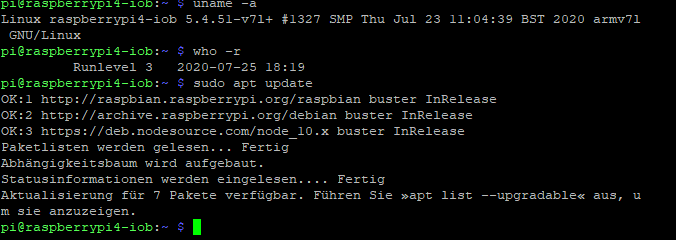
              uname -a 
              who -r
              sudo apt update
              

              Linux-Werkzeugkasten:
              https://forum.iobroker.net/topic/42952/der-kleine-iobroker-linux-werkzeugkasten
              NodeJS Fixer Skript:
              https://forum.iobroker.net/topic/68035/iob-node-fix-skript
              iob_diag: curl -sLf -o diag.sh https://iobroker.net/diag.sh && bash diag.sh

              1 Reply Last reply
              0
              • A Offline
                A Offline
                arnold
                wrote on last edited by
                #37
                pi@raspberrypi4-iob:~ $ uname -a
                Linux raspberrypi4-iob 5.4.51-v7l+ #1327 SMP Thu Jul 23 11:04:39 BST 2020 armv7l GNU/Linux
                pi@raspberrypi4-iob:~ $ who -r
                         Runlevel 5   2020-07-25 16:52
                pi@raspberrypi4-iob:~ $ sudo apt update
                OK:1 http://raspbian.raspberrypi.org/raspbian buster InRelease
                OK:2 http://archive.raspberrypi.org/debian buster InRelease
                OK:3 https://deb.nodesource.com/node_10.x buster InRelease
                Paketlisten werden gelesen... Fertig
                Abhängigkeitsbaum wird aufgebaut.
                Statusinformationen werden eingelesen.... Fertig
                Aktualisierung für 7 Pakete verfügbar. Führen Sie »apt list --upgradable« aus, um sie anzuzeigen.
                pi@raspberrypi4-iob:~ $
                
                
                Thomas BraunT 1 Reply Last reply
                0
                • A arnold
                  pi@raspberrypi4-iob:~ $ uname -a
                  Linux raspberrypi4-iob 5.4.51-v7l+ #1327 SMP Thu Jul 23 11:04:39 BST 2020 armv7l GNU/Linux
                  pi@raspberrypi4-iob:~ $ who -r
                           Runlevel 5   2020-07-25 16:52
                  pi@raspberrypi4-iob:~ $ sudo apt update
                  OK:1 http://raspbian.raspberrypi.org/raspbian buster InRelease
                  OK:2 http://archive.raspberrypi.org/debian buster InRelease
                  OK:3 https://deb.nodesource.com/node_10.x buster InRelease
                  Paketlisten werden gelesen... Fertig
                  Abhängigkeitsbaum wird aufgebaut.
                  Statusinformationen werden eingelesen.... Fertig
                  Aktualisierung für 7 Pakete verfügbar. Führen Sie »apt list --upgradable« aus, um sie anzuzeigen.
                  pi@raspberrypi4-iob:~ $
                  
                  
                  Thomas BraunT Online
                  Thomas BraunT Online
                  Thomas Braun
                  Most Active
                  wrote on last edited by Thomas Braun
                  #38

                  @arnold
                  Lass den Server in Runlevel 3 laufen.

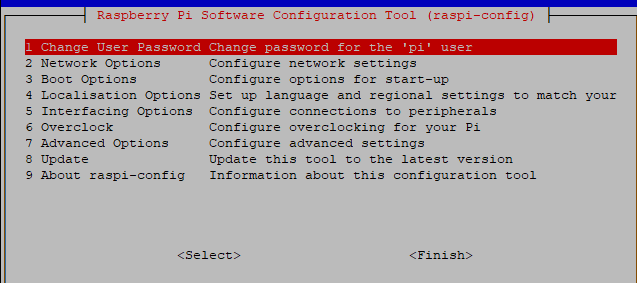
                  sudo raspi-config
                  

                  3 Boot Options
                  B1 Desktop / CLI
                  B1 oder B2 (Je nach Vorliebe, ich würde B1 empfehlen)

                  Linux-Werkzeugkasten:
                  https://forum.iobroker.net/topic/42952/der-kleine-iobroker-linux-werkzeugkasten
                  NodeJS Fixer Skript:
                  https://forum.iobroker.net/topic/68035/iob-node-fix-skript
                  iob_diag: curl -sLf -o diag.sh https://iobroker.net/diag.sh && bash diag.sh

                  1 Reply Last reply
                  0
                  • A Offline
                    A Offline
                    arnold
                    wrote on last edited by
                    #39

                    @Thomas-Braun said in Ble.0 Adapter bremst ganzen IObroker in 2 Min.:

                    Server in Runlevel 3

                    wie mache ich das --Server in Runlevel 3 laufen ???

                    Thomas BraunT 1 Reply Last reply
                    0
                    • A arnold

                      @Thomas-Braun said in Ble.0 Adapter bremst ganzen IObroker in 2 Min.:

                      Server in Runlevel 3

                      wie mache ich das --Server in Runlevel 3 laufen ???

                      Thomas BraunT Online
                      Thomas BraunT Online
                      Thomas Braun
                      Most Active
                      wrote on last edited by
                      #40

                      @arnold Siehe Edit oben.

                      Linux-Werkzeugkasten:
                      https://forum.iobroker.net/topic/42952/der-kleine-iobroker-linux-werkzeugkasten
                      NodeJS Fixer Skript:
                      https://forum.iobroker.net/topic/68035/iob-node-fix-skript
                      iob_diag: curl -sLf -o diag.sh https://iobroker.net/diag.sh && bash diag.sh

                      1 Reply Last reply
                      0
                      • A Offline
                        A Offline
                        arnold
                        wrote on last edited by
                        #41

                        kann ich nicht finden ,brauche Anweisung .

                        Thomas BraunT 1 Reply Last reply
                        0
                        • A arnold

                          kann ich nicht finden ,brauche Anweisung .

                          Thomas BraunT Online
                          Thomas BraunT Online
                          Thomas Braun
                          Most Active
                          wrote on last edited by Thomas Braun
                          #42

                          @arnold
                          ?
                          Steht doch alles da.
                          Du rufst

                          sudo raspi-config
                          

                          auf und gehst dann in die genannten Menüpunkte rein.
                          Mit der Tab-Taste wechselst du mit dem Cursor die Menüpunkte.

                          Linux-Werkzeugkasten:
                          https://forum.iobroker.net/topic/42952/der-kleine-iobroker-linux-werkzeugkasten
                          NodeJS Fixer Skript:
                          https://forum.iobroker.net/topic/68035/iob-node-fix-skript
                          iob_diag: curl -sLf -o diag.sh https://iobroker.net/diag.sh && bash diag.sh

                          1 Reply Last reply
                          0
                          • A Offline
                            A Offline
                            arnold
                            wrote on last edited by
                            #43

                            welche MenüPunkte ? wo stecht das in Edit oben

                            1f9401d1-616f-4bb2-8de7-54c1a110ef51-image.png

                            Thomas BraunT 1 Reply Last reply
                            0
                            • A arnold

                              welche MenüPunkte ? wo stecht das in Edit oben

                              1f9401d1-616f-4bb2-8de7-54c1a110ef51-image.png

                              Thomas BraunT Online
                              Thomas BraunT Online
                              Thomas Braun
                              Most Active
                              wrote on last edited by
                              #44

                              @arnold

                              3 Boot Options
                              B1 Desktop / CLI
                              B1 oder B2 (Je nach Vorliebe, ich würde B1 empfehlen)

                              Linux-Werkzeugkasten:
                              https://forum.iobroker.net/topic/42952/der-kleine-iobroker-linux-werkzeugkasten
                              NodeJS Fixer Skript:
                              https://forum.iobroker.net/topic/68035/iob-node-fix-skript
                              iob_diag: curl -sLf -o diag.sh https://iobroker.net/diag.sh && bash diag.sh

                              1 Reply Last reply
                              0
                              • A Offline
                                A Offline
                                arnold
                                wrote on last edited by
                                #45

                                habe
                                Boot Options >B1 Desktop / CLI > und B1 mit ok und reboot .

                                keine Besserung

                                Thomas BraunT 1 Reply Last reply
                                0
                                • A arnold

                                  habe
                                  Boot Options >B1 Desktop / CLI > und B1 mit ok und reboot .

                                  keine Besserung

                                  Thomas BraunT Online
                                  Thomas BraunT Online
                                  Thomas Braun
                                  Most Active
                                  wrote on last edited by Thomas Braun
                                  #46

                                  @arnold

                                  who -r
                                  

                                  Und die 7 ausstehenden Updates könntest du auch einspielen.

                                  Linux-Werkzeugkasten:
                                  https://forum.iobroker.net/topic/42952/der-kleine-iobroker-linux-werkzeugkasten
                                  NodeJS Fixer Skript:
                                  https://forum.iobroker.net/topic/68035/iob-node-fix-skript
                                  iob_diag: curl -sLf -o diag.sh https://iobroker.net/diag.sh && bash diag.sh

                                  1 Reply Last reply
                                  0
                                  • A Offline
                                    A Offline
                                    arnold
                                    wrote on last edited by
                                    #47

                                    @Thomas-Braun said in Ble.0 Adapter bremst ganzen IObroker in 2 Min.:

                                    who -r

                                    1f47438f-9ea2-4bbd-b82a-b476d3906224-image.png

                                    und was jetzt ?

                                    Thomas BraunT 1 Reply Last reply
                                    0
                                    • A arnold

                                      @Thomas-Braun said in Ble.0 Adapter bremst ganzen IObroker in 2 Min.:

                                      who -r

                                      1f47438f-9ea2-4bbd-b82a-b476d3906224-image.png

                                      und was jetzt ?

                                      Thomas BraunT Online
                                      Thomas BraunT Online
                                      Thomas Braun
                                      Most Active
                                      wrote on last edited by
                                      #48

                                      @arnold
                                      Was heißt eigentlich

                                      gelaufen am Rpi3,aber nach dem Umzug auf Rpi4 jedoch nicht

                                      Wie bist du denn umgezogen? OS neuinstalliert auf dem RPI4 oder nur die Karte umgesteckt?

                                      Linux-Werkzeugkasten:
                                      https://forum.iobroker.net/topic/42952/der-kleine-iobroker-linux-werkzeugkasten
                                      NodeJS Fixer Skript:
                                      https://forum.iobroker.net/topic/68035/iob-node-fix-skript
                                      iob_diag: curl -sLf -o diag.sh https://iobroker.net/diag.sh && bash diag.sh

                                      1 Reply Last reply
                                      0
                                      • A Offline
                                        A Offline
                                        arnold
                                        wrote on last edited by
                                        #49

                                        200ec84f-afd1-4674-b269-f55f9b634036-image.png

                                        Thomas BraunT 1 Reply Last reply
                                        0
                                        • A arnold

                                          200ec84f-afd1-4674-b269-f55f9b634036-image.png

                                          Thomas BraunT Online
                                          Thomas BraunT Online
                                          Thomas Braun
                                          Most Active
                                          wrote on last edited by
                                          #50

                                          @arnold Jetzt die Pakete per

                                          sudo apt dist-upgrade
                                          sudo reboot
                                          

                                          auch installieren.

                                          Linux-Werkzeugkasten:
                                          https://forum.iobroker.net/topic/42952/der-kleine-iobroker-linux-werkzeugkasten
                                          NodeJS Fixer Skript:
                                          https://forum.iobroker.net/topic/68035/iob-node-fix-skript
                                          iob_diag: curl -sLf -o diag.sh https://iobroker.net/diag.sh && bash diag.sh

                                          A 1 Reply Last reply
                                          0

                                          Hello! It looks like you're interested in this conversation, but you don't have an account yet.

                                          Getting fed up of having to scroll through the same posts each visit? When you register for an account, you'll always come back to exactly where you were before, and choose to be notified of new replies (either via email, or push notification). You'll also be able to save bookmarks and upvote posts to show your appreciation to other community members.

                                          With your input, this post could be even better 💗

                                          Register Login
                                          Reply
                                          • Reply as topic
                                          Log in to reply
                                          • Oldest to Newest
                                          • Newest to Oldest
                                          • Most Votes


                                          Support us

                                          ioBroker
                                          Community Adapters
                                          Donate
                                          FAQ Cloud / IOT
                                          HowTo: Node.js-Update
                                          HowTo: Backup/Restore
                                          Downloads
                                          BLOG

                                          257

                                          Online

                                          32.7k

                                          Users

                                          82.6k

                                          Topics

                                          1.3m

                                          Posts
                                          Community
                                          Impressum | Datenschutz-Bestimmungen | Nutzungsbedingungen | Einwilligungseinstellungen
                                          ioBroker Community 2014-2025
                                          logo
                                          • Login

                                          • Don't have an account? Register

                                          • Login or register to search.
                                          • First post
                                            Last post
                                          0
                                          • Home
                                          • Recent
                                          • Tags
                                          • Unread 0
                                          • Categories
                                          • Unreplied
                                          • Popular
                                          • GitHub
                                          • Docu
                                          • Hilfe