
NEWS




Test Adapter time-switch v2.0.x GitHub/Latest
-
Habe gestern Abend bei mir getestet. (Astro Sonnenuntergang)
Funktioniert immer noch!
Vers. 2.2.0 pre 5@wolfi sagte in Test Adapter time-switch v2.0.x GitHub/Latest:
Habe gestern Abend bei mir getestet. (Astro Sonnenuntergang)
Funktioniert immer noch!
Vers. 2.2.0 pre 5Also mein Timer mit Sonnaufgang und Sonnenuntergang tut es definitiv nicht mehr. Version ist 2.2.1
-
@wolfi @BananaJoe @mx-driver
Habe den Fehler bei mir auch feststellen können und habe glaub ich einen Fix gefunden.
Bitte mal die Version2.2.2-pre.1von https://github.com/walli545/ioBroker.time-switch/tarball/133-astro-not-working installieren und testen. -
@wolfi @BananaJoe @mx-driver
Habe den Fehler bei mir auch feststellen können und habe glaub ich einen Fix gefunden.
Bitte mal die Version2.2.2-pre.1von https://github.com/walli545/ioBroker.time-switch/tarball/133-astro-not-working installieren und testen.@walli545 sagte in Test Adapter time-switch v2.0.x GitHub/Latest:
@wolfi @BananaJoe @mx-driver
Habe den Fehler bei mir auch feststellen können und habe glaub ich einen Fix gefunden.
Bitte mal die Version2.2.2-pre.1von https://github.com/walli545/ioBroker.time-switch/tarball/133-astro-not-working installieren und testen.Installiert! (Den Link genommen und bei Installieren aus eigener URL ==> Beliebig eingefügt - richtig?)
Version ist jetzt 2.2.2-pre.1ioBroker@Ubuntu 24.04 LTS (VMware) für: >260 Geräte, 5 Switche, 7 AP, 9 IP-Cam, 1 NAS 42TB, 1 ESXi 15TB, 4 Proxmox 1TB, 1 Hyper-V 48TB, 14 x Echo, 5x FireTV, 5 x Tablett/Handy VIS || >=160 Tasmota/Shelly || >=95 ZigBee || PV 8.1kW / Akku 14kWh || 2x USV 750W kaskadiert || Creality CR-10 SE 3D-Drucker
-
@walli545 sagte in Test Adapter time-switch v2.0.x GitHub/Latest:
@wolfi @BananaJoe @mx-driver
Habe den Fehler bei mir auch feststellen können und habe glaub ich einen Fix gefunden.
Bitte mal die Version2.2.2-pre.1von https://github.com/walli545/ioBroker.time-switch/tarball/133-astro-not-working installieren und testen.Installiert! (Den Link genommen und bei Installieren aus eigener URL ==> Beliebig eingefügt - richtig?)
Version ist jetzt 2.2.2-pre.1 -
@walli545 sagte in Test Adapter time-switch v2.0.x GitHub/Latest:
@wolfi @BananaJoe @mx-driver
Habe den Fehler bei mir auch feststellen können und habe glaub ich einen Fix gefunden.
Bitte mal die Version2.2.2-pre.1von https://github.com/walli545/ioBroker.time-switch/tarball/133-astro-not-working installieren und testen.Installiert! (Den Link genommen und bei Installieren aus eigener URL ==> Beliebig eingefügt - richtig?)
Version ist jetzt 2.2.2-pre.1@bananajoe ja genau 👍
-
@wolfi @BananaJoe @mx-driver
Habe den Fehler bei mir auch feststellen können und habe glaub ich einen Fix gefunden.
Bitte mal die Version2.2.2-pre.1von https://github.com/walli545/ioBroker.time-switch/tarball/133-astro-not-working installieren und testen.@walli545 sagte in Test Adapter time-switch v2.0.x GitHub/Latest:
@wolfi @BananaJoe @mx-driver
Habe den Fehler bei mir auch feststellen können und habe glaub ich einen Fix gefunden.
Bitte mal die Version2.2.2-pre.1von https://github.com/walli545/ioBroker.time-switch/tarball/133-astro-not-working installieren und testen.Also sieht gut aus. Gestern Abend hat er brav bei Sonnenuntergang geschaltet, heute morgen bei Sonnaufgang.
Naja, so genau habe ich das nicht kontrolliert, aber er war an als er an sein sollte und aus als er aus sein sollte. -
@bananajoe ja genau 👍
time-switch.0	2021-04-20 19:26:05.733	info	(8632) starting. Version 2.2.1 in /opt/iobroker/node_modules/iobroker.time-switch, node: v12.16.3, js-controller: 3.2.16
host.iobroker-d	2021-04-20 19:25:59.578	info	Do not restart adapter system.adapter.time-switch.0 because desired by instance
host.iobroker-d	2021-04-20 19:25:59.577	error	instance system.adapter.time-switch.0 terminated by request of the instance itself and will not be restarted, before user restarts it.
host.iobroker-d	2021-04-20 19:25:59.367	info	instance system.adapter.time-switch.0 started with pid 8632
time-switch.0	2021-04-20 19:25:57.392	info	(6568) Terminated (ADAPTER_REQUESTED_TERMINATION): Without reason
time-switch.0	2021-04-20 19:25:57.389	info	(6568) terminating
time-switch.0	2021-04-20 19:25:57.378	info	(6568) cleaning everything up...
time-switch.0	2021-04-20 19:25:56.063	info	(6568) Got terminate signal TERMINATE_YOURSELF
Ist zwar nur Kosmetik, aber ein "error", nur weil ich weitere Schaltpunkte hinzugefügt habe?
-
@walli545 sagte in Test Adapter time-switch v2.0.x GitHub/Latest:
@wolfi @BananaJoe @mx-driver
Habe den Fehler bei mir auch feststellen können und habe glaub ich einen Fix gefunden.
Bitte mal die Version2.2.2-pre.1von https://github.com/walli545/ioBroker.time-switch/tarball/133-astro-not-working installieren und testen.Also sieht gut aus. Gestern Abend hat er brav bei Sonnenuntergang geschaltet, heute morgen bei Sonnaufgang.
Naja, so genau habe ich das nicht kontrolliert, aber er war an als er an sein sollte und aus als er aus sein sollte.@bananajoe sagte in Test Adapter time-switch v2.0.x GitHub/Latest:
@walli545 sagte in Test Adapter time-switch v2.0.x GitHub/Latest:
@wolfi @BananaJoe @mx-driver
Habe den Fehler bei mir auch feststellen können und habe glaub ich einen Fix gefunden.
Bitte mal die Version2.2.2-pre.1von https://github.com/walli545/ioBroker.time-switch/tarball/133-astro-not-working installieren und testen.Also sieht gut aus. Gestern Abend hat er brav bei Sonnenuntergang geschaltet, heute morgen bei Sonnaufgang.
Naja, so genau habe ich das nicht kontrolliert, aber er war an als er an sein sollte und aus als er aus sein sollte.Ja scheint zu funktionieren
Danke -
Kann ich das ganze irgendwie mit Jarvis nutzen / integrieren?
-
@wolfi sagte in Test Adapter time-switch v2.0.x GitHub/Latest:
Hallo
Ich frage nochmal meinen Wunsch auf den Zusatz Countdown Timer nach ?
Wäre das möglich?Einfach Zeit Einstellung Stunden , Minuten
Bei Start die Zeit läuft sichtbar rückwärts. (Start mit Bottom währe ausreichen)
Nach Ablauf der Zeit Aktion ein oder aus wählbar.Gruss
Hallo zusammen,
gut gemachter Adapter, nutze ihn schon seit einiger Zeit. Danke für die Arbeit :+1:
Jetzt hätte ich jedoch eine Frage bzw. möchte kurz nachhaken was denn aus Wolfis Wunsch geworden ist?
Ich möchte einen State zu einem bestimmten Zeitpunkt einfach nur triggern, heißt den State für 1, 2 ...X sec on oder off schalten. Ist so eine Funktion in der Pipeline? Wolfis Wunsch würde dem ja recht nahe kommen, oder? Bin ich der Erste/Einzige der sowas brauchen könnte?Danke schon mal
@fuso sagte in Test Adapter time-switch v2.0.x GitHub/Latest:
@wolfi sagte in Test Adapter time-switch v2.0.x GitHub/Latest:
Hallo
Ich frage nochmal meinen Wunsch auf den Zusatz Countdown Timer nach ?
Wäre das möglich?Einfach Zeit Einstellung Stunden , Minuten
Bei Start die Zeit läuft sichtbar rückwärts. (Start mit Bottom währe ausreichen)
Nach Ablauf der Zeit Aktion ein oder aus wählbar.Gruss
Hallo zusammen,
gut gemachter Adapter, nutze ihn schon seit einiger Zeit. Danke für die Arbeit :+1:
Jetzt hätte ich jedoch eine Frage bzw. möchte kurz nachhaken was denn aus Wolfis Wunsch geworden ist?
Ich möchte einen State zu einem bestimmten Zeitpunkt einfach nur triggern, heißt den State für 1, 2 ...X sec on oder off schalten. Ist so eine Funktion in der Pipeline? Wolfis Wunsch würde dem ja recht nahe kommen, oder? Bin ich der Erste/Einzige der sowas brauchen könnte?Danke schon mal
Hallo @walli545
Adapter läuft weiterhin ohne Probleme
wollte mich nur mal kurz erkundigen, ob Du die angemerkten Features noch planst?
Vielen Dank -
seit dem Update läuft der Adapter nicht mehr ich kann ihn auch nicht mehr installieren
was kann ich machen ich war sehr zufrieden mit dem Adapter -
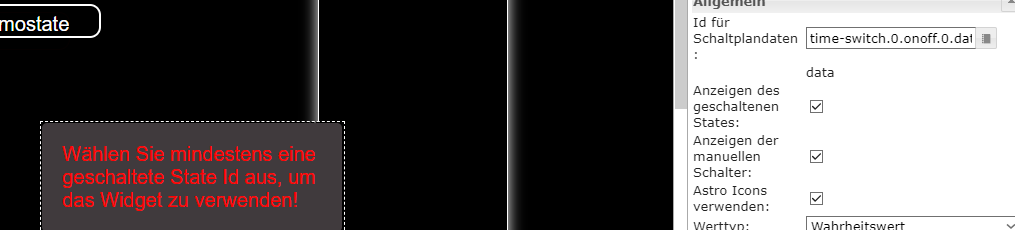
Heute 2.2.2 installiert. In der VIS den Schedule on/off installiert. Beim Anlegen OID bleibt die Meldung wie auf dem Bild zu sehen ist bestehen. Alle Schaltplan ID Daten haben ich testweise verwendet. Ergebnis bleibt bestehen..was kann das sein?
 .
. -
Hallo Zusammen,
ich habe eben die aktuelle Version auf meinem PI4 aus dem github Link installiert und wo
normal das Widget erscheint fehlt das Bild. Es sieht also nicht so aus wie unten gezeigt.
Ziehe ich das Widgeht dann in die Vis, ist kein Widget zusehen. Ea ist jedoch da, weil ich es mit STR+A
selektieren kann.
Kenn jemand eine Lösung, dass es wie unten aussieht?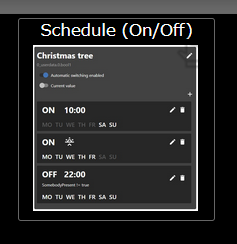
Ich habe den Adapter bereits einmal deinstalliert und neu installiert.
@theloh sagte in Test Adapter time-switch v2.0.x GitHub/Latest:
Hallo Zusammen,
ich habe eben die aktuelle Version auf meinem PI4 aus dem github Link installiert und wo
normal das Widget erscheint fehlt das Bild. Es sieht also nicht so aus wie unten gezeigt.
Ziehe ich das Widgeht dann in die Vis, ist kein Widget zusehen. Ea ist jedoch da, weil ich es mit STR+A
selektieren kann.
Kenn jemand eine Lösung, dass es wie unten aussieht?Ich habe den Adapter bereits einmal deinstalliert und neu installiert.
Ich habe genau das gleiche Problem, jedoch nur wenn ich per Remote (Pro) damit arbeiten will.
Local oder Vis auf Android funktioniert einwandfrei.
Basiert das Widget evtl. auf Material-CSS? Damit hatte ich bis jetzt immer Probleme und nutze es deshalb nicht mehr.
VG
Axel -
@theloh sagte in Test Adapter time-switch v2.0.x GitHub/Latest:
Hallo Zusammen,
ich habe eben die aktuelle Version auf meinem PI4 aus dem github Link installiert und wo
normal das Widget erscheint fehlt das Bild. Es sieht also nicht so aus wie unten gezeigt.
Ziehe ich das Widgeht dann in die Vis, ist kein Widget zusehen. Ea ist jedoch da, weil ich es mit STR+A
selektieren kann.
Kenn jemand eine Lösung, dass es wie unten aussieht?Ich habe den Adapter bereits einmal deinstalliert und neu installiert.
Ich habe genau das gleiche Problem, jedoch nur wenn ich per Remote (Pro) damit arbeiten will.
Local oder Vis auf Android funktioniert einwandfrei.
Basiert das Widget evtl. auf Material-CSS? Damit hatte ich bis jetzt immer Probleme und nutze es deshalb nicht mehr.
VG
Axel@axel-koeneke : Hat sonst niemand Probleme mit der Darstellung per Remote?
Habe folgendes im Log wenn ich das Widget einfüge:cloud.0 2021-09-27 08:13:42.309 error (1028) Addon vis 10 - at Object.reRenderWidgetEdit (https://iobroker.pro/vis/js/visEdit.js:4237:14) cloud.0 2021-09-27 08:13:42.308 error (1028) Addon vis 9 - at Object.reRenderWidget (https://iobroker.pro/vis/js/vis.js:1088:14) cloud.0 2021-09-27 08:13:42.307 error (1028) Addon vis 8 - at Object.renderWidget (https://iobroker.pro/vis/js/vis.js:1660:33) cloud.0 2021-09-27 08:13:42.306 error (1028) Addon vis 7 - at Object.e.view.e.template (https://iobroker.pro/vis/lib/js/can.custom.min.js:58:1267) cloud.0 2021-09-27 08:13:42.302 error (1028) Addon vis 6 - at Function.renderAs (https://iobroker.pro/vis/lib/js/can.custom.min.js:58:3631) cloud.0 2021-09-27 08:13:42.301 error (1028) Addon vis 5 - at Function.renderTo (https://iobroker.pro/vis/lib/js/can.custom.min.js:58:2982) cloud.0 2021-09-27 08:13:42.301 error (1028) Addon vis 4 - at r (https://iobroker.pro/vis/lib/js/can.custom.min.js:58:138) cloud.0 2021-09-27 08:13:42.300 error (1028) Addon vis 3 - at t.template.fn (https://iobroker.pro/vis/lib/js/can.custom.min.js:76:256) cloud.0 2021-09-27 08:13:42.298 error (1028) Addon vis 2 - at n.render (https://iobroker.pro/vis/lib/js/can.custom.min.js:76:475) cloud.0 2021-09-27 08:13:42.295 error (1028) Addon vis 1 - at Object.eval (tplTime-switchDevicePlan.js:2:35) cloud.0 2021-09-27 08:13:42.294 error (1028) Addon vis 0 - TypeError: Cannot read property 'createOnOffWidget' of undefinedTypeError: Cannot read property 'createOnOffWidget' of undefined cloud.0 2021-09-27 08:13:42.225 error (1028) Addon vis can't render tplTime-switchDevicePlan w00089 on "Wetter_Detail": cloud.0 2021-09-27 08:13:42.224 error (1028) Addon vis 10 - at Object.reRenderWidgetEdit (https://iobroker.pro/vis/js/visEdit.js:4237:14) cloud.0 2021-09-27 08:13:42.221 error (1028) Addon vis 9 - at Object.reRenderWidget (https://iobroker.pro/vis/js/vis.js:1088:14) cloud.0 2021-09-27 08:13:42.220 error (1028) Addon vis 8 - at Object.renderWidget (https://iobroker.pro/vis/js/vis.js:1660:33) cloud.0 2021-09-27 08:13:42.219 error (1028) Addon vis 7 - at Object.e.view.e.template (https://iobroker.pro/vis/lib/js/can.custom.min.js:58:1267) cloud.0 2021-09-27 08:13:42.217 error (1028) Addon vis 6 - at Function.renderAs (https://iobroker.pro/vis/lib/js/can.custom.min.js:58:3631) cloud.0 2021-09-27 08:13:42.215 error (1028) Addon vis 5 - at Function.renderTo (https://iobroker.pro/vis/lib/js/can.custom.min.js:58:2982) cloud.0 2021-09-27 08:13:42.214 error (1028) Addon vis 4 - at r (https://iobroker.pro/vis/lib/js/can.custom.min.js:58:138) cloud.0 2021-09-27 08:13:42.210 error (1028) Addon vis 3 - at t.template.fn (https://iobroker.pro/vis/lib/js/can.custom.min.js:76:256) cloud.0 2021-09-27 08:13:42.209 error (1028) Addon vis 2 - at n.render (https://iobroker.pro/vis/lib/js/can.custom.min.js:76:475) cloud.0 2021-09-27 08:13:42.207 error (1028) Addon vis 1 - at Object.eval (tplTime-switchDevicePlan.js:2:35) cloud.0 2021-09-27 08:13:42.205 error (1028) Addon vis 0 - TypeError: Cannot read property 'createOnOffWidget' of undefinedTypeError: Cannot read property 'createOnOffWidget' of undefined cloud.0 2021-09-27 08:13:42.097 error (1028) Addon vis can't render tplTime-switchDevicePlan w00089 on "Wetter_Detail":Wie gesagt, lokal funktioniert es prima.
VG
Axel -
@axel-koeneke : Hat sonst niemand Probleme mit der Darstellung per Remote?
Habe folgendes im Log wenn ich das Widget einfüge:cloud.0 2021-09-27 08:13:42.309 error (1028) Addon vis 10 - at Object.reRenderWidgetEdit (https://iobroker.pro/vis/js/visEdit.js:4237:14) cloud.0 2021-09-27 08:13:42.308 error (1028) Addon vis 9 - at Object.reRenderWidget (https://iobroker.pro/vis/js/vis.js:1088:14) cloud.0 2021-09-27 08:13:42.307 error (1028) Addon vis 8 - at Object.renderWidget (https://iobroker.pro/vis/js/vis.js:1660:33) cloud.0 2021-09-27 08:13:42.306 error (1028) Addon vis 7 - at Object.e.view.e.template (https://iobroker.pro/vis/lib/js/can.custom.min.js:58:1267) cloud.0 2021-09-27 08:13:42.302 error (1028) Addon vis 6 - at Function.renderAs (https://iobroker.pro/vis/lib/js/can.custom.min.js:58:3631) cloud.0 2021-09-27 08:13:42.301 error (1028) Addon vis 5 - at Function.renderTo (https://iobroker.pro/vis/lib/js/can.custom.min.js:58:2982) cloud.0 2021-09-27 08:13:42.301 error (1028) Addon vis 4 - at r (https://iobroker.pro/vis/lib/js/can.custom.min.js:58:138) cloud.0 2021-09-27 08:13:42.300 error (1028) Addon vis 3 - at t.template.fn (https://iobroker.pro/vis/lib/js/can.custom.min.js:76:256) cloud.0 2021-09-27 08:13:42.298 error (1028) Addon vis 2 - at n.render (https://iobroker.pro/vis/lib/js/can.custom.min.js:76:475) cloud.0 2021-09-27 08:13:42.295 error (1028) Addon vis 1 - at Object.eval (tplTime-switchDevicePlan.js:2:35) cloud.0 2021-09-27 08:13:42.294 error (1028) Addon vis 0 - TypeError: Cannot read property 'createOnOffWidget' of undefinedTypeError: Cannot read property 'createOnOffWidget' of undefined cloud.0 2021-09-27 08:13:42.225 error (1028) Addon vis can't render tplTime-switchDevicePlan w00089 on "Wetter_Detail": cloud.0 2021-09-27 08:13:42.224 error (1028) Addon vis 10 - at Object.reRenderWidgetEdit (https://iobroker.pro/vis/js/visEdit.js:4237:14) cloud.0 2021-09-27 08:13:42.221 error (1028) Addon vis 9 - at Object.reRenderWidget (https://iobroker.pro/vis/js/vis.js:1088:14) cloud.0 2021-09-27 08:13:42.220 error (1028) Addon vis 8 - at Object.renderWidget (https://iobroker.pro/vis/js/vis.js:1660:33) cloud.0 2021-09-27 08:13:42.219 error (1028) Addon vis 7 - at Object.e.view.e.template (https://iobroker.pro/vis/lib/js/can.custom.min.js:58:1267) cloud.0 2021-09-27 08:13:42.217 error (1028) Addon vis 6 - at Function.renderAs (https://iobroker.pro/vis/lib/js/can.custom.min.js:58:3631) cloud.0 2021-09-27 08:13:42.215 error (1028) Addon vis 5 - at Function.renderTo (https://iobroker.pro/vis/lib/js/can.custom.min.js:58:2982) cloud.0 2021-09-27 08:13:42.214 error (1028) Addon vis 4 - at r (https://iobroker.pro/vis/lib/js/can.custom.min.js:58:138) cloud.0 2021-09-27 08:13:42.210 error (1028) Addon vis 3 - at t.template.fn (https://iobroker.pro/vis/lib/js/can.custom.min.js:76:256) cloud.0 2021-09-27 08:13:42.209 error (1028) Addon vis 2 - at n.render (https://iobroker.pro/vis/lib/js/can.custom.min.js:76:475) cloud.0 2021-09-27 08:13:42.207 error (1028) Addon vis 1 - at Object.eval (tplTime-switchDevicePlan.js:2:35) cloud.0 2021-09-27 08:13:42.205 error (1028) Addon vis 0 - TypeError: Cannot read property 'createOnOffWidget' of undefinedTypeError: Cannot read property 'createOnOffWidget' of undefined cloud.0 2021-09-27 08:13:42.097 error (1028) Addon vis can't render tplTime-switchDevicePlan w00089 on "Wetter_Detail":Wie gesagt, lokal funktioniert es prima.
VG
AxelHallo zusammen,
ich hab aktuell zeitlich viel um die Ohren, da ich gerade an meiner Bachelorarbeit arbeite. Ich habe mir aber jetzt mal die Zeit genommen und die Einmal/Countdown Trigger fertig eingebaut. Außerdem habe ich die Kompatibilität mit Admin 5 und js-controller 3.3 überprüft, soweit konnte ich keine Probleme feststellen.Über https://github.com/walli545/ioBroker.time-switch/tarball/dev könnt ihr die neue Version
2.3.0-pre.1testen.@axel-koeneke Zum Thema ioBroker.pro: Das besitze und nutze ich nicht von daher tue ich mich schwer den Fehler zu reproduzieren. Evtl. könntest du mir noch weitere Logs z.B. aus dem Browser zur Verfügung stellen?
-
Hallo zusammen,
ich hab aktuell zeitlich viel um die Ohren, da ich gerade an meiner Bachelorarbeit arbeite. Ich habe mir aber jetzt mal die Zeit genommen und die Einmal/Countdown Trigger fertig eingebaut. Außerdem habe ich die Kompatibilität mit Admin 5 und js-controller 3.3 überprüft, soweit konnte ich keine Probleme feststellen.Über https://github.com/walli545/ioBroker.time-switch/tarball/dev könnt ihr die neue Version
2.3.0-pre.1testen.@axel-koeneke Zum Thema ioBroker.pro: Das besitze und nutze ich nicht von daher tue ich mich schwer den Fehler zu reproduzieren. Evtl. könntest du mir noch weitere Logs z.B. aus dem Browser zur Verfügung stellen?
@walli545 Wennich das Widget in eine leere View ziehe kommt folgendes im Chrome:
Error: can't render tplTime-switchDevicePlan w00735 on "Test":
conn.js:1256 Error: 0 - TypeError: Cannot read property 'createOnOffWidget' of undefinedTypeError: Cannot read property 'createOnOffWidget' of undefined
conn.js:1256 Error: 1 -     at Object.eval (tplTime-switchDevicePlan.js:2:35)
conn.js:1256 Error: 2 -     at n.render (https://iobroker.pro/vis/lib/js/can.custom.min.js:76:475)
conn.js:1256 Error: 3 -     at t.template.fn (https://iobroker.pro/vis/lib/js/can.custom.min.js:76:256)
conn.js:1256 Error: 4 -     at r (https://iobroker.pro/vis/lib/js/can.custom.min.js:58:138)
conn.js:1256 Error: 5 -     at Function.renderTo (https://iobroker.pro/vis/lib/js/can.custom.min.js:58:2982)
conn.js:1256 Error: 6 -     at Function.renderAs (https://iobroker.pro/vis/lib/js/can.custom.min.js:58:3631)
conn.js:1256 Error: 7 -     at Object.e.view.e.template (https://iobroker.pro/vis/lib/js/can.custom.min.js:58:1267)
conn.js:1256 Error: 8 -     at Object.renderWidget (https://iobroker.pro/vis/js/vis.js:1660:33)
conn.js:1256 Error: 9 -     at Object.reRenderWidget (https://iobroker.pro/vis/js/vis.js:1088:14)
conn.js:1256 Error: 10 -     at Object.reRenderWidgetEdit (https://iobroker.pro/vis/js/visEdit.js:4237:14)
visEdit.js:4397 Cannot find in DOM w00735
translate.js:20 "boolean": {"en": "boolean", "de": "boolean", "ru": "boolean"},
translate.js:20 "string": {"en": "string", "de": "string", "ru": "string"},
conn.js:1256 Error: can't render tplTime-switchDevicePlan w00735 on "Test":
conn.js:1256 Error: 0 - TypeError: Cannot read property 'createOnOffWidget' of undefinedTypeError: Cannot read property 'createOnOffWidget' of undefined
conn.js:1256 Error: 1 -     at Object.eval (tplTime-switchDevicePlan.js:2:35)
conn.js:1256 Error: 2 -     at n.render (https://iobroker.pro/vis/lib/js/can.custom.min.js:76:475)
conn.js:1256 Error: 3 -     at t.template.fn (https://iobroker.pro/vis/lib/js/can.custom.min.js:76:256)
conn.js:1256 Error: 4 -     at r (https://iobroker.pro/vis/lib/js/can.custom.min.js:58:138)
conn.js:1256 Error: 5 -     at Function.renderTo (https://iobroker.pro/vis/lib/js/can.custom.min.js:58:2982)
conn.js:1256 Error: 6 -     at Function.renderAs (https://iobroker.pro/vis/lib/js/can.custom.min.js:58:3631)
conn.js:1256 Error: 7 -     at Object.e.view.e.template (https://iobroker.pro/vis/lib/js/can.custom.min.js:58:1267)
conn.js:1256 Error: 8 -     at Object.renderWidget (https://iobroker.pro/vis/js/vis.js:1660:33)
conn.js:1256 Error: 9 -     at Object.reRenderWidget (https://iobroker.pro/vis/js/vis.js:1088:14)
conn.js:1256 Error: 10 -     at Object.reRenderWidgetEdit (https://iobroker.pro/vis/js/visEdit.js:4237:14)
translate.js:20 "dataId": {"en": "dataId", "de": "dataId", "ru": "dataId"},
translate.js:20 "showId": {"en": "showId", "de": "showId", "ru": "showId"},
translate.js:20 "showManualSwitch": {"en": "showManualSwitch", "de": "showManualSwitch", "ru": "showManualSwitch"},
translate.js:20 "useAstroIcons": {"en": "useAstroIcons", "de": "useAstroIcons", "ru": "useAstroIcons"},
translate.js:20 "valueType": {"en": "valueType", "de": "valueType", "ru": "valueType"},
translate.js:20 "offValue": {"en": "offValue", "de": "offValue", "ru": "offValue"},
translate.js:20 "onValue": {"en": "onValue", "de": "onValue", "ru": "onValue"},
translate.js:20 "statesCount": {"en": "statesCount", "de": "statesCount", "ru": "statesCount"},
translate.js:20 "stateId": {"en": "stateId", "de": "stateId", "ru": "stateId"},
translate.js:20 "showConditionIds": {"en": "showConditionIds", "de": "showConditionIds", "ru": "showConditionIds"},
translate.js:20 "conditionStatesCount": {"en": "conditionStatesCount", "de": "conditionStatesCount", "ru": "conditionStatesCount"},
translate.js:20 "conditionStateId": {"en": "conditionStateId", "de": "conditionStateId", "ru": "conditionStateId"},
translate.js:20 "conditionStateAlias": {"en": "conditionStateAlias", "de": "conditionStateAlias", "ru": "conditionStateAlias"},
Hoffentlich kannst du damit etwas anfangen.
VG
Axel






Support us
422
Online32.6k
Users82.1k
Topics1.3m
Posts