Skip to content
  • Home
  • Recent
  • Tags
  • 0 Unread 0
  • Categories
  • Unreplied
  • Popular
  • GitHub
  • Docu
  • Hilfe
Skins
  • Light
  • Brite
  • Cerulean
  • Cosmo
  • Flatly
  • Journal
  • Litera
  • Lumen
  • Lux
  • Materia
  • Minty
  • Morph
  • Pulse
  • Sandstone
  • Simplex
  • Sketchy
  • Spacelab
  • United
  • Yeti
  • Zephyr
  • Dark
  • Cyborg
  • Darkly
  • Quartz
  • Slate
  • Solar
  • Superhero
  • Vapor

  • Default (No Skin)
  • No Skin
Collapse
ioBroker Logo

Community Forum

donate donate
  1. ioBroker Community Home
  2. Deutsch
  3. ioBroker Allgemein
  4. Zigbee Umstieg von ccXXXX auf ccYYYY
NEWS

  • Jahresrückblick 2025 – unser neuer Blogbeitrag ist online! ✨
    BluefoxB
    Bluefox
    17
    1
    2.8k

  • Neuer Blogbeitrag: Monatsrückblick - Dezember 2025 🎄
    BluefoxB
    Bluefox
    13
    1
    1.1k

  • Weihnachtsangebot 2025! 🎄
    BluefoxB
    Bluefox
    25
    1
    2.4k

Zigbee Umstieg von ccXXXX auf ccYYYY
Scheduled Pinned Locked Moved ioBroker Allgemein
zigbeeumstiegplatineneu anlernen
169 Posts 21 Posters 25.5k Views 28 Watching
  • Oldest to Newest
  • Newest to Oldest
  • Most Votes
Reply
  • Reply as topic
Log in to reply
This topic has been deleted. Only users with topic management privileges can see it.
  • AsgothianA Asgothian

    @xenon damit ist zu rechnen. Ob wir dafür sorgen können das die da Variante weiter geht stehe ich skeptisch.

    Wichtig - das ist keine Anpassung die von den iobroker Entwicklern ausgeht.

    A.

    XenonX Offline
    XenonX Offline
    Xenon
    Forum Testing Developer
    wrote on last edited by
    #160

    @asgothian nein das ist mir klar, da mache ich euch keinen Vorwurf 🙂

    Gut, dann ändere ich die ID einfach im Vorfeld und lerne dann halt einmalig neu an! Danke dir für die schnelle Antwort.

    Vielleicht sollte man das schon mal vorab veröffentlichen, damit Leute die neu anfangen es direkt anders machen?

    wenn euch mein Beitrag geholfen hat, bewertet ihn bitte unten rechts :)

    1 Reply Last reply
    0
    • aXCellA Offline
      aXCellA Offline
      aXCell
      wrote on last edited by
      #161

      Hallo,

      nachdem ich obige Anleitung minuziös eingehalten habe, startet mein ioBroker nicht mehr.

      auf

      iobroker status 
      

      bekomme ich:

      aXCells-Mini:~ Alex$ iobroker status
      iobroker is not running on this host.
      
      At least one iobroker host is running.
      
      Objects type: redis
      States  type: redis


      Was mich wundert, ist die gegenteillige Aussage: "is not running" & "one iobroker host is running".
      Was denn nun?

      Auf

      which nodejs node npm && nodejs -v && node -v && npm -v && sudo apt update && sudo apt update && apt policy nodejs
      
      /usr/local/bin/node
      /usr/local/bin/npm


      (Ja, ich bin auf MacOS unterwegs)

      node -v = v14.17.5
      NPM -v = 6.14.14

      Ich weiß gerade nicht, wie ich den ioBroker wieder zum laufen bekomme, da ja eigentlich "nur" der Zigbee Stick gewechselt wurde.

      Weiß jemand Rat?

      Thomas BraunT arteckA 2 Replies Last reply
      0
      • aXCellA aXCell

        Hallo,

        nachdem ich obige Anleitung minuziös eingehalten habe, startet mein ioBroker nicht mehr.

        auf

        iobroker status 
        

        bekomme ich:

        aXCells-Mini:~ Alex$ iobroker status
        iobroker is not running on this host.
        
        At least one iobroker host is running.
        
        Objects type: redis
        States  type: redis


        Was mich wundert, ist die gegenteillige Aussage: "is not running" & "one iobroker host is running".
        Was denn nun?

        Auf

        which nodejs node npm && nodejs -v && node -v && npm -v && sudo apt update && sudo apt update && apt policy nodejs
        
        /usr/local/bin/node
        /usr/local/bin/npm


        (Ja, ich bin auf MacOS unterwegs)

        node -v = v14.17.5
        NPM -v = 6.14.14

        Ich weiß gerade nicht, wie ich den ioBroker wieder zum laufen bekomme, da ja eigentlich "nur" der Zigbee Stick gewechselt wurde.

        Weiß jemand Rat?

        Thomas BraunT Online
        Thomas BraunT Online
        Thomas Braun
        Most Active
        wrote on last edited by
        #162

        @axcell

        Multihostbetrieb?

        iobroker list instances
        

        Linux-Werkzeugkasten:
        https://forum.iobroker.net/topic/42952/der-kleine-iobroker-linux-werkzeugkasten
        NodeJS Fixer Skript:
        https://forum.iobroker.net/topic/68035/iob-node-fix-skript
        iob_diag: curl -sLf -o diag.sh https://iobroker.net/diag.sh && bash diag.sh

        aXCellA 1 Reply Last reply
        0
        • aXCellA aXCell

          Hallo,

          nachdem ich obige Anleitung minuziös eingehalten habe, startet mein ioBroker nicht mehr.

          auf

          iobroker status 
          

          bekomme ich:

          aXCells-Mini:~ Alex$ iobroker status
          iobroker is not running on this host.
          
          At least one iobroker host is running.
          
          Objects type: redis
          States  type: redis


          Was mich wundert, ist die gegenteillige Aussage: "is not running" & "one iobroker host is running".
          Was denn nun?

          Auf

          which nodejs node npm && nodejs -v && node -v && npm -v && sudo apt update && sudo apt update && apt policy nodejs
          
          /usr/local/bin/node
          /usr/local/bin/npm


          (Ja, ich bin auf MacOS unterwegs)

          node -v = v14.17.5
          NPM -v = 6.14.14

          Ich weiß gerade nicht, wie ich den ioBroker wieder zum laufen bekomme, da ja eigentlich "nur" der Zigbee Stick gewechselt wurde.

          Weiß jemand Rat?

          arteckA Offline
          arteckA Offline
          arteck
          Developer Most Active
          wrote on last edited by
          #163

          @axcell wo läuft der iobroker ?

          zigbee hab ich, zwave auch, nuc's genauso und HA auch

          1 Reply Last reply
          0
          • Thomas BraunT Thomas Braun

            @axcell

            Multihostbetrieb?

            iobroker list instances
            
            aXCellA Offline
            aXCellA Offline
            aXCell
            wrote on last edited by aXCell
            #164

            @thomas-braun sagte in Zigbee Umstieg von ccXXXX auf ccYYYY:

            @axcell

            Multihostbetrieb?

            Nein, Solo Betrieb auf dem immer laufendem Mac Mini.
            Wobei mir aber einfällt, das seit ein paar Tagen in der seitlichen Navigationsleiste "Hosts" immer zwei aufgeführt waren, warum auch immer, einer davon aber rot markiert wurde ?!

            aXCells-Mini:~ Alex$ iobroker list instances
              system.adapter.admin.0                  : admin                 : aXCells-Mini.fritz.box                   -  enabled, port: 8081, bind: 0.0.0.0, run as: admin
              system.adapter.backitup.0               : backitup              : aXCells-Mini.fritz.box                   -  enabled
              system.adapter.cloud.0                  : cloud                 : aXCells-Mini.fritz.box                   - disabled
              system.adapter.daswetter.0              : daswetter             : aXCells-Mini.fritz.box                   - disabled
              system.adapter.discovery.0              : discovery             : aXCells-Mini.fritz.box                   -  enabled
              system.adapter.flot.0                   : flot                  : aXCells-Mini.fritz.box                   -  enabled
              system.adapter.history.0                : history               : aXCells-Mini.fritz.box                   -  enabled
              system.adapter.icons-mfd-svg.0          : icons-mfd-svg         : aXCells-Mini.fritz.box                   -  enabled
              system.adapter.influxdb.0               : influxdb              : aXCells-Mini.fritz.box                   -  enabled, port: 8086
              system.adapter.info.0                   : info                  : aXCells-Mini.fritz.box                   -  enabled
              system.adapter.iot.0                    : iot                   : aXCells-Mini.fritz.box                   - disabled
              system.adapter.jarvis.0                 : jarvis                : aXCells-Mini.fritz.box                   -  enabled
              system.adapter.javascript.0             : javascript            : aXCells-Mini.fritz.box                   -  enabled
              system.adapter.net-tools.0              : net-tools             : aXCells-Mini.fritz.box                   -  enabled
              system.adapter.nuki-extended.0          : nuki-extended         : aXCells-Mini.fritz.box                   -  enabled
              system.adapter.ping.0                   : ping                  : aXCells-Mini.fritz.box                   - disabled
              system.adapter.tr-064.0                 : tr-064                : aXCells-Mini.fritz.box                   -  enabled
              system.adapter.vis-colorpicker.0        : vis-colorpicker       : aXCells-Mini.fritz.box                   -  enabled
              system.adapter.vis-hqwidgets.0          : vis-hqwidgets         : aXCells-Mini.fritz.box                   -  enabled
              system.adapter.vis-icontwo.0            : vis-icontwo           : aXCells-Mini.fritz.box                   -  enabled
              system.adapter.vis-inventwo.0           : vis-inventwo          : aXCells-Mini.fritz.box                   -  enabled
              system.adapter.vis-material-advanced.0  : vis-material-advanced : aXCells-Mini.fritz.box                   -  enabled
              system.adapter.vis-metro.0              : vis-metro             : aXCells-Mini.fritz.box                   -  enabled
              system.adapter.vis-timeandweather.0     : vis-timeandweather    : aXCells-Mini.fritz.box                   -  enabled
              system.adapter.vis-weather.0            : vis-weather           : aXCells-Mini.fritz.box                   -  enabled
              system.adapter.vis.0                    : vis                   : aXCells-Mini.fritz.box                   -  enabled
              system.adapter.web.0                    : web                   : aXCells-Mini.fritz.box                   -  enabled, port: 8082, bind: 0.0.0.0, run as: admin
              system.adapter.yahka.0                  : yahka                 : aXCells-Mini.fritz.box                   -  enabled
              system.adapter.zigbee.0                 : zigbee                : aXCells-Mini.fritz.box                   -  enabled, port: /dev/tty.usbmodem14101
            
            + instance is alive


            @arteck
            Auf einem Mac Mini mit OSX 10.15.7

            Thomas BraunT 1 Reply Last reply
            0
            • aXCellA aXCell

              @thomas-braun sagte in Zigbee Umstieg von ccXXXX auf ccYYYY:

              @axcell

              Multihostbetrieb?

              Nein, Solo Betrieb auf dem immer laufendem Mac Mini.
              Wobei mir aber einfällt, das seit ein paar Tagen in der seitlichen Navigationsleiste "Hosts" immer zwei aufgeführt waren, warum auch immer, einer davon aber rot markiert wurde ?!

              aXCells-Mini:~ Alex$ iobroker list instances
                system.adapter.admin.0                  : admin                 : aXCells-Mini.fritz.box                   -  enabled, port: 8081, bind: 0.0.0.0, run as: admin
                system.adapter.backitup.0               : backitup              : aXCells-Mini.fritz.box                   -  enabled
                system.adapter.cloud.0                  : cloud                 : aXCells-Mini.fritz.box                   - disabled
                system.adapter.daswetter.0              : daswetter             : aXCells-Mini.fritz.box                   - disabled
                system.adapter.discovery.0              : discovery             : aXCells-Mini.fritz.box                   -  enabled
                system.adapter.flot.0                   : flot                  : aXCells-Mini.fritz.box                   -  enabled
                system.adapter.history.0                : history               : aXCells-Mini.fritz.box                   -  enabled
                system.adapter.icons-mfd-svg.0          : icons-mfd-svg         : aXCells-Mini.fritz.box                   -  enabled
                system.adapter.influxdb.0               : influxdb              : aXCells-Mini.fritz.box                   -  enabled, port: 8086
                system.adapter.info.0                   : info                  : aXCells-Mini.fritz.box                   -  enabled
                system.adapter.iot.0                    : iot                   : aXCells-Mini.fritz.box                   - disabled
                system.adapter.jarvis.0                 : jarvis                : aXCells-Mini.fritz.box                   -  enabled
                system.adapter.javascript.0             : javascript            : aXCells-Mini.fritz.box                   -  enabled
                system.adapter.net-tools.0              : net-tools             : aXCells-Mini.fritz.box                   -  enabled
                system.adapter.nuki-extended.0          : nuki-extended         : aXCells-Mini.fritz.box                   -  enabled
                system.adapter.ping.0                   : ping                  : aXCells-Mini.fritz.box                   - disabled
                system.adapter.tr-064.0                 : tr-064                : aXCells-Mini.fritz.box                   -  enabled
                system.adapter.vis-colorpicker.0        : vis-colorpicker       : aXCells-Mini.fritz.box                   -  enabled
                system.adapter.vis-hqwidgets.0          : vis-hqwidgets         : aXCells-Mini.fritz.box                   -  enabled
                system.adapter.vis-icontwo.0            : vis-icontwo           : aXCells-Mini.fritz.box                   -  enabled
                system.adapter.vis-inventwo.0           : vis-inventwo          : aXCells-Mini.fritz.box                   -  enabled
                system.adapter.vis-material-advanced.0  : vis-material-advanced : aXCells-Mini.fritz.box                   -  enabled
                system.adapter.vis-metro.0              : vis-metro             : aXCells-Mini.fritz.box                   -  enabled
                system.adapter.vis-timeandweather.0     : vis-timeandweather    : aXCells-Mini.fritz.box                   -  enabled
                system.adapter.vis-weather.0            : vis-weather           : aXCells-Mini.fritz.box                   -  enabled
                system.adapter.vis.0                    : vis                   : aXCells-Mini.fritz.box                   -  enabled
                system.adapter.web.0                    : web                   : aXCells-Mini.fritz.box                   -  enabled, port: 8082, bind: 0.0.0.0, run as: admin
                system.adapter.yahka.0                  : yahka                 : aXCells-Mini.fritz.box                   -  enabled
                system.adapter.zigbee.0                 : zigbee                : aXCells-Mini.fritz.box                   -  enabled, port: /dev/tty.usbmodem14101
              
              + instance is alive


              @arteck
              Auf einem Mac Mini mit OSX 10.15.7

              Thomas BraunT Online
              Thomas BraunT Online
              Thomas Braun
              Most Active
              wrote on last edited by
              #165

              @axcell

              iobroker start admin
              

              Linux-Werkzeugkasten:
              https://forum.iobroker.net/topic/42952/der-kleine-iobroker-linux-werkzeugkasten
              NodeJS Fixer Skript:
              https://forum.iobroker.net/topic/68035/iob-node-fix-skript
              iob_diag: curl -sLf -o diag.sh https://iobroker.net/diag.sh && bash diag.sh

              aXCellA 2 Replies Last reply
              0
              • Thomas BraunT Thomas Braun

                @axcell

                iobroker start admin
                
                aXCellA Offline
                aXCellA Offline
                aXCell
                wrote on last edited by
                #166

                @thomas-braun sagte in Zigbee Umstieg von ccXXXX auf ccYYYY:

                @axcell

                iobroker start admin
                

                Keinerlei Reaktion, Adresse weiterhin nicht erreichbar, im Terminal (Konsole / Shell) keinerlei Rückmeldung nach dem Befehl.

                1 Reply Last reply
                0
                • Thomas BraunT Thomas Braun

                  @axcell

                  iobroker start admin
                  
                  aXCellA Offline
                  aXCellA Offline
                  aXCell
                  wrote on last edited by
                  #167

                  @thomas-braun & @arteck

                  Ich habe keine Ahnung was nun der Auslöser war, aber die GUI ist wieder erreichbar.
                  Habe den Mac nach den Befehlen vorhin einfach nur, wie immer, ignoriert und laufen lassen, ein bisschen fern gesehen und komme gerade wieder, ist der ioBroker wieder erreichbar.

                  Der neue Zigbee Stick nach ein paar Fehlermeldungen bezüglich Herdsman ist auch grün und verbunden und hat auch die erste "alte" neue Steckdose angelernt bekommen.

                  Danke!

                  P.S. Allerdings habe ich tatsächlich wohl einen zweiten Host irgendwie ins System bekommen.
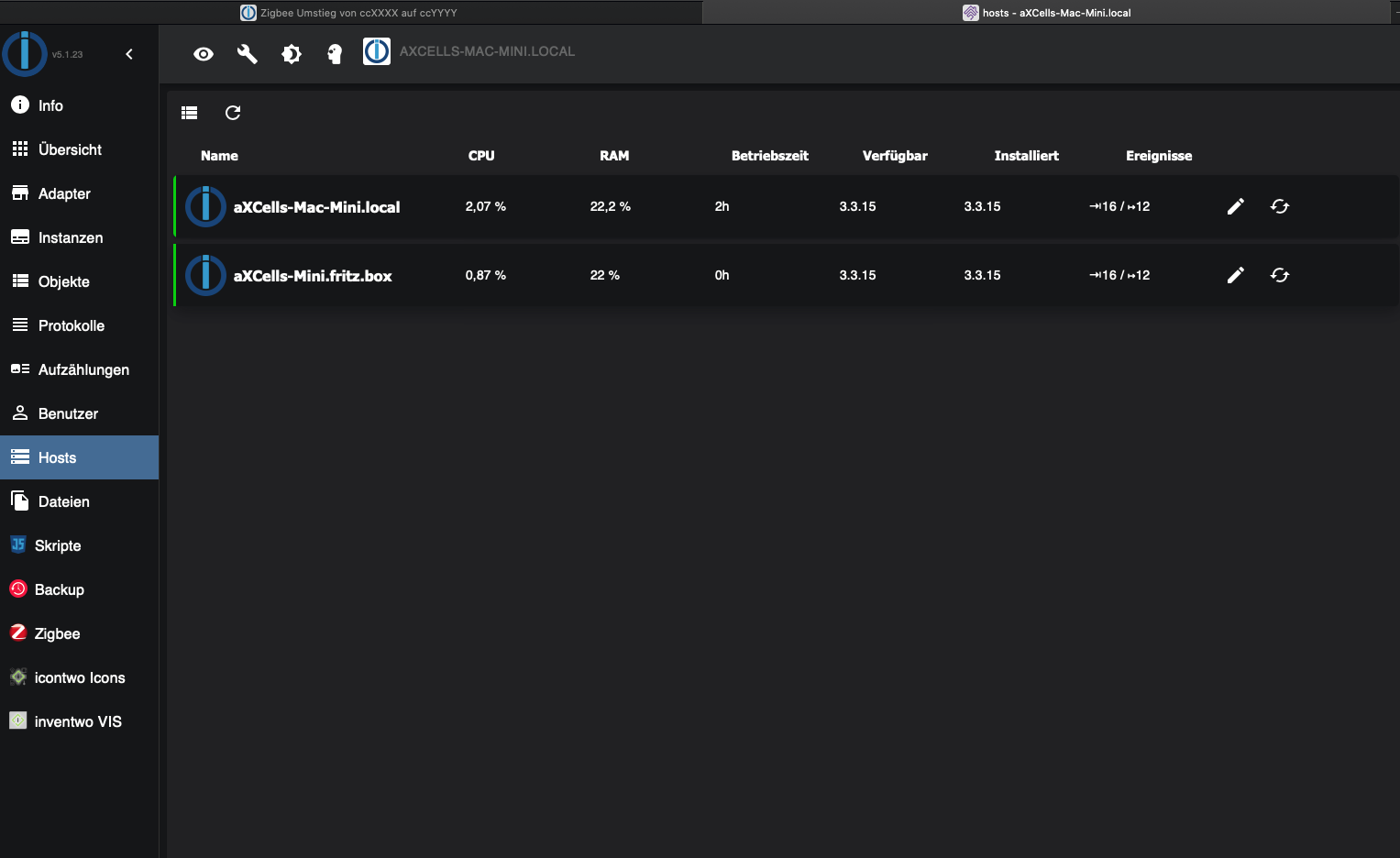
                  Bildschirmfoto 2021-08-20 um 21.28.38.png

                  1 Reply Last reply
                  0
                  • J Jojo1900

                    @asgothian

                    Hoffentlich dauert das noch ne weile
                    habe gerade die erweiterte PAN ID geändert und schon hat der Adapter nicht mehr funktioniert. Geräte neu anlernen ist nicht das Problem habe nur 1 Gerät

                    R Offline
                    R Offline
                    ReverZ
                    wrote on last edited by
                    #168

                    @jojo1900
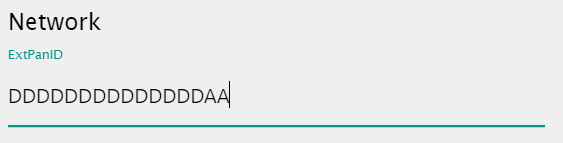
                    Wenn ich eine andere PAN ID als DDDDDDDDDDDDDDDD eingebe, wird der USB-Adapter bei mir ebenfalls nicht mehr erkannt.
                    Kann das an der Firmware-Version (20200211) liegen? Ich dachte man kann den Wert mit beliebigen Hex-Werte setzen.

                    Thomas BraunT 1 Reply Last reply
                    0
                    • R ReverZ

                      @jojo1900
                      Wenn ich eine andere PAN ID als DDDDDDDDDDDDDDDD eingebe, wird der USB-Adapter bei mir ebenfalls nicht mehr erkannt.
                      Kann das an der Firmware-Version (20200211) liegen? Ich dachte man kann den Wert mit beliebigen Hex-Werte setzen.

                      Thomas BraunT Online
                      Thomas BraunT Online
                      Thomas Braun
                      Most Active
                      wrote on last edited by
                      #169

                      @reverz
                      Jein. Schau im LogFile nach welche ID da erwartet wird.

                      Linux-Werkzeugkasten:
                      https://forum.iobroker.net/topic/42952/der-kleine-iobroker-linux-werkzeugkasten
                      NodeJS Fixer Skript:
                      https://forum.iobroker.net/topic/68035/iob-node-fix-skript
                      iob_diag: curl -sLf -o diag.sh https://iobroker.net/diag.sh && bash diag.sh

                      1 Reply Last reply
                      0
                      Reply
                      • Reply as topic
                      Log in to reply
                      • Oldest to Newest
                      • Newest to Oldest
                      • Most Votes


                      Support us

                      ioBroker
                      Community Adapters
                      Donate
                      FAQ Cloud / IOT
                      HowTo: Node.js-Update
                      HowTo: Backup/Restore
                      Downloads
                      BLOG

                      601

                      Online

                      32.6k

                      Users

                      82.3k

                      Topics

                      1.3m

                      Posts
                      Community
                      Impressum | Datenschutz-Bestimmungen | Nutzungsbedingungen | Einwilligungseinstellungen
                      ioBroker Community 2014-2025
                      logo
                      • Login

                      • Don't have an account? Register

                      • Login or register to search.
                      • First post
                        Last post
                      0
                      • Home
                      • Recent
                      • Tags
                      • Unread 0
                      • Categories
                      • Unreplied
                      • Popular
                      • GitHub
                      • Docu
                      • Hilfe