



Skip to content
  • Home
  • Recent
  • Tags
  • 0 Unread 0
  • Categories
  • Unreplied
  • Popular
  • GitHub
  • Docu
  • Hilfe
Skins
  • Light
  • Brite
  • Cerulean
  • Cosmo
  • Flatly
  • Journal
  • Litera
  • Lumen
  • Lux
  • Materia
  • Minty
  • Morph
  • Pulse
  • Sandstone
  • Simplex
  • Sketchy
  • Spacelab
  • United
  • Yeti
  • Zephyr
  • Dark
  • Cyborg
  • Darkly
  • Quartz
  • Slate
  • Solar
  • Superhero
  • Vapor

  • Default (No Skin)
  • No Skin
Collapse
ioBroker Logo

Community Forum

donate donate
  1. ioBroker Community Home
  2. Deutsch
  3. Tester
  4. Test Adapter mihome-vacuum v2.0.x
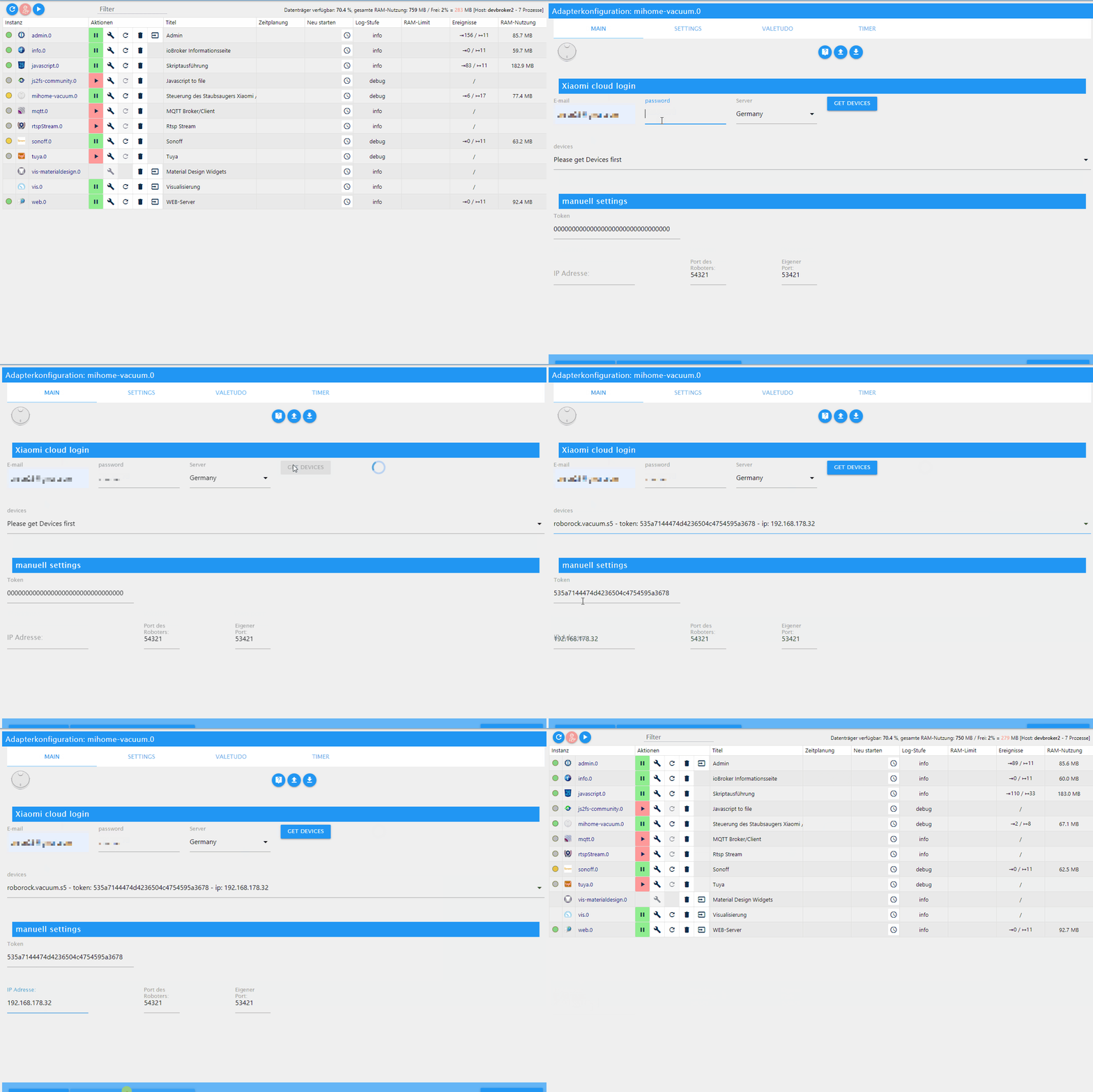
NEWS

  • Monatsrückblick Januar/Februar 2026 ist online!
    BluefoxB
    Bluefox
    16
    1
    309

  • Jahresrückblick 2025 – unser neuer Blogbeitrag ist online! ✨
    BluefoxB
    Bluefox
    17
    1
    4.7k

  • Neuer Blogbeitrag: Monatsrückblick - Dezember 2025 🎄
    BluefoxB
    Bluefox
    13
    1
    1.3k

Test Adapter mihome-vacuum v2.0.x

Scheduled Pinned Locked Moved Tester
xiaomiroborockmihome-vacuummap
1.5k Posts 144 Posters 541.2k Views 118 Watching
  • Oldest to Newest
  • Newest to Oldest
  • Most Votes
Reply
  • Reply as topic
Log in to reply
This topic has been deleted. Only users with topic management privileges can see it.
  • G Offline
    G Offline
    Gloover
    wrote on last edited by
    #698

    So, ich habe jetzt mein IOBroker komplett deinstalliert und alles wieder neu aufgespielt. Alles ist auf dem neuesten Stand:
    Node.js v10.19.0
    NPM 6.13.4

    Ich habe den Vacuum Adapter 2.0.7 endlich mal installiert bekommen
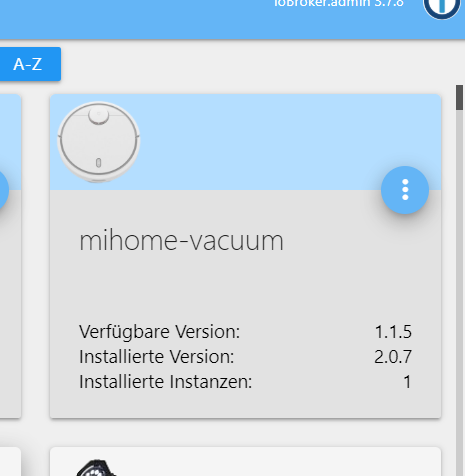
    1.png

    • ABER,
      wenn ich die Adapterkonfiguration ansehe, fehlen mir die Punkte "MAP", "Valetudo", etc. - die Oberfläche sieht aus, wie bei dem 1.1.5-er Adapter.
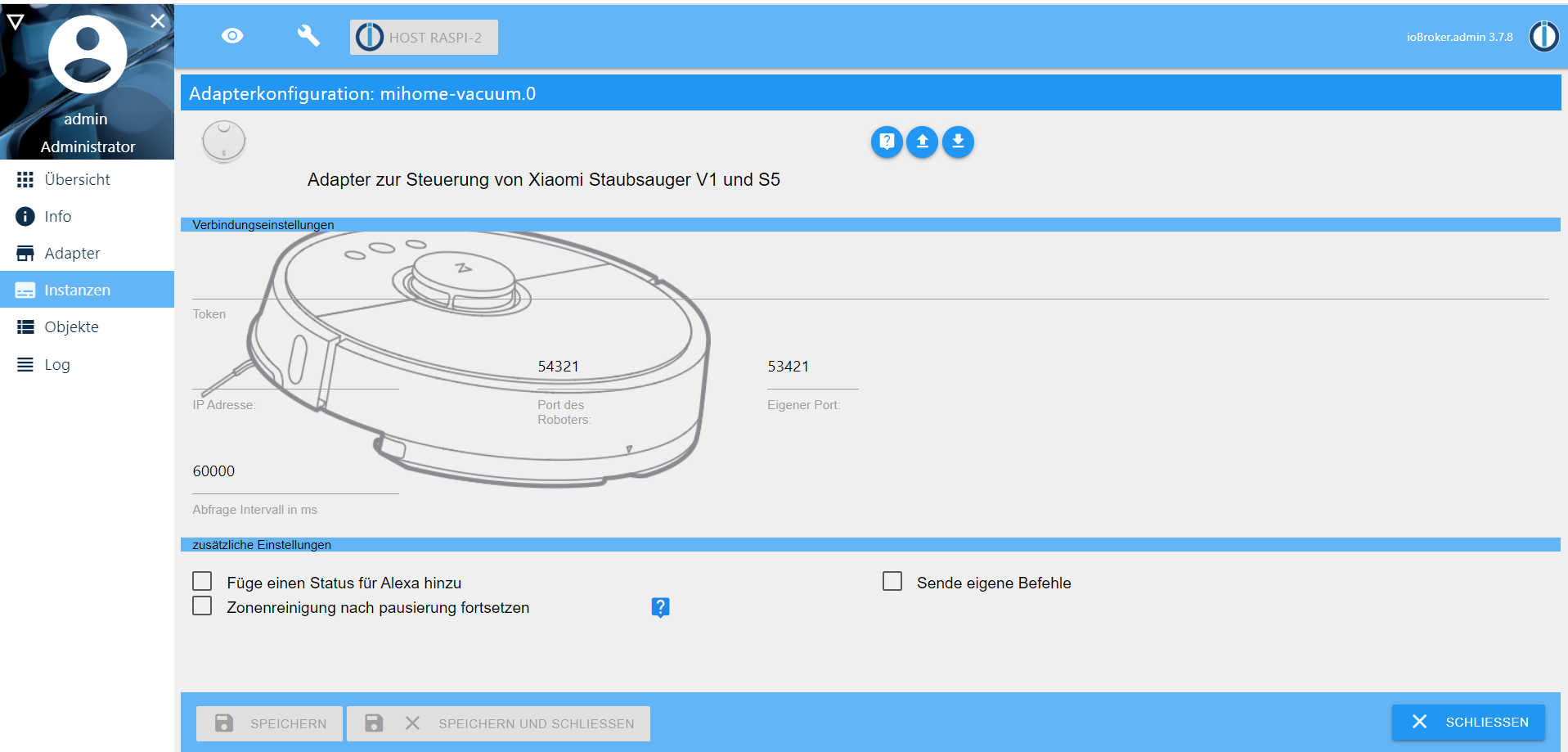
      2.png

    Was mache ich wieder falsch?

    MeistertrM 1 Reply Last reply
    0
    • G Gloover

      So, ich habe jetzt mein IOBroker komplett deinstalliert und alles wieder neu aufgespielt. Alles ist auf dem neuesten Stand:
      Node.js v10.19.0
      NPM 6.13.4

      Ich habe den Vacuum Adapter 2.0.7 endlich mal installiert bekommen
      1.png

      • ABER,
        wenn ich die Adapterkonfiguration ansehe, fehlen mir die Punkte "MAP", "Valetudo", etc. - die Oberfläche sieht aus, wie bei dem 1.1.5-er Adapter.
        2.png

      Was mache ich wieder falsch?

      MeistertrM Offline
      MeistertrM Offline
      Meistertr
      Developer
      wrote on last edited by
      #699

      @Gloover lad mal von git und schau ob es dann geht

      G 1 Reply Last reply
      0
      • MeistertrM Meistertr

        @Gloover lad mal von git und schau ob es dann geht

        G Offline
        G Offline
        Gloover
        wrote on last edited by
        #700

        @Meistertr Entschuldige, ich verstehe nicht ganz, was du damit meinst. Ich habe den Adapter mit

        npm i iobroker.mihome-vacuum
        

        installiert - so wie es hier beschrieben steht:
        https://github.com/iobroker-community-adapters/ioBroker.mihome-vacuum/

        Bin noch ein Laie auf dem Gebiet, entschuldige bitte, wenn die Frage sehr unwissend klingen.

        1 Reply Last reply
        0
        • D Offline
          D Offline
          dirkhe
          Developer
          wrote on last edited by
          #701

          Das sieht mir so aus, als wenn er die Index, anstelle der index_m nutzt. Allerdings weiß ich nicht, wann welche Version zieht.

          MeistertrM 1 Reply Last reply
          0
          • D dirkhe

            Das sieht mir so aus, als wenn er die Index, anstelle der index_m nutzt. Allerdings weiß ich nicht, wann welche Version zieht.

            MeistertrM Offline
            MeistertrM Offline
            Meistertr
            Developer
            wrote on last edited by
            #702

            @dirkhe index wird nur noch von dem alten admin2 verwendet. Sieht mehr nach der alten index_m aus @Gloover bist du sicher dass du die 2.x drauf hast? Ansonsten mal ein upload unter dem Adapter Reiter durchführen.

            1 Reply Last reply
            0
            • R Offline
              R Offline
              root_
              wrote on last edited by root_
              #703

              Bei mir ist es momentan mit der RC07 irgendwie ein Glücksspiel eine Verbindung zum Sauger zu bekommen. Ich habe nur die Token Verbindung aktiv ohne cloud usw. Ich war der Meinung das diese lokal hergestellt wird oder gibts da ein Firmware Problem mit dem Sauger v1 3.5.4,004007?
              Ansonsten geh ich wieder auf eine frühere Version.

              Bekomme immer

              mihome-vacuum.0	2020-04-06 17:47:33.162	info	(128263) connecting, this can take up to 10 minutes ...
              
              1 Reply Last reply
              0
              • D Offline
                D Offline
                dirkhe
                Developer
                wrote on last edited by
                #704

                Ich hatte da auch Probleme, nachdem ich die Firmware geupdatet habe. Ich merke es teilweise auch, dass ich einen Befehl zum robbi gebe, der den sogar mit ok bestätigt, es aber trotzdem erst Sekunden später ausführt...
                Was du mal versuchen kannst, ist den robbi mit dem inet zu verbinden, in die App zu gehen und die mal kurz quatschen lassen. Danach kann du die Verbindung wieder kappen

                1 Reply Last reply
                0
                • R Offline
                  R Offline
                  root_
                  wrote on last edited by
                  #705

                  Dann werde ich mal testweise auf eine ältere FW zurück gehen. Gibt ja leider kein FW changelog für den sauger.

                  X 1 Reply Last reply
                  0
                  • R root_

                    Dann werde ich mal testweise auf eine ältere FW zurück gehen. Gibt ja leider kein FW changelog für den sauger.

                    X Offline
                    X Offline
                    xengosam
                    wrote on last edited by
                    #706

                    Kann leider nur bestätigen. Bei meinem Xiaomi STYJ02YM mit der aktuellen Firmware 3.5.3_0047 steht im Log auch nur:

                    mihome-vacuum.0	2020-04-08 10:07:08.265	info	(1563) connecting, this can take up to 10 minutes ...
                    mihome-vacuum.0	2020-04-08 10:06:48.305	info	(1563) connecting, this can take up to 10 minutes ...
                    mihome-vacuum.0	2020-04-08 10:06:28.248	info	(1563) connecting, this can take up to 10 minutes ...
                    mihome-vacuum.0	2020-04-08 10:06:08.297	info	(1563) connecting, this can take up to 10 minutes ...
                    mihome-vacuum.0	2020-04-08 10:05:48.236	info	(1563) connecting, this can take up to 10 minutes ...
                    mihome-vacuum.0	2020-04-08 10:05:28.300	info	(1563) connecting, this can take up to 10 minutes ...
                    mihome-vacuum.0	2020-04-08 10:05:08.228	info	(1563) connecting, this can take up to 10 minutes ...
                    mihome-vacuum.0	2020-04-08 10:04:48.269	info	(1563) connecting, this can take up to 10 minutes ...
                    mihome-vacuum.0	2020-04-08 10:04:28.203	info	(1563) connecting, this can take up to 10 minutes ...
                    mihome-vacuum.0	2020-04-08 10:04:08.256	info	(1563) connecting, this can take up to 10 minutes ...
                    mihome-vacuum.0	2020-04-08 10:03:48.301	info	(1563) connecting, this can take up to 10 minutes ...
                    mihome-vacuum.0	2020-04-08 10:03:28.246	info	(1563) connecting, this can take up to 10 minutes ...
                    mihome-vacuum.0	2020-04-08 10:03:08.288	info	(1563) connecting, this can take up to 10 minutes ...
                    mihome-vacuum.0	2020-04-08 10:02:48.234	info	(1563) connecting, this can take up to 10 minutes ...
                    mihome-vacuum.0	2020-04-08 10:02:28.550	info	(1563) connecting, this can take up to 10 minutes ...
                    mihome-vacuum.0	2020-04-08 10:02:08.223	info	(1563) connecting, this can take up to 10 minutes ...
                    mihome-vacuum.0	2020-04-08 10:01:48.264	info	(1563) connecting, this can take up to 10 minutes ...
                    mihome-vacuum.0	2020-04-08 10:01:28.206	info	(1563) connecting, this can take up to 10 minutes ...
                    mihome-vacuum.0	2020-04-08 10:01:08.252	info	(1563) connecting, this can take up to 10 minutes ...
                    mihome-vacuum.0	2020-04-08 10:00:48.296	info	(1563) connecting, this can take up to 10 minutes ...
                    mihome-vacuum.0	2020-04-08 10:00:28.242	info	(1563) connecting, this can take up to 10 minutes ...
                    mihome-vacuum.0	2020-04-08 10:00:08.286	info	(1563) connecting, this can take up to 10 minutes ...
                    mihome-vacuum.0	2020-04-08 09:59:48.329	info	(1563) connecting, this can take up to 10 minutes ...
                    mihome-vacuum.0	2020-04-08 09:59:28.271	info	(1563) connecting, this can take up to 10 minutes ...
                    mihome-vacuum.0	2020-04-08 09:59:08.216	info	(1563) connecting, this can take up to 10 minutes ...
                    mihome-vacuum.0	2020-04-08 09:58:48.262	info	(1563) connecting, this can take up to 10 minutes ...
                    mihome-vacuum.0	2020-04-08 09:58:28.203	info	(1563) connecting, this can take up to 10 minutes ...
                    mihome-vacuum.0	2020-04-08 09:58:08.246	info	(1563) connecting, this can take up to 10 minutes ...
                    mihome-vacuum.0	2020-04-08 09:57:48.189	info	(1563) connecting, this can take up to 10 minutes ...
                    mihome-vacuum.0	2020-04-08 09:57:28.234	info	(1563) connecting, this can take up to 10 minutes ...
                    mihome-vacuum.0	2020-04-08 09:57:08.280	info	(1563) connecting, this can take up to 10 minutes ...
                    mihome-vacuum.0	2020-04-08 09:56:48.224	info	(1563) connecting, this can take up to 10 minutes ...
                    mihome-vacuum.0	2020-04-08 09:56:28.269	info	(1563) connecting, this can take up to 10 minutes ...
                    mihome-vacuum.0	2020-04-08 09:56:08.171	info	(1563) connecting, this can take up to 10 minutes ...
                    mihome-vacuum.0	2020-04-08 09:55:48.255	info	(1563) connecting, this can take up to 10 minutes ...
                    mihome-vacuum.0	2020-04-08 09:55:28.198	info	(1563) connecting, this can take up to 10 minutes ...
                    mihome-vacuum.0	2020-04-08 09:55:08.244	info	(1563) connecting, this can take up to 10 minutes ...
                    mihome-vacuum.0	2020-04-08 09:54:48.294	info	(1563) connecting, this can take up to 10 minutes ...
                    mihome-vacuum.0	2020-04-08 09:54:28.234	info	(1563) connecting, this can take up to 10 minutes ...
                    mihome-vacuum.0	2020-04-08 09:54:08.164	info	(1563) connecting, this can take up to 10 minutes ...
                    mihome-vacuum.0	2020-04-08 09:53:48.220	info	(1563) connecting, this can take up to 10 minutes ...
                    mihome-vacuum.0	2020-04-08 09:53:28.264	info	(1563) connecting, this can take up to 10 minutes ...
                    mihome-vacuum.0	2020-04-08 09:53:08.209	info	(1563) connecting, this can take up to 10 minutes ...
                    mihome-vacuum.0	2020-04-08 09:52:48.355	info	(1563) connecting, this can take up to 10 minutes ...
                    mihome-vacuum.0	2020-04-08 09:52:28.195	info	(1563) connecting, this can take up to 10 minutes ...
                    mihome-vacuum.0	2020-04-08 09:52:08.243	info	(1563) connecting, this can take up to 10 minutes ...
                    mihome-vacuum.0	2020-04-08 09:51:48.182	info	(1563) connecting, this can take up to 10 minutes ...
                    mihome-vacuum.0	2020-04-08 09:51:28.227	info	(1563) connecting, this can take up to 10 minutes ...
                    mihome-vacuum.0	2020-04-08 09:51:08.170	info	(1563) connecting, this can take up to 10 minutes ...
                    mihome-vacuum.0	2020-04-08 09:50:48.213	info	(1563) connecting, this can take up to 10 minutes ...
                    mihome-vacuum.0	2020-04-08 09:50:28.258	info	(1563) connecting, this can take up to 10 minutes ...
                    mihome-vacuum.0	2020-04-08 09:50:08.200	info	(1563) connecting, this can take up to 10 minutes ...
                    mihome-vacuum.0	2020-04-08 09:49:48.245	info	(1563) connecting, this can take up to 10 minutes ...
                    mihome-vacuum.0	2020-04-08 09:49:28.192	info	(1563) connecting, this can take up to 10 minutes ...
                    mihome-vacuum.0	2020-04-08 09:49:08.234	info	(1563) connecting, this can take up to 10 minutes ...
                    mihome-vacuum.0	2020-04-08 09:48:48.181	info	(1563) connecting, this can take up to 10 minutes ...
                    
                    1 Reply Last reply
                    0
                    • B Offline
                      B Offline
                      BamBam89
                      wrote on last edited by
                      #707

                      Hallo zusammen,

                      ich möchte mich hier gerne mit ran hängen. Muss jedoch zugeben, das ich auf dem Gebiet des ioBroker erst seit gestern unterwegs bin.

                      Bis dato habe ich es geschafft alle fast alle meine Geräte im ioBroker einzubinden. allerdings sind beim Mi Vacuum wohl meine derzeitigen Grenzen erreicht.

                      Bis vor einer guten Stunde, habe ich mich an dem mihome-vacuum 1.1.5 versucht. Leider vegebens.
                      Zwar wurde mir die Instanz grün angezeigt, allerdings gab es keine Kommunikation.
                      Ich bin dann vorhin auf die V2.x gestoßen, welche ich mir dann installiert habe.
                      Nach anfänglichen Fehlern, wurde die Installation dann erfolgreich abgeschlossen.

                      Leider scheint es aber noch ein Problem zu geben. im Log finde ich nun seit ca. 20 Minuten die Info:

                      (11587) connecting, this can take up to 10 minutes ...
                      

                      Seit kurzem dann noch eine Warnung:

                      (11587) Time difference between Mihome Vacuum and ioBroker: 1 sec
                      

                      Ich hoffe Ihr könnt mir weiter helfen? Woran könnte das liegen?
                      Vielen Dank euch und schon mal frohe Ostern.

                      Gruß BamBam89

                      M 1 Reply Last reply
                      0
                      • X Offline
                        X Offline
                        xengosam
                        wrote on last edited by
                        #708

                        Hallo BamBam89,

                        solltest du einen Xiaomi STYTJ01ZHM oder Xiaomi STYJ02YM oder Xiaowa E2, dann ist dieser noch nicht im Adapter integriert.
                        Diese Robbis haben eine andere API und diese muss erst in den Adapter implementiert werden.

                        Mehr Infos hier auf Github.

                        B 1 Reply Last reply
                        0
                        • D Online
                          D Online
                          DarkDevil
                          wrote on last edited by
                          #709

                          ich bekomme bei der Installtion immer folgenden Fehler:
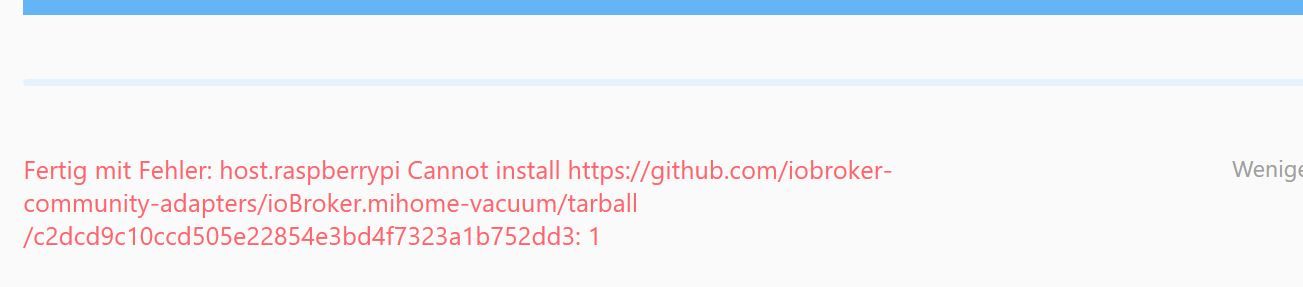
                          Unbenannt2.JPG
                          Hat jemand Rat? Und brauche ich bei dem Adapter den Token nicht auszulesen?

                          D 1 Reply Last reply
                          0
                          • X xengosam

                            Hallo BamBam89,

                            solltest du einen Xiaomi STYTJ01ZHM oder Xiaomi STYJ02YM oder Xiaowa E2, dann ist dieser noch nicht im Adapter integriert.
                            Diese Robbis haben eine andere API und diese muss erst in den Adapter implementiert werden.

                            Mehr Infos hier auf Github.

                            B Offline
                            B Offline
                            BamBam89
                            wrote on last edited by
                            #710

                            @xengosam

                            Danke dir erst einmal für deine Antwort. Ist es aber nicht.
                            Es handelt sich um einen S502-00

                            Mi Roborock 2 white
                            Staubsaugerroboter Xiaomi Mi Roborock 2 (2.Generation) weiß.
                            Sprich ein S5 damit sollte es doch eigentlich gehen?

                            Gruß BamBam89

                            X 1 Reply Last reply
                            0
                            • B BamBam89

                              @xengosam

                              Danke dir erst einmal für deine Antwort. Ist es aber nicht.
                              Es handelt sich um einen S502-00

                              Mi Roborock 2 white
                              Staubsaugerroboter Xiaomi Mi Roborock 2 (2.Generation) weiß.
                              Sprich ein S5 damit sollte es doch eigentlich gehen?

                              Gruß BamBam89

                              X Offline
                              X Offline
                              xengosam
                              wrote on last edited by
                              #711

                              @BamBam89

                              Aktiviere bitte mal bei den Instanzen (das Icon oben = Expertenmodus) und stell dann bitte den Adapter bei Logs stufe auf debug. Dann den Adapter neu starten.. es sollten dann mehr Einträge in der Log Übersicht sein als vorher.
                              Dann den Log mal reinkopieren.. bin sicher @dirkhe kann dir dann helfen

                              LG

                              B 1 Reply Last reply
                              0
                              • X xengosam

                                @BamBam89

                                Aktiviere bitte mal bei den Instanzen (das Icon oben = Expertenmodus) und stell dann bitte den Adapter bei Logs stufe auf debug. Dann den Adapter neu starten.. es sollten dann mehr Einträge in der Log Übersicht sein als vorher.
                                Dann den Log mal reinkopieren.. bin sicher @dirkhe kann dir dann helfen

                                LG

                                B Offline
                                B Offline
                                BamBam89
                                wrote on last edited by
                                #712

                                @xengosam

                                Danke dir.

                                @dirkhe ich hoffe du kannst mir weiter helfen.
                                Anbei die Log Einträge

                                mihome-vacuum.0	2020-04-10 14:03:28.047	info	(14176) set nächster Timer: Nicht verfügbar
                                mihome-vacuum.0	2020-04-10 14:03:27.651	info	(14176) connecting, this can take up to 10 minutes ...
                                mihome-vacuum.0	2020-04-10 14:03:27.507	info	(14176) Create state clean_home for controlling by cloud adapter
                                mihome-vacuum.0	2020-04-10 14:03:27.505	info	(14176) Expert mode enabled, states created
                                mihome-vacuum.0	2020-04-10 14:03:27.384	info	(14176) starting. Version 2.0.9-RC07 in /opt/iobroker/node_modules/iobroker.mihome-vacuum, node: v10.19.0
                                mihome-vacuum.0	2020-04-10 14:03:21.098	info	(13239) Terminated (START_IMMEDIATELY_AFTER_STOP): Without reason
                                mihome-vacuum.0	2020-04-10 14:03:21.096	info	(13239) terminating
                                mihome-vacuum.0	2020-04-10 14:03:21.094	info	(13239) Got terminate signal TERMINATE_YOURSELF
                                mihome-vacuum.0	2020-04-10 14:03:17.537	info	(13239) connecting, this can take up to 10 minutes ...
                                mihome-vacuum.0	2020-04-10 14:02:57.537	info	(13239) connecting, this can take up to 10 minutes ...
                                mihome-vacuum.0	2020-04-10 14:02:37.544	info	(13239) connecting, this can take up to 10 minutes ...
                                mihome-vacuum.0	2020-04-10 14:02:17.536	info	(13239) connecting, this can take up to 10 minutes ...
                                mihome-vacuum.0	2020-04-10 14:01:58.049	info	(13239) set nächster Timer: Nicht verfügbar
                                mihome-vacuum.0	2020-04-10 14:01:57.621	info	(13239) connecting, this can take up to 10 minutes ...
                                mihome-vacuum.0	2020-04-10 14:01:57.519	info	(13239) Create state clean_home for controlling by cloud adapter
                                mihome-vacuum.0	2020-04-10 14:01:57.518	info	(13239) Expert mode enabled, states created
                                mihome-vacuum.0	2020-04-10 14:01:57.268	info	(13239) starting. Version 2.0.9-RC07 in /opt/iobroker/node_modules/iobroker.mihome-vacuum, node: v10.19.0
                                
                                Gruß BamBam89
                                
                                D 1 Reply Last reply
                                0
                                • B BamBam89

                                  @xengosam

                                  Danke dir.

                                  @dirkhe ich hoffe du kannst mir weiter helfen.
                                  Anbei die Log Einträge

                                  mihome-vacuum.0	2020-04-10 14:03:28.047	info	(14176) set nächster Timer: Nicht verfügbar
                                  mihome-vacuum.0	2020-04-10 14:03:27.651	info	(14176) connecting, this can take up to 10 minutes ...
                                  mihome-vacuum.0	2020-04-10 14:03:27.507	info	(14176) Create state clean_home for controlling by cloud adapter
                                  mihome-vacuum.0	2020-04-10 14:03:27.505	info	(14176) Expert mode enabled, states created
                                  mihome-vacuum.0	2020-04-10 14:03:27.384	info	(14176) starting. Version 2.0.9-RC07 in /opt/iobroker/node_modules/iobroker.mihome-vacuum, node: v10.19.0
                                  mihome-vacuum.0	2020-04-10 14:03:21.098	info	(13239) Terminated (START_IMMEDIATELY_AFTER_STOP): Without reason
                                  mihome-vacuum.0	2020-04-10 14:03:21.096	info	(13239) terminating
                                  mihome-vacuum.0	2020-04-10 14:03:21.094	info	(13239) Got terminate signal TERMINATE_YOURSELF
                                  mihome-vacuum.0	2020-04-10 14:03:17.537	info	(13239) connecting, this can take up to 10 minutes ...
                                  mihome-vacuum.0	2020-04-10 14:02:57.537	info	(13239) connecting, this can take up to 10 minutes ...
                                  mihome-vacuum.0	2020-04-10 14:02:37.544	info	(13239) connecting, this can take up to 10 minutes ...
                                  mihome-vacuum.0	2020-04-10 14:02:17.536	info	(13239) connecting, this can take up to 10 minutes ...
                                  mihome-vacuum.0	2020-04-10 14:01:58.049	info	(13239) set nächster Timer: Nicht verfügbar
                                  mihome-vacuum.0	2020-04-10 14:01:57.621	info	(13239) connecting, this can take up to 10 minutes ...
                                  mihome-vacuum.0	2020-04-10 14:01:57.519	info	(13239) Create state clean_home for controlling by cloud adapter
                                  mihome-vacuum.0	2020-04-10 14:01:57.518	info	(13239) Expert mode enabled, states created
                                  mihome-vacuum.0	2020-04-10 14:01:57.268	info	(13239) starting. Version 2.0.9-RC07 in /opt/iobroker/node_modules/iobroker.mihome-vacuum, node: v10.19.0
                                  
                                  Gruß BamBam89
                                  
                                  D Offline
                                  D Offline
                                  dirkhe
                                  Developer
                                  wrote on last edited by
                                  #713

                                  @BamBam89 Du hast noch nicht auf debug gestellt. Bitte mache das mal.

                                  B 1 Reply Last reply
                                  0
                                  • D DarkDevil

                                    ich bekomme bei der Installtion immer folgenden Fehler:
                                    Unbenannt2.JPG
                                    Hat jemand Rat? Und brauche ich bei dem Adapter den Token nicht auszulesen?

                                    D Offline
                                    D Offline
                                    dirkhe
                                    Developer
                                    wrote on last edited by
                                    #714

                                    @DarkDevil Bitte readme lesen. Du kannst den Tocken über den Adapter auslesen, in der Konfiguration. Credentials für xiamio cload eingeben und Staubsauger auswählen

                                    D 1 Reply Last reply
                                    0
                                    • D dirkhe

                                      @DarkDevil Bitte readme lesen. Du kannst den Tocken über den Adapter auslesen, in der Konfiguration. Credentials für xiamio cload eingeben und Staubsauger auswählen

                                      D Online
                                      D Online
                                      DarkDevil
                                      wrote on last edited by
                                      #715

                                      @dirkhe und hast du eine Idee warum ich es nicht installiert bekomme?

                                      D 1 Reply Last reply
                                      0
                                      • D dirkhe

                                        @BamBam89 Du hast noch nicht auf debug gestellt. Bitte mache das mal.

                                        B Offline
                                        B Offline
                                        BamBam89
                                        wrote on last edited by
                                        #716

                                        @dirkhe ähh doch... mehr ist da nicht...
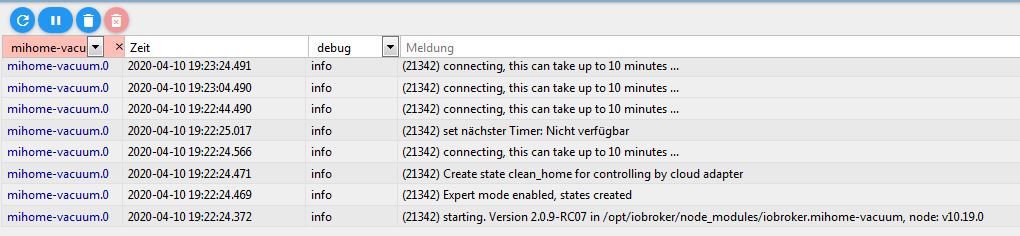
                                        Log.JPG

                                        Also zumindest denke ich, das ich debug aktiviert habe.... :-)

                                        Gruß BamBam89

                                        D 1 Reply Last reply
                                        0
                                        • B BamBam89

                                          @dirkhe ähh doch... mehr ist da nicht...

                                          Log.JPG

                                          Also zumindest denke ich, das ich debug aktiviert habe.... :-)

                                          Gruß BamBam89

                                          D Offline
                                          D Offline
                                          dirkhe
                                          Developer
                                          wrote on last edited by
                                          #717

                                          @BamBam89 Du hast nurdie Filterung auf debug eingestellt. Du musst dem Adapter in den Instanzen aud debug einstellen:
                                          5d70ad97-748e-4096-bcb5-42519867df77-image.png

                                          B 1 Reply Last reply
                                          0
                                          Reply
                                          • Reply as topic
                                          Log in to reply
                                          • Oldest to Newest
                                          • Newest to Oldest
                                          • Most Votes


                                          Support us

                                          ioBroker
                                          Community Adapters
                                          Donate

                                          483

                                          Online

                                          32.7k

                                          Users

                                          82.5k

                                          Topics

                                          1.3m

                                          Posts
                                          Community
                                          Impressum | Datenschutz-Bestimmungen | Nutzungsbedingungen | Einwilligungseinstellungen
                                          ioBroker Community 2014-2025
                                          logo
                                          • Login

                                          • Don't have an account? Register

                                          • Login or register to search.
                                          • First post
                                            Last post
                                          0
                                          • Home
                                          • Recent
                                          • Tags
                                          • Unread 0
                                          • Categories
                                          • Unreplied
                                          • Popular
                                          • GitHub
                                          • Docu
                                          • Hilfe