




Test Adapter mihome-vacuum v2.0.x
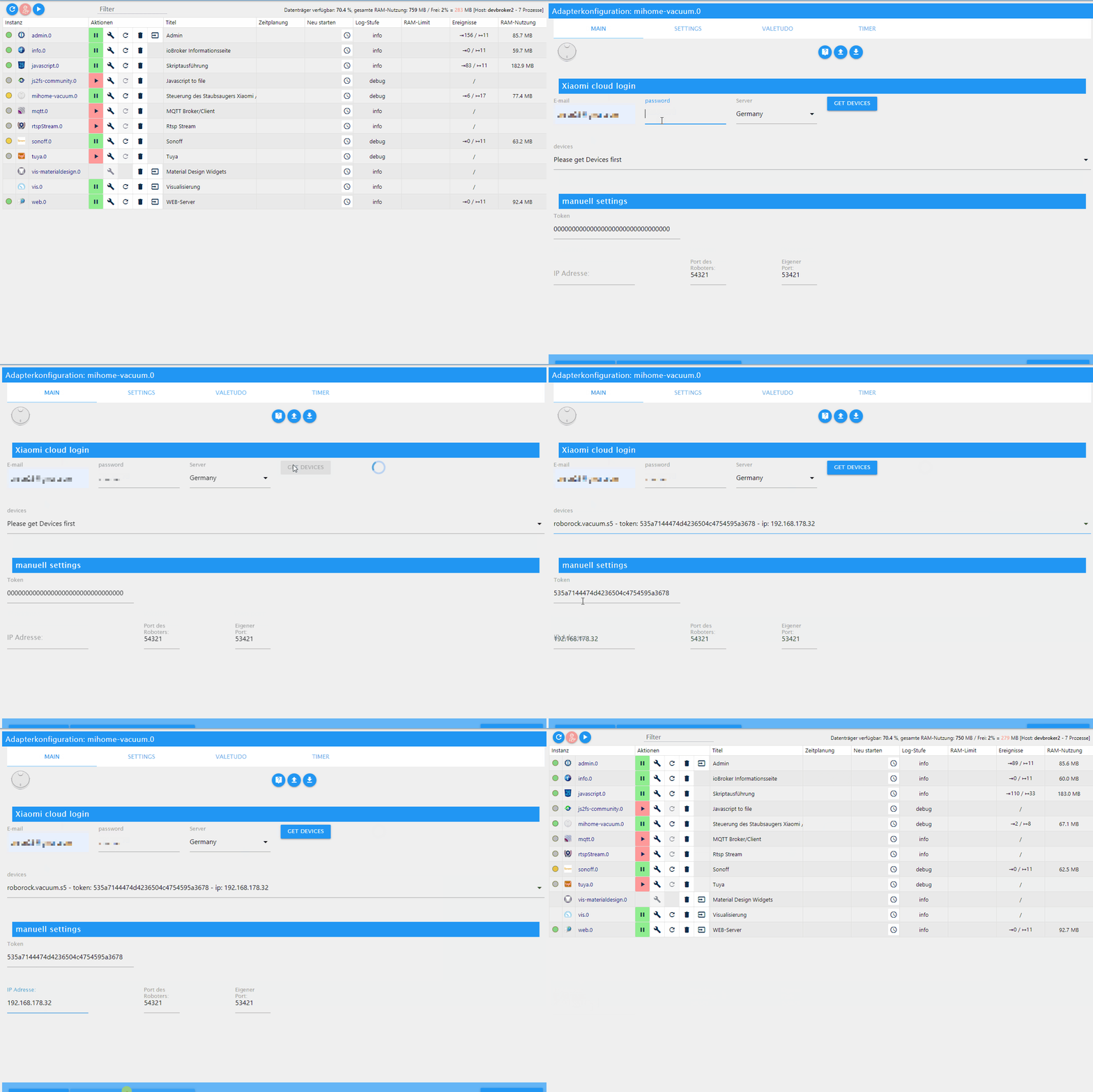
-
Kannst du dein Vorgehen vielleicht beschreiben.
Kämpfe mich durch den Wiki-Eintrag, komme aber nicht weiter.
Habe allerdings eine Docker-Installation auf einer Synology DS
Danke
falls du den Container von Buanet nutzt, dann nimm die neue Version 5 davon. Das ist eine saubere Installation mit node 12 und der aktuellste js-controller..
Ich empfehle ich dir folgende Vorgehensweise:
- Backup von Iobroker mit z.B. backitup.
- neues leeres Volume anlegen.
- Container Image V 5 stable laden und starten
- In den container wechseln und das backup einspielen.
Dann sollte alles laufen
-
Also ich habe jetzt alles versucht. Habe auch den robi zurückgesetzt wieder verbunden.
Trotzdem werden sowohl die Räume als auch die Karte nicht geladen...
Kann es an Node 12 liegen??
Jemand eine Anleitung?
Sonos, Intel Nuc, Iobroker Pro, Proxmox, IPad Air (Wand), Vis, Xiaomi, Devolo, Bose, Philips Hue, Instar, Synology
-
Also ich habe jetzt alles versucht. Habe auch den robi zurückgesetzt wieder verbunden.
Trotzdem werden sowohl die Räume als auch die Karte nicht geladen...
Kann es an Node 12 liegen??
Jemand eine Anleitung?
@xADDRx Liegt nicht an node12, aber vielleicht an eine falschen Installation von node oder canvas.
Ohne Meldungen im Log kann man da aber nichts zu sagen. -
@xADDRx Liegt nicht an node12, aber vielleicht an eine falschen Installation von node oder canvas.
Ohne Meldungen im Log kann man da aber nichts zu sagen.Also ich hab es nun gefixed bekommen.
Node12 installieren
IoBroker fix
npm rebuild im IoBroker Verzeichnis
npm rebuild --build-from-source canvas
Iobroker fixSeitdem funktioniert es auch mit node 12
-
Also ich hab es nun gefixed bekommen.
Node12 installieren
IoBroker fix
npm rebuild im IoBroker Verzeichnis
npm rebuild --build-from-source canvas
Iobroker fixSeitdem funktioniert es auch mit node 12
@Kevin Mein reden...
-
Also ich hab es nun gefixed bekommen.
Node12 installieren
IoBroker fix
npm rebuild im IoBroker Verzeichnis
npm rebuild --build-from-source canvas
Iobroker fixSeitdem funktioniert es auch mit node 12
-
Also ich hab es nun gefixed bekommen.
Node12 installieren
IoBroker fix
npm rebuild im IoBroker Verzeichnis
npm rebuild --build-from-source canvas
Iobroker fixSeitdem funktioniert es auch mit node 12
@Kevin IObroker fix ging durch..
beim npm Fehler:
root@debian:/opt/iobroker# npm rebuild

> iobroker@1.0.6 install /opt/iobroker/node_modules/iobroker
> node lib/setup.js

NPM version: 6.13.4

!!!!!!!!!!!!!!!!!!!!!!!!!!!!!!!!!!!!!!!!!!!!!!!!!!!!!!!!!!!!!!!!!!!!!!!!!
NPM 5 is currently NOT supported!
Please use "npm install -g npm@4" to downgrade npm to 4.x and try again.
You need to make sure to downgrade again with the above command after you
installed an update to nodejs/npm!
!!!!!!!!!!!!!!!!!!!!!!!!!!!!!!!!!!!!!!!!!!!!!!!!!!!!!!!!!!!!!!!!!!!!!!!!!
npm ERR! code ELIFECYCLE
npm ERR! errno 1
npm ERR! iobroker@1.0.6 install: `node lib/setup.js`
npm ERR! Exit status 1
npm ERR!
npm ERR! Failed at the iobroker@1.0.6 install script.
npm ERR! This is probably not a problem with npm. There is likely additional logging output above.

npm ERR! A complete log of this run can be found in:
npm ERR!     /home/iobroker/.npm/_logs/2020-08-07T09_32_00_912Z-debug.log
root@debian:/opt/iobroker# npm rebuild --build-from-source canvas

> canvas@2.6.1 install /opt/iobroker/node_modules/canvas
> node-pre-gyp install --fallback-to-build

node-pre-gyp WARN Using request for node-pre-gyp https download
Package pixman-1 was not found in the pkg-config search path.
Perhaps you should add the directory containing `pixman-1.pc'
to the PKG_CONFIG_PATH environment variable
No package 'pixman-1' found
gyp: Call to 'pkg-config pixman-1 --libs' returned exit status 1 while in binding.gyp. while trying to load binding.gyp
gyp ERR! configure error
gyp ERR! stack Error: `gyp` failed with exit code: 1
gyp ERR! stack     at ChildProcess.onCpExit (/usr/lib/node_modules/npm/node_modules/node-gyp/lib/configure.js:351:16)
gyp ERR! stack     at ChildProcess.emit (events.js:310:20)
gyp ERR! stack     at Process.ChildProcess._handle.onexit (internal/child_process.js:275:12)
gyp ERR! System Linux 4.9.0-4-amd64
gyp ERR! command "/usr/bin/node" "/usr/lib/node_modules/npm/node_modules/node-gyp/bin/node-gyp.js" "configure" "--fallback-to-build" "--module=/opt/iobroker/node_modules/canvas/build/Release/canvas.node" "--module_name=canvas" "--module_path=/opt/iobroker/node_modules/canvas/build/Release" "--napi_version=5" "--node_abi_napi=napi" "--napi_build_version=0" "--node_napi_label=node-v72"
gyp ERR! cwd /opt/iobroker/node_modules/canvas
gyp ERR! node -v v12.16.3
gyp ERR! node-gyp -v v5.1.0
gyp ERR! not ok
node-pre-gyp ERR! build error
node-pre-gyp ERR! stack Error: Failed to execute '/usr/bin/node /usr/lib/node_modules/npm/node_modules/node-gyp/bin/node-gyp.js configure --fallback-to-build --module=/opt/iobroker/node_modules/canvas/build/Release/canvas.node --module_name=canvas --module_path=/opt/iobroker/node_modules/canvas/build/Release --napi_version=5 --node_abi_napi=napi --napi_build_version=0 --node_napi_label=node-v72' (1)
node-pre-gyp ERR! stack     at ChildProcess.<anonymous> (/opt/iobroker/node_modules/node-pre-gyp/lib/util/compile.js:83:29)
node-pre-gyp ERR! stack     at ChildProcess.emit (events.js:310:20)
node-pre-gyp ERR! stack     at maybeClose (internal/child_process.js:1021:16)
node-pre-gyp ERR! stack     at Process.ChildProcess._handle.onexit (internal/child_process.js:286:5)
node-pre-gyp ERR! System Linux 4.9.0-4-amd64
node-pre-gyp ERR! command "/usr/bin/node" "/opt/iobroker/node_modules/.bin/node-pre-gyp" "install" "--fallback-to-build"
node-pre-gyp ERR! cwd /opt/iobroker/node_modules/canvas
node-pre-gyp ERR! node -v v12.16.3
node-pre-gyp ERR! node-pre-gyp -v v0.11.0
node-pre-gyp ERR! not ok
Failed to execute '/usr/bin/node /usr/lib/node_modules/npm/node_modules/node-gyp/bin/node-gyp.js configure --fallback-to-build --module=/opt/iobroker/node_modules/canvas/build/Release/canvas.node --module_name=canvas --module_path=/opt/iobroker/node_modules/canvas/build/Release --napi_version=5 --node_abi_napi=napi --napi_build_version=0 --node_napi_label=node-v72' (1)
npm ERR! code ELIFECYCLE
npm ERR! errno 1
npm ERR! canvas@2.6.1 install: `node-pre-gyp install --fallback-to-build`
npm ERR! Exit status 1
npm ERR!
npm ERR! Failed at the canvas@2.6.1 install script.
npm ERR! This is probably not a problem with npm. There is likely additional logging output above.

npm ERR! A complete log of this run can be found in:
npm ERR!     /home/iobroker/.npm/_logs/2020-08-07T09_32_42_894Z-debug.log
root@debian:/opt/iobroker# npm rebuild --build-from-source canvas

> canvas@2.6.1 install /opt/iobroker/node_modules/canvas
> node-pre-gyp install --fallback-to-build

node-pre-gyp WARN Using request for node-pre-gyp https download
Package pixman-1 was not found in the pkg-config search path.
Perhaps you should add the directory containing `pixman-1.pc'
to the PKG_CONFIG_PATH environment variable
No package 'pixman-1' found
gyp: Call to 'pkg-config pixman-1 --libs' returned exit status 1 while in binding.gyp. while trying to load binding.gyp
gyp ERR! configure error
gyp ERR! stack Error: `gyp` failed with exit code: 1
gyp ERR! stack     at ChildProcess.onCpExit (/usr/lib/node_modules/npm/node_modules/node-gyp/lib/configure.js:351:16)
gyp ERR! stack     at ChildProcess.emit (events.js:310:20)
gyp ERR! stack     at Process.ChildProcess._handle.onexit (internal/child_process.js:275:12)
gyp ERR! System Linux 4.9.0-4-amd64
gyp ERR! command "/usr/bin/node" "/usr/lib/node_modules/npm/node_modules/node-gyp/bin/node-gyp.js" "configure" "--fallback-to-build" "--module=/opt/iobroker/node_modules/canvas/build/Release/canvas.node" "--module_name=canvas" "--module_path=/opt/iobroker/node_modules/canvas/build/Release" "--napi_version=5" "--node_abi_napi=napi" "--napi_build_version=0" "--node_napi_label=node-v72"
gyp ERR! cwd /opt/iobroker/node_modules/canvas
gyp ERR! node -v v12.16.3
gyp ERR! node-gyp -v v5.1.0
gyp ERR! not ok
node-pre-gyp ERR! build error
node-pre-gyp ERR! stack Error: Failed to execute '/usr/bin/node /usr/lib/node_modules/npm/node_modules/node-gyp/bin/node-gyp.js configure --fallback-to-build --module=/opt/iobroker/node_modules/canvas/build/Release/canvas.node --module_name=canvas --module_path=/opt/iobroker/node_modules/canvas/build/Release --napi_version=5 --node_abi_napi=napi --napi_build_version=0 --node_napi_label=node-v72' (1)
node-pre-gyp ERR! stack     at ChildProcess.<anonymous> (/opt/iobroker/node_modules/node-pre-gyp/lib/util/compile.js:83:29)
node-pre-gyp ERR! stack     at ChildProcess.emit (events.js:310:20)
node-pre-gyp ERR! stack     at maybeClose (internal/child_process.js:1021:16)
node-pre-gyp ERR! stack     at Process.ChildProcess._handle.onexit (internal/child_process.js:286:5)
node-pre-gyp ERR! System Linux 4.9.0-4-amd64
node-pre-gyp ERR! command "/usr/bin/node" "/opt/iobroker/node_modules/.bin/node-pre-gyp" "install" "--fallback-to-build"
node-pre-gyp ERR! cwd /opt/iobroker/node_modules/canvas
node-pre-gyp ERR! node -v v12.16.3
node-pre-gyp ERR! node-pre-gyp -v v0.11.0
node-pre-gyp ERR! not ok
Failed to execute '/usr/bin/node /usr/lib/node_modules/npm/node_modules/node-gyp/bin/node-gyp.js configure --fallback-to-build --module=/opt/iobroker/node_modules/canvas/build/Release/canvas.node --module_name=canvas --module_path=/opt/iobroker/node_modules/canvas/build/Release --napi_version=5 --node_abi_napi=napi --napi_build_version=0 --node_napi_label=node-v72' (1)
npm ERR! code ELIFECYCLE
npm ERR! errno 1
npm ERR! canvas@2.6.1 install: `node-pre-gyp install --fallback-to-build`
npm ERR! Exit status 1
npm ERR!
npm ERR! Failed at the canvas@2.6.1 install script.
npm ERR! This is probably not a problem with npm. There is likely additional logging output above.

npm ERR! A complete log of this run can be found in:
npm ERR!     /home/iobroker/.npm/_logs/2020-08-07T09_36_07_361Z-debug.log
Sonos, Intel Nuc, Iobroker Pro, Proxmox, IPad Air (Wand), Vis, Xiaomi, Devolo, Bose, Philips Hue, Instar, Synology
-
@Kevin IObroker fix ging durch..
beim npm Fehler:
root@debian:/opt/iobroker# npm rebuild > iobroker@1.0.6 install /opt/iobroker/node_modules/iobroker > node lib/setup.js NPM version: 6.13.4 !!!!!!!!!!!!!!!!!!!!!!!!!!!!!!!!!!!!!!!!!!!!!!!!!!!!!!!!!!!!!!!!!!!!!!!!! NPM 5 is currently NOT supported! Please use "npm install -g npm@4" to downgrade npm to 4.x and try again. You need to make sure to downgrade again with the above command after you installed an update to nodejs/npm! !!!!!!!!!!!!!!!!!!!!!!!!!!!!!!!!!!!!!!!!!!!!!!!!!!!!!!!!!!!!!!!!!!!!!!!!! npm ERR! code ELIFECYCLE npm ERR! errno 1 npm ERR! iobroker@1.0.6 install: `node lib/setup.js` npm ERR! Exit status 1 npm ERR! npm ERR! Failed at the iobroker@1.0.6 install script. npm ERR! This is probably not a problem with npm. There is likely additional logging output above. npm ERR! A complete log of this run can be found in: npm ERR! /home/iobroker/.npm/_logs/2020-08-07T09_32_00_912Z-debug.log root@debian:/opt/iobroker# npm rebuild --build-from-source canvas > canvas@2.6.1 install /opt/iobroker/node_modules/canvas > node-pre-gyp install --fallback-to-build node-pre-gyp WARN Using request for node-pre-gyp https download Package pixman-1 was not found in the pkg-config search path. Perhaps you should add the directory containing `pixman-1.pc' to the PKG_CONFIG_PATH environment variable No package 'pixman-1' found gyp: Call to 'pkg-config pixman-1 --libs' returned exit status 1 while in binding.gyp. while trying to load binding.gyp gyp ERR! configure error gyp ERR! stack Error: `gyp` failed with exit code: 1 gyp ERR! stack at ChildProcess.onCpExit (/usr/lib/node_modules/npm/node_modules/node-gyp/lib/configure.js:351:16) gyp ERR! stack at ChildProcess.emit (events.js:310:20) gyp ERR! stack at Process.ChildProcess._handle.onexit (internal/child_process.js:275:12) gyp ERR! System Linux 4.9.0-4-amd64 gyp ERR! command "/usr/bin/node" "/usr/lib/node_modules/npm/node_modules/node-gyp/bin/node-gyp.js" "configure" "--fallback-to-build" "--module=/opt/iobroker/node_modules/canvas/build/Release/canvas.node" "--module_name=canvas" "--module_path=/opt/iobroker/node_modules/canvas/build/Release" "--napi_version=5" "--node_abi_napi=napi" "--napi_build_version=0" "--node_napi_label=node-v72" gyp ERR! cwd /opt/iobroker/node_modules/canvas gyp ERR! node -v v12.16.3 gyp ERR! node-gyp -v v5.1.0 gyp ERR! not ok node-pre-gyp ERR! build error node-pre-gyp ERR! stack Error: Failed to execute '/usr/bin/node /usr/lib/node_modules/npm/node_modules/node-gyp/bin/node-gyp.js configure --fallback-to-build --module=/opt/iobroker/node_modules/canvas/build/Release/canvas.node --module_name=canvas --module_path=/opt/iobroker/node_modules/canvas/build/Release --napi_version=5 --node_abi_napi=napi --napi_build_version=0 --node_napi_label=node-v72' (1) node-pre-gyp ERR! stack at ChildProcess.<anonymous> (/opt/iobroker/node_modules/node-pre-gyp/lib/util/compile.js:83:29) node-pre-gyp ERR! stack at ChildProcess.emit (events.js:310:20) node-pre-gyp ERR! stack at maybeClose (internal/child_process.js:1021:16) node-pre-gyp ERR! stack at Process.ChildProcess._handle.onexit (internal/child_process.js:286:5) node-pre-gyp ERR! System Linux 4.9.0-4-amd64 node-pre-gyp ERR! command "/usr/bin/node" "/opt/iobroker/node_modules/.bin/node-pre-gyp" "install" "--fallback-to-build" node-pre-gyp ERR! cwd /opt/iobroker/node_modules/canvas node-pre-gyp ERR! node -v v12.16.3 node-pre-gyp ERR! node-pre-gyp -v v0.11.0 node-pre-gyp ERR! not ok Failed to execute '/usr/bin/node /usr/lib/node_modules/npm/node_modules/node-gyp/bin/node-gyp.js configure --fallback-to-build --module=/opt/iobroker/node_modules/canvas/build/Release/canvas.node --module_name=canvas --module_path=/opt/iobroker/node_modules/canvas/build/Release --napi_version=5 --node_abi_napi=napi --napi_build_version=0 --node_napi_label=node-v72' (1) npm ERR! code ELIFECYCLE npm ERR! errno 1 npm ERR! canvas@2.6.1 install: `node-pre-gyp install --fallback-to-build` npm ERR! Exit status 1 npm ERR! npm ERR! Failed at the canvas@2.6.1 install script. npm ERR! This is probably not a problem with npm. There is likely additional logging output above. npm ERR! A complete log of this run can be found in: npm ERR! /home/iobroker/.npm/_logs/2020-08-07T09_32_42_894Z-debug.log root@debian:/opt/iobroker# npm rebuild --build-from-source canvas > canvas@2.6.1 install /opt/iobroker/node_modules/canvas > node-pre-gyp install --fallback-to-build node-pre-gyp WARN Using request for node-pre-gyp https download Package pixman-1 was not found in the pkg-config search path. Perhaps you should add the directory containing `pixman-1.pc' to the PKG_CONFIG_PATH environment variable No package 'pixman-1' found gyp: Call to 'pkg-config pixman-1 --libs' returned exit status 1 while in binding.gyp. while trying to load binding.gyp gyp ERR! configure error gyp ERR! stack Error: `gyp` failed with exit code: 1 gyp ERR! stack at ChildProcess.onCpExit (/usr/lib/node_modules/npm/node_modules/node-gyp/lib/configure.js:351:16) gyp ERR! stack at ChildProcess.emit (events.js:310:20) gyp ERR! stack at Process.ChildProcess._handle.onexit (internal/child_process.js:275:12) gyp ERR! System Linux 4.9.0-4-amd64 gyp ERR! command "/usr/bin/node" "/usr/lib/node_modules/npm/node_modules/node-gyp/bin/node-gyp.js" "configure" "--fallback-to-build" "--module=/opt/iobroker/node_modules/canvas/build/Release/canvas.node" "--module_name=canvas" "--module_path=/opt/iobroker/node_modules/canvas/build/Release" "--napi_version=5" "--node_abi_napi=napi" "--napi_build_version=0" "--node_napi_label=node-v72" gyp ERR! cwd /opt/iobroker/node_modules/canvas gyp ERR! node -v v12.16.3 gyp ERR! node-gyp -v v5.1.0 gyp ERR! not ok node-pre-gyp ERR! build error node-pre-gyp ERR! stack Error: Failed to execute '/usr/bin/node /usr/lib/node_modules/npm/node_modules/node-gyp/bin/node-gyp.js configure --fallback-to-build --module=/opt/iobroker/node_modules/canvas/build/Release/canvas.node --module_name=canvas --module_path=/opt/iobroker/node_modules/canvas/build/Release --napi_version=5 --node_abi_napi=napi --napi_build_version=0 --node_napi_label=node-v72' (1) node-pre-gyp ERR! stack at ChildProcess.<anonymous> (/opt/iobroker/node_modules/node-pre-gyp/lib/util/compile.js:83:29) node-pre-gyp ERR! stack at ChildProcess.emit (events.js:310:20) node-pre-gyp ERR! stack at maybeClose (internal/child_process.js:1021:16) node-pre-gyp ERR! stack at Process.ChildProcess._handle.onexit (internal/child_process.js:286:5) node-pre-gyp ERR! System Linux 4.9.0-4-amd64 node-pre-gyp ERR! command "/usr/bin/node" "/opt/iobroker/node_modules/.bin/node-pre-gyp" "install" "--fallback-to-build" node-pre-gyp ERR! cwd /opt/iobroker/node_modules/canvas node-pre-gyp ERR! node -v v12.16.3 node-pre-gyp ERR! node-pre-gyp -v v0.11.0 node-pre-gyp ERR! not ok Failed to execute '/usr/bin/node /usr/lib/node_modules/npm/node_modules/node-gyp/bin/node-gyp.js configure --fallback-to-build --module=/opt/iobroker/node_modules/canvas/build/Release/canvas.node --module_name=canvas --module_path=/opt/iobroker/node_modules/canvas/build/Release --napi_version=5 --node_abi_napi=napi --napi_build_version=0 --node_napi_label=node-v72' (1) npm ERR! code ELIFECYCLE npm ERR! errno 1 npm ERR! canvas@2.6.1 install: `node-pre-gyp install --fallback-to-build` npm ERR! Exit status 1 npm ERR! npm ERR! Failed at the canvas@2.6.1 install script. npm ERR! This is probably not a problem with npm. There is likely additional logging output above. npm ERR! A complete log of this run can be found in: npm ERR! /home/iobroker/.npm/_logs/2020-08-07T09_36_07_361Z-debug.log -
@Kevin IObroker fix ging durch..
beim npm Fehler:
root@debian:/opt/iobroker# npm rebuild > iobroker@1.0.6 install /opt/iobroker/node_modules/iobroker > node lib/setup.js NPM version: 6.13.4 !!!!!!!!!!!!!!!!!!!!!!!!!!!!!!!!!!!!!!!!!!!!!!!!!!!!!!!!!!!!!!!!!!!!!!!!! NPM 5 is currently NOT supported! Please use "npm install -g npm@4" to downgrade npm to 4.x and try again. You need to make sure to downgrade again with the above command after you installed an update to nodejs/npm! !!!!!!!!!!!!!!!!!!!!!!!!!!!!!!!!!!!!!!!!!!!!!!!!!!!!!!!!!!!!!!!!!!!!!!!!! npm ERR! code ELIFECYCLE npm ERR! errno 1 npm ERR! iobroker@1.0.6 install: `node lib/setup.js` npm ERR! Exit status 1 npm ERR! npm ERR! Failed at the iobroker@1.0.6 install script. npm ERR! This is probably not a problem with npm. There is likely additional logging output above. npm ERR! A complete log of this run can be found in: npm ERR! /home/iobroker/.npm/_logs/2020-08-07T09_32_00_912Z-debug.log root@debian:/opt/iobroker# npm rebuild --build-from-source canvas > canvas@2.6.1 install /opt/iobroker/node_modules/canvas > node-pre-gyp install --fallback-to-build node-pre-gyp WARN Using request for node-pre-gyp https download Package pixman-1 was not found in the pkg-config search path. Perhaps you should add the directory containing `pixman-1.pc' to the PKG_CONFIG_PATH environment variable No package 'pixman-1' found gyp: Call to 'pkg-config pixman-1 --libs' returned exit status 1 while in binding.gyp. while trying to load binding.gyp gyp ERR! configure error gyp ERR! stack Error: `gyp` failed with exit code: 1 gyp ERR! stack at ChildProcess.onCpExit (/usr/lib/node_modules/npm/node_modules/node-gyp/lib/configure.js:351:16) gyp ERR! stack at ChildProcess.emit (events.js:310:20) gyp ERR! stack at Process.ChildProcess._handle.onexit (internal/child_process.js:275:12) gyp ERR! System Linux 4.9.0-4-amd64 gyp ERR! command "/usr/bin/node" "/usr/lib/node_modules/npm/node_modules/node-gyp/bin/node-gyp.js" "configure" "--fallback-to-build" "--module=/opt/iobroker/node_modules/canvas/build/Release/canvas.node" "--module_name=canvas" "--module_path=/opt/iobroker/node_modules/canvas/build/Release" "--napi_version=5" "--node_abi_napi=napi" "--napi_build_version=0" "--node_napi_label=node-v72" gyp ERR! cwd /opt/iobroker/node_modules/canvas gyp ERR! node -v v12.16.3 gyp ERR! node-gyp -v v5.1.0 gyp ERR! not ok node-pre-gyp ERR! build error node-pre-gyp ERR! stack Error: Failed to execute '/usr/bin/node /usr/lib/node_modules/npm/node_modules/node-gyp/bin/node-gyp.js configure --fallback-to-build --module=/opt/iobroker/node_modules/canvas/build/Release/canvas.node --module_name=canvas --module_path=/opt/iobroker/node_modules/canvas/build/Release --napi_version=5 --node_abi_napi=napi --napi_build_version=0 --node_napi_label=node-v72' (1) node-pre-gyp ERR! stack at ChildProcess.<anonymous> (/opt/iobroker/node_modules/node-pre-gyp/lib/util/compile.js:83:29) node-pre-gyp ERR! stack at ChildProcess.emit (events.js:310:20) node-pre-gyp ERR! stack at maybeClose (internal/child_process.js:1021:16) node-pre-gyp ERR! stack at Process.ChildProcess._handle.onexit (internal/child_process.js:286:5) node-pre-gyp ERR! System Linux 4.9.0-4-amd64 node-pre-gyp ERR! command "/usr/bin/node" "/opt/iobroker/node_modules/.bin/node-pre-gyp" "install" "--fallback-to-build" node-pre-gyp ERR! cwd /opt/iobroker/node_modules/canvas node-pre-gyp ERR! node -v v12.16.3 node-pre-gyp ERR! node-pre-gyp -v v0.11.0 node-pre-gyp ERR! not ok Failed to execute '/usr/bin/node /usr/lib/node_modules/npm/node_modules/node-gyp/bin/node-gyp.js configure --fallback-to-build --module=/opt/iobroker/node_modules/canvas/build/Release/canvas.node --module_name=canvas --module_path=/opt/iobroker/node_modules/canvas/build/Release --napi_version=5 --node_abi_napi=napi --napi_build_version=0 --node_napi_label=node-v72' (1) npm ERR! code ELIFECYCLE npm ERR! errno 1 npm ERR! canvas@2.6.1 install: `node-pre-gyp install --fallback-to-build` npm ERR! Exit status 1 npm ERR! npm ERR! Failed at the canvas@2.6.1 install script. npm ERR! This is probably not a problem with npm. There is likely additional logging output above. npm ERR! A complete log of this run can be found in: npm ERR! /home/iobroker/.npm/_logs/2020-08-07T09_32_42_894Z-debug.log root@debian:/opt/iobroker# npm rebuild --build-from-source canvas > canvas@2.6.1 install /opt/iobroker/node_modules/canvas > node-pre-gyp install --fallback-to-build node-pre-gyp WARN Using request for node-pre-gyp https download Package pixman-1 was not found in the pkg-config search path. Perhaps you should add the directory containing `pixman-1.pc' to the PKG_CONFIG_PATH environment variable No package 'pixman-1' found gyp: Call to 'pkg-config pixman-1 --libs' returned exit status 1 while in binding.gyp. while trying to load binding.gyp gyp ERR! configure error gyp ERR! stack Error: `gyp` failed with exit code: 1 gyp ERR! stack at ChildProcess.onCpExit (/usr/lib/node_modules/npm/node_modules/node-gyp/lib/configure.js:351:16) gyp ERR! stack at ChildProcess.emit (events.js:310:20) gyp ERR! stack at Process.ChildProcess._handle.onexit (internal/child_process.js:275:12) gyp ERR! System Linux 4.9.0-4-amd64 gyp ERR! command "/usr/bin/node" "/usr/lib/node_modules/npm/node_modules/node-gyp/bin/node-gyp.js" "configure" "--fallback-to-build" "--module=/opt/iobroker/node_modules/canvas/build/Release/canvas.node" "--module_name=canvas" "--module_path=/opt/iobroker/node_modules/canvas/build/Release" "--napi_version=5" "--node_abi_napi=napi" "--napi_build_version=0" "--node_napi_label=node-v72" gyp ERR! cwd /opt/iobroker/node_modules/canvas gyp ERR! node -v v12.16.3 gyp ERR! node-gyp -v v5.1.0 gyp ERR! not ok node-pre-gyp ERR! build error node-pre-gyp ERR! stack Error: Failed to execute '/usr/bin/node /usr/lib/node_modules/npm/node_modules/node-gyp/bin/node-gyp.js configure --fallback-to-build --module=/opt/iobroker/node_modules/canvas/build/Release/canvas.node --module_name=canvas --module_path=/opt/iobroker/node_modules/canvas/build/Release --napi_version=5 --node_abi_napi=napi --napi_build_version=0 --node_napi_label=node-v72' (1) node-pre-gyp ERR! stack at ChildProcess.<anonymous> (/opt/iobroker/node_modules/node-pre-gyp/lib/util/compile.js:83:29) node-pre-gyp ERR! stack at ChildProcess.emit (events.js:310:20) node-pre-gyp ERR! stack at maybeClose (internal/child_process.js:1021:16) node-pre-gyp ERR! stack at Process.ChildProcess._handle.onexit (internal/child_process.js:286:5) node-pre-gyp ERR! System Linux 4.9.0-4-amd64 node-pre-gyp ERR! command "/usr/bin/node" "/opt/iobroker/node_modules/.bin/node-pre-gyp" "install" "--fallback-to-build" node-pre-gyp ERR! cwd /opt/iobroker/node_modules/canvas node-pre-gyp ERR! node -v v12.16.3 node-pre-gyp ERR! node-pre-gyp -v v0.11.0 node-pre-gyp ERR! not ok Failed to execute '/usr/bin/node /usr/lib/node_modules/npm/node_modules/node-gyp/bin/node-gyp.js configure --fallback-to-build --module=/opt/iobroker/node_modules/canvas/build/Release/canvas.node --module_name=canvas --module_path=/opt/iobroker/node_modules/canvas/build/Release --napi_version=5 --node_abi_napi=napi --napi_build_version=0 --node_napi_label=node-v72' (1) npm ERR! code ELIFECYCLE npm ERR! errno 1 npm ERR! canvas@2.6.1 install: `node-pre-gyp install --fallback-to-build` npm ERR! Exit status 1 npm ERR! npm ERR! Failed at the canvas@2.6.1 install script. npm ERR! This is probably not a problem with npm. There is likely additional logging output above. npm ERR! A complete log of this run can be found in: npm ERR! /home/iobroker/.npm/_logs/2020-08-07T09_36_07_361Z-debug.log@xADDRx Docker auf einer Synology? Ansonsten: Meld dich nicht als root an!
Da scheint mir die Installation von node mal wieder in die Hose gegangen zu sein.
Schau hier rein:
https://forum.iobroker.net/topic/35090/howto-nodejs-installation-und-upgrades-unter-debian -
@xADDRx Docker auf einer Synology? Ansonsten: Meld dich nicht als root an!
Da scheint mir die Installation von node mal wieder in die Hose gegangen zu sein.
Schau hier rein:
https://forum.iobroker.net/topic/35090/howto-nodejs-installation-und-upgrades-unter-debian -
@Thomas-Braun Keine Synology! Node habe ich nach der Anleitung damals ohne Fehler installiert gehabt.
@xADDRx
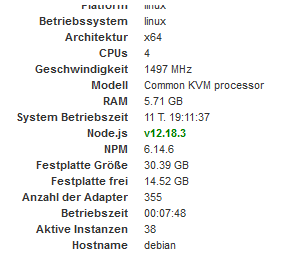
Dann ist da wohl alles mögliche verfummelt. Deine Version vom js-controller ist auch uralt. Jedenfalls lt. Log.
root-Login ist jedenfalls absoluter Quark. Kannste Mal den @Freaknet fragen. Nur ein paar Postings zuvor.Wenn du Hilfe beim glattziehen möchtest mach am besten einen neuen, eigenen Thread dafür auf. Hier führt das zu weit.
-
@xADDRx
Dann ist da wohl alles mögliche verfummelt. Deine Version vom js-controller ist auch uralt. Jedenfalls lt. Log.
root-Login ist jedenfalls absoluter Quark. Kannste Mal den @Freaknet fragen. Nur ein paar Postings zuvor.Wenn du Hilfe beim glattziehen möchtest mach am besten einen neuen, eigenen Thread dafür auf. Hier führt das zu weit.
@Thomas-Braun Hmmm. Also JS Controller ist aug 3.1.6. Auch habe ich sonst keine Porbleme. Sowohl die Karte als auch die Räume haben ja vorm Adapter Update funktionert und wurden geladen sobald man auf dem Button geklickt hat...
Sonos, Intel Nuc, Iobroker Pro, Proxmox, IPad Air (Wand), Vis, Xiaomi, Devolo, Bose, Philips Hue, Instar, Synology
-
@Thomas-Braun Hmmm. Also JS Controller ist aug 3.1.6. Auch habe ich sonst keine Porbleme. Sowohl die Karte als auch die Räume haben ja vorm Adapter Update funktionert und wurden geladen sobald man auf dem Button geklickt hat...
@xADDRx Das Install-Log zeigt was anderes an.
-
@xADDRx Das Install-Log zeigt was anderes an.
@Thomas-Braun Was sollte ich am besten tun??
Sonos, Intel Nuc, Iobroker Pro, Proxmox, IPad Air (Wand), Vis, Xiaomi, Devolo, Bose, Philips Hue, Instar, Synology
-
@Thomas-Braun Was sollte ich am besten tun??
Versuch mal das:
iobroker stop sudo apt-get update sudo apt-get upgrade sudo apt-get --purge remove nodejs -y sudo apt-get autoremove -y sudo reboot curl -s https://deb.nodesource.com/gpgkey/nodesource.gpg.key | apt-key add - sudo sh -c "echo deb https://deb.nodesource.com/node_12.x disco main \> /etc/apt/sources.list.d/nodesource.list" sudo apt-get update sudo apt-get install nodejs -y npm install -g npm@6 sudo reboot iobroker update iobroker upgrade self iobroker fix cd /opt/iobroker/ npm rebuild -
Versuch mal das:
iobroker stop sudo apt-get update sudo apt-get upgrade sudo apt-get --purge remove nodejs -y sudo apt-get autoremove -y sudo reboot curl -s https://deb.nodesource.com/gpgkey/nodesource.gpg.key | apt-key add - sudo sh -c "echo deb https://deb.nodesource.com/node_12.x disco main \> /etc/apt/sources.list.d/nodesource.list" sudo apt-get update sudo apt-get install nodejs -y npm install -g npm@6 sudo reboot iobroker update iobroker upgrade self iobroker fix cd /opt/iobroker/ npm rebuild@Kevin Woher weißt du dass da Disco läuft?
So wird das mutmaßliche Installationschaos doch nur noch größer...
Da dürfte eher ein Debian laufen, kein Ubuntu. -
@Kevin Woher weißt du dass da Disco läuft?
So wird das mutmaßliche Installationschaos doch nur noch größer...
Da dürfte eher ein Debian laufen, kein Ubuntu. -
@Thomas-Braun so habe ich es bei mir zum laufen gebracht. Auf raspbian
@Kevin Dann hast du jetzt ein falsches Repo drin. Disco Dingo ist nicht für Raspian gedacht.
Vermutlich bist Du auch auf einem hervorragenden Weg dein System zu zerballern.


Support us
260
Online32.7k
Users82.5k
Topics1.3m
Posts