Skip to content
  • Home
  • Recent
  • Tags
  • 0 Unread 0
  • Categories
  • Unreplied
  • Popular
  • GitHub
  • Docu
  • Hilfe
Skins
  • Light
  • Brite
  • Cerulean
  • Cosmo
  • Flatly
  • Journal
  • Litera
  • Lumen
  • Lux
  • Materia
  • Minty
  • Morph
  • Pulse
  • Sandstone
  • Simplex
  • Sketchy
  • Spacelab
  • United
  • Yeti
  • Zephyr
  • Dark
  • Cyborg
  • Darkly
  • Quartz
  • Slate
  • Solar
  • Superhero
  • Vapor

  • Default (No Skin)
  • No Skin
Collapse
ioBroker Logo

Community Forum

donate donate
  1. ioBroker Community Home
  2. Deutsch
  3. Visualisierung
  4. Material Design Widgets: Top App Bar Widget
NEWS

  • Jahresrückblick 2025 – unser neuer Blogbeitrag ist online! ✨
    BluefoxB
    Bluefox
    16
    1
    1.8k

  • Neuer Blogbeitrag: Monatsrückblick - Dezember 2025 🎄
    BluefoxB
    Bluefox
    13
    1
    893

  • Weihnachtsangebot 2025! 🎄
    BluefoxB
    Bluefox
    25
    1
    2.1k

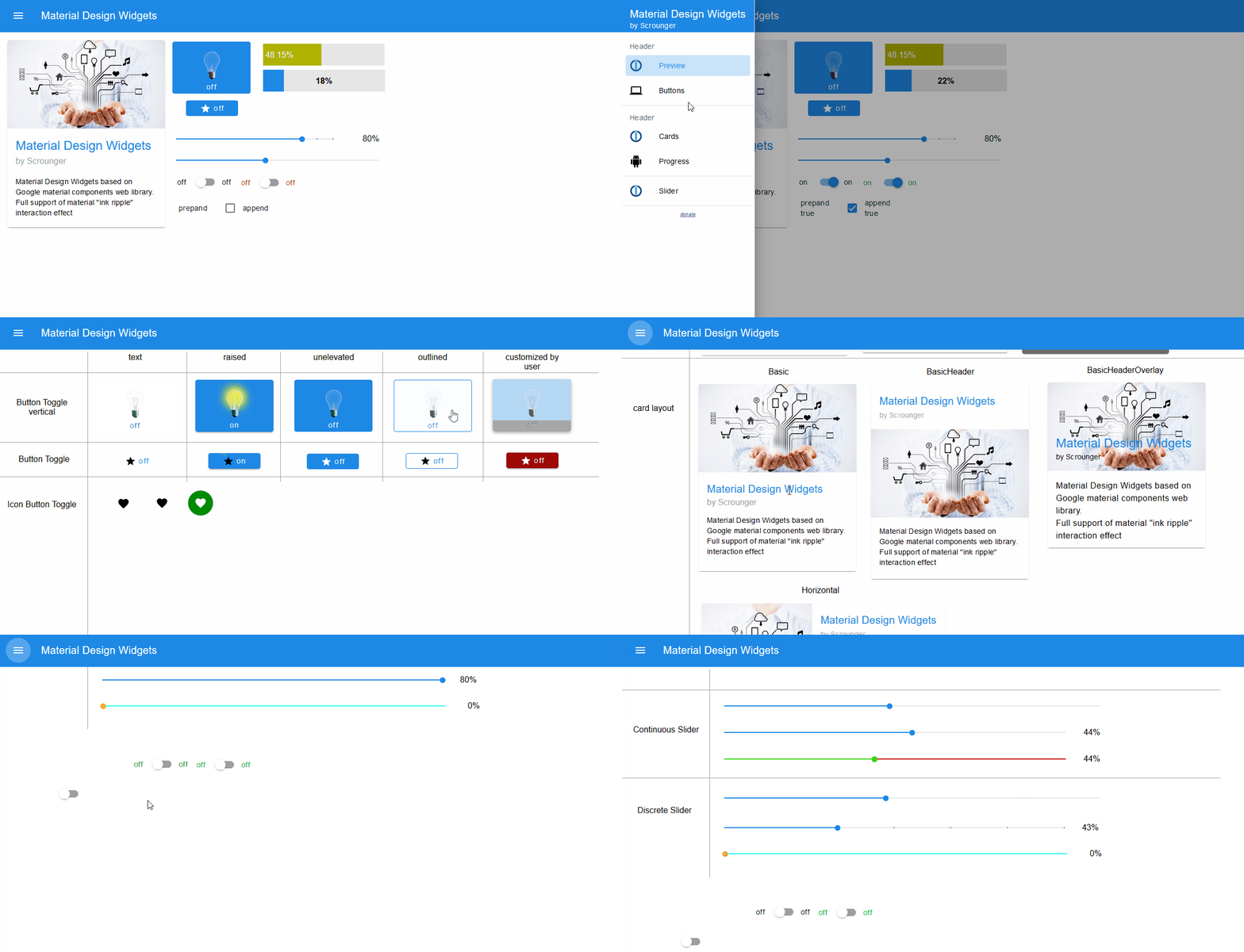
Material Design Widgets: Top App Bar Widget
Scheduled Pinned Locked Moved Visualisierung
vis
412 Posts 74 Posters 94.0k Views 79 Watching
  • Oldest to Newest
  • Newest to Oldest
  • Most Votes
Reply
  • Reply as topic
Log in to reply
This topic has been deleted. Only users with topic management privileges can see it.
  • NegaleinN Offline
    NegaleinN Offline
    Negalein
    Global Moderator
    wrote on last edited by
    #292

    @Scrounger

    gestern wurde mir die 0.5.5 angeboten.
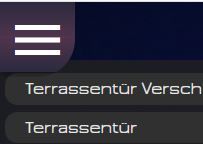
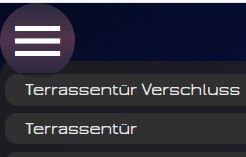
    Läuft eigentlich alles, bis auf den Button (siehe Screenshot).

    Vorher war nur der runde Button zu sehen. Jetzt mit 0.5.5 ist es eckig mit dem runden in der Mitte.
    a0a5547b-c404-4820-be8a-6030011e2873-image.png

    ° Node.js & System Update ---> sudo apt update, iob stop, sudo apt full-upgrade
    ° Node.js Fixer ---> iob nodejs-update
    ° Fixer ---> iob fix

    ScroungerS 1 Reply Last reply
    0
    • NegaleinN Negalein

      @Scrounger

      gestern wurde mir die 0.5.5 angeboten.
      Läuft eigentlich alles, bis auf den Button (siehe Screenshot).

      Vorher war nur der runde Button zu sehen. Jetzt mit 0.5.5 ist es eckig mit dem runden in der Mitte.
      a0a5547b-c404-4820-be8a-6030011e2873-image.png

      ScroungerS Offline
      ScroungerS Offline
      Scrounger
      Developer
      wrote on last edited by
      #293

      @negalein
      Hintergrund Farbe evtl transparent?
      Hast du irgendwelche CSS uberscheibungen im Einsatz?

      NegaleinN 1 Reply Last reply
      0
      • ScroungerS Scrounger

        @negalein
        Hintergrund Farbe evtl transparent?
        Hast du irgendwelche CSS uberscheibungen im Einsatz?

        NegaleinN Offline
        NegaleinN Offline
        Negalein
        Global Moderator
        wrote on last edited by
        #294

        @scrounger sagte in Material Design Widgets: Top App Bar Widget:

        Hintergrund Farbe evtl transparent?

        Nein

        Hast du irgendwelche CSS uberscheibungen im Einsatz?

        Ja, aber die hatte ich vor dem Update auch schon.

        /* custom scrollbar layout */
          @media only screen and (min-width: 1025px) {
            :root {
                --material-design-widget-scrollbar-color: rgba(63,64,71,1);
                --material-design-widget-scrollbar-track-color: rgba(50,50,60,1);
                
                /* Firefox */
                --material-design-widget-scrollbar-style: thin;
                
                /* nur Chrome, Edge, Safari */
                --material-design-widget-scrollbar-width: 15px;
                --material-design-widget-scrollbar-radius: 7px;
                --material-design-widget-scrollbar-hover-color: rgba(63,64,71,1);
            }
            
            /* Firefox */
            .materialdesign-widget, 
            .materialdesign-topAppBar-with-Drawer .mdc-drawer .mdc-drawer__content, 
            .v-menu__content.menuable__content__active,
            .materialdesign-widget .v-calendar-daily__scroll-area,
            .materialdesign-widget .mdc-data-table,
            .materialdesign-widget .mdc-data-table__content {
                scrollbar-width: var(--material-design-widget-scrollbar-style);
                scrollbar-color: var(--material-design-widget-scrollbar-color) var(--material-design-widget-scrollbar-track-color);
            }
            
            /* Chrome, Edge, Safari */
            .materialdesign-widget::-webkit-scrollbar,
            .materialdesign-topAppBar-with-Drawer .mdc-drawer .mdc-drawer__content::-webkit-scrollbar,
            .v-menu__content.menuable__content__active::-webkit-scrollbar, 
            .materialdesign-widget .v-calendar-daily__scroll-area::-webkit-scrollbar,
            .materialdesign-widget .mdc-data-table::-webkit-scrollbar,
            .materialdesign-widget .mdc-data-table__content::-webkit-scrollbar {
                width: var(--material-design-widget-scrollbar-width);
            }
            .materialdesign-widget::-webkit-scrollbar-track, 
            .materialdesign-topAppBar-with-Drawer .mdc-drawer .mdc-drawer__content::-webkit-scrollbar-track, 
            .v-menu__content.menuable__content__active::-webkit-scrollbar-track,
            .materialdesign-widget .v-calendar-daily__scroll-area::-webkit-scrollbar-track,
            .materialdesign-widget .mdc-data-table::-webkit-scrollbar-track,
            .materialdesign-widget .mdc-data-table__content::-webkit-scrollbar-track {
                background: var(--material-design-widget-scrollbar-track-color);
            }
            .materialdesign-widget::-webkit-scrollbar-thumb,     
            .materialdesign-topAppBar-with-Drawer .mdc-drawer .mdc-drawer__content::-webkit-scrollbar-thumb, 
            .v-menu__content.menuable__content__active::-webkit-scrollbar-thumb,
            .materialdesign-widget .v-calendar-daily__scroll-area::-webkit-scrollbar-thumb,
            .materialdesign-widget .mdc-data-table::-webkit-scrollbar-thumb,
            .materialdesign-widget .mdc-data-table__content::-webkit-scrollbar-thumb {
                background-color: var(--material-design-widget-scrollbar-color);
                border-right: 0px solid white;
                border-radius: var(--material-design-widget-scrollbar-radius);
            }
            .materialdesign-widget::-webkit-scrollbar-thumb:hover, 
            .materialdesign-topAppBar-with-Drawer .mdc-drawer .mdc-drawer__content::-webkit-scrollbar-thumb:hover, 
            .v-menu__content.menuable__content__active::-webkit-scrollbar-thumb:hover,
            .materialdesign-widget .v-calendar-daily__scroll-area::-webkit-scrollbar-thumb:hover,
            .materialdesign-widget .mdc-data-table::-webkit-scrollbar-thumb:hover,
            .materialdesign-widget .mdc-data-table__content::-webkit-scrollbar-thumb:hover {
                background: var(--material-design-widget-scrollbar-hover-color);
            }
        }
        
        /*Trashschedule-Adapter*/
        .trashtype .daysleft {
            background: none !important;
            top: 56%;
            transform: scale(0.8) !important;
        }
         
        .trashtype .dumpster {
            transform: scale(0.9) !important;
            height: 120px !important;
        }
         
        .trashtype {
            width: 70px !important;
        }
         
        .trashtype .name {
            font-size: 16px !important;
            margin-top: 5px !important;
        }
        
        /**Top App Bar Hintergrund und Auswahlbutton @Glasfaser**/
        .mdc-drawer {
         
            background: linear-gradient(0deg, #2c2a3f, #4c6ed4, #2c2a3f) !important;
        }
         
        .mdc-top-app-bar {
              background: linear-gradient(0deg, #2c2a3f, #4c6ed4, #2c2a3f) !important;
        }
        

        #vis_container .mic-navleft-huawei .label {
          font-size: 100% !important;
          font-family: RobotoCondensed-Light !important;
          text-align: left !important;
          text-shadow: 2px 2px 2px #000000 !important;
          padding: 0 !important;
          margin: -3px 0px 0px 50px !important;
        }
        /* Nicht selektiert */
        #vis_container .mic-navleft-huawei .bg-orange {
            background: none !important;
            box-shadow: none !important; /* Rahmen weg */
        }
        /* selektiert */
        #vis_container .mic-navleft-huawei .bg-green {
            background: rgba(182, 17, 138, 0.6) !important;
            box-shadow: none !important; /* Rahmen weg */
        }
        .button_site_navigation_grey_200
            {
                height:94px;
            	width:200px;
            	line-height:94px;
                text-align:center;
                vertical-align:middle;
            	border:#85888a solid 3px;
                border-radius: 5px;
            	font-size:22px;
            	background: #0079FF;
                background: -webkit-gradient(linear, 0% 0%, 0% 100%, from(#676a6e), to(#1f2122));
                background: -webkit-linear-gradient(0% 0%, 0% 100%, from(#676a6e), to(#1f2122));
                background: -moz-linear-gradient(center top, #676a6e, #1f2122);
                color:white;
            }
        .button_site_navigation_blue_200
            {
                height:94px;
            	width:200px;
            	line-height:94px;
                text-align:center;
                vertical-align:middle;
            	border:#1a89c8 solid 3px;
                border-radius: 5px;
            	font-size:22px;
            	background: #0079FF;
                background: -webkit-gradient(linear, 0% 0%, 0% 100%, from(#676a6e), to(#1f2122));
                background: -webkit-linear-gradient(0% 0%, 0% 100%, from(#676a6e), to(#1f2122));
                background: -moz-linear-gradient(center top, #676a6e, #1f2122);
                color:white;
            }
        /************************
         * Log-Table 
         ************************/
        .tablelog .log-warn { color: orange; font-weight: bold; }
        .tablelog .log-error { color: red;  font-weight: bold;}
         
        .tablelog-inner {
            background-color: transparent;
        }
        .tablelog.vis-widget {
            background-color: transparent !important;
        }
         
        .tablelog-th1 { /* nur linke Spalte */ 
            width: 40px;
            text-align: center;
            color: white;
            font-size: 11px;
            padding: 2px;
        }
        /* Tabellen-Zeilen odd/even */
        .tablelog-tr:nth-child(odd) {
            font-size: 11px;
            color: white;
            background-color: #707070;
        }
        .tablelog-tr:nth-child(even) {
            font-size: 11px;
            color: white;
            background-color: #606060;
        }
        .hintegrundfarbe_bigbox{
        background: #484A5C;
        border:1px solid #2B2D3B;
        }
         
        /* das hellblaue 4F5165
        /*3E404C */
         
         
        .kod_fanart_verlauf{
        box-shadow: inset 700px 0px 150px 8px #161616;
         
        }


        .small_button_aktiv{
           border:#7F808F solid 0.5px;
           border-radius:4px;
           border-left-color:#7F808F;
           border-left-width: 10px;
           box-sizing:border-box;
        }
         
        .shadown_hg{
           box-shadow: 0px 10px 35px -10px
           #202020;
        }
         
        .shadown_box{
           box-shadow: 0px 12px 35px -12px #000;
        }
         
         
        .Menue_ueberschrift{
           font-size:20px;
           font-family:Jura-DemiBold;
           color:#fff;
        }
         
        .linie_unten{
        border-bottom: 0.2px solid #acacac;
        opacity:0.5;
        }
         
        .linie_oben_unten{
        border-top: 2px solid #2B2D3B;
        border-bottom: 2px solid #2B2D3B;
         
        }
         
        .linie_rechts{
        border-right: 1px solid #000;
        border-left: 0px solid #000;
        border-top: 0px solid #000;
        border-bottom: 1px solid #000;
        }
         
        /* ########################## */
         
        .zentrieren div {
           display: flex;
           align-items: center; /* vertikal*/
           justify-content: center; /* horizontal */
        }
         
        .zentrieren_links div {
           display: flex;
           align-items: center; /* vertikal*/
           justify-content: left; /* horizontal */
        }
         
        .zentrieren_unten div {
           display: flex;
           align-items: flex-end; /* vertikal*/
           justify-content: center; /* horizontal */
        }
         
        .zentrieren_oben_center div {
           display: flex;
           justify-content: center; /* horizontal */
        }
         
        .zentrieren_oben_links div {
           display: flex;
           align-items: left; /* vertikal*/
        }


        /* ########################## */
         
         
        .blur{
             /* Add the blur effect */
            filter: blur(2px);
           -webkit-filter: blur(10px);
        }
         
        .blur2{
             /* Add the blur effect */
            filter: blur(4px);
           -webkit-filter: blur(10px);
        }
         
        .blur3{
             /* Add the blur effect */
            filter: blur(1px);
           -webkit-filter: blur(2px);
        }


        /******************************************
                        — LINKS —
        ******************************************/
        .noteProject a:link { color: #b8b8b8; } /* unvisited link */
        .noteProject a:visited { color: #b8b8b8; } /* visited link */
        .noteProject a:hover { color: #ffffff; } /* mouse over link */
        .pnoteProjecte a:active { color: #ffffff; } /* selected link */
        hr { border:0; height: 1px; background-color:#b8b8b8 }
        
        
        /******************************************
                        — LINKS —
        ******************************************/
        .noteProject a:link { color: #b8b8b8; } /* unvisited link */
        .noteProject a:visited { color: #b8b8b8; } /* visited link */
        .noteProject a:hover { color: #ffffff; } /* mouse over link */
        .pnoteProjecte a:active { color: #ffffff; } /* selected link */
        hr { border:0; height: 1px; background-color:#b8b8b8 }


        /******************************************
                        — LINKS —
        ******************************************/
        .noteProject a:link { color: #b8b8b8; } /* unvisited link */
        .noteProject a:visited { color: #b8b8b8; } /* visited link */
        .noteProject a:hover { color: #ffffff; } /* mouse over link */
        .pnoteProjecte a:active { color: #ffffff; } /* selected link */
        hr { border:0; height: 1px; background-color:#b8b8b8 }
        
        
        /******************************************
                        — TABLE —
        ******************************************/
        
        /* Color of log level */
        .tableLog .logInfo { color: yellow;}
        .tableLog .logWarn { color: orange;}
        .tableLog .logError { color: red;}


        /* Apply word-break */
        .tableLog {
            word-break: break-word; 
        }


        /* Jede zweite Tabellenzeile formatieren */
        .tableLog tr:nth-child(even) {
            background:rgba(56,46,67,0.1);
        }
        
        /* Rand unterhalb Tabellenüberschrift setzen */
        .tableLog .mdc-data-table__header-row {
            border-bottom: 1px solid #434343;
        }
        
        /* Zeilenhöhe und Abstände definieren */
        .tableLog .mdc-data-table__cell  {
            line-height:1.3em;
            padding-top: 6px;
            padding-bottom: 6px;
        }
        
        
        /* Scrollbar */
        .tableLog::-webkit-scrollbar { width: 15px; }
        .tableLog::-webkit-scrollbar-track { background: transparent; }
        .tableLog::-webkit-scrollbar-thumb { background-color: rgba(63,64,71,1); border-radius: 7px; border-color: rgba(63,64,71,1); }
        .tableLog::-webkit-scrollbar-thumb:hover { background: #8f8f8f; }
        
        
        /******************************************
                        — BUTTONS —
        ******************************************/
        
        
        .leftBarBtn .materialdesign-button-body {
            justify-content: left !important; 
            margin-left: 0.9em;
        }


        /* Scrollbar von Widget "materialdesign - Select" enfernen */
        .v-menu__content.theme--light.menuable__content__active::-webkit-scrollbar {
            width: 0px;
            background: transparent; 
        }
        .v-menu__content.theme--light.menuable__content__active {
            scrollbar-width: none; /* für Firefox */
        }
        
        .mdc-dialog__content{
        padding: 0 !important;
        }
        
        /* ANFANG Anpassung Dialog View von Scrounger */
         
        .mdc-dialog__content {
           padding: 0 4px !important;
        }
        .mdc-dialog__content {
           padding: 0 4px !important;
           }
           
           
        .mdc-dialog__title {
           padding: 0 24px 1px !important;
           }
         
        .mdc-dialog__actions {
          padding: 0px  !important;
          min-height: 1px !important;
          margin: auto !important
        }
         
        .mdc-dialog .mdc-dialog__scrim {
         
           background:linear-gradient(0deg, #2c2a3f, #4f344c, #2c2a3f)!important;
           opacity: .8 !important;
        }
         
        .element.style ::-webkit-scrollbar {
           width: 0px;
           background: transparent; 
        }
         
        .mdc-dialog .element.style {
             overflow-y: none !important;
           } 
           
        /* ENDE Anpassung Dialog View von Scrounger */


        .rotate090 {
           transform-origin:50% 50%;
           transform: rotate(270deg);
        }
        
        /*  ===========================================
            Formatierung DOCKER-Ausgabe
            =========================================== */   
        .dockerup  { color:LIME; }
        .dockererr { color:RED; }
        .dockerimg { color:DARKTURQUOISE; }
        /* ENDE Anpassung Dialog View von Scrounger */
        
        /** Scrollbar: anderer Style (Chrome, Fully) **/
        .mAppBar .mdc-drawer__content::-webkit-scrollbar { width: 15px; }
        .mAppBar .mdc-drawer__content::-webkit-scrollbar-track { background: transparent; }
        .mAppBar .mdc-drawer__content::-webkit-scrollbar-thumb { background-color: rgba(63,64,71,1); border-radius: 7px; border-color: rgba(63,64,71,1); }
        .mAppBar .mdc-drawer__content::-webkit-scrollbar-thumb:hover { background: #8f8f8f; }
        
        .station_open {
            color: #2EFE2E;
        }
        
        .station_closed {
            color: #FF0000 !important; /* !important kann ggf. weggelassen werden */
        }
        
        /* € sign */
        .station_combined_euro {
            font-family: RobotoCondensed-Light;
            font-size: 88%;
        }
        
        /* Spinner */
        .spinnerleft {
        animation-name: spin;
        animation-duration: 60000ms;
        animation-iteration-count: infinite;
        animation-timing-function: linear; 
        }
         
        @keyframes spin {
          from {
              transform:rotate(360deg);
          }
          to {
              transform:rotate(0deg);
          }
        }
        .spinnerright {
        animation-name: spin2;
        animation-duration: 60000ms;
        animation-iteration-count: infinite;
        animation-timing-function: linear; 
        }
         
        @keyframes spin2 {
          from {
              transform:rotate(0deg);
          }
          to {
              transform:rotate(360deg);
          }
        }
        
        
        .rotate90{
        transform: rotate(90deg);
        }
         
        .rotate-90{
        transform: rotate(-90deg);
        }
         
        .rotate180{
        transform: rotate(180deg);
        }
        
        /* TimeSwitch */
        app-on-off-schedule-widget {
            /* Primary color (button background, toggle switch color) */
            --ts-widget-primary-color: #337ab7;
         
            /* Background color of the widget */
            --ts-widget-bg-color: #424242;
            /* Background color of the triggers */
            --ts-widget-trigger-bg-color: #272727;
         
            /* Foreground color (font color and scrollbar color) */
            --ts-widget-fg-color: white;
            /* Font color of the switched states id */
            --ts-widget-oid-fg-color: #a5a5a5;
            /* Font color in buttons */
            --ts-widget-btn-fg-color: white;
            /* Font color of a disabled weekday */
            --ts-widget-weekdays-disabled-fg-color: #5D5D5D;
            /* Font color of an enabled weekday */
            --ts-widget-weekdays-enabled-fg-color: white;
            /* Font color of the name of the widget (defaults to --ts-widget-fg-color) */
            --ts-widget-name-fg-color: white;
            /* Font color of switched time (defaults to --ts-widget-fg-color) */
            --ts-widget-switched-time-fg-color: white;
            /* Font color of switched value (defaults to --ts-widget-fg-color)*/
            --ts-widget-switched-value-fg-color: white;
            /* Font color of the astro time (defaults to --ts-widget-fg-color) */
            --ts-widget-astro-time-fg-color: black;
            /* Font color of the astro time's shift */
            --ts-widget-astro-shift-fg-color: #5d5d5d;
         
            /* Font family used in the whole widget */
            --ts-widget-font-family: 'Roboto', 'Segoe UI', BlinkMacSystemFont, system-ui, -apple-system;
            /* Font size of the name of the widget */
            --ts-widget-name-font-size: 2em;
            /* Font size of the switched oid */
            --ts-widget-oid-font-size: 30px;
         
            /* Applies a filter to icons used in buttons (safe, edit, remove, cancel), for
               white use invert(1) and for black invert(0) */
            --ts-widget-img-btn-filter: invert(1);
            
            /* Add trigger dropdown background color */
            --ts-widget-add-trigger-dropdown-bg-color: #f1f1f1;
            /* Add trigger dropdown font color */
            --ts-widget-add-trigger-dropdown-fg-color: black;
            /* Add trigger dropdown hover background color */
            --ts-widget-add-trigger-dropdown-hover-bg-color: #ddd;
         
            /* ! Changing these may break the layout, change at your own risk */
         
            /* Font size of weekdays */
            --ts-widget-weekdays-font-size: 23px;
            /* Font size of switched value (on/off) */
            --ts-widget-switched-value-font-size: 2em;
            /* Font size of switched time */
            --ts-widget-switched-time-font-size: 2em;
            /* Font size of the astro time (e.g. Sunrise, ...) */
            --ts-widget-astro-time-font-size: 1.5em;
            /* Font size of the astro time's shift */
            --ts-widget-astro-shift-font-size: 1em;
        }
        

        ° Node.js & System Update ---> sudo apt update, iob stop, sudo apt full-upgrade
        ° Node.js Fixer ---> iob nodejs-update
        ° Fixer ---> iob fix

        1 Reply Last reply
        0
        • GlasfaserG Offline
          GlasfaserG Offline
          Glasfaser
          wrote on last edited by
          #295

          @negalein sagte in Material Design Widgets: Top App Bar Widget:

          .... der runde Button zu sehen .... Jetzt ... ist es eckig

          Dito ... ;)
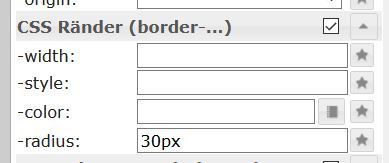
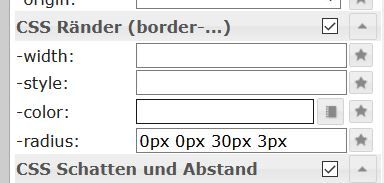
          Du kannst es mit den Standarteinstellung beinflussen .

          .
          1.JPG
          .
          Jede Ecke einzeln mit der Abrundung bestimmt :
          5.JPG
          .
          oder :

          2.JPG

          3.JPG

          Synology 918+ 16GB - ioBroker in Docker v9 , VISO auf Trekstor Primebook C13 13,3" , Hikvision Domkameras mit Surveillance Station .. CCU RaspberryMatic in Synology VM .. Zigbee CC2538+CC2592 .. Sonoff .. KNX .. Modbus ..

          NegaleinN 1 Reply Last reply
          0
          • GlasfaserG Glasfaser

            @negalein sagte in Material Design Widgets: Top App Bar Widget:

            .... der runde Button zu sehen .... Jetzt ... ist es eckig

            Dito ... ;)
            Du kannst es mit den Standarteinstellung beinflussen .

            .
            1.JPG
            .
            Jede Ecke einzeln mit der Abrundung bestimmt :

            5.JPG
            .
            oder :

            2.JPG

            3.JPG

            NegaleinN Offline
            NegaleinN Offline
            Negalein
            Global Moderator
            wrote on last edited by
            #296

            @glasfaser sagte in Material Design Widgets: Top App Bar Widget:

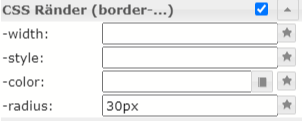
            Du kannst es mit den Standarteinstellung beinflussen .

            leider nichts gebracht
            Edit vis.png Unbenannt-1.png

            ° Node.js & System Update ---> sudo apt update, iob stop, sudo apt full-upgrade
            ° Node.js Fixer ---> iob nodejs-update
            ° Fixer ---> iob fix

            GlasfaserG 1 Reply Last reply
            0
            • NegaleinN Negalein

              @glasfaser sagte in Material Design Widgets: Top App Bar Widget:

              Du kannst es mit den Standarteinstellung beinflussen .

              leider nichts gebracht

              Edit vis.png Unbenannt-1.png

              GlasfaserG Offline
              GlasfaserG Offline
              Glasfaser
              wrote on last edited by
              #297

              @negalein

              Du hast es aber im Widget TopAppBar geändert !?

              Synology 918+ 16GB - ioBroker in Docker v9 , VISO auf Trekstor Primebook C13 13,3" , Hikvision Domkameras mit Surveillance Station .. CCU RaspberryMatic in Synology VM .. Zigbee CC2538+CC2592 .. Sonoff .. KNX .. Modbus ..

              NegaleinN 1 Reply Last reply
              0
              • GlasfaserG Glasfaser

                @negalein

                Du hast es aber im Widget TopAppBar geändert !?

                NegaleinN Offline
                NegaleinN Offline
                Negalein
                Global Moderator
                wrote on last edited by
                #298

                @glasfaser sagte in Material Design Widgets: Top App Bar Widget:

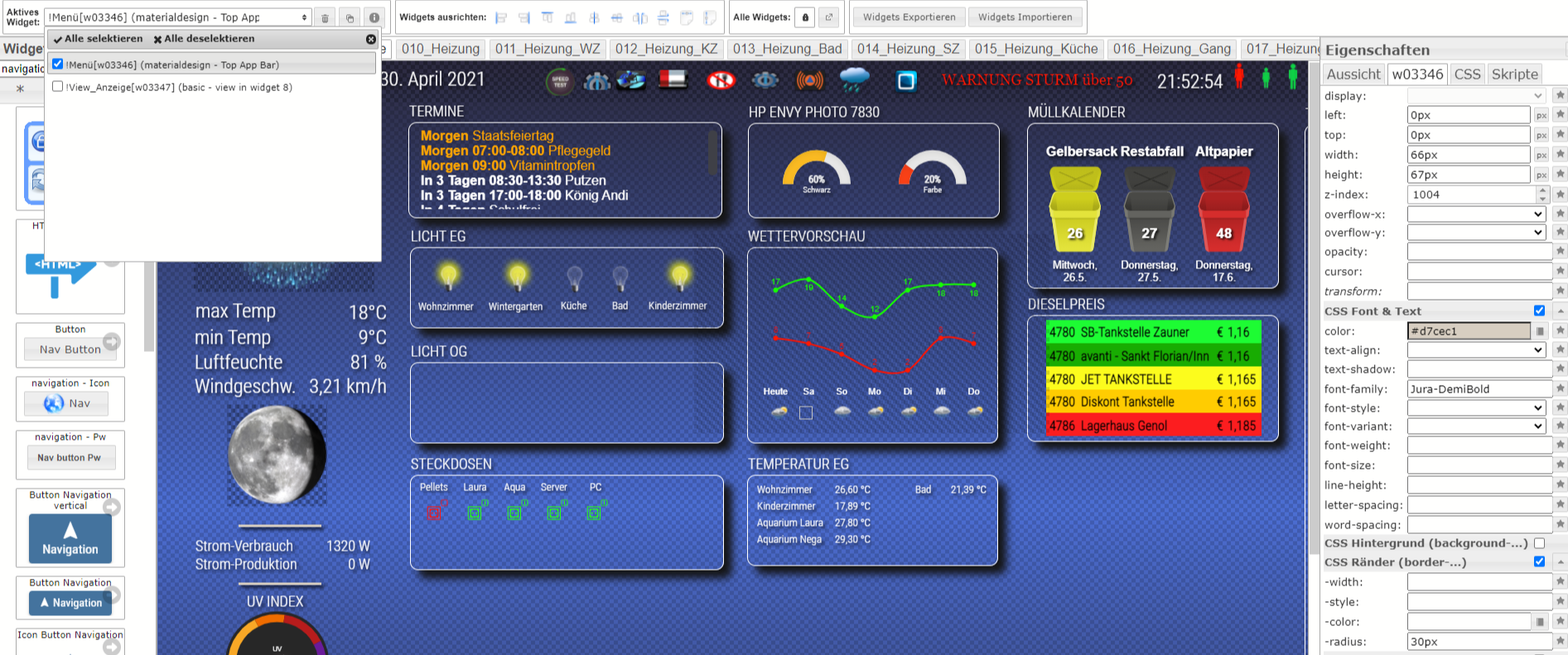
                Du hast es aber im Widget TopAppBar geändert !?

                Jep :)
                Edit vis (1).png

                ° Node.js & System Update ---> sudo apt update, iob stop, sudo apt full-upgrade
                ° Node.js Fixer ---> iob nodejs-update
                ° Fixer ---> iob fix

                GlasfaserG 1 Reply Last reply
                0
                • NegaleinN Negalein

                  @glasfaser sagte in Material Design Widgets: Top App Bar Widget:

                  Du hast es aber im Widget TopAppBar geändert !?

                  Jep :)

                  Edit vis (1).png

                  GlasfaserG Offline
                  GlasfaserG Offline
                  Glasfaser
                  wrote on last edited by
                  #299

                  @negalein

                  Komisch ...

                  Nimm mal das Widget in einem anderen Projekt , ist es auch dort so das man es nicht verändern kann , bzw. nimm mal Testweise alle CSS Anweisungen raus . Global / Projekt

                  Synology 918+ 16GB - ioBroker in Docker v9 , VISO auf Trekstor Primebook C13 13,3" , Hikvision Domkameras mit Surveillance Station .. CCU RaspberryMatic in Synology VM .. Zigbee CC2538+CC2592 .. Sonoff .. KNX .. Modbus ..

                  NegaleinN 1 Reply Last reply
                  0
                  • GlasfaserG Glasfaser

                    @negalein

                    Komisch ...

                    Nimm mal das Widget in einem anderen Projekt , ist es auch dort so das man es nicht verändern kann , bzw. nimm mal Testweise alle CSS Anweisungen raus . Global / Projekt

                    NegaleinN Offline
                    NegaleinN Offline
                    Negalein
                    Global Moderator
                    wrote on last edited by
                    #300

                    @glasfaser sagte in Material Design Widgets: Top App Bar Widget:

                    Nimm mal das Widget in einem anderen Projekt , ist es auch dort so das man es nicht verändern kann , bzw. nimm mal Testweise alle CSS Anweisungen raus . Global / Projekt

                    auch keine Änderung

                    Ich verstehs nicht

                    ° Node.js & System Update ---> sudo apt update, iob stop, sudo apt full-upgrade
                    ° Node.js Fixer ---> iob nodejs-update
                    ° Fixer ---> iob fix

                    GlasfaserG 1 Reply Last reply
                    0
                    • NegaleinN Negalein

                      @glasfaser sagte in Material Design Widgets: Top App Bar Widget:

                      Nimm mal das Widget in einem anderen Projekt , ist es auch dort so das man es nicht verändern kann , bzw. nimm mal Testweise alle CSS Anweisungen raus . Global / Projekt

                      auch keine Änderung

                      Ich verstehs nicht

                      GlasfaserG Offline
                      GlasfaserG Offline
                      Glasfaser
                      wrote on last edited by
                      #301

                      @negalein

                      Im Admin ... Adapter ... Upload durchführen bei
                      Material Design und VIS

                      Synology 918+ 16GB - ioBroker in Docker v9 , VISO auf Trekstor Primebook C13 13,3" , Hikvision Domkameras mit Surveillance Station .. CCU RaspberryMatic in Synology VM .. Zigbee CC2538+CC2592 .. Sonoff .. KNX .. Modbus ..

                      NegaleinN 1 Reply Last reply
                      0
                      • GlasfaserG Glasfaser

                        @negalein

                        Im Admin ... Adapter ... Upload durchführen bei
                        Material Design und VIS

                        NegaleinN Offline
                        NegaleinN Offline
                        Negalein
                        Global Moderator
                        wrote on last edited by
                        #302

                        @glasfaser sagte in Material Design Widgets: Top App Bar Widget:

                        m Admin ... Adapter ... Upload durchführen bei
                        Material Design und VIS

                        Nichts

                        Hab auch gerade den Vis-Adapter aktualisiert, Upload VIS, Upload Material (wie immer) brachte keine Änderung.

                        ° Node.js & System Update ---> sudo apt update, iob stop, sudo apt full-upgrade
                        ° Node.js Fixer ---> iob nodejs-update
                        ° Fixer ---> iob fix

                        GlasfaserG 1 Reply Last reply
                        0
                        • NegaleinN Negalein

                          @glasfaser sagte in Material Design Widgets: Top App Bar Widget:

                          m Admin ... Adapter ... Upload durchführen bei
                          Material Design und VIS

                          Nichts

                          Hab auch gerade den Vis-Adapter aktualisiert, Upload VIS, Upload Material (wie immer) brachte keine Änderung.

                          GlasfaserG Offline
                          GlasfaserG Offline
                          Glasfaser
                          wrote on last edited by
                          #303

                          @negalein

                          schicke mir mal dein Widget zu

                          Synology 918+ 16GB - ioBroker in Docker v9 , VISO auf Trekstor Primebook C13 13,3" , Hikvision Domkameras mit Surveillance Station .. CCU RaspberryMatic in Synology VM .. Zigbee CC2538+CC2592 .. Sonoff .. KNX .. Modbus ..

                          NegaleinN 1 Reply Last reply
                          0
                          • GlasfaserG Glasfaser

                            @negalein

                            schicke mir mal dein Widget zu

                            NegaleinN Offline
                            NegaleinN Offline
                            Negalein
                            Global Moderator
                            wrote on last edited by
                            #304

                            @glasfaser sagte in Material Design Widgets: Top App Bar Widget:

                            schicke mir mal dein Widget zu

                            du hast Post

                            ° Node.js & System Update ---> sudo apt update, iob stop, sudo apt full-upgrade
                            ° Node.js Fixer ---> iob nodejs-update
                            ° Fixer ---> iob fix

                            GlasfaserG 1 Reply Last reply
                            0
                            • NegaleinN Negalein

                              @glasfaser sagte in Material Design Widgets: Top App Bar Widget:

                              schicke mir mal dein Widget zu

                              du hast Post

                              GlasfaserG Offline
                              GlasfaserG Offline
                              Glasfaser
                              wrote on last edited by Glasfaser
                              #305

                              @negalein

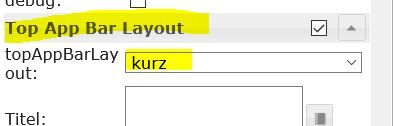
                              Stelle um auf :

                              1.JPG

                              danach werden die Werte im CSS Ränder übernommen

                              Synology 918+ 16GB - ioBroker in Docker v9 , VISO auf Trekstor Primebook C13 13,3" , Hikvision Domkameras mit Surveillance Station .. CCU RaspberryMatic in Synology VM .. Zigbee CC2538+CC2592 .. Sonoff .. KNX .. Modbus ..

                              NegaleinN 1 Reply Last reply
                              1
                              • GlasfaserG Glasfaser

                                @negalein

                                Stelle um auf :

                                1.JPG

                                danach werden die Werte im CSS Ränder übernommen

                                NegaleinN Offline
                                NegaleinN Offline
                                Negalein
                                Global Moderator
                                wrote on last edited by
                                #306

                                @glasfaser sagte in Material Design Widgets: Top App Bar Widget:

                                Stelle um auf :

                                Merci, das wars.
                                Hatte ich nicht mehr im Blick.

                                ° Node.js & System Update ---> sudo apt update, iob stop, sudo apt full-upgrade
                                ° Node.js Fixer ---> iob nodejs-update
                                ° Fixer ---> iob fix

                                1 Reply Last reply
                                0
                                • dQeLseD Online
                                  dQeLseD Online
                                  dQeLse
                                  wrote on last edited by
                                  #307

                                  hat jemand von Euch die 0.5.5 mit dem ipad4 ans laufen bekommen?
                                  Die TopAppBar wird mir nicht mehr angezeigt über die iobrokerApp, auf dem Rechner funktioniert Sie allerdings ohne Probleme.

                                  ScroungerS 1 Reply Last reply
                                  0
                                  • dQeLseD dQeLse

                                    hat jemand von Euch die 0.5.5 mit dem ipad4 ans laufen bekommen?
                                    Die TopAppBar wird mir nicht mehr angezeigt über die iobrokerApp, auf dem Rechner funktioniert Sie allerdings ohne Probleme.

                                    ScroungerS Offline
                                    ScroungerS Offline
                                    Scrounger
                                    Developer
                                    wrote on last edited by
                                    #308

                                    @dqelse sagte in Material Design Widgets: Top App Bar Widget:

                                    hat jemand von Euch die 0.5.5 mit dem ipad4 ans laufen bekommen?
                                    ...nicht mehr angezeigt über die iobrokerApp ...

                                    siehe https://github.com/Scrounger/ioBroker.vis-materialdesign#iobroker-vis-app, muss erst seitens app implementiert werden.

                                    dQeLseD 1 Reply Last reply
                                    0
                                    • ScroungerS Scrounger

                                      @dqelse sagte in Material Design Widgets: Top App Bar Widget:

                                      hat jemand von Euch die 0.5.5 mit dem ipad4 ans laufen bekommen?
                                      ...nicht mehr angezeigt über die iobrokerApp ...

                                      siehe https://github.com/Scrounger/ioBroker.vis-materialdesign#iobroker-vis-app, muss erst seitens app implementiert werden.

                                      dQeLseD Online
                                      dQeLseD Online
                                      dQeLse
                                      wrote on last edited by
                                      #309

                                      @scrounger vielen dank :) dann warte ich mal ab

                                      1 Reply Last reply
                                      0
                                      • ice987I Offline
                                        ice987I Offline
                                        ice987
                                        wrote on last edited by ice987
                                        #310

                                        ich möchte die Farbe des "Hamburgers" (drei weisse, horizontale Linien" 6f6dca11-6932-4ba6-8995-720e15ff0ad3-image.png ändern. Habe ich die entsprechende Option in den Einstellungen übersehen oder geht dies nur mittels dem CSS Befehl
                                        .mdc-top-app-bar .mdc-top-app-bar__navigation-icon {
                                            color: #ff0000;
                                        }
                                        

                                        Adapter: ioBroker.vis-materialdesign v0.5.6
                                        Widget: materialdesign Widget - Top App Bar

                                        https://github.com/Scrounger/ioBroker.vis-materialdesign/issues/171

                                        husqvarna-automower, meteoblue, wiserbyfeller, spritmonitor

                                        GlasfaserG 1 Reply Last reply
                                        0
                                        • ice987I ice987

                                          ich möchte die Farbe des "Hamburgers" (drei weisse, horizontale Linien" 6f6dca11-6932-4ba6-8995-720e15ff0ad3-image.png ändern. Habe ich die entsprechende Option in den Einstellungen übersehen oder geht dies nur mittels dem CSS Befehl

                                          .mdc-top-app-bar .mdc-top-app-bar__navigation-icon {
                                              color: #ff0000;
                                          }
                                          

                                          Adapter: ioBroker.vis-materialdesign v0.5.6
                                          Widget: materialdesign Widget - Top App Bar

                                          https://github.com/Scrounger/ioBroker.vis-materialdesign/issues/171

                                          GlasfaserG Offline
                                          GlasfaserG Offline
                                          Glasfaser
                                          wrote on last edited by Glasfaser
                                          #311

                                          @ice987

                                          Nur per CSS

                                          1.JPG

                                          du mußt noch ein !important hinter setzen , damit er auch im Runtime sichtbar ist .

                                          .mdc-top-app-bar .mdc-top-app-bar__navigation-icon {
                                          color:  #2E9AFE !important;
                                          }
                                          

                                          Synology 918+ 16GB - ioBroker in Docker v9 , VISO auf Trekstor Primebook C13 13,3" , Hikvision Domkameras mit Surveillance Station .. CCU RaspberryMatic in Synology VM .. Zigbee CC2538+CC2592 .. Sonoff .. KNX .. Modbus ..

                                          1 Reply Last reply
                                          1
                                          Reply
                                          • Reply as topic
                                          Log in to reply
                                          • Oldest to Newest
                                          • Newest to Oldest
                                          • Most Votes


                                          Support us

                                          ioBroker
                                          Community Adapters
                                          Donate

                                          707

                                          Online

                                          32.6k

                                          Users

                                          82.1k

                                          Topics

                                          1.3m

                                          Posts
                                          Community
                                          Impressum | Datenschutz-Bestimmungen | Nutzungsbedingungen | Einwilligungseinstellungen
                                          ioBroker Community 2014-2025
                                          logo
                                          • Login

                                          • Don't have an account? Register

                                          • Login or register to search.
                                          • First post
                                            Last post
                                          0
                                          • Home
                                          • Recent
                                          • Tags
                                          • Unread 0
                                          • Categories
                                          • Unreplied
                                          • Popular
                                          • GitHub
                                          • Docu
                                          • Hilfe