Skip to content
  • Home
  • Recent
  • Tags
  • 0 Unread 0
  • Categories
  • Unreplied
  • Popular
  • GitHub
  • Docu
  • Hilfe
Skins
  • Light
  • Brite
  • Cerulean
  • Cosmo
  • Flatly
  • Journal
  • Litera
  • Lumen
  • Lux
  • Materia
  • Minty
  • Morph
  • Pulse
  • Sandstone
  • Simplex
  • Sketchy
  • Spacelab
  • United
  • Yeti
  • Zephyr
  • Dark
  • Cyborg
  • Darkly
  • Quartz
  • Slate
  • Solar
  • Superhero
  • Vapor

  • Default (No Skin)
  • No Skin
Collapse
ioBroker Logo

Community Forum

donate donate
  1. ioBroker Community Home
  2. Deutsch
  3. Praktische Anwendungen (Showcase)
  4. [Linux Shell-Skript] WLAN-Wetterstation
NEWS

  • Jahresrückblick 2025 – unser neuer Blogbeitrag ist online! ✨
    BluefoxB
    Bluefox
    17
    1
    3.6k

  • Neuer Blogbeitrag: Monatsrückblick - Dezember 2025 🎄
    BluefoxB
    Bluefox
    13
    1
    1.1k

  • Weihnachtsangebot 2025! 🎄
    BluefoxB
    Bluefox
    25
    1
    2.5k

[Linux Shell-Skript] WLAN-Wetterstation
Scheduled Pinned Locked Moved Praktische Anwendungen (Showcase)
linuxshell-scriptwetterstationwlan-wetterstation
5.7k Posts 156 Posters 3.9m Views 138 Watching
  • Oldest to Newest
  • Newest to Oldest
  • Most Votes
Reply
  • Reply as topic
Log in to reply
This topic has been deleted. Only users with topic management privileges can see it.
  • NashraN Nashra

    @crunchip sagte in [Linux Shell-Skript] WLAN-Wetterstation:

    @Nashra hier mal das einzelne json nur für Regenmenge


    {
    "datasource": null,
    "gridPos": {
    "h": 4,
    "w": 6,
    "x": 9,
    "y": 8
    },
    "hideTimeOverride": true,
    "id": 5,
    "options": {
    "displayMode": "lcd",
    "orientation": "horizontal",
    "fieldOptions": {
    "values": false,
    "calcs": [
    "lastNotNull"
    ],
    "defaults": {
    "min": 0,
    "max": 1200,
    "thresholds": [
    {
    "color": "rgb(15, 31, 171)",
    "value": null
    }
    ],
    "mappings": [],
    "unit": "lengthmm"
    },
    "override": {}
    }
    },
    "pluginVersion": "6.5.2",
    "targets": [
    {
    "alias": "Jahr",
    "groupBy": [
    {
    "params": [
    "$__interval"
    ],
    "type": "time"
    },
    {
    "params": [
    "null"
    ],
    "type": "fill"
    }
    ],
    "measurement": "javascript.0.Wetterstation.Regen_Jahr_kumuliert",
    "orderByTime": "ASC",
    "policy": "default",
    "refId": "A",
    "resultFormat": "time_series",
    "select": [
    [
    {
    "params": [
    "value"
    ],
    "type": "field"
    },
    {
    "params": [],
    "type": "mean"
    }
    ]
    ],
    "tags": []
    },
    {
    "alias": "Monat",
    "groupBy": [
    {
    "params": [
    "$__interval"
    ],
    "type": "time"
    },
    {
    "params": [
    "null"
    ],
    "type": "fill"
    }
    ],
    "measurement": "javascript.0.Wetterstation.Regen_Monat",
    "orderByTime": "ASC",
    "policy": "default",
    "refId": "D",
    "resultFormat": "time_series",
    "select": [
    [
    {
    "params": [
    "value"
    ],
    "type": "field"
    },
    {
    "params": [],
    "type": "mean"
    }
    ]
    ],
    "tags": []
    },
    {
    "alias": "Woche",
    "groupBy": [
    {
    "params": [
    "$__interval"
    ],
    "type": "time"
    },
    {
    "params": [
    "null"
    ],
    "type": "fill"
    }
    ],
    "measurement": "javascript.0.Wetterstation.Regen_Woche",
    "orderByTime": "ASC",
    "policy": "default",
    "refId": "B",
    "resultFormat": "time_series",
    "select": [
    [
    {
    "params": [
    "value"
    ],
    "type": "field"
    },
    {
    "params": [],
    "type": "mean"
    }
    ]
    ],
    "tags": []
    },
    {
    "alias": "Tag",
    "groupBy": [
    {
    "params": [
    "$__interval"
    ],
    "type": "time"
    },
    {
    "params": [
    "null"
    ],
    "type": "fill"
    }
    ],
    "measurement": "javascript.0.Wetterstation.Regen_Tag",
    "orderByTime": "ASC",
    "policy": "default",
    "refId": "C",
    "resultFormat": "time_series",
    "select": [
    [
    {
    "params": [
    "value"
    ],
    "type": "field"
    },
    {
    "params": [],
    "type": "mean"
    }
    ]
    ],
    "tags": []
    }
    ],
    "timeFrom": "1d",
    "timeShift": null,
    "title": "Regenmenge",
    "transparent": true,
    "type": "bargauge"
    }

    aktuelle view und json ist oben im Beitrag

    Irgendwie stehe ich heute auf dem Schlauch, wie bekomme ich das ausgetauscht?

    GlasfaserG Offline
    GlasfaserG Offline
    Glasfaser
    wrote on last edited by Glasfaser
    #398

    @Nashra

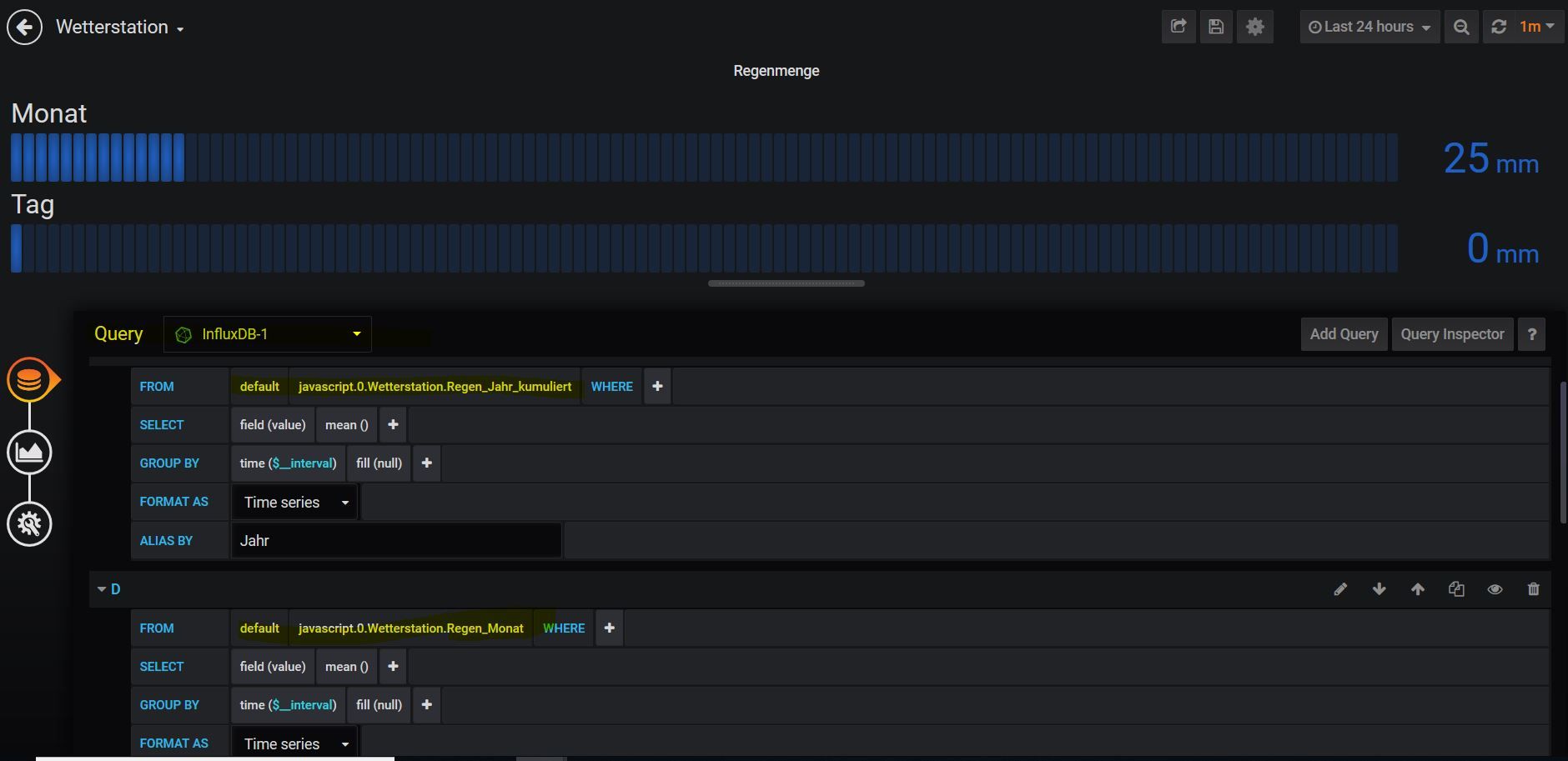
    Das Dashboard Json von crunchip klappte auf anhieb , brauchte nur die influxdb anwählen wo ich es Importiert habe .

    No Date würde bei dir heißen , das nichts in Influx geloggt ist bei den Datenpunkten .

    Hier der Screenshot von der Regenmenge :
    1.JPG

    @crunchip kannst du es als Textdatei hinterlegen

    Synology 918+ 16GB - ioBroker in Docker v9 , VISO auf Trekstor Primebook C13 13,3" , Hikvision Domkameras mit Surveillance Station .. CCU RaspberryMatic in Synology VM .. Zigbee CC2538+CC2592 .. Sonoff .. KNX .. Modbus ..

    crunchipC 1 Reply Last reply
    0
    • GlasfaserG Glasfaser

      @Nashra

      Das Dashboard Json von crunchip klappte auf anhieb , brauchte nur die influxdb anwählen wo ich es Importiert habe .

      No Date würde bei dir heißen , das nichts in Influx geloggt ist bei den Datenpunkten .

      Hier der Screenshot von der Regenmenge :
      1.JPG

      @crunchip kannst du es als Textdatei hinterlegen

      crunchipC Away
      crunchipC Away
      crunchip
      Forum Testing Most Active
      wrote on last edited by crunchip
      #399

      @Glasfaser @Nashra hier als Textdatei. Datenpunkte sind alle Original gelassen, wie auch im Script, also javascript.0.Wetterstation.xyz
      Regenmenge.txt

      umgestiegen von Proxmox auf Unraid

      1 Reply Last reply
      1
      • NashraN Nashra

        @crunchip sagte in [Linux Shell-Skript] WLAN-Wetterstation:

        @Nashra hier mal das einzelne json nur für Regenmenge


        {
        "datasource": null,
        "gridPos": {
        "h": 4,
        "w": 6,
        "x": 9,
        "y": 8
        },
        "hideTimeOverride": true,
        "id": 5,
        "options": {
        "displayMode": "lcd",
        "orientation": "horizontal",
        "fieldOptions": {
        "values": false,
        "calcs": [
        "lastNotNull"
        ],
        "defaults": {
        "min": 0,
        "max": 1200,
        "thresholds": [
        {
        "color": "rgb(15, 31, 171)",
        "value": null
        }
        ],
        "mappings": [],
        "unit": "lengthmm"
        },
        "override": {}
        }
        },
        "pluginVersion": "6.5.2",
        "targets": [
        {
        "alias": "Jahr",
        "groupBy": [
        {
        "params": [
        "$__interval"
        ],
        "type": "time"
        },
        {
        "params": [
        "null"
        ],
        "type": "fill"
        }
        ],
        "measurement": "javascript.0.Wetterstation.Regen_Jahr_kumuliert",
        "orderByTime": "ASC",
        "policy": "default",
        "refId": "A",
        "resultFormat": "time_series",
        "select": [
        [
        {
        "params": [
        "value"
        ],
        "type": "field"
        },
        {
        "params": [],
        "type": "mean"
        }
        ]
        ],
        "tags": []
        },
        {
        "alias": "Monat",
        "groupBy": [
        {
        "params": [
        "$__interval"
        ],
        "type": "time"
        },
        {
        "params": [
        "null"
        ],
        "type": "fill"
        }
        ],
        "measurement": "javascript.0.Wetterstation.Regen_Monat",
        "orderByTime": "ASC",
        "policy": "default",
        "refId": "D",
        "resultFormat": "time_series",
        "select": [
        [
        {
        "params": [
        "value"
        ],
        "type": "field"
        },
        {
        "params": [],
        "type": "mean"
        }
        ]
        ],
        "tags": []
        },
        {
        "alias": "Woche",
        "groupBy": [
        {
        "params": [
        "$__interval"
        ],
        "type": "time"
        },
        {
        "params": [
        "null"
        ],
        "type": "fill"
        }
        ],
        "measurement": "javascript.0.Wetterstation.Regen_Woche",
        "orderByTime": "ASC",
        "policy": "default",
        "refId": "B",
        "resultFormat": "time_series",
        "select": [
        [
        {
        "params": [
        "value"
        ],
        "type": "field"
        },
        {
        "params": [],
        "type": "mean"
        }
        ]
        ],
        "tags": []
        },
        {
        "alias": "Tag",
        "groupBy": [
        {
        "params": [
        "$__interval"
        ],
        "type": "time"
        },
        {
        "params": [
        "null"
        ],
        "type": "fill"
        }
        ],
        "measurement": "javascript.0.Wetterstation.Regen_Tag",
        "orderByTime": "ASC",
        "policy": "default",
        "refId": "C",
        "resultFormat": "time_series",
        "select": [
        [
        {
        "params": [
        "value"
        ],
        "type": "field"
        },
        {
        "params": [],
        "type": "mean"
        }
        ]
        ],
        "tags": []
        }
        ],
        "timeFrom": "1d",
        "timeShift": null,
        "title": "Regenmenge",
        "transparent": true,
        "type": "bargauge"
        }

        aktuelle view und json ist oben im Beitrag

        Irgendwie stehe ich heute auf dem Schlauch, wie bekomme ich das ausgetauscht?

        crunchipC Away
        crunchipC Away
        crunchip
        Forum Testing Most Active
        wrote on last edited by
        #400

        @Nashra willst du die ganze View oder nur Regen austauschen?

        umgestiegen von Proxmox auf Unraid

        GlasfaserG NashraN 2 Replies Last reply
        0
        • crunchipC crunchip

          @Nashra willst du die ganze View oder nur Regen austauschen?

          GlasfaserG Offline
          GlasfaserG Offline
          Glasfaser
          wrote on last edited by
          #401

          @crunchip

          Bei mir passt es .... war nur für @Nashra
          :+1:

          Synology 918+ 16GB - ioBroker in Docker v9 , VISO auf Trekstor Primebook C13 13,3" , Hikvision Domkameras mit Surveillance Station .. CCU RaspberryMatic in Synology VM .. Zigbee CC2538+CC2592 .. Sonoff .. KNX .. Modbus ..

          1 Reply Last reply
          0
          • crunchipC crunchip

            @Nashra willst du die ganze View oder nur Regen austauschen?

            NashraN Offline
            NashraN Offline
            Nashra
            Most Active Forum Testing
            wrote on last edited by
            #402

            @crunchip sagte in [Linux Shell-Skript] WLAN-Wetterstation:

            @Nashra willst du die ganze View oder nur Regen austauschen?

            Bitte die ganze View, habe mir gerade alles zerschossen :face_with_rolling_eyes:

            Gruß Ralf
            Mir egal, wer Dein Vater ist! Wenn ich hier angel, wird nicht übers Wasser gelaufen!!

            Benutzt das Voting rechts unten im Beitrag wenn er euch geholfen hat.

            crunchipC 1 Reply Last reply
            0
            • NashraN Nashra

              @crunchip sagte in [Linux Shell-Skript] WLAN-Wetterstation:

              @Nashra willst du die ganze View oder nur Regen austauschen?

              Bitte die ganze View, habe mir gerade alles zerschossen :face_with_rolling_eyes:

              crunchipC Away
              crunchipC Away
              crunchip
              Forum Testing Most Active
              wrote on last edited by crunchip
              #403

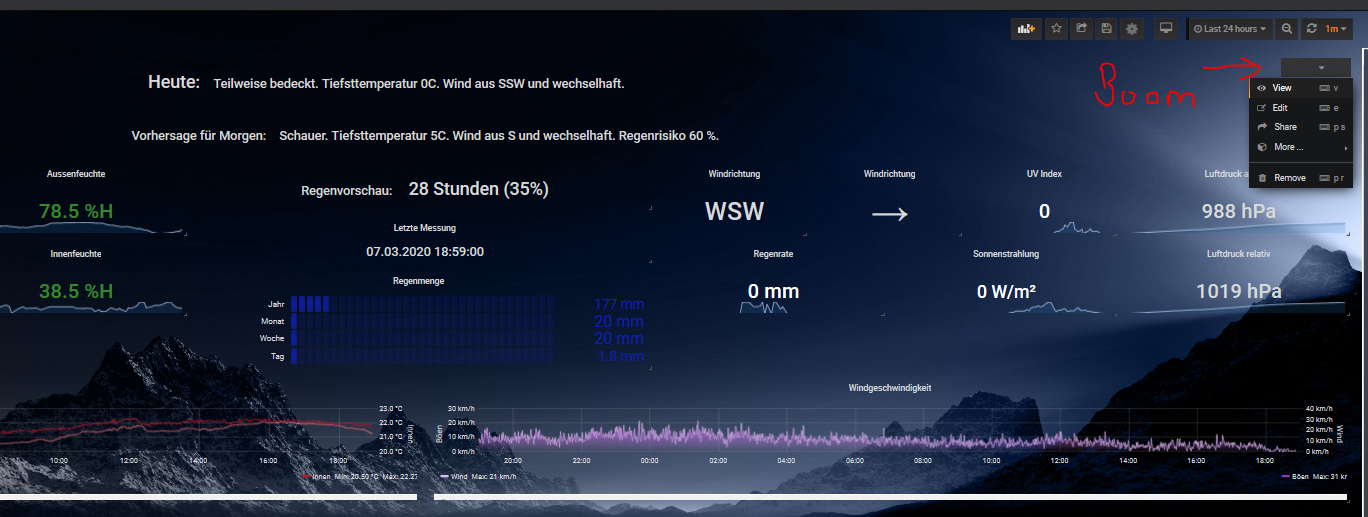
              @Nashra allerdings sind in dieser View zusätzliche plugins, die benötigt werden

              • Boom Theme (Oben rechts im Dashboard)...ist für Hindergrund
              • Bar Gauge
              • Windrose
              • Table
              • Singlestat
              • Graph

              Wetterstation mit Hintergrund.txt
              806b3bab-133e-4675-beb3-df820be06beb-image.png

              umgestiegen von Proxmox auf Unraid

              GlasfaserG S NashraN 3 Replies Last reply
              5
              • crunchipC crunchip

                @Nashra allerdings sind in dieser View zusätzliche plugins, die benötigt werden

                • Boom Theme (Oben rechts im Dashboard)...ist für Hindergrund
                • Bar Gauge
                • Windrose
                • Table
                • Singlestat
                • Graph

                Wetterstation mit Hintergrund.txt
                806b3bab-133e-4675-beb3-df820be06beb-image.png

                GlasfaserG Offline
                GlasfaserG Offline
                Glasfaser
                wrote on last edited by Glasfaser
                #404

                @crunchip

                Das sieht mal Geil aus :sunglasses:

                Wie schaltet man den Hintergrund ein , habe gerade einen neuen Import von "Wetterstation mit Hintergrund " der Hintergrund ist schwarz

                Synology 918+ 16GB - ioBroker in Docker v9 , VISO auf Trekstor Primebook C13 13,3" , Hikvision Domkameras mit Surveillance Station .. CCU RaspberryMatic in Synology VM .. Zigbee CC2538+CC2592 .. Sonoff .. KNX .. Modbus ..

                crunchipC 1 Reply Last reply
                0
                • GlasfaserG Glasfaser

                  @crunchip

                  Das sieht mal Geil aus :sunglasses:

                  Wie schaltet man den Hintergrund ein , habe gerade einen neuen Import von "Wetterstation mit Hintergrund " der Hintergrund ist schwarz

                  crunchipC Away
                  crunchipC Away
                  crunchip
                  Forum Testing Most Active
                  wrote on last edited by crunchip
                  #405

                  @Glasfaser https://grafana.com/grafana/plugins/yesoreyeram-boomtheme-panel
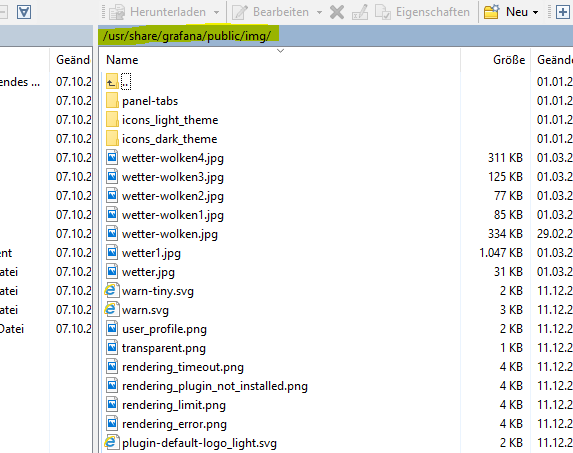
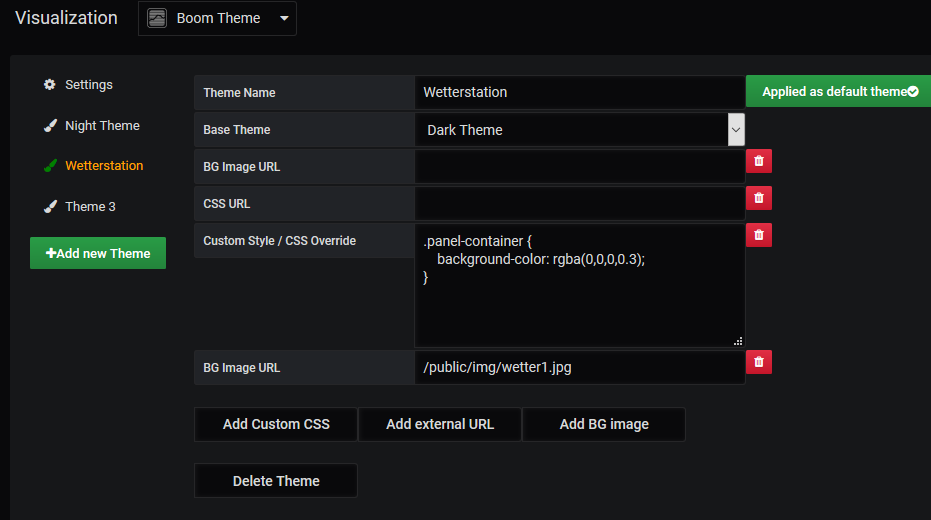
                  sieht dann so aus, Neues Thema "Wetterstation" hinzugefügt, custom Style vom Night Theme hinein kopiert.
                  Pfad der Bilder(die müssen selbst ausgesucht und reinkopiert werden), siehe
                  b4aefec9-759a-4269-8ac9-7e86e4f297bc-image.png

                  edbb1cec-a529-4376-be6b-090963f82cd7-image.png
                  bild der View
                  wetter1.jpg
                  hier noch ein paar andere
                  bilder-wetterstation.zip

                  umgestiegen von Proxmox auf Unraid

                  GlasfaserG 1 Reply Last reply
                  3
                  • crunchipC crunchip

                    @Nashra allerdings sind in dieser View zusätzliche plugins, die benötigt werden

                    • Boom Theme (Oben rechts im Dashboard)...ist für Hindergrund
                    • Bar Gauge
                    • Windrose
                    • Table
                    • Singlestat
                    • Graph

                    Wetterstation mit Hintergrund.txt
                    806b3bab-133e-4675-beb3-df820be06beb-image.png

                    S Offline
                    S Offline
                    skokarl
                    wrote on last edited by
                    #406

                    @crunchip
                    super geil

                    IOBroker mit Proxmox auf Celeron Nuc mit 16 GB und Debian11, Sonos API, Echo Show 15 als Wandtablet, Homematic IP, HUE, Sonos, Echos, DS718+ als Backup

                    1 Reply Last reply
                    0
                    • crunchipC crunchip

                      @Glasfaser https://grafana.com/grafana/plugins/yesoreyeram-boomtheme-panel
                      sieht dann so aus, Neues Thema "Wetterstation" hinzugefügt, custom Style vom Night Theme hinein kopiert.
                      Pfad der Bilder(die müssen selbst ausgesucht und reinkopiert werden), siehe
                      b4aefec9-759a-4269-8ac9-7e86e4f297bc-image.png

                      edbb1cec-a529-4376-be6b-090963f82cd7-image.png
                      bild der View
                      wetter1.jpg
                      hier noch ein paar andere
                      bilder-wetterstation.zip

                      GlasfaserG Offline
                      GlasfaserG Offline
                      Glasfaser
                      wrote on last edited by
                      #407

                      @crunchip sagte in [Linux Shell-Skript] WLAN-Wetterstation:

                      @Glasfaser https://grafana.com/grafana/plugins/yesoreyeram-boomtheme-panel
                      sieht dann so aus, Neues Thema "Wetterstation" hinzugefügt, custom Style vom Night Theme hinein kopiert.

                      :sob: Nächste Baustelle

                      Das Problem ist ... Grafana ist im Synology Docker da habe ich kein Zugriff auf den Ordner :thinking_face:

                      Aber ist nicht so wichtig ... ´werde es nach Zeiten herrausfinden

                      Synology 918+ 16GB - ioBroker in Docker v9 , VISO auf Trekstor Primebook C13 13,3" , Hikvision Domkameras mit Surveillance Station .. CCU RaspberryMatic in Synology VM .. Zigbee CC2538+CC2592 .. Sonoff .. KNX .. Modbus ..

                      crunchipC 1 Reply Last reply
                      0
                      • GlasfaserG Glasfaser

                        @crunchip sagte in [Linux Shell-Skript] WLAN-Wetterstation:

                        @Glasfaser https://grafana.com/grafana/plugins/yesoreyeram-boomtheme-panel
                        sieht dann so aus, Neues Thema "Wetterstation" hinzugefügt, custom Style vom Night Theme hinein kopiert.

                        :sob: Nächste Baustelle

                        Das Problem ist ... Grafana ist im Synology Docker da habe ich kein Zugriff auf den Ordner :thinking_face:

                        Aber ist nicht so wichtig ... ´werde es nach Zeiten herrausfinden

                        crunchipC Away
                        crunchipC Away
                        crunchip
                        Forum Testing Most Active
                        wrote on last edited by
                        #408

                        @Glasfaser der Pfad sollte ja keine Rolle spielen, kannst du auch woanders ablegen. Genauso geht ja auch z.b. ein http Link, den du einbinden kannst. Gibt ja mehrere Möglichkeiten

                        umgestiegen von Proxmox auf Unraid

                        GlasfaserG 1 Reply Last reply
                        1
                        • crunchipC crunchip

                          @Glasfaser der Pfad sollte ja keine Rolle spielen, kannst du auch woanders ablegen. Genauso geht ja auch z.b. ein http Link, den du einbinden kannst. Gibt ja mehrere Möglichkeiten

                          GlasfaserG Offline
                          GlasfaserG Offline
                          Glasfaser
                          wrote on last edited by
                          #409

                          @crunchip sagte in [Linux Shell-Skript] WLAN-Wetterstation:
                          Danke trotzdem ,rennt nicht weg ;)

                          Synology 918+ 16GB - ioBroker in Docker v9 , VISO auf Trekstor Primebook C13 13,3" , Hikvision Domkameras mit Surveillance Station .. CCU RaspberryMatic in Synology VM .. Zigbee CC2538+CC2592 .. Sonoff .. KNX .. Modbus ..

                          1 Reply Last reply
                          0
                          • crunchipC crunchip

                            @ilovegym Der Ostwind geht dir dann aber flöten?

                            ? Offline
                            ? Offline
                            A Former User
                            wrote on last edited by
                            #410

                            @crunchip sagte in [Linux Shell-Skript] WLAN-Wetterstation:

                            @ilovegym Der Ostwind geht dir dann aber flöten?

                            Ja, noch, war ne schnelle Kabelbinder Montage bei Regenwetter 🙈🙈🤣🤣
                            Die bleibt da nicht.

                            1 Reply Last reply
                            0
                            • GlasfaserG Glasfaser

                              @SBorg sagte in [Linux Shell-Skript] WLAN-Wetterstation:

                              Wäre toll, da mir für mein "Pimp up your weatherstation"

                              Dann würde ich aber einen neuen Thread dafür aufmachen :joy:

                              @skokarl sagte in [Linux Shell-Skript] WLAN-Wetterstation:

                              Du sollst das Ding nicht gleich umprogrammieren ......

                              :+1: :sunglasses:

                              SBorgS Offline
                              SBorgS Offline
                              SBorg
                              Forum Testing Most Active
                              wrote on last edited by
                              #411

                              @Glasfaser sagte in [Linux Shell-Skript] WLAN-Wetterstation:

                              @SBorg sagte in [Linux Shell-Skript] WLAN-Wetterstation:

                              Wäre toll, da mir für mein "Pimp up your weatherstation"

                              Dann würde ich aber einen neuen Thread dafür aufmachen :joy:

                              Hehehe...+ klick :joy:

                              @Nashra sagte in [Linux Shell-Skript] WLAN-Wetterstation:

                              Da baut der das Teil erstmal auseinander. @SBorg du bist mir einer :joy:

                              Besser als wenn sie schon montiert ist :innocent: :grin:

                              LG SBorg ( SBorg auf GitHub)
                              Projekte: Lebensmittelwarnung.de | WLAN-Wetterstation | PimpMyStation

                              1 Reply Last reply
                              0
                              • R Offline
                                R Offline
                                rollerfreak2
                                wrote on last edited by
                                #412

                                Hi zusammen, ich bin der Anleitung gefolgt und soweit funktioniert auch alles, bis auf den cronjob. Mein IoBroker läuft in einem Docker Container auf meinem Synology DS218+. Das mit dem cronjob läuft aber irgendwie nicht. Kann es sein das dass @reboot im Docker nicht funktioniert? So sieht mein cronjob aus (crontab -l)

                                @reboot /opt/iobroker/wetterstation.sh &                                        
                                2 0 * * * pkill -9 wetterstation.* && /opt/iobroker/wetterstation.sh &                                                                                      
                                

                                Wenn ich das hier in der Console setze klappt die Übertragung. Ich schaffe es aber nicht das als cronjob zu konfiguieren.

                                setsid /opt/iobroker/wetterstation.sh > /dev/null 2>&1 < /dev/null
                                

                                Hat jemand eine Idee was ich falsch mache? Hinweis ich musste vorher im docker auch erst crontab installieren (apt install cron), das fand ich etwas komisch, ist das nicht immer mit dabei? Als Container verwende ich "buanet/iobroker:latest"

                                SBorgS GlasfaserG 2 Replies Last reply
                                0
                                • R rollerfreak2

                                  Hi zusammen, ich bin der Anleitung gefolgt und soweit funktioniert auch alles, bis auf den cronjob. Mein IoBroker läuft in einem Docker Container auf meinem Synology DS218+. Das mit dem cronjob läuft aber irgendwie nicht. Kann es sein das dass @reboot im Docker nicht funktioniert? So sieht mein cronjob aus (crontab -l)

                                  @reboot /opt/iobroker/wetterstation.sh &                                        
                                  2 0 * * * pkill -9 wetterstation.* && /opt/iobroker/wetterstation.sh &                                                                                      
                                  

                                  Wenn ich das hier in der Console setze klappt die Übertragung. Ich schaffe es aber nicht das als cronjob zu konfiguieren.

                                  setsid /opt/iobroker/wetterstation.sh > /dev/null 2>&1 < /dev/null
                                  

                                  Hat jemand eine Idee was ich falsch mache? Hinweis ich musste vorher im docker auch erst crontab installieren (apt install cron), das fand ich etwas komisch, ist das nicht immer mit dabei? Als Container verwende ich "buanet/iobroker:latest"

                                  SBorgS Offline
                                  SBorgS Offline
                                  SBorg
                                  Forum Testing Most Active
                                  wrote on last edited by
                                  #413

                                  @rollerfreak2 Hi, so wie ich das lese, musst du noch den User bei der Synology hinzufügen:

                                  @reboot root /opt/iobroker/wetterstation.sh &                                        
                                  2 0 * * * root pkill -9 wetterstation.* && /opt/iobroker/wetterstation.sh & 
                                  

                                  Quelle

                                  "reboot" kennt sie auch :)

                                  LG SBorg ( SBorg auf GitHub)
                                  Projekte: Lebensmittelwarnung.de | WLAN-Wetterstation | PimpMyStation

                                  R 1 Reply Last reply
                                  0
                                  • crunchipC crunchip

                                    @Nashra allerdings sind in dieser View zusätzliche plugins, die benötigt werden

                                    • Boom Theme (Oben rechts im Dashboard)...ist für Hindergrund
                                    • Bar Gauge
                                    • Windrose
                                    • Table
                                    • Singlestat
                                    • Graph

                                    Wetterstation mit Hintergrund.txt
                                    806b3bab-133e-4675-beb3-df820be06beb-image.png

                                    NashraN Offline
                                    NashraN Offline
                                    Nashra
                                    Most Active Forum Testing
                                    wrote on last edited by Nashra
                                    #414

                                    @crunchip sagte in [Linux Shell-Skript] WLAN-Wetterstation:

                                    @Nashra allerdings sind in dieser View zusätzliche plugins, die benötigt werden

                                    • Boom Theme (Oben rechts im Dashboard)...ist für Hindergrund
                                    • Bar Gauge
                                    • Windrose
                                    • Table
                                    • Singlestat
                                    • Graph

                                    Wetterstation mit Hintergrund.txt

                                    Hallo @crunchip erstmal Danke für View.
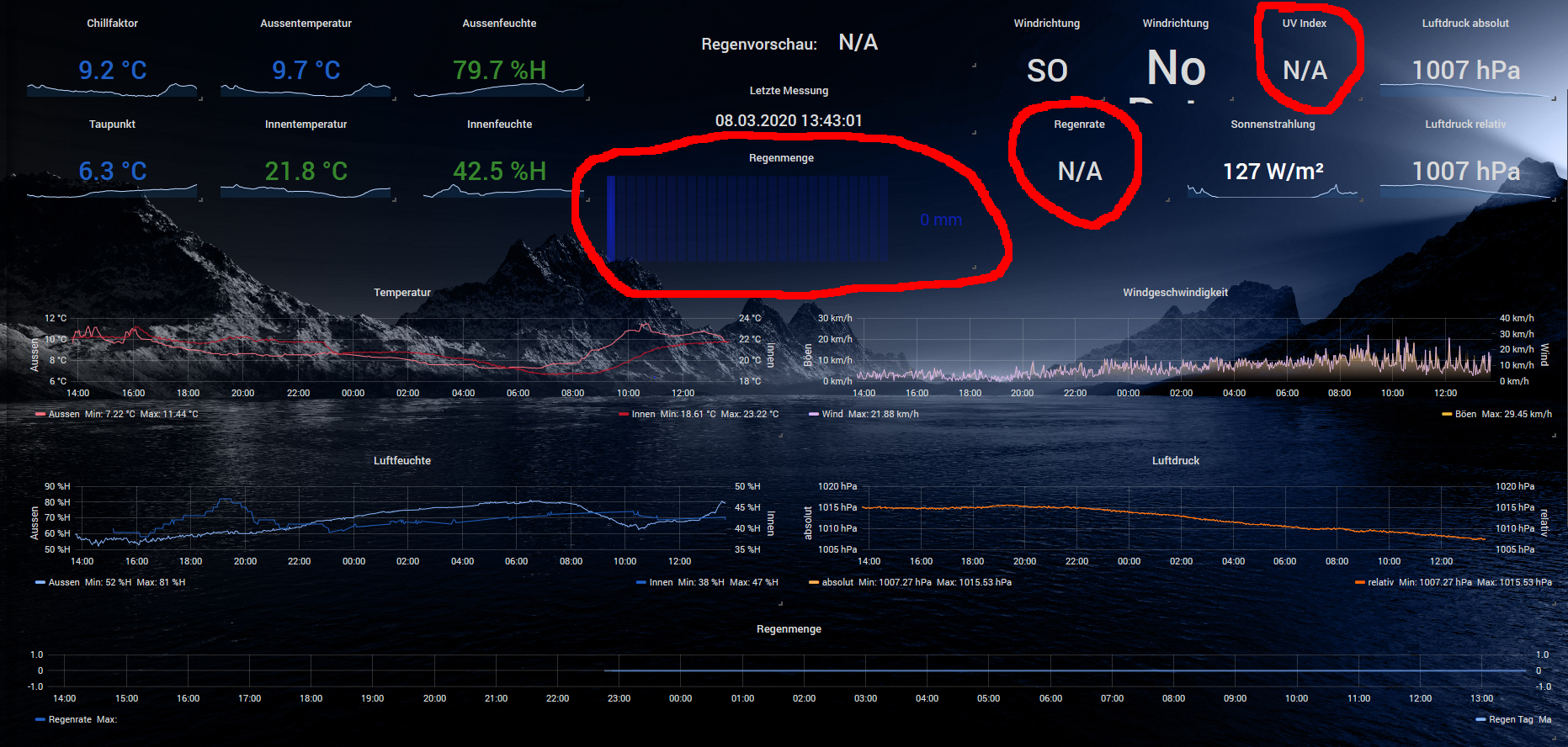
                                    Habe es soweit alles hinbekommen aber einige Sachen wollen einfach nicht
                                    d.h. ich kann einstellen was ich will, es werden keine Daten (rot) angezeigt.
                                    Vllt weißt Du ja woran es liegen könnte, mir fällt im Moment nichts ein :(
                                    wetterstation-grafana2a.PNG

                                    Gruß Ralf
                                    Mir egal, wer Dein Vater ist! Wenn ich hier angel, wird nicht übers Wasser gelaufen!!

                                    Benutzt das Voting rechts unten im Beitrag wenn er euch geholfen hat.

                                    crunchipC 1 Reply Last reply
                                    0
                                    • SBorgS SBorg

                                      @rollerfreak2 Hi, so wie ich das lese, musst du noch den User bei der Synology hinzufügen:

                                      @reboot root /opt/iobroker/wetterstation.sh &                                        
                                      2 0 * * * root pkill -9 wetterstation.* && /opt/iobroker/wetterstation.sh & 
                                      

                                      Quelle

                                      "reboot" kennt sie auch :)

                                      R Offline
                                      R Offline
                                      rollerfreak2
                                      wrote on last edited by
                                      #415

                                      @SBorg geht leider auch nicht.

                                      SBorgS 1 Reply Last reply
                                      0
                                      • R rollerfreak2

                                        @SBorg geht leider auch nicht.

                                        SBorgS Offline
                                        SBorgS Offline
                                        SBorg
                                        Forum Testing Most Active
                                        wrote on last edited by
                                        #416

                                        @rollerfreak2 Ich habe gerade noch etwas entdeckt :(

                                        Achtung: Die Spalten dürfen nur durch Tab getrennt werden!
                                        

                                        Wenn du mein Beispiel per C&P übernommen hast, sind zwischen den Spalten "nur" [Spaces] (bei Linux so üblich).
                                        ...und du musst offensichtlich auch den cron-Daemon neu starten.

                                        LG SBorg ( SBorg auf GitHub)
                                        Projekte: Lebensmittelwarnung.de | WLAN-Wetterstation | PimpMyStation

                                        R 1 Reply Last reply
                                        0
                                        • NashraN Nashra

                                          @crunchip sagte in [Linux Shell-Skript] WLAN-Wetterstation:

                                          @Nashra allerdings sind in dieser View zusätzliche plugins, die benötigt werden

                                          • Boom Theme (Oben rechts im Dashboard)...ist für Hindergrund
                                          • Bar Gauge
                                          • Windrose
                                          • Table
                                          • Singlestat
                                          • Graph

                                          Wetterstation mit Hintergrund.txt

                                          Hallo @crunchip erstmal Danke für View.
                                          Habe es soweit alles hinbekommen aber einige Sachen wollen einfach nicht
                                          d.h. ich kann einstellen was ich will, es werden keine Daten (rot) angezeigt.
                                          Vllt weißt Du ja woran es liegen könnte, mir fällt im Moment nichts ein :(
                                          wetterstation-grafana2a.PNG

                                          crunchipC Away
                                          crunchipC Away
                                          crunchip
                                          Forum Testing Most Active
                                          wrote on last edited by crunchip
                                          #417

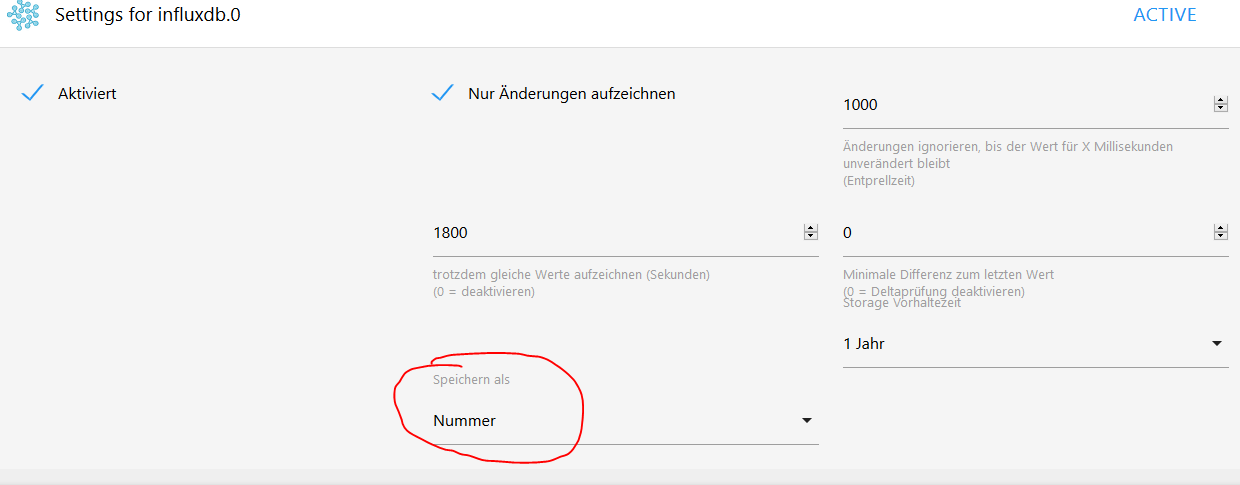
                                          @Nashra kann es vllt sein, das du die Daten "falsch" in die Datenbank schreibst
                                          am Beispiel Uv-Index
                                          ce923f26-96e4-4d23-9a3a-bd4168551ba4-image.png

                                          desweiteren Fehlt dir bei Windrichtung der Pfeil

                                          umgestiegen von Proxmox auf Unraid

                                          SBorgS NashraN 2 Replies Last reply
                                          0
                                          Reply
                                          • Reply as topic
                                          Log in to reply
                                          • Oldest to Newest
                                          • Newest to Oldest
                                          • Most Votes


                                          Support us

                                          ioBroker
                                          Community Adapters
                                          Donate

                                          825

                                          Online

                                          32.7k

                                          Users

                                          82.4k

                                          Topics

                                          1.3m

                                          Posts
                                          Community
                                          Impressum | Datenschutz-Bestimmungen | Nutzungsbedingungen | Einwilligungseinstellungen
                                          ioBroker Community 2014-2025
                                          logo
                                          • Login

                                          • Don't have an account? Register

                                          • Login or register to search.
                                          • First post
                                            Last post
                                          0
                                          • Home
                                          • Recent
                                          • Tags
                                          • Unread 0
                                          • Categories
                                          • Unreplied
                                          • Popular
                                          • GitHub
                                          • Docu
                                          • Hilfe