Skip to content
  • Home
  • Recent
  • Tags
  • 0 Unread 0
  • Categories
  • Unreplied
  • Popular
  • GitHub
  • Docu
  • Hilfe
Skins
  • Light
  • Brite
  • Cerulean
  • Cosmo
  • Flatly
  • Journal
  • Litera
  • Lumen
  • Lux
  • Materia
  • Minty
  • Morph
  • Pulse
  • Sandstone
  • Simplex
  • Sketchy
  • Spacelab
  • United
  • Yeti
  • Zephyr
  • Dark
  • Cyborg
  • Darkly
  • Quartz
  • Slate
  • Solar
  • Superhero
  • Vapor

  • Default (No Skin)
  • No Skin
Collapse
ioBroker Logo

Community Forum

donate donate
  1. ioBroker Community Home
  2. Deutsch
  3. Hardware
  4. USB-Stick als Laufwerk einbinden in VM

NEWS

  • Monatsrückblick Januar/Februar 2026 ist online!
    BluefoxB
    Bluefox
    12
    1
    129

  • Jahresrückblick 2025 – unser neuer Blogbeitrag ist online! ✨
    BluefoxB
    Bluefox
    17
    1
    4.3k

  • Neuer Blogbeitrag: Monatsrückblick - Dezember 2025 🎄
    BluefoxB
    Bluefox
    13
    1
    1.2k

USB-Stick als Laufwerk einbinden in VM

Scheduled Pinned Locked Moved Hardware
ubuntuproxmoxmounten
16 Posts 3 Posters 1.3k Views 4 Watching
  • Oldest to Newest
  • Newest to Oldest
  • Most Votes
Reply
  • Reply as topic
Log in to reply
This topic has been deleted. Only users with topic management privileges can see it.
  • Beliar_666B Beliar_666

    Hallo,
    Mein IoB läuft in einer Virtuellen Ubuntu Maschine in Proxmox. Nun wollte ich einen USB Stick als Laufwerk einbinden um dort z.B. die Backups und die History zu speichern. Ich habe schon die ein oder andere Anleitung hier aus dem Forum probiert aber es will einfach so gar nicht klappen. Ich bekomme einfach keinen Zugriff.

    Gibt es eine Schritt für Schrittanleitung?

    crunchipC Away
    crunchipC Away
    crunchip
    Forum Testing Most Active
    wrote on last edited by
    #3

    @Beliar_666 du musst deinen usb mounten, dann in rechenzentrum storage ein verzeichnis hinzufügen.
    name vergeben und den mountpfad angeben.
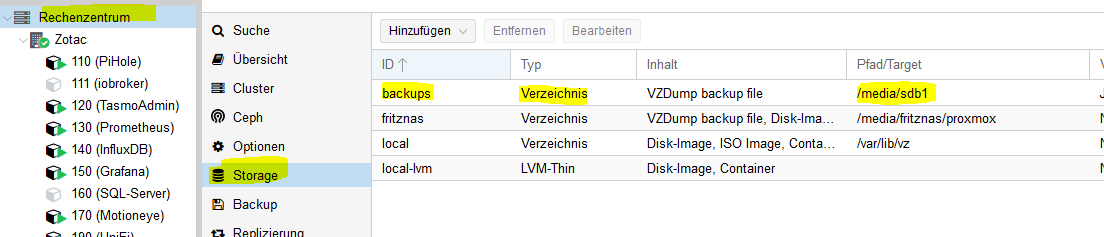
    4b9b54cd-0bb0-4c6c-8f59-bf4427c926de-image.png

    umgestiegen von Proxmox auf Unraid

    1 Reply Last reply
    0
    • HomoranH Do not disturb
      HomoranH Do not disturb
      Homoran
      Global Moderator Administrators
      wrote on last edited by
      #4

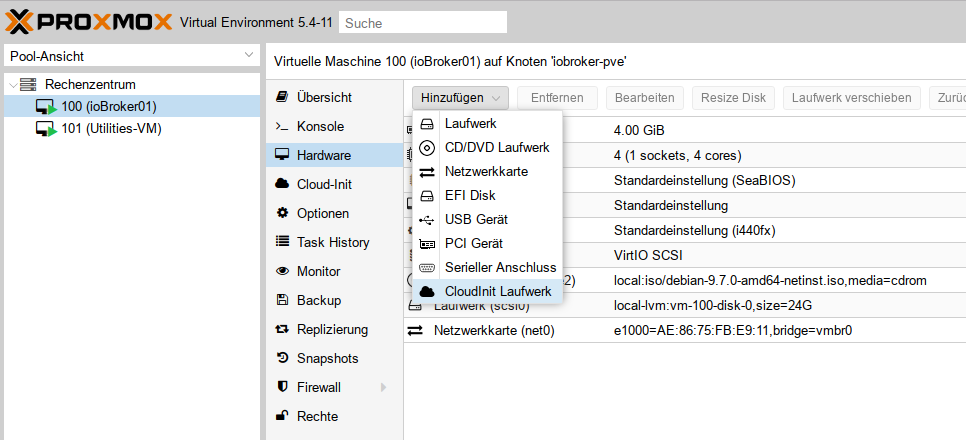
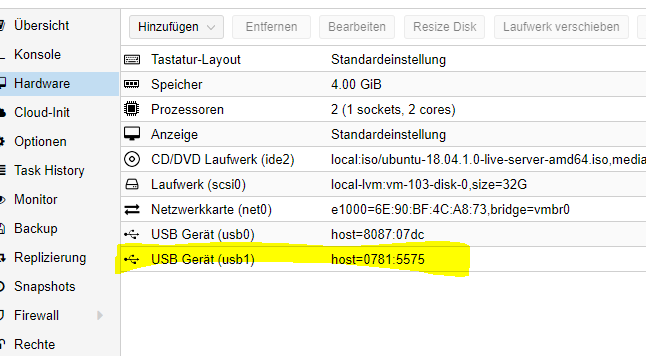
      Ich denke er meint eher in der VM

      vm_USB.png

      kein Support per PN! - Fragen im Forum stellen -

      Benutzt das Voting rechts unten im Beitrag wenn er euch geholfen hat.

      ioBroker freut sich auch über eine Spende für das Forum. Benutzt dazu den Spendenbutton im Header. Danke!

      der Installationsfixer: curl -fsL https://iobroker.net/fix.sh | bash -

      Beliar_666B 1 Reply Last reply
      0
      • HomoranH Homoran

        Ich denke er meint eher in der VM

        vm_USB.png

        Beliar_666B Offline
        Beliar_666B Offline
        Beliar_666
        wrote on last edited by
        #5

        @Homoran Ja genau, ich will den in IoB nutzen.

        Das mit dem durchreichen klappt ja eben nicht. müsste er dann nicht in der Konsole der IoB VM auftauchen?

        HomoranH 1 Reply Last reply
        0
        • Beliar_666B Beliar_666

          @Homoran Ja genau, ich will den in IoB nutzen.

          Das mit dem durchreichen klappt ja eben nicht. müsste er dann nicht in der Konsole der IoB VM auftauchen?

          HomoranH Do not disturb
          HomoranH Do not disturb
          Homoran
          Global Moderator Administrators
          wrote on last edited by
          #6

          @Beliar_666
          Hast du denn da einen USB Port hinzugefügt?

          kein Support per PN! - Fragen im Forum stellen -

          Benutzt das Voting rechts unten im Beitrag wenn er euch geholfen hat.

          ioBroker freut sich auch über eine Spende für das Forum. Benutzt dazu den Spendenbutton im Header. Danke!

          der Installationsfixer: curl -fsL https://iobroker.net/fix.sh | bash -

          Beliar_666B 1 Reply Last reply
          1
          • HomoranH Homoran

            @Beliar_666
            Hast du denn da einen USB Port hinzugefügt?

            Beliar_666B Offline
            Beliar_666B Offline
            Beliar_666
            wrote on last edited by
            #7

            @Homoran Also in der Konsole vom Proxmox sind beide USB Sticks zumindest mal zu sehen:

            root@pve:~# lsusb
            Bus 002 Device 008: ID 0781:5575 SanDisk Corp.
            Bus 002 Device 002: ID 8087:0024 Intel Corp. Integrated Rate Matching Hub
            Bus 002 Device 001: ID 1d6b:0002 Linux Foundation 2.0 root hub
            Bus 001 Device 003: ID 8087:07dc Intel Corp.
            Bus 001 Device 002: ID 8087:0024 Intel Corp. Integrated Rate Matching Hub
            Bus 001 Device 001: ID 1d6b:0002 Linux Foundation 2.0 root hub
            Bus 004 Device 001: ID 1d6b:0003 Linux Foundation 3.0 root hub
            Bus 003 Device 001: ID 1d6b:0002 Linux Foundation 2.0 root hub


            Der Sandisk.

            mit fdisk -l taucht er auch auf im Proxmox

            
            Disk /dev/sdb: 57.7 GiB, 61910024192 bytes, 120918016 sectors
            Units: sectors of 1 * 512 = 512 bytes
            Sector size (logical/physical): 512 bytes / 512 bytes
            I/O size (minimum/optimal): 512 bytes / 512 bytes
            Disklabel type: dos
            Disk identifier: 0x9b25a212
            
            Device     Boot Start       End   Sectors  Size Id Type
            /dev/sdb1       32768 120905189 120872422 57.7G  7 HPFS/NTFS/exFAT


            HomoranH 1 Reply Last reply
            0
            • Beliar_666B Beliar_666

              @Homoran Also in der Konsole vom Proxmox sind beide USB Sticks zumindest mal zu sehen:

              root@pve:~# lsusb
              Bus 002 Device 008: ID 0781:5575 SanDisk Corp.
              Bus 002 Device 002: ID 8087:0024 Intel Corp. Integrated Rate Matching Hub
              Bus 002 Device 001: ID 1d6b:0002 Linux Foundation 2.0 root hub
              Bus 001 Device 003: ID 8087:07dc Intel Corp.
              Bus 001 Device 002: ID 8087:0024 Intel Corp. Integrated Rate Matching Hub
              Bus 001 Device 001: ID 1d6b:0002 Linux Foundation 2.0 root hub
              Bus 004 Device 001: ID 1d6b:0003 Linux Foundation 3.0 root hub
              Bus 003 Device 001: ID 1d6b:0002 Linux Foundation 2.0 root hub


              Der Sandisk.

              mit fdisk -l taucht er auch auf im Proxmox

              
              Disk /dev/sdb: 57.7 GiB, 61910024192 bytes, 120918016 sectors
              Units: sectors of 1 * 512 = 512 bytes
              Sector size (logical/physical): 512 bytes / 512 bytes
              I/O size (minimum/optimal): 512 bytes / 512 bytes
              Disklabel type: dos
              Disk identifier: 0x9b25a212
              
              Device     Boot Start       End   Sectors  Size Id Type
              /dev/sdb1       32768 120905189 120872422 57.7G  7 HPFS/NTFS/exFAT


              HomoranH Do not disturb
              HomoranH Do not disturb
              Homoran
              Global Moderator Administrators
              wrote on last edited by
              #8

              @Beliar_666
              Hast du gelesen was ich geschrieben habe?

              du brauchst den USB doch in der VM - nicht in Proxmox, oder?

              kein Support per PN! - Fragen im Forum stellen -

              Benutzt das Voting rechts unten im Beitrag wenn er euch geholfen hat.

              ioBroker freut sich auch über eine Spende für das Forum. Benutzt dazu den Spendenbutton im Header. Danke!

              der Installationsfixer: curl -fsL https://iobroker.net/fix.sh | bash -

              Beliar_666B 1 Reply Last reply
              0
              • HomoranH Homoran

                @Beliar_666
                Hast du gelesen was ich geschrieben habe?

                du brauchst den USB doch in der VM - nicht in Proxmox, oder?

                Beliar_666B Offline
                Beliar_666B Offline
                Beliar_666
                wrote on last edited by
                #9

                @Homoran Ja, genau da will ich den haben, aber wie bekomme ich den da jetzt hinein?

                HomoranH 1 Reply Last reply
                0
                • Beliar_666B Beliar_666

                  @Homoran Ja, genau da will ich den haben, aber wie bekomme ich den da jetzt hinein?

                  HomoranH Do not disturb
                  HomoranH Do not disturb
                  Homoran
                  Global Moderator Administrators
                  wrote on last edited by
                  #10

                  @Beliar_666

                  @Homoran sagte in USB-Stick als Laufwerk einbinden in VM:

                  Ich denke er meint eher in der VM

                  vm_USB.png

                  kein Support per PN! - Fragen im Forum stellen -

                  Benutzt das Voting rechts unten im Beitrag wenn er euch geholfen hat.

                  ioBroker freut sich auch über eine Spende für das Forum. Benutzt dazu den Spendenbutton im Header. Danke!

                  der Installationsfixer: curl -fsL https://iobroker.net/fix.sh | bash -

                  Beliar_666B 1 Reply Last reply
                  0
                  • HomoranH Homoran

                    @Beliar_666

                    @Homoran sagte in USB-Stick als Laufwerk einbinden in VM:

                    Ich denke er meint eher in der VM

                    vm_USB.png

                    Beliar_666B Offline
                    Beliar_666B Offline
                    Beliar_666
                    wrote on last edited by
                    #11

                    @Homoran Dort zeigt er mir dann aber mein USB Laufwerk nicht an?!?
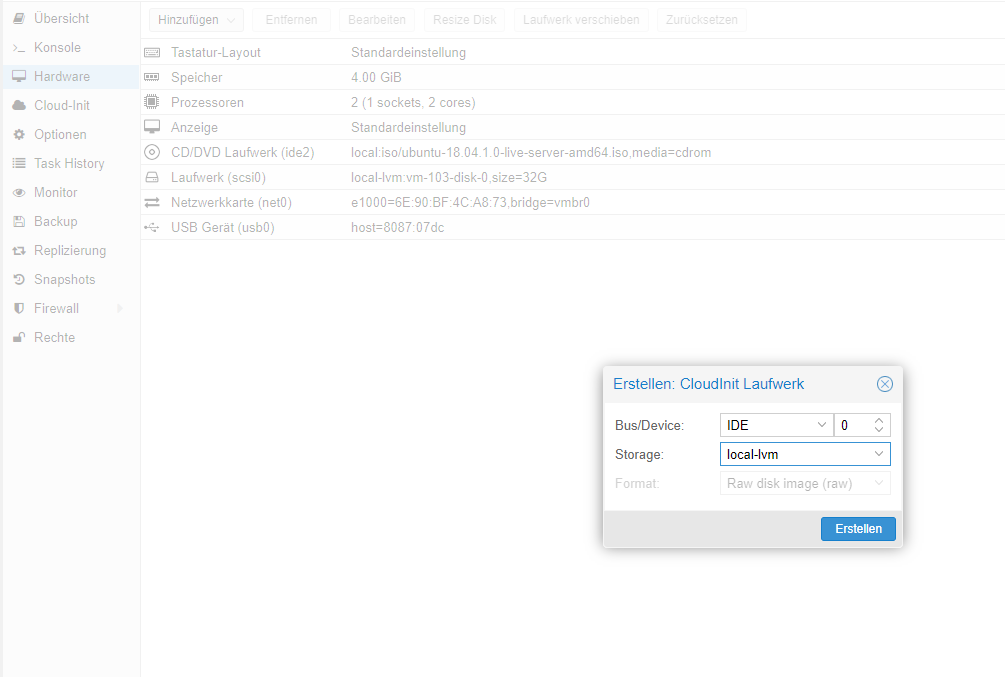
                    usb.PNG

                    Das Angezeigte ist die einzige möglichkeit.

                    HomoranH 1 Reply Last reply
                    0
                    • Beliar_666B Beliar_666

                      @Homoran Dort zeigt er mir dann aber mein USB Laufwerk nicht an?!?

                      usb.PNG

                      Das Angezeigte ist die einzige möglichkeit.

                      HomoranH Do not disturb
                      HomoranH Do not disturb
                      Homoran
                      Global Moderator Administrators
                      wrote on last edited by
                      #12

                      @Beliar_666
                      U S B! nicht CloudInit

                      kein Support per PN! - Fragen im Forum stellen -

                      Benutzt das Voting rechts unten im Beitrag wenn er euch geholfen hat.

                      ioBroker freut sich auch über eine Spende für das Forum. Benutzt dazu den Spendenbutton im Header. Danke!

                      der Installationsfixer: curl -fsL https://iobroker.net/fix.sh | bash -

                      Beliar_666B 1 Reply Last reply
                      1
                      • HomoranH Homoran

                        @Beliar_666
                        U S B! nicht CloudInit

                        Beliar_666B Offline
                        Beliar_666B Offline
                        Beliar_666
                        wrote on last edited by Beliar_666
                        #13

                        @Homoran usb1.PNG

                        da ist es

                        Jetzt taucht es auch in der Konsole von der IoB VM auf.

                        Disk /dev/sdb: 57,7 GiB, 61910024192 bytes, 120918016 sectors
                        Units: sectors of 1 * 512 = 512 bytes
                        Sector size (logical/physical): 512 bytes / 512 bytes
                        I/O size (minimum/optimal): 512 bytes / 512 bytes
                        Disklabel type: dos
                        Disk identifier: 0x9b25a212
                        
                        Device     Boot Start       End   Sectors  Size Id Type
                        /dev/sdb1       32768 120905189 120872422 57,7G  7 HPFS/NTFS/exFAT


                        Also kann ich jetzt in dem History Adapter /dev/sdb1 angeben als Speicherort?

                        Beliar_666B 1 Reply Last reply
                        0
                        • Beliar_666B Beliar_666

                          @Homoran usb1.PNG

                          da ist es

                          Jetzt taucht es auch in der Konsole von der IoB VM auf.

                          Disk /dev/sdb: 57,7 GiB, 61910024192 bytes, 120918016 sectors
                          Units: sectors of 1 * 512 = 512 bytes
                          Sector size (logical/physical): 512 bytes / 512 bytes
                          I/O size (minimum/optimal): 512 bytes / 512 bytes
                          Disklabel type: dos
                          Disk identifier: 0x9b25a212
                          
                          Device     Boot Start       End   Sectors  Size Id Type
                          /dev/sdb1       32768 120905189 120872422 57,7G  7 HPFS/NTFS/exFAT


                          Also kann ich jetzt in dem History Adapter /dev/sdb1 angeben als Speicherort?

                          Beliar_666B Offline
                          Beliar_666B Offline
                          Beliar_666
                          wrote on last edited by
                          #14

                          Also /dev/sdb1 kann ich dem History-Adapter nicht zuweisen, das gibt ne Fehlermeldung im Log...

                          crunchipC 1 Reply Last reply
                          0
                          • Beliar_666B Beliar_666

                            Also /dev/sdb1 kann ich dem History-Adapter nicht zuweisen, das gibt ne Fehlermeldung im Log...

                            crunchipC Away
                            crunchipC Away
                            crunchip
                            Forum Testing Most Active
                            wrote on last edited by
                            #15

                            @Beliar_666 ist der pfad nicht /media/sdb1

                            umgestiegen von Proxmox auf Unraid

                            Beliar_666B 1 Reply Last reply
                            0
                            • crunchipC crunchip

                              @Beliar_666 ist der pfad nicht /media/sdb1

                              Beliar_666B Offline
                              Beliar_666B Offline
                              Beliar_666
                              wrote on last edited by
                              #16

                              @crunchip Nein, kommt selbige Fehlermeldung.

                              host.iobroker	2019-12-07 14:39:08.085	info	Restart adapter system.adapter.history.0 because enabled
                              host.iobroker	2019-12-07 14:39:08.085	info	instance system.adapter.history.0 terminated with code 0 (NO_ERROR)
                              host.iobroker	2019-12-07 14:39:08.085	error	Caught by controller[0]: path: '/media/sdb1/' }
                              host.iobroker	2019-12-07 14:39:08.085	error	Caught by controller[0]: code: 'EACCES',
                              host.iobroker	2019-12-07 14:39:08.085	error	Caught by controller[0]: syscall: 'mkdir',
                              host.iobroker	2019-12-07 14:39:08.085	error	Caught by controller[0]: errno: -13,
                              host.iobroker	2019-12-07 14:39:08.085	error	Caught by controller[0]: at process._tickCallback (internal/process/next_tick.js:68:7)
                              host.iobroker	2019-12-07 14:39:08.085	error	Caught by controller[0]: at promise.then (/opt/iobroker/node_modules/standard-as-callback/built/index.js:19:49)
                              host.iobroker	2019-12-07 14:39:08.085	error	Caught by controller[0]: at tryCatcher (/opt/iobroker/node_modules/standard-as-callback/built/utils.js:11:23)
                              host.iobroker	2019-12-07 14:39:08.084	error	Caught by controller[0]: at client.keys (/opt/iobroker/node_modules/iobroker.js-controller/lib/states/statesInRedis.js:588:17)
                              host.iobroker	2019-12-07 14:39:08.084	error	Caught by controller[0]: at states.getKeys (/opt/iobroker/node_modules/iobroker.js-controller/lib/adapter.js:6765:25)
                              host.iobroker	2019-12-07 14:39:08.084	error	Caught by controller[0]: at initLogging (/opt/iobroker/node_modules/iobroker.js-controller/lib/adapter.js:7061:64)
                              host.iobroker	2019-12-07 14:39:08.084	error	Caught by controller[0]: at Object.ready (/opt/iobroker/node_modules/iobroker.history/main.js:144:22)
                              host.iobroker	2019-12-07 14:39:08.084	error	Caught by controller[0]: at main (/opt/iobroker/node_modules/iobroker.history/main.js:348:12)
                              host.iobroker	2019-12-07 14:39:08.084	error	Caught by controller[0]: at Object.mkdirSync (fs.js:757:3)
                              host.iobroker	2019-12-07 14:39:08.083	error	Caught by controller[0]: { Error: EACCES: permission denied, mkdir '/media/sdb1/'
                              history.0	2019-12-07 14:39:07.572	info	(3179) Terminated (NO_ERROR): Without reason
                              history.0	2019-12-07 14:39:07.569	info	(3179) terminating
                              history.0	2019-12-07 14:39:07.540	error	(3179) Error: EACCES: permission denied, mkdir '/media/sdb1/' at Object.mkdirSync (fs.js:757:3) at main (/opt/iobroker/node_modules/iobroker.history/main.js:348:12) at Object.ready (/opt/i
                              history.0	2019-12-07 14:39:07.539	error	(3179) uncaught exception: EACCES: permission denied, mkdir '/media/sdb1/'
                              history.0	2019-12-07 14:39:07.471	info	(3179) starting. Version 1.8.7 in /opt/iobroker/node_modules/iobroker.history, node: v10.17.0
                              

                              schaut nach ein em Rechteproblem aus...

                              1 Reply Last reply
                              0
                              Reply
                              • Reply as topic
                              Log in to reply
                              • Oldest to Newest
                              • Newest to Oldest
                              • Most Votes


                              Support us

                              ioBroker
                              Community Adapters
                              Donate

                              555

                              Online

                              32.7k

                              Users

                              82.4k

                              Topics

                              1.3m

                              Posts
                              Community
                              Impressum | Datenschutz-Bestimmungen | Nutzungsbedingungen | Einwilligungseinstellungen
                              ioBroker Community 2014-2025
                              logo
                              • Login

                              • Don't have an account? Register

                              • Login or register to search.
                              • First post
                                Last post
                              0
                              • Home
                              • Recent
                              • Tags
                              • Unread 0
                              • Categories
                              • Unreplied
                              • Popular
                              • GitHub
                              • Docu
                              • Hilfe