Skip to content
  • Home
  • Recent
  • Tags
  • 0 Unread 0
  • Categories
  • Unreplied
  • Popular
  • GitHub
  • Docu
  • Hilfe
Skins
  • Light
  • Brite
  • Cerulean
  • Cosmo
  • Flatly
  • Journal
  • Litera
  • Lumen
  • Lux
  • Materia
  • Minty
  • Morph
  • Pulse
  • Sandstone
  • Simplex
  • Sketchy
  • Spacelab
  • United
  • Yeti
  • Zephyr
  • Dark
  • Cyborg
  • Darkly
  • Quartz
  • Slate
  • Solar
  • Superhero
  • Vapor

  • Default (No Skin)
  • No Skin
Collapse
ioBroker Logo

Community Forum

donate donate
  1. ioBroker Community Home
  2. Deutsch
  3. Tester
  4. Test Adapter ioBroker.backitup v3.1.x

NEWS

  • Monatsrückblick Januar/Februar 2026 ist online!
    BluefoxB
    Bluefox
    16
    1
    279

  • Jahresrückblick 2025 – unser neuer Blogbeitrag ist online! ✨
    BluefoxB
    Bluefox
    17
    1
    4.7k

  • Neuer Blogbeitrag: Monatsrückblick - Dezember 2025 🎄
    BluefoxB
    Bluefox
    13
    1
    1.3k

Test Adapter ioBroker.backitup v3.1.x

Scheduled Pinned Locked Moved Tester
backitupbackitup backupccuhistorymysqlredisrestorerestore backup
2.8k Posts 170 Posters 2.4m Views 113 Watching
  • Oldest to Newest
  • Newest to Oldest
  • Most Votes
Reply
  • Reply as topic
Log in to reply
This topic has been deleted. Only users with topic management privileges can see it.
  • simatecS simatec

    @JB_Sullivan
    Schaue mal Zeile 466 und 465.
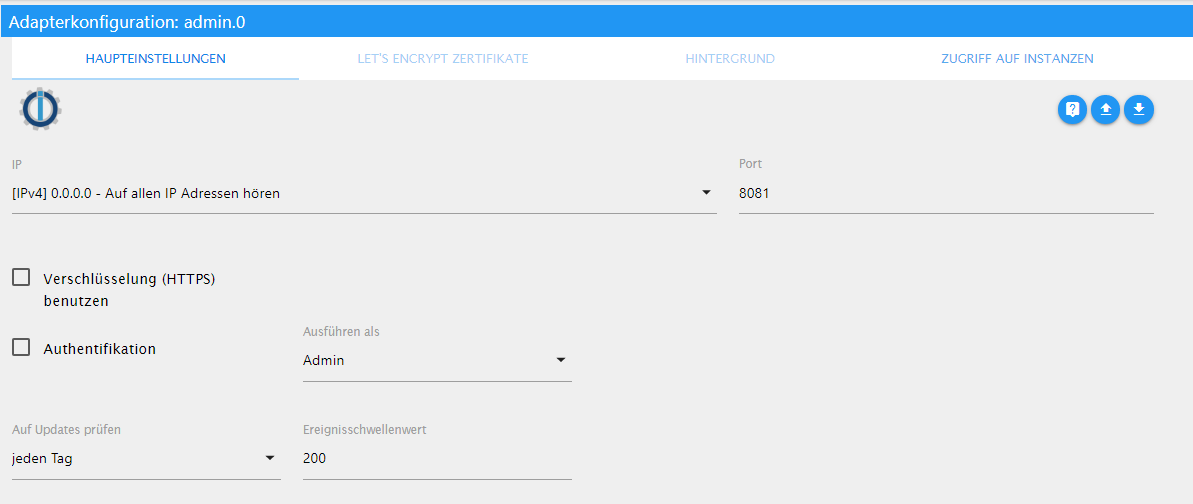
    Deine Hostname und IP werden nicht übernommen. Bist du sicher, dass du auf dem alten System auf alle IP Adressen hören drin hast?

    Zeig mal ein Screenshot der Admin Einstellungen auf deinem alten System

    JB_SullivanJ Offline
    JB_SullivanJ Offline
    JB_Sullivan
    wrote on last edited by
    #77

    @simatec
    admin.0 meinst du?

    2019-12-06 22_21_49-Window.png

    ioBroker (since 2018) auf Intel Core i3-5005U NUC und Windwos10 Pro

    simatecS 1 Reply Last reply
    0
    • JB_SullivanJ JB_Sullivan

      @simatec
      admin.0 meinst du?

      2019-12-06 22_21_49-Window.png

      simatecS Offline
      simatecS Offline
      simatec
      Developer Most Active
      wrote on last edited by
      #78

      @JB_Sullivan
      Zeig mal auf dem neuen System „iobroker list instances“

      • Besuche meine Github Seite
      • Beitrag hat geholfen oder willst du mich unterstützen
      • HowTo Restore ioBroker
      JB_SullivanJ 1 Reply Last reply
      0
      • simatecS simatec

        @JB_Sullivan
        Zeig mal auf dem neuen System „iobroker list instances“

        JB_SullivanJ Offline
        JB_SullivanJ Offline
        JB_Sullivan
        wrote on last edited by
        #79

        @simatec
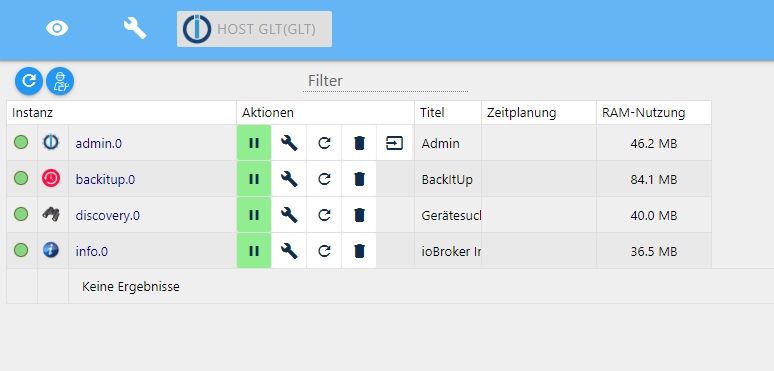
        was meinst du mit "iobroker list instances"? Die hier?
        ff95ea49-9325-46e3-9f13-a2482127f6b9-image.png

        ioBroker (since 2018) auf Intel Core i3-5005U NUC und Windwos10 Pro

        simatecS 2 Replies Last reply
        0
        • JB_SullivanJ JB_Sullivan

          @simatec
          was meinst du mit "iobroker list instances"? Die hier?

          ff95ea49-9325-46e3-9f13-a2482127f6b9-image.png

          simatecS Offline
          simatecS Offline
          simatec
          Developer Most Active
          wrote on last edited by
          #80

          @JB_Sullivan
          Nein per Konsole nach dem Restore

          • Besuche meine Github Seite
          • Beitrag hat geholfen oder willst du mich unterstützen
          • HowTo Restore ioBroker
          JB_SullivanJ 1 Reply Last reply
          0
          • JB_SullivanJ JB_Sullivan

            @simatec
            was meinst du mit "iobroker list instances"? Die hier?

            ff95ea49-9325-46e3-9f13-a2482127f6b9-image.png

            simatecS Offline
            simatecS Offline
            simatec
            Developer Most Active
            wrote on last edited by
            #81

            @JB_Sullivan
            Mache mal bitte folgendes:
            Restore ausführen und dann iobroker stoppen (falls iobroker läuft) und dann über die Konsole „iobroker host this“ danach wieder starten und du solltest über localhost drauf kommen

            • Besuche meine Github Seite
            • Beitrag hat geholfen oder willst du mich unterstützen
            • HowTo Restore ioBroker
            JB_SullivanJ 1 Reply Last reply
            0
            • simatecS simatec

              @JB_Sullivan
              Nein per Konsole nach dem Restore

              JB_SullivanJ Offline
              JB_SullivanJ Offline
              JB_Sullivan
              wrote on last edited by
              #82

              @simatec

              C:\iobroker\GLT>iobroker list instances
                system.adapter.admin.0                 : admin                 -  enabled, port: 8081, bind: 0.0.0.0, run as: admin
                system.adapter.alexa2.0                : alexa2                - disabled
                system.adapter.backitup.0              : backitup              -  enabled
                system.adapter.bring.0                 : bring                 - disabled
                system.adapter.cloud.0                 : cloud                 - disabled
                system.adapter.daswetter.0             : daswetter             - disabled
                system.adapter.deconz.0                : deconz                - disabled
                system.adapter.discovergy.0            : discovergy            - disabled
                system.adapter.discovery.0             : discovery             - disabled
                system.adapter.dwd.0                   : dwd                   - disabled
                system.adapter.email.0                 : email                 - disabled
                system.adapter.flot.0                  : flot                  - disabled
                system.adapter.fritzbox.0              : fritzbox              - disabled
                system.adapter.fritzdect.0             : fritzdect             - disabled
                system.adapter.fullybrowser.0          : fullybrowser          - disabled
                system.adapter.history.0               : history               - disabled
                system.adapter.ical.0                  : ical                  - disabled
                system.adapter.ical.1                  : ical                  - disabled
                system.adapter.icons-material-png.0    : icons-material-png    - disabled
                system.adapter.icons-material-svg.0    : icons-material-svg    - disabled
                system.adapter.info.0                  : info                  - disabled
                system.adapter.innogy-smarthome.0      : innogy-smarthome      - disabled
                system.adapter.iot.0                   : iot                   - disabled
                system.adapter.javascript.0            : javascript            - disabled
                system.adapter.mihome-vacuum.0         : mihome-vacuum         - disabled, port: 54321
                system.adapter.octoprint.0             : octoprint             - disabled
                system.adapter.ping.0                  : ping                  - disabled
                system.adapter.proxy.0                 : proxy                 - disabled
                system.adapter.rflink.0                : rflink                - disabled
                system.adapter.roomba.0                : roomba                - disabled
                system.adapter.socketio.0              : socketio              - disabled, port: 8084, bind: 0.0.0.0, run as: admin
                system.adapter.sonoff.0                : sonoff                - disabled, port: 1883, bind: 0.0.0.0
                system.adapter.sourceanalytix.0        : sourceanalytix        - disabled
                system.adapter.spotify-premium.0       : spotify-premium       - disabled
                system.adapter.tankerkoenig.0          : tankerkoenig          - disabled
                system.adapter.telegram.0              : telegram              - disabled, port: 8443, bind: 0.0.0.0
                system.adapter.tr-064.0                : tr-064                - disabled
                system.adapter.trashschedule.0         : trashschedule         - disabled
                system.adapter.vis-canvas-gauges.0     : vis-canvas-gauges     - disabled
                system.adapter.vis-colorpicker.0       : vis-colorpicker       - disabled
                system.adapter.vis-history.0           : vis-history           - disabled
                system.adapter.vis-hqwidgets.0         : vis-hqwidgets         - disabled
                system.adapter.vis-jqui-mfd.0          : vis-jqui-mfd          - disabled
                system.adapter.vis-justgage.0          : vis-justgage          - disabled
                system.adapter.vis-materialdesign.0    : vis-materialdesign    - disabled
                system.adapter.vis-plumb.0             : vis-plumb             - disabled
                system.adapter.vis-timeandweather.0    : vis-timeandweather    - disabled
                system.adapter.vis-weather.0           : vis-weather           - disabled
                system.adapter.vis.0                   : vis                   - disabled
                system.adapter.web.0                   : web                   - disabled, port: 8082, bind: 0.0.0.0, run as: admin
              
              + instance is alive
              

              ioBroker (since 2018) auf Intel Core i3-5005U NUC und Windwos10 Pro

              1 Reply Last reply
              0
              • simatecS simatec

                @JB_Sullivan
                Mache mal bitte folgendes:
                Restore ausführen und dann iobroker stoppen (falls iobroker läuft) und dann über die Konsole „iobroker host this“ danach wieder starten und du solltest über localhost drauf kommen

                JB_SullivanJ Offline
                JB_SullivanJ Offline
                JB_Sullivan
                wrote on last edited by
                #83

                @simatec sagte in Test Adapter Backitup v1.3.x:

                iobroker host this

                BINGO !!!!!! Ich komme wieder drauf !!!!!

                C:\iobroker\GLT>iobroker stop
                2019-12-06 22:37:02,462 INFO  - Stopping the service with id 'iobroker(GLT)'
                
                C:\iobroker\GLT>iobroker host this
                Host "iobroker(ioBroker)" successfully renamed to "GLT".
                The host for instance "system.adapter.admin.0" was changed from "GLT(GLT)" to "GLT".
                The host for instance "system.adapter.alexa2.0" was changed from "GLT(GLT)" to "GLT".
                The host for instance "system.adapter.backitup.0" was changed from "GLT(GLT)" to "GLT".
                The host for instance "system.adapter.bring.0" was changed from "GLT(GLT)" to "GLT".
                The host for instance "system.adapter.cloud.0" was changed from "GLT(GLT)" to "GLT".
                The host for instance "system.adapter.daswetter.0" was changed from "GLT(GLT)" to "GLT".
                The host for instance "system.adapter.deconz.0" was changed from "GLT(GLT)" to "GLT".
                The host for instance "system.adapter.discovergy.0" was changed from "GLT(GLT)" to "GLT".
                The host for instance "system.adapter.discovery.0" was changed from "GLT(GLT)" to "GLT".
                The host for instance "system.adapter.dwd.0" was changed from "GLT(GLT)" to "GLT".
                The host for instance "system.adapter.email.0" was changed from "GLT(GLT)" to "GLT".
                The host for instance "system.adapter.flot.0" was changed from "GLT(GLT)" to "GLT".
                The host for instance "system.adapter.fritzbox.0" was changed from "GLT(GLT)" to "GLT".
                The host for instance "system.adapter.fritzdect.0" was changed from "GLT(GLT)" to "GLT".
                The host for instance "system.adapter.fullybrowser.0" was changed from "GLT(GLT)" to "GLT".
                The host for instance "system.adapter.history.0" was changed from "GLT(GLT)" to "GLT".
                The host for instance "system.adapter.ical.0" was changed from "GLT(GLT)" to "GLT".
                The host for instance "system.adapter.ical.1" was changed from "GLT(GLT)" to "GLT".
                The host for instance "system.adapter.icons-material-png.0" was changed from "GLT(GLT)" to "GLT".
                The host for instance "system.adapter.icons-material-svg.0" was changed from "GLT(GLT)" to "GLT".
                The host for instance "system.adapter.info.0" was changed from "GLT(GLT)" to "GLT".
                The host for instance "system.adapter.innogy-smarthome.0" was changed from "GLT(GLT)" to "GLT".
                The host for instance "system.adapter.iot.0" was changed from "GLT(GLT)" to "GLT".
                The host for instance "system.adapter.javascript.0" was changed from "GLT(GLT)" to "GLT".
                The host for instance "system.adapter.mihome-vacuum.0" was changed from "GLT(GLT)" to "GLT".
                The host for instance "system.adapter.octoprint.0" was changed from "GLT(GLT)" to "GLT".
                The host for instance "system.adapter.ping.0" was changed from "GLT(GLT)" to "GLT".
                The host for instance "system.adapter.proxy.0" was changed from "GLT(GLT)" to "GLT".
                The host for instance "system.adapter.rflink.0" was changed from "GLT(GLT)" to "GLT".
                The host for instance "system.adapter.roomba.0" was changed from "GLT(GLT)" to "GLT".
                The host for instance "system.adapter.socketio.0" was changed from "GLT(GLT)" to "GLT".
                The host for instance "system.adapter.sonoff.0" was changed from "GLT(GLT)" to "GLT".
                The host for instance "system.adapter.sourceanalytix.0" was changed from "GLT(GLT)" to "GLT".
                The host for instance "system.adapter.spotify-premium.0" was changed from "GLT(GLT)" to "GLT".
                The host for instance "system.adapter.tankerkoenig.0" was changed from "GLT(GLT)" to "GLT".
                The host for instance "system.adapter.telegram.0" was changed from "GLT(GLT)" to "GLT".
                The host for instance "system.adapter.tr-064.0" was changed from "GLT(GLT)" to "GLT".
                The host for instance "system.adapter.trashschedule.0" was changed from "GLT(GLT)" to "GLT".
                The host for instance "system.adapter.vis-canvas-gauges.0" was changed from "GLT(GLT)" to "GLT".
                The host for instance "system.adapter.vis-colorpicker.0" was changed from "GLT(GLT)" to "GLT".
                The host for instance "system.adapter.vis-history.0" was changed from "GLT(GLT)" to "GLT".
                The host for instance "system.adapter.vis-hqwidgets.0" was changed from "GLT(GLT)" to "GLT".
                The host for instance "system.adapter.vis-jqui-mfd.0" was changed from "GLT(GLT)" to "GLT".
                The host for instance "system.adapter.vis-justgage.0" was changed from "GLT(GLT)" to "GLT".
                The host for instance "system.adapter.vis-materialdesign.0" was changed from "GLT(GLT)" to "GLT".
                The host for instance "system.adapter.vis-plumb.0" was changed from "GLT(GLT)" to "GLT".
                The host for instance "system.adapter.vis-timeandweather.0" was changed from "GLT(GLT)" to "GLT".
                The host for instance "system.adapter.vis-weather.0" was changed from "GLT(GLT)" to "GLT".
                The host for instance "system.adapter.vis.0" was changed from "GLT(GLT)" to "GLT".
                The host for instance "system.adapter.web.0" was changed from "GLT(GLT)" to "GLT".
                
                C:\iobroker\GLT>iobroker start
                2019-12-06 22:37:22,326 INFO  - Starting the service with id 'iobroker(GLT)'
                

                ioBroker (since 2018) auf Intel Core i3-5005U NUC und Windwos10 Pro

                simatecS 1 Reply Last reply
                0
                • JB_SullivanJ JB_Sullivan

                  @simatec sagte in Test Adapter Backitup v1.3.x:

                  iobroker host this

                  BINGO !!!!!! Ich komme wieder drauf !!!!!

                  C:\iobroker\GLT>iobroker stop
                  2019-12-06 22:37:02,462 INFO  - Stopping the service with id 'iobroker(GLT)'
                  
                  C:\iobroker\GLT>iobroker host this
                  Host "iobroker(ioBroker)" successfully renamed to "GLT".
                  The host for instance "system.adapter.admin.0" was changed from "GLT(GLT)" to "GLT".
                  The host for instance "system.adapter.alexa2.0" was changed from "GLT(GLT)" to "GLT".
                  The host for instance "system.adapter.backitup.0" was changed from "GLT(GLT)" to "GLT".
                  The host for instance "system.adapter.bring.0" was changed from "GLT(GLT)" to "GLT".
                  The host for instance "system.adapter.cloud.0" was changed from "GLT(GLT)" to "GLT".
                  The host for instance "system.adapter.daswetter.0" was changed from "GLT(GLT)" to "GLT".
                  The host for instance "system.adapter.deconz.0" was changed from "GLT(GLT)" to "GLT".
                  The host for instance "system.adapter.discovergy.0" was changed from "GLT(GLT)" to "GLT".
                  The host for instance "system.adapter.discovery.0" was changed from "GLT(GLT)" to "GLT".
                  The host for instance "system.adapter.dwd.0" was changed from "GLT(GLT)" to "GLT".
                  The host for instance "system.adapter.email.0" was changed from "GLT(GLT)" to "GLT".
                  The host for instance "system.adapter.flot.0" was changed from "GLT(GLT)" to "GLT".
                  The host for instance "system.adapter.fritzbox.0" was changed from "GLT(GLT)" to "GLT".
                  The host for instance "system.adapter.fritzdect.0" was changed from "GLT(GLT)" to "GLT".
                  The host for instance "system.adapter.fullybrowser.0" was changed from "GLT(GLT)" to "GLT".
                  The host for instance "system.adapter.history.0" was changed from "GLT(GLT)" to "GLT".
                  The host for instance "system.adapter.ical.0" was changed from "GLT(GLT)" to "GLT".
                  The host for instance "system.adapter.ical.1" was changed from "GLT(GLT)" to "GLT".
                  The host for instance "system.adapter.icons-material-png.0" was changed from "GLT(GLT)" to "GLT".
                  The host for instance "system.adapter.icons-material-svg.0" was changed from "GLT(GLT)" to "GLT".
                  The host for instance "system.adapter.info.0" was changed from "GLT(GLT)" to "GLT".
                  The host for instance "system.adapter.innogy-smarthome.0" was changed from "GLT(GLT)" to "GLT".
                  The host for instance "system.adapter.iot.0" was changed from "GLT(GLT)" to "GLT".
                  The host for instance "system.adapter.javascript.0" was changed from "GLT(GLT)" to "GLT".
                  The host for instance "system.adapter.mihome-vacuum.0" was changed from "GLT(GLT)" to "GLT".
                  The host for instance "system.adapter.octoprint.0" was changed from "GLT(GLT)" to "GLT".
                  The host for instance "system.adapter.ping.0" was changed from "GLT(GLT)" to "GLT".
                  The host for instance "system.adapter.proxy.0" was changed from "GLT(GLT)" to "GLT".
                  The host for instance "system.adapter.rflink.0" was changed from "GLT(GLT)" to "GLT".
                  The host for instance "system.adapter.roomba.0" was changed from "GLT(GLT)" to "GLT".
                  The host for instance "system.adapter.socketio.0" was changed from "GLT(GLT)" to "GLT".
                  The host for instance "system.adapter.sonoff.0" was changed from "GLT(GLT)" to "GLT".
                  The host for instance "system.adapter.sourceanalytix.0" was changed from "GLT(GLT)" to "GLT".
                  The host for instance "system.adapter.spotify-premium.0" was changed from "GLT(GLT)" to "GLT".
                  The host for instance "system.adapter.tankerkoenig.0" was changed from "GLT(GLT)" to "GLT".
                  The host for instance "system.adapter.telegram.0" was changed from "GLT(GLT)" to "GLT".
                  The host for instance "system.adapter.tr-064.0" was changed from "GLT(GLT)" to "GLT".
                  The host for instance "system.adapter.trashschedule.0" was changed from "GLT(GLT)" to "GLT".
                  The host for instance "system.adapter.vis-canvas-gauges.0" was changed from "GLT(GLT)" to "GLT".
                  The host for instance "system.adapter.vis-colorpicker.0" was changed from "GLT(GLT)" to "GLT".
                  The host for instance "system.adapter.vis-history.0" was changed from "GLT(GLT)" to "GLT".
                  The host for instance "system.adapter.vis-hqwidgets.0" was changed from "GLT(GLT)" to "GLT".
                  The host for instance "system.adapter.vis-jqui-mfd.0" was changed from "GLT(GLT)" to "GLT".
                  The host for instance "system.adapter.vis-justgage.0" was changed from "GLT(GLT)" to "GLT".
                  The host for instance "system.adapter.vis-materialdesign.0" was changed from "GLT(GLT)" to "GLT".
                  The host for instance "system.adapter.vis-plumb.0" was changed from "GLT(GLT)" to "GLT".
                  The host for instance "system.adapter.vis-timeandweather.0" was changed from "GLT(GLT)" to "GLT".
                  The host for instance "system.adapter.vis-weather.0" was changed from "GLT(GLT)" to "GLT".
                  The host for instance "system.adapter.vis.0" was changed from "GLT(GLT)" to "GLT".
                  The host for instance "system.adapter.web.0" was changed from "GLT(GLT)" to "GLT".
                  
                  C:\iobroker\GLT>iobroker start
                  2019-12-06 22:37:22,326 INFO  - Starting the service with id 'iobroker(GLT)'
                  
                  simatecS Offline
                  simatecS Offline
                  simatec
                  Developer Most Active
                  wrote on last edited by
                  #84

                  @JB_Sullivan :+1:

                  • Besuche meine Github Seite
                  • Beitrag hat geholfen oder willst du mich unterstützen
                  • HowTo Restore ioBroker
                  JB_SullivanJ 1 Reply Last reply
                  0
                  • simatecS simatec

                    @JB_Sullivan :+1:

                    JB_SullivanJ Offline
                    JB_SullivanJ Offline
                    JB_Sullivan
                    wrote on last edited by
                    #85

                    @simatec

                    Jetzt sieht man im LOG, das er mächtig am nachladen ist - was war des Rätsels Lösung, bzw. warum dieses "Fehlverhalten"?

                    ioBroker (since 2018) auf Intel Core i3-5005U NUC und Windwos10 Pro

                    simatecS 1 Reply Last reply
                    0
                    • JB_SullivanJ JB_Sullivan

                      @simatec

                      Jetzt sieht man im LOG, das er mächtig am nachladen ist - was war des Rätsels Lösung, bzw. warum dieses "Fehlverhalten"?

                      simatecS Offline
                      simatecS Offline
                      simatec
                      Developer Most Active
                      wrote on last edited by
                      #86

                      @JB_Sullivan
                      Lag nicht am restore oder backitup.
                      Es wurde der Hostname von deinem alten System gesetzt

                      • Besuche meine Github Seite
                      • Beitrag hat geholfen oder willst du mich unterstützen
                      • HowTo Restore ioBroker
                      StabilostickS 1 Reply Last reply
                      0
                      • simatecS simatec

                        @JB_Sullivan
                        Lag nicht am restore oder backitup.
                        Es wurde der Hostname von deinem alten System gesetzt

                        StabilostickS Offline
                        StabilostickS Offline
                        Stabilostick
                        wrote on last edited by Stabilostick
                        #87

                        @simatec @JB_Sullivan

                        Wenn man die Wiederherstellung des gesicherten iobroker-data-Ordners mit dem Windows Installer macht, wird dabei u.a. auch der Hostname automatisch auf den aktuellen Stand gebracht.

                        simatecS 1 Reply Last reply
                        0
                        • StabilostickS Stabilostick

                          @simatec @JB_Sullivan

                          Wenn man die Wiederherstellung des gesicherten iobroker-data-Ordners mit dem Windows Installer macht, wird dabei u.a. auch der Hostname automatisch auf den aktuellen Stand gebracht.

                          simatecS Offline
                          simatecS Offline
                          simatec
                          Developer Most Active
                          wrote on last edited by
                          #88

                          @Stabilostick
                          Das sollte dann bei backitup auch mit rein.
                          Aber für sollten uns beide noch einmal kurzschließen ...

                          • Besuche meine Github Seite
                          • Beitrag hat geholfen oder willst du mich unterstützen
                          • HowTo Restore ioBroker
                          JB_SullivanJ 1 Reply Last reply
                          0
                          • simatecS simatec

                            @Stabilostick
                            Das sollte dann bei backitup auch mit rein.
                            Aber für sollten uns beide noch einmal kurzschließen ...

                            JB_SullivanJ Offline
                            JB_SullivanJ Offline
                            JB_Sullivan
                            wrote on last edited by
                            #89

                            @simatec

                            Also vielen Dank für deine Geduld und deine Unterstützung. Alleine hätte ich das NIE lösen können - Also nochmals vielen vielen Dank !!! :+1: :+1: :+1: :+1:

                            ioBroker (since 2018) auf Intel Core i3-5005U NUC und Windwos10 Pro

                            1 Reply Last reply
                            0
                            • JB_SullivanJ JB_Sullivan

                              @simatec

                              Das ist ja interessant - also bei mir auf dem Produktiven System ist BackItUp mit 1.3.1 vorhanden und legt Backup Dateien an, welche iobroker am Anfang heißen.

                              Auf der neuen Installation - ebenfalls mit BackItUp 1.3.1 - werden diese Backups nicht gefunden. Benenne ich sie in minimal um, werden sie gefunden, darum habe ich die Datei von iobroker _xxxxxx in minimal_xxxxxxx umbenannt.

                              Dr. BakteriusD Offline
                              Dr. BakteriusD Offline
                              Dr. Bakterius
                              Most Active
                              wrote on last edited by Dr. Bakterius
                              #90

                              Wo wird die Konsole mit dem Fortschritt angezeigt? Bei mir läuft nur der Balken endlos durch. Habe auch mal versucht http://IP:PORT/backitup-restore selbst aufzurufen. Da war keine Seite erreichbar.

                              simatecS 1 Reply Last reply
                              0
                              • opossumO Offline
                                opossumO Offline
                                opossum
                                wrote on last edited by
                                #91

                                Hallo, @Dr-Bakterius ,

                                hast Du im Browser einen Popupblocker? Bei mir wurde das erst angezeigt, als ich den Popupblocker ausgeschaltet hatte.

                                https://schlepper-petersdorf.jimdofree.com/

                                Dr. BakteriusD 1 Reply Last reply
                                0
                                • opossumO opossum

                                  Hallo, @Dr-Bakterius ,

                                  hast Du im Browser einen Popupblocker? Bei mir wurde das erst angezeigt, als ich den Popupblocker ausgeschaltet hatte.

                                  Dr. BakteriusD Offline
                                  Dr. BakteriusD Offline
                                  Dr. Bakterius
                                  Most Active
                                  wrote on last edited by Dr. Bakterius
                                  #92

                                  @opossum Kann schon sein (Chrome). Müsste ich beim nächsten Mal testen und alles was blocken könnte abschalten.

                                  Edit: Habe es jetzt auch mal mit Edge und v1.3.2 probiert, da ging das Statusfenster auf. :+1:

                                  Habe meinen Post von oben angepasst da ich wohl doch nicht v1.3.2 sondern die stable installiert hatte. Habe zuvor vergessen auf 'latest' umzustellen. :face_with_rolling_eyes:

                                  Passt also alles! Mein Test in einem Proxmox-Container hat reibungslos funktioniert. Super Tool! :clap:

                                  1 Reply Last reply
                                  0
                                  • Dr. BakteriusD Dr. Bakterius

                                    Wo wird die Konsole mit dem Fortschritt angezeigt? Bei mir läuft nur der Balken endlos durch. Habe auch mal versucht http://IP:PORT/backitup-restore selbst aufzurufen. Da war keine Seite erreichbar.

                                    simatecS Offline
                                    simatecS Offline
                                    simatec
                                    Developer Most Active
                                    wrote on last edited by
                                    #93

                                    @Dr-Bakterius
                                    Welche Version hast du installiert?
                                    Das Feature gibt es erst ab Version 1.3.2

                                    • Besuche meine Github Seite
                                    • Beitrag hat geholfen oder willst du mich unterstützen
                                    • HowTo Restore ioBroker
                                    Dr. BakteriusD 1 Reply Last reply
                                    0
                                    • SRo769S Offline
                                      SRo769S Offline
                                      SRo769
                                      wrote on last edited by
                                      #94

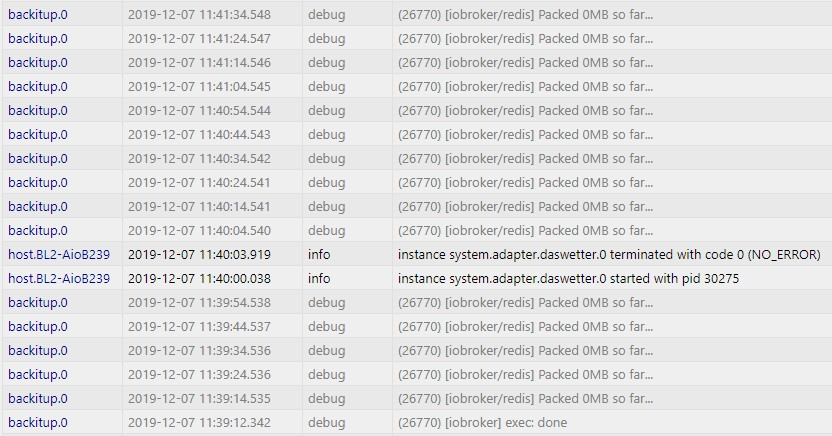
                                      Hi, hab mal den Adapter 1.3.2 getestet. Klappt soweit alles (mysql, redis, ccu - alles enthalten - keine Fehlermeldungen). Allerdings habe ich folgendes Problem:

                                      Nach dem eigentlichen Backup-Ende kommen die folgenden Log-Einträge dauerhaft:
                                      0a8a8c7e-19e2-4c20-a4e4-cb58cbc03cce-image.png

                                      Alle paar Sekunden ein neuer Eintrag- die Redis-Sicherung ist auch nur 1kb groß und lässt sich nicht entpacken. Habe ich so auch noch nicht gehabt. Ist das schon mal woanders aufgetreten?

                                      VG Sven

                                      1 Reply Last reply
                                      0
                                      • simatecS simatec

                                        @Dr-Bakterius
                                        Welche Version hast du installiert?
                                        Das Feature gibt es erst ab Version 1.3.2

                                        Dr. BakteriusD Offline
                                        Dr. BakteriusD Offline
                                        Dr. Bakterius
                                        Most Active
                                        wrote on last edited by
                                        #95

                                        @simatec sagte in Test Adapter Backitup v1.3.x:

                                        @Dr-Bakterius
                                        Welche Version hast du installiert?
                                        Das Feature gibt es erst ab Version 1.3.2

                                        Sieh mal mein Post direkt ober deinem. ;-) Hab' meinen Fehler schon gefunden gehabt.

                                        1 Reply Last reply
                                        0
                                        • JB_SullivanJ Offline
                                          JB_SullivanJ Offline
                                          JB_Sullivan
                                          wrote on last edited by
                                          #96

                                          So, da bin ich wieder : )

                                          Ich habe heute erst festgestellt, das meine ganzen Einstellungen für sourceanalytix und history nach dem Backup beim Sonoff Adapter komplett nicht mehr vorhanden sind.

                                          Da das ein Haufen Zeug war was ich neu einstellen müsste, kann man das irgendwie einzeln restoren? Wo werden diese Einstellungen üblicherweise gespeichert? Vielleicht ist es ja auch möglich aus der alten ioB Installation die Datei mit diesen Infos einzeln rüber zu kopieren?

                                          ioBroker (since 2018) auf Intel Core i3-5005U NUC und Windwos10 Pro

                                          simatecS 1 Reply Last reply
                                          0
                                          Reply
                                          • Reply as topic
                                          Log in to reply
                                          • Oldest to Newest
                                          • Newest to Oldest
                                          • Most Votes


                                          Support us

                                          ioBroker
                                          Community Adapters
                                          Donate

                                          386

                                          Online

                                          32.7k

                                          Users

                                          82.5k

                                          Topics

                                          1.3m

                                          Posts
                                          Community
                                          Impressum | Datenschutz-Bestimmungen | Nutzungsbedingungen | Einwilligungseinstellungen
                                          ioBroker Community 2014-2025
                                          logo
                                          • Login

                                          • Don't have an account? Register

                                          • Login or register to search.
                                          • First post
                                            Last post
                                          0
                                          • Home
                                          • Recent
                                          • Tags
                                          • Unread 0
                                          • Categories
                                          • Unreplied
                                          • Popular
                                          • GitHub
                                          • Docu
                                          • Hilfe