Skip to content
  • Home
  • Recent
  • Tags
  • 0 Unread 0
  • Categories
  • Unreplied
  • Popular
  • GitHub
  • Docu
  • Hilfe
Skins
  • Light
  • Brite
  • Cerulean
  • Cosmo
  • Flatly
  • Journal
  • Litera
  • Lumen
  • Lux
  • Materia
  • Minty
  • Morph
  • Pulse
  • Sandstone
  • Simplex
  • Sketchy
  • Spacelab
  • United
  • Yeti
  • Zephyr
  • Dark
  • Cyborg
  • Darkly
  • Quartz
  • Slate
  • Solar
  • Superhero
  • Vapor

  • Default (No Skin)
  • No Skin
Collapse
ioBroker Logo

Community Forum

donate donate
  1. ioBroker Community Home
  2. Deutsch
  3. Tester
  4. Test Adapter ioBroker.backitup v3.1.x

NEWS

  • Monatsrückblick Januar/Februar 2026 ist online!
    BluefoxB
    Bluefox
    9
    1
    98

  • Jahresrückblick 2025 – unser neuer Blogbeitrag ist online! ✨
    BluefoxB
    Bluefox
    17
    1
    4.3k

  • Neuer Blogbeitrag: Monatsrückblick - Dezember 2025 🎄
    BluefoxB
    Bluefox
    13
    1
    1.2k

Test Adapter ioBroker.backitup v3.1.x

Scheduled Pinned Locked Moved Tester
backitupbackitup backupccuhistorymysqlredisrestorerestore backup
2.8k Posts 170 Posters 2.4m Views 113 Watching
  • Oldest to Newest
  • Newest to Oldest
  • Most Votes
Reply
  • Reply as topic
Log in to reply
This topic has been deleted. Only users with topic management privileges can see it.
  • M MCU

    @thomas-braun

    apt policy influxdb*
    influxdb2-cli:
      Installed: 2.3.0
      Candidate: 2.3.0
      Version table:
     *** 2.3.0 500
            500 https://repos.influxdata.com/debian stable/main amd64 Packages
            100 /var/lib/dpkg/status
    influxdb-client:
      Installed: (none)
      Candidate: 1.6.7~rc0-1+b5
      Version table:
         1.6.7~rc0-1+b5 500
            500 http://ftp.debian.org/debian bullseye/main amd64 Packages
    influxdb-dev:
      Installed: (none)
      Candidate: (none)
      Version table:
    influxdb:
      Installed: (none)
      Candidate: 1.8.10-1
      Version table:
         1.8.10-1 500
            500 https://repos.influxdata.com/debian stable/main amd64 Packages
         1.6.7~rc0-1+b5 500
            500 http://ftp.debian.org/debian bullseye/main amd64 Packages
    influxdb2:
      Installed: 2.3.0-1
      Candidate: 2.3.0-1
      Version table:
     *** 2.3.0-1 500
            500 https://repos.influxdata.com/debian stable/main amd64 Packages
            100 /var/lib/dpkg/status
    
    Thomas BraunT Online
    Thomas BraunT Online
    Thomas Braun
    Most Active
    wrote on last edited by
    #2062

    @mcu @simatec
    Muss der client auf dem System mit dem ioBroker installiert sein?
    Mir war so.

    Linux-Werkzeugkasten:
    https://forum.iobroker.net/topic/42952/der-kleine-iobroker-linux-werkzeugkasten
    NodeJS Fixer Skript:
    https://forum.iobroker.net/topic/68035/iob-node-fix-skript
    iob_diag: curl -sLf -o diag.sh https://iobroker.net/diag.sh && bash diag.sh

    M simatecS 2 Replies Last reply
    0
    • Thomas BraunT Thomas Braun

      @mcu @simatec
      Muss der client auf dem System mit dem ioBroker installiert sein?
      Mir war so.

      M Online
      M Online
      MCU
      wrote on last edited by MCU
      #2063

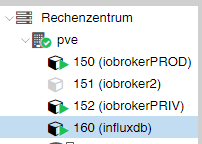
      @thomas-braun Also das auf dem ioBroker-System?

      wget -q https://repos.influxdata.com/influxdb.key
      echo '23a1c8836f0afc5ed24e0486339d7cc8f6790b83886c4c96995b88a061c5bb5d influxdb.key' | sha256sum -c && cat influxdb.key | gpg --dearmor | sudo tee /etc/apt/trusted.gpg.d/influxdb.gpg > /dev/null
      echo 'deb [signed-by=/etc/apt/trusted.gpg.d/influxdb.gpg] https://repos.influxdata.com/debian stable main' | sudo tee /etc/apt/sources.list.d/influxdata.list
      
      sudo apt update && sudo apt install influxdb2-cli
      

      1efadcbb-39e2-4648-a66c-71f50e5a16d6-image.png

      NUC i7 64GB mit Proxmox ---- Jarvis Infos Aktualisierungen der Doku auf Instagram verfolgen -> mcuiobroker Instagram
      Wenn Euch mein Vorschlag geholfen hat, bitte rechts "^" klicken.

      Thomas BraunT 1 Reply Last reply
      0
      • M MCU

        @thomas-braun Also das auf dem ioBroker-System?

        wget -q https://repos.influxdata.com/influxdb.key
        echo '23a1c8836f0afc5ed24e0486339d7cc8f6790b83886c4c96995b88a061c5bb5d influxdb.key' | sha256sum -c && cat influxdb.key | gpg --dearmor | sudo tee /etc/apt/trusted.gpg.d/influxdb.gpg > /dev/null
        echo 'deb [signed-by=/etc/apt/trusted.gpg.d/influxdb.gpg] https://repos.influxdata.com/debian stable main' | sudo tee /etc/apt/sources.list.d/influxdata.list
        
        sudo apt update && sudo apt install influxdb2-cli
        

        1efadcbb-39e2-4648-a66c-71f50e5a16d6-image.png

        Thomas BraunT Online
        Thomas BraunT Online
        Thomas Braun
        Most Active
        wrote on last edited by
        #2064

        @mcu

        Wenn der client auf dem iobroker-System laufen muss dann ja. Steht aber soweit ich weiß in der Readme zum Adapter drin.

        Linux-Werkzeugkasten:
        https://forum.iobroker.net/topic/42952/der-kleine-iobroker-linux-werkzeugkasten
        NodeJS Fixer Skript:
        https://forum.iobroker.net/topic/68035/iob-node-fix-skript
        iob_diag: curl -sLf -o diag.sh https://iobroker.net/diag.sh && bash diag.sh

        1 Reply Last reply
        0
        • Thomas BraunT Thomas Braun

          @mcu @simatec
          Muss der client auf dem System mit dem ioBroker installiert sein?
          Mir war so.

          simatecS Offline
          simatecS Offline
          simatec
          Developer Most Active
          wrote on last edited by
          #2065

          @thomas-braun
          Der Client musst dort installiert sein, wo Backitup läuft. Also ja auf dem iobroker System.
          Wenn influxdb auf einem anderen System läuft, wird es dort für Backitup nicht benötigt

          • Besuche meine Github Seite
          • Beitrag hat geholfen oder willst du mich unterstützen
          • HowTo Restore ioBroker
          Thomas BraunT 1 Reply Last reply
          0
          • simatecS simatec

            @thomas-braun
            Der Client musst dort installiert sein, wo Backitup läuft. Also ja auf dem iobroker System.
            Wenn influxdb auf einem anderen System läuft, wird es dort für Backitup nicht benötigt

            Thomas BraunT Online
            Thomas BraunT Online
            Thomas Braun
            Most Active
            wrote on last edited by
            #2066

            @simatec

            Thx. Hatte gerade aber auch für @MCU auch nochmal in die Readme geschaut... Da steht es ja drin:

            Um ein Backup einer InfluxDB 2.x erstellen zu können, muss Influx-CLI auf eurem System installiert sein. Dies ist sowohl bei einem lokalen als auch bei einem Remote Backup erforderlich.

            Bei einem Remote Backup muss Influx-CLI auf dem System installiert sein, auf dem auch euer iobroker läuft. Auf dem entfernten System, in dem eure Datenbank arbeitet, ist die Installation für ein Backup nicht erforderlich.

            Linux-Werkzeugkasten:
            https://forum.iobroker.net/topic/42952/der-kleine-iobroker-linux-werkzeugkasten
            NodeJS Fixer Skript:
            https://forum.iobroker.net/topic/68035/iob-node-fix-skript
            iob_diag: curl -sLf -o diag.sh https://iobroker.net/diag.sh && bash diag.sh

            M 1 Reply Last reply
            0
            • Thomas BraunT Thomas Braun

              @simatec

              Thx. Hatte gerade aber auch für @MCU auch nochmal in die Readme geschaut... Da steht es ja drin:

              Um ein Backup einer InfluxDB 2.x erstellen zu können, muss Influx-CLI auf eurem System installiert sein. Dies ist sowohl bei einem lokalen als auch bei einem Remote Backup erforderlich.

              Bei einem Remote Backup muss Influx-CLI auf dem System installiert sein, auf dem auch euer iobroker läuft. Auf dem entfernten System, in dem eure Datenbank arbeitet, ist die Installation für ein Backup nicht erforderlich.

              M Online
              M Online
              MCU
              wrote on last edited by MCU
              #2067

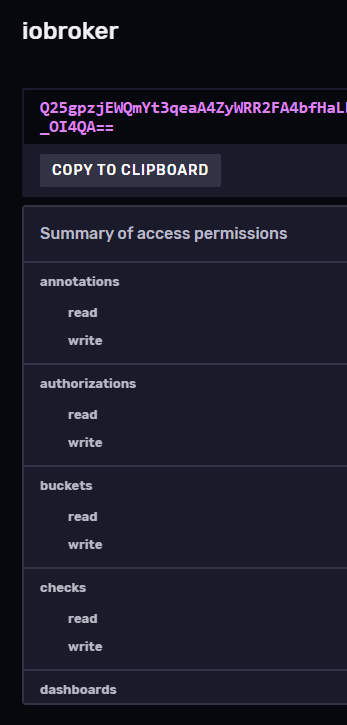
              @thomas-braun Jetzt ein Schritt weiter?

              b5510e0a-685b-4849-b61e-404fc19c7e70-image.png
              ab58f3a6-62d1-4d18-b775-71611116ab35-image.png

              NUC i7 64GB mit Proxmox ---- Jarvis Infos Aktualisierungen der Doku auf Instagram verfolgen -> mcuiobroker Instagram
              Wenn Euch mein Vorschlag geholfen hat, bitte rechts "^" klicken.

              Thomas BraunT simatecS L 3 Replies Last reply
              0
              • M MCU

                @thomas-braun Jetzt ein Schritt weiter?
                b5510e0a-685b-4849-b61e-404fc19c7e70-image.png
                ab58f3a6-62d1-4d18-b775-71611116ab35-image.png

                Thomas BraunT Online
                Thomas BraunT Online
                Thomas Braun
                Most Active
                wrote on last edited by
                #2068

                @mcu

                Da fehlt jetzt die Zugangsberechtigung. Da ich aber influx nicht verwende kann ich da nicht weiterhelfen.

                Linux-Werkzeugkasten:
                https://forum.iobroker.net/topic/42952/der-kleine-iobroker-linux-werkzeugkasten
                NodeJS Fixer Skript:
                https://forum.iobroker.net/topic/68035/iob-node-fix-skript
                iob_diag: curl -sLf -o diag.sh https://iobroker.net/diag.sh && bash diag.sh

                1 Reply Last reply
                1
                • M MCU

                  @thomas-braun Jetzt ein Schritt weiter?
                  b5510e0a-685b-4849-b61e-404fc19c7e70-image.png
                  ab58f3a6-62d1-4d18-b775-71611116ab35-image.png

                  simatecS Offline
                  simatecS Offline
                  simatec
                  Developer Most Active
                  wrote on last edited by
                  #2069

                  @mcu Ich verwende bei mir den Token vom Admin

                  • Besuche meine Github Seite
                  • Beitrag hat geholfen oder willst du mich unterstützen
                  • HowTo Restore ioBroker
                  M 1 Reply Last reply
                  1
                  • M MCU

                    @thomas-braun Jetzt ein Schritt weiter?
                    b5510e0a-685b-4849-b61e-404fc19c7e70-image.png
                    ab58f3a6-62d1-4d18-b775-71611116ab35-image.png

                    L Offline
                    L Offline
                    legro
                    wrote on last edited by legro
                    #2070

                    @mcu

                    In der neuen InfluxDB gibt es keine Authentifizierung über Benutzer/Passwort mehr. Es werden ausschließlich sog. Token verwendet.

                    Wie du diese einrichten kannst, habe ich hier in einer PDF beschrieben.

                    Raspberry Pi 5 mit 8GB + 120GB SSD + Coordinator COD-m + ioBroker ..

                    1 Reply Last reply
                    1
                    • simatecS simatec

                      @mcu Ich verwende bei mir den Token vom Admin

                      M Online
                      M Online
                      MCU
                      wrote on last edited by
                      #2071

                      @simatec @legro
                      Es muss der Initial-User-Token(erster admin-User, kann auch anders heißen, so wie in meinem Fall) sein, nicht der DB-AdminUser-Token.
                      Mit dem Initial-Admin-Token funktioniert es. Danke an alle.

                      NUC i7 64GB mit Proxmox ---- Jarvis Infos Aktualisierungen der Doku auf Instagram verfolgen -> mcuiobroker Instagram
                      Wenn Euch mein Vorschlag geholfen hat, bitte rechts "^" klicken.

                      1 Reply Last reply
                      0
                      • A AxLED

                        @simatec

                        weil meine NAS sporadisch 1x die Woche läuft, daher greift die Zeitplanung von Backitup leider in meinem Fall auch nicht (immer).

                        Gruß

                        AxLED

                        A Offline
                        A Offline
                        AxLED
                        wrote on last edited by
                        #2072

                        @simatec
                        @axled sagte in Test Adapter ioBroker.backitup v2.4.x:

                        @simatec

                        weil meine NAS sporadisch 1x die Woche läuft, daher greift die Zeitplanung von Backitup leider in meinem Fall auch nicht (immer).

                        Gruß

                        AxLED

                        simatecS 1 Reply Last reply
                        0
                        • A AxLED

                          @simatec
                          @axled sagte in Test Adapter ioBroker.backitup v2.4.x:

                          @simatec

                          weil meine NAS sporadisch 1x die Woche läuft, daher greift die Zeitplanung von Backitup leider in meinem Fall auch nicht (immer).

                          Gruß

                          AxLED

                          simatecS Offline
                          simatecS Offline
                          simatec
                          Developer Most Active
                          wrote on last edited by
                          #2073

                          @axled Warum weckst du dein NAS nicht über den Backitup Adapter mit WOL

                          • Besuche meine Github Seite
                          • Beitrag hat geholfen oder willst du mich unterstützen
                          • HowTo Restore ioBroker
                          A 1 Reply Last reply
                          0
                          • simatecS simatec

                            @axled Warum weckst du dein NAS nicht über den Backitup Adapter mit WOL

                            A Offline
                            A Offline
                            AxLED
                            wrote on last edited by
                            #2074

                            @simatec
                            meine NAS unterstützt leider kein Wake on Lan
                            Gruß AxLED

                            1 Reply Last reply
                            0
                            • A AxLED

                              @simatec

                              ich habe mal eine Frage zum Objekt lastedBackup.
                              Wann wird das aktualisiert?

                              Hintergrund: Da meine NAS nicht 24x7 läuft, habe ich ein Blockly erstellt, dass

                              • Listenpunktdas Datum aus latestBackup mit dem aktuellen Datum vergleicht

                              • ListenpunktSollte dass länger als 7 Tage her sein, setze ich den Wert des Objektes oneClick/iobroker auf true.

                              Funktioniert soweit auch ganz gut, bis auf das Objekt latestBackup, dass wird leider nicht aktualisiert.
                              Hast du einen Tipp für mich?

                              Danke und Gruß

                              AxLED

                              simatecS Offline
                              simatecS Offline
                              simatec
                              Developer Most Active
                              wrote on last edited by simatec
                              #2075

                              @axled sagte in Test Adapter ioBroker.backitup v2.4.x:

                              @simatec

                              ich habe mal eine Frage zum Objekt lastedBackup.
                              Wann wird das aktualisiert?

                              Hintergrund: Da meine NAS nicht 24x7 läuft, habe ich ein Blockly erstellt, dass

                              • Listenpunktdas Datum aus latestBackup mit dem aktuellen Datum vergleicht

                              • ListenpunktSollte dass länger als 7 Tage her sein, setze ich den Wert des Objektes oneClick/iobroker auf true.

                              Funktioniert soweit auch ganz gut, bis auf das Objekt latestBackup, dass wird leider nicht aktualisiert.
                              Hast du einen Tipp für mich?

                              Danke und Gruß

                              AxLED

                              Das Objekt latestBackup wird beim Backupprozess aktualisiert
                              Wenn du nicht die Logik von Backitup einsetzt und damit keine automatischen Backups erstellst, hast du nicht die Funktion für das löschen alter Backups zur Verfügung.

                              Das manuelle Backup über die GUI oder über das Objekt oneClick/iobroker löschen aus Sicherheitsgründen keine alten Backups.

                              Ich denke, du solltest eventuell dein Energiekonzept für dein NAS überdenken.
                              Grundsätzlich rate ich in jeder Nacht ein Backup zu erstellen. Damit wäre es für dich auch leichter händelbar.

                              Du erstellst jede Nacht um 2:33 ein Backup und startest vorher dein NAS jede Nacht um 2:30

                              • Besuche meine Github Seite
                              • Beitrag hat geholfen oder willst du mich unterstützen
                              • HowTo Restore ioBroker
                              1 Reply Last reply
                              1
                              • simatecS simatec

                                @qqolli
                                Wenn man nesting aktiviert, wird /proc und /sys vom Hypervisor (Proxmox) rw gemounted.
                                Vom Sicherheitsaspekt also nicht so gut.

                                Es gibt aber Konstellationen, wo es benötigt wird. Beispiel ist hier ein Docker im LXC

                                qqolliQ Offline
                                qqolliQ Offline
                                qqolli
                                wrote on last edited by
                                #2076

                                @simatec

                                Ich habe seit heute einen neuen Rechner, auf dem ich Proxmox installiert habe. Der soll dann mein produktiver Rechner werden. Da ich ja mit der iob-Installation bzgl. Backitup massive Probleme habe, hatte ich heute gut die Hälfte der Instanzen gelöscht, Update & Ugrade mit Reboot durchgeführt und dann gedacht, das er heute vlt. den iob schafft zu sichern; leider nein:

                                Started iobroker ...
                                [DEBUG] [mount] - noserverino option: false
                                [DEBUG] [mount] - cifs-mount command: "sudo mount -t cifs -o username=backup,password=****,rw,file_mode=0777,dir_mode=0777,vers=3.1.1 //192.168.178.23/backup/ioBroker /opt/iobroker/backups"
                                [DEBUG] [mount] - mount successfully completed
                                [DEBUG] [mount] - done
                                [DEBUG] [iobroker] - host.ioBroker 89446 states saved
                                
                                [DEBUG] [iobroker] - host.ioBroker 118256 objects saved
                                
                                [ERROR] [iobroker] - 
                                <--- Last few GCs --->
                                
                                [24831:0x576cc58]   127861 ms: Scavenge 957.2 (964.7) -> 957.1 (965.4) MB, 16.5 / 0.0 ms  (average mu = 0.805, current mu = 0.800) allocation failure 
                                [24831:0x576cc58]   128158 ms: Mark-sweep (reduce) 958.1 (965.4) -> 958.1 (964.4) MB, 244.2 / 0.0 ms  (+ 16.1 ms in 15 steps since start of marking, biggest step 4.5 ms, walltime since start of marking 297 ms) (average mu = 0.741, current mu = 0.377) allo
                                
                                <--- JS stacktrace --->
                                
                                FATAL ERROR: Reached heap limit Allocation failed - JavaScript heap out of memory
                                
                                [DEBUG] [iobroker] - done
                                [DEBUG] [influxDB] - InfluxDB-Backup started ...
                                [DEBUG] [influxDB] - Start InfluxDB Backup ...
                                [DEBUG] [influxDB] - InfluxDB Backup tmp directory created 
                                [DEBUG] [influxDB] - Packed 32MB so far...
                                [DEBUG] [influxDB] - Backup created: /opt/iobroker/backups/influxDB_2022_07_14-14_32_14_backupiobroker.tar.gz
                                [DEBUG] [influxDB] - Try deleting the InfluxDB tmp directory
                                [DEBUG] [influxDB] - InfluxDB tmp directory was successfully deleted
                                [DEBUG] [influxDB] - InfluxDB-Backup for is finish
                                [DEBUG] [influxDB] - done
                                [DEBUG] [grafana] - Start Grafana Backup ...
                                [DEBUG] [grafana] - Created grafana_tmp directory: "/opt/iobroker/backups/grafana_tmp"
                                [DEBUG] [grafana] - Created dashboard directory
                                [DEBUG] [grafana] - Created dashboards_manually_restore directory
                                [DEBUG] [grafana] - Created datasource directory
                                [DEBUG] [grafana] - start Grafana request ...
                                [DEBUG] [grafana] - Grafana is not available: Error: connect ECONNREFUSED 192.168.178.21:3000
                                [DEBUG] [grafana] - Grafana is not available!
                                [DEBUG] [grafana] - Try deleting the Grafana tmp directory: "/opt/iobroker/backups/grafana_tmp"
                                [DEBUG] [grafana] - Grafana tmp directory "/opt/iobroker/backups/grafana_tmp" successfully deleted
                                [DEBUG] [grafana] - Grafana Backup cannot created ...
                                [DEBUG] [grafana] - done
                                [DEBUG] [javascripts] - Created javascript_tmp directory: "/opt/iobroker/backups/tmpScripts"
                                [DEBUG] [javascripts] - found Script: AlexaSagWas
                                [DEBUG] [javascripts] - found Script: Aliase_Erzeugen
                                [DEBUG] [javascripts] - found Script: Astro
                                [DEBUG] [javascripts] - found Script: Aufräumen
                                [DEBUG] [javascripts] - found Script: Azimun_Elevation
                                [DEBUG] [javascripts] - found Script: Batteriestand_überwachen
                                [DEBUG] [javascripts] - found Script: Benzinpreise
                                [DEBUG] [javascripts] - found Script: Codeschloss
                                [DEBUG] [javascripts] - found Script: Countdown
                                [DEBUG] [javascripts] - found Script: Datenpunkte_Erzeugen
                                [DEBUG] [javascripts] - found Script: EG_Toilette_Rolladen_Schalter
                                [DEBUG] [javascripts] - found Script: Fire7_laden
                                [DEBUG] [javascripts] - found Script: Flur_EG_Lampe_Steuern
                                [DEBUG] [javascripts] - found Script: Froni
                                [DEBUG] [javascripts] - found Script: Froni_Start
                                [DEBUG] [javascripts] - found Script: HM_Switch
                                [DEBUG] [javascripts] - found Script: HP_P2015_An_Aus
                                [DEBUG] [javascripts] - found Script: Haustürklingel
                                [DEBUG] [javascripts] - found Script: Küche_Lampen_Steuern
                                [DEBUG] [javascripts] - found Script: Lager_Lampen_Steuern
                                [DEBUG] [javascripts] - found Script: Licht_KG_NAS_&_USV
                                [DEBUG] [javascripts] - found Script: Liste_HM-Geräte
                                [DEBUG] [javascripts] - found Script: MQTT_Test
                                [DEBUG] [javascripts] - found Script: MduiLogHMDevices
                                [DEBUG] [javascripts] - found Script: Murks
                                [DEBUG] [javascripts] - found Script: NetzwerkStatusFritzBox
                                [DEBUG] [javascripts] - found Script: OG_Bad_Rolladen_Spiegel
                                [DEBUG] [javascripts] - found Script: Online_Check
                                [DEBUG] [javascripts] - found Script: PIR_Duration
                                [DEBUG] [javascripts] - found Script: PIR_EG_Flur
                                [DEBUG] [javascripts] - found Script: PIR_Kopieren
                                [DEBUG] [javascripts] - found Script: PIR_OG_Flur
                                [DEBUG] [javascripts] - found Script: PV-Anlage_Kosten_Bezug
                                [DEBUG] [javascripts] - found Script: PV_Berechnungen
                                [DEBUG] [javascripts] - found Script: Party_Lampen_Steuern
                                [DEBUG] [javascripts] - found Script: QQ_rufen
                                [DEBUG] [javascripts] - found Script: Rolladensteuerung_Manuell
                                [DEBUG] [javascripts] - found Script: Schlafzimmer_Yeelight_Steuern
                                [DEBUG] [javascripts] - found Script: Shelly_Rolladen_HM_Taster
                                [DEBUG] [javascripts] - found Script: Shelly_Status
                                [DEBUG] [javascripts] - found Script: Shelly_Verbrauchswerte
                                [DEBUG] [javascripts] - found Script: Skript_1
                                [DEBUG] [javascripts] - found Script: Sprachausgabe_alle_Geräte
                                [DEBUG] [javascripts] - found Script: T2C_Telegram
                                [DEBUG] [javascripts] - found Script: TFK_Zählen
                                [DEBUG] [javascripts] - found Script: Taupunkt
                                [DEBUG] [javascripts] - found Script: Test
                                [DEBUG] [javascripts] - found Script: Timer
                                [DEBUG] [javascripts] - found Script: Treppenhaus_Rolladen_Schalter
                                [DEBUG] [javascripts] - found Script: TürFenster_Offen
                                [DEBUG] [javascripts] - found Script: USV
                                [DEBUG] [javascripts] - found Script: USV_Berechnungen
                                [DEBUG] [javascripts] - found Script: Unifi_Netzwerk
                                [DEBUG] [javascripts] - found Script: Unifi_Netzwerk_Neu
                                [DEBUG] [javascripts] - found Script: Userstates_besondere_Uhr
                                [DEBUG] [javascripts] - found Script: VIS_Alexa
                                [DEBUG] [javascripts] - found Script: View_Wechsel
                                [DEBUG] [javascripts] - found Script: Wallpanel_States_MQTT
                                [DEBUG] [javascripts] - found Script: Skript_1
                                [DEBUG] [javascripts] - found Script: Skript_2
                                [DEBUG] [javascripts] - found Script: Skript_3
                                [DEBUG] [javascripts] - found Script: Spülmaschine_Fertig
                                [DEBUG] [javascripts] - found Script: Trockner_Fertig
                                [DEBUG] [javascripts] - found Script: Waschmaschine_Fertig
                                [DEBUG] [javascripts] - found Script: Wetter
                                [DEBUG] [javascripts] - found Script: Yeelight_An_Aus
                                [DEBUG] [javascripts] - found Script: Zeit
                                [DEBUG] [javascripts] - found Script: BattUeberwachung
                                [DEBUG] [javascripts] - found Script: Wetterstation
                                [DEBUG] [javascripts] - found Script: Userstates_anlegen
                                [DEBUG] [javascripts] - found Script: RGB_Kühltruhe
                                [DEBUG] [javascripts] - found Script: Fronius_Solarweb
                                [DEBUG] [javascripts] - found Script: Sonoff_Tabelle
                                [DEBUG] [javascripts] - found Script: Carport_Licht
                                [DEBUG] [javascripts] - found Script: NAS_Stream_holen
                                [DEBUG] [javascripts] - Try deleting the Javascript tmp directory: "/opt/iobroker/backups/tmpScripts"
                                [DEBUG] [javascripts] - Javascript tmp directory "/opt/iobroker/backups/tmpScripts" successfully deleted
                                [DEBUG] [javascripts] - Backup created: /opt/iobroker/backups/javascripts_2022_07_14-14_32_51_backupiobroker.tar.gz
                                [DEBUG] [javascripts] - done
                                [DEBUG] [yahka] - found yahka database: yahka.0
                                [DEBUG] [yahka] - done
                                [DEBUG] [cifs] - used copy path: /backup/ioBroker
                                [DEBUG] [cifs] - done
                                [DEBUG] [clean] - done
                                [DEBUG] [pushover] - done
                                [DEBUG] [historyHTML] - new history html values created
                                [DEBUG] [historyHTML] - done
                                [DEBUG] [historyJSON] - new history json values created
                                [DEBUG] [historyJSON] - done
                                [DEBUG] [umount] - mount activ, umount is started ...
                                [DEBUG] [umount] - umount successfully completed
                                [DEBUG] [umount] - done
                                [EXIT] 0
                                

                                Ehrlich gesagt, weiß ich nicht wo die vielen States & Objekte herkommen :-(

                                Ohne Backup muss ich fast alles wieder neu aufbauen auf dem neuen PC. Was kann ich noch machen?

                                Dr. BakteriusD crunchipC 2 Replies Last reply
                                0
                                • qqolliQ qqolli

                                  @simatec

                                  Ich habe seit heute einen neuen Rechner, auf dem ich Proxmox installiert habe. Der soll dann mein produktiver Rechner werden. Da ich ja mit der iob-Installation bzgl. Backitup massive Probleme habe, hatte ich heute gut die Hälfte der Instanzen gelöscht, Update & Ugrade mit Reboot durchgeführt und dann gedacht, das er heute vlt. den iob schafft zu sichern; leider nein:

                                  Started iobroker ...
                                  [DEBUG] [mount] - noserverino option: false
                                  [DEBUG] [mount] - cifs-mount command: "sudo mount -t cifs -o username=backup,password=****,rw,file_mode=0777,dir_mode=0777,vers=3.1.1 //192.168.178.23/backup/ioBroker /opt/iobroker/backups"
                                  [DEBUG] [mount] - mount successfully completed
                                  [DEBUG] [mount] - done
                                  [DEBUG] [iobroker] - host.ioBroker 89446 states saved
                                  
                                  [DEBUG] [iobroker] - host.ioBroker 118256 objects saved
                                  
                                  [ERROR] [iobroker] - 
                                  <--- Last few GCs --->
                                  
                                  [24831:0x576cc58]   127861 ms: Scavenge 957.2 (964.7) -> 957.1 (965.4) MB, 16.5 / 0.0 ms  (average mu = 0.805, current mu = 0.800) allocation failure 
                                  [24831:0x576cc58]   128158 ms: Mark-sweep (reduce) 958.1 (965.4) -> 958.1 (964.4) MB, 244.2 / 0.0 ms  (+ 16.1 ms in 15 steps since start of marking, biggest step 4.5 ms, walltime since start of marking 297 ms) (average mu = 0.741, current mu = 0.377) allo
                                  
                                  <--- JS stacktrace --->
                                  
                                  FATAL ERROR: Reached heap limit Allocation failed - JavaScript heap out of memory
                                  
                                  [DEBUG] [iobroker] - done
                                  [DEBUG] [influxDB] - InfluxDB-Backup started ...
                                  [DEBUG] [influxDB] - Start InfluxDB Backup ...
                                  [DEBUG] [influxDB] - InfluxDB Backup tmp directory created 
                                  [DEBUG] [influxDB] - Packed 32MB so far...
                                  [DEBUG] [influxDB] - Backup created: /opt/iobroker/backups/influxDB_2022_07_14-14_32_14_backupiobroker.tar.gz
                                  [DEBUG] [influxDB] - Try deleting the InfluxDB tmp directory
                                  [DEBUG] [influxDB] - InfluxDB tmp directory was successfully deleted
                                  [DEBUG] [influxDB] - InfluxDB-Backup for is finish
                                  [DEBUG] [influxDB] - done
                                  [DEBUG] [grafana] - Start Grafana Backup ...
                                  [DEBUG] [grafana] - Created grafana_tmp directory: "/opt/iobroker/backups/grafana_tmp"
                                  [DEBUG] [grafana] - Created dashboard directory
                                  [DEBUG] [grafana] - Created dashboards_manually_restore directory
                                  [DEBUG] [grafana] - Created datasource directory
                                  [DEBUG] [grafana] - start Grafana request ...
                                  [DEBUG] [grafana] - Grafana is not available: Error: connect ECONNREFUSED 192.168.178.21:3000
                                  [DEBUG] [grafana] - Grafana is not available!
                                  [DEBUG] [grafana] - Try deleting the Grafana tmp directory: "/opt/iobroker/backups/grafana_tmp"
                                  [DEBUG] [grafana] - Grafana tmp directory "/opt/iobroker/backups/grafana_tmp" successfully deleted
                                  [DEBUG] [grafana] - Grafana Backup cannot created ...
                                  [DEBUG] [grafana] - done
                                  [DEBUG] [javascripts] - Created javascript_tmp directory: "/opt/iobroker/backups/tmpScripts"
                                  [DEBUG] [javascripts] - found Script: AlexaSagWas
                                  [DEBUG] [javascripts] - found Script: Aliase_Erzeugen
                                  [DEBUG] [javascripts] - found Script: Astro
                                  [DEBUG] [javascripts] - found Script: Aufräumen
                                  [DEBUG] [javascripts] - found Script: Azimun_Elevation
                                  [DEBUG] [javascripts] - found Script: Batteriestand_überwachen
                                  [DEBUG] [javascripts] - found Script: Benzinpreise
                                  [DEBUG] [javascripts] - found Script: Codeschloss
                                  [DEBUG] [javascripts] - found Script: Countdown
                                  [DEBUG] [javascripts] - found Script: Datenpunkte_Erzeugen
                                  [DEBUG] [javascripts] - found Script: EG_Toilette_Rolladen_Schalter
                                  [DEBUG] [javascripts] - found Script: Fire7_laden
                                  [DEBUG] [javascripts] - found Script: Flur_EG_Lampe_Steuern
                                  [DEBUG] [javascripts] - found Script: Froni
                                  [DEBUG] [javascripts] - found Script: Froni_Start
                                  [DEBUG] [javascripts] - found Script: HM_Switch
                                  [DEBUG] [javascripts] - found Script: HP_P2015_An_Aus
                                  [DEBUG] [javascripts] - found Script: Haustürklingel
                                  [DEBUG] [javascripts] - found Script: Küche_Lampen_Steuern
                                  [DEBUG] [javascripts] - found Script: Lager_Lampen_Steuern
                                  [DEBUG] [javascripts] - found Script: Licht_KG_NAS_&_USV
                                  [DEBUG] [javascripts] - found Script: Liste_HM-Geräte
                                  [DEBUG] [javascripts] - found Script: MQTT_Test
                                  [DEBUG] [javascripts] - found Script: MduiLogHMDevices
                                  [DEBUG] [javascripts] - found Script: Murks
                                  [DEBUG] [javascripts] - found Script: NetzwerkStatusFritzBox
                                  [DEBUG] [javascripts] - found Script: OG_Bad_Rolladen_Spiegel
                                  [DEBUG] [javascripts] - found Script: Online_Check
                                  [DEBUG] [javascripts] - found Script: PIR_Duration
                                  [DEBUG] [javascripts] - found Script: PIR_EG_Flur
                                  [DEBUG] [javascripts] - found Script: PIR_Kopieren
                                  [DEBUG] [javascripts] - found Script: PIR_OG_Flur
                                  [DEBUG] [javascripts] - found Script: PV-Anlage_Kosten_Bezug
                                  [DEBUG] [javascripts] - found Script: PV_Berechnungen
                                  [DEBUG] [javascripts] - found Script: Party_Lampen_Steuern
                                  [DEBUG] [javascripts] - found Script: QQ_rufen
                                  [DEBUG] [javascripts] - found Script: Rolladensteuerung_Manuell
                                  [DEBUG] [javascripts] - found Script: Schlafzimmer_Yeelight_Steuern
                                  [DEBUG] [javascripts] - found Script: Shelly_Rolladen_HM_Taster
                                  [DEBUG] [javascripts] - found Script: Shelly_Status
                                  [DEBUG] [javascripts] - found Script: Shelly_Verbrauchswerte
                                  [DEBUG] [javascripts] - found Script: Skript_1
                                  [DEBUG] [javascripts] - found Script: Sprachausgabe_alle_Geräte
                                  [DEBUG] [javascripts] - found Script: T2C_Telegram
                                  [DEBUG] [javascripts] - found Script: TFK_Zählen
                                  [DEBUG] [javascripts] - found Script: Taupunkt
                                  [DEBUG] [javascripts] - found Script: Test
                                  [DEBUG] [javascripts] - found Script: Timer
                                  [DEBUG] [javascripts] - found Script: Treppenhaus_Rolladen_Schalter
                                  [DEBUG] [javascripts] - found Script: TürFenster_Offen
                                  [DEBUG] [javascripts] - found Script: USV
                                  [DEBUG] [javascripts] - found Script: USV_Berechnungen
                                  [DEBUG] [javascripts] - found Script: Unifi_Netzwerk
                                  [DEBUG] [javascripts] - found Script: Unifi_Netzwerk_Neu
                                  [DEBUG] [javascripts] - found Script: Userstates_besondere_Uhr
                                  [DEBUG] [javascripts] - found Script: VIS_Alexa
                                  [DEBUG] [javascripts] - found Script: View_Wechsel
                                  [DEBUG] [javascripts] - found Script: Wallpanel_States_MQTT
                                  [DEBUG] [javascripts] - found Script: Skript_1
                                  [DEBUG] [javascripts] - found Script: Skript_2
                                  [DEBUG] [javascripts] - found Script: Skript_3
                                  [DEBUG] [javascripts] - found Script: Spülmaschine_Fertig
                                  [DEBUG] [javascripts] - found Script: Trockner_Fertig
                                  [DEBUG] [javascripts] - found Script: Waschmaschine_Fertig
                                  [DEBUG] [javascripts] - found Script: Wetter
                                  [DEBUG] [javascripts] - found Script: Yeelight_An_Aus
                                  [DEBUG] [javascripts] - found Script: Zeit
                                  [DEBUG] [javascripts] - found Script: BattUeberwachung
                                  [DEBUG] [javascripts] - found Script: Wetterstation
                                  [DEBUG] [javascripts] - found Script: Userstates_anlegen
                                  [DEBUG] [javascripts] - found Script: RGB_Kühltruhe
                                  [DEBUG] [javascripts] - found Script: Fronius_Solarweb
                                  [DEBUG] [javascripts] - found Script: Sonoff_Tabelle
                                  [DEBUG] [javascripts] - found Script: Carport_Licht
                                  [DEBUG] [javascripts] - found Script: NAS_Stream_holen
                                  [DEBUG] [javascripts] - Try deleting the Javascript tmp directory: "/opt/iobroker/backups/tmpScripts"
                                  [DEBUG] [javascripts] - Javascript tmp directory "/opt/iobroker/backups/tmpScripts" successfully deleted
                                  [DEBUG] [javascripts] - Backup created: /opt/iobroker/backups/javascripts_2022_07_14-14_32_51_backupiobroker.tar.gz
                                  [DEBUG] [javascripts] - done
                                  [DEBUG] [yahka] - found yahka database: yahka.0
                                  [DEBUG] [yahka] - done
                                  [DEBUG] [cifs] - used copy path: /backup/ioBroker
                                  [DEBUG] [cifs] - done
                                  [DEBUG] [clean] - done
                                  [DEBUG] [pushover] - done
                                  [DEBUG] [historyHTML] - new history html values created
                                  [DEBUG] [historyHTML] - done
                                  [DEBUG] [historyJSON] - new history json values created
                                  [DEBUG] [historyJSON] - done
                                  [DEBUG] [umount] - mount activ, umount is started ...
                                  [DEBUG] [umount] - umount successfully completed
                                  [DEBUG] [umount] - done
                                  [EXIT] 0
                                  

                                  Ehrlich gesagt, weiß ich nicht wo die vielen States & Objekte herkommen :-(

                                  Ohne Backup muss ich fast alles wieder neu aufbauen auf dem neuen PC. Was kann ich noch machen?

                                  Dr. BakteriusD Offline
                                  Dr. BakteriusD Offline
                                  Dr. Bakterius
                                  Most Active
                                  wrote on last edited by
                                  #2077

                                  @qqolli sagte in Test Adapter ioBroker.backitup v2.4.x:

                                  JavaScript heap out of memory
                                  

                                  Da siehst du das Problem.

                                  qqolliQ 1 Reply Last reply
                                  0
                                  • Dr. BakteriusD Dr. Bakterius

                                    @qqolli sagte in Test Adapter ioBroker.backitup v2.4.x:

                                    JavaScript heap out of memory
                                    

                                    Da siehst du das Problem.

                                    qqolliQ Offline
                                    qqolliQ Offline
                                    qqolli
                                    wrote on last edited by
                                    #2078

                                    @dr-bakterius

                                    Ja, aber warum? Habe echt fast alles an Instanzen gelöscht. Muss noch die entsprechenden Adapter ebenfalls löschen?

                                    Was könnte ich noch machen?

                                    Dr. BakteriusD 1 Reply Last reply
                                    0
                                    • qqolliQ qqolli

                                      @dr-bakterius

                                      Ja, aber warum? Habe echt fast alles an Instanzen gelöscht. Muss noch die entsprechenden Adapter ebenfalls löschen?

                                      Was könnte ich noch machen?

                                      Dr. BakteriusD Offline
                                      Dr. BakteriusD Offline
                                      Dr. Bakterius
                                      Most Active
                                      wrote on last edited by
                                      #2079

                                      @qqolli Vielleicht hilft dir das weiter: https://sebhastian.com/javascript-heap-out-of-memory/

                                      qqolliQ 1 Reply Last reply
                                      0
                                      • Dr. BakteriusD Dr. Bakterius

                                        @qqolli Vielleicht hilft dir das weiter: https://sebhastian.com/javascript-heap-out-of-memory/

                                        qqolliQ Offline
                                        qqolliQ Offline
                                        qqolli
                                        wrote on last edited by
                                        #2080

                                        @dr-bakterius

                                        Das hat leider auch nicht funktioniert:

                                        pi@ioBroker:~ $ node --max-old-space-size=4096 index.js
                                        
                                        <--- Last few GCs --->
                                        
                                        [17653:0x50f5bd0]      103 ms: Mark-sweep 0.2 (2.8) -> 0.2 (2.8) MB, 1.6 / 0.0 ms  (average mu = 0.060, current mu = 0.020) allocation failure GC in old space requested
                                        [17653:0x50f5bd0]      112 ms: Mark-sweep (reduce) 0.2 (2.8) -> 0.2 (1.8) MB, 8.7 / 0.0 ms  (average mu = 0.013, current mu = 0.004) last resort GC in old space requested
                                        [17653:0x50f5bd0]      114 ms: Mark-sweep (reduce) 0.2 (1.8) -> 0.2 (1.8) MB, 2.3 / 0.0 ms  (average mu = 0.015, current mu = 0.019) last resort GC in old space requested
                                        
                                        
                                        <--- JS stacktrace --->
                                        
                                        FATAL ERROR: CALL_AND_RETRY_LAST Allocation failed - JavaScript heap out of memory
                                        Abgebrochen
                                        pi@ioBroker:~ $ node --max-old-space-size=4096 `which npm` install
                                        
                                        <--- Last few GCs --->
                                        
                                        [17759:0x3e84c10]      101 ms: Mark-sweep (reduce) 0.3 (2.8) -> 0.3 (1.8) MB, 22.8 / 0.0 ms  (average mu = 0.019, current mu = 0.002) last resort GC in old space requested
                                        [17759:0x3e84c10]      103 ms: Mark-sweep (reduce) 0.3 (1.8) -> 0.3 (1.8) MB, 1.8 / 0.0 ms  (average mu = 0.019, current mu = 0.021) last resort GC in old space requested
                                        
                                        
                                        <--- JS stacktrace --->
                                        
                                        FATAL ERROR: CALL_AND_RETRY_LAST Allocation failed - JavaScript heap out of memory
                                        Abgebrochen
                                        pi@ioBroker:~ $
                                        

                                        So wie es aussieht, muss ich alles neu auf der Proxmoxmaschine aufsetzen, außer den JS-Skripts, die konnte der Backitup gesichert :-)

                                        @Thomas-Braun Hättest du evtl. noch eine Idee?

                                        1 Reply Last reply
                                        0
                                        • qqolliQ qqolli

                                          @simatec

                                          Ich habe seit heute einen neuen Rechner, auf dem ich Proxmox installiert habe. Der soll dann mein produktiver Rechner werden. Da ich ja mit der iob-Installation bzgl. Backitup massive Probleme habe, hatte ich heute gut die Hälfte der Instanzen gelöscht, Update & Ugrade mit Reboot durchgeführt und dann gedacht, das er heute vlt. den iob schafft zu sichern; leider nein:

                                          Started iobroker ...
                                          [DEBUG] [mount] - noserverino option: false
                                          [DEBUG] [mount] - cifs-mount command: "sudo mount -t cifs -o username=backup,password=****,rw,file_mode=0777,dir_mode=0777,vers=3.1.1 //192.168.178.23/backup/ioBroker /opt/iobroker/backups"
                                          [DEBUG] [mount] - mount successfully completed
                                          [DEBUG] [mount] - done
                                          [DEBUG] [iobroker] - host.ioBroker 89446 states saved
                                          
                                          [DEBUG] [iobroker] - host.ioBroker 118256 objects saved
                                          
                                          [ERROR] [iobroker] - 
                                          <--- Last few GCs --->
                                          
                                          [24831:0x576cc58]   127861 ms: Scavenge 957.2 (964.7) -> 957.1 (965.4) MB, 16.5 / 0.0 ms  (average mu = 0.805, current mu = 0.800) allocation failure 
                                          [24831:0x576cc58]   128158 ms: Mark-sweep (reduce) 958.1 (965.4) -> 958.1 (964.4) MB, 244.2 / 0.0 ms  (+ 16.1 ms in 15 steps since start of marking, biggest step 4.5 ms, walltime since start of marking 297 ms) (average mu = 0.741, current mu = 0.377) allo
                                          
                                          <--- JS stacktrace --->
                                          
                                          FATAL ERROR: Reached heap limit Allocation failed - JavaScript heap out of memory
                                          
                                          [DEBUG] [iobroker] - done
                                          [DEBUG] [influxDB] - InfluxDB-Backup started ...
                                          [DEBUG] [influxDB] - Start InfluxDB Backup ...
                                          [DEBUG] [influxDB] - InfluxDB Backup tmp directory created 
                                          [DEBUG] [influxDB] - Packed 32MB so far...
                                          [DEBUG] [influxDB] - Backup created: /opt/iobroker/backups/influxDB_2022_07_14-14_32_14_backupiobroker.tar.gz
                                          [DEBUG] [influxDB] - Try deleting the InfluxDB tmp directory
                                          [DEBUG] [influxDB] - InfluxDB tmp directory was successfully deleted
                                          [DEBUG] [influxDB] - InfluxDB-Backup for is finish
                                          [DEBUG] [influxDB] - done
                                          [DEBUG] [grafana] - Start Grafana Backup ...
                                          [DEBUG] [grafana] - Created grafana_tmp directory: "/opt/iobroker/backups/grafana_tmp"
                                          [DEBUG] [grafana] - Created dashboard directory
                                          [DEBUG] [grafana] - Created dashboards_manually_restore directory
                                          [DEBUG] [grafana] - Created datasource directory
                                          [DEBUG] [grafana] - start Grafana request ...
                                          [DEBUG] [grafana] - Grafana is not available: Error: connect ECONNREFUSED 192.168.178.21:3000
                                          [DEBUG] [grafana] - Grafana is not available!
                                          [DEBUG] [grafana] - Try deleting the Grafana tmp directory: "/opt/iobroker/backups/grafana_tmp"
                                          [DEBUG] [grafana] - Grafana tmp directory "/opt/iobroker/backups/grafana_tmp" successfully deleted
                                          [DEBUG] [grafana] - Grafana Backup cannot created ...
                                          [DEBUG] [grafana] - done
                                          [DEBUG] [javascripts] - Created javascript_tmp directory: "/opt/iobroker/backups/tmpScripts"
                                          [DEBUG] [javascripts] - found Script: AlexaSagWas
                                          [DEBUG] [javascripts] - found Script: Aliase_Erzeugen
                                          [DEBUG] [javascripts] - found Script: Astro
                                          [DEBUG] [javascripts] - found Script: Aufräumen
                                          [DEBUG] [javascripts] - found Script: Azimun_Elevation
                                          [DEBUG] [javascripts] - found Script: Batteriestand_überwachen
                                          [DEBUG] [javascripts] - found Script: Benzinpreise
                                          [DEBUG] [javascripts] - found Script: Codeschloss
                                          [DEBUG] [javascripts] - found Script: Countdown
                                          [DEBUG] [javascripts] - found Script: Datenpunkte_Erzeugen
                                          [DEBUG] [javascripts] - found Script: EG_Toilette_Rolladen_Schalter
                                          [DEBUG] [javascripts] - found Script: Fire7_laden
                                          [DEBUG] [javascripts] - found Script: Flur_EG_Lampe_Steuern
                                          [DEBUG] [javascripts] - found Script: Froni
                                          [DEBUG] [javascripts] - found Script: Froni_Start
                                          [DEBUG] [javascripts] - found Script: HM_Switch
                                          [DEBUG] [javascripts] - found Script: HP_P2015_An_Aus
                                          [DEBUG] [javascripts] - found Script: Haustürklingel
                                          [DEBUG] [javascripts] - found Script: Küche_Lampen_Steuern
                                          [DEBUG] [javascripts] - found Script: Lager_Lampen_Steuern
                                          [DEBUG] [javascripts] - found Script: Licht_KG_NAS_&_USV
                                          [DEBUG] [javascripts] - found Script: Liste_HM-Geräte
                                          [DEBUG] [javascripts] - found Script: MQTT_Test
                                          [DEBUG] [javascripts] - found Script: MduiLogHMDevices
                                          [DEBUG] [javascripts] - found Script: Murks
                                          [DEBUG] [javascripts] - found Script: NetzwerkStatusFritzBox
                                          [DEBUG] [javascripts] - found Script: OG_Bad_Rolladen_Spiegel
                                          [DEBUG] [javascripts] - found Script: Online_Check
                                          [DEBUG] [javascripts] - found Script: PIR_Duration
                                          [DEBUG] [javascripts] - found Script: PIR_EG_Flur
                                          [DEBUG] [javascripts] - found Script: PIR_Kopieren
                                          [DEBUG] [javascripts] - found Script: PIR_OG_Flur
                                          [DEBUG] [javascripts] - found Script: PV-Anlage_Kosten_Bezug
                                          [DEBUG] [javascripts] - found Script: PV_Berechnungen
                                          [DEBUG] [javascripts] - found Script: Party_Lampen_Steuern
                                          [DEBUG] [javascripts] - found Script: QQ_rufen
                                          [DEBUG] [javascripts] - found Script: Rolladensteuerung_Manuell
                                          [DEBUG] [javascripts] - found Script: Schlafzimmer_Yeelight_Steuern
                                          [DEBUG] [javascripts] - found Script: Shelly_Rolladen_HM_Taster
                                          [DEBUG] [javascripts] - found Script: Shelly_Status
                                          [DEBUG] [javascripts] - found Script: Shelly_Verbrauchswerte
                                          [DEBUG] [javascripts] - found Script: Skript_1
                                          [DEBUG] [javascripts] - found Script: Sprachausgabe_alle_Geräte
                                          [DEBUG] [javascripts] - found Script: T2C_Telegram
                                          [DEBUG] [javascripts] - found Script: TFK_Zählen
                                          [DEBUG] [javascripts] - found Script: Taupunkt
                                          [DEBUG] [javascripts] - found Script: Test
                                          [DEBUG] [javascripts] - found Script: Timer
                                          [DEBUG] [javascripts] - found Script: Treppenhaus_Rolladen_Schalter
                                          [DEBUG] [javascripts] - found Script: TürFenster_Offen
                                          [DEBUG] [javascripts] - found Script: USV
                                          [DEBUG] [javascripts] - found Script: USV_Berechnungen
                                          [DEBUG] [javascripts] - found Script: Unifi_Netzwerk
                                          [DEBUG] [javascripts] - found Script: Unifi_Netzwerk_Neu
                                          [DEBUG] [javascripts] - found Script: Userstates_besondere_Uhr
                                          [DEBUG] [javascripts] - found Script: VIS_Alexa
                                          [DEBUG] [javascripts] - found Script: View_Wechsel
                                          [DEBUG] [javascripts] - found Script: Wallpanel_States_MQTT
                                          [DEBUG] [javascripts] - found Script: Skript_1
                                          [DEBUG] [javascripts] - found Script: Skript_2
                                          [DEBUG] [javascripts] - found Script: Skript_3
                                          [DEBUG] [javascripts] - found Script: Spülmaschine_Fertig
                                          [DEBUG] [javascripts] - found Script: Trockner_Fertig
                                          [DEBUG] [javascripts] - found Script: Waschmaschine_Fertig
                                          [DEBUG] [javascripts] - found Script: Wetter
                                          [DEBUG] [javascripts] - found Script: Yeelight_An_Aus
                                          [DEBUG] [javascripts] - found Script: Zeit
                                          [DEBUG] [javascripts] - found Script: BattUeberwachung
                                          [DEBUG] [javascripts] - found Script: Wetterstation
                                          [DEBUG] [javascripts] - found Script: Userstates_anlegen
                                          [DEBUG] [javascripts] - found Script: RGB_Kühltruhe
                                          [DEBUG] [javascripts] - found Script: Fronius_Solarweb
                                          [DEBUG] [javascripts] - found Script: Sonoff_Tabelle
                                          [DEBUG] [javascripts] - found Script: Carport_Licht
                                          [DEBUG] [javascripts] - found Script: NAS_Stream_holen
                                          [DEBUG] [javascripts] - Try deleting the Javascript tmp directory: "/opt/iobroker/backups/tmpScripts"
                                          [DEBUG] [javascripts] - Javascript tmp directory "/opt/iobroker/backups/tmpScripts" successfully deleted
                                          [DEBUG] [javascripts] - Backup created: /opt/iobroker/backups/javascripts_2022_07_14-14_32_51_backupiobroker.tar.gz
                                          [DEBUG] [javascripts] - done
                                          [DEBUG] [yahka] - found yahka database: yahka.0
                                          [DEBUG] [yahka] - done
                                          [DEBUG] [cifs] - used copy path: /backup/ioBroker
                                          [DEBUG] [cifs] - done
                                          [DEBUG] [clean] - done
                                          [DEBUG] [pushover] - done
                                          [DEBUG] [historyHTML] - new history html values created
                                          [DEBUG] [historyHTML] - done
                                          [DEBUG] [historyJSON] - new history json values created
                                          [DEBUG] [historyJSON] - done
                                          [DEBUG] [umount] - mount activ, umount is started ...
                                          [DEBUG] [umount] - umount successfully completed
                                          [DEBUG] [umount] - done
                                          [EXIT] 0
                                          

                                          Ehrlich gesagt, weiß ich nicht wo die vielen States & Objekte herkommen :-(

                                          Ohne Backup muss ich fast alles wieder neu aufbauen auf dem neuen PC. Was kann ich noch machen?

                                          crunchipC Away
                                          crunchipC Away
                                          crunchip
                                          Forum Testing Most Active
                                          wrote on last edited by crunchip
                                          #2081

                                          @qqolli sagte in Test Adapter ioBroker.backitup v2.4.x:

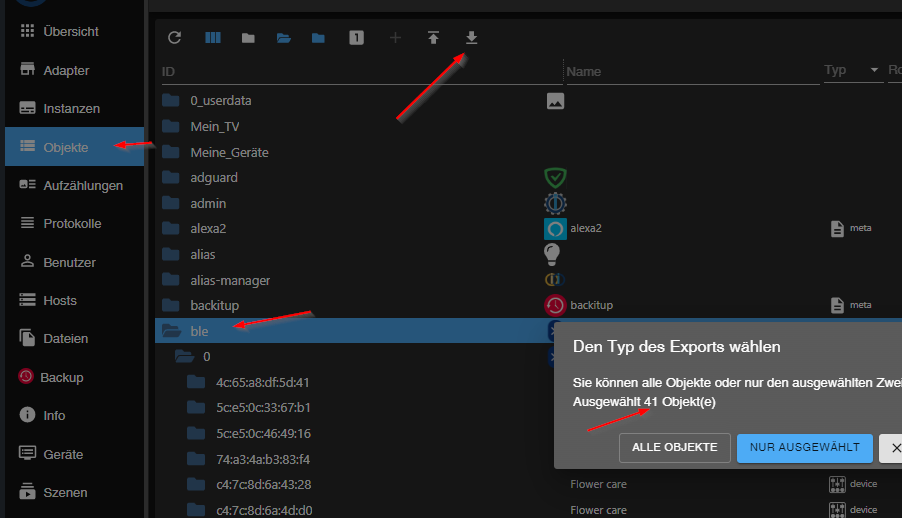
                                          Ehrlich gesagt, weiß ich nicht wo die vielen States & Objekte herkommen

                                          es gibt ein paar Kandidaten, die unötig viele anlegen
                                          einfach nachsehen, klick dich durch,
                                          61812af4-255d-4eaf-8979-2b4c3a28e2b7-image.png

                                          umgestiegen von Proxmox auf Unraid

                                          qqolliQ 1 Reply Last reply
                                          1
                                          Reply
                                          • Reply as topic
                                          Log in to reply
                                          • Oldest to Newest
                                          • Newest to Oldest
                                          • Most Votes


                                          Support us

                                          ioBroker
                                          Community Adapters
                                          Donate

                                          313

                                          Online

                                          32.7k

                                          Users

                                          82.4k

                                          Topics

                                          1.3m

                                          Posts
                                          Community
                                          Impressum | Datenschutz-Bestimmungen | Nutzungsbedingungen | Einwilligungseinstellungen
                                          ioBroker Community 2014-2025
                                          logo
                                          • Login

                                          • Don't have an account? Register

                                          • Login or register to search.
                                          • First post
                                            Last post
                                          0
                                          • Home
                                          • Recent
                                          • Tags
                                          • Unread 0
                                          • Categories
                                          • Unreplied
                                          • Popular
                                          • GitHub
                                          • Docu
                                          • Hilfe