Skip to content
  • Home
  • Recent
  • Tags
  • 0 Unread 0
  • Categories
  • Unreplied
  • Popular
  • GitHub
  • Docu
  • Hilfe
Skins
  • Light
  • Brite
  • Cerulean
  • Cosmo
  • Flatly
  • Journal
  • Litera
  • Lumen
  • Lux
  • Materia
  • Minty
  • Morph
  • Pulse
  • Sandstone
  • Simplex
  • Sketchy
  • Spacelab
  • United
  • Yeti
  • Zephyr
  • Dark
  • Cyborg
  • Darkly
  • Quartz
  • Slate
  • Solar
  • Superhero
  • Vapor

  • Default (No Skin)
  • No Skin
Collapse
ioBroker Logo

Community Forum

donate donate
  1. ioBroker Community Home
  2. Deutsch
  3. Tester
  4. Test Adapter TrashSchedule

NEWS

  • Jahresrückblick 2025 – unser neuer Blogbeitrag ist online! ✨
    BluefoxB
    Bluefox
    17
    1
    2.9k

  • Neuer Blogbeitrag: Monatsrückblick - Dezember 2025 🎄
    BluefoxB
    Bluefox
    13
    1
    1.1k

  • Weihnachtsangebot 2025! 🎄
    BluefoxB
    Bluefox
    25
    1
    2.4k

Test Adapter TrashSchedule

Scheduled Pinned Locked Moved Tester
adaptercalendaricalkalendermülltrash
1.4k Posts 186 Posters 532.6k Views 171 Watching
  • Oldest to Newest
  • Newest to Oldest
  • Most Votes
Reply
  • Reply as topic
Log in to reply
This topic has been deleted. Only users with topic management privileges can see it.
  • A Offline
    A Offline
    andi2055
    wrote on last edited by
    #197

    Super Adapter!
    Würde ich nun auch verwenden für andere periodische Erinnerungen wie z.B. "Filter wechseln" / "Filter reinigen" / Wartung XY usw. in x Tagen durchführen

    Daher über den Namen TRASHSchedule nochmal nachdenken. Der kann ja mehr!

    Ich habe nun die Einheit manuell von "Days" in "Tage" umbenannt für alle Datenpunkte. Wäre schön wenn man das zentral konfigurieren könnte.

    So sieht das bei mir in Lovelace aus - je nach Restdauer haben die Balken unterschiedliche Farben. Auf der Startseite gibt es zusätzlich auch noch eine Erinnerung bei Müllabfuhr am nächsten Tag.
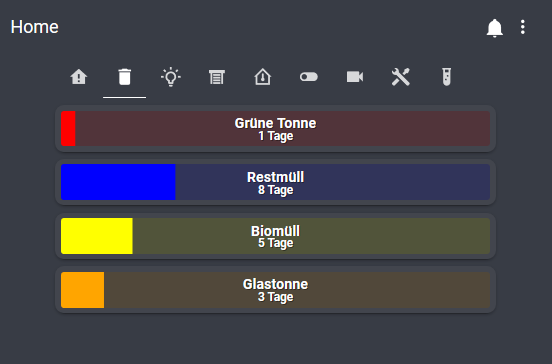
    f2c7e36c-b539-4ad3-97d7-e8f4e5421a9a-grafik.png

    Danke für den Adapter!

    M ChaotC 2 Replies Last reply
    1
    • SBorgS SBorg

      @ktsalti sagte in Test Adapter TrashSchedule v0.0.x:

      ...Gelbe Tonne...

      Der [SPACE] geht da IMHO nicht. Du müsstest den Datenpunkt zB. in "GelbeTonne" oder "Gelbe_Tonne" umbenennen.
      Aber der Hauptfehler: "tage = 1" ist keine gültige Abfrage in JS, sondern eine Zuweisung. Du setzt also tage auf den Wert "1".
      Korrekt ist tage == 1

      K Offline
      K Offline
      ktsalti
      wrote on last edited by
      #198

      Danke euch @SBorg und @0018 !!
      Das == war der springende Punkt - so funktioniert es jetzt (sogar mit Leerzeichen).

      Viele Grüße!

      1 Reply Last reply
      0
      • A andi2055

        Super Adapter!
        Würde ich nun auch verwenden für andere periodische Erinnerungen wie z.B. "Filter wechseln" / "Filter reinigen" / Wartung XY usw. in x Tagen durchführen

        Daher über den Namen TRASHSchedule nochmal nachdenken. Der kann ja mehr!

        Ich habe nun die Einheit manuell von "Days" in "Tage" umbenannt für alle Datenpunkte. Wäre schön wenn man das zentral konfigurieren könnte.

        So sieht das bei mir in Lovelace aus - je nach Restdauer haben die Balken unterschiedliche Farben. Auf der Startseite gibt es zusätzlich auch noch eine Erinnerung bei Müllabfuhr am nächsten Tag.
        f2c7e36c-b539-4ad3-97d7-e8f4e5421a9a-grafik.png

        Danke für den Adapter!

        M Offline
        M Offline
        Machinima
        wrote on last edited by
        #199

        @andi2055
        Wow, sieht gut aus! Wie hast du das genau mit der Darstellung realisiert?

        A 1 Reply Last reply
        0
        • A andi2055

          Super Adapter!
          Würde ich nun auch verwenden für andere periodische Erinnerungen wie z.B. "Filter wechseln" / "Filter reinigen" / Wartung XY usw. in x Tagen durchführen

          Daher über den Namen TRASHSchedule nochmal nachdenken. Der kann ja mehr!

          Ich habe nun die Einheit manuell von "Days" in "Tage" umbenannt für alle Datenpunkte. Wäre schön wenn man das zentral konfigurieren könnte.

          So sieht das bei mir in Lovelace aus - je nach Restdauer haben die Balken unterschiedliche Farben. Auf der Startseite gibt es zusätzlich auch noch eine Erinnerung bei Müllabfuhr am nächsten Tag.
          f2c7e36c-b539-4ad3-97d7-e8f4e5421a9a-grafik.png

          Danke für den Adapter!

          ChaotC Offline
          ChaotC Offline
          Chaot
          wrote on last edited by
          #200

          @andi2055
          Ihr habt ne Glastonne? Wow!

          ioBroker auf NUC unter Proxmox; VIS: 12" Touchscreen und 17" Touch; Lichtsteuerung, Thermometer und Sensoren: Tasmota (39); Ambiente Beleuchtung: WLED (9); Heizung: DECT Thermostate (9) an Fritz 6690; EMS-ESP; 1 Echo V2; 3 Echo DOT; 1 Echo Connect; 2 Echo Show 5; Unifi Ap-Ac Lite.

          M 1 Reply Last reply
          0
          • M Machinima

            @andi2055
            Wow, sieht gut aus! Wie hast du das genau mit der Darstellung realisiert?

            A Offline
            A Offline
            andi2055
            wrote on last edited by
            #201

            @Machinima
            Das ist der Lovelace Visualisierung Adapter
            https://forum.iobroker.net/topic/22781/test-adapter-lovelace-v0-2-x

            Code für Lovelace (custom Adapter custom:bar-card muss zuvor installiert sein)


            type: vertical-stack
            title: Müll
            cards:

            • type: 'custom:bar-card'
              title: Grüne Tonne
              entity: sensor.Trash_Grüne_Tonne_daysleft
              min: 0
              max: 30
              title_position: inside
              show_label: true
              title_style:
              color: white
              font-size: 16px
              severity:
              • value: 1
                color: red
              • value: 3
                color: orange
              • value: 7
                color: yellow
              • value: 30
                color: blue
            • type: 'custom:bar-card'
              title: Restmüll
              entity: sensor.Trash_Restmüll_daysleft
              min: 0
              max: 30
              title_position: inside
              show_label: true
              title_style:
              color: white
              font-size: 16px
              severity:
              • value: 1
                color: red
              • value: 3
                color: orange
              • value: 7
                color: yellow
              • value: 30
                color: blue
            • type: 'custom:bar-card'
              title: Biomüll
              entity: sensor.Trash_Biomüll_daysleft
              min: 0
              max: 30
              title_position: inside
              show_label: true
              title_style:
              color: white
              font-size: 16px
              severity:
              • value: 1
                color: red
              • value: 3
                color: orange
              • value: 7
                color: yellow
              • value: 30
                color: blue
            • type: 'custom:bar-card'
              title: Glastonne
              entity: sensor.Trash_Glasbox_daysleft
              min: 0
              max: 30
              title_position: inside
              show_label: true
              title_style:
              color: white
              font-size: 16px
              severity:
              • value: 1
                color: red
              • value: 3
                color: orange
              • value: 7
                color: yellow
              • value: 30
                color: blue

            @Chaot
            Naja Glasbox/Korb ist passender. Wird aber abgeholt alle 4 Wochen :)

            ChaotC 1 Reply Last reply
            0
            • A andi2055

              @Machinima
              Das ist der Lovelace Visualisierung Adapter
              https://forum.iobroker.net/topic/22781/test-adapter-lovelace-v0-2-x

              Code für Lovelace (custom Adapter custom:bar-card muss zuvor installiert sein)


              type: vertical-stack
              title: Müll
              cards:

              • type: 'custom:bar-card'
                title: Grüne Tonne
                entity: sensor.Trash_Grüne_Tonne_daysleft
                min: 0
                max: 30
                title_position: inside
                show_label: true
                title_style:
                color: white
                font-size: 16px
                severity:
                • value: 1
                  color: red
                • value: 3
                  color: orange
                • value: 7
                  color: yellow
                • value: 30
                  color: blue
              • type: 'custom:bar-card'
                title: Restmüll
                entity: sensor.Trash_Restmüll_daysleft
                min: 0
                max: 30
                title_position: inside
                show_label: true
                title_style:
                color: white
                font-size: 16px
                severity:
                • value: 1
                  color: red
                • value: 3
                  color: orange
                • value: 7
                  color: yellow
                • value: 30
                  color: blue
              • type: 'custom:bar-card'
                title: Biomüll
                entity: sensor.Trash_Biomüll_daysleft
                min: 0
                max: 30
                title_position: inside
                show_label: true
                title_style:
                color: white
                font-size: 16px
                severity:
                • value: 1
                  color: red
                • value: 3
                  color: orange
                • value: 7
                  color: yellow
                • value: 30
                  color: blue
              • type: 'custom:bar-card'
                title: Glastonne
                entity: sensor.Trash_Glasbox_daysleft
                min: 0
                max: 30
                title_position: inside
                show_label: true
                title_style:
                color: white
                font-size: 16px
                severity:
                • value: 1
                  color: red
                • value: 3
                  color: orange
                • value: 7
                  color: yellow
                • value: 30
                  color: blue

              @Chaot
              Naja Glasbox/Korb ist passender. Wird aber abgeholt alle 4 Wochen :)

              ChaotC Offline
              ChaotC Offline
              Chaot
              wrote on last edited by
              #202

              @andi2055
              Ok,das ist ein Service.
              Ich muss immer zum Glascontainer.
              Andererseits bleibt uns wenigstens derzeit noch die Biotonne erspart.

              ioBroker auf NUC unter Proxmox; VIS: 12" Touchscreen und 17" Touch; Lichtsteuerung, Thermometer und Sensoren: Tasmota (39); Ambiente Beleuchtung: WLED (9); Heizung: DECT Thermostate (9) an Fritz 6690; EMS-ESP; 1 Echo V2; 3 Echo DOT; 1 Echo Connect; 2 Echo Show 5; Unifi Ap-Ac Lite.

              1 Reply Last reply
              0
              • haus-automatisierungH haus-automatisierung
                Aktuelle Test Version 2.0.0
                Veröffentlichungsdatum 04.05.2022
                Github Link https://github.com/klein0r/ioBroker.trashschedule

                Im Forum existieren mehrere Themen, wie man aus einem iCal-Kalender die Müllabfahrtzeiten extrahieren kann. Dafür werden immer wieder Blockly und JavaScript-Funktionen geteilt. Ich dachte mir, dass es doch viel schöner wäre, wenn das ein Adapter erledigen könnte.

                Die Idee kommt aus dem FHEM-Umfeld, wo das ABFALL-Modul genau das gleiche macht. Auch dort wurden zuvor viele Funktionen bereitgestellt und jeder hat das Thema anders gelöst.

                Dieser Adapter nimmt eine iCal-Instanz als Quelle und durchsucht die nächsten Events nach den vorher definierten "Abfall-Typen". Wird ein Typ gefunden, werden die Tage bis zur Abholung berechnet und in einem State bereitgestellt. So entsteht eine Struktur, welche als Basis für VIS o.ä. genutzt werden kann.

                Weiterhin gibt es eine Zusammenfassung der nächsten Abholung, wenn mehrere "Abfall-Typen" auf einmal abgeholt werden. Diese kann man zum Beispiel für Pushover- oder Telegram-Nachrichten nutzen.

                Konfiguration

                Gelöscht. Bitte die aktuelle Doku nutzen: https://github.com/klein0r/ioBroker.trashschedule/blob/master/docs/de/README.md

                Wichtige Änderung ab Version 1.1.0

                Leider musste ich die Namen der Datenpunkte aufräumen, da immer wieder Quatsch dort reingeschrieben wurde. Solltest Du also Scripts oder eine Visualisierung auf den Datenpunkten der einzelnen Abfalltypen haben, müssen diese kontrolliert und ggf. angepasst werden.

                Reihenfolge um ab Version 1.0.1 wieder Daten zu bekommen (in VIS)

                1. Trashschedule Instanz stoppen
                2. Alle Datenpunkte des Adapters löschen (also von trashschedule.0). Einfach in der Objektansicht auf die Mülltonne klicken und weg damit.
                3. In der Expertenansicht der Adapterliste erst bei Trashschedule auf Upload klicken, dann bei VIS
                4. iCal einmal Instanzliste neustarten, dann Trashschedule wieder starten
                  Danach sollte alles wieder richtig sein.
                J Offline
                J Offline
                Jens Lattwesen
                wrote on last edited by
                #203

                @haus-automatisierung Moin, im ICAL-Adapter habe ich Daten drin. TrashSchedule liest diese aber nicht aus.
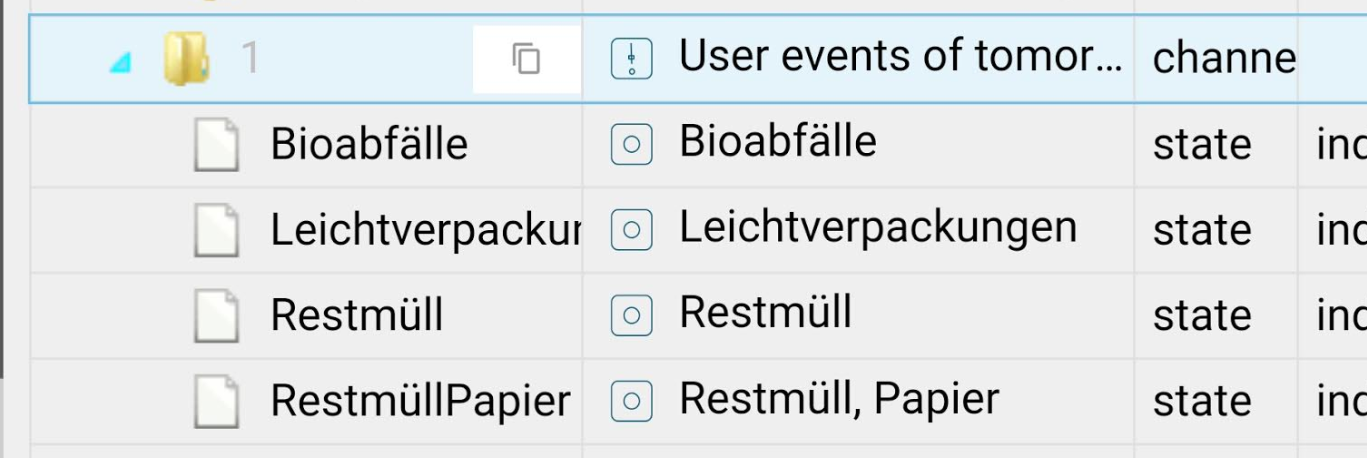
                6f60e6d6-9db3-4034-a81c-b143f8a32cd9-image.png

                Im Google-Kalender steht der Termin bspw. so drin:

                a0d9c603-4c5a-40be-a28a-bfadc07a5b42-image.png
                e5d3084a-1c91-45eb-af71-708f304df608-image.png

                Wo liegt mein Fehler?

                ? 1 Reply Last reply
                0
                • J Jens Lattwesen

                  @haus-automatisierung Moin, im ICAL-Adapter habe ich Daten drin. TrashSchedule liest diese aber nicht aus.
                  6f60e6d6-9db3-4034-a81c-b143f8a32cd9-image.png

                  Im Google-Kalender steht der Termin bspw. so drin:

                  a0d9c603-4c5a-40be-a28a-bfadc07a5b42-image.png
                  e5d3084a-1c91-45eb-af71-708f304df608-image.png

                  Wo liegt mein Fehler?

                  ? Offline
                  ? Offline
                  A Former User
                  wrote on last edited by
                  #204

                  @Jens-Lattwesen

                  Hast Du den Abfalltyp eingetragen? Analog meines Screens unten? Bei Dir dann sowas wie "Verpackungen" für "gilt für Termine"
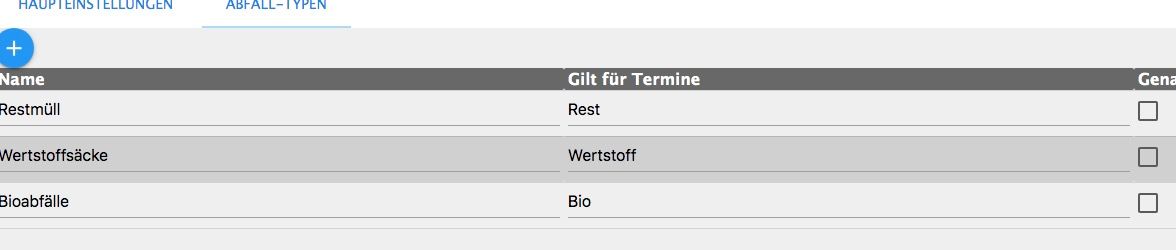
                  Bildschirmfoto 2020-01-23 um 08.20.47.JPG

                  1 Reply Last reply
                  0
                  • J Offline
                    J Offline
                    Jens Lattwesen
                    wrote on last edited by
                    #205

                    2da3143d-8570-40c1-a8fa-fdc12f4a572a-image.png

                    1 Reply Last reply
                    0
                    • J Offline
                      J Offline
                      Jens Lattwesen
                      wrote on last edited by
                      #206

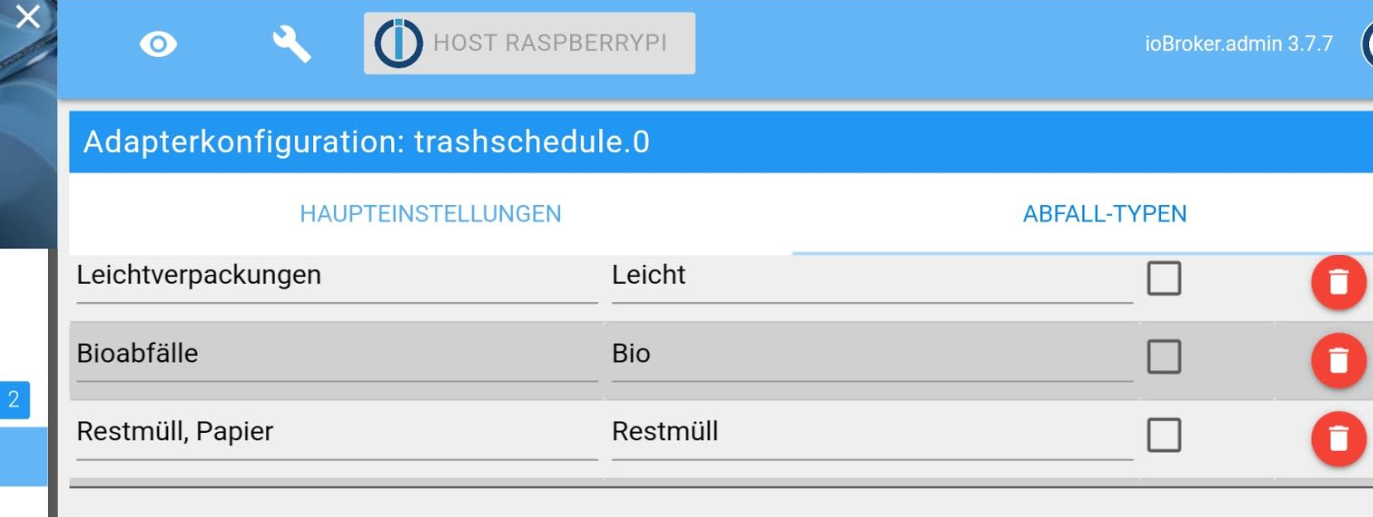
                      Was mich noch ein wenig stutzig macht, ist der Eintrag "Restmüll, Papier".

                      ? 2 Replies Last reply
                      0
                      • J Jens Lattwesen

                        Was mich noch ein wenig stutzig macht, ist der Eintrag "Restmüll, Papier".

                        ? Offline
                        ? Offline
                        A Former User
                        wrote on last edited by
                        #207

                        @Jens-Lattwesen

                        Ich habe den Adapter so verstanden:
                        die erste Spalte ist nur die Bezeichnung.
                        Die zweite dann das Suchwort

                        1 Reply Last reply
                        0
                        • J Jens Lattwesen

                          Was mich noch ein wenig stutzig macht, ist der Eintrag "Restmüll, Papier".

                          ? Offline
                          ? Offline
                          A Former User
                          wrote on last edited by
                          #208

                          @Jens-Lattwesen Trage mal testweise das komplette Wort ein :)

                          1 Reply Last reply
                          0
                          • J Offline
                            J Offline
                            Jens Lattwesen
                            wrote on last edited by
                            #209

                            Dann müsste er ja was finden ;-)

                            ? 1 Reply Last reply
                            0
                            • J Jens Lattwesen

                              Dann müsste er ja was finden ;-)

                              ? Offline
                              ? Offline
                              A Former User
                              wrote on last edited by
                              #210

                              @Jens-Lattwesen Soll er denn das nicht?

                              1 Reply Last reply
                              0
                              • J Offline
                                J Offline
                                Jens Lattwesen
                                wrote on last edited by
                                #211

                                Natürlich, er tut es aber leider (noch) nicht

                                ? 1 Reply Last reply
                                0
                                • J Jens Lattwesen

                                  Natürlich, er tut es aber leider (noch) nicht

                                  ? Offline
                                  ? Offline
                                  A Former User
                                  wrote on last edited by
                                  #212

                                  Hallo an den Entwickler @haus-automatisierung :)
                                  Unterstützt der Adapter nur die im Eingangspost genannten 4 Typen oder beliebige?
                                  Ersteres würde das Problem von @Jens-Lattwesen erklären

                                  Danke

                                  sigi234S 1 Reply Last reply
                                  0
                                  • ? A Former User

                                    Hallo an den Entwickler @haus-automatisierung :)
                                    Unterstützt der Adapter nur die im Eingangspost genannten 4 Typen oder beliebige?
                                    Ersteres würde das Problem von @Jens-Lattwesen erklären

                                    Danke

                                    sigi234S Online
                                    sigi234S Online
                                    sigi234
                                    Forum Testing Most Active
                                    wrote on last edited by
                                    #213

                                    @HeinrichB

                                    Ich habe 3 Instanzen und man kann einen beliebigen Typ eintragen, muss halt im Kalender vorkommen.
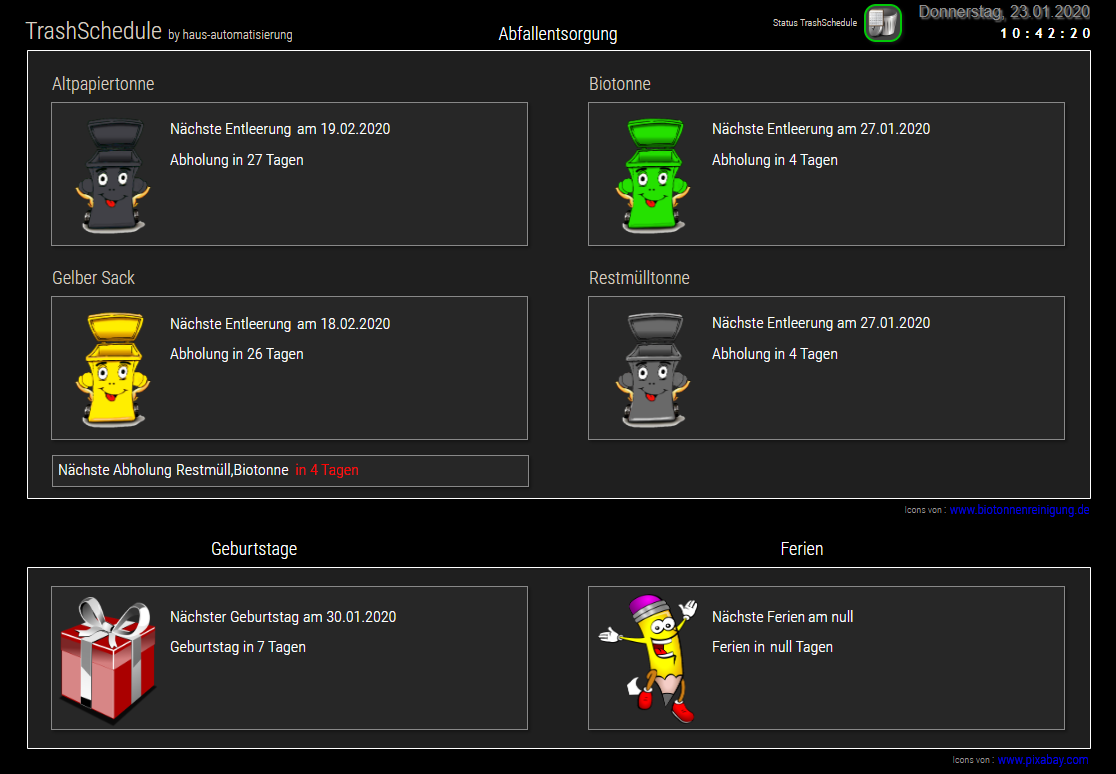
                                    Screenshot (1429).png

                                    Bitte benutzt das Voting rechts unten im Beitrag wenn er euch geholfen hat.
                                    Immer Daten sichern!

                                    ? 1 Reply Last reply
                                    0
                                    • sigi234S sigi234

                                      @HeinrichB

                                      Ich habe 3 Instanzen und man kann einen beliebigen Typ eintragen, muss halt im Kalender vorkommen.

                                      Screenshot (1429).png

                                      ? Offline
                                      ? Offline
                                      A Former User
                                      wrote on last edited by
                                      #214

                                      @sigi234 Danke, ich war mir nur unsicher und bevor wir einem Phantom nachjagen :)

                                      @Jens-Lattwesen Dann nochmals alles checken und ggf. Instanz mal neustarten

                                      1 Reply Last reply
                                      0
                                      • J Offline
                                        J Offline
                                        jwedenig
                                        Most Active
                                        wrote on last edited by
                                        #215

                                        Hi!
                                        Seit gestern (js controller update) ist mein Adapter rot.
                                        Hier das Log:

                                        
                                        host.raspberrypi	2020-01-28 08:31:31.600	error	Cannot download and install adapter "trashschedule@0.0.3". To retry it disable/enable the adapter or restart host. Also check the error messages in the log!
                                        host.raspberrypi	2020-01-28 08:31:31.599	info	iobroker npm-install: exit 1
                                        host.raspberrypi	2020-01-28 08:31:31.585	info	iobroker npm-install: host.raspberrypi download trashscheduleFile not found: trashschedule
                                        host.raspberrypi	2020-01-28 08:31:31.583	error	iobroker npm-install: host.raspberrypi Unknown packetName trashschedule
                                        host.raspberrypi	2020-01-28 08:31:29.441	error	Cannot download and install adapter "trashschedule@0.0.3". To retry it disable/enable the adapter or restart host. Also check the error messages in the log!
                                        host.raspberrypi	2020-01-28 08:31:29.439	info	iobroker npm-install: exit 1
                                        host.raspberrypi	2020-01-28 08:31:29.406	info	iobroker npm-install: host.raspberrypi download trashscheduleFile not found: trashschedule
                                        host.raspberrypi	2020-01-28 08:31:29.405	error	iobroker npm-install: host.raspberrypi Unknown packetName trashschedule
                                        host.raspberrypi	2020-01-28 08:31:29.201	error	Cannot download and install adapter "trashschedule@0.0.3". To retry it disable/enable the adapter or restart host. Also check the error messages in the log!
                                        host.raspberrypi	2020-01-28 08:31:28.169	info	iobroker install trashschedule@0.0.3 using installedVersion
                                        host.raspberrypi	2020-01-28 08:31:28.169	warn	startInstance cannot find adapter "trashschedule@0.0.3". Try to install it... 4 attempt
                                        host.raspberrypi	2020-01-28 08:31:28.167	info	iobroker npm-install: exit 1
                                        host.raspberrypi	2020-01-28 08:31:28.158	info	iobroker npm-install: host.raspberrypi download trashscheduleFile not found: trashschedule
                                        host.raspberrypi	2020-01-28 08:31:28.150	error	iobroker npm-install: host.raspberrypi Unknown packetName trashschedule
                                        host.raspberrypi	2020-01-28 08:31:26.225	info	iobroker install trashschedule@0.0.3 using installedVersion
                                        host.raspberrypi	2020-01-28 08:31:26.224	warn	startInstance cannot find adapter "trashschedule@0.0.3". Try to install it... 3 attempt
                                        host.raspberrypi	2020-01-28 08:31:25.176	info	iobroker install trashschedule@0.0.3 using installedVersion
                                        host.raspberrypi	2020-01-28 08:31:25.175	warn	startInstance cannot find adapter "trashschedule@0.0.3". Try to install it... 2 attempt
                                        host.raspberrypi	2020-01-28 08:31:25.173	info	iobroker npm-install: exit 1
                                        host.raspberrypi	2020-01-28 08:31:25.166	info	iobroker npm-install: File not found: trashschedule
                                        host.raspberrypi	2020-01-28 08:31:25.163	info	iobroker npm-install: host.raspberrypi download trashschedule
                                        host.raspberrypi	2020-01-28 08:31:25.154	error	iobroker npm-install: host.raspberrypi Unknown packetName trashschedule
                                        host.raspberrypi	2020-01-28 07:31:22.334	info	iobroker install trashschedule@0.0.3 using installedVersion
                                        host.raspberrypi	2020-01-28 07:31:22.333	warn	startInstance cannot find adapter "trashschedule@0.0.3". Try to install it... 1 attempt
                                        host.raspberrypi	2020-01-28 07:31:22.330	info	"system.adapter.trashschedule.0" enabled


                                        Wer eine Idee?

                                        J 1 Reply Last reply
                                        0
                                        • J jwedenig

                                          Hi!
                                          Seit gestern (js controller update) ist mein Adapter rot.
                                          Hier das Log:

                                          
                                          host.raspberrypi	2020-01-28 08:31:31.600	error	Cannot download and install adapter "trashschedule@0.0.3". To retry it disable/enable the adapter or restart host. Also check the error messages in the log!
                                          host.raspberrypi	2020-01-28 08:31:31.599	info	iobroker npm-install: exit 1
                                          host.raspberrypi	2020-01-28 08:31:31.585	info	iobroker npm-install: host.raspberrypi download trashscheduleFile not found: trashschedule
                                          host.raspberrypi	2020-01-28 08:31:31.583	error	iobroker npm-install: host.raspberrypi Unknown packetName trashschedule
                                          host.raspberrypi	2020-01-28 08:31:29.441	error	Cannot download and install adapter "trashschedule@0.0.3". To retry it disable/enable the adapter or restart host. Also check the error messages in the log!
                                          host.raspberrypi	2020-01-28 08:31:29.439	info	iobroker npm-install: exit 1
                                          host.raspberrypi	2020-01-28 08:31:29.406	info	iobroker npm-install: host.raspberrypi download trashscheduleFile not found: trashschedule
                                          host.raspberrypi	2020-01-28 08:31:29.405	error	iobroker npm-install: host.raspberrypi Unknown packetName trashschedule
                                          host.raspberrypi	2020-01-28 08:31:29.201	error	Cannot download and install adapter "trashschedule@0.0.3". To retry it disable/enable the adapter or restart host. Also check the error messages in the log!
                                          host.raspberrypi	2020-01-28 08:31:28.169	info	iobroker install trashschedule@0.0.3 using installedVersion
                                          host.raspberrypi	2020-01-28 08:31:28.169	warn	startInstance cannot find adapter "trashschedule@0.0.3". Try to install it... 4 attempt
                                          host.raspberrypi	2020-01-28 08:31:28.167	info	iobroker npm-install: exit 1
                                          host.raspberrypi	2020-01-28 08:31:28.158	info	iobroker npm-install: host.raspberrypi download trashscheduleFile not found: trashschedule
                                          host.raspberrypi	2020-01-28 08:31:28.150	error	iobroker npm-install: host.raspberrypi Unknown packetName trashschedule
                                          host.raspberrypi	2020-01-28 08:31:26.225	info	iobroker install trashschedule@0.0.3 using installedVersion
                                          host.raspberrypi	2020-01-28 08:31:26.224	warn	startInstance cannot find adapter "trashschedule@0.0.3". Try to install it... 3 attempt
                                          host.raspberrypi	2020-01-28 08:31:25.176	info	iobroker install trashschedule@0.0.3 using installedVersion
                                          host.raspberrypi	2020-01-28 08:31:25.175	warn	startInstance cannot find adapter "trashschedule@0.0.3". Try to install it... 2 attempt
                                          host.raspberrypi	2020-01-28 08:31:25.173	info	iobroker npm-install: exit 1
                                          host.raspberrypi	2020-01-28 08:31:25.166	info	iobroker npm-install: File not found: trashschedule
                                          host.raspberrypi	2020-01-28 08:31:25.163	info	iobroker npm-install: host.raspberrypi download trashschedule
                                          host.raspberrypi	2020-01-28 08:31:25.154	error	iobroker npm-install: host.raspberrypi Unknown packetName trashschedule
                                          host.raspberrypi	2020-01-28 07:31:22.334	info	iobroker install trashschedule@0.0.3 using installedVersion
                                          host.raspberrypi	2020-01-28 07:31:22.333	warn	startInstance cannot find adapter "trashschedule@0.0.3". Try to install it... 1 attempt
                                          host.raspberrypi	2020-01-28 07:31:22.330	info	"system.adapter.trashschedule.0" enabled


                                          Wer eine Idee?

                                          J Offline
                                          J Offline
                                          jwedenig
                                          Most Active
                                          wrote on last edited by
                                          #216

                                          Habe den Adapter nochmals über Github installiert, jetzt läufts wieder!

                                          1 Reply Last reply
                                          0
                                          Reply
                                          • Reply as topic
                                          Log in to reply
                                          • Oldest to Newest
                                          • Newest to Oldest
                                          • Most Votes


                                          Support us

                                          ioBroker
                                          Community Adapters
                                          Donate

                                          465

                                          Online

                                          32.6k

                                          Users

                                          82.3k

                                          Topics

                                          1.3m

                                          Posts
                                          Community
                                          Impressum | Datenschutz-Bestimmungen | Nutzungsbedingungen | Einwilligungseinstellungen
                                          ioBroker Community 2014-2025
                                          logo
                                          • Login

                                          • Don't have an account? Register

                                          • Login or register to search.
                                          • First post
                                            Last post
                                          0
                                          • Home
                                          • Recent
                                          • Tags
                                          • Unread 0
                                          • Categories
                                          • Unreplied
                                          • Popular
                                          • GitHub
                                          • Docu
                                          • Hilfe