Skip to content
  • Home
  • Recent
  • Tags
  • 0 Unread 0
  • Categories
  • Unreplied
  • Popular
  • GitHub
  • Docu
  • Hilfe
Skins
  • Light
  • Brite
  • Cerulean
  • Cosmo
  • Flatly
  • Journal
  • Litera
  • Lumen
  • Lux
  • Materia
  • Minty
  • Morph
  • Pulse
  • Sandstone
  • Simplex
  • Sketchy
  • Spacelab
  • United
  • Yeti
  • Zephyr
  • Dark
  • Cyborg
  • Darkly
  • Quartz
  • Slate
  • Solar
  • Superhero
  • Vapor

  • Default (No Skin)
  • No Skin
Collapse
ioBroker Logo

Community Forum

donate donate
  1. ioBroker Community Home
  2. Deutsch
  3. ioBroker Allgemein
  4. Forecast.solar mit dem Systeminfo Adapter

NEWS

  • Monatsrückblick Januar/Februar 2026 ist online!
    BluefoxB
    Bluefox
    18
    1
    675

  • Jahresrückblick 2025 – unser neuer Blogbeitrag ist online! ✨
    BluefoxB
    Bluefox
    18
    1
    5.7k

  • Neuer Blogbeitrag: Monatsrückblick - Dezember 2025 🎄
    BluefoxB
    Bluefox
    13
    1
    1.5k

Forecast.solar mit dem Systeminfo Adapter

Scheduled Pinned Locked Moved ioBroker Allgemein
systeminfosolarjson
188 Posts 15 Posters 29.3k Views 16 Watching
  • Oldest to Newest
  • Newest to Oldest
  • Most Votes
Reply
  • Reply as topic
Log in to reply
This topic has been deleted. Only users with topic management privileges can see it.
  • paul53P paul53

    @JB_Sullivan sagte:

    wann es ggf. sinnvoller ist den Geschirrspüler, die Waschmaschine, oder Wäschetrockner einzuschalten.

    Dann interessieren Dich nicht die "watt_hours_day", sondern die "watts".

    GarganoG Offline
    GarganoG Offline
    Gargano
    wrote on last edited by
    #23

    @paul53 Also relativ einfach machbar wäre es die watts_hours in festen Schritten zu errechnen:

    Mitternacht bis 9:00
    9:00 bis 12:00
    12:00 bis 15:00
    15:00 bis 18:00
    18:00 bis 21:00
    21:00 bis Mitternacht

    paul53P 1 Reply Last reply
    0
    • GarganoG Gargano

      @paul53 Also relativ einfach machbar wäre es die watts_hours in festen Schritten zu errechnen:

      Mitternacht bis 9:00
      9:00 bis 12:00
      12:00 bis 15:00
      15:00 bis 18:00
      18:00 bis 21:00
      21:00 bis Mitternacht

      paul53P Offline
      paul53P Offline
      paul53
      wrote on last edited by
      #24

      @Gargano sagte:

      relativ einfach machbar wäre es die watts_hours in festen Schritten zu errechnen:

      Das sind die über den Tag kumulierten Werte. Wozu braucht man die ?

      So einfach ist es auch nicht, denn das die Zeiten und Werte ab 15:00 Uhr:

      '2020-12-15 15:00:00':8720,'2020-12-15 15:41:00':8780,'2020-12-15 16:22:00':8780,
      

      Bitte verzichtet auf Chat-Nachrichten, denn die Handhabung ist grauenhaft !
      Produktiv: RPi 2 mit S.USV, HM-MOD-RPI und SLC-USB-Stick mit root fs

      GarganoG 1 Reply Last reply
      0
      • JB_SullivanJ JB_Sullivan

        @paul53 sagte in Forecast.solar mit dem Systeminfo Adapter:

        Das ganze zweimal und beide Werte addieren.

        OK, dann bin ich wieder raus - Javaskript ist halt nicht meins.......aber ist es korrekt, das bei dem Ergebnis nur ein Zahlenwert bei dem Objekt drin steht und keine jsaon Tabelle mit mehreren Werten?

        Also bei mir steht 6843 - ich nehme mal an Wh drin. In Wirklichkeit hatte ich heute aber nur 2396 Wh Erzeugung. Wobei lt. Formel das nur der Wert vom Westdach wäre. die 2369 sind aber schon der Tagesertrag von beiden Dachflächen.

        Also entweder ich habe irgendwo einen Bock drin, oder so toll ist die Vorhersage dann doch nicht.

        paul53P Offline
        paul53P Offline
        paul53
        wrote on last edited by paul53
        #25

        @JB_Sullivan sagte:

        Tabelle mit mehreren Werten?

        Du möchtest eine JSON-Tabelle. Dafür habe ich mal die Funktion von @Gargano abgewandelt.

        function GetSolar() {
            request(options, function(error, response, body) {
                if (!error && response.statusCode == 200) {
                    let watts = JSON.parse(body).result.watts;  
                    let today = formatDate(new Date(), 'YYYY-MM-DD');
                    let table = [];
                    for(let time in watts) {
                        let pos = time.indexOf(':00:00');
                        if(time.includes(today) && pos != -1) {
                            let entry = {};
                            entry.Uhrzeit = time.substr(pos - 2, 5);
                            entry.Leistung = watts[time];
                            table.push(entry);
                        }
                    }  
                    setState(SolarJSON, JSON.stringify(table), true);
                }
            });
        }
        

        Bitte verzichtet auf Chat-Nachrichten, denn die Handhabung ist grauenhaft !
        Produktiv: RPi 2 mit S.USV, HM-MOD-RPI und SLC-USB-Stick mit root fs

        GarganoG 1 Reply Last reply
        0
        • paul53P paul53

          @JB_Sullivan sagte:

          Tabelle mit mehreren Werten?

          Du möchtest eine JSON-Tabelle. Dafür habe ich mal die Funktion von @Gargano abgewandelt.

          function GetSolar() {
              request(options, function(error, response, body) {
                  if (!error && response.statusCode == 200) {
                      let watts = JSON.parse(body).result.watts;  
                      let today = formatDate(new Date(), 'YYYY-MM-DD');
                      let table = [];
                      for(let time in watts) {
                          let pos = time.indexOf(':00:00');
                          if(time.includes(today) && pos != -1) {
                              let entry = {};
                              entry.Uhrzeit = time.substr(pos - 2, 5);
                              entry.Leistung = watts[time];
                              table.push(entry);
                          }
                      }  
                      setState(SolarJSON, JSON.stringify(table), true);
                  }
              });
          }
          
          GarganoG Offline
          GarganoG Offline
          Gargano
          wrote on last edited by
          #26

          @paul53 Evtl. wäre für JB_Sullivan eine Grafik mit den Watts -Werten das Richtige. Hast Du eine Idee, mit welchem Widget man aus der JSON Tabelle die Werte anzeigt ?

          paul53P 1 Reply Last reply
          0
          • GarganoG Gargano

            @paul53 Evtl. wäre für JB_Sullivan eine Grafik mit den Watts -Werten das Richtige. Hast Du eine Idee, mit welchem Widget man aus der JSON Tabelle die Werte anzeigt ?

            paul53P Offline
            paul53P Offline
            paul53
            wrote on last edited by paul53
            #27

            @Gargano sagte:

            mit welchem Widget

            Mit Vis kenne ich mich kaum aus. Ich weiß nur, wie die JSON-Table für das Widget "JSON Table" aufgebaut sein muss.

            Bitte verzichtet auf Chat-Nachrichten, denn die Handhabung ist grauenhaft !
            Produktiv: RPi 2 mit S.USV, HM-MOD-RPI und SLC-USB-Stick mit root fs

            GarganoG 1 Reply Last reply
            0
            • paul53P paul53

              @Gargano sagte:

              relativ einfach machbar wäre es die watts_hours in festen Schritten zu errechnen:

              Das sind die über den Tag kumulierten Werte. Wozu braucht man die ?

              So einfach ist es auch nicht, denn das die Zeiten und Werte ab 15:00 Uhr:

              '2020-12-15 15:00:00':8720,'2020-12-15 15:41:00':8780,'2020-12-15 16:22:00':8780,
              
              GarganoG Offline
              GarganoG Offline
              Gargano
              wrote on last edited by
              #28

              @paul53 Die Liste hört halt bei Null Watt/h auf

              paul53P 1 Reply Last reply
              0
              • GarganoG Gargano

                @paul53 Die Liste hört halt bei Null Watt/h auf

                paul53P Offline
                paul53P Offline
                paul53
                wrote on last edited by
                #29

                @Gargano sagte:

                Die Liste hört halt bei Null Watt/h auf

                Die geringen Leistungswerte habe ich ausgefiltert, indem ich nur die mit ganzer Stunde ":00:00" in die Tabelle schreibe.

                Bitte verzichtet auf Chat-Nachrichten, denn die Handhabung ist grauenhaft !
                Produktiv: RPi 2 mit S.USV, HM-MOD-RPI und SLC-USB-Stick mit root fs

                1 Reply Last reply
                0
                • paul53P paul53

                  @Gargano sagte:

                  mit welchem Widget

                  Mit Vis kenne ich mich kaum aus. Ich weiß nur, wie die JSON-Table für das Widget "JSON Table" aufgebaut sein muss.

                  GarganoG Offline
                  GarganoG Offline
                  Gargano
                  wrote on last edited by
                  #30

                  @paul53 Auch gut, dann kann man die Teblle in einem JSON Widget darstellen. Werde ich morgen mal ausprobieren.

                  paul53P 1 Reply Last reply
                  0
                  • GarganoG Gargano

                    @paul53 Auch gut, dann kann man die Teblle in einem JSON Widget darstellen. Werde ich morgen mal ausprobieren.

                    paul53P Offline
                    paul53P Offline
                    paul53
                    wrote on last edited by
                    #31

                    @Gargano sagte:

                    Teblle in einem JSON Widget

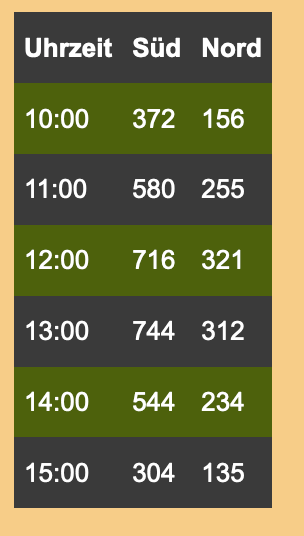
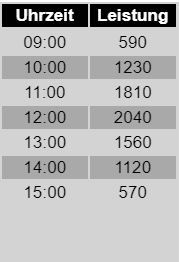
                    Sieht so aus:

                    Vis_Table.JPG

                    Bitte verzichtet auf Chat-Nachrichten, denn die Handhabung ist grauenhaft !
                    Produktiv: RPi 2 mit S.USV, HM-MOD-RPI und SLC-USB-Stick mit root fs

                    1 Reply Last reply
                    0
                    • JB_SullivanJ Offline
                      JB_SullivanJ Offline
                      JB_Sullivan
                      wrote on last edited by JB_Sullivan
                      #32

                      Vielen Dank euch beiden, das ihr Euch für mich den Kopf zerbrecht ;)

                      Ja eine Grafik wäre cool. Kann man das vielleicht so machen, das man Datenpunkte generiert, welche die Zeit von 6:00 - 22:00 (wegen Sommer) im 30 Minuten Rhythmus abdecken (also 32 DPs).
                      Diese 32 DP`s trackt man via History oder InfluxDB, wodurch man sich mit FLOT oder GRAFANA dann ein Diagramm basteln kann.

                      Vielleicht geht es auch eleganter, aber für mich als Laien wäre das so eine Idee, wie man ggf. ein Diagramm aus den rein kommenden Daten basteln könnte.

                      @Gargano - nimm mal oben aus dem Skript deine Geodaten raus - muss ja nicht jeder wissen wo du wohnst - oder?

                      Achso - das mit der VIS Tabelle habe ich dank Eurer Skripte auch hin bekommen
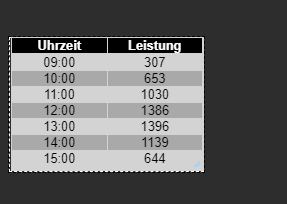
                      21e399ba-50b2-4768-87c4-66f4c70dc517-image.png

                      PS: Das Skript ist aber nach wie vor nur für eine Ausrichtung - oder?

                      Habe im übrigen noch eine coole Seite gefunden, für Leute welche PV-Prognosen für ihren Standort anzeigen lassen wollen.

                      https://re.jrc.ec.europa.eu/pvg_tools/en/#PVP

                      ioBroker (since 2018) auf Intel Core i3-5005U NUC und Windwos10 Pro

                      paul53P GarganoG 2 Replies Last reply
                      0
                      • JB_SullivanJ JB_Sullivan

                        Vielen Dank euch beiden, das ihr Euch für mich den Kopf zerbrecht ;)

                        Ja eine Grafik wäre cool. Kann man das vielleicht so machen, das man Datenpunkte generiert, welche die Zeit von 6:00 - 22:00 (wegen Sommer) im 30 Minuten Rhythmus abdecken (also 32 DPs).
                        Diese 32 DP`s trackt man via History oder InfluxDB, wodurch man sich mit FLOT oder GRAFANA dann ein Diagramm basteln kann.

                        Vielleicht geht es auch eleganter, aber für mich als Laien wäre das so eine Idee, wie man ggf. ein Diagramm aus den rein kommenden Daten basteln könnte.

                        @Gargano - nimm mal oben aus dem Skript deine Geodaten raus - muss ja nicht jeder wissen wo du wohnst - oder?

                        Achso - das mit der VIS Tabelle habe ich dank Eurer Skripte auch hin bekommen

                        21e399ba-50b2-4768-87c4-66f4c70dc517-image.png

                        PS: Das Skript ist aber nach wie vor nur für eine Ausrichtung - oder?

                        Habe im übrigen noch eine coole Seite gefunden, für Leute welche PV-Prognosen für ihren Standort anzeigen lassen wollen.

                        https://re.jrc.ec.europa.eu/pvg_tools/en/#PVP

                        paul53P Offline
                        paul53P Offline
                        paul53
                        wrote on last edited by paul53
                        #33

                        @JB_Sullivan sagte:

                        Das Skript ist aber nach wie vor nur für eine Ausrichtung - oder?

                        Ja.

                        @JB_Sullivan sagte in Forecast.solar mit dem Systeminfo Adapter:

                        Kann man das vielleicht so machen, das man Datenpunkte generiert, welche die Zeit von 6:00 - 22:00 (wegen Sommer) im 30 Minuten Rhythmus abdecken (also 32 DPs).

                        Die Daten werden nur im Stunden-Rhythmus geliefert. Im Sommer wird die Tabelle automatisch länger.

                        Bitte verzichtet auf Chat-Nachrichten, denn die Handhabung ist grauenhaft !
                        Produktiv: RPi 2 mit S.USV, HM-MOD-RPI und SLC-USB-Stick mit root fs

                        1 Reply Last reply
                        0
                        • JB_SullivanJ JB_Sullivan

                          Vielen Dank euch beiden, das ihr Euch für mich den Kopf zerbrecht ;)

                          Ja eine Grafik wäre cool. Kann man das vielleicht so machen, das man Datenpunkte generiert, welche die Zeit von 6:00 - 22:00 (wegen Sommer) im 30 Minuten Rhythmus abdecken (also 32 DPs).
                          Diese 32 DP`s trackt man via History oder InfluxDB, wodurch man sich mit FLOT oder GRAFANA dann ein Diagramm basteln kann.

                          Vielleicht geht es auch eleganter, aber für mich als Laien wäre das so eine Idee, wie man ggf. ein Diagramm aus den rein kommenden Daten basteln könnte.

                          @Gargano - nimm mal oben aus dem Skript deine Geodaten raus - muss ja nicht jeder wissen wo du wohnst - oder?

                          Achso - das mit der VIS Tabelle habe ich dank Eurer Skripte auch hin bekommen

                          21e399ba-50b2-4768-87c4-66f4c70dc517-image.png

                          PS: Das Skript ist aber nach wie vor nur für eine Ausrichtung - oder?

                          Habe im übrigen noch eine coole Seite gefunden, für Leute welche PV-Prognosen für ihren Standort anzeigen lassen wollen.

                          https://re.jrc.ec.europa.eu/pvg_tools/en/#PVP

                          GarganoG Offline
                          GarganoG Offline
                          Gargano
                          wrote on last edited by Gargano
                          #34

                          @JB_Sullivan So, jetzt gibts es ein Objekt JSONTable für beide Ausrichtungen
                          Bitte unter options1 und options2 die enstprechenden Werte eintragen
                          Unter SolarJSONTable ist dann das Objekt mit beiden Ausrichtungen

                          
                          const SolarJSON1        = "javascript.0.SolarForecast.JSON1";
                          const SolarJSON2        = "javascript.0.SolarForecast.JSON2";
                          const SolarJSONTable    = "javascript.0.SolarForecast.JSONTable";
                          
                          const creatStateList = [
                              {name :SolarJSON1, type:"string", role : "value"},
                              {name :SolarJSON2, type:"string", role : "value"},
                              {name :SolarJSONTable, type:"string", role : "value"}
                          ]
                          
                          creatStateList.forEach (function(item) {
                              createState(item.name, { 
                                  type: item.type,
                                  min: 0,
                                  def: 0,
                                  role: item.role
                              });
                          });
                          
                          var request = require('request');
                          var options1 = {url: 'https://api.forecast.solar/estimate/lat1/lon1/45/45/1', method: 'GET', headers: { 'User-Agent': 'request' }};
                          var options2 = {url: 'https://api.forecast.solar/estimate/lat2/lon2/45/-45/1', method: 'GET', headers: { 'User-Agent': 'request' }};
                          
                          var urls = [
                            {myUrl:options1,mySolarJSON:SolarJSON1},
                            {myUrl:options2,mySolarJSON:SolarJSON2}
                          ]
                          
                          var promises = urls.map(myAsyncRequest);
                          
                          schedule({hour: 00, minute: 30}, getSolar );
                          getSolar();
                          
                          function myAsyncRequest(myUrl) {
                            log('Request '+myUrl.myUrl.url);
                            return new Promise((resolve, reject) => {
                               request(myUrl.myUrl.url, function(error, response, body) {
                                  if (!error && response.statusCode == 200) {
                            
                                      let today = formatDate(new Date(), 'YYYY-MM-DD');
                                      let watts = JSON.parse(body).result.watts;  
                                      let table = [];
                                      for(let time in watts) {
                                          let pos = time.indexOf(':00:00');
                                          if(time.includes(today) && pos != -1) {
                                              let entry = {};
                                              entry.Uhrzeit = time.substr(pos - 2, 5);
                                              entry.Leistung = watts[time];
                                              table.push(entry);
                                          }
                                      }  
                                      log ('JSON: '+myUrl.mySolarJSON);
                                      setState(myUrl.mySolarJSON, JSON.stringify(table), true);
                          
                                      resolve (body);
                                  }
                              });  
                            })
                          }
                          
                          
                          function makeTable () {
                              log ('MakeTable');
                              let watts1 = JSON.parse(getState(SolarJSON1).val);
                              let watts2 = JSON.parse(getState(SolarJSON2).val); 
                              log ('Items: '+watts1.length);
                              let table = [];
                              for(var n=0;n<watts1.length;n++) {
                                      let entry = {};
                                      entry.Uhrzeit = watts1[n].Uhrzeit;
                                      entry.Leistung1 = watts1[n].Leistung;
                                      entry.Leistung2 = watts2[n].Leistung;
                                      table.push(entry);
                              }  
                              setState(SolarJSONTable, JSON.stringify(table), true);
                          }
                          
                          
                          function getSolar() {
                           
                            Promise.all(promises)
                            .then(function(bodys) {
                              console.log("All url loaded");
                              makeTable();
                            })
                          
                          }


                          H paul53P JB_SullivanJ 3 Replies Last reply
                          0
                          • GarganoG Gargano

                            @JB_Sullivan So, jetzt gibts es ein Objekt JSONTable für beide Ausrichtungen
                            Bitte unter options1 und options2 die enstprechenden Werte eintragen
                            Unter SolarJSONTable ist dann das Objekt mit beiden Ausrichtungen

                            
                            const SolarJSON1        = "javascript.0.SolarForecast.JSON1";
                            const SolarJSON2        = "javascript.0.SolarForecast.JSON2";
                            const SolarJSONTable    = "javascript.0.SolarForecast.JSONTable";
                            
                            const creatStateList = [
                                {name :SolarJSON1, type:"string", role : "value"},
                                {name :SolarJSON2, type:"string", role : "value"},
                                {name :SolarJSONTable, type:"string", role : "value"}
                            ]
                            
                            creatStateList.forEach (function(item) {
                                createState(item.name, { 
                                    type: item.type,
                                    min: 0,
                                    def: 0,
                                    role: item.role
                                });
                            });
                            
                            var request = require('request');
                            var options1 = {url: 'https://api.forecast.solar/estimate/lat1/lon1/45/45/1', method: 'GET', headers: { 'User-Agent': 'request' }};
                            var options2 = {url: 'https://api.forecast.solar/estimate/lat2/lon2/45/-45/1', method: 'GET', headers: { 'User-Agent': 'request' }};
                            
                            var urls = [
                              {myUrl:options1,mySolarJSON:SolarJSON1},
                              {myUrl:options2,mySolarJSON:SolarJSON2}
                            ]
                            
                            var promises = urls.map(myAsyncRequest);
                            
                            schedule({hour: 00, minute: 30}, getSolar );
                            getSolar();
                            
                            function myAsyncRequest(myUrl) {
                              log('Request '+myUrl.myUrl.url);
                              return new Promise((resolve, reject) => {
                                 request(myUrl.myUrl.url, function(error, response, body) {
                                    if (!error && response.statusCode == 200) {
                              
                                        let today = formatDate(new Date(), 'YYYY-MM-DD');
                                        let watts = JSON.parse(body).result.watts;  
                                        let table = [];
                                        for(let time in watts) {
                                            let pos = time.indexOf(':00:00');
                                            if(time.includes(today) && pos != -1) {
                                                let entry = {};
                                                entry.Uhrzeit = time.substr(pos - 2, 5);
                                                entry.Leistung = watts[time];
                                                table.push(entry);
                                            }
                                        }  
                                        log ('JSON: '+myUrl.mySolarJSON);
                                        setState(myUrl.mySolarJSON, JSON.stringify(table), true);
                            
                                        resolve (body);
                                    }
                                });  
                              })
                            }
                            
                            
                            function makeTable () {
                                log ('MakeTable');
                                let watts1 = JSON.parse(getState(SolarJSON1).val);
                                let watts2 = JSON.parse(getState(SolarJSON2).val); 
                                log ('Items: '+watts1.length);
                                let table = [];
                                for(var n=0;n<watts1.length;n++) {
                                        let entry = {};
                                        entry.Uhrzeit = watts1[n].Uhrzeit;
                                        entry.Leistung1 = watts1[n].Leistung;
                                        entry.Leistung2 = watts2[n].Leistung;
                                        table.push(entry);
                                }  
                                setState(SolarJSONTable, JSON.stringify(table), true);
                            }
                            
                            
                            function getSolar() {
                             
                              Promise.all(promises)
                              .then(function(bodys) {
                                console.log("All url loaded");
                                makeTable();
                              })
                            
                            }


                            H Online
                            H Online
                            holgerwolf
                            wrote on last edited by
                            #35

                            Klappt prima (bis auf die Sonne ;-)

                            3f57cc3c-eec6-439a-a9e7-d4ea6dff2554-grafik.png

                            1 Reply Last reply
                            0
                            • GarganoG Gargano

                              @JB_Sullivan So, jetzt gibts es ein Objekt JSONTable für beide Ausrichtungen
                              Bitte unter options1 und options2 die enstprechenden Werte eintragen
                              Unter SolarJSONTable ist dann das Objekt mit beiden Ausrichtungen

                              
                              const SolarJSON1        = "javascript.0.SolarForecast.JSON1";
                              const SolarJSON2        = "javascript.0.SolarForecast.JSON2";
                              const SolarJSONTable    = "javascript.0.SolarForecast.JSONTable";
                              
                              const creatStateList = [
                                  {name :SolarJSON1, type:"string", role : "value"},
                                  {name :SolarJSON2, type:"string", role : "value"},
                                  {name :SolarJSONTable, type:"string", role : "value"}
                              ]
                              
                              creatStateList.forEach (function(item) {
                                  createState(item.name, { 
                                      type: item.type,
                                      min: 0,
                                      def: 0,
                                      role: item.role
                                  });
                              });
                              
                              var request = require('request');
                              var options1 = {url: 'https://api.forecast.solar/estimate/lat1/lon1/45/45/1', method: 'GET', headers: { 'User-Agent': 'request' }};
                              var options2 = {url: 'https://api.forecast.solar/estimate/lat2/lon2/45/-45/1', method: 'GET', headers: { 'User-Agent': 'request' }};
                              
                              var urls = [
                                {myUrl:options1,mySolarJSON:SolarJSON1},
                                {myUrl:options2,mySolarJSON:SolarJSON2}
                              ]
                              
                              var promises = urls.map(myAsyncRequest);
                              
                              schedule({hour: 00, minute: 30}, getSolar );
                              getSolar();
                              
                              function myAsyncRequest(myUrl) {
                                log('Request '+myUrl.myUrl.url);
                                return new Promise((resolve, reject) => {
                                   request(myUrl.myUrl.url, function(error, response, body) {
                                      if (!error && response.statusCode == 200) {
                                
                                          let today = formatDate(new Date(), 'YYYY-MM-DD');
                                          let watts = JSON.parse(body).result.watts;  
                                          let table = [];
                                          for(let time in watts) {
                                              let pos = time.indexOf(':00:00');
                                              if(time.includes(today) && pos != -1) {
                                                  let entry = {};
                                                  entry.Uhrzeit = time.substr(pos - 2, 5);
                                                  entry.Leistung = watts[time];
                                                  table.push(entry);
                                              }
                                          }  
                                          log ('JSON: '+myUrl.mySolarJSON);
                                          setState(myUrl.mySolarJSON, JSON.stringify(table), true);
                              
                                          resolve (body);
                                      }
                                  });  
                                })
                              }
                              
                              
                              function makeTable () {
                                  log ('MakeTable');
                                  let watts1 = JSON.parse(getState(SolarJSON1).val);
                                  let watts2 = JSON.parse(getState(SolarJSON2).val); 
                                  log ('Items: '+watts1.length);
                                  let table = [];
                                  for(var n=0;n<watts1.length;n++) {
                                          let entry = {};
                                          entry.Uhrzeit = watts1[n].Uhrzeit;
                                          entry.Leistung1 = watts1[n].Leistung;
                                          entry.Leistung2 = watts2[n].Leistung;
                                          table.push(entry);
                                  }  
                                  setState(SolarJSONTable, JSON.stringify(table), true);
                              }
                              
                              
                              function getSolar() {
                               
                                Promise.all(promises)
                                .then(function(bodys) {
                                  console.log("All url loaded");
                                  makeTable();
                                })
                              
                              }


                              paul53P Offline
                              paul53P Offline
                              paul53
                              wrote on last edited by
                              #36

                              @Gargano sagte:

                              JSONTable für beide Ausrichtungen

                              Die Lösung setzt voraus, dass beide Ausrichtungen mit der selben Uhrzeit beginnen und die gleiche Anzahl an Einträgen haben.

                              Bitte verzichtet auf Chat-Nachrichten, denn die Handhabung ist grauenhaft !
                              Produktiv: RPi 2 mit S.USV, HM-MOD-RPI und SLC-USB-Stick mit root fs

                              GarganoG 1 Reply Last reply
                              0
                              • paul53P paul53

                                @Gargano sagte:

                                JSONTable für beide Ausrichtungen

                                Die Lösung setzt voraus, dass beide Ausrichtungen mit der selben Uhrzeit beginnen und die gleiche Anzahl an Einträgen haben.

                                GarganoG Offline
                                GarganoG Offline
                                Gargano
                                wrote on last edited by
                                #37

                                @paul53 Richtig, da aber die beiden Abfragen zur gleichen Zeit sind , wird dies wohl immer so sein

                                paul53P 1 Reply Last reply
                                0
                                • GarganoG Gargano

                                  @paul53 Richtig, da aber die beiden Abfragen zur gleichen Zeit sind , wird dies wohl immer so sein

                                  paul53P Offline
                                  paul53P Offline
                                  paul53
                                  wrote on last edited by
                                  #38

                                  @Gargano sagte:

                                  da aber die beiden Abfragen zur gleichen Zeit sind , wird dies wohl immer so sein

                                  Das glaube ich nicht bei Ausrichtung Ost/West.

                                  Bitte verzichtet auf Chat-Nachrichten, denn die Handhabung ist grauenhaft !
                                  Produktiv: RPi 2 mit S.USV, HM-MOD-RPI und SLC-USB-Stick mit root fs

                                  GarganoG 1 Reply Last reply
                                  0
                                  • paul53P paul53

                                    @Gargano sagte:

                                    da aber die beiden Abfragen zur gleichen Zeit sind , wird dies wohl immer so sein

                                    Das glaube ich nicht bei Ausrichtung Ost/West.

                                    GarganoG Offline
                                    GarganoG Offline
                                    Gargano
                                    wrote on last edited by
                                    #39

                                    @paul53 Kannst ja mal einen genialen Algorithmus in der Funktion makeTable einfügen, der dies berücksichtigt.

                                    1 Reply Last reply
                                    0
                                    • GarganoG Gargano

                                      @JB_Sullivan So, jetzt gibts es ein Objekt JSONTable für beide Ausrichtungen
                                      Bitte unter options1 und options2 die enstprechenden Werte eintragen
                                      Unter SolarJSONTable ist dann das Objekt mit beiden Ausrichtungen

                                      
                                      const SolarJSON1        = "javascript.0.SolarForecast.JSON1";
                                      const SolarJSON2        = "javascript.0.SolarForecast.JSON2";
                                      const SolarJSONTable    = "javascript.0.SolarForecast.JSONTable";
                                      
                                      const creatStateList = [
                                          {name :SolarJSON1, type:"string", role : "value"},
                                          {name :SolarJSON2, type:"string", role : "value"},
                                          {name :SolarJSONTable, type:"string", role : "value"}
                                      ]
                                      
                                      creatStateList.forEach (function(item) {
                                          createState(item.name, { 
                                              type: item.type,
                                              min: 0,
                                              def: 0,
                                              role: item.role
                                          });
                                      });
                                      
                                      var request = require('request');
                                      var options1 = {url: 'https://api.forecast.solar/estimate/lat1/lon1/45/45/1', method: 'GET', headers: { 'User-Agent': 'request' }};
                                      var options2 = {url: 'https://api.forecast.solar/estimate/lat2/lon2/45/-45/1', method: 'GET', headers: { 'User-Agent': 'request' }};
                                      
                                      var urls = [
                                        {myUrl:options1,mySolarJSON:SolarJSON1},
                                        {myUrl:options2,mySolarJSON:SolarJSON2}
                                      ]
                                      
                                      var promises = urls.map(myAsyncRequest);
                                      
                                      schedule({hour: 00, minute: 30}, getSolar );
                                      getSolar();
                                      
                                      function myAsyncRequest(myUrl) {
                                        log('Request '+myUrl.myUrl.url);
                                        return new Promise((resolve, reject) => {
                                           request(myUrl.myUrl.url, function(error, response, body) {
                                              if (!error && response.statusCode == 200) {
                                        
                                                  let today = formatDate(new Date(), 'YYYY-MM-DD');
                                                  let watts = JSON.parse(body).result.watts;  
                                                  let table = [];
                                                  for(let time in watts) {
                                                      let pos = time.indexOf(':00:00');
                                                      if(time.includes(today) && pos != -1) {
                                                          let entry = {};
                                                          entry.Uhrzeit = time.substr(pos - 2, 5);
                                                          entry.Leistung = watts[time];
                                                          table.push(entry);
                                                      }
                                                  }  
                                                  log ('JSON: '+myUrl.mySolarJSON);
                                                  setState(myUrl.mySolarJSON, JSON.stringify(table), true);
                                      
                                                  resolve (body);
                                              }
                                          });  
                                        })
                                      }
                                      
                                      
                                      function makeTable () {
                                          log ('MakeTable');
                                          let watts1 = JSON.parse(getState(SolarJSON1).val);
                                          let watts2 = JSON.parse(getState(SolarJSON2).val); 
                                          log ('Items: '+watts1.length);
                                          let table = [];
                                          for(var n=0;n<watts1.length;n++) {
                                                  let entry = {};
                                                  entry.Uhrzeit = watts1[n].Uhrzeit;
                                                  entry.Leistung1 = watts1[n].Leistung;
                                                  entry.Leistung2 = watts2[n].Leistung;
                                                  table.push(entry);
                                          }  
                                          setState(SolarJSONTable, JSON.stringify(table), true);
                                      }
                                      
                                      
                                      function getSolar() {
                                       
                                        Promise.all(promises)
                                        .then(function(bodys) {
                                          console.log("All url loaded");
                                          makeTable();
                                        })
                                      
                                      }


                                      JB_SullivanJ Offline
                                      JB_SullivanJ Offline
                                      JB_Sullivan
                                      wrote on last edited by JB_Sullivan
                                      #40

                                      @Gargano

                                      Sieht gut aus - kannst du ggf. Noch eine Summen Bildung von Leistung 1 & 2 mit in die Tabelle aufnehmen?
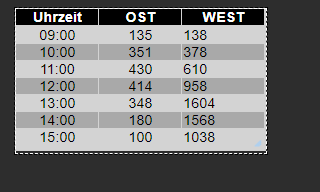
                                      e5061836-c812-4deb-8d19-e2600ddda9ff-image.png

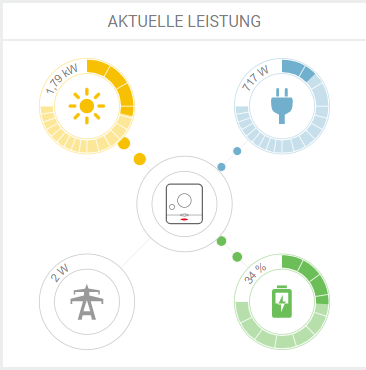
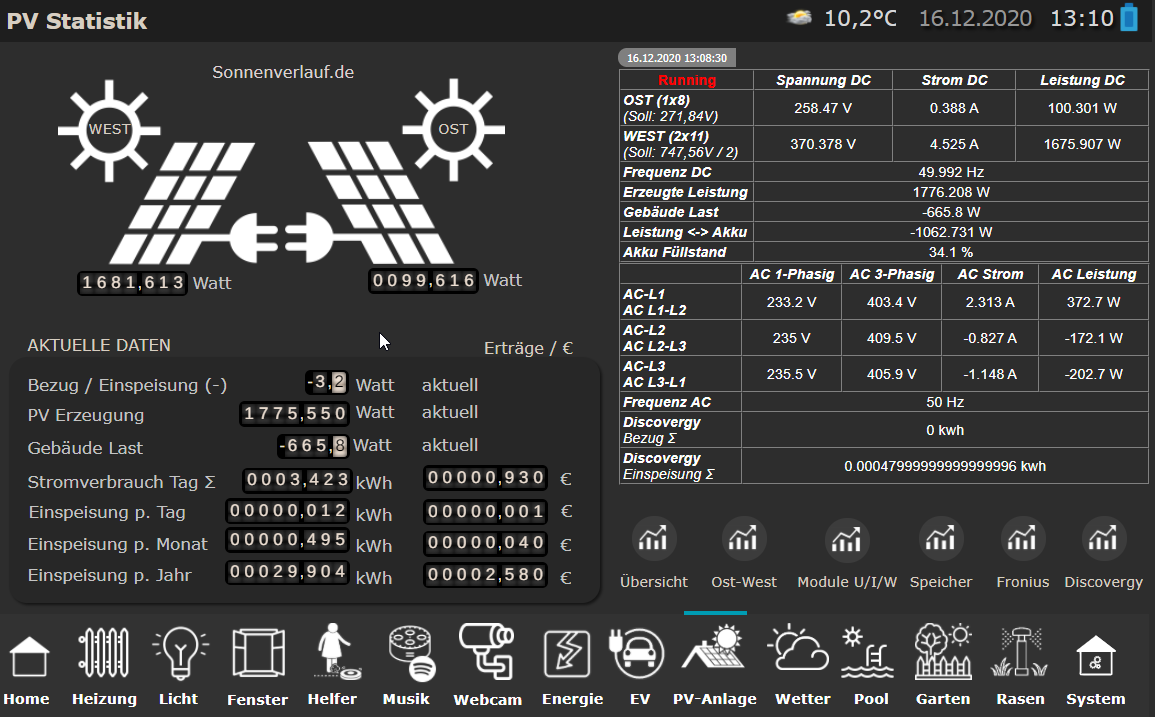
                                      Der Hammer ist, das dass ziehmlich gut passt - 13:00 Uhr lt. Forecast 1952 Watt.

                                      Real guckst du: Um die ~ 150 Watt wollen wir uns jetzt nicht streiten ;)
                                      08aabdd3-e97d-4b64-96ab-9a6695cc0b32-image.png

                                      Auch die Aufteilung OST / WEST ist dicht an den prognostiziereten Werten.
                                      63338181-2867-403e-98ac-461d82e93e67-image.png

                                      ioBroker (since 2018) auf Intel Core i3-5005U NUC und Windwos10 Pro

                                      paul53P GarganoG 2 Replies Last reply
                                      0
                                      • JB_SullivanJ JB_Sullivan

                                        @Gargano

                                        Sieht gut aus - kannst du ggf. Noch eine Summen Bildung von Leistung 1 & 2 mit in die Tabelle aufnehmen?

                                        e5061836-c812-4deb-8d19-e2600ddda9ff-image.png

                                        Der Hammer ist, das dass ziehmlich gut passt - 13:00 Uhr lt. Forecast 1952 Watt.

                                        Real guckst du: Um die ~ 150 Watt wollen wir uns jetzt nicht streiten ;)

                                        08aabdd3-e97d-4b64-96ab-9a6695cc0b32-image.png

                                        Auch die Aufteilung OST / WEST ist dicht an den prognostiziereten Werten.

                                        63338181-2867-403e-98ac-461d82e93e67-image.png

                                        paul53P Offline
                                        paul53P Offline
                                        paul53
                                        wrote on last edited by
                                        #41

                                        @JB_Sullivan sagte:

                                        Sieht gut aus

                                        Wie sieht es aus, wenn für options1 die Westausrichtung gewählt wird ?

                                        Bitte verzichtet auf Chat-Nachrichten, denn die Handhabung ist grauenhaft !
                                        Produktiv: RPi 2 mit S.USV, HM-MOD-RPI und SLC-USB-Stick mit root fs

                                        JB_SullivanJ 1 Reply Last reply
                                        0
                                        • paul53P paul53

                                          @JB_Sullivan sagte:

                                          Sieht gut aus

                                          Wie sieht es aus, wenn für options1 die Westausrichtung gewählt wird ?

                                          JB_SullivanJ Offline
                                          JB_SullivanJ Offline
                                          JB_Sullivan
                                          wrote on last edited by
                                          #42

                                          @paul53

                                          Interessant - dann sieht es anderes aus - allerdings habe ich auch unterschiedlich starke Belegungen auf OST und West
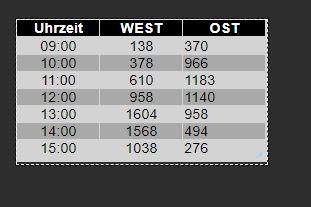
                                          86ef6199-e6ab-4677-9735-ecdd0dd7b107-image.png

                                          https://api.forecast.solar/estimate/52.xx/10.xx/40/90/7.26
                                          https://api.forecast.solar/estimate/52.xx/10.xx/40/-90/2.64

                                          ioBroker (since 2018) auf Intel Core i3-5005U NUC und Windwos10 Pro

                                          1 Reply Last reply
                                          0

                                          Hello! It looks like you're interested in this conversation, but you don't have an account yet.

                                          Getting fed up of having to scroll through the same posts each visit? When you register for an account, you'll always come back to exactly where you were before, and choose to be notified of new replies (either via email, or push notification). You'll also be able to save bookmarks and upvote posts to show your appreciation to other community members.

                                          With your input, this post could be even better 💗

                                          Register Login
                                          Reply
                                          • Reply as topic
                                          Log in to reply
                                          • Oldest to Newest
                                          • Newest to Oldest
                                          • Most Votes


                                          Support us

                                          ioBroker
                                          Community Adapters
                                          Donate
                                          FAQ Cloud / IOT
                                          HowTo: Node.js-Update
                                          HowTo: Backup/Restore
                                          Downloads
                                          BLOG

                                          504

                                          Online

                                          32.7k

                                          Users

                                          82.6k

                                          Topics

                                          1.3m

                                          Posts
                                          Community
                                          Impressum | Datenschutz-Bestimmungen | Nutzungsbedingungen | Einwilligungseinstellungen
                                          ioBroker Community 2014-2025
                                          logo
                                          • Login

                                          • Don't have an account? Register

                                          • Login or register to search.
                                          • First post
                                            Last post
                                          0
                                          • Home
                                          • Recent
                                          • Tags
                                          • Unread 0
                                          • Categories
                                          • Unreplied
                                          • Popular
                                          • GitHub
                                          • Docu
                                          • Hilfe