Skip to content
  • Home
  • Recent
  • Tags
  • 0 Unread 0
  • Categories
  • Unreplied
  • Popular
  • GitHub
  • Docu
  • Hilfe
Skins
  • Light
  • Brite
  • Cerulean
  • Cosmo
  • Flatly
  • Journal
  • Litera
  • Lumen
  • Lux
  • Materia
  • Minty
  • Morph
  • Pulse
  • Sandstone
  • Simplex
  • Sketchy
  • Spacelab
  • United
  • Yeti
  • Zephyr
  • Dark
  • Cyborg
  • Darkly
  • Quartz
  • Slate
  • Solar
  • Superhero
  • Vapor

  • Default (No Skin)
  • No Skin
Collapse
ioBroker Logo

Community Forum

donate donate
  1. ioBroker Community Home
  2. Deutsch
  3. Skripten / Logik
  4. Daten aus Url abfragen und in Datenpunkt schreiben

NEWS

  • UPDATE 31.10.: Amazon Alexa - ioBroker Skill läuft aus ?
    apollon77A
    apollon77
    48
    3
    8.9k

  • Monatsrückblick – September 2025
    BluefoxB
    Bluefox
    13
    1
    2.2k

  • Neues Video "KI im Smart Home" - ioBroker plus n8n
    BluefoxB
    Bluefox
    16
    1
    3.4k

Daten aus Url abfragen und in Datenpunkt schreiben

Scheduled Pinned Locked Moved Unsolved Skripten / Logik
blocklycommunicationjavascriptmonitoring
50 Posts 14 Posters 9.6k Views 10 Watching
  • Oldest to Newest
  • Newest to Oldest
  • Most Votes
Reply
  • Reply as topic
Log in to reply
This topic has been deleted. Only users with topic management privileges can see it.
  • E el_malto

    Und hier dann gleich noch ein Blockly.
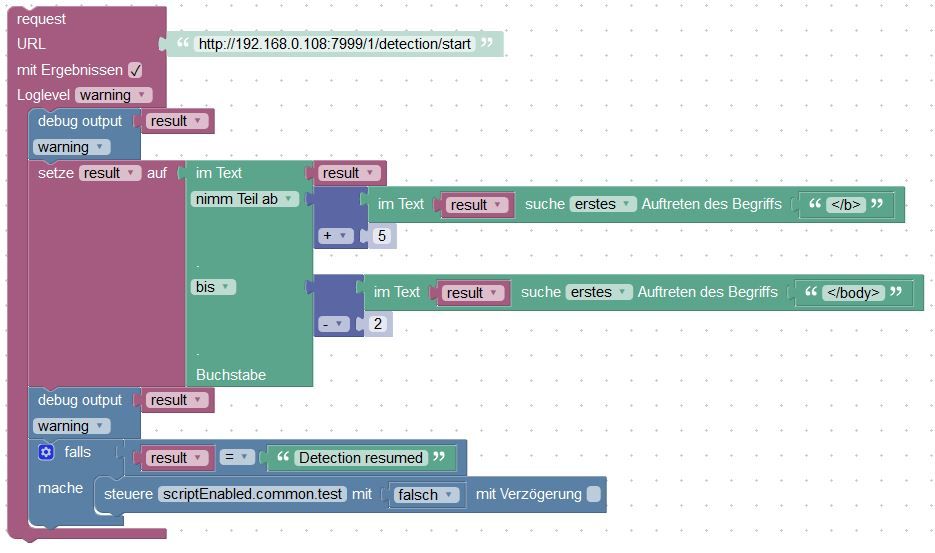
    Unbenannt.JPG
    Loglevel kann man natürlich ändern. War nur zum testen. Ebenso das letzte debug output war nur zum test um zu im log gucken wie der output aussieht.

    P Offline
    P Offline
    ps1304
    wrote on last edited by
    #38

    @el_malto
    evtl. kannst du mir einen Tipp geben mit dem Blocky.
    Will den UV-Wert aus einer Webseite auslesen.

    Webseite: https://api.openuv.io/api/v1/uv?lat=49.36&lng=8.25&dt=2018-01-24T10:50:52.283Z' \ -H 'x-access-token: 4f4f65045b988eb3f2ad959b1886f525

    Das Resultat der URL sollte so aussehen:

    {

    -
    "result": {
        "uv": 7.0454,
        "uv_time": "2021-06-03T10:03:09.828Z",
        "uv_max": 7.8131,
        "uv_max_time": "2021-06-03T11:26:37.081Z",
        "ozone": 328.5,
        "ozone_time": "2021-06-03T09:04:07.922Z",
        -
        "safe_exposure_time": {
            "st1": 24,
            "st2": 28,
            "st3": 38,
            "st4": 47,
            "st5": 76,
            "st6": 142
        },
        -
        "sun_info": {
            -
            "sun_times": {
                "solarNoon": "2021-06-03T11:26:37.081Z",
                "nadir": "2021-06-02T23:26:37.081Z",
                "sunrise": "2021-06-03T03:25:55.512Z",
                "sunset": "2021-06-03T19:27:18.650Z",
                "sunriseEnd": "2021-06-03T03:29:59.850Z",
                "sunsetStart": "2021-06-03T19:23:14.312Z",
                "dawn": "2021-06-03T02:43:51.160Z",
                "dusk": "2021-06-03T20:09:23.002Z",
                "nauticalDawn": "2021-06-03T01:44:50.294Z",
                "nauticalDusk": "2021-06-03T21:08:23.868Z",
                "nightEnd": "2021-06-02T23:56:41.971Z",
                "night": "2021-06-03T22:56:32.191Z",
                "goldenHourEnd": "2021-06-03T04:15:35.318Z",
                "goldenHour": "2021-06-03T18:37:38.844Z"
            },
            -
            "sun_position": {
                "azimuth": -0.6715074136164529,
                "altitude": 1.0200626838376345
            }
        }
    }
    

    }

    Mein Blocky:

    Blocky-UV.PNG

    Fehler:
    Blocky-Error.PNG

    F 1 Reply Last reply
    0
    • P ps1304

      @el_malto
      evtl. kannst du mir einen Tipp geben mit dem Blocky.
      Will den UV-Wert aus einer Webseite auslesen.

      Webseite: https://api.openuv.io/api/v1/uv?lat=49.36&lng=8.25&dt=2018-01-24T10:50:52.283Z' \ -H 'x-access-token: 4f4f65045b988eb3f2ad959b1886f525

      Das Resultat der URL sollte so aussehen:

      {

      -
      "result": {
          "uv": 7.0454,
          "uv_time": "2021-06-03T10:03:09.828Z",
          "uv_max": 7.8131,
          "uv_max_time": "2021-06-03T11:26:37.081Z",
          "ozone": 328.5,
          "ozone_time": "2021-06-03T09:04:07.922Z",
          -
          "safe_exposure_time": {
              "st1": 24,
              "st2": 28,
              "st3": 38,
              "st4": 47,
              "st5": 76,
              "st6": 142
          },
          -
          "sun_info": {
              -
              "sun_times": {
                  "solarNoon": "2021-06-03T11:26:37.081Z",
                  "nadir": "2021-06-02T23:26:37.081Z",
                  "sunrise": "2021-06-03T03:25:55.512Z",
                  "sunset": "2021-06-03T19:27:18.650Z",
                  "sunriseEnd": "2021-06-03T03:29:59.850Z",
                  "sunsetStart": "2021-06-03T19:23:14.312Z",
                  "dawn": "2021-06-03T02:43:51.160Z",
                  "dusk": "2021-06-03T20:09:23.002Z",
                  "nauticalDawn": "2021-06-03T01:44:50.294Z",
                  "nauticalDusk": "2021-06-03T21:08:23.868Z",
                  "nightEnd": "2021-06-02T23:56:41.971Z",
                  "night": "2021-06-03T22:56:32.191Z",
                  "goldenHourEnd": "2021-06-03T04:15:35.318Z",
                  "goldenHour": "2021-06-03T18:37:38.844Z"
              },
              -
              "sun_position": {
                  "azimuth": -0.6715074136164529,
                  "altitude": 1.0200626838376345
              }
          }
      }
      

      }

      Mein Blocky:
      Blocky-UV.PNG

      Fehler:
      Blocky-Error.PNG

      F Offline
      F Offline
      fastfoot
      wrote on last edited by fastfoot
      #39

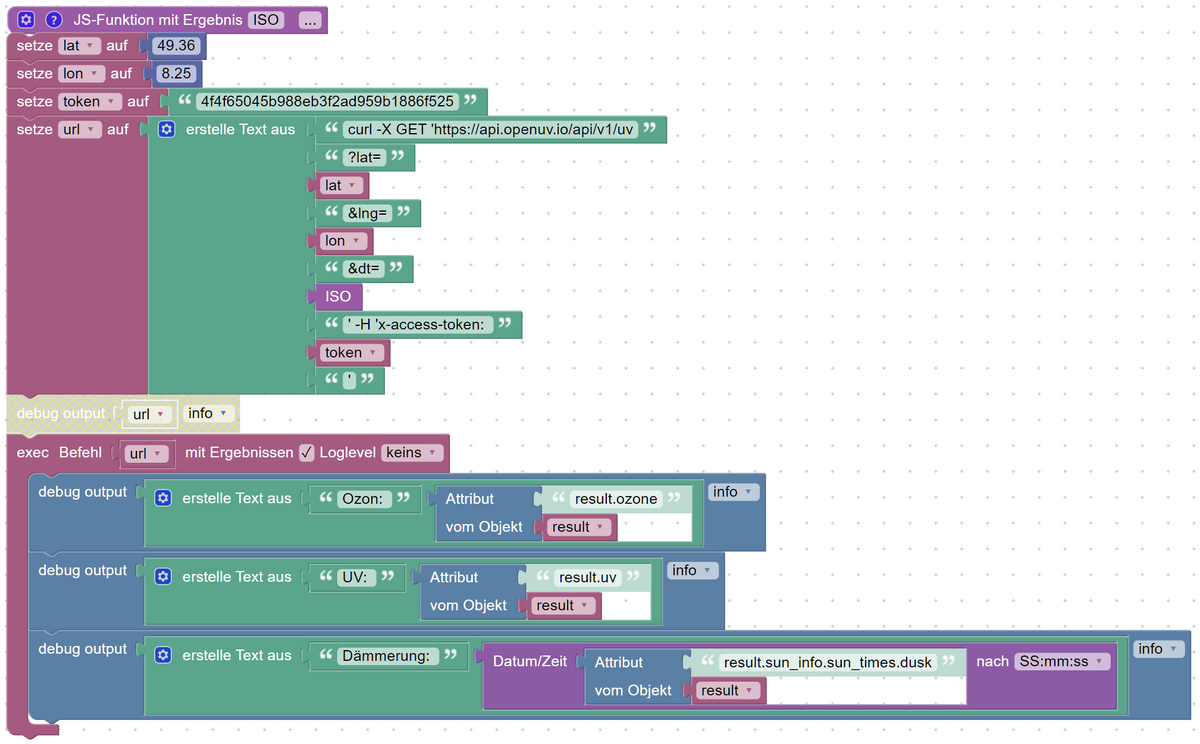
      @ps1304 Das musst du mit Exec machen
      UV-Werte2.PNG

      <xml xmlns="https://developers.google.com/blockly/xml">
       <variables>
         <variable id="r)q(=l.(fO2$sQ*9)`o|">lat</variable>
         <variable id="7Bf_zZ,|3JbY[Sr;;[ZR">lon</variable>
         <variable id="iJUofjFj{4E4E[XLB$;;">token</variable>
         <variable id="]^02}el_a.}BLFPBoK_k">url</variable>
         <variable id="uL@O#?q};$[1_?SuB(Zz">result</variable>
       </variables>
       <block type="procedures_defcustomreturn" id="j,Uv*5`KC6=o+k#Yn*}r" x="13" y="62">
         <mutation statements="false"></mutation>
         <field name="NAME">ISO</field>
         <field name="SCRIPT">cmV0dXJuIG5ldyBEYXRlKCkudG9JU09TdHJpbmcoKTs=</field>
         <comment pinned="false" h="80" w="160">Beschreibe diese Funktion …</comment>
       </block>
       <block type="variables_set" id="f{$FuDQUkMUL~PSmgYc%" x="12" y="87">
         <field name="VAR" id="r)q(=l.(fO2$sQ*9)`o|">lat</field>
         <value name="VALUE">
           <block type="math_number" id="ZsdPU*L3/[#qSd=9:fs~">
             <field name="NUM">49.36</field>
           </block>
         </value>
         <next>
           <block type="variables_set" id="oZi#MCqD_bTw.JTc}v`b">
             <field name="VAR" id="7Bf_zZ,|3JbY[Sr;;[ZR">lon</field>
             <value name="VALUE">
               <block type="math_number" id="*ac]BBC-hY`h1BH2+Xf$">
                 <field name="NUM">8.25</field>
               </block>
             </value>
             <next>
               <block type="variables_set" id="LUEg@D^vS=sJ?/$uMt2V">
                 <field name="VAR" id="iJUofjFj{4E4E[XLB$;;">token</field>
                 <value name="VALUE">
                   <block type="text" id="aV+U5=4|}#:a5_q%fQGx">
                     <field name="TEXT">4f4f65045b988eb3f2ad959b1886f525</field>
                   </block>
                 </value>
                 <next>
                   <block type="variables_set" id="R73J$#MIp8_Vp*g;I_Vd">
                     <field name="VAR" id="]^02}el_a.}BLFPBoK_k">url</field>
                     <value name="VALUE">
                       <block type="text_join" id="8jU@k?nm1-!HF2EEhP2B" inline="false">
                         <mutation items="10"></mutation>
                         <value name="ADD0">
                           <block type="text" id="(xi=zG)5zzu1VUWR5_yI">
                             <field name="TEXT">curl -X GET 'https://api.openuv.io/api/v1/uv</field>
                           </block>
                         </value>
                         <value name="ADD1">
                           <block type="text" id="QGeRt@XIf9B0]rt/[5/V">
                             <field name="TEXT">?lat=</field>
                           </block>
                         </value>
                         <value name="ADD2">
                           <block type="variables_get" id="7yOgrRt2~jH-)vR$lsZ,">
                             <field name="VAR" id="r)q(=l.(fO2$sQ*9)`o|">lat</field>
                           </block>
                         </value>
                         <value name="ADD3">
                           <block type="text" id="k]elWH-i.E_[)y^YWeUE">
                             <field name="TEXT">&amp;lng=</field>
                           </block>
                         </value>
                         <value name="ADD4">
                           <block type="variables_get" id="gq[];Hf#m9^Bz:!)`nT4">
                             <field name="VAR" id="7Bf_zZ,|3JbY[Sr;;[ZR">lon</field>
                           </block>
                         </value>
                         <value name="ADD5">
                           <block type="text" id="!0y$S%JfGYrQB442Yb5f">
                             <field name="TEXT">&amp;dt=</field>
                           </block>
                         </value>
                         <value name="ADD6">
                           <block type="procedures_callcustomreturn" id="/pzhTHC#/npmQu({W{pn">
                             <mutation name="ISO"></mutation>
                           </block>
                         </value>
                         <value name="ADD7">
                           <block type="text" id="3J]0e%I[m@XENX?yZc9j">
                             <field name="TEXT">' -H 'x-access-token: </field>
                           </block>
                         </value>
                         <value name="ADD8">
                           <block type="variables_get" id="lL|?fLO@Z|``twKY!wLU">
                             <field name="VAR" id="iJUofjFj{4E4E[XLB$;;">token</field>
                           </block>
                         </value>
                         <value name="ADD9">
                           <block type="text" id="`n{XyRJDqX:^L^$$F3a@">
                             <field name="TEXT">'</field>
                           </block>
                         </value>
                       </block>
                     </value>
                     <next>
                       <block type="debug" id="O=+r9m[=^{mr=;C..F[`" inline="true" disabled="true">
                         <field name="Severity">log</field>
                         <value name="TEXT">
                           <shadow type="text" id="hh!S9zzkHd1{Q}*}kz:b">
                             <field name="TEXT">test</field>
                           </shadow>
                           <block type="variables_get" id="s37WFIreI,*m?KSv?{7h">
                             <field name="VAR" id="]^02}el_a.}BLFPBoK_k">url</field>
                           </block>
                         </value>
                         <next>
                           <block type="exec" id="OMwQ%7n75x_$`{4hBZ!c" inline="true">
                             <mutation xmlns="http://www.w3.org/1999/xhtml" with_statement="true"></mutation>
                             <field name="WITH_STATEMENT">TRUE</field>
                             <field name="LOG"></field>
                             <value name="COMMAND">
                               <shadow type="text" id="668`Wbm%~rygt2*$8vPg">
                                 <field name="TEXT"></field>
                               </shadow>
                               <block type="variables_get" id="6gg-WkzGF`JiqCfwl@lx">
                                 <field name="VAR" id="]^02}el_a.}BLFPBoK_k">url</field>
                               </block>
                             </value>
                             <statement name="STATEMENT">
                               <block type="debug" id=":_C%p-ItsgXEF^eza||W" inline="true">
                                 <field name="Severity">log</field>
                                 <value name="TEXT">
                                   <shadow type="text" id="egouHr?gLBvM?{s+n,X^">
                                     <field name="TEXT">test</field>
                                   </shadow>
                                   <block type="text_join" id="UHO[5.rARYb-jNr`AF8`" inline="true">
                                     <mutation items="2"></mutation>
                                     <value name="ADD0">
                                       <block type="text" id="gS{l!j`Z}~kvT;ArzsBK">
                                         <field name="TEXT">Ozon: </field>
                                       </block>
                                     </value>
                                     <value name="ADD1">
                                       <block type="get_attr" id="jqL$%gJC$dA%jbWI8`7Q" inline="false">
                                         <value name="PATH">
                                           <shadow type="text" id="R$`K}$_fhOy`S#^nM;+*">
                                             <field name="TEXT">result.ozone</field>
                                           </shadow>
                                         </value>
                                         <value name="OBJECT">
                                           <block type="variables_get" id="WHlI7Om@d_|0Z^kjCO)G">
                                             <field name="VAR" id="uL@O#?q};$[1_?SuB(Zz">result</field>
                                           </block>
                                         </value>
                                       </block>
                                     </value>
                                   </block>
                                 </value>
                                 <next>
                                   <block type="debug" id="W,=Yv.6Qi9A7P%fz0fAX" inline="true">
                                     <field name="Severity">log</field>
                                     <value name="TEXT">
                                       <shadow type="text">
                                         <field name="TEXT">test</field>
                                       </shadow>
                                       <block type="text_join" id="XAMpBA80y:?/v@+*z/n;" inline="true">
                                         <mutation items="2"></mutation>
                                         <value name="ADD0">
                                           <block type="text" id="pH2:T`%T%%ml!QjJ!eIf">
                                             <field name="TEXT">UV: </field>
                                           </block>
                                         </value>
                                         <value name="ADD1">
                                           <block type="get_attr" id="%=%exdMv%Ev~y#CZlR*-" inline="false">
                                             <value name="PATH">
                                               <shadow type="text" id="3-xVEGSPDAAq`F{9UPLs">
                                                 <field name="TEXT">result.uv</field>
                                               </shadow>
                                             </value>
                                             <value name="OBJECT">
                                               <block type="variables_get" id="-c{^){YOZ*gpjKve[ckB">
                                                 <field name="VAR" id="uL@O#?q};$[1_?SuB(Zz">result</field>
                                               </block>
                                             </value>
                                           </block>
                                         </value>
                                       </block>
                                     </value>
                                     <next>
                                       <block type="debug" id=".xJJ7inIRJ:`X9(`xVC%" inline="true">
                                         <field name="Severity">log</field>
                                         <value name="TEXT">
                                           <shadow type="text">
                                             <field name="TEXT">test</field>
                                           </shadow>
                                           <block type="text_join" id="rTpp-~neNAGeXg+mH4DP" inline="true">
                                             <mutation items="2"></mutation>
                                             <value name="ADD0">
                                               <block type="text" id="*@O8^M^@Ezo-cuWTnup1">
                                                 <field name="TEXT">Dämmerung: </field>
                                               </block>
                                             </value>
                                             <value name="ADD1">
                                               <block type="convert_from_date" id="l_bAD?91I[+MO/2Pbd:P">
                                                 <mutation xmlns="http://www.w3.org/1999/xhtml" format="false" language="false"></mutation>
                                                 <field name="OPTION">hh:mm:ss</field>
                                                 <value name="VALUE">
                                                   <block type="get_attr" id="#FTqim;:)@q}5q/]qwvm" inline="false">
                                                     <value name="PATH">
                                                       <shadow type="text" id="wCoO!qsD.([8:oNjR*0u">
                                                         <field name="TEXT">result.sun_info.sun_times.dusk</field>
                                                       </shadow>
                                                     </value>
                                                     <value name="OBJECT">
                                                       <block type="variables_get" id="#Vf0B6)m7#$r$xbgIn|D">
                                                         <field name="VAR" id="uL@O#?q};$[1_?SuB(Zz">result</field>
                                                       </block>
                                                     </value>
                                                   </block>
                                                 </value>
                                               </block>
                                             </value>
                                           </block>
                                         </value>
                                       </block>
                                     </next>
                                   </block>
                                 </next>
                               </block>
                             </statement>
                           </block>
                         </next>
                       </block>
                     </next>
                   </block>
                 </next>
               </block>
             </next>
           </block>
         </next>
       </block>
      </xml>
      

      iobroker läuft unter Docker auf QNAP TS-451+
      SkriptRecovery: https://forum.iobroker.net/post/930558

      1 Reply Last reply
      1
      • P Offline
        P Offline
        ps1304
        wrote on last edited by
        #40

        @fastfoot super - vielen Dank !!!! - hat mir sehr gehoflen - evtl. ne doofe Frage: wird mit deinem Blocky jetzt schon ein Datenpunkt generiert, den ich auslesen kann? Beispiel: das Attribut "result.uv" als Datenpunkt.

        Gruß Peter

        F 1 Reply Last reply
        0
        • P ps1304

          @fastfoot super - vielen Dank !!!! - hat mir sehr gehoflen - evtl. ne doofe Frage: wird mit deinem Blocky jetzt schon ein Datenpunkt generiert, den ich auslesen kann? Beispiel: das Attribut "result.uv" als Datenpunkt.

          Gruß Peter

          F Offline
          F Offline
          fastfoot
          wrote on last edited by
          #41

          @ps1304 sagte in Daten aus Url abfragen und in Datenpunkt schreiben:

          @fastfoot super - vielen Dank !!!! - hat mir sehr gehoflen - evtl. ne doofe Frage: wird mit deinem Blocky jetzt schon ein Datenpunkt generiert, den ich auslesen kann? Beispiel: das Attribut "result.uv" als Datenpunkt.

          Gruß Peter

          nein, hier werden die Werte nur angezeigt. Schreiben kannst du sie mit dem Aktualisieren-Block

          iobroker läuft unter Docker auf QNAP TS-451+
          SkriptRecovery: https://forum.iobroker.net/post/930558

          P 1 Reply Last reply
          0
          • F fastfoot

            @ps1304 sagte in Daten aus Url abfragen und in Datenpunkt schreiben:

            @fastfoot super - vielen Dank !!!! - hat mir sehr gehoflen - evtl. ne doofe Frage: wird mit deinem Blocky jetzt schon ein Datenpunkt generiert, den ich auslesen kann? Beispiel: das Attribut "result.uv" als Datenpunkt.

            Gruß Peter

            nein, hier werden die Werte nur angezeigt. Schreiben kannst du sie mit dem Aktualisieren-Block

            P Offline
            P Offline
            ps1304
            wrote on last edited by
            #42

            @fastfoot Perfekt - hab ich hingekriegt - danke noochmal für die Hilfe !!!

            1 Reply Last reply
            0
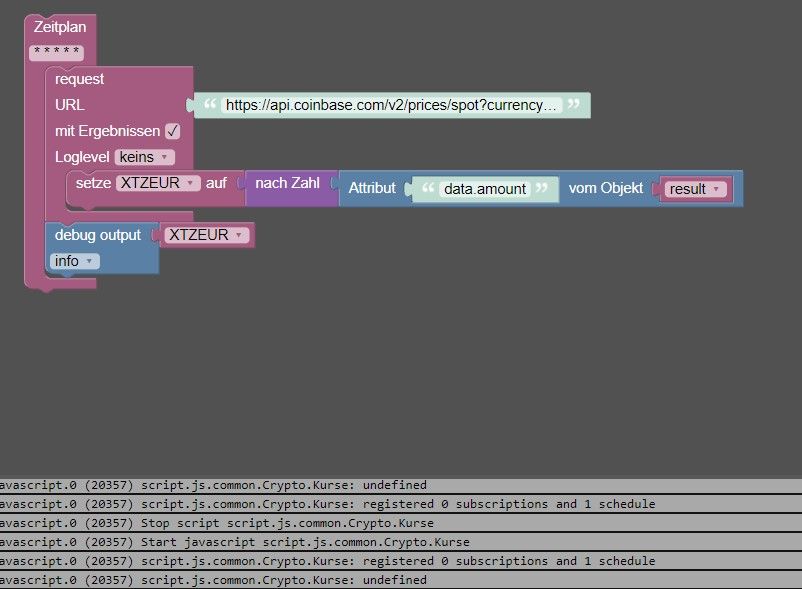
            • paul53P paul53

              @MartinK. said: "https://api.coinbase.com/v2/prices/spot?currency=EUR"

              Mit diesem Link funktioniert es so:
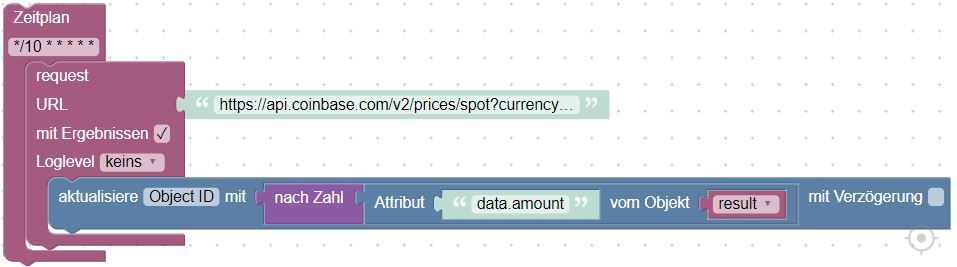
              Blockly_temp.JPG

              A Offline
              A Offline
              Andre 2
              wrote on last edited by
              #43

              @paul53 Wie erstellt man so ein Link?

              paul53P 1 Reply Last reply
              0
              • A Andre 2

                @paul53 Wie erstellt man so ein Link?

                paul53P Offline
                paul53P Offline
                paul53
                wrote on last edited by
                #44

                @andre-2 sagte: Wie erstellt man so ein Link?

                Was für einen Link meinst Du?

                Bitte verzichtet auf Chat-Nachrichten, denn die Handhabung ist grauenhaft !
                Produktiv: RPi 2 mit S.USV, HM-MOD-RPI und SLC-USB-Stick mit root fs

                HomoranH A 2 Replies Last reply
                0
                • paul53P paul53

                  @andre-2 sagte: Wie erstellt man so ein Link?

                  Was für einen Link meinst Du?

                  HomoranH Do not disturb
                  HomoranH Do not disturb
                  Homoran
                  Global Moderator Administrators
                  wrote on last edited by Homoran
                  #45

                  @paul53 sagte :

                  Was für einen Link meinst Du?

                  den abzufragenden URL

                  kein Support per PN! - Fragen im Forum stellen - es gibt fast nichts, was nicht auch für andere interessant ist.

                  Benutzt das Voting rechts unten im Beitrag wenn er euch geholfen hat.

                  der Installationsfixer: curl -fsL https://iobroker.net/fix.sh | bash -

                  1 Reply Last reply
                  0
                  • paul53P paul53

                    @andre-2 sagte: Wie erstellt man so ein Link?

                    Was für einen Link meinst Du?

                    A Offline
                    A Offline
                    Andre 2
                    wrote on last edited by
                    #46

                    @paul53 https://api.coinbase.com/v2/prices/spot?currency=EUR

                    Den meine ich.

                    paul53P 1 Reply Last reply
                    0
                    • A Andre 2

                      @paul53 https://api.coinbase.com/v2/prices/spot?currency=EUR

                      Den meine ich.

                      paul53P Offline
                      paul53P Offline
                      paul53
                      wrote on last edited by paul53
                      #47

                      @andre-2 sagte: Den meine ich.

                      Den Link hast Du. Wie man mit Blockly den Wert ermittelt und in einen Datenpunkt schreibt, habe ich hier gezeigt.

                      Bitte verzichtet auf Chat-Nachrichten, denn die Handhabung ist grauenhaft !
                      Produktiv: RPi 2 mit S.USV, HM-MOD-RPI und SLC-USB-Stick mit root fs

                      A 1 Reply Last reply
                      0
                      • paul53P paul53

                        @andre-2 sagte: Den meine ich.

                        Den Link hast Du. Wie man mit Blockly den Wert ermittelt und in einen Datenpunkt schreibt, habe ich hier gezeigt.

                        A Offline
                        A Offline
                        Andre 2
                        wrote on last edited by
                        #48

                        @paul53 Und wie kann ich den Link abändern, so das ich den Kurs für Ethereum sehe?

                        Wie ich den im Skript verarbeite weiß ich.

                        paul53P 1 Reply Last reply
                        0
                        • A Andre 2

                          @paul53 Und wie kann ich den Link abändern, so das ich den Kurs für Ethereum sehe?

                          Wie ich den im Skript verarbeite weiß ich.

                          paul53P Offline
                          paul53P Offline
                          paul53
                          wrote on last edited by
                          #49

                          @andre-2 sagte: Link abändern, so das ich den Kurs für Ethereum sehe?

                          Keine Ahnung. Der Link stammt nicht von mir und ich kenne die API nicht.

                          Bitte verzichtet auf Chat-Nachrichten, denn die Handhabung ist grauenhaft !
                          Produktiv: RPi 2 mit S.USV, HM-MOD-RPI und SLC-USB-Stick mit root fs

                          1 Reply Last reply
                          0
                          • paul53P paul53

                            @MartinK. said: "https://api.coinbase.com/v2/prices/spot?currency=EUR"

                            Mit diesem Link funktioniert es so:

                            Blockly_temp.JPG

                            caravandriverC Offline
                            caravandriverC Offline
                            caravandriver
                            wrote on last edited by
                            #50

                            @paul53 Screenshot 2021-12-30 105916.jpg

                            Bei mir klappt das nicht. Warum?

                            1 Reply Last reply
                            0
                            Reply
                            • Reply as topic
                            Log in to reply
                            • Oldest to Newest
                            • Newest to Oldest
                            • Most Votes


                            Support us

                            ioBroker
                            Community Adapters
                            Donate

                            627

                            Online

                            32.4k

                            Users

                            81.5k

                            Topics

                            1.3m

                            Posts
                            Community
                            Impressum | Datenschutz-Bestimmungen | Nutzungsbedingungen | Einwilligungseinstellungen
                            ioBroker Community 2014-2025
                            logo
                            • Login

                            • Don't have an account? Register

                            • Login or register to search.
                            • First post
                              Last post
                            0
                            • Home
                            • Recent
                            • Tags
                            • Unread 0
                            • Categories
                            • Unreplied
                            • Popular
                            • GitHub
                            • Docu
                            • Hilfe