Skip to content
  • Home
  • Recent
  • Tags
  • 0 Unread 0
  • Categories
  • Unreplied
  • Popular
  • GitHub
  • Docu
  • Hilfe
Skins
  • Light
  • Brite
  • Cerulean
  • Cosmo
  • Flatly
  • Journal
  • Litera
  • Lumen
  • Lux
  • Materia
  • Minty
  • Morph
  • Pulse
  • Sandstone
  • Simplex
  • Sketchy
  • Spacelab
  • United
  • Yeti
  • Zephyr
  • Dark
  • Cyborg
  • Darkly
  • Quartz
  • Slate
  • Solar
  • Superhero
  • Vapor

  • Default (No Skin)
  • No Skin
Collapse
ioBroker Logo

Community Forum

donate donate
  1. ioBroker Community Home
  2. Deutsch
  3. ioBroker Allgemein
  4. IoBroker.phantomjs

NEWS

  • UPDATE 31.10.: Amazon Alexa - ioBroker Skill läuft aus ?
    apollon77A
    apollon77
    48
    3
    8.8k

  • Monatsrückblick – September 2025
    BluefoxB
    Bluefox
    13
    1
    2.2k

  • Neues Video "KI im Smart Home" - ioBroker plus n8n
    BluefoxB
    Bluefox
    16
    1
    3.2k

IoBroker.phantomjs

Scheduled Pinned Locked Moved ioBroker Allgemein
148 Posts 32 Posters 24.4k Views 19 Watching
  • Oldest to Newest
  • Newest to Oldest
  • Most Votes
Reply
  • Reply as topic
Log in to reply
This topic has been deleted. Only users with topic management privileges can see it.
  • NegaleinN Negalein

    @ilovegym sagte in IoBroker.phantomjs:

    wput ist installiert?
    wput --version

    schätze nicht

    root@iobroker:/opt/iobroker# wput --version
    bash: wput: Kommando nicht gefunden.
    

    Mit welchem Befehl installier ich es?

    Mit apt-get install wput?

    ? Offline
    ? Offline
    A Former User
    wrote on last edited by
    #76

    @Negalein

    sudo apt install wput

    NegaleinN 1 Reply Last reply
    0
    • NegaleinN Negalein

      @ilovegym sagte in IoBroker.phantomjs:

      wput ist installiert?
      wput --version

      schätze nicht

      root@iobroker:/opt/iobroker# wput --version
      bash: wput: Kommando nicht gefunden.
      

      Mit welchem Befehl installier ich es?

      Mit apt-get install wput?

      ? Offline
      ? Offline
      A Former User
      wrote on last edited by
      #77

      @Negalein ... und pfui, nix root... immer schön n useraccount nutzen und sudo davor.. :-)

      GlasfaserG 1 Reply Last reply
      0
      • ? A Former User

        @Negalein

        sudo apt install wput

        NegaleinN Offline
        NegaleinN Offline
        Negalein
        Global Moderator
        wrote on last edited by
        #78

        @ilovegym sagte in IoBroker.phantomjs:

        sudo apt install wput

        Danke, war eine schwere Geburt.
        Läuft jetzt wunderbar.

        ° Node.js: 20.17.0 NPM: 10.8.2
        ° Proxmox, Ubuntu 22.04.3 LTS
        ° Fixer ---> iob fix

        ? 1 Reply Last reply
        0
        • NegaleinN Negalein

          @ilovegym sagte in IoBroker.phantomjs:

          sudo apt install wput

          Danke, war eine schwere Geburt.
          Läuft jetzt wunderbar.

          ? Offline
          ? Offline
          A Former User
          wrote on last edited by
          #79

          @Negalein super, freut mich! :+1: :+1:

          1 Reply Last reply
          0
          • ? A Former User

            @Negalein ... und pfui, nix root... immer schön n useraccount nutzen und sudo davor.. :-)

            GlasfaserG Offline
            GlasfaserG Offline
            Glasfaser
            wrote on last edited by
            #80

            @ilovegym sagte in IoBroker.phantomjs:

            @Negalein ... und pfui,

            Der ist gut ... :grin:

            Er hat eine Synology ;)

            Synology 918+ 16GB - ioBroker in Docker v9 , VISO auf Trekstor Primebook C13 13,3" , Hikvision Domkameras mit Surveillance Station .. CCU RaspberryMatic in Synology VM .. Zigbee CC2538+CC2592 .. Sonoff .. KNX .. Modbus ..

            1 Reply Last reply
            0
            • NegaleinN Negalein

              @apollon77 @holgerwolf @ilovegym @crunchip

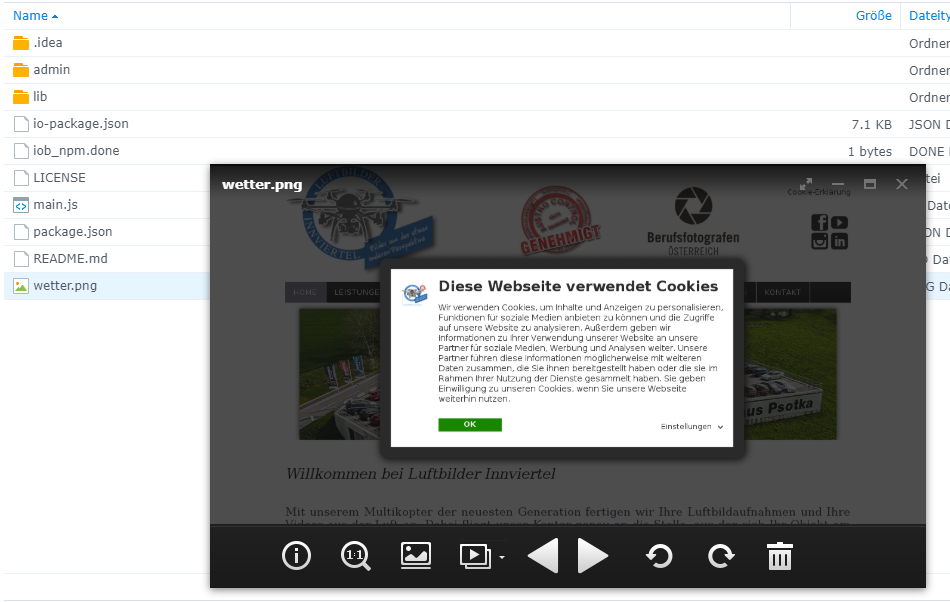
              Es läuft jetzt soweit, dass das .png erstellt wird.
              Hab libfontconfig nachinstalliert.

              phantomjs.0	2020-07-16 12:58:00.486	info	(3450) Create 1200px*800px in 30000ms - "https://www.luftbilder-innviertel.at" => "/opt/iobroker/node_modules/iobroker.phantomjs/wetter.png"
              phantomjs.0	2020-07-16 12:56:00.451	info	(3450) Create 1200px*800px in 30000ms - "https://www.luftbilder-innviertel.at" => "/opt/iobroker/node_modules/iobroker.phantomjs/wetter.png"
              

              Wird auch sauber abgespeichert.
              Synology_Nega_3 - Synology DiskStation (4).png

              Aber das mit dem FTP funktioniert nicht.

              apollon77A Offline
              apollon77A Offline
              apollon77
              wrote on last edited by
              #81

              @Negalein leg mal bitte issue im github an das wir das mit installieren lassen

              Beitrag hat geholfen? Votet rechts unten im Beitrag :-) https://paypal.me/Apollon77 / https://github.com/sponsors/Apollon77

              • Debug-Log für Instanz einschalten? Admin -> Instanzen -> Expertenmodus -> Instanz aufklappen - Loglevel ändern
              • Logfiles auf Platte /opt/iobroker/log/… nutzen, Admin schneidet Zeilen ab
              NegaleinN 1 Reply Last reply
              0
              • apollon77A apollon77

                @Negalein leg mal bitte issue im github an das wir das mit installieren lassen

                NegaleinN Offline
                NegaleinN Offline
                Negalein
                Global Moderator
                wrote on last edited by
                #82

                @apollon77 sagte in IoBroker.phantomjs:

                leg mal bitte issue im github an das wir das mit installieren lassen

                mach ich

                Aber nochwas zum Sdapter.
                In den Objekten unter phantomjs.0 ändert sich nichts.

                So kommt es vom Script:

                  sendTo("phantomjs.0", "send", {
                     url: 'http://10.0.1.22:32544/d/C3AZo2nGk/wetterstation-copy?orgId=1&refresh=1m&kiosk',
                     output: 'wetterstation.png',
                     width: '1920',
                     height: '1080',
                     renderTime: '60000'
                  });
                

                So schauts aber unter Objekte aus.
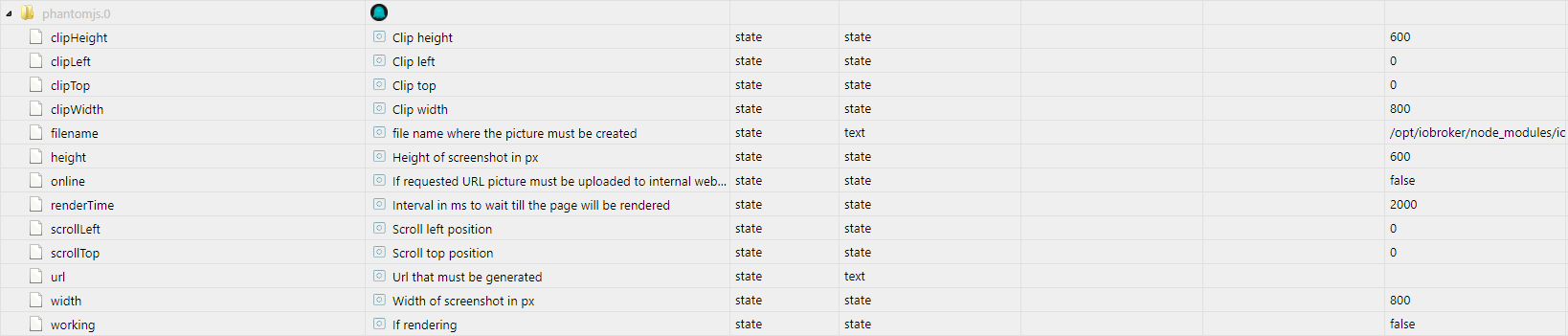
                objects - ioBroker (4).png

                Bild wird aber so wie im Script gespeichert. Von da passt es.

                ° Node.js: 20.17.0 NPM: 10.8.2
                ° Proxmox, Ubuntu 22.04.3 LTS
                ° Fixer ---> iob fix

                ? 1 Reply Last reply
                0
                • NegaleinN Negalein

                  @apollon77 sagte in IoBroker.phantomjs:

                  leg mal bitte issue im github an das wir das mit installieren lassen

                  mach ich

                  Aber nochwas zum Sdapter.
                  In den Objekten unter phantomjs.0 ändert sich nichts.

                  So kommt es vom Script:

                    sendTo("phantomjs.0", "send", {
                       url: 'http://10.0.1.22:32544/d/C3AZo2nGk/wetterstation-copy?orgId=1&refresh=1m&kiosk',
                       output: 'wetterstation.png',
                       width: '1920',
                       height: '1080',
                       renderTime: '60000'
                    });
                  

                  So schauts aber unter Objekte aus.
                  objects - ioBroker (4).png

                  Bild wird aber so wie im Script gespeichert. Von da passt es.

                  ? Offline
                  ? Offline
                  A Former User
                  wrote on last edited by
                  #83

                  @Negalein Browser-Cache ist dein Feind! Töte ihn.. dann gehts.. nervt mich auch dauernd..
                  Strg+F5
                  Notfalls Browser schliessen und neu öffnen..

                  1 Reply Last reply
                  0
                  • apollon77A Offline
                    apollon77A Offline
                    apollon77
                    wrote on last edited by
                    #84

                    Auf GitHub ist eine 1.1.0 ... wer mal kann bitte checken:

                    • (Apollon77) Add config to automatically install libfontconfig when js-controller 3+ is used
                    • (Apollon77) Add ignore-ssl-errors=true to parameters to prevent error with self signed ssl certs
                    • (Apollon77) Adjust state description to not confuse witha static port number :-)

                    Beitrag hat geholfen? Votet rechts unten im Beitrag :-) https://paypal.me/Apollon77 / https://github.com/sponsors/Apollon77

                    • Debug-Log für Instanz einschalten? Admin -> Instanzen -> Expertenmodus -> Instanz aufklappen - Loglevel ändern
                    • Logfiles auf Platte /opt/iobroker/log/… nutzen, Admin schneidet Zeilen ab
                    ? 1 Reply Last reply
                    -1
                    • apollon77A apollon77

                      Auf GitHub ist eine 1.1.0 ... wer mal kann bitte checken:

                      • (Apollon77) Add config to automatically install libfontconfig when js-controller 3+ is used
                      • (Apollon77) Add ignore-ssl-errors=true to parameters to prevent error with self signed ssl certs
                      • (Apollon77) Adjust state description to not confuse witha static port number :-)
                      ? Offline
                      ? Offline
                      A Former User
                      wrote on last edited by
                      #85

                      @apollon77 also ich hab die neue version nicht getestet, komme frühstens morgen dazu, aber das war nicht nur die destription.. Ich teste die neue Version morgen..

                      apollon77A 1 Reply Last reply
                      0
                      • ? A Former User

                        @apollon77 also ich hab die neue version nicht getestet, komme frühstens morgen dazu, aber das war nicht nur die destription.. Ich teste die neue Version morgen..

                        apollon77A Offline
                        apollon77A Offline
                        apollon77
                        wrote on last edited by
                        #86

                        @ilovegym Ich hab im Code gesucht und in dem State was im Issue stand sollte an sich das Bild als Binary-State gespeichert sein und keine URL drin stehen ... habe nichts direkt gefunden :-(

                        Beitrag hat geholfen? Votet rechts unten im Beitrag :-) https://paypal.me/Apollon77 / https://github.com/sponsors/Apollon77

                        • Debug-Log für Instanz einschalten? Admin -> Instanzen -> Expertenmodus -> Instanz aufklappen - Loglevel ändern
                        • Logfiles auf Platte /opt/iobroker/log/… nutzen, Admin schneidet Zeilen ab
                        ? 1 Reply Last reply
                        0
                        • NegaleinN Negalein

                          @holgerwolf sagte in IoBroker.phantomjs:

                          Irgendwie werde die Werte aus deinem Blockly nicht übernommen

                          hmmm, komisch
                          Eigegeben sind sie richtig.

                          Vergessen das Blockly nach einer Änderung abzuspeichern?

                          Nein, eigentlich nicht.

                          Schau dir mal den Javascript Code dazu an.

                          schedule("*/5 * * * *", function () {
                            sendTo("phantomjs.0", "send", {
                               "url": 'http://10.0.1.22:32544/d/oNYohoEZk/wetterstation?orgId=1&refresh=1m&kiosk',
                               "output": 'wetter.png',
                               "width": '800',
                               "high": '600',
                               "rendertime": '10000'
                            });
                            exec('wput -nc /opt/iobroker/node_modules/iobroker.phantomjs/boden-ext.png ftp://user:password@www37.world4you.com');
                            console.log("exec: " + 'wput -nc /opt/iobroker/node_modules/iobroker.phantomjs/boden-ext.png ftp://user:password@www37.world4you.com');
                          });
                          

                          Hää, wo kommt da im JS-Code jetzt das boden-ext.pngher?

                          F Offline
                          F Offline
                          fastfoot
                          wrote on last edited by
                          #87

                          @Negalein sagte in IoBroker.phantomjs:

                          Hää, wo kommt da im JS-Code jetzt das boden-ext.pngher?

                          das weiss ich nicht, möchte dich aber darauf aufmerksam machen, dass du deine ftp Zugangsdaten veröffentlicht hast. Es reicht nicht, die Daten hier im Forum zu ändern, das solltest du im Blockly tun, speichern, und dann erst veröffentlichen! Ändere dein Passwort, wer weiss wer das jetzt noch kennt...

                          iobroker läuft unter Docker auf QNAP TS-451+
                          SkriptRecovery: https://forum.iobroker.net/post/930558

                          NegaleinN 1 Reply Last reply
                          0
                          • F fastfoot

                            @Negalein sagte in IoBroker.phantomjs:

                            Hää, wo kommt da im JS-Code jetzt das boden-ext.pngher?

                            das weiss ich nicht, möchte dich aber darauf aufmerksam machen, dass du deine ftp Zugangsdaten veröffentlicht hast. Es reicht nicht, die Daten hier im Forum zu ändern, das solltest du im Blockly tun, speichern, und dann erst veröffentlichen! Ändere dein Passwort, wer weiss wer das jetzt noch kennt...

                            NegaleinN Offline
                            NegaleinN Offline
                            Negalein
                            Global Moderator
                            wrote on last edited by
                            #88

                            @fastfoot sagte in IoBroker.phantomjs:

                            dass du deine ftp Zugangsdaten veröffentlicht hast. Es reicht nicht, die Daten hier im Forum zu ändern, das solltest du im Blockly tun

                            Danke für den Hinweis.
                            Aber beim Import steht ftp://user:password@www37.world4you.com
                            user = nicht der richtige Username
                            password = nicht das richtige Passwort

                            :blush:

                            ° Node.js: 20.17.0 NPM: 10.8.2
                            ° Proxmox, Ubuntu 22.04.3 LTS
                            ° Fixer ---> iob fix

                            F 1 Reply Last reply
                            0
                            • NegaleinN Negalein

                              @fastfoot sagte in IoBroker.phantomjs:

                              dass du deine ftp Zugangsdaten veröffentlicht hast. Es reicht nicht, die Daten hier im Forum zu ändern, das solltest du im Blockly tun

                              Danke für den Hinweis.
                              Aber beim Import steht ftp://user:password@www37.world4you.com
                              user = nicht der richtige Username
                              password = nicht das richtige Passwort

                              :blush:

                              F Offline
                              F Offline
                              fastfoot
                              wrote on last edited by
                              #89

                              @Negalein ich sagte doch dass das nicht reicht, vlt. hilft es dass der 5.Buchstabe deines usernamens ein Unterstrich ist. Möchtest du mehr? :smiling_imp:

                              iobroker läuft unter Docker auf QNAP TS-451+
                              SkriptRecovery: https://forum.iobroker.net/post/930558

                              NegaleinN 1 Reply Last reply
                              0
                              • F fastfoot

                                @Negalein ich sagte doch dass das nicht reicht, vlt. hilft es dass der 5.Buchstabe deines usernamens ein Unterstrich ist. Möchtest du mehr? :smiling_imp:

                                NegaleinN Offline
                                NegaleinN Offline
                                Negalein
                                Global Moderator
                                wrote on last edited by
                                #90

                                @fastfoot sagte in IoBroker.phantomjs:

                                Möchtest du mehr?

                                gern per PN

                                Ich versteh es nicht. Hab den Code importiert und mir zeigte es nichts reales an.

                                ° Node.js: 20.17.0 NPM: 10.8.2
                                ° Proxmox, Ubuntu 22.04.3 LTS
                                ° Fixer ---> iob fix

                                F 1 Reply Last reply
                                0
                                • NegaleinN Negalein

                                  @fastfoot sagte in IoBroker.phantomjs:

                                  Möchtest du mehr?

                                  gern per PN

                                  Ich versteh es nicht. Hab den Code importiert und mir zeigte es nichts reales an.

                                  F Offline
                                  F Offline
                                  fastfoot
                                  wrote on last edited by
                                  #91

                                  @Negalein sagte in IoBroker.phantomjs:

                                  gern per PN

                                  habe ich danach gesucht aber nichts gefunden, wie mache ich das?

                                  iobroker läuft unter Docker auf QNAP TS-451+
                                  SkriptRecovery: https://forum.iobroker.net/post/930558

                                  NegaleinN 1 Reply Last reply
                                  0
                                  • F fastfoot

                                    @Negalein sagte in IoBroker.phantomjs:

                                    gern per PN

                                    habe ich danach gesucht aber nichts gefunden, wie mache ich das?

                                    NegaleinN Offline
                                    NegaleinN Offline
                                    Negalein
                                    Global Moderator
                                    wrote on last edited by
                                    #92

                                    @fastfoot sagte in IoBroker.phantomjs:

                                    habe ich danach gesucht aber nichts gefunden, wie mache ich das?

                                    meinen Usernamen aklicken, rechts die 3 Punkte, beginne einen Chat mit ...

                                    ° Node.js: 20.17.0 NPM: 10.8.2
                                    ° Proxmox, Ubuntu 22.04.3 LTS
                                    ° Fixer ---> iob fix

                                    F 1 Reply Last reply
                                    0
                                    • NegaleinN Negalein

                                      @fastfoot sagte in IoBroker.phantomjs:

                                      habe ich danach gesucht aber nichts gefunden, wie mache ich das?

                                      meinen Usernamen aklicken, rechts die 3 Punkte, beginne einen Chat mit ...

                                      F Offline
                                      F Offline
                                      fastfoot
                                      wrote on last edited by
                                      #93

                                      @Negalein sagte in IoBroker.phantomjs:

                                      @fastfoot sagte in IoBroker.phantomjs:

                                      habe ich danach gesucht aber nichts gefunden, wie mache ich das?

                                      meinen Usernamen aklicken, rechts die 3 Punkte, beginne einen Chat mit ...

                                      ok, müsstest du haben

                                      iobroker läuft unter Docker auf QNAP TS-451+
                                      SkriptRecovery: https://forum.iobroker.net/post/930558

                                      1 Reply Last reply
                                      0
                                      • apollon77A apollon77

                                        @ilovegym Ich hab im Code gesucht und in dem State was im Issue stand sollte an sich das Bild als Binary-State gespeichert sein und keine URL drin stehen ... habe nichts direkt gefunden :-(

                                        ? Offline
                                        ? Offline
                                        A Former User
                                        wrote on last edited by A Former User
                                        #94

                                        @apollon77 Hi, die Beschreibung des States hatte ich auch im Code gefunden und geändert, da stand es ja hardcodiert, jetzt sieht die Stelle so aus:

                                         var data = fs.readFileSync(options.output);
                                                            adapter.getObject('pictures.' + fileName, function (err, obj) {
                                                                if (!obj) {
                                                                    adapter.setObject('pictures.' + fileName, {
                                                                        common: {
                                                                            type:   'file',
                                                                            role:   'file',
                                                                            read:   true,
                                                                            write:  false,
                                                                            desc:   'Can be accessed from web server under http://ip:port/state/' + adapter.namespace + '.pictures.' + fileName
                                                                        },
                                                                        type: 'state',
                                                                        native: {
                                                                            url: options.url
                                                                        }
                                                                    });
                                                                }


                                        Im Text in der Beschreibung stimmt es dann auch, aber im Datenpunkt als Objekt steht wieder die 8082 drin.. woher die auch kommt... ???
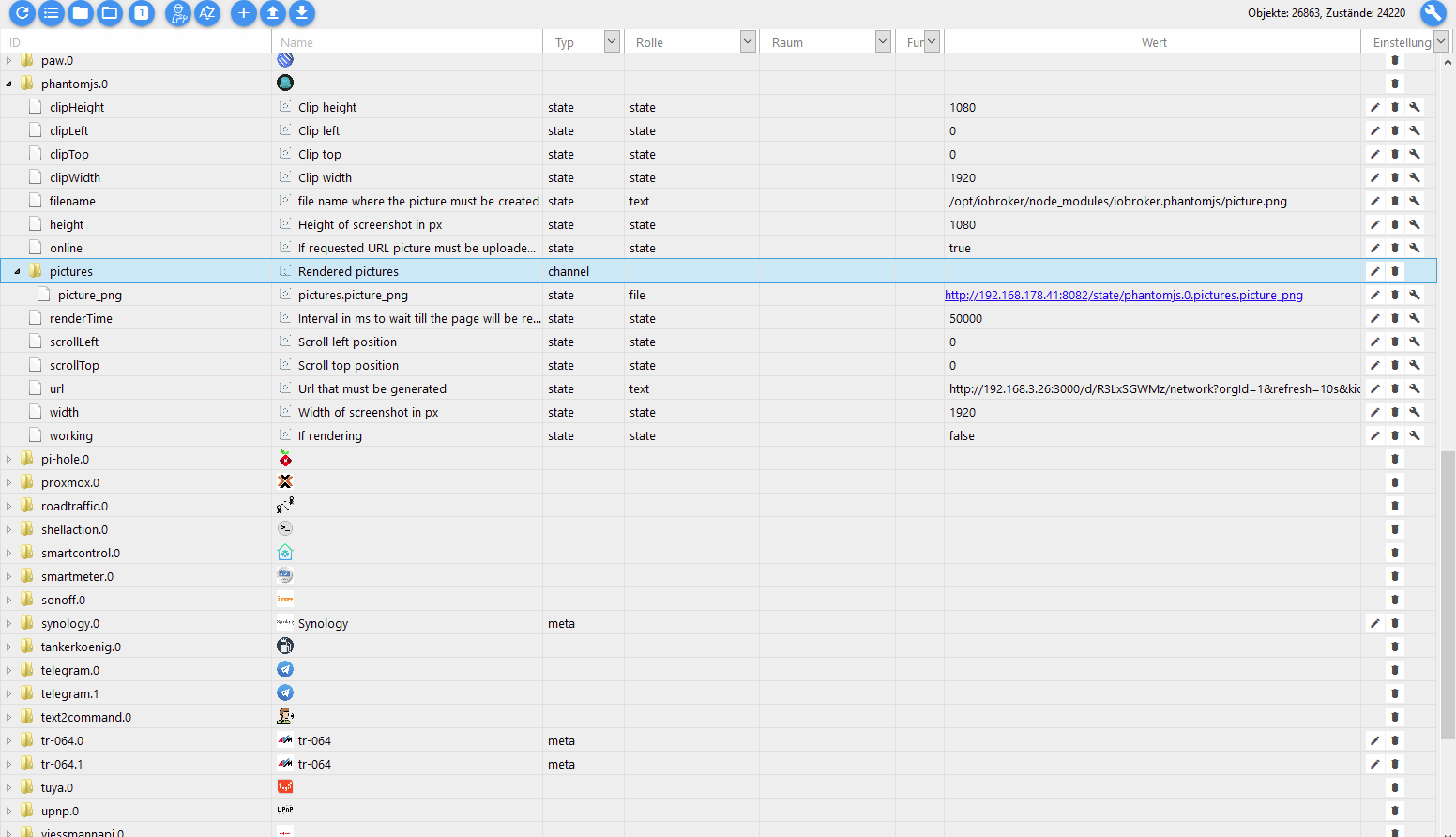
                                        0e17173a-63d8-4d14-9cbe-c106d217b97f-grafik.png

                                        Das RAW sieht so aus :

                                        {
                                          "from": "system.adapter.phantomjs.0",
                                          "user": "system.user.admin",
                                          "ts": 1595686012126,
                                          "binary": true,
                                          "common": {
                                            "name": "pictures.picture_png",
                                            "type": "boolean",
                                            "role": "file",
                                            "desc": "Can be accessed from web server under http://ip:port/state/phantomjs.0.pictures.picture_png",
                                            "read": true,
                                            "write": false
                                          },
                                          "native": {
                                            "url": "http://192.168.3.26:3000/d/R3LxSGWMz/network?orgId=1&refresh=10s&kiosk"
                                          },
                                          "acl": {
                                            "object": 1636,
                                            "owner": "system.user.admin",
                                            "ownerGroup": "system.group.administrator",
                                            "state": 1636
                                          },
                                          "_id": "phantomjs.0.pictures.picture_png",
                                          "type": "state"
                                        }
                                        
                                        1 Reply Last reply
                                        0
                                        • apollon77A Offline
                                          apollon77A Offline
                                          apollon77
                                          wrote on last edited by
                                          #95

                                          Das Issue gehört zum Admin Adapter ... https://github.com/ioBroker/ioBroker.admin/blob/master/src/lib/js/selectID.js#L2405


                                          Beitrag hat geholfen? Votet rechts unten im Beitrag :-) https://paypal.me/Apollon77 / https://github.com/sponsors/Apollon77

                                          • Debug-Log für Instanz einschalten? Admin -> Instanzen -> Expertenmodus -> Instanz aufklappen - Loglevel ändern
                                          • Logfiles auf Platte /opt/iobroker/log/… nutzen, Admin schneidet Zeilen ab
                                          ? 1 Reply Last reply
                                          0
                                          Reply
                                          • Reply as topic
                                          Log in to reply
                                          • Oldest to Newest
                                          • Newest to Oldest
                                          • Most Votes


                                          Support us

                                          ioBroker
                                          Community Adapters
                                          Donate
                                          FAQ Cloud / IOT
                                          HowTo: Node.js-Update
                                          HowTo: Backup/Restore
                                          Downloads
                                          BLOG

                                          831

                                          Online

                                          32.4k

                                          Users

                                          81.5k

                                          Topics

                                          1.3m

                                          Posts
                                          Community
                                          Impressum | Datenschutz-Bestimmungen | Nutzungsbedingungen | Einwilligungseinstellungen
                                          ioBroker Community 2014-2025
                                          logo
                                          • Login

                                          • Don't have an account? Register

                                          • Login or register to search.
                                          • First post
                                            Last post
                                          0
                                          • Home
                                          • Recent
                                          • Tags
                                          • Unread 0
                                          • Categories
                                          • Unreplied
                                          • Popular
                                          • GitHub
                                          • Docu
                                          • Hilfe